parking brake AUDI S8 2010 Owners Manual
[x] Cancel search | Manufacturer: AUDI, Model Year: 2010, Model line: S8, Model: AUDI S8 2010Pages: 384, PDF Size: 90.95 MB
Page 4 of 384
Table of contents
Table of contents
Vehicle literature
About this Owner's Manual ............. ...... .
Controls and
equipment .............. .
Instruments and controls ... .
General illustration ........... .
Instruments and
warning/indicator Lights ..... .
Instruments ................ .
Warning/indicator ligh ts ...... .
Driver information display ... .
Introduction ............ ... . .
On-Board Diagno stic system
(OBD) ....................... .
Auto Ch eck Control ........... .
Speed warning system ........ .
Tr ip computer ............... .
Opening and closing ......... .
Keys ........................ .
Power locking system ........ .
Rear lid/Trunk lid ......... ... .
Child safety Lock ............. .
Convenience key ............. .
Anti-theft alarm system ...... .
Power windows .............. .
Sliding/tilting power sunroof .. .
Clear vision .. ................ .
Lights ....... ......... ...... .
Interior ligh ts ........ ....... .
5
6
8
9
9
10
10
14
22
22
25
26
35
36
39
39
41
46
49
so
52
53
57
60
60
65 Vi
sion
Wiper and washer system
Mirrors
Seats and storage ........... .
General recommendations .... .
Power seat ....... ........... .
Head restraint s .... .......... .
Armr est ................. ... .
Seat memory ................ .
Rear seats ............. ..... .
Indiv idual rear seats ......... .
Luggage compartment .. ..... .
Roof rack ................... .
Cupho lder .................. .
Ashtray ..................... .
Cigarette Lighter/socket ...... .
Long cente r console .... ...... .
Storage ............. ....... .
Warm and cold ........... ... .
Climat e controls ...... ... .. .. .
W ind shield defogging/defrosting
Rear climate controls ........ .
Basic settin gs ............... .
On the road ................. .
s . teenng .................... .
I gn ition lock and ign ition switch
S tarti ng and stopping the en gine
Starting and stopping the engine
us ing the Convenience ke y .....
Electromechanical park ing brake
C ru ise control ............... . 68
70
7
4
76
76
77
81
83
8 4
85
87
90
92
9 4
96
97
98
98
103
103
112
114
115
11 7
11 7
118
119
120
123
126
Adaptive Cruise Control ....... 128
Speed and distance control
system
Driver information .......... .. .
System Limitation s ........... .
A d' l . u I ane assist ............. . .
128
135
139
142
Lane assist . . . . . . . . . . . . . . . . . . . 142
Audi side assist ............... 145
Lane Change Assistan t . . . . . . . . . 145
No tes ..... ......... .......... 152
Automatic transmission 154
tiptronic ® (6-speed automatic
transmission ) . . . . . . . . . . . . . . . . . 1 54
Advanced Parking System ..... 161
Advanced Parking System with
rear view camera .............. 161
Specia l park ing situat ions . . . . . . 169
Tow ing hitch ........... ....... 1 71
Settings in the MMI ......... ... 171
Saf ety tips .... ................ 173
Adaptive Air Suspension 176
Adaptiv e Air Suspens ion and
Damp ing . . . . . . . . . . . . . . . . . . . . . 176
Homelink ® ............. ...... 181
Universal remote control
181
Safety first ............... 186
Driving Safely ................. 186
General notes . . . . . . . . . . . . . . . . . 186
Proper occupan t seating
positions . . . . . . . . . . . . . . . . . . . . . 188
Driver and passenger side
footwell . . . . . . . . . . . . . . . . . . . . . . 192
Page 11 of 384
Instruments and controls
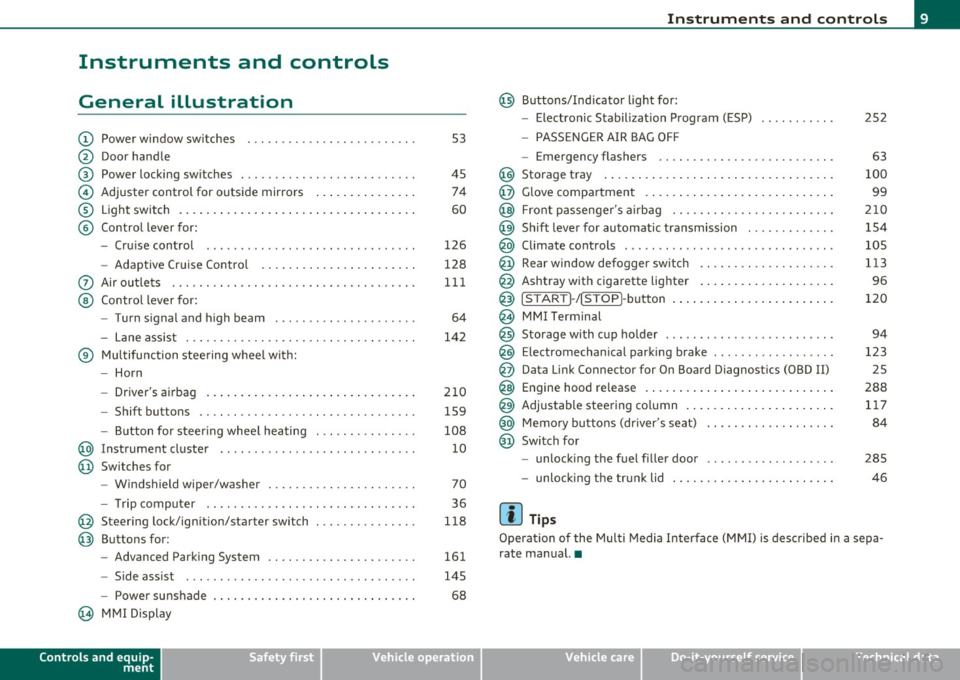
General illustration
(D Power window switches . .. .. .. ... .. ... .. ... ... . .
@ Door handle
@ Power locking switches . .. .. ......... .. .. .... ... .
© Adjuster control for outside mirrors .............. .
® Light switch ............... . ... ..... ....... ... .
© Control lever for:
- Cruise contro l ............ .... ... . ... ....... .
- Adaptive Cruise Control . ................... .. .
0 Air outlets .... .... .. .. .. ... ... ............. .. .
@ Control lever for:
- Turn signal and high beam .................... .
- Lane assist ................ ...... .. .. .. .. ... .
® Multifunction steering wheel with:
- Horn
- Driver's airbag ....................... ....... .
- Shift buttons .... .. .. .. .. .... ............... .
- Button for steer ing whee l heating . .. .. ... ...... .
@ Instrument cluster .................. .... ... ... .
@ Switches for
- Windshield wiper/washer ................ .. ... .
- Tr ip computer .. .......... . .. .... .. .. .... ... .
@ Steering lock/ignition/starter switch .............. .
@ Buttons for:
- Advanced Parking System .... .. .... .. ...... ... .
- Side ass ist ........... ........ ... ..... ... ... .
- Power sunshade
@ MMI Display
Controls and equip
ment Safety first
53
45 74
60
126
128
111
64
142
210 159
108 10
70
36
118
161
145
68
Instruments and controls
@ Buttons/Indicator light for:
- Electronic Stabilization Program (ESP)
- PASSENGER AIR BAG OFF
- Emergency flashers .. .. .. .. .. .... .. ......... .
@ Storage tray .................. .. .. .. ......... .
@ Glove compartment .... .... .. .. .... ........... .
@ Front passenger 's airbag .................... .. . .
@ Sh ift lever for automatic transmission ........... . .
@ Climate controls . .. .................... .... ... .
@ Rear window defogger switch .. .. .. .. .. .... ..... .
@ Ashtray with cigarette lighter ................... .
@ IS TART ]-/IS TOP]-button . ... ................ ... .
@ MMI Terminal
@ Storage with cup holder ..... .. .. .. ............. .
@ Electromechanical parking brake ... .. ...... ..... . .
@ Da ta Link Connector for On Board Diagnostics (OBD II)
@ Engine hood release ........................... .
@ Adjustable steering column ..................... .
@ Memory buttons (driver's seat) .................. .
@ Switch for
- unlock ing the fuel filler door ....... ....... .... .
- unlock ing the trunk lid
[ i ] Tips
252
63
100
99
210
154
105
113
96
120
94
123 25
288 117
84
285
46
Operation of the Multi Media Interface (MMI) is described in a sepa
rate manual. •
Vehicle care Technical data
Page 17 of 384
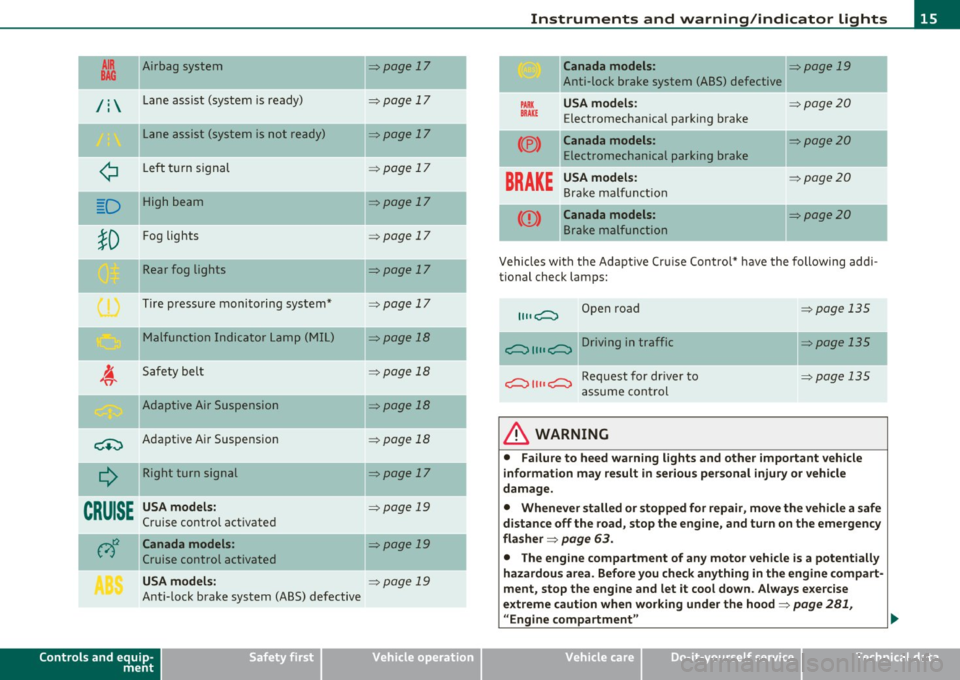
AIR Airbag system
BAG ~
/ : Lane assist (system is ready)
L ane assist (system is not ready)
¢ Left t urn signal
D High beam
!D
Fog lights
Rear fog lights
Tire pressure monitoring system*
M alfunction Indicator Lamp (MI L)
I. "fi'
Safety bel t
-Adaptive Air Suspension
~ Adaptive A ir Suspension
Q
Right turn signal
--
CRUISE
USA models:
Cruise contro l act ivate d
c;)~ Canada models :
Cruise control activated
USA models:
Ant i-lock brake system (ABS) defective
Controls and equip
ment Safety first
=:>page
17
-
=> page 17
=> page 17
=> page 1 7
=> page 17
=> page 17
=> page 17
=> page 17
=> page 18
=> page 18
-=>page 18
=> page 18
=>page 17
-
=> page 19
=>page 19
=> page 19
Instruments and warning /indicator lights
Canada models: => page 19
Anti-lock brake system (ABS) defective
PARK USA m odel s: =:>page20
BRAK E Electromechan ica l parking brake
(®) Canada models: =:> page 20
Electromechanical parking brake
BRAKE
USA models: =:> page20
Bra ke ma lf u ncti on
Canada models: =:>page20
B rake malfunction
-
Vehicles wi th the Adapt ive Cr uise Control* have the following add i-
tional check lamps:
II II c;::::::::, Open road => page 135
c;::::::::, II II c;::::::::, Driving in traffic => page 135
c;::::::::, II II c;::::::::, Request for dr iver to =>page 135
assume cont rol
& WARNING
• Failure to heed warning lights and other important veh icle
information may result in serious personal injury or vehicle
damage.
• Whenever stalled or stopped for repair , move the vehicle a safe
distance off the road, stop the engine, and turn on the emergency
fla sher =>
page 63.
• The engine compartment of any motor vehicle is a potentially
hazardous area. Before you check anything in the engine com part -
ment, stop the eng ine and let it cool down . Always e xercise
extreme caution when working under the hood=>
page 281,
"Engine compartment " ..
Vehicle care Technical data
Page 22 of 384

Instruments and warning/indicator lights
Malfunction in the electronic differential lock (EDL)
The ED L works toge ther w ith the ABS. The ABS warn ing lig ht w ill
come on if there is a mal func tion in the EDL system=>
page 253 . See
your authorized A udi dea le r as soon as poss ible .
& WARNING
• If the .. (USA models )/ ...,. (Canada models ) wa rning light
does not go out , or if it comes on while driving, the ABS system is
not working properly. The vehicle can then be stopped only with
the standard brakes (without ABS ). You will not have the p rotec
tion ABS provide s. Contact you r Audi dealer as soon as pos sible .
• USA models: If the BRAKE warning light , the ., warning light
and the warning light come on together , the rear wheel s
could lock up first under hard braking . Rear wheel lock-up can
c ause loss of vehicle control and an accident. Have you r vehicle
repaired immediate ly by your authorized Audi dealer or a qualified
workshop. Drive slowly and avoid sudden, hard brake applica
tions .
• Canada models: If the brake warning light «D>, the wa rning
light and the ABS warning light come on together, the rear
wheels could lock up first under hard braking. Rear wheel lock-up
can cause los s of vehicle control and an accident . Have your vehicle
repaired immediately by your authorized Aud i dealer or a qualified
workshop . Drive slowly and avoid sudden, hard brake
applic ations. •
Electromechanical parking brake
::E {USA models) / (®) {Canada models)
The warning/indicator light monit ors the electromechan
ical parking broke .
With the pa rking bra ke app lied and the ignition t urned on, the
wa rning/ind icator light illuminates. Afte r the ign it ion has been
t u rne d off, the wa rning/indicator light continues to illuminate for about 30 seconds.
If the park
ing brake is applied w ith the ign ition
tur ned off, the w arning/ind ic a tor ligh t illumi nates fo r abo ut 3 0
seconds.
Th e warning/ind icator light will go out when the parking brake is
re lease d.
If the war ning/ indicator lig ht flashes cont inuous ly
after applying the
p ar king bra ke, bra king fo rce is no t sufficien t to prevent the vehicle
from rolling unintentionally . T his can happe n if the brakes become
too hot. P lease note the fo llowi ng:
• If the slope of the ground is too s teep to par k the ve hicl e, th e addi
tional drive message appea rs
Caution: Vehicle parked too steep .
• In the event of a pa rking brake mal func tion, the yellow • symbol
appea rs in the instrument cluste r display and the driver message
Parking brake malfunction! is d isplayed. Have t he ma lf u n ct io n
re paire d as soon as possib le by a q ualified Audi dealership .•
Brake system BRAKE (USA
models)
/ (CD) {Canada models)
The warning/indicator ligh t flashes if brak e fluid l eve l is
low, if there is an A BS system malfunction or a parking
brake malfunction.
Th e light illum ina tes when the igni tion is t urned o n. It goes out after
the engine has been started . This indicates that t he brake warn ing
light is fu nctioni ng p roperly.
If the brake warning light does not light up when the engine is
cranking , there may be a malfunction in the electrical system. In
this case, contact your Audi dealer.
If the brake system wa rning/indicator light flashes, there is a brake
system malfunc tion . By press ing the
I C H ECK ] button, you can b ring
up a driver message which explains the malfunction in mo re detail
=>
page 28. ~
Page 23 of 384

If the ABS, ESP and brake force distribution fail, the ABS indicator
li ght (U SA mode ls)/ ( Can ad a models) and the ESP indica to r
light come on alo ng w it h the brake system malfu nction light
BRAKE (U SA models) /(Ci) (Ca nada models) . The message Brake fault!
Drive carefully to nearest workshop appears in the inst rument
cl uster disp lay and three consecut ive warning tones sound =>& .
(USA models): If the w arning lig ht
BRAKE and the wa rn in g light illu
minate together, immediately contact your author ized Audi dealer or
qu alifie d wo rkshop to h ave all bra ke p ads in spec ted =>
page 32.
When the light comes on, an a udible war ning s ignal is also given .
& WARNING
• USA models : If the BRAKE warning light, the.,. warn ing light
and the~ S warning light come on together , the rear wheel s
could lock up first under hard braking. Rear wheel lock-up can
cause loss of vehicle control and an accident. Have your vehicle
repaired immediately by your authorized Audi dealer or a qualified
workshop. Drive slowly and avoid sudden , hard brake appli ca
tions.
• Canada models: If the brake warning light ID, the • warning
light and the ABS warning light
"'1 come on together, the rear
wheels could lock up first under hard braking. Rear wheel lock-up
can cause loss of vehicle control and an accident. Have your vehicle
repaired immediately by your authorized Audi dealer or a qualified
workshop. Drive slowly and avoid sudden, hard brake applica
tions.
• If the brake warning /indicator light doe s not go out after
a few
second s and the parking brake released, or l ights up while you are
driving, the fluid level in the brake fluid reservoir i s too low. If you
believe that it is safe to do so, proceed immediately at low speed
to the neare st authorized Audi dealer or qualified repair facility
and have the brake system inspected.
• Always keep in mind that after several brake applications, you
will need greater p ressu re on the brake pedal to stop your vehicle .
Do not rely on strained brakes to re spond with maximum stopping
Controls and equip
ment Safety first
Instruments and warning
/indicator lights
& WARNING (co ntinued )
power in critical situations . You must allow fo r increased braking
distan ce s. The extra distance used up by fading brakes could lead
to an accident. •
Vehicle care Technical data
Page 31 of 384
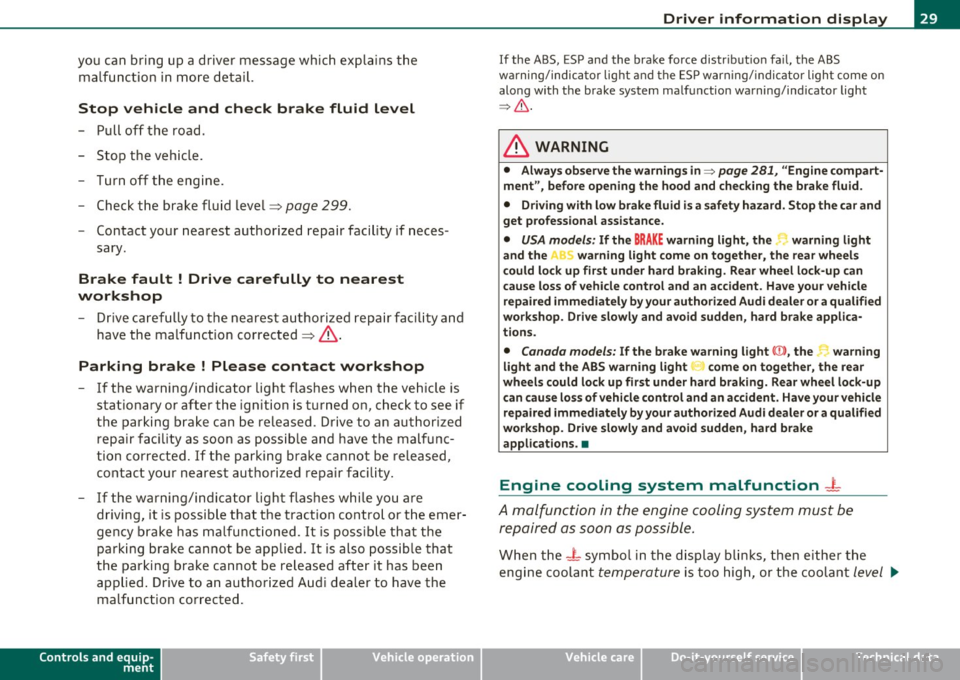
you can bring up a driver message which explains the malfunction in more detail.
Stop vehicle and check brake fluid Level
- Pull off the road .
- Stop the vehicle.
- Turn off the engine.
- Check the brake fluid level~
page 299.
-Contact your nearest authorized repair facility if neces-
sary.
Brake fault ! Drive carefully to nearest
workshop
- Drive carefully to the nearest authorized repair facility and
have the malfunction corrected~& .
Parking brake ! Please contact workshop
- If the warning/indicator light flashes when the vehicle is
stationary or after the ignition is turned on , check to see if
the parking brake can be released . Drive to an authorized
repair facility as soon as possible and have the malfunc
tion corrected. If the parking brake cannot be released,
contact your nearest authorized repair facility.
- If the warning/indicator light flashes while you are driving, it is possible that the traction control or the emer
gency brake has malfunctioned. It is possible that the parking brake cannot be applied . It is also possible that
the parking brake cannot be released after it has been
applied. Drive to an authorized Audi dealer to have the malfunction corrected.
Controls and equip
ment Safety first
Driver information display
I
f the ABS , ESP and the brake for ce distribution fail, the ABS
warning/indicator light and the ESP warning/indicator light come on
along with the brake system malfunction warning/indicator light
~ & -
& WARNING
• Always observe the warnings in ::::> page 281, "Engine compart
ment", before opening the hood and checking the brake fluid.
• Driving with low brake fluid is a safety hazard. Stop the car and
get professional assistance.
• USA models: If the BRAKE warning light, the ~ warning light
and the warning light come on together, the rear wheels
could lock up first under hard braking. Rear wheel lock-up can
cause loss of vehicle control and an accident. Have your vehicle
repaired immediately by your authorized Audi dealer or a qualified
workshop. Drive slowly and avoid sudden, hard brake applica
tions.
• Canada models: If the brake warning light(())), the r-warning
light and the ABS warning light come on together, the rear
wheels could lock up first under hard braking. Rear wheel lock-up
can cause loss of vehicle control and an accident. Have your vehicle
repaired immediately by your authorized Audi dealer or a qualified
workshop. Drive slowly and avoid sudden, hard brake
applications. •
Engine cooling system malfunction -1-
A malfunction in the engine cooling system must be
repaired as soon as possible.
When the - L symbol in the display blinks, then either the
engine coolant
temperature is too high, or the coolant level ~
Vehicle care Technical data
Page 34 of 384
Driver information displ ay
Yellow symbols
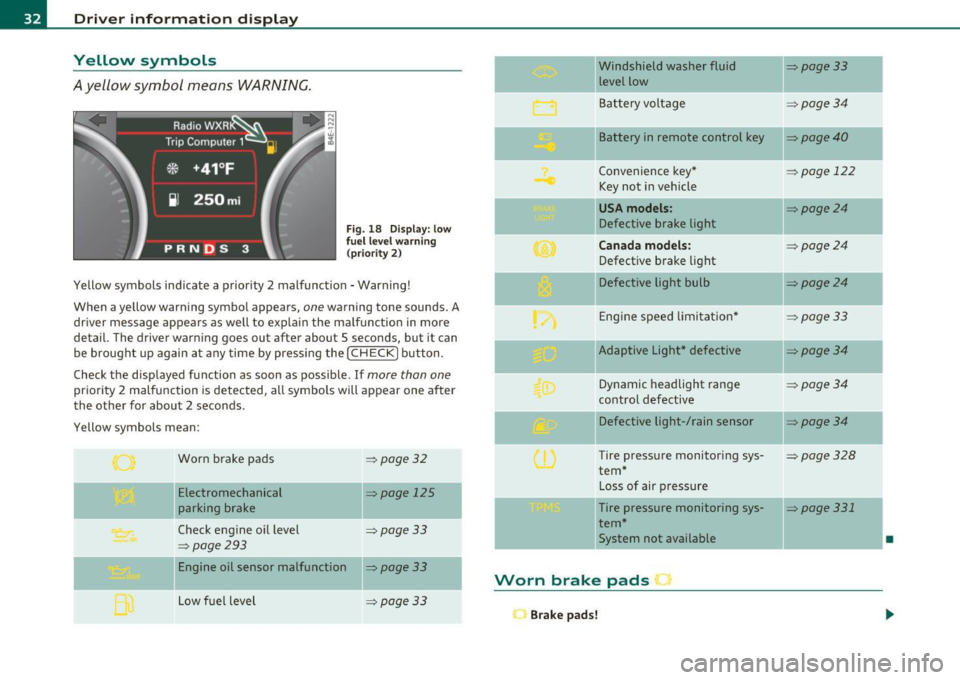
A yellow symbol means WARNING.
Fig . 18 Display: low
f ue l level warn ing
(priority 2)
Yellow symbols ind icate a prior ity 2 malfunction -Warning!
When a yellow warning symbo l appears,
one warning tone sounds. A
dr iver message appears as well to explain the ma lfunction in more
detail. The driver warning goes out after about 5 seconds, but it can
be brought up again at any time by pressing the
I CHECK] button .
Check the displayed function as soon as possible.
If more than one
priority 2 malfunction is detected, all symbols will appear one after
the other for about 2 seconds .
Yellow symbols mean:
Worn brake pads
=> page 32
Electromechanical => page 125
parking brake
Check engine oil level
=> page 33
=> page 293
Engine oil sensor malfunction => page 33
-
Low fuel level =>page33
Windshield washer fluid =>page33
level low ~
Bat tery voltage =>page34
-
II Battery in remote control key =>page40
Convenience key * =>page 122
Key not in veh icle
USA models: => page24
Defective brake light
Can ad a mod els : =>page24
Defect ive brake light
Defective light bulb
=>page24
E ng ine speed limitat ion* => page33
-
IIAdaptive Light* defective =>page34
Dynamic headlight range => page 34
contro l defective
Defective light-/rain sensor
=> page34
Tire pressure monitoring sys-=>page328
tern *
Loss of air p ressure
-Tire pressure monitoring sys-=> page331
tern*
11System not available •
Worn brake pads •
Brake pa ds!
Page 125 of 384

On the road -
----------------
Electromechanical parking brake
Operation
The electromechanical parking brake replaces the hand
brake.
Fig. 135 Center
console: Parking brake
- Pull the switch to apply the parking brake~ fig. 135. The
indicator light in the switch will come on.
- Step on the brake pedal or the accelerator pedal and press
the switch at the same time to release the parking brake.
The indicator light in the switch will go out.
Your vehicle is equipped with an electromechanical parking brake
which replaces the handbrake. The parking brake is designed to
prevent the vehicle from rolling unintentionally.
In addition to the normal functions of a traditional hand brake, the
electromechanical parking brake provides various convenience and
safety functions.
Emergency brake
An emergency brake ensures that the vehicle can be slowed even if
the normal brakes fail~ page 125, "Emergency braking".
Controls and equip
ment Safety first
Indicator lights
•
If the parking brake is applied with the ignition turned on, the
indicator light in the instrument cluster (U.S. models:=.., Canadian
models: ©) and in the switch
«el) will come on.
• If the parking brake is applied with the ignition turned off, the
indicator light in the instrument cluster (U.S. models:=., Canadian
models: ©) and in the switch
«fl) will come on for about 30 seconds
and then go out.
& WARNING
If the vehicle is stationary and the transmission is engaged with
the engine running, the engine should not be speeded up (e.g.
manually from under the hood). Otherwise the vehicle will start to
move -you run the risk of an accident.
0 Note
If the warning/indicator light (U.S . models: BRAKE, Canadian models:
«I» ) flashes in the instrument cluster, there is a brake system
malfunction . By pressing the [CHECK! button, you can bring up a
driver message which explains the malfunction in more detail. If the
message
Parking brake ! Please contact workshop appears, there is
a parking brake malfunction which you should have repaired immedi
ately by an authorized dealership~ page 28.
[ i] Tips
• You can apply the parking brake at any time -even with the igni
tion turned off . The ignition must be turned on in order to release the
parking brake.
• Occasional noises when the parking brake is applied and released
are normal and are not a cause for concern.
• The parking brake goes through a self-test cycle at regular inter
vals -when the vehicle is parked. Any associated noises are normal. •
Vehicle care Technical data
Page 126 of 384

1111....__0_ n_ t_h_ e_ r_ o_ a _ d _________________________________________________ _
Parking
To p revent a parked vehicle from rolling away, there are
a fe w things you should do.
When you park your vehicle , do the following
- Stop t he veh icle us ing the bra ke pedal.
- Pull the switch to apply t he electromechanica l parking
brake .
- Move th e se lector lev er in to the
P position ~& .
- Switch off the e ngine and remove the ignition key from
the ignition lock.
When you park your vehicle on hills, do the
following
- Stop the veh icle us ing the bra ke pedal.
- Pull the switch to apply t he e lectromechanica l parking
brake .
- I f you a re parkin g h eaded
downhill , turn the front w heels
toward th e curb .
- I f you are parking headed
uphill , turn t he fro nt wh eels
away from t he curb.
- M ove the selector lever into the
P position.
- Switch off the e ngine and remove the ign it ion key from
the ignition lock.
& WARNING
Thi s is how you can reduce the risk of injury when lea ving your
vehicle.
& W ARNING (continued )
• Never park the vehicle where it can come in contact with dry
grass , spilled fuel or any other flammable material s.
• When parking on hills, always turn the wheel s so that the front
wheel s will fir st roll into the curb, if the vehicle should start to
roll.
• Never allow anyone · especially small children· to remain in
the vehicle when it i s locked. Locked door s make it more difficult
fo r rescu ers to acce ss the passenger compartment in the event of
an emergency. Danger to life!
• Never leave children unsuperv ised in the vehicle. Ch ildren
could relea se the parking brake or move the gear shift lever out of
gear. The vehicle could start to roll away and cau se an accident .
• No matter what the season i s, the temperature
in a parked
v ehicle can reach dangero us le vels .
0 Note
• Please exercise care when you pa rk your veh icle in parking areas
w ith park ing barriers o r cur bs. Parking barriers and curbs vary in
he ight and could damage your bumpe r and related components as
the front of your vehicle moves over a ba rrier or curb that is too high,
as you park or as you back out of a pa rking spot. In order to be sure
that no such damage can occur, yo u may wish to stop short of having
t he fro nt t ires of you r car touch t he p arking bar rie r or curb.
• Please a lso exerc ise except iona l care when you drive up or down
steep ramps or drive over curbs or o ther obstacles, for which the
vehicle is not des igned, because components of the vehicle close to
t he ground, s uch as bumpe r covers, spoilers and suspension and
exhaust system components, may become damaged. •
Page 127 of 384

On the road ---------------~:..:.....__
Starting off with a trailer
To prevent rolling back unintentionally on an incline, do
the following:
- Keep the switch pulled and depress the accelerator. The
parking brake stays applied and p reve nts the vehicle from
rolling backward .
- You can release t he switch once you are sure t hat you are
deve loping enough forward momentum at the whee ls as
you depress the acce lerator .
Depending on the we ight of the rig (vehicle and trailer) and the
severity of the incline, yo u may roll backwards as you start. You can
prevent rol ling backwards by holding the park ing bra ke sw itch pulled
out and accelerating -just as you wou ld when starting on a hill with a
conventional hand brake .•
Emergency braking
In the event that the conventional brake system fails or
locks.
- P ull the swi tch and cont inue to pull it to s low your veh icle
with the parking brake in an emergency .
- As soon as you re lease the sw itc h or accelerate, the
braking process stops .
If you pull the switch and hold it above a speed of abou t 5 mp h (8
km/h), the emergency braking function is init iated. The vehicle is
bra ked at all fou r wheels by activat ing the hydraulic b rake system.
Brake performance is s imilar to making an emergency stop~,&.
So that emergency braking is not activated by mistake, an audible
warning tone (buzzer) sounds when the switch is pulled . As soon as
Controls and equip
ment Safety first
the switch is released, or the accelerator pedal is depressed, emer
gency braking s tops.
& WARNING
Em erg ency braking should only be u sed in an emergen cy, wh en
the no rmal foot brake ha s failed o r the brake pedal i s obstructed.
U sing the park ing b rake to perform emerg ency braking will slow
your vehicl e as if you had made a full brake application . The laws
of phy sic s c annot be su spen ded even wi th ESP and it s ass ociated
c omponents (ABS, ASR , ED S). In corn ers and when r oad or
weather condit ion s are bad , a full brake application can cause the
ve hicl e to sk id or the rear end to br eak away- r isking an accid ent .•
Driver messages in the instrument cluster
C aution : Vehicle park ed too steep
Th is message appears when the pa rking brake is applied on an incline
that exceeds abo ut 30%.
In this case the braking power of the parking brake may
not be
adequate
t o p revent the vehicle from rolling un intentionally.
Plea se release parking b rake
Thi s message appears, when a gear is se lected and the accelerato r
pedal is depressed -release the parking brake.
Pre ss brake p edal to relea se park ing brake
T his driver message appea rs when the switch to release the parking
bra ke was pressed. The par king brake can only be released if you press
the brake or accelerator pedal and press the switch at the same time.
.1 Par king bra ke mal funct ion !
T his driver message appears together w ith the yellow symbol
when there is a parking brake malfunct ion.
Vehicle care Technical data