change wheel AUDI S8 2016 User Guide
[x] Cancel search | Manufacturer: AUDI, Model Year: 2016, Model line: S8, Model: AUDI S8 2016Pages: 302, PDF Size: 75.68 MB
Page 192 of 302
Smart Technology
shared, please see your contract with the
wireless te lecommunications provider and the
"About Audi connect" tab in your vehicle's
MMI:
! MENUI button> Audi connect> About
Audi connect.
Electronic Stabilization
Control (ESC)
Description
ESC helps to improve road holding and vehicle
dynamics to help reduce the probability of skid
ding and loss of vehicle control. It works only
when the engine is running. ESC detects certain
difficult dr iving situations, including when the
veh icle is beginn ing to spin (yaw) out of contro l
and helps you to get the vehicle back under con
trol by se lectively braking the wheels, and/or re
ducing engine power and providing steering as
sistance to help hold the vehicle on the driver's
intended course. The indicator light
GI in the in
strument cluster blinks when ESC is taking action
to help you control the vehicle.
ESC has limitations. It is important to remember
that ESC cannot overcome the laws of physics. It
will not always be able to help out under all con
ditions you may come up against . For example,
ESC may not always be able to help you master
situations where there is a sudden change in the
coefficient of friction of the road surface. When
there is a section of dry road that is suddenly cov
ered with water, slush o r snow , ESC cannot per
form the same way it wou ld on the dry surface. If
the vehicle hydrop lanes (rides on a cushion of wa
ter instead of the road surface), ESC wi ll not be
able to he lp you steer the vehicle because contact
with the pavement has been interrupted and the
vehicle cannot be braked or steered. During fast cornering, part icularly on w inding roads, ESC
cannot always deal as effective ly w ith difficult
driving situat ions than at lower speeds . When
towing a trailer, ESC is not able to help you re
ga in control as it would if you were not towing a
trai ler.
Always adjust your speed and driving sty le to
road, traffic and weather conditions. ESC cannot
override the vehicle's physical limits, increase the
190
available traction, or keep a vehicle on the road if
road departure is a result of driver inattention.
Instead, ESC improves the possib ility of keeping
the vehicle under control and on the road during extreme maneuvers by using the driver's steering
inputs to help keep the vehicle going in the in
tended direction . If you are traveling at a speed
that causes you to run off the road before ESC
can provide any assistance, you may not exper i
ence the benefits of ESC.
ESC is switched on all the time. In certa in s itua
tions when you need less traction, you can sw itch
off ASR by press ing the button above
~ page 192, fig. 186 the selector lever. Be sure
to switch ASR on again when you no longer need
l ess traction.
The following systems are integrated in the ESC:
Anti-lock braking system (ABS)
ABS prevents the wheels from locking up when
braking. The vehicle can still be steered even dur
i ng hard braking . Apply steady pressure to the
brake pedal. Do not pump the pedal. A pulsing in
the brake pedal indicates that the system is help
i ng you to brake the vehicle.
Brake assist system
The brake assist system can decrease braking dis
tance. It increases braking power when the dr iver
presses the brake pedal quickly in emergency sit
uations. You must press and hold the brake pedal
u nt il the situation is over. In vehicles with adap
tive cruise control*, the brake assist system is
more sensitive if the d ista nee detected to the ve
hicle ahead is too sma ll.
Anti-slip regulation (ASR)
ASR reduces engine powe r when the dr ive wheels
begin to spin and adapts the force to the road
cond itions. This makes it easier to start, acceler
ate and drive up hills.
Electronic differential lock (EDL)
The EDL brakes wheels that are spinning and
transfers the drive power to the other wheels.
This function is not available at higher speeds .
Page 193 of 302
In extreme cases, EDL automatically switches off
to help keep the brake on the braked wheel from
overheating. EDL w ill switch on aga in a utomati
cally when conditions have returned to normal.
Ste ering recommendat ion
The ESC helps to stabilize the ve hicle by chang ing
the s teering torque .
I n vehicles with dynamic steering*, ESC also
h e lps to s tabilize the stee ring in critical s itua
tions.
Selective wh eel torqu e control
Select ive whee l torque control is used when driv
in g on curves . T he front wheel on the inside of
the cu rve or both wheels o n the inside of the
curve are br aked selec tively as needed . This al
l ows more precise driv ing in curves . The applica
b le system may not activate when driving in wet
or snowy conditions.
Automatic post-collision braking system
The "Automatic post-co llision bra king system"
can help to reduce the ris k of slid ing and of other
coll is ions after an accident. If the airbag contro l
module detects a col lision above a certain vehicle
speed, the vehicle is b raked by t he ESC.
The vehicle does not b rake automatica lly if :
- the driver p resses the accelerator pedal, or
- the braking force generated by the pressed
brake pedal is greate r than the brak ing force
that wou ld be initiated by the system, or
- the ESC, the brake system or the vehicle electri
ca l system are not f unction ing .
Sma rt Technology
A WARNING
- The ESC and its integrated systems cannot
overcome the limits posed by natural physi
cal laws . This is especia lly important on s lip
pe ry o r we t roads .
If the systems beg in act
i n g to stab iliz e your ve hicle, yo u should im
mediately change yo ur speed to ma tch the
road and traffic con dit ions . Do not let the
increased safety provided by these systems
tempt you to take r isks. Do ing so will in
crease the r isk of a loss of vehicle contro l,
coll is ion and serious pe rsonal in juries.
- Always adapt your speed to road, traffic and
weather conditions. The risk of losing con
trol of the vehicle increases when driving too fast, especially through curves and on
slippery or wet roads, and when driving too
close to vehi cles up ahead. The ESC and its
i n teg ra ted systems ca nnot alw ays preven t
coll is io ns -the re is s till a risk of accide nts!
- Always accelerate w ith specia l care on even,
smooth s urfaces su ch as those that are wet
or covere d wi th ice and snow. The d rive
whee ls can spin eve n wit h these assistance
systems that cannot always help to reduce
the risk of loss of vehicle contro l.
(D Tips
-ABS a nd ASR only wo rk cor rec tly when all
four wheels a re equipped wi th identi cal
tires. Diffe rent tire s izes can lead to a red uc
tion i n engine power .
- You may hear noises when the systems de
scribed are working .
191
Page 206 of 302
Trailer mod e
conditions are unfavorable - particularly when
going downhill.
Red uce veh icle speed
imm ediatel y if the tra ile r
shows the s lightest sign of swaying.
Do not try
to stop the sway in g b y accele rating .
Observe speed lim its . In some areas, speeds for
ve hicl es towing tra ilers are lower than for reg ula r
veh icles.
A lways apply brakes early . When dr iving down
h ill , sh ift into a lower gear to use the engine
b raking effect to slow the veh icle. Use of the
brakes a lone can cause them to overheat and fail.
Air suspension*
When driving with a tra iler, activate the trailer
mode of the air suspension . Switch the air sus
pens ion tra iler mode on when you a re towing a
tra ile r. This will limit the regulat ion by the air
suspens ion while driving . Select in the MM I:
ICARI function button > (Car )* sys tem s control
button >
Vehicle setting s > Air su sp .: to wi ng >
On .
Coolant temperature
The coolan t temperature gauge¢ page 10 must
be observed carefully. The coo lant temperature
can increase if you drive on long inclines in a low
gear at high engine speeds. Reduce your speed
immed iate ly if the LEDs in the top part of the dis
p lay turn on.
For more information about indicator lights, re
fer to.
¢page 15.
A WARNING
Anyone not properly restrained in a moving
vehicle is at a much greater risk in an acci
dent. Never let anyone ride in your car who is
not properly wearing the restraints provided
by Audi.
Trailer mode notes
Important to know
Your vehicle hand les different ly when towing a
trai ler because of the additiona l weight and dif
ferent weight distr ibut ion. Safety, performance
204
-
and economy will g reatly depend on how carefu l
l y you load your trai ler and operate your rig .
Befo re yo u actually tow yo ur t railer, pract ice
turning, stopping and backing up in an area away
from traffic. Keep practicing unti l you have be
come complete ly familiar with the way your vehi
cle-tra iler combination behaves and responds .
Backing up is diff icult and requ ires practice.
Backing up with a trailer genera lly req uires steer
ing action opposite to that when backing up your
vehicle witho ut a trailer .
Maintain a greater distance between yo ur vehicle
and the one in front of you. You will need more
room to stop . To compensate for the trailer, you
will need a larger than normal turning radius .
When passing, remember tha t you canno t accel
erate as fast as you normally wou ld because of
the added load . Make sure you have enough room
to pass. After passing, allow p lenty of room for
your trailer before changing lanes again.
Avoid jerky starts, sharp turns or rapid lane changes.
(D Tips
- Do not tow a trailer du ring the break-i n pe ri
od of your vehicle.
- If you tow a tr aile r, your A udi may requi re
more frequent ma intenance due to the ex
tra load ¢
page 281.
Parking on a slope
Do not park on a slope with a trailer . If it cannot
be avoided, do so only after doing the following:
When parking:
.,. App ly the foot brake.
.,. Have someone p lace chocks unde r both the ve
hicle and the trailer wheels .
.,. With chocks in place, slowly release the brakes
until the wheel chocks abso rb the load .
.,. Turn the whee ls towards the curb.
.,. App ly the parking brake .
.,. Select the P selector lever posit ion.
Page 243 of 302
-
"XL" "xl" "EXTRA LOAD" or "RF" ' ' '
on the sidewall.
Rim
means a metal support for a tire
or a tire and tube assembly upon
which the tire beads are seated .
Rim diameter
means nominal diameter of the
bead seat. If you change your
wheel size, you will have to pur
chase new tires to match the new
rim d iameter.
Rim size designation
means rim diameter and width.
Rim width
means nominal distance between
r im flanges.
Sidewall
means that portion of a tire be
tween the tread and bead .
Speed rating (letter code )
means the speed at wh ich a tire is
designed to be driven for exten d
ed periods of t ime . The ratings
range from 93 mph (150 km/h)
to 186 mph (298 km/h)
¢ table
on page 237.
Yo u may not find
ci this information on all tires be-:c
; cause it is not required by law. V,
-"' -
Wheels
T he speed rating letter code,
where applicable, is molded on
the tire sidewall and indicates the
maximum pe rmissible road
speeds
¢ & in Winter tires on
page 251 .
Tire pressure monitoring
system*
means a system that detects
when one or more of a vehicle's
tires are underin flated and illum i
na tes a low tire pressure wa rning
telltale.
Tread
means that port ion of a tire that
comes into contact with the road.
Tread separation
means pulling away of the tread
from the tire carcass .
Treadwear indicators (TWI)
means the projections within the
principal grooves designed to give
a visua l indication of t he degrees
of wear of the tread . See
¢ page 245, Treadwear indicator
for mo re info rma tion on measu r-
ing tire wear. .,.
241
Page 249 of 302
the risk of an accident. Read
and follow the important safe
ty precautions inc:::>
page 248 ,
Tires and vehicle load limits.
-The tire must flex more if the tire pressure is too low or if
the vehicle speed or load are
too high . This heats the tire up
too much . This increases the
risk of an accident because it
can cause the tire to burst and result in loss of vehicle con
trol.
- Incorrect tire pressure in
creases tire wear and has a negative effect on driving and
Tire pressure table
Please note that the information
contained in the following table
was correct at the time of print ing , and the information is sub
ject to change . If there are differ
ences between this information
and the tire pressures specified
on the label on the driver's side B
pillar, always follow the specifica
tion on the B-pillar label
~ page 246, fig. 207.
Wheels
braking behavior, which in
creases the risk of an accident.
Replace lost valve caps to re
duce the risk of damage to the
tire valves.
Tire pressure that is too low in creases fuel consumption.
Audi recommends using the
tire pressure specified for a
normal load c:::>
table on
page 248
or for a full load
when the vehicle is partially
loaded .
Make sure that the tire designa
tion on your tire matches the des
ignation on the tire pressure label
and the tire pressure table .
The following table lists recom
mended tire pressures in cold
tires according to the load and
the size of the tires installed .
247
Page 256 of 302
Wheels
_& WARNING
Temperature grades apply to tires that are
properly inflated and not over or underinf lat
ed.
Tire pressure monitoring system
U) General notes
Applies to: vehicles with tire pressure monito ring system
Each tire, including the spare (if provided),
should be checked monthly when cold and inflat
ed to the inflation pressure recommended by the
vehicle manufacturer on the vehicle placard or
tire inflat ion pressure label. (If your vehicle has
tires of a different size than the size indicated on
the vehicle placard or tire inflation pressure la
bel, you should determine the proper tire infla
tion pressure fo r those tir es) .
As an added safety feature, your vehicle has been
equipped with a t ire pressure monitoring system
(TPMS) that illuminates a low tire pressure tell
tale when one or more of your tires is significant
ly under-inflated . Accord ingly, when the low tire
p ressure telltale illuminates, you should stop and
check your tires as soon as possible, and inflate
them to the proper pressure. Driving on a signifi
cantly under-inflated tire causes the tire to over
heat and can lead to tire failure. Under-inflation
also reduces fuel efficiency and tire tread life,
and may affect the vehicle's handling and stop
ping ability.
Please note that the TPMS is not a substitute for
proper tire maintenance, and it is the driver's re
sponsib ility to maintain correct tire pressure,
even if under-inflation has not reached the level
to trigger illumination of the TPMS low tire pres
sure telltale.
Your vehicle has also been equipped with a TPMS
malfunct ion indicator to indicate when the sys
tem is not operating properly. The TPMS mal
function indicator is comb ined w ith the low tire
pressure telltale. When the system detects a
malfunction, the telltale will flash for approxi
mately one minute and then remain cont inuous ly
illuminated. This sequence will continue upon
254
subsequent vehicle start-ups as long as the mal
function exists.
When the malfunction indicator is illum inated,
the system may not be able to detect or s ignal
low tire pressure as intended . TPMS malfunctions
may occur for a variety of reasons, including the
i nstallation of replacement or alternate tires or
wheels on the vehicle that prevent the TPMS
from functioning properly. Always check the
TPMS malfunction telltale after replacing one or
more tires or wheels on your vehicle to ensure
that the replacement or alternate tires and
whee ls allow the TPMS to continue to function
properly.
If the Tire Pressure Monitoring System
indicator appears
Applies to: vehicles with tire pressure monitoring system
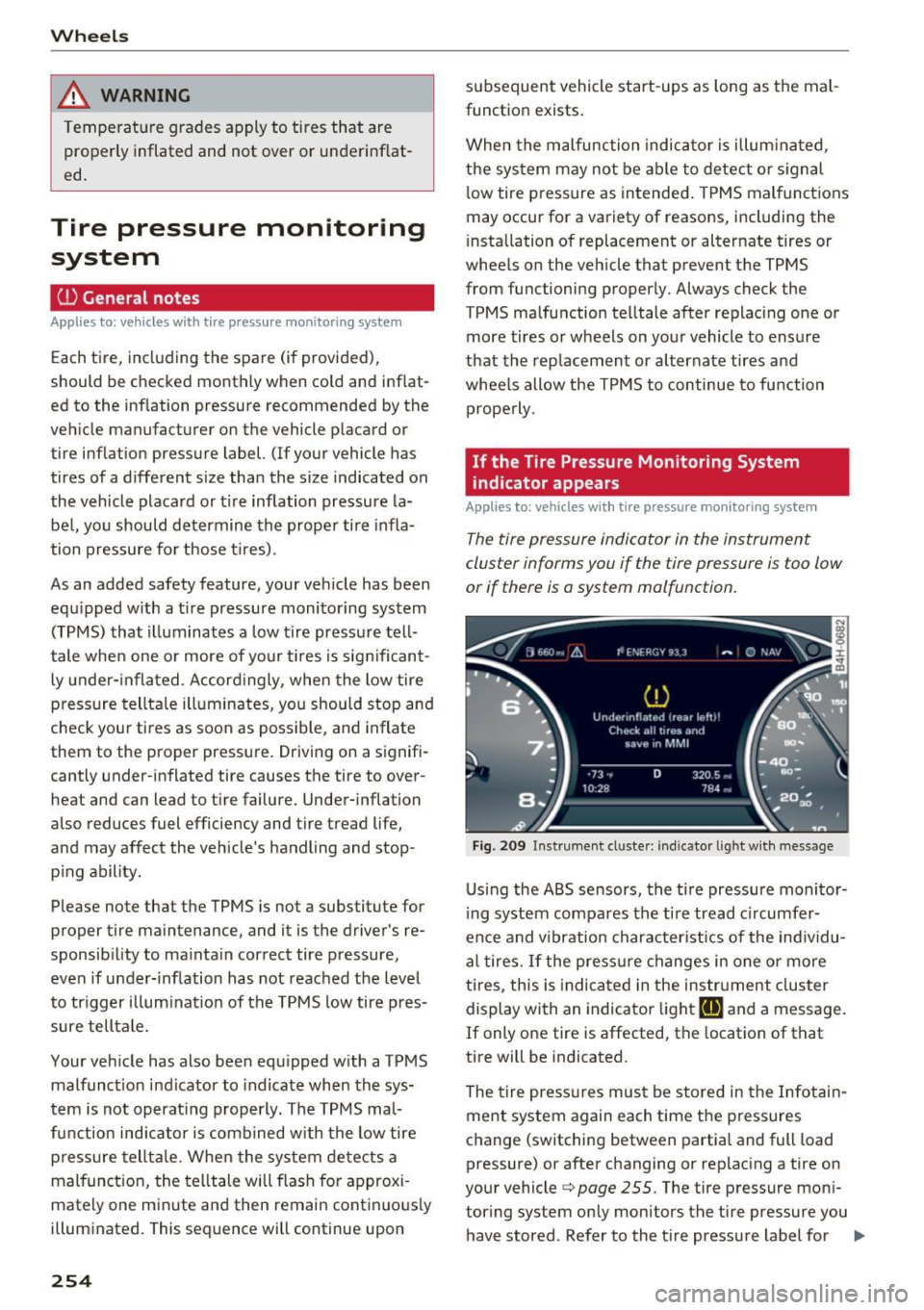
The tire pressure indicator in the instrument
cluster informs you if the tire pressure is too low
or if there is a system malfunction.
Fig . 209 Instrument cl uste r: indicator light with me ssage
Using the ABS sensors, the tire pressure monitor
ing system compares the tire tread c ircumfer
ence and v ibration characteristics of the individu
al tires.
If the pressure changes in one or more
ti res, this is ind icated in the instrument cluster
display with an indicator light
[I] and a message.
If only one tire is affected, the locat ion of that
tire will be indicated.
The tire pressures must be stored in the Infotain
ment system again each time the pressures
change (switching between partial and full load
pressure) or after changing or replacing a tire on
your vehicle ¢
page 255. The tire pressure moni
tor ing system only monitors the tire pressure you
have stored . Refer to the t ire pressure label for ..,.
Page 261 of 302
Replacing wheels
Before changing a wheel
Observe the following precautions for your own
and your passenger's safety when changing a
wheel.
.,. After you experience a tire failure, pull the car
well away from moving traffic and try to reach
level ground before you stop¢.,&. .
.. All passengers should
leave the car and move
to a safe location (for instance, beh ind the
guardrail) ¢.,&. .
.,. Engage the
parking brake to prevent your vehi
cle from rolling unintentionally ¢.,&. .
.. Move
selector lever to position P ¢ .,&. .
1> lfyou are towing a trailer, unhitch the trailer
from your vehicle.
.,. Take the
jack and the spare tire out of the lug
gage compartment,
¢page 257.
..&, WARNING
You or your passengers could be injured wh ile
changing a wheel if you do not follow these
safety precautions:
- If you have a flat tire, move a safe distance
off the road. Turn off the engine, turn the
emergency flashers on and use other warn
ing devices to alert other motorists.
- Make sure that passengers wa it in a safe
place away from the vehicle and well away
from the road and traffic.
- T o help prevent the vehicle from moving
sudden ly and possibly slipping off the jack,
always fully set the parking brake and block
the wheel diagonally opposite the wheel be
ing changed. When one front wheel is lifted
off the ground, plac ing the Automatic
Transmission in "P" (Park) will
not prevent
the vehicle from moving.
- Before you change a wheel, be sure the
ground is level and firm . If necessary, use a
sturdy board under the jack .
- Always store the vehicle tool k it, the jack
and the replaced tire in the luggage com
partment ¢
page 135.
Emergency assistance
{!) Tips
Before changing the wheel, you must activate
the jacking mode, so that the automat ic con
tro ls for the Adaptive Air Suspension do not
make it more difficult to lift the vehicle with
the jack ¢
page 261 .
Changing a wheel
When you change a wheel , follow the sequence
described below step-by-s tep and in exactly tha t
order .
l. Activate the vehicle jack mode ¢ page 261 .
2. Remove the decorative wheel cover*. For
more details see also¢
page 260, Decora
tive wheel covers
or¢ page 260, Wheels
with wheel bolt caps .
3. Loosen the wheel bolts¢ page 260.
4. Locate the proper mounting point for the
jack and align the jack below that point
¢ page 261 or¢ page 262.
5. Raise the car with the jack¢ page 261 or
¢page 262.
6. Remove the wheel with the flat tire and then
install
the spare ¢ page 263.
7. Tighten all wheel bolts lightly .
8.
Lower the vehicle with the jack .
9. Use the wheel bolt wrench and
firmly tighten
all wheel bolts<=>
page 260.
10. Replace the decorative wheel cover*.
11. Deactivate the vehicle jack mode in the MMI :
I CAR! function button > Car systems contro l
button
> Servicing & checks > Air susp.: jack
mode > Off.
The vehicle jack mode switches off automatically
at speeds above 10 km/h .
..&, WARNING
Always read and follow all WARNINGS and in
formation
¢ .&. in AB: Raising the vehicle on
page 262
and ¢ page 264.
259
Page 262 of 302
Emergency assistance
After changing a wheel
A wheel change is not complete without the do
ing the following .
• Always store the vehicle tool kit, the jack* and
the replaced tire in the luggage compartment
<=>page 135.
• Check the tire pressure on the spare wheel im
mediate ly after mounting it.
• As soon as possible, have the
tightening tor
ques
on all wheel bolts checked with a torque
wrench. The correct tightening torque is 90 ft
lb (120 Nm).
• Have the flat tire
replaced as soon as possible.
@ Tips
- If you notice that the whee l bolts are cor
roded and difficu lt to turn while changing a
tire, they should be replaced before you
check the tightening torque .
- Drive at reduced speed until you have the
tightening torques checked.
- After changing a wheel, the tire pressure in
a ll four tires must be checked/corrected and
the tire pressure mon itor ing indicator must
be stored in the MMI
c> page 255.
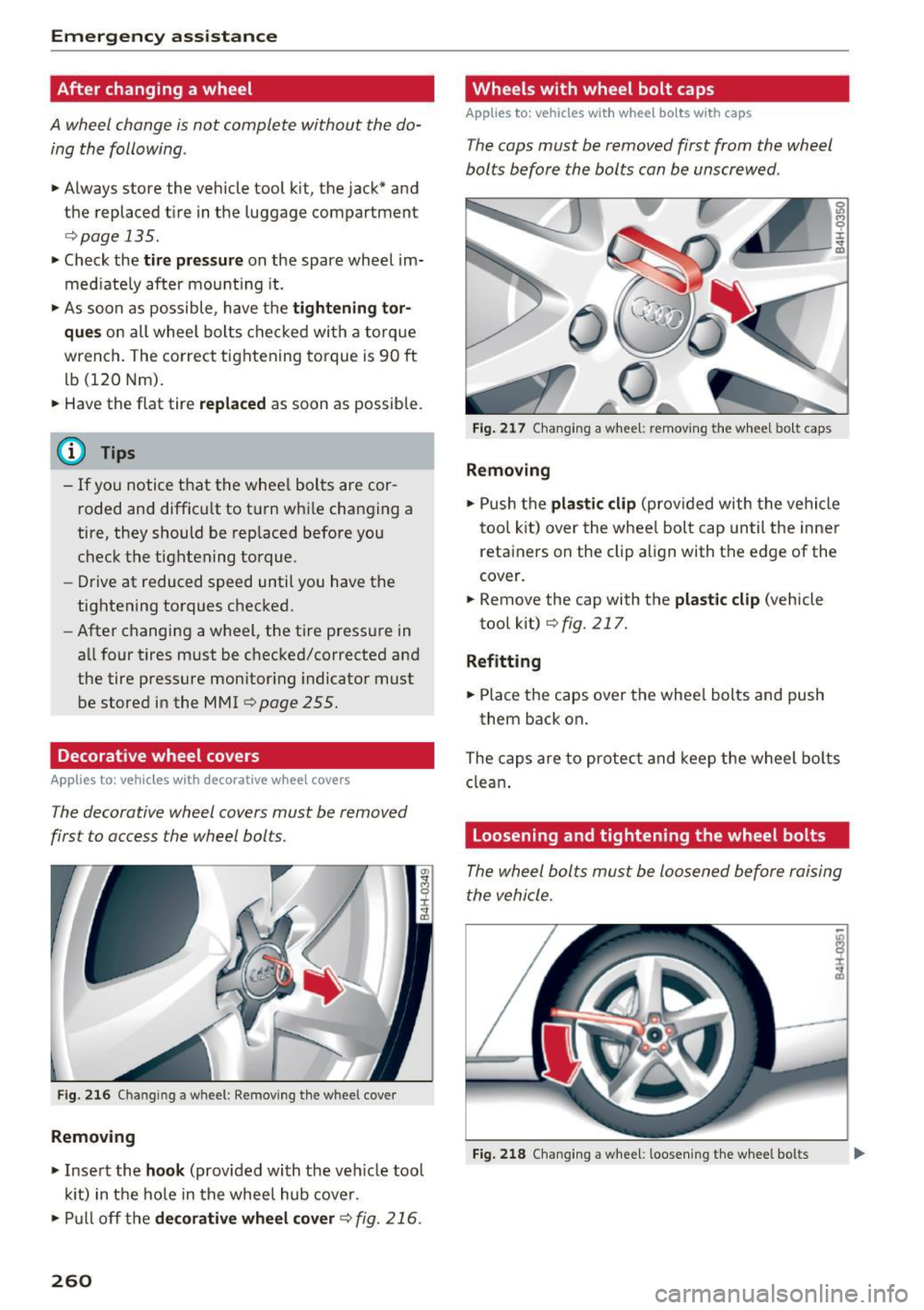
Decorative wheel covers
App lies to: vehicles with decorative wheel covers
The decorative wheel covers must be removed
first to access the wheel bolts .
Fig. 216 Chan gin g a w heel : Removing the whee l cover
Removing
• Insert the hook (provided with the ve hicle tool
kit) in the hole in the wheel hub cover.
• Pull off the
decorative wheel cover c> fig. 216.
260
Wheels with wheel bolt caps
Applies to: vehicles with wheel bo lts with caps
The caps must be removed first from the wheel
bolts before the bolts can be unscrewed .
Fig. 217 Changing a wheel: removing the wheel bo lt caps
Removing
• Push the plastic clip (provided with the vehicle
tool kit) over the whee l bolt cap until the inner
retainers on the clip align with the edge of the
cover.
• Remove the cap with the
plastic clip (vehicle
tool kit)
<=> fig. 217 .
Refitting
• Place the caps over the wheel bolts and push
them back on .
The caps are to protect and keep the wheel bolts
clean.
Loosening and tightening the wheel bolts
The wheel bolts must be loosened before raising
the vehicle.
Fig. 218 Chang ing a wheel: loosening the wheel bo lts
Page 263 of 302
Loosening
• Slide the wh eel wr ench onto the wheel bolt as
far as it will go.
• Take tight hold of the
end of the wrench handle
and turn the wheel bolts
counter-cloc kwise
about one single turn in the direction of arrow
<=>fig. 218.
Tightening
• Slide the wheel wrench onto the wheel bolt as
far as it w ill go.
• Take tight hold of the
end of the wrench handle
and turn each wheel bolt
cloc kwise until it is
seated.
A WARNING
- Do not use force or hurry when changing a
wheel· you can cause the vehicle to slip off
the jack and cause se rious personal injur ies.
- Do not loosen the wheel bolts more than
one turn
before you raise the vehicle with
the jack. -You risk an injury.
(D Tips
- Never use the hexagonal socket in the han
dle of the screwdriver to loosen or tighten
the wheel bo lts .
- If a wheel bolt is
very tight, you may find it
easier to loosen by carefully push ing down
on the end of the wheel bo lt wrench with
one
foot only . As you do so, hold on to the
car to keep your balan ce and take care no t
to slip .
Emergen cy a ssis tanc e
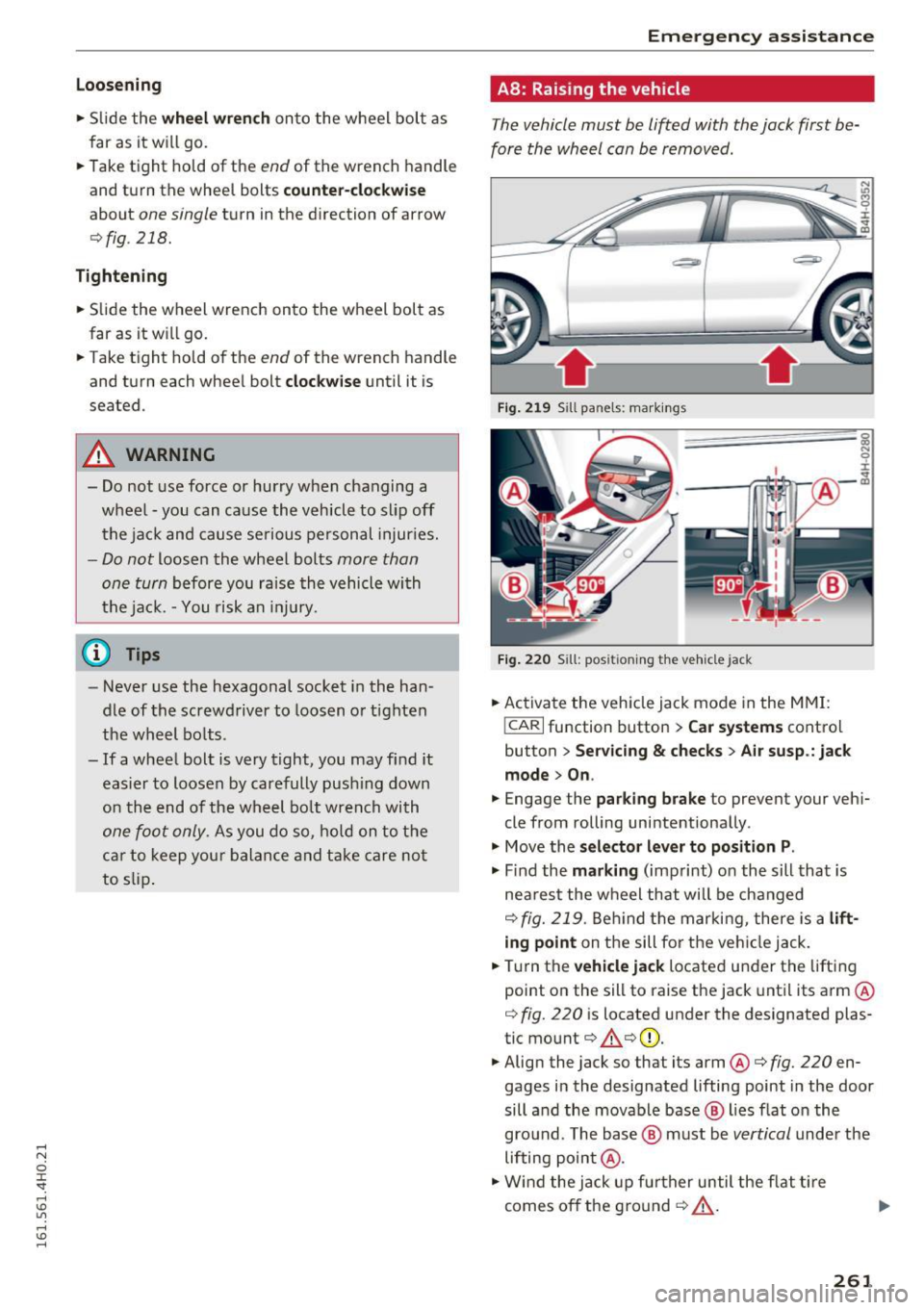
A8: Raising the vehicle
The vehicle must be lifted with the jack first be
fore the wheel can be removed.
Fig . 219 Sill panels: markings
F ig . 220 S ill: positioning the vehicle jack
• Activate the vehicle jack mode in the MMI:
!CARI function button > Car systems control
button
> Ser vicing & chec ks> A ir su sp .: jac k
mode > On .
• Engage the pa rki ng br ake to prevent your veh i
cle from rolling unintentionally.
"' Move the
selector l eve r to position P .
"' Find the mark ing (imprint) on the sill that is
nea rest the wheel that will be changed
<=> fig. 219 . Behind t he marking, there is a lift
ing point on the sill fo r th e vehi cle jack.
• Turn the
vehicle jack located under the lifting
point on the sill to raise the jack unt il its arm @
<=> fig. 220 is located under the designated plas
tic mount<=> .&.<=>CD.
"' Align the jack so that its arm@<=>
fig. 220 en
gages in the designated lifting point in the door
sill and the movable base @ lies flat on the
gro und . The base @ must be
vertical under the
lifting point@.
"' Wind the jack up fu rther until the f lat ti re
comes off the ground ¢..&._ . ""
261
Page 264 of 302
Emerg ency assis ta nce
Position the vehicle jack only under the designat
ed lifting po ints on the sill
¢fig. 219. There is ex
actly
one locat ion for each wheel. The jack must
not be positioned at any other location
c> &<=>0.
An uns table su rf a ce under the jack can cause the
vehicle to slip off the jack. Always provide a firm
base for the jack on the ground . If necessary
place a sturdy board or similar support under the
jack. On
hard, slippery su rfaces (such as tiles)
use a rubber mat or similar to prevent the jack
from slipping
c> ,&..
A WARNING
-
-Yo u or your passengers could be injured
wh ile chang ing a wheel if you do not follow
these safety precaut ions:
- Position the vehicle jack only at the desig
nated lifting points and align the jack.
Otherw ise, the vehicle jack cou ld slip and
cause an injury if it does not have suffi
cient hold on the vehicle.
- A soft or unstable s urface under the jack
may cause the vehicle to slip off the jack.
Always p rovide a firm base for the jack on
the ground. If necessary, use a sturdy
board under the jack.
- On hard, s lippery surface (such as tiles)
use a rubber mat or similar to prevent the
jack from slippi ng.
- T o help prevent injury to yo urself and yo ur
passenge rs:
- Do not raise the vehicle unti l you are sure
the jack is securely engaged .
- Passengers must not remain in the vehicle
when it is jacked up.
- Make sure that passengers wait in a safe
place away from the vehicle and well away
from the road and traffic.
- Make sure jack position is correct, adjust
as necessary and then continue to raise
the jack.
- Changes in temperature or load can affect
the height of the vehicle.
(D Note
Do not lift the vehicle by the sill . Position the
vehicle jack only at the designated lifting
262
points on the sill. Otherwise, your vehicle wi ll
be damaged .
(1) Tips
The vehicle jac k mode sw itches off automa ti
cally at speeds above 10 km/h.
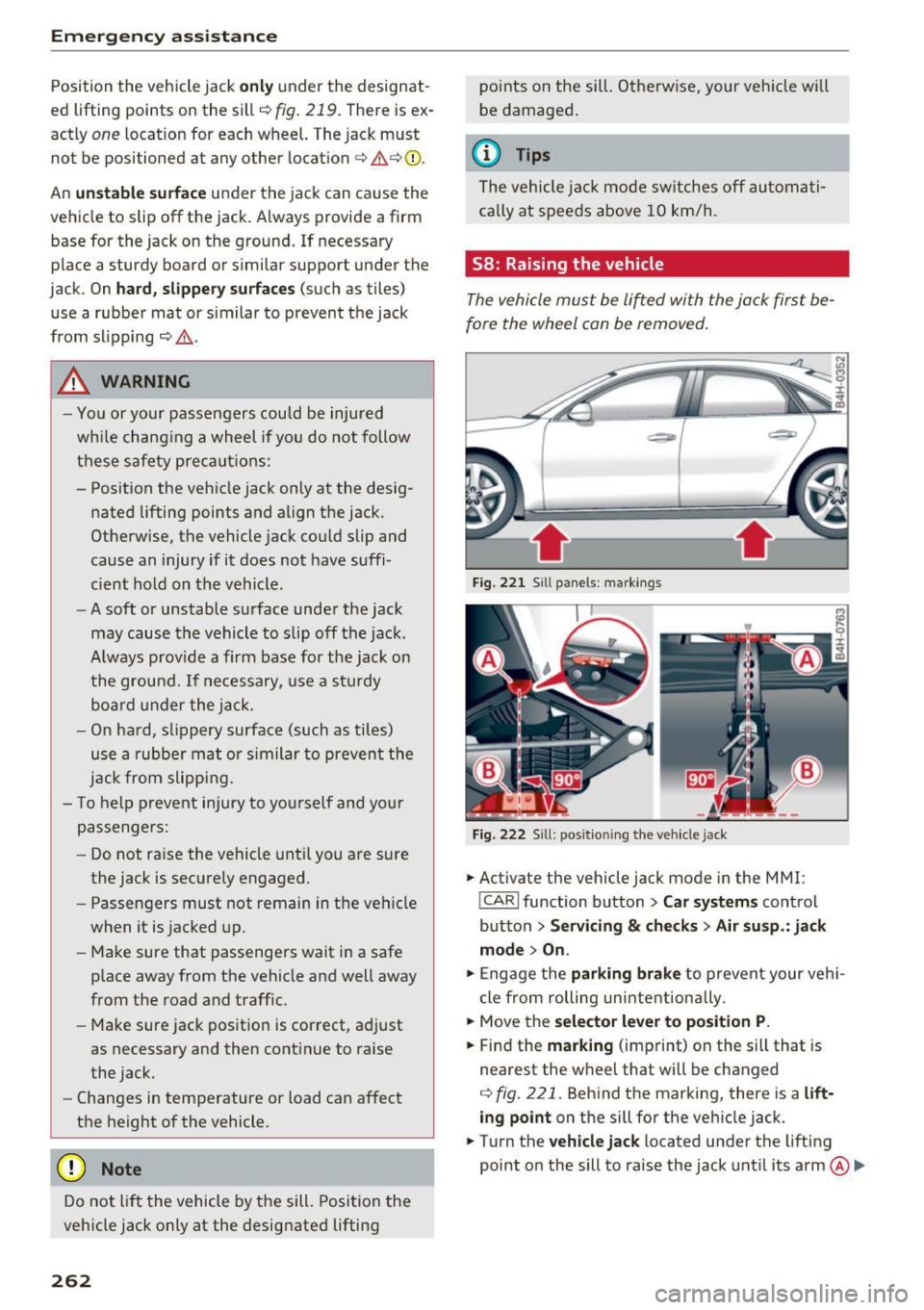
58: Raising the vehicle
The vehicle must be li~ed with the jack first be
fore the wheel can be removed .
Fig. 221 Sill panels : ma rkings
F ig. 222 Sill : pos ition ing the veh icle jack
.. Activate the vehicle jack mode in the MMI :
!CARI function button > Car s yst ems control
button
> Ser vicin g & che cks > A ir su sp .: jack
mode > On .
.. Engage the parking brake to prevent your vehi
cle from rolling uni ntentiona lly .
.. Move the
select or lever t o positi on P.
.. Find the marking (imprint) on the sill that is
nearest the wheel that will be changed
<=>fig. 221 . Behind the marking, there is a lift
ing point
on the sill for the vehicle jack.
.. Turn the
vehicl e jack located under the lifting
point on the sill to raise the jack until its arm
@ Ill>