key AUDI TT 2013 Owner´s Manual
[x] Cancel search | Manufacturer: AUDI, Model Year: 2013, Model line: TT, Model: AUDI TT 2013Pages: 262, PDF Size: 65.91 MB
Page 89 of 262
Homelink®
Universal remote
control
General information
The HomeLink universal remote control can
be programmed with hand-held transmitters
from existing equipment.
You must first program the Homelink ® trans
mitter before you can use the system
~ page 87, Programming the HomeLink ®
transmitter .
In order to program the Home Link ® transmit
ter for devices utilizing rolling code, a second
person on a ladder who can safely reach the
garage door opener motor is recommended.
It is also necessary to locate the "learn" but
ton on your garage door opener motor . Refer
to the ope rating inst ructions for the opener ,
as the location and color of this bu tton may
vary by manufacturer .
You can still use the origina l remote control
fo r the device at any time.
A WARNING
-
- Never use the Homelink® transmitter
with any garage door opener that does
have not the safety stop and reverse fea
ture as requ ired by federal safety stand
ards. This includes any garage door open
er model man ufactured before April 1,
1982.
- A garage door opener which cannot de
tect an object, signaling the door to stop
and reverse does not meet current feder
al safety standards. Using a garage door
opener without these features increases
risk of serious injury or death.
- For safety reasons never release the
parking brake or start the engine while
anyone is standing in front of the vehicle.
- A garage door or an estate gate may
sometimes be set in motion when the Homelink ® remote control is being pro
grammed. If the device is repeatedly ac-
Homelin k® 87
tivated, this can overstrain motor and
damage its e lectrical components -an
overheated motor is a fire hazard!
- To avoid possible injuries or property
damage, please always make abso lutely
certain that no persons or objects are lo
cated in the range of motion of any
equipment being operated.
{!) Tips
- If you would like more information on
Homelink ®, where to purchase the
Homelink ® compatible products, or
would like to purchase the Homelink®
Home Lighting Package, please cal l to ll
free: 1-800-355-3515.
- For Declaration of Compliance to United
States FCC and Industry Canada regula
tions~
page 246.
Programming the Homelink ®
transmitter
The transmitter is programmed in two phas
es. For rolling code transmitters, a third
phase is also necessary.
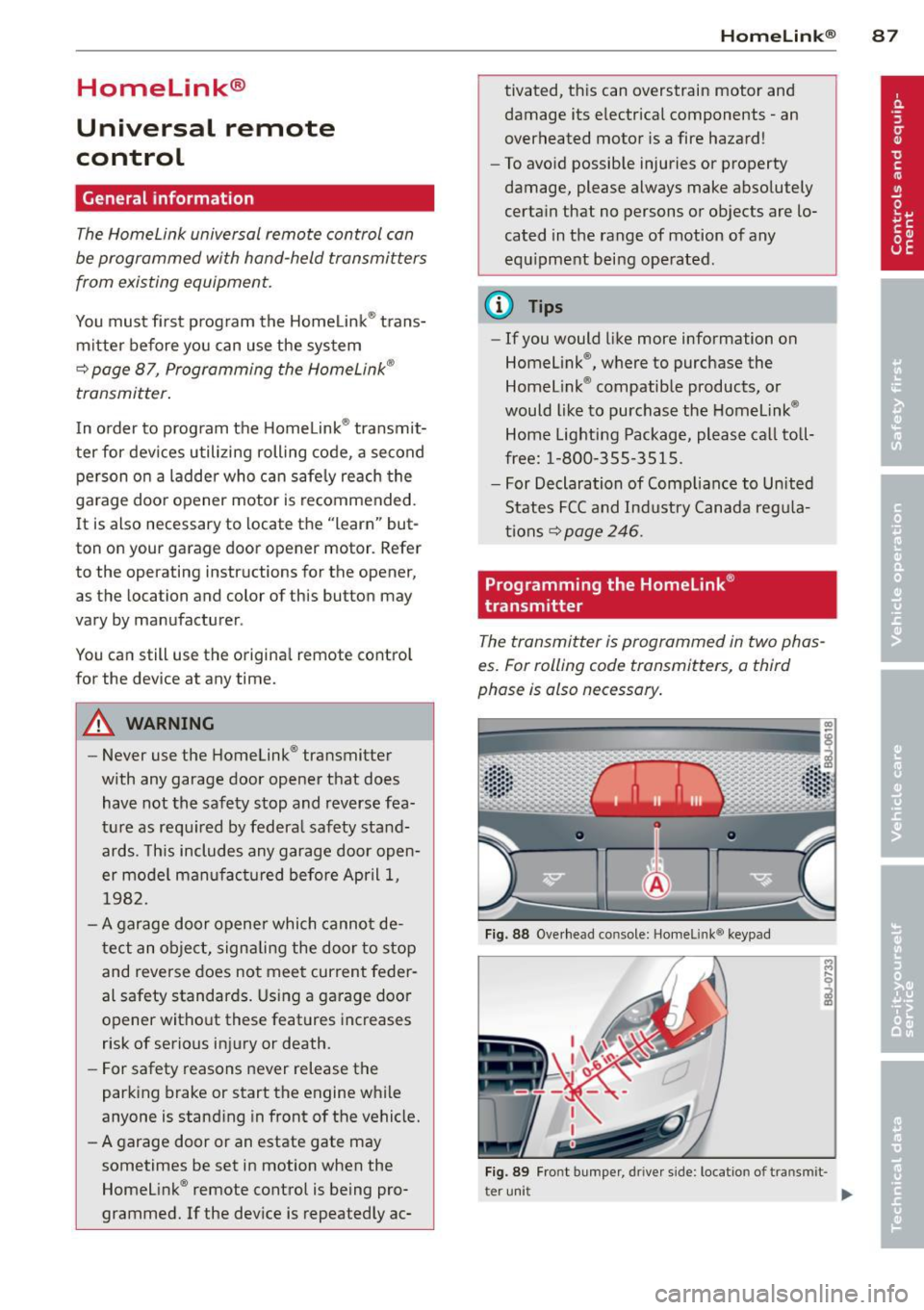
Fig . 88 Ove rhead co nsole: Homelink ® keypad
Fig. 89 Fro nt b umper , driver side : locatio n of tran smi t-
t er uni t
II>
Page 90 of 262
88 Homelink®
Pha se 1:
p rogramming th e ove rhead k eypad
1. Make sure yo ur vehicle is wit hin operating
range of the remote controlled garage
door opener .
2. Set the parking brake¢.&. in General in
formation on page 87 .
3. Tur n the ignition on . Do not start the en
g ine!
4 . Press and hold the two outs ide Home
L ink ® buttons
(D a nd @ for approx i
mately
20 seconds until indicator light @
¢fig . 88 begins to flash . The n re lease
both buttons. Do not hold the buttons for
longer than
30 seconds .
.,. This procedure only needs to be performed
once . It erases the factory-set default codes
and does not have to be repeated to pro
gram add it ional remote controls .
5. Press and hold the Home Link ® button (D ,
® or @ until the indicator light @
starts flashi ng
slowly. Re lease the bu tton.
.,. The system will remain in programming
mode for 5 minutes .
Co to the front of the
vehicle and proceed with phase 2 .
Phase 2:
programming the bumper mounted tran s
m itter
6 . Hold the original remote control at a dis
tance between
0 -6 in . (0 -15 cm) from the
bumper below the appropriate head light
for you r vehicle ¢
fig. 89 (use the shortest
d istance possible).
7 . Aim the remote control just below the
driver sid e head light.
8 . Press and hold the activation button on
the remote contro l.
.,. May be different in Canada.
If so, press and
re-press (cycle) the activation button on your
remote control every two seconds.
9 . The emergency flashers will flash
thre e
tim es
(after about 15-60 seconds) when
the programm ing is successful. Release
the butto n on the remote control.
.,. To program more devices, repeat steps 4 to
9.
10. Press and ho ld the tra ined Homelink ®
button and observe the indicator light @
¢fig. 88.
.,. If the ind icator light is solid/continuous,
programm ing is comp lete and your device
should activate when you press and release
the tra ined Homel ink ® button .
.,. If the ind icator light blinks rapidly fo r
2 sec
onds and is the n a sol id/continuous ligh t,
proceed w ith phase
3 to progr am a roll ing
code device.
Phase 3: rolling code pr ogramming
.,. A second pe rson o n a ladder who ca n safely
reach the garage door opene r motor is rec
ommended .
11. Loca te the "learn" b utton on the ga rage
doo r opener motor ( re fer to the operating
instructions for the opener, as the loca
tion of this button may vary by manufac
turer).
12. Press and release the learn button on the
garage door opener motor .
.,. Not e: once the button is pressed, there are
30 second s in which to in it iate the next
step.
13. On the Homelink ® keypad inside the vehi
cle , fi rm ly press and hold the Homel ink ®
bu tton prev ious ly programmed in phases
1 and 2 for two seconds and release. Re
peat this sequence
twice.
.,. Some vehicles may require the press/hold/
release sequence up to three times to com
plete the trai ning process .
.,. Homelink ® should now activate your rolling
code equipped device .
If the 5 minute time limit is exceeded , the
emergency flash ers will flash one time to in
dicate that the process has been term inated .
In this case, repeat steps 4 through 9.
If the emergency flashers do not flash
three
t imes (after about 15 -60 seconds) , program
ming was not successful. In this case, repeat
steps 4 through 9 .
Remote contro l units for garage door openers
in Canada are set to stop transmitting radio
frequency sig nals afte r two seconds. This t ime ..,.
Page 91 of 262
may not be sufficient for the Homelink® sys
tem to learn the radio frequency signal. Per form all other steps as described above .
Operating the Homelink® transmitter
The HomeLink ® transmitter works in the
same manner as the original hand held re
mote control that came with the system.
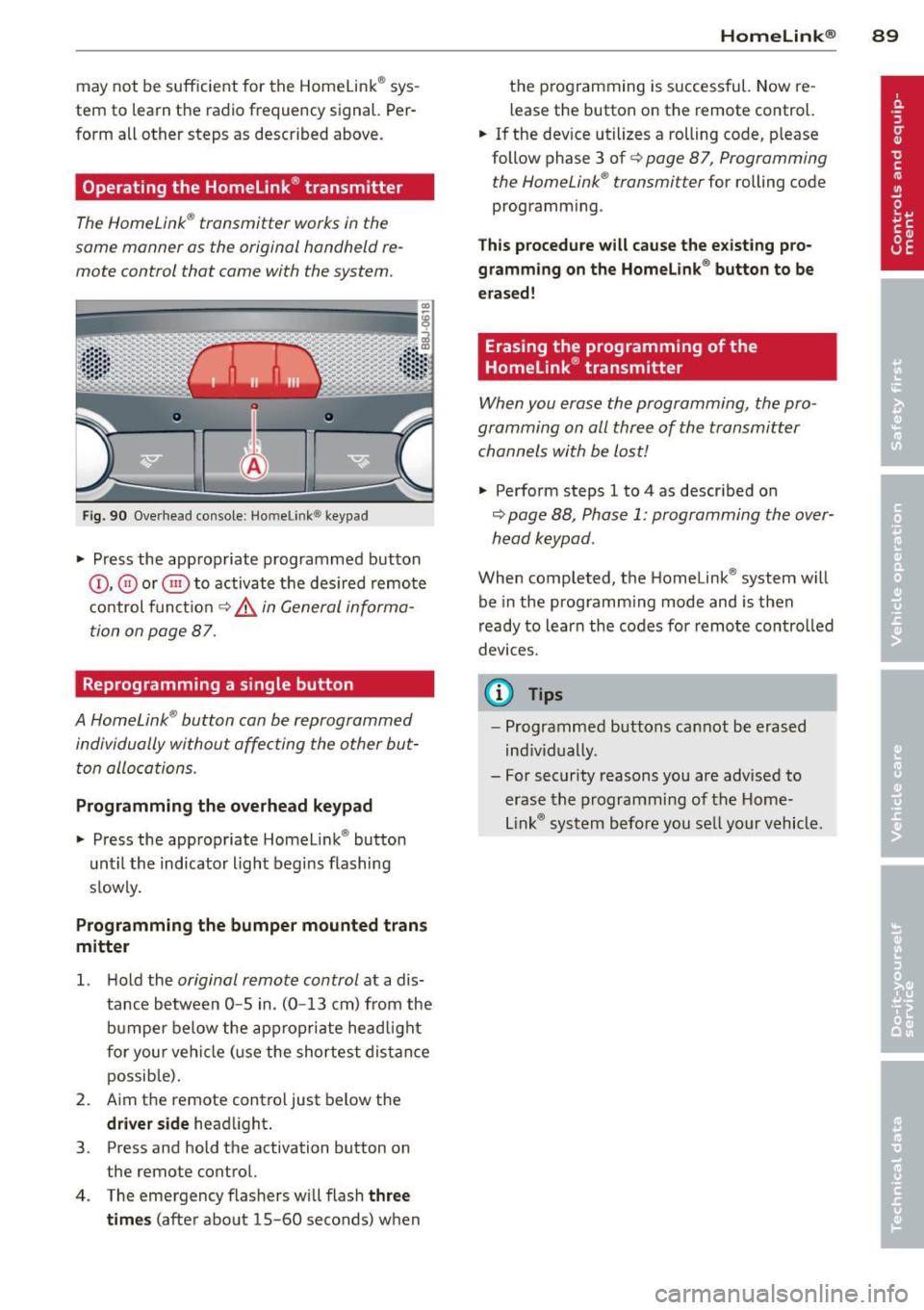
Fig . 9 0 Overhead co nsole: Ho melin k® key pad
• Press the appropriate programmed button
©, @ or@ to activate t he des ired remote
co ntrol funct io n
¢ &. in General informa
tion on page 87.
Reprogramming a single button
A HomeLink ® button can be reprogrammed
individually without affecting the other but t on allocations.
Programming the overhead keypad
• Press the app ropriate Homeli nk® button
unt il the indicator light begins flashing
s low ly.
Programming the bumper mounted trans
mitter
1. H old the original remote control at a dis
tance between
0 -5 in . (0 -13 cm) from the
b umper below the ap prop ria te head light
fo r your vehi cle (use the shortest dis tan ce
possib le) .
2 . Aim the remote control just be low the
driver side head light .
3 . Press and hold the activation button on
the remote control.
4 . The emergency flashers w ill flash
three
times
(afte r about 15 -60 seconds) when
Homelin k® 89
the programming is successful. Now re
l ease the button on the remote control.
• If the dev ice utilizes a rolling code, p lease
follow phase 3 of ¢
page 8 7, Programming
t he HomeLink ® transmitter
for rolling code
programm ing .
Th is p rocedure will cause the e xisting pro ·
gramming on the Homelink ® button to be
erased!
Erasing the programming of the
Homelink ® transmitter
When you erase the programming, the pro ·
gramming on all three of the transmitter channels with be lost!
• Perfo rm steps 1 to 4 as descr ibed on
~ page 88, Phase 1: programming the over
head k eypad .
When completed, t he Homelink ® system will
be in the prog ramm ing mode and is then
r eady to learn the codes fo r remote controlled
devices.
(D Tips
- Programmed buttons can not be erased
ind iv idually.
- For security reasons you are advis ed to
erase the programming of the Home
Lin k® system before you se ll yo ur vehicl e.
Page 105 of 262
forces on the body more "tolerable" and less likely to cause injury.
Although these examples are based on a fron
tal collision , safety belts can also substantial
ly reduce the risk of injury in other kinds of
crashes. So, whether you're on a long trip or
just going to the corner store, always buckle
up and make sure others do, too. Accident sta
tistics show that vehicle occupants properly
wearing safety belts have a lower risk of being
injured and a much better chance of surviving
an accident . Properly using safety belts also
greatly increases the ability of the supplemen
tal airbags to do their job in a collision. For
this reason, wearing a safety belt is legally re
quired in most countries including much of
the United States and Canada.
Although your Audi is equipped with airbags ,
you still have to wear the safety belts provid
ed. Front airbags, for example, are activated
only in some frontal collisions. The front air
bags are not activated in all frontal collisions,
in side and rear collisions, in roll overs or in
cases where there is not enough deceleration
through impact to the front of the vehicle .
The same goes for the other airbag systems in
your Audi. So, always wear your safety belt
and make sure everybody in your vehicle is
properly restrained!
Important safety instructions about
safety belts
Safety belts must always be properly posi
tioned across the strongest bones of your
body.
.,. Always wear safety belts as illustrated and
described in this chapter.
.,. Make sure that your safety belts are always
ready for use and are not damaged.
A WARNING
Not wearing safety belts or wearing them
improperly increases the risk of serious
personal injury and death. Safety belts can
work only when used correctly .
Safety belts 103
-Always fasten your safety belts correctly
before driving off and make sure all pas
sengers are properly restrained.
- For maximum protection, safety belts
must always be positioned correctly on
the body .
- Never strap more than one person, in cluding small children, into any single
safety belt.
- Never place a safety belt over a child sit
ting on your lap.
-Always keep feet in the footwell in front
of the seat while the vehicle is being driv
en.
- Never let any person ride with feet on
the instrument panel or sticking out the
window or on the seat.
- Never remove a safety belt while the ve
hicle is moving . Doing so will increase
your risk of being injured or killed .
- Never wear belts twisted.
- Never wear belts over rigid or breakable objects in or on your clothing, such as
eye glasses, pens, keys, etc., as these
may cause injury .
- Never wear the shoulder part of the belt
under your arm or otherwise out of posi
tion .
- Several layers of heavy clothing may in
terfere with correct positioning of belts and reduce their effectiveness .
- Always keep belt buckles free of anything
that may prevent the buckle from latch
ing securely.
- Never use comfort clips or devices that
create slack in the shoulder belt. Howev
er, special clips may be required for the
correct use of some child restraint sys
tems .
- Never allow safety belts to become dam
aged by being caught in door or seat
hardware.
- Torn or frayed safety belts can tear and
damaged belt hardware can break in an
accident. Inspect belts regularly. If web-
bing, bindings, buckles, or retractors are .,..
L,_ _______________ _J
•
•
Page 107 of 262
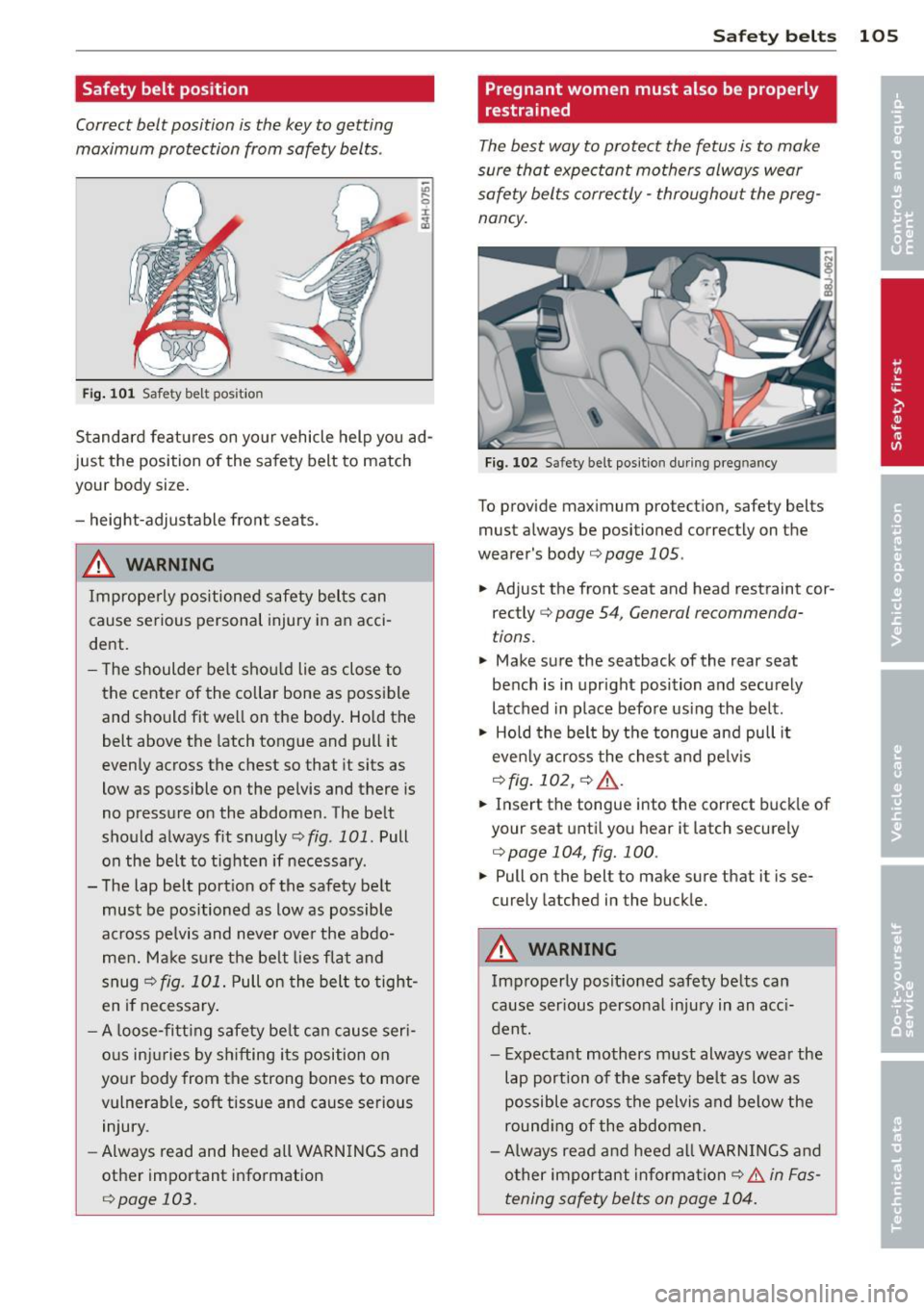
Safety belt position
Correct be.It position is the key to getting
maximum protection from safety belts .
Fig. 1 01 Safety belt pos it io n
Standard features on yo ur vehicle help you ad
just the position of the safety belt to match
your body size.
- height-adjustable front seats.
& WARNING
Improperly positioned safety belts can
cause serious personal injury in an acci
dent.
-
- T he shoulder be lt shou ld lie as close to
the cente r of the collar bone as poss ible
and should fit we ll on the body . Ho ld the
belt above the latch tongue and pull it
evenly across the chest so that it sits as
low as possible on the pelvis and there is
no pressure on the abdomen. The be lt
should always fit snugly
c:> fig . 101 . Pull
on the belt to tighten if necessary .
- The lap belt port ion of the safety be lt
must be positioned as low as possible
across pelvis and never ove r the abdo
me n. Ma ke su re the be lt lies flat and
snug
c:> fig. 101 . Pull on the belt to tight
en if necessary .
- A loose-fi tt ing safety be lt c an cause seri
o us inj uries by s hifting its position on
yo ur body from the strong bones to more
vulnerab le, soft tissue and cause serious
injury.
- Always read and heed all WARN INGS and
other important info rmation
c:> page 103.
Safety belts 105
Pregnant women must also be properly
, restrained
The best way to protect the fetus is to make
sure that expectant mothers always wear
safety belts corre ctly -throughout the preg
nancy.
Fi g. 102 Safety be lt po sit ion d uring preg nancy
To provide max imum protect ion, safety belts
must a lways be positioned correctly on the
wearer 's body
c> page 105.
.,. Adjust the front seat and head restraint cor
rectly
c:> p age 54 , General recommenda
t ions .
.,. Make s ure the seatback of the rear seat
bench is in upright position and securely
latched in p lace befo re using the belt.
.,. Hold the belt by t he tongue and pull it
even ly across the ches t and pelv is
c> fig.10 2,c> .&., .
.,. Insert the tongue into the correct buck le of
your seat unti l yo u h ear it latch securely
<=> page 104, fig. 100 .
.,. Pull on the belt to make sure that it is se
curely latched in the buck le.
& WARNING
Imp roperly posit ioned safety belts can
cause ser ious persona l inju ry in an acc i
dent.
-
- Expectant mothers must always wear the
lap port ion of the safety belt as low as
possible a cross the pelvis and below the
round ing of the abdomen.
- Always read a nd heed all WAR NIN GS a nd
o ther impo rtant inform ation
c:> & in Fas
tening safety belts on page 104.
Page 159 of 262
than is being generated and ensures an optimal state of charge for the battery.
@ Tips
- But even energy management cannot
negate the limits o f physics. Consider
that the power and life of a battery are
li mited.
- If starting ab ility is threatened, you are
i nformed by a warning
¢ page 157,
Driver notification in the instrument
cluster display.
What you should know
The highest priority is given to maintaining
starting capability.
The battery is severely taxed in short-distance
driving, in city traffic and during the co ld time
of year. Abundant e lectrica l energy is re
quired, but only a litt le is generated. It is also
cr itical if the engine is not run ning and electri
cal components are turned on. In th is in
stance energy is being consumed but non e is
be ing gene rated.
It is in precisely these situations that you w ill
notice energy management actively regulat
in g the distribution of energy .
Vehicle stands for an extended period
If you do not drive your vehicle over a period
of several days or weeks, electrical compo
nents are gradually cut back or switched off.
This reduces energy consumption and mai n
tains sta rting capab ility over a longer per iod.
Take into consideration that when you un lock
your ve hicle, some co nvenience functions,
such as the remote key or power seat adjust
ment, may not be available . The convenience
f u nctions w ill be ava ilable again whe n you
turn on the igni tion and star t the eng ine.
With the engine turned off
If you listen to the radio, for example, with
the eng ine turned off, the battery is being dis
charged .
Intellig ent technolog y 157
If starting capability is jeo pardi zed d ue to en
ergy consumption, a message appears in the
drive r information d isplay .
You have to start t he engine to charge the
batte ry .
With the engine running
Although e lectrical energy is generated when
the ve hicl e is being driven, t he battery can be
c ome disc harged. This happe ns mostly when
li ttle energy is being generated and a g reat
deal consumed and t he battery's sta te of
c h arge is not optimal.
T o b ring the energy b alance b ack into equili
br ium, consumers which requ ire espe cially
la rge amounts of energy a re temporari ly cut
back or switched off . Heating systems in pa r
ticu lar require a great deal of energy. If yo u
notice, for example, that the heated seats* or
the heated rear window are not heating, they
have been temporarily cut back or sw itched
off . These systems w ill be available again as
soon as the ene rgy balance has been restored.
You w ill also notice that engine id le speed has
been increased slightly . T hi s is normal and not
a cause for conce rn . By i ncreas ing eng ine id le
speed the additional energy r equired is gene r
ated and the battery is charged.
Driver notification in the instrument
cluster display
If battery power drops into the range where it
can limit the ability of the engine to start, this
is shown in the instrument cluster display
with the following driver message:
(•) Low battery charge: battery will be
charged while driving
T his no tificat ion reminds yo u that the star ting
capability of the engine may be lim ited . As
soon as you sta rt dr iving again, the battery
will be recharged and the not ificat ion w ill go
out. •
•
Page 177 of 262
you have the engine washed, the anti-corrosion treatment is a lmost always removed as
wel l. It is therefore essential to have a long
lasting corrosion protection reapplied to all
surfaces, seams, joints and components in the
engine compartment .
A WARNING
Be aware: The engine compartment of any
motor vehicle is a potentially hazardous
area.
- Before working in the engine compart
ment, be sure to read the informat ion
c::.>page 174.
- Before reaching into the front plenum
pane l, always remove the ignition key.
O therw ise, the windshield wipe r system
cou ld unintentiona lly be switched on,
poss ibly causing personal injury from the
moving wiper linkage .
- Never reach into the area around or
touch the radiator fan. The auxiliary fan
is temperature controlled and can switch
on suddenly- even when the ign it ion is
off.
- Do not wash, wax or dry the engine w ith
the engine running. Moving or hot parts could injure you .
- Do not clean the underside of the chas sis, fenders, wheel covers, or other hard
to reach parts w ithout protecting your
hands and arms. You may cut yourse lf on
sharp-edged metal parts .
- Always read and heed all WARNINGS and
other information
c::.> page 164.
Cleaning and protec tion 17 5
•
•
Page 182 of 262
180 Checking and filling
Checking and filling
Engine hood
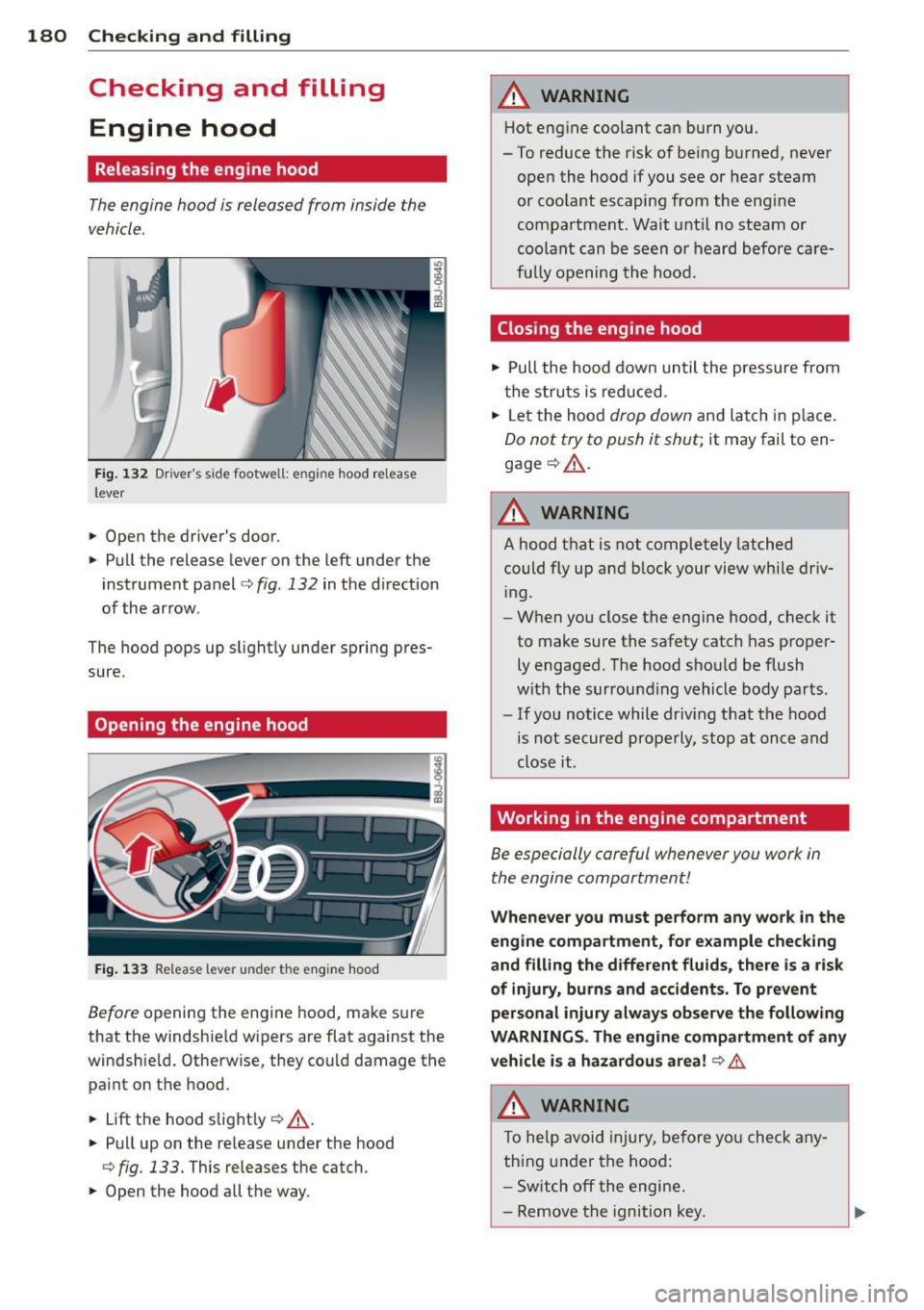
Releasing the engine hood
The engine hood is released from inside the
vehicle.
Fi g. 132 Dr iver's side footwell: engine hood re lease
lever
.. Open the driver's door.
.. Pull the release lever on the left under the
instrument panel
c> fig. 132 in the direction
of the arrow .
The hood pops up slight ly under spring pres
sure.
Opening the engine hood
Fig . 133 Re lease lever under the engine hood
Before opening the engine hood, make sure
that the windshie ld wipers are flat against the
windshie ld. Otherwise, they cou ld damage the
pa int on the hood.
.. Lift the hood s light ly
c> _& .
.. Pull up on the release under the hood
¢ fig. 133. This releases the catch.
.. Open the hood all the way.
A WARNING
-Hot engine coolant can burn you.
- To reduce the risk of being burned, never
open the hood if you see or hear steam
or coo lant escaping from the eng ine
compartment. Wait unt il no steam or
coolant can be seen o r heard before care
fu lly opening the hood.
Closing the engine hood
.. Pull the hood down until the pressure from
the struts is reduced .
.. Let the hood
drop down and latch in p lace.
Do not try to push it shut; it may fail to en
gage
c> _& .
A WARNING
--
A hood that is not completely latched
could fly up and b lock your view while dr iv
i ng.
- When you close the engine hood, check it
to make sure the safety catch has proper
ly engaged . The hood should be flush
with the surrounding vehicle body parts.
- If you notice while dr iv ing that the hood
is not secured properly, stop at once and
close it.
Working in the engine compartment
Be especially careful whenever you work in
the engine compartment!
Wheneve r you must pe rform any wo rk in the
eng ine compartment, for e xample chec king
and filling the different fluids, ther e is a risk
of injury, burns and a ccident s. To prevent
p ers onal injury al ways obs erv e the following
WARNINGS. The eng in e c ompartm ent of an y
vehicl e is a hazardou s area!
c> .&.
A WARNING
To he lp avoid injury, before yo u check any
thing under the hood:
- Sw itch off the engine .
- Remove the ignition key.
Page 230 of 262
228 Fuses and bulbs
Fuses and bulbs
Electrical fuses
Replacing fuses
Fuses that have blown will have metal strips
that have burned through .
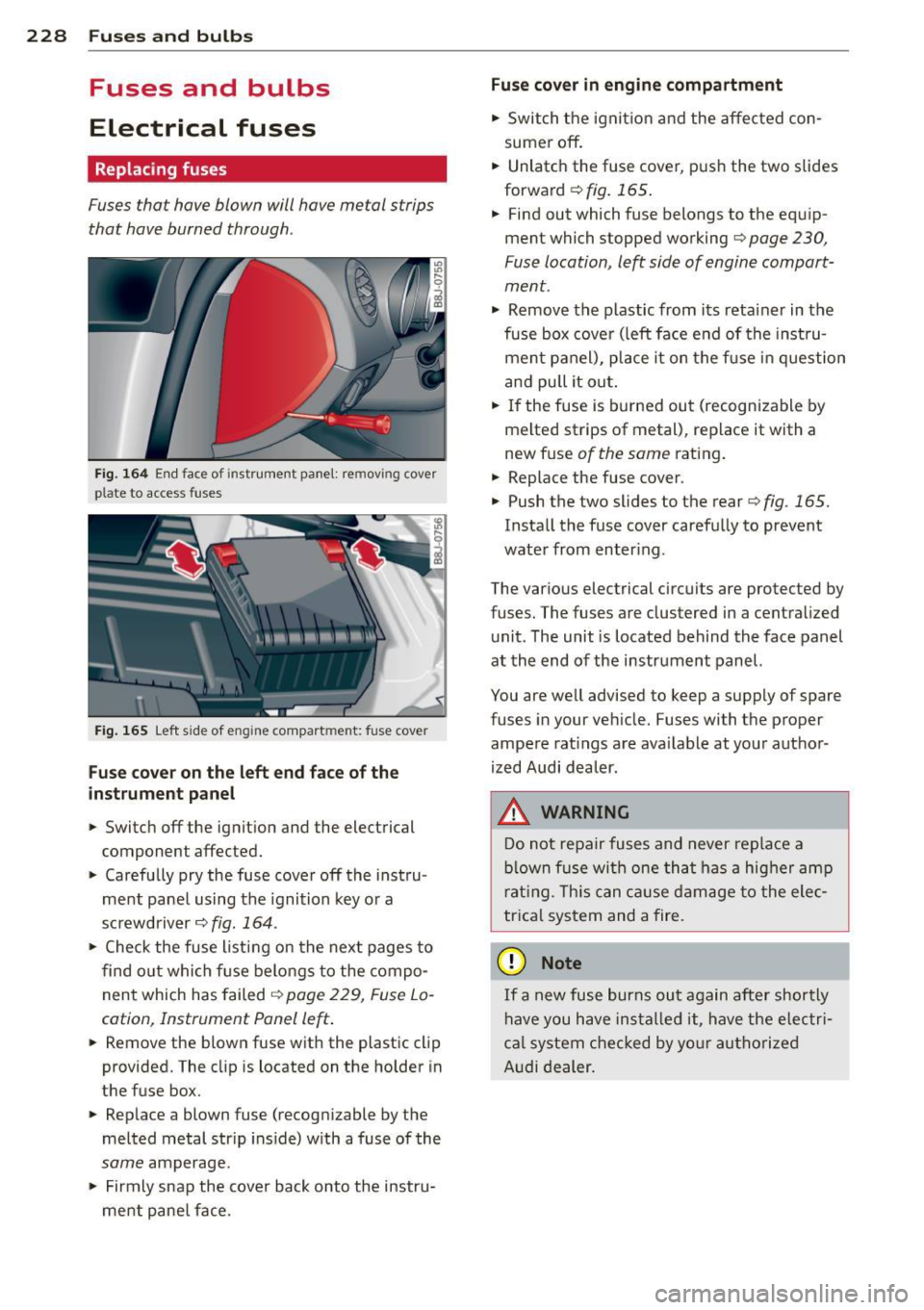
Fig. 164 End face of instrument panel: rem ov ing cover
p la te to access fuses
Fig. 165 Left side of eng ine compart men t: fuse cove r
Fuse cover on the left end face of the
inst rument pane l
.. Switch off the ignition and the electrical
component affected.
.. Carefully pry the fuse cover off the instru
ment panel using the ignition key or a
screwdriver~
fig. 164 .
.. Check the fuse listing on the next pages to
find out which fuse belongs to the compo
nent which has failed
~ page 229, Fuse Lo
cation, Instrument Panel left .
.. Remove the blown fuse with the plastic clip
provided. The cl ip is located on the holder in
the fuse box .
.. Replace a blown fuse (recognizable by the
melted metal str ip inside) with a fuse of the
same amperage .
.. Firmly snap the cover back onto the instru
ment panel face .
Fuse cover in engine compartment
.. Switch the ignition and the affected con
sumer off .
.. Unlatch the fuse cover, push the two slides
forward
~ fig. 165.
.. Find out which fuse belongs to the equip
ment which stopped working~
page 230,
Fuse location , le~ side of engine compart
ment .
.. Remove the plastic from its retainer in the
fuse box cover (left face end of the instru
ment panel), place it on the fu se in question
and pull it out .
.. If the fuse is burned out (recognizable by
melted strips of metal), replace it with a
new fuse
of the same rating.
.. Replace the fuse cover.
.. Push the two slides to the rear~
fig. 165.
Install the fuse cover carefully to prevent
water from enter ing .
The various electrical circuits are protected by
fuses. The fuses are clustered in a centralized unit. The unit is located behind the face panel
at the end of the instrument panel.
You are well advised to keep a supply of spare
fuses in your vehicle. Fuses with the proper
ampere rat ings are ava ilable at your author
ized Audi dealer.
A WARNING -
Do not repa ir fuses and never replace a
blown fuse with one that has a higher amp
rating. This can cause damage to the elec
trica l system and a fire.
(D Note
If a new fuse burns out again after shortly
have you have installed it, have the electri
ca l system checked by your authorized
Audi dealer.
Page 240 of 262
238 General information
General information Explanation of
technical data
Some of the technical data listed in this man
ual require further explanation.
The tecical data for your vehicle are listed in
the charts starting on ¢
page 240. This chap
ter provides general information, notes and
restrictions which apply to these data .
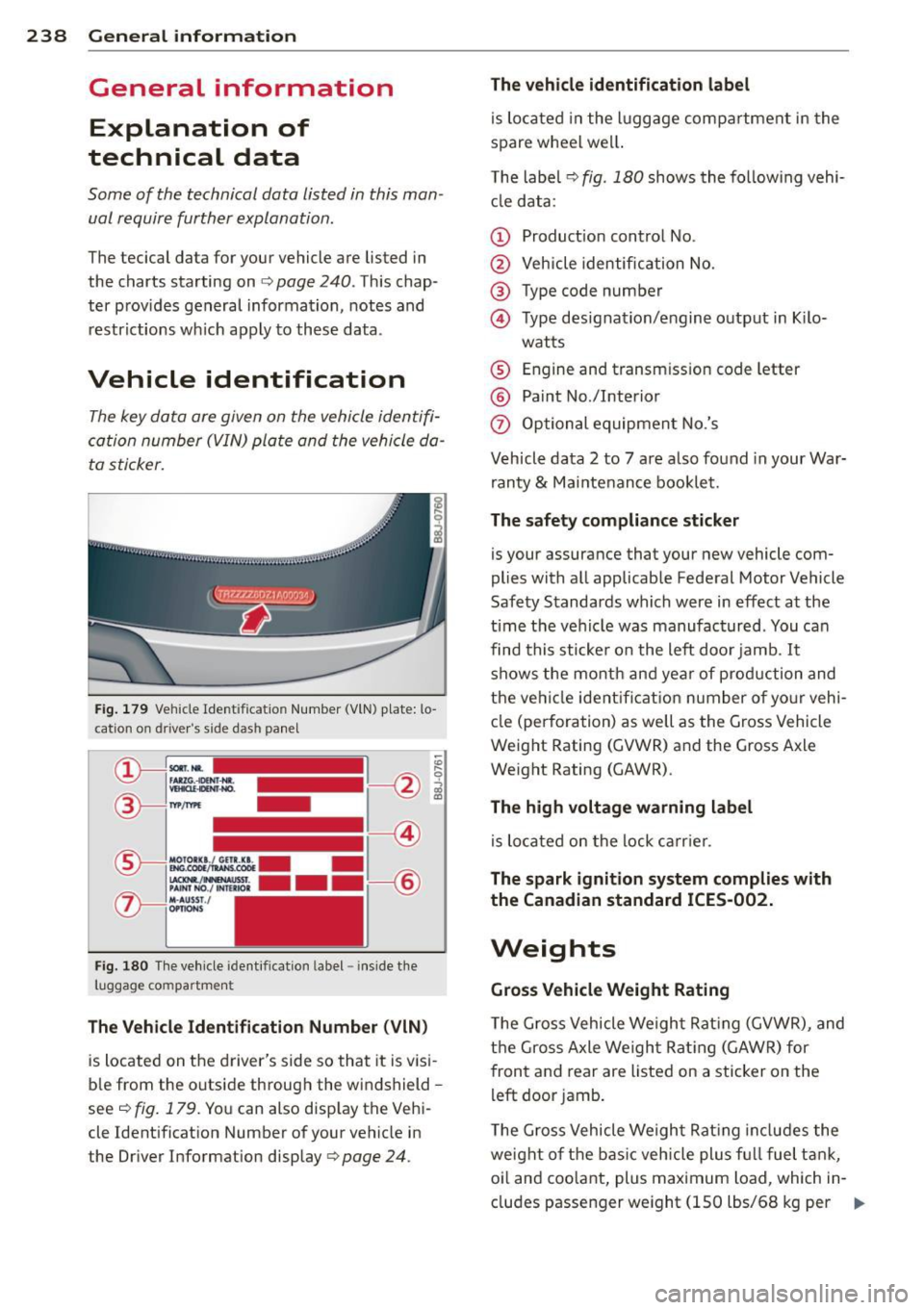
Vehicle identification
The key data are given on the vehicle identifi
cation number (VIN) plate and the vehicle da
ta sticker.
Fig. 179 Veh icle Ide ntificat io n Number (VlN) plate: lo
cation on driver 's side das h panel
Fig. 180 Th e vehicle identi fication label -inside the
luggage co mpa rtmen t
The Vehicle Identification Number (VIN)
is located on the driver's side so that it is visi
ble from the outside through the windshield -
seer:!> fig. 179. You can also display the Vehi
cle Identification Number of your vehicle in
the Driver Information display¢
page 24 .
The vehicle identification label
is located in the luggage compartment in the
spare wheel wel l.
The label¢
fig. 180 shows the following vehi
cle data :
(D Product ion control No .
@ Vehicle identification No.
® Type code number
@ Type designation/engine output in Kilo-
watts
® Engine and transmission code letter
@ Paint No./Interior
(f) Optional equipment No.'s
Vehicle data 2 to 7 are also found in your War
ranty
& Maintenance booklet.
The safety compliance sticker
is your assurance that your new vehicle com
plies with all applicable Federal Motor Vehicle
Safety Standards which were in effect at the
time the vehicle was manufactured . You can
find this sticker on the left door jamb.
It
shows the month and year of production and
the ve hicle ident ification number of your vehi
cle (perforation) as well as the Gross Vehicle
Weight Rating (GVWR) and the Gross Axle
Weight Rating (GAWR) .
The high voltage warning label
is located on the lock carr ier .
The spark ignition system complies with
the Canadian standard ICES-002.
Weights
Gross Vehicle Weight Rating
The Gross Vehicle Weight Rating (GVWR), and
the Gross Axle Weight Rating (GAWR) for
front and rear are listed on a sticker on the
left door jamb.
The Gross Vehicle Weight Rating includes the
weight of the basic vehicle plus full fuel tank,
oi l and coolant, plus maximum load, wh ich in
cludes passenger weight (150 lbs/68 kg per
Ill>