ignition AUDI TT COUPE 2009 User Guide
[x] Cancel search | Manufacturer: AUDI, Model Year: 2009, Model line: TT COUPE, Model: AUDI TT COUPE 2009Pages: 316, PDF Size: 71.16 MB
Page 26 of 316
Driver information system
The service interval display determines when a service procedure is
needed for your vehicle . It operates in two stages:
• Service reminder : Before reaching a service event, this message
appears briefly when you switch on the ignition:
OIL CHANGE IN
1230 Ml (2000 KM) 150 DAYS.
• Service event: When the date for service is reached, the message
OIL CHANGE! appears. It is accompanied by an audible signal.
Display remaining distance
By briefly pulling the knob,@) ~ page 12 , fig. 2, the dis tance/time
remaining to the next service date is displayed with the ignition on.
The distance/ time remaining is updated every 300 miles (500 kml.
If the distance/time remaining is cal led up on new vehicles or after
service has been performed, the due date is always shown in the
display with
OIL CHANGE IN····· Ml (KMl··· DAYS within the first 300
miles (500 km).
To reset the displa y
The dealership performing the service resets the display when the
service has been completed . The display is resets as follows:
• Switch the ignition on.
• Pull the knob @)~
page 12 , fig. 2, this message appears : OIL
CHANGE!
• Pull the knob unti l the display OIL CHANGE IN····· Ml (KM)···
DAYS
appears in the display. If the reset button is not pulled within
5 seconds, the disp lay reset mode closes.
[ i J Tips
• If a malfunction is present (red symbol), the distance remaining
cannot be called up.
• Do not reset the display between service intervals. Doing so will
result in an incorrect display.
• If the battery is disconnected, the Service Interval Display values
are reta ined. •
On vehicles with the Driver Information System, you can also call
up the service interval display~
page 27.
• If service was not performed at the correct time or the service
interval display was not reset after service was performed, the addi
tional mileage driven or the elapsed days will be shown as negative
numbers. •
On-Board Diagnostic system (OBD)
On-Board Diagnostics
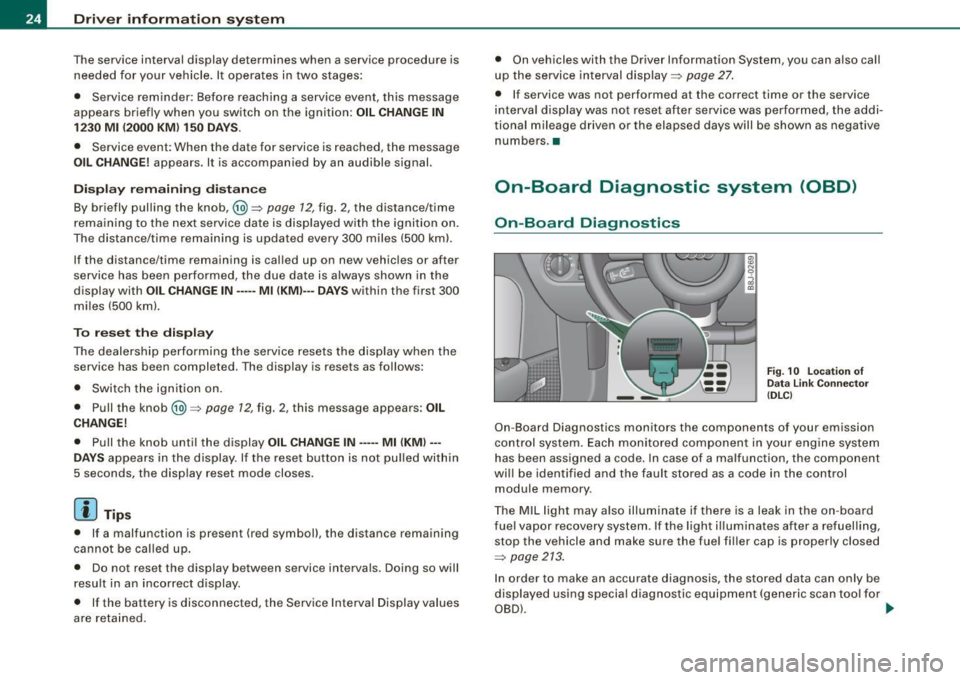
Fig. 10 Locat ion of
Data Link Connector
( DLC )
On-Board Diagnostics monitors the components of your emission
control system . Each monitored component in your engine system
has been assigned a code. In case of a malfunction, the component
wi ll be identified and the fault stored as a code in the control
module memory.
The MIL light may also illuminate if there is a leak in the on -board
fuel vapor recovery system. If the light ill uminates after a refuelling,
stop the vehicle and make sure the fuel fi ller cap is properly closed
~ page 213.
In order to make an accurate diagnosis, the stored data can only be
displayed using special diagnostic equipment (generic scan tool for
OBD) . ...
Page 27 of 316
In order to connect the special diagnostic equipment, push the plug
into the Data Link Connector (DLC). The DLC is located to the right of
the hood release =>
page 24, fig. 10.
Your authorized Audi dealer or a qualified service station can inter
pret the code and perform the necessary repair. •
Malfunction Indicator Lamp (MIL)
The Malfunction Indicator Lamp (MIU in the instrument cluster
=>
page 15, fig. 5 is part of the On -Board Diagnostic (OBD II) system.
The warning/indicator light illuminates when the ignition is
switched on and goes out after the engine starts and the idle has
stabilized. This indicates that the MIL is working properly.
If the light does not go out after the engine is started, or illuminates
while you are driving, a malfunction may exist in the engine system.
If the light starts flashing, the catalytic converter could be damaged .
Continue driving
with reduced power (avoiding sustained high
speeds and/or rapid accelerations) and have the condition
corrected. Contact your authorized Audi dealer .
If the light illuminates, the electronic speed limiter may also be
malfunctioning . For more information=>
page 25, "Electronic speed
limiter".
An improperly closed fuel filler cap may also cause the MIL light to
illuminate =>
page 213. •
Electronic speed limiter
Your vehicle may be factory equipped with tires that are rated for a
maximum speed of 130 mph (210 km/h). This is less than the
maximum speed of your vehicle . To reduce the risk of sudden tire
failure and loss of control if the vehicle is operated at excessive
speeds, your vehicle also has an electronic speed limiter. The elec-
Controls and equip
ment
Driver information system
tronic speed limiter prevents your vehicle from going faster than the
tire speed rating. For more information =>
page 246.
If the engine control unit receives faulty vehicle road speed signals,
the Malfunction Indicator Light (MIU•"" will illuminate. If this
occurs, contact the nearest authorized Audi dealer for assistance.
& WARNING
Always observe the posted speed limits and adjust your speed to
suit prevailing road, traffic and weather conditions. Never drive
your vehicle faster than the maximum speed rating of the tires installed. •
Trip computer
Introduction
The trip computer gives you information on current and
average fuel mileage, average speed, fuel range and
driving time.
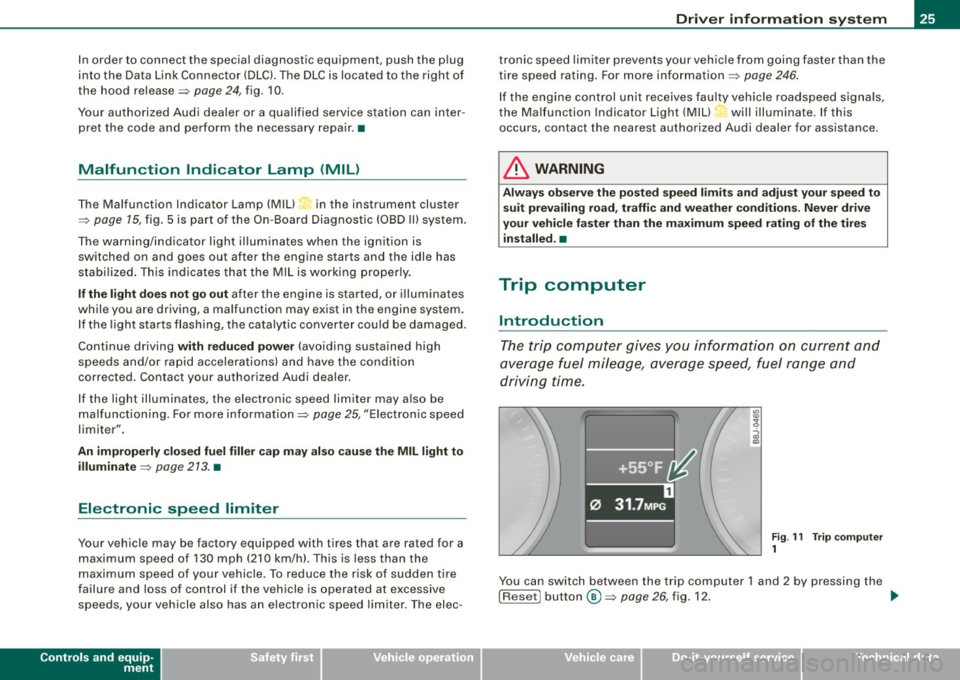
Fig . 11 Trip computer
1
You can switch between the trip computer 1 and 2 by pressing the
! Reset! button®=>
page 26, fig. 12. .,,_
I • •
Page 28 of 316
Driver inf ormation sy ste m
You can tell which memory level is currently active by the number in
the display =>
page 25, fig. 11. The data from the single -trip memory
(memory level 1 l is being displayed if a
1 appears in the disp lay. If a
2 is shown, then the data from the total -trip memory is being
displayed (memory leve l 2l.
S in gle-trip m emor y (Trip c ompu ter 1 )
The single-trip memory stores the trip information from the time the
ignition is turned on until it is turned off . If the trip is con tinued
w ithi n 2 hour s from the time the ignition was turned off, the new
data will be included in the calculation of the current trip informa
tion. If the trip is interrupted for
more than 2 ho ur s the memory is
reset automatica lly.
T ot al-tr ip m em ory ( Trip co mpu te r 2)
Unlike the single -trip memory, the total -trip memory is no t reset
automatically . This permits you to evaluate your driving data for the
entire period between manua l resets.
F u el ra nge
The estimated cruising range in miles (km) appears in the display.
The display changes in increments of 6 miles (10 km) .
Avera ge fuel mil eage
The average fuel economy in MPG 0/100 km) since you last cleared
the memory appears in this display.
C ur rent f uel mileage
The instantaneous fuel consumption in mi les per ga llon (1/100 km)
is shown in this display. When the vehicle is stationary, the most
recent fuel consumption is displayed.
A ve ra g e sp eed
The average speed in mph (km/h) s ince the last time the display was
reset appears in the display.
El ap se d tim e
The length of time that you have been driving since you last rese t
the memory appears in this disp lay. The maximum time period that
can be recorded i s 999 hours and 59 minutes .
Distance
The elapsed distance since the last t ime the memory was cleared
appears in the display . The maximum distance that can be recorded
is 9,999 .9 mi les (9,999.9 kilometers).
[ i ] Tips
All stored values will be lost if the vehicle battery is disconnected .•
Op eration
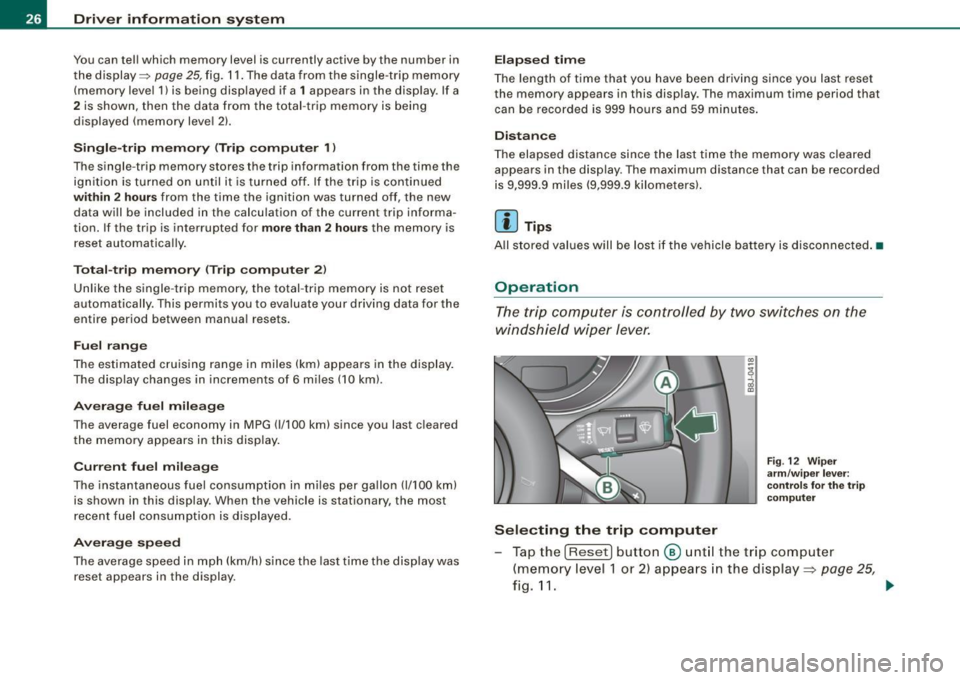
The trip computer is controlled by two switches on the
windshield wiper lever.
Sel ecting th e trip comput er
Fig . 12 Wip er
a rm /w ip er leve r:
co ntrols fo r the t rip
co mput er
Tap the [Reset) button @ unt il the trip computer
(memory level 1 or 2) appears in the display =:>
page 25,
fig.11. _.
Page 29 of 316

Sele cting the fun ctions
- Push in the uppe r (lower) protrusion on the function
se lector switch
@ =>page 26, fig. 12. The functions for
the trip compu ter are d isp layed in succession on the
respective memory levels.
R ese ttin g the function to z ero
- Push the [Reset ] button ® for at least two seconds .
You can reset the fo llowing values to zero using the [R eset] button:
• driving time
• distance
• average fuel mileage
• average speed
The trip computer only opera tes when the ignition is on . When you
turn on the ignit ion, the function that was in use when you last
turned the ignition off will be displayed.
[ i ] T ip s
• You can also set the va lues for the functions to zero in the menu
display (R es et) ~
page 27 .
• All stored values wil l be lost if the vehic le battery is
disconnected .•
Con tro ls and eq uip
ment
Menu display
Introduction Dri
ver in form ati on syst em
Fig . 13 W ip er leve r:
Co ntrols for the men u
di sp la y
Fig . 14 Di spl ay: Star t
menu
Some functions in your vehicle can be set, activated, and controlled
by Men us (e.g. Acoustic park assist*) . With these menus you can
also select the informa tion shown in the driver information system ,
which operates only with the ignition switched on . Operation is
controlled by the
I Res et I button and the rocker switch on the wiper
lever~fig .13 . .,_.
Vehicle care
I I Technical data
Page 33 of 316
- Press the knob button:::> page 30, fig. 19 until the
=>
page 30, fig. 18 symbol appears.
Resetting the maximum speed
- Drive the vehicle at a speed of at least 3 mph (5 km/h)
- Press the knob for more than 2 seconds .
The speed warning symbol ~ (USA models) /~ (Canada models) will
appear briefly in the display when you release the button to indicate
that the maximum speed has been stored successfully.
The maximum speed remains stored until it is changed by pressing
the button again briefly or un til it is del ete d by a l engthy push on the
button. •
Speed warning 2: setting a speed limit
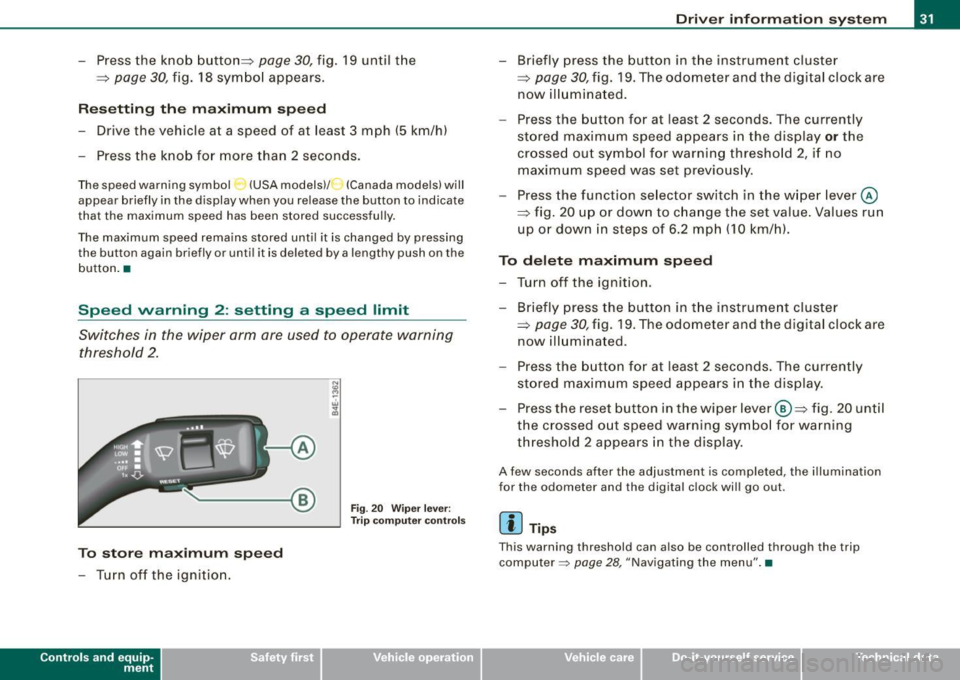
Switches in the wiper arm are used to operate warning
threshold 2 .
To store maximum speed
- Turn off the ignition.
Con tro ls and eq uip
ment
A
Fig . 20 Wiper lever:
Trip computer controls
Driver information system
- Briefly press the button in the instrument cluster
=;, page 30, fig. 19. The odometer and the digital clock are
now illuminated.
- Press the button for at least 2 seconds. The currently
stored maximum speed appears in the display
or the
crossed out symbol for warning threshold 2, if no maximum speed was set previously.
- Press the function selector switch in the wiper lever @
::::> fig. 20 up or down to change the set value. Values run
up or down in steps of 6.2 mph (10 km/h).
To delete maximum speed
- Turn off the ignition.
- Briefly press the button in the instrument cluster
=>
page 30, fig. 19. The odometer and the digital clock are
now illuminated .
- Press the button for at least 2 seconds. The currently
stored maximum speed appears in the display.
Press the reset button in the wiper lever ®=> fig. 20 until
the crossed out speed warning symbol for warning threshold 2 appears in the display.
A few seconds after the adjustment is completed , the illumination
for the odometer and the digital clock will go out.
[ i] Tips
Th is warning threshold can also be controlled through the trip
computer =>
page 28, "Navigating the menu". •
Vehicle care I I irechnical data
Page 40 of 316
Opening and closing
Opening and closing
Keys
Key set
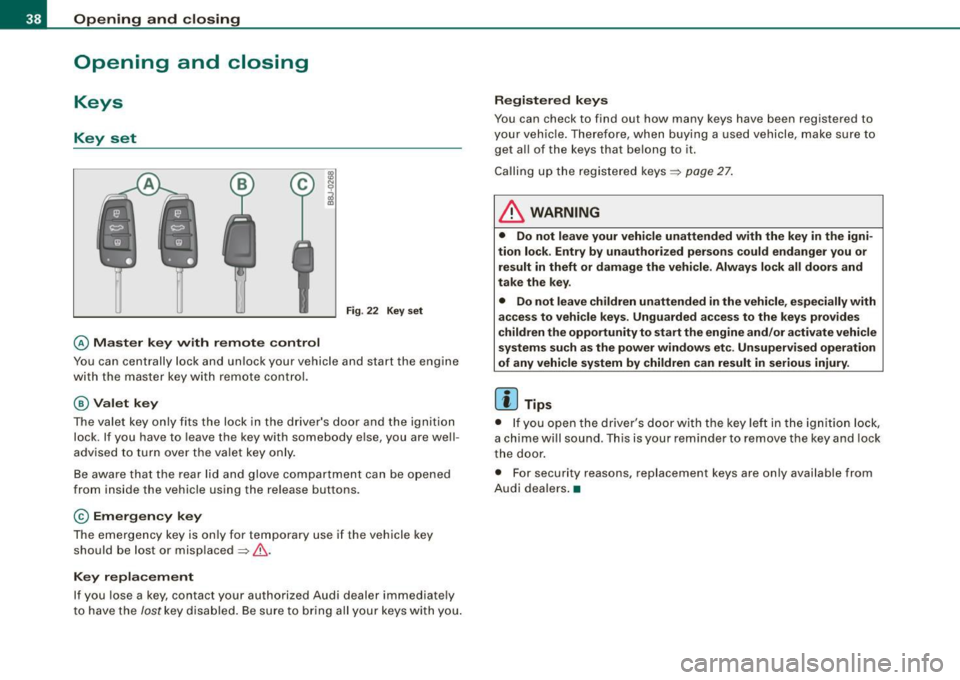
@ Ma ster key wi th remote control
Fig . 22 Key set
You can centrally lock and unlock your vehicle and start the engine
with the master key with remote control.
@ Valet k ey
The valet key only fits the lock in the d river's door and the ignition
lock . If you have to leave the key with somebody else, you are well
advised to turn over the valet key only.
Be aware that the rear lid and glove compartment can be opened
from inside the vehicle using the release buttons.
© Em erg en cy k ey
The emergency key is on ly for temporary use if the vehicle key
should be lost or misplaced=> &.
Key replacement
If you lose a key, contact your authorized Audi dealer immediately
to have the
lost key disa bled. Be sure to bring all your keys with you .
Registered k ey s
You can check to find out how many keys have been registered to
your veh ic le . Therefore, when buying a used vehicle, make sure to
get a ll of the keys that belong to
it.
Calling up the registered keys=> page 27.
& WARNING
• Do not leave your vehi cle unattended with the key in the igni
tion lock . Entry by unauthorized per sons co uld endanger you or
result in theft or damage the vehicle . Alw ays lock all doors and
take th e key.
• Do not leave children unattended
in the vehicle, especially with
acces s to vehi cle key s. Unguarded a ccess to the ke ys prov ides
childr en the opportunity to sta rt the engine and /or a ctivate vehicle
s y stems such as the po wer wind ows etc. Un supe rvis ed op eration
of an y vehicle sy stem b y childre n can result in seriou s injur y.
[ i ] Tips
• I f you open the driver's door with t he key lef t in the ignit ion lock,
a chime wi ll sound . Th is is your reminder to remove the key and lock
t he door.
• For security reasons, replacement keys are on ly available from
Audi dea lers .•
Page 41 of 316
Master key with remote control
The remote control allows you to lock or unlock the
vehicle electronically.
"' N
0
i
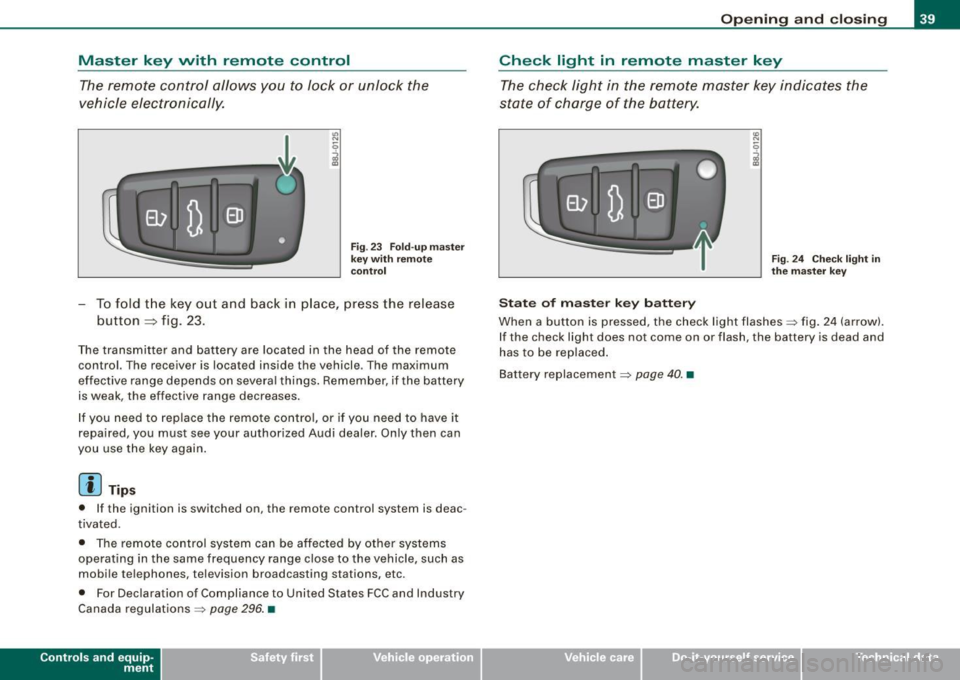
F ig . 23 Fold -u p m as ter
k ey wit h re mo te
co ntrol
- To fold t he key out and back in place, p ress the release
button
=> fig. 23.
The transmitter and battery are located in the head of the remote
control. The receiver is located inside the vehicle . The maximum
effective range depends on severa l things . Remember, if the battery
is weak, the effective range decreases.
I f you need to replace the remote co ntro l, or if you need to have it
repaired , you must see your authorized Audi dealer. Only then can
you use the key again .
[ i] Tip s
• If the ignition is switched on, the remote control system is deac
tivated .
• T he remote control system can be affected by other systems
operating in the same frequency range close to the vehicle , such as
mobi le telephones, television broadcasting stations, etc.
• For Declaration of Compliance to United States FCC and Industry
Canada regulations =>
page 296. •
Contro ls and eq uip
ment
Op ening and clo sing
Check light in remote master key
The check light in the remote master key indicates t he
state of charge of the battery.
St ate o f m aster k ey b att ery
Fig . 2 4 Chec k ligh t in
th e m as ter k ey
When a button is pressed, the check light flashes~ fig . 24 (arrow).
I f the check light does not come on or flash, the battery is dead and
has to be replaced .
Bat tery replacement
~ page 40. •
Vehicle care I I Technical data
Page 42 of 316
Opening and closing
Master key battery replacement
Each master key contains a battery housed under the
cover.
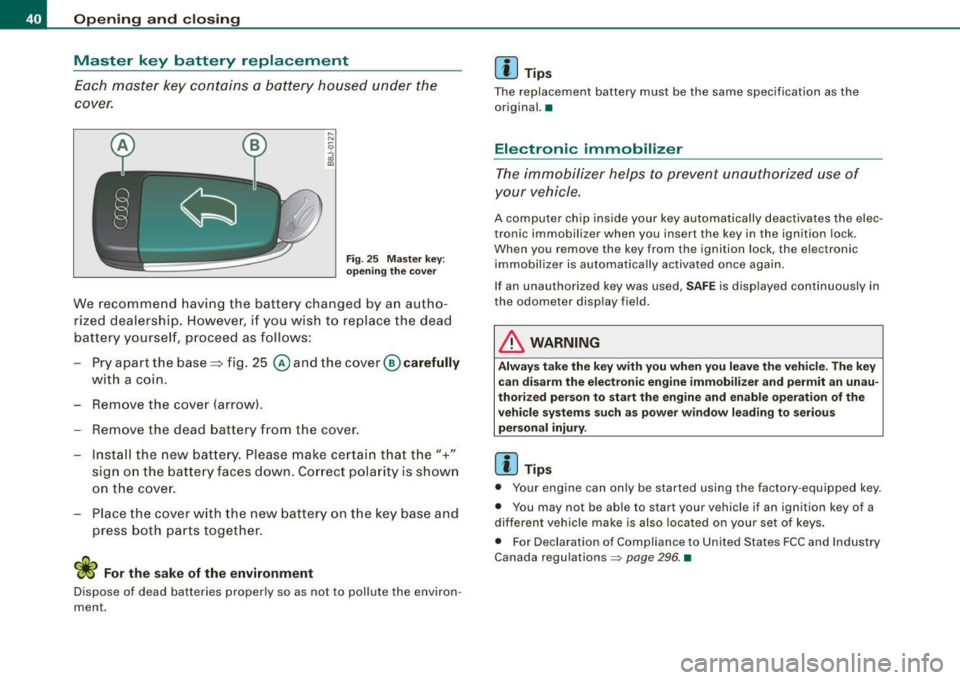
Fig. 25 Master key:
opening the cover
We recommend having the battery changed by an autho
rized dealership. However, if you wish to replace the dead
battery yourself, proceed as follows:
- Pry apart the base::::::,fig. 25
@andthecover @carefully
with a coin.
- Remove the cover (arrow) .
- Remove the dead battery from the cover.
- Install the new battery. Please make certain that the"+"
sign on the battery faces down. Correct polarity is shown
on the cover.
- Place the cover with the new battery on the key base and
press both parts together.
For the sake of the environment
Dispose of dead batteries properly so as not to pollute the environ
ment.
[ i ] Tips
The replacement battery must be the same specification as the
original. •
Electronic immobilizer
The immobilizer helps to prevent unauthorized use of
your vehicle.
A computer chip inside your key automatically deactivates the elec
tronic immobilizer when you insert the key in the ignition lock .
When you remove the key from the ignition lock, the electronic
immobilizer is automatically activated once again .
If an unauthorized key was used,
SAFE is displayed continuously in
the odometer display field.
& WARNING
Always take the key with you when you leave the vehicle. The key can disarm the electronic engine immobilizer and permit an unau
thorized person to start the engine and enable operation of the
vehicle systems such as power window leading to serious
personal injury.
[ i ] Tips
• Your engine can only be started using the factory -equipped key.
• You may not be able to start your vehicle if an ignition key of a
different vehicle make is also located on your set of keys.
• For Declaration of Compliance to United States FCC and Industry
Canada regulations ~
page 296. •
Page 43 of 316
Power locking system
General description
The power locking system l ocks or unl ocks all doors
simultane ously.
The power locking system in your vehic le incorporates the following
functions :
• Central locking function
• Remote control feature ~
page 39.
• Anti -Theft A larm System ~ page 47.
You can lock and un lock the vehicle from outside either with the
ke ys or the remote control transmitter inside the master key.
A ctiv ating the pow er locki ng system lo cks or unlo ck s a ll d oors
s imultaneou sly .
You can also open or close the windows when you lock or unlock the
driver's door using the key. For sa fety reasons, you cannot use the
remote control to open/c lose the windows.
The
selective unlock feature makes it possible to open just the
driver's door.
I f the power locking system should malfunction, you can lock and
unlock each lock in dividually using the vehicle key .
Automatic locking *
The automatic locking feature locks all the vehicle doors and the
rear lid when you drive faster than 9 mph (15 km/hl.
You can unlock the vehicle from the inside by:
• removing the key from the ignition switch (the vehicle will auto
matica lly unlock itself) or
• pressing the unlock part of the power lock switch
oc:'il or
pulling the door handle (to open the door).
Controls and equip
ment
Opening and clo sing
If you wish, you can have an authori zed Audi dea ler convert your
power d oor lock sys tem to auto matic locking .
Unlocking /lo cking the vehicl e
When you unlock your vehic le :
• The anti -theft alarm system is deactivated briefly .
• The vehicle interior lights i lluminate for approxima te ly 30
seconds .
When you
lo ck the vehicle:
• All doors are locked.
• The anti -theft ala rm system is activated .
• The vehicle interior lights turn off.
• The anti -theft alarm system is act ivated. The horn of the anti
theft alarm syst em wi ll sound and the anti -theft alarm system readi
ness l ight, located in the center of the instrument pane l be low the
windshield on the right side of the air vent, will start to blink .
& WARNING
• When you lock your vehicl e from o utside , nobod y -espe ciall y
children - should remain in side the vehic le. Remembe r, when you
lock the vehi cle from the outs ide the windo ws cannot be opened
from the inside.
• When you leave the vehi cle , alw ays remove the ignition key and
ta ke it with you. Thi s will prev ent pa ssenger s (children , for
e x ample ) from ac cident ally b eing locked in the vehi cle should they
accidentally pre ss the power locking swit ch .
• Do not le ave ch ild ren i nside the vehi cle unsupervised . In an
emergency it would be impo ssible to open the doors from the
out side w ithout the key .
I • •
Page 45 of 316
If you need to replace the remote control, or if you need to have it
repaired, you must see your authorized Audi dealer. Only then can
you use the key again.
& WARNING
Read and follow all WARNINGS => & in "General description" on
page 41.
[ i] Tips
• The remote control key is automatically deactivated when the
ignition is switched on.
• The operation of the remote control key can be temporarily
disrupted by interference from transmitters in the vicinity of the
vehicle working in the same frequency range (e.g. a cell phone, radio equipment) .
• In order to make sure the locking function is working, you should
always keep your eye on the vehicle to make sure it is properly
locked.
• Do not use the remote control if you are inside the car, otherwise
you may unintentionally lock the vehicle, and then you would set off the anti-theft alarm when you try to start the engine or open a door .
In case this happens anyhow, push the unlock button
II).
• Use the panic function only if you are in an emergency
situation. •
Resetting the remote control
The remote control must be reset if the vehicle does not
unlock.
- Press the unlock CD button on the remote control.
- Unlock or lock the vehicle once at the door lock using the
stem of the remote control key.
Controls and equip
ment
Opening and closing
The synchronization process must not take longer than 30
seconds. •
Operating locks with the key
To lock and unlock the vehicle from the outside, turn the
key in the lock of the driver's door.
To unlock the vehicle
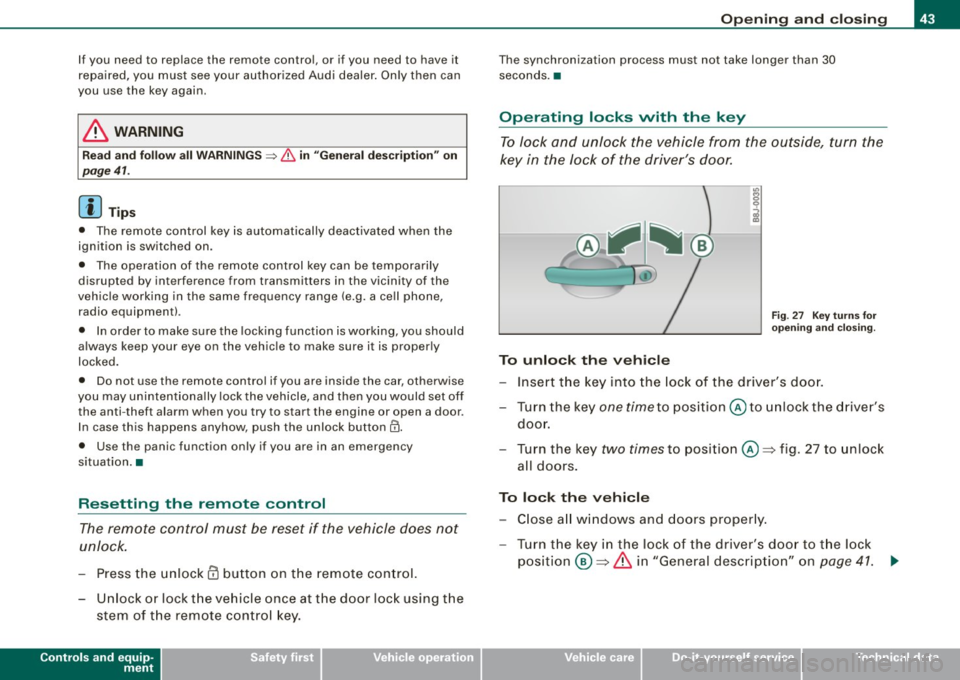
Fig. 27 Key turns for
opening and closing.
-Insert the key into the lock of the driver's door.
- Turn the key
one time to position @to unlock the driver's
door.
- Turn the key
two times to position @~ fig . 27 to unlock
all doors.
To lock the vehicle
- Close all windows and doors properly.
- Turn the key in the lock of the driver's door to the lock
position @~
& in "General description" on page 41. ~
I • •