ECO mode AUDI TT COUPE 2009 Owner's Manual
[x] Cancel search | Manufacturer: AUDI, Model Year: 2009, Model line: TT COUPE, Model: AUDI TT COUPE 2009Pages: 316, PDF Size: 71.16 MB
Page 95 of 316
Starting and stopping the engine
Starting the engine
The engine can only be started with on original Audi key
and the clutch pedal* depressed.
- Set the parking brake.
Move the selector lever to the neutral position (automatic
transmission: selector lever in P or N)
~ & .
- On vehicles with manual transmission, fully depress the
clutch pedal.
- Turn the ignition key to position
0 ~ page 92, fig. 79 -
do not depress the gas pedal when starting the engine!
- Let go of the key as soon as the engine starts.
A cold engine may at first be loud after it has been started. This is
due to the hydraulic valves building up the oil pressure . This normal
and no need for concern.
If the engine does not start immediately, stop trying after 10
seconds and then try to restart the engine about 30 seconds later.
& WARNING
Never start or let the engine run in a confined or enclosed area.
Exhaust fumes from the engine contain carbon monoxide, a color
less and odorless gas. Carbon monoxide can be fatal if inhaled.
• Never leave the engine idling unattended. An unattended
vehicle with a running engine poses a danger of personal injury or
theft.
Controls and equip
ment
On the road
0 Note
• Avoid high engine speeds, fast acceleration or heavy engine
loads while the engine is still cold. This could damage the engine.
• The engine cannot be started by pushing or towing the vehicle.
~ For the sake of the environment
To avoid unnecessary engine wear and to reduce exhaust emis
sions, do not let your vehicle stand and warm up. Be ready to drive
off immediately after starting your vehicle. Maintain moderate
speed until the engine is completely warm. Remember, the engine
performs best at operating temperature. •
Stopping the engine
-Turn the ignition key to position G) ~ page 92, fig. 79.
& WARNING
• Never turn off the engine until the vehicle has come to a
complete stop.
• The brake booster and servotronic only work when the engine
is running. With the ignition turned off, you have to apply more
force when steering or braking. Since you cannot steer and stop
normally, this can lead to accidents and serious injuries.
• The radiator fan can continue to run for up to 10 minutes even
after you have turned off the engine and removed the ignition key.
The radiator fan can also turn on again if the engine coolant heats
up because of intense sunlight or heat build-up
in the engine
compartment. .,
I • •
Page 106 of 316
• ..__T_ ra_ n_s_ m_ i_ s _s_ i_ o _n ___________________________________________________ _
Switching to manual
-Push the selector lever to the right from D. As the trans
mission has switched,
6 5 4 3 2 1 appears in the display,
with the gear that is engaged highlighted.
Upshifting
Tap the selector lever forward (in the tiptronic setting)
=> page 103, fig. 88 G).
Downshifting
- Tap the selector lever backward (in the tiptronic setting)
o.
Switching to manual can be carried out with the vehic le stationary
as well as moving .
When accelerating, the transmission shifts into the next gear in gears 1 , 2, 3, 4 and 5 shortly before the maximum permissible
engine speed is reached.
If you have selected a lower gear than the current one , the transmis
sion will only shift down when the engine cannot be overspeeded.
If kick -down is actuated, the transmission shifts into a lower gear
independently of speed and engine rpm .•
Ap plies to vehicles: w ith S tronic ® and wi th Tipt ro nic co ntrols o n the st eer in g w hee l
Steering wheel with Tiptronic ® controls
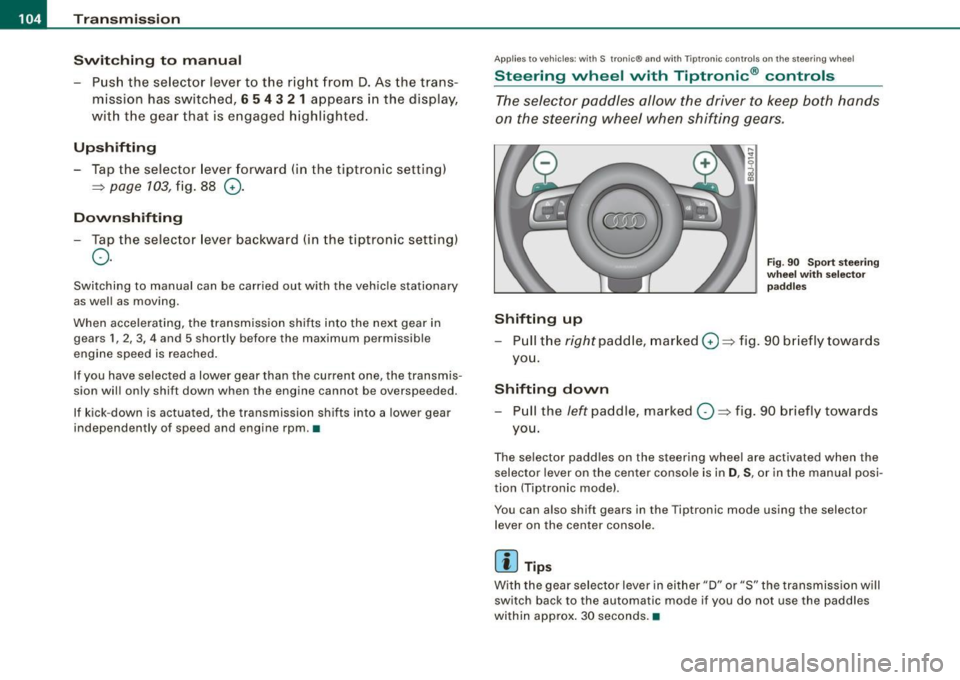
The selector paddles allow the driver to keep both hands
on the steering wheel when shifting gears.
Shifting up
Fig. 90 Sport steering
wheel with selec tor
paddles
- Pull the right paddle, marked 0=> fig. 90 briefly towards
you.
Shifting down
- Pull the left paddle, marked O => fig. 90 briefly towards
you.
The selector padd les on the steering wheel are activated when the
selector lever on the center console is in
D, S, or in the manual posi
tion (Tiptronic mode) .
You can also shift g ears in the Tiptronic mode using the selector
lever on the center console.
[ i ] Tips
With the gear selector lever in ei ther "D" or "S" the transmission will
switch back to the automa tic mode if you do not use the paddles
within approx . 30 seconds. •
Page 107 of 316
____________________________________________________ T_ r_a _n _ s_ m __ is_s_ i _o _ n __ llll
Ap plies to vehicles : wit h S tro ni c®
Kick -dovvn feature
The kick-down feature allows maximum acceleration.
If you depress the accelerator pedal fully beyond the full-throttle
position, the transmission automatically downshifts one gear,
depending on vehicle speed and engine rpm. The upshift into the
next higher gear takes place as soon as the maximum specified
engine speed is reached.
& WARNING
Please note that the drive wheels can spin if the kick-down is used
on a smooth slippery road -risk of skidding! •
Applies to vehicles : withs t ro ni c®
Launch Control Program
The Launch Control Program permits maximum accelera
tion .
In order to use Launch Control, the ASR (Anti-Slip Regula
tion) must be disabled. When ASR is disabled, the ESP
warning/indicator light 9 in the instrument cluster illumi
nates . So that Launch Control can be used, the engine must
be at operating temperature and the steering wheel must
not be turned .
- With the engine running, briefly press the ESP button.
The message "ASR off" appears in the instrument cluster
d isplay.
- Shift the gear lever to "S" or the tiptronic® position.
- Step on the brake pedal with your left foot and keep the
brake pedal fully depressed for at least one second.
Controls and equip
ment
- With your right foot, step on the accelerator to the wide
open throttle position or Kickdown. The engine speed
settles at about 3,200 rpm.
- Take your left foot off the brake.
The S tronic® in your vehicle is electronically controlled. A special
Launch Control Program provides the best acceleration from a
standing start .
& WARNING
• Always adapt your driving to the traffic flow.
• Only use Launch Control when road and traffic conditions allow
it and other drivers will not be endangered or annoyed by your
driving and the acceleration of the vehicle.
• Make sure that ESP remains enabled. With the ESP disabled,
the vehicle could brake away, particularly on a slick and slippery road -risk of skidding!
• Once acceleration is finished, switch ASR on again by briefly
pushing the ESP button. •
Applies to vehicles: with S tronic®
Back-up program
In the event of a system malfunction, there is an back-up
program.
In the event of system malfunctions, the automatic transmission
switches to the fail- safe mode. This is signalled by one segment or
all the segments in the display illuminating or going out .
Th e effect of a system malfunction can be one of the following:
• The program shifts only into certain gears.
• Reverse gear can no longer be engaged.
I • •
Page 108 of 316
• ..__T_ ra_ n_s_ m_ i_ s _s_ i_ o _n ___________________________________________________ _
• The manual shift program (tiptronic) is switched off in the fail
safe mode.
If the transmission switches to fail-safe mode, you should take the
vehicle to an authorized Audi dealership as soon as possible to have
the condition corrected .•
A pp lies to vehi cles: wit h S tronic ®
Emergency release for selector lever
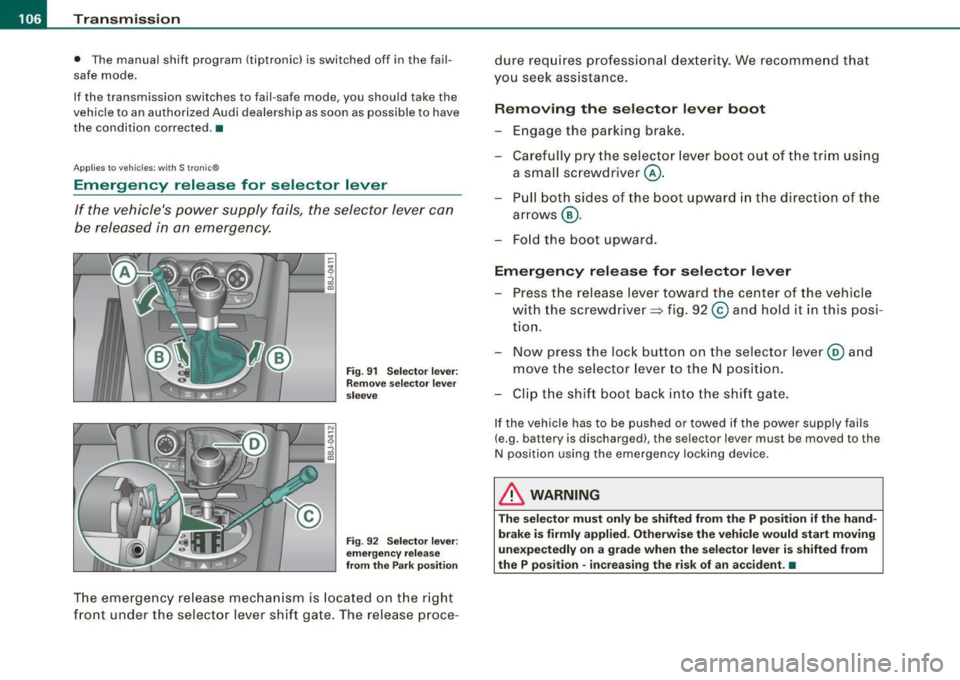
If the vehicle's power supply fails, the selector lever can
be released in an emergency.
rr- ~v r::.~=::::::= ::;~~,:,:J ::: __ -tg
i
Fig. 91 Selector lever:
Remove selector lever
sleeve
Fig . 92 Selector lever:
emergency release
from the Park position
The emergency release mechanism is located on the right
front under the selector lever shift gate. The release proce- dure
requires professional dexterity. We recommend that
you seek assistance.
Removing the selector lever boot
-Engage the parking brake.
- Carefully pry the selector lever boot out of the trim using
a small screwdriver @.
- Pull both sides of the boot upward in the direction of the
arrows @.
- Fold the boot upward.
Emergency release for selector lever
-Press the release lever toward the center of the vehicle
with the screwdriver ~ fig. 92
© and hold it in this posi
tion.
- Now press the lock button on the selector lever@ and
move the selector lever to the N position.
- Clip the shift boot back into the shift gate.
If the vehicle has to be pushed or towed if the power supply fails
(e.g . battery is discharged), the selector lever mus t be moved to the
N position using the emergency locking device.
& WARNING
The selector must only be shifted from the P position if the hand
brake is firmly applied. Otherwise the vehicle would start moving
unexpectedly on a grade when the selector lever is shifted from
the P position -increasing the risk of an accident. •
Page 109 of 316
___________________________________________________ H_ o_m_ e_ L_ i_ n _ k_ ® __ ,n
Homelink®
Universal remote control
A pplies to vehi cles: w ith Home link® unive rsa l re mo te cont ro l
General information
The Homelink® fea ture c an learn up to three radio
frequency codes for m ost current transmitters used for
operating garage doors, estate gates, home or outdoor
lighting systems, and other devices.
You must first pr ogram the Homelink® transmitter before you can
use the system=> page 108, "Programming the Homelink® trans
mitter".
In order to program the Homelink® transmitter for devices uti lizing
rolling code, a second person on a ladder who can safe ly reach the
garage door opener motor is recommended. It is also necessary to
locate the "learn" button on your garage door opener motor . Refer
t o the operating instructions for the opener, as the location a nd
color of this but ton may vary by manufacturer.
You can still use the origina l remote control for the device at any
time.
& WARNING
• Never use the Homelink"" transmitte r with any garage door
opener that does have not the safety stop and rever se feature as
required by federal safety standards . This includes any garage
door opener model manufactured before April 1 , 1982 .
• A garage door opener whi ch cannot detect an obje ct, signaling
the door to stop and rever se does not meet current federal safety
standard s. U sing a ga rage door opener without these features
increases risk of serious injury or death .
Controls and equip
ment
& W ARNIN G (continu ed )
• For safety re asons never relea se the p ark ing brake or st art the
engine while anyone i s standing in front of the vehi cle .
• A garage door or an estate gate may sometimes be set
in
motion when the Homelink ® remote control is being
programmed . If the d evice is repeated ly act ivated , this can over
strain motor and damage it s elec trical component s -an over
heated motor is a fire hazard !
• To avoid po ssible in juries or property damage, please alway s
make ab solutely certain that no persons or obje cts are located in
the range of motion of any equipment being operated.
[ i ] Tips
• If you wou ld like more in forma tion on Hom elink ®, where to
purchase the Homelink ® compatible products, or wou ld like to
p urchase the Homelink ® Home Light ing Package , please ca ll toll
free : 1-8 0 0-355 -3515.
• Fo r Declaratio n of Co mpliance to United S ta tes FCC a nd In dus try
Canada regulations=> page
296. •
I • •
Page 110 of 316
• ..__H_ o_m_ e_ L_ i_ n _k_ @_R __________________________________________________ _
Applies to vehicles: with Home li nk® universal remote control
Programming the Homelink ® transmitt er
The transmitter is programmed in two phases. For rolling
code transmitters, a third phase is also necessary.
1----------------.....:!i:l
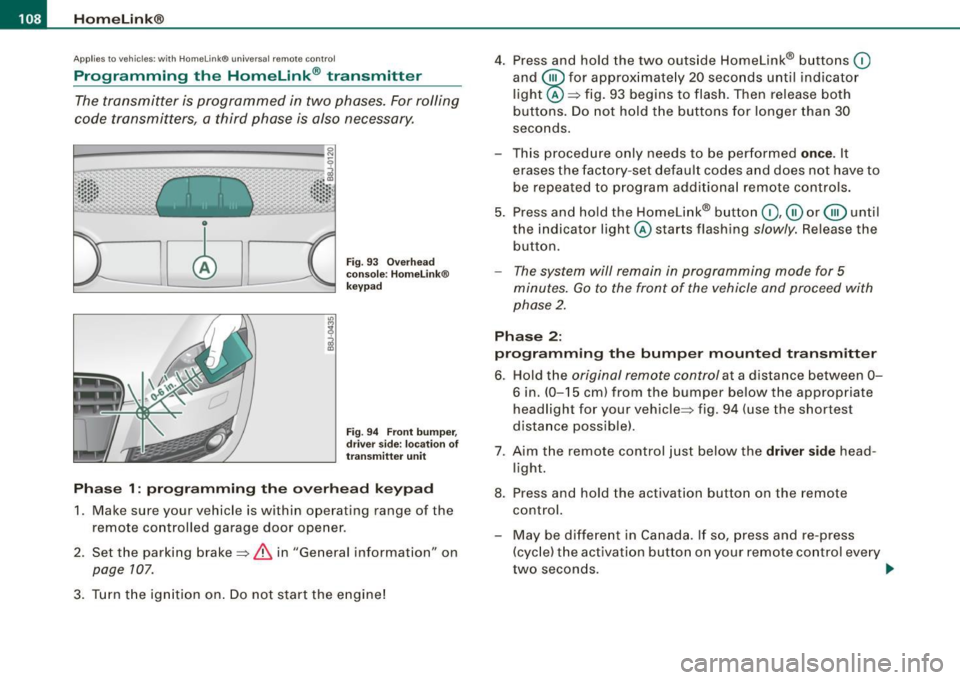
Fig . 93 Overhead
console : Homelink®
keypad
Fig. 94 Front bumper,
driver side: location of
transmitter unit
Phase 1: programming the overhead keypad
1. Make sure your vehicle is within operating range of the
remote controlled garage door opener .
2. Set the parking brake~
& in "General information" on
page 107.
3. Turn the ignition on. Do not start the engine! 4. Press and hold the two outside Homelink® buttons
(D
and
@for approximately 20 seconds until indicator
light @::::::, fig. 93 begins to flash. Then release both
buttons. Do not hold the buttons for longer than 30
seconds.
This procedure only needs to be performed
once . It
erases the factory-set default codes and does not have to
be repeated to program additional remote controls.
5. Press and hold the Homelink® button
(D , ® or @ until
the indicator light @starts flashing
slowly. Release the
button.
- The system will remain in programming mode for 5
minutes.
Go to the front of the vehicle and proceed with
phase 2.
Phase 2:
programming the bumper mounted transmitter
6. Hold the original remote control at a distance between 0-
6 in. (0-15 cm) from the bumper below the appropriate
headlight for your vehicle~ fig . 94 (use the shortest
distance possible) .
7. Aim the remote control just below the
driver side head
light.
8. Press and hold the activation button on the remote control.
- May be different in Canada. If so, press and re-press
(cycle) the activation button on your remote control every
two seconds. .-,,
Page 112 of 316
....... _H _o_ m _ e _L_i_n _k _ ® ____________________________________________________ _
- Press the appropriate programmed button
(0, ® or @
to activate the desired remote control function
~ & in
"General information" on
page 107. •
Applies to v ehic les : wit h Home link® univers al rem ote con tro l
Reprogramming a single button
A Homelink® button can be reprogrammed individually without affecting the other button a/locations.
Programming the overhead keypad
- Press the appropriate Homelink® button until the indi
cator light begins flashing slowly.
Programming the bumper mounted transmitter 1. Hold the
original remote control at a distance between 0-
5 in. (0-13 cm) from the bumper below the appropriate
headlight for your vehicle (use the shortest distance
possible) .
2. Aim the remote control just below the driver side head
light.
3. Press and hold the act ivation button on the remote
control.
4. The emergency flashers w ill flash three times (after
about
15-60 seconds) when the programming is
successful. Now release the button on the remote
control.
- If the device ut ilizes a rolling code, please follow phase 3
of ~
page 108, "Programming the Homelink® trans
mitter" for rolling code programming.
This procedure will cause the existing programming on the
Homelink ® button to be erased! •
App lies to ve hicl es: wit h Homeli nk® uni versal remote cont rol
Erasing the programming of the Homelink ®
transmitter
When you erase the programming, the programming on
all three of the transmitter channels with be lost!
- Perform steps 1 to 4 as described on~ page 108, "Phase
1: programming the overhead keypad".
When completed , the Homelink ® system will be in the p rog ram
ming mode and is then ready to learn the codes for remote
controlled devices.
[I) Tips
• Programmed buttons cannot be erased individually.
• For security reasons you are advised to erase the programming
of the Homelink ® system befo re you sell your vehicle. •
Page 132 of 316
___ S_a_ f_ e_ t-= y_ b_e_ l_ t _s _______________________________________________ _
To provide maximum protection, safety belts must always
be positioned correctly on the wearer's body.
Adjust the front seat and head restraint properly
=> page 69, "General recommendations ".
Hold the belt by the tongue and pull it evenly across the
chest and pelvis=>&.
- Insert the tongue into the correct buckle of your seat
until you hear it latch securely => page
129, fig. 106.
Pull on the belt to make sure that it is securely latched in
the buckle.
Automatic safety belt retractors
Every safety belt is equipped with an automatic belt retractor on the
shoulder belt. This feature locks the belt when the belt is pulled out
fast, during hard braking and in an accident . The belt may also lock
when you drive up or down a steep hill or through a sharp curve.
During normal driving the belt lets you move freely.
Safety belt pretensioners
The safety belts on the front seats are equipped with a belt preten
sion er that helps to tighten the safety belt and remove slack when
the pretensioner is activated. The function of the pretensioner is
monitored by a warning light:::::,
page 78, "Airbag system
t!A (USA models) /!.ir (Canada models)".
Switchable locking feature
Every safety belt except the one on the driver seat is equipped with
a switchable locking feature that
must be used when the safety belt
is used to attach a child seat. Be sure to read the important informa
tion about this feature:::::,
page 168.
& WARNING
Improperly positioned safety belts can cause serious injury in an
accident :::::,
page 130, "Safety belt position".
• Safety belts offer optimum protection only when the seat back
is upright and belts are properly positioned on the body.
• Never attach the safety belt to the buckle for another seat.
Attaching the belt to the wrong buckle will reduce safety belt
effectiveness and can cause serious personal injury.
• A passenger who is not properly restrained can be seriously
injured by the safety belt itself when it moves from the stronger
parts of the body into critical areas like the abdomen.
• Always lock the convertible locking retractor when you are
securing a child seat in the vehicle:::::,
page 170. •
Safety belt position
Correct belt position is the key to getting maximum
protection f ram safety belts.
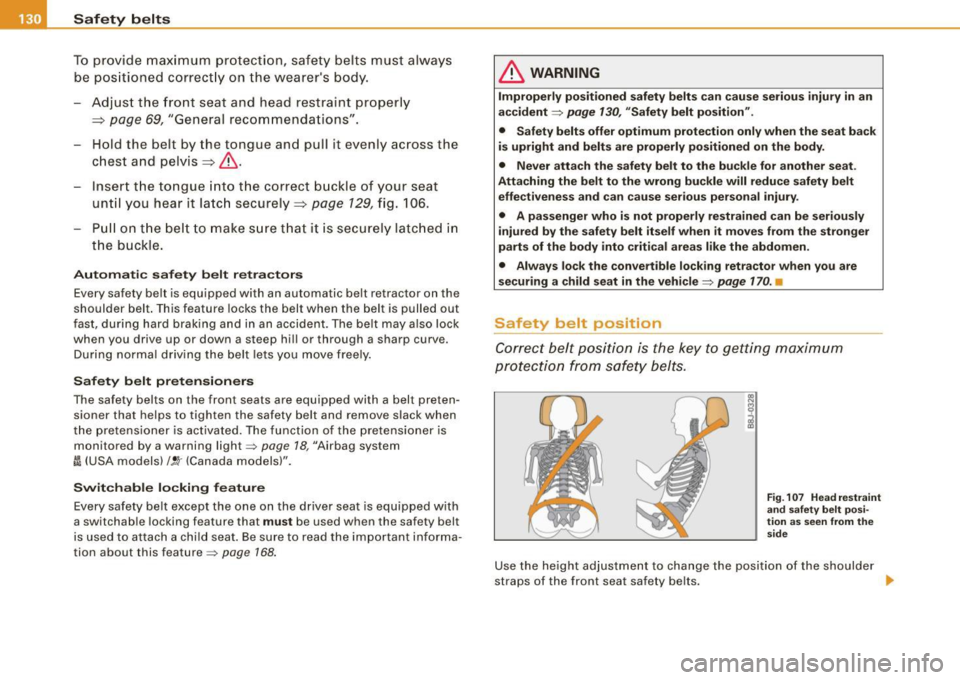
Fig. 107 Head restraint
and safety belt posi
tion as seen from the
side
Use the height adjustment to change the position of the shoulder
straps of the front seat safety belts.
~
Page 152 of 316

-L~A:::..:,: ir:....: b:!..::: a~g L.:: s:1y :...:s::..: t~ e:.: m:...:...:.. ________________________________________________ _
& WARN ING (continued )
• Always make sure that the side airbag can inflate without inter
fe rence :
- Never install seat covers or replacement upholstery over the
front seatback s that have not been spe cifically approved by
Audi.
- Never use additional seat cushions that cover the areas
where the side airbags inflate .
- Damage to the original seat covers or to the seam
in the area
of the side airbag module must always be repaired immedi
ately by an authorized Audi dealer .
• The airbag system can be activated only once. After an airbag
ha s inflated , it must be replaced by an authorized Audi de aler or
qualified technician who has the technical information , training
and special equipment necessary .
• The airbag system can be deployed only once. After an airbag
has been deployed , it must be repla ced with new repla cement
parts designed and approved especially for your Audi model
version . Replacement of complete airbag systems or airbag
components must be performed by qualified workshops only .
Make sure that any airbag service action is entered in your Audi
Warranty
& Maintenance booklet under AIRBAG REPLACEMENT
RECORD .
• For safety reasons in severe accidents , the alternator and
starter are separated from the vehicle battery with a pyrotechn ic
circuit interrupter.
-Work on the pyrotechni c circuit interrupter must only be
performed by a qualified dealer -risk of an accident!
- If the vehi cle or the circuit inte rrupter is scrapped , all appli
cable safety precautions must be followed. •
Other things that can affect Advanced Airbag
performance
Changing the vehic le 's suspens ion system can change the way that
th e Adva nced Air bag Syste m performs in a c rash. Fo r example,
using tire -ri m co mbinations not approved by Audi, lowering the
veh ic le, c hang in g the st if f ness o f th e suspe nsio n, incl uding th e
spr ings, suspension struts, shock absorbers etc. can change the
f o rces t hat a re m easured by the a irba g se nsors and se nt to the elec
tronic control unit. Some suspension changes can, for example,
i ncrease the fo rce level s meas ure d by the senso rs and make the
a irbag system dep loy in crashes in which it wou ld not d ep loy if the
changes ha d no t been made . O th er ki nds of changes may red uce
th e force levels measured by the sensors and preve nt the airbag
fro m deploying w hen it sh ould.
Th e senso rs in th e sa fety belt buc kle fo r the dr iver a nd fro nt
passenger seat te ll the e lectronic control modu le if the safety belt is
l a tc h ed or not. If th e sa fe ty belt is being use d, th e front airbag wi ll
deploy at a slightly higher rate of vehic le dece leration than if the
sa fe ty be lt is n ot b ein g use d. Th ere fore, i n a partic ula r co llisi on, i t is
possible that an airbag wi ll not deploy at a seating position where
th e sa fe ty be lt is bei ng us ed bu t wi ll infl ate at the position w here the
safety be lt is not being used. It is important that nothi ng interfere
with the safety belt buc kles so that the sensors can send the co rrect
i nformatio n about safety belt use to t he electronic control unit.
& WARNING
Changing the vehicle's suspension including use of unapproved
tire -rim combinations can change Advanced Airbag performance
and increase the risk of serious personal injury in a crash.
• Never install suspension components that do not have the
same pe rformance characteristics as the components originally
installed on your vehicle.
• Never use tire -rim combinations that have not been approved
by Audi. ..
Page 161 of 316

-----------------------------------------~C::_! h~ i~ ld ~ S~a !_!f ~e _!;tY L _lffl!III
restraints and for the different models of the same kind of child
restraint offered by child restraint manufacturers.
The weight ranges for the individual types, makes and models of
child restraints that the NHTSA has specified in the Safety Standard
together with the weight ranges of typ ical infants and typical 1 year
old child have been stored in the control unit of the Advanced
Airbag System. When a child restraint is being used on the front
passenger seat with a typical 1 year -old child, the Advanced Airbag
System compares the weight measured by the weight sensing mat
with the information stored in the electronic control unit.
The electronic control unit also registers the tension on the front
passenger safety belt. The tension on the safety belt for the front
passenger seat will be different for an adult who is properly using
the safety belt as compared to the tension on the belt when it is
used to attach a child restraint to the seat. The sensor below the
latch for the safety belt for the front seat passenger measures the
tension on the belt . The input from this sensor is then used with the
weight to "decide" , whether there is a child restraint with a typical 1
year-old child on the front passenger seat and whether or not the airbag must be turned off.•
Child restraints and Advanced Airbags
Regardless of the child restraint that you use, make sure that it has
been certified to meet United States Federal Motor Vehicle Safety
Standards and has been certified by its manufacturer for use with
an airbag. Always be sure that the chi ld restraint is properly
installed at one of the rear seating positions. If in exceptiona l
circumstances you must use it on the front passenger seat, carefully
read all of the information on child safety and Advanced Airbags
and heed a ll of the applicable WARNINGS. Make certain that the
child restraint is correctly recognized by the weight -sensing mat
inside the front passenger seat, that the front passenger airbag is
turned off and that the airbag status is always correctly signaled by
th e
PASSENGER AIR BAG OFF light .
Controls and equip
ment Safety first Vehicle operation
Many
types and models of child restraints have been available over
the years, new mode ls are introduced regularly incorporating new
and improved designs and older mode ls are taken out of produc
tion. Child restraints are not standardized . Child restraints of the
same type typically have different weights and sizes and different
'footprints,' the size and shape of the bottom of the chi ld restraint
that sits on the seat, when they are installed on a vehicle sea t. These
differences make it virtual ly impossible to certify comp liance with
the requirements for advanced airbags with each and every child
restraint that has ever been sold in the past or will be sold over the
course of the usefu l life of your vehic le.
For this reason, the United States National Highway Traffic Safety
Administration has pub lished a list of specific type, makes and
models of child restraints that must be used to certify compliance
of the Advanced Airbag System in your vehicle with the suppression
requirements of Federal Motor Vehicle Safety Standard 208. These
child restraints are:
A. Car beds, manufactured on or after September 1,
2004:
• Cosco Dream Ride 02-719
B. Rear facing child restraint systems, manufactured
on or after September 1, 2004:
(When the restraint system comes equipped with a removable base,
compliance has to be certified with or without the base) .
• Britax Handle with Care 191
• Century Assura 4553
• Century Smart Fit 4543
• Cosco Arriva 02727
• Evenflo Discovery Adjust Right 212
• Evenflo First Choice 204
• Graco lnfant8457
Vehicle care Do-it-yourself service Technical data