automatic transmission AUDI TT COUPE 2016 User Guide
[x] Cancel search | Manufacturer: AUDI, Model Year: 2016, Model line: TT COUPE, Model: AUDI TT COUPE 2016Pages: 322, PDF Size: 52.86 MB
Page 73 of 322
Downloaded from www.Manualslib.com manuals search engine ..... N
G: CX)
.....
"' U"I
.....
"' .....
Selector lever emergency release
If the vehicle's power supply fails, the selector
lever can
be released in an emergency.
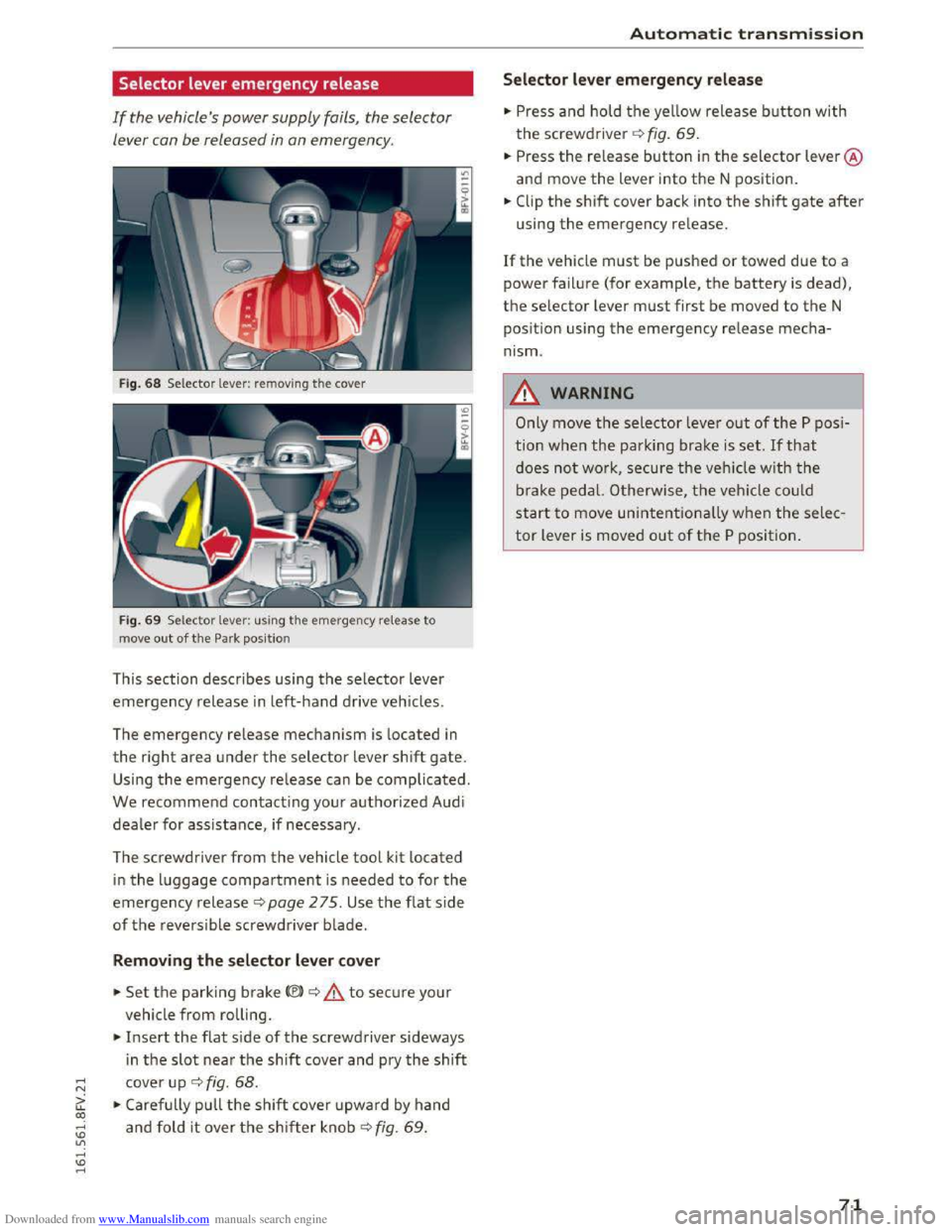
Fig. 68 Selector lever: removing the cover
Fig. 69 Selector lever: us ing the emergency release to
move
out of the Park position
This section describes using the selector lever
emergency release in left-hand drive vehicles.
The
emergency release mechanism is located in
the right area under the selector lever shift gate.
Using the emergency release can be complicated.
We recommend contacting your authorized Audi
dealer for assistance, if necessary.
The screwdriver
from the vehicle tool kit located
in the luggage compartment is needed to for the
emergency release c:> page 2 75. Use the flat side
of the reversible screwdriver blade.
Removing the selector lever cover
.. Set the parking brake<®> c:> A to secure your
vehicle
from rolling .
.. Insert the flat side of the screwdriver sideways
i n
the slot near the shift cover and pry the shift
cover up c:> fig. 68 .
.. Carefully pull the shift cover upward by hand
and fold it over the shifter knob c:> fig. 69 .
Automatic transmission
Selector lever emergency release
.. Press and hold the yellow release button with
the screwdriver c:> fig. 69.
.. Press the re lease button in the selector lever @
and move
the lever into the N position .
.. Clip the shift cover back into the shift gate after
using the emergency release.
If the vehicle must be pushed or towed due to a
power failure (for example, the battery is dead),
the selector lever must first be moved to the N
pos ition using
the emergency release mecha
nism.
_&WARNING
Only move the selector lever out of the P posi
tion
when the parking brake is set. If that
does not work, secure the veh icle w ith the
brake pedal. Otherwise,
the vehicle could
start to move unintentionally when the selec
tor lever is moved out of the P position.
71
Page 82 of 322
Downloaded from www.Manualslib.com manuals search engine Assist
& WARNING
Using Audi drive select incorrectly can lead to
collisions, other accidents and serious inju
ries.
Description
Applies to: vehicles with Audi drive select
The vehicle setup in each mode depends on the
vehicle's features. However, the engine and
steering are always affected.
Engine and automatic transmission
Depending on the mode, the engine and auto
matic transmission respond more quickly or i n a
more balanced
manner to accelerator pedal
movements.
Adaptive dampers (Audi magnetic ride)*
The adaptive dampers use sensors to record in
formation regarding steering movements, brak
ing and acceleration operations by the driver,
road
surface, driving speed, and load. With dri ve
select, you can adjust the adaptive dampers to
sporty (dynamic), comfortable (comfort) or ba l
anced (auto).
Steering
The power steering adapts. Indirect steering that
moves easily as in comfort mode is especially
suited to long drives on a highway. The dynamic
mode provides sporty, direct steering.
Cruise control system*
The acceleration performance is especially fuel
efficient in efficiency* mode.
Engine sound*
The engine sound is adapted to the applied mode
and can be subtle to sporty.
@ Tips
In some models, the maximum vehicle speed
can only be reached in the auto and dynamic
modes.
80
Selecting the driving mode
Applies to: vehicles with A ud i drive select
You can select between efficiency*, comfort, au
to, dynamic and individual.
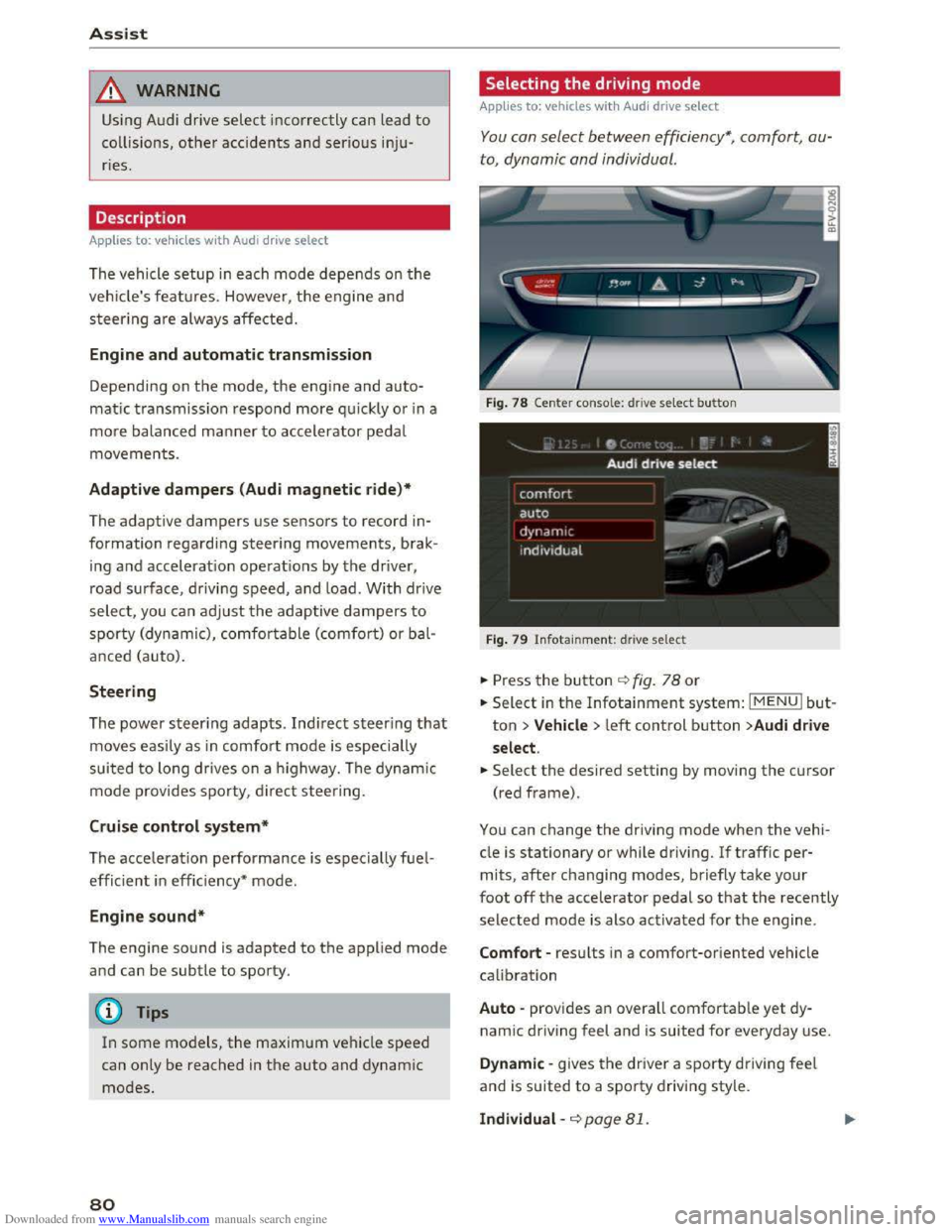
Fig. 78 Center conso le: drive select button
Fig. 79 Infotainment: drive select
.. Press the button ¢fig. 78 or
.. Select in the Infotainment system: IMENUI but
ton >Vehicle > left control button >Audi drive
select .
.. Select the desired setting by moving the cursor
(red frame).
You can change the driving mode when the vehi
cle is stationary or while driving. If traffic per
mits, after changing modes, briefly take your
foot off the accelerator pedal so that the recently
selected mode is also activated for the engine.
Comfort -results in a comfort-oriented vehicle
calibration
Auto -provides an overall comfortable yet dy
namic driving feel and is suited for everyday use.
Dynamic -gives the driver a sporty driving feel
and is suited to a sporty driving style.
Individual -¢page 81.
Page 280 of 322
Downloaded from www.Manualslib.com manuals search engine Emergency assista nce
-If you have a flat tire, move a safe distance
off the road. Turn off the engine, turn the
emergency flashers on and use other warn
ing devices to alert other motorists.
-Make sure that passengers wait in a safe
place away from the vehicle and well away
from the road and traffic.
-
To help prevent the vehicle from moving
suddenly and possibly slipping off the jack,
always fully
set the parking brake and block
the wheel diagonally opposite the wheel be
ing changed. When one front wheel is lifted
off the ground, placing the Automatic
Transmission in P (Park) will not prevent the
vehicle from moving.
- Before you
change a wheel, be sure the
ground is level and firm. If necessary, use a
sturdy board under the jack.
- Always
store the veh icle tool k it, the jack
and the replaced tire in the luggage com
partment¢ page 176.
Changing a wheel
When you change a wheel, follow the sequence
described
below step-by-step and in exactly that
order .
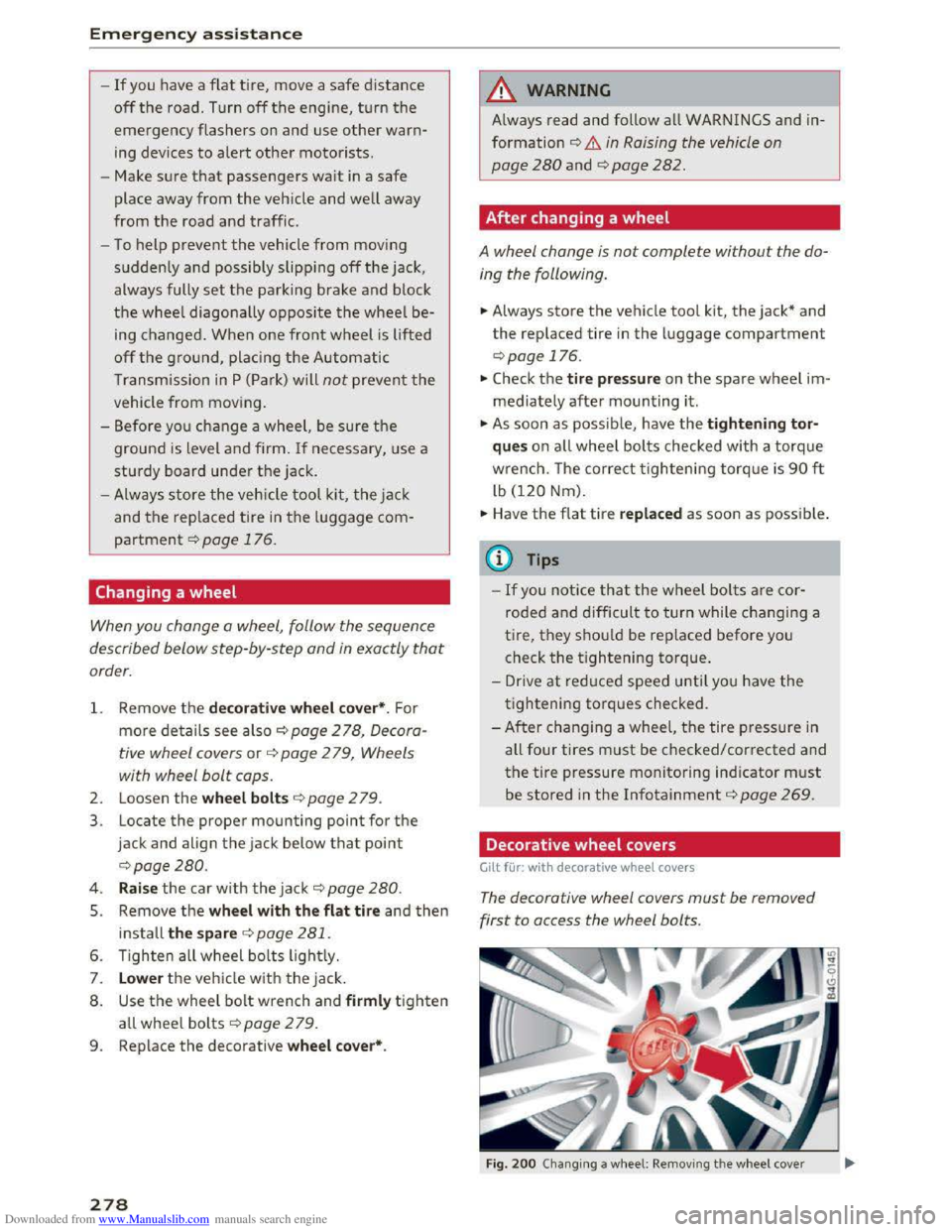
1. Remove the decorative wheel co ver*. For
more de tails see also¢ page 2 78, Decora
tive wheel covers or c::> page 2 79, Wheels
with wheel bolt caps.
2. Loosen the wheel bolts ¢page 2 79.
3. Locate the proper mounting point for the
jack and align the jack below that point
c::>page280.
4. Raise the car with the jack c::> page 280.
5. Remove the wheel with the flat tire and then
install the s pare ¢ page 281.
6. Tighten all wheel bolts lightly.
7.
Lower the veh icle with the jack .
8. Use the wheel bolt wrench and firml y tighten
all wheel bolts ¢page 279.
9. Replace the decorative wheel cover*.
278
A WARNING
Always read and follow all WARNINGS and in
formation c::> .& in Raising the vehicle on
page
280 and c::>page 282.
After changing a wheel
A wheel change is not complete without the do
ing the following.
.. Always store the vehicle tool kit, the jack* and
the replaced tire in the luggage compartment
c::>page 176.
.. Check the tire pressu re on the spare wheel im
mediately after mounting it.
.,. As soon as possib le, have the tightening tor
que s on all wheel bolts checked with a torque
wrench. The correct tightening torque is 90 ft
lb (120 Nm).
.. Have the flat t ire replac ed as soon as possible .
(0 Tips
-If you notice tha t the wheel bolts are cor
roded and difficult to turn while changing a
t ire,
they s hou ld be replaced before you
check
the tightening torque.
- Drive
at reduced speed unti l yo u have the
tightening torques checked.
-
After changing a wheel, the tire pressure in
all four tires must be checked/corrected and
the tire pressure monitoring indicator must
be stored in the Infotainment c::> page 269.
Decorative wheel covers
Gilt for: with decorative wheel covers
The decorative wheel covers must be removed
first to access the wheel bolts.
Fig. 200 Changing a w heel: Removing th e w heel cover
Page 288 of 322
Downloaded from www.Manualslib.com manuals search engine Fuses and bulbs
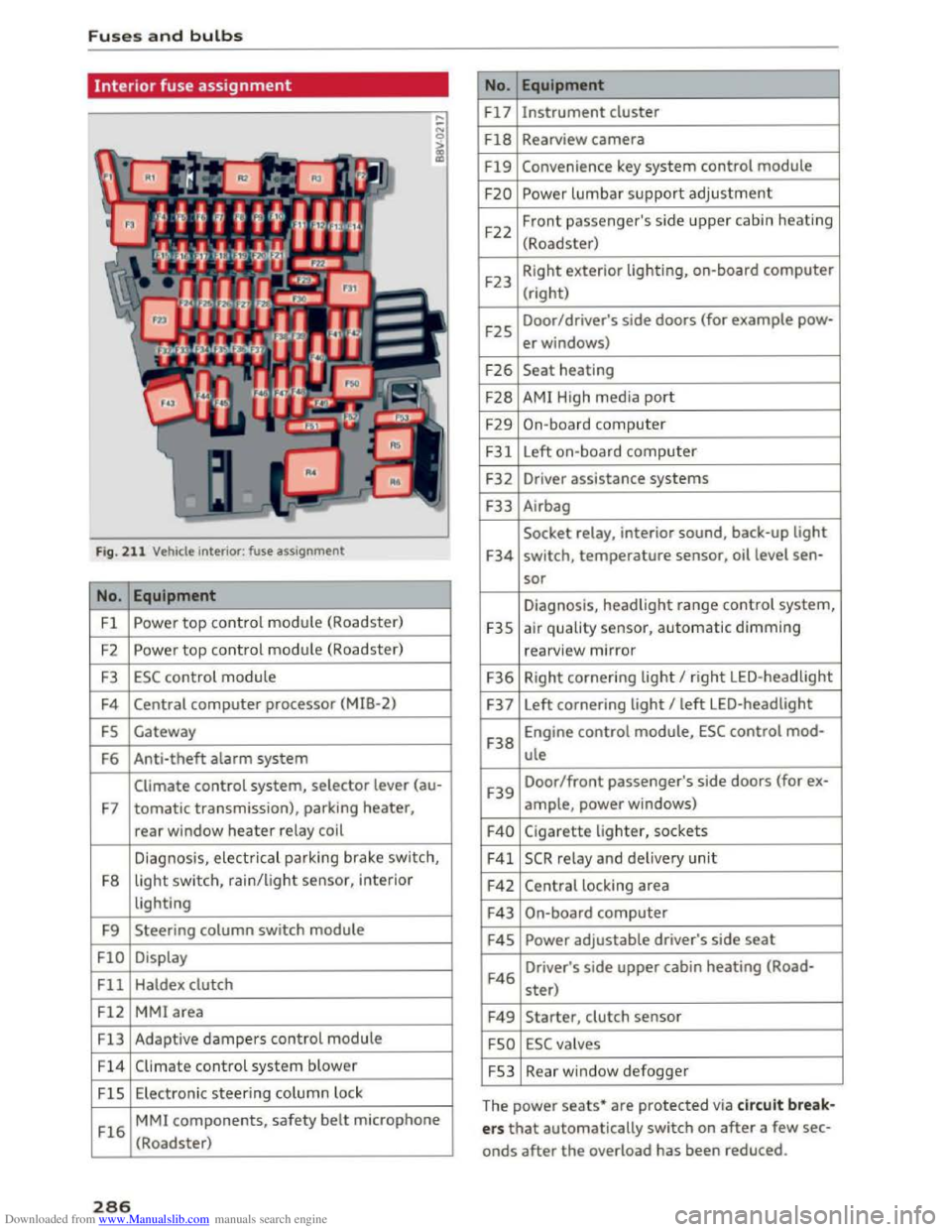
Interior fuse assignment
Fig. 211 Vehicle interior: fuse assignment
No. Equipment
Fl Powe r top control module (Roadster)
F2
Power top control module (Roadster)
F3 ESC control module
F4 Central computer processor (MIB-2)
FS Gateway
F6
Anti-theft alarm system
Climate control system, selector lever (au-
F7 tomatic transmission), parking heater,
rear window heater relay coil
Diagnosis,
electr ical parking brake switch,
F8
light switch, rain/light sensor, inter ior
lighting
F9
Steering column switch module
FlO Display
Fll Haldex clutch
F12 MMI area
Fl3 Adaptive dampers control module
F14 Climate control system blower
FlS Electronic steering column l ock
Fl6
MMI components, safety belt microphone
(Roadster)
286
No . Equipment
Fl7 Instrument cluster
Fl8 Rearview camera
F19 Convenience key system control module
F20 Power lumbar support adjustment
F22
Front passenger's side upper cabin heating
(Roadster)
F23 Right
exterior lighting, on-board computer
(right)
F25 Door/driver's
side doors (for example pow-
er windows)
F26 Seat heating
F28 AMI High media port
F29 On-board computer
F31 Left on-board computer
F32
Driver assistance systems
F33
Airbag
Socket relay, interior sound, back-up light
F34 switch, temperature sensor, oil level sen-
sor
Diagnosis, headlight range control system,
F35 air quality sensor, automatic dimming
rearview mirror
F36 Right cornering light I right LED-headlight
F37 Left
cornering light I left LED-headlight
F38
Engine control module, ESC control mod-
ule
F39
Door/front passenger's side doors (for ex-
ample, power windows)
F40 Cigarette lighter, sockets
F41 SCR relay and delivery unit
F42 Central locking area
F43 On-board computer
F45 Power adjustable driver's side seat
F46
Driver's side upper cabin heating (Road-
ster)
F49 Starter, clutch sensor
FSO ESC valves
FS3 Rear window defogger
The
power seats* are protected via circuit break
ers that automatically switch on after a few sec
onds after the overload has been reduced.
Page 289 of 322
Downloaded from www.Manualslib.com manuals search engine ..... N
G: CX)
.....
"' U"I
.....
"' .....
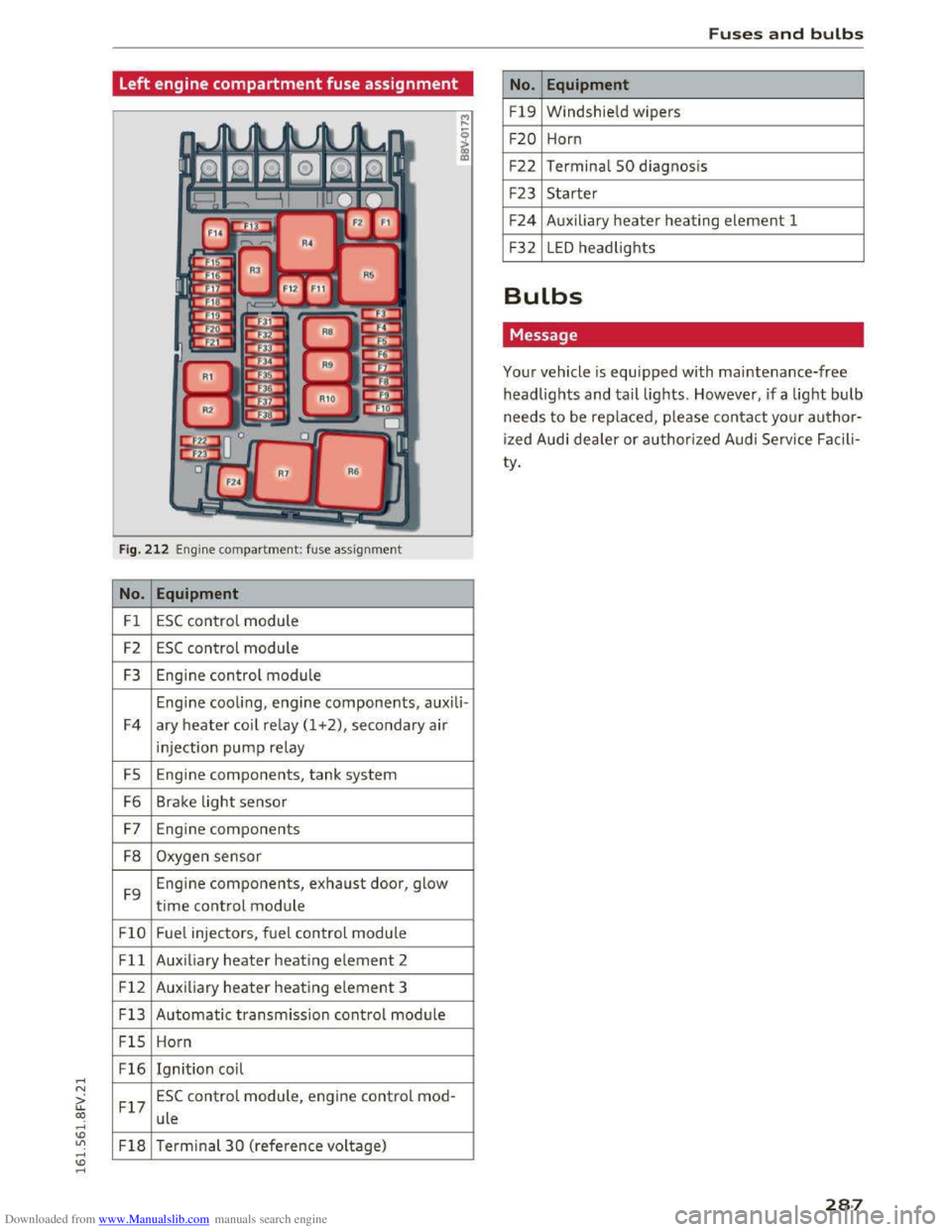
Left engine compartment fuse assignment
Fig. 212 Engine compartment: fuse assignment
No. Equipment
Fl ESC control module
F2 ESC control module
F3 Engine control module
Engine cooling, engine components, auxili-
F4 ary
heater coil relay (1 +2), secondary air
injection pump relay
FS Engine components, tank system
F6 Brake light sensor
F7 Engine components
F8 Oxygen sensor
F9 Engine
components, exhaust door, glow
time control module
FlO Fue
l injectors, fuel control module
Fll Auxiliary heater heating element 2
F 1 2 Auxiliary
heater heating e
lement 3
F13
Automatic transmission contr ol module
FlS Horn
F16 Ignition coil
F17
ESC control module, engine control mod-
ule
F18 Terminal 30 ( reference voltage)
Fuses and bulbs
No. Equipment
Fl9 Windshield wipers
F20 Horn
F22
Terminal 50 diagnosi s
F23 Starter
F24 Auxiliary heater heating element 1
F32 LED headlights
Bulbs
Message
Your vehicle is equipped with maintenance-free
headlights and tail lights. However, if a light bulb
needs to be replaced, please contact your author
ized Audi dealer or authorized Audi Service Facili
ty.
287
Page 290 of 322
Downloaded from www.Manualslib.com manuals search engine Emergency situations
Emergency situations
General
This chapter is intended for trained emergency
crews and working personnel who have the nec
essary tools and equipment to perform these
operations.
Starting by pushing or
towing
CD Note
Vehicles with an automatic transmission can
not be started by pushing or towi ng.
Starting with jumper
cables
If necessary, the engine con be started by con
necting it to the battery of another vehicle.
If the engine should fail to start because of a dis
charged or weak battery, the battery can be con
nected to the battery of another vehicle, using a
pair of jumper cables to start the engine.
Jumper cables
Use only jumper cables of sufficiently large cross
section to carry the starter current safely. Refer
to the manufacturer's specifications.
Use only jumper cables with insulated terminal
clamps which are distinctly marked:
plus(+) cable in most cases co lored red
minus(-) cable in most cases colored black.
A WARNING _,
Batteries contain electricity, acid, and gas.
Any of these can cause very serious or fatal in·
jury. Follow the instructions below for safe
handling of your vehicle's battery.
-Always shield your eyes and avoid leaning
over
the battery whenever possible.
- A discharged
battery can freeze at tempera
tures just below 32 °F (0 °C). Before con
necting a jumper cable, you must thaw the
288
frozen battery completely, otherwise it
could explode.
-
Do not allow battery acid to contact eyes or
skin. Flush any contacted area with water
immediately.
-
Improper use of a booster battery to start a
vehicle may
cause an explosion.
- Vehicle
batteries generate explosive gases.
Keep sparks, flame and lighted cigarettes
away from batteries.
-Do not try to jump start any vehicle with a
low acid level
in the battery.
-The voltage of th e booster battery must also
have a 12-volt rating. The capacity (Ah) of
the booster battery should not be lower
than that of the discharged battery. Use of
batteries of different voltage or substantial
ly different "Ah" rating may cause an exp lo
sion and personal injury.
- Never
charge a frozen battery. Gas trapped
in the ice may cause an explosion.
- Never
charge or use a battery that has been
frozen. The battery case may have be weak
ened.
-Use of batteries of different voltage or sub
stantially different capacity (Ah) rating may
cause an explosion and injury. The capacity
(Ah)
of the booster battery should not be
lower than that of the discharged battery.
- Before you check anything in the engine
compartment, always read and heed all
WARNINGS
~page 236.
CD Note
- Applying a higher voltage booster battery
will cause expensive damage to sensitive
electronic
components, such as control
units, relays, radio, etc.
-There must be no electrical contact between
the vehicles as otherwise current could al
ready start to flow as soon as the positive
( +
)terminals are connected.
Tips
T he discharged battery must be properly con-
nected to the vehicle's electrical system. ~
Page 291 of 322
Downloaded from www.Manualslib.com manuals search engine ..... N
G: CX)
.....
"' U"I
.....
"' .....
When jump starting or charging the battery,
never connect the negative ground cable to
the battery negative post because the battery
manager system must be able to detect the
battery's state of charge. Always connect the
negative ground cable to the negative ground
post of the battery manager control unit.
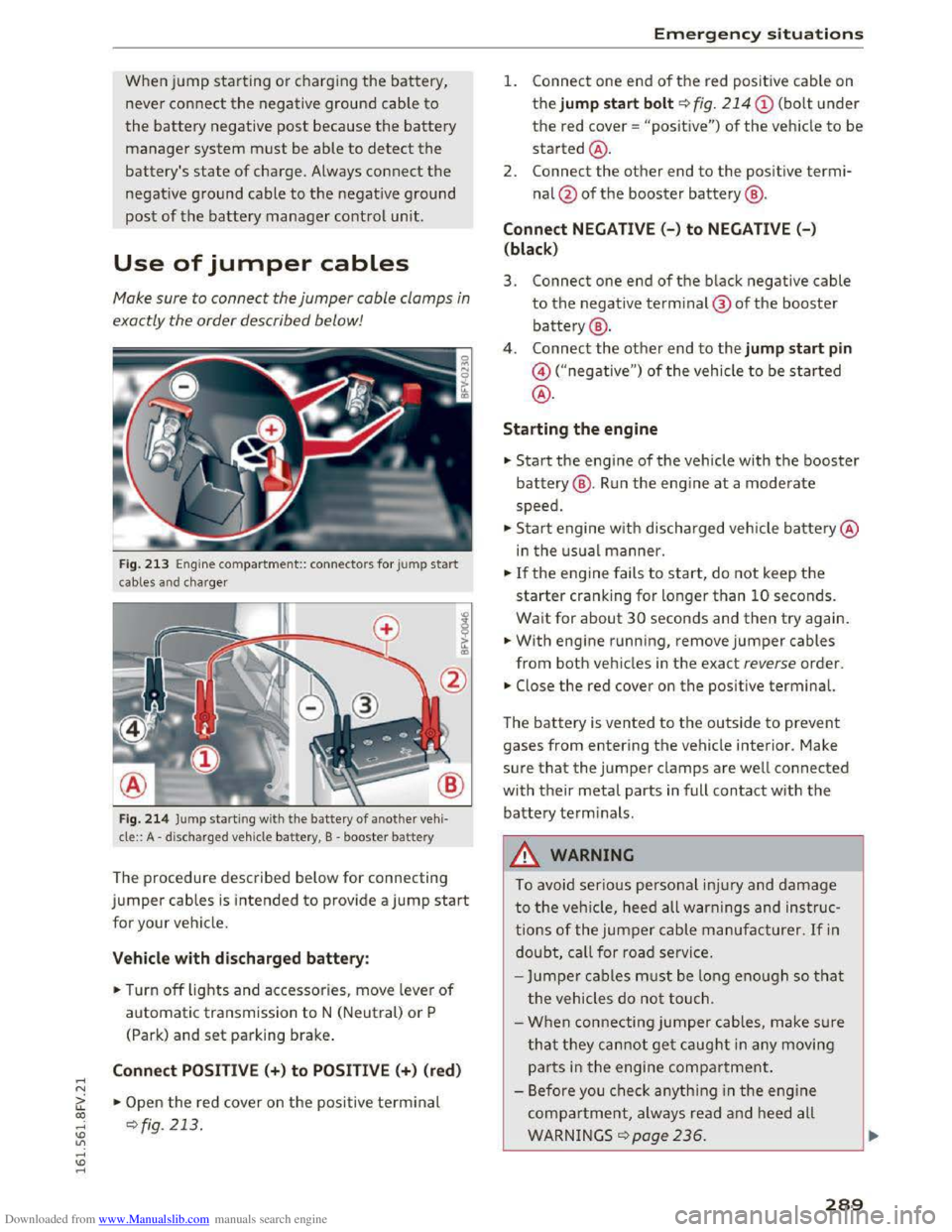
Use of jumper cables
Make sure to connect the jumper cable clamps in
exactly the order described below!
Fig. 213 Engine compa rtment:: connecto rs for jump start
cables and cha rger
Fig.
214 Jump starti ng with the battery of another vehi·
cle:: A -discharged vehicle battery, B -booster battery
The procedure described below for connecting
jumper cables is intended to provide a jump start
for your vehicle.
Vehicle with discharged battery:
.. Turn off lights and accessories, move lever of
automatic transmission to N (Neutral) or P
(Park)
and set parking brake.
Connect POSITIVE (+) to POSITIVE(+) (red)
.,.. Open the red cover on the positive terminal
~fig. 213 .
Emergency situations
1. Connect one end of the red positive cable on
the jump start bolt~ fig. 214
the red cover = "positive") of the veh icle to be
started@ .
2.
Connect the other end to the positi ve termi
nal@of the booster battery@ .
Connect NEGATIVE(-) to NEGATIVE (- )
(black)
3. Connect one end of the black negative cable
to the negative terminal@ of the booster
battery@ .
4 .
Connect the other end to the jump start pin
@("negative") of the vehicle to be started
@.
Starting the engine
.. Start the engine of the vehicle with the booster
battery@. Run the engine at a moderate
speed .
.,.. Start engine w ith discharged vehicle battery@
in the usual manner.
.,.. If the engine fails to start, do not keep the
starter cranking for longer than 10 seconds.
Wait for about 30 seconds and then try again .
.. With engine running, remove jumper cables
from both vehicles in the exact reverse order .
.. Close the red cover on the positive terminal.
The battery is vented to the outside to prevent
gases from entering the vehicle interior. Make
sure that the jumper clamps are well connected
with their metal parts in full contact with the
battery terminals .
.&. WARNING
t-==
To avoid serious personal injury and damage
to the vehicle, heed all warnings and instruc
tions of the jumper cable manufacturer. If in
doubt, call for road service.
-
Jumper cables must be long enough so that
the vehicles do not touch.
-
When connecting jumper cables, make s u re
that they cannot get caught in any moving
parts in the engine compartment.
- Before you check anything in the engine
compartment, always read and heed all
WARNINGS q page 236.
289
Page 294 of 322
Downloaded from www.Manualslib.com manuals search engine Emergency situations
Raising the vehicle
Lifting with workshop hoist and with floor
jack
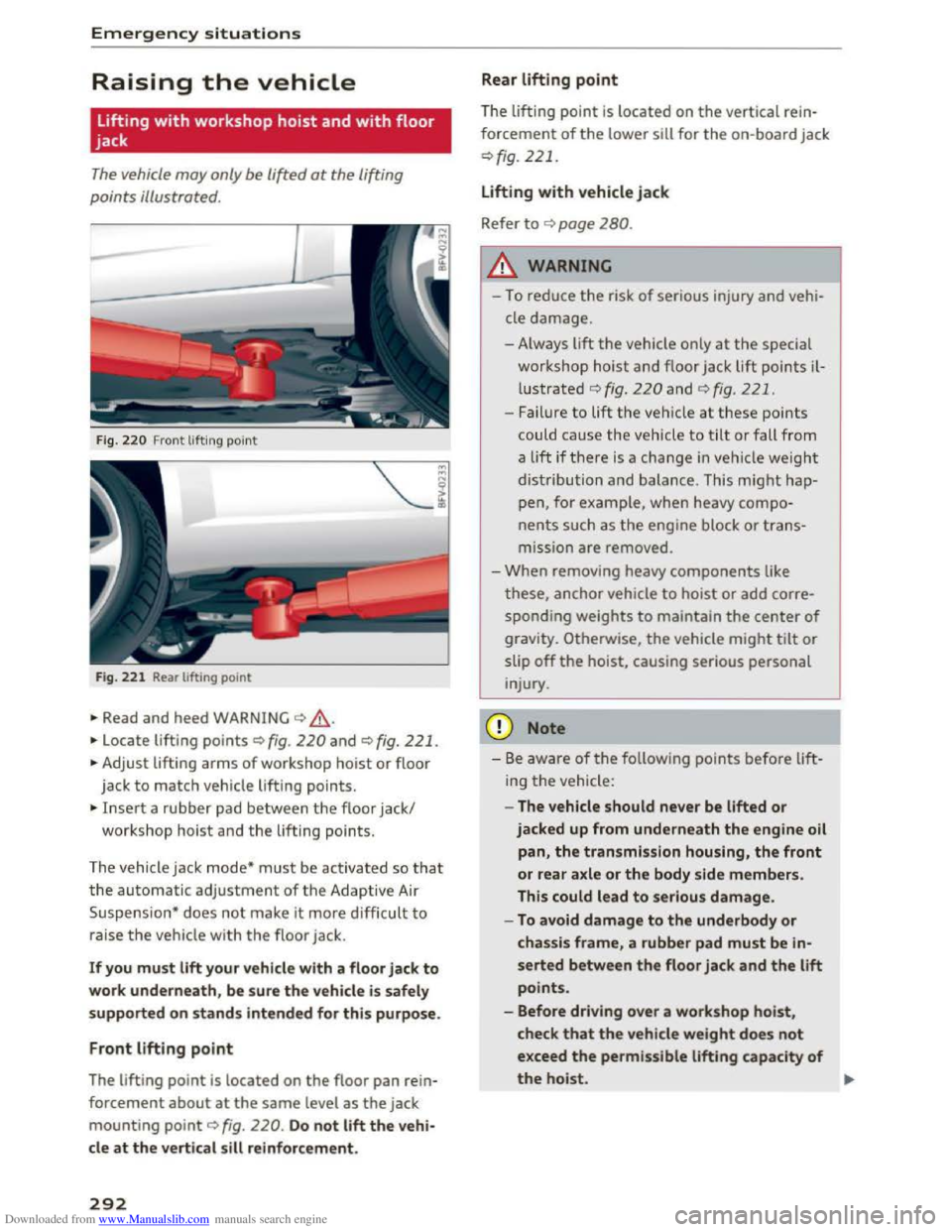
The vehicle may only be li~ed at the lifting
points illustrated.
Fig. 220 Front lifting point
Fig.
221 Rear lifting point
.,. Read and heed WARNING¢_&,
.,. locate lifting points ¢ fig. 220 and¢ fig. 221.
.,. Adjust lifting arms of workshop hoist or floor
jack
to match vehicle lifting points.
.,. Insert a rubber pad between the floor jack/
workshop hoist and the lifting points.
The vehicle jack mode*
must be activated so that
the automatic adjustment of the Adaptive Air
Suspension*
does not make it more d ifficult to
raise the vehicle with the floor jack.
If you must lift your vehicle with a f loor jack to
work underneath, be s ure the ve hicle is safely
s
upported on stands i ntended for this purpos e .
Front lifting point
The lifting point is located on the floor pan rein
forcement about at the same level as the jack
mounting point¢ fig. 220. Do not lift the vehi
cle at the vertical sill reinfor cement.
292
Rear lifting point
The lifting point is located on the vertical rein
forcement of the lower sill for the on-board jack
¢fig. 221.
Lifting with vehicle jack
Refer
to¢ page 280 .
..&. WARNING
-To reduce the r isk of serious injury and vehi
cle damage.
-Always lift the vehicle only at the special
workshop
hoist and floor jack lift points il
lustrated ¢fig. 220 and ¢fig. 221.
-Failure to lift the vehicle at these points
could cause
the vehicle to tilt or f all from
a lift ifthere is a change in vehicle weigh t
distribution
and balance. This might hap
pen, for example, when heavy compo
nents such as the engine block or trans
mission are removed.
-
When removing heavy components like
these, anchor vehicle to hoist or add corre
sponding weights to maintain the center of
gravity. Otherwise, the vehicle might tilt or
slip off the hoist, causing serious personal
injury .
CD Note
-Be aware of the following points before lift
ing the vehicle:
- The vehicle
should never be lifted or
jacked up from underneath the engine oil
pan, the transmission housing, the front
or rear axle or the body side members.
This could lead to serious damage.
-To avoid damage to the underbody or
chassis frame, a rubber pad must be in
serted between the floor jack and the lift
points.
- Before driving over a work shop hoist,
check that the vehicle weight does not
exceed the permissible lifting capacity of
the hoist. ..,.
Page 297 of 322
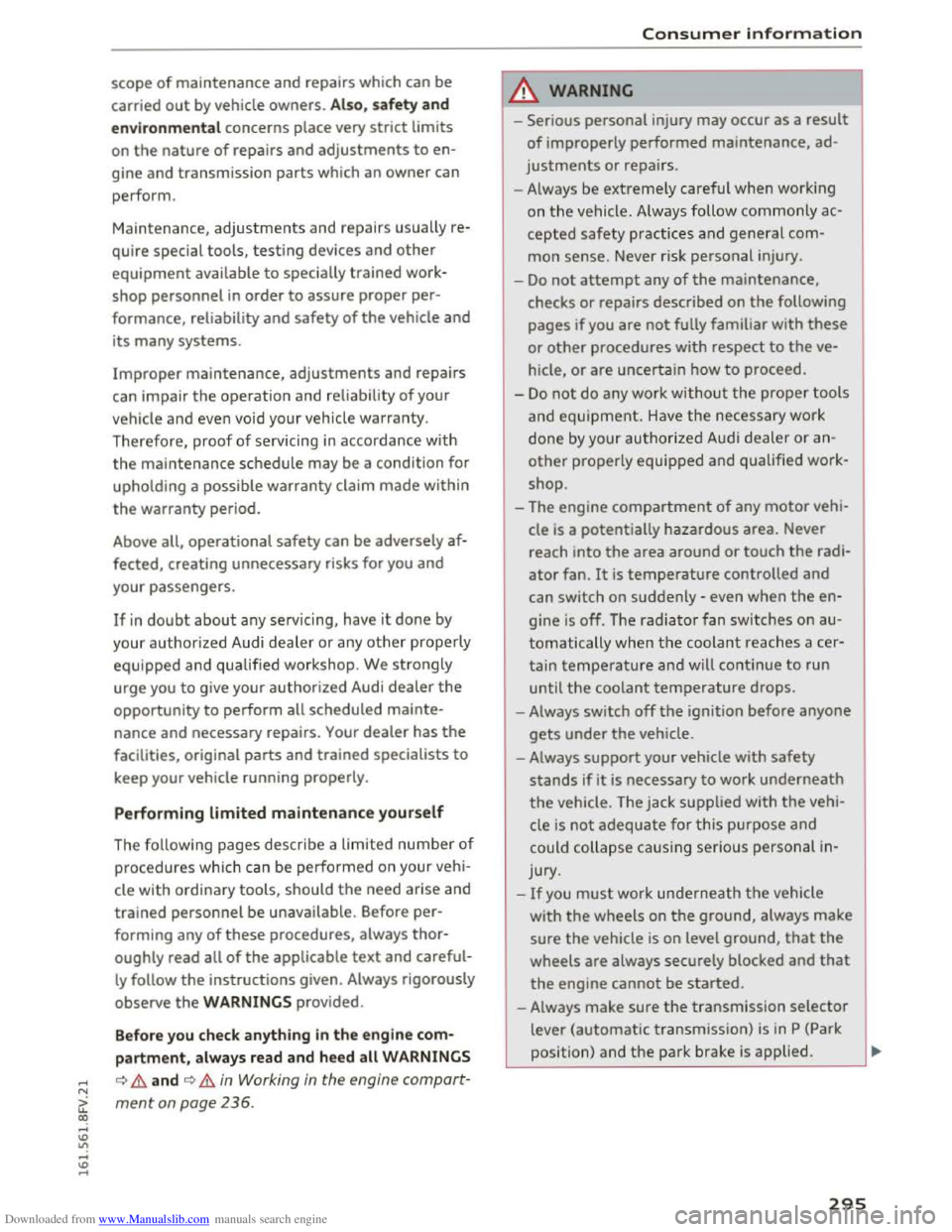
Downloaded from www.Manualslib.com manuals search engine scope of maintenance and repairs which can be
carried
out by vehicle owners. Also, safety and
e n viro n
mental concerns place very strict limits
on the nature of repairs and adjustments to en
gine and transmission parts which an owner can
perform.
Maintenance,
adjustments and repairs usually re
quire special tools, testing devices and other
equipment available to specially trained work
shop personnel in order to assure proper per
formance, reliability and safety of the vehicle and
its many systems.
Improper maintenance, adjustments and repairs
can impair the operation and reliability of your
vehicle and even void your vehicle warranty.
Therefore, proof of servicing in accordance w ith
the maintenance schedule may be a condition for
upholding a possible
warranty claim made within
the warranty period.
Above all,
operational safety can be adversely af
fected, creating unnecessary risks for you and
your passengers.
If in doubt about any ser vicing, have it done by
your authorized Audi dealer or any other properly
equipped and qualified workshop. We strongly
urge you to give your authorized Audi dealer the
opportunity to perform all scheduled main te
nance
and necessary repairs. Your dealer has the
facilities, original parts and trained specialists to
keep your vehicle running properly.
Performing limited maintenance yourself
The follow ing pages describe a limited number of
procedures which can be performed on your vehi
cle with ordinary
tools, should the need arise and
trained personnel be unavailable. Before per
forming any of these procedures, always thor
oughly read all of the applicable text and careful
ly follow the instructions given. Always rigorously
observe the WARNINGS provided .
Before you check anything in the e ngine com
partment , always read and heed all WARNINGS
..... c::> &. and c::> &. in Working in the engine compart-N
c;: ment on page 236.
co ..... U)
"' ..... U) .....
"'
Consumer information
A WARNING
-Serious personal injury may occur as a result
of improperly performed maintenance, ad
justments or repairs.
-Always be extremely careful when working
on
the vehicle. Always follow commonly ac
cepted safety practices and general com
mon sense. Never risk personal injury.
-
Do not attempt any of the maintenance,
checks or repairs described on the following
pages if you are not fully familiar with these
or other procedures with respect to the ve
hicle,
or are uncertain how to proceed.
-
Do not do any wor k without the proper tools
and equipment. H ave the necessary work
done by your authorized Audi dealer or an
other properly equipped and qualified work
shop.
-The engine compartment of any motor vehi
cle is a
potentially hazardous area. Never
reach into the area around or touch the radi
ator fan. It is temperature controlled and
can switch on suddenly -even when the en
gine is off. The
radiator fan switches on au
tomatically when th e coolant reaches a cer
tain temperature and will continue to run
until the coolant temperature drops.
- Always switch off the ignition before anyone
gets under the vehicle.
- Always
support your vehicle with safety
stands if it is necessary to work underneath
the vehicle. The jack supplied with the vehi
cle is
not adequate for this purpose and
could collapse causing serious personal in
jury.
-
If you must work underneath the vehicle
with
the wheels on the ground, always make
sure the vehicle is on level ground, that the
wheels are always securely blocked and that
the engine cannot be started.
-Always make sure the transmission selector
lever (automatic transmission) is in P (Park
position) and the pa rk brake is applied. .,..
295
Page 304 of 322
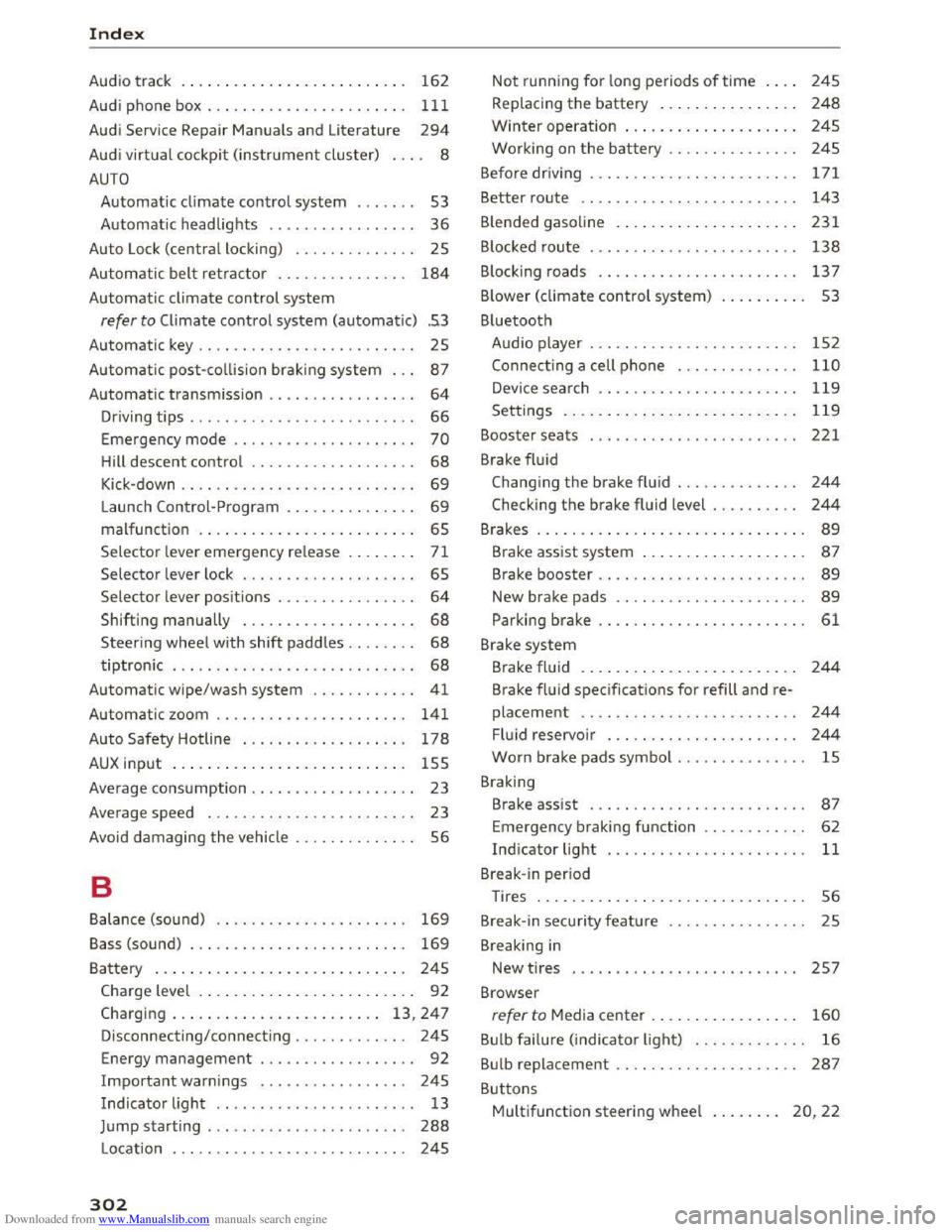
Downloaded from www.Manualslib.com manuals search engine Index
Audio track . . . . . . . . . . . . . . . . . . . . . . . . . . 162
Audi phone
box.................... .. . 111
Audi Service Repair Manuals and Literature 294
Audi virtual cockpit (instrument cluster) . . . . 8
AUTO
Automatic climate control system . . . . . . . 53
Automatic headlights . . . . . . . . . . . . . . . . .
36
Auto Lock (centra l locking) . . . . . . . . . . . . . . 25
Automatic
belt retractor . . . . . . . . . . . . . . . 184
Automatic climate control system
refer to Climate control system (automatic) .53
Automatic key . . . . . . . . . . . . . . . . . . . . . . . . . 25
Automatic post-collision brak ing system . . .
87
Automatic transmission . . . . . . . . . . . . . . . . . 64
Driving tips . . . . . . . . . . . . . . . . . . . . . . . . . . 66
Emergency mode . . . . . . . . . . . . . . . . . . . . . 70
Hill descent control . . . . . . . . . . . . . . . . . . . 68
Kick-down . . . . . . . . . . . . . . . . . . . . . . . . . . . 69
Launch Control-Program . . . . . . . . . . . . . . . 69
malfunction . . . . . . . . . . . . . . . . . . . . . . . . . 65
Selector lever emergency release . . . . . . . . 71
Selector lever lock . . . . . . . . . . . . . . . . . . . . 65
Selector lever positions . . . . . . . . . . . . . . . .
64
Shifting manually . . . . . . . . . . . . . . . . . . . . 68
Steering wheel with shift paddles. . . . . . . . 68
tiptronic . . . . . . . . . . . . . . . . . . . . . . . . . . . . 68
Automatic wipe/wash system . . . . . . . . . . . . 41
Automatic zoom . . . . . . . . . . . . . . . . . . . . . . 141
Auto Safety Hotline . . . . . . . . . . . . . . . . . . . 178
AUX input . . . . . . . . . . . . . . . . . . . . . . . . . . . 155
Average consumption . . . . . . . . . . . . . . . . . . . 23
Average speed . . . . . . . . . . . . . . . . . . . . . . . . 23
Avoid damaging
the vehicle . . . . . . . . . . . . . . 56
B
Balance (sound) . . . . . . . . . . . . . . . . . . . . . . 169
Bass (sound) . . . . . . . . . . . . . . . . . . . . . . . . . 169
Battery . . . . . . . . . . . . . . . . . . . . . . . . . . . . . 245
Charge level . . . . . . . . . . . . . . . . . . . . . . . . . 92
Charging . . . . . . . . . . . . . . . . . . . . . . . . 13, 247
Disconnecting/connecting . . . . . . . . . . . . . 245
Energy management . . . . . . . . . . . . . . . . . . 92
Important warnings . . . . . . . . . . . . . . . . . 245
Indicator light . . . . . . . . . . . . . . . . . . . . . . . 13
Jump starting . . . . . . . . . . . . . . . . . . . . . . .
288
Location . . . . . . . . . . . . . . . . . . . . . . . . . . . 245
302
Not running for long periods of time . . . . 245
Replacing the battery . . . . . . . . . . . . . . . . 248
Winter operat ion . . . . . . . . . . . . . . . . . . . . 245
Working on the battery . . . . . . . . . . . . . . . 24S
Befo re
driv ing . . . . . . . . . . . . . . . . . . . . . . . . 171
Better route . . . . . . . . . . . . . . . . . . . . . . . . . 143
Blended gasoline . . . . . . . . . . . . . . . . . . . . . 231
B locked route . . . . . . . . . . . . . . . . . . . . . . . .
138
Blocking roads . . . . . . . . . . . . . . . . . . . . . . . 13 7
B lower (climate
control system) . . . . . . . . . . 53
Bluetooth Audio player . . . . . . . . . . . . . . . . . . . . . . . .
152
Connect ing a cell phone . . . . . . . . . . . . . . 110
Device search . . . . . . . . . . . . . . . . . . . . . . . 119
Settings . . . . . . . . . . . . . . . . . . . . . . . . . . . 119
Booster seats . . . . . . . . . . . . . . . . . . . . . . . . 221
Brake
fluid
Changing the brake fluid . . . . . . . . . . . . . . 244
Checking the brake fluid level . . . . . . . . . . 244
Brakes . . . . . . . . . . . . . . . . . . . . . . . . . . . . . . . 89
Brake assist system . . . . . . . . . . . . . . . . . . . 87
Brake booster . . . . . . . . . . . . . . . . . . . . . . . . 89
New brake pads . . . . . . . . . . . . . . . . . . . . . . 89
Parking brake . . . . . . . . . . . . . . . . . . . . . . . . 61
Brake system
Brake
fluid . . . . . . . . . . . . . . . . . . . . . . . . . 244
Brake fluid specifications for refill and re
placement . . . . . . . . . . . . . . . . . . . . . . . . .
244
Fluid reservoir . . . . . . . . . . . . . . . . . . . . . . 244
Worn brake pads symbol . . . . . . . . . . . . . . . lS
Braking
Brake assist . . . . . . . . . . . . . . . . . . . . . . . . .
87
Emergency braking function . . . . . . . . . . . . 62
Indicator light . . . . . . . . . . . . . . . . . . . . . . . 11
Break-in period
Tires . . . . . . . . . . . . . . . . . . . . . . . . . . . . . . . 56
Break-in security feature . . . . . . . . . . . . . . . .
25
Breaking in
New tires . . . . . . . . . . . . . . . . . . . . . . . . . . 257
Browser
refer to Media center . . . . . . . . . . . . . . . . . 160
Bulb failure (indicator light) . . . . . . . . . . . . . 16
Bulb replacement . . . . . . . . . . . . . . . . . . . . . 287
Buttons
Multifunction steering wheel . . . . . . . . 20, 22