infotainment AUDI TT COUPE 2016 User Guide
[x] Cancel search | Manufacturer: AUDI, Model Year: 2016, Model line: TT COUPE, Model: AUDI TT COUPE 2016Pages: 322, PDF Size: 52.86 MB
Page 34 of 322
Downloaded from www.Manualslib.com manuals search engine Opening and closing
Power windows
Controls
The driver can control all power windows.
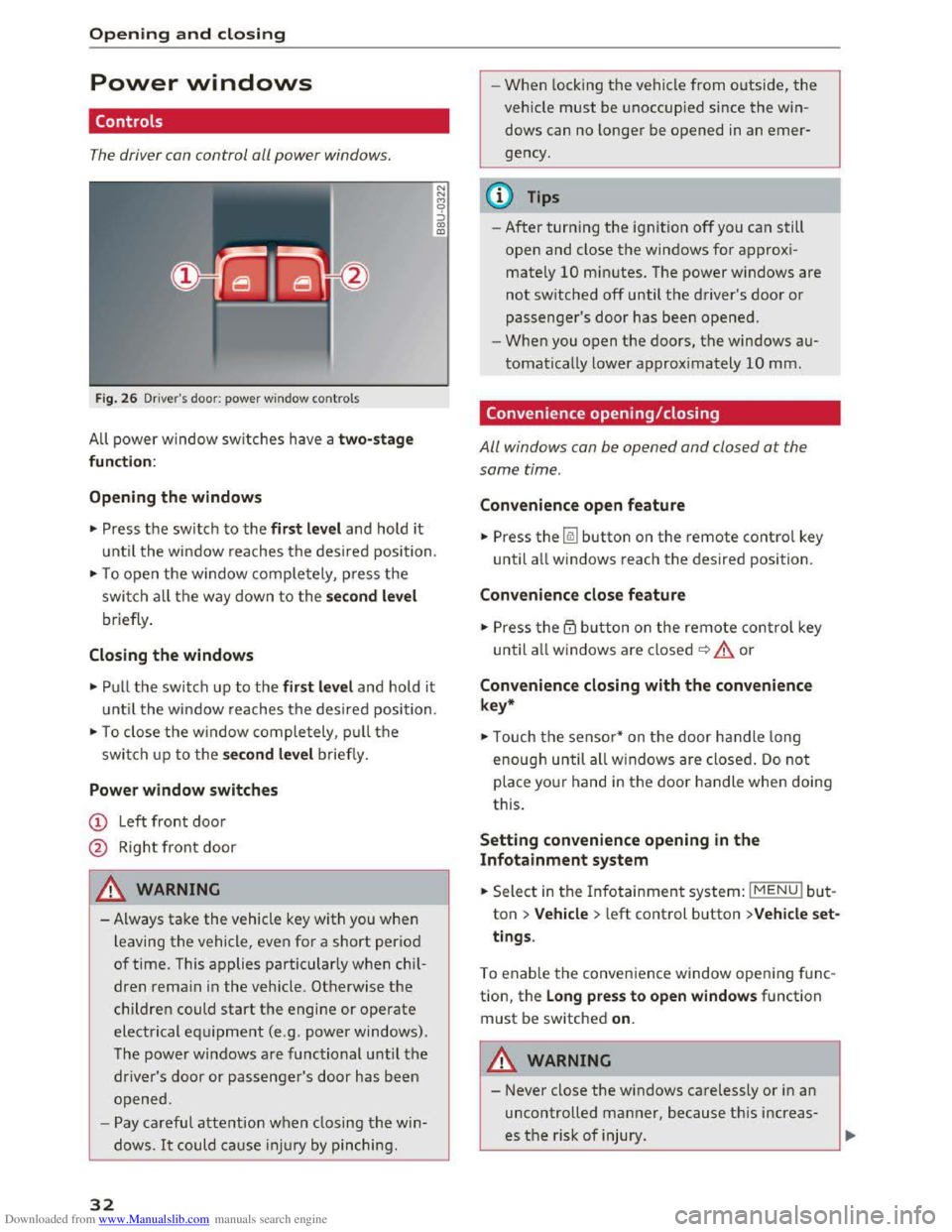
Fig. 26 D river's door: powe r w in dow controls
All power window switches h ave a two- stage
function:
Opening the windows
"' Press t h e switch to the first level and hold it
until the window reaches the desired position .
"'To open the window completely, press the
swi tch all the way down to the second level
briefly .
Closing the windows
"'Pull the switch up to the first level and hold it
until the window reaches the desired position.
"'To close the window completely , pull the
switch u p to the second level briefly.
Power window switches
CD Left front door
@ Right front door
A WARNING
- Always take the vehicle key with you when
leaving the vehicle, even for a short period
of time. This applies particularly when chi l
dren remai n in the vehicle. Otherwise the
children could start the engine or operate
electrical equipment (e .g . power windows).
T he
power windows are functional until the
driver's door or passenger's door has b een
o pened.
- Pay carefu l attention when closing the win
dows. It could cause in jur y by pin ching .
32
N
N
M 0 ::) CX> ID
-1
-When locking the vehicle from o utside, the
veh icle must be unoccupied since the win
dows can no longer be opened in an emer
gency.
(l} Tips
-After turning the ignition off you can s till
open and close the windows for approxi
mately 10 mi nutes. The power windows are
not switched off until the driver 's door or
passenger's door has been opened.
-When you open the doors, the windows au
tomatically lower approximately 10 mm.
Convenience opening/closing
All windows can be opened and closed at the
same time.
Convenience open feature
"' Press the~ button on the remote contro l key
until all windows reach the desired position.
Convenience close feature
"' Press the ~ button on the remote control key
until all w indows are closed~ A or
Convenience closing with the convenience
key*
"'Touch the sensor * on the door handle long
enough until all w indows are close d. Do not
place your hand in the door handle when doing
this.
Setting convenience opening in the
Infotainment system
.. Select in the Infotainment system: IMENUI but
ton > Vehicle > left control button >Vehicle set
tings .
To enable the conven ience window opening f u nc
tion, the Long press to open windows function
must be switched on.
A WARNING
-Never close the windows ca relessly or in an
uncontrolled manner, because this increas
es th e risk of injury.
Page 39 of 322
Downloaded from www.Manualslib.com manuals search engine Always make sure your vehicle is parked and
adequately lit according to the laws. Avoid
using
the parking lights for several hours.
Switch
on the right or left parking light if
possible.
-
Please observe legal regulations when using
the lighting systems described.
Tips
-The light sensor for the automatic head
lights*
is in the rearview mirror mount.
Therefore, do not place any stickers in this
area on the w indshield.
-
Some functions of the exterior lighting can
be
adjusted ~page 3 7.
-
If yo u turn off the ign ition whil e the exterior
lights are on and open the door, you will
hear a warning tone.
- In some markets, the tail lights will switch
on when the daytime running lights switch
on.
- In cool
or damp weather, the inside of the
headlights, turn signals and tail lights can
fog over due to the temperature difference
between the inside and outside. They will
clear shortly after switching them on. This
does not affect the service life of the light
ing.
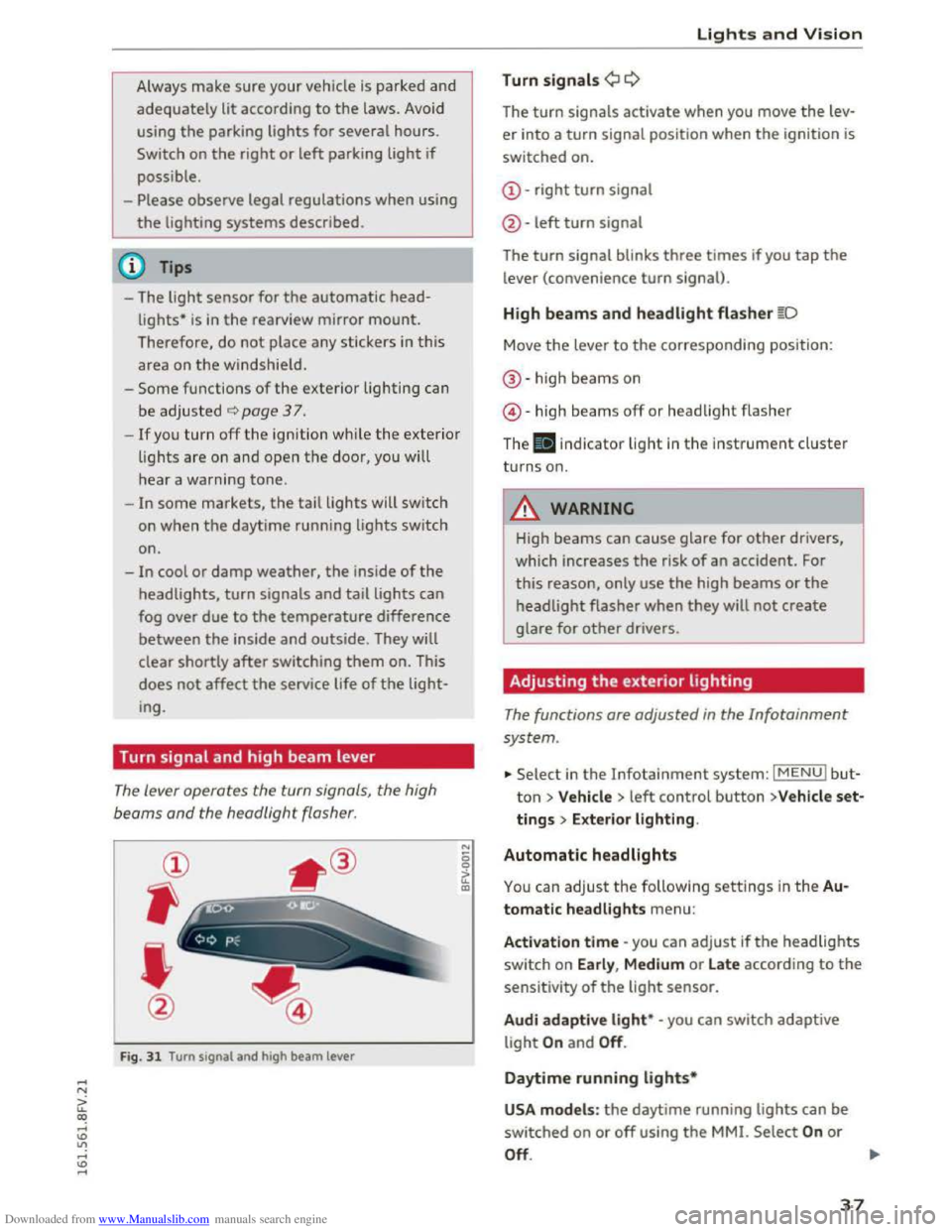
Turn signal and high beam lever
The lever operates the turn signals, the high
beoms
and the headlight flasher.
@
,
I
@
Fig. 31 Turn signal and high beam lever
"' 0 0
a'.: CXl
Lights and Vision
Turn signals¢ Q
The turn signals activate when you move the lev
er into a turn signal position when the ignition is
switched on.
@-right turn signal
@
-left turn signal
The turn signal blinks three times if you tap the
lever (convenience turn signal).
High beams and headlight flasher §D
Move the lever to the corresponding position:
®-high beams on
@-high beams off or headlight flasher
The . indicator light in the instrument cluster
turns on.
A WARNING
High beams can cause glare for other drivers,
which increases
the risk of an accident. For
this reason, only use the high beams or the
headlight flasher when they will not create
glare for other drivers.
Adjusting the exterior lighting
The functions are adjusted in the Infotainment
system .
... Select in the Infotainment system: IMENUI but
ton> Vehicle > left control button >V ehicle set
tings > Exterior lighting.
Automatic headlights
You can adjust the following settings in the Au
tomatic headlights
menu:
Activation time -you can adjust ifthe headlights
switch on Early, Medium or Late according to the
sensitivity of the light sensor.
Audi adapti ve light* -you can switch adaptive
light On and Off.
Daytime running lights*
USA models : the daytime running lights can be
switched on or off using the MMI. Select On or
Off. ....
37
Page 40 of 322

Downloaded from www.Manualslib.com manuals search engine Lights and Vision
Canada models: this function cannot be switched
off. They activate automaticall y each time the ig
n ition is switched on. T his menu item is shown
with a "gray background".
Com ing home , Leaving home
The coming home function illuminates the area
outside the vehicle when you turn the ignition off
and open the driver 's door. To switch on the func
tion, select Entry /exit lighting .
The leaving home ill uminates the area outside
the vehicle when you unlock the vehicle . To
switch
on the function, select Entry/exit light
ing .
The coming home and leaving home f unctions
only operate when it is dark and the lig ht switch
is in
the AUTO position.
Emergency flasher
Fig. 32 Center conso le : eme rge ncy flash er button
The emergency flashers makes other drivers
aware of your vehicle in dangerous situations.
• Press the~ button to switch the emergency
flashers on or off.
You can indicate a
lane change or a turn when the
emergency fla sh ers are switched on by us ing the
turn sig nal lever. The emergency flashers stop
temporarily.
The emergency flashers also work when the igni
tion is turned off.
(!) Tips
You should switch the emergency flashers on
if:
38
- You are the last c a r in a tra ffic jam so that
all other vehi cles approaching from behind
can see you, or if
- Your vehicle
has broken down or you are
having
an emergency, or if
- You r vehicle is
being towed or i f you are
towing another vehicle.
Interior lighting
Interior lighting
Fig. 33 Headlin e r: i nterior lighti ng
[!]-Door contact switch. The interior lighting is
controlled automatically.
A switch is no longer needed to switch the read
ing lights on. A swiping movement or a brief tap
on the light is all that is needed to switch the
light on or off. If you hold your finger on the
reading light when switching it on, this ca n dim
the light down t o a certain level.
Interior light ing
There are other interior lighting functions that
are availab le. Several functions can be set in the
Infotainment system. Select in the Infotainment
system: I MENUl button > Vehicle > left control
b u
tton >Vehicle settings> Interior lighting.
Page 43 of 322
Downloaded from www.Manualslib.com manuals search engine ..... N
G: CX)
.....
"' U"I
.....
"' .....
Windshield wipers
Switching the windshield wipers on
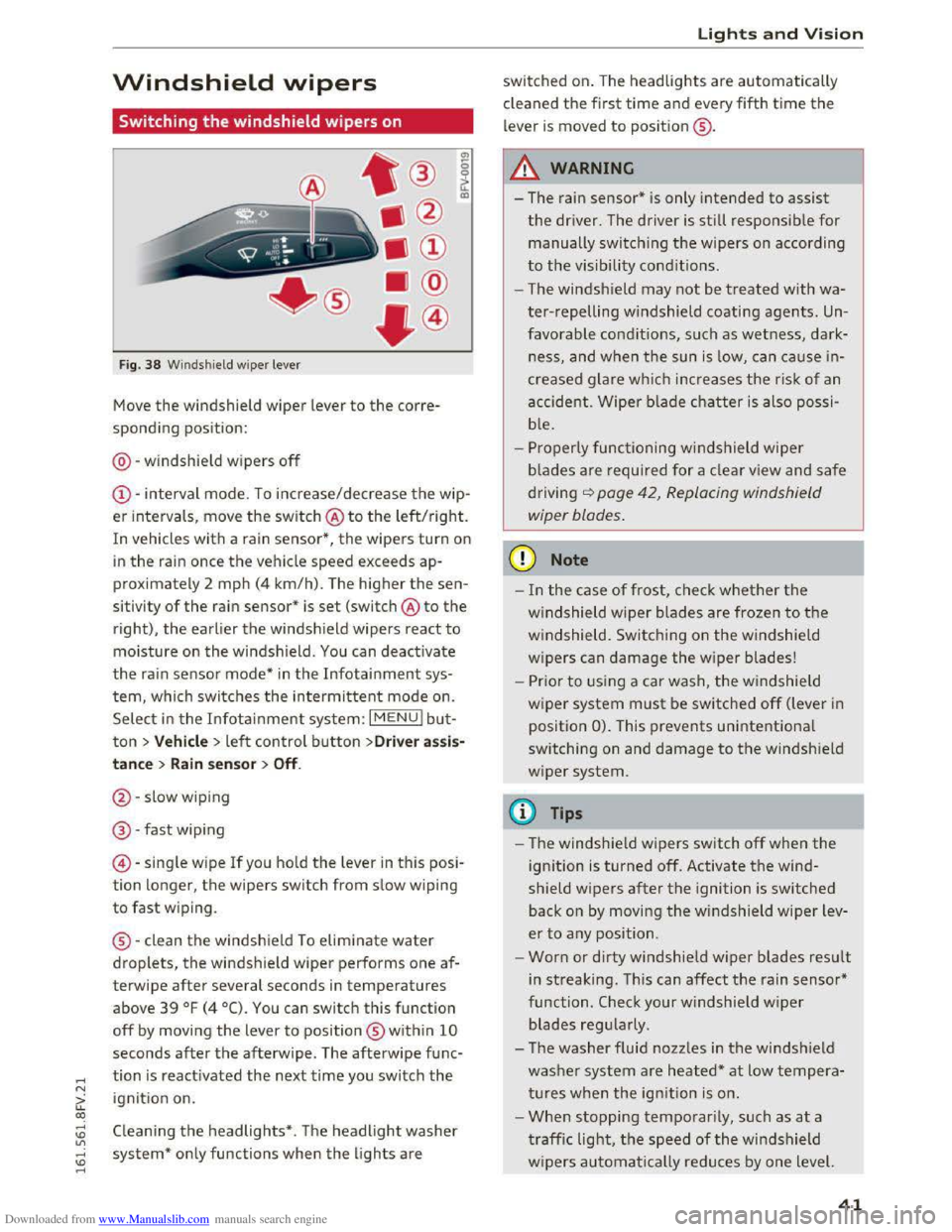
Fig. 38 Windshield wiper lever
Move the windshield wiper lever to the corre
sponding position:
@ -windshield wipers
off
@-interval mode. To increase/decrease the wip
er intervals , move
the switch @ to the left/right.
In vehicles with a rain sensor*, the wipers turn on
in the rain once the vehicle speed exceeds ap
proximately 2 mph (4
km/h). The higher the sen
sitivity
of the rain sensor* is set (switch @ to the
right),
the earlier the windsh ield wipers react to
moisture on the windsh ield. You can deact ivate
the rain sensor mode* in the Infotainment sys
tem, which switches the intermittent mode on.
Select
in the Infotainment system: I MENU! bu t
ton> Vehicle > left control button >Driver assis
tance > Rain sensor > Off.
@-slow wiping
@ -fast wip ing
©
-singl e w ipe If you hold the lever in this posi
tion longer, the wipers switch from slow wiping
to fast wiping .
® -clean
the windshield To eliminate water
droplets, the windshield wiper performs one af
terwipe
after several seconds in temperatures
above
39 °F (4 °C). You can switch this function
off by moving the lever to position ® within 10
seconds after the afterwipe . The afterwipe func
tion is reactivated the next time you switch the
ignition on.
Cleaning the headlights* . The headlight washer
system*
only functions when the lights are
Lights and Vision
switched on. The headlights are automatically
cl eaned
the first time and every fifth time the
lever is moved to position ® ·
A WARNING
f-==" -I
- The rain sensor* is only intended to assist
the driver. The driver is still responsib le for
manually switching the wipers on according
to the visibility conditions .
- The windsh ield may
not be treated with wa
ter-repelling windshield coating agents. Un
favorable conditions, such as wetness, dark
ness, and when
the sun is low, can cause in
creased glare which increases
the risk of an
accident.
Wiper blade chatter is also possi
b l
e.
-Properly functioning windshield wiper
b lad
es are required for a clear view and safe
driving
<:::>page 42, Replacing windshield
wiper blades.
CD Note
-In the case of frost, check whether the
windshield wiper blades are frozen to the
windshield. Switching on the windshield
wipers
can damage the w ip er blades!
-
Prior to using a car wash, the windshield
w ip er system
must be switched off (lever in
position
0). This prevents unintentiona l
switching on and damage
to the windsh ield
wiper system .
@Tips
-The windshie ld wipers switch off when the
ignition is turned off. Activate the wind
shield wipers
after the ignition is switched
back on by moving
the windshield wiper lev
er
to any position.
-
Worn or dirty windshie ld wiper blades result
in streaking.
This can affect the rain sensor*
function .
Check your windshield wiper
blades regularly .
- The washer fluid nozzles in
the windshield
washer system are heated*
at low tempera
tures when
the ignition is on.
- When stopping
temporarily, such as at a
traffic light, the speed of the windshield
w ipers automatically reduces by one level.
41
Page 56 of 322
Downloaded from www.Manualslib.com manuals search engine Warm and cold
-Switching manua l recirculation mode on and
off: press ld<>I
-A utomatic* recircu lation mode: auto rec ircula
tion needs to be activated in the Infotainment
system. Select in the Infotainment system:
IMENUI button> Vehicle > left control button
>Vehicle settings > Air condit ioning > Auto re
circul ation . The air quality sensor that is de
s i
gned for diesel and gasoline exhaust auto
matically switches the recircu lation mode on or
off depending on the level of pollutant s in the
o utside air.
In recirculation mode, the a ir inside the vehicle is
circulated
and filtered. This prevents the u nfil
tered a ir outside the vehicle from entering the
ve hicl e interio r. We recommend switching recir
cula tion mode on when driv ing thr o ugh a tunnel
or when sitting in traffic<::>.&..
Recirc ulation mode is switched off by pressing
the 1- 1 button o r IAUTOI orlw MAXI.
I@ M AX I Switching defrost on and off
The windshield and side windows are defrosted
or cleared of condensation as quickly as possible.
The
optimum amoun t of a ir flows mainly out of
the vents under the windshield . Rec irculatio n
mode switches off. The temperature is contr olled
automatically.
The IAUTOI button switches the defroster off.
IO!il R EARI Switching the rear window defogger
on and
off
If the rear window defogger is activated when
the ign ition is switched on, the battery manage
ment determ ines based on the ba ttery c harge if
it is possible t o t urn on . Othe rwise, the rear win
dow defogger functions with the engine run ning
and switches off automatically after approxi
mately 10 -20 mi nutes, depending on the out
side temperature.
To preven t
the rear window defogger from
switching off automatically, press and hold the
lliill REARI button for more than 2 seconds. This re
mains stored up to approximately lS minutes af
ter turning off the ignition.
54
A WARNING
You should not use the recirc ulation mode for
an extended period since no fresh air i s drawn
in . With the air-conditioning switched off, the
windows can fog up, which inc reases the risk
of an accident.
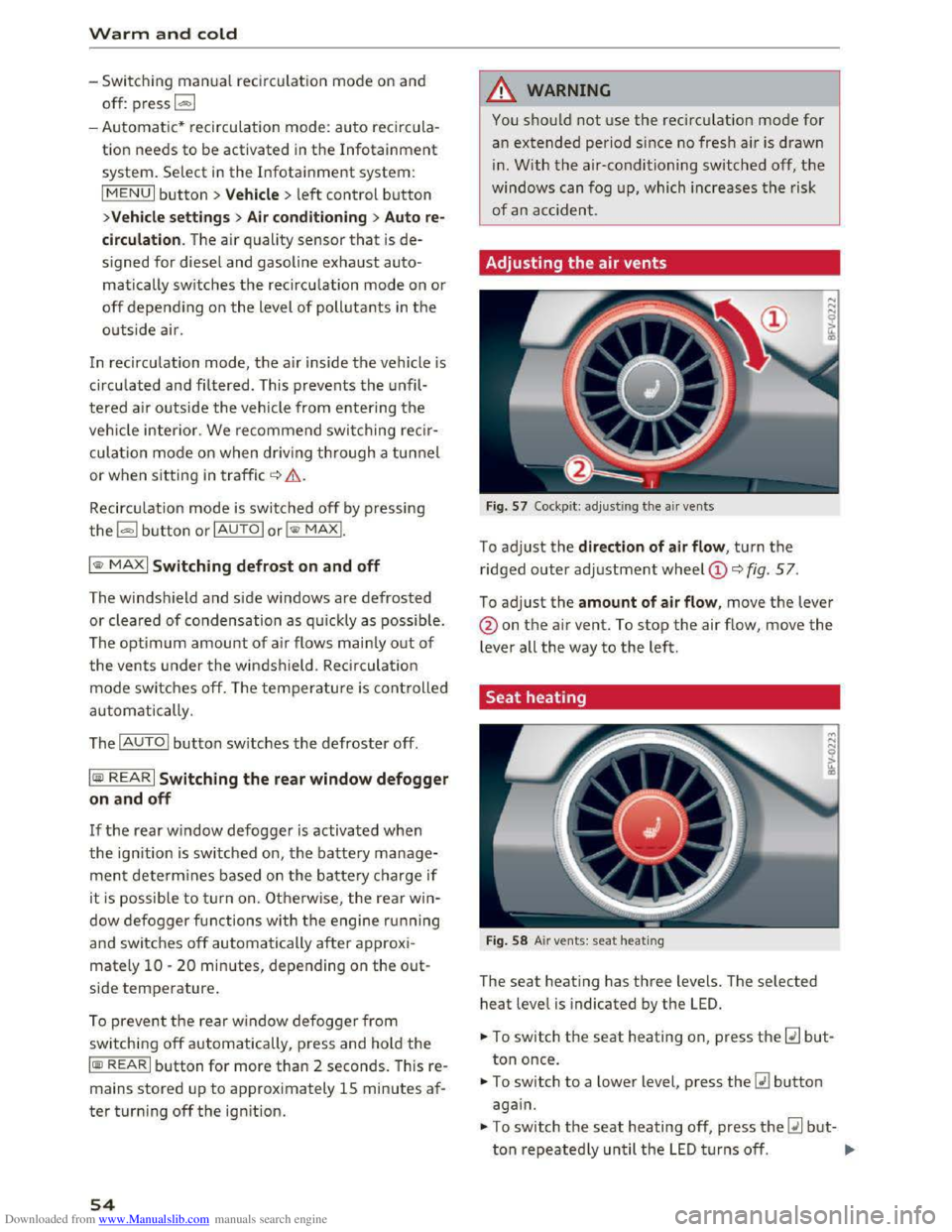
Adjusting
the air vents
Fig. 57 Cockpit: adj ust ing the air vents
To adjust the direction of air flow , turn the
ridged outer adjustment wheel©<::> fig. 57.
To adjust the amount of air flow, move the lever
@on the air vent. To stop the air flow, move the
lever all the way to the left.
Seat heating
Fig. 58 Air vents: seat heating
The seat heati ng has three levels. The selected
heat level is indicated by the LED.
... To switch the seat heating on, press the~ but
ton once.
... To switch to a lower level, press the~ button
again.
.,. To switch the seat heating off, press the~ but-
ton repeatedly until the LED t u rn s off. .,..
Page 66 of 322
Downloaded from www.Manualslib.com manuals search engine Automatic transmission
Automatic transmission
S tronic
Introduction
Your vehicle is equipped with an electronically
controlled DSG transmission called S tronic. Two
independent clutches transfer the power be
tween the engine and transmission. It allows the
vehicle to accelerate without a noticeable inter
ruption in traction.
The transmission upshifts or downshifts auto
matically. The driving style continuously influen
ces the selection of the driving program.
When a moderate driving style is used, the
transmission selects the most economical driving
mode. The transmission upshifts at a lower RPM
and downshifts at a higher RPM to improve fuel
efficiency.
The
transmi ssion switches to a sporty mode after
a kick-down or when the driver uses a sporty
driving style
characterized by quick accelerator
pedal movements, heavy acceleration, frequent
changes in speed and traveling at the maximum
speed.
If desired, the driver can also select the gears
manually (tiptronic mode).
Selector lever positions
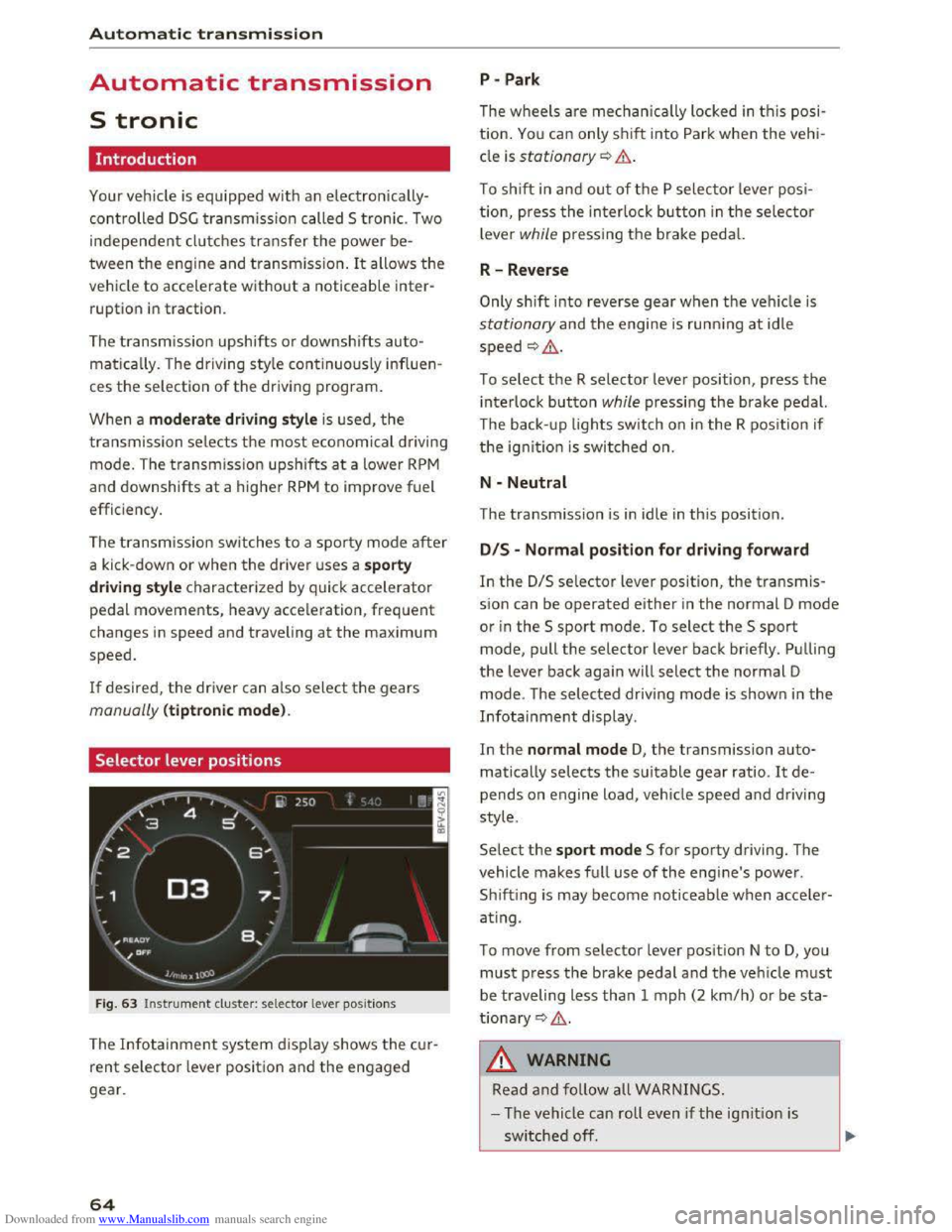
Fig. 63 Instrument cluster: selector lever positions
The Infotainment system d isplay shows the cur
rent selector lever position and the engaged
gear.
64
P -Park
The wheels are mechanica lly locked in this posi
tion. You can only shift into Park when the vehi
cle is stationary¢&.
To shift in and out of the P selector lever posi
tion, press the interlock button in the selector
lever while pressing the brake pedal.
R-Reverse
Only shift into reverse gear when the vehicle is
stationary and the engine is running at idle
speed ¢,6.
To select the R selector lever position, press the
interlock button while pressing the brake pedal.
The back- up
lights switch on in the R position if
the ignition is switched on.
N -Neutral
The transmission is in idle in this position.
DIS -Normal position for driving forward
In the D/S selector lever position, the transmis
sion can be operated either in the normal D mode
or in the S sport mode. To select the S sport
mode, pull the selector lever back briefly. Pulling
the lever back again will select the normal D
mode. The selected driving mode is shown in the
Infotainment display.
In
the normal mode D, the transmission auto
matically selects the suitable gear ratio. It de
pends on engine load, vehicle speed and driving
style.
Select the sport mode S for sporty driving. The
vehicle
makes full use of the engine's power.
Sh i
fting is may become noticeable when acce ler
ating.
To move from selector lever position N to D, you
must press the brake pedal and the vehicle must
be traveling less than 1 mph (2 km/h) or be sta
tionary ¢,6.
A WARNING
Read and follow all WARNINGS.
- The vehicle can roll
even if the ignition is
switched off.
Page 67 of 322
Downloaded from www.Manualslib.com manuals search engine ..... N
G: CX)
.....
"' U"I
.....
"' .....
-Never select R or P while driving, because
this increases the risk of an accident.
- Power
is still transmitted to the wheels
when
the engine is running at idle. To pre
vent
the vehicle from "creeping", you must
keep your foot on the brake in all selector
lever positions (except
P) when the engine is
runn ing. Otherwise,
this increases the risk
of an accident.
-
Do not i nadvertently press the accelerator
peda l when
the veh icle is stopped if a gear is
engaged. Otherwise the vehicle will start to
move immediately, even if the par king brake
is set. This coul d result in a crash.
-
Do not press the accelerator pedal when
changing
the selector lever position while
the vehicle is stationary and the engine is
running.
- Never leave
your vehicle with t he engine
running wh
ile in gear. If you must leave
your vehicle when
the engine is running, set
the parking brake and move the selector lev
er to the P position.
- Before opening
the hood and working on a
running engine, select
the P position with
the selector lever and activate the parking
brake. Always read and
follow the applica
ble warnings
c> page 236, Working in the
engine compartment.
CD Note
Never let the vehicle roll downhill with engine
off and the selector lever in the N position,
because
this could damage the automatic
transmission and cata l
ytic converter .
@ Tips
-Drive select: sporty shifting character istics
can
be selected using the Dynamic driving
mode. The
Infotainment display shows Sas
the selector lever position instead of D.
-If you accidentally select N while driving,
take your
foot off the accelerator pedal im
mediately and
wait for the engine to slow
down
to idle before selecting D or S.
-If there is a powe r failure, the sel ector lever
will not move out of the P position. The
Automatic tran smission
emergency release can be used if this hap
pens. Left-hand drive vehicles
c> page 71.
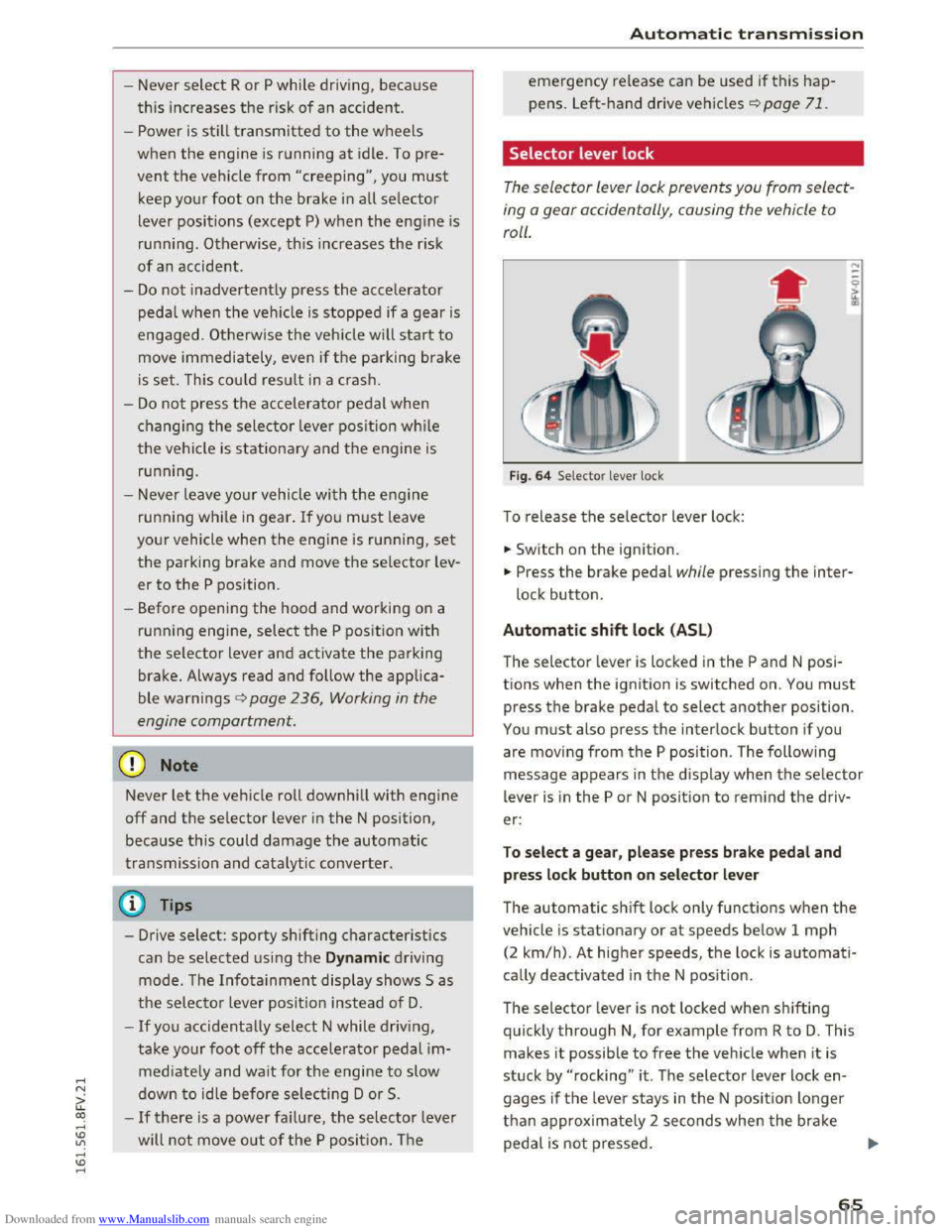
Selector lever lock
The selector lever lock prevents you from select
ing
o gear occidentally, causing the vehicle to
roll.
F ig . 64 Selector lever lock
To release the selector lever lock:
... Switch on the ignition.
... Press the brake pedal while pressing the inter
lock button.
Automatic shift lock (ASL)
The selector lever is locked in the P and N posi
tions when
the ignition is switched on. You must
press the brake pedal to select another position.
You must also press the interlock button if you
are moving
from the P position. The following
message appears in
the display when the selector
lever
is i n the P or N position to rem ind the driv
er:
To sel e ct a g ear, pl ease pr ess brake pedal and
pre
ss lock button on selector le ver
The automatic shift lock only functions when the
vehicle is stationary or at speeds below 1 mph
(2
km/h). At higher speeds, th e lock is automati
cally deactivated in
the N pos ition.
The selector lever
is not locked when shifting
quickly through N, for example from R to D. This
makes
it possible to free the veh icle when it is
stuck by "rocking" it . The selector lever lock en
gages
if the leve r stays in the N posit ion longer
than approx imately 2 seconds when t
he brake
peda l
is not pressed.
65
Page 70 of 322
Downloaded from www.Manualslib.com manuals search engine Automatic transmission
-The transmission can overheat and be dam
aged under certain driving and traffic condi
tions such as frequent starts, creeping for a
l
ong time, or stop-and-go traffic. When the
@]or. indicator light turns on, stop the
vehicle at the next opportunity and let the
transmission cool r::!;> page 70.
- Allowing the veh icle to roll when the engine
is stopped will damage the S troni c trans
mission because it is not lubricated
r::!;> page 290, Towing with a tow truck.
@ Tips
For
safety reasons, the parking brake is re
leased automatically only when the driver's
safety belt is engaged i n the buckle.
Hill descent control
The hill descent control system assists the driv
ing when driving down declines .
Hill descent control is activated when the selec
tor lever is in the Dor S position and you press
the brake pedal. The transmission automatically
selects a gear that is suitable for the incline. Hill
descent control tries to maintain the speed ach
ieved at the time of braking, within physical and
technical
limitations. If may still be necessary to
adj ust the speed with the brakes. Because hill de
scent control cannot shift down farther than 3rd
gear, it may be necessary to shift into tiptronic
mode in very steep areas. In this case, shift into
1st or 2nd gear in tiptronic mode to use the en
g ine 's braki ng force to relieve the brakes.
Hill
descent control switches off once the decline
levels
out or you press the accelerator pedal.
On vehicles with a cruise control system*
r::!;> page 72, hill descent control is also activated
when the speed is set.
A WARNING
Hill descent control cannot overcome physical
limitations,
so it may not be able to maintain
a
constant speed under all conditions. Always
be ready to apply the brakes.
68
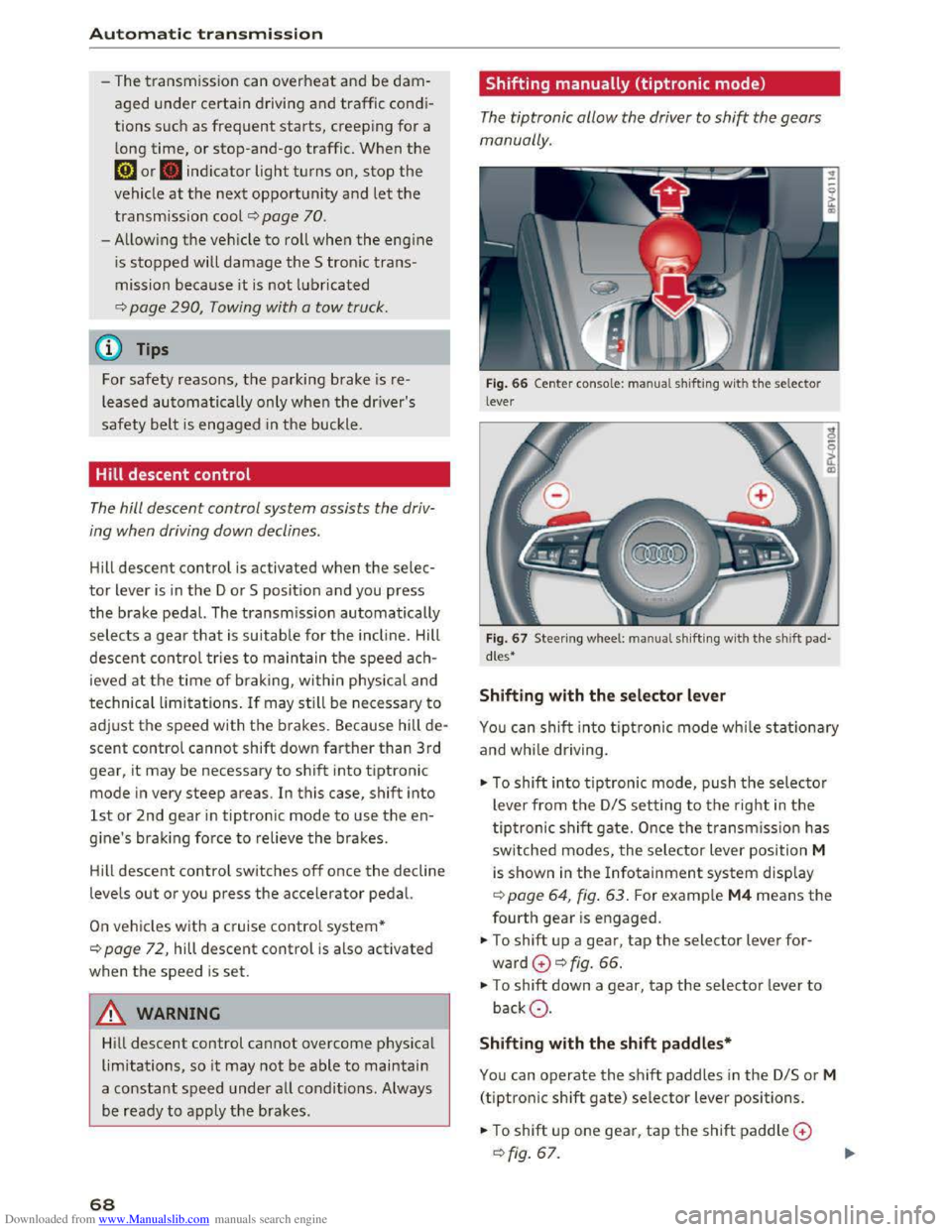
Shifting manually (tiptronic mode)
The tiptronic allow the driver to shi~ the gears
manually.
Fig. 66 Center conso le : ma nua l shifting with the selector
lever
Fig.
67 Steer ing whee l: ma nual shifting with the shift pad
dles•
Shifting with the selector lever
You can shift into tiptronic mode while stationary
and while dri ving.
""To shift into tiptronic mode, push the selector
lever from
the D/S setting to the right in the
tiptronic shift gate. Once the transmission has
switched modes, the selector lever position M
is shown in the Infotainment system display
r::!;>poge 64, fig. 63. For example M4 means the
fourth gear is engaged.
""To shift up a gear, tap the selector lever for
ward G ¢fig. 66.
""To shift down a gear, tap the selector lever to
backQ.
Shifting with the shift paddles*
You can operate the shift paddles in the D/S or M
(tiptronic shift gate) selector lever positions.
""To shift up one gear, tap the shift paddle G
r::!;> fig. 67.
Page 71 of 322
Downloaded from www.Manualslib.com manuals search engine ..... N
G'. CX)
.... ID IJ' .... ID ....
.,. To shift down one gear, tap the shift paddle Q.
If the shift paddles are tapped while in the D/S
selector lever position, automatic mode switches
off briefly. To switch from manually shifting back
to automatic shifting immediately, tap the shift
paddle 0 Q fig. 67 for 1 second.
To keep shifting using the shift paddles, move
the selector lever to the right out of the D/S posi
tion into
the tiptronic shift gate.
The transmission automatically shifts up or down
before critical
engine speed is reached.
The
transmission only allows manual shifting
when
the engine speed is within the permitted
rang e.
(D Tips
-If you shift to the next lowest gear, the
transmission will only shift if the engine will
not be over-rewed.
- With kick-down, the transmission shifts to a
lower
gear, depending on vehicle speed and
engine speed.
-tiptronic does not work if the transmission
is running in emergency mode.
Kick-down
Kick-down enables maximum acceleration.
When you press the accelerator pedal down be
yond
the resistance point, the automatic trans
mission downshifts into a lower gear, depending
on vehicle speed and engine RPM. It shifts up in
to the next higher gear once the max imum speci
fied
engine RPM is reached.
A WARNING
Please note that the wheels could spin on
s
lick or slippery roads when kick-down is ac
tive.
ll The ESC light turns on continuously and the message Sta·
bilization control (ESC): sport. Warning! Reduced stabil
ity appears temporarily to indicate in the Infotainment
system
that the syste m was deactivate d.
Automatic transmission
Launch Control-Program
The Launch Control Program enables maximum
acceleration.
Requirement: the engine must be at operating
temperature and the steering wheel must not be
turned.
... With the engine running, press the l.eoFFI but
ton briefly one time ll .
.,. Pull the selector lever back out of the D/S posi
tion briefly to select the S pos ition, or press it
toward the right into the tiptronic position or
select the Dynamic driving mode in drive se
lect* Q page 79.
.,. Press the brake pedal firmly with your left foot
and hold it all the way down for at least 1 sec
ond .
... At the same time, press the gas pedal all the
way down with your right foot until the engine
reaches and stays at a high RPM level.
.,. Remove your left foot from the brake.
A WARNING
-Always adapt your driving to the traffic flow.
-
Only use Launch Control when road and traf-
fic conditions allow it and other drivers will
not be endangered or impacted by your driv
ing and the vehicle's acceleration.
-
Please note that the drive wheels can spin
and the vehicle can break away when sport
mode is sw itched on, especially when the
road is slippery.
-
Once the vehicle has started moving, press
the l.t'l OFFI button briefly to turn the sport
mode off.
(D Tips
- The transmission temperature may increase
s ignificantly
after using the launch control
program. If that happens, the program may
not be available for a few minutes. It w ill be
available again after a cool-down period. "'
69
Page 72 of 322
Downloaded from www.Manualslib.com manuals search engine Automatic transmission
-When accelerating using the launch control
program, all vehicle
parts are subject to
heavy loads . This can lead to increased
wear.
Emergency mode
In the event of a system malfunction, there is on
emergency program.
If all of the selecto r lever positions are highlight
ed wit h a light background
in the Infotainment
display, there is a system malfunction and the S
tronic transmiss ion is running in the emergency
program . The vehicle can still be driven
in emer
gency mode,
but only with reduced speed and
not in a
ll gears. In some cases, the vehicle can
n ot dri
ve in rever se .
@Note
If the transmission runs in emergency mode,
drive
to an author ized Audi dealer or author
ized
Audi Service Facility immediately to have
the malfunction corrected.
Transmission malfunction
• Transmission : malfunction! Please stop ve
hicle and s
hift to P
There is a malfunction in the t ra nsmission. Park
the vehicle securely and do not continue driving.
See an authorized
Audi dealer or authorized Audi
Service Facility for assistance .
• Transmis sio n : too hot. Please stop vehicle
The transmission is too hot and can become dam
aged .
Stop and let the transmission cool with the
engine running (at idle) in the P selector lever po
sition. Then
the indicato r light and the message
turn off, drive to an authorized Audi dea le r or a u
thorized Audi Se rvice Facility immediately to have
the ma lfunction cor rected . If the indicator light
and
the driver message do not turn off, do not
continue driving. See an authorized
Audi dealer
or authorized Audi Service Facility for assistance .
[o] Tran smission : malfunction! You can contin
ue dri
ving. See owner's manual
70
Drive to an au thorized Audi dealer or authori zed
Audi Service Facility immediate ly to have the
malfunction corrected.
[o] Transmiss ion : malfunction! You may contin
ue driving. No rever se gear
Drive to an authorized Audi dealer or authorized
Audi Service Facility immed iately to have the
malfunction corrected .
ml Transmi ss ion: malfunction! You may contin
ue driving in D
until engin e off
Drive the vehicle away from moving traffic and
park . See an
authorized Audi dealer or authorized
Audi Service Facility for assistance.
ml Tran smiss ion: too hot. Please adapt driving
style
Continue driving moderately. When the indicator
light turns off, you can continue driving normal
l
y.
ml Tran smission: please press brake pedal a nd
s elect gear again
If the transmiss ion mal f u nct ions because the
temperatu re is too high, a message appears
when
the transmission is cooled .