service AUDI TT COUPE 2016 User Guide
[x] Cancel search | Manufacturer: AUDI, Model Year: 2016, Model line: TT COUPE, Model: AUDI TT COUPE 2016Pages: 322, PDF Size: 52.86 MB
Page 20 of 322
Downloaded from www.Manualslib.com manuals search engine Instruments and indicator lights
Drive with reduced engine performance (avoid
high
speeds for extended periods of time and/ or
fast acceleration) and have the malfunction cor
rected. See an authorized Audi dealer or author
ized Audi Service Facility.
The
indicator may turn on if the electronic speed
lim iter is faulty. For additional information, refer
to c:> page 72, Electronic speed limiter.
On-Board Diagnostics
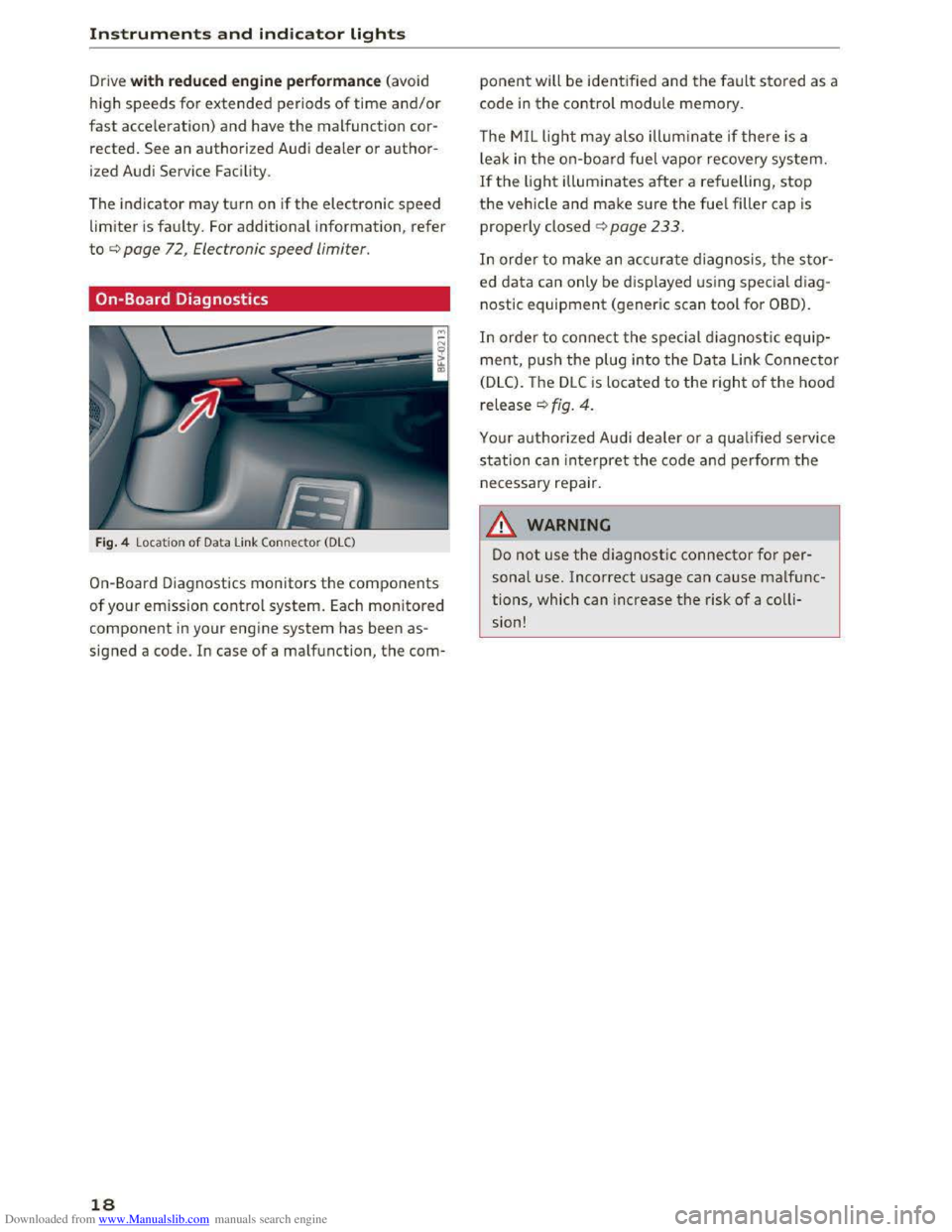
Fig. 4 Locat ion of Data Link Connector (DLC)
On-Board Diagnostics monitors the components
of your emission control system. Each monitored
component in your engine system has been as
signed a code. In case of a malfunction, the com-
18
ponent will be identified and the fault stored as a
code in the control module memory.
The MIL light may also illum inate if there is a
l
eak in the on-boar d fuel vapor recovery system.
If the light illuminates after a refuelling, stop
the vehicle and make sure the fuel filler cap is
properly closed c:> page 233.
In order to make an accurate diagnosis, the stor
ed data can only be displayed using special d iag
nostic equipment (generic scan tool for OBD).
In order to connect the special diagnostic equip
ment, push the plug into the Data Link Connector
(DLC). The DLC is located to the right of the hood
release c:> fig. 4.
Your authorized Audi dealer or a qualified service
station can interpret the code and perform the
necessary repair.
11. WARNING
Do not use the diagnostic connector for per
sonal use. Incorrect usage can cause malfunc
tions, which can increase the risk of a colli
sion!
- I
Page 27 of 322
Downloaded from www.Manualslib.com manuals search engine ..... N
G: CX)
..... I.Cl U"I
..... I.Cl .....
Opening and closing
Central locking
Description
You can lock and unlock the veh icle centrally. You
have the following options:
-Remote control key<=> page 2 7,
-
Sensors in the door handles*<=> page 28,
- Lock cylinder on the driver's door<=> page 30,
or
-Central locking switch inside<=> page 29.
Auto Lock
The Auto Lock function locks all doors and the
luggage compartment lid once the speed has ex
ceeded approximately 9 mph (lS km/h).
The vehicle can be unlocked if the opening func
tion in the central locking system switch is used
or one of the door handles is pulled. The Auto
Lock function can be switched on and off in the
Infotainment system<=> page 29.
Additionally, in the event of a crash with airbag
deployment the doors are automatically un
locked to allow access to the vehicle.
Selective unlocking
The doors and luggage compartment lid will lock
when they close. You can set in the Infotainment
system whether only the driver's door or the en
tire vehicle should be unlocked when unlock ing
<=>page29.
Turn signals
When you unlock the vehicle, the turn signals
f l
ash twice. When you lock the vehicle, the turn
signals flash once. If the blinking continues, one
of the doors or the luggage compartment lid is
not closed or the ignition is sti ll switched on.
Unintentionally locking yourself out
In the following cases there safeguards to pre
vent you locking your remote master key in the
vehicle:
-
If the driver's door is open, the veh icle cannot
be locked by pressing the !ml button on the re-
Opening and closing
mote control key or touching the locking sen
sor* on a door.
-When locking using the Im] button in the central
locking switch, the vehicle will not lock if a door
is open <=>page 29.
-On veh icles with a convenience key*, the lug
gage compartment lid unlocks again after clos
ing if
the most recently used key is in the lug
gage compartment. The emergency flashers
blink four times.
Do not lock your vehicle with the remote control
key or convenience key* until all doors and the
luggage compartment lid are closed. In this way
you avoid locking
yourself out accidentally.
@Tips
-Do not leave valuables unattended in the ve
hicle. A locked vehicle is not a safe!
-The LED in the driver's door rail blinks when
you lock the vehicle. If the LED lights up for
approximately 30 seconds after locking,
there is a malfunction in the central locking
system. Have the problem corrected by an
authorized Audi dealer or authorized Audi
Service Facility.
Key set
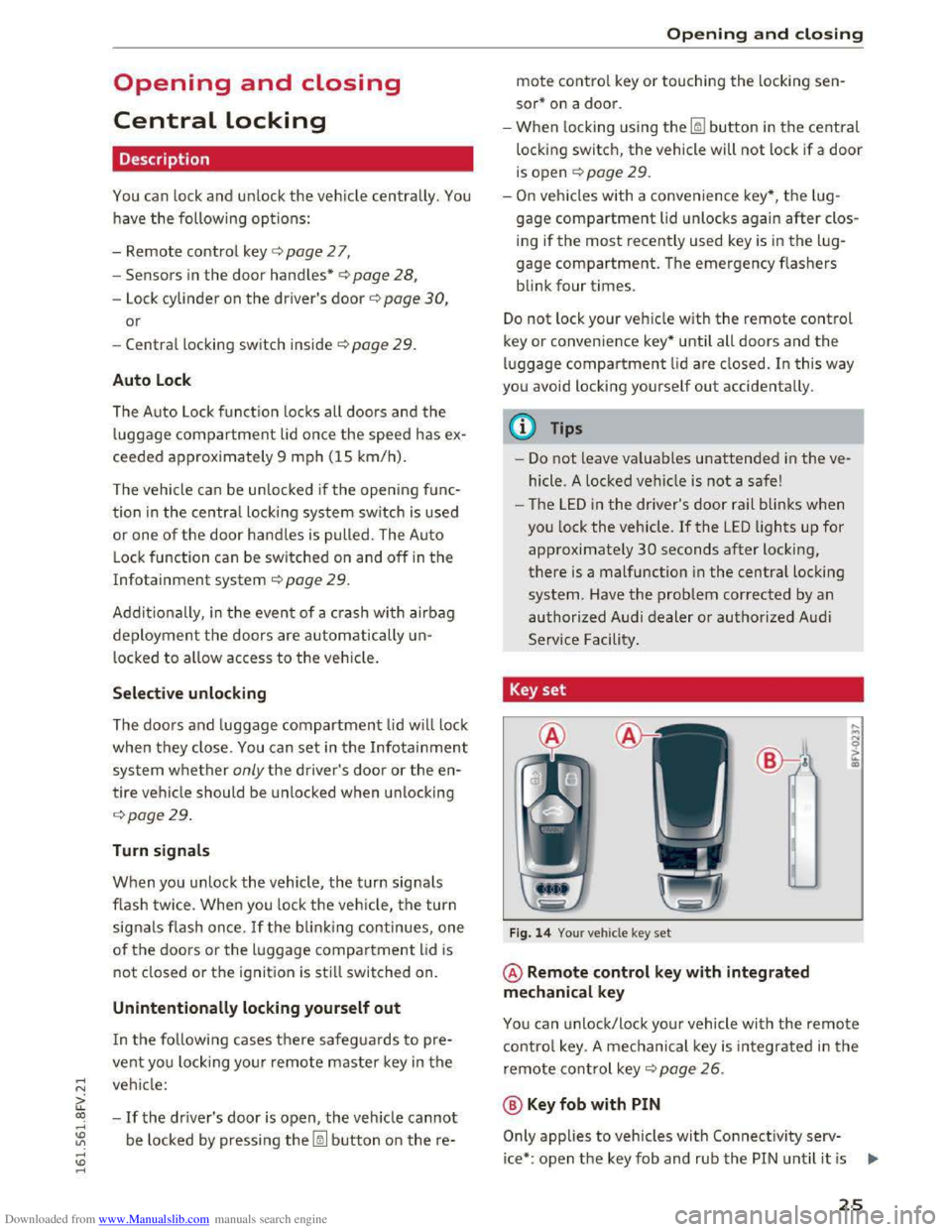
Fig. 14 Your vehicle key set
@ Remote control key with integrated
mechanical key
You can unlock/lock your vehicle with the remote
control key . A mechanical key is integrated in the
remote control key ¢ page 26.
@ Key fob with PIN
Only applies to vehicles with Connectivity serv-
ice* :
open the key fob and rub the PIN until it is ..,.
25
Page 28 of 322
Downloaded from www.Manualslib.com manuals search engine Opening and closing
visible . You can activate the Connectivity service*
on your vehicle using this PIN code.
Replacing a ke y
If a key is lost, see an authorized Audi dealer or
authorized Audi Service Facility. Have this key de
activa ted. It is important to bri ng all keys wit h
you .
If a key is lost, you should report it to your
insurance company.
Numb er of keys
You can check the number of keys assigned to
your veh icle in the Infotainment system. To do
this, select: the I MENU I button > Vehi cle > left
control button > Service & checks > Vehicle in·
fo rma tion. This way, you can make sure that you
have
all the keys when purchasing a used vehicle.
Electron ic immobilizer
The immobilizer preven ts unauthorized use of
the vehicle.
Unde r certain circumstances, the vehicle may not
be able to start if there is a key from a different
veh icle manufacturer on the key chain.
Data in the master key
When driving, service and maintenance-relevant
data is continuously stored on your remote con
trol key. Your Audi service advisor can read out
this data and tell you about the work your vehi cle
needs. This applies also to vehicles with a con
ven i
ence key*.
Personal comfort settings
If two people use one vehicle , it is recommended
that each person always uses "their own " master
key. When the ignition is turned off or when the
veh icle is locked, personal convenience settings
for the following systems are stored and as
signed to the remote master key.
-
Climate control system
-Parking aid*
- Active
lane assist*
- Si
de assist*
- Drive
select
26
The stored settings are automatically recalled
when you unlock the vehicle, open the doors or
turn on the ignition .
_&WARNING
Always take the vehicle key with you when
leav ing the vehicle, even for a short period of
time. This applies particularly when children
remai n in the vehicle . Otherwise the children
could
start the engine or operate e lectrical
equipment such as power w indows .
@Tips
-1
The operation of the remote control key can
be
temporarily d isrupted by interference from
transmitters in the vic in ity of the vehicle
working
in the same frequency range (e.g. a
cell
phone, rad io equipment). Always check if
your vehicle is locked!
Removing the mechanical key
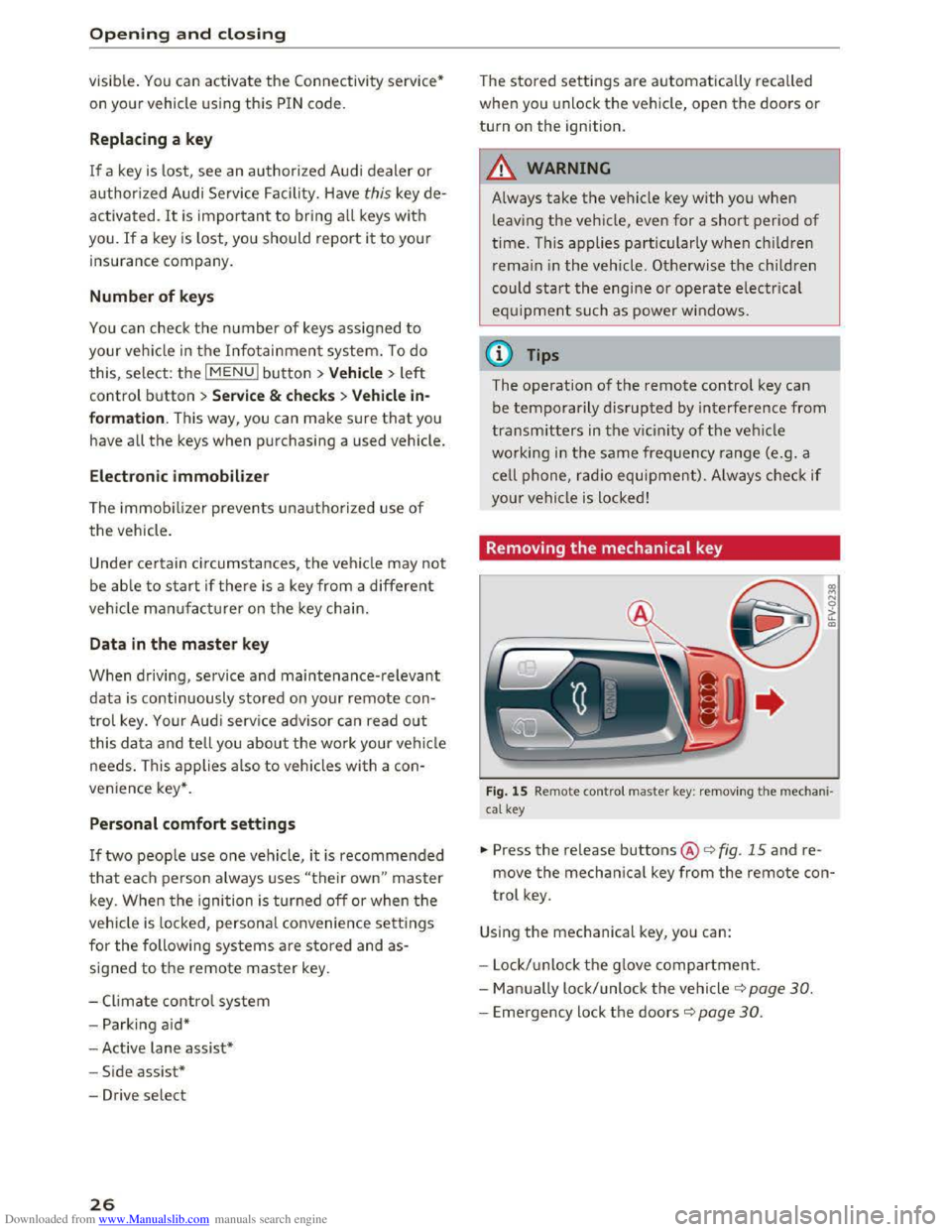
Fig. 15 Remote contro l master key : remov ing the m ec ha ni·
cal key
.,,. Press the release buttons@<=> fig. 15 and re
move the mechanical key from the remote con
trol key.
Using the mechanical key, you can:
- Lock/ unlock th e g love
compartment.
- Man ually lock/unlock
the vehicle ¢ page 30.
-Emergency lock the doors c::> page 30.
Page 39 of 322
Downloaded from www.Manualslib.com manuals search engine Always make sure your vehicle is parked and
adequately lit according to the laws. Avoid
using
the parking lights for several hours.
Switch
on the right or left parking light if
possible.
-
Please observe legal regulations when using
the lighting systems described.
Tips
-The light sensor for the automatic head
lights*
is in the rearview mirror mount.
Therefore, do not place any stickers in this
area on the w indshield.
-
Some functions of the exterior lighting can
be
adjusted ~page 3 7.
-
If yo u turn off the ign ition whil e the exterior
lights are on and open the door, you will
hear a warning tone.
- In some markets, the tail lights will switch
on when the daytime running lights switch
on.
- In cool
or damp weather, the inside of the
headlights, turn signals and tail lights can
fog over due to the temperature difference
between the inside and outside. They will
clear shortly after switching them on. This
does not affect the service life of the light
ing.
Turn signal and high beam lever
The lever operates the turn signals, the high
beoms
and the headlight flasher.
@
,
I
@
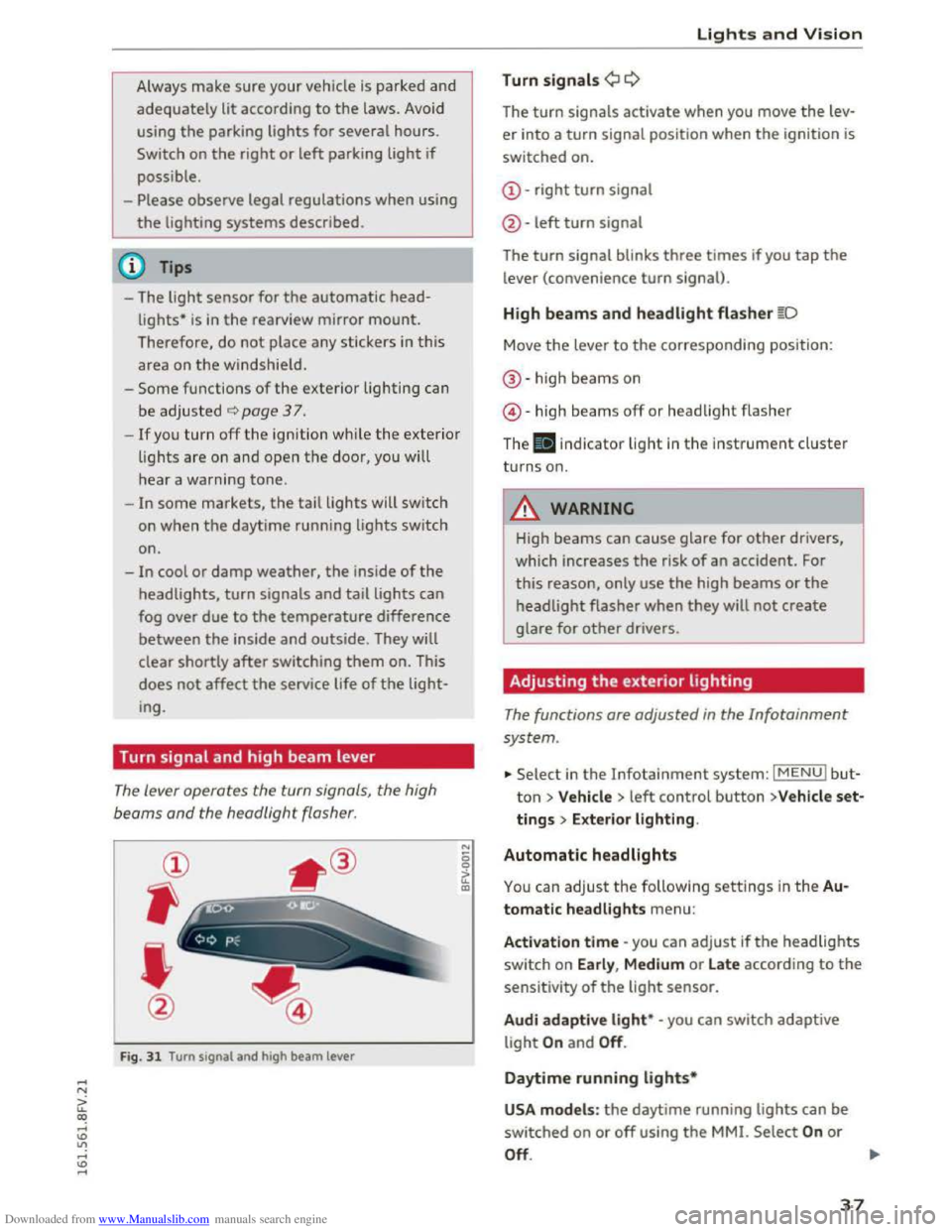
Fig. 31 Turn signal and high beam lever
"' 0 0
a'.: CXl
Lights and Vision
Turn signals¢ Q
The turn signals activate when you move the lev
er into a turn signal position when the ignition is
switched on.
@-right turn signal
@
-left turn signal
The turn signal blinks three times if you tap the
lever (convenience turn signal).
High beams and headlight flasher §D
Move the lever to the corresponding position:
®-high beams on
@-high beams off or headlight flasher
The . indicator light in the instrument cluster
turns on.
A WARNING
High beams can cause glare for other drivers,
which increases
the risk of an accident. For
this reason, only use the high beams or the
headlight flasher when they will not create
glare for other drivers.
Adjusting the exterior lighting
The functions are adjusted in the Infotainment
system .
... Select in the Infotainment system: IMENUI but
ton> Vehicle > left control button >V ehicle set
tings > Exterior lighting.
Automatic headlights
You can adjust the following settings in the Au
tomatic headlights
menu:
Activation time -you can adjust ifthe headlights
switch on Early, Medium or Late according to the
sensitivity of the light sensor.
Audi adapti ve light* -you can switch adaptive
light On and Off.
Daytime running lights*
USA models : the daytime running lights can be
switched on or off using the MMI. Select On or
Off. ....
37
Page 44 of 322

Downloaded from www.Manualslib.com manuals search engine Lights and Vision
Cleaning windshield wiper blades
Clean the wiper blades when you see wiper
streaks.
Clean the wiper blades with a soft towel
and glass cleaner.
"" Place the windshield wiper arms in the service
position
~page 42.
"" Fold the windshield wiper arms away from the
windshield.
& WARNING
Dirty windshield wiper blades can impair vi
sion, which increases
the risk of an accident.
Replacing windshield wiper blades
Fig. 39 Removing windshield wiper blades
Wiper service pos ition /blade repl acement
positi on
-
"' ~ 0 ci:
"' QJ
.,.. To bring the wipers into the service position,
turn the ignition off and move the windshield
wiper lever
into position@~ page 41, fig. 38.
.,.. To bring the wipers into the starting position,
turn the ignition on and move the windshield
wiper lever
into position@) for at least two sec
onds
q page 41, fig. 38.
Removing the wiper blade
.,.. Fold the windshield wiper arm away from the
windshield.
"" Press the locking knob@~ fig. 39 on the wiper
blade. Hold
the wiper blade firmly .
.,.. Remove the wiper blade in the direction of the
arrow.
42
Installing the wiper blade
.,.. Insert the new wiper blade into the mount on
the wiper arm @until you hear it latch into
place.
.,.. Place the wiper arm back on the windshield.
.,.. Turn the service position off.
& WARNING
For safety reasons, the windshield wiper
blades should be replaced once or twice each
year.
CD Note
- The windshie ld wiper blades must only be
folded away when in the service position!
Otherwise, you risk damaging the paint on
the hood or the windshield wiper motor.
-
You should not drive your vehicle or press
the windshield wiper lever when the wiper
arms are folded away
from the windshield.
The windshield wipers would move back in
to their original position and could damage
the hood and windshield.
(j) Tips
-You can also use the service position, for ex
ample,
if you want to protect the windshield
from icing by using a cover.
-
You cannot activate the service position
when
the hood is open.
Digital compass
Switching the compass on and off
Applies to: vehicles with digital compass
0 N
!
Fig. 40 Rearview mirror: digital compass is sw itched on
Page 54 of 322
Downloaded from www.Manualslib.com manuals search engine Warm and cold
Warm and cold
Climate control system
Description
The climate control system warms, cools and
adds humidity to the air in the vehicle interior. It
functions most effectively when the windows are
closed. If there is a build-up of heat inside the ve
hicle, ventilation can help to speed up the cooling
process.
Pollutant filter
The pollutant filter removes pollutants such as
dust and pollen from the air .
Key recogniti on
Certain settings are automatically stored and as
signed to t h e remote control key being used.
.&. WARNING
Poor visibility can lead to accidents.
-For safer driving, keep all windows free of
ice, snow and fog.
- Become familiar
as quickly as possible with
the correct use and function of the climate
control system, especially with the defrost
ing and defogging function.
-
When the temperature is below freezing,
only use the windshield washer system after
the windshield has been warmed by the cli
mate control system. The washer flu id could
freeze on the windshield and impair visibili
ty.
CD Note
-If you suspect that the climate control sys
tem is damaged, sw itch the system off to
52
prevent further damage and have it checked
by an
authorized Audi dealer or authorized
Audi Service Facility.
- Repairs
to the Audi climate control system
require special technical knowledge and
special tools. See an authorized Audi dealer
or authorized Audi Service Facility.
® For the sake of the environment
Reducing the amount of fuel used also re
duces the amount of pollutants that enter the
air.
('!) Tips
-To prevent interference with the heating
and cooling output a nd to prevent the win
dows from fogging over, the air intake in
front of the windshield must be free of ice,
snow or leaves.
-
Condensation from the cooling system can
drip
and form a puddle of water under the
veh icle. This is normal and does not mean
there is a leak.
- The
energy management system may switch
the seat heating* or rear window defroster
off temporarily. These systems are available
again as soon as the energy balance has
been restored.
-The flows through the vents under the rear
window. Make sure the openings are not
covered when placing clothing on the lug
gage compartment cover.
Page 59 of 322
Downloaded from www.Manualslib.com manuals search engine @ Tips
-Determine the depth before driving through
water.
-Do not stop the vehicle, drive in reverse or
switch the engine off when driving through
water.
- Keep in mind that oncoming vehicles may
create waves that raise the water level and
make it too deep for your vehicle to drive
through safely.
- Avoid driving
through salt water (corrosion).
Economical and environmentally-friendly
driving
The amount of fuel consumption, the envi ron
mental impact and the wear to the engine,
b rakes and tires depends mostly on yo ur driving
style. Wit h
an anticipatory and economic driv ing
style, fu
el consumption can be reduced by ap
proximately 10-lSo/o. The following tips will help
you conserve the environment and your money at
the same time.
Anticip atory driv ing
A veh icle uses the most fuel when a ccele rating.
When you drive with anticipation, you do not
need to brake as often and thus acce lerate less.
When possible, let your vehicle coast with a gea r
engaged -for example, when you notice that the
next traffic light is red.
Avoid full acceleration
You should rarely travel at the maximum vehicle
speed. High speeds cause a disproportionately
high increase in fuel consumption, emissions and
traffic noise. Slower driving saves fuel.
Reduce idling time
It pays off to stop the engine, for example when
at railroad crossings or traffic lights with longer
red lights. Stopping the engine for 30-40 sec
onds already saves more fuel than the amount of
extra fuel needed to restart the engine.
It takes a very long time in idle to warm the en
gine up to operating temperature. Wear and
emissions are especially high in the warm-up
Driving
phase. Therefore, you should begin driving im
mediately after starting the engine. Avoid high
RPMs while doing this.
Service regularly
By servic ing you r vehicle regularly, you can help
to reduce fuel consumption before you even start
to drive . The maintenance condition of your vehi
cle not only affects traffic safety and long-term
val ue b ut also impacts fuel co nsumptio n.
A poorly serviced engine can lead to fuel con
sumption that is 10% higher than normal.
Also check the oil level when refueling. The oil
con sumpti on
depends largely on the engine load
and speed. It is no rmal for the oil consumption
of a new engine to reach its lowest point only af
ter a certain amount of use. Therefore, the oil
consumption can only be properly judged after
approximately 3,000 mi (5,000 km) have been
driven.
Avoi d short trip s
The engine and exhaust cleaning system must
reach their optimal operating tempera tu re to ef
fectively reduce consumption and emissions.
A cold engine consumes a disproportionately
high
amount of f u el. The engine is at operating
temperature and consumption has normalized
only after approximately four kilometers.
Q) Note
Do not leave engine idling unattended after
starting. If warning lights should come on to
indicate improper operation, they would go
unheeded. Extended idling also produces
heat, which could result in overheating or
other damage to the vehicle or other proper
ty.
CD Note
-Have your vehicle maintained properly and
in accordance with the service recommenda
tions in your Warranty & M ain tenance book-
let. Lac k of proper mai ntenance as well as
improper use of th e vehi cle w il l impair the
function of the emission control system and
cou ld lead to damage. .,..
57
Page 60 of 322
Downloaded from www.Manualslib.com manuals search engine Driving
-Do not alter or remove any component of
the Emission Control System unless ap
proved by the manufacturer.
-Do not alter or remove any device, such as
heat shields, switches, ignition wires,
valves, which
are designed to protect your
vehicle's Emission
Control System and other
important vehicle components.
(D Tips
The consumption estimates as published by
ENVIRONMENTAL PROTECTION AGENCY
(EPA) and Transport Canada may not corre
spond to your actual consumption on the
road, which will vary depending upon vehicle
load
and speed, road and weather conditions,
trip length, etc.
Steering
Adjusting the steering wheel position
The steering wheel position is fully adjustable up
and down and forward and back.
Fig. 59 Lever on the steering column
•Tilt the lever~ fig. 59 downward.~&,
• Bring the steering wheel into the desired posi
tion.
•Push the lever against the steering column un
til
it latches.
A WARNING
Incorrect use of the steering wheel adjust
ment and an incorrect seating position can
cause serious injuries.
-
Only adjust the steering column when the
vehicle is stationary so that you do not lose
control of the vehicle.
58
-1
-Adjust the driver's seat or steering wheel so
that there is at least a 10 in (25 cm) dis
tance between your chest and the steering
wheel. If you do not maintain this distance,
you will not be properly protected by the air
bag system.
-If your physical characteristics prevent you
from
sitting at least 10 in (25 cm) or more
away from the steering wheel, see if your
authorized Audi dealer or authorized Audi
Service Facility
can provide adapters that
will help.
-
If your face is level with the steering wheel,
the airbag does not provide as much protec
tion during a collision. Always make sure
that the steering wheel is level with your
chest.
-Always hold the steering wheel with your
hands in the 9 o'clock and 3 o'clock posi
tions to reduce the risk of injury ifthe airbag
deploys.
- Never hold
the steering wheel in the 12
o'clock position or with both hands on the
rim or the center of the steering wheel.
Holding
the steering wheel incorrectly sig
nificantly
increases the risk of injury to the
hands, arms and head if the airbag deploys.
Starting and stopping
the engine
Starting the engine
The I ST ART ENGINE STOP I button switches the
ignition on and starts the engine.
Fig. 60 Center conso le: START ENGINE STOP button
Page 62 of 322
Downloaded from www.Manualslib.com manuals search engine Driving
Messages
Turn off ignition before leaving vehicle. Battery
is discharging
This message appears and a warning tone sounds
if you open the driver's door when the ignition is
switched on. Switch
the ignition off so that the
battery will not discharge.
Pressing start/stop b utton again will switch off
engine.
This
message appears when you press the
I START ENGINE STOPI button while driving .
Engine
start system: malfunction! Please con
tact Service
The engine automatic start system has a mal
function. Drive
to an authorized Audi dealer or
authorized Audi Service Facility immediately to
have the malfunction corrected. To start the en
gine,
press and hold the I START ENGINE STOPI
button.
II Remote control key : hold back of key
against the designated area. See owner's man
ual
This message appears if there is no convenience
key inside
the vehicle or ifthe system does not
recognize the key. The convenience key may not
be recognized, for example, if it is covered by an
object that disrupts the signal (such as a brief
case), or if
the key battery is weak. Electronic de
vices su ch as cell phones can also interfere with
the signal.
To still be able to start or stop the engine, refer
to "Correct ing a malfunction" Q page 60.
ml Remote control key : key not recognized . Is
the key still in the vehicle?
The
ml indicator light turns on and this message
appears if the convenience key was removed from
the vehicle when the engine was running. If the
convenience key is no longer in the vehicle, you
cannot switch the ignition on or start the engine
once you stop it. In addition, you cannot lock the
vehicle from the outside.
Please press brake pedal
60
This message appears if you do not press the
brake pedal when starting the engine.
Please select N or P
This
message appears when starting or stopping
the engine if the selector lever is not in the N or P
posi tion. The engine will not start/stop.
Shift to P, otherwise vehicle can roll away.
Doors
can be locked only in P
This
message appears for safety reasons along
with a warning
tone. It appears if the selector
lever for the automatic transmission is not in the
P position when switch ing the ignition off w ith
the I START ENGIN E STOPI button. Sh ift these
lector lever to the P pos ition. Otherwise, the vehi
cl e could roll.
You also cannot lock the ve hicl e us
ing
the loc kin g sensor on the door hand le or us
ing
the convenience key.
Starting the engine when there is a
malfunction
It may not be possible to start the engine under
certain circumstances, for example
if the battery
in the vehicle key is drained , if interference is af
fected
the key or if there is a system malfunc
tion .
Fig. 61 Steering column/remote control key: starting the
engine if there is a ma lfunction
As long as the message fi)) Remote control key:
hold back of key against the designated area.
See owner' s manual is displayed, you can emer
gency start your vehicle .
... Press the brake pedal~ A in Starting the en
gine on page
59 .
... Press the~, S~T~A~R~T~E_N _G ~l-N~E-S_T_ O_P~I button. ....
Page 63 of 322
Downloaded from www.Manualslib.com manuals search engine ..... N
G: CX)
.....
"' U"I
.....
"' .....
.,.. Hold the master key in the location indicated as
shown in the illustration y») ¢fig. 61. The en
gine will
start.
.. If the engine does not automatically start,
press the I START ENGINE STOP! button again.
{!) Tips
You can view the message again by pressing
the I START ENGINE STOPI button.
Electromechanical
parking brake
Operating
The electromechanical parking brake replaces
the hand brake.
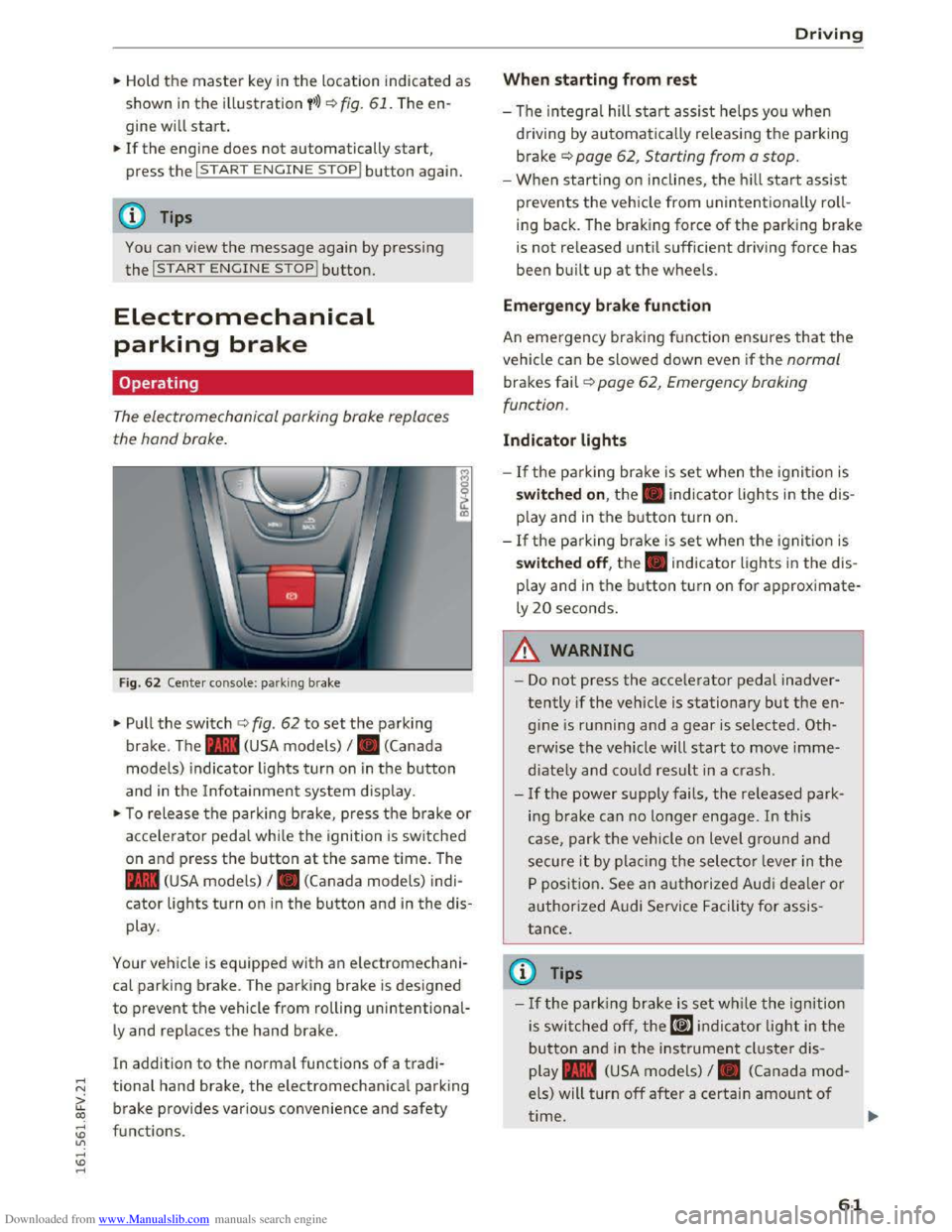
Fig. 62 Center console: park ing brake
.,.. Pull the switch ¢ fig. 62 to set the parking
brake. The . (USA models) I. (Canada
model s) indicator lights turn on in the button
and in the Info tainment system display.
.,.. To release the parking brake, press th e b rake or
acce le rator pedal while the ignition is switched
on and p ress the button at the same time. The
• (USA models) I. (Canada models) indi
cator lights turn on in the button and in the dis
play .
Your vehicle is equipped with an electromechani
cal parking brake. T
he parking brake is designed
to prevent the vehicle from rolling unintentional
ly and replaces the hand brake.
In addition to the normal functions of a tradi
tional hand brake, the electromechanical parking
brake provides various convenience
and safety
functions .
Driving
When starting from rest
-The integral hill start assist helps you when
driving by automatically releasing the parking
brake¢ page 62, Starting from a stop.
-When starting on inclines, the hill start assist
prevents the veh icle from un intentionally roll
ing back . The braking force
of the parking brake
is
not re leased unti l sufficient driving force has
been built up at the wheels.
Emergen cy brake function
An emergency braking fu nction ensures that the
vehicle can be slowed down even if the normal
brakes fail¢ page 62, Emergency braking
functi on.
Indicator lights
- If the parking brake is set when th e ignit io n is
switched on , the. indicator lights in the dis
play
and in the button tur n on .
- I f
the parking brak e is set when the ignit io n is
switched off, the. indicator lights in the dis
play
and in the b utton turn on for approximate
ly 20 seconds.
A WARNING
t-==
-Do not press the acce lerator pedal inadver-
tently if the vehicle is stationary but the en
gine is ru nning and a gear is selected. Oth
erwise the vehicle will start to move imme
diately and co uld result in a crash.
-
If the power supply fails, the released park
ing brake
can no longer engage. In this
case, park t he vehicle on level ground and
secure it by plac ing the selector l eve r in the
P position. See an authorized Audi deale r o r
authorized A udi Service Facil ity for assis
tance.
©Tips
-If the park ing brak e is set while the igni tion
is swi tc h
ed off, the((@)) indi cator light in the
button and in the ins trument cluster dis
play .
(USA models) I. (Canada mod
els) will turn off after a certain amount of
time.
61