light AUDI TT COUPE 2017 Owner's Manual
[x] Cancel search | Manufacturer: AUDI, Model Year: 2017, Model line: TT COUPE, Model: AUDI TT COUPE 2017Pages: 322, PDF Size: 79.73 MB
Page 38 of 322

Lights and Vision
Lights and Vision
Exterior lighting
Switching lights on and off
Fig. 30 Instrument panel: l ight sw itch
Li ght switch ·~ -
I
Tu rn the switch to the corresponding position.
When the lights are switched on, the
;oo: symbo l
turns on .
0 -lights are off (in some markets, the daytime
running lights* are switched on when the ignition
is switched on.)
- USA models : the daytime running lights switch
on automatically when the ignition is switched on and the light switch is set to the
O or the
AUTO position (only in daylight). The D ayt ime
runn ing lights
can be switched on and off in
the MMI
c:;, page 37c:;, &..
-Ca nad a model s: the daytime running lights
switch on automatically when the ignition is
switched on and the light switch is set to the
0 ,
::oo: or the AUTO position (only in daylight) c:;, &. .
AUTO* - automatic headlights switch on and off
depending on br ightness, for example in twilight,
during ra in or in tunnels.
;oo: -Parking lights
io -Low beam headlights
l~"' I -All-wea ther lights*
@il -Rear fog light(s)
All-weather light s*
In vehicles with all-weathe r lights, the front
lights are adjusted automatically so that you are
36
l ess likely to see g lare from your own head lights,
for example when driving on a wet road.
Automatic dynamic headlight range control
system*
You r vehicle is equipped with a headlight range
contro l system so that there is less g lare for on
coming t raffic if the vehicle load changes. The
headlight range also adjusts automatically when
braking and accelerat ing.
Light functions
The following light funct ions may be avai lable
depending on ve hicle equ ipment and only f unc
tion when the light switch is in the AUTO posi
tion.
Static cornering light* (vehicles with LED head
li ghts) -the cornering light switches on automat
ica lly when the steer ing whee l is turned at acer
ta in angle at speeds up to approximate ly 44 mph
(70 km/h) and when the turn s ignal is activated
at speeds up to approximately 25 mph (40 km/ h) . The area to the side of the vehicle is illum inat
ed bette r when turn ing.
H ighway light fun ction * (vehicles with LED head
lights) - this function adapts the lighting for
highway driv ing based on veh icle speed .
Speed dependent light distributio n* (vehicles
with LED headlights) -the speed dependent light
distribution adapts the light in towns a nd on
highways or expressways . Intersections can a lso
be illumina ted on veh icles w ith a navigation sys
tem*.
& WARNING
- Autom atic headlig hts* are o nly inten ded to
assist the driver. They do not relieve the
driver of responsi bility to check the head
lights and to t urn them on manually based
on the current light and vis ibility conditions.
For examp le, fog cannot be detected by the
light sensors. So always switch o n the low
beam under these weather condit ions and
when dr iv ing in the da rk
io.
- The rear fog lights should only be turned on
in acco rdance w it h traffic regulations, to
prevent glare for traffic behind your vehicle . ..,.
Page 39 of 322

CD
CD
.... N
" N ...... 0
0
Ill co
-If the battery has been discharging for a
wh ile, the parking light may sw itch off auto
matically. Always make sure your vehicle is
parked and adequately lit according to the
laws . Avo id using the parking lights for sev
eral hours.
- Always observe legal regulations when us
ing the light ing systems described.
(D Tips
- The light sensor for the automatic head
lights* is in the rearview mirror mount. Do
not place any stickers in th is area on the
windsh ield.
- Some exterior lighting functions can be ad
justed
Qpage 37.
-If you turn off the ignition wh ile the exterior
lights are on and open the door, a warning
tone so unds .
- In some markets, the ta il lights will sw itch
on when the dayt ime run ning lights switch
on.
- In cool or damp weather, the inside of the
headlights, turn signals and tail lights can
fog over due to the temperature difference
between the inside and outs ide. They will
clear short ly after switching them on. This
does not affect the service life of the light
ing.
Turn signal and high beam lever
The Lever operates the turn signals, the high
beams and the headlight flasher.
@
,
t
@
F ig. 31 Turn signal and high bea m lever
N
5 0
~ a:,
Lights and V ision
Turn signals ¢ 9
The turn signa ls act ivate when yo u move the lev
er into a turn signal position when the ignition is
switched on.
(D -rig ht tu rn signal
@ -left turn signal
The turn signa l blinks three times if you tap the
lever (convenience turn signa l).
High beams and headlight flasher
~D
Move the lever to the corresponding position:
@ -high beams on
@-high beams off or headlight flasher
T he
II indicator light in the instrument cluster
turns on.
A WARNING
= H igh beams can cause glare for other drivers,
which increases the risk of an accident. For
this reason, only use the high beams or the
headlight flasher when they will not create
g lare for other dr ivers.
Adjusting the exterior lighting
The functions are adjusted in the Infotainment
system .
.,. Select in the Infotainment system: I MENU ! but
ton> Vehicle > left control button >Vehicle set
tings > Exterior lighting .
Automatic headlights
You can adjust the following settings in the Au
tomatic headlights menu:
Activation time -you can adjust if the headlights
switch on Early, Medium or Late according to the
sensit ivity of the light sensor.
Audi adaptive light * -you can sw itch adaptive
light
On and Off .
Daytime running lights*
USA models: the daytime running lights can be
switched on or off using the MM I. Select
On or
Off .
37
Page 40 of 322
Lights and Vision
Canada models : this function cannot be switched
off . They activate automatica lly each time the ig
n ition is switched on . T his menu item is shown
with a "gray background".
Com ing home , Lea ving home
The com ing home function illum ina tes the area
outside the vehicle when you turn the ignition off
and open the driver 's door . To switch o n the func
tion, select
Entry /ex it lighting .
The leav ing home ill umin ates t he a re a out side
the vehicle when you unlock the vehicle . To
switch on the function, select
Entr y/exi t light
ing .
The com ing home and leaving home f unctions
only operate when it is dark and the lig ht switch
is in the
AU TO position.
Emergency flasher
Fig. 32 Cente r conso le : eme rge ncy f las her button
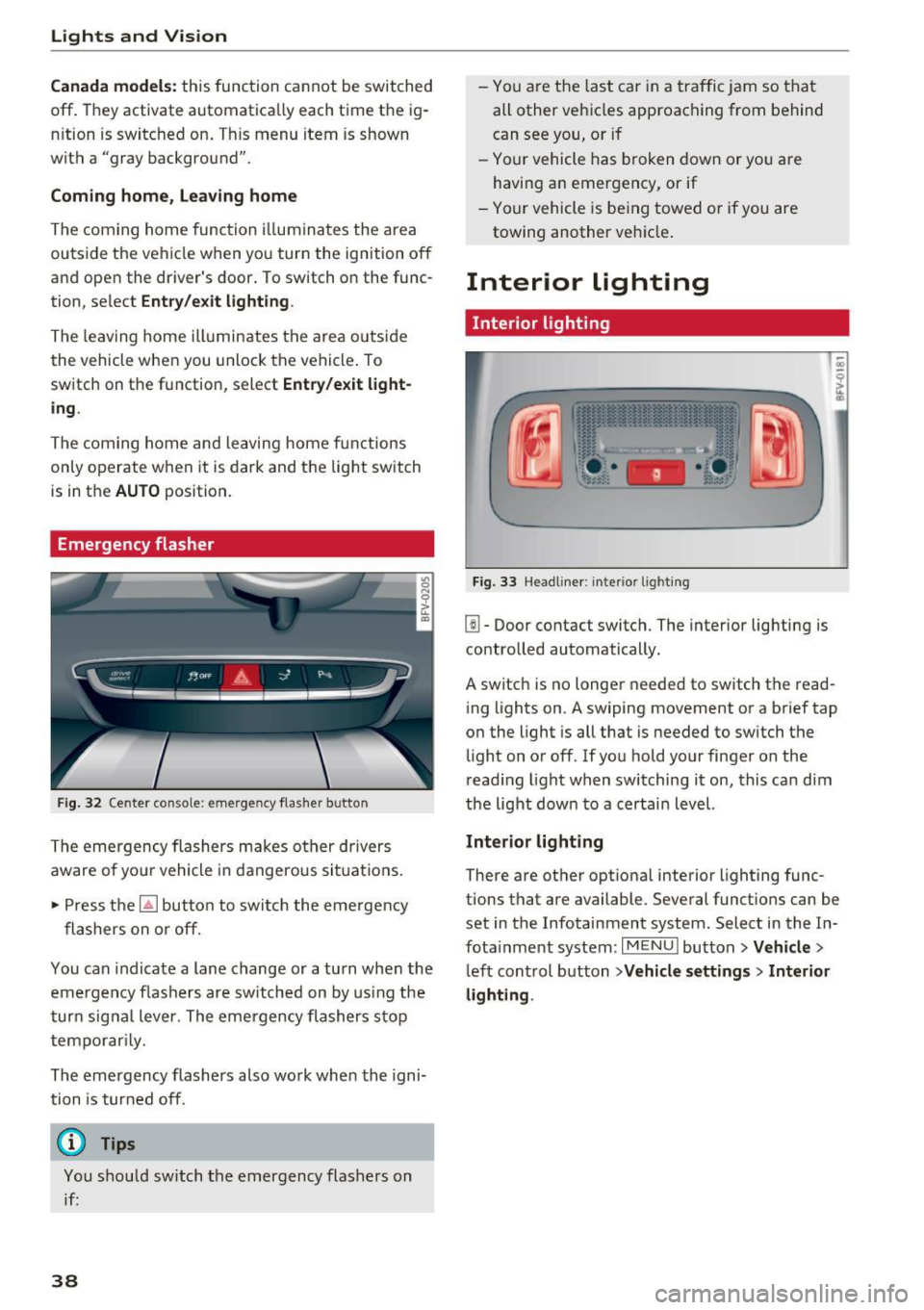
The emergency flashers makes other drivers
aware of yo ur vehicle in dangerous si tuat ions .
• Press the ~ button to switc h the eme rgency
flashers on or off.
You can indicate a lane change or a tu rn when the
em ergency fl ash ers are sw itched on by us ing the
tur n sig nal lever. The emergency flashers s top
tempo rar ily.
The emergency flashers also work when the igni
tion is tur ned off.
(D Tips
You s hou ld switch the emergency flashers on
if:
38
- You a re the last c ar in a tra ffic j am so that
all other vehi cles approaching from behind
can see you, or if
- Your vehicle has broken down or yo u are
having an emergency, or if
- You r vehicle is be ing towed or if you are
towing another vehicle .
Interior lighting
Interior lighting
Fig. 33 Head line r: i nte rior light ing
l!I -Door contact switch. The interior lighting is
contro lled automatically.
A switch is no longer needed to switch the read
ing lights on . A swiping movement or a brief tap
o n the light is all that is needed to switch the
li ght on or off. If yo u hold your finger on the
r ead ing light when switching it on, this ca n dim
the light dow n to a certai n level.
Interior light ing
There are othe r optional interior lighting func
tions that are available . Several funct ions can be
set in the Infotainment system . Select in the In
f ota inment system :
I MENU I button >Vehicle >
left con trol button >Vehicle settings > Interior
lighting .
Page 41 of 322
CD
CD
.... N
" N .... 0
0
Ill co
Instrument illumination
Fig. 34 Instrument illum inatio n
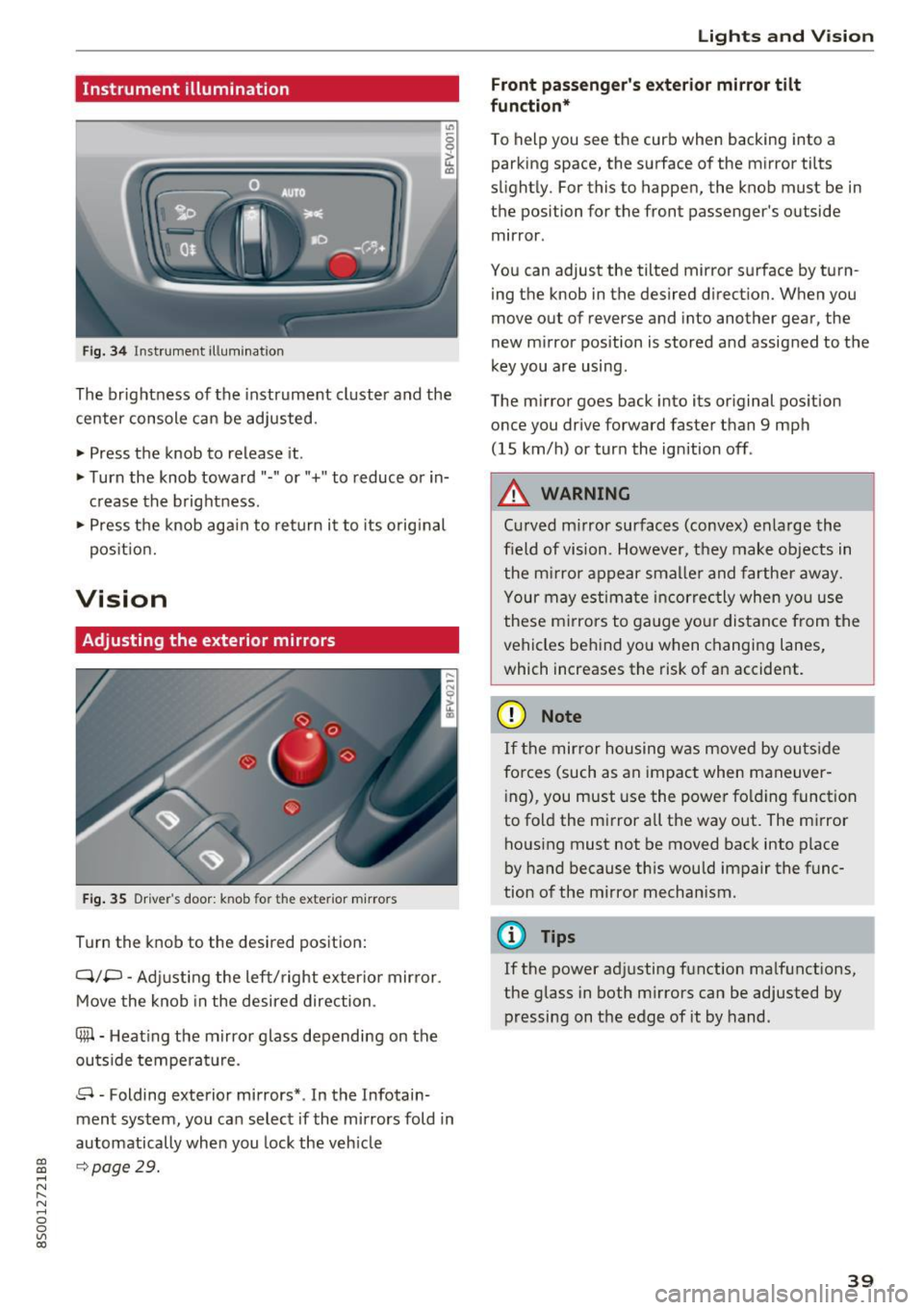
The brightness of the instrument cluster and the
center console can be adjusted.
~ Press the knob to release it .
~ Turn the knob toward"·" or"+" to reduce or in
crease the b rightness .
~ Press the knob aga in to return it to its original
pos it ion.
Vision
Adjusting the exterior mirrors
F ig. 35 Driver 's door: knob for the exter ior mirrors
Turn the knob to the desired pos ition:
Q/P -Adjusting the left/ right exter io r mir ror.
Move the knob in the desired direction .
4lil-Heating the mirror glass depending on the
outside temperat ure.
8 • Folding exterior mirrors* . In the Infotain
ment system, you can select if the mirrors fold in
automatically when you lock the vehicle
9 page 29.
Lights and V ision
Front passenger 's e xterior mirror tilt
function*
T o help you see the curb when backing into a
parking space, the surface of the mirror ti lts
slight ly. For this to happen, the knob must be in
the position for the front passenger's outside
mirror .
You can adjust the tilted mirror s urface by turn
ing the knob in the desired d irection. When you
move out of reverse and into another gear, the
new mirror position is stored and assigned to the
key you are using .
The m irror goes back into its or iginal position
once you drive forward faster than 9 mph
(15 km/h) or turn the ignition off .
A WARNING
Curved m irror surfaces (convex) enlarge the
field of vision. However, they make objects in
the m irror appear smalle r and farthe r away.
Your may estimate incorrec tly when you use
these m irrors to gauge your distance from the
vehicles behind yo u when changing lanes,
which increases the risk of an accident.
(D Note
If t he mir ror housing was moved by outs ide
fo rces (such as an impact when maneuver
i ng), you must use the power fo ld ing funct ion
to fold the mirror a ll the way out . The mirror
housing must not be moved back into place
by hand because th is would impair the func
tion of the mirror mechanism.
(D Tips
If the power ad justing function ma lfunctions,
the glass in both m irrors can be adjusted by
pressing on the edge of it by hand .
39
Page 42 of 322
Lights and Vision
Dimming the mirrors
Fig. 36 Automatic d imm ing rearview mirror
Manual dimming rea rview mirror
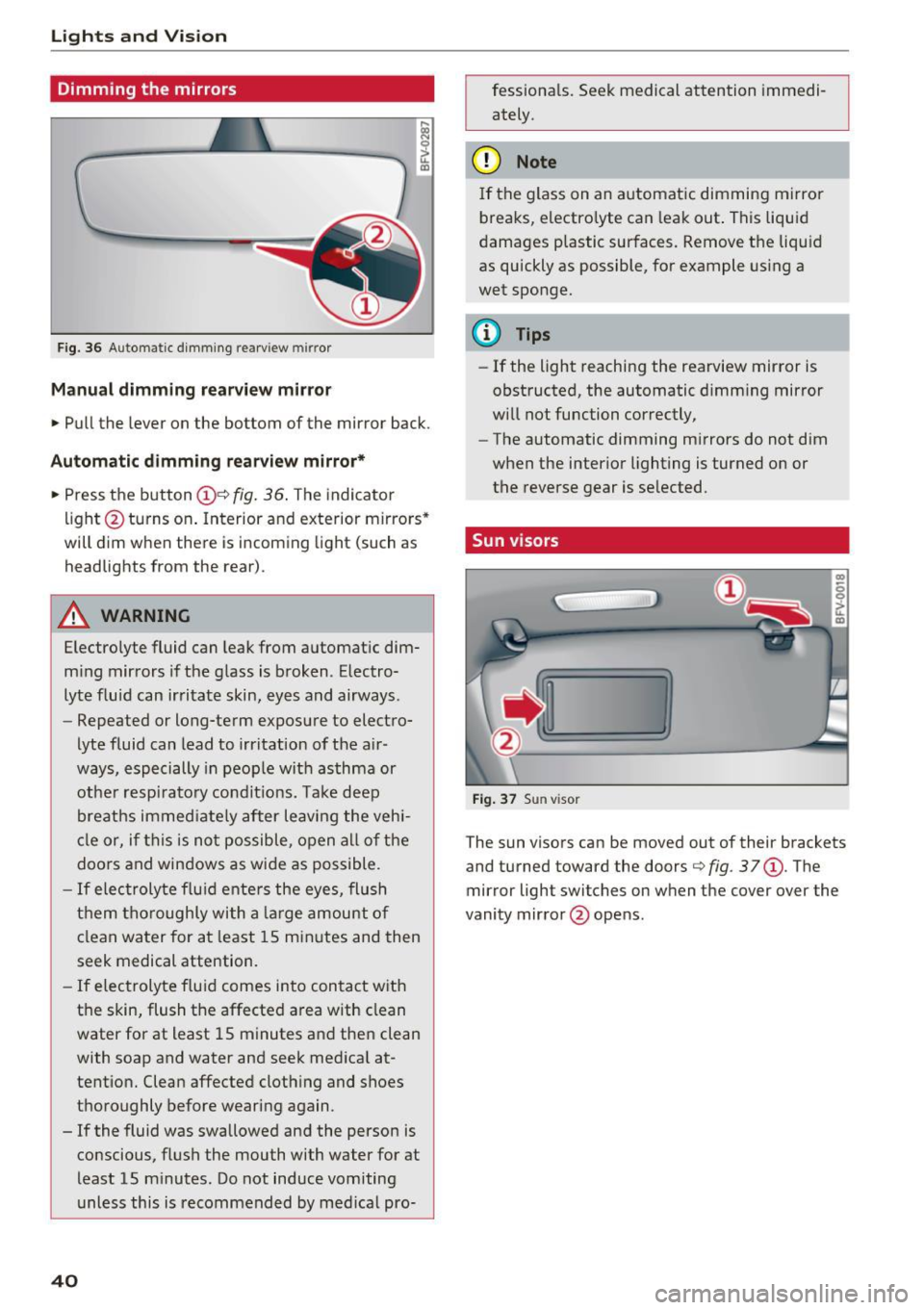
.. Pull the lever on the bottom of the mirror back.
Automatic dimm ing rearview mirror*
.. Press t he button @Qfig.
36 . The indicator
li ght @turns o n. Interior and exterior mirro rs *
will dim w hen the re is i ncom ing light (such as
headlights from the rear) .
A WARNING
Electro lyte fluid can leak from automat ic dim
m ing mir rors i f the g lass is broken . Electro
lyte f luid can irritate skin, eyes and airways.
- Repeated or long-te rm exposure to elect ro-
lyte fluid can lead to irritation of the air
ways, especially in peop le wit h asthma or
ot he r resp irato ry co ndi tions. Tak e deep
breath s immed iate ly after leaving the veh i
cl e or, if this is no t possible, o pen a ll of th e
doors and win dows as wide as possible .
-If elec troly te f lu id ente rs the eyes, flush
t h em thor oughly wi th a la rge amoun t of
cl ean wa ter for a t least 15 mi nutes an d then
seek medical attention.
- If e lec trolyte f lu id comes into con tact w ith
t h e skin , flush the affected a rea wit h clean
water for at least 15 minutes a nd the n clean
with soap and water and seek medica l at
tentio n. Clean affected cloth ing and shoes
t h oroughly bef ore wearing again.
- If the fluid was swallowe d an d the person is
conscious, fl ush the mouth with water for at
least 15 m inutes. Do not induce vomiting
unless this is recommended by me dica l pro-
40
fessiona ls . Seek medical attention immedi
ately .
(D Note
I f the glass on an a utomat ic dimming mirro r
breaks, electro lyte can lea k out . This liquid
damages p lastic sur faces. Remove t he liquid
as quickly as possible, fo r example using a
wet sponge.
@ Tips
- If the light reaching the rearview mirror is
obstructed, the automatic d imm ing mirror
w ill not function correctly,
- The automatic dimming m irrors do not dim
when the interio r lighting is turned o n or
the reverse gear is se lected .
Sun v isors
Fi g. 37 Sun visor
m
-0 0 ::1-u.. co
T he sun visors can be moved out of their brackets
and tu rned toward the doors
Q fig . 37 @. The
mirror light switches on when the cover over the
vanity mir ror @ ope ns.
Page 43 of 322

CD
CD
.... N
" N ...... 0
0
Ill co
Windshield wipers
Switching the windshield wipers on
Fig. 38 Windshie ld wiper lever
Move the windshield wiper lever to the corre
sponding position:
@ -windshield w ipers off
@ -interval mode. To increase/decrease the wip
er intervals, move the switch ® to the left/right.
In vehicles with a rain sensor*, the wipers turn on in the rain once the vehicle speed exceeds ap
proximately 2 mph (4 km/h). The higher the sen
sitivity of the rain sensor* is set (switch ® to the
right), the earlier the windsh ield wipers react to
mo isture on the windsh ield. You can deact ivate
the rain sensor mode* in the Infotainment sys
tem, which switches the intermi ttent mode on.
Select in the Infotainment system:
I MENU! but
ton>
Vehicle > left control button >Driver as sis
tance > Rain sensor
> Off.
@ -slow wiping
@ -fast wip ing
© -sing le w ipe If you hold the lever in th is posi
tion longer, the wipers switch from slow wiping
to fast w iping.
® -clean the windshield To eliminate water
droplets, the windshield wipers perform one af
terwipe after several seconds while driving in
temperatures above 39 °F (4 °C). You can switch
this function off by moving the lever to position
@ within 10 seconds of the afterwipe . The after
wipe function is reactivated the next t ime you
switch the ignition on.
C leaning the headlights* . The headlight washer
system* only functions when the lights are
Lights and V ision
switched on. The headlights are automatically
cleaned the first time and every fifth time the
l ever is moved to position
® ·
A WARNING
--
- The rain sensor* is only intended to assist
the driver. The driver may still be responsi
ble for manually sw itch ing the w ipers on
based on visibility cond itions.
- The windsh ield may not be treated w ith wa
ter-repelling w indshield coating agents. Un
favorable condit ions, such as wetness, dark
ness, and when the sun is low, can cause in
creased glare, wh ich increases the risk of an
accident. Wiper blade chatter is also possi
b le.
- Properly functioning windshield wiper
b lad es are required for a cl ear v iew and safe
driving
<:::> page 42, Replacing windshield
wiper blades .
(D Note
-If there is frost, make sure the windshield
w iper blades are not frozen to the wind
shield. Switching on the windshield w ipers
when the blades are frozen to the wind
shield can damage the wiper blades.
- Prior to using a car wash, the w indshield
wiper system must be switched off (lever in
position 0). This prevents the wipers from
switching on unintentionally and caus ing
damage to the windsh ield wiper system.
(D Tips
- The windshie ld wipers switch off when the
ignition is switched off. You can activate the
w indshield wipers after the ignition is
switched back on by moving the w indshield
w iper lever to any position.
- Wor n or dirty windshield w iper blades result
in streaking. This can affect the rain sensor*
function . Check your w indshield w iper
blades regularly .
- The washer f luid nozzles in the windsh ield
washer system are heated * at low tempera-
tures when the ign ition is o n. .,.
41
Page 44 of 322
Lights and Vi sion
- When stopping temporarily, such as at a
traffic light, the speed of the windshie ld
wipers automatica lly reduces by one level.
Cleaning windshield wiper blades
Clean the wiper blades when you see wiper
streaks . Clean the wiper blades with a soft towel
and glass cleaner.
~ Pl ace the windshield wiper arms in the service
position ¢
page 42.
~ Fold the windshield wiper arms away from the
windshield .
A WARNING
,--
Dirty windshield wiper blades can impair vi-
sion , which increases the risk of an accident .
Replacing windshield wiper blades
Fig. 39 Re mov ing w indshi eld w iper b lade s
Wind shield wiper ser vice po sition /blade
replacement po sition
~ To b ring the windshield wipers into the service
pos ition, turn the ignition off and move the
windshield wiper lever into position @
¢ page 41, fig. 38.
~ To bring the wipers into the starting position,
turn the ignit ion on and move the windshield
wiper lev er into position @ for at least two sec
onds ¢
page 41, fig. 38.
Remov ing th e wip er bl ade
~ Fo ld the windshield wiper arm away from the
windshield.
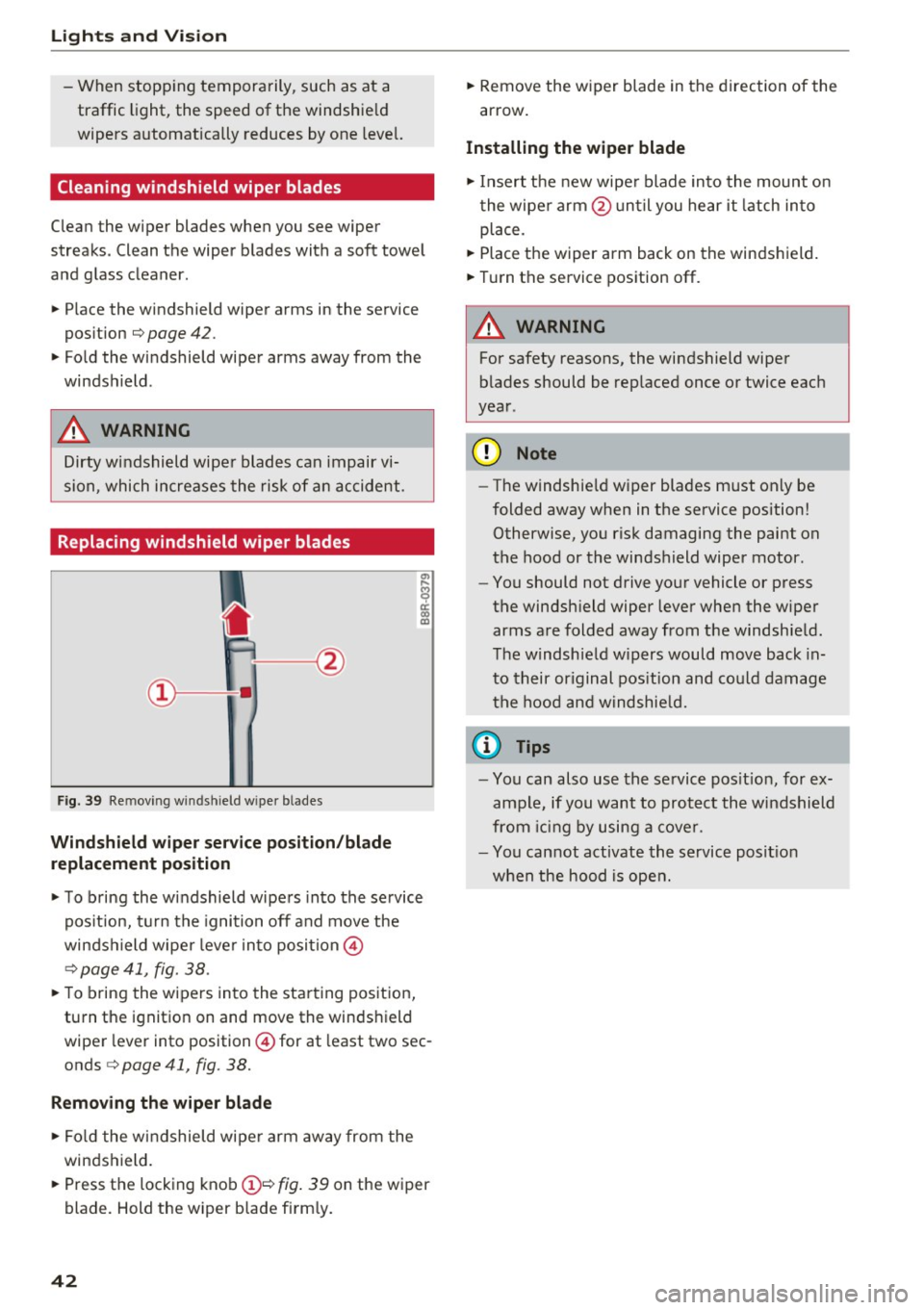
~ Press the locking knob(!)¢ fig. 39 on the wiper
blade . Hold the wiper blade firm ly.
42
~ Remove the wiper blade in the direction of the
arrow .
Installing the wipe r blade
~ Insert the new wipe r blade into the mount on
the wipe r arm @un ti l you hear it latch into
place.
~ Place the wiper arm back on the windshield.
~ Turn the service position off.
A WARNING
-
For safety reasons, the windshield wiper
blades should be rep laced once or twice each
year .
@ Note
-The windshield w iper blades must only be
folded away when in the service position!
Otherwise, you risk damaging the paint on
the hood or the windshield wiper motor.
- You should not drive your vehicle or press
the windsh ield wiper lever when the wiper
arms are folded away from the windshield.
T he windshield w ipers would move back in
to their or iginal pos it ion and could damage
the hood and windshie ld.
(D Tips
- You can also use the se rvice pos it ion, for ex
ample, if you want to protect the windshield
from ic in g by using a cover.
- You cannot activate the service posit io n
when the hood is open.
Page 45 of 322
CD
CD
.... N
" N .... 0
0
Ill co
Digital compass
Switching the compass on and off
Applies to: vehicles with digital compass
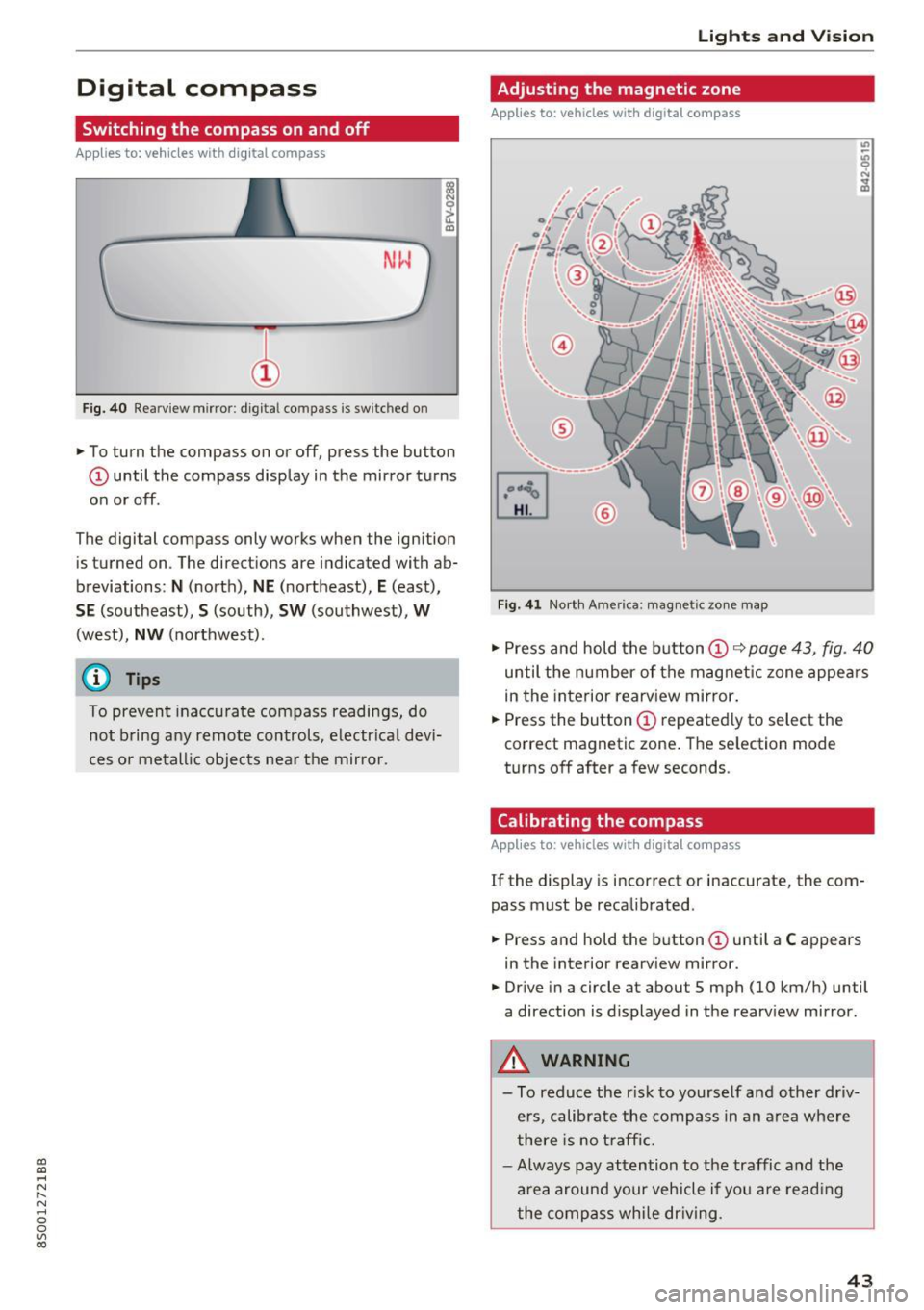
Fig. 40 Rearview mirror : digita l compass is switc hed on
., To turn the compass on or off, press the button
@ until the compass display in the mirror turns
on or off.
The digital compass only works when the ignition is turned on . The directions are indicated with ab
breviations :
N (north), NE (northeast), E (east),
SE (southeast), S (south), SW (southwest), W
(west), NW (northwest).
(D Tips
To prevent inaccurate compass readings, do
not bring any remote controls, electrical devi
ces or metallic objects near the mirror .
Lights and V ision
Adjusting the magnetic zone
Applies to: vehicles with digita l compass
Fi g. 41 North Amer ica: magnetic zone map
., Press and hold the button (D ~ page 43, fig. 40
until the number of the magnetic zone appea rs
in the interior rearview mirror.
., Press the button
CD repeatedly to select the
correct magnetic zone. The selection mode
turns off after a few seconds .
Calibrating the compass
Applies to: vehicles wit h digita l compass
If the display is incorrect or inaccurate, the com
pass must be recalibrated .
., Press and hold the button
CD until a C appears
in the interior rearview mirror .
., Drive in a circle at about 5 mph (10 km/h) until
a direction is displayed in the rearview mirror.
A WARNING
-
-To reduce the r isk to yourse lf and other driv-
ers, calibrate the compass in an area where
there is no traffic.
- Always pay attention to the traffic and the
area around your vehicle if you are reading
the compass while driving .
43
Page 48 of 322
Sea ts and stor age
Ashtray
Applies to: vehicles with ashtray
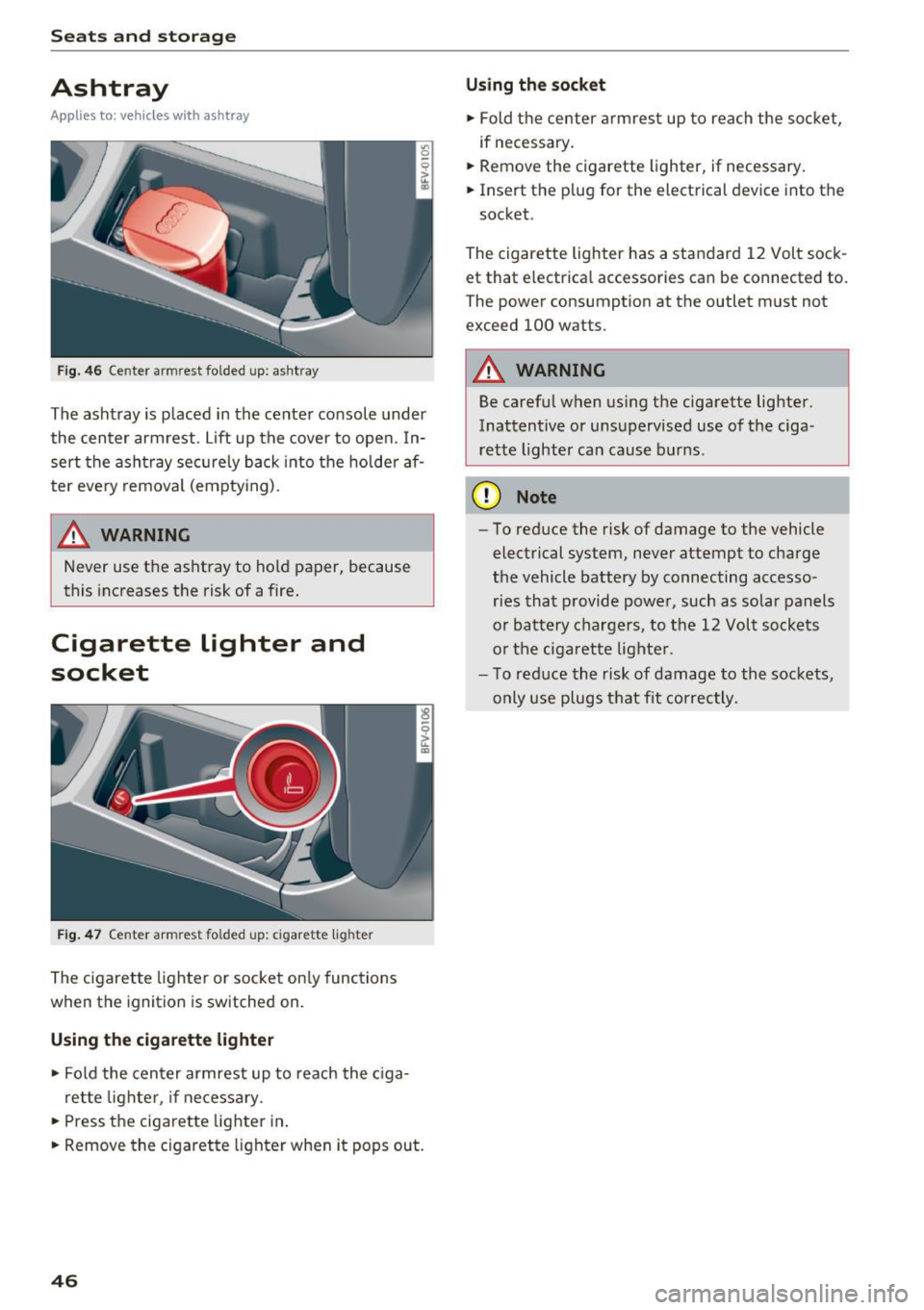
Fig . 4 6 Center armrest folded up: ashtray
The ashtray is placed in the center console under
the center armrest . Lift up the cover to open. In
sert the ashtray sec urely back i nto the holde r af
ter eve ry remova l (empty ing).
A WARNING
Never use the ashtray to hold paper, because
this increases the risk of a fire .
Cigarette lighter and
socket
Fig. 4 7 Center armrest fo lded up: cigarette lighter
The cigarette lighter or socket on ly functions
when the ignition is switched on.
Using the cigarette lighter
.,. Fol d the cen ter armrest up to reach the c iga
ret te lighter, if necessary .
.,. Press the ciga re tte lighter in .
.,. Remove the cigarette lighter when it pops out.
46
U si ng th e soc ket
.,. Fold the center armrest up to reach the socket,
if necessary .
.,. Remove the cigarette lighter, if necessary .
.,. Insert the plug for the electrical device into the
socket.
The cigarette lighter has a standard 12 Volt sock
et that electr ical accessories can be connected to.
The power consumption at the outlet must not
exceed 100 watts.
A WARNING
Be carefu l when using the cigarette lighter.
Inattentive or unsupervised use of the ciga
re tte lighter can cause burns.
(D Note
- To reduce the risk of damage to the vehicle
electrical system, neve r attempt to charge
the vehicle battery by connecting accesso ries that p rovide powe r, such as solar panels
or battery chargers, to the 12 Volt sockets
or the ciga rette lighte r.
- To reduce the risk of damage to the sockets,
only use plugs t hat fit correctly.
-
Page 49 of 322
CD
CD
.... N
" N ...... 0
0
Ill co
Storage
Beverage holders
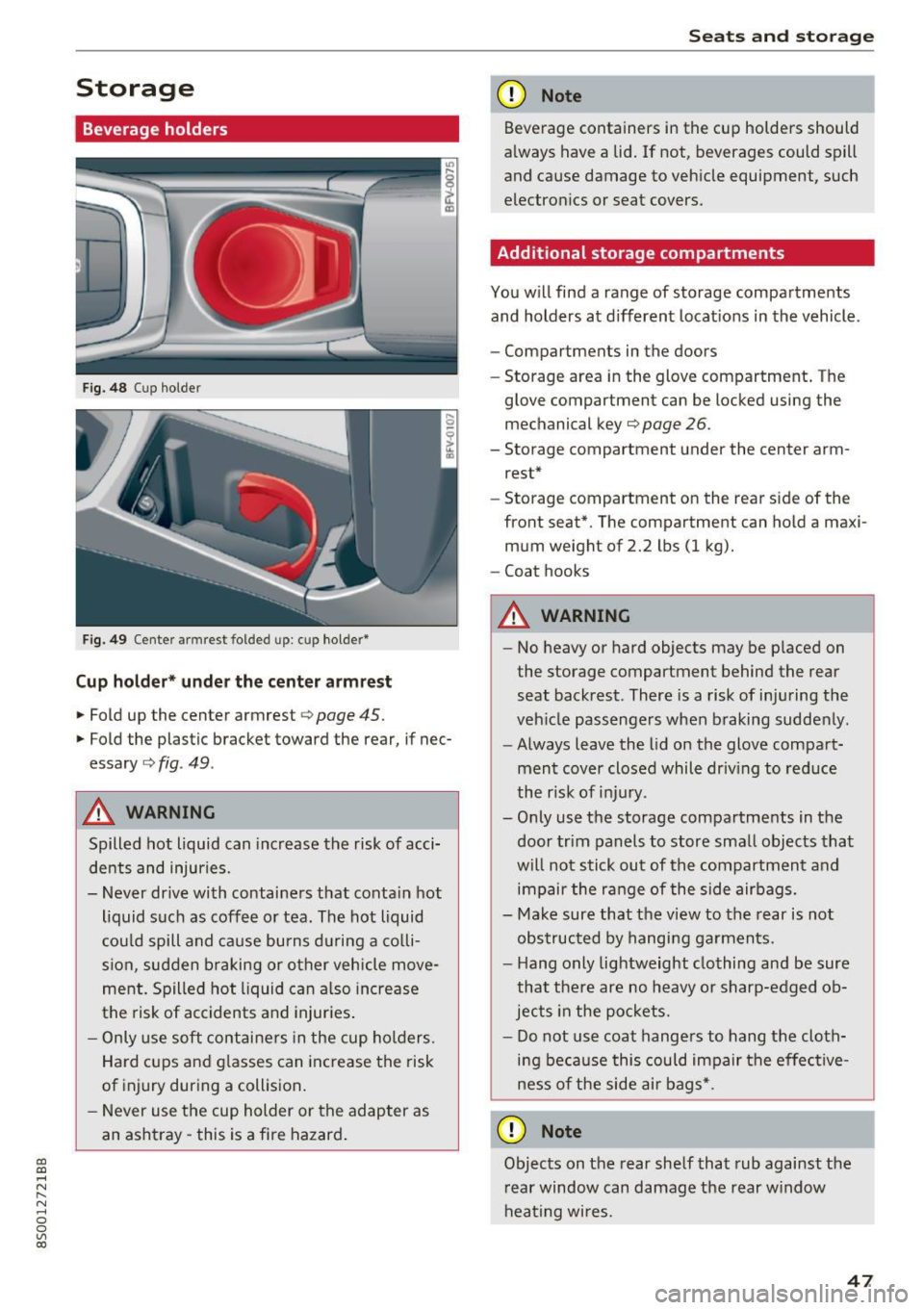
Fig. 48 Cup holder
Fig. 49 Center armrest folded up: cup holder*
Cup holder* under the center armre st
.,. Fold up the center armrest c> page 45.
.,. Fold the plastic bracket toward the rear, if nec
essary
c::> fig . 49 .
A WARNING
Spilled hot liquid can increase the risk of acci
dents and injuries.
- Never drive with containers that conta in hot
liquid such as coffee o r tea. The hot liquid
cou ld spill and ca use bu rns d uring a co lli
sion, sudden braking or other vehicle move
ment. Spilled hot liquid can a lso in crease
the risk of accidents and injur ies .
- Only use soft contai ne rs in the cup ho lders.
Hard cups and g lasses can increase the risk
of injury during a collision .
- Never use the cup holder or the adapter as
an ashtray -this is a fire hazard .
Seats and storag e
(D Note
Beverage containers in the cup holders should
a lways have a lid . If not, beverages could spill
and cause damage to veh icle equipment, such
electron ics or seat covers.
Additional storage compartments
You w ill find a range of storage compartments
and holders at d ifferent locat ions in the vehicle.
- Compartments in the doors
- Storage area in the glove compartment . The
glove compartment can be locked using the
mechanical key¢
page 26.
-Storage compartment under the center arm
rest*
- Storage compartment on the rear side of the
front seat*. The compartment can hold a maxi
mum weight of 2.2 lbs (1 kg).
- Coat hooks
A WARNING
- No heavy or hard objects may be p laced on
the storage compartment behind the rear
seat backrest. There is a risk of inju ring the
veh icle passengers when braking sudde nly .
- Always leave the lid on the glove compa rt
ment cover closed whil e driv ing to red uce
the r isk of inju ry.
- O nly use the storage compartments in the
door trim panels to store sma ll objects tha t
will not stick out of the compartment a nd
impair the ra nge of the side airbags.
- Make sure that the v iew to the rear is not
obs truc ted by hanging ga rments.
- H ang o nly lightweight clothing and be sure
that the re are no heavy or sharp-edged ob
jects in the po ckets.
- Do not use coat hange rs to hang the cloth
ing be ca use this could impair the effec tive
ness of the side air bags*.
(D Note
Objects on the rear she lf that rub against the
r ear window can damage the rear w indow
hea ting wi res .
47