light AUDI TT COUPE 2017 Workshop Manual
[x] Cancel search | Manufacturer: AUDI, Model Year: 2017, Model line: TT COUPE, Model: AUDI TT COUPE 2017Pages: 322, PDF Size: 79.73 MB
Page 93 of 322
co
co
.... N
" N .... 0
0
Vl c:o
brake rotors and pads by caref ull y applying
the brakes several t imes .
-If the front spoiler is damaged or you install
another spoiler, make sure the front wheel
brakes are vent ilated properly. Otherwise,
the brake system could overheat, wh ich re
duces the ir effectiveness .
- Failure of a brake circuit impairs b raking
performance , which increases brak ing dis
tance. Avoid driving the vehicle and have it
towed it to the nearest author ized Audi
dealer or author ized A udi Se rvice Facility.
- Never let the vehicle roll while t he engine is
stopped because this increases the risk of a n
acc iden t.
- If the bra ke booste r is not working, you will
have to press m uch ha rder on the bra ke
ped al to compensate for the lac k of th e
booster.
- Never let the brakes "rub " by pressing the
pedal light ly when bra king is no t actually
ne cessary . T his cause s the brakes to over
hea t and i ncre ases br aking di stance and
ca uses wear.
- B efo re driv ing downh ill a long dis tance on a
steep h ill, decrease your speed and se lec t a
l ower gear . This makes use of the engine
braking effect and relieves the brakes . If
you need to b rake additionally, brake in in
tervals and not continuously.
@ Tips
- If the brake booste r is not working, you
must press the brake pedal with much more
fo rce than normal.
- If you retrofit yo ur vehicle with a front spoil
er, whee l
covers or similar items, make sure
that the air flow to the front whee ls is not
i nterr upted . Otherw ise the brake system
ca n become too hot .
Intelligent Technology
Electromechanical
steering
The electromechanical steering supports the
driver 's steering movements .
Power steering adap ts elec tronically based on
the ve hicle speed.
Indicator light s and message s
• Steering: malfun ction! Please stop vehicle
If this indica to r li ght tur ns on and st ays on and
t hi s message appea rs, the powe r steering may
have failed.
Stop t he vehi cle in a safe location as soon as pos
s ible. Do
not cont inue drivi ng. See an autho riz ed
Audi dealer or authorized A udi Service Fac ility for
assistance .
l;r- ij S teering : malfun ction! You may continue
driving
If the indicator light turns on, the steering wheel
may be more d ifficult to
move or more sensit ive
t h an usua l. Th e steer ing whee l may a lso be at an
angle when d riving s trai ght.
D rive slowly to an a uthorized Audi dea ler or au
t h orized Audi Serv ice Facility to have the mal
funct ion corre cted.
(D Tips
If the . or l;r, ij ind icator light only s tays on
fo r a short time, you may continue d riving.
All wheel drive (quattro)
In all wheel drive, all four wheels are powered.
General information
In all whee l dr ive, the dr iv ing power is divided be
tween all four wheels . This happens automatical
ly depending on you r dr iv ing behav ior as we ll as
t h e cur rent road condi tions. A lso see ~
page 88,
Elec tronic stabilization con trol ( ESC).
T he all whee l dr ive concept is des igned for high
engine power . You r vehicle is except ionally pow
erfu l and has excellent driv ing cha racteristics
bot h unde r normal d rivi ng conditions and o n
91
Page 94 of 322
Intelligent Technology
snow and ice. Always read and follow safety pre
cautions
¢ & .
Winter tires
By using all wheel drive, your vehicle has good
forward motion with standard tires in winter con
ditions. However, in winter we recommend using
winter or all season tires on
all four wheels, be
cause this will improve the
broking effect.
Snow chains
If there are snow chain laws, snow chains must
also be used on vehicles with all wheel drive
¢ page 2 70, Snow chains.
Replacing tires
For vehicles with all wheel drive, only whee ls with
the same rolling circumference should be used .
Avoid using tires with different tread depths
¢ page 262, New tires or wheels.
Offroad vehicle?
Your Aud i is not an offroad vehicle - there is not
enough ground clearance. For this reason, avoid
difficult terrain.
_&. WARNING
-Also, in vehicles with all wheel drive, adapt
your driv ing style to the current road and
t ra ffic conditions. Do not let the increased
safety provided tempt you into taking risks,
because this increases the r isk of an acci
dent.
- The braking ability of your vehicle is limited
to the traction of the wheels. In this way, it
is not different from a two wheel drive vehi
cle. Do not be tempted to accelerate to a
high speed when the road is slippery, be
cause this increases the risk of an accident.
- Note that on wet streets, the front wheels
can "hydroplane" if driving at speeds that
are too high. Unlike front whee l drive
vehicles, the eng ine does not rev highe r sud
denly when the vehicle begins hydroplaning.
For this reason, pay attention to the road
conditions regardless o f your speed.
92
Rear spoiler
Appl ies to: vehicles with retractable rear spoile r
The extendoble rear spoiler increases driving sta
bility.
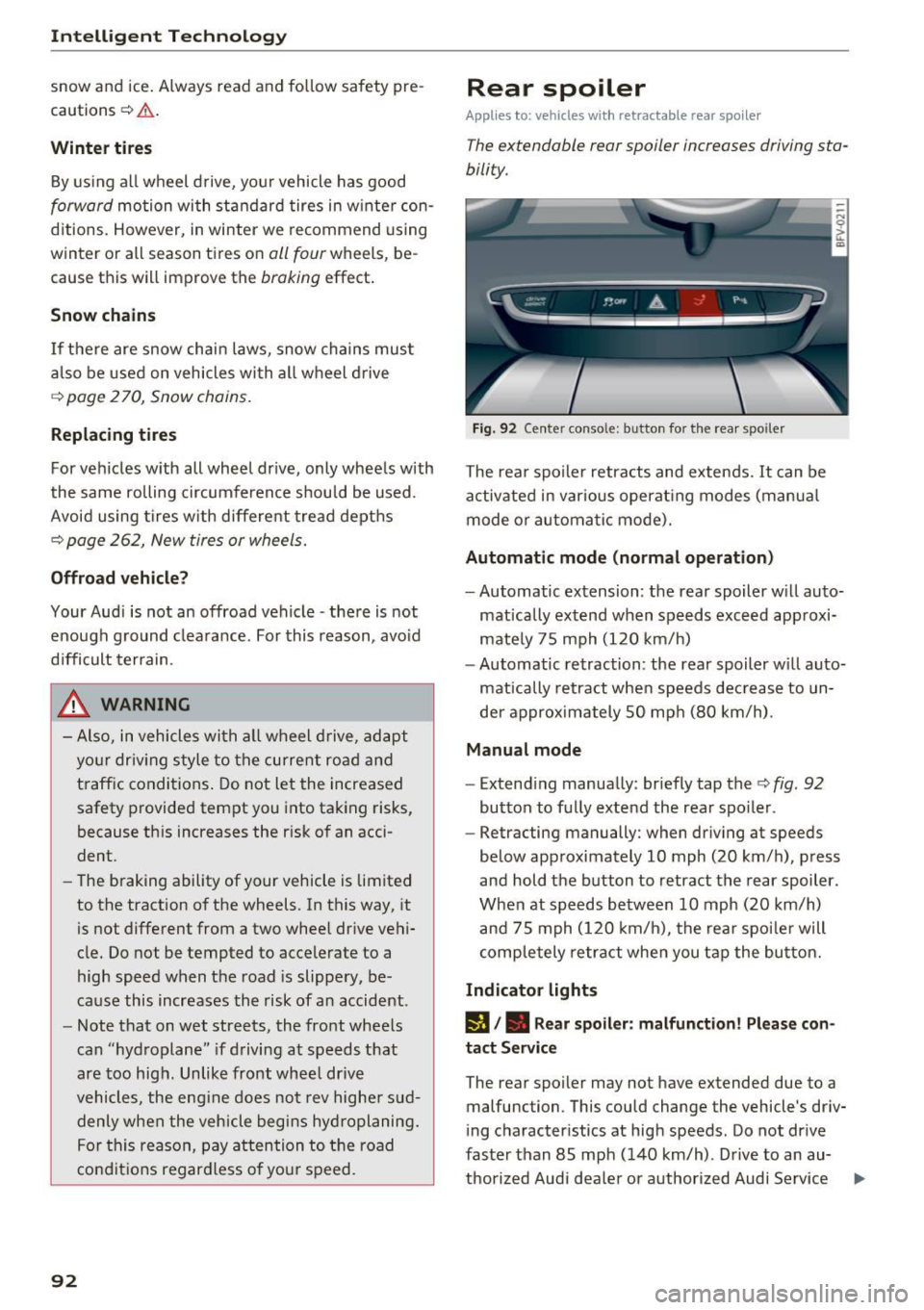
Fig. 92 Center conso le: button for the rear spoiler
The rear spoiler retracts and extends. It can be
activated in various operat ing modes (manua l
mode or automatic mode).
Automatic mode (normal operation)
- Automatic extension: the rear spoiler w ill auto-
mat ically extend when speeds exceed approxi
mately 75 mph
(120 km/h)
- Automatic retraction: the rear spoiler w ill auto
matically retract when speeds decrease to un
der approximately 50 mph (80 km/h).
Manual mode
-Extend ing manually : briefly tap the¢ fig. 92
button to fully extend the rear spoiler .
- Retracting manually: when driving at speeds
below approximately
10 mph (20 km/h), press
and hold the b utton to retract the rear spoiler .
When at speeds be tween
10 mph (20 km/h)
and 75 mph
(120 km/h), the rea r spoi ler will
completely retract when you tap the button.
Indicator lights
IJ,. Rear spoiler: malfunction! Please con
tact Service
The rear spoiler may not have extended due to a
malfunction. This could change the vehicle's driv
ing characteristics at high speeds. Do not drive
faster than 85 mph
(140 km/h) . Drive to an au-
thorized Audi dea ler or authorized Audi Service ..,.
Page 95 of 322

co
co
.... N
" N .... 0
0
Vl c:o
Facility immediately to have the malfunction cor
rected. The color of the indicator light depends
on the vehicle speed.
A WARNING
-
Driving at higher speeds without the rear
spoiler deployed can impair handling charac teristics, making the vehicle harder to con
trol.
- Always make sure that the spoiler is de
ployed when driving at speeds over 85 mph
(140 km/h). If the rear spoiler warning/indi
cator light in the instrument cluster comes
on, the rear spoiler may not have deployed.
- Never drive at speeds higher than 85 mph
(140 km/h) if the spoiler is not deployed .
Have the spoiler inspected as soon as possi
ble by an authorized Audi dealer or qualified
workshop.
- Always obey speed limits and other traffic
laws.
A WARNING t =
Improper operation of the rear spoiler can
cause crushing injuries.
-
- Always make sure that nobody, especially
children, is in the way when the rear spoiler
is deployed or retracted.
(D Note
- Never push on the vehicle on the rear spoil
er. This could cause damage.
- To prevent damage to the rear spoiler do
not lean or place anything on it.
- Only operate the rear spoiler manually when
the luggage compartment lid is close and
the rear spoiler moving parts are not
blocked. Otherwise, damage could occur.
@ Tips
Clean the rear spoiler compartment every 2 to
3 months. To function correctly, the rear
spoiler must be free of ice , snow and leaves.
Intelligent Technology
Energy management
The starting ability is optimized
The energy management system manages the
electrical energy distribution and optimizes the
availability of electrical energy for starting the
engtne.
When a vehicle with a conventional energy sys
tem is not driven for a long time, the vehicle bat
tery is drained by equipment (for example, the
immobilizer). In certain circumstances , there
could may not be enough energy to start the en
gine.
Your vehicle is equipped with an intelligent ener
gy management system for distributing electrici
ty. This significantly improves the starting ability
and increases the vehicle battery life.
The energy management system Is made up of
battery diagnosis, idling current management
and dynamic energy management.
Battery diagnosis
The battery diagnosis determines the vehicle bat
tery charge level. The sensors determine the bat
tery voltage, the battery current, and the battery
temperature. The current charge level and the
performance of the vehicle battery are deter
mined based on this.
Idling current management
The idling current management decreases the
energy used while parked. With the engine
switched off , it manages the energy distribution
to the different electrical components. Data from
the battery diagnosis is taken into account for
this.
Depending on the vehicle battery charge level,
electrical equipment is switched off one item af
ter the other to prevent the vehicle battery from draining and to maintain the starting ability.
Dynamic energy management
While driving , dynamic energy management dis
tributes the appropriate amount of energy to the
electrical equipment.
It controls the battery
charge level so that the amount of energy is not ..,_
93
Page 96 of 322
Intelligent Technology
greater than the amount being generated in or
der to maintain an optimal vehicle battery charge
level.
(D Tips
- Energy management cannot overcome the laws of physics. Note that the charge level
and length of the vehicle battery life are
limited.
- When the starting ability is jeopardized, the
(•j indicator light turns on¢ page 13.
What you should know
Maintaining the starting ability is the highest
priority.
A lot of stress is placed on the vehicle battery
when driving short distances, during city driving,
and at cold times of the year. A lot of energy is
used but little is generated. It is also critical
when the engine is not running but electrical
equipment is switched on. In this case, energy is used but none is generated .
In situations like this, energy management will
actively regulate the distribution of energy.
Long periods without use
If you do not drive your vehicle for several days or
weeks, electrical equipment is gradually scaled
back or switched off. This reduces energy use and
ensures the vehicle will be able to start after long
periods of time. Some convenience functions
such as opening with the remote control key may not be available . These convenience functions
will be available again once you switch the igni tion on and start the engine.
With the engine switched off
The vehicle battery will drain if you use Infotain ment functions such as listening to the radio
while the engine is switched off .
If the vehicle's ability to start may be impaired by
the energy use, a message will appear in the In
fotainment system display. The message indi cates that the system will switch off automatically soon .
If you would like to continue using the
functions, you must start the engine.
94
With the engine running
Although e lectrical energy is generated while
driving , the vehicle battery can drain . This can
happen if little energy is generated but much is
used, and the charge level of the vehicle battery
is not optimal.
To restore the balance of energy , components
that require large amounts of energy are tempo
rarily scaled back or switched off. Heating sys
tems in particular require a great deal of energy.
If you notice, for example, that the seat heating*
or rear window defroster is not working, then it has been temporarily reduced or switched off .
These systems are available again as soon as the energy supply has been restored.
In addition, you may notice that the idle speed
has slightly increased . That is normal and no
cause for concern . By increasing the idling speed ,
the additional required energy will be generated
and the vehicle battery will be charged.
Information about data
recorded by vehicle
control modules
Your vehicle is not equipped with a crash data re
corder . This device is installed by some vehicle
manufacturers to record data about crashes so
that it can be analyzed later. Crash data record
ers are also called "Event Data Recorders (EDR)".
In some legal jurisdictions, it is not permitted to
access or download data recorded by pre-instal
led crash data recorders in order to evaluate a
crash without clear consent of the vehicle owner.
Your vehicle is not equipped with a crash data re
corder. However it does contain a variety of elec
tronic control modules for various vehicle sys
tems such as engine function, exhaust treatment
or airbags and safety belts.
These electronic control modules record vehicle
data during normal driving for diagnosis and re
pair purposes. The recording capability of the
electronic control modules is limited to data only
- no sound is recorded. If the control module de
tects a system malfunction or other change in
status, a very limited amount of data is recorded .,,.
Page 105 of 322
co
co
.... N
" N .... 0
0
Vl c:o
-Entering characters: turn the contro l knob to
the desired character using the character se lec
t ion @¢ fig.
105. Press the control knob to
confirm the character. Your input is displayed
in the input fie ld @ . When you have entered all
of the characters, select and confirm~
Or: push the control knob dow n.
-Entering accented characters (such as a, ~. n,
o) *: turn the control knob w it h the character
selection @¢ fig .
105 to a character. To open
the se lected accen ted cha racters, press and
hold the control knob. T urn the control knob
wi th the charact er selection @¢ fig.
105 to an
accented cha racter. Press the control knob to
insert the accented character. To close the ac
cented characters without se lecting a charac
ter, press and hold the control knob again.
Or:
select and confirm laou 10 ¢ fig . 105. Select
and confirm an accented character .
-Deleting characters: select and confirm<&! @
¢ fig .
105. To delete all characters in the input
field, press and hold the control knob on
<&I
@¢ fig . 105 until a ll characters in the input
field are de leted .
-Entering special characters : select and con
firm l!&?l @¢fig .
105 orll23 I@ . Select and
Symbol/Description Description
Multi Media Interface
confirm the desired special character (for ex
ample, a hyphen or period) with the number
speller .
-Input assistance : in some cases s uch as in navi
gation*, there is a word suggestion* @
¢ fig.
105 based on available entries while you
are entering data. You can select this sugges
tion by pus hing the control knob upward.
- Results list : in some cases, such as in the direc
tory, the system sw itches automatically to the
results list based on available entries
@ ¢
fig. 105 . Select and confirm a suggestion
from the list.
Requirement: the input field@¢
fig. 105 must
be active .
-Switching between speller and MMI touch*:
the handwriting recogn itio n for the MMI touch
control pad* is activated automatically . Simply
start wr iting.
Overview of symbols in the speller
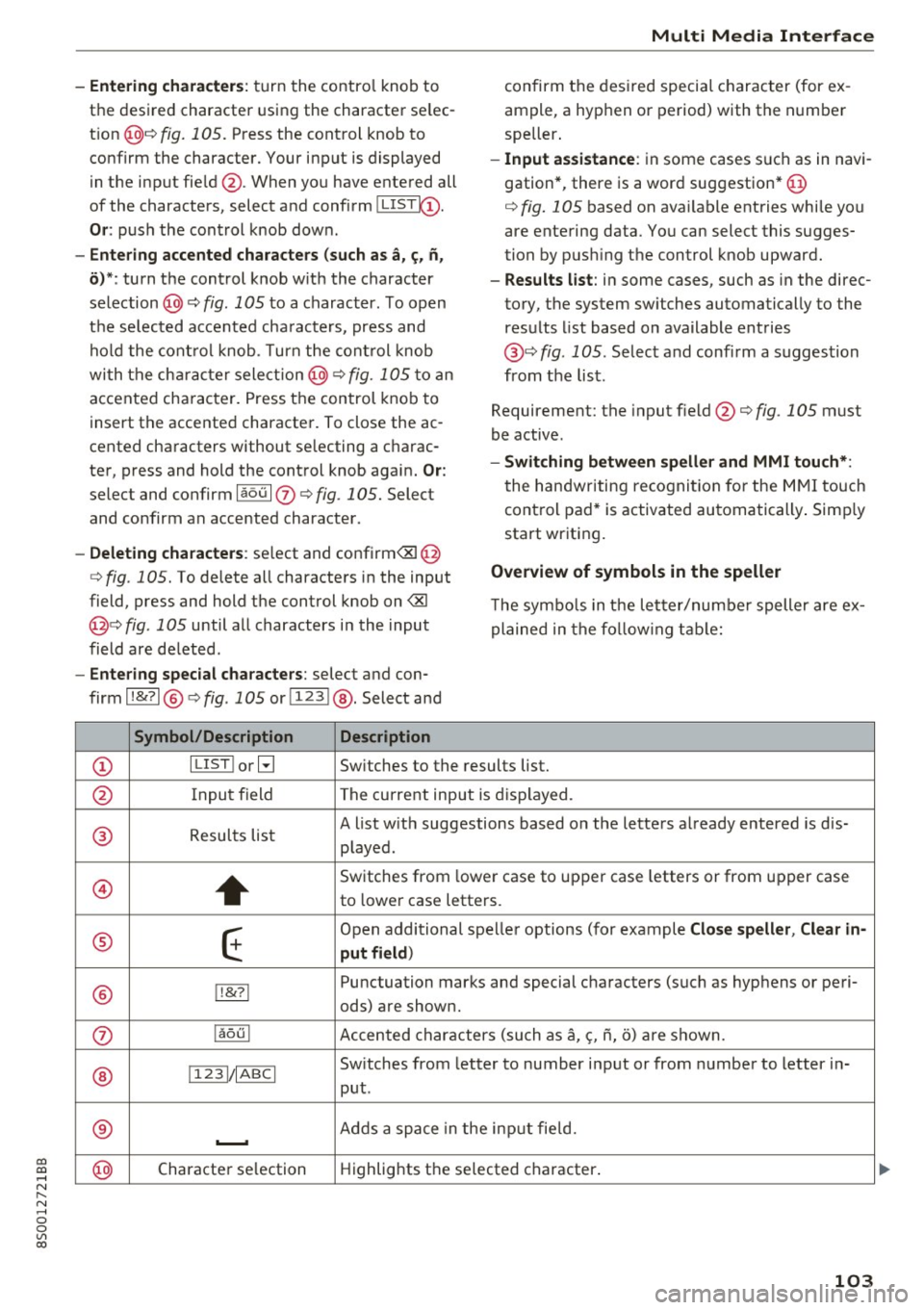
T he symbo ls in the letter/numbe r speller are ex
plained in the following table:
CD ILIST lorB
Switches to the results list.
@ Input field The current input is displayed.
® Results list A list w
ith suggestions based on the letters already entered is dis-
played .
@
+
Switches from lower case to upper case letters or from upper case
to lower case letters.
® E
Open additional spe ller options (for example Close speller , Clear in -
put field )
® 1!&71 Punctuation
marks and special characters (such as hyphens or peri-
ods) are shown.
0 l
aou l Accented characters (such as
a, <;, ii, o) are shown .
Sw itches from letter to number input or from number to letter in-
® 11 231/ IABCI
put.
® ...__. Adds
a space in the inp ut fie ld .
@ Character
selection Highlights
the selected character .
103
Page 109 of 322

"'
"' ....
N
" N .... 0 0
"' CX)
• Telephone
• Audi connect
• Navigation
• Directory
• Radio
• Med ia
• Sound
• Help
• Help Speech dia log system
• Help Telephone
• Help Audi connect
• Help Navigation
• Help Map
• Help Radio
• Help Media
TELEPHONE
· Enter number
• Delete number/ correc tion
• Directory
• Call (XY)
·business/ private/ land line/ mobile
NAVIG:ATI0N
• Navigate to (XV)
• Business address/ Private address
• Start/ cancel route guidance
· Directory
• Last destinations
• N avigation favorites
• Drive home
• Enter address
• Enter country/ town/ street/ state
• Exclude routt / Exclude route for (XY) km/ m
• M ap
• Day map / Night map
Voice recognition system
• Favor ites
• Call (XY)
• Enter number
• Redial
• Read new tex t message
• N avigate to
(XV)
• Enter address/destination
• Onhne destinations
• Cancel route guidance
• M ap
• Line (XY)
• Next page/ previous page
• Cancel
• N o, l meant
()(Y)
• Correction
• Call list
• Redial
• Call mailbox
• Enter PIN/ delete PI N
• Telephone favori tes
• Exclude ne xt route section / Exclude
nex t street
• Route list
• Calculate alternative routes
· Online destinations
• Special destination
• 20 driving position map/ 20 north position map/ 30 map/ Destination map/ Overview map
AllJC !H C0NNECf
• Audi connect
• Travel information/ Parking Information
• Fuel prices
• Weather
RADIO
• Radio presets
• Last stations
• FM
• FM / AM/ SIRIUS XM
• Station (XY) / Frequency (XY)
• T raffic announcement on/ off
Fig . 108 Co mmand overv ie w
• Flight Information I Train Information
• City events
• Online news
• Twitter
MEDIA
• Jukebo x
• CO/ DVD y
• SO card l / SD card 2
· Audi music Interface/ !Pod/ USB / Bluetooth /
Wl ·Fi / Medium (XV)
• Media favorites/ Artists/ Albums/ Genres/
Tracks/ Playlists / Videos
• Folder up
· Random playback on / off
107
Page 131 of 322
co
co
.... N
" N .... 0
0
Vl c:o
Weather
Applies to: vehicles with Audi connect
Information on current weather conditions as
well as weather forecasts for the selected search area (for example,
Nearby ).
~ Select and confirm Weather.
Flight information
Applies to: vehicles with Audi connect
Information on flights and current arrival/depar
ture times in the selected search area .
~ Select and confirm Flight information .
You can select the desi red information using the
right control button.
City events
Applies to: vehicles with Audi connect
Information on events in various categories in
the desired search area .
~ Select and confirm City events > left cont rol
button
> category.
Online news
Applies to: vehicles with Audi connect
You can check the current headlines of your fa
vorite publications in the MMI.
Requirement: your myAudi account must be sub
scr ibed to newsfeeds and your vehicle must be
connected to myAudi
¢ page 127.
~ Select : Online news > desired newsfeed > a
headline.
© Tips
If you have not subscribed to any personal
newsfeeds in your myAudi account, pre -con
figured newsfeeds will be displayed.
Audi connect
Twitter
Applies to: vehicles with Audi connect
You can access the most important functions in
your Twitter account through your MMI.
Requirement:
You must have connected your myAudi account
with Twitter. Additional information on this can
be found in the
Audi connect (myAudi) operating
manua l under
my .audiusa.com .
You must have connected your vehicle wit h
myAudi
¢ page 127.
~ Select Twitter > left control button > desired
function
(for examp le, Trends ).
The following categories can be se lected in the
Twitter menu:
- My tweets: News Feed and the Tweets you have
posted are listed.
- Home : the Tweets for everyone you follow are
displayed.
- Trends : topics on Twitter that are currently
popular within a country .
Different functions are ava ilable depending on
the Twitter category you have selected:
-New tweet: you can post a new tweet using
pre-made templates or using customized tem plates in your myAudi account.
-Refresh: the se lected Twitter function is re
freshed.
- Favorite : set a Tweet as favorite to show you
liked it .
-Retweet : you can quote a Tweet to share i t with
others.
(D Tips
- You can find additional information on con
necting your myAud i account with Twitter in
the
Audi connect (myAudi) operating man
ual at
my.audiusa.com.
- Other settings s uch as account, language,
Tweet security and location settings
cannot
be changed in the MMI. These changes must
be made on the Tw itter website.
129
Page 132 of 322

Audi connect
- You can on ly connect one Twitter account
with your myAudi account .
- Audi connect makes it possible to access
Twitter . Permanent avai lab ility cannot be
guaranteed, beca use that depends on Twit
ter.
Audi connect services in navigation
Applies to: veh icles w ith navigation system and Audi connect
The follow ing Audi connect services are currently
ava ilable :
- Navigat ion with online map view and Street
View
c::> page 146.
-Point of Inte rest (POI) online search with
v oice recognition (such as restaurants) : plan
route gu idance using the MMI control panel
and the voice recogn ition system
c::> poge 108.
- Set up dest inations in your MMI using yo ur
myAudi account or onl ine map view
c::> poge 146.
-Online traffic informat ion : receive up-to-the
minute traff ic information about accide nts,
road construction and other incidents
c::> poge 147.
-Map updates* : import navigation map updates
i n your MMI usi ng a n SD card .
(Di Tips
- For the Map update Audi connect se rvice us
i ng an SD card, check the current softwa re
version in you r vehicle a nd compare it with
my.audiusa .com to see if a new version is
available. You can also have the new naviga
tion data in sta lled by an Audi dea ler, whi ch
c an be done for an add ition al charge.
- More inform ation on map updates can be
fo und in t he Audi conne ct Operating Man
ual under my.audiu sa .com .
Audi connect services on the phone
Applies to: vehicles with Audi connect
The fo llowing A udi connect services are currently
ava ilable:
S to ring con tacts o n your computer us ing your
m yAudi Account and loading the contac ts into
the MMI directory
c::> poge 123.
130
' Audi connect services in the Media menu
Applies to: vehicles with Wi-Fi audio player and Audi connect
-Wi -Fi audio player : you can access the med ia
center through W i- Fi connec ted med ia p laye rs
(such as sma rtphones)
c:>poge 159.
-Online media : offers ac cess to d ifferen t onli ne
media se rvices and operation through the MM I
using the Audi MMI connect app.
(D Tips
Fo r more info rm ation on the Wi -Fi audio play
e r and s upported devices, cont act a n au thor
iz ed A udi dealer or au thori zed A udi Se rvi ce
Fac ility.
Additional options
Applies to: vehicles with Aud i connect
... Select: !MENU I button> Audi conne ct > right
cont rol button.
The following options are available in the Audi
connect services overview :
- Log in :
see c:>poge 127, Logging into myAudi in
the vehicle.
- Connection manag er: see c::> page 175.
Wi-Fi hotspot
Applies to: vehicles with Wi-Fi hotspot
You con use the MMI as o Wi-Fi hotspot to con
nect up to eight Wi- Fi devices to the Internet.
While driving, restricted use of unsecured, light,
small wireless devices is only possible from the
rear of the vehicle.
Requirement: the ignition must be switched on.
... Sele ct:
!ME NUI button> Telephone > right co n-
t rol butt on > Wi-Fi settings .
The following sett ings ca n be mod ified :
Wi-Fi
The MMI Wi-Fi hotspot is deactivated at the fac
tory. Sw itch the W i-F i hotspot to On before es
tablis hing an Internet connection betwee n your
vehicle and your Wi-Fi device . .,.
Page 137 of 322
CD
CD
.... N
" N ...... 0
0
Ill co
Navigation
Opening navigation
Applies to: vehicles with navigation system
Navigation
The navigation system directs you to your destination, around traffic incidents and on alternative
routes, if desired.
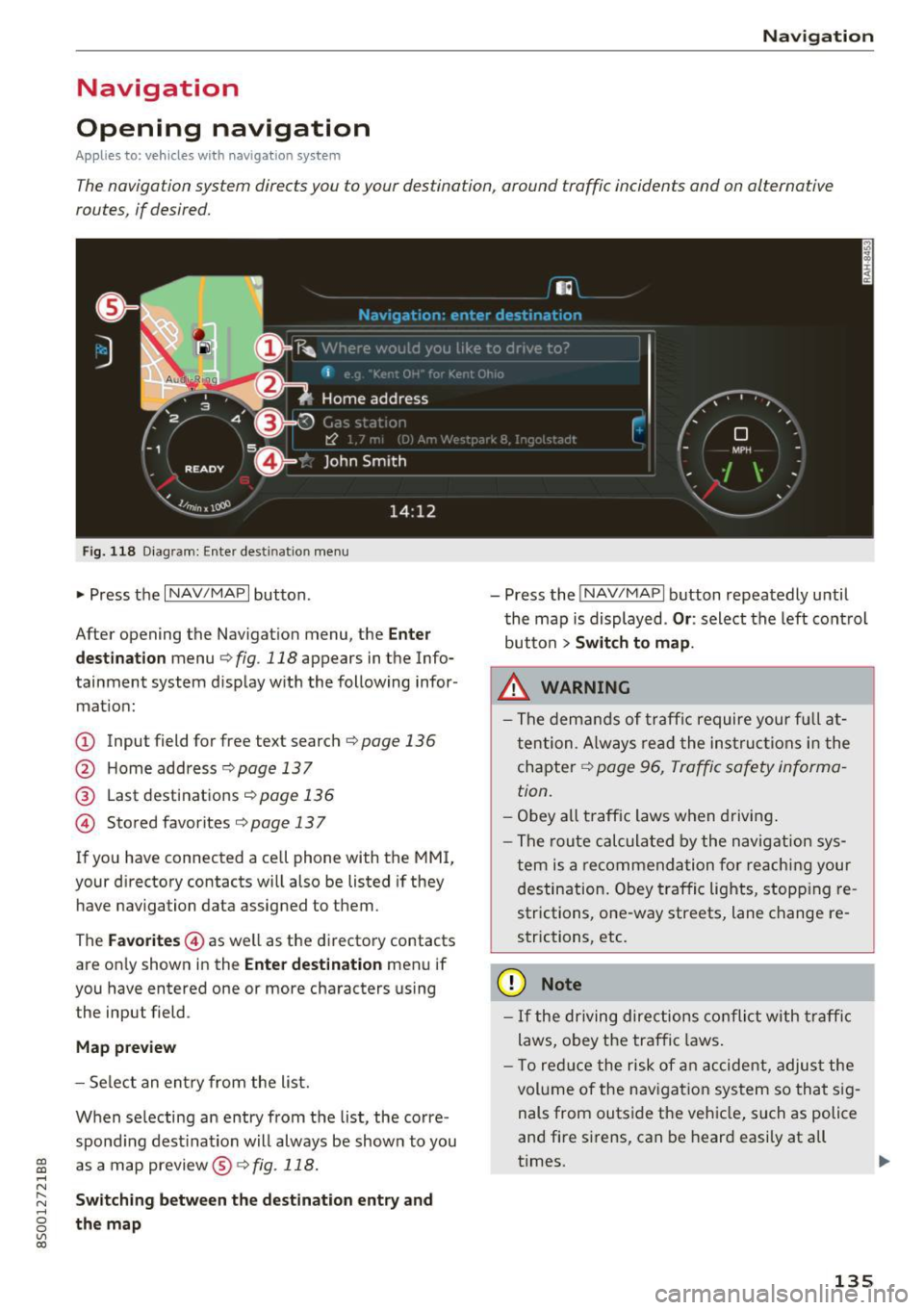
Fig . 118 Diag ram: Enter destination menu
• Press the I NAV/MAPI button.
After opening the Navigation menu, the
Enter
destination
menu c;, fig. 118 appears in the Info
tainment system display with the following infor mat ion:
(!) Input field for free text search c;, page 136
@ Home address <=;>page 137
® Last destinations c;, page 136
@ Stored favorites c;, page 13 7
If you have connected a cell phone with the MMI,
your directory contacts will also be listed if they
have navigation data assigned to them .
The
Favorites @) as well as the directory contacts
are on ly shown in the
Enter destination menu if
you have entered one or more characters using
the input field.
Map preview
- Select an entry from the list.
When se lecting an entry from the list, the corre
spond ing destination will always be show n to you
as a map preview@~
fig. 118.
Switching between the destination entry and
the map
- Press the INAV/MAPI button repeatedly until
the map is displayed .
Or: select the left control
button
> Switch to map .
_&. WARNING
- The demands of traffic require your fu ll at
tention . Always read the instructions in the
chapter
c;, page 96, Traffic safety informa
tion.
- Obey
all traffic laws when driving.
- The route calculated by the navigation sys-
tem is a recommendation for reaching your
destination. Obey traffic lights, stopp ing re
strictions, one-way streets, lane change re
strictions, etc.
(D Note
- If the driving directions conflict with traffic
laws, obey the traffic laws.
- T o reduce the risk of an accident, adjust the
volume of the navigation system so that sig
nals from outside the vehicle, such as police
and fire sirens, can be heard easily at all
times.
-
135
Page 147 of 322
co
co
.... N
" N .... 0
0
Vl c:o
on highways, possible parking lots and rest a reas
are shown, which you can select as a stopover .
POis along the route
Requirement: route gu idance mus t be ac tive .
Searching for points of interest along you r cur
rent ro ute See
¢ page 138.
Additional options on the map
Applies to: ve hicles with navigation system
.,. Press t he I NAV/MAPI button repeated ly until
the map is d isplayed
¢ page 143 , fig. 125.
.,. Press t he right contro l bu tton.
Depending on the f unction selec ted , the follow
i n g options can a lso be se lected unde r the
Map
menu :
Cancel route guidance : see¢ page 140 .
Map settings : see ¢ page 145 .
Route criteria : see ¢page 142 .
Voice guidance : see ¢page 142.
Navigation setting s: see¢ page 141 .
Online traffic data* : see ¢ page 147 .
Show alternative routes : see¢ page 142.
Parking along the route : parking options near
the veh icle are disp layed.
Save current po sition : you can save your current
ve hicle position as a favor ite ¢
page 141 or save
i t as a contact in the directo ry ¢
page 141 .
Audi connect at this locat ion *: allows you to
search for
City events or Weather at the entered
l ocat io n.
Country info rm ation : you can disp lay the appli
cable urban and rural speed limits for any coun
try/state. This information w ill be automatically
shown to you in the route information @
¢
page 143, fig . 125 when the speed lim it is ex
ceeded, if this function is act ivated ¢
page 14 6.
Avoid route *: when route gu idance is active, the
calculated ro ute w ill avoid the area you have
spec ified (max imum : 12 m i (20 km)), if possible .
The navigation system ca lcula tes a n alternat ive
Na vigation
route. The route to be avo ided that you have en
te red applies only to the cur rent route and must
be set agai n, if needed. The areas you have se
l ected to avoid w ill appea r with red and white
shading on the map .
Map settings
Applies to: vehicles wit h navigat ion syste m
.,. Press the INAV/MAPI button repeatedly until
t he map is displayed
¢ page 143, fig . 125 .
.,. Sele ct: r igh t cont rol b utton > Map settings .
Depending on the selected function, the fo llow
i ng setti ngs can be selected:
Map colors
Day /Night :
the map is displayed with a light/
dar k background.
Automatic : when the lights switch on, the map
colors switch from day to n ight .
Map display
Standard
¢ page 143, fig . 124.
Google Earth * ¢page 146 , fig. 126.
Traffic ¢ page 147.
Map orientation
Destination :
th e map i ndic ates the destin ation
and is or ien ted to the no rth .
2D heading up map /2D north up map : the cu r
r ent vehicle pos it ion is d isplayed . T he map is or i
en ted in the d irect io n of t ravel o r to the no rt h .
3D map : when this func tion is sw itched on, the
cu rrent veh icle posit io n is shown on a three-di
mens iona l map and orien ted in the d irec tion of
t ravel. At a sca le o f 62 mi ( 100 k m) and la rge r,
the ma p orientation is to the north.
Overview : th e en tire route from the veh icle pos i
tion to the des tina tion o r the ne xt stopover is dis
played on the map. The m ap s cale depends on
the leng th of the ro ute a nd adapts au tom atically .
The map is orie nte d to the north .
Ill>
145