light AUDI TT COUPE 2017 Repair Manual
[x] Cancel search | Manufacturer: AUDI, Model Year: 2017, Model line: TT COUPE, Model: AUDI TT COUPE 2017Pages: 322, PDF Size: 79.73 MB
Page 157 of 322
co
co
.... N
" N .... 0
0
Vl c:o
Media
Introduction
There are various media drives and connections
avai lable in the MMI. You can play, for example,
audio/video files from the Jukebox* or connect
your mobile device to the Audi mus ic interface*
and operate it through the MMI.
Notes
General information
Media and format restrictions:
the MMI (includ
ing the SD card reader and the USB storage de
vice connection*) was tested with a variety of products and media on the market. However,
there may be cases where individual devices or media and audio/video* files may not be recog
n ized, may play only w ith restrictions or may not
play at all.
Digital Rights Management: please note that
the audio/video files are subject to copyright pro
tection .
The media drives do not play fi les that are pro
tected by ORM and that are ident ified with the
symbol
l'.D .
Data security: never store important data on SD
cards, the Jukebox*, CDs/DVDs or mobile devices .
Audi AG is not responsible for damaged or lost
files and media .
Loading times: the more files/fo lders/play lists
that are on a storage medium, the longer it will
take to load the audio/video files* . Audi recom
mends using storage media that only contain au
dio/video files*. To decrease the t i me it takes to
load audio/v ideo files*, create subfolders (for ex
ample, fo r the art ist or album). The loading time
will also increase when importing fi les.
Additional information : when playing, audio
files are automatically displayed w ith any add i
tional information that is stored (such as the ar
tist, track and album cover). If this information is
not available o n the storage med ium, the MMI
will check the Grace note metadata database .
Media
However, in some cases, the additional informa
tion may not be displayed.
Restricted functionality : reset the Media set
tings
t o the factory default settings if functional
ity is restr icted
<> page 175.
Reset the Jukebox* to the factory default set
t in gs if functiona lity is rest ricted <>
page 175.
For information about the propert ies of support
ed media and fi le formats, see
<>page 168 .
(D Note
You are responsible for all precaut ions taken
for data protection, anti-virus protect ion and
protection against loss of data on mobi le de
v ices that are used to access the Internet
through the Wi-Fi hotspot.
CD/DVD operation
CD/DVD and format restrictions:
the functionali
ty of individual storage media may be limited due
to the variety of blank CDs/DVDs availab le and
the various capacities. Audio CDs or video DVDs
with copy protection, CDs/DVDs that do not con
form to the standard and mult isess ion CDs may
have limited playback or may not play at all . Audi
recommends finaliz ing t he recording process
whe n creat ing mult isess ion CDs. Mult isession is
not supported for DVDs .
Using CDs /DVDs, the CD drive or the DVD drive :
to ensure correct, high-quality playback and to
prevent damage to the drive or disc reading er
ro rs, always store CDs/DVDs in a protective
s leeve and do not expose them to direct sunlight.
Do
not use:
- Damaged, dirty or scratched CDs/DVDs
- Single CDs/DVDs (3 inch/8 cm diameter)
- CD/DVDs that are not round
- CDs/DVDs w ith labels
- Protective rings
- Cleaning CDs
Thermal protection switch: CD/DVD playback
may be temporarily unavailable if outside tem-
peratures are extremely hot or cold. A thermal
llo-
155
Page 163 of 322
CD
CD
.... N
" N .... 0
0
Ill co
@ Tips
-Depending on the Internet connection and
network traffic, a connection loss can occur
during playback of on line media services.
-Online media and Internet radio usage de
pends on the service availability of the third
party provider.
- Audi AG simply makes the access to online
media services possible through the MMI
and does not take any responsibility for the
contents of the online media services.
- Always read the chapter ¢ page 132, About
Audi connect.
- Depending on the mobile device used, there
may be interruptions during media playback
and when using the
Audi MMI connect app.
To avoid interruptions when using a mobile device, do not lock the screen on your mo
bile device and keep the
Audi MMI connect
app in the foreground.
- Contact your authorized Audi dealer or au
thorized Audi Service Facility for additional
information about online media.
Multimedia connections
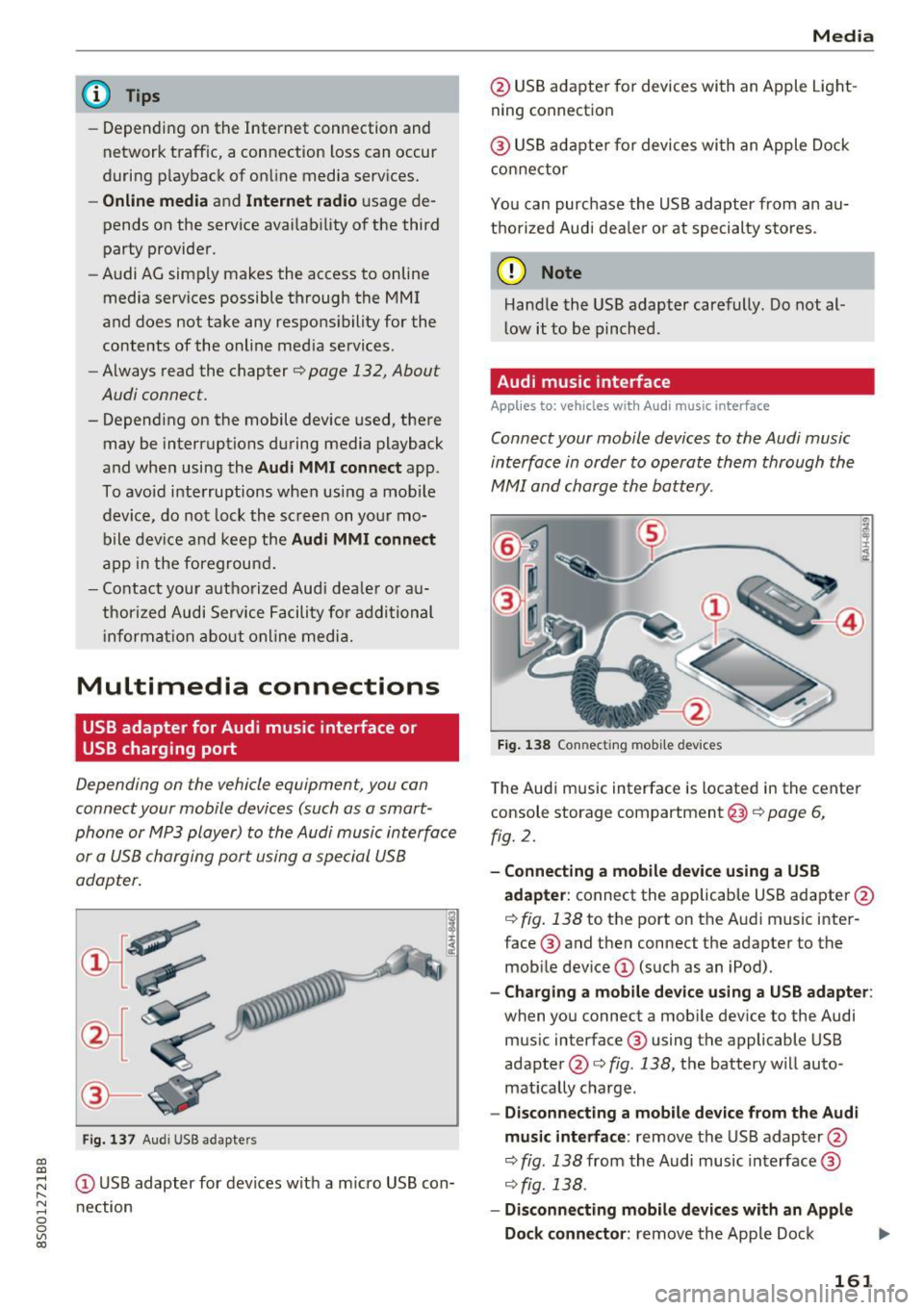
USB adapter for Audi music interface or
USB charging port
Depending on the vehicle equipment, you can
connect your mobile devices (such as a smart
phone or MP3 player) to the Audi music interface
or a USB charging port using a special USB
adapter.
I
Fig. 137 Audi USS adapters
(D USB adapter for devices with a micro USB con
nection
Media
@ USB adapter for devices with an Apple Light
ning connection
@ USB adapter for devices with an Apple Dock
connector
You can purchase the USB adapter from an au
thorized Audi dealer or at specialty stores.
(D Note
Handle the USB adapter carefully. Do not al
low it to be pinched.
Audi music interface
App lies to: vehicles wi th Audi music interface
Connect your mobile devices to the Audi music
interface in order to operate them through the
MMI and charge the battery .
Fig. 138 Connecting mobile devices
The Audi music interface is located in the center
console storage compartment@¢ page 6,
fig. 2.
-Connecting a mobile device using a USB
adapter:
connect the applicable USB adapter@
¢ fig. 138 to the port on the Audi music inter
face @ and then connect the adapter to the
mobile device
(D (such as an iPod).
-Charging a mobile device using a USB adapter :
when you connect a mobile device to the Audi
music interface ® using the applicable USB
adapter @¢ fig. 138, the battery will auto
matically charge .
-Disconnecting a mobile device from the Audi
music interface :
remove the USB adapter@
¢ fig . 138 from the Audi music interface @
¢ fig. 138.
-Disconnecting mobile devices with an Apple
Dock connector :
remove the Apple Dock .,,.
161
Page 166 of 322
Media
Media center
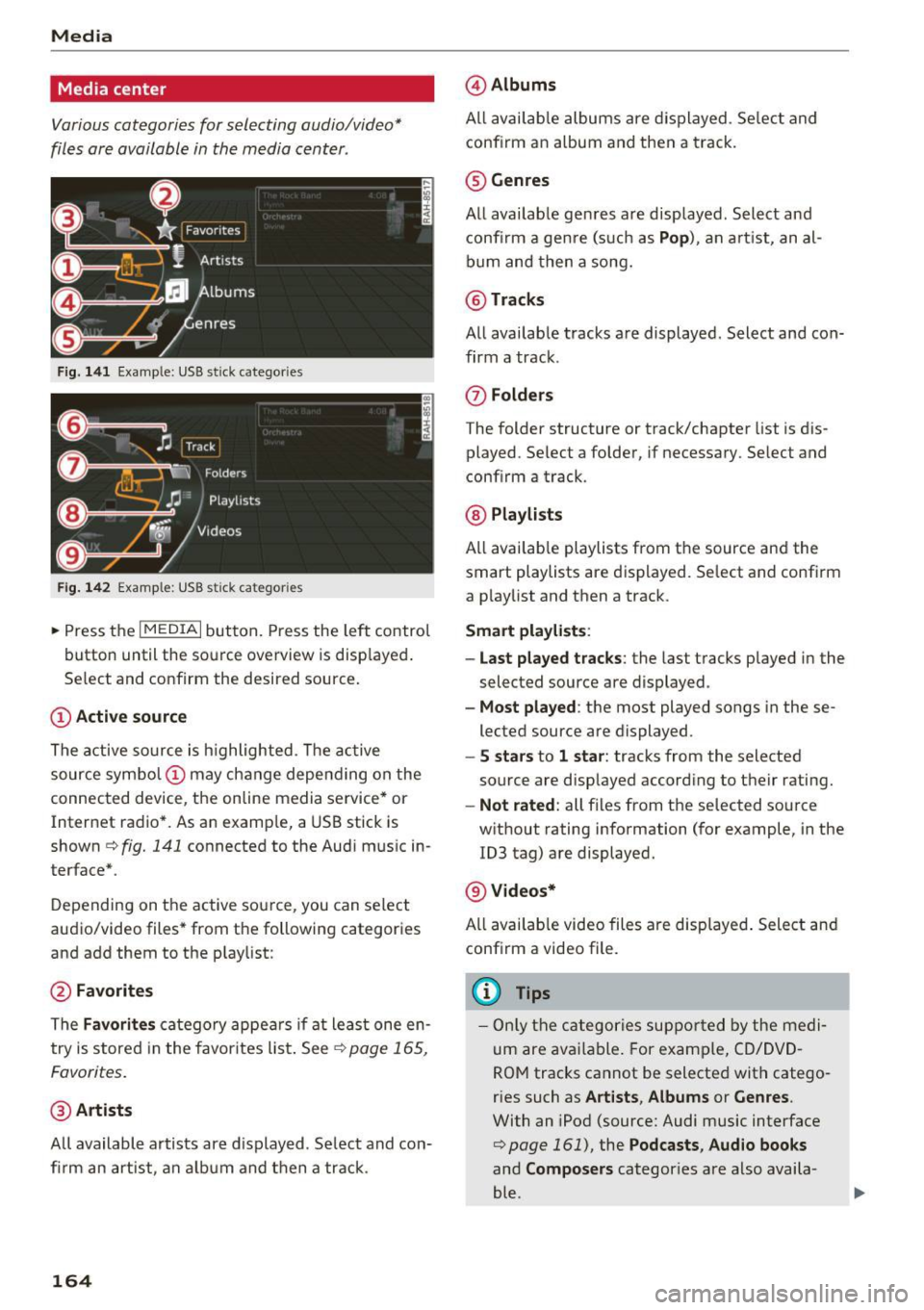
Various categories for selecting audio/video*
files ore available in the media center .
Fig. 141 Example : USB st ick categories
F ig . 142 Example: USB s tick cat egories
~ Press the I MEDIAi but ton. Press the left control
button until the source overview is disp layed.
Se lect and confirm the desired source.
(D Active sourc e
The active source is h ighlighted . T he ac tive
source symbol (!) may change depending on the
connected device, the online media service* or
Internet radio* . As an examp le, a USB stick is
shown
c!;> fig. 141 connected to the Aud i mus ic in
terface* .
Depending on the active source, you can select
audio/video files* from the following categories
and add them to the playlist:
@ Favorites
The Favorit es catego ry appea rs if at least one en
try is stored in the favor ites list . See ~
page 165,
Favor ites.
@ Arti sts
All available artists are d isplayed . Se lect and con
fi rm an art ist , an a lb u m and then a track.
164
@ Album s
All avai lab le albums are displayed . Se lect and
conf irm an a lbum and then a track.
® Genres
All available genres are displayed . Select and
confi rm a gen re (s uch as
Pop ), an a rt ist, an al
bum and then a song.
@ Tracks
All availab le tracks are displayed . Select and con
firm a track .
0 Fo lder s
The folder structure or track/chapter list is dis
played . Se lect a folder , if necessary. Select and
conf irm a track .
@ Playlists
All availab le playlists from the source and the
smart playlists are displayed . Se lect and confirm
a p laylist and then a track .
Smart pla yli sts:
- Last played tra cks :
the last tracks played in the
selected source are displayed .
-Mo st played : the most played songs in these
lected source are displayed.
- S s ta rs to 1 star : tracks from the selected
source are disp layed according to their rating.
- Not rat ed : all files from the selected source
w ithout rating information (for example, in the
ID3 tag) are displayed.
@ Videos*
All availab le video files are displayed . Select and
conf irm a video file .
@ Tips
- Only the categories suppo rted by the medi
um are available . For example, CD/DVD
ROM tracks cannot be selected with catego
ries such as
Art ists , Albums or Genres .
With an iPod (source: Audi music interface
<:!;> page 161), the Podcasts , Aud io books
and Composer s categories are also availa
ble .
Page 174 of 322
Audi smartph one inte rfac e
Audi smartphone
interface
Setup
App lies to: ve hicles w ith Audi smartpho ne in te rface
You can connect your smartphone to th e MMI us
ing the Audi smartphone int erfac e. Certain con
te nt on your smartph on e is ada pted to the Info
t ainment syste m display while driving and can
be operated through the MMI control panel.
Requirement :
The vehicle must be stationary and the ignition
must be switched on.
iPhone generation 5 or higher with Lightning
connector and iOS 7.1.2 operating system or
h igher.
Or :
Sma rtphone with Android Auto app and Android
5.0 Lo llipop operating system or higher.
"' Connect your smar tphone to the Audi music in -
te rface
<:? page 161 using a USB adapter
¢page 161, fig. 137 .
.. Se lect and confirm Activ ate Apple CarPla y or
Activate And roid Auto now .
.. Fo llow the system instruct ions.
"' Pay attention to any additional system prompts
o n your smartphone if applicable.
If you chose not to use Apple CarPlay or Andro id
Auto when connect ing your smartphone for the
first time, you can start the Audi smartp hone in
terface later on using the
Connection manager .
.. Se lect: I M ENU I button> Audi smartphone in-
terfa ce > Change to conne ction manager .
.. Connect your sma rtphone to the A udi music in
terface
<:?page 161 using a USB adapte r
¢page 161, fig. 137 .
.. Se lect and confirm Audi smartphone : in the
Connection manager ¢ page 175. You can se
lect you r smartphone in the list of devices that
are already paired
¢ page 176.
"'Follow the system instruct ions .
1> In p repa ratio n at the t ime of p rint ing.
172
(D Tips
- The f unctions t hat can be used depend on
t h e follow ing factors, among others :
- the brand of your smartpho ne
- the vers io n of the ope rating system in
your smartphone
- the software version of the app used
- the USB adapter cab le and correct connec-
tion
- your cell phone se rvice provide r
- the customized settings on your smart -
phone
- One o f the factors above o r a combina tion
of any of them could cause your smartphone
to be incompatib le wit h the Audi smart
phone interface. Compatibility cannot be
guaranteed for all types of smartphones.
For more informat ion and assistance, refer
to the use r guide and the manufactu rer of
you r smartphone.
- If the connected smartphone has voice con
t rol, you can ope ra t e you r smartpho ne usi ng
the ext erna l voice recognition system*
¢page 113.
- The menu language shown in the MMI is
based on t he sett ing s in you r smartp ho ne.
- Th e time d is pl ayed in the M MI is based on
t h e settings in yo ur smartp hone.
- Severa l MMI funct ions a re not availab le
when Apple Car Play o r Andro id Auto is ac
t ive.
- You cannot connec t any mobi le devices via
Bl uetoo th when an App le Car Play connec
ti on is a ct ive .
- Whe n the Apple CarPlay connec tion is ac
t ive,
Tag this song for iTunes*1
) is not avai l
able
¢page 15 1 .
Operating
App lies to: vehicles with A udi smartp hone interface
Opening a menu
Apple CarPlay : you can go back to the Apple Ca r
Play main menu regardless of the se lec ted me nu
i tem by p ressing and holdi ng the
!BACKI b utt on. ..,.
Page 182 of 322
Safe dri ving
Safe driving
Basics
Safe driving habits
Please remember -safe ty first!
This chapter contains important information,
tips, instructions and warnings that you need to
read and observe for your own safety, the safety
of your passengers and others. We have summar ized here what you need to know about safety
be lts, a irbags, child restra ints as well as child
safety. Your safety is for us
priority number 1 . Al
ways observe the info rmation and wa rn ings in
this section - for your own safety as well as that
of your passengers.
The information i n this section applies to all
model versions of yo ur vehicle . Some of the fea
tures descr ibed in t his sections may be s tanda rd
equipment on some models, or may be optional
equipment on others . If you are not sure, ask
your authorized Audi dealer.
A WARNING
- Always make sure that you follow the in
structions and heed the WARNINGS in th is
Manual.
It is in your interest and in the in
te rest of your passengers .
- Always keep the comp lete Owner's Litera
ture in your A udi when you lend or sell your
vehicle so that this important information
will always be available to the d river and
passenge rs.
- Always keep the Owner 's literature handy so
that you can find it easily if you have ques
t ions.
Safety equipment
The safety features are part of the occupant re
straint system and work together to help reduce
the risk of injury in a wide variety of occident si t
uations.
Your safety and the safety of your passenge rs
should not be left to chance. Advan ces i n tech
nology have made a var iety of features avai lab le
to help reduce the risk of injury in an accident .
180
The following is a list of just a few of the safety
features in your Audi :
- sophis tica ted safety be lts fo r drive r and all pas-
senge r seat ing pos itions,
- safety belt p retensioners,
- safety belt force lim ite rs fo r th e front seats,
- front airbags,
- knee airbags fo r the front seats*
- side airbags in the front seats,
- side curtain airbags with eject ion m itigat ion
features,
- special LATCH anchorages for child restraints,
- adj ustab le steering col umn.
These ind iv idual safety features, can work to
gether as a system to he lp protect you and your
passengers i n a wide range of acc idents. These
fea tures canno t wo rk as a sys tem if they a re not
a lways correc tly adjusted and correct ly used.
Safety is everybody' s responsibilit y!
Important things to do before driving
Safety is everybody's job! Vehicle and occupant
safety always depends on the informed and care
ful driver .
For your safety and the safety of your passen
gers,
before driving alway s:
.. Make sure that all lights and signals are operat
ing correctly .
.. Make sure that the tire pressure is correct .
.. Make sure that all windows are clean and afford
good visibility to the outs ide .
.,. Sec ure all luggage and othe r items ca refully
Q page 185, ~page 47.
.,. Make sure that noth ing can inter fere wi th the
peda ls .
.. Ad just front seat and mirrors cor rectly for your
height.
.. Make sure to use the right child restraint cor
rectly to protect children
Q page 221, Child
safety .
.. Sit p roperly in your seat and make sure t hat
your passenge rs do the same
Q page 44, Seats
and storage.
ll-
Page 183 of 322
CD
CD
.... N
" N .... 0
0
Ill co
.. Fasten your safety be lt and wear it properly. Al
so instruct your passengers to fasten their
safety belts properly ¢
page 189.
What impairs driving safety?
Safe driving is directly related to the condition of
the vehicle, the driver as well as the driver's abili
ty to concentrate on the road without being dis
tracted.
The driver is responsible for the safety of the ve
hicle and all of its occupants . If your ability to
drive is impaired, safety risks for everybody in the
veh icle increase and you also become a hazard to
everyone else on the road ¢,&. .Therefore:
.. Do not let yourself be distracted by passengers
or by using a cellular te lephone .
.. NEVER drive when your driv ing ability is im
paired (by medications, alcohol, drugs, etc.).
.. Observe a ll traffic laws, rules of the road and
speed limits and plain common sense.
.. ALWAYS adjust your speed to road, traffic and
weather cond itions.
.. Ta ke frequent breaks on long trips. Do not drive
for more than two hours at a stretch .
.. Do NOT drive when you are tired, under pres
sure or when you are stressed.
A WARNING
Impaired driving safety increases the risk of
ser ious personal injury and death whenever a
vehicle is being used.
Safe d riving
Correct passenger
seating positions
Proper seating position for the driver
The proper driver seating position is important
for safe, relaxed driving.
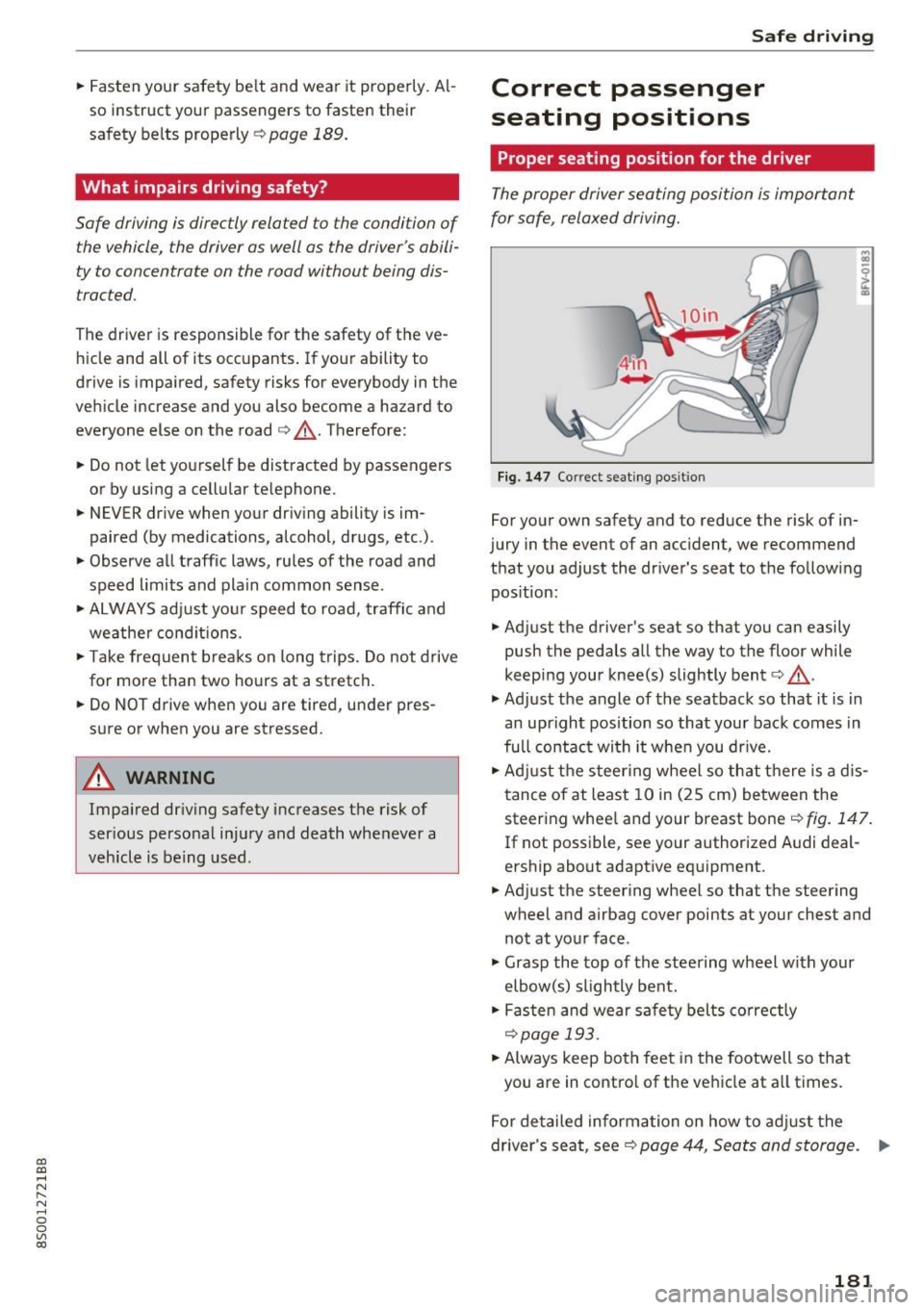
Fig. 147 Correct seating position
For your own safety and to reduce the risk of in
jury in the event of an accident, we recommend
that you adjust the driver's seat to the following position:
.. Adjust the driver's seat so that you can easily
push the pedals all the way to the floor while
keep ing your knee(s) slightly bent¢,&. .
.,. Adjust the angle of the seatback so that it is in
an upright position so that your back comes in
full contact wi th it when you dr ive.
.. Adjust the steering wheel so that there is a dis
tance of at least 10 in (25 cm) between the
steering whee l and your breast bone¢
fig. 147.
If not possible, see your author ized A udi deal
ership about adaptive equipment .
.. Adjust the steering wheel so that the steering
wheel and airbag cover points at your chest and
not at your face .
.,. Grasp the top of the steering wheel with your
elbow(s) slightly bent .
.. Fasten and wear safety belts correctly
¢page 193 .
.. Always keep both feet in the footwell so that
you are in contro l of the vehicle at all times.
For detailed information on how to adjust the
driver's seat, see¢
page 44, Seats and storage. ..,..
181
Page 191 of 322
co
co
.... N
" N .... 0
0
Vl c:o
Safety belts
General notes
Always wear safety belts!
Wearing safety belts correctly saves lives!
This chapter explains why safety belts are neces
sary, how they work and how to adjust and wear
them correctly. "' Read all the information that follows and heed
all of the instructions and WARNINGS.
A WARNING
Not wearing safety belts or wearing them im
properly increases the risk of serious personal
injury and death .
- Safety belts are the single most effective
means available to reduce the risk of serious
injury and death in automobile accidents.
For your protection and that of your passen
gers, always correctly wear safety belts
when the veh icle is moving.
- Pregnant women, injured, or physically im
paired persons must also use safety belts.
Like all vehicle occupants, they are more
likely to be seriously injured if they do not
wear safety belts. The best way to protect a
fetus is to protect the mother -throughout
the entire pregnancy.
Number of seats
Your Audi TT Coupe has two seating positions in
the front and two height-limited seating posi
tions in the rear . Each seating position has a safe
ty belt. The rear seat area in your Audi TT Coupe
does not have enough room for passengers of all
sizes. For reasons of safety , no person taller than
4 ft 9 in (S7 in/1.4S m) should ever r ide in the
r ear seat area.
A WARNING
Not wearing safety belts or wearing them im
properly increases the risk of serious personal
injury and death .
Safety belts
- Never strap more than one person, includ
ing small children, into any belt. It is espe
cially dangerous to place a safety belt over
a
child sitting on your lap .
- Never let more people ride in the vehicle
than there are safety belts available.
- Be sure everyone riding in the vehicle is
properly restrained with a separate safety
belt or child restraint .
- Persons taller than 4
ft 9 in (57 in/1.45 m)
as well as children in booster seats who are
too close to the rear window and roof can
suffer severe head and neck injuries when
the rear lid is closed or in a crash.
- The minimum clearance between the pas senger's heads and the rear window must
never -under any circumstances -be less
that lin (2.5 cm) when the passengers sit
fu lly upright.
- Always make sure that rea r seat passengers
cannot be struck when the rear lid is closed.
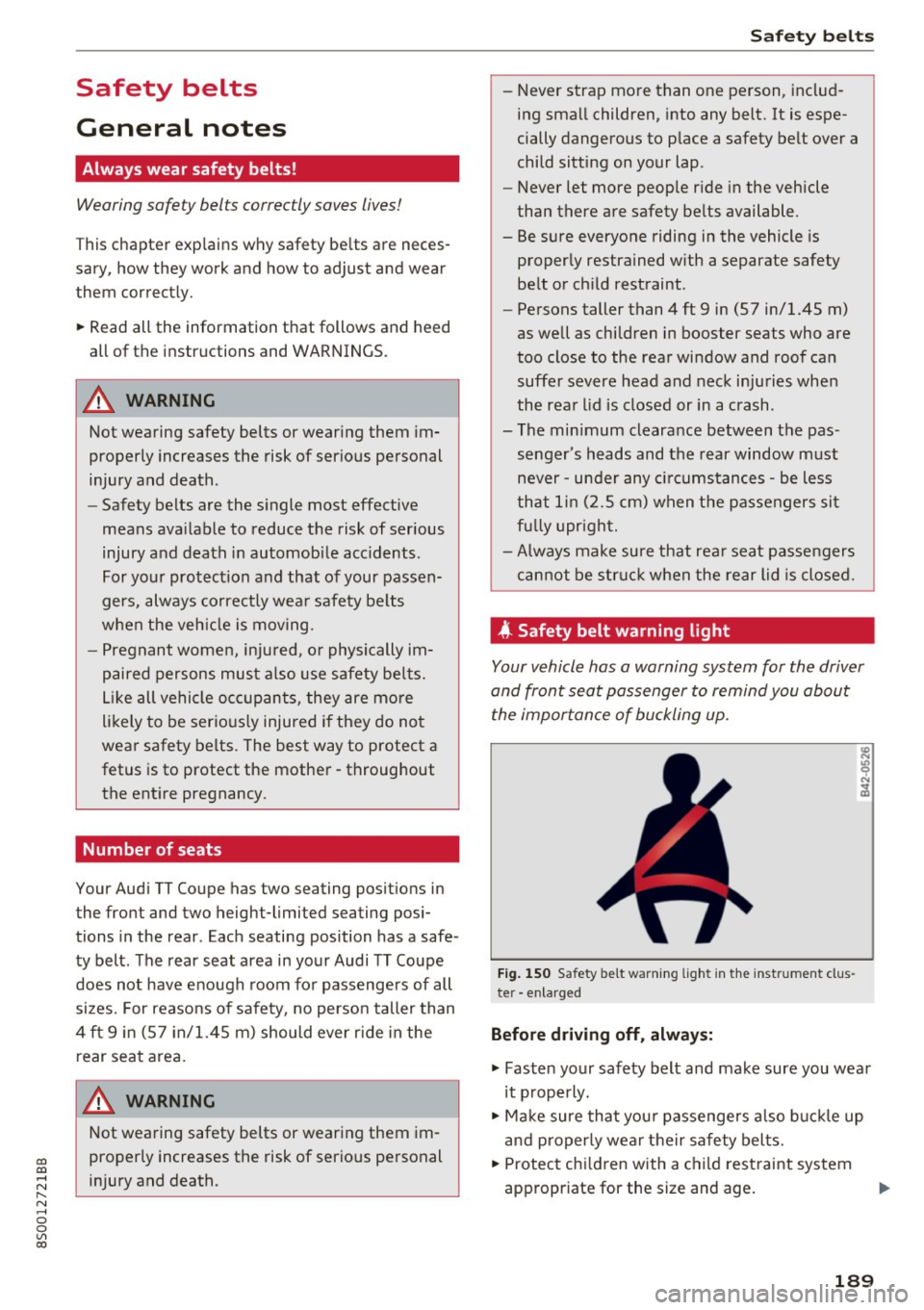
4 Safety belt warning light
Your vehicle has a warning system for the driver
and front seat passenger to remind you about the importance of buckling up.
Fi g. 150 Safety belt warning light in the instrument clus
ter -enlarged
Before driving off , always:
"' Fasten your safety belt and make sure you wear
it properly.
"' Make sure that your passengers also buckl e up
and properly wear their safety belts.
"' Protect children with a child restraint system
appropriate for the size and age.
189
Page 192 of 322
Safe ty belts
The warning light . in the instrument cluster
lights up when the ignit ion is switched on as a re
minder to fasten the safety belts. In addition, a
warning tone w ill sound for a certain period of
time.
F a sten you r safet y be lt and make sure that your
pa sse nge rs also prope rly put on thei r safet y
belt s.
_&. WARNING
- Safety belts are the s ingle most effective
means ava ilable to reduce the risk of ser ious
i njury and death in automobile acc idents .
For yo ur protect ion and that of your passen
gers, always co rrectly wea r safety be lts
when the vehicle is moving .
- Failure to pay attention to t he war ning light
that comes on could lead to persona l injury.
Why safety belts?
Frontal collisions and the law of physics
Frontal crashes create very strong forces for peo
ple riding in vehicles.
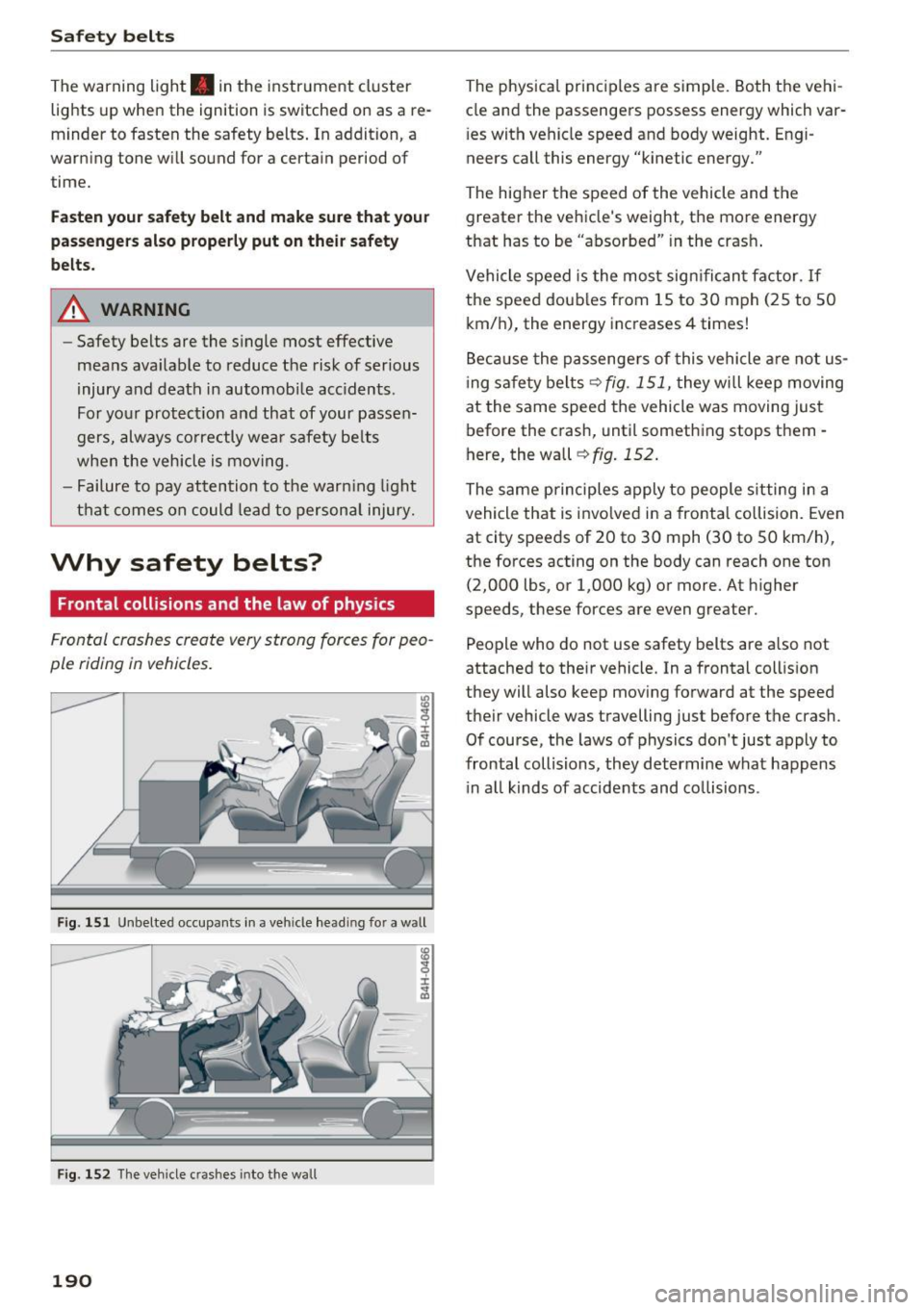
Fig. 151 Unbelte d occupa nts in a ve hicle head in g fo r a w all
I ± ..,. a,
F ig . 1 52 The veh icle c rashes into the w all
190
The physical princ iples are simple . Both the vehi
cle and the passengers possess energy which var
i es with vehicle speed and body weight. Engi
neers call this energy "kinetic energy."
The higher the speed of the vehicle and the greater the vehicle 's we ight, the more energy
that has to be "absorbed" in the crash .
Vehicle speed is the most sign ifican t factor. If
the speed doub les from 15 to 30 mph (25 to 50
km/h), the energy increases 4 times!
Beca use the passenge rs of this vehicle a re not us
i ng safety belts ¢
fig. 151, they w ill keep moving
at the same speed the vehicle was moving just before the crash, until something stops them -
here, the wall
¢ fig . 152 .
The same principles apply to people s itting in a
vehicle that is invo lved in a frontal collision. Even
at city speeds of 20 to 30 mph (30 to 50 km/h),
the forces acting on the body can reach one ton (2,000 lbs , or 1,000 kg) or more. At h igher
speeds, these forces are even greater.
People who do not use safety belts are a lso not
attached to their vehicle. In a frontal coll is ion
they will also keep mov ing forward at the speed
their vehicle was travelling just before the crash .
Of course, the laws of physics don 't just apply to
frontal collisions, they determine what happens i n a ll kinds of accide nts and co llisions .
Page 195 of 322
CD
CD
.... N
" N ...... 0
0
Ill co
-Always keep the belts clean . Dirty be lts may
not work properly and can impair the func
tion of the inertia reel ¢
table Interior
cleaning on page
277 .
Safety belts
Fastening safety belts
Seat first -everybody buckle up!
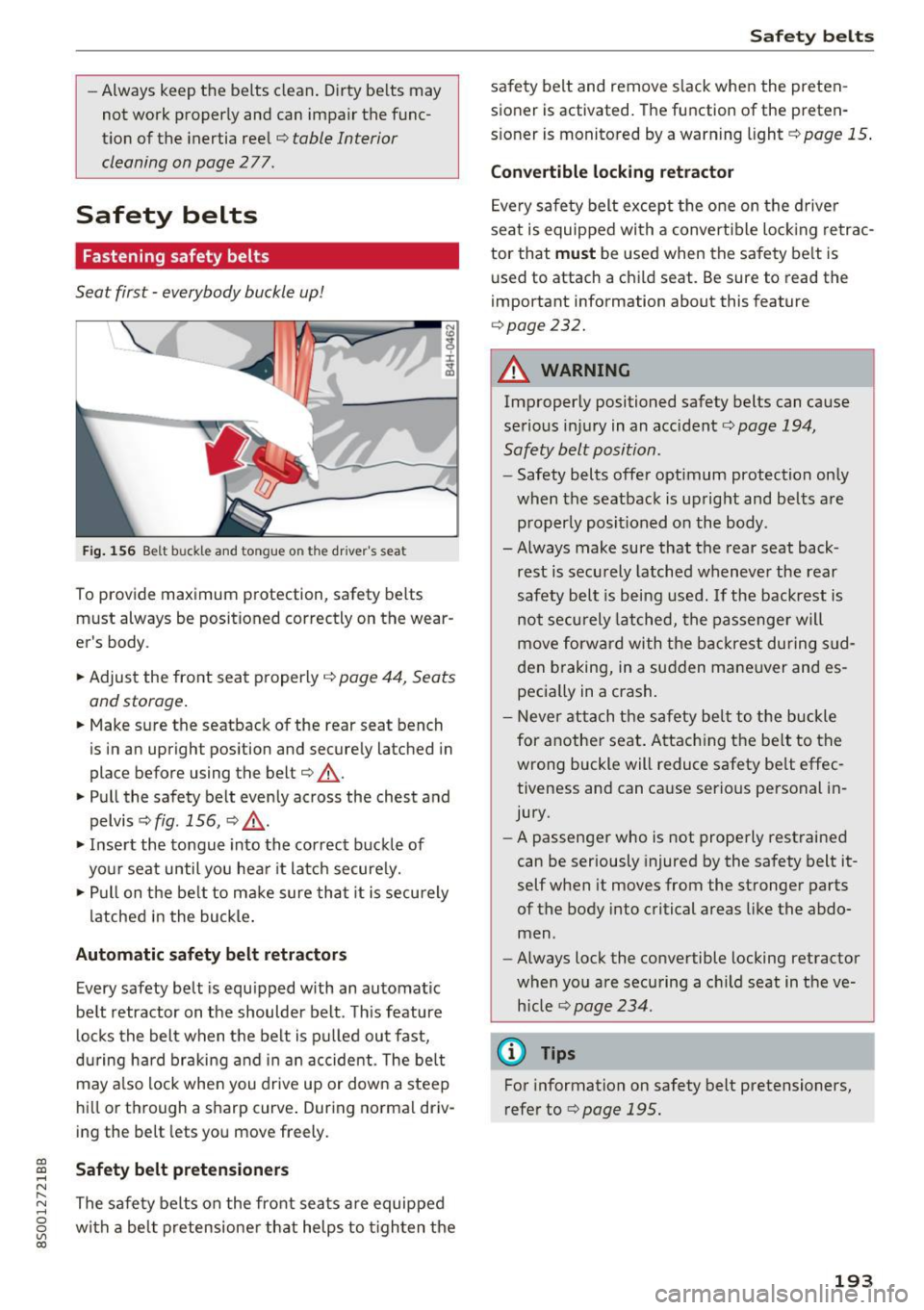
Fig . 156 B elt b uck le and tongue o n the drive r's sea t
To provide maximum protect ion, safety belts
must always be position ed correctly on th e wear
er's body .
.. Adjust the front seat properly
¢ page 44 , Seats
and storage.
.. Make sure the seatback of the rear seat bench
is in an upright pos ition and securely latched in
place before using the belt ¢
&_.
.. Pull the safety belt evenly across the chest and
pelvis ¢
fig. 156, ¢ ,&. .
.. Inse rt the tongue into the correct buckle of
your seat until you hea r it latch secure ly.
.,. Pull on the be lt to make sure that it is securely
latched in the bu ckle .
Automatic safety belt retractors
Every safety belt is equipped with an automatic
belt retractor on the shoulder belt . Th is feature
l ocks the belt when the be lt is p ulled out fast,
during hard braking and i n an accide nt. T he belt
may a lso lock when you drive up or down a steep
hi ll or through a sharp curve . During no rma l driv
ing the be lt lets you move freely.
Safety belt pretensioners
The safe ty belts on the front sea ts are equipped
with a be lt pretensione r that helps to t igh ten the
Safet y bel ts
safety belt and remove s lack when the preten
sioner is activated. The function of the preten
s ioner is monitored by a warn ing light ¢
page 15 .
Convertible locking retractor
Eve ry safe ty belt except the one on the drive r
seat is equipped with a convertible loc king retrac
tor that
must be used when the safety be lt is
u sed to attach a child seat. Be sure to read the
impo rtant information about this feature
¢ page 232.
A WARNING
-Improperly positioned safety belts can cause
serious injury in an accident¢
page 194,
Safety belt position.
- Safety belts offer optimum protection on ly
when the seatback is upright and belts are properly posit ioned on the body .
- Always make sure that the rear seat back
rest is secu rely latched whenever the rear
safety belt is being used . If the backrest is
not securely latched, the passenge r will
move forw ard with the backrest during s ud
den braking, in a sudden mane uver and es
pecia lly in a crash.
- Neve r attach the safety bel t to the buckle
for anot her seat . Attac hing the be lt to the
wrong buckle will reduce safety be lt effec
tiveness and can cause serious personal in
jury.
- A passenger who is not properly rest rained
can be seriously injured by the safety belt it
self when it moves from the stronger parts
of the body into critical areas like the abdo
men .
- Always lock the convertible locking retractor
when yo u are securing a c hild seat in the ve
h icle
¢ page 234.
@ Tips
For information on safety belt pretensioners,
refer to¢
page 195 .
193
Page 201 of 322
co
co
.... N
" N .... 0
0
Vl c:o
seat. It can be a very dangerous place for an
infant or a child in a rearward-facing seat .
The Advanced Airbag System in your veh icle has
been certified to comply with the Requirements
of United States Federal Motor Vehicle Safety
Standard 208 as applicab le at the time your vehi
cle was manufactured.
The Standard req uires the front airbag on the
passenger side to be turned
off ("suppressed") if
a child up to about one year of age restrained in
one of the rear-facing or forward-facing infant re
stra ints listed in Federa l Motor Vehicle Safety
Standard 208 with which the Advanced Airbag
System in your vehicle was certified has been in
stalled on the front passenger seat. For a listing
of the ch ild restraints that were used to ce rtify
comp liance with the US Safety Standard
c>page 223.
The PASSENGER AIR BAG OFF~; light in the
h eadliner tells you when the front Advanced A ir
bag on the passenger side has been turned
off by
the elect ronic control unit.
E ach t ime you tur n on the ignit ion, the
PA SSEN
GER AIR BAG OFF ~; ON @ light will come on
for a few seconds and:
- PAS SENGER AIR BAG OFF~; will come on if
the front passenger seat is not occupied,
- PASSENGER AIR BAG OFF~; will come on if
the electr ical capacitance measured by the ca
pacit ive passenger detection system for the
front passenge r seat equa ls the comb ined ca
pacitan ce of an infant up to abou t one ye ar of
age and one of the rea rwa rd-facing or forward
f acing child restraints listed in Federa l Moto r
Vehicle Safety Standard 208 with which the Ad
vanced Airbag System in your vehicle was certi
fied. For a listing of the child restraints that
were used to cert ify your vehicle's compliance
with the U.S. Safety Standard
c> page 223.
-PASSENGER AIR BAG OFF~; will come on if
there is a small child or child restraint on the
front passenger seat,
- PASSENGER AIR BAG ON @will go off if the
front passenger seat is occupied by an adult as
reg istered by the capacitive passenger detec-
Airb ag sys tem
tion system c> page 209, Monitoring the Ad
vanced Airbag System.
T he PAS SENGER AIR BAG OFF~; ligh t comes on
whe n electrica l capacitan ce regis tered on the
front passenge r seat is equal to or less than the
combined capacitance of a typical 1 year -old in
fant and one of the rearward -facing or forward
facing child restraints listed in Federal Motor Ve hicle Safety Standard 208 w ith which the Ad
vanced Airbag System in your vehicle was ce rti
fied.
If the total e lectr ica l capacitance reg istered on
the front passenger seat is more than that of a
typ ical 1 year-old child but less than the weight
of a small adult, the front airbag on the passen
ger side can deploy (the
PASSENGER AIR BAG
OFF ~;
light does not come on).
If the
PASSENGER AIR BAG OFF~; light does
not come on, the fro nt airbag on the passenger
s ide has not been t urned
off by the electro nic
c ontro l unit and can deploy if the contro l uni t
senses an impac t that meets t he conditions stor
ed in its memory.
For example , the airbag may deplo y if:
- a small ch ild that is heav ier than a typical 1
year-o ld child is on the front passenger seat
(regardless of whethe r the child is in one of the
child safety seats listed
c> page 223), o r
- a child who has outgrown c hild restraints is on
the front passenge r seat.
If the front passenger airbag is turned off, the
PA SSENGER AIR BAG OFF~; light comes on i n
the headliner and stays on.
If the front passenger airbag deploys, the Feder
al Standard requires the airbag to meet the "low
risk" deployment criteria to reduce the risk of i n
jury through interact ion w ith the airbag. "Low
risk" deployment occurs in t hose crashes that
ta ke place at lowe r decele rations as defined in
t h e e lectronic co ntrol un it
c> page 209, PASS EN
GER A IR BAG OFF~; ON@ light.
Always remembe r, a ch ild seat or infant ca rr ier
insta lled on the front seat may be st ruck and
k nocked out of pos it io n by the rap idly inflat ing
passenge r's airbag in a fron tal coll is ion. The ..,_
199