sport AUDI TT COUPE 2017 Owners Manual
[x] Cancel search | Manufacturer: AUDI, Model Year: 2017, Model line: TT COUPE, Model: AUDI TT COUPE 2017Pages: 322, PDF Size: 79.73 MB
Page 4 of 322
Table of content s
About this Owne r's Manual . .. .. .
5
Cockpi t . . . . . . . . . . . . . . . . . . . . . . . . . . . 6
Cockpit overview . . . . . . . . . . . . . . . . . 6
Controls at a glance . . . . . . . . . . . . . . . . . . 6
Instruments and indicator lights 8
Instruments . . . . . . . . . . . . . . . . . . . . . . . . 8
Indicator lights . . . . . . . . . . . . . . . . . . . . . 9
On-Board Diagnostic system (OBD) . . . . .
17
Drive r information system . . . . . . 19
Overview . . . . . . . . . . . . . . . . . . . . . . . . . . . 19
M ultifunction steering wheel plus . . . . . . 20
Mu ltifunction steering wheel . . . . . . . . . . 22
Tachometer . . . . . . . . . . . . . . . . . . . . . . . . 23
Odometer . . . . . . . . . . . . . . . . . . . . . . . . . . 23
On-board computer . . . . . . . . . . . . . . . . . . 23
Sport view . . . . . . . . . . . . . . . . . . . . . . . . . 24
Start ing and driving . . . . . . . . . . . . . 25
Opening and closing . . . . . . . . . . . . . 25
Cent ral locking ... ............ .... .. .
L uggage compartment lid ............ .
P ower window .. ... .. ..... ... .. .. .. .
Garage doo r opener (Home link) ... .. .. . 25
30
32
33
Lights and Vision . . . . . . . . . . . . . . . . . 36
Exterior lighting . . . . . . . . . . . . . . . . . . . . . 36
Interior lighting . . . . . . . . . . . . . . . . . . . . . 38
V1s1on . . . . . . . . . . . . . . . . . . . . . . . . . . . . . 39
W indshield wipers . . . . . . . . . . . . . . . . . . .
41
Dig ital compass . . . . . . . . . . . . . . . . . . . . . 43
Seats and storage . . . . . . . . . . . . . . . . 44
General information . . . . . . . . . . . . . . . . . 44
Front seats . . . . . . . . . . . . . . . . . . . . . . . . . 44
Rea r bench seat . . . . . . . . . . . . . . . . . . . . . 45
Ashtray . . . . . . . . . . . . . . . . . . . . . . . . . . . . 46
Ciga rette lighter and socket . . . . . . . . . . . 46
S to rage . . . . . . . . . . . . . . . . . . . . . . . . . . . . 47
L uggage compa rtment . . . . . . . . . . . . . . . 48
2
Warm and cold .. .. ... . .. .... ... .. 51
Climate contro l system . . . . . . . . . . . . . . . 51
Dr1v1ng ... .. .. .. .. .. .. .. .. .... ... . .
Genera l information .. ... . .. .... ... . .
Steering . ... .. .. .. .. ... .. ..... ... . .
Start ing and stopping the engine
Electromechanical parking brake ...... .
Start ing from a stop .. ... ....... ... . .
Automat ic transmission ....... ..... . .
Tra ile r towing ...................... .
Driver assistance .............. .. .
Assist ............................ .
Electronic speed lim iter ..... ....... .. .
Speed warning sy stem . .. ........... . .
Cruise cont rol sys tem
Audi active lane assist ... . ... .... ... . .
Lap timer ... .. .. .. ... .. .. ..... ... . .
Audi s ide assist . ... .. ... . .. .... ... . .
Audi drive select (drive settings) ....... .
Parking systems
General information .. ............. . .
Rear parking system .. .. ........... . .
Parking system plus . .. ............. . .
55
55
57
57
60
61
61
69
70
70
70
70
70
72
74
76
79
82
82
83
83
Rearv iew camera . . . . . . . . . . . . . . . . . . . . 84
Adjust ing the d isplay and the wa rning
tones ...... ... .. .. .. ... ....... ... .. 86
Er ror messages . . . . . . . . . . . . . . . . . . . . . 86
Intelligent Technology . . . . . . . . . . 88
El ectronic stabiliza tion control ( ESC) . . . . 88
B rakes . . . . . . . . . . . . . . . . . . . . . . . . . . . . . 89
E lectromechanical steering . . . . . . . . . . .
91
A ll wheel d rive (quattro) . . . . . . . . . . . . . . 91
Rear spoiler . . . . . . . . . . . . . . . . . . . . . . . . 92
Energy management . . . . . . . . . . . . . . . . . 93
Information about data recorded by
vehicle control modules . . . . . . . . . . . . . . 94
Infotainment system . . . . . . . . . . . . 96
Multi Media Interface . . . . . . . . . . . . 96
Traffic safety information . . . . . . . . . . . . . 96
Introd uction . . . . . . . . . . . . . . . . . . . . . . . . 96
MM I On/Off knob with joystick function . . 96
MM I ope ration . . . . . . . . . . . . . . . . . . . . . . 9 7
MM I touch . . . . . . . . . . . . . . . . . . . . . . . . . 98
Page 16 of 322
Instruments and indicator lights
f!II Steering lock: malfunction! Please contact
Service
There is a malfunction in the elect ronic stee ring
lo ck.
Dr ive to an authorized Aud i dea ler or aut horized
Aud i Serv ice Facility immediately to have the
malfunct io n corrected.
_& WARNING
Do not tow your veh icle when there is a mal
function in the electronic steering lock -this
increases the risk of an accident.
i'.t Central indicator light
If the . or U indicator light turns on, check
the message in the instrument cluster .
©-Engine start system
• Engine start system: malfunction! Please
c ontact Service
Do not switch the ign it ion off because you may
not be able to switch it on aga in.
D rive to an a uthorized Audi dea le r or a uthorized
Aud i Service Facility immediately to have the
malfunct ion corrected.
II! Engine start system: malfunction! Plea se
c ontact Service
There is a malfunction in the eng ine start ing sys
tem.
Dr ive to an a uthorized Aud i dea le r or authorized
Aud i Serv ice Facility immediately to have t he
malfunc tion corrected.
f!. I~ Electronic stabilization control (ESC)
and
( 8 ) anti-lock braking system (ABS)
.
If the DJ indicato r light b links w hile driving, the
E SC or ASR (Anti-S lip Reg ulation) is actively reg u
lating.
I f the
DJ indicato r light turns on, the system has
switched the ESC off . In this case, you can switch
the ignition off and then on to switch the ESC on
14
again. The in dicator light t urns of f when the sys
tem is functioning fully.
Stabi lization control (ESC ): sport . Warning! Re
duced stab ility
If the II ind icator light turns o n, ESC sport
mode was switched on using the
I.a OFF I button
~ page 89. You can turn the ESC on aga in by
press the
I ~ OFF ! button ag ain.
Stabilization control (ESC ): off. Warn ing! Re
duced stability
If the 11 ind icator light turns on, the ESC was re
str icted or sw itched off using the
I .$ OF F I butto n
~ page 89. The message ESC OFF also appea rs .
You can t urn the ESC o n aga in by p ress t he
l.13 OFF I but to n aga in.
The system switches on when the ignit ion is
switched on . The
II ind icator light turns off
whe n the system is fu nctioning fu lly .
Stabili zation cont rol (ESC ): malfunct ion! See
owner's manual
Stab ilization control (ESC / ABS ): malfunction!
See owner's manual
ABS: malfunction! See owner 's manual
I f the DJ ind ic a tor light and t he A BS indica to r
li gh t
tJ:]) (U SA mode ls)/ riJ (C anada models)
turn on and this message appears, there is a mal
function in the ABS system or electronic differen
tia l lock. Th is also causes the ESC to malfunction.
The brakes still function with their normal power,
but ABS is not active .
Drive to an authorized A udi dealer or authorized
Audi Se rvice Facility immediate ly to have the
malfunction corrected .
_& WARNING
If the 1111 (USA models) • (Canada mod
e ls) brake system indicator light turns on to
ge ther with the ABS and ESC ind icator lights ,
the ABS/ESC regula ting func tion may have
failed. F unctions tha t stabili ze the vehicle a re
no longer ava ilabl e. This could c ause the vehi
cle to swerve, which inc reases the risk that
the vehicle will slide . Drive ca refully to the
~
Page 21 of 322
CD
CD
.... N
" N .... 0
0
Ill co
Driver information system
Overview
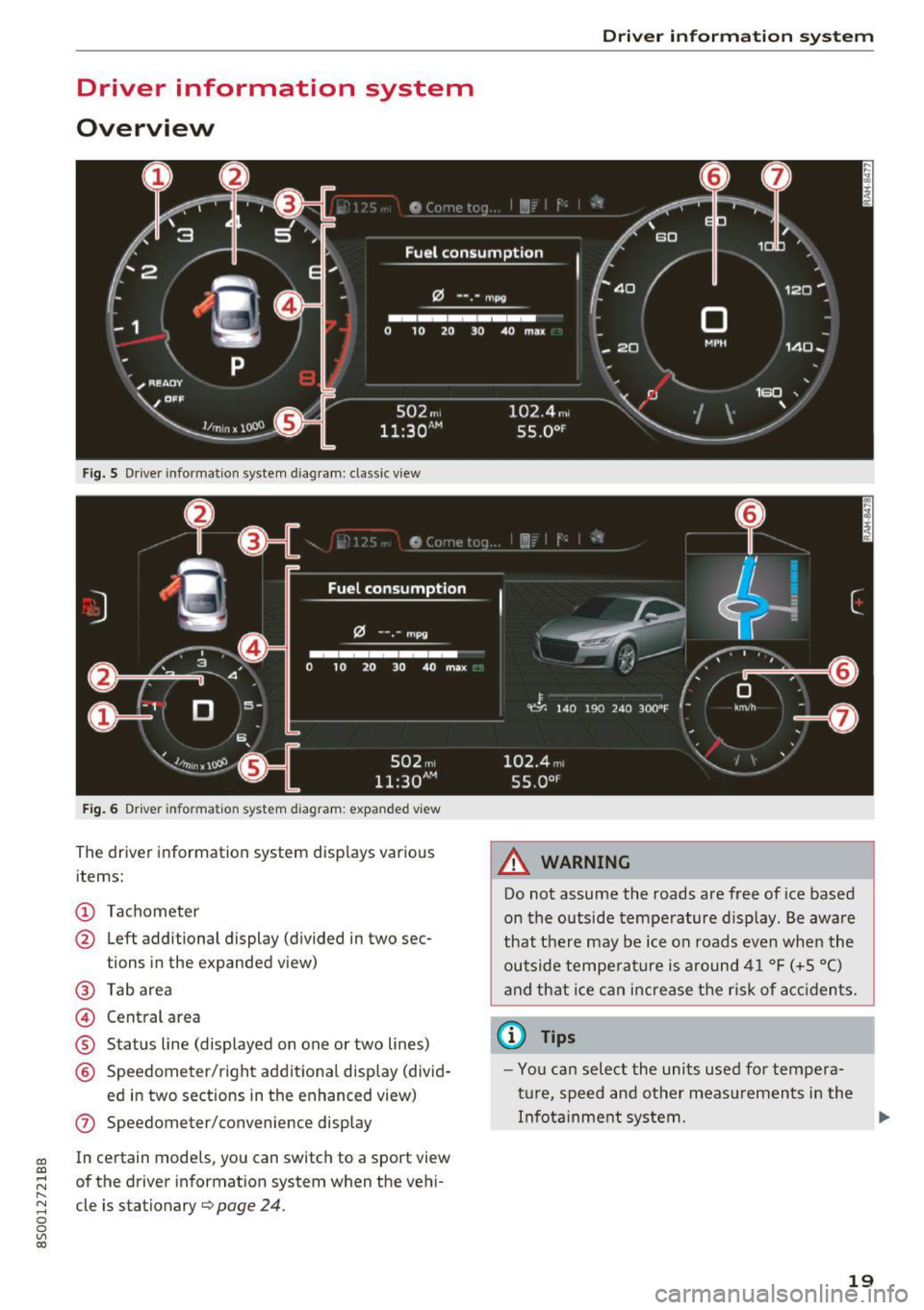
Fig. S Dr iver information system diagram: classic v iew
Fig. 6 D river information system diagram : expanded view
The driver information system displays various
items:
@ Tachometer
@ Left additional display (divided in two sec-
tions in the expanded view)
@ Tab area
@ Central area
® Status line (displayed on one or two lines)
@ Speedometer/right additional display (divid-
ed in two sections in the enhanced view)
(J) Speedometer/convenience display
In certain models , you can sw itch to a sport view
of the driver information system when the vehi
cle is stationary
¢ page 24 .
Driver in forma tion system
A WARNING
-Do not assume the roads are free of ice based
on the outside temperature display . Be aware
that there may be ice on roads even when the
outside temperature is around 41 °F (+5 °C)
and that ice can increase the risk of accidents.
(D Tips
-You can select the units used for tempera
ture, speed and other measurements in the
Infotainment system. .,,.
19
Page 26 of 322
Driver information system
Sport view
Applies to: ve hicles w ith boost p ressure indicato r and engine o il tempera ture indica tor (S models)
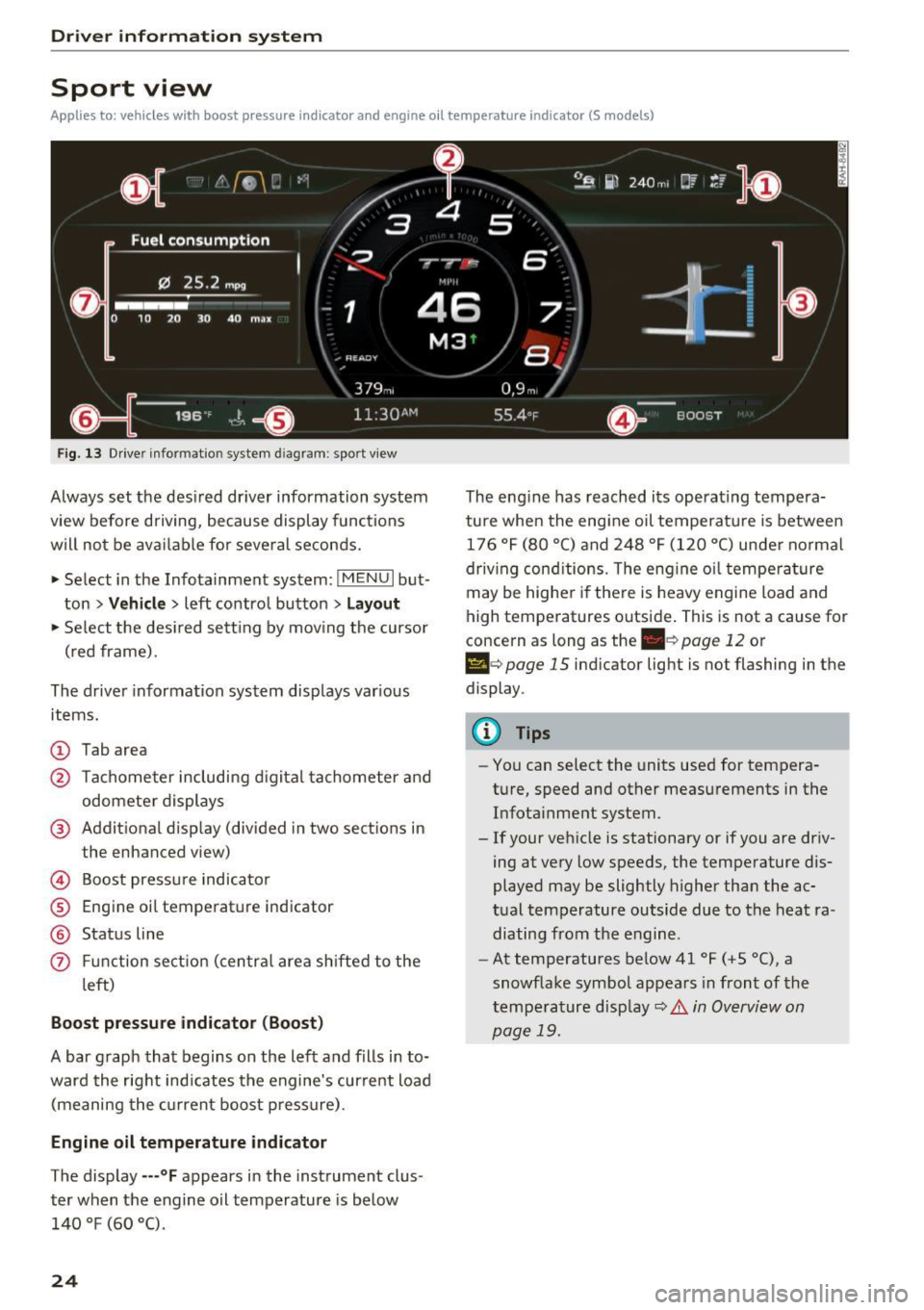
Fig. 13 Drive r informatio n system d iag ram: sport v iew
Always set the desired driver information system
view before driving, because display functions
will not be available for several seconds.
• Select in the Infotainment system:
IMENU I but
ton
> Vehicle > left contro l button > Layout
• Se lect the des ired sett ing by mov ing the cursor
(red frame).
The driver information system displays various
items.
(D Tab area
@ Tachometer including d igital tachometer and
odometer displays
@ Additional display (divided in two sections in
the enhanced view)
© Boost pressure indicator
® Engine oil temperature ind icator
@ Status line
(f) Funct ion sect ion (centra l area shifted to the
l eft)
Boost pressure indicator (Boost)
A bar graph that begins on the left and fills in to
ward the right indicates the engine's curre nt load
(meaning the current boost pressure).
Engine oil temperature indicator
The display ---°F appears in the instrument clus
ter when the engine oil temperature is below
140 °F (60 °().
24
The eng ine has reached its operating tempera
ture when the engi ne oil temperatu re is between
176 °F (80 °() and 248 °F (120 °C) under normal
driv ing cond itions. The eng ine o il temperature
may be higher if there is heavy engine load and
high temperatures outside. This is not a cause for
concern as long as the
. c> page 12 or
Ill e> page 15 indicator light is not flashing in the
display .
@ Tips
-You can select the units used for tempera
ture, speed and other measurements in the
Infota inment system.
- If your vehicle is stationary or if you are driv
ing at very low speeds, the temperature dis
played may be slightly higher than the ac
tual temperature outside due to the heat ra
diating from the engine.
- At temperatures below41 °F (+5 °(), a
snowflake symbol appears in front of the
tempe rature disp lay
c> .& in Overview on
page 19.
Page 50 of 322
Sea ts and stor age
Roof rack
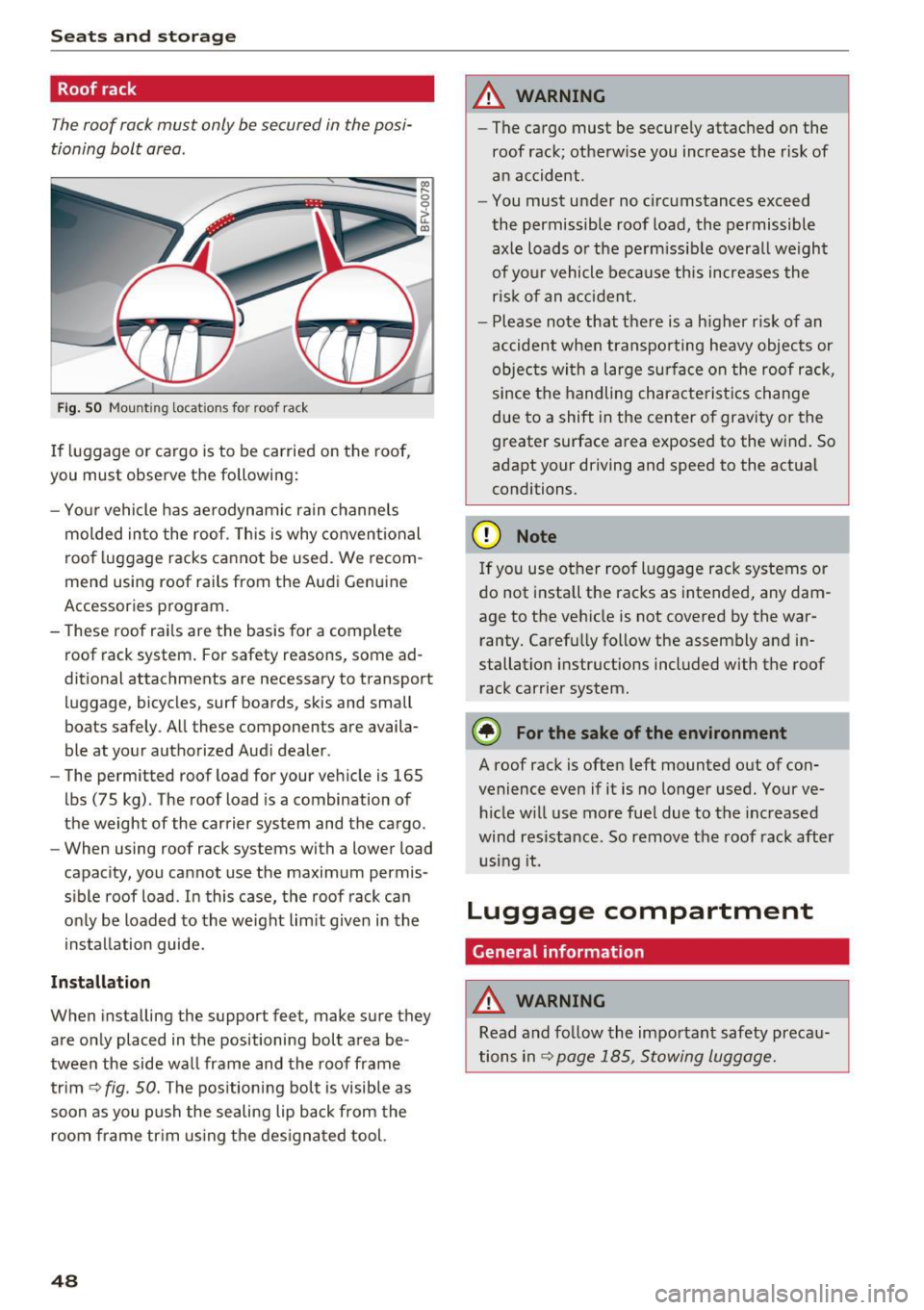
The roof rack must only be secured in the posi
tioning bolt area.
Fig . SO Mount ing locat ions fo r roof rac k
If luggage or cargo is to be carried on the roof,
you must observe the following:
- Yo ur vehicle has ae rodynami c rain channels
molded in to the roof . T h is is why convent ional
roo f luggage racks ca nnot be used . We recom
mend using roof rails from the Aud i Genu ine
Accessories program.
- These roof rai ls are the bas is for a complete
roof rack system . For safety reasons, some ad
ditional attachments are necessary to transport luggage, bicycles, surf boards, skis and small
boats safely . All these components are availa
ble at yo ur authorized Aud i dealer .
- The permitted roof load for your veh icle is 165
lbs (75 kg) . The roof load is a combination of
the weight of the carrier system and the cargo .
- When using roof rack systems with a lower load
capacity, you cannot use the maximum permis
s ible roof load . In this case, the roof rack can
o nly be loaded to the weight lim it given in the
i nstallation guide.
Inst allation
When installing the support feet, make sure they
are only placed in the positioning bolt area be
tween the side wa ll frame and the roof frame
trim ¢
fig. 50. The positioning bolt is visible as
soon as you push the sealing lip back from the
room frame tr im us ing t he des igna ted tool.
48
A WARNING
- The cargo must be secure ly attached on the
roof rack; otherw ise you increase the r isk of
an accident .
- You must u nder no circ umstances exceed
the permissible roof load, the permissible
axle loads o r the pe rm issib le overa ll we ight
of yo ur vehicle be cause this increases the
ris k of an a cc iden t.
- Please note that there is a h igher r is k of an
accident when transporting heavy objec ts or
objec ts wi th a l arge sur face on the roof r ack,
since the handling characterist ics change
due to a shift in the center of gravity or the
greater surface area exposed to the wind . So
adapt your driving and speed to the actual
conditions.
(D Note
If yo u use ot her roof l uggage rack systems or
do not install the racks as intended, any dam
age to the vehicle is not covered by the war ranty . Carefu lly follow the assembly and in
stallation instructions included with the roof
rack carrier system.
® For the sake of the environment
A roof rack is often left mounted out of con
venience even if it is no longer used. Your ve hicle w ill use more fue l due to the inc reased
wind res istance. So remove t he roof rack after
u sing it.
Luggage compartment
General information
A WARNING
Read and fo llow the important safety preca u
tions in
Q page 185, Stowing luggage.
Page 57 of 322
co
co
.... N
" N .... 0
0
Vl c:o
Driving
General information
Breaking in
A new vehicle must be broken in, and the break
in distance should be 1,000 mi les ( 1,500 km). Do
not drive at speeds that w ill exceed
2/3 of the
maximum permitted engine speed
(RPM) for the
first 600 miles (1,000 km) , and avoid full accel
eration during this period . You may gradually
start increasing the
RPM and the speed between
600 miles (1,000 km) and 1,000 miles (1,500
km).
During the first hours of use, the engine has a
higher internal friction than later on when all
moving parts have settled into place with each
other.
How the vehicle is driven during the first 1,000
miles (1,500 km) also affects the engine quality.
Drive at moderate engine speeds after the initial
break-in per iod, part icularly when running a cold
engine . This will reduce engine wear and improve
the mileage .
Do not drive at too low of an engine speed (rpm).
Shift down if the engine stops running "smooth
ly" . Extremely high eng ine speeds are automati
cally reduced .
Avoid damaging the vehicle
When you are driving on poor roads, or over
curbs, steep ramps, etc., make certain that low
lying parts such as spoilers and exhaust system
parts do not bottom out and get damaged.
This is especially true for vehicles with low-slung
chassis (sports chassis)* and fully loaded
vehicles.
Driving through water on roads
Note the following to reduce the risk of vehicle
damage when driving through water, for examp le
on flooded roads :
- The wate r must not be any higher than the bot
tom of the vehicle body .
Driving
- Do not drive faster than walking speed.
A WARNING
After driv ing through water or mud, the effec
tiveness of the brakes may be reduced due to moisture on the brake rotors and brake pads.
A few careful brake applications should dry
off the brakes .
(D Note
Vehicle components such as the engine,
transmission, suspension or electrical system
can be severely damaged by driving through
water.
(D Tips
- Determine the depth before driving through
water.
- Do not stop the vehicle, drive in reverse or
switch the engine off when driving through
water.
- Keep in mind that oncoming vehicles may create waves that raise the water level and
make it too deep for your vehicle to drive
through safely.
- Avoid dr iving through salt water, because
this can cause corrosion.
Economical and environmentally-friendly
driving
T he amount of fuel consumpt ion, the environ
menta l impact and the wear to the engine,
brakes and tires depends mostly on your driving
style. With an anticipatory and economic driving
style, fuel consumption can be reduced by ap
proximately 10-15%. The following tips will help
you conserve the environment and your money at
the same time .
Anticipatory driving
A vehicle uses the most fuel when accelerating.
When you drive with anticipation, you do not
need to brake as often and so you accelerate less.
When possible, let your vehicle coast with a
gear
engaged -
for example, when you notice that the
next traff ic light is red . .,,.
55
Page 58 of 322

Driving
Avoid full acc ele ra tion
You sho uld rare ly travel at the maximum vehicle
speed . High speeds cause a disp roportionately
high increase in fuel consumption, emissions and
traffic noise . Slower driving saves fuel.
Reduce idling time
It pays off to stop the engi ne, for examp le when
at rai lro ad crossings or tr affic lights with longer
red lights . Stopping the engine for 30 -40 sec
onds already saves more fuel than the amount of
extra fuel needed to resta rt the engine.
It t akes a very long time in idle to wa rm the en
g ine up to operating tempe ra ture . Wear and
emissions are especially high in the warm-up
p hase . Therefore, yo u should begin driving im
mediately after starting the engine. Avoid high
RPMs while do ing th is.
Have ma intenanc e performed r egularly
By having maintenance performed regular ly on
your vehicle, yo u can help to reduce f uel con
sumpt ion before you even start to dr ive. The
maintenance condition of your vehicle not only
affects traffic safety and long-term value but a l
so impacts
fuel consumpt ion .
A poorly maintained engine can lead to fuel con
sumpt ion that is 10% higher than normal.
A lso check the
oil le vel when refueling . The o il
consumption
depends large ly on the engine load
and speed. It is normal for the oil consumpt ion
of a new eng ine to reach its lowest point only af
ter a certain amount of use. Therefore, the oil
consumption can o nly be properly judged after
approx imately 3,000 m i (S,000 km) have been
d riven.
Avoid short trips
The engine and exhaust cleaning system must
reach the ir opt imal
operating temperature to ef
fectively red uce consumption and em iss ions.
A co ld engine uses a disproportionately h igh
amount of fuel. The engine reaches operating
temperature and consumpt io n normalizes only
afte r approximately
four kilometers.
56
(D Note
Do not leave engine idling unattended after
starting. If warning lights sho uld come on to
i ndicate imprope r operation, they would go
unheeded. Extended idling also produces
h eat, which could result in overheating or
other damage to the vehicle o r other proper
ty.
(D Note
- Have your ve hicle ma intained properly and
in accordance with the service recommenda
t ions i n your Warranty
& M aintenance book
let. La ck of prope r mai nte na nce as we ll as
imp roper use o f the ve hicle will impa ir the
func tion of the emission cont ro l sys tem and
cou ld lead to damage.
- Do not alte r or remove any compone nt of
the Emission Contro l System unless ap
proved by the man ufacturer.
- Do not alte r or remove any dev ice, such as
heat shields, switches, ig nition w ires,
valves, which are designed to protect your
vehicle's Emission Contro l System and other
important veh icle components.
(D Tips
The cons umption estimates as publishe d by
ENVIRONMENTAL PROTECTION AGENCY
(EPA) and Transport Canada may not corre
spond to your actual consumption on the r oad, which wi ll vary depending upon vehicle
l oad and speed, road a nd wea ther conditions,
tr ip length, etc.
Page 64 of 322

Driving
vehicle to accelerate without a noticeable
interruption in traction.
The transm ission upshifts o r downshifts auto
mat ica lly . T he driving sty le con tinuo usly influen
ces the selection of the driving program.
W hen a
moderate driving style is used , the
t ra nsmission se lects the most e conomical d riving
mode. The t ransm iss io n upshifts a t a lower RPM
and downshifts at a higher RPM to improve fuel
efficiency.
The transm ission switches to a spo rty mode after
a ki ck-down or when the drive r uses a
sp o rty
dri ving sty le
character ized by quick accelerator
pedal movements, heavy acce leration, frequent
changes in speed and traveling at the ma ximum
speed.
I f desired, the driver can a lso select the gears
manually ( tiptronic mode ).
Selector lever positions
Fig. 63 Inst rument clus te r: s ele ctor leve r pos it io n s
The Infot ainment system d isplay shows the c ur
ren t selecto r lever position and the engaged
gear.
P -Park
You can only shift in to Par k when the ve hicle is
stationary ~,&. .
To shift in and out of the P selector lever posi
tion, press the inte rlock butto n in the se lector
lever
while pressi ng the brake pedal.
62
R- Reverse
Only s hift into reverse gear w hen the ve hicle is
stationary and the engine is runn ing at idle
speed ~&. .
To se lect t he R sele ctor leve r pos ition, press the
i nterlo ck button
while p ressi ng the bra ke pedal.
The back -up lights switch on in the R pos ition if
the ignit ion is switched on.
N -Neutral
The tra nsmission is in idle in th is position.
D IS -Normal position for driving forward
In the D/S se lector lever position, the transmis
s ion can be operated either in the normal D mode
or in the S sport mode. To select the S sport
mode, pull the selector lever bac k br iefly . Pu lling
the leve r bac k aga in will select the normal D
mode. The selec ted drivi ng mode is show n in t he
Infotai nment display.
In the
normal mode D , the transmission auto
matically sele cts the s uitable gear ratio.
It de
pends on engine load , vehi cle speed a nd driving
style.
Se lect the
sport mode S fo r spo rty d riving . The
vehicle makes f ull use of the engine's power.
Sh ift ing may become no ticeable whe n acceler at
i ng.
To move from selector leve r pos it ion N to D, you
mus t press the brake pedal and the veh icle m ust
be traveling less th an 1 mph (2 km/h) o r be sta
tiona ry ¢ ,&. .
&_ WARNING
Read and fo llow all WARNINGS .
- The vehi cle can roll even if the ig nitio n is
sw itched off .
- Never se lec t R or P whi le dr iving, because
this increases the risk of an ac cident .
- P owe r is still transmi tted to the wheels
w hen t he engine is runn ing at idle . To pre
vent the vehicle from "creeping", yo u m ust
keep your foot on the brake in a ll selector
lever positions (except P) when the engine is
r u nning. Otherwise, this increases the risk
of an accident.
Page 65 of 322
CD
CD
.... N
" N ...... 0
0
Ill co
-Do not inadvertently press the accelerator
pedal when the vehicle is stopped if a gear is
engaged. Otherwise the vehicle will start to
move immediately, even if the parking brake
is set . This could result in a crash .
- Do not press the accelerator pedal when
changing the selector lever position while
the vehicle is stationary and the engine is
running.
- Never leave your vehicle with the engine running while in gear.
If you must leave
your vehicle when the engine is running, set
the parking brake and move the selector lev
er to the P position .
- To decrease the risk of an accident, these
lector lever must be in the P position and
the parking brake must be set before open
ing the hood and working on a running en
gine. Always read and follow the applicable
warnings¢
page 244, Working in the en
gine compartment.
{[) Note
Never let the vehicle roll downhill with engine
off and the selector lever in the
N position,
because this could damage the automatic
transmission and catalytic converter.
@ Tips
- Drive select: sporty shifting characteristics
can be selected using the
Dynamic driving
mode. The Infotainment display shows 5 as
the selector lever position instead of D.
- If you accidentally select N while driving,
take your foot off the accelerator pedal im
mediately and wait for the engine to slow
down to idle before selecting Dor 5 .
- If there is a power failure, the selector lever
will not move out of the P position. The
emergency release can be used if this hap
pens. Left-hand drive vehicles
q page 69.
Driving
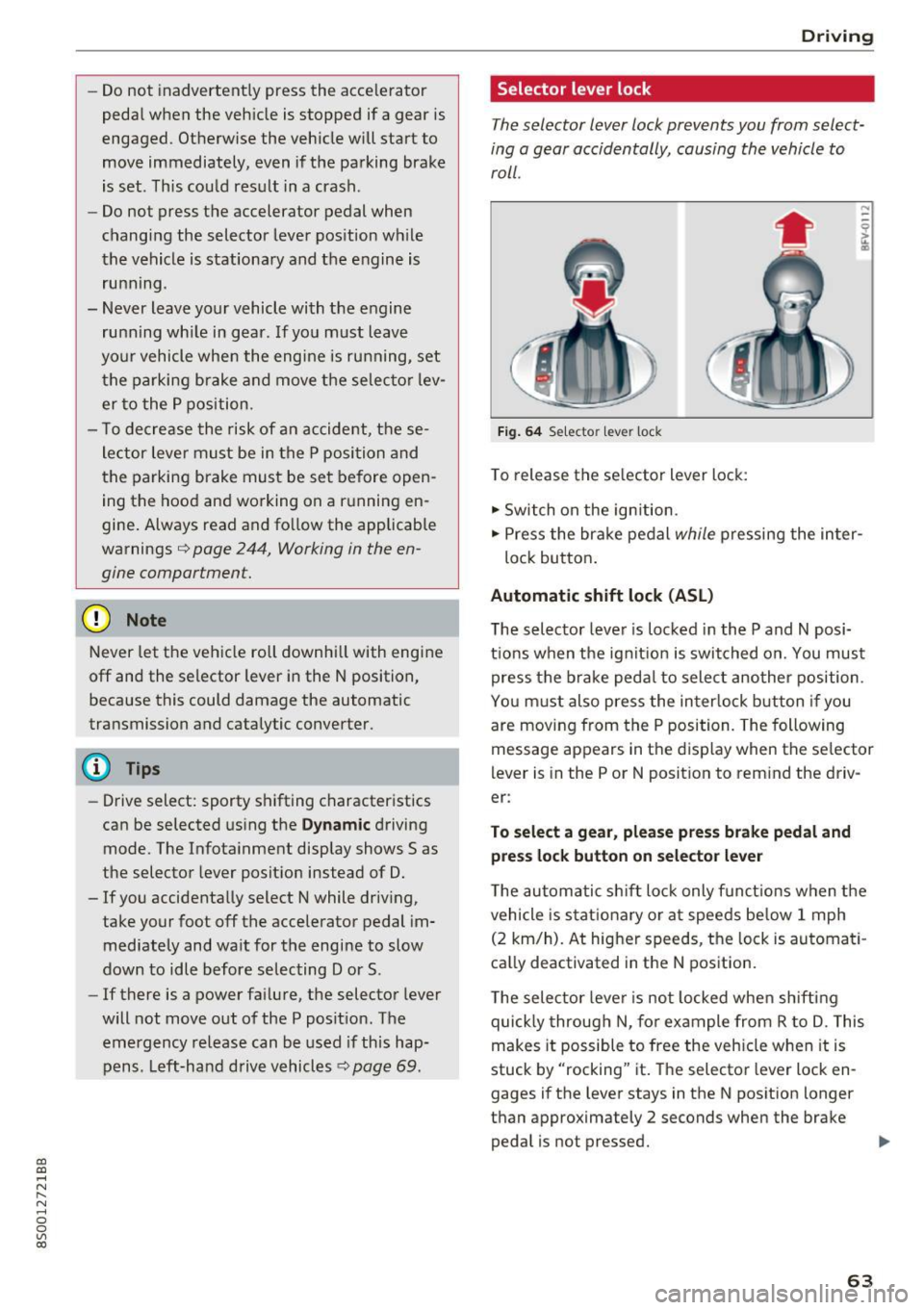
Selector lever lock
The selector lever lock prevents you from select
ing a gear accidentally, causing the vehicle to
roll.
Fig. 64 Selecto r lever lock
To release the selector lever lock:
.,. Switch on the ignition.
.,. Press the brake pedal
while pressing the inter-
lock button.
Automatic shift lock (ASL)
The selector lever is locked in the P and N posi
tions when the ignition is switched on. You must press the brake pedal to select another position.
You must also press the interlock button if you
are moving from the
P position. The following
message appears in the display when the selector
lever is in the P or
N position to remind the driv
er:
To select a gear, please press brake pedal and press lock button on selector lever
The automatic shift lock only functions when the
vehicle is stationary or at speeds below 1 mph
(2 km/h). At higher speeds, the lock is automati
cally deactivated in the N position.
The selector lever is not locked when shifting
quickly through N, for example from R to D. This
makes it possible to free the vehicle when it is
stuck by "rocking" it. The selector lever lock en
gages if the lever stays in the N position longer
than approximately 2 seconds when the brake
pedal is not pressed.
II>-
63
Page 69 of 322

co
co
.... N
" N .... 0
0
Vl c:o
~ To shift down one gear, tap the shift paddle 0-
If the sh ift paddles are tapped while in the D/S
selecto r lever posit io n, automatic mode switches
off briefly . To switch from manually shifting back
to a utomatic shifting immediately, tap the shift
paddle G)¢fig . 67for 1 second .
To keep shifting using the shift paddles, move
the sele ctor lever to the right out of the D/S posi
tion into the t ipt ronic shift gate.
The transm ission automatically shifts up o r down
befo re critical engine speed is reached.
The transm ission only a llows manual sh ift ing
when the engine speed is within the permitted
range.
(D Tips
- If you sh ift to the next lowest gear, the
transm ission w ill only shift if the engine w ill
not be over-revved.
- With kick-down, the transmission shifts to a
l ower gear, depending on vehicle speed and
engine speed.
- tiptronic does not wo rk if the t ransmiss ion
i s r unning in emergency mode.
Kick-down
Kick-down enables maximum acceleration.
When you press the accelerator pedal down be
yond the resistance point , the automatic trans
m iss ion downshifts into a lower gear and the en
g ine utilizes its fu ll power , depend ing on veh icle
speed and engine R PM.
It shifts up into t he next
h igher gea r once the maximum spec ified engine
RP M is reached.
A WARNING
Please note that the wheels could spin on
slick or slippery roads when kick-down is ac
tive.
-
l ) T he ESC lig ht turn s on continuous ly and the mess age S ta·
b ili za tion co ntro l (E SC): sport. Warn ing! Red uced st abi l·
ity appe ars te mporar ily in th e I nfotainment syste m to in
di cate tha t the syste m wa s deact ivate d.
D riv ing
Launch Control-Program
The Launch Control Program enables maximum
acceleration .
Requirement: the engine must be at operating
temperature and the steering wheel must not be
turned .
~ With the engine running, press the l1' 0FF I but
ton briefly one t ime
l ).
~ Pull the selector lever back out of the D/S posi
tion briefly to select the S position, or press it
toward the r ight into the tiptron ic position or
select the
Dynamic dr iving mode in dr ive se
lect* ¢
page 79.
~ Press the brake pedal fi rm ly w ith your left foo t
and hold it all the way down for at least 1 sec
ond.
~ At the same time, p ress the gas peda l all the
way down with your right foot until the eng ine
reaches and stays at a high RPM level.
~ Remove your left foot from the brake.
A WARNING
- Always adapt your driving to the t raff ic flow.
- Only use Launch Control when road and traf-
f ic conditions allow it and other drivers will
not be endange red or impacted by your dr iv
ing and the vehicle's acceleration.
- Please note that the d rive wheels can spin
and the vehicle can b reak away when spo rt
mode is switched on, especially when the
road is slippery.
- Once the vehicle has started mov ing, press
the
! .P-O FF I button briefly to turn the spo rt
mode off.
(D Tips
- The transmission temperature may increase
significant ly after using the launch control
prog ram. If that happens, the prog ram may
no t be ava ilable for a few minutes.
It will be
avai lab le again afte r a cool -down period. ..,.
67