brake light AUDI TT ROADSTER 2011 Owner's Manual
[x] Cancel search | Manufacturer: AUDI, Model Year: 2011, Model line: TT ROADSTER, Model: AUDI TT ROADSTER 2011Pages: 260, PDF Size: 64.11 MB
Page 93 of 260
If you have selected a lower gear than the cur
rent one, the transmission w ill only shift down
when the engine cannot be overspeeded .
If kick-down is actuated, the transmission
shifts into a lower gear independent ly of
speed and engine rpm .
Steering wheel with Tiptronic ® controls
The selector paddl es allow the driver to keep
both hands on the steering wheel when shift
ing gears.
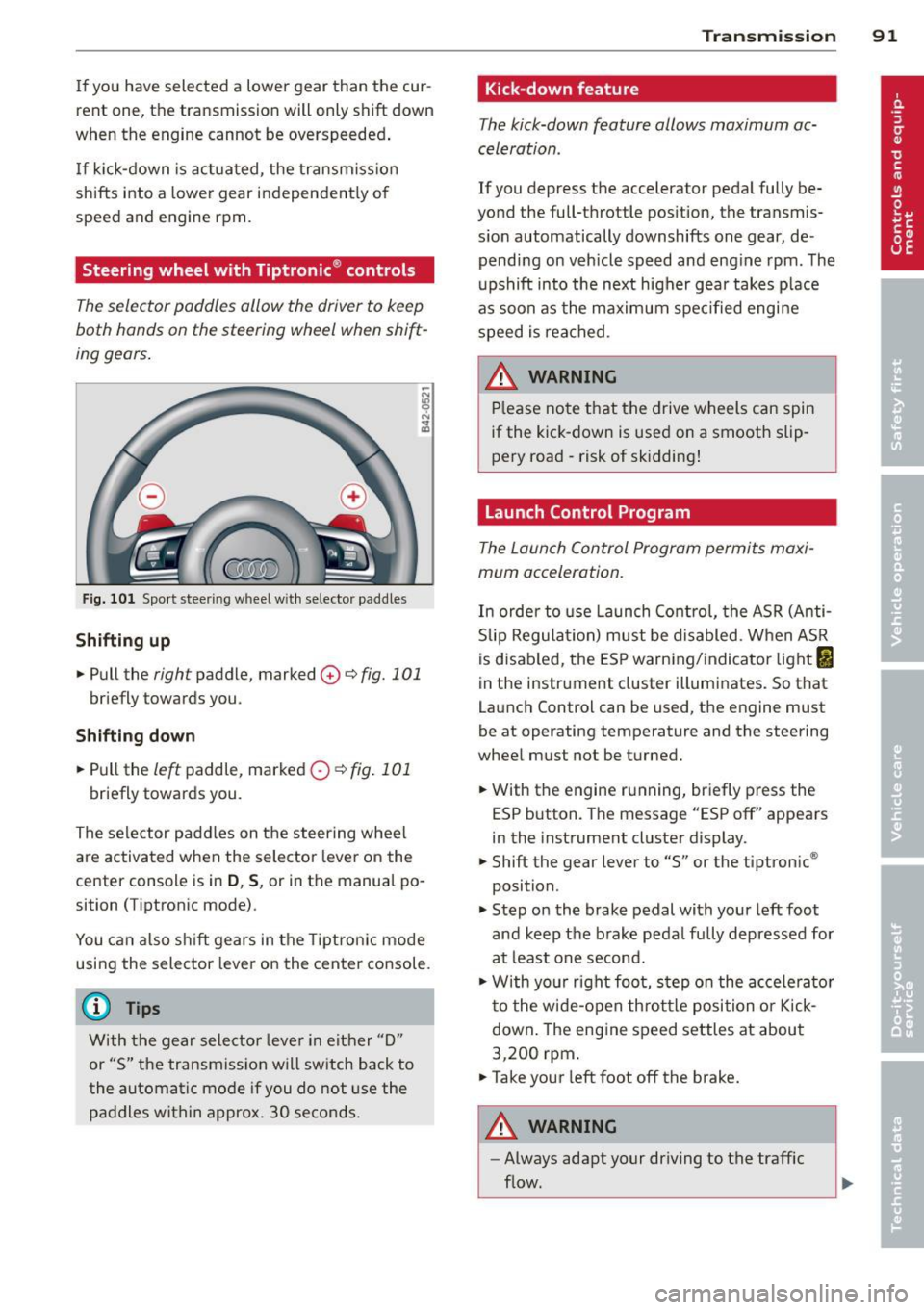
Fig. 101 Sport steer ing wheel w ith selector paddle s
Shifting up
.. Pull the right paddle, marked 0 ¢ fig. 101
briefly towards you .
Shifting down
.. Pull the left paddle, marked 0 ¢fig. 101
briefly towards you.
The selector paddles on the steering wheel
are activated when the selector lever on the
center console is in
D , S, or in the manual po
sition (Tiptronic mode) .
You can also shift gears in the Tiptronic mode
using the selector lever on the center console.
@ Tips
With the gear selector lever in either "D"
or "S" the transmission will switch back to
the automatic mode if you do not use the
paddles within approx. 30 seconds.
Transmission 91
Kick-down feature
The kick-down feature allows maximum ac
celeration .
If you depress the accelerator pedal fully be
yond the full-throttle position, the transmis
s ion automatically downshifts one gear, de
pending on vehicle speed and engine rpm. The
upshift into the next higher gear takes place
as soon as the maximum specified engine
speed is reached.
_&. WARNING
Please note that the drive wheels can spin
if the kick-down is used on a smooth slip
pery road -risk of sk idding!
Launch Control Program
The Launch Control Program permits maxi
mum acceleration.
In order to use Launch Control, the ASR (Anti
Slip Regulation) must be disabled. When ASR
is disabled, the ESP warning/indicator light
I
in the instrument cluster illuminates. So that
Launch Control can be used, the engine must
be at operating temperature and the steering
wheel must not be turned .
.. With the engine running, briefly press the
ESP button. The message "ESP off" appears
in the instrument cluster display.
.. Shift the gear lever to "S" or the tiptronic ®
position.
.. Step on the brake pedal with your left foot
and keep the brake pedal fully depressed for
at least one second.
.. W ith your right foot, step on the accelerator
to the wide-open throttle position or Kick
down. The engine speed settles at about
3,200 rpm.
.. Take your left foot off the brake.
&_ WARNING
-
-Always adapt your driving to the traffic
flow.
Page 94 of 260
92 Transmission
-Only use Launch Control when road and
traffic conditions allow it and other driv
ers will not be endangered or annoyed by
your driving and the acceleration of the
vehicle.
- Make sure that ESP remains enabled.
With the ESP disabled, the vehicle could
brake away, particularly on a slick and
slippery road -risk of skidding!
- Once acceleration is finished, switch ASR
on again by briefly pushing the ESP but
ton.
Back -up program
In the event of a system malfunction, there is
an back-up program .
In the event of system malfunction, the auto
matic transmission switches to the fail-safe
mode . All of the selector lever position dis
plays for the automatic transmission are high
lighted with a light background in the instru
ment cluster display . In some cases you can
not use reverse gear any more.
If the transmission switches to fail-safe
mode, you should take the vehicle to an au
thorized Audi dealership as soon as possible
to have the condition corrected.
Clutch is overheating
• Clutch is overheating! Please stop vehi
cle!
If the symbols are illuminated, the clutch is
overheating and could be damaged if you con
tinue to drive . Stop the vehicle and allow the
transmission to cool with the selector lever in
the
P position while the engine runs at idle. If
the warning does not turn off, do not continue
driving. See your authorized Audi dealer or
qualified repair facility for assistance. Other
wise serious transmission damage could re
sult. Once the indicator light has turned off,
drive to your authorized Audi dealer or quali
fied repair facility immediately to have the
malfunction corrected.
Selector lever emergency release
If the vehicle 's power supply fails, the selec
tor lever can be released in an emergency.
-
-
-
-
-
-
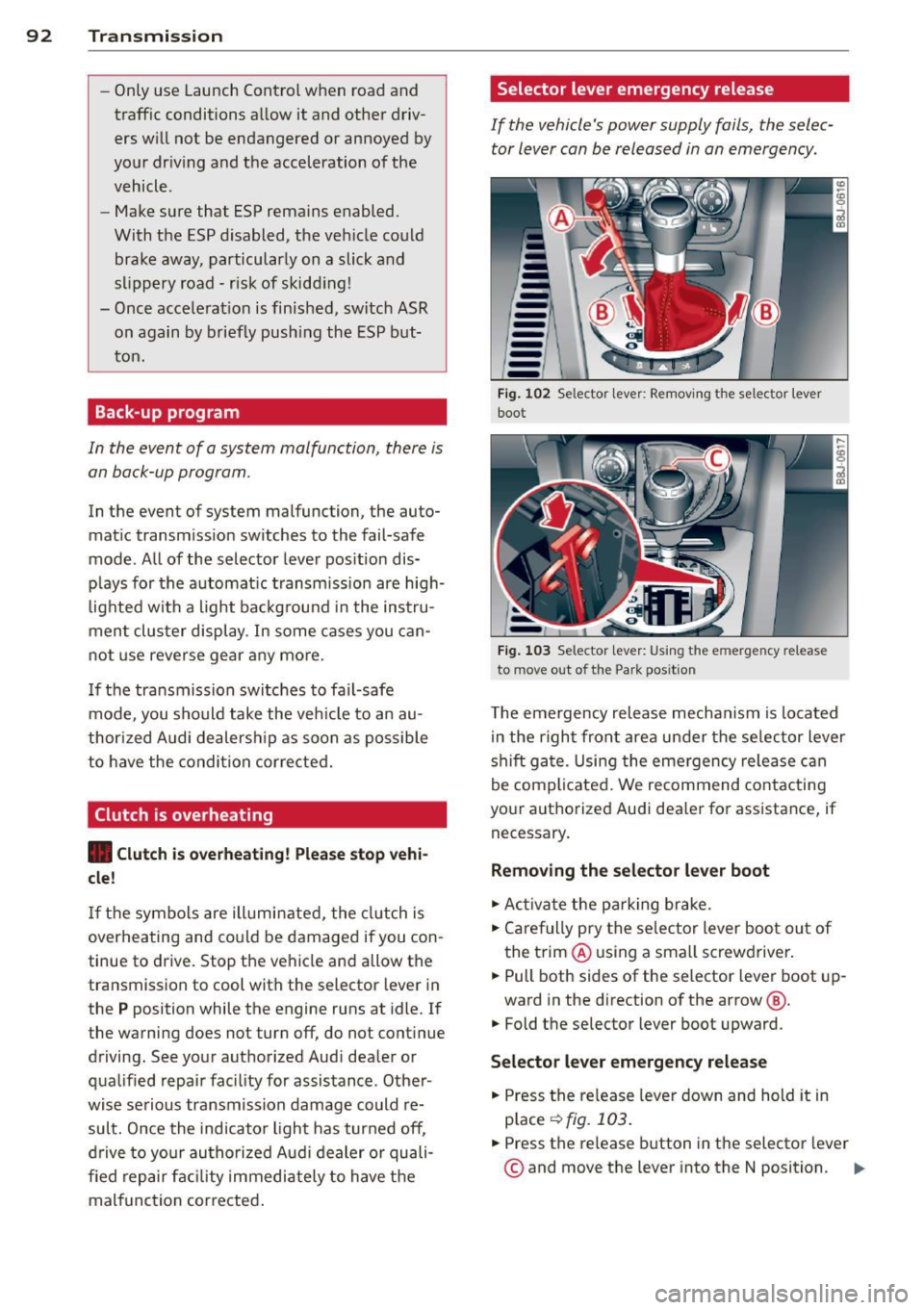
---Fig. 102 Selector lever: Removing t he selector lever
boot
Fig. 103 Selector lever: Using the e merge ncy release
to move o ut of the Park pos it ion
The emergency release mechanism is located
in the right front area under the selector lever
shift gate. Using the emergency release can
be complicated. We recommend contacting
your authorized Audi dealer for assistance, if necessary .
Removing the selector lever boot
.. Activate the parking brake.
.. Carefully pry the selector lever boot out of
the trim @ using a small screwdriver .
.. Pull both sides of the selector lever boot up-
ward in the direction of the arrow @.
.. Fold the selector lever boot upward.
Selector lever emergency release
.. Press the release lever down and hold it in
place
~ fig . 103 .
.. Press the release button in the selector lever
© and move the lever into the N position. Iii>
Page 96 of 260
94 Homelin k®
Homelink ®
Universal remote
control
General information
The Homelink ® feature can learn up to three
radio frequency codes for most current trans
mitters used for operating garage doors, es tate gates, home or outdoor lighting sys
tems , and other devices.
You must first program the Homelink ® trans
mitter before you can use the system
¢ page 95, Programming the HomeLink ®
transmitter.
In order to program the Home Link ® transmit
ter for devices utilizing rolling code, a second person on a ladder who can safely reach the
garage door opener motor is recommended.
It is also necessary to locate the "learn" but
ton on your garage door opener motor . Refer
to the operating instructions for the opener,
as the location and color of this button may
vary by manufacturer .
You can still use the original remote control
for the device at any time.
A WARNING -
- Never use the Homelink® transmitter
with any garage door opener that does
have not the safety stop and reverse fea
ture as requ ired by federal safety stand
ards. This includes any garage door open
er mode l manufactured before April 1,
1982.
- A garage door opener which cannot de
tect an object, signaling the door to stop
and reverse does not meet current feder
al safety standards. Using a garage door
opener without these features increases
risk of serious injury or death.
- For safety reasons never release the
parking brake or start the engine while
anyone is standing in front of the vehicle .
- A garage door or an estate gate may
sometimes be set in motion when the Homelink
® remote control is being pro
grammed. If the device is repeatedly ac
tivated, this can overstrain motor and
damage its electrical components -an
overheated motor is a fire hazard!
- To avoid possible injuries or property
damage, please always make absolutely
certain that no persons or objects are lo
cated in the range of motion of any
equ ipment being operated.
0) Tips
- If you would like more information on
Homelink®, where to purchase the
Homelink ® compatible products, or
would like to purchase the Homelink ®
Home Lighting Package, please call toll
free: 1-800-355-3515.
- For Declaration of Comp liance to United
States FCC and Industry Canada regula
tions ¢
page 244.
Page 97 of 260
Programming the Homelink®
transmitter
The transmitter is programmed in two phas
es. For rolling code transmitters, a third
phase is also necessary.
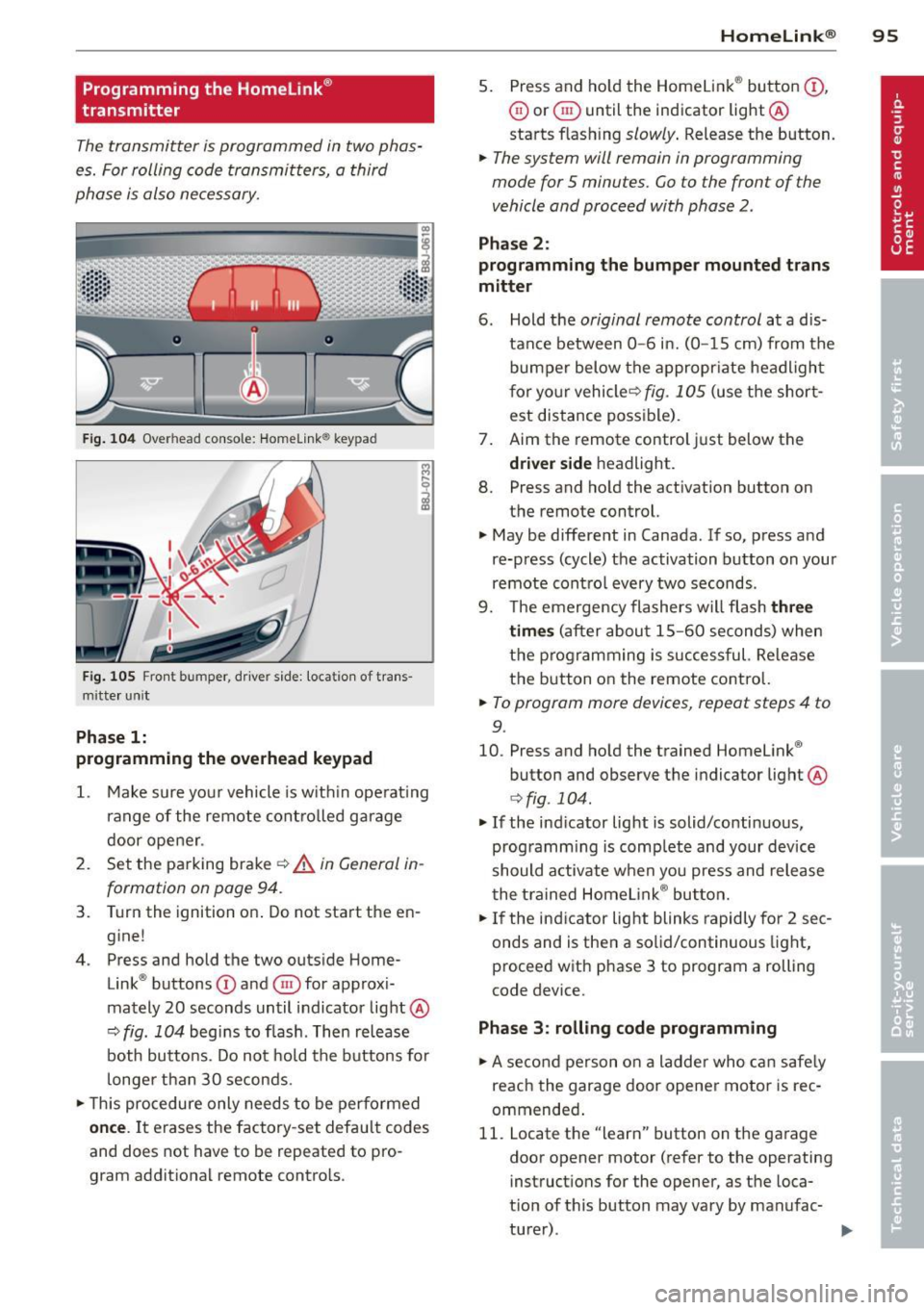
F ig . 104 Overhead console: Homelink ® keypad
Fig. 105 Front bumper, driver side: locat ion of trans
mitte r unit
Phase 1:
programming the overhead keypad
1. Make sure your vehicle is w ith in operat ing
ra nge of the remote controlled garage
door opener .
2. Set the parking brake~&.
in General in
formation on page 94.
3. Turn the ignition on . Do not start the en
g ine!
4 . Press and hold the two outside Home
Link ® buttons
(D and @for approxi
mately 20 seconds until indicator light@
~ fig. 104 begins to flash . Then release
both buttons . Do not hold the buttons for
longer than 30 seconds.
.. This procedure only needs to be performed
once. It erases the factory-set default codes
and does not have to be repeated to pro
gram additional remote controls .
Homelin k® 95
5. Press and ho ld the Homelink ® button (D ,
@ or§ until the indicator light@
starts flashing
slowly . Release the button.
.. The system will remain in programming
mode for 5 minutes.
Go to the front of the
vehicle and proceed with phase 2 .
Phase 2:
programming the bumper mounted trans
mitter
6. Hold the original remote control at a d is
tance between
0 -6 in. (0 -15 cm) from the
bumper below the appropr iate headlight
for your vehicleQ
fig . 105 (use the short
est distance possible) .
7. Aim the remote control just below the
driver side headligh t.
8. Press and hold the activation button on
the remote control.
.. May be different in Canada . If so, press and
re-press (cycle) the activation button on your
remote control every two seconds .
9. The emergency flashers will flash
three
times
(after about 15-60 seconds) when
the programming is successful. Re lease
the button on the remote control.
.. To program more devices, repeat steps 4 to
9.
10. Press and hold the trained Homelink ®
button and observe the indicator light @
Qfig . 104.
.. If the indicator light is solid/continuous,
programm ing is complete and your device
should activate when you press and release
the trained Homelink ® button.
.. If the indicator light blinks rapidly for 2 sec
onds and is then a solid/continuous light,
proceed w ith phase 3 to program a rolling
code device.
Phase 3: rolling code programming
.. A second person on a ladder who can safely
reach the garage door opener motor is rec
ommended .
11. Locate the "learn" button on the garage
door opener motor (refer to the operating
instructions for the opener, as the loca
tion of this button may vary by manufac
turer) .
Page 151 of 260

A WARNING
- The limits of physics cannot be suspended by ESP. Even in vehicles w ith ESP, you
should always adapt your driving to road
and traffic conditions. This is particular ly
t rue on a slippery and wet road. Do not
be tempted by the inc reased safety pro
vided to take ris ks - danger of an acci
dent!
- Please note tha t when ESP/ASR is deacti
vated, the drive whee ls can spin on icy
and slippery roads and the veh icle can
break away - danger of skidding!
Switching on and off
Fi g. 130 Center co nsole wit h ESP switch
The ES P is a utomatically activated when the
engine is star ted, and it performs a self-test.
As soon as the test is completed, the system
is in normal operating mode.
Deactivating
ESP should normally be activated at all times
because this ensures optimum vehicle stabil i
ty. Only in some cases it does make sense to
deactivate the Electronic Stability P rogram
(ESP) by press ing the button
~fig . 130. Deac
tivation is ind icated by the ESP lamp
I in the
instr ument cluster f lashes. The message
ESP
OFF
appears in the instrument cluster. Ant i
Slip Regulation is completely deactivated and
the stabilization effects from the ESP system are lim ited. Th is makes a mo re agile and spor
ty driv ing style poss ible, but the fu ll exte nt of
t he s tabiliza tion f unct ion is not available .
Intelligent technolog y 149
Activating
Press the@] button again~ fig. 130. T he ind i
cator light
I goes out . The message ESP ON
appears brief ly in the instrument cluster dis
play.
&_ WARNING
i=
You shou ld only switch the ESP off if your
driving ab ility and the traff ic situat ion al
low. Please note that when ESP/ASR is de
activated, the d rive wheels can spin on icy
a nd slippery roads and th e vehicle can
b reak away- dange r of skidd ing!
a) Tips
- If Aud i magnetic ride* is malfunct io ni ng,
the ESP may not sw itch off or it may
switch off automatically.
- In the event of a defect in the rear spoil er sys tem or in Audi magnet ic ride, it can
happen that ASR and ASR/ESP cannot be
deactivated, o r they are ac tiva ted au to
matically in the deactiva ted st ate.
Electronic differential lock (EDL)
The electronic differential lock monitors the
rotational speed of the drive wheels.
General notes
The electronic d ifferential lock (EDL) helps the
ca r to start moving, accele rate and climb a
gradient on su rfaces provid ing poor or a lmost
no g rip. Withou t EDL, this would be d iff icul t ,
i f not impossib le.
How the system works
The EDL operates automatica lly. It mon itors
the rotational speed of the dr ive wheels on an
axle with the help of the ABS sensors
c;:> page 153. If a noticeable difference in ro
tational speed
between the drive wheels on
o ne axle is detected (e.g. on s lippery ground
on one side), the s pinning wheel is braked,
thereby t ransferring power to the other drive
whee l or wheels (a ll-wheel drive). This is done
up to a speed of about 60 mph (100 km/h). ..,_
Page 152 of 260

150 Intelligent te chn olog y
Noises from the b rake system signal that
wheel spin is being controlled.
Driving off
When drivi ng off, a lways be sure to keep road
conditions in mind as you accelerate. If one
d rive wheel spi ns because it is on a surface
with less grip, gradua lly increase the press ure
on the accelerator pedal until the car starts to
move. The wheel less able to transfer power
spins.
O verheating of bra kes
To prevent the disc brake of the braked wheel
from overheating if subjected to excessive
loads, the EDL cuts out temporarily. The vehi
cle rema ins operationa l and behaves in the
same way as a vehicle without EDL.
As soon as the brake has cooled down, EDL
switches on again automatically .
A WARNING
-When accelerating on slippery surfaces,
such as on ice or snow, always be careful
when depressing the acce lerator pedal.
Even with the EDL working, the drive
wheels can spin and reduce yo ur ability
to contro l your car. -Risk of crash!
- The increased safety afforded by EDL
does not mean that you can ta ke safety
risks. Always adapt your dr iving sty le to
the road conditions and traff ic situa tion.
@ Tips
If a fa ult occurs in the ABS, the EDL is also
not f unct ion ing. This is indicated by the
ABS warning light ¢
page 17.
Anti-Slip Regulation System (ASR)
The Anti-Slip Regulation System prevents the
driven wheels from spinning wh en the car is
accelerating.
General notes
The Anti-Slip Regulation System (ASR) is inte
grated in the electronic stabilization program
(ESP). When th e vehicle starts up and acceler- ates, the whee
ls are prevented from spinning
by adjusting the engine power to match the
amount of grip available from the road sur
face.
How the system works
ASR pe rforms a utomat ica lly, i.e . w ithout t he
driver's intervention. With the aid of the ABS
sensors ¢
page 153, ASR monitors t he speed
of the dr iven whee ls . If the whee ls start to
spin, the engine torq ue is reduced automati
cally until the tires find enough gr ip to lock
onto the road surface . The system is active
across the ent ire speed range .
The ASR works in conjunction with the ABS. If
a malfunction should occur in the ABS, the
ASR w ill also be out of act io n.
@ Tips
To ensure that the ASR works properly, all
four whee ls must be fitted wit h ident ica l
tires . Any differences in ro lling radius of
the tires can cause the system to reduce
engine power wh en this is not desired. See
a lso
¢ page 205, New tires and repla cing
tires and wheels.
Rear spoiler
The rear spoiler improves vehicle handling
and enhances driver control .
Fig. 131 Switc h fo r rear spo iler
The rear spoiler deploys and retracts. Spoiler
operation can be set for automat ic or manual
operation .
Page 153 of 260
Automatic mod e (normal operat ion)
- Automatic deployment: At a speed of about
75 mph (120 km/h), the rear spoiler deploys
automatically .
- Automatic retraction: When speed drops be
low abo ut SO mph (80 km/h), the rear spoil
er retracts automatically.
Manual mode
- Manua l dep loyment: Tapping briefly on the
switch
¢ fig. 131 dep loys the rear spo iler .
- Manual retraction: At speeds up to about 10
mph (20 km/h), retract the rear spoiler by
pressing and holding the switch ¢
fig. 131.
At speeds between 10 mph (20 km/h) and
75 mph (120 km/h), retract the rear spoi ler
by tapping on the switch
¢ fig. 131 .
A WARNING
Driv ing at higher speeds w ithout the rear
spoiler dep loyed can impair handling char
acteristics, making the vehicle harder to
control.
- Always make sure that the spoiler is de·
ployed whe n driving at speeds over 85
mp h (140 km/h) . If the rea r spo ile r
wa rning/ind icator light in the instru
ment cluster comes on, the rear spo iler
may not have dep loyed.
- Never drive at speeds hig her than 85
mp h (1 40 km/h) if the spoiler is not de
ployed. Have the spoi ler inspected as
soon as possible by an authorized A udi
dealer or qualified workshop .
- Always obey speed limits and other traf
fic laws.
A WARNING
Improper operation of the rear spoiler can
cause crushing injuries .
- Always make sure that nobody, especia lly
children, is in the way when the rear
spoiler is deployed or retracted.
Q) Note
Never push the vehicle o r apply fo rce to
the rear spoiler -it could be damaged.
Int ellig ent technolog y 151
(D Tips
Clean the spoiler compa rtment every 2 to
3 months. The spoiler compartment must
a lways be free of ice, snow, leaves or other
debr is .
Braking
General information
What affects braking efficiency?
Ope rating condition s and driving h abits
The brakes on today's automobiles are still
subject to wear, depending largely on operat
ing condit ions and driving habits ¢.&, . On ve
hicles that a re either dr iven mostly in stop
and-go city t raff ic or are dr iven hard, the
brake pads should be chec ked by yo ur author
ized Audi dea ler mo re often than specified in
the
W arranty & Maintenanc e boo klet. Failure
to have your brake pads inspected can result in reduced brake performance .
On steep slopes, you should use the braking
effect o f the engine . This way, you prevent un
necessary wear on the brake system. If you
must use your brakes, do not hold the brakes
down cont in uous ly. Pump the brakes at inter
vals.
Noises may occur when braking depending on
the speed, braking force and o utside condi
tions such as temperature and humid ity.
Moisture o r ro ad s alt
U nder certa in conditions, for examp le, when
driving through water or very heavy rain , or
even after washing your vehicle, the b raking
effect can be reduced due to moist ure (or in
freezing cond itions ice) on the brake pads. A
few cautious brake applications should dry off
the brake pads or remove any ice coatings .
The effectiveness of the brakes can be reduced
when the vehicle is driven on a salt-covered road and t he brakes are not used. L ikewise,
you clean off accumulated salt coating from brake d iscs and pads with a few cautious ap-
plications of the b rake ¢ .&, .
IJJ,
•
•
Page 155 of 260
Anti-lock brake system (ABS)
ABS prevents the wheels from locking under braking.
The anti-lock brake system (ABS) makes a ma
jor contribution to increasing active dr iving
safety. You should not expect that braking d is
tances will be
shortened under all circumstan
ces with ABS. Braki ng d istance may even be
come somewhat
longer, for example, on grav
e l or in new snow on slippery g round, even if
you are driving care fully and s low ly.
ABS operation
When a vehicle speed of about 10 mph (20
km/h) is reached, an automatic test sequence
is run. Some noise from the pump may be au
d ible.
I f the speed of a wheel slows down too much
r e lative to veh icle speed and it starts to lock,
brake pressure to this wheel is reduced. This
ad justment process can be felt as a
pul sin g
moti on of the br ake pedal , accompanied by
some noises. You as the driver are intentiona l
ly being given the information that the whee ls
are tending to lock (ABS control range). In or
der for ABS to be able to operate optimally in
this range, you must keep the brake pedal de pressed - do not "pump the brakes ".
Brake a ssist ant
The brake power assist unit increases the
pressure that you generate with the brake
pedal. It works only w hen the eng ine is run
ning .
Automatic full br ak ing
This function allows full brak ing in spite of
high brake pedal forces (e.g. when the brakes
are severely stressed because the vehicle is
fully loaded) . The driver notices th is function
throug h a reduction of pedal force and in
creased pedal travel. When the brake pedal is released, fu ll braking assist switches off again
automatically .
Intellig ent technolog y 153
If there is an ABS failure, the b rake assistant
and automatic fu ll braking assist are not avail
able.
A WARNING
- ABS cannot suspend the laws of physics.
You should keep th is in mind in particu
lar on an icy or wet road . If ABS control
of braking intervenes, you should adjust
your speed immed iately to road and traf
fic conditions. Do not be tempted by the increased safety provided to take risks -
danger o f an accident .
- Please keep in mind tha t the risk of an
accident is increased by driving too fast,
particularly in bends and on icy or wet
roads, and by driving too close to the ve
hicle ahead . The increased risk of an acci
dent cannot be reduced by the brake as
sistant - danger of an accident.
(D Tips
If a malfunction occurs in the ABS, this is
s ignalled by an indicator light, see
<=:> page 17.
Electro-mechanical
power assist
The electro-mechanical power assist helps
the driver when steering .
The degree of power assist is electronically
matched to vehicle speed.
The power steering system assists the driver
so that he can steer the vehicle with reduced physical effort .
Power steering will not work if the engine is
off . As a result, the steering wheel will be hard
to turn .
A WARNING
If the system develops a problem, you
must seek qualified professiona l assis
tance.
•
•
Page 161 of 260
the exhaust system and this could cause
the catalytic converter to overheat.
- Do not turn off the ignition while the ve
hicle is moving .
- Do not con tinue to operate yo ur vehicle
under these conditions, as otherwise fuel
can reac h the cata lytic converter . This
could result in overheating of the con
verter, requ iring its replacement.
- To assure efficient operation of the Emis
sion Control System:
- Have your veh icle ma inta ined properly
and in acco rdance with the service rec
ommendations in your Wa rranty
&
Ma intenance booklet.
- La ck of proper maintenance as well as
improper use of the vehicle will impa ir
t he funct ion of the emission control
system and cou ld lead to damage.
@ For the sake of the environment
Even when the Emission Contro l System is
operating p roperly, t he exhaus t gas can
have a s ulfu r- like exhaust gas smell under
some operating states. This depends on
the s ulfur content o f the fue l being used.
Using a different brand of fuel may help,
or filling the tank w ith lead-free super
grade gasoline .
Operate your vehicle
economically and
minimize pollution
General
Your personal style of driving will determine
the economy of your vehicle, as well as ex
haust and noise levels .
Fuel economy, environmental impact, and
wear on your engine, brakes and t ires largely
depend on three factors :
- your persona l driving style
- operating conditions
- technical lim itations
I f you anticipate w hat you need to do nex t and
d rive economically, you can eas ily cut your
Dri vin g and en vironm ent 159
fuel consumption by 10 -15 percent. This sec
tion w ill give yo u some tips on how you can
help the env ironment and your pocketbook .
(D Tips
The cons umption estimates as publishe d
by ENVIRONME NTAL PROTEC TION AGENCY
(EPA) and Transport Canada may not corre
spond to your actual consumption on the road, which will vary depending upon vehi
cle load and speed, road and weather con
dit ions, trip length, etc.
Drive smoothly and keep a lookout
ahead
Vehicles use the most fuel when they are ac
celerating.
Avoid unnecessary accelerat ing and braking .
Vehicles use the most fuel when they are ac
ce lerat ing . If you anticipate what is going to
happe n next, you will need to brake less and,
th us, accele rate less . Let the vehicle coast
whenever possible -for examp le when you see
that the next t raff ic light is red.
Avoid full throttle
Driving at moderate speeds saves fuel and
improves your mileage.
"' Try and keep well below your car's maximum
speed.
Acce lerat ing gently reduces fue l consump
tion, eng ine wear, and does not disturb the
environment.
Fuel consumpt ion, exhaust emiss ions and en
gine noise increase disproportionately at high
speeds. If you drive at app roximately three
quarte rs of top speed, fuel consumption w ill
be reduced by one half. Nev er drive faster
t h an the posted speed limit and weathe r con
ditions perm it.
•
•
Page 164 of 260
162 Cleaning and protection
Cleaning and
protect ion
General information
Regular care preserves vehicle value .
Any automobile is exposed to industr ial
f umes, corrosive road salt, etc. A well cared
for Audi can look like new many years after pu rchase . Regula r and correct care w ill con
tr ibute to maintain ing the beauty and value of
your Aud i.
Furthermore , good care may be a condition
for substantiating a warranty claim should
corrosion damage or paint de fects occur.
Your authorized Audi dealer has a variety of
dedicated vehicl e-care products and can ad
v ise wh ich ones to use for cleaning the exter i
or and inte rior of your vehicle .
Whether you use produc ts recommended by
Aud i or other commercially ava ilable clean ing
agents, please make sure you apply t hem cor
r ectly .
A WARNING
-Cleaning agents may be poisonous. Keep
them o ut of t he rea ch of childre n.
- Heed a ll ca ution labels.
- Always read directions on th e co ntai ner
b efore using a ny product . Follow the di
rec tions caref ully.
- Most chemical cleaners a re concentrat ed
and have to be diluted.
- Use spot removing fluids only in well
ventilated areas.
- Do not use gasoline, kerosene, d iesel
fuel, nail pol is h remover or ot her volati le
fluids. They may be toxic, flammab le or
h azar dou s in other w ays. Do not was h,
w ax or dry the vehicle wi th the ig nit ion
on or the eng ine running .
- D o not cl ea n the under sides of ch assis,
f en ders, wheel cove rs , etc. without pro
tectin g your hands and a rms. You may
c u t yourself on s harp-ed ged metal parts . -
Moisture and ice on b rakes may impair
brak ing eff ic iency
c::> page 151 , General
information.
Test the brakes carefully
each time you wash t he vehicle .
@ For the sake of the environment
Select on ly environ mentally friendly clean
i ng products. Leftover cleaning products
s hou ld not d isposed of in the househo ld
waste .
Care of exterior
Washing
Frequent washing protects the vehicle .
The best p rotection against environmen tal i n
fluences is
frequent wash ing and waxing . How
often t his is requi red depends o n:
- How much t he ve hicle is used
- Whe re the veh icle is parked (garage, i n the
open under trees, etc.)
- The seasona l and weather conditions
- Environmental infl uences
T he longer b ird d roppings, inse cts, tree res in,
r oad and indus trial grime, ta r, soo t, road salt
and other mater ials remain on the vehicle
paint, the more lasting t heir destr uctive ef
f ects w ill be .
Hig h tempera tures, as from e xpos ure to in
tense sun light, intensify the co rrosive e ffect
part icu lar ly when humidity is high as well.
Un der certa in ci rcumstances,
weekly w ashing
may be ne cessary. Un der othe r cond it ions , a
mon thly washing and waxing may be a de
quate.
After the winter, the unders ide of the vehicle
sho uld be thoro ughly washe d pre ferab ly in a
pro fessional ca r wash.
A WARNING ~
A lways read and heed all WARNINGS a nd
the information
c::> page 162.