brake light AUDI TT ROADSTER 2011 User Guide
[x] Cancel search | Manufacturer: AUDI, Model Year: 2011, Model line: TT ROADSTER, Model: AUDI TT ROADSTER 2011Pages: 260, PDF Size: 64.11 MB
Page 33 of 260
than 3 seconds and faster than 3 mph (5 km/
h).
A WARNING
-Always observe the warnings in
9 page 172, Engine compartment, be
fore opening the engine hood and check ing the brake flu id .
- Driv ing with low brake fluid is a safety
hazard! Stop the car and get professional
assistance.
- If the brake system warn ing/ indicator
light illuminates together with the ABS
warning/ind icator light, t hen the ABS
system is malfunct ion ing . The rear
wheels co uld qu ickly lock up when yo u
apply the brakes. This could lead to loss
o f control and your vehi cle could slide!
Drive carefu lly to the nearest a uthorized
Audi dealer and have the ma lfunction
corrected.
_ L Engine cooling system
A malfunction in the engine cooling system
must be repaired as soon as possible .
When the . symbol in the d isp lay flashes,
then either the eng ine coolan t
temperature is
too high, or the coo lant
level is too low. In ad
dition to the symbol, the fo llowing message
also appears in the display:
Swit ch off engine and check coolant level
"'Pull off the road and stop the vehicle.
"'T urn off t he engine.
"' Check coolant leve l
9page 185.
"'Add coolant if ne cessary¢ page 186.
"' Contin ue driving only after the eng ine cool -
ant warn ing/indicato r light goes o ut.
"' Contact your authorized Audi dea ler for as-
s istance if necessary.
If the engine coolant level is correct, then the radiator fan may be the cause of the malf unc
tion .
If the generator wa rning/ind icator light
should also illuminate ¢
page 16, then the
fan belt may be damaged.
Dr iver in formati on sys tem 3 1
A WARNING
-If your vehicle should break down for
mechanical or other reasons, park at a
safe distance from moving traffic, tu rn
off the eng in e and tu rn on the haza rd
warn ing ligh ts ¢
page 56, Emergen cy
flasher ~-
-
-Never ope n the hood if you see o r hear
s team or coola nt es caping from the en
gi ne compartmen t -you ris k being sc ald
ed . Wait unt il yo u can no longer see o r
hea r steam o r coolant escap ing.
- T he engine compa rtment o f any vehicle
is a dangerous area. Be fore you perform
a ny work i n the engine compartment,
turn off the eng ine and allow it to cool.
Follow t he warn ing stickers
9 page 172,
Engine compartment .
(D Note
Do not continue driv ing if the . sym bol
ill uminates. There is a malfunction in the
engine cooling system -you could damage
your engine.
~ Engine oil pr essure
The red engine oil pressure warning symbol
requires immediate service or repair.
If the . symbo l appears in the disp lay and
flashes, the o il pressure is too low . In add ition
to the symbol, the following message a lso ap
pears in the display:
Switch off engine and check oil le vel
"' Pull off the road an d stop the ve hicle.
"' Shu t the eng ine down.
"' Check the engine oil level¢
page 183 .
"'Contact your authorized Audi dealer for as-
sistance if necessary.
Engine oil level too low
I f the engine oil leve l is too low , top off oil to
the p roper level
¢ page 183. .,.
Page 34 of 260

32 Driver information system
Engine oil level OK
If th e . symbol st arts flashin g ag ain eve n
though the engine oil leve l checks O K on the
dip stick,
do not start driving again and do
not let the engine run at idle .
Instead, con
tact your author ized Audi dealer for assis
tance.
@ Tips
- The engine oil pressure symbol. is
not an indicator for a low engine oil lev
el. Do not rely on it. Instead , check the
oil level in your engine at regular inter
vals, preferably each time you refuel,
and always before going on a long trip.
- The yellow oil level warning indication
II requires oil refill or workshop serv
ice without delay. Do not wait until the
red oil pressure warning symbol.
starts to flash before you respond to
the low oil level warning
II . By then,
your engine may already have suffered
serious damage.
fl) Fuel supply too low
When the (i1 symbo l ill uminates, this means
there are about 2.6 gallons (10 liters) of fue l
left i n the fuel tank . Time to ref uel!
r::;, page 17 5 .
If the symbol lights up, even when t he re is
ample fuel in the tank, and the text
Tank sys
tem malfunction! Please contact workshop
a ppears in the d isplay, there is a fault in the
sys tem. Contact a qualified wor ksh op to have
the fau lt rectified.
'l=:11 , Checking the engine oil level
II! Please add max . 1 qt of engine oil!
If th e II sy mbo l comes o n, add 1 quart( ! li
ter) of o il at t he nex t oppor tunity
<::;,page 183.
1) - : USA mod els onl y
~ Checking the engine oil level
W hen the Ill symbol illum ina tes, check t he
engi ne oil leve l as soon as po ssibl e
r::;, page 183 . Top off t he oil at your ear liest
oppo rtunity
<::;, page 183 .
~.,., Engine oil sensor defective
If the II symbol illum inates, contact yo ur
autho rized Aud i dea le r and have the oil senso r
i nspected .
{0) Worn brake pads
&J Brake pads!
If the warning light i lluminates, immed iate ly
contact your a uthori zed Audi d ealer or quali
fied works hop to have all b rake pads i nspect
ed. On USA mode ls t he war ning ligh t
&J
comes on together w ith the warning light
1111 . Bot h set s of bra ke pads o n an ax le
mu st al ways be re place d at th e same time.
A WARNING
Driving w ith bad bra kes ca n ca use a colli
sion and ser io us perso nal in jury.
- If th e warni ng light
&J an d th e warn ing
lig ht
11111> with t he mess age Brake
pads!
comes o n in the ins trum en t cluste r
d isp lay, immediate ly co ntact you r au
th orized A udi dealer or qualif ied work
shop to have all b rake pads checked or
re placed if nec essary.
0 /8 Speed warning 1
If the [i (USA models)l [i) (Canada mode ls)
symbol illum ina tes, this m ea ns you a re d riv
i ng fas ter than t he set vehicle speed . S low
down!
r::;, page 26.
-
Page 35 of 260
![AUDI TT ROADSTER 2011 User Guide 0/0, Speed warning 2
If the ti] (USA models)l [i] (Canada models)
symbol illuminates, this means you have dr iv
en faster than the second set vehicle speed.
Slowdown!
¢page 26.
~[](/img/6/57666/w960_57666-34.png "AUDI TT ROADSTER 2011 User Guide 0/0, Speed warning 2
If the ti] (USA models)l [i] (Canada models)
symbol illuminates, this means you have dr iv
en faster than the second set vehicle speed.
Slowdown!
¢page 26.
~[")
0/0, Speed warning 2
If the ti] (USA models)l [i] (Canada models)
symbol illuminates, this means you have dr iv
en faster than the second set vehicle speed.
Slowdown!
¢page 26.
~[) Headlight range control defective
Appl ie s to veh icles: w ith dynamic hea dli ght range a djust
m ent
If the II ill uminates, the dynamic headlight
range control is no longer working properly.
Have the system checked and repaired at your
authorized Audi dealer.
! ?) Engine speed limitation
A pp lies to veh icles: with e ngine spee d limitat io n
(Pl Do not exceed max. engine speed of XXXX
rpm
The II! symbol illuminates when there is an
engine control malfunction. The indicator
light ~ in the instrument cluster also illumi
nates . The engine speed is limited to the
speed displayed in the driver information sys
tem . Keep in mind that the eng ine speed will
not exceed the va lue disp layed in the driver in
fo rmation system , fo r example when down
shifting.
Please go to an authorized Aud i dealer or oth
er qualified workshop to have the malfunction
r epaired.
O Windshield washer fluid level too low
If the (-J '>ymbol illuminates, add windshield
washer fluid to the washer system
¢page 192.
D Battery voltage low
If the (•i symbol illuminates, contact your au
thor iz ed Audi dealer and have the following
components inspected:
- drive be lt
- battery charge
Driver information system 33
Also see if the generator warning/indicator
light illuminates
¢page 16.
® Defective light bulb warning
The defective light bulb warning tells you
when o vehicle light bulb hos become defec
tive.
If a defective bulb has been detected by the
system or a light bulb burns out, the
II sym
bo l with a message appears in the display to
te ll you which bulb is burnt out and where it is
located. For example :
Rear left turn signal
After S seconds, the message disappears. If
you want to recall the message into the dis
play, p ress the CHECK button
¢page 10,
fig . 3 @ .
The re are three reasons why the defective
bulb message would appear in the disp lay:
- The light bulb has burnt out¢
page 230 .
-The fuse is "blown" ¢ page 22 7, Replacing
fuses .
-The wire connect ion to the light bulb is de-
fective.
Have the bulb replaced or the connection re
paired by your authorized Audi Service depart
ment .
.&, WARNING
-Light bulbs are pressurized and could ex
plode wh ile they are being changed caus
ing serious pe rsonal injury.
- Work with due care when handling the
high-voltage sect ion of gas discharge
(xenon) lamps. Failing to do so could re
sult in death or serious injury!
BRAKE LIGHT!< ®> Brake light defective
In case of a malfunction or component fail-
ur e, the symbo l (USA models)/
l1J (Canada models) can appear. The follow
ing electrical components should be checked,
repaired or replaced, as necessary:
Page 36 of 260

34 Driver information system
-Brake light bulbs
- All w iring connections
- Brake light switch
Contact your author ized Audi dealer for assis
tance if necessary .
(D Tips
The brake light switch is only inspected as
pa rt of the functional check after the en
gine is started .
@9 Light/rain sensor defective
Applies to vehicles: with a utomat ic headlights
The indicator light indicates a defect in the
automatic headlights/automatic wiper sys
tem .
If the symbol illuminates, the light sensor has
failed . For safety reasons, the low beams are
turned on permanently with the switch in
AU
TO . However, you can continue to turn the
lights on and off using the light switch. In the
case of a defect in the rain senso r, the wind
shie ld wiper lever functions are still available .
H ave the light/rain sensor checked as soon as
possible at a n authorized Audi dealer .
:sO Adaptive light defective
Applies to vehicles: wit h Adaptive Light
rlJ Adaptive light defective
When this symbo l m;J illuminates, it means
that Adaptive Light is defective. Go to a quali
fied workshop to have the headlights or the
contro l unit for the Adaptive Light repaired.
Page 49 of 260
Opening the Convertible Top Manually
App lies to v ehicles: with manu al co nver tib le to p
Fig. 43 Locking han dle
Fig. 44 Conve rtible top ope n a han d's wid th
" Apply the hand brake firm ly .
" Remove any objects from the storage com
partment to prevent damage to the conver
t ible top and the rea r wi ndow .
" Fold the locki ng handle down
c::> fig . 43.
"T urn the handle coun ter-clockwise as far as
it wi ll go and ho ld it.
" Push the re leased convertible top up by the
locking handle and open it about the width
of a hand
c::> fig. 44.
" Exit the vehicle .
" Lift the convert ible top at the front and
guide it to rear into the storage compart
me nt as far as it wi ll go .
" Push the convert ible top down into the ton-
neau until you hear it click into place .
" Fold the covers down
c::> page 50, fig . 52.
The conve rtible top is completely open when
the ind icator light in the instrument clus
ter goes o ut. The doo r windows are automati
cally lowered about 20 mm while the top is
opening.
Con vert ible top 4 7
A WARNING
For safety reasons, the convertible top
may only be unlocked w hen the veh icle is
stationary .
Closing the Convertible Top Manually
Applies to vehicles: wit h manual convert ib le top
Fi g. 45 Hand le betwee n the seatbacks
Fig . 4 6 Lock ing hand le
.. App ly the hand brake firmly.
" Pull the handle
c::> fig . 45 between the seat-
backs to unlock the convertible top.
.. Exit the vehicle.
" Fold the covers upward
c::> page 50, fig. 51 .
" Lift the convertible top and guide the frame
forwa rd
c:!;> fig. 46.
" Get back into the vehicle.
" Swing the locki ng handle down
c:;> page 47,
fig . 43.
.. Tu rn the handle counter -clockwise as far as
it will go and pull the top down into the
latch .
" Turn the handle clockwise as far as it w ill go.
.. Fold the latch handle back into its recess.
A WARNING
-
Never drive the vehicle with the top not
properly latched! Otherwise there is a r isk
Page 68 of 260
66 Seat s a nd s tor ag e
Seats and storage
General recommen
dations
Why is your seat adjustment so
important?
The safety belts and the airbag system can
only provide maximum protection if the front
seats are correctly adjusted.
There are various ways of adjust ing the front
seats to provide safe and comfortable support
for the driver and the front passenger . Adjust
your seat properly so that :
- you can easily and quick ly reach all the
switches and controls in the instrument
panel
-your body is prope rly supported thus reduc
ing physical stress and fatigue
- the safety be lts and airbag system can offe r
maximum protection
¢ page 115 .
In the following sec tions, you will see exactly
how you can best adjust you r seats .
There are special regulations and instructions
for insta lling a child safety seat on the front
passenger's seat. Always heed the informa
tion rega rd ing child safety provided in
¢ page 136, Child Safety .
A WARNING
Incorrect seating position of the driver and
all other passengers can result in serious
personal injury.
- Always keep your feet on the floor when
the vehicle is in motion -never p ut your
feet on top of the instrument panel, out
of the w indow or on top of the seat cush
ion! This applies espec ially to the passen
gers .
If your seating position is incorrect
you increase the r isk of injury in the case
of sudden braking or an acc ident.
If the
airbag infla tes and the seating position
is incorrect this could result in personal
injury or even death.
- It is import ant for bo th the driver and
front passenger to keep a distance of at least 10 inches (25 cm) between them
selves and the steering wheel and/or in
strument panel. If you're s itting any
closer than th is, the a irbag system can
not protect you properly . In addition to
this, the front seats and head restra ints
must be adjusted to your body height so
that they can give you max imum protec
tion.
- Always try to keep as much distance as
possible between yourself and the s teer
ing wheel or instrument pane l.
- Do not adjust the driver's o r fron t pa s
senger's seat whi le the vehicle is moving.
Your seat may move unexpected ly, caus
ing sudden loss of vehicle contro l and
personal injury . If you ad just yo ur seat
while the veh icle is moving, you are out
of posit ion.
Driver's seat
The correct seat position is important for safe
and relaxed driving.
We recommend that you adjust the driver's
seat in the fo llowing manner:
.,. Adjust the seat in fo re and aft direction so
t ha t you can easily p ush the peda ls to the
floor wh ile keeping your knee slightly bent
i::> A in Why is your seat adjustment so im
portant? on page
66 .
.,. Adjust the seatback so that when you sit
w ith your back against the seatback, you can
still grasp the top of the steering wheel.
.,. Posit io n the head restraint according to the
occupant 's height
<=:>page 70 . For maxi
mum protection, t he top of the head re
s t raint shou ld be a t least at eye level, pref
erab ly higher and idea lly level with the top
of the head
¢ page 101, fig. 109 .
A WARNING "--
Never place any objects in the dr iver's foot-
well. An object could get into the pedal
area and interfere with pedal function. In
case of sudden braking or an acc ident, you
wo uld not be able to brake or accelerate!
Page 83 of 260
You should always lock the steering whenever
you leave your vehicle . This makes a vehicle
theft even more difficu lt ¢ & .
Ignition ke y safe ty lock
After switching off the ignition, the ig nit ion
key can only be removed from the ign ition
l ock when the selector lever is in the "P"
(Park) position . After you have removed the
key, the selector lever is locked and cannot be
moved.
Ignition on @
If it is difficult to turn the key after you have
inse rted it into the ignition lock, turn the
steering whee l back and forth. This will take
the load
off the steering lock mechan ism and
you will be able to turn the key freely and start the engine.
Starting the engin e@
In this position the engine starts . While the
engine is starting, the power supply to the headlights and other e lectr ica l consumers is
tempo rarily interrupted to conserve battery
power . After the engine has started, release
the key and it will return to posit io n @ .
Before the starter can be operated again the
key must be turned back to position@. The
non-r epeat lock prevents you from damag ing
the sta rter when the engine is runn ing .
A WARNING
-Never remove the key from the ign ition
lock whi le the vehicle is moving. The
steering wheel will lock causing loss of
control.
- If you have to leave your ve hicle -even
f or just a m in ute -always remove the ig
ni tion key and take it with you. This is es
pecially important if yo u a re going to
leave chi ldren behind in the vehicle. The
children cou ld start the engine or use
other vehicle controls. Unsupervised use
of vehicle controls (for example, power
windows) can cause serious personal in
jur ies .
-
On th e ro ad 81
(D Tips
If the vehicle battery has been disconnect
ed and then reconnected, then yo u must
l eave the key in posit ion @ for about 5
seconds before you can start the engine.
Starting and stopping
the engine
' Starting the engine
The engine can only be started with an origi
nal Audi key .
.,. Se t the par king brake.
.,. Move the selector lever in P or
N q ,& .
.,. Tu rn the ignition key to position ®
~ page 80, fig. 90 -do not depress the gas
peda l when starting the engine!
.,. Let go of the key as soon as the engine
starts.
A cold engine may at first be loud after it has
been started. This is due to the hydraulic
valves bu ild ing up the oil pressure. Th is nor
mal and no need for concern .
If the engine does not start immediately, stop
trying after 10 seconds and then try to restart
the engine about 30 seconds later.
A WARNING
-Never start or let the eng ine run in a con-
fined o r enclosed area . Exhaust fumes
from the engine contain carbon monoxide,
a colorless and odo rless gas. Ca rbon mon
oxide can be f atal if inhaled.
- Never leave the engine id ling unattend
ed. An una ttended veh icle with a runn ing
engine poses a danger o f personal injury
or theft .
(D Note
-Avo id high engine speeds, fast accelera
tion or heavy engine loads while the en
gine is still cold. This could damage the
engine.
- The engine cannot be started by pushing
or towing the vehicle . .,..
Page 84 of 260
82 On the road
@ For the sake of the environment
To avoid unnecessary e ngine wea r and to
reduce exhaust emissions, do not let your
veh icle stand and warm up. Be ready to
drive off immediately after start ing your
veh icle . Maintain moderate speed until the
engine is comp letely warm . Remember,
the engine performs best at operating
temperature .
Stopping the engine
• Turn the ig nition key to position ©
<=> page 80, fig. 90.
&_ WARNING
- Never turn off the eng ine unti l th e vehi
cle has come to a complete stop.
- The brake booster and servotronic on ly
work when the engine is running . With
the ignition turned off, yo u have to apply
more force when steering or braking.
S ince you cannot steer and stop norma l
ly, this can lead to accidents and ser ious
injuries .
-The radiator fan can continue to run for up to 10 min utes eve n after yo u have
turned off the eng ine and rem oved the
ign iti on key. The r ad iator fa n can also
t u rn on again if th e e ngine coola nt hea ts
up because of inte nse sunlight or hea t
build -up in t he engine compartment.
(D Note
Do not stop the engi ne immed iate ly afte r
hard or extended driving . K eep the eng ine
r u nning for app rox imately two minu tes to
prevent e xcessive heat build-up .
Parking brake
Parking brake
When the parking brake is set , it prevents the
vehicle from rolling away unintentionally .
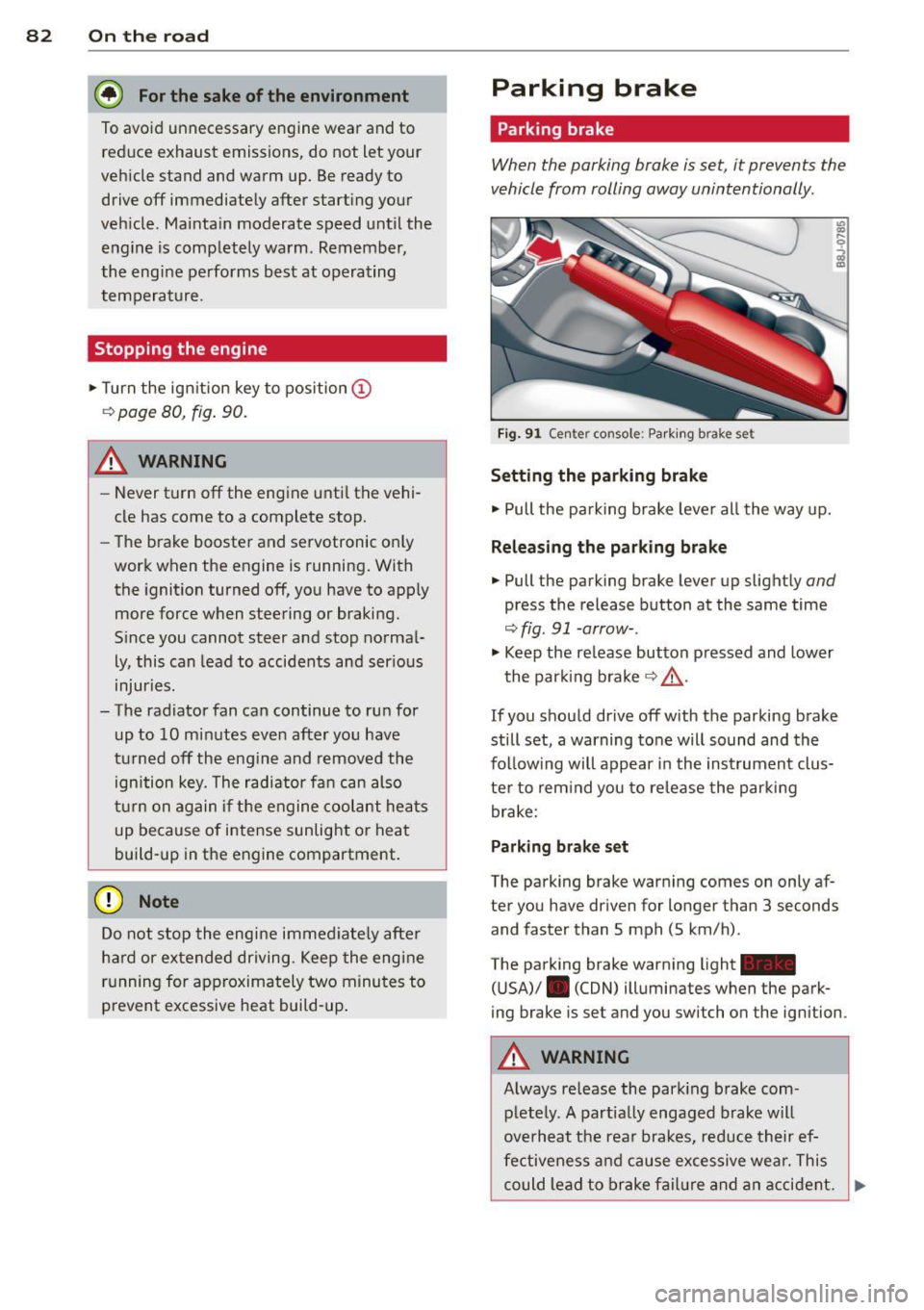
Fig. 9 1 Ce nte r co nso le: P ark ing b rak e s et
Setting the parking brake
• Pull the pa rking brake leve r all the way up.
Releasing the parking brake
• Pull the p arking brake lever up slight ly and
press the release button at the same time
<=> fig. 91 -arrow- .
• Keep the re lease button p ressed and lower
the par kin g brake <=>.&, .
If you should drive off with the parking brake
still set, a warning tone will sound and the
fol low ing will appear in the instrument clus
te r to rem ind you to re lease the par kin g
brake:
Parking brake set
The parking brake war ning comes on only af
ter you have dr iven for longer than 3 seconds
and faster than S mph (5 km/h) .
The parking brake warning light -
( U SA)/ . (CON) illuminates when the park
ing brake is set and you switch on the igni tion .
&_ WARNING
Always re lease the park ing b rake com -
plete ly. A part ially engaged brake w ill
overheat the rea r brakes, reduce their ef
fe ctive ne ss and cau se excessive wea r. This
could lead to brake f ailur e and an accident. .,..
Page 87 of 260
ice, fog, gravel, heavy rain and hydro
planing) -risk of accident.
- Turn off the cruise control tempo rari ly
when entering turn lanes, highway exit
lanes or in construction zones.
- Please note that inadvertent ly "rest ing"
yo ur foot on the accelerator peda l causes
the cruise control not to brake. Th is is
because the cru ise control is overridden
by the d river's acce le rat ion .
(D Tips
The cruise control cannot mainta in a con
stant speed when driving downhill. The ve
hicle will acce lerate under its own weight.
Downshift to a lower gear or use the
brakes to slow down.
Changing speed
.,. Press leve r in the 0 or O direction
¢ page 84, fig. 92 to increase or decrease
your speed.
... Re lease the lever to save that speed .
Change speed in incremen ts of 1 mph (1 km/
h) by light ly pressing the lever.
If you keep the
l ever pressed down, yo u will alter yo ur speed
in 5 mph ( 10 km/h) increments .
You ca n also press the acceler ator peda l down
to inc rease your speed, e .g. if yo u want to
pass someone. The speed yo u saved earlier
will resume as soon as you release the acceler
ator peda l.
I f, however, yo u exceed your saved speed by
S mph ( 10 km/h) for longer than 5 mi nutes,
the cruise contro l will turn off tempora rily.
T he symbol will go o ut but the saved speed
will be retained.
Presetting your speed
You can preset your desired speed while the
vehicle is not moving .
... Turn on the ignition .
... Pull lever into position
(D ~ page 84,
fig. 92.
On th e ro ad 85
... Press the lever in the 0 or O direction to
increase or decrease your speed .
... Release the lever to save that speed.
T his function makes it possib le, for e xamp le,
to save the speed you want before driving on
the highway . Once on the highway, activate
the cr uise control by pulling the lever toward
(D .
Switching the system off
Temporary deacti vation
... Press the brake pedal, or
... Press the lever into position @(not clicked
into place)
¢ page 84, fig . 92, or
... Dr ive fo r longe r than 5 m inutes at mo re
than 5 mph (10 km/h) above the stored
speed.
Switching off completely
... Press lever into position @(clicked into
place), or
... Switch the ignit ion off .
The system retains the saved speed if you de activate the cruise control temporar ily. To re
sume the saved speed, re lease the brake ped
al and pu ll th e leve r to pos it ion
(D .
Switc hing the ignit ion off erases the saved
speed .
A WARNING
You shou ld only ret urn to the saved speed
i f it is not too fast for the cu rrent traffic
conditions -ris k of an accident!
Page 89 of 260
Transmission S tronic transmission
Introduction
Your vehicle is equipped with a S tronic trans miss ion, also called a double-clutch system/
transmission.
Power is transferred between the engine and
the transm ission by means of two i ndepend
ent clutches. They replace the to rque convert
e r of conventional automat ic transm iss ions
and a llow the vehicle to acce lerate without a
noticeable break in the power flow .
W it h the aid
of tiptroni c, the gears can op
tionally be sh ifted
manually¢ page 90.
Selector lever positions
All the selector lever positions are explained
in this section.
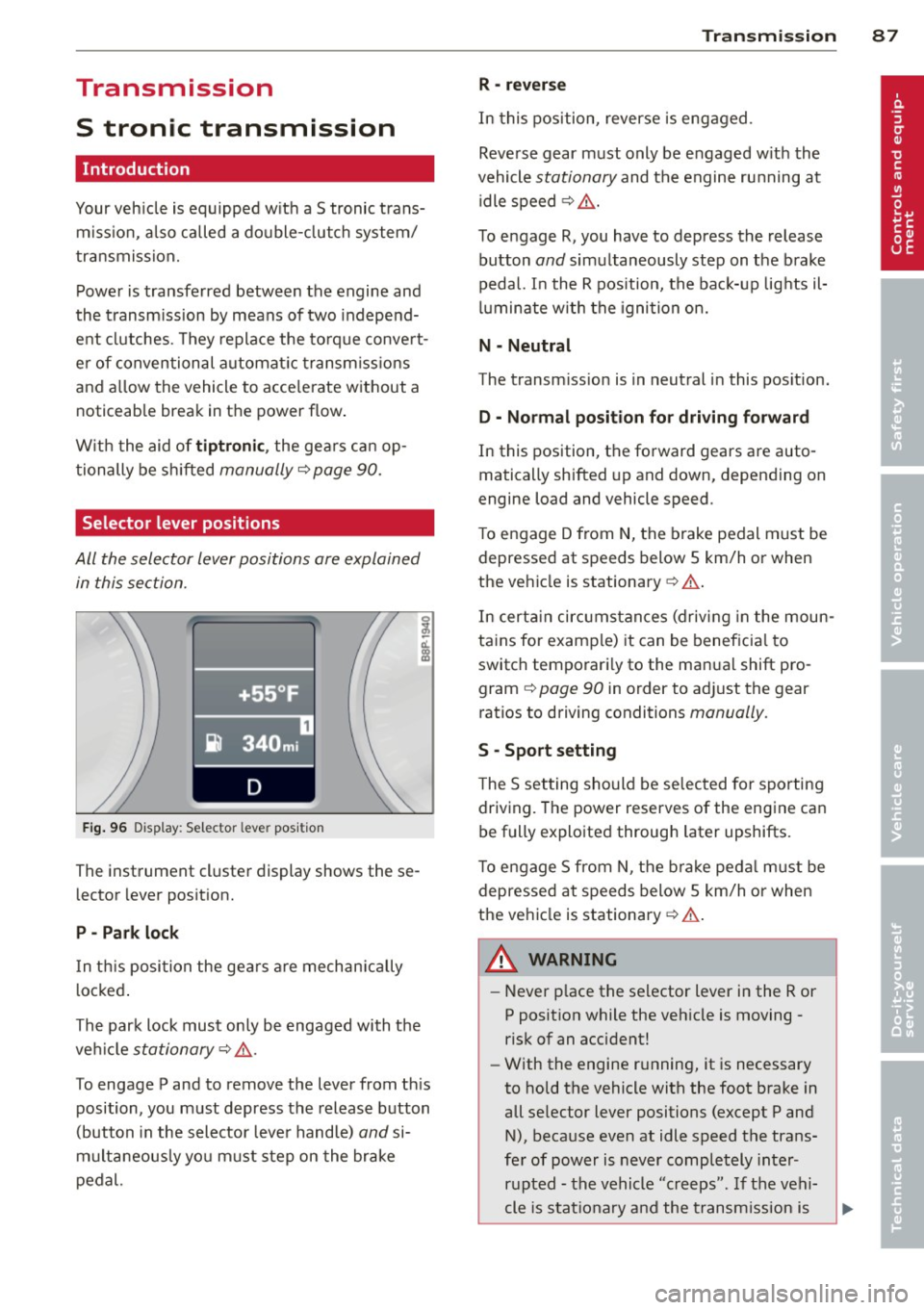
F ig . 96 Display: Selector lever position
The instrument cluster display shows these
l ector lever position.
P -Park lock
In th is posi tion the gea rs are mechan ically
l ocked .
The park lock must on ly be engaged with the
ve hicl e
stationary¢ /1..
To engage P and to remove the lever from th is
position, you must depress the release button
(button in the selector lever handle)
and si
multaneously yo u must step on the brake
pedal.
Tran sm iss ion 87
R -re ver se
In this position, reverse is eng aged.
Reverse gear must only be engaged w ith the
vehicle
stationary and the engine ru nning at
idle speed ¢
/1..
To engage R, you have to depress the release
button
and simultaneously step on the brake
pedal. I n the R pos ition, the bac k-up lights il
luminate w ith the ignition on.
N -Neutral
The transm iss ion is in neutral in this pos ition.
D -Normal po sition fo r dri ving forward
In this position, the forward gears are auto
matically shifted up and down, depending on
engine load and vehicle speed.
T o engage D from
N, the brake pedal must be
depressed at speeds below S km/h or when
the vehicle is stationary¢&. .
In certa in circ umstances (driving in the moun
tains for examp le) it can be beneficia l to
switch temporari ly to the man ual shift pro
gram ¢
page 90 in order to adjust the gear
ratios to driving conditions
manually .
S -Sport s etting
T he S set ting should be se lected for sporting
driving. The power reserves of the engine ca n
be fully explo ited through later upshifts.
T o e ngage S from N, the b ra ke peda l must be
depressed at speeds below 5 km/h or when
the ve hicle is stationary ¢&. .
A WARNING
-Never p lace the selector lever i n the R or
P posit ion while the veh icle is moving -
risk of an accident!
- With the engine r unning, it is necessary
to hold the vehicle with the foot brake in
all se lector lever positions (except P and
N), because even at idle speed the trans
fe r of power is never completely inter
r u pted -the vehicle "creeps". If t he vehi
cle is stat ionary and the t ransm ission is