ignition AUDI TT ROADSTER 2014 User Guide
[x] Cancel search | Manufacturer: AUDI, Model Year: 2014, Model line: TT ROADSTER, Model: AUDI TT ROADSTER 2014Pages: 244, PDF Size: 60.87 MB
Page 23 of 244
Instrument s and warnin g/indic ator ligh ts 21
Contact your authorized Audi dealer for assis
tance if necessary.
@ Tips
The brake light switch is only inspected as
pa rt of the functional check after the en
gine is started.
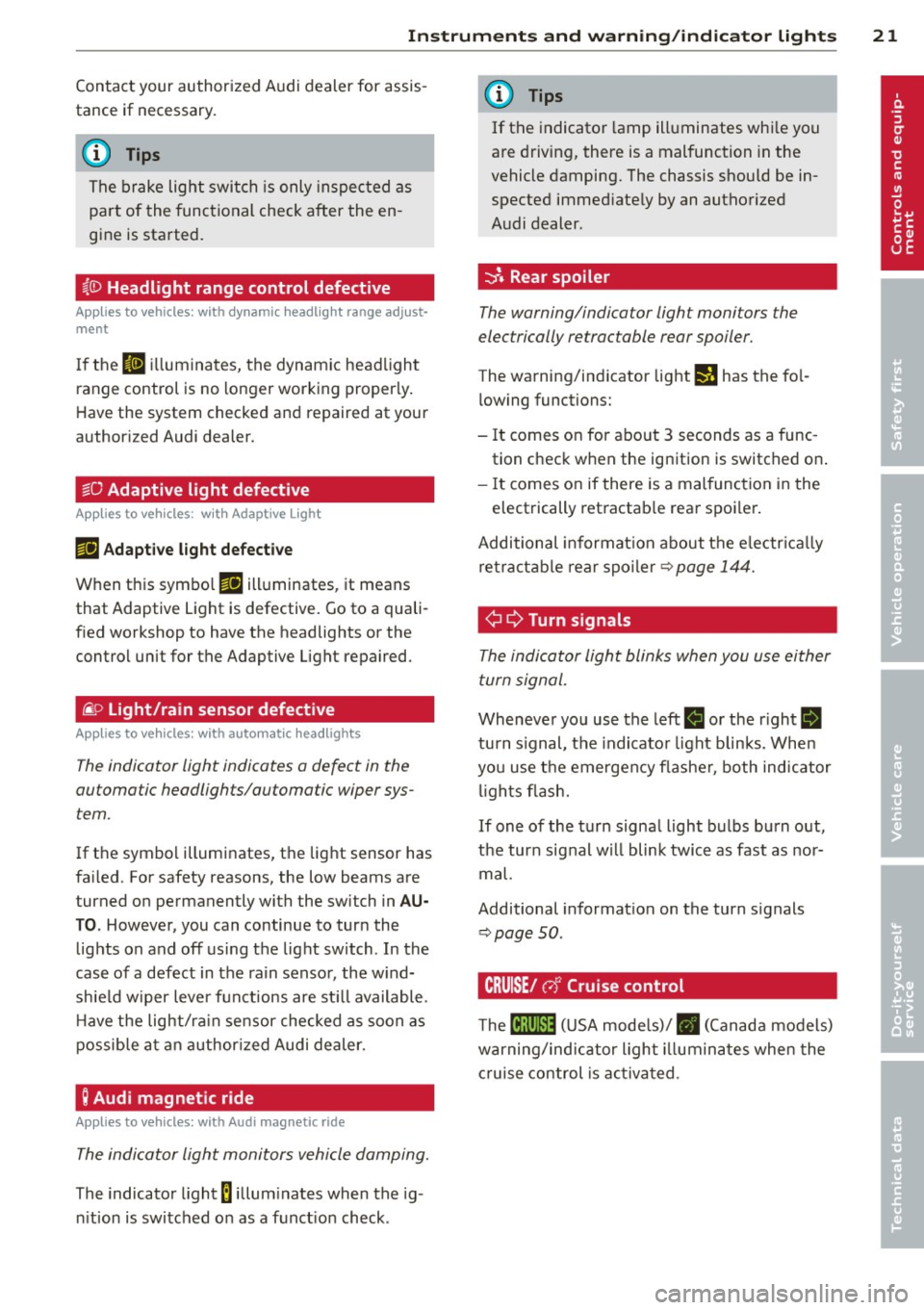
~(D Headlight range control defective
Applies to vehicles: with dynamic headlig ht range adjust·
ment
I f the II ill uminates, the dynamic headlight
range control is no longer working properly .
Have the system checked and repaired at your
authorized Audi dealer.
sD Adaptive light defective
App lies to vehicles: w it h Adaptive Light
rlJ Ad apt ive l ight de fe cti ve
When this symbo l rlJ illuminates, it means
that Adaptive Light is defective. Go to a quali
f ied workshop to have the headlights or the
control unit for the Adaptive Light repaired.
(j_ o Light/rain sensor defective
Applies to vehicles: with automat ic headlights
The indicator light indicates a defect in the
automatic headlights/automatic wiper sys
tem.
If the symbol illuminates, the light sensor has
failed. For safety reasons, the low beams are
turned on permanently with the switch in
AU
TO. However, you can continue to turn the
lights on and off using the light switch . In the
case of a defect in the ra in sensor, the w ind
sh ie ld wiper lever functions are st ill available .
H ave the light/ra in sensor checked as soon as
possib le at an author ized Audi dealer.
; Audi magnetic ride
Applies to vehicles: with Audi magnetic ride
The indicator light monitors vehicle damping.
The indicator light 8 illum inates when the ig
n ition is switched on as a funct ion check .
(D Tips
If the indicator la mp illuminates whi le you
are driving, there is a malfunction in the
vehicle damping. The chassis should be in
spected immed iate ly by an authorized
Audi dealer.
-::}. Rear spoiler
The warning/indicator light monitors the
electrically retractable rear spoiler.
The warning/indicator light I) has the fo l
l owing functions:
- It comes on for about 3 seconds as a func
tion check when the ignition is switched on .
- It comes on if there is a mal function in the
electrically retractab le rear spoi ler.
Additional informat ion about t he e lectr ica lly
retractab le rear spoi ler¢
page 144.
¢ ¢Turn signals
The indicator light blinks when you use either
turn signal.
Whenever you use the left II or the r ight II
turn s ignal, the indicator light blinks. When
you use the emergency flashe r, both indicator
li ghts fl ash.
If one of the turn signal light bulbs burn out,
the turn signal w ill blink twice as fast as nor
mal.
Additional informat ion on the turn s ignals
~ page SO.
CRUISE/ r,f Cruise control
The lB;\l )~i4 ( U SA mode ls)/ . (Canada models)
warning/indicator light illuminates when the
c ruise control is ac tiva ted.
Page 26 of 244
24 Driver information system
the calculation of the current trip informa
t ion. If the trip is interrupted for
more than 2
hours
the memory is reset automatica lly.
Total -trip memory (Trip computer 2)
Unlike the sing le-trip memory, the total-trip
memory is not reset automatically. This per
mits you to evaluate your dr iving data for the
entire period between manual resets.
Efficiency program*
The effic ien cy program can help you to use
less fuel
~ page 2 7.
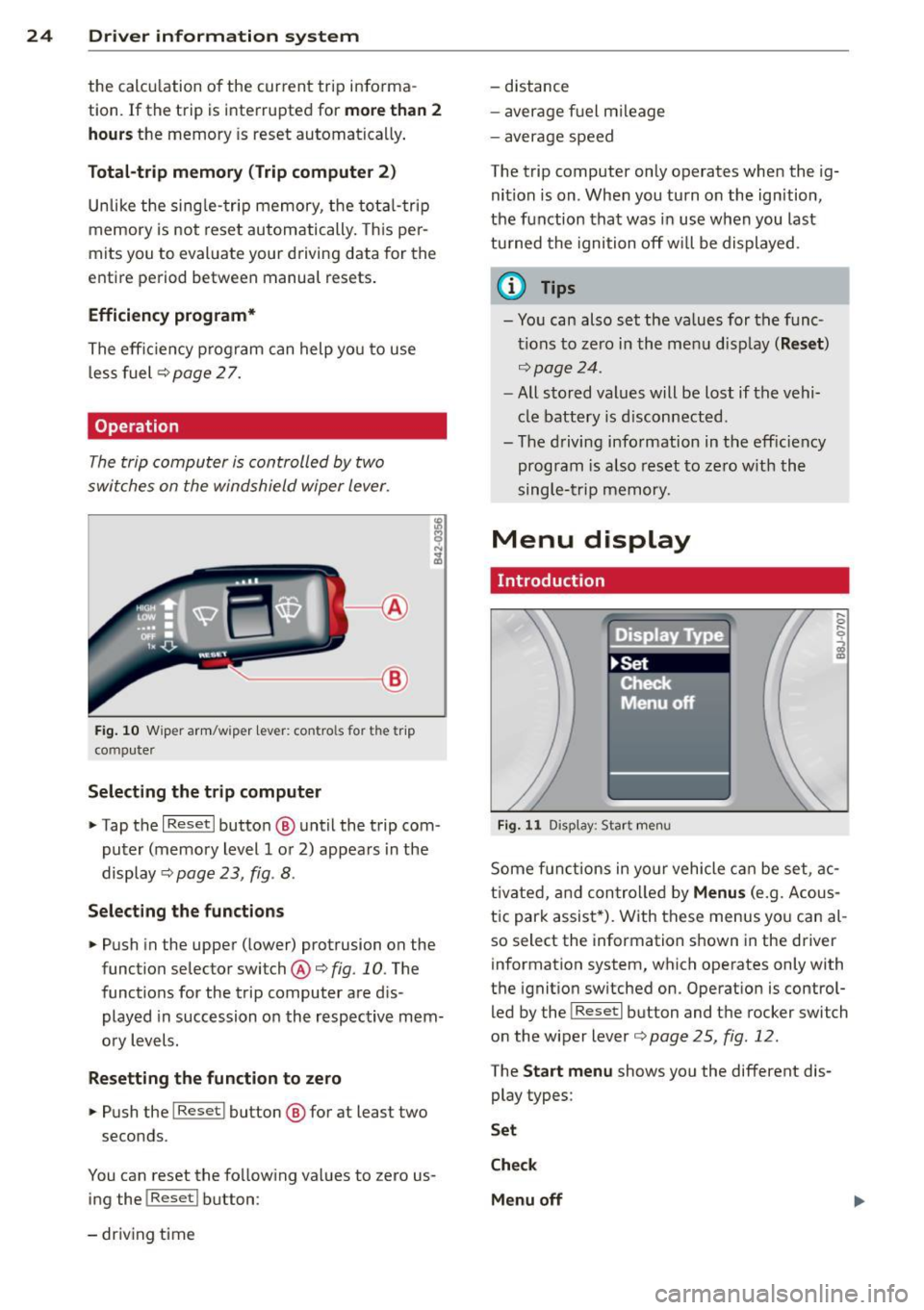
Operation
The trip computer is controlled by two
switches on the windshield wiper lever.
-----------< @
Fig. 10 W iper arm/w iper lever: con tro ls for t he trip
compute r
Selecting the trip computer
"Tap the I Reset I button @ until the trip com
puter (memory level 1 or 2) appears in the
display ¢
page 23, fig . 8.
Selecting the functions
" Push in the upper (lower) protrusion on the
function selector switch @
q fig. 10. The
functions for the trip computer are d is
played in succession on the respective mem
ory levels.
Resetting the function to zero
" Push the I Reset I button @ for at least two
seconds.
You can reset the fo llowing values to zero us
ing the
I Reset I button :
- driving time -
distance
- average f uel mileage
- average speed
The t rip computer only operates when the ig
nition is on. When you turn on the ignition,
the function that was in use when you last
turned the ignition off will be displayed .
(D Tips
-You can also set the values for the func
tions to zero in the menu display
(Reset )
qpage24 .
-All stored values will be lost if the vehi
cle battery is disconnected .
- The driving information in the efficiency
program is a lso reset to zero with the
single-trip memory.
Menu display
Introduction
Display Type
•set
iF'Cf t -,,., ==
Menu off
Fig. 11 D isplay: Sta rt men u
Some funct ions in yo ur vehicle can be set , ac
t ivated, and controlled by
Menus (e.g. Acous
tic park assist *). With these menus you can al
so select the information shown in the driver
information system, which operates only with
the ignition switched on. Operation is control
led by the
! Reset I button and the rocker switch
on the wiper lever
q page 25, fig . 12.
The Start menu shows you the different dis
play types:
Set
Check
Menu off
Page 28 of 244
26 Driver information system
Selec- Selected func- Meaning
tion tion bar
0
Box Not selected
•
Triangle
point-Previous page
ing up
•
Triangle point- Next page
ing down
Selecting settings
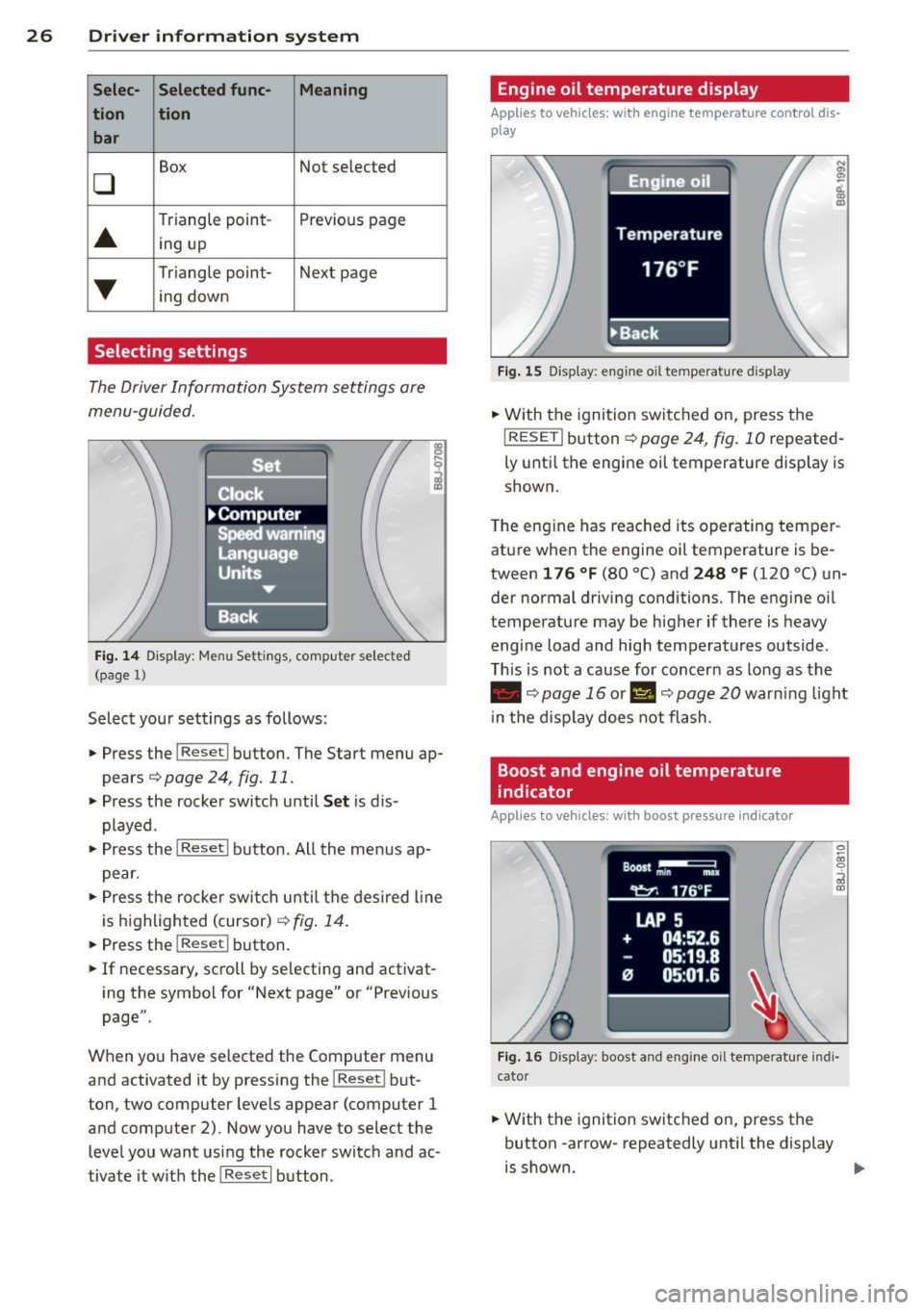
The Driver Information System settings are
menu-guided .
Fig. 14 Display: Menu Set tings , computer selected
(page
l)
Select your settings as follows :
• Press the !Reset i button. The Start menu ap
pears¢
page 24, fig. 11.
• Press the rocker switch until Set is dis
played .
• Press the
I Reseti button. All the menus ap
pear.
• Press the rocke r switch u ntil the desired line
is highlighted (cursor)¢
fig. 14.
• Press the I Res et i button.
• If necessary, scro ll by se lecting and activat
ing the symbol for "Next page" or "Previous
page".
When you have selected the Computer menu
and activated it by pressing the!Reset i but
ton, two computer leve ls appear (computer 1
and computer 2). Now you have to select the
level you want using the rocker switch and ac
tivate it w ith the
I Reset I button .
Engine oil temperature display
Applies to vehicles: with engine temperature con tro l dis
play
Fig. 15 Display : eng ine oil temperature d isp lay
;
ci.. a, ID
• With the ignition switched on, press the
! RESETi button
¢page 24, fig. 10 repeated
ly until the engine oil temperature display is
shown.
The engine has reached its operating temper
ature when the engine oil temperature is be
tween
1 76 °f (80 °C) and 248 °f (120 °C) un
der normal driving conditions. The engine oil
temperature may be higher if there is heavy
engine load and high temperatures outside .
This is not a cause for concern as long as the
• ¢page 16 or II ¢page 20 warning light
in the display does not flash .
Boost and engine oil temperature
indicator
Applies to vehicles: with boost pressure indicato r
0 ~ 00 0
;;i a,
Fig. 16 Disp lay: boost and eng ine oi l temperature indi
cator
• With the ignition switched on, press the
button -arrow- repeatedly until the display
is shown . ..,.
Page 30 of 244
28 Driver information system
Fue l economy messages are displayed when
fuel consumption is increased by certain con
ditions. If you follow these fuel economy mes
sages, you can reduce your vehicle's consump
t ion of fuel. The messages appear automati
cally and are only displayed in the efficiency
program . The fuel economy messages turn off
automatically after a certain period of time .
.,. To turn a fuel economy message off immedi
ately after it appears, press the
! R ESET I but
ton
¢ page 24 , fig . 1 O @, or
.,. Press the function selection switch
¢page 24, fig.10 @.
(D Tips
-Once you have turned a fuel economy
message off, it will only appear again af
ter you turn the ignition on aga in.
- The fuel economy messages are not dis
played in every instance, but rather in in
tervals over a period of ti me.
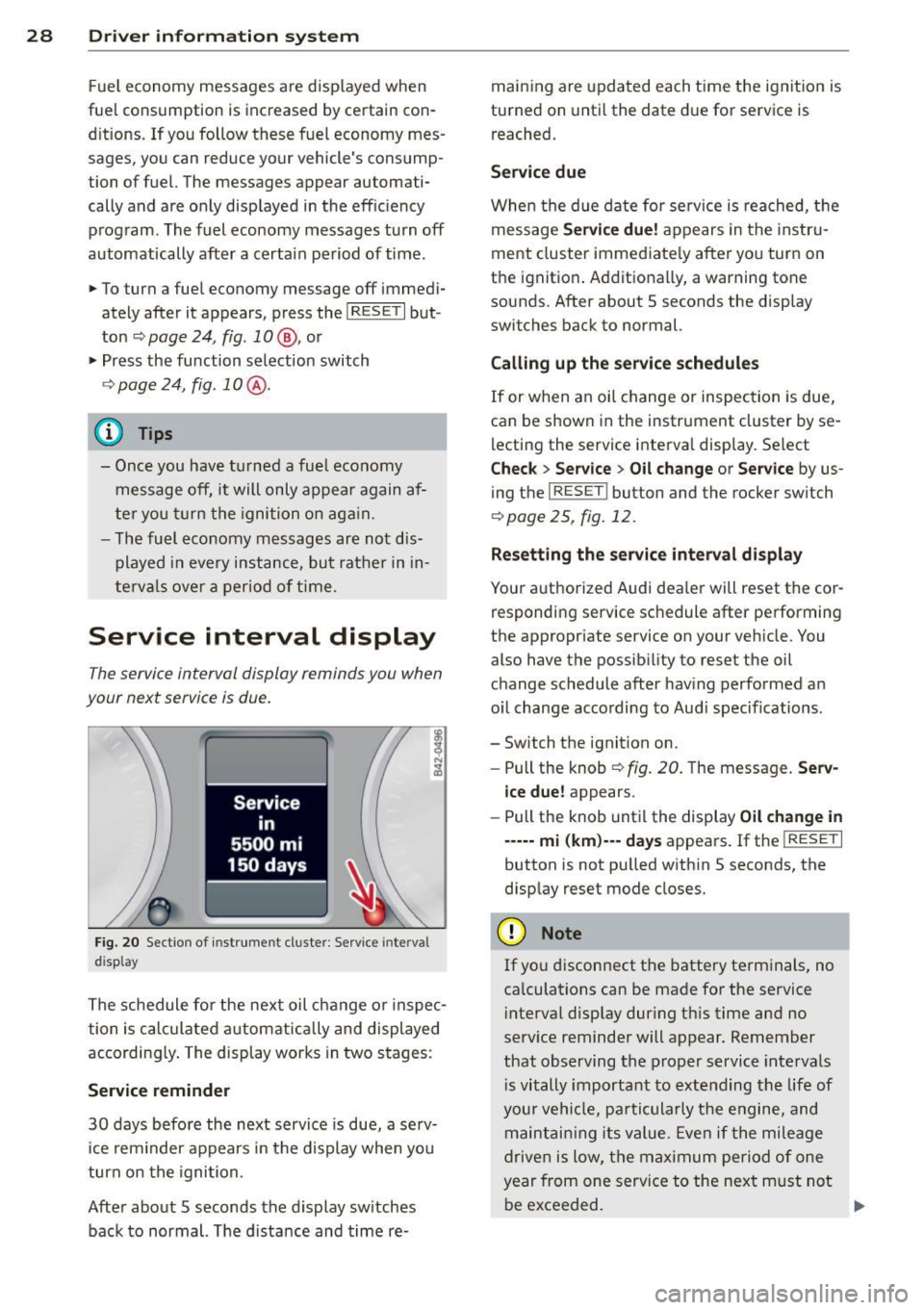
Service interval display
The service interval display reminds you when
your next service is due.
Fig. 20 Sectio n of inst rume nt cl uster : Serv ice interv al
d isplay
The schedule for the next oil change or inspec
tion is calculated automatically and displayed
according ly . The display works in two stages :
Service reminder
30 days before the next service is due, a serv
ice rem inder appears in the display when you
turn on the ignition.
After about 5 seconds the display sw itches
back to normal. The d istance and time re- maining are
updated each time the ignition is
turned on until the date due for service is
reached.
Service due
When the due date for service is reached, th e
message
Service due! appears in the instru
ment cluster immediately after you turn on
the ignition . Additionally, a warning tone
sounds. After about 5 seconds the disp lay
switches back to normal.
Calling up the service schedules
If or when an oil change or inspection is due,
can be shown in the instrument cluster by se
lecting the service interval display . Select
Chec k > Service > Oil change or Service by us
ing the
I RESET I button and the rocker switch
r:::> page 25, fig. 12 .
Resetting the service interval display
Your authorized Audi dealer will reset the cor
responding service schedule after performing
the appropriate service on you r vehicle. You
also have the possibility to reset the oil
change schedule after having performed an
o il change according to Audi specif ications.
- Switch the ignition on.
- Pull the knob
r:::> fig. 20. The message. Serv-
ice due!
appears.
- Pull the knob until the display
Oil change in
-----mi (km)--- days appears . If the I RESET I
button is not pulled within 5 seconds, the
display reset mode closes.
(D Note
If you disconnect the battery terminals, no
calculations can be made for the service
interval display dur ing this time and no
serv ice reminder will appear. Remember
that observing the proper service intervals
i s vitally important to extending the life of
your vehicle, pa rticularly the engine, and
maintaining its value. Even if the mileage
driven is low, the maximum period of one
year from one service to the next m ust not
be exceeded.
II>-
Page 31 of 244
@ Tips
-Do not reset the display between oil
changes, otherw ise the display will be in
correct.
- The information in the Service Reminder
remains stored even when the vehicle
battery is disconnected.
Lap timer
Introduction
Appl ies to vehicles : wit h lap timer
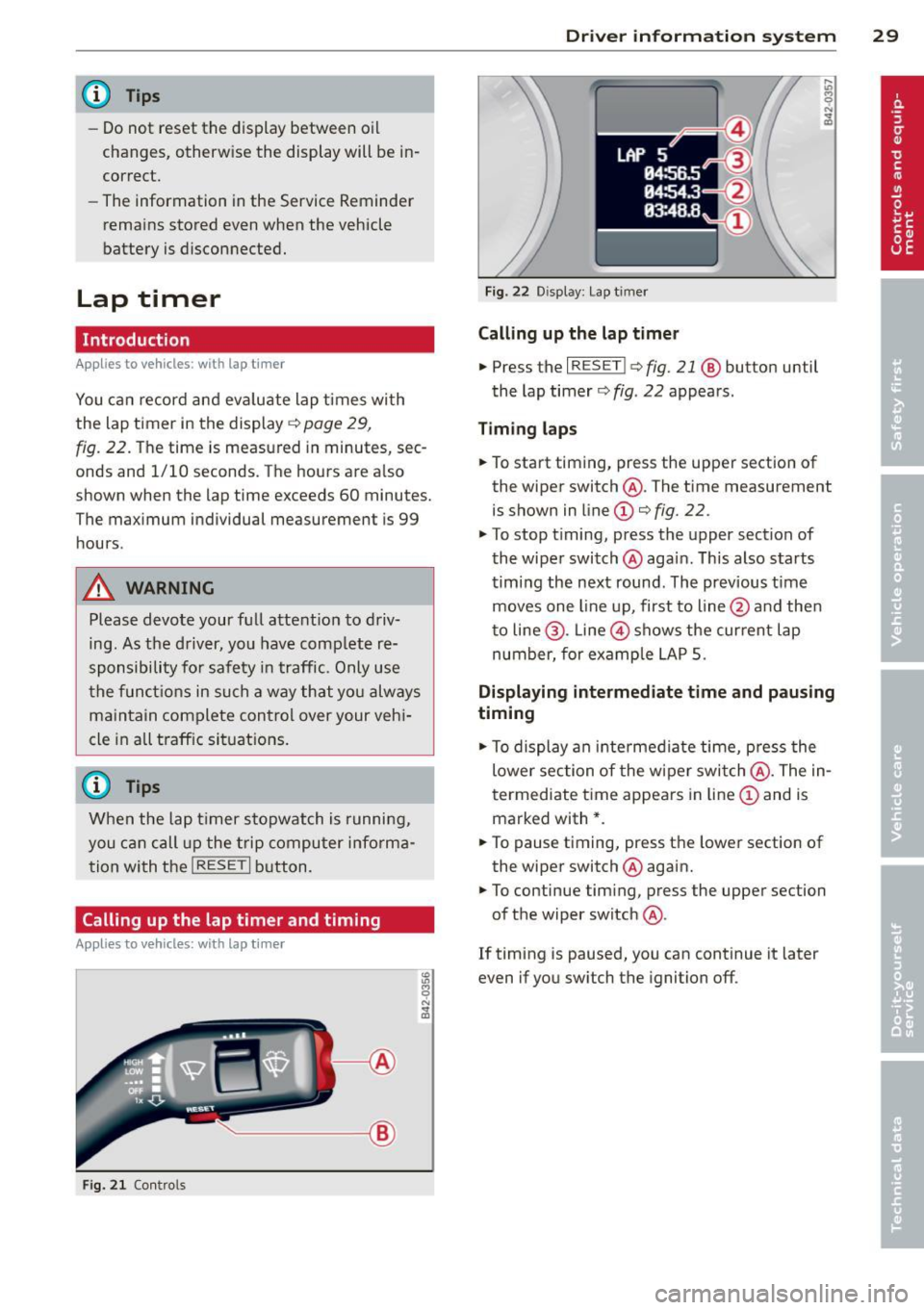
You ca n record and eva luate lap times wi th
the lap timer in the display
c::> page 29,
fig. 22. The time is measured in minutes, sec
onds and 1/10 seconds. The hours are a lso
shown when the lap time exceeds 60 minutes.
The maximum individual measurement is 99
h ours.
A WARNING
-
Please devote your full attent ion to driv
ing. As the driv er, you have comp lete re
sponsibility for safety in traffic. Only use
t he funct io ns in such a way that yo u always
ma in tain complete contro l over your veh i
cle in all traff ic si tuations.
@ Tips
W hen the lap t imer stopwatch is running,
you can c all up the t rip computer info rma
t ion wi th the
I RESET I b utton .
Calling up the lap timer and timing
Applies to vehicles: with lap timer
------- @
Fig. 2 1 Contro ls
Dr iver in formation system 29
Fig . 22 D isplay: Lap t imer
Calling up the lap t imer
.. Press the I RESET I c:> fig. 21 @ button until
the lap timer
c::> fig . 22 appears .
Timing laps
.. To start timing, press the upper section of
the wiper switch @. The time measurement
is shown in line
CD c::> fig. 22.
.. To stop timing, press the upper section of
the wiper switch @again. This also starts
timing the next round . The previous t ime
moves one line up, first to line @and the n
t o line @. Line @ shows the current lap
number, for ex ample LAP 5.
Displaying intermediate time and pausing
timing
.. To display an intermediate time, press the
lower section of the w iper swi tch @ . The in
t ermediate t ime appears in line
CD and is
marked with* .
.. To pause t iming, press the lower section of
the wiper switch @again .
.. To continue tim ing, press the upper section
of the wiper switch @.
If timing is paused, you can continue it later
even if you sw itch the ignition off.
Page 32 of 244
30 Driver information system
Evaluating times and continuing or
resetting timing
Applies to vehicles: with lap timer
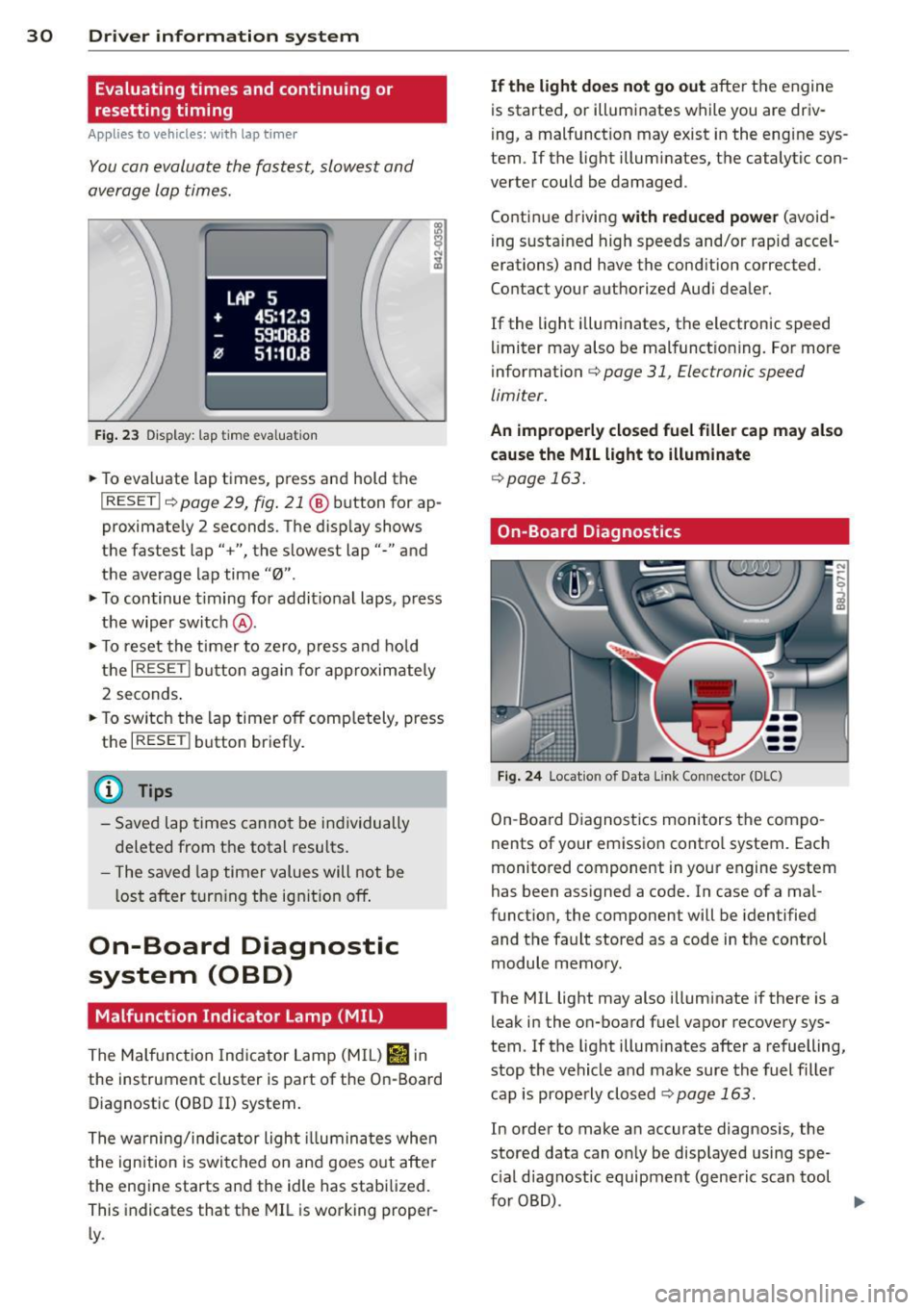
You can evaluate the fastest, slowest and
average lap times.
LAP 5
+ 45:12.9
59:08.8
0 51 :10.a
Fig. 23 Display: lap time eval uation
.. To eva luate lap times, press and hold the
I RESET Ir=) page 29, fig . 21 @ button for ap
proximate ly 2 seconds. The display shows
the fastest lap" +", the s lowest lap"-" and
the average lap time
"0" .
.. To continue t iming for addit ional laps, press
the wiper switch @ .
.. To reset the timer to zero , press and hold
the
I RESET I button again for approximately
2 seconds .
.. To switch the lap timer off comp letely, press
the
I RESET ! button briefly.
(D Tips
- Saved lap times cannot be individually
deleted from the tota l resu lts.
- The saved lap timer values will not be
l os t after turning the ignition off.
On-Board Diagnostic
system (OBD)
Malfunction Indicator Lamp (MIL)
The Malfunction Indicator Lamp (M IL) Iii in
the instrument cluster is part of the On-Board
Diagnostic (OBD
II) system.
The warning/indicator ligh t illuminates whe n
the ignition is switched on and goes out after
the eng ine starts and the idle has stabilized.
This indicates that the MIL is working proper
ly .
If the light does not go out after t he engine
is started, or illuminates while you are driv
i ng, a malfunction may exist in the eng ine sys
tem. If the light illuminates, the catalytic con
verter could be damaged .
Contin ue driving
with reduced power (avoid
i ng sustained high speeds and/or rapid accel
erations) and have the cond ition corrected.
Contact your a uthorized Audi dea ler.
If the light il luminates, the electronic speed
limiter may also be malfunct ioning. For more
information
c:> page 31, Electronic speed
limiter.
An improperly closed fuel filler cap may also
cause the MIL light to illuminate
c:> page 163.
On-Board Diagnostics
Fig. 24 Locat ion of Data Link Connector (DLC)
On-Board Diagnostics monitors the compo
nents of your emission contro l system . Each
monitored component in your engine system
has been assigned a code. In case of a mal
funct ion, the component will be identified
and the fault stored as a code in the control
module memory.
The MIL light may also illuminate if there is a
leak in the on-board fuel vapor recovery sys·
tem. If the light illuminates after a refuelling,
stop the vehicle and make sure the fuel filler
cap is properly closed
c:> page 163.
In order to make an accurate diagnosis, the
stored data can on ly be displayed using spe
c ial dia gnost ic equipment (generic scan tool
furOBD) .
~
Page 34 of 244
32 Opening and clo sing
Opening and closing
Keys
Key set
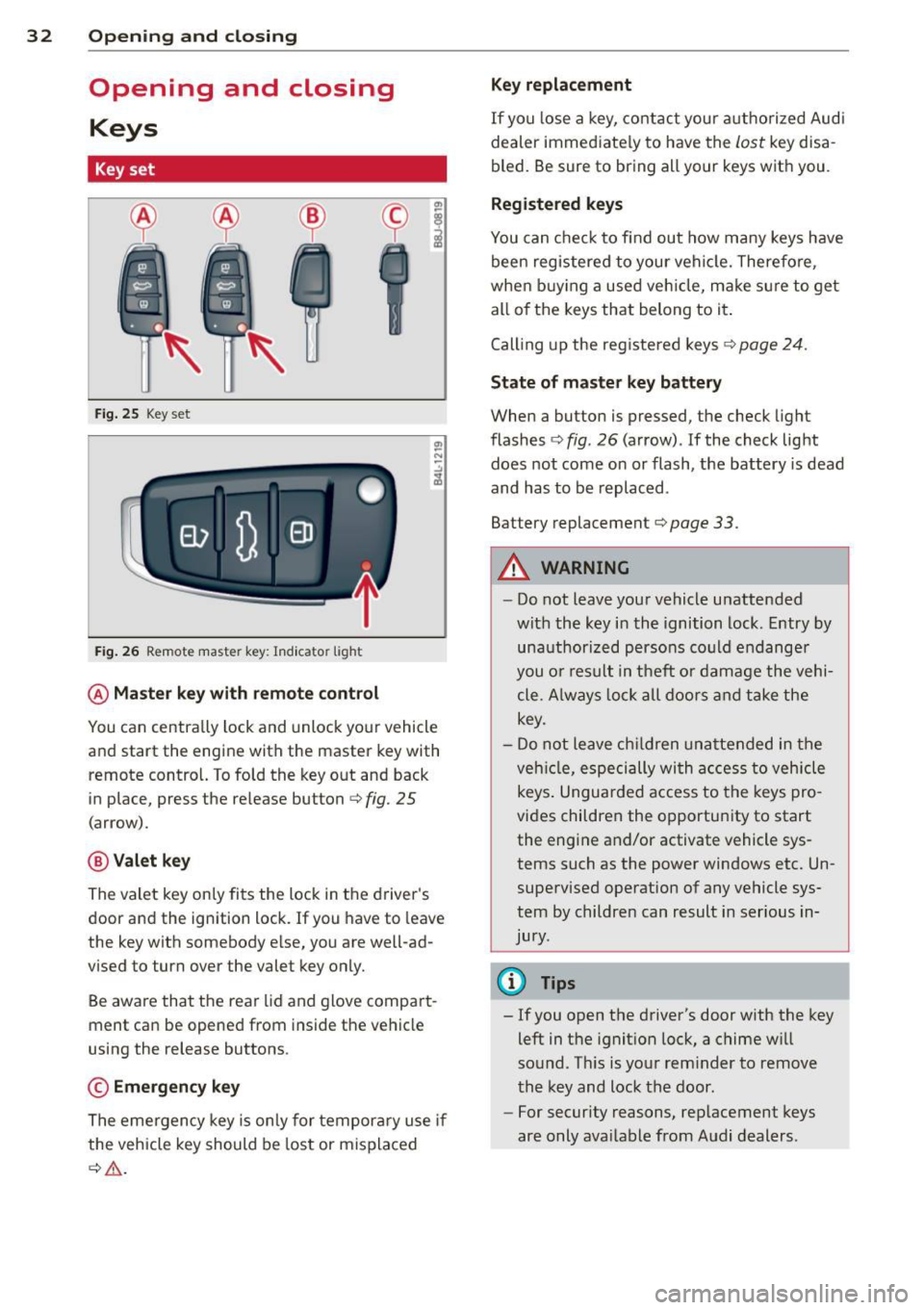
Fig . 25 Key set
Fig. 26 Remote master key : Indicator light
@ Ma ster key w ith remote control
You can centrally lock and unlock your vehicle
and start the engine with the master key with
remote control. To fold the key out and back
in place, press the re lease button
c:> fig. 25
(arrow).
@ Valet ke y
The valet key on ly fits the lock in the driver's
door and the ignition lock. If you have to leave
the key with somebody e lse, you are well-ad
vised to turn over the valet key only.
Be aware that the rear lid and glove compart
ment can be opened from inside the vehicle
using the release buttons .
© Emergency k ey
The eme rgency key is only for temporary use if
the vehicle key should be lost or misplaced
c:> & .
Ke y replac ement
If you lose a key, contact you r a uthorized Audi
dealer immed iate ly to have the
Lost key disa
bled. Be sure to bring all your keys with you .
Registered ke ys
You can check to find out how many keys have
been reg istered to your vehicle. Therefore,
when buy ing a used veh icle, make sure to get
all of the keys that belong to it.
Call ing up the reg istered keys
c:> page 24.
St ate of mas ter key b atter y
When a button is pressed, the check light
flashes
c:> fig . 26 (arrow) . If the check light
does not come on or flash, the battery is dead
and has to be replaced .
Battery replacement
c:> page 33.
_& WARNING ........... -
- Do not leave your vehicle unattended
wit h the key in the ignition lock. Entry by
unauthorized persons could endange r
you o r result in theft or damage the vehi
cle. A lways loc k all doors a nd take the
key.
- D o not leave ch ildren unattended in the
veh icle, especially wi th access to vehicle
keys . Unguarded access to the keys pro
vides children the opportunity to start
the engine and/or activate vehicle sys
tems such as the power windows etc. Un supervised operation of any vehicle sys
tem by children can result in ser ious in
jury.
{!) Tips
- If you open the driver's door with the key
left in the ignit ion lock, a chime will
sound . Th is is your rem inder to remove
the key and lock the door.
- For security reasons, rep lacement keys
are only ava ilable from Audi dealers .
Page 35 of 244
Master key with remote control
The remote control allows you to lock or un
lock the vehicle electronically .
The transmitter and battery are located in the
head of the remote control. The receiver is lo
cated inside the vehicle. The maximum effec
tive range depends on several things . Remem
ber, if the battery is wea k, the effective range
decreases.
If you need to replace the remote control, or if
you need to have it repaired, you must see
your author ized Audi dealer. Only then can
you use the key again.
(D Tips
- If the ignition is sw itched on, the remote
control system is deactivated .
- The remote control system can be affect ed by other systems operating in the
same frequency range close to the vehi
cle, such as mobi le telephones, televi
sion broadcasting stations, etc.
- Fo r De clarat ion of Compliance to United
Sta tes FCC and Indus try Canada regula
tions
¢ page 229.
Master key battery replacement
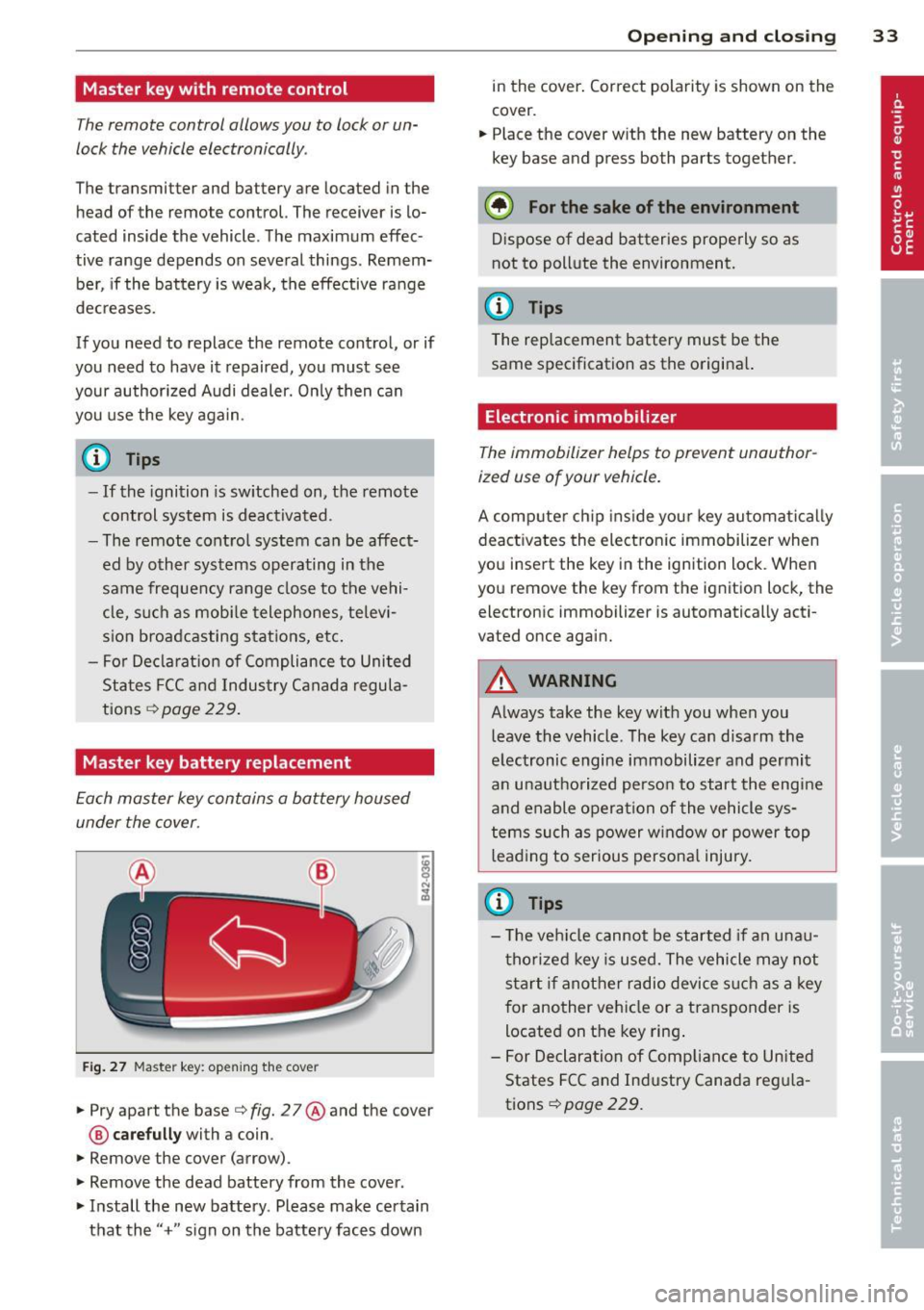
Each master key contains a battery housed
under the cover .
Fig . 27 Maste r key: open ing the cover
.. Pry apart the base¢ fig. 27@and the cover
@ care full y with a coin .
.,. Remove the cover (arrow) .
.,. Remove the dead battery from the cover .
.. Install the new battery . Please make certain
that the" +" sign on the batte ry faces down
Op enin g an d clos ing 33
in the cover . Correct polarity is shown on the
cover .
.. Place the cover with the new battery on the
key base and press both parts together .
@ For the sake of the env ironment
Dispose of dead batteries properly so as
not to pollute the environment.
(D Tips
The replacement battery must be the
same specification as the origina l.
Electronic immobilizer
The immobilizer helps to prevent unauthor
ized use of your vehicle.
A computer chip ins ide your key automatica lly
deactivates the electron ic immobilizer when
you insert the key in the ign ition lock. When
you remove the key from the ignition lock, the
electronic immobilizer is automatically acti
vated once again.
A WARNING
---
Always take the key with you when you leave the vehicle. The key can disarm the
electronic engine immobilizer and permit
an unauthorized person to start the engine
and enable operation of the vehicle sys
tems such as power w indow or power top
leading to serious persona l injury.
(D Tips
- T he ve hicle cannot be started if an unau
thorized key is used. The vehicle may not
start if another radio device s uch as a key
for another vehicle or a transponder is
located on the key ring .
- For Declaration of Compliance to United
States FCC and Industry Canada reg ula
tions¢
page 229 .
Page 37 of 244
accidentally press the power locking
switch.
- Do not leave children inside the vehicle
unsupervised. In an emergency it would
be impossible to open the doors from
the outside without the key.
@ Tips
- In the event of a crash with airbag de
ployment a ll locked doors will be auto
matically unlocked to g ive access to the
vehicle occupants from the outside.
- If the power locking system should mal
function, you can lock each door individ
ually using the vehicle key .
- If the power locking system should fail,
you can still open the fue l tank flap in an
emergency
c> page 164.
- You are well advised not to keep valua
bles inside an unattended vehicle, visible
or not . Even a properly locked vehicle
cannot provide the security of a safe!
Unlocking and locking the vehicle w ith
the remote control
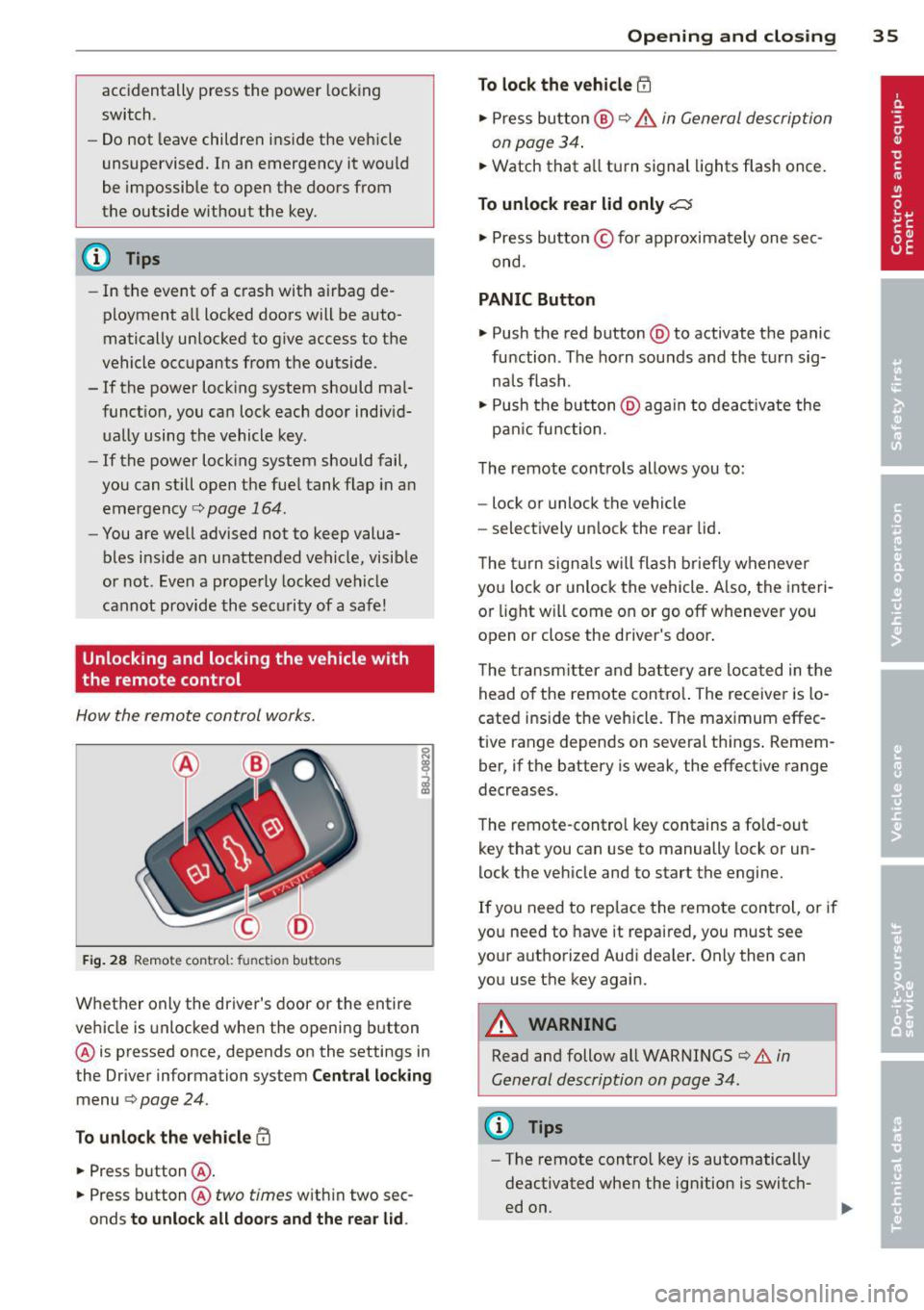
How the remote control works.
Fig . 28 Remote contro l: fu nctio n buttons
0
I
Whether only the driver's door or the entire
vehicle is unlocked when the opening b utton
@ is pressed once, depends on the settings in
the Driver information system
Central locking
menu c> page 24.
To unlock the vehicle !Ii
.,. Press button @.
.,. Press button @
two times with in two sec
onds
to unlock all doors and the rear lid.
Opening and closing 35
To lock the vehicle efl
.,. Press button @ c> &. in General description
on page 34 .
.,. Watch that a ll turn signal lights flash once.
To unlock rear lid only~
.,. Press button © for approximately one sec
ond .
PANIC Button
.,. Push the red button @to activate the panic
function . The horn sounds and the turn sig
na ls flash .
.,. Push the button @aga in to deact ivate the
pan ic function .
The remote controls allows you to:
- lock or unlock the vehicle
- select ively unlock the rear lid.
The turn signals will flash briefly whenever
you lock or unlock the vehicle. Also, the interi
or light will come on or go off whenever you
open or close the driver's door .
The transm itter and battery are located in the
head o f the remote contro l. The receiver is lo
cated ins ide the vehicle. The max imum effec
tive range depends on several th ings . Remem
ber, if the battery is weak, the effective range
decreases.
The remote-control key contains a fo ld-out
key that you can use to manually lock or un
lock the vehicle and to start the engine.
If you need to replace the remote control, or if
you need to have it repaired, you must see
your authorized Aud i dealer. Only then can
you use the key again.
A WARNING
Read and follow all WARNINGS <=>.&. in
General description on page 34.
(0 Tips
- The remote contro l key is automatically
deactivated when the ignition is switch
ed on.
-
Page 40 of 244
38 Openin g and clo sing
well as the vehicle doors closed when not
in use.
@ Tips
- If the rear lid is ope n or not properly
locked when the ignition is turned on,
the door and rear lid warning appears in
the instrument cluster disp lay.
- If the rear lid on a locked vehicle is un
locked with the middle button
c;j on the
remote key, the rear lid is automatically
l ocked again immediately after clos ing .
This is indicated by the turn signals blinking .
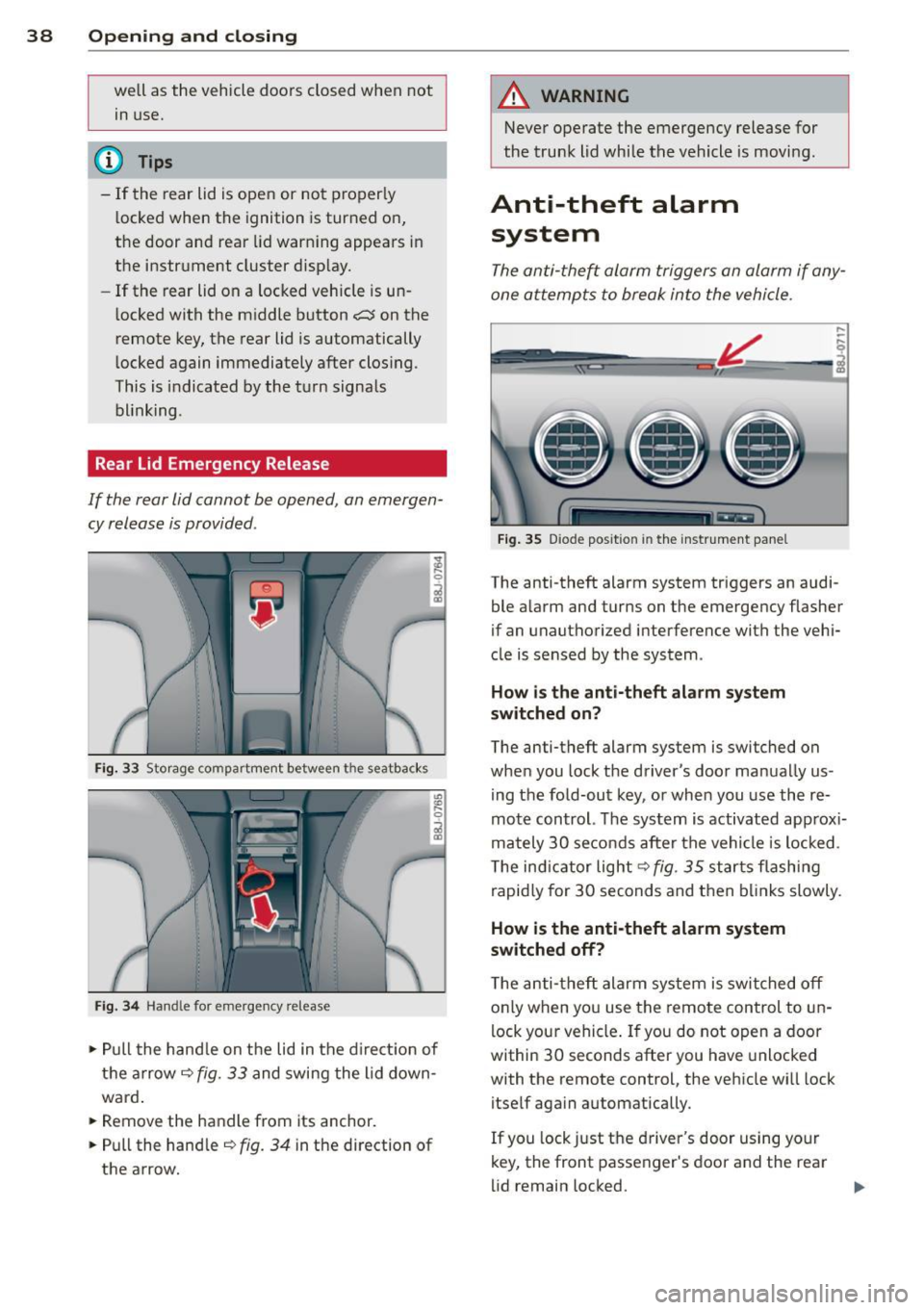
Rear Lid Emergency Release
If the rear lid cannot be opened , an emergen
cy release is provided .
Fig. 33 Storage compartment between t he seatbacks
Fig. 3 4 Handle for emergency re lease
., Pull the hand le on the lid in the d irect ion of
the arrow
i=;, fig. 33 and swing the lid down
ward .
.. Remove the handle from its anchor.
.. Pull the hand le
r::;, fig. 34 in the direction of
the arrow.
A WARNING
-Never operate the emergency release for
the trunk lid while the vehicle is moving .
Anti-theft alarm
system
The anti -the~ alarm triggers an alarm if any
one attempts to break into the vehicle.
F ig . 35 D iode positio n in th e instr ument pane l
,..
-q
i
The anti-theft alarm system triggers an audi
ble a larm and turns on the emergency flasher
if an unauthorized interference with the vehi
cle is sensed by the system .
How is the anti- theft ala rm sy ste m
sw itched on ?
The anti-theft alarm system is switched on
when you lock t he driver's door manually us
ing the fold-out key, or when you use the re
mote control. The system is activated approx i
mately 30 seconds after the vehicle is locked.
T he ind icator light
r::;,fig. 35 starts flashing
rapid ly for 30 seconds and then bl inks slowly .
How is th e anti-theft alarm sy stem
sw itched off?
T he anti-theft alarm system is switched off
o nly when you use the remote control to un
lock your vehicle . If you do not open a door
within 30 seconds after you have unlocked
with the remote control, the vehicle wi ll lock
itself aga in automatically .
If you lock just the driver's door using your
key, the front passenger's door and the rear
lid remain locked. ..,.