ignition AUDI TT ROADSTER 2014 Owner's Guide
[x] Cancel search | Manufacturer: AUDI, Model Year: 2014, Model line: TT ROADSTER, Model: AUDI TT ROADSTER 2014Pages: 244, PDF Size: 60.87 MB
Page 58 of 244
56 Clear vis ion
The washer jets extend forward out o f the
front bumper driven by water pressure to
spray the front headlights with water.
You shou ld inspect the headlights regularly
(for example when refueling) and clean
off
any solid dirt or insects from the lenses .
To ensure the system wo rks properly in wi nter,
keep the washer jets free of snow and remove
any ice using a de-icing spray.
Service position
It is only possible to change wiper blades if
you move the wiper arms to the service posi
tion .
In o rder to use the windsh ield wipers, t he
front lid mus t be comp lete ly closed.
Moving w iper blades to the service
position
• When there is a risk of frost, make s ure that
the wiper b lades a re not frozen to the wind
shield.
.. Switch the ignition on.
.. Move the wiper lever to position
0
c> page 54, fig. 63 .
.. Press the I Reset I button until the Displa y
typ e
menu appears in the Driver Informa
t ion System display .
.. Us ing the rocker switch and the
! Reset ! but
ton, select the
S et > W iper s > Front > Serv
ice positi on on
function. The winds hield
wiper arms move to the service position.
Moving wiper blades to park position
.. Make certain that the wiper arms are lying
against the windshie ld .
.. Switch the ign ition on and move t he wiper
l ever from posi tion
O to 4 c> page 54,
fig . 63 .
The wiper arms will move back to
the park position.
«I) Note
Never drive yo ur vehicle when the w ind
shie ld w iper arms are in the service pos i
tion and pulled away from the windshie ld .
When you dr ive faste r than 4 mp h (6 km/ h), the wiper a
rms automatically return to
the park position and cou ld cause paint
damage to the front lid!
(D Tips
- Yo u can also turn on the se rvice posit ion,
for example, if yo u want to protect the
w indshield from icing by using a cover .
- The service posit ion moves to
off a uto
matically when you operate the w ind
shield wiper lever, or speed exceeds
4 mph (6 km/h).
Cleaning windshield wiper blades
Clean the windshie ld w iper blades when they
begin to leave streaks.
.. Place the windshie ld w iper arms in the serv
ice pos it ion. Refer to
c> page 56.
.. Use a soft cloth and glass cleaner to clean
the windshield wiper blades .
A WARNING
Dirty windsh ield wipe r blades can impair
your view. This can lead to accidents .
Page 64 of 244
62 Seats and storage
seating position and improperly posi
tioned safety be lts!
Power seats
Adjustment switches
App lies to vehicles: wit h power seats
The operating logic for the switches corre
sponds to the construction and function of
the seat.
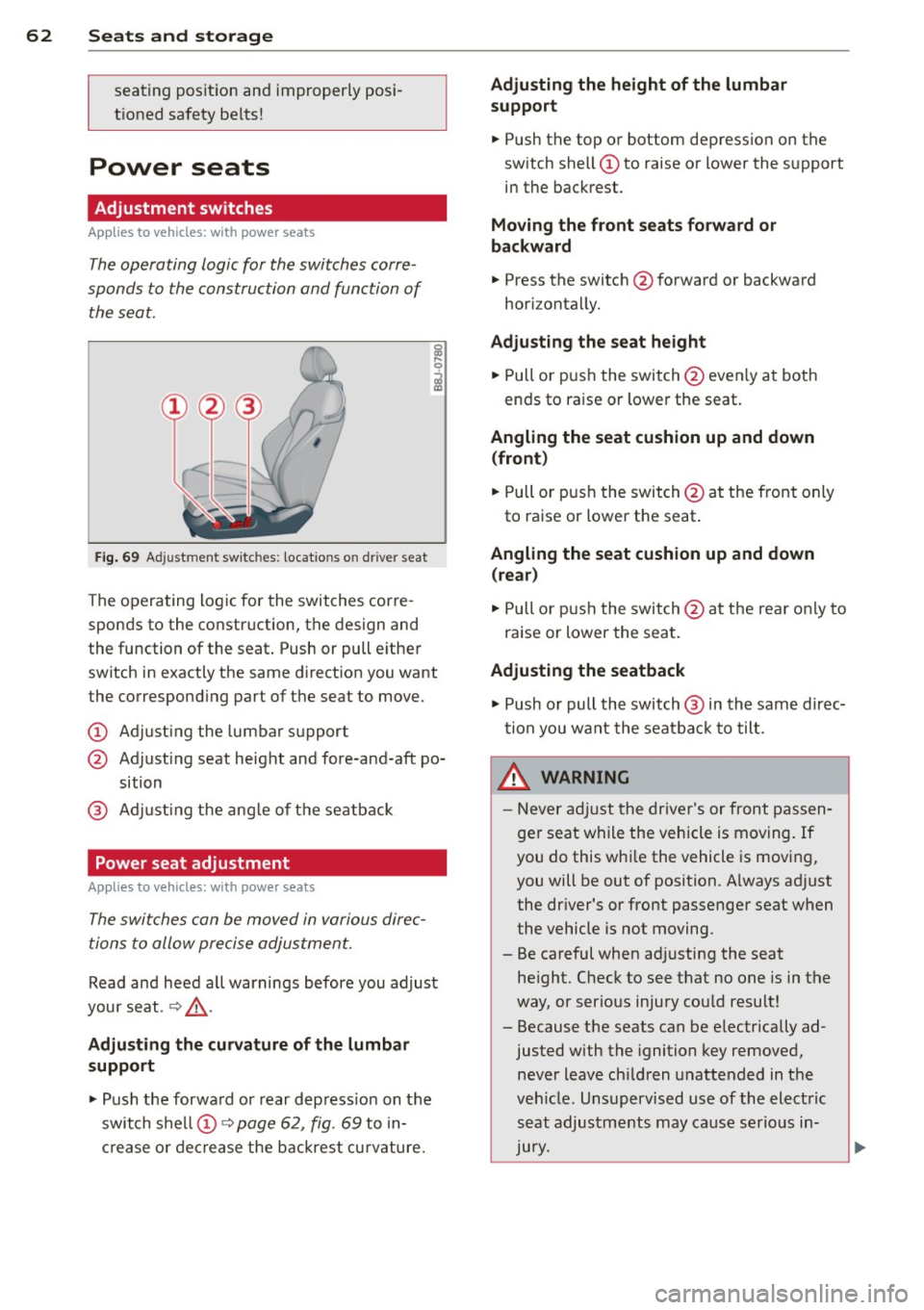
Fig. 69 Adjustment switches: locations on driver seat
The operating logic for the switches corre
sponds to the construction, the design and
the function of the seat. Push or pull either
switch in exactly the same direction you want
the corresponding part of the seat to move.
CD Adjusting the lumbar support
@ Adjusting seat height and fore-and-aft po
sition
@ Adjusting the angle of the seatback
Power seat adjustment
Applies to vehicles: with power seats
The switches can be moved in various direc
tions to allow precise adjustment.
Read and heed all warnings before you adjust
your seat. ¢&_ .
Adjusting the curvature of the lumbar
support
.,. Push the forward or rear depress ion on the
switch shell CD¢
page 62, fig. 69 to in
crease or decrease the backrest curvature.
Adjusting the height of the lumbar
support
.,. Push the top or bottom depression on the
switch shell CD to raise or lower the support
in the backrest.
Moving the front seats forward or
backward
.,. Press the switch @forward or backward
horizontally.
Adjusting the seat height
.,. Pull or push the switch @even ly at both
ends to raise or lower the seat.
Angling the seat cushion up and down (front )
.,. Pull or push the switch @at the front only
to raise or lower the seat.
Angling the seat cushion up and down (rear)
.,. Pull or push the switch@at the rear only to
raise or lower the seat .
Adjusting the seatback
.,. Push or pull the switch @ in the same direc
tion you want the seatback to tilt.
,&. WARNING
-Never adjust the driver's or front passen
ger seat while the vehicle is moving.
If
you do this while the vehicle is moving,
you will be out of position. A lways ad just
the dr iver's or front passenger seat when
the vehicle is not moving.
- Be careful when adj usting the seat
height. Check to see that no one is in the
way, or serious injury could result!
- Because the seats can be e lectrically ad
justed with the ignition key removed,
never leave ch ildren unattended in the
vehicle. Unsupervised use of the electric
seat adjustments may cause serious in
Jury.
Page 67 of 244
Cigarette lighter/
socket
Cigarette lighter
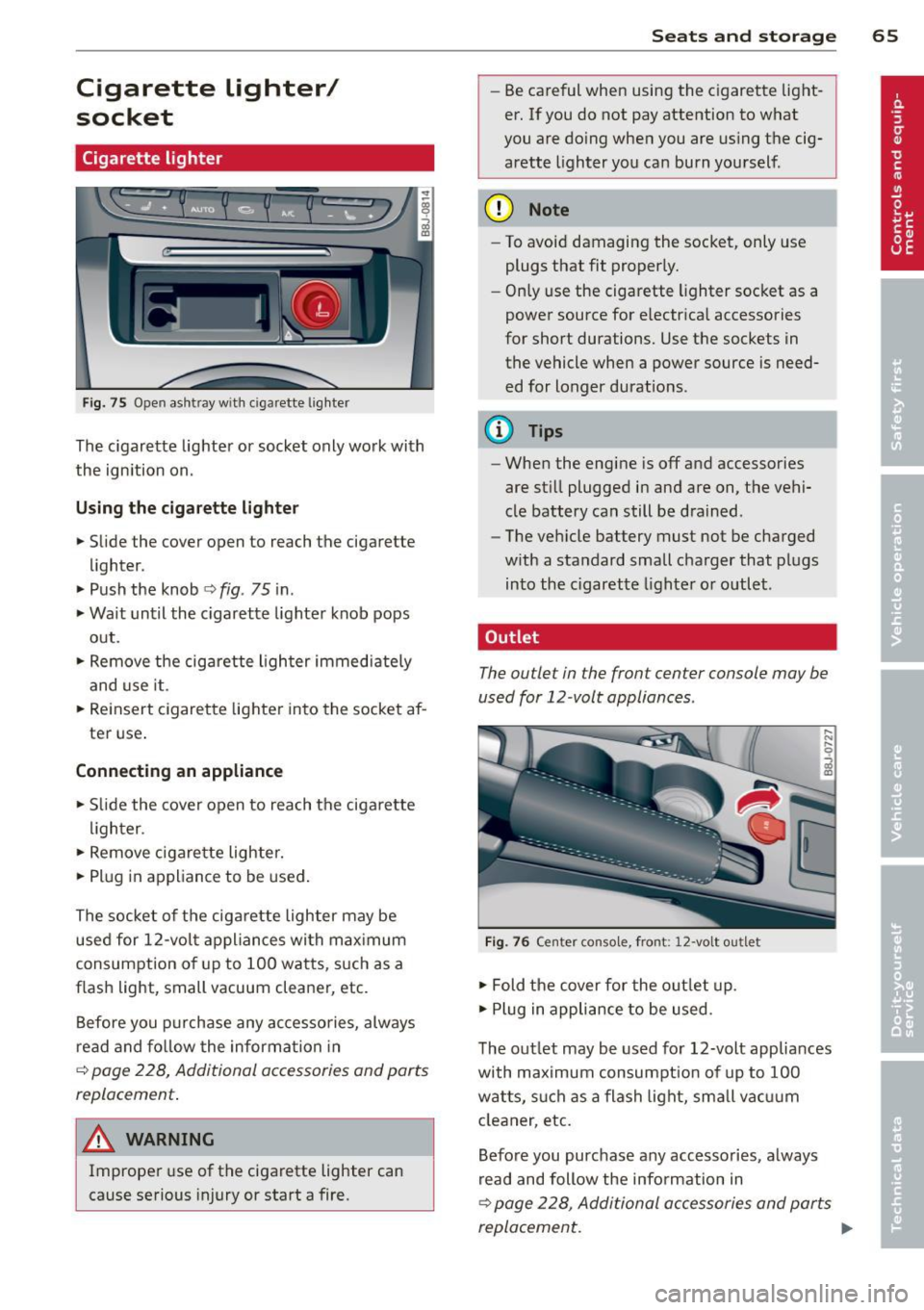
Fig. 75 Open ashtray with cigar ette ligh ter
The cigarette lighter or socket only work with
the ignition on.
Using the cigarette lighter
.,. Slide the cover open to reach the cigarette
lighter.
.,. Push the knob¢
fig. 75 in .
.,. Wait until the cigarette lighter knob pops
out .
.,. Remove the cigarette lighter immediately
and use it.
.,. Reinsert cigarette lighter into the socket af
ter use.
Connecting an appliance
.,. Slide the cover open to reach the cigarette
lighter.
.,. Remove cigarette lighter .
.,. Plug in appliance to be used.
The socket of the cigarette lighter may be used for 12-volt appliances with maximum
consumption of up to 100 watts, such as a
f lash Light, small vacuum cleaner, etc.
Before you purchase any accessories, always
read and follow the information in
¢ page 228, Additional accessories and parts
replacement .
A WARNING
-
Improper use of the cigarette lighter can
cause serious injury or start a fire.
Seats and storage 65
-Be careful when using the cigarette light
er. If you do not pay attention to what
you are doing when you are using the cig
arette lighter you can burn yourself .
(D Note
-To avoid damaging the socket, only use
plugs that fit properly.
- Only use the cigarette lighter socket as a
power source for e lectrical accessories
for short durations. Use the sockets in the vehicle when a power source is need
ed for longer durations.
@ Tips
- When the engine is off and accessories
are still plugged in and are on, the vehi
cle battery can still be drained.
- The vehicle battery must not be charged
with a standard small charger that plugs
into the cigarette lighter or outlet .
, Outlet
The outlet in the front center console may be
used for 12 -volt appliances .
Fig. 76 Center console, front: 12 -volt outlet
.,. Fold the cover for the outlet up.
.,. Plug in appliance to be used .
"'
" 0
i
The outlet may be used for 12-volt appliances
with maximum consumpt ion of up to 100
watts, such as a flash light, small vacuum
cleaner, etc.
Before you purchase any accessories, always
read and follow the info rmation in
¢ page 228, Additional accessories and parts
replacement.
Page 68 of 244
66 Seats and st o rage
A WARNING
The outlet p lus any appliances plugged in
to it rema in functional even if the ignition
is switched off or the ignition key is re
moved. N ever leave children inside the ve
hicle withou t supe rvision.
@ Note
To avo id damag ing the socket, only use
plugs that fit properly .
(i) Tips
When the engine is off and accessor ies are
still plugged in and are on, the vehicle bat
tery can still be dra ined .
Storage
General
A WARNING
- Always remove objects from the instru
ment panel. Any items not put away
cou ld slide around inside the vehicle
wh ile driving or when accelerating or
when applying the brakes or when driv ing around a corner.
- When you are drivi ng make sure tha t
anything you may have placed in the cen
ter console or other storage locations cannot fa ll out into the footwells. In case
of sudden braking you would not be able
to brake or accelerate.
-
Glove compartment
The glove compartment is illuminated and
can be locked .
§
___ .;.;._ _______ i
Fig . 77 G love compartme nt
To open glove compartment
• Pull the handle~ fig. 77 in the direct ion of
t he ar row push down lid to the fully open
position .
To close gl ove compartment
• Push the glove compartment lid upward un-
til the lock engages .
CD changer *
The CD changer for the Sound System is locat
ed in the glove compartment.
A WARNING
-To reduce the risk of personal i njury in an
accident or sudden stop, always keep the
g love compartment closed while driving.
Storage compartment in the front seats
Applies to vehicles: w ith storage compartment in the
front seats
There is a fold-out storage compartment in
the front of the seats.
Op ening
• Lift the handle and pull the drawer o ut.
Clo sin g
-
.. Push the drawer in completely until it latch
es .
Page 75 of 244
On the road
Steering
Adjusting the steering wheel column
The steering wheel position can be continu
ously adjusted in height and distance.
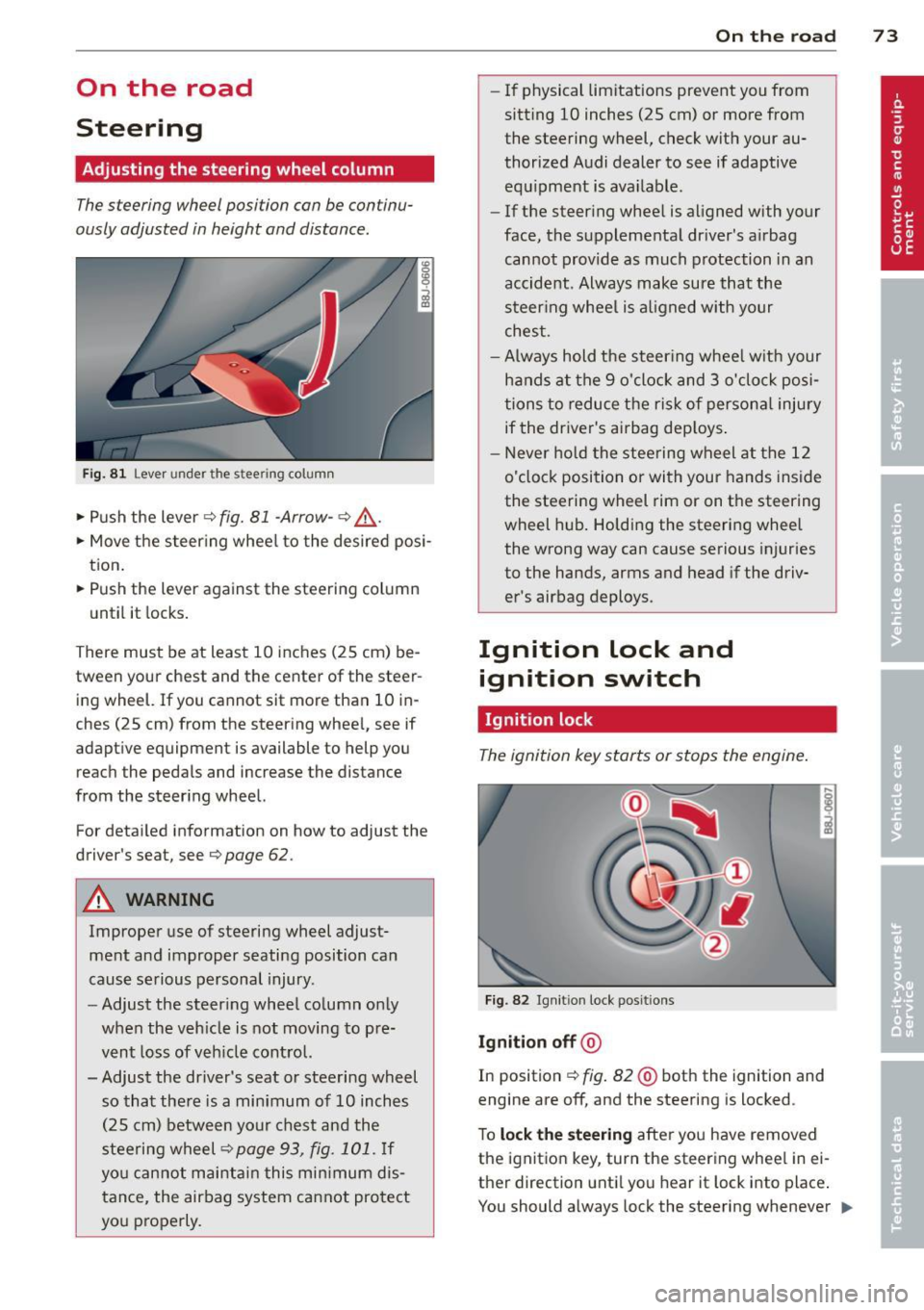
Fig. 81 Lever under the stee ring column
• Push the lever¢ fig. 81 -Arrow- ¢,&. .
• Move the steer ing wheel to the desired posi
tion.
• Push the lever against the steering column
until it locks.
There must be at least 10 inches (25 cm) be tween your chest and the center of the steer
ing wheel. If you cannot sit more than 10 in
ches (25 cm) from the steering wheel, see if
adaptive equipment is available to help you
reach the pedals and increase the distance
from the steering wheel.
For detailed information on how to adjust the
driver's seat, see
¢ page 62.
A WARNING
Improper use of steering wheel adjust
ment and improper seating position can
cause serious personal injury.
- Adjust the steering wheel column only
when the vehicle is not moving to pre
vent loss of vehicle control.
- Adjust the driver's seat or steering wheel so that there is a minimum of 10 inches
(25 cm) between your chest and the
steering wheel
¢page 93, fig. 101. If
you cannot maintain this minimum dis
tance, the airbag system cannot protect
you properly.
On the road 73
-If physical limitations prevent you from
sitt ing 10 inches (25 cm) or more from
the steering wheel, check with your au
thorized Audi dealer to see if adaptive equipment is ava ilable .
- If the steering wheel is aligned with your
face, the supplemental dr iver 's airbag
cannot provide as much protection in an
accident. Always make sure that the
steering wheel is al igned with your
chest .
-Always hold the steer ing wheel w ith your
hands at the 9 o'clock and 3 o'clock posi
tions to reduce the risk of persona l injury
if the driver's airbag deploys .
- Never hold the steering wheel at the 12
o'clock position or with your hands inside
the steering wheel rim or on the steering
wheel hub. Holding the steering wheel
the wrong way can cause serious injuries
to the hands, arms and head if the driv
er's airbag deploys.
Ignition lock and ignition switch
Ignition lock
The ignition key starts or stops the engine.
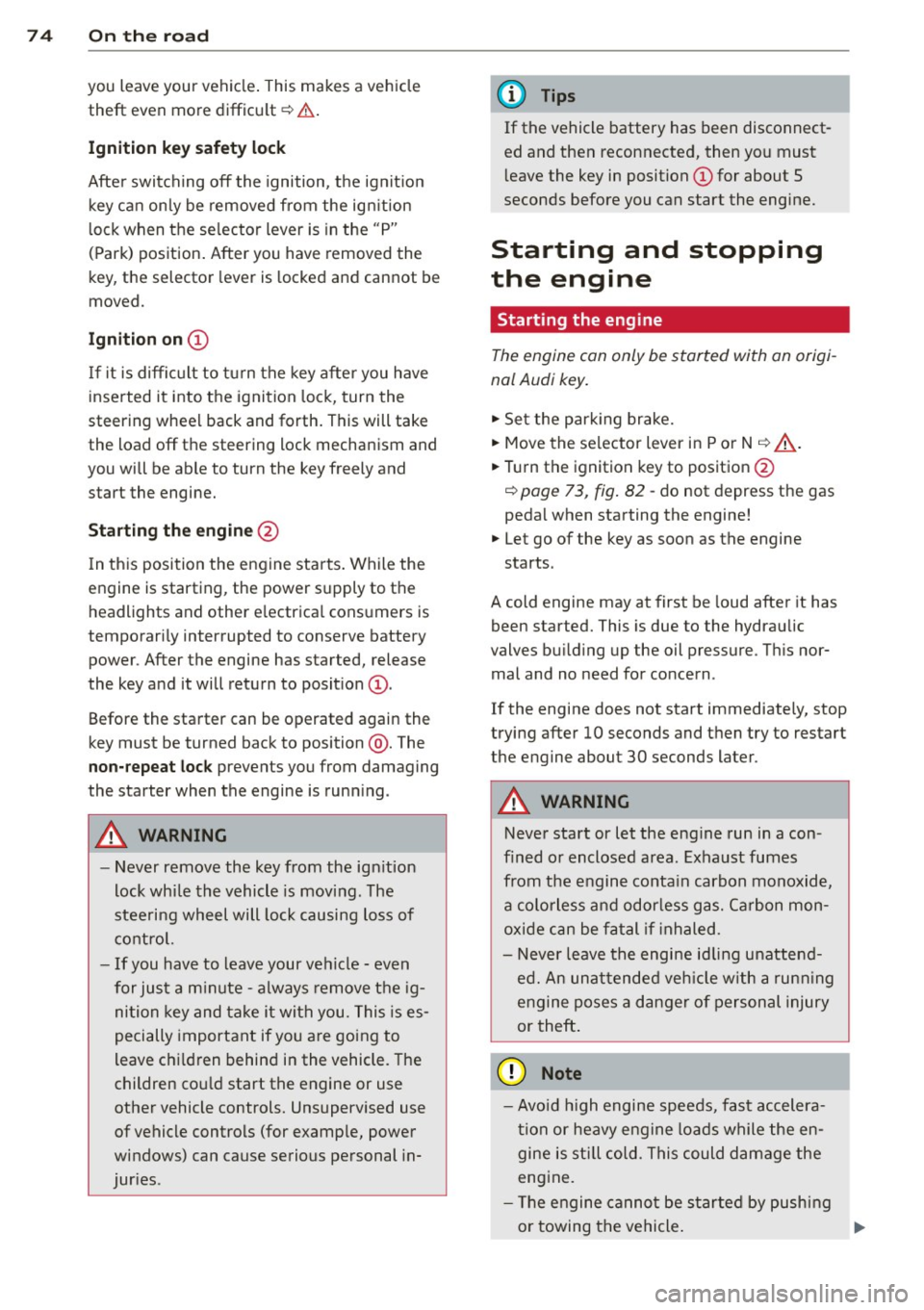
Fig. 82 Ignit ion lock posit ions
Ignition off @
In position ~ fig. 82@ both the ignition and
engine are off, and the steering is locked .
To
lock the steering after you have removed
the ignition key , turn the steering wheel in ei
ther direction until you hear it lock into place .
You should always lock the steering whenever ..,.
Page 76 of 244
74 On the road
you leave your vehicle. This makes a vehicle
theft even more difficult ¢ .&. .
Ignition key saf ety lock
Afte r swi tching off the ignition, t he ig nit ion
key can on ly be removed from the ig nition
lock when the se lector lever is in the "P"
(Park) position . After you have removed the
key, the selector lever is locked and cannot be
moved.
Ignition on @
If it is diffic ult to tu rn the key after you have
inserted it into the ignition lock, turn the
steering wheel back and forth. This will take
the load
off the steering lock mechanism and
you will be able to turn the key freely and
start the engine.
Starting the engine @
In this position the engine starts . While the
engine is starting , the power supply to the
headlights and other e lectrica l consumers is
temporari ly interrupted to conserve battery
power. After the engine has started, release
the key and it will return to posit ion
(D .
Before the starter can be operated again the
key must be turned back to position @. The
non -repeat loc k prevents you from damaging
the starter when the engine is runn ing .
A WARNING
-Never remove the key from the ign it ion
lock whi le the vehicle is moving. The
steeri ng wheel will lock causing loss of
c ontrol.
- If you have to leave your vehicle - even
for just a m inute -always remove t he ig
nition key and take it with you. This is es
pecially important if you a re going to
leave chi ldren behind in the vehicle. The
children co uld start the engine or use
other vehicle controls. Unsupervised use
of vehicle controls (for examp le, power
windows) can cause serious personal in
jur ies .
(D Tips
If the vehicle battery has been disconnect
ed and then reconnected, then you must
l eave the key in position
(D for about 5
seconds before you can start the engine.
Starting and stopping
the engine
Starting the engine
The engine can only be started with an origi
nal Audi key.
.,. Set the park ing brake.
.,. Move the selector lever in P or
N ~ &_ .
.,. Turn the ignition key to position @
¢ page 73, fig. 82 -do not depress the gas
pedal when starting the engine!
.,. Let go of the key as soon as the engine
starts .
A cold engine may at first be loud after it has
been started. This is due to the hydraulic
valves bu ild ing up the oil pressure . Th is nor
mal and no need for concern .
If the engine does not start immediate ly, stop
trying after 10 seconds and then try to restart
the engine about 30 seconds later .
A WARNING
-Never start or let the engine run in a con-
f ined or enclosed area. Exhaust fumes
from the engine conta in carbon monoxide,
a colorless and odorless gas. Carbon mon
oxide can be fatal if inhaled .
- Never leave the engi ne idling unattend
ed. An unat tended veh icle w ith a runn ing
engine poses a danger of personal injury
or theft .
(D Note
-Avo id h igh engine speeds, fast accelera
tion or heavy engine loads while the en
gine is still cold. This could damage the
engine.
- T he engine cannot be started by pushing
or towing the vehicle . ..,.
Page 77 of 244
@ For the sake of the environment
To avoid unnecessary engine wear and to reduce exhaust emissions, do not let your
vehicle stand and warm up. Be ready to
drive off immediately after start ing your
veh icle. Mainta in moderate speed until the
engine is completely warm . Remember,
the engine performs best at operating
temperature .
Stopping the engine
.,. Turn the ignition key to position @
¢page 73, fig. 82.
_& WARNING
-Never turn off the engine before the ve
hicle has come to a complete stop. The
full function of the brake booster and the
power steering is not guaranteed. You
must use more force to turn or brake if
necessary . Because you cannot steer and
brake as you usually would, this could
lead to crashes and serious injur ies.
- The radiator fan can continue to run for
up to 10 minutes even after you have
turned off the eng ine and removed the
ignition key. The radiator fan can also
turn on again if the engine coolant heats
up because of intense sunlight or heat
build-up in the engine compartment .
(D Note
Do not stop the engine immediately after
hard or extended driving. Keep the engine
r un ning for approximately two minutes to
prevent excessive heat build-up.
On the road 75
Parking brake
Parking brake
When the parking brake is set, it prevents the
vehicle from rolling away unintentionally .
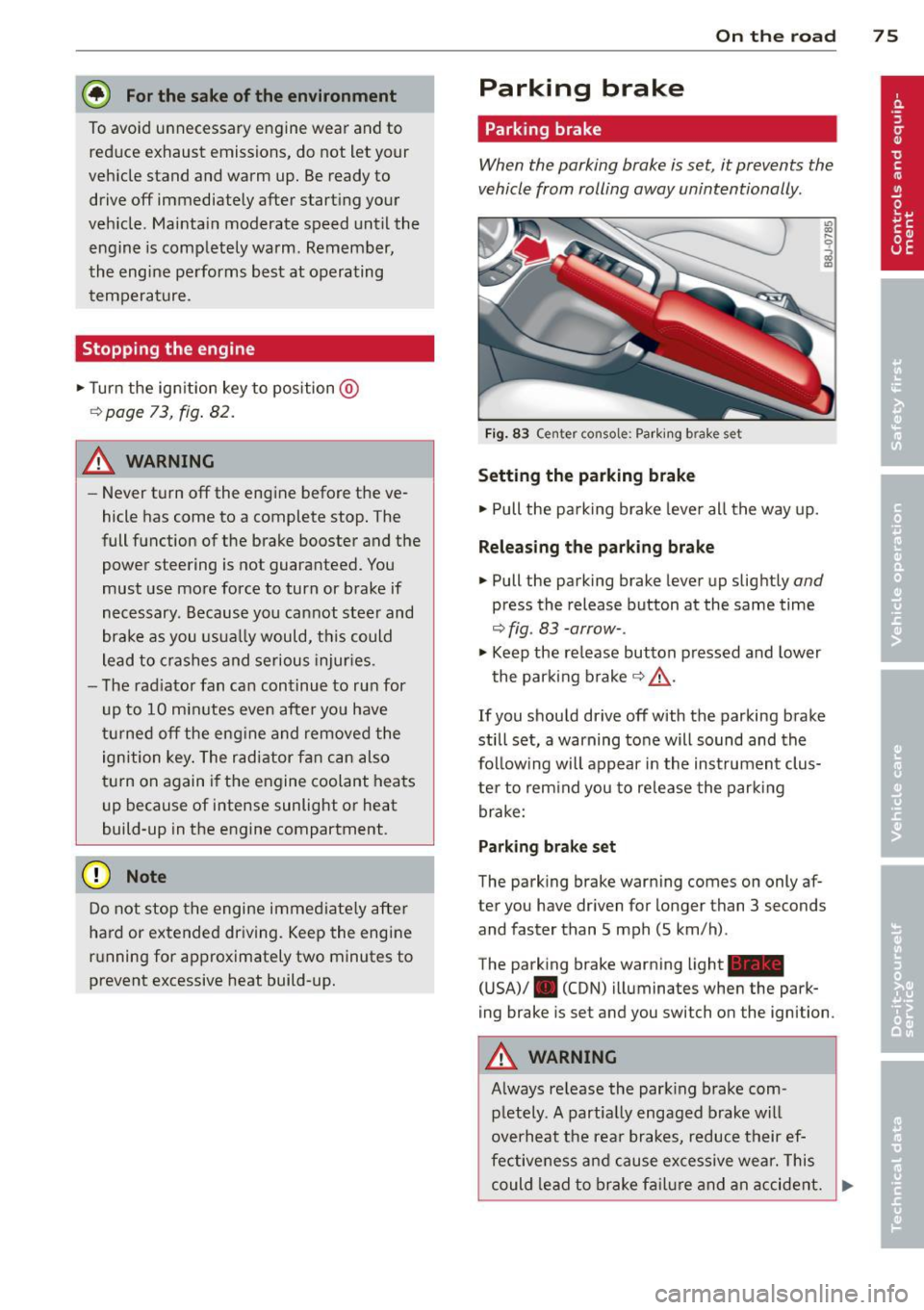
Fig. 83 Center console: Parki ng b rake set
Setting the parking brake
.. Pull the parking brake lever all the way up.
Releasing the parking brake
.. Pull the parking brake lever up slightly and
press the release button at the same time
¢ fig. 83 -arrow-.
.,. Keep the re lease button pressed and lower
the parking brake¢&_ .
If you should drive off with the parking brake
still set, a warning tone will sound and the
follow ing will appear in the instrument clus
ter to rem ind you to release the parking
brake:
Parking brake set
The parking brake warning comes on only af
ter you have driven for longer than 3 seconds
and faster than 5 mph (5 km/h) .
The parking brake warning light_
(USA)/ . (CON) illuminates when the park
ing brake is set and you switch on the ignition .
A WARNING
Always re lease the park ing brake com -
pletely. A partially engaged brake will
overheat the rear brakes, reduce their ef
fectiveness and cause excessive wear. This
could lead to brake failure and an accident. .,.
Page 79 of 244
ignition, assuming that you have not changed
or reset the setting.
The speed warning symbo l
Jmj (USA models)/
caj (Canada models) in the wa rning 1 display
appears when you exceed the maximum
speed. It goes out when the speed falls below
the stored max imum speed .
The speed warning symbo l wi ll also go out if
the speed
exceeds the sto red maximum speed
by more than about 25 mph (40 km/h) for at
least 10 seconds. The stored maximum speed
is deleted .
Setting speed warning 1
¢ page 77.
Speed warning
2
Storing warning 2 is recommended if you al
ways
want to be reminded of a certain speed,
for example when yo u are traveling in a coun
try that has a general max imum speed limit,
or if you do not want to exceed a specified
speed for winter tires.
The speed warning 2 symbol,
(mj CUSA mod
e ls)/
(SJ (Canada models) appea rs in the dis
play when you exceed the stored speed limit.
Unlike warning 1, it will not go out until the
vehicle speed drops below the stored speed
limit.
Setting speed warning 2
¢ page 78.
@ Tips
Even though your vehicle is equipped wi th
a speed warning system, you should still
watch the speedometer to make sure you
are not driving faster than the speed limit.
On the road 77
Speed warning 1: setting a speed limit
Warning threshold 1 is set by the button.
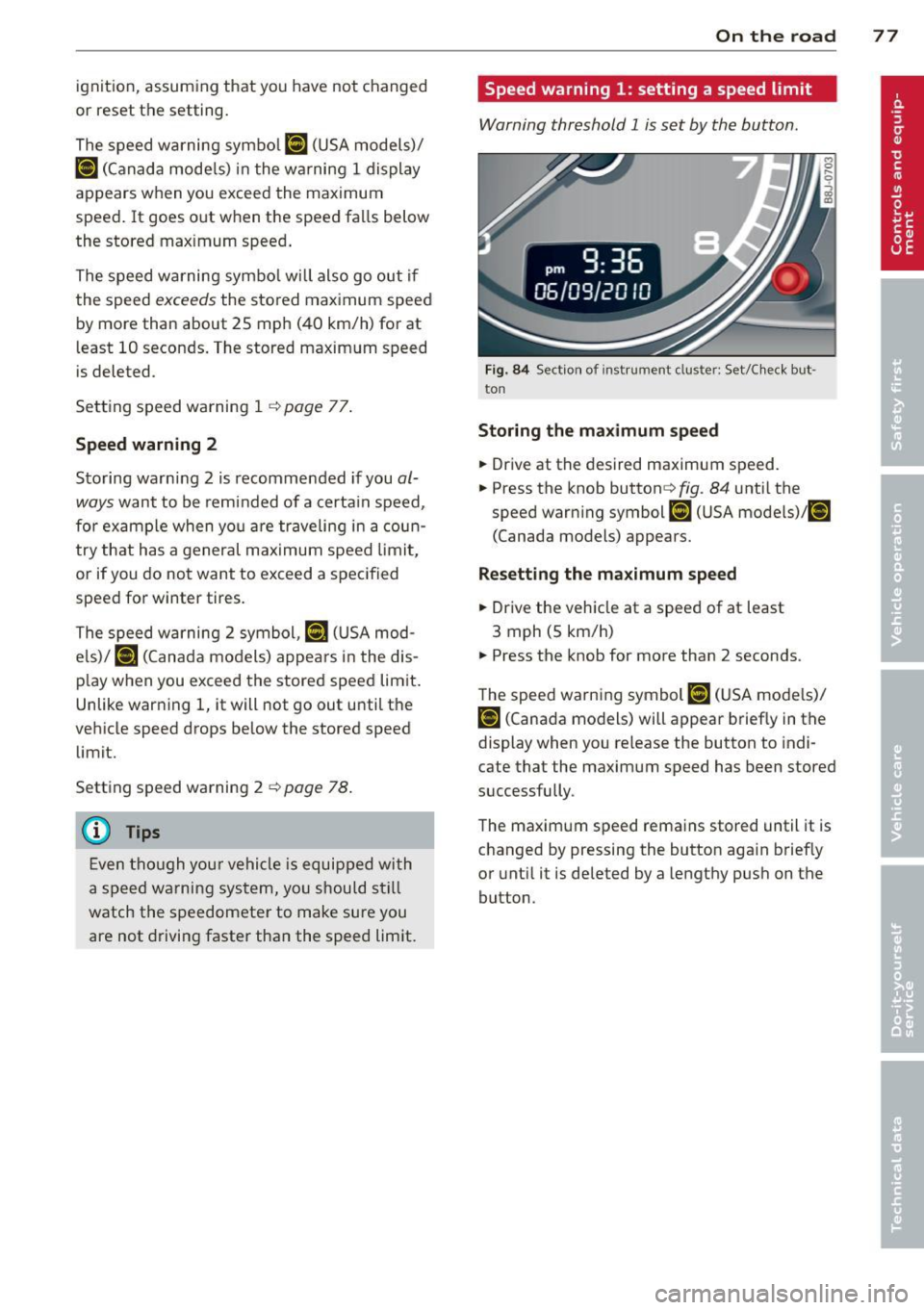
Fig. 84 Sect ion of instru ment clu ster: Set/C heck but ·
ton
Storing the maximum speed
.,. Drive at the desired maximum speed.
.,. Press the knob button ~fig .
84 unti l the
speed warning symbol
[fl (USA models)/ ~
(Canada models) appears.
Resetting the maximum speed
.,. Drive the vehicle at a speed of at least
3 mph (5 km/h)
.,. Press the knob for more than 2 seconds .
The speed warning symbol
fZl (USA models)/
i•j rcanada models) will appear briefly in the
display when you release the button to indi
cate that the maximum speed has been stored
successfully .
The maximum speed remains stored until it is
changed by pressing the button aga in briefly
or until it is deleted by a lengthy push on the
button.
Page 80 of 244
78 On the road
Speed warning 2: setting a speed limit
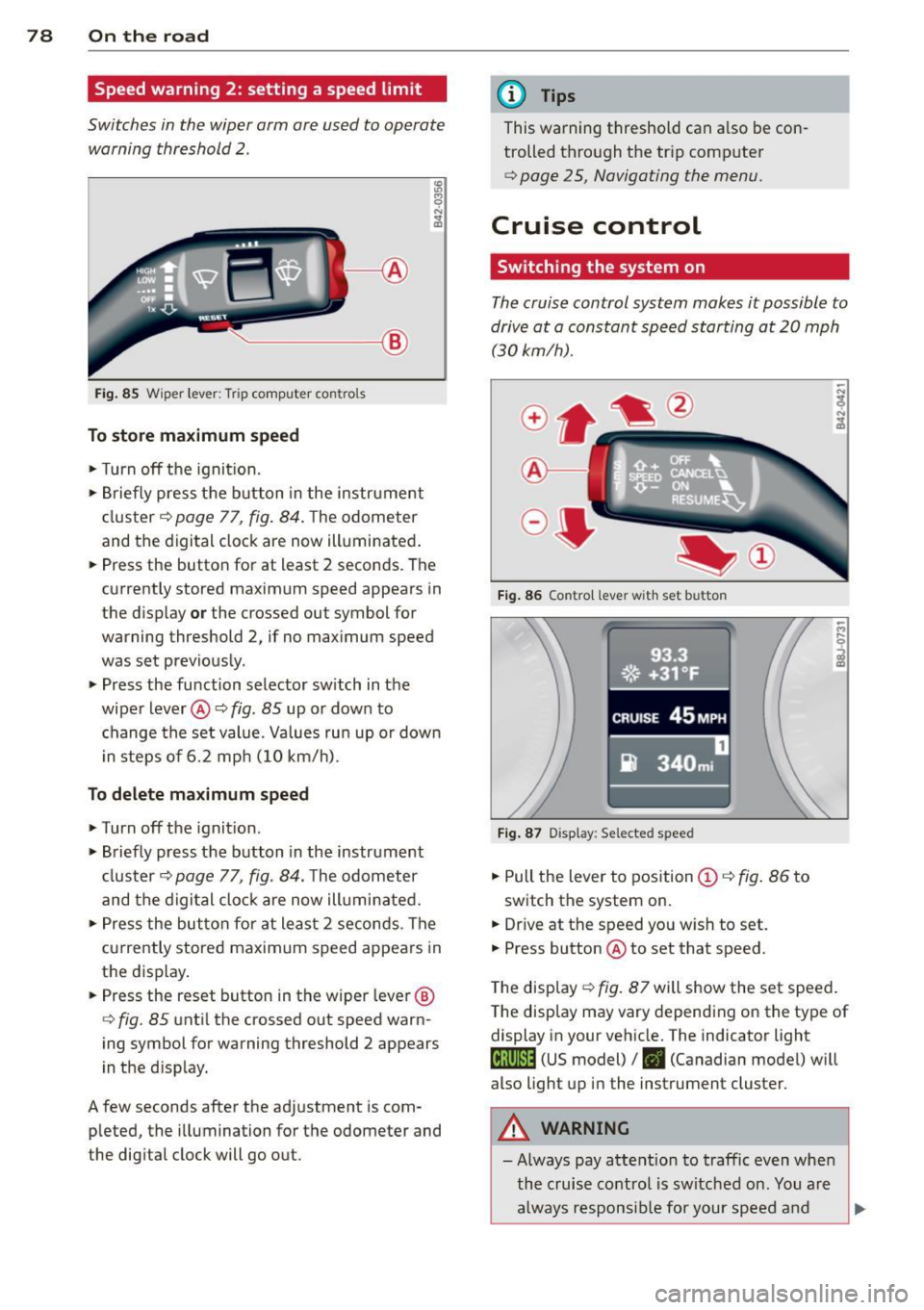
Switches in the wiper arm are used to operate
warning threshold
2 .
'----I ®
Fig. 85 Wiper lever: Tr ip computer con trols
To store maximum speed
>Turnoff the ignition.
> Briefly press the button in the instrument
cl uster ¢
page 77, fig. 84. The odometer
and the digital clock are now illuminated .
> Press the button for at least 2 seconds . The
currently stored maximum speed appears in
the display
or the crossed out symbol for
warning threshold 2, if no max imum speed
was set previously.
> Press the function selector sw itch in the
wipe r lever @¢
fig. 85 up or down to
change the set value. Values run up or dow n
i n steps of 6.2 mph (10 km/h).
To delete maximum speed
>Turnoff the ignit ion.
> Briefly press the button in the instrument
cluster <:::>
page 77, fig . 84 . The odometer
and the digital clock are now illumi nated.
> Press the button fo r at least 2 seconds . The
cu rrently stored maxim um speed appears in
the display.
> Press the reset button in the wiper lever ®
<:::>
fig . 85 until the crossed out speed warn
ing symbol for warning threshold 2 appears
i n the display.
A few seconds after the adjustment is com
pleted, the illumination for the odometer and
the dig ital clock will go out.
(D Tips
This warning threshold can a lso be con
trolled thro ugh the tr ip computer
¢ page 25, Navigating the menu.
Cruise control
Switching the system on
The cruise control system makes it possible to
drive at a constant speed starting at 20 mph (30 km/h) .
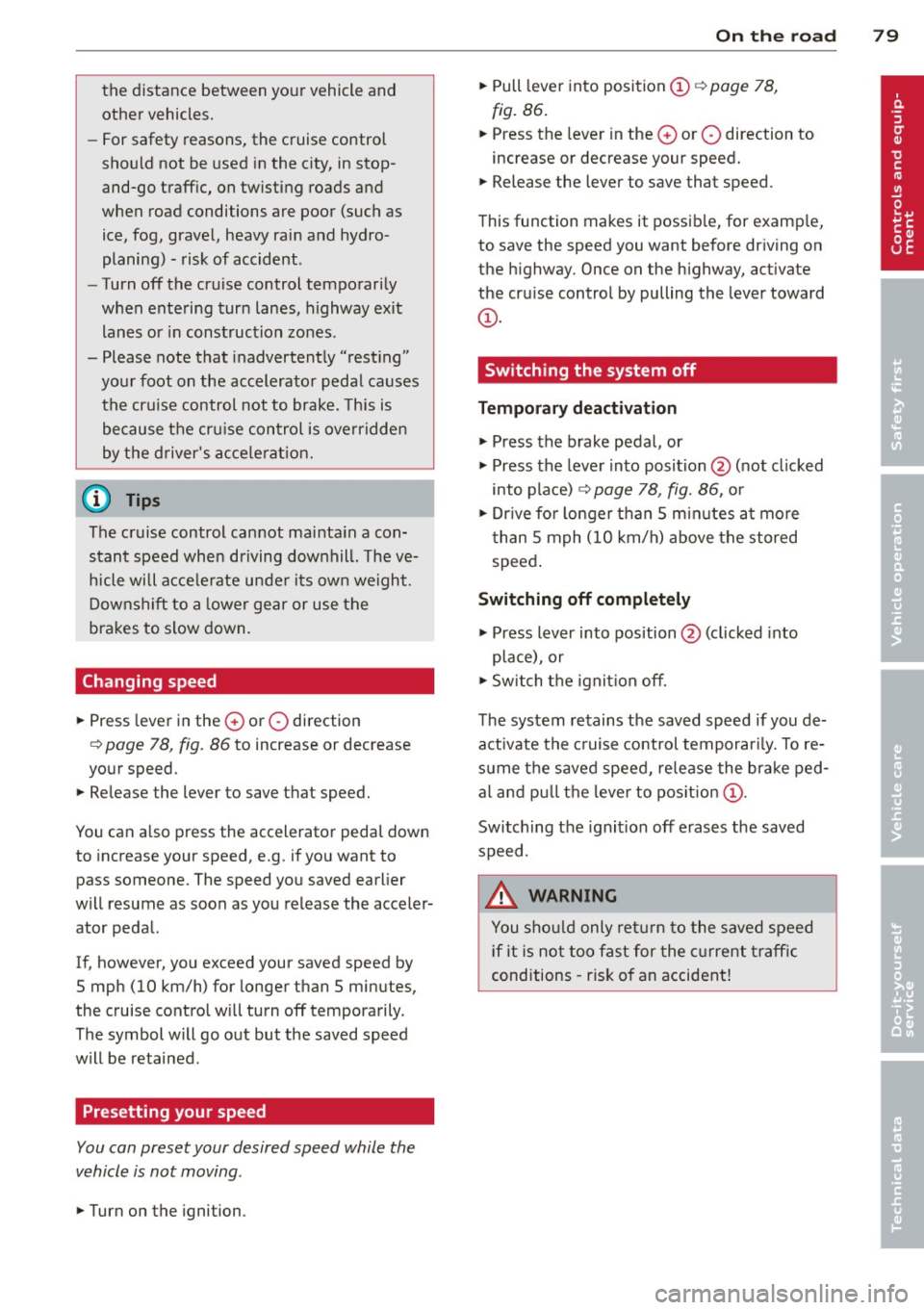
®-
Fig. 86 Contro l leve r with set b utton
Fig. 87 Display : Se lecte d speed
> Pull the lever to position (D <:::> fig. 86 to
switch the system on.
> Dr ive at the speed you w ish to set.
> Press button @ to set that speed.
.., ....
i
The display <:::> fig. 87 will show the set speed .
The display may vary depending on the type of
display in your vehicle. The indicator light
M;ll)~14 (US model)/ . (Canadian model) will
also light up in the instrument cluster .
A WARNING
- Always pay attention to traffic even when
the cruise control is switched on. You are
always responsib le for your speed and
Page 81 of 244
the distance between your vehicle and
other vehicles.
- For safety reasons, the cruise control
should not be used in the city, in stop
and-go traffic, on twisting roads and
when road conditions are poor (such as
ice, fog, grave l, heavy rain and hydro
planing) -risk of acc ident.
- Turn off the cruise control temporari ly
when entering turn lanes, highway exit
lanes or in const ruction zones.
- Please note that inadvertent ly "rest ing"
yo ur foot on the accelerato r peda l causes
the cruise control not to brake. This is
because t he cr uise con trol is overr idden
by the driver's acce le rat ion.
@ Tips
The cruise control cannot mai nta in a con
stant speed when driving downhill. The ve
hicle will acce lerate unde r its own weight.
Downshift to a lower gear or use t he
bra kes to slow down.
Changing speed
~ Press lever in the 0 or O direction
Q page 78, fig. 86 to increase or decrease
your speed.
~ Release the lever to save that speed.
You can a lso press the accelerator peda l down
to increase your speed, e.g. if you want to
pass someone. The speed you saved earlier
will resume as soon as you release the acceler
ator peda l.
If, however, you exceed your saved speed by
5 mph (10 km/h) for longer than 5 minutes,
the cruise contro l will turn off tempora rily.
The symbol will go out but the saved speed
will be retained.
Presetting your speed
You can preset your desired speed while the
vehicle is not moving .
~ Turn on the ignition.
On the ro ad 79
~ Pull leve r into position (D q page 78,
fig. 86 .
~ Press the leve r in the 0 or O direction to
increase or decrease your speed.
~ Release the lever to save that speed.
T his function makes it possib le, for examp le,
to save the speed you want before dr iving on
the highway. Once on the highway, activate
the cruise control by pulling the lever toward
(D .
Switching the system off
Temporary deactivation
~ Press the brake pedal, or
~ Press the leve r into position @(not clicked
into place)
q page 78, fig . 86, or
~ Dr ive fo r longer than 5 m inutes a t more
t han 5 mph (10 km/h) above the stored
speed .
Switching off completely
~ Press lever into position @ (clicked into
place), or
~ Switch the ignit ion off.
The system retains the saved speed if you de activate the c ruise control temporar ily. To re
s u me the saved speed, re lease the brake ped
al a nd pull th e leve r to pos it ion
(D .
Switching the ignit ion off erases the saved
speed.
.&_ WARNING
You shou ld only ret urn to the saved speed
if it is no t too fast for the c urre nt traffic
conditions -risk o f an accident!