display AUDI TT ROADSTER 2014 Owner's Manual
[x] Cancel search | Manufacturer: AUDI, Model Year: 2014, Model line: TT ROADSTER, Model: AUDI TT ROADSTER 2014Pages: 244, PDF Size: 60.87 MB
Page 60 of 244
58 Clear vis ion
- To help prevent damage to the wiper
arms or other components, do not at
tempt to move the wipers by hand .
@ Tips
-Commercial hot waxes applied by auto
matic car washes affect the cleanability
of the glass surface.
- The front wiper blades are different
l engths; the blade on the driver's side is
l onger.
Digital compass
Activating or deactivating the compass
Appl ies to vehicles: with digital compass
The direction is displayed on the interior rear
view mirror.
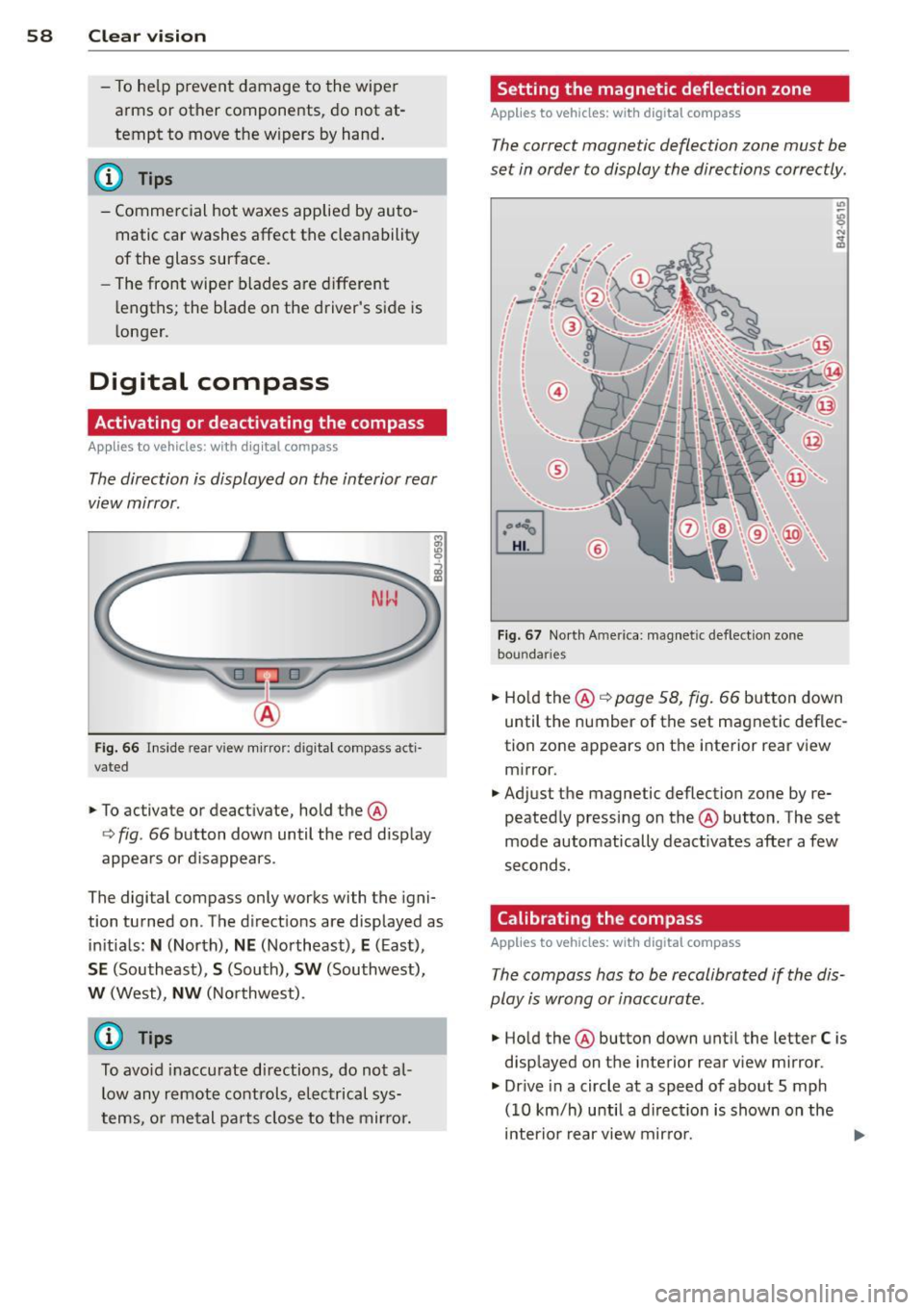
Fig. 66 Ins ide rear vi ew mirror: digita l compass acti·
vate d
,. To activate or deactivate, hold the@
i=> fig. 66 button down until the red display
appears or d isappears.
The digital compass only works with the igni
tion turned on. The direct ions are displayed as
in itials:
N (North), NE (Northeast), E (East),
SE (Southeast), S (South), SW (Southwest),
W (West), NW (Northwest).
(j) Tips
To avo id inaccurate directions, do not al
low any remote controls, electrical sys
tems, or metal parts close to the mirror.
Setting the magnetic deflection zone
Applies to vehicles: with digital compass
The correct magnetic deflection zone must be
set in order to display the directions correctly.
Fig. 67 North America: mag netic defle ction zone
boundar ies
,. Ho ld the @¢ page 58, fig. 66 button down
until the number of the set magnetic deflec
tion zone appears on the interior rear view mirror.
,. Adjust the magnetic deflection zone by re
peatedly pressing on the @button. The set
mode automatically deact ivates after a few
seconds.
Calibrating the compass
Applies to vehicles: with digital compass
The compass has to be recalibrated if the dis
play is wrong or inaccurate.
,. Hold the @button down until the letter
C is
displayed on the interior rear view mirror.
,. Dr ive in a circle at a speed of about S mph
(10 km/h) until a direct ion is shown on the
interior rear view mirror. ..,.
Page 78 of 244
76 On the road
On ly afte r th e ve hic le has come to com
plete stop, shou ld you f irm ly set t he park
ing b rake and either move the selector lev
er i nto "P".
Parking
P a rkin g
"' Stop the vehicle using the brake pedal.
"' Set the parki ng brake firmly .
"' Swi tc h off the engine.
"' Mov e the selector lever into the P pos ition
~ A -
.. When on incl ines or decli nes, turn the steer
ing wheel so that the vehicle will roll into
the curb if it begins to move .
A WARNING
This is how you can reduce the risk of in
jury when leaving your veh icle.
- Never park the vehicle where it can come
in contact with dry grass, spilled fuel or
any other flammable mater ials.
- Never allow anyone -especia lly small
children -to remain in the vehicle when
it is locked. Locked doors make it more
difficult for rescuers to access the pas
senger compartment in the event of an
eme rgency. Danger to life!
- Never leave children unsupervised in the
vehicle . Children could re lease the park
ing brake o r move the gea rshift lever out
of gear. The vehicle could start to roll
away and ca use an accident.
- N o matter wha t the season is, the tem
perature in a par ked vehicle can rea ch
dangero us levels .
Starting on hills
Applies to vehicles: wit h hill h old ass ist
H ill hold assist ma kes it easie r to sta rt on
h ill s.
The system is act ivated when the brake pedal
i s depressed
for a few s econds .
After releasing the brake pedal, the brake
power is held for a brief moment to prevent
the vehicle from rolling back when start ing . At
th is time, you can easi ly beg in to move your
vehicle.
A WARNING
-- If you did not begin moving immed iate ly
after releasing the brake pedal, under
c e rtain ci rcumstances, the vehicle would
begin to ro ll backwa rd. Depr ess the
b rake ped al immedi ately o r engage the
hand brake .
- Should t he e ngine sta ll, dep ress the
b ra ke ped al immediate ly or eng age the
hand b rake .
- I n or der to prevent the vehicle from roll
ing back unintentionally when s tarti ng in
s top -and-go traffic, keep the brake pedal
depressed for a few seconds before driv
ing off.
(J} Tips
You can find o ut if yo ur vehicle is eq uipped
with "Hill hold ass ist" at an autho rized
A udi dealersh ip.
Speed warning system
Overview
The speed warning system helps you to keep
your driving speed below a set speed limit.
The speed warn ing system warns the driver if
he exceeds a previous ly stored max imum
speed . A warning tone will sound as soon as
the ve hicle speed exceeds the set speed by
about 3 mph (3 km/h). At the same time, a
warning symbo l appea rs in the display.
The speed warn ing system has
two warning
thr esho lds
that f unction independently of
each other and that have somewhat different
purposes:
Speed warning 1
You can use speed warning 1 to set the maxi mum speed while you are driving . This setting
will remain in effect unti l yo u tur n off the ..,.
Page 79 of 244
ignition, assuming that you have not changed
or reset the setting.
The speed warning symbo l
Jmj (USA models)/
caj (Canada models) in the wa rning 1 display
appears when you exceed the maximum
speed. It goes out when the speed falls below
the stored max imum speed .
The speed warning symbo l wi ll also go out if
the speed
exceeds the sto red maximum speed
by more than about 25 mph (40 km/h) for at
least 10 seconds. The stored maximum speed
is deleted .
Setting speed warning 1
¢ page 77.
Speed warning
2
Storing warning 2 is recommended if you al
ways
want to be reminded of a certain speed,
for example when yo u are traveling in a coun
try that has a general max imum speed limit,
or if you do not want to exceed a specified
speed for winter tires.
The speed warning 2 symbol,
(mj CUSA mod
e ls)/
(SJ (Canada models) appea rs in the dis
play when you exceed the stored speed limit.
Unlike warning 1, it will not go out until the
vehicle speed drops below the stored speed
limit.
Setting speed warning 2
¢ page 78.
@ Tips
Even though your vehicle is equipped wi th
a speed warning system, you should still
watch the speedometer to make sure you
are not driving faster than the speed limit.
On the road 77
Speed warning 1: setting a speed limit
Warning threshold 1 is set by the button.
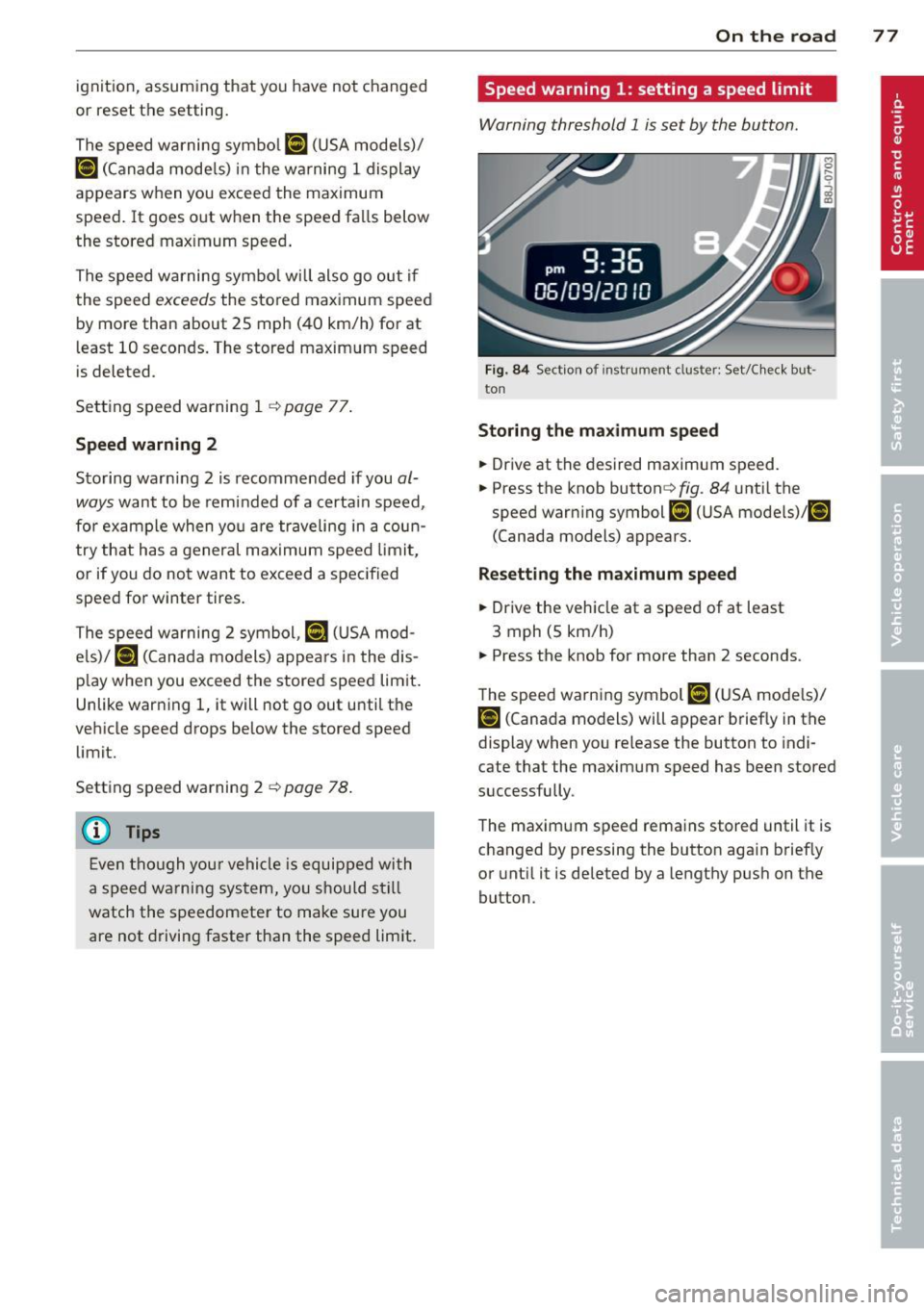
Fig. 84 Sect ion of instru ment clu ster: Set/C heck but ·
ton
Storing the maximum speed
.,. Drive at the desired maximum speed.
.,. Press the knob button ~fig .
84 unti l the
speed warning symbol
[fl (USA models)/ ~
(Canada models) appears.
Resetting the maximum speed
.,. Drive the vehicle at a speed of at least
3 mph (5 km/h)
.,. Press the knob for more than 2 seconds .
The speed warning symbol
fZl (USA models)/
i•j rcanada models) will appear briefly in the
display when you release the button to indi
cate that the maximum speed has been stored
successfully .
The maximum speed remains stored until it is
changed by pressing the button aga in briefly
or until it is deleted by a lengthy push on the
button.
Page 80 of 244
78 On the road
Speed warning 2: setting a speed limit
Switches in the wiper arm are used to operate
warning threshold
2 .
'----I ®
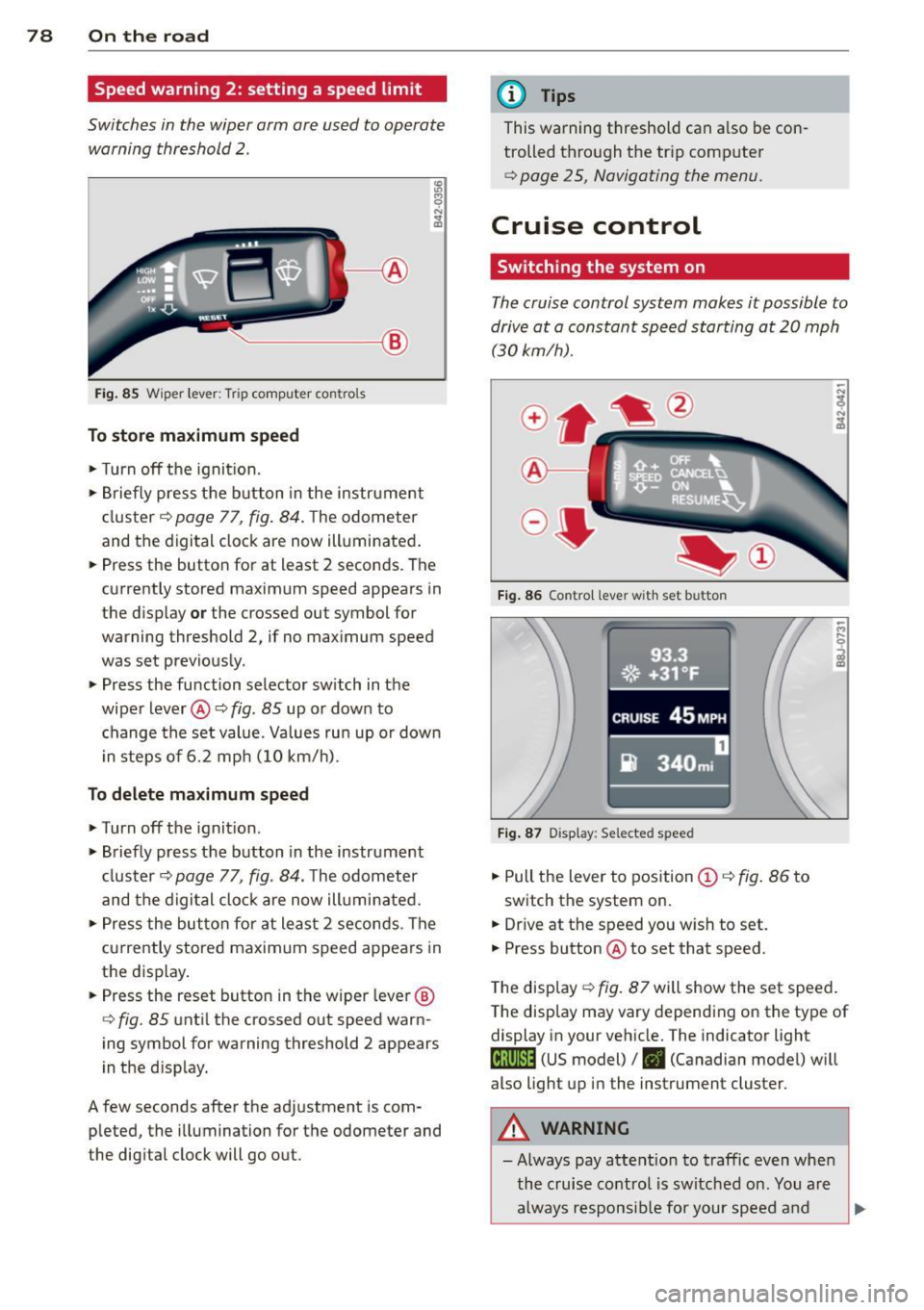
Fig. 85 Wiper lever: Tr ip computer con trols
To store maximum speed
>Turnoff the ignition.
> Briefly press the button in the instrument
cl uster ¢
page 77, fig. 84. The odometer
and the digital clock are now illuminated .
> Press the button for at least 2 seconds . The
currently stored maximum speed appears in
the display
or the crossed out symbol for
warning threshold 2, if no max imum speed
was set previously.
> Press the function selector sw itch in the
wipe r lever @¢
fig. 85 up or down to
change the set value. Values run up or dow n
i n steps of 6.2 mph (10 km/h).
To delete maximum speed
>Turnoff the ignit ion.
> Briefly press the button in the instrument
cluster <:::>
page 77, fig . 84 . The odometer
and the digital clock are now illumi nated.
> Press the button fo r at least 2 seconds . The
cu rrently stored maxim um speed appears in
the display.
> Press the reset button in the wiper lever ®
<:::>
fig . 85 until the crossed out speed warn
ing symbol for warning threshold 2 appears
i n the display.
A few seconds after the adjustment is com
pleted, the illumination for the odometer and
the dig ital clock will go out.
(D Tips
This warning threshold can a lso be con
trolled thro ugh the tr ip computer
¢ page 25, Navigating the menu.
Cruise control
Switching the system on
The cruise control system makes it possible to
drive at a constant speed starting at 20 mph (30 km/h) .
®-
Fig. 86 Contro l leve r with set b utton
Fig. 87 Display : Se lecte d speed
> Pull the lever to position (D <:::> fig. 86 to
switch the system on.
> Dr ive at the speed you w ish to set.
> Press button @ to set that speed.
.., ....
i
The display <:::> fig. 87 will show the set speed .
The display may vary depending on the type of
display in your vehicle. The indicator light
M;ll)~14 (US model)/ . (Canadian model) will
also light up in the instrument cluster .
A WARNING
- Always pay attention to traffic even when
the cruise control is switched on. You are
always responsib le for your speed and
Page 84 of 244
82 Transmi ssion
Transmission
S tronic transmission
Introduction
App lies to vehicles : wit h S tro nic
Your veh icle is equipped with a S tronic trans
miss ion, a lso called a double-clutch system/
tra nsmission.
Power is transfe rred between the engine and
the transm ission by means of two i ndepend
ent cl utches. They replace the to rque conve rt
e r of conventional a utomat ic transm iss io ns
and a llow the vehicle to acce le rate w it h out a
noticeab le break in the power flow .
W ith the aid oftiptroni c, the gea rs can op
tionally be sh ifted
manually ¢ page 85.
Selector lever positions
App lies to vehicles: wit h S tro nic
All the selector lever positions are explained
in this section.
l-- -·· -----,,1
+55°F
~ 340mi
D
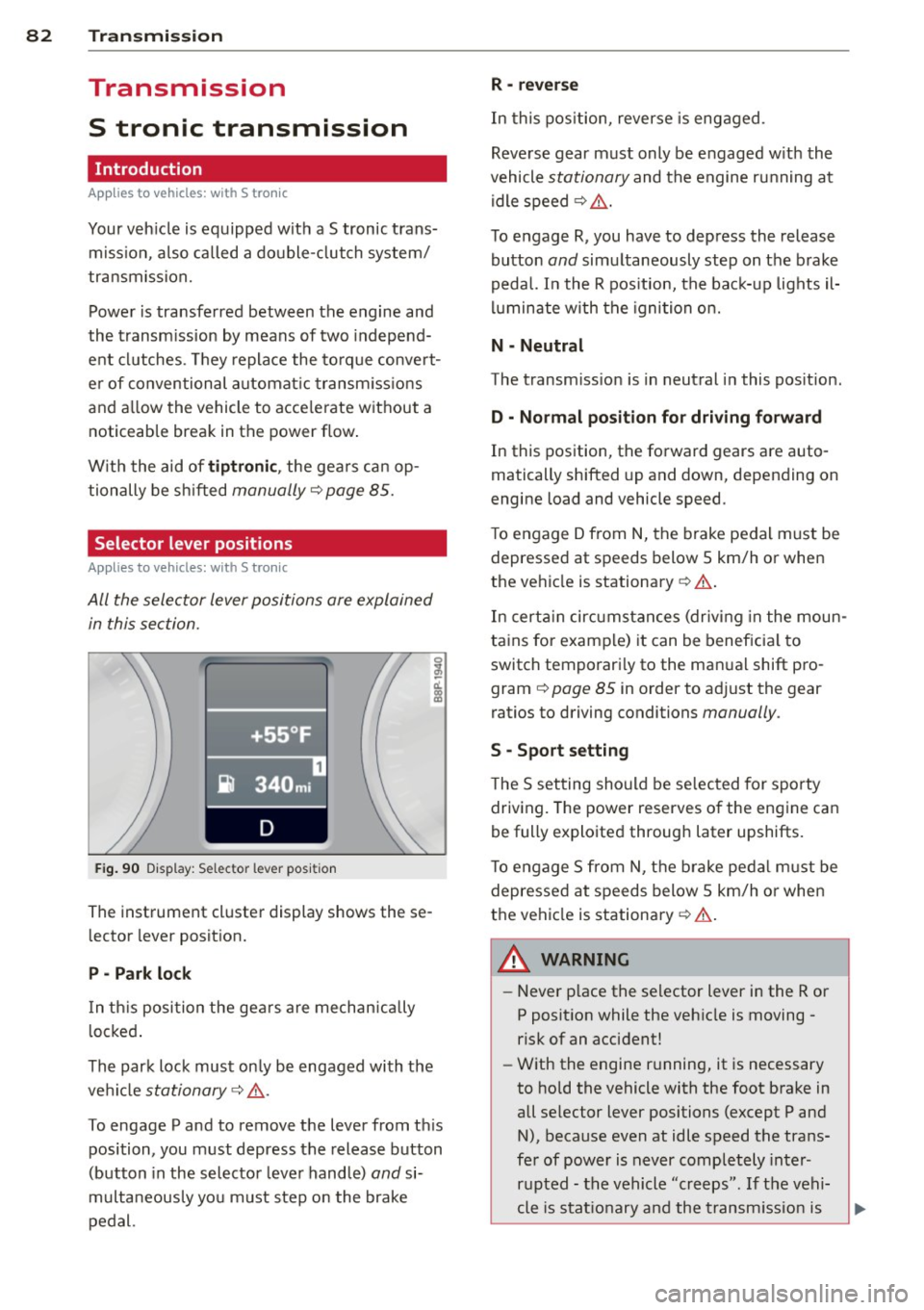
F ig. 90 Display: Selector lever posit ion
The instrument cluster display shows these
l ector lever posit ion.
P - Park lock
I n th is posi tion the ge ars are mechan ically
l ocked .
The park lock must on ly be engaged with t he
ve hicl e
stationary ¢&, .
To engage P and to remove the lever from th is
position, you must depress the release button
(button in the selector leve r hand le)
and si
multaneous ly yo u m ust s tep on the brake
pedal.
R -reverse
In this pos ition, reverse is eng aged .
Reve rse gear m ust only be e ngaged w ith the
vehicle
stationary and the engine ru nning at
idle speed ¢ &, .
T o engage R, you have to depress the release
button
and simultaneously step on the b rake
peda l. In the R pos ition, the bac k-up lights il
l u minate w ith the igni tion o n.
N - Neutral
The transm iss ion is in neut ral i n this pos ition.
D -No rmal position fo r driving forward
In this position, the forward gears are auto
matically shifted up and down, depending on
engine load and vehicle speed.
T o engage D from
N, the brake pedal m ust be
depressed at s peeds below 5 km/h or when
the ve hicle is stationary ¢& .
In cert ain circ umstan ces (driving in the moun
ta ins for examp le) it can be beneficia l to
switch temporari ly to the man ual shift pro
gram ¢
page 85 in order to ad just the gear
ratios to driving conditions
manually .
S -Sport setting
T he S setting sho uld be se lec ted for sporty
driving. The power reserves of the engine can
be fully explo ited through later upshifts.
T o engage S from N, t he brake peda l m ust be
depressed at speeds below 5 km/h o r when
t h e vehi cle is stationary ¢& .
A. WARNING
- Never p lace the se lector lever i n the R or
P posit ion while the veh icle is moving -
risk of an accident!
- W ith the engine r unning, it is necessary
to hold the vehicle with the foot brake in
all se lector lever positions (except P and
N), because even at idle speed the trans
fe r of power is never completely inter
r u pted - t he vehicle "creeps". If t he vehi-
cle is stat io nary and the t rans missio n is
~
Page 85 of 244
engaged, the engine should never be
speeded up unintentionally (e.g. manual ly from under the hood). Otherwise the
vehicle will immediately start to move -
sometimes even if the parking brake is
firmly applied - risk of an accident!
- Before you or other persons open the
hood and work on a running engine, the
selector lever must be moved to P and
the parking brake applied firmly - risk of
an accident! Follow the warning stickers.
@ Tips
If you have inadvertently sh ifted into N
while the veh icle is moving, you should re
move your foo t from the accelerator and
wait until the engi ne speed has dropped to
id le before shifting back to Dor S.
Selector lever lock
Applies to vehicles: with S tro nic
The selector lever lock prevents a gear from
being engaged occidentally and unintention
ally setting the vehicle in motion .
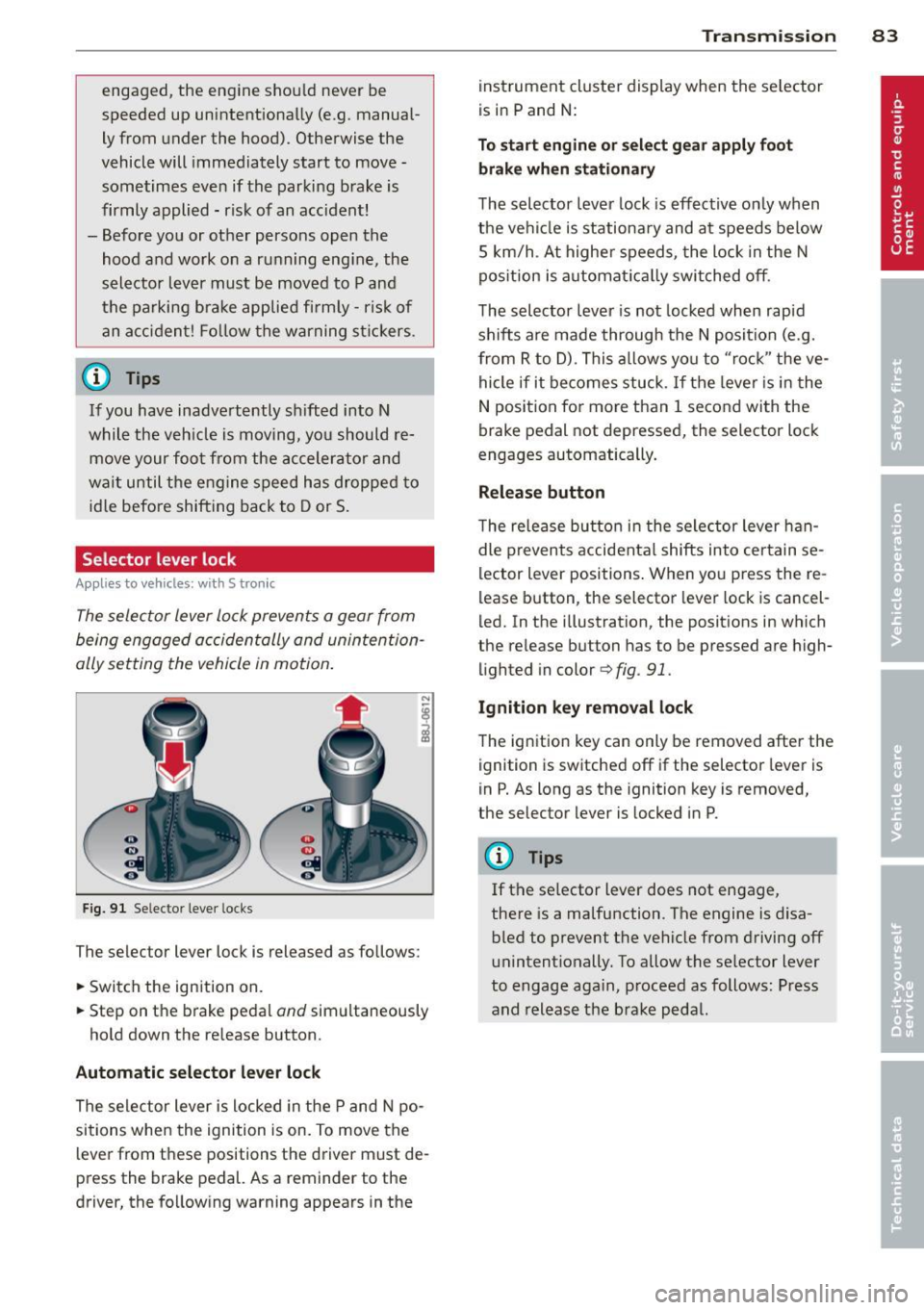
Fig. 91 Selector lever locks
The selector lever lock is released as follows:
.,. Switch the ignition on.
.,. Step on the brake pedal
and simultaneously
hold down the re lease button.
Automatic selector lever lock
The selector lever is locked in the P and N po
sitions when the ignition is on. To move the
l ever from these positions the driver must de
press the brake pedal. As a reminder to the
driver, the following warning appears in the
Transmission 83
instrument cluster display when the se lector
is in P and N:
To start engine or select gear apply foot
brake when stationary
The selector lever lock is effective only when
the vehi cle is stationary and a t speeds below
S km/h . At higher speeds, the lock in the N
pos ition is automat ically switched off.
The selector lever is not locked when rapid
shifts are made through the N position (e.g.
from R to D) . This allows you to "rock " the ve
hicle if it becomes stuck. If the lever is in the
N position for more than 1 second with the
brake pedal not depressed, the selector lock
engages automatically .
Release button
The release butto n in the selector lever han
dle prevents accidental shifts into certain se
lector lever positions . When you press the re
lease button , the selector lever lock is cancel
led. In the illustration, the positions in which
the release button has to be pressed are high
lighted in color
¢ fig . 91.
Ignition key removal lock
The ignition key can only be removed after the
ignition is switched off if the selector lever is
in P. As long as the ignition key is removed,
the selector lever is locked in P.
(y Tips
If the se lector lever does not engage,
there is a malfunction . The engine is disa
bled to prevent th e vehicle from driving off
unintentionally. To allow the selector lever
to engage again, proceed as follows: Press
and release the brake pedal.
Page 87 of 244
because if the vehicle starts to roll
backward, you could cause an accident. If
the clutch should start to slip, you will
feel the vehicle "jerk" and the selector lever display will start blink ing.
- Before driving down a steep slope, re
duce your speed and shift into a lower gear with "tiptronic".
- Do not ride the brakes or apply the brake
pedal too often or too long . Constant
braking causes the brakes to overheat
and substantially reduces braking per
formance, increases braking distance or
causes complete failure of the brake sys
tem.
Hill Descent Assist
Applies to vehicles: with S tro nic
Hill Descent Assist helps the driver when driv
ing down inclines .
Hill Descent Ass ist is activated by pressing the
b rake wh ile descending when the selector lev
er is in D/S. The S tronic transmission auto
mat ically shifts down to a gear suitab le for
the incline. Hill Descent Assist attempts to
maintain the current vehicle speed when the
brak ing occurs, as far as phys ical and techni
cal limits allow. It may be necessary to adjust
the speed using the brakes.
Hill Descent Assist switches off when the in
cline levels out or when the gas pedal is press
ed.
On vehicles w ith cruise control*~
page 78,
Hill Descent Assist is also activated when the
speed is set.
_&. WARNING
Hill Descent Assist cannot overcome phys i
cal limitations, so it may not be possible to
ma intain a constant vehicle speed under
all circumstances . Always be ready to ap
ply the brakes .
Transmission 85
tiptronic operation
Applies to vehicles: with S tronic
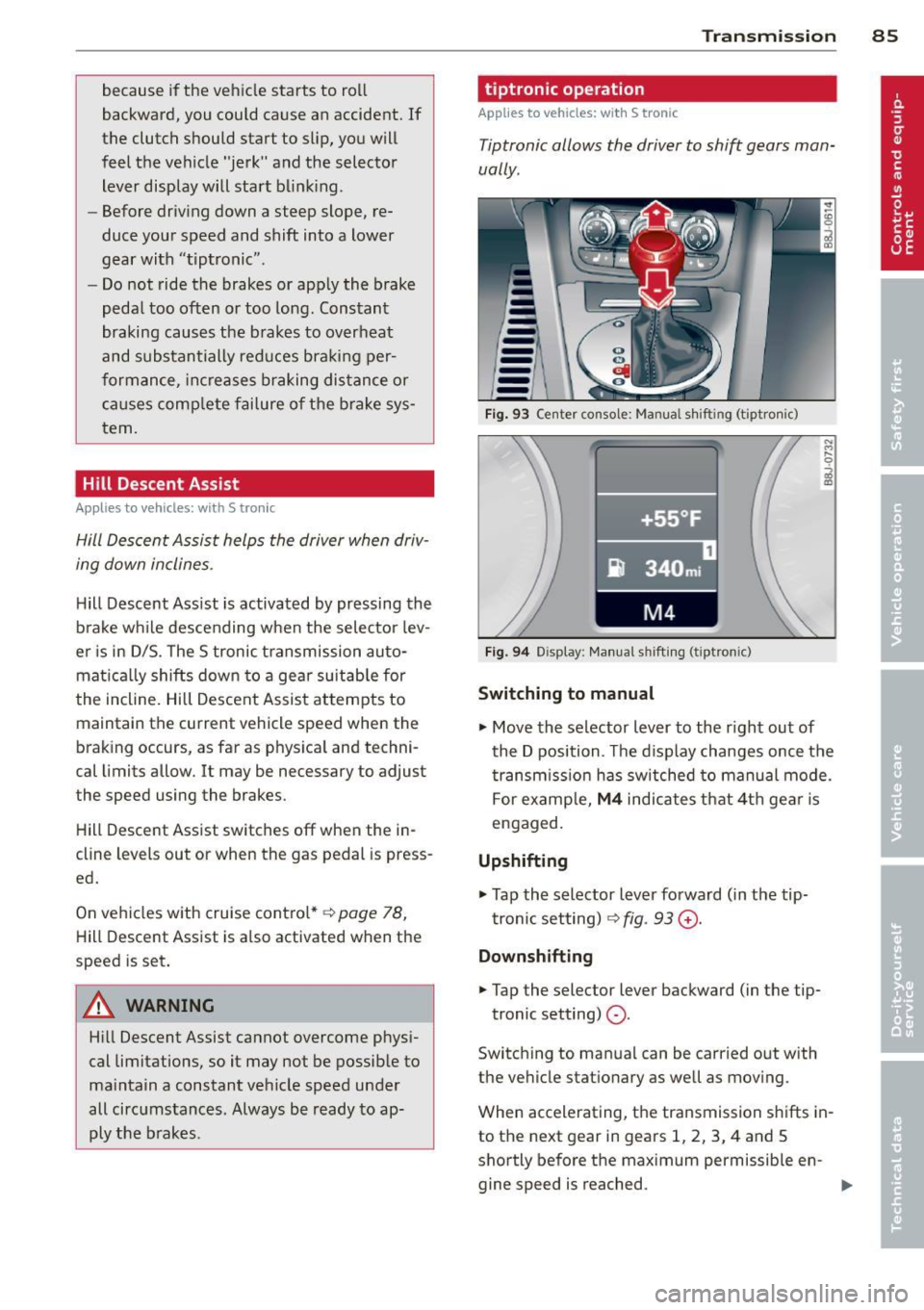
Tiptronic allows the driver to shift gears man
ually.
Fig. 93 Center console: Ma nua l sh ift in g (t iptronic)
Fig . 94 D isplay : Manual sh ift ing (t iptron ic)
Switching to manual
"' Move the selector lever to the right out of
the D position . Th e display changes once the
transmission has switched to manual mode.
For examp le,
M4 indicates that 4th gear is
engaged.
Upshifting
"' Tap the selector lever forward (in the tip
tronic setting)
~ fig. 93 0 -
Downshifting
"'Tap the selector lever backward (in the tip-
tronic setting)
0 -
Switching to manual can be carried out with
the vehicle stationary as well as moving .
When accelerating, the transmission shifts in
to the next gear in gears 1, 2, 3, 4 and S
shortly before the maximum permissible en- gine speed is reached . ..,.
Page 88 of 244
86 Transmis sion
If you have selected a lower gear than the cur
rent one, the transmission w ill only shift down
when the engine cannot be overspeeded.
I f kick-down is actuated, the transmiss ion
shifts into a lower gear independently of
speed and engine rpm .
Steering wheel with Tiptronic controls
Applies to vehicles: with S tro nic
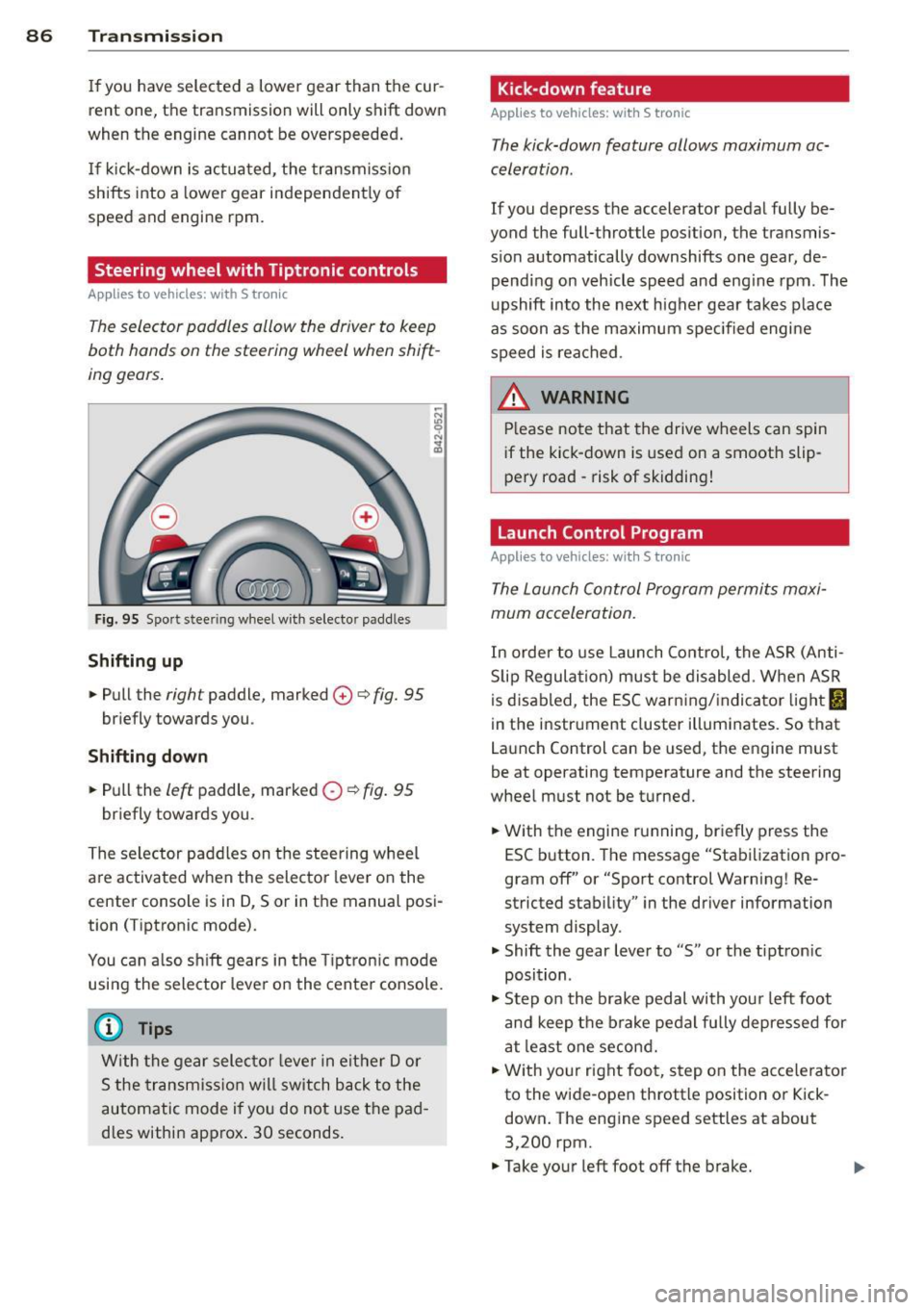
The selector paddles allow the driver to keep
both hands on the steering wheel when shift
ing gears.
Fig. 95 Spo rt stee ring wheel w ith selecto r paddle s
Shifting up
.,. Pull the right paddle, marked 0 ¢ fig. 95
briefly towards you .
Shifting down
.,. Pull the left paddle, marked O ¢ fig. 95
briefly towards you .
The selector paddles on the steering wheel
are activated when the selector lever on the
center console is in D, 5 or in the manual posi
tion ( Tiptronic mode).
You can also shift gears in the Tiptronic mode
using the selector lever on the center console.
(D Tips
With the gear selector lever in either Dor
5 the transmission will switch back to the
automatic mode if you do not use the pad
dles within approx . 30 seconds.
Kick-down feature
Applies to vehicles: w it h S tronic
The kick-down feature allows maximum ac
celeration.
If you depress the accelerator pedal fully be
yond the full-throttle position, the transmis·
sion automatically downshifts one gear, de·
pending on vehicle speed and eng ine rpm. The
upshift into the next higher gear takes place
as soon as the maximum specified engine
speed is reached.
.&_ WARNING i-==
Please note that the drive wheels can spin
if the kick-down is used on a smooth slip·
pery road -risk of skidding!
Launch Control Program
Applies to veh icles: w it h S t ronic
The Launch Control Program permits maxi
mum acceleration.
In order to use Launch Control, the ASR (Anti
S lip Regulation) must be disabled . When ASR
is disabled , the ESC warning/indicator light
fl
in the instrument cluster illuminates. So that
Launch Control can be used, the engine must
be at operating temperature and the steering
wheel must not be turned.
.,. With the engine running, briefly press the
ESC button . The message "Stabilization pro
gram off" or "Sport control Warning! Re
stricted stability" in the driver information
system display .
.,. Shift the gear lever to "5" or the tiptronic
position .
.,. Step on the brake pedal with your left foot
and keep the brake pedal fully depressed for
at least one second.
.,. With yo ur right foot, step on the accelerator
to the wide-open throttle position or Kick·
down. The eng ine speed settles at about
3,200 rpm .
.,. Take your left foot off the brake. ..,.
Page 89 of 244
_& WARNING
-Always adapt your driving to the traffic
flow.
- Only use Launch Control when road and
traffic conditions allow it and other driv
ers will not be endangered or annoyed by
your driving and the acceleration of the
vehicle .
- Make sure that ESC remains enabled .
With the ESC disabled, the veh icle could
brake away, particularly on a slick and
slippery road -risk of skidding!
- Once acce lerat ion is finished, switch ASR
on again by briefly pushing the ESC but
ton.
@ Tips
- The transm ission temperature may in
crease significantly after using the
Launch Control Program. If that hap
pens, the program may not be available
for a few minutes. I t will be availab le
again after a coo l-down period.
- When accelerating using the Launch
Control program, all vehicle parts are
subject to heavy loads . This can result in
increased wear.
Back-up program
Applies to vehicles: with S tronic
In the event of a system malfunction, there is
a back-up program.
I n the event of system mal func tion, the auto
matic transmission switches to the fail-safe
mode. A ll of the selector lever position dis
plays for the automatic transmission are high
lighted with a light background in the instru
ment cluster display . In some cases you can
not use reverse gear any more .
If the transmission switches to fail-safe mode, you should take the vehicle to an au
thorized Audi dealership as soon as possible
to have the condition corrected.
Transmission 87
Clutch is overheating
Applies to vehicles: with S tronic
• Clutch is overheating! Please stop vehi
cle!
If the symbols are illuminated, the clutch is
overheating and could be damaged if you con
tinue to drive. Stop the vehicle and a llow the
transmission to cool with the se lector lever in
the P posit ion while the engine runs at idle.
If
the warning does not turn off, do not continue
driving. See your authorized A udi dealer or
qualified repair facility for assistance. Other
wise serious transmission damage could re
sult. Once the indicator light has turned off,
drive to your authorized Audi dealer or quali
fied repa ir facility immed iately to have the
malfunction corrected.
Selector lever emergency release
Applies to vehicles: wi th S tronic
If the vehicle's power supply fails, the selec
tor lever can be released in an emergency.
--
-
-
-
-
---Fig. 96 Se lector lever : Removing the selector lever
boot
.. ~
- ,
Fig. 97 Selector lever : Using the em erge ncy release to
move out of the Park pos it ion
T he emergency release mechanism is located
in the right front area under the selector lever ..,.
Page 150 of 244
148 Intelligent technology
Battery diagnosi s
Battery diagnosis continuously determines
the state of the battery. Sensors determine
battery voltage, battery current and battery
temperature. This determines the current
state of charge and the power of the battery.
Idling current management
I dling current management reduces energy
consumption while the vehicle is standing.
With the ignition switched off, it controls the
energy supply to the various electrical compo
nents. Data from battery diagnosis is consid
ered.
Depending on the battery's state of charge,
individual consumers are gradually turned off
to prevent excessive discharge of the battery
and thus maintain starting capability.
Dynamic energy management
While the vehicle is being driven, dynamic en
ergy management distributes the energy gen
erated according to the needs of the individu
al components. It regulates consumption, so
that more electrical energy is not being used
than is being generated and ensures an opti
mal state of charge for the battery .
(D Tips
-But even energy management cannot
negate the limits of physics. Consider
that the power and life of a battery are
limited .
- If starting ability is threatened, you are informed by a warning
~page 149,
Driver notification in the instrument
cluster display.
What you should know
The highest priority is given to maintaining
starting capability .
The battery is severely taxed in short -distance
driving, in city traffic and during the cold time
of year. Abundant electrical energy is re
quired, but only a little is generated.
It is also
critical if the engine is not running and electri- cal components are turned on.
In this in
stance energy is being consumed but none is
being generated.
It is in precisely these situations that you will
notice energy management actively regulat
ing the distribution of energy.
Vehicle stands for an extended period
If you do not drive your vehicle over a period
of several days or weeks , electrical compo
nents are gradually cut back or switched off .
This reduces energy consumption and main
tains starting capability over a longer period.
Take into consideration that when you unlock
your vehicle, some convenience functions ,
such as the remote key or power seat adjust
ment, may not be available. The convenience
functions will be available again when you
turn on the ignition and start the engine.
With the engine turned off
If you listen to the radio, for example, with
the engine turned off, the battery is being dis
charged.
If starting capability is jeopardized due to en
ergy consumption, a message appears in the
driver information display.
You have to start the engine to charge the
battery.
With the engine running
Although electrical energy is generated when
the vehicle is being driven, the battery can be
come discharged. This happens mostly when
little energy is being generated and a great
deal consumed and the battery's state of
charge is not optimal.
To bring the energy balance back into equili
brium, consumers which require especially
large amounts of energy are temporarily cut
back or switched off . Heating systems in par
ticular require a great deal of energy. If you
notice, for example, that the heated seats* or
the heated rear window are not heating, they
have been temporarily cut back or switched .,.