warning light AUDI TT ROADSTER 2014 Owner's Manual
[x] Cancel search | Manufacturer: AUDI, Model Year: 2014, Model line: TT ROADSTER, Model: AUDI TT ROADSTER 2014Pages: 244, PDF Size: 60.87 MB
Page 38 of 244
36 Opening and clo sing
- The operation of the remote cont ro l key
can be temporarily disrupted by interfer
ence from transmitters in the vicin ity of
the vehicle work ing in the same frequen
cy range (e.g. a cell phone, radio equip ment) .
- In order to make sure the locking func
tion is working, you should always keep
your eye on the vehicle to make sure it is
properly locked .
- Do not use the remote control if you are
i nside the car, otherwise you may unin
tentionally lock the vehicle, and then you
would set off the anti-theft ala rm when
you try to start the engine or open a
door . In case this happens anyhow, push
the un lock button
CD .
- Use the panic function only if you are in
an emergency situation.
Resetting the remote control
The remote control must be reset if the vehi
cle does not unlock .
.,,. Press the unlock button CD on the remote
control.
.,,. Manua lly unlock the driver's door lock with
the mechanical key within 30 seconds.
.,,. Press either the lock- 1'.D or the unlock
CD but
ton to comp lete th e reset sequence .
Operating locks with the key
To lock and unlock the vehicle from the out
side , turn the key in the lock of the driver 's
door .
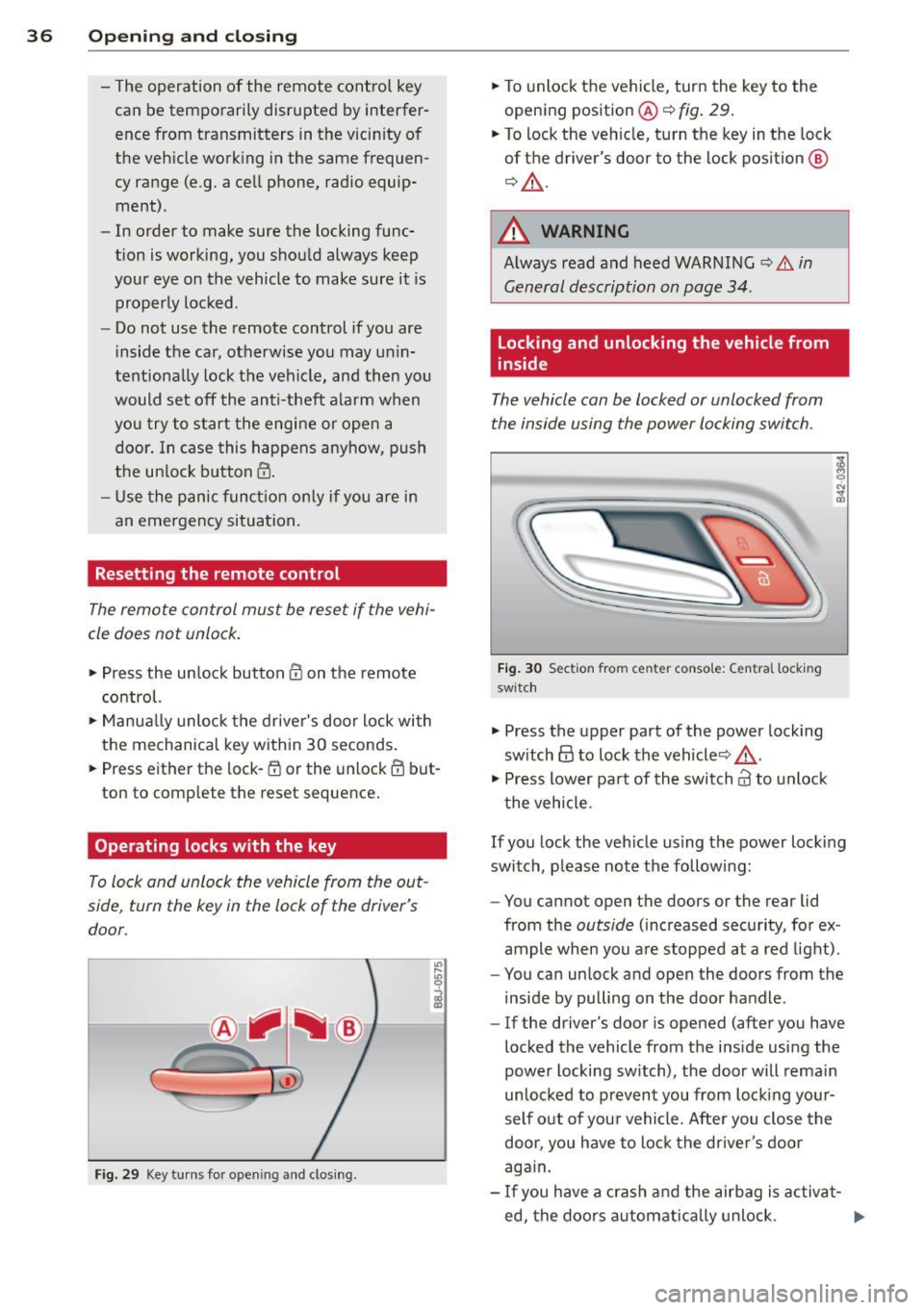
Fig. 29 Key tu rns fo r ope ning and clo sing.
.,,. To unlock the vehicle, turn the key to the
opening position@¢
fig. 29.
.,,. To lock the veh icle, turn the key in the lock
of the driver's door to the lock position
@
¢ &_ .
A WARNING
Always read and heed WARNING¢.&. in
General description on page 34 .
Locking and unlocking the vehicle from
inside
The vehicle can be locked or unlocked from
the inside using the power locking switch .
Fig. 30 Sec tion from center conso le: Ce ntra l locking
switch
.,,. Press the upper part of the power lock ing
sw itch
@ to lock the vehicle ¢&_ .
.,,. Press lower pa rt of the switch
crl to unlock
the vehicle .
If you lock the veh icle using the power locking
switch , please note the following:
- You cannot open the doors or the rear lid
from the
outside ( increased security, for ex
ample when you are stopped at a red light).
- You can unlock and open the doors from the
inside by pulling on the door handle .
-If the driver's door is opened (after you have
locked the vehicle from the inside using the
power locking switch), the door will remain
unlocked to prevent you from locking your
self out of you r vehicle. After you close the
door, you have to lock the driver 's door
aga in.
- If you have a crash and the airbag is activat-
ed, the doo rs automatically unlock. ..,.
Page 40 of 244
38 Openin g and clo sing
well as the vehicle doors closed when not
in use.
@ Tips
- If the rear lid is ope n or not properly
locked when the ignition is turned on,
the door and rear lid warning appears in
the instrument cluster disp lay.
- If the rear lid on a locked vehicle is un
locked with the middle button
c;j on the
remote key, the rear lid is automatically
l ocked again immediately after clos ing .
This is indicated by the turn signals blinking .
Rear Lid Emergency Release
If the rear lid cannot be opened , an emergen
cy release is provided .
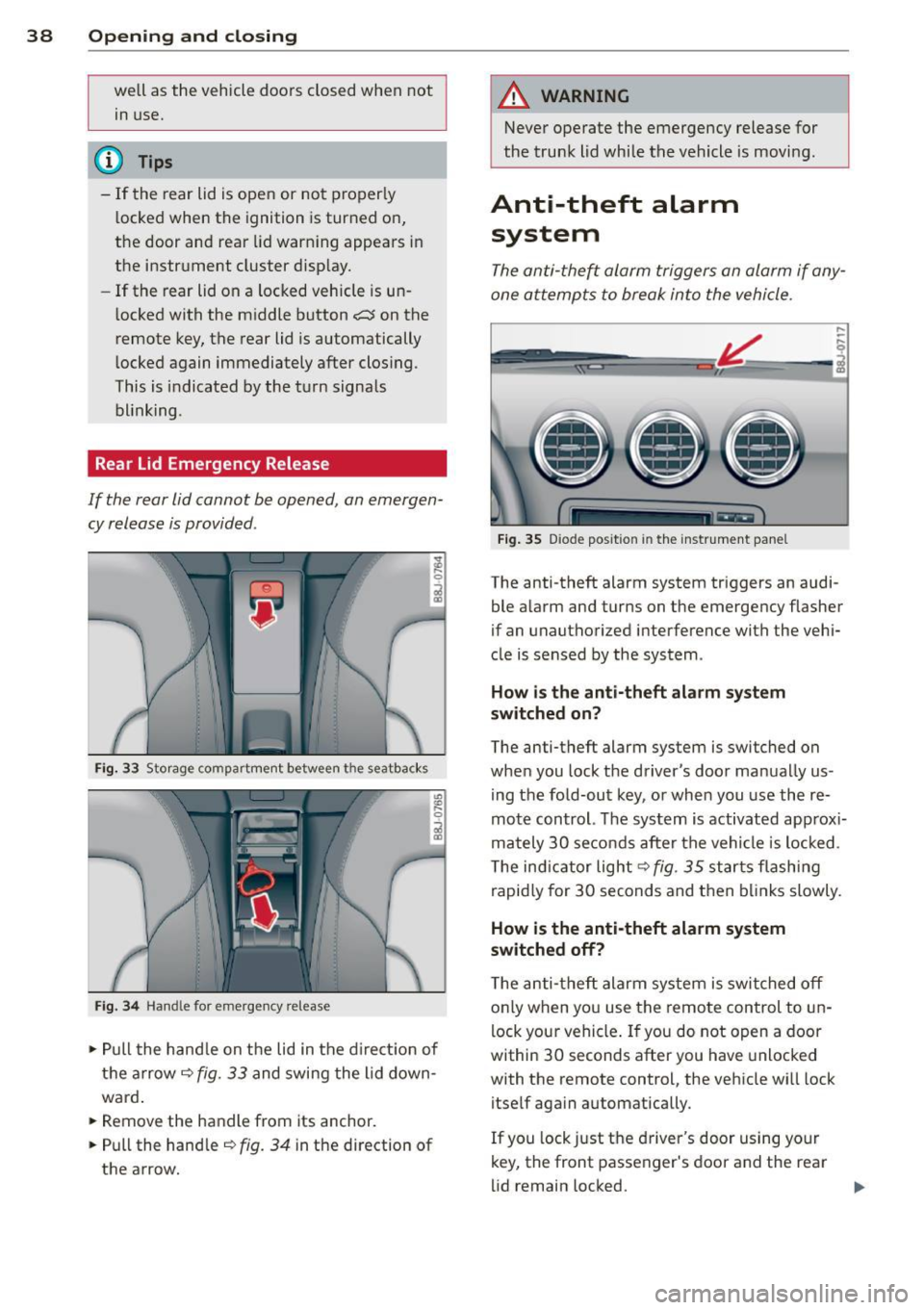
Fig. 33 Storage compartment between t he seatbacks
Fig. 3 4 Handle for emergency re lease
., Pull the hand le on the lid in the d irect ion of
the arrow
i=;, fig. 33 and swing the lid down
ward .
.. Remove the handle from its anchor.
.. Pull the hand le
r::;, fig. 34 in the direction of
the arrow.
A WARNING
-Never operate the emergency release for
the trunk lid while the vehicle is moving .
Anti-theft alarm
system
The anti -the~ alarm triggers an alarm if any
one attempts to break into the vehicle.
F ig . 35 D iode positio n in th e instr ument pane l
,..
-q
i
The anti-theft alarm system triggers an audi
ble a larm and turns on the emergency flasher
if an unauthorized interference with the vehi
cle is sensed by the system .
How is the anti- theft ala rm sy ste m
sw itched on ?
The anti-theft alarm system is switched on
when you lock t he driver's door manually us
ing the fold-out key, or when you use the re
mote control. The system is activated approx i
mately 30 seconds after the vehicle is locked.
T he ind icator light
r::;,fig. 35 starts flashing
rapid ly for 30 seconds and then bl inks slowly .
How is th e anti-theft alarm sy stem
sw itched off?
T he anti-theft alarm system is switched off
o nly when you use the remote control to un
lock your vehicle . If you do not open a door
within 30 seconds after you have unlocked
with the remote control, the vehicle wi ll lock
itself aga in automatically .
If you lock just the driver's door using your
key, the front passenger's door and the rear
lid remain locked. ..,.
Page 44 of 244
42 Convertible top
Opening the Convertible Top Manually
Applies to vehicles: with manua l convertible top
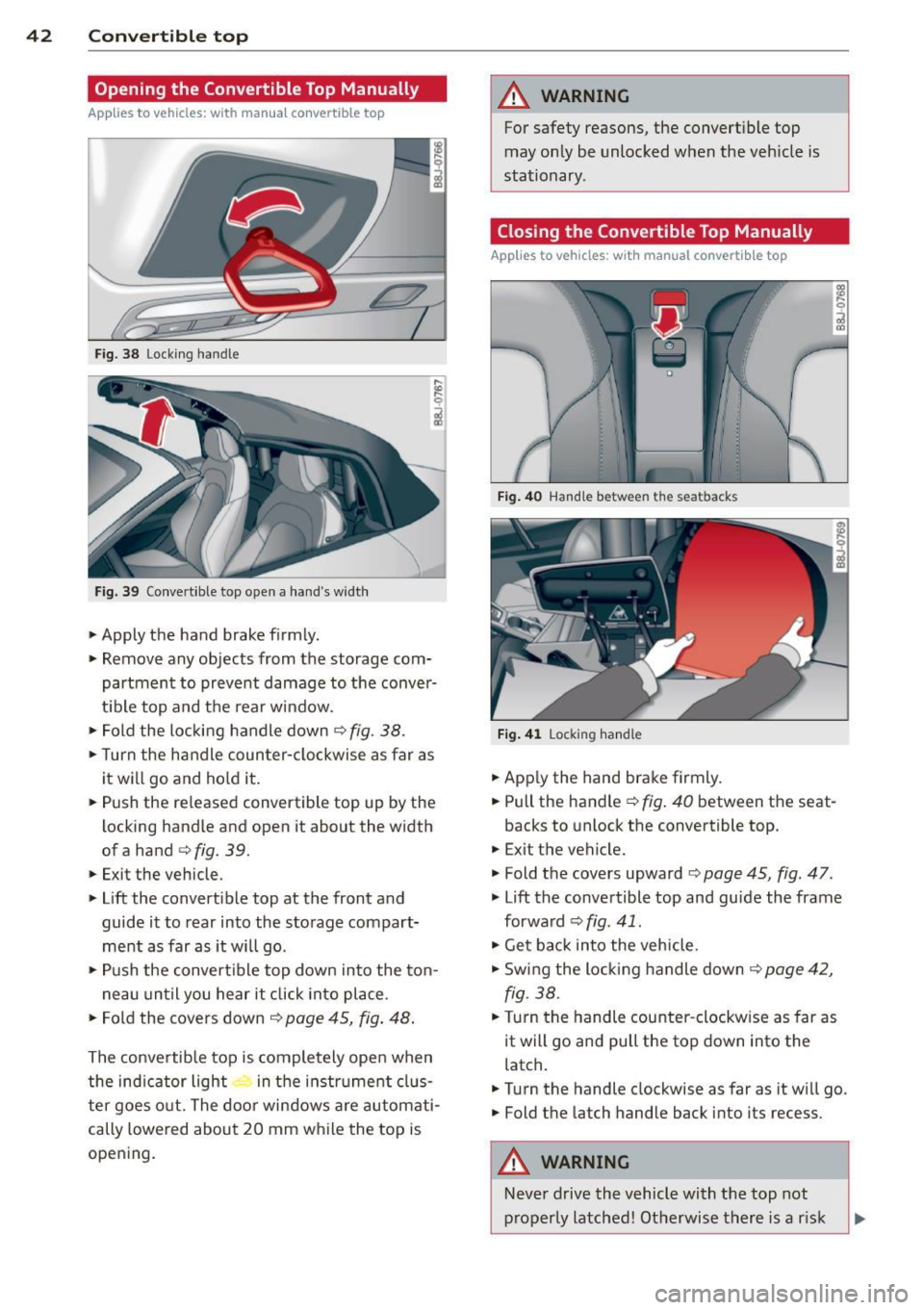
Fig. 38 Lock ing handle
Fig. 39 Convert ible top open a hand 's widt h
• Apply the hand brake f irmly.
• Remove any objects from the storage com
partment to prevent damage to the conver
t ib le top and the rear window.
• Fold the locking handle down
¢ fig . 38.
• Turn the handle coun ter-clockwise as far as
it w ill go and hold it.
• Push the released convertible top up by the
locking handle and open it about the width
ofa hand
¢ fig. 39.
• Exit the vehicle .
• Lift the convert ible top at the front and
guide it to rear into the storage compart
ment as far as it will go .
• Push the convert ible top down into the ton -
n eau until you hear it click into place .
• Fo ld the covers down ¢
page 45, fig. 48 .
The conve rtib le top is comple tely ope n when
the ind icator light in t he i nstr ument clus
ter goes o ut. The door windows a re automati
cally lowered about 20 mm w hile the top is
opening .
A WARNING
-~
For safety reasons, the convert ible top
may on ly be unlocked when the veh icle is
stationary .
Closing the Convertible Top Manually
Applies to vehicles: with manual convertib le top
F ig . 40 Hand le betwee n the sea tbacks
Fig. 4 1 Locking hand le
• App ly the hand brake firmly.
• Pull the handle¢
fig. 40 between the seat-
backs to unlock the convertible top.
• Exit the vehicle.
• Fold the covers upward ¢
page 45, fig. 47 .
• Lift the convertible top and guide the frame
forwa rd ¢
fig. 41.
• Get bac k into the vehicle.
• Swing the locking handle down <=?
page 42,
fig. 38.
• Turn the handle counter -clockw ise as far as
it will go and pull the top down into the
latch .
• Turn the handle clockwise as far as it wi ll go.
• Fold the la tch handle back into its recess.
A WARNING
-
-
Neve r drive the vehicle with the top not
p roperly latched! Otherwise there is a r isk
Page 45 of 244
that the top will be opened by the wind.
Th is can result in injuries and damage to
the vehicle.
@ Tips
The indicator light for the convertible top goes out as soon as it is correctly latched .
Opening and Closing the Convertible
Top Automatically
App lies to vehicles: with power convertible top
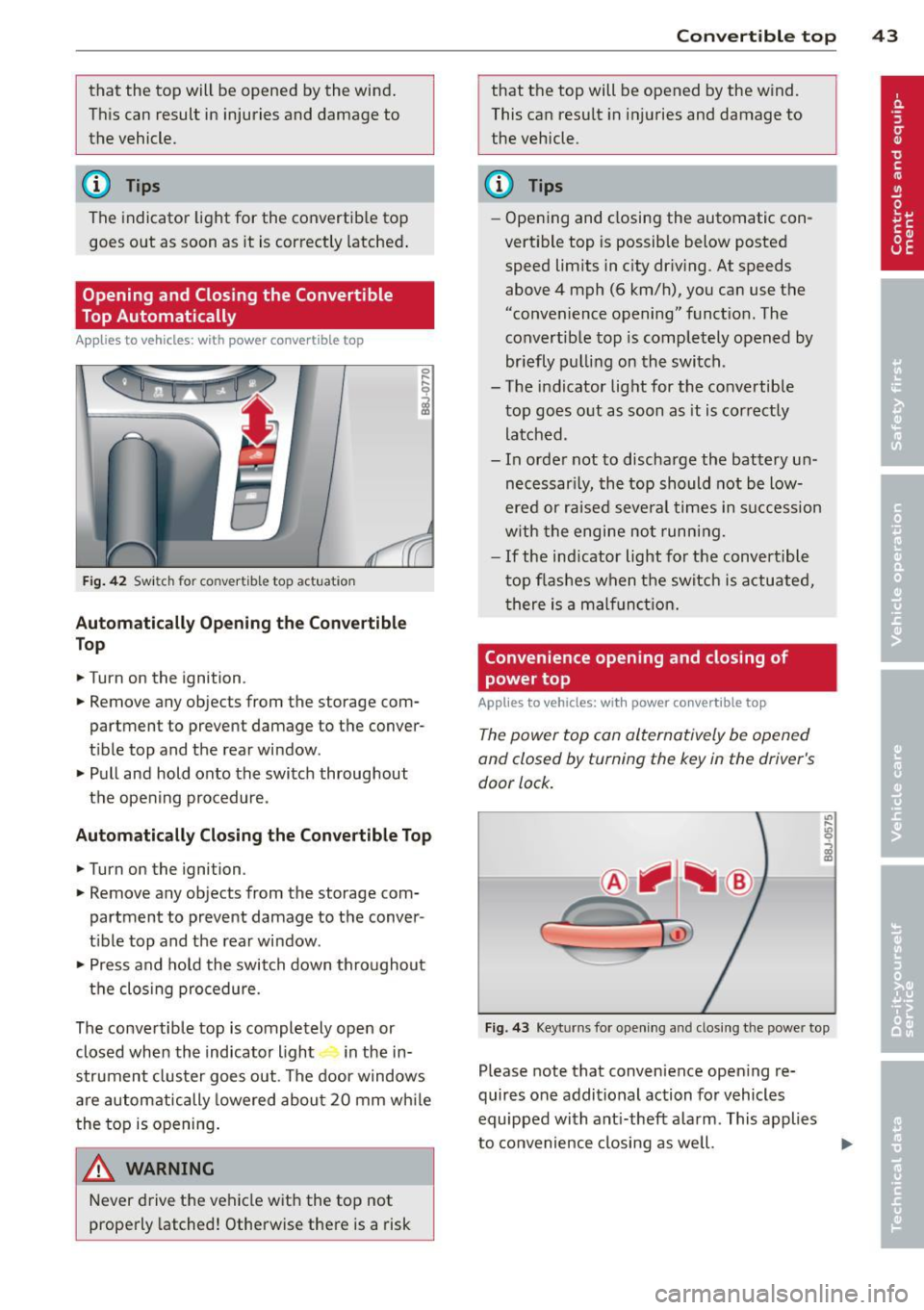
Fig . 42 Switch for convertible top actuation
Au tomaticall y Op ening th e Convertible
Top
.. Turn on the ignition .
.. Remove any objects from the storage com
partment to prevent damage to the
conver
tible top and the rear window.
.. Pull and hold onto the switch throughout
the opening procedure.
Automatic ally C losing th e Con vertible T op
.. Turn on the ignition .
.. Remove any objects from the storage com
partment to prevent damage to the
conver
t ible top and the rear window .
.. Press and hold the switch down throughout
the closing procedure.
The convertible top is completely open or
closed when the indicator light in the in-
strument cluster goes out . The door windows
are automatically lowered about 20 mm wh ile
the top is opening .
& WARNING
Never drive the vehicle with the top not
properly latched! Otherwise there is a risk
-
Con vert ible top 4 3
that the top will be opened by the wind.
This can result in in juries and damage to
the vehicle.
(D Tips
- Opening and closing the automatic con
vertible top is possible below posted speed lim its in city driv ing. At speeds
above 4 mph (6 km/h), you can use the
"convenience opening" funct ion. The
convertible top is completely opened by
br iefly pulling on the switch .
- The indicator light for the co nvertible
top goes o ut as soon as it is cor rectly
latched.
- In order not to discharge the battery un
necessar ily, the top should not be low
ered or raised several times in succession
w ith the engine not running.
- If the ind icator light for the convertible
t op flashes when the switch is actuated,
there is a malf unct ion.
Convenience opening and closing of
power top
Applies to vehicles: with power co nvertible top
The power top can alternatively be opened
and closed by turning the key in the driver's
door lock.
c
F ig. 43 Keyt urns for ope ning and closing th e power top
Please note that convenience open ing re
quires one additional action for vehicles
equipped with ant i-theft alarm . This applies
to convenience closing as we ll.
Page 51 of 244
light sensor checked as soon as possible at a
dealership.
Adaptive light *
The benefit of adaptive l ight is that the curve
and the edge of the road are better i llum inat
ed . The adaptive light is contro lled automati
cally, depending on vehicle speed and steering
wheel angle.
When driving a round bends, the head lights
are contro lled according to steering wheel an
g le . So that there is no black area ahead of the
ve hic le, the two main beams pivot at different
angles. The system works above a speed of
about 6 mph (10 km/h).
Com ing home /le avi ng home function *
The function is swit ched on when the switch is
in the AUTO* position and the function is
shown as active in the driver information sys
tem.
The
coming hom e function illuminates the
area around the vehicle when the ign ition is
switched off and the driver's door is ope ned.
The length of time the lights remain on can be
set in the menu display
( Illumination > Exte
rior lights > coming home ).
The leavi ng home function i lluminates the
area around the vehicle when unlocking it.
A WARNING
- Never use dayt ime running l ights to see
where you are going. They are not bright
enough and w ill not let you see far
enough ahead for safety, especially at
dusk or when it is dar k. Always switch on
the low beams at dusk or when i t is dar k.
- Automatic headlights a re only intended
to assist the dr iver. They do not re lieve
t he driver of his responsibi lity to check
t he headlights and to turn them on man
ually according to the current light and
visibility conditions. For example, fog
and rain cannot be detected by the light
sensors. So a lways switch on the head
lights under these weather cond itions
and when driving in the dark
jO .
Clear vis ion 49
- Crashes can happen when you cannot see
the road ahead and when you cannot be
seen by other motorists.
- Always turn on the headlights so that
youcanseeahe adandsothatothe ~
can see your car from the back .
- Please observe legal regulat ions w hen
using the ligh ting systems des cribed.
(D Tips
- T he light sensor for head light control is
located in the rear view mirror mount.
Do not apply any stickers to t he wind
shield in th is area to preven t malfunc
tions or fa ilures.
- Some exter io r l ighting funct ions can be
adjusted in t he driver i nformat ion sys
t em
~page 24.
- I f you remove the igni tion from t he igni
t ion lock while the headligh ts are s till
on, a buzzer wi ll sound as long as the
driver's door is o pen to remind yo u to
t u rn off the lights.
- Always observe the specific local regula
tions for your area as to when to use your
lights.
- With automatic headlights, the high
beam f unction is also available, but w ith
one restrict ion: If you have not sw itched
the high beams back to low beams dur
ing automatic headlight operation (for
example, after d riving throug h a tunnel),
only the low beams come on the next
t ime au tomati c headlights a re swi tched
on. To use the high beams , you firs t have
t o pull the hig h beam lever back and
then push the lever fo rward again .
- In coo l or damp weather, the inside of
the headlights, turn signals an d tail
lights can fog over due to the tempera
t u re difference between the inside and
outside. They w ill clear shortly after
switching them on. This does not affect
the se rv ice life of the lighting.
Page 52 of 244
50 Clear vis ion
Front fog lights
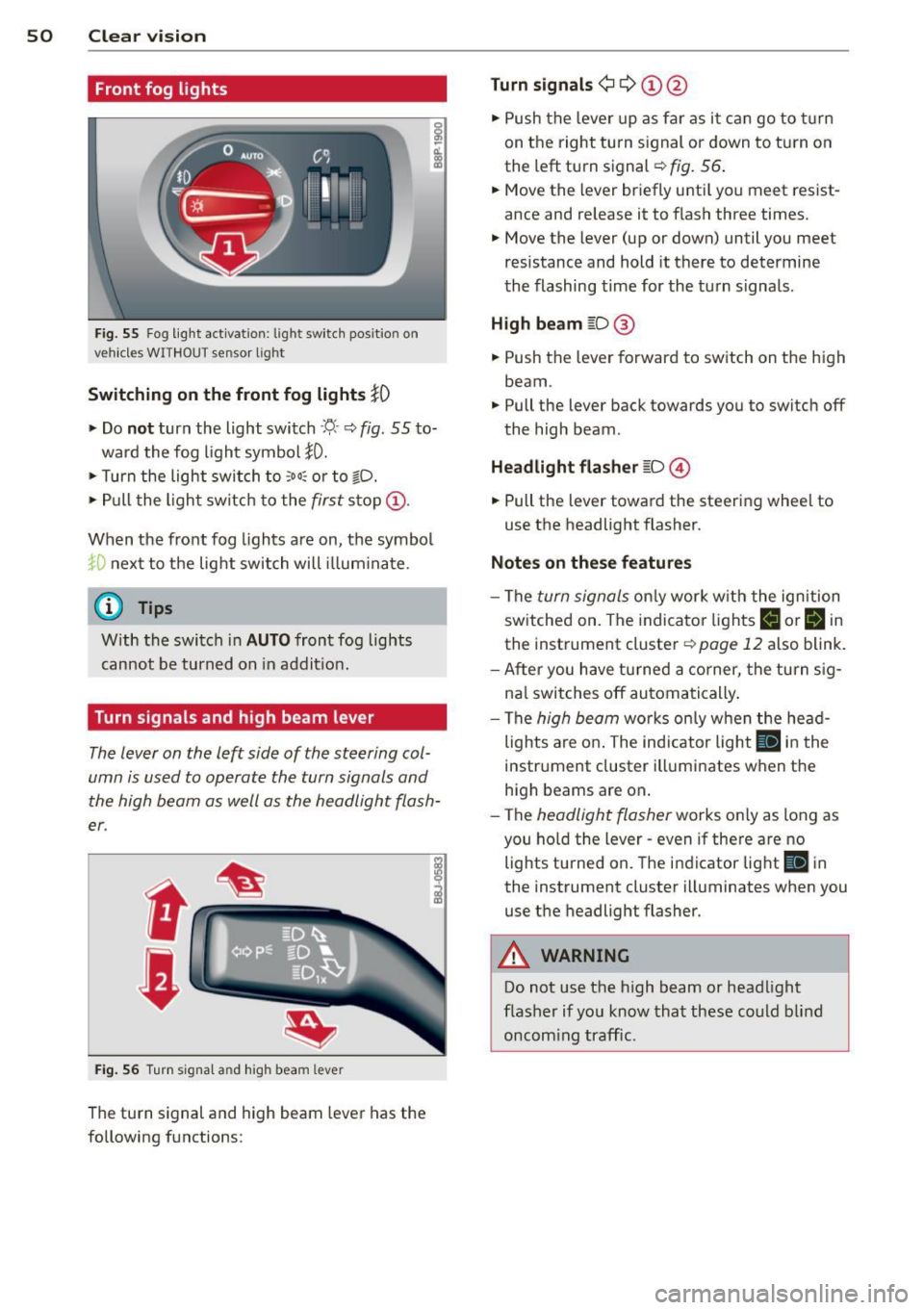
F ig. 55 Fog light act ivation: light switch pos itio n on
veh icles WITHOUT sensor light
Switching on the front fog lights iO
.,. Do no t turn the light switch ·'t/- · ¢ fig. 55 to-
ward the fog light symbol
}D.
.,. Turn the light switch to :o o: or to io .
.,. Pull the ligh t switch to the first stop @.
When the front fog lights are on, the symbol
}D next to the light switch will i llum ina te.
@ Tips
With the switch in AUTO front fog lights
cannot be turned on in addit ion.
Turn signals and high beam lever
The lever on the left side of the steering col
umn is used to operate the turn signals and
the high beam as well as the headlight flash
er .
Fig. 56 Tu rn signa l and hig h beam lever
The turn signal and high beam lever has the
following functions:
Turn signals ¢ Q ©@
.,. Push the lever up as fa r as it ca n go to t urn
on the right turn s ignal or down to tu rn on
the left turn signal ¢
fig. 56 .
.,. Move the lever briefly unti l you meet res ist
ance and release it to flash three times .
.,. Move the lever (up or down) until you meet
resistance and hold it there to determine
the flashing time for the turn signals .
High be am gD @
.,. Push the lever forward to switch on the high
beam.
.,. Pull the lever back towards you to switch off
the high beam.
Headlight fla sh er gD @
.,. Pull the lever toward the steering whee l to
use the headlight flasher.
Not es on thes e features
- The turn signals on ly work wi th the ignition
sw itched on. The indicator lights
F-1 or rl in
the instrument cluster¢
page 12 also blink.
- After you have turned a co rner, the turn s ig-
na l switches off automa tically .
- The
high beam works on ly w hen the he ad
lights a re on . The indicator light
II in t he
instrument cluster illuminates when the
high beams are on.
- The
headlight flasher works only as long as
you ho ld the lever - even if there a re no
lights turned on. The indicator light
II in
the instrument cluster illuminates when you
use the headlight flasher.
A WARNING
-
Do not use the h igh beam or head light
flasher if yo u know that these could b lind
oncom ing traffic.
-
Page 55 of 244
_& WARNING
- Curved (i. e. convex) mirror surfaces in
crease your field of view. Remember that
vehicles or other objects will appear
smaller and farther away than when seen
in a flat mirror.
If you use this mirror to
estimate distances of following vehicles
when changing lanes, you could estimate
incorrectly and cause an accident.
CD Note
- If the mirror housing is moved uninten
tionally (for example, while parking your
vehicle), then you must first fold the mir ror electrically. Do not readjust the mir
ror housing manually. You could damage
the motor which controls the mirror .
- If you wash the vehicle in an automatic
car wash, you must fold the exterior mir
rors in to reduce the risk of damage to
the mirrors . Never fold power folding ex
terior mirrors* by hand. Only fold them in and out using the power controls .
@ Tips
If there should be a malfunction in the
electrical system, you can still adjust the
exterior mirrors by pressing the edge of
the mirror .
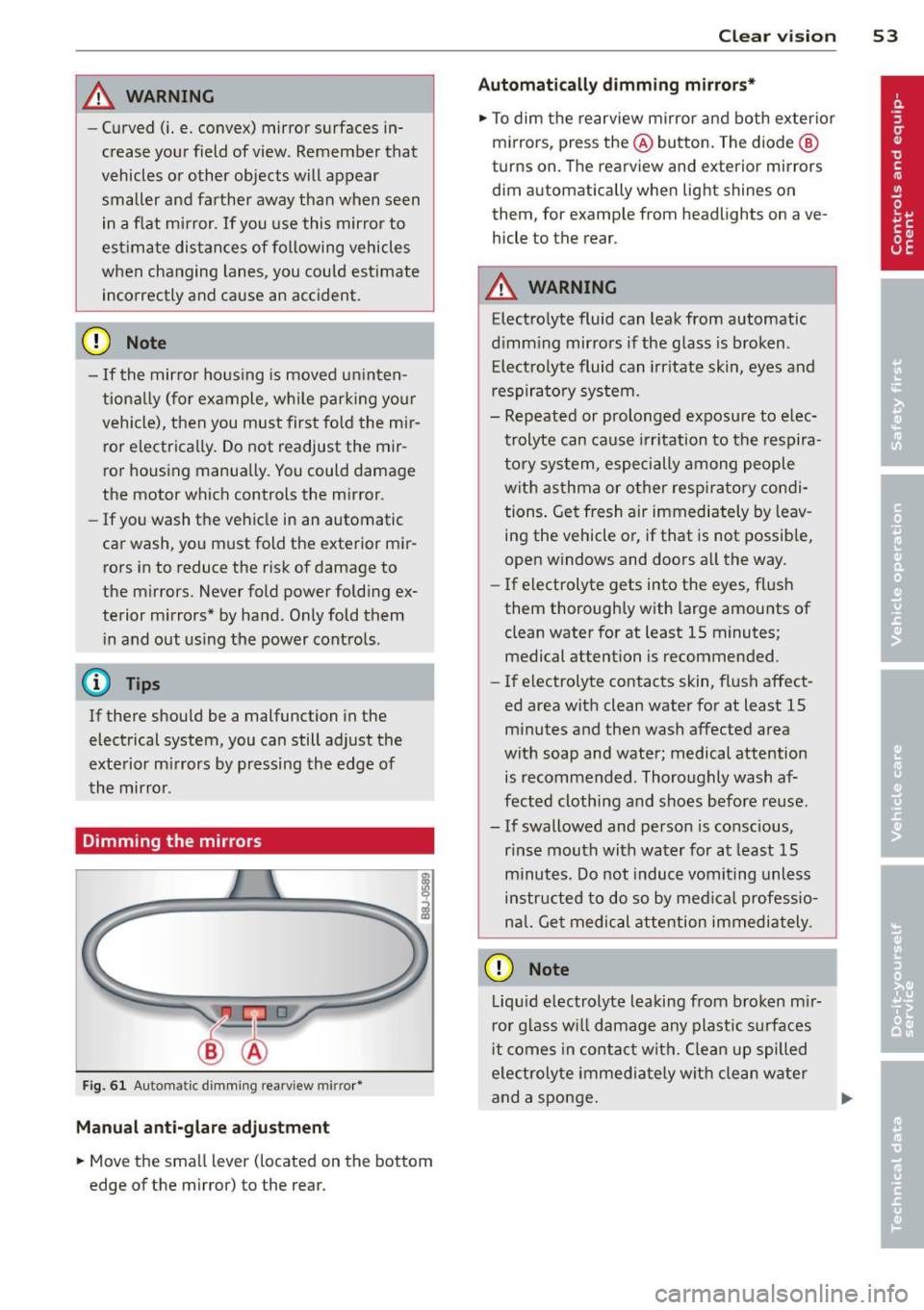
Dimming the mirrors
Fig. 61 Automa tic dimming re arview mirror•
Manual anti-glare adjustment
• Move the small l ever (located on the bottom
edge of the mirror) to the rear.
Clear vision 53
Automatically dimming mirrors*
• To dim the rearview mirror and both exterior
mirrors, press the @button. The diode @
turns on . The rearview and exterior mirrors
dim automatically when light shines on
them, fo r ex ample from headlights on ave
hicle to the rear .
_& WARNING
Electrolyte fluid can leak from automatic
dimming mirrors if the glass is broken .
Electrolyte fluid can irritate skin, eyes and
respiratory system.
- Repeated or prolonged exposure to elec
trolyte can cause irritation to the respira
tory system, especially among people
with asthma or other respiratory condi
tions. Get fresh air immediately by leav
ing the vehicle or, if that is not possible,
open windows and doors all the way.
- If electrolyte gets into the eyes, flush
them thoroughly with large amounts of
clean water for at least 15 minutes·
. '
medical attention is recommended.
- If electrolyte contacts skin, flush affect
ed area with clean water for at least 15 minutes and then wash affected area
with soap and water; medical attention is recommended. Thoroughly wash af
fected clothing and shoes before reuse .
- If swallowed and person is conscious, rinse mouth with water for at least 15
minutes. Do not induce vomiting unless
instructed to do so by medical professio
nal. Get medical attention immediately .
CD Note
Liquid electrolyte leaking from broken mir
ror glass will damage any plastic surfaces
it comes in contact with. Clean up spilled
electrolyte immediately with clean water
and a sponge. .,..
Page 57 of 244
During brief stops, e.g. at a red light, wiper
motion will automatically be reduced to the
next lower speed. Wipers already turning at
low speed change to intermittent wiping.
When the ignition is turned on, the washer
jets are heated.
A WARNING
- Wiper blades are crucial for safe driving!
Only when they are in good condition are
they able to clear the windows properly
to provide uncompromising visibility .
Worn or damaged wiper blades are a safety hazard ¢
page 5 7, Replacing
windshield wiper blades!
- The light/rain sensor* is only designed to
assist and support the driver.
It remains
entirely the driver's responsibility to
monitor outside weather conditions and
to manually activate the wipers as soon as rain or drizzle reduces visibility
through the windshield.
- The windshield must not be treated with
water-repellent materials. They can in
crease glare under poor visibility condi
tions such as wetness, darkness, or when
the sun is low on the horizon. In addi
tion, they can cause the windshield wip
ers to chatter .
(I) Note
In freezing or near freezing conditions:
- Always check that the wiper blades are
not frozen to the glass before you turn
the wipers on . Loosen a wiper blade
which is frozen in place before operating
the wipers to prevent damage to the
wiper blade or the wiper motor.
- Do not use the wipers to clear a frosted window . Using the wipers as a conven
ient ice scraper will destroy the wiper
blades.
- Before you take your vehicle to an auto
matic car wash, make sure you have the
windshield wiper system switched off (lever in position 0), otherwise the wind
shield wiper system could get damaged
Clear vision 5 5
in the car wash if it should suddenly
come on.
(0 Tips
- The windshield wipers are switched off
when the ignition is turned off. Activate
the windshield wipers after the ignition
is switched back on by moving the wind
shield wiper lever to any position.
- Worn or dirty windshield wiper blades
cause smearing, which can affect the op
eration of the light/rain sensor* . Check
the condition of your windshield wiper
blades regularly.
- The rain sensor is part of the interval
wiping system . Turning off the ignition
will also deactivate the rain sensor. To re activate the sensor, switch off the inter
val wiping function, then switch it back
on again.
-Applies to vehicles with light/rain sen
sor : When the wipers are switched on
manually and in rain conditions, the au
tomatic headlights* turn on¢
page 48,
Switching the headlights on and off
or
off during the day when the wipers are
no longer operating. The automatic
headlights* function is available in this
case only when the light switch is in the
"AUTO" position¢
page 48, fig. 53.
-Make sure the washer fluid reservoir in
the engine compartment is topped off
before going on a long trip. Look up
¢
page 180 for checking and filling the
washer container .
- The wipers only operate with the hood
completely closed .
Headlight washer system
Applies to vehicles: with headlight washer system
The headlight washer system cleans the
headlights.
"'Operate the windshield wiper/washer sys
tem
o page 54, fig. 63 ® with the head
lights turned on by holding the lever for lon-
ger than one second . ..,.
Page 58 of 244
56 Clear vis ion
The washer jets extend forward out o f the
front bumper driven by water pressure to
spray the front headlights with water.
You shou ld inspect the headlights regularly
(for example when refueling) and clean
off
any solid dirt or insects from the lenses .
To ensure the system wo rks properly in wi nter,
keep the washer jets free of snow and remove
any ice using a de-icing spray.
Service position
It is only possible to change wiper blades if
you move the wiper arms to the service posi
tion .
In o rder to use the windsh ield wipers, t he
front lid mus t be comp lete ly closed.
Moving w iper blades to the service
position
• When there is a risk of frost, make s ure that
the wiper b lades a re not frozen to the wind
shield.
.. Switch the ignition on.
.. Move the wiper lever to position
0
c> page 54, fig. 63 .
.. Press the I Reset I button until the Displa y
typ e
menu appears in the Driver Informa
t ion System display .
.. Us ing the rocker switch and the
! Reset ! but
ton, select the
S et > W iper s > Front > Serv
ice positi on on
function. The winds hield
wiper arms move to the service position.
Moving wiper blades to park position
.. Make certain that the wiper arms are lying
against the windshie ld .
.. Switch the ign ition on and move t he wiper
l ever from posi tion
O to 4 c> page 54,
fig . 63 .
The wiper arms will move back to
the park position.
«I) Note
Never drive yo ur vehicle when the w ind
shie ld w iper arms are in the service pos i
tion and pulled away from the windshie ld .
When you dr ive faste r than 4 mp h (6 km/ h), the wiper a
rms automatically return to
the park position and cou ld cause paint
damage to the front lid!
(D Tips
- Yo u can also turn on the se rvice posit ion,
for example, if yo u want to protect the
w indshield from icing by using a cover .
- The service posit ion moves to
off a uto
matically when you operate the w ind
shield wiper lever, or speed exceeds
4 mph (6 km/h).
Cleaning windshield wiper blades
Clean the windshie ld w iper blades when they
begin to leave streaks.
.. Place the windshie ld w iper arms in the serv
ice pos it ion. Refer to
c> page 56.
.. Use a soft cloth and glass cleaner to clean
the windshield wiper blades .
A WARNING
Dirty windsh ield wipe r blades can impair
your view. This can lead to accidents .
Page 62 of 244
60 Seats and stor age
Seats and storage
General recommen
dations
Why is your seat adjustment so
important?
The safety belts and the airbag system can
only provide maximum protection if the front
seats are correctly adjusted.
There are various ways of adjusting the front
seats to provide safe and comfortable support
for the driver and the front passenger. Adjust
you r seat prope rly so that :
- you can easily and quickly reach all the
switches and controls in the instrument
panel
-your body is properly supported thus reduc
ing physical stress and fatigue
- the safety be lts and airbag system can offer
maximum protection
¢ page 109.
In the following sections, you will see exactly
how you can best adjust your seats .
There are special regulations and instructions
for installing a child safety seat on the front
passenger's seat. Always heed the informa
tion regarding child safety provided in
¢ page 130, Child Safety.
A WARNING
Incorrect seating position of the driver and
all other passengers can result in serious
personal injury.
- Always keep your feet on the floor when
the vehicle is in motion -never put your
feet on top of the instrument panel, out
of the window or on top of the seat cush
ion! This applies especially to the passen
gers .
If your seating position is incorrect
you increase the risk of injury in the case
of sudden braking or an acc ident.
If the
airbag inflates and the seating position
is incorrect this could result in personal
injury or even death.
- It is important for both the driver and
front passenger to keep a distance of at least 10
inches (25 cm) between them
selves and the steering wheel and/or in
strument panel. If you're sitting any
closer than this, the airbag system can not protect you properly . In addition to
this, the front seats and head restraints
must be adjusted to your body height so
that they can give you maximum protec
tion.
- Always try to keep as much distance as
possible between yourself and the steer
ing wheel or instrument panel.
- Do not adjust the driver's or front pas
senger's seat whi le the vehicle is moving.
Your seat may move unexpectedly, caus
ing sudden loss of vehicle control and
personal injury. If you adjust your seat
while the vehicle is moving, you are out of position.
Driver's seat
The correct seat position is important for safe
and relaxed driving.
We recommend that you adjust the driver's
seat in the following manner :
.,. Adjust the seat in fore and aft direction so
that you can easily push the peda ls to the
floor whi le keeping your knee slightly bent
i::> A in Why is your seat adjustment so im
portant? on page 60 .
.,. Adjust the seatback so that when you sit
with your back against the seatback , you can
still grasp the top of the steering wheel.
.,. Position the head restraint according to the
occupant 's height
<=:> page 63 . For maxi
mum protection, the top of the head re
straint shou ld be at least at eye level, pref
erably higher and ideally level with the top
of the head
¢ page 95, fig. 102.
A WARNING "--
Never place any objects in the driver's foot-
well. An object could get into the pedal
area and interfere with pedal function. In
case of sudden braking or an accident, you
would not be able to brake or accelerate!