fuel AUDI TT ROADSTER 2015 User Guide
[x] Cancel search | Manufacturer: AUDI, Model Year: 2015, Model line: TT ROADSTER, Model: AUDI TT ROADSTER 2015Pages: 244, PDF Size: 60.74 MB
Page 29 of 244
Efficiency program
Description
Applies to vehicles: with trip computer with efficiency
program
• 95
!'4 . FM 1
[JI 300 m,
27.7 m pg
25.8 mpg
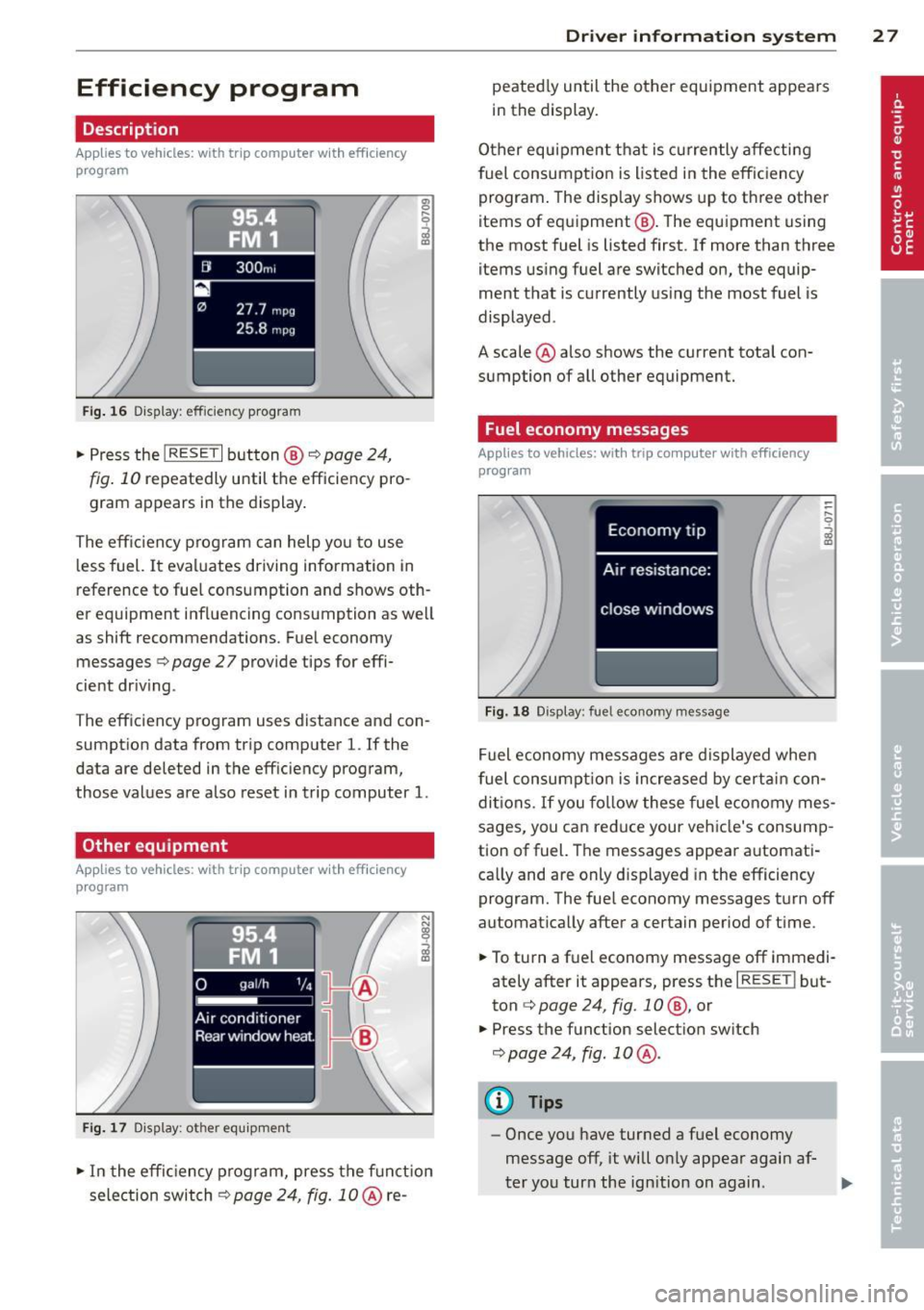
Fig. 16 Di.splay : effic ie ncy program
.,. Press the I RESET I button@¢ page 24,
fig. 10 repeatedly until the efficiency pro
gram appears in the display .
The eff ic iency p rogram can help yo u to use
l ess fuel.
It eva luates driving information in
reference to fue l cons umption and shows oth
er equipment influencing consumption as we ll
as shift recommendations. F ue l economy
messages ¢
page 27 provide tips for effi
cient dr iv ing .
T he eff iciency program uses distance and con
sumpt ion data from tr ip comp uter
l. If the
data are deleted in the eff iciency program,
those values are a lso reset in trip computer
l.
Other equipment
App lies to vehicles: with trip computer w it h eff ic iency
program
F ig. 1 7 Dis p lay: ot her equ ip m ent
.. In the effic iency program, press the f unct io n
selection switch¢
page 24, fig. 10 @ re-
Dr iver in formation system 2 7
peated ly until the other equipment appea rs
i n the display.
Other equipment t hat is currently affecti ng
fuel consumption is listed in the eff iciency
program . The display shows up to th ree other
items of equ ipment @. The equ ipment us ing
the most fuel is listed first. If more than three items us ing fuel are switched on, the equip
ment that is currently us ing the most fuel is
displayed .
A scale @ also shows the current tota l con
sumption of all other equipment.
Fuel economy messages
App lies to vehicles: with trip computer with efficiency
program
Fi g. 18 Disp lay: fu el e cono my message
Fuel economy messages a re displayed when
fuel consu mpti on is increased by cert ain con
d iti ons.
If you fo llow these fuel e conomy mes
sages, you can reduce your veh icle's consump
tion of fuel. The messages appea r automati
ca lly and are only d isp layed in the efficiency
program. The fue l economy messages t urn off
automat ica lly after a certain period of t ime .
.. To turn a f uel economy message off immed i
ately after it appears, press the
I RESE TI but
ton ¢
page 24, fig . 1 0 @, or
.. Press the f unction select ion sw itch
¢ page 24, fig . 10 @.
(D Tips
-Once you have turned a fuel economy
message off, it will on ly appear agai n af-
t er yo u turn the ign ition on again .
IJJ,
Page 30 of 244
28 Driver information system
-The fuel economy messages are not dis
played in every instance, but rather in in
terva ls over a period of ti me.
Service interval display
The service interval display reminds you when
your nex t service is due.
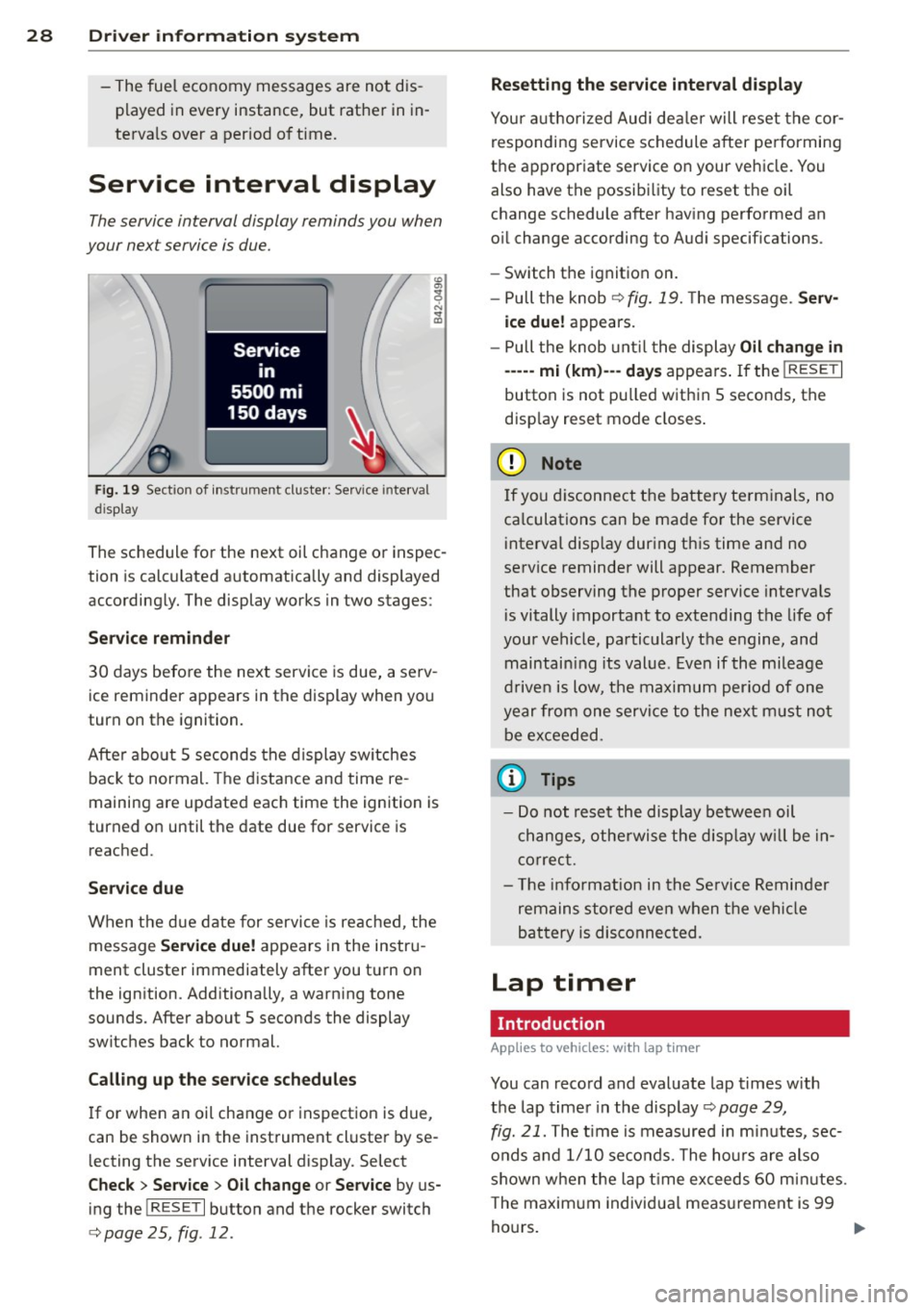
Fig. 19 Sect ion of instrument cluster: Serv ice in terva l
d isp lay
The schedule for the next oil change or inspec
tion is calculated automatically and displayed
accordingly. The display works in two stages :
Service reminder
30 days before the next service is due, a serv
ice reminder appears in the display when you
turn on the ignition.
After about
5 seconds the display switches
back to normal. The distance and time re
maining are updated each time the ignition is
turned on until the date due for service is
reached.
Service due
When the due date for service is reached , the
message
Service due! appears in the instru
ment cluster immediately after you turn on
the ignition. Additionally, a warning tone
sounds . After about
5 seconds the display
switches back to normal.
Calling up the service schedules
If or when an oil change or inspection is due,
can be shown in the instrument cluster by se
lecting the serv ice interval display. Select
Check > Service > Oil change or Service by us
ing the
! R ES ET I button and the rocker switch
c> page 25 , fig . 12.
Resetting the service interval display
Your authorized Audi dealer will reset the cor
responding service schedule after performing
the appropriate service on your veh icle. You
also have the possibility to reset the oil
change schedule after having performed an
o il change according to Audi specifications.
- Switch the ignition on.
- Pull the knob
c> fig. 19. The message. Serv-
ice due!
appears.
- Pull the knob until the display
Oil change in
-----mi (km)---day s appears . If the I RESET I
button is not pulled within 5 seconds, the
disp lay reset mode closes.
(D Note
If you disconnect the battery terminals, no
ca lculations can be made for the service
interval display during this time and no
service reminder will appear. Remember
that observing the proper service intervals
i s vitally important to extending the life of
your vehicle, particularly the engine, and
maintain ing its value . Even if the mileage
driven is low, the maximum period of one
year from one service to the next must not
be exceeded.
'
(D Tips
-Do not reset the display between oil
changes, otherwise the display w ill be in
correct.
- Th e information in the Service Reminder
remains stored even when the vehicle
battery is disconnected.
Lap timer
I ntrod ucti on
App lies to vehicles: wit h lap timer
You can record and evaluate lap times with
the lap timer in the display c>page
29,
fig. 21. The time is measured in minutes, sec
onds and
1/10 seconds. The hours are also
shown when the lap t ime exceeds
60 min utes .
T he maximum individual measurement is 99
hours. ..,.
Page 32 of 244
30 Driver information system
@ Tips
-Saved lap times cannot be individually
deleted from the total results.
- The saved lap timer values will not be
lost after turning the ignition off .
On-Board Diagnostic
system (OBD)
Malfunction Indicator Lamp (MIL)
The Malfunction Indicator Lamp (MIL) Ill in
the instrument cluster is part of the On-Board
Diagnostic (OBD II) system.
The warning/indicator light illuminates when
the ignition is switched on and goes o ut after
the engine starts and the idle has stabilized.
This indicates that the MIL is working proper
ly.
If the light does not go out after the engine
is started, or illuminates whi le you are driv
ing, a ma lfunction may exist in the engine sys
tem. If the light illuminates, the catalytic con
verter could be damaged.
Continue driving
with reduced power (avoid
ing sustained high speeds and/or rapid accel
erations) and have the condition corrected.
Contact your authorized Audi dealer .
If the light illuminates, the electronic speed limiter may also be malfunctioning. For more
information ¢
page 30, Electronic speed
limiter.
An improperly closed fuel filler cap may also
cause the MIL light to illuminate
¢page 162.
On-Board Diagnostics
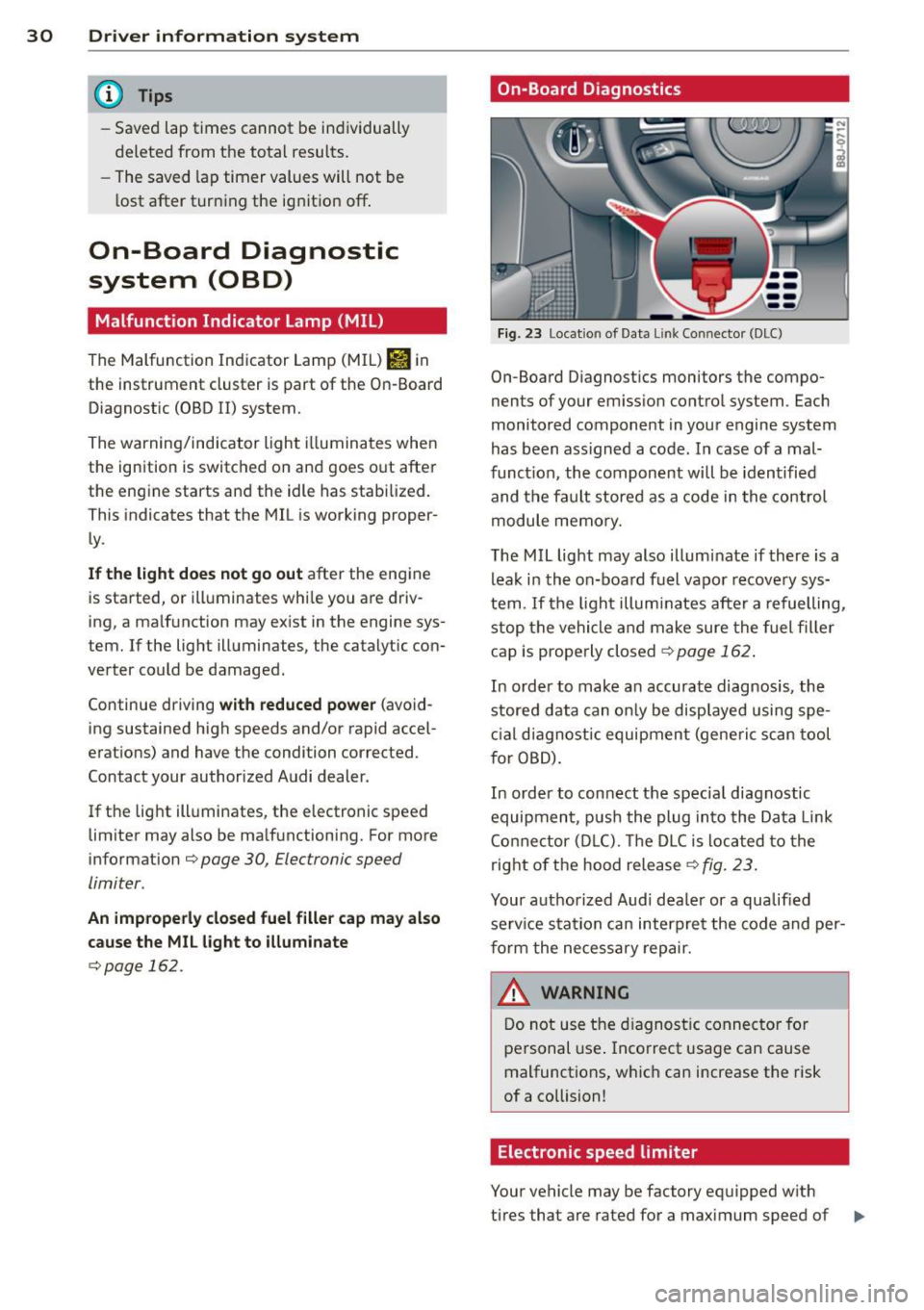
Fig. 23 Location of Data Lin k Co nn ector (DLC)
On-Board D iagnostics monitors the compo
nents of your emission control system . Each
monitored component in your engine system
has been ass igned a code. In case of a mal
funct ion, the component will be identified
and the fault stored as a code in the control
module memory.
The MIL light may also illuminate if there is a
leak in the on-board fuel vapor recovery sys
tem .
If the light illuminates after a refuelling,
stop the vehicle and make sure the fuel filler
cap is properly closed¢
page 162 .
In order to make a n accurate diagnosis, the
stored data can only be displayed using spe
cial diagn ostic equipment (generi c scan tool
f or OBD).
In order to connect the spec ial diagnostic
equipment , push the plug into the Data Link
Connector (DLC). Th e DLC is located to the
right of the hood release
¢fig. 23.
Your authorized Audi dealer or a qualified
service s ta tion can interpret the code and per
form the necessary repair.
~ARNING
Do not use the diagnostic connector for
personal use . Incorrect usage can cause
malfunctions, which can increase the risk
of a collision!
Electronic speed limiter
Your vehicle may be factory equipped w ith
-
tires that are rated for a maximum speed of .,..
Page 58 of 244

56 Clear vis ion
The washer jets extend forward out o f the
front bumper driven by water pressure to
spray the front headlights with water.
You shou ld inspect the headlights regularly
(for example when refueling) and clean
off
any solid dirt or insects from the lenses .
To ensure the system wo rks properly in wi nter,
keep the washer jets free of snow and remove
any ice using a de-icing spray.
Service position
It is only possible to change wiper blades if
you move the wiper arms to the service posi
tion .
In o rder to use the windsh ield wipers, t he
front lid mus t be comp lete ly closed.
Moving w iper blades to the service
position
• When there is a risk of frost, make s ure that
the wiper b lades a re not frozen to the wind
shield .
.. Switch the ignition on.
.. Move the wiper lever to position
0
c> page 54, fig. 62.
.. Press the I Reset I button until the Displa y
typ e
menu appears in the Driver Informa
t ion System display .
.. Us ing the rocker switch and the
! Reset ! but
ton, select the
S et > W iper s > Front > Serv
ice positi on on
function. The winds hield
wiper arms move to the service position.
Moving wiper blades to park position
.. Make certain that the wiper arms are lying
against the windshie ld .
.. Switch the ign ition on and move t he wiper
l ever from posi tion
O to 4 c> page 54,
fig . 62 .
The wiper arms will move back to
the park position.
«I) Note
Never drive yo ur vehicle when the w ind
shie ld w iper arms are in the service pos i
tion and pulled away from the windshie ld .
When you dr ive faste r than 4 mp h (6 km/ h), the wiper a
rms automatically return to
the park position and cou ld cause paint
damage to the front lid!
(D Tips
- Yo u can also turn on the se rvice posit ion,
for example, if yo u want to protect the
w indshield from icing by using a cover .
- The service posit ion moves to
off a uto
matically when you operate the w ind
shield wiper lever, or speed exceeds
4 mph (6 km/h).
Cleaning windshield wiper blades
Clean the windshie ld w iper blades when they
begin to leave streaks. Use a soft cloth and
glass cleaner to clean the windshield wiper
blades.
.. Place the windshie ld w iper arms in the serv
ice pos it ion . Refer to
c::> page 56 .
"' Lift the wiper arm away from the front win
dow.
_&. WARNING
Di rty windsh ield wiper b lades can impair
your view. This can lead to accidents .
-
Page 73 of 244

The rear window defogger works only when
the engine is running. The indicator light in
the button illuminates when the rear w indow
defogger is turned on .
The rear window defogger is switched off au
tomatically after approx . 10 minutes .
@) For the sake of the environment
As soon as the rear window is clear, yo u
should switch the rear window de fogger
off . The reduced power consumption has a
beneficial effect on fuel consumption.
Heated seats~
Applies to vehicles: with heated seats
The seat cushion and the seotbock of the
front seats con be heated electrically .
.,. Press the heated seats b utton I-J + I
Q page 67, fig. 78 to set the level of heating
desired .
The range of controls goes from 1 to 3. The heat setting se lected is shown by LEDs above
the button .
A WARNING
Individuals with reduced sensitivity to pain
or temperature could develop burns when
using the seat heating function. To reduce
the risk of inju ry, these individuals should
not use seat heat ing .
(D Note
To avo id damage to the heating elements
in the seats, do not kneel on the seats or
place heavy loads on a small area of the
seat .
Using the climate controls economically
Economical use of the climate controls helps
to save fuel .
When climate control is working in coo ling
mode, engine performance is reduced and
fuel consumption is affected . To keep the time
Warm and c old 71
the air conditioning is on as short as possible,
you should do the following:
.,. If you would like to save fuel, switch the ai r
condi tioning off .
.,. If you open the windows while driving,
switch the air conditioning off .
.,. If the veh icle is extremely hot d ue to the
heat of the sun, br iefly open doors and w in
dows .
@) For the sake of the environment
When you save fuel, you reduce emissions
from the vehicle.
Page 152 of 244
150 Driving and en vironm ent
Avoid damaging the
vehicle
When you are driving on poor roads, or over
curbs, steep ramps, etc ., make certain that
low-lying parts such as spoilers and exhaust
system parts do not bottom out and get dam
aged.
This is especially true for vehicles with low
slung chassis (sports chassis) and fully loaded
vehicles .
Driving through water
on roads
Note the following to avoid vehicle damage
when driving through water, for example on
flooded roads:
- T he water must not be any highe r tha n the
bottom of the vehi cle body.
- Do no t drive faster than wa lking speed.
_& WARNING
After d riving through water, m ud, slush,
etc., the brakes may be slow to take effect
because o f wet brake ro tors and pads . Dry
the brakes fi rst by braking carefully to re
store the full braking effect.
(]) Note
Vehicle components such as the engine,
transmiss ion, suspension or electrical sys
tem can be severely damaged by driving
through water.
- Check the depth o f the water before driv
ing through it.
- Do not stop the veh icle, dr ive in reverse
or switch the engine
off when driving
through water.
- Keep in mind that oncoming vehicles may c reate waves that raise the water
l evel and make it too deep for your vehi
cle to drive through safely.
- Avoid driving thro ugh salt water because
it can ca use corrosion.
-
Catalytic converter
It is very important that your emission con
trol system (catalytic converter) is function
ing properly to ensure that your vehicle is run
ning in an environmentally sound manner.
.. Always use lead-free gasoline¢ page 160,
Fuel supply .
.. Never run the tank down all the way to emp
ty.
.. Never put too much moto r o il in yo ur eng ine
¢ page 169, Adding engine oil ~-
.. Never try to push- or tow-st art you r vehicle.
The catalytic co nverter is an efficient "clean
u p" dev ice built into the exhaust system of
t h e vehi cle. The cata lytic conve rter bu rns
many of the pollutan ts in the exha ust gas be
f ore they are re leased into the atmosphere.
T he exclusive use of unleaded fuel is critically
impor tant for the life of the catalyt ic convert
er and prope r funct ion ing of the engi ne.
A WARNING
- Do not park or operate the vehicle in
areas where the hot exha ust system may
come in contact with dry g rass, brush,
fue l spill or other material wh ich can
cause a fire.
- Do not app ly additiona l undercoating or
r u stproofing on or near the exhaust
manifold, exhaust pipes, catalytic con
verter or heat sh ields. Dur ing driv ing, the
substance used fo r undercoating could
overheat and cause a fire.
(D Note
- Be aware that just one tank filling with
leaded fuel will already ser iously de-
grade the performance of the catalytic
converte r.
- Do not exceed the correct engi ne oil level
¢page 169.
-Do not drive until the fuel tank becomes
completely empty . The engine co uld mis-
fire. Unburned fuel could also get into ..,.
Page 153 of 244
the exhaust system and this could cause
the catalytic converter to overheat.
- Do not turn off the ignition while the ve
hicle is moving .
- Do not continue to operate yo ur vehicle
under these conditions, as otherwise fuel
can reach the cata lytic converter. This
could result in overheating of the con
verter, requ iring its replacement.
- To assure efficient operation of the Emis
sion Control System:
- Have your veh icle ma inta ined properly
and in acco rdance with the service rec
ommendations in your Warranty
&
Ma intenan ce booklet.
- Lac k of proper maintenance as well as
improper use of the vehicle will impa ir
t he funct ion of the emission control
system and cou ld lead to damage.
@ For the sake of the environment
Even when the Emission Contro l System is
operating p roperly, the exhaust gas can
have a s ulfu r- like exhaust gas smell under
some operating states. This depends on
the s ulfur content of the fue l being used.
Using a different brand of fuel may help,
or filling the tank w ith lead-free super
grade gasoline .
Shutting down vehicle
If you would like your veh icle to remain inop
erat ive for a longer period of time, contact an
Aud i or other specialized deale r. T hey can ad
vise you on necessary precautions e.g . corro
sion prevention, ma intenance and storage.
Pay attention to add itiona l information con
cerning the battery . Re fer to~
page 175.
Dri vin g and en vironm ent 151
Operate your vehicle
economically and
minimize pollution
General
Your personal style of driving will determine
the economy of your vehicle, as well as ex
haust and noise levels.
Fuel economy, environmenta l impact, and
wear on your eng ine, brakes and tires largely
depend on three factors:
- your personal d riving s tyle
- operati ng conditions
- technical limitat ions
If you ant ic ipate what you need to do next and
drive economically, you can easily cut you r
fuel consumpt io n by 1O-lS percent . T his sec
tion w ill give you some tips on how you can
help the env ironment and your po cketbook.
@ Tips
The consumption estimates as published
by ENVIRONME NTAL PROT ECTI ON AGENCY
( E PA) a nd Tra nsp o rt Canada may no t corre
spond to your actual consump tion on the
r oad, which will va ry depending upon vehi
cle load and speed, road and weather con
ditions, trip length, etc.
Drive smoothly and keep a lookout
ahead
Vehicles use the most fuel when they are ac
celerating.
Avoid unnecessary acce lerating and braking .
Vehicles use the most f ue l when they are ac
ce le rat ing. If you ant icipate what is going to
happen next, you will need to brake less and,
thus, acce lerate less . Let the vehicle coast
whenever possible - for examp le when you see
that the next traff ic light is red.
•
•
Page 154 of 244
152 Driving and en vironm ent
Avoid full throttle
Driving at moderate speeds saves fuel and
improves your mileage .
"'Try and keep well below your car 's maximum
speed.
Accelerating gently reduces fuel consump
tion, engine wear, and does not disturb the
environment. F ue l consumption, exhaust emissions and en
gine no ise increase disproportionately at high
speeds. If you drive at approximately three
quarters of top speed, fuel consumption will be reduced by one half. Never dr ive faster
than the posted speed limit and weather con
d itions permit .
Reducing unnecessary idling
Even when your car is just idling it burns up
fuel.
"'Shut the engine off when you are not driv ing
the vehicle .
"'Do not warm up the veh icle by letting the
engine run at idle .
It makes sense to shut
off the e ngine in traff ic
jams, when waiting for trains to pass at ra il
road crossings , or at traff ic lights that have
l ong wa its on red. Turning the engine
off fo r
just
30-40 seconds saves more fue l than is
burned s tarting the eng ine again .
It takes a long time for the engine to warm up
fully when it is running at idle . Howeve r, wear
and nox ious em issions are especially high
when the engine is warming up. So you should
drive away as soon as you start the engine and
avoid running at high RPMs while the engine
is sti ll warming up.
([) Note
Do not leave engine idling unattended af
ter starting . If warning lights should come
on to indicate improper operation, they
wou ld go unheeded. Extended idling also
produces heat, which cou ld result in over- heating or other damage to the vehicle or
other property .
Regular maintenance
A badly tuned engine unnecessarily wastes a
lot of fuel.
"' Have your ve hicle serviced at reg ular in ter -
vals.
By having your veh icle regu la rly serviced by an
Audi dealer he lps to ensure that it runs p rop
erly and economically. The condition of your
vehicle not only affects its sa fety and ability to
hold its val ue, it also affects
fuel con sum p
tion .
Check your oil e ach time you fill your t ank .
The amount of o il used is related to engine
load and speed .
It is normal for the oil consumption of a new
engine to reach its lowest value after a certa in
mileage has been driven.
You must drive your veh icle about 3,000 m iles
(5,000 kilometres) before you can properly
assess oil consumpt ion.
This also app lies to fue l cons umption and en
gine output.
(D Note
- Have your vehicle maintained proper ly
and in accordance with the service rec
ommendations in your Warranty
& Main
tenance booklet. Lack of proper ma inte
nance as well as improper use of the ve
hicle will impair the function of the
em iss ion contro l system and cou ld lead
to damage.
- Do not alter or remove any component of
the Emission Control Sys tem unless ap
proved by the manufacturer.
- Do not alte r or remove any device, such
a s hea t sh ie lds, switches, ig nition w ires,
valves, which are designed to protec t
your vehicle's Emission Control System
and other impo rtant vehicle compo
nents .
Page 155 of 244
Fewer short trips
Fuel consumption will always be relatively
high on short trips.
11-Try to avoid driving short distances with a
cold eng ine.
The engine and catalyt ic converte r have to
reac h their optimal
operating temperature to
reduce fuel consumption and noxious emis
sions effective ly .
- Just after starting, a co ld eng ine in a mid
s iz e car burns the fuel at a poor rate of 6-8
miles per gallon (30-40 l/l00km). Half a
mile dow n the road, the m ileage improves
to 12 MPG (20 l/100 km) .
It will take the
engine no less than
two and a half mil es
(4 km) of d riving to warm up to its proper
oper ating tempe ra tu re and ope ra te at an
eco nomic mileage. This explains why taking
the car for shor t tr ips is a rather wastef ul
convenience.
- T he
outside temperature is also cr it ica l in
t hi s re gard . You r car cons umes more fuel in
the winter than in t he summer .
Trailer towing
General information
Your Audi TT Roadster is not designed to tow
a trailer.
Towing a tra iler with yo ur Audi TI Roadster is
n ot recommended and can cause damage to
the car . Damaged caused by towing a trailer is
n ot covered by your Aud i War ranty .
Driving and environment 153
•
•
Page 158 of 244
156 Vehicle care and cleaning
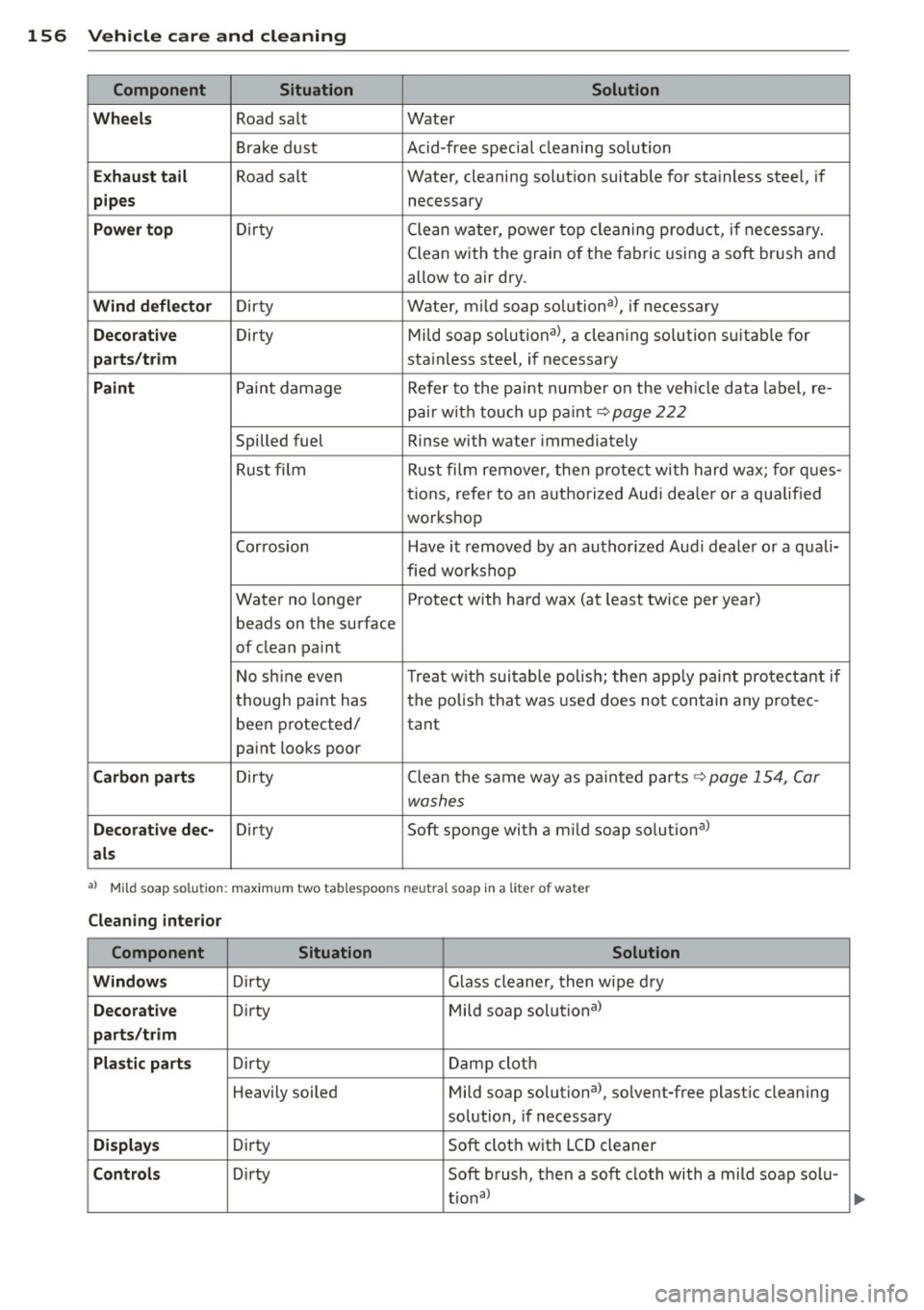
Component Situation Solution
Wheels
Road sa lt Water
Brake dust Acid-free special cleaning so lution
E x haust tail Road sa lt Water, cleaning solut ion suitable for sta inless steel, if
pipes necessary
Power top D irty Clean w ater, powe r top cleaning p rod uct, if necessa ry.
Clean with the grain o f the fabric using a soft br ush and
allow to air dry.
Wind d eflector Dirty Water, mild soap solutiona>, if necessary
Decorative Dirty Mild soap solutiona>, a cleaning solution suitab le for
parts/t rim sta inless steel, if necessary
Paint P aint damage Refer to the paint numbe r on the veh icle data label, re-
p air wi th tou ch up pa in t
9 page 222
Spilled fuel Rinse with water immediately
Rust fi lm Rust film remover, t hen protect wi th hard wax; fo r q ues-
t ions, refe r to an a utho rized Audi dea le r or a qualif ied
wor kshop
Corrosion Have it removed by an autho rized Aud i deale r or a qual i-
fied wo rkshop
Water no longer Protect with hard wax (at least twice per year)
beads on the surface
o f clean paint
N o sh ine even Treat w ith sui table po lish ; t hen app ly pain t pro tectan t if
t hough paint has the po
lish tha t was used does not con tain any protec -
been p rotected/
tant
pa int looks poo r
Carbon part s Dirty Clean tlhe same way as painted parts 9page 154, Car
washes
Decorat ive dee -
Dirty Soft sponge with a mild soap solutional
als
al M ild soap so lu tion : max imu m tw o tab lesp oon s ne utr al s oa p in a liter of wa ter
Cleaning interior
Component Situation Solution
Windows
Dir ty Glass cleaner, then wipe d ry
Decorat ive D irty Mild soap solutional
parts/trim
Plastic parts
D irt y Damp cloth
H eavily soi led Mild soap solutional, solvent-free plast ic cleaning
so lution, if necessary
Di splays Dir ty Soft cloth with LCD cleaner
Controls D irty Soft brush, then a soft cloth with a mild soap solu-
t io nal
...