engine AUDI TT ROADSTER 2015 Owner's Manual
[x] Cancel search | Manufacturer: AUDI, Model Year: 2015, Model line: TT ROADSTER, Model: AUDI TT ROADSTER 2015Pages: 244, PDF Size: 60.74 MB
Page 37 of 244
accidentally press the power locking
switch.
- Do not leave children inside the vehicle
unsupervised. In an emergency it would
be impossible to open the doors from
the outside without the key.
@ Tips
- In the event of a crash with airbag de
ployment a ll locked doors will be auto
matically unlocked to g ive access to the
vehicle occupants from the outside.
- If the power locking system should mal
function, you can lock each door individ
ually using the vehicle key .
- If the power locking system should fail,
you can still open the fue l tank flap in an
emergency
c>page 163.
- You are well advised not to keep valua
bles inside an unattended vehicle, visible
or not . Even a properly locked vehicle
cannot provide the security of a safe!
Unlocking and locking the vehicle w ith
the remote control
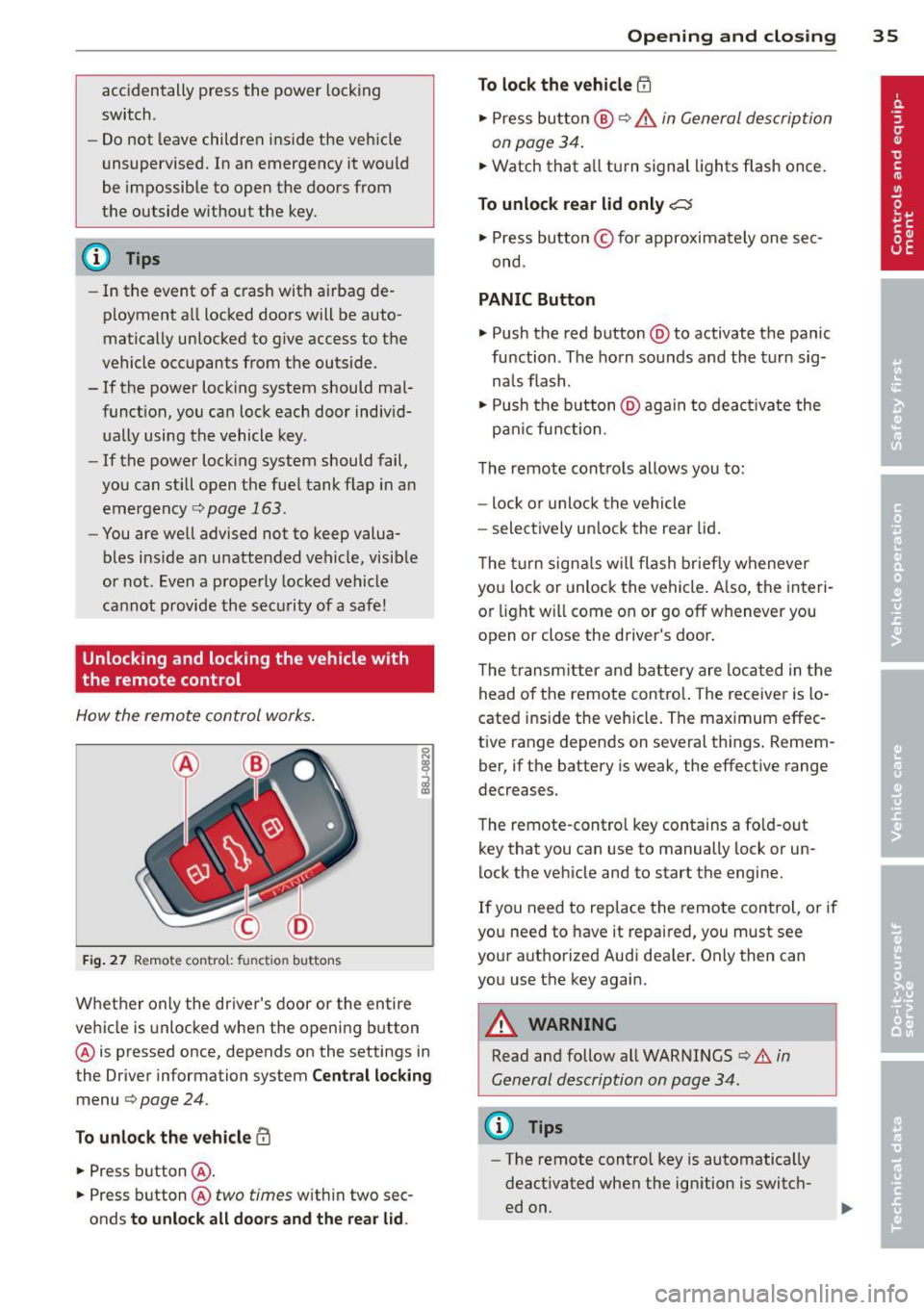
How the remote control works.
Fig . 27 Remote contro l: fu nctio n buttons
0
I
Whether only the driver's door or the entire
vehicle is unlocked when the opening b utton
@ is pressed once, depends on the settings in
the Driver information system
Central locking
menu c> page 24.
To unlock the vehicle !Ii
.,. Press button @.
.,. Press button @
two times with in two sec
onds
to unlock all doors and the rear lid.
Opening and closing 35
To lock the vehicle efl
.,. Press button @ c> &. in General description
on page 34 .
.,. Watch that a ll turn signal lights flash once.
To unlock rear lid only~
.,. Press button © for approximately one sec
ond .
PANIC Button
.,. Push the red button @to activate the panic
function . The horn sounds and the turn sig
na ls flash .
.,. Push the button @aga in to deact ivate the
pan ic function .
The remote controls allows you to:
- lock or unlock the vehicle
- select ively unlock the rear lid.
The turn signals will flash briefly whenever
you lock or unlock the vehicle. Also, the interi
or light will come on or go off whenever you
open or close the driver's door .
The transm itter and battery are located in the
head o f the remote contro l. The receiver is lo
cated ins ide the vehicle. The max imum effec
tive range depends on several th ings . Remem
ber, if the battery is weak, the effective range
decreases.
The remote-control key contains a fo ld-out
key that you can use to manually lock or un
lock the vehicle and to start the engine.
If you need to replace the remote control, or if
you need to have it repaired, you must see
your authorized Aud i dealer. Only then can
you use the key again.
A WARNING
Read and follow all WARNINGS c> .&. in
General description on page 34.
(0 Tips
- The remote contro l key is automatically
deactivated when the ignition is switch
ed on.
-
Page 38 of 244
36 Opening and closing
-The operation of the remote control key
can be temporarily disrupted by interfer
ence from transmitters in the vicinity of
the vehicle working in the same frequen
cy range (e.g. a cell phone, radio equip
ment) .
- In order to make sure the locking func
tion is working, you should always keep
your eye on the vehicle to make sure it is
properly locked .
- Do not use the remote control if you are
inside the car, otherwise you may unin
tentionally lock the vehicle, and then you
would set off the anti-theft alarm when
you try to start the engine or open a
door. In case this happens anyhow, push
the unlock button
CD .
- Use the panic function only if you are in
an emergency situation.
Resetting the remote control
The remote control must be reset if the vehi
cle does not unlock .
.,,. Press the unlock button CD on the remote
control.
.,,. Manually unlock the driver's door lock with
the mechanical key within 30 seconds.
.,,. Press either the lock-1'.D or the unlock
CD but
ton to complete th e reset sequence.
Operating locks with the key
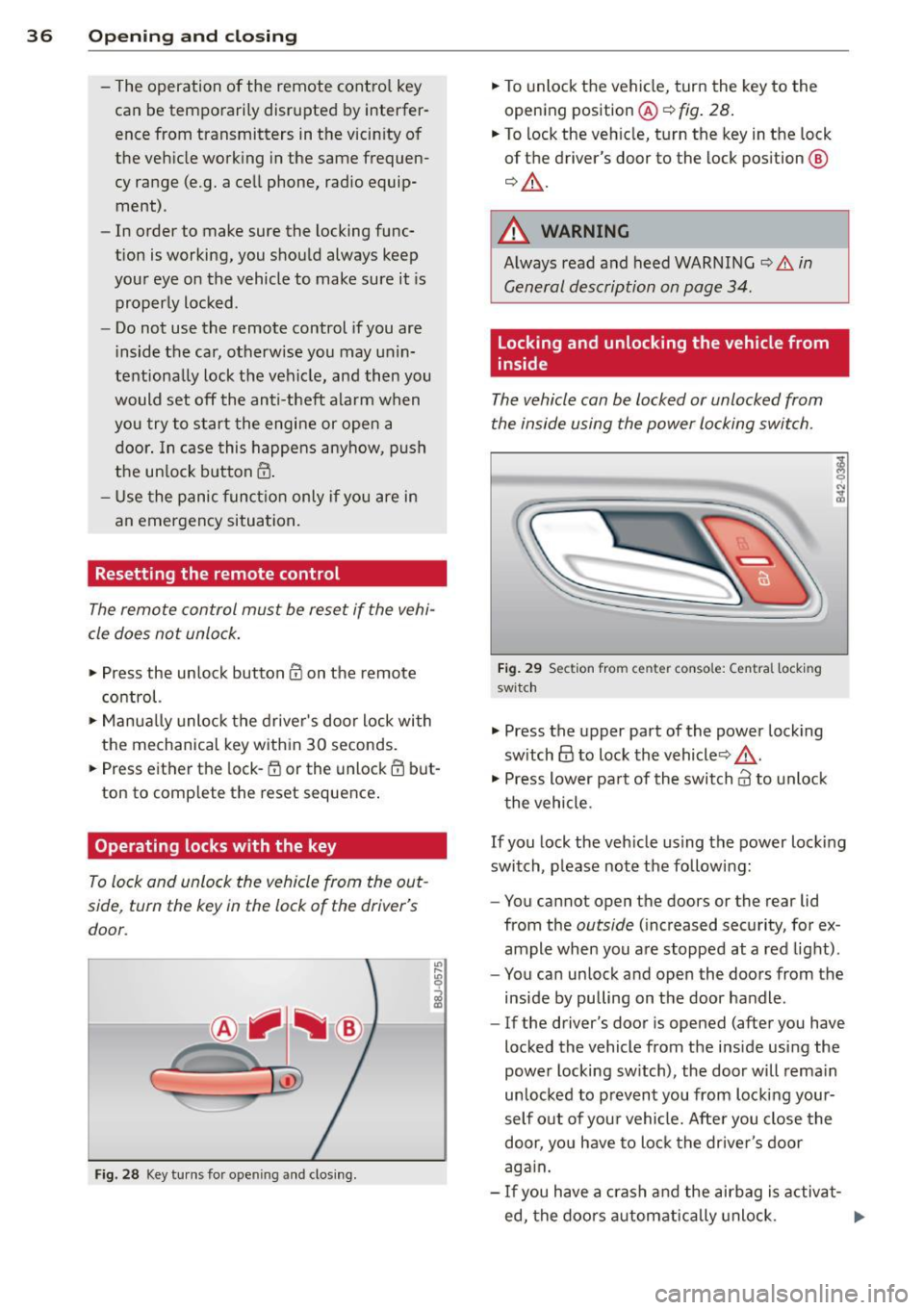
To lock and unlock the vehicle from the out
side , turn the key in the lock of the driver's
door .
Fig. 28 Key turns for ope ning and clo sing.
.,,. To unlock the vehicle, turn the key to the
opening position@¢
fig. 28.
.,,. To lock the vehicle, turn the key in the lock
of the driver's door to the lock position
@
¢ &_ .
A WARNING
Always read and heed WARNING¢.&. in
General description on page 34.
Locking and unlocking the vehicle from
inside
The vehicle can be locked or unlocked from
the inside using the power locking switch .
Fig. 29 Sec tion from center conso le: Ce ntra l locking
switch
.,,. Press the upper part of the power locking
switch
@ to lock the vehicle ¢&_ .
.,,. Press lower pa rt of the switch
crl to unlock
the vehicle .
If you lock the vehicle using the power locking
switch , please note the following:
- You cannot open the doors or the rear lid
from the
outside (increased security, for ex
ample when you are stopped at a red light).
- You can unlock and open the doors from the
inside by pulling on the door handle .
-If the driver's door is opened (after you have
locked the vehicle from the inside using the
power locking switch), the door will remain
unlocked to prevent you from locking your
self out of your vehicle. After you close the
door, you have to lock the driver 's door
again.
- If you have a crash and the airbag is activat-
ed, the doors automatically unlock. ..,.
Page 41 of 244
When will the anti theft ala rm system be
triggered?
When the vehicle is locked , the alarm system
monitors and protects the following parts of
the vehicle:
- engine compartment
- luggage compartment
- doo rs
- ignition
When the system is activated, the alarm will
be triggered if one of the doors, the engine
hood or the rear lid are opened, or if the ign i
tion is turned on.
The anti-theft alarm system will also go off
when the battery is disconnected.
You can a lso trigger the alarm by pressing the
PANIC button on your remote-control key.
This will alert other people in case of emer
gency. Press the
PANIC button again to turn
off the alarm .
How is the anti-theft alarm switched off
when triggered?
The alarm system is switched off when you
unlock the vehicle using the remote-control key or when the ignition is sw itched on . The
a larm will also switch itse lf off when it comes
to the end of its cycle.
Emergency flasher
The emergency flasher will blink briefly when
the doors, engine hood and rear lid are prop
erly closed.
If the emergency flashers do not blink, check
the doors, engine hood and rear lid to make
sure they are properly closed. If you close a
door, the hood or the rear lid with the ant i
theft alarm switched on, the emergency flash
ers will blink only after you have closed the
door or lid.
(1) Tips
For the anti-theft alarm system to func
tion properly, make sure all vehicle doors
and windows are closed before leaving the
vehicle.
Opening and closing 39
Power windows
Controls
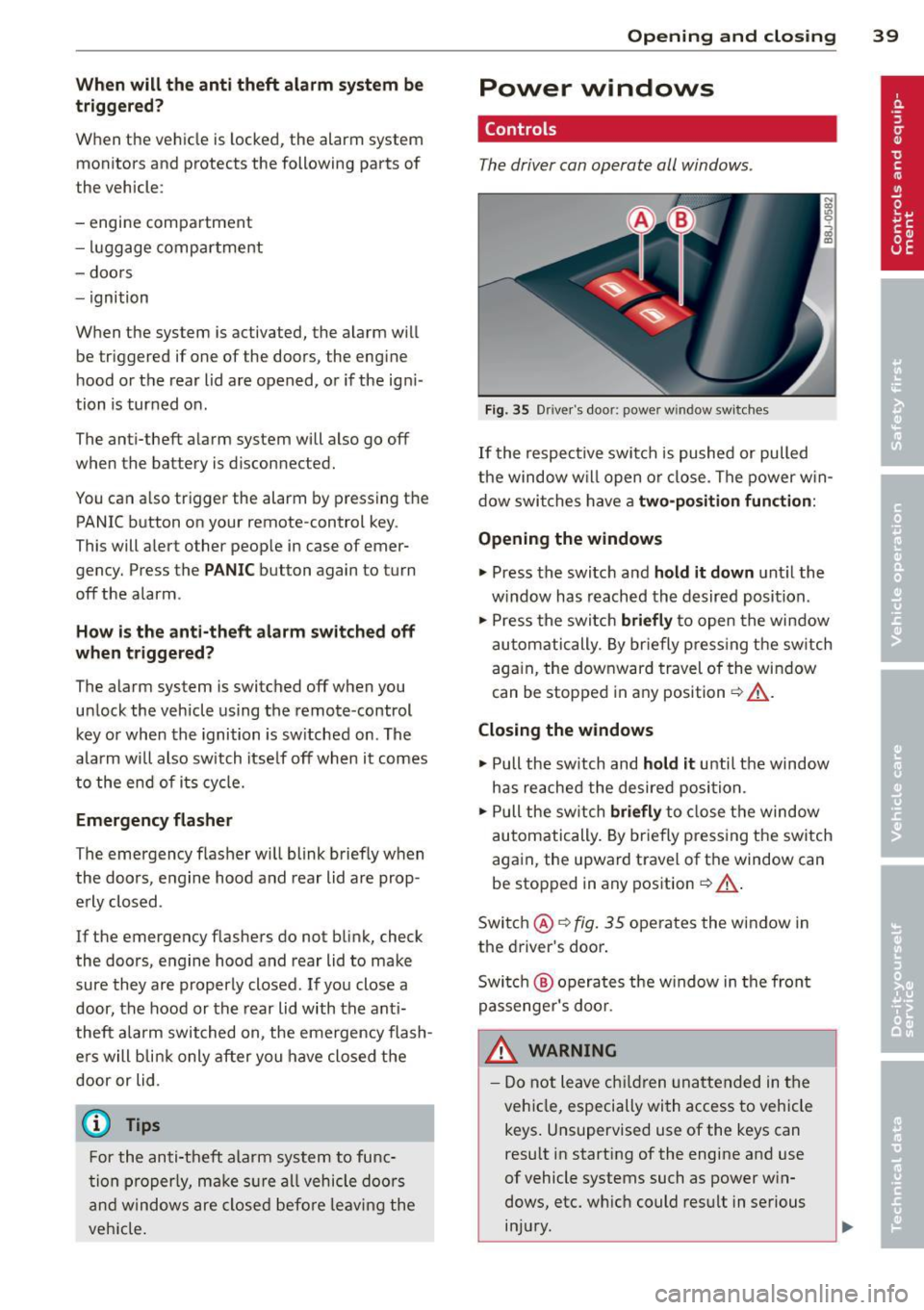
The driver can operate all windows .
Fig. 35 Driver's door: power w indow switches
If the respective switch is pushed or pulled
the window w il l open or clos e. The power win
dow switches have a two-position function :
Opening the windows
.,. Press the switch and hold it down until the
w indow has reached the desired position .
.,. Press the switch
briefly to open the window
automatically. By briefly pressing the switch
again, the downward travel of the window
can be stopped in any position<=-> .&_.
Closing the windows
.,. Pull the sw itch and hold it unti l the window
has reached the desired position .
.,. Pull the switch
briefly to close the window
automatically. By briefly press ing the switch
aga in, the upward travel of the window can
be stopped in any position
~ .&_ .
Switch @<=->fig .
35 operates the window in
the driver's door.
Switch @ operates the window in the front
passenger 's door.
&_ WARNING
- Do not leave children unattended in the
vehicle, especially with access to vehicle
keys . Unsupervised use of the keys can
result in start ing of the engine and use
of vehicle systems such as power win
dows, etc. wh ich could result in serious
injury.
Page 45 of 244
that the top will be opened by the wind.
Th is can result in injuries and damage to
the vehicle.
@ Tips
The indicator light for the convertible top goes out as soon as it is correctly latched .
Opening and Closing the Convertible
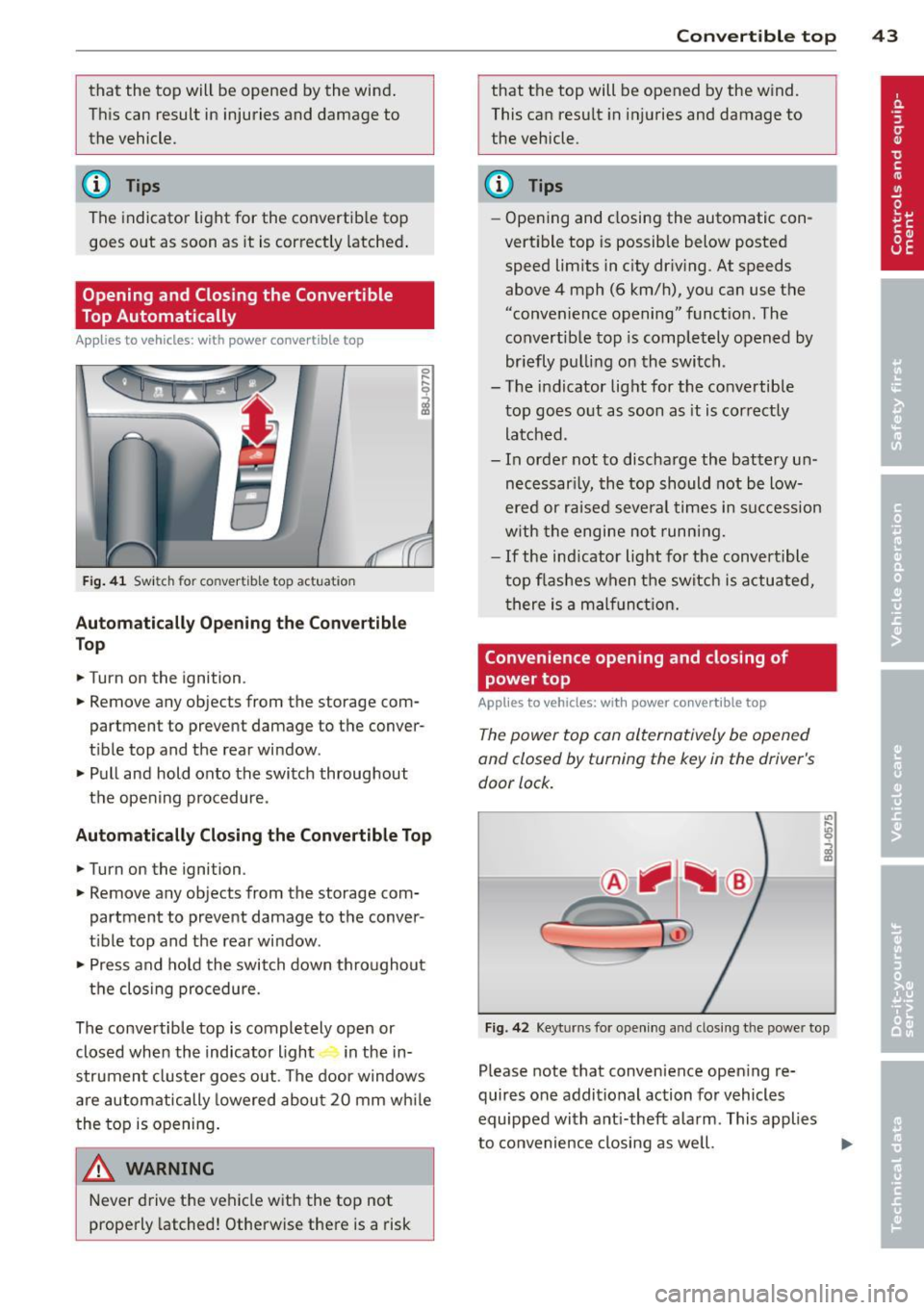
Top Automatically
App lies to vehicles: with power convertible top
Fig . 41 Switch for convertible top actuation
Au tomaticall y Op ening th e Convertible
Top
.. Turn on the ignition .
.. Remove any objects from the storage com
partment to prevent damage to the
conver
tible top and the rear window.
.. Pull and hold onto the switch throughout
the opening procedure.
Automatic ally C losing th e Con vertible T op
.. Turn on the ignition .
.. Remove any objects from the storage com
partment to prevent damage to the
conver
t ible top and the rear window .
.. Press and hold the switch down throughout
the closing procedure.
The convertible top is completely open or
closed when the indicator light in the in-
strument cluster goes out . The door windows
are automatically lowered about 20 mm wh ile
the top is opening .
& WARNING
Never drive the vehicle with the top not
properly latched! Otherwise there is a risk
-
Con vert ible top 4 3
that the top will be opened by the wind.
This can result in in juries and damage to
the vehicle.
(D Tips
- Opening and closing the automatic con
vertible top is possible below posted speed lim its in city driv ing. At speeds
above 4 mph (6 km/h), you can use the
"convenience opening" funct ion. The
convertible top is completely opened by
br iefly pulling on the switch .
- The indicator light for the co nvertible
top goes o ut as soon as it is correctly
latched.
- In order not to discharge the battery un
necessar ily, the top should not be low
ered or raised several times in succession
w ith the engine not running.
- If the ind icator light for the convertible
t op flashes when the switch is actuated,
there is a malf unct ion.
Convenience opening and closing of
power top
Applies to vehicles: with power co nvertible top
The power top can alternatively be opened
and closed by turning the key in the driver's
door lock.
c
F ig. 42 Keyt urns for ope ning and closing th e power top
Please note that convenience open ing re
quires one additional action for vehicles
equipped with ant i-theft alarm . This applies
to convenience closing as we ll.
Page 50 of 244
48 Clear vision
Clear vision Lights
Switching the headlights on and off
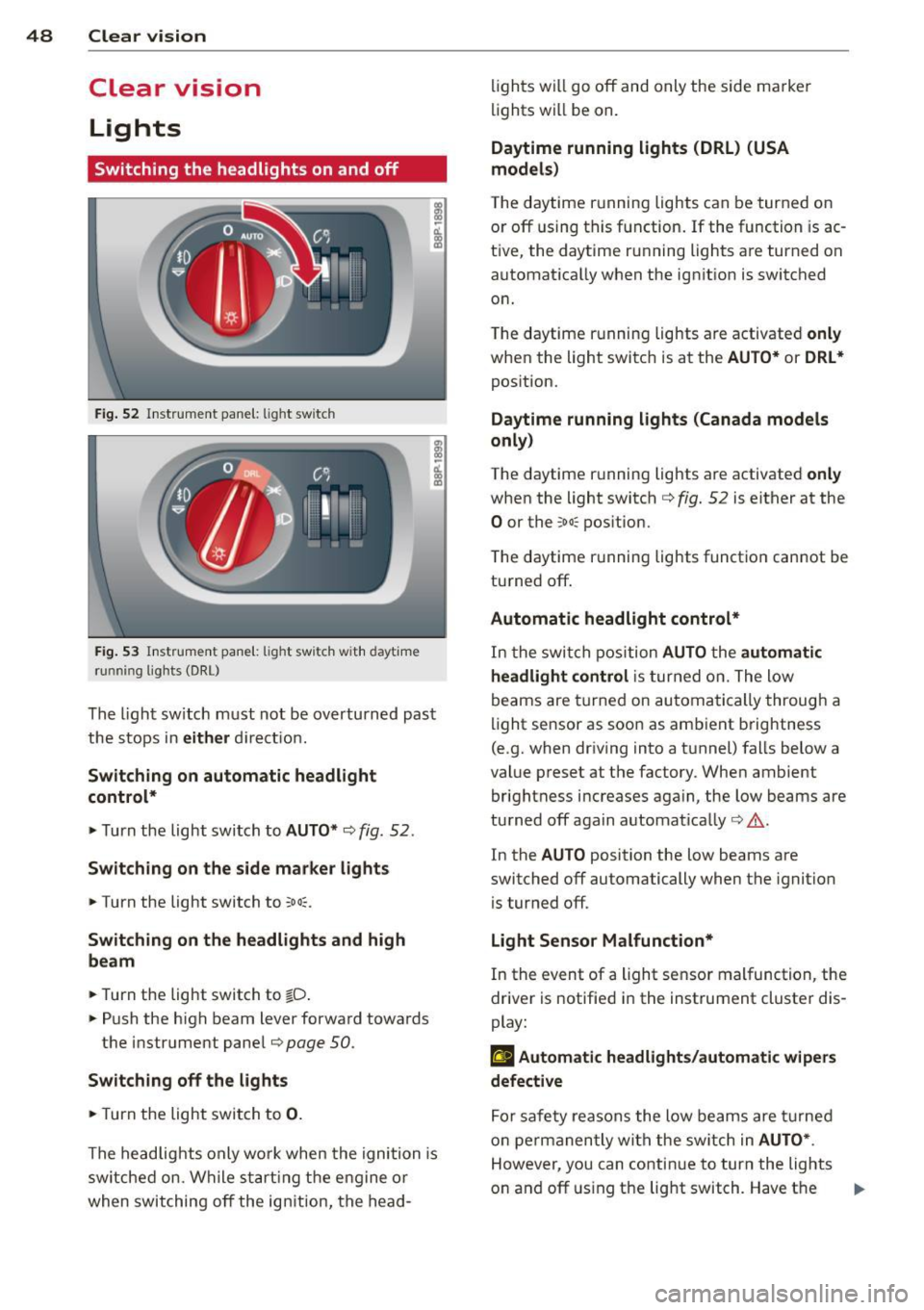
Fig . 52 Instr ument pane l: lig ht sw itc h
Fig. 53 Instrum ent pane l: ligh t swi tch with daytime
runnin g lights (DRL)
The light switch must not be overturned past
the stops in
either direct ion.
Switching on automatic headlight
control*
.,. Turn the light switch to AUTO* ¢ fig. 52.
Switching on the side marker lights
... Turn the light switch to :;oo: .
Switching on the headlights and high
beam
... Turn the light switch to iD.
... Push the high beam lever forward towards
the instrument panel¢
page SO.
Switching off the lights
... Turn the light switch to 0.
The head lights only work when the ignition is
switched on. While start ing the engine or
when switching off the ignition, the head- lights
will go off and only the side ma rker
lights will be on.
Daytime running lights (DRL) (USA
models)
T he daytime running lights can be turned on
or off using this function. If the function is ac
tive, the daytime running lights are turned on
automatically when the ignit ion is switched
on.
The daytime running lights are activated
only
when the light switch is at the AUTO* or DRL *
position.
Daytime running lights (Canada models
only)
The daytime running lights are activated only
when the light switch ¢ fig. 52 is either at the
0 or the :;oo: position.
T he daytime r unning lights funct ion cannot be
turned off.
Automatic headlight control*
In the switch position AUTO the automatic
headlight control
is turned on. The low
beams are turned on automatically through a
light sensor as soon as ambient brightness
(e .g. when driving into a tunnel) falls below a
value preset at the factory. When ambient
brightness increases aga in, the low beams are
turned off again automatically ¢.&. .
In the
AUTO position the low beams are
switched off automatically when the ignition
is turned off .
Light Sensor Malfunction*
In the event of a light sensor malfunction, the
driver is notified in the instrument cluster dis
play:
tal Automatic headlights/automatic wipers
defective
For safety reasons the low beams are turned
on permanently with the switch in
AUTO* .
However, you can continue to turn the lights
on and off using the light switch . Have the
Ill>-
Page 57 of 244

During brief stops, e.g. at a red light, wiper
motion will automatically be reduced to the
next lower speed. Wipers already turning at
low speed change to intermittent wiping.
When the ignition is turned on, the washer
jets are heated.
A WARNING
- Wiper blades are crucial for safe driving!
Only when they are in good condition are
they able to clear the windows properly
to provide uncompromising visibility .
Worn or damaged wiper blades are a safety hazard ¢
page 5 7, Replacing
windshield wiper blades!
- The light/rain sensor* is only designed to
assist and support the driver.
It remains
entirely the driver's responsibility to
monitor outside weather conditions and
to manually activate the wipers as soon as rain or drizzle reduces visibility
through the windshield.
- The windshield must not be treated with
water-repellent materials. They can in
crease glare under poor visibility condi
tions such as wetness, darkness, or when
the sun is low on the horizon. In addi
tion, they can cause the windshield wip
ers to chatter .
(I) Note
In freezing or near freezing conditions:
- Always check that the wiper blades are
not frozen to the glass before you turn
the wipers on . Loosen a wiper blade
which is frozen in place before operating
the wipers to prevent damage to the
wiper blade or the wiper motor.
- Do not use the wipers to clear a frosted window . Using the wipers as a conven
ient ice scraper will destroy the wiper
blades.
- Before you take your vehicle to an auto
matic car wash, make sure you have the
windshield wiper system switched off (lever in position 0), otherwise the wind
shield wiper system could get damaged
Clear vision 5 5
in the car wash if it should suddenly
come on.
(0 Tips
- The windshield wipers are switched off
when the ignition is turned off. Activate
the windshield wipers after the ignition
is switched back on by moving the wind
shield wiper lever to any position.
- Worn or dirty windshield wiper blades
cause smearing, which can affect the op
eration of the light/rain sensor* . Check
the condition of your windshield wiper
blades regularly.
- The rain sensor is part of the interval
wiping system . Turning off the ignition
will also deactivate the rain sensor. To re activate the sensor, switch off the inter
val wiping function, then switch it back
on again.
-Applies to vehicles with light/rain sen
sor : When the wipers are switched on
manually and in rain conditions, the au
tomatic headlights* turn on¢
page 48,
Switching the headlights on and off
or
off during the day when the wipers are
no longer operating. The automatic
headlights* function is available in this
case only when the light switch is in the
"AUTO" position¢
page 48, fig. 52.
-Make sure the washer fluid reservoir in
the engine compartment is topped off
before going on a long trip. Look up
¢
page 179 for checking and filling the
washer container .
- The wipers only operate with the hood
completely closed .
Headlight washer system
Applies to vehicles: with headlight washer system
The headlight washer system cleans the
headlights.
"'Operate the windshield wiper/washer sys
tem
o page 54, fig. 62 ® with the head
lights turned on by holding the lever for lon-
ger than one second . ..,.
Page 66 of 244
64 Seats and storage
A WARNING
Never put waste paper in the ashtray. Hot
ashes or othe r hot objects in the asht ray
co uld set waste paper on fire.
Cigarette Lighter/
socket
Cigarette lighter
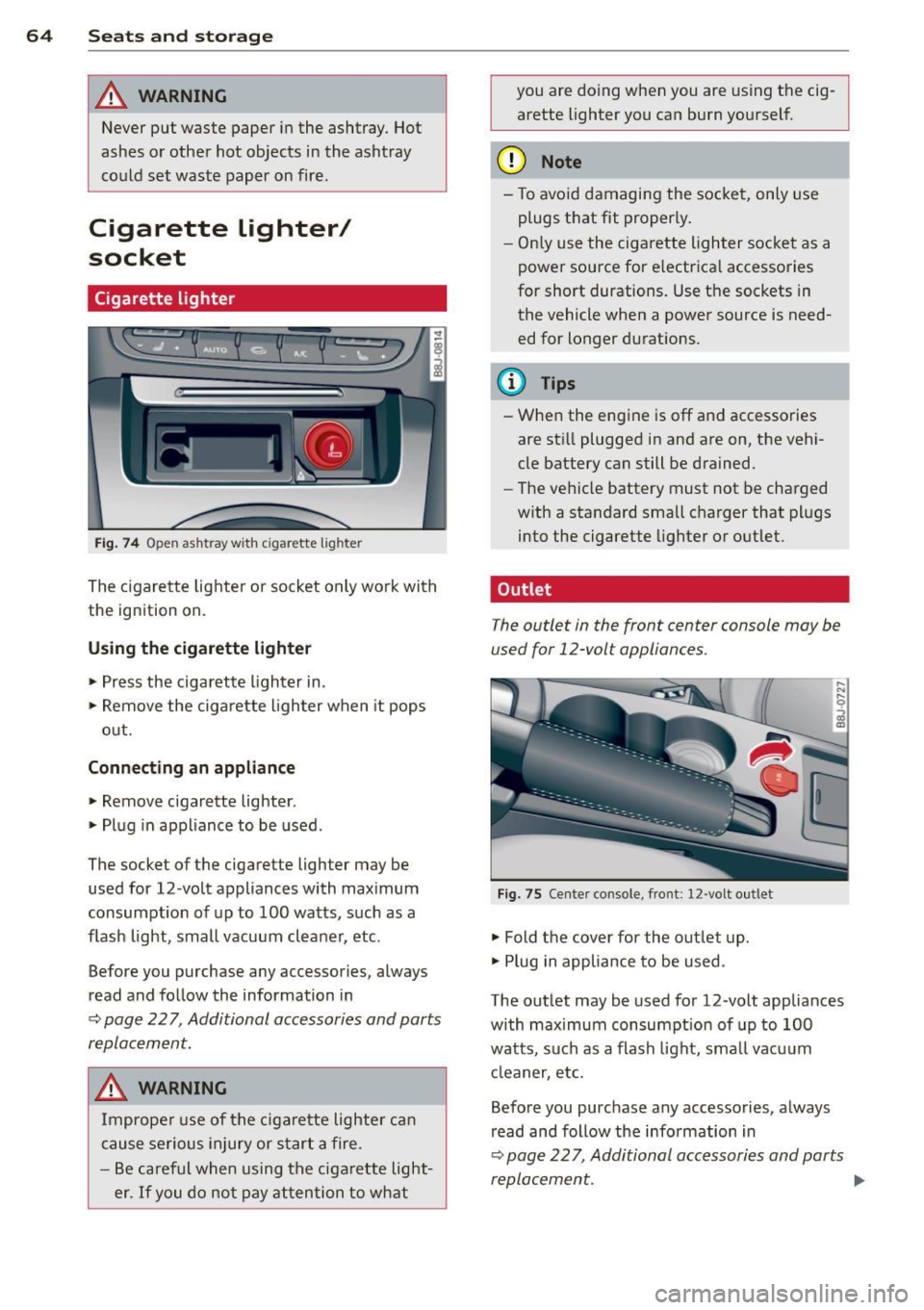
Fi g. 74 O pen ash tray w ith c iga rett e ligh ter
The cigare tte lighte r or socket only work with
the ign ition on.
Using the cigarette lighter • Press the cigarette lighter in.
• Remove the ciga rette lighter when it pops
out.
Conn ecting an appliance
• Remove cigarette lighter .
• Plug in appliance to be used.
The socket of the cigarette lighter may be used for 12 -volt appliances with max imum
consumption of up to 100 watts, such as a
flash light, small vacuum cleaner, etc.
Before you purchase any accessories, always
read and follow the information in
~ page 22 7, Additional accessories and parts
replacement.
A WARNING
Improper use of the cigarette lighter can
cause serious injury or star t a fire.
- Be careful when using the ciga rette light
er.
If you do not pay attention to what you are doing when you are using t
he cig
arette lighter you can burn yourself.
(D Note
- To avoid damagi ng the socket, only use
plugs that fit proper ly .
- Only use the cigarette lighter socket as a
power source for e lectrica l accessories
for short durations. Use the sockets in
the vehicle when a power source is need ed for longer durations .
(D Tips
- When the engine is off and accessories
are sti ll plugged in and are on, the vehi
cle battery can still be drained.
- The vehicle battery must not be charged
w ith a standard small charger that plugs
into the cigarette lighter or outlet .
Outlet
T he outlet in the front center console may be
used for 12-volt appliances.
Fig . 75 Ce nter co nso le, fro nt: 12 -volt out let
• Fold the cover for the outlet up .
• Plug in appliance to be used .
The outlet may be used for 12 -volt appliances
with maximum consumpt ion of up to 100
watts, such as a flash light, small vacuum
cl eaner, etc.
Before you purchase any accessories, always
read and follow the information in
~ page 22 7, Additional accessories and parts
replacement . .,,.
Page 67 of 244
_& WARNING
The outlet plus any appliances plugged in
to it remain functional
even if the ignition
is switched off or the ignition key is re
moved. Never leave children inside the
ve
hicle without supervision.
(D Note
To avo id damag ing the socket, only use
plugs that fit properly.
@ Tips
When the engine is off and accessories are
still plugged in and are on, the vehicle bat
tery can still be dra ined.
Storage
General
_& WARNING
- Always remove objects from the instru
ment panel. Any items not put away
could slide around inside the vehicle
wh ile driving or when accelerating or
when applying the brakes or when driv
ing around a corner.
-
- When you are driving make sure that
anything you may have placed in the cen
ter console or other storage locations
cannot fall o ut into the footwells . In case
of sudden braking you would not be able
to brake or accelerate.
Seats and storage 65
Glove compartment
The glove compartment is illuminated and
can be locked .
i
----------- i
•
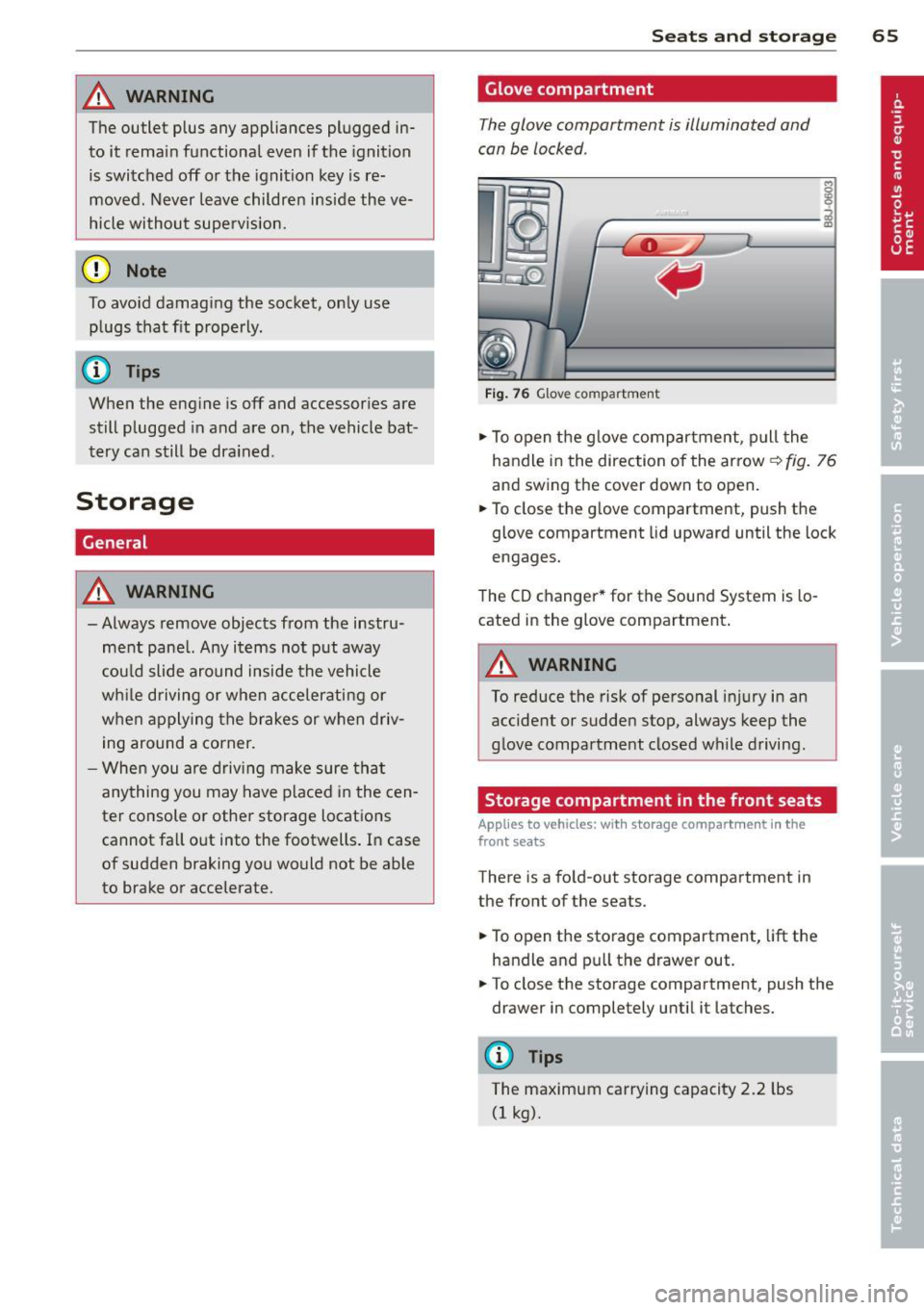
Fig . 76 Glove compartme nt
.,.. To open the glove compartment, pull the
handle in the direction of the arrow~
fig. 76
and swing the cover down to open .
.. To close the glove compartment, push the
glove compartment lid upward until the lock
engages.
The CD changer * for the Sound System is lo
cated in the glove compartment .
A WARNING
To reduce the risk of personal i njury in an
accident or sudden stop, always keep the
glove compartment closed while driving.
Storage compartment in the front seats
Applies to vehicles: with storage compartment in the
front seats
There is a fold-out storage compartment in
the front of the seats .
.. To open the storage compartment,
lift the
handle and pull the drawer out .
-
.. To close the storage compartment, push the
drawer in completely until it latches.
('.I) Tips
The maximum carrying capacity 2.2 lbs
(1 kg).
Page 69 of 244
Warm and cold Climate controls
Controls
W arm and cold 6 7
The air conditioning automatically maintains the selected temperature in the vehicle interior
throughout each season .
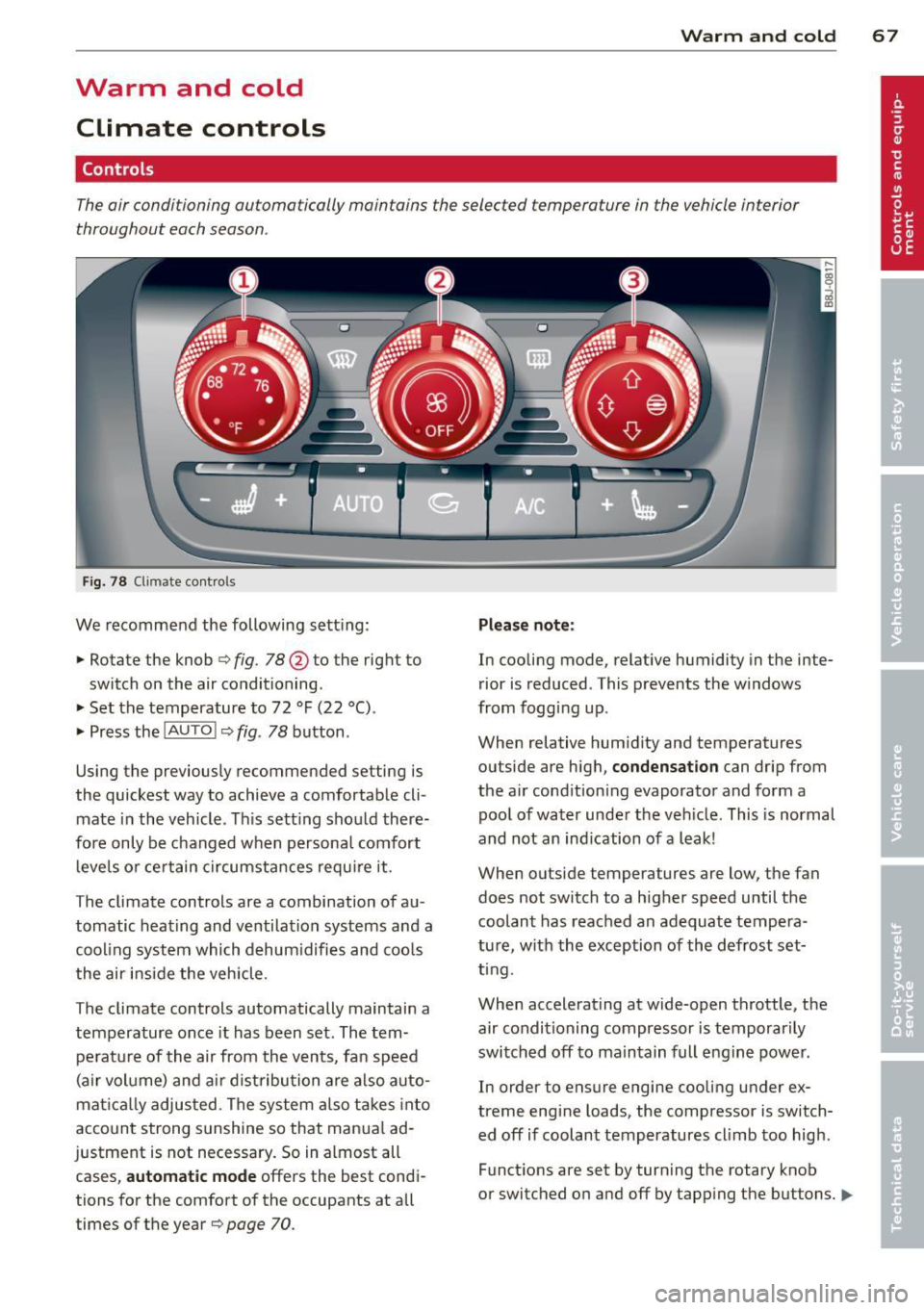
Fig. 78 Climate contro ls
We recommend the following sett ing :
• Rotate the knob
c::> fig. 78 @ to the right to
switch on the air conditioning .
• Set the temperature to 72 °F (22 °() .
• Press the
!AUTO I c::> fig . 78 button .
Using the previously recommended setting is
the quickest way to achieve a comfortable cli
mate in the vehicle . Th is setting should there
fore only be changed when persona l comfort
l eve ls o r certain circumstances requ ire it .
The climate controls are a combination of au
tomatic heating and ventilation systems and a
coo ling system which dehum idifies and coo ls
the air inside the vehicle .
The climate controls automatically maintain a temperature once it has been set. The tempe rat ure of the air from the v ents, fan speed
(air vo lume) and ai r distribu tion are also auto
mat ica lly adjusted . The system also takes into
account strong sunshine so that manua l ad
justment is not necessary . So in almost all
cases,
a utomatic mode offers the best cond i
tions for the comfort of the occupants at all
times of the year
c::> page 70 .
Plea se note:
In cooling mode, relative humidity in the inte
rior is reduced . This prevents the w indows
from fogg ing up .
When relative hum idity and temperatures
outside are high,
condensation can drip from
the a ir cond ition ing evaporator and form a
poo l of water under the veh icle. This is normal
and not an ind ication of a leak!
When outside temperatures are low, the fan
does not switch to a higher speed until the coolant has reached an adequate tempera
tu re , with the exception of the defrost set
t ing.
When accelerating at wide-open throttle, the
air condit ioning compressor is temporar ily
switched off to maintain full engine power.
In order to ensure engine cooling under ex
treme engine loads, the compressor is switch
ed off if coolant temperatures cl imb too high .
Funct ions are set by turn ing the rotary knob
or switched o n and off by tapp ing the buttons.
1111-
Page 73 of 244

The rear window defogger works only when
the engine is running. The indicator light in
the button illuminates when the rear w indow
defogger is turned on .
The rear window defogger is switched off au
tomatically after approx . 10 minutes .
@) For the sake of the environment
As soon as the rear window is clear, yo u
should switch the rear window de fogger
off . The reduced power consumption has a
beneficial effect on fuel consumption.
Heated seats~
Applies to vehicles: with heated seats
The seat cushion and the seotbock of the
front seats con be heated electrically .
.,. Press the heated seats b utton I-J + I
Q page 67, fig. 78 to set the level of heating
desired .
The range of controls goes from 1 to 3. The heat setting se lected is shown by LEDs above
the button .
A WARNING
Individuals with reduced sensitivity to pain
or temperature could develop burns when
using the seat heating function. To reduce
the risk of inju ry, these individuals should
not use seat heat ing .
(D Note
To avo id damage to the heating elements
in the seats, do not kneel on the seats or
place heavy loads on a small area of the
seat .
Using the climate controls economically
Economical use of the climate controls helps
to save fuel .
When climate control is working in coo ling
mode, engine performance is reduced and
fuel consumption is affected . To keep the time
Warm and c old 71
the air conditioning is on as short as possible,
you should do the following:
.,. If you would like to save fuel, switch the ai r
condi tioning off .
.,. If you open the windows while driving,
switch the air conditioning off .
.,. If the veh icle is extremely hot d ue to the
heat of the sun, br iefly open doors and w in
dows .
@) For the sake of the environment
When you save fuel, you reduce emissions
from the vehicle.