light AUDI TT ROADSTER 2016 Owners Manual
[x] Cancel search | Manufacturer: AUDI, Model Year: 2016, Model line: TT ROADSTER, Model: AUDI TT ROADSTER 2016Pages: 306, PDF Size: 31.82 MB
Page 275 of 306
Downloaded from www.Manualslib.com manuals search engine 0
N
,.....
N Hubcaps*
�
Insert the hook (provided in the vehicle's tool
kit) in the hole in the hubcap ¢ Fig. 230.
� Pull off the hubcap.
Wheels with wheel bolt caps*
� Slide the plastic clip (provided in the vehicle's
tool kit) onto the wheel bolt cap until it engag
es ¢Fig. 231.
� Pull off the cap using the plastic clip.
Anti-theft wheel bolts
Applies to: vehicles with anti-theft wheel bolts
1
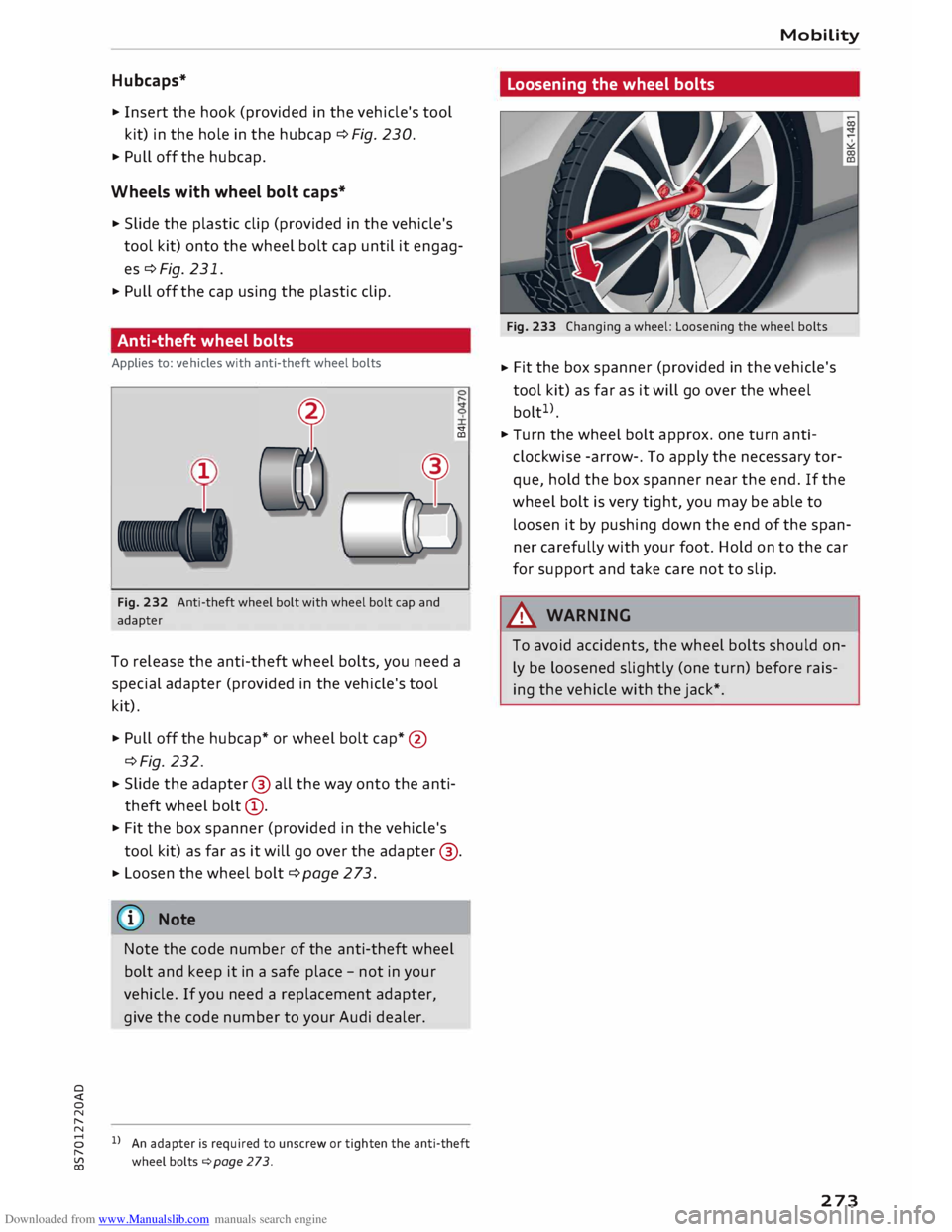
Fig. 232 Anti-theft wheel bolt with wheel bolt cap and
adapter <:t
CD
To release the anti-theft wheel bolts, you need a
special adapter (provided in the vehicle's tool
kit).
� Pull off the hubcap* or wheel bolt cap*@
¢Fig. 232.
� Slide
the adapter @ all the way onto the anti
theft wheel bolt@.
� Fit the box spanner (provided in the vehicle's
tool kit) as far as it will go over the adapter @.
� Loosen
the wheel bolt ¢ page 2 73.
(D} Note
Note the code number of the anti-theft wheel
bolt and keep it in a safe place -not in your
vehicle. If you need a replacement adapter,
give the code number to your Audi dealer.
8 l}An adapter is required to unscrew or tighten the anti-theft
,.....
� wheelbolts¢page273. Mobility
Loosening the wheel bolts
Fig. 233 Changing a wheel: Loosening the wheel bolts
� Fit
the box spanner (provided in the vehicle's
tool kit) as far as it will go over the wheel
bolt 1
>.
� Turn the wheel bolt approx. one turn anti
clockwise -arrow-. To apply the necessary tor
que, hold the box spanner near the end. If the
wheel bolt is very tight, you may be able to
Loosen it by pushing down the end of the span
ner carefully with your foot. Hold on to the car
for support and take care not to slip.
A WARNING
To avoid accidents, the wheel bolts should on
ly be Loosened slightly (one turn) before rais
ing the vehicle with the jack*.
273
Page 277 of 306
Downloaded from www.Manualslib.com manuals search engine Taking
off/ putting on the wheel
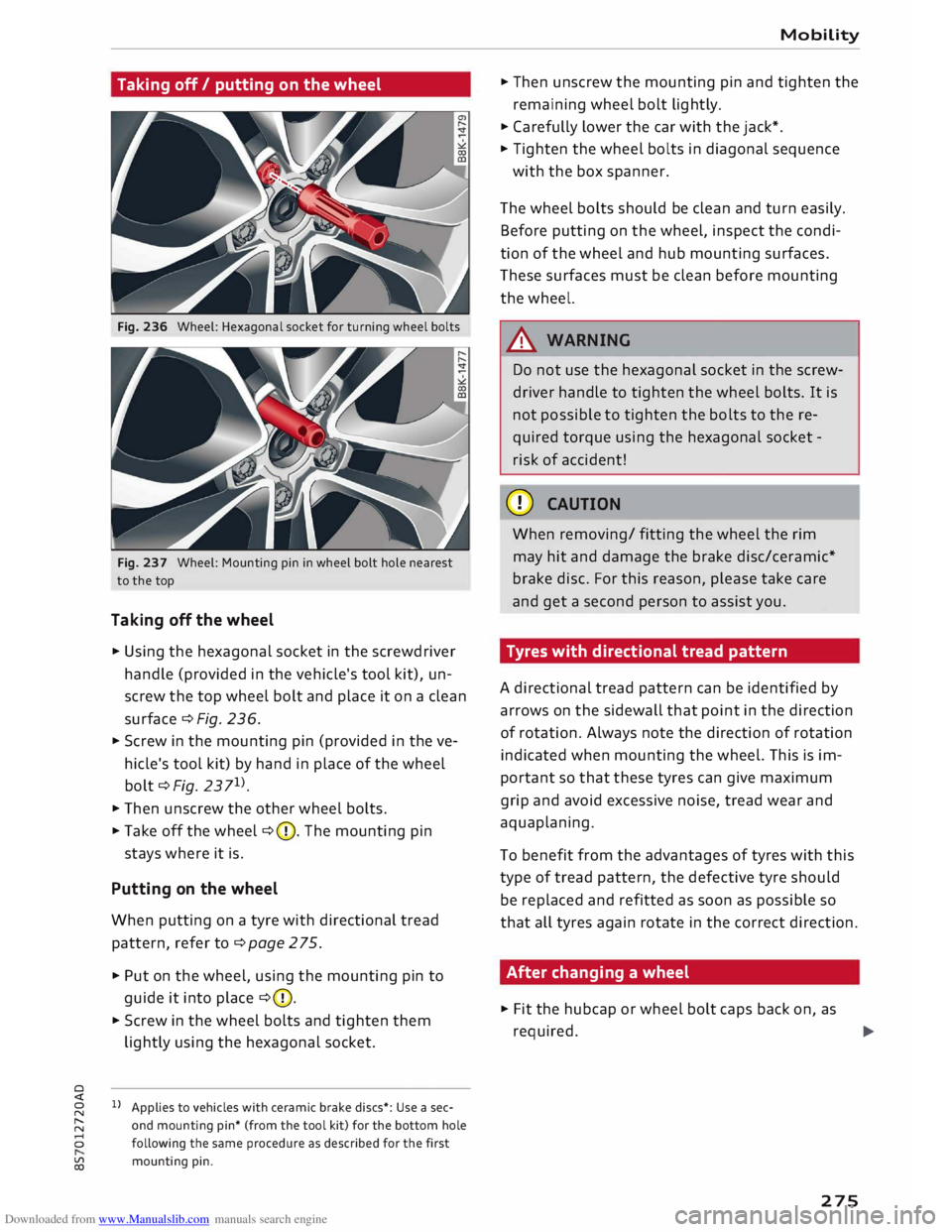
Fig. 236 Wheel: Hexagonal socket for turning wheel bolts
Fig. 237 Wheel: Mounting pin in wheel bolt hole nearest
to the top
Taking off the wheel
� Using the hexagonal socket in the screwdriver
handle (provided in the vehicle's tool kit), un
screw the top wheel bolt and place it on a clean
surface ¢ Fig. 236.
� Screw in the mounting pin (provided in the ve
hicle's tool kit) by hand in place of the wheel
bolt ¢Fig. 2371
).
� Then
unscrew the other wheel bolts.
�Take off the wheel ¢(D. The mounting pin
stays where it is.
Putting on the wheel
When putting on a tyre with directional tread
pattern, refer to ¢page 275.
� Put on the wheel, using the mounting pin to
guide it into place ¢(D.
� Screw in the wheel bolts and tighten them
lightly using the hexagonal socket.
0
Applies to vehicles with ceramic brake discs*: Use a sec-
� and
mounting pin* (from the tool kit) for the bottom hole
8 following the same procedure as described for the first
� mounting
pin. Mobility
� Then unscrew the mounting pin and tighten the
remaining wheel bolt lightly.
� Carefully lower the car with the jack*.
� Tighten the wheel bolts in diagonal sequence
with the box spanner.
The wheel bolts should be clean and turn easily.
Before putting on the wheel, inspect the condi
tion of the wheel and hub mounting surfaces.
These surfaces must be clean before mounting
the wheel.
.&_ WARNING
Do not use the hexagonal socket in the screw
driver handle to tighten the wheel bolts. It is
not possible to tighten the bolts to the re
quired torque using the hexagonal socket -
risk of accident!
CD CAUTION
When removing/ fitting the wheel the rim
may hit and damage the brake disc/ceramic*
brake disc. For this reason, please take care
and get a second person to assist you.
Tyres with directional tread pattern
A directional tread pattern can be identified by
arrows on the sidewall that point in the direction
of rotation. Always note the direction of rotation
indicated when mounting the wheel. This is im
portant so that these tyres can give maximum
grip and avoid excessive noise, tread wear and
aquaplaning.
To benefit from the advantages of tyres with this
type of tread pattern, the defective tyre should
be replaced and refitted as soon as possible so
that all tyres again rotate in the correct direction.
After changing a wheel
� Fit the hubcap or wheel bolt caps back on, as
required. ..,.
275
Page 280 of 306
Downloaded from www.Manualslib.com manuals search engine Mobility
...
Connect one end of the black lead to the nega
tive terminal @of the boosting battery@.
... Connect the other end of the black jump lead to
the negative terminal© of the jump-start con
nection @ in your vehicle.
... Position
the jump leads in such a way that they
cannot come into contact with any moving
parts in the engine compartment.
Starting the engine
... Start
the engine of the vehicle with the boost
ing battery and let it run at idling speed.
... Now start the engine of the vehicle with the
discharged battery.
... If the engine fails to start: do not operate the
starter for longer than 10 seconds. Wait for
about 30 seconds and try again .
... Switch on the blower and the rear window heat
ing on the vehicle which has been jump-started
in order to offset excessive voltage which may
occur when disconnecting the leads. The head
lights must be switched off!
... When
the engines are running, disconnect the
leads in exactly the opposite sequence to that
described on ¢page 277, Connecting and dis
connecting the jump Leads. Make sure that the
leads cannot come into contact with any mov
ing parts in the engine compartment.
... Close the cap on the positive terminal.
... Switch off the blower and the rear window
heating again.
A WARNING
- The non-insulated parts of the battery
clamps must not be allowed to touch. The
jump lead attached to the positive battery
terminal must not touch metal parts of the
vehicle: this can cause short circuits.
- Do not lean over batteries -risk of chemical
burns!
- The screw plugs on the battery cells must be
screwed in firmly.
- Keep sparks, flame and lit cigarettes away
from vehicle batteries: the gases given off
can cause an explosion.
- If jump-starting another vehicle, position
the jump leads in such a way that they can
not come into contact with any moving
278 parts
in the engine compartment of the oth
er vehicle .
CD CAUTION
Please note that the above method of con
necting the leads is intended for jump-start
ing your vehicle. If jump-starting another ve
hicle, you should not connect the negative
Lead(-) to the negative terminal of the dis
charged vehicle battery, but directly to the
engine block or a solid metal part bolted to
the engine block. If the battery of the other
vehicle does not have a gas vent, there is a
risk that a mixture of oxygen and hydrogen
gas can accumulate and cause an explosion.
@ Note
- The vehicle battery is vented to the outside
to prevent gases entering the vehicle's inte
rior.
- Connect the battery clamps so they have
good metal-to-metal contact with the bat
tery terminals.
Tow-starting / towing
away
General notes
Some experience is required to tow or tow-start a
vehicle, especially when using a tow-rope. Both
drivers should be familiar with the technique re
quired for towing. Inexperienced drivers should
not attempt to tow-start or tow away another ve
hicle.
Do not pull too hard with the towing vehicle and
take care to avoid jerking the tow-rope. When
towing off-road, there is always a risk that the
anchorage points may be overloaded.
Tow-bar I tow-rope
It is easier and safer to tow the vehicle with a
tow-bar. You should only use a tow-rope if you do
not have a tow-bar. It is advisable to use a tow
rope made of elastic synthetic fibre or similarly
elastic material.
�
Page 281 of 306
Downloaded from www.Manualslib.com manuals search engine 0
N
,.....
N
......
0
,.....
Vl
CX) Notes
on towing vehicles
The vehicle can be towed with a tow-bar or tow
rope. When the engine is not running, the gear
box will not be adequately lubricated if the fol
lowing speed/distance restrictions are not ob
served:
- The vehicle must not be towed faster than
SO km/h.
- The vehicle must not be towed further than
SO km.
Additional notes on towing by breakdown
truck
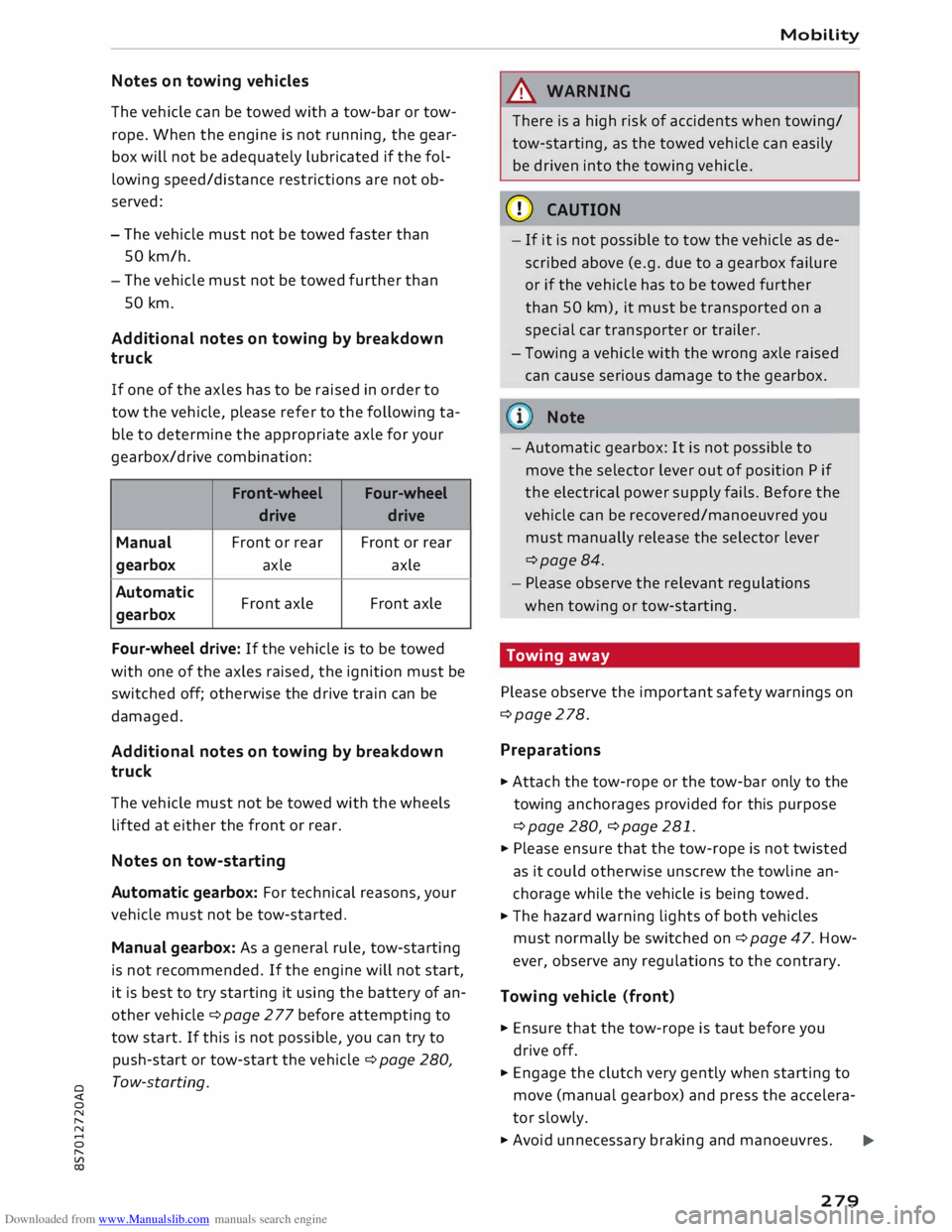
If one of the axles has to be raised in order to
tow the vehicle, please refer to the following ta
ble to determine the appropriate axle for your
gearbox/drive combination:
Front -wheel
Four-wheel
drive drive
Manual Front
or rear Front or rear
gearbox axle
axle
Automatic Front axle Front
axle
gearbox
Four-wheel drive: If the vehicle is to be towed
with one of the axles raised, the ignition must be
switched off; otherwise the drive train can be
damaged.
Additional notes on towing by breakdown
truck
The vehicle must not be towed with the wheels
lifted at either the front or rear.
Notes on tow-starting
Automatic gearbox: For technical reasons, your
vehicle must not be tow-started.
Manual gearbox: As a general rule, tow-starting
is not recommended. If the engine will not start,
it is best to try starting it using the battery of an
other vehicle ¢ page 2 77 before attempting to
tow start. If this is not possible, you can try to
push-start or tow-start the vehicle ¢ page 280,
Tow-starting. Mobility
& WARNING
There is a high risk of accidents when towing/
tow-starting, as the towed vehicle can easily
be driven into the towing vehicle.
CD CAUTION
- If it is not possible to tow the vehicle as de
scribed above (e.g. due to a gearbox failure
or if the vehicle has to be towed further
than SO km), it must be transported on a
special car transporter or trailer.
- Towing a vehicle with the wrong axle raised
can cause serious damage to the gearbox.
Note
- Automatic gearbox: It is not possible to
move the selector lever out of position P if
the electrical power supply fails. Before the
vehicle can be recovered/manoeuvred you
must manually release the selector lever
¢page 84.
- Please observe the relevant regulations
when towing or tow-starting.
Towing away
Please observe the important safety warnings on
¢page 278.
Preparat ions
.,. Attach the tow-rope or the tow-bar only to the
towing anchorages provided for this purpose
¢page 280, ¢page 281 .
.,. Please ensure that the tow-rope is not twisted
as it could otherwise unscrew the towline an
chorage while the vehicle is being towed.
.,. The hazard warning lights of both vehicles
must normally be switched on¢ page 47. How
ever, observe any regulations to the contrary.
Towing vehicle (front}
.,. Ensure that the tow-rope is taut before you
drive off.
.,. Engage the clutch very gently when starting to
move (manual gearbox) and press the accelera
tor slowly.
.,. Avoid unnecessary braking and manoeuvres.
..,.
279
Page 282 of 306
Downloaded from www.Manualslib.com manuals search engine Mobility
Vehicle being towed (rear)
� Ensure that the ignition is switched on, the
steering wheel is not locked, and that you can
operate the turn signals, horn or windscreen
wipers if necessary ¢ A-
� The brake servo only works when the engine is
running. The power steering only works when
the ignition is on and the vehicle is moving 1
).
Otherwise you will need to press the brake ped
al significantly harder and apply more force to
move the steering wheel.
� Please ensure that the steering wheel is un-
locked and that it moves freely.
� Release the parking brake¢ page 74.
� Manual gearbox: Put the gear lever in neutral.
� Automatic gearbox: Move the selector lever to
position N.
� Ensure that the tow-rope remains taut at all
times when towing.
A WARNING
If the vehicle has no electrical power, do NOT
use a tow-bar or tow-rope to tow the vehicle
(D Note
You can use the turn signals to indicate a
change of direction (or lane) even when the
hazard warning lights are on. The hazard
warning lights will be interrupted temporari
ly.
Tow-starting
Please observe the important safety warnings on
¢page 278.
Important: Your vehicle must be fitted with a
manual gearbox. If your vehicle has a petrol en
gine, it must not be towed further than SO me
tres ¢(D.
� Attach the tow-rope or the tow-bar only to the
towing anchorages provided for this purpose
¢page 280, ¢page 281.
� Engage second or third gear before moving off.
� Press the clutch and hold the pedal down.
l l
Important: The vehicle battery must be adequately charg
ed.
280 �
Switch on the ignition.
� Once both vehicles are moving, release the
clutch.
� As soon as the engine starts, press the clutch
pedal and put the gear lever in neutral.
CD CAUTION
When tow-starting the vehicle, do not tow it
further than 50 metres; otherwise the cata
lytic converter could be damaged.
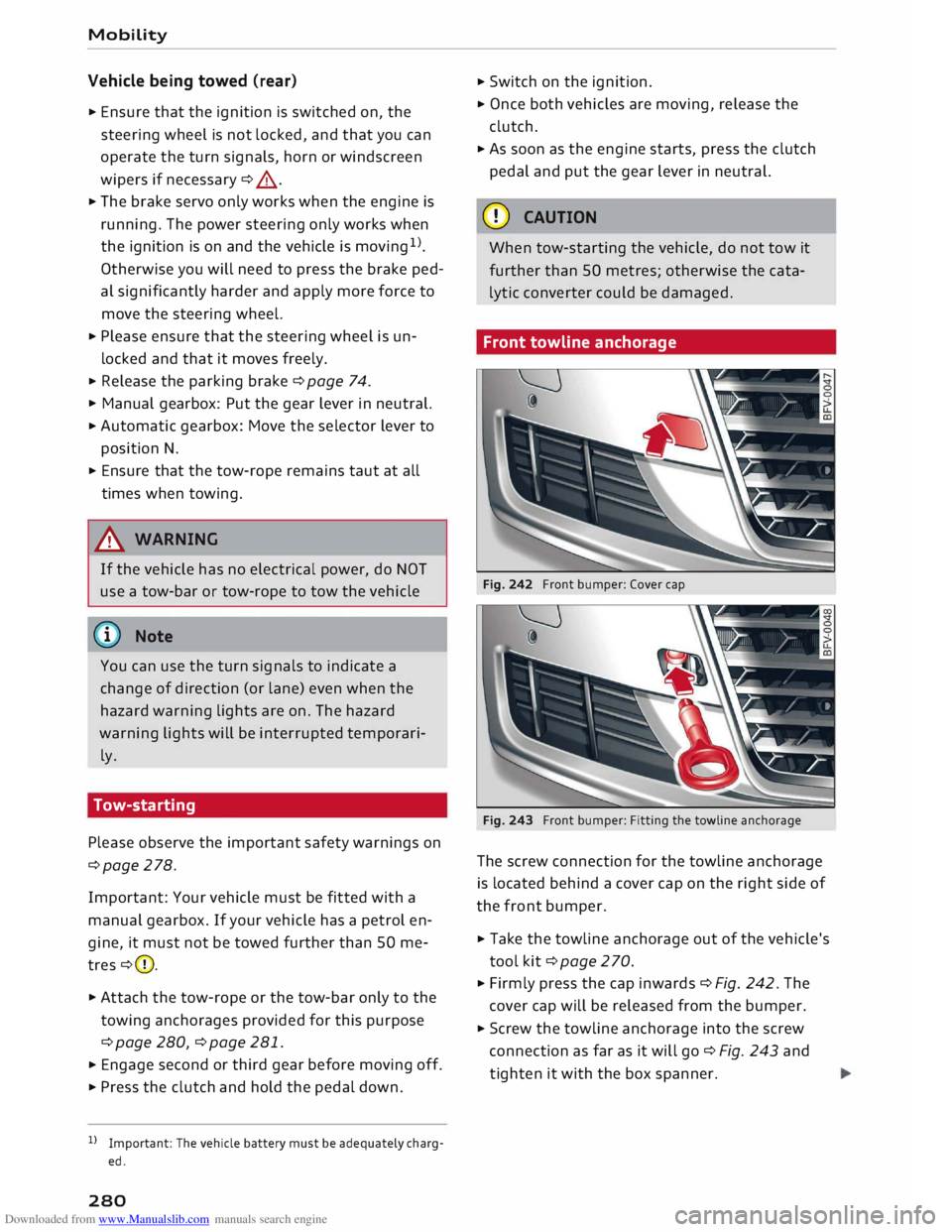
Front towline anchorage
Fig. 242 Front bumper: Cover cap
Fig. 243 Front bumper: Fitting the towline anchorage
The screw connection for the towline anchorage
is located behind a cover cap on the right side of
the front bumper.
� Take the towline anchorage out of the vehicle's
tool kit¢ page 2 70.
� Firmly press the cap inwards ¢ Fig. 242. The
cover cap will be released from the bumper.
� Screw the towline anchorage into the screw
connection as far as it will go¢ Fig. 243 and
tighten it with the box spanner.
Page 284 of 306
Downloaded from www.Manualslib.com manuals search engine Fuses
and bulbs
Fuses and bulbs
Fuses Fuses in vehicle interior
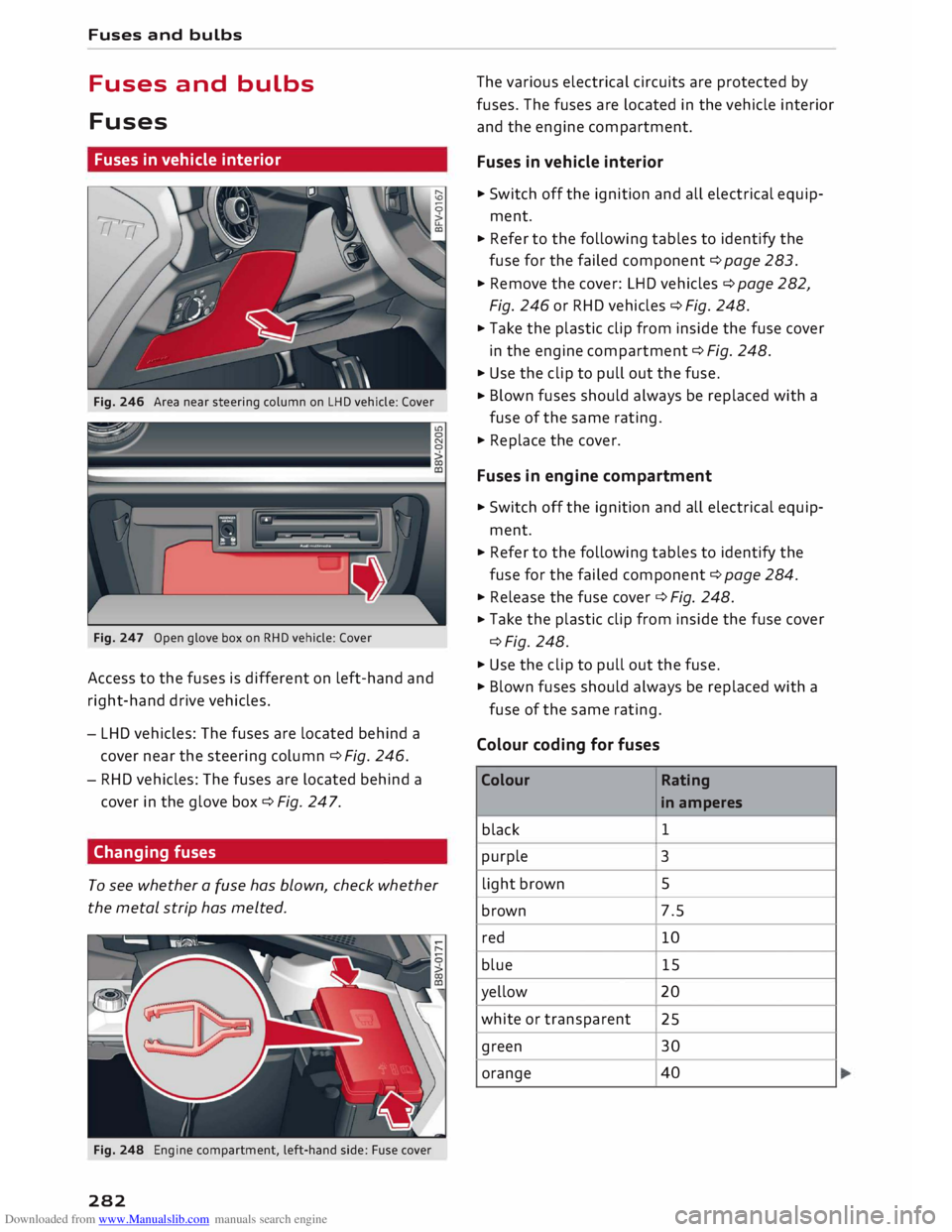
Fig. 246 Area near steering column on LHD vehicle: Cover
Fig. 247 Open glove box on RHD vehicle: Cover
Access to the fuses is different on left-hand and
right-hand drive vehicles.
- LHD vehicles: The fuses are located behind a
cover near the steering column c::> Fig. 246.
- RHD vehicles: The fuses are located behind a
cover in the glove box c::> Fig. 247.
Changing fuses
To see whether a fuse has blown, check whether
the metal strip has melted.
Fig. 248 Engine compartment, left-hand side: Fuse cover
282 The
various electrical circuits are protected by
fuses. The fuses are located in the vehicle interior
and the engine compartment.
Fuses in vehicle interior
.,,. Switch off the ignition and all electrical equip
ment .
... Refer to the following tables to identify the
fuse for the failed component c::> page 283 .
... Remove the cover: LHD vehicles c::> page 282,
Fig. 246 or RHD vehicles c::> Fig. 248 .
... Take the plastic clip from inside the fuse cover
in the engine compartment c::> Fig. 248 .
... Use the clip to pull out the fuse .
... Blown
fuses should always be replaced with a
fuse of the same rating .
.,,. Replace the cover.
Fuses in engine compartment
... Switch off the ignition and all electrical equip
ment .
... Refer to the following tables to identify the
fuse for the failed component c::> page 284 .
... Release the fuse cover c::> Fig. 248 .
... Take
the plastic clip from inside the fuse cover
c::>Fig. 248 .
.,,. Use the clip to pull out the fuse.
.,,. Blown fuses should always be replaced with a
fuse of the same rating.
Colour coding for fuses
Colour Rating
in amperes
black 1
purple 3
light brown 5
brown 7.5
red 10
blue 15
yellow 20
white or transparent
25
green 30
orange 40
Page 285 of 306
Downloaded from www.Manualslib.com manuals search engine 0
N
,.....
N
......
0
,.....
Vl
CX) &,
WARNING
Never attempt to repair a fuse or replace a
blown fuse by fitting a fuse with a higher am
pere rating. This could damage the electrical
system -risk of fire!
CD CAUTION
If a newly replaced fuse blows again after a
short time, the electrical system must be
checked by a qualified workshop as soon as
possible.
@ Note
- Unassigned fuse locations are not shown in
the tables below.
- Some of the items of equipment listed in
the tables below are only fitted on certain
models or are optional extras.
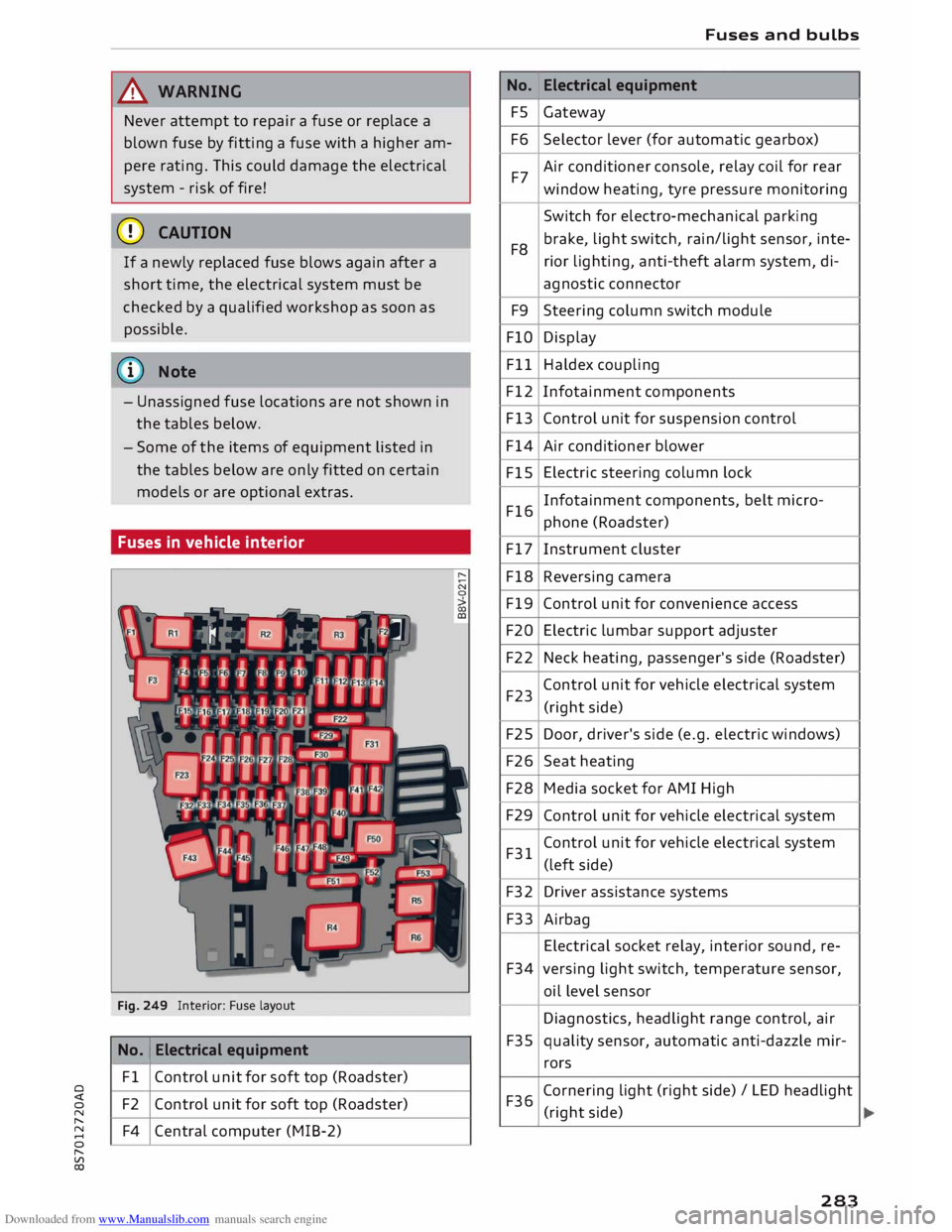
Fuses in vehicle interior
Fig. 249 Interior: Fuse layout
No. 1
Electrical equipment
Fl Control unit for soft top (Roadster)
F2 Control unit for soft top (Roadster)
F4 Central computer (MIB-2) No.
FS
F6
F7
F8 F9
FlO
Fll
F12
F13
F14
FlS
F16
F17
F18
F19
F20
F22
F23
F25
F26
F28
F29
F31
F32
F33
F34
F35
F36 Fuses
and bulbs
Electrical equipment
Gateway
Selector lever (for automatic gearbox)
Air conditioner console, relay coil for rear
window heating, tyre pressure monitoring
Switch for electro-mechanical parking
brake, light switch, rain/light sensor, inte-
rior lighting, anti-theft alarm system, di-
agnostic connector
Steering column switch module
Display
Haldex coupling
Infotainment components
Control unit for suspension control
Air conditioner blower
Electric steering column lock
Infotainment components, belt micro-
phone (Roadster)
Instrument cluster
Reversing camera
Control unit for convenience access
Electric lumbar support adjuster
Neck heating, passenger's side (Roadster)
Control unit for vehicle electrical system
(right side)
Door, driver's side (e.g. electric windows)
Seat heating
Media socket for AMI High
Control unit for vehicle electrical system
Control unit for vehicle electrical system
(left side)
Driver assistance systems
Airbag
Electrical socket relay, interior sound, re-
versing light switch, temperature sensor,
oil level sensor
Diagnostics, headlight range control, air
quality sensor, automatic anti-dazzle mir-
rors
Cornering light (right side)/ LED headlight
(right side)
283
Page 286 of 306
Downloaded from www.Manualslib.com manuals search engine Fuses
and bulbs
No. Electrical
equipment
F37 Cornering
light (left side) / LED headlight
(left side)
F38 Engine control unit, ESC control unit
F39 Door,
passenger's side (e.g. electric win-
dows)
F40 Cigarette lighter, electrical sockets
F41 SCR relay and delivery unit
F42 Central locking system
F43 On-board computer
F45 Electrically adjustable seat (driver's side)
F46 Neck heating, driver's side (Roadster)
F49 Starter, clutch sensor
F53 Rear window heating
The seats with electric adjustment* are protected
by circuit breakers. These reset automatically af
ter a few seconds when the overload has been
corrected.
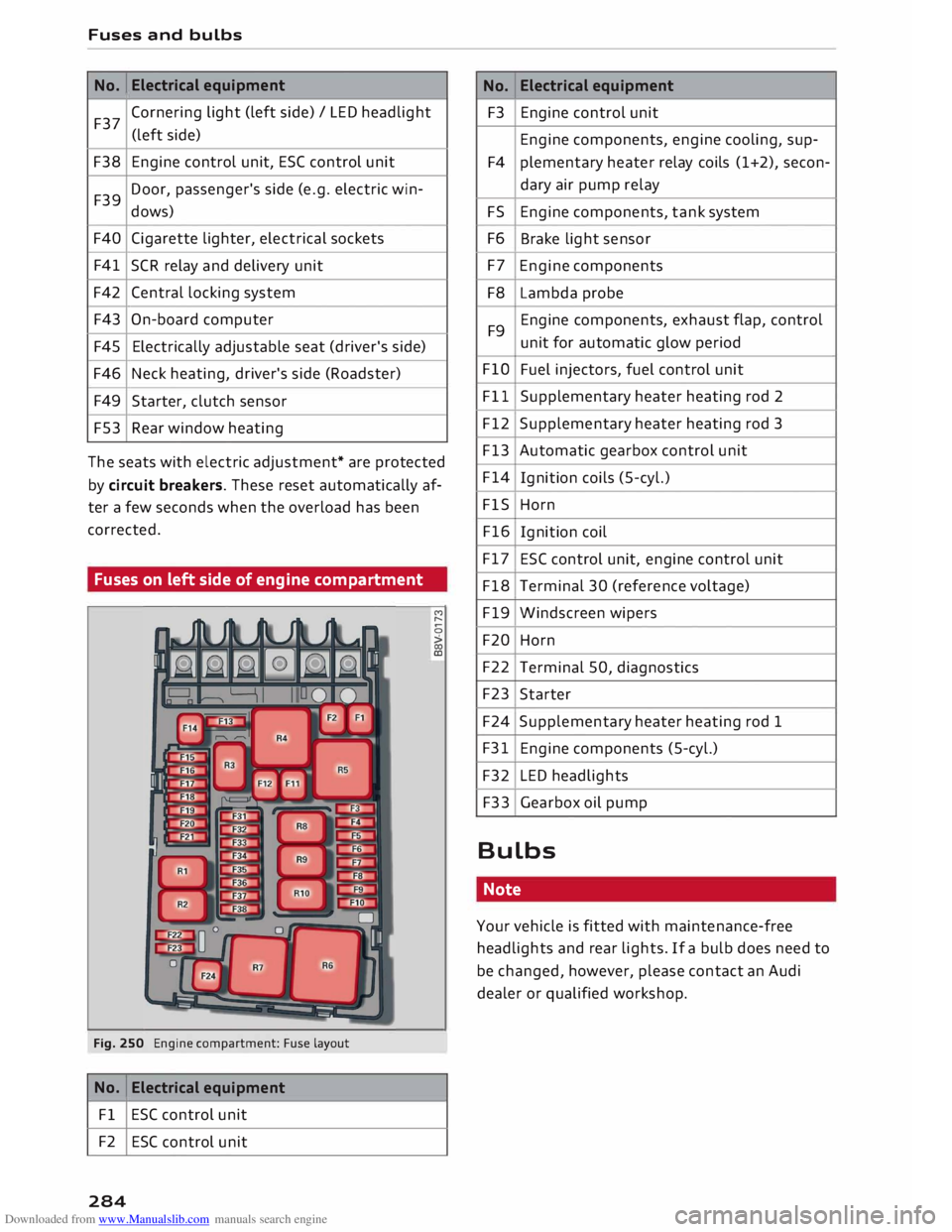
Fuses on left side of engine compartment
Fig. 250 Engine compartment: Fuse layout
No. Electrical
equipment
Fl ESC control unit
F2 ESC control unit
284 M
r--
0
> 00
ID No.
Electrical
equipment
F3 Engine control unit
Engine components, engine cooling, sup-
F4 plementary
heater relay coils (1+2), secon-
dary air pump relay
FS Engine components, tank system
F6 Brake light sensor
F7 Engine components
F8 Lambda probe
F9 Engine components,
exhaust flap, control
unit for automatic glow period
FlO Fuel injectors, fuel control unit
Fll Supplementary heater heating rod 2
F12 Supplementary heater heating rod 3
F13 Automatic gearbox control unit
F14 Ignition coils (5-cyl.)
FlS Horn
F16 Ignition coil
F17 ESC control unit, engine control unit
F18 Terminal 30 (reference voltage)
F19 Windscreen wipers
F20 Horn
F22 Terminal 50, diagnostics
F23 Starter
F24 Supplementary heater heating rod 1
F31 Engine components (5-cyl.)
F32 LED headlights
F33 Gearbox oil pump
Bulbs Note
Your vehicle is fitted with maintenance-free
headlights and rear lights. If a bulb does need to
be changed, however, please contact an Audi
dealer or qualified workshop.
Page 290 of 306
Downloaded from www.Manualslib.com manuals search engine Technical
data
� Note
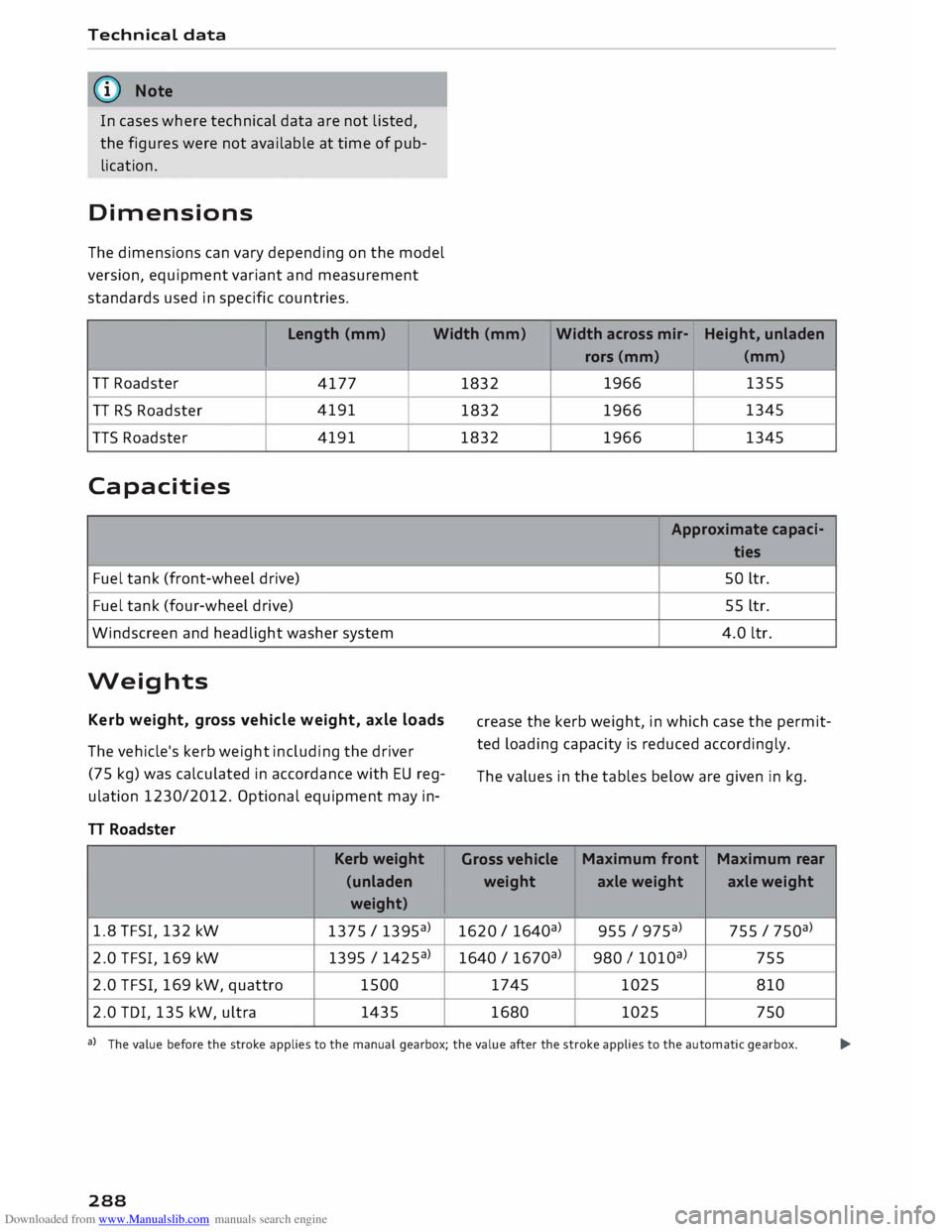
In cases where technical data are not listed,
the figures were not available at time of pub
lication.
Dimensions
The dimensions can vary depending on the model
version, equipment variant and measurement
standards used in specific countries.
Length (mm)
Width (mm) Width
across mir-Height,
unladen
TT Roadster
4177
TT RS Roadster 4191
TTS Roadster
4191
Capacities
Fuel tank (front-wheel drive)
Fuel tank (four-wheel drive)
Windscreen and headlight washer system
Weights Kerb weight, gross vehicle weight, axle loads
The vehicle's kerb weight including the driver
(75 kg) was calculated in accordance with EU reg
ulation 1230/2012. Optional equipment may in-
TT Roadster
Kerb weight
(unladen weight)
1.8 TFSI, 132 kW
1375 / 1395a)
2.0 TFSI, 169 kW
1395 / 1425a)
2.0 TFSI, 169 kW, quattro 1500
2.0 TOI, 135 kW, ultra 1435 rors
(mm) (mm)
1832 1966
1355
1832 1966 1345
1832 1966
1345
Approximate capaci-
ties
SO ltr.
55 ltr.
4.0 ltr.
crease the kerb weight, in which case the permit
ted loading capacity is reduced accordingly.
The values in the tables below are given in kg.
Gross vehicle Maximum
front
Maximum rear
weight axle weight axle weight
1620 / 164oa) 955
/ 975a) 755
/ 750a)
1640 / 167oa) 980
I 101oa>
755
1745 1025
810
1680 1025
750
a) The value before the stroke applies to the manual gearbox; the value after the stroke applies to the automatic gearbox.
�
288
Page 292 of 306
Downloaded from www.Manualslib.com manuals search engine Index
Numbers and
Symbols
360 °
display
A 104
A/C (air conditioner) . . . . . . . . . . . . . . . . . 61, 62
ABS see Anti-lock brake system . . . . . . . . . . . .
113
Accelerator pedal . . . . . . . . . . . . . . . . . . . . .
226
Accessories 285
Active lane assist . . . . . . . . . . . . . . . . . . . . . . 92
Cleaning area around camera . . . . . . . . . . 264
Driver messages . . . . . . . . . . . . . . . . . . . . . .
93
Indicator lamp . . . . . . . . . . . . . . . . . . . . . . .
93
Setting steering vibration . . . . . . . . . . . . . .
94
Setting time of warning . . . . . . . . . . . . . . . .
94
Switching on/off . . . . . . . . . . . . . . . . . . . . . 93
Adaptive light (indicator lamp) . . . . . . . . . . . 19
Additional phone ................. 143,214
Airbag . . . . . . . . . . . . . . . . . . . . . . . . . . . . . .
235
Deactivating passenger's airbag . . . . . . . .
237
Front airbags . . . . . . . . . . . . . . . . . . . . . . .
236
Side airbags . . . . . . . . . . . . . . . . . . . . . . . .
239
Warning lamp . . . . . . . . . . . . . . . . . . . . . . . 16
Air conditioner (automatic)
Adjusting air outlets . . . . . . . . . . . . . . . 62, 63
Air distribution, air outlets . . . . . . . . . . . . . 62
Air recirculation mode . . . . . . . . . . . . . . . . . 63
AUTO (automatic mode) . . . . . . . . . . . . . . . 62
Blower . . . . . . . . . . . . . . . . . . . . . . . . . . . . .
62
Controls . . . . . . . . . . . . . . . . . . . . . . . . . . . .
62
Defrosting windows . . . . . . . . . . . . . . . . . . .
63
Drive select . . . . . . . . . . . . . . . . . . . . . . . . . 100
Rear window heating . . . . . . . . . . . . . . . . . .
63
Selecting temperature . . . . . . . . . . . . . . . . .
62
Air conditioner (manual)
Adjusting air outlets . . . . . . . . . . . . . . . 61, 63
Adjusting temperature . . . . . . . . . . . . . . . . 61
Air distribution,
air outlets . . . . . . . . . . . . .
61
Air recirculation mode . . . . . . . . . . . . . . . . . 61
Blower . . . . . . . . . . . . . . . . . . . . . . . . . . . . .
61
Controls . . . . . . . . . . . . . . . . . . . . . . . . . . . .
60
Defrosting windows . . . . . . . . . . . . . . . . . . .
61
Rear window heating . . . . . . . . . . . . . . . . . . 61
Air distribution, setting (air conditioner) 61, 62
Air outlets, adjusting . . . . . . . . . . . . . . . . . . . 63
290 Air
recirculation mode (air conditioner)
Alarm system 61,63
see Anti-theft alarm system . . . . . . . . . 27, 32
All-season tyres
see All-weather tyres . . . . . . . . . . . . . . . . .
257
All-weather lights . . . . . . . . . . . . . . . . . . . . . . 44
All-weather tyres . . . . . . . . . . . . . . . . . . . . . 257
Alterations to the vehicle . . . . . . . . . . . . . . .
285
Alternative routes . . . . . . . . . . . . . . . . . . . . . 177
Alternator (warning lamp) . . . . . . . . . . . . . . . 15
AMI see Audi music interface .......... 197,
198
Android Auto
see Audi smartphone interface . . . . . . . . .
210
Announcements (traffic programme) . . . . .
218
Anti-dazzle exterior mirrors . . . . . . . . . . . . . . 49
Anti-dazzle interior mirror . . . . . . . . . . . . . . . 49
Anti-freeze Coolant . . . . . . . . . . . . . . . . . . . . . . . . . . . . 249
Windscreen washer system . . . . . . . . . . . .
252
Anti-lock brake system . . . . . . . . . . . . . . . . .
113
Anti-theft alarm system . . . . . . . . . . . . . . . . . 32
Anti-theft wheel bolts . . . . . . . . . . . . . . . . . 273
Apple CarPlay
see Audi smartphone interface . . . . . . . . . 210
Armrest . . . . . . . . . . . . . . . . . . . . . . . . . . . . . .
55
Ashtray . . . . . . . . . . . . . . . . . . . . . . . . . . . . . .
56
ASR see Traction control system .......... .
Audi connect ........................ .
Data connection .................... .
Data protection .................... . 113
159
166
168
Personal hotspot . . . . . . . . . . . . . . . . . . . . 161
Services (overview) . . . . . . . . . . . . . . . . . . 162
Setup . . . . . . . . . . . . . . . . . . . . . . . . . . . . . 159
Audi magnetic ride
see Suspension control . . . . . . . . . . . . . . .
100
Audi music interface . . . . . . . . . . . . . . . . . . .
197
Audi music stream
see Wi-Fi . . . . . . . . . . . . . . . . . . . . . . . . . . .
195
Audio files . . . . . . . . . . . . . . . . . . . . . . . . . . . 200
Audio player
Bluetooth audio player
194
Audio players
Wi-Fi audio players . . . . . . . . . . . . . . . . . .
195
Audio track 203