audio AUDI TT ROADSTER 2016 User Guide
[x] Cancel search | Manufacturer: AUDI, Model Year: 2016, Model line: TT ROADSTER, Model: AUDI TT ROADSTER 2016Pages: 306, PDF Size: 31.82 MB
Page 168 of 306
Downloaded from www.Manualslib.com manuals search engine Audi
connect
Netwo rk search*
A List of the Wi-Fi networks available near you is
displayed.
Connection to personal hotspot1
)
The Wi-Fi hotspot of the MMI is activated. The
MMI can establish an Internet connection to a
personal Wi-Fi hotspot (e.g. smartphone). You
can search for your personal hotspot and connect
to the MMI using Network search. For more in
formation, please refer to ¢ page 161.
This mode is not available if your own SIM card is
inserted in the SIM card reader.
A WARNING
- Do not allow the features of the Wi-Fi hot
spot to distract you from watching the traf
fic -taking your eyes off the road can cause
an accident.
- Mobile devices, tablet and laptop computers
and devices of a similar weight can only be
operated safely when the vehicle is station
ary. Like any loose object, they can be cata
pulted through the vehicle in an accident
and cause serious injuries. Always make sure
that such devices are securely stowed while
you are driving.
- No Wi-Fi devices may be used in the areas
around the airbags while the vehicle is being
driven. Please also observe the safety warn
ings in the chapter on¢ page 235.
- Depending on the configuration of the Wi-Fi
device you are using (refer to the operating
manual of your Wi-Fi device for more de
tails), the SIM card of the device may be
used in certain
cases
to provide the data
connection for Internet-supported apps and
services which use the MMI Wi-Fi hotspot.
Depending on your network provider, you
may be charged for this service, especially if
you are using the system abroad. We there
fore strongly recommend that you use an
unlimited data plan. For more information,
l l
Not available in all markets.
166 contact
your service provider. Some exam
ple cases are described below:
- Data plan expired/used up
- Data plan not valid abroad
- SIM card in the card reader* is not a data
SIM card
- SIM card in the card reader* is defective/
not valid
- Network is switched automatically due to
a low signal strength/data rate of the Wi
Fi hotspot, the eSIM* or the SIM card in
the card reader*
- Connection to Wi-Fi hotspot interrupted
- Please note that it is your responsibility to
. take
precautions regarding data protection,
anti-virus protection and protection against
loss of data on mobile devices used to con
nect to the Internet via the Wi-Fi hotspot.
1 Note
- You might require a separate mobile phone
contract with extra costs before you can use
the Wi-Fi hotspot. For more information,
contact your service provider.
- In vehicles without Audi connect*, the Wi-Fi
hotspot can only be used for the Wi-Fi audio
player*. A data connection to the Internet
cannot be established.
- Further information can be found on the In
ternet at www.audi.com.
Configuring the data
connection
Applies to: vehicles with Audi connect
You must configure a data connection before you
can use Audi connect services.
� Select: I MENU
I button > right control button >
Connection manager.
� Select: right control button > Online settings >
Data connection settings.
You can select when you would Like the system to
establish an Internet connection in the Data con
nection settings menu. The online connection is �
Page 187 of 306
Downloaded from www.Manualslib.com manuals search engine 0
N
,.....
N Radio
Calling up the radio
menu
The radio supports the following wavebands:
FM, AM, DAB* (digital radio). You can use the HD
Radio receiver* to receive radio stations from the
FM/AM wavebands digitally.
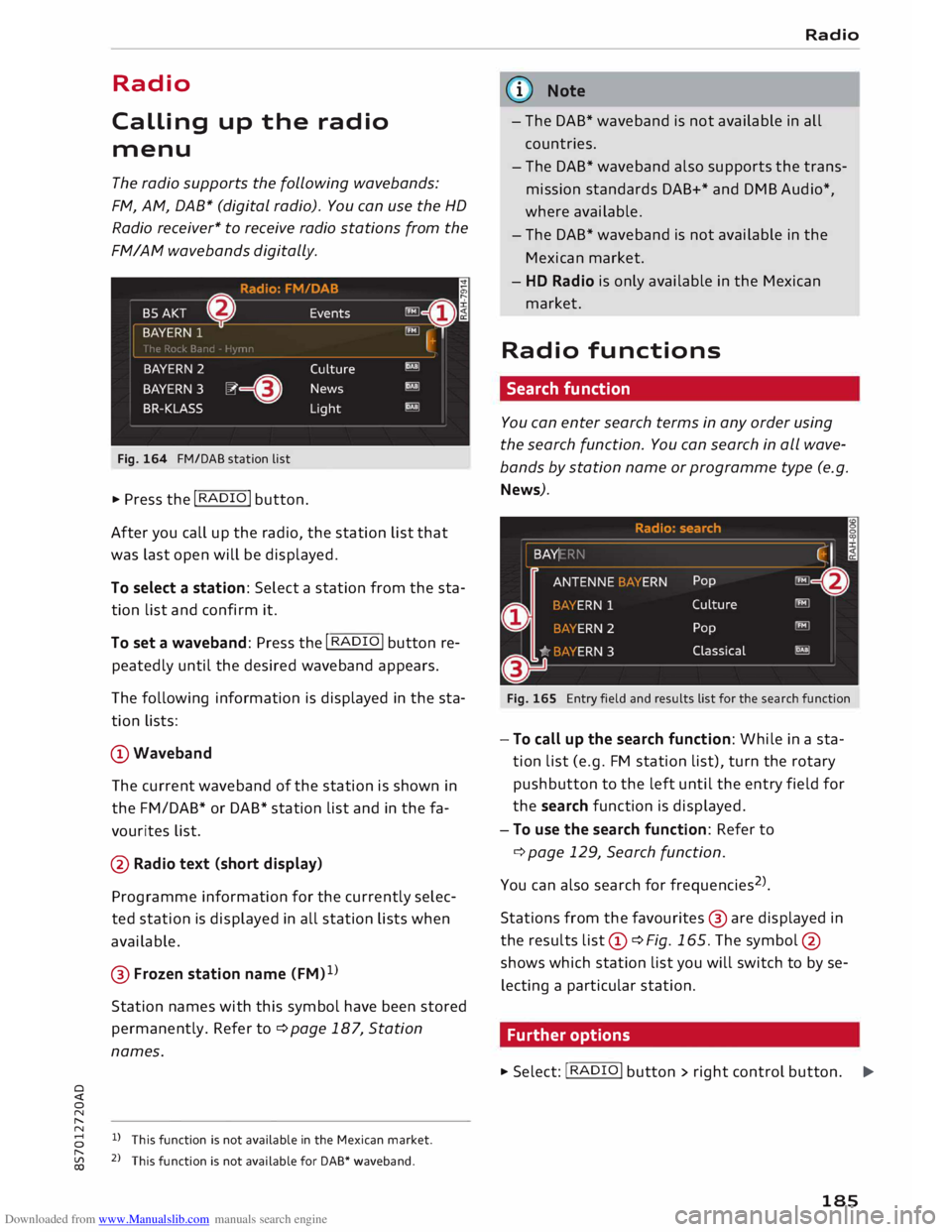
Fig. 164 FM/DAB station list
� Press the I RADIO I button.
After you call up the radio, the station list that
was last open will be displayed.
To select a station: Select a station from the sta
tion list and confirm it.
To set a waveband: Press the I RADIO! button re
peatedly until the desired waveband appears.
The following information is displayed in the sta
tion lists:
CD Waveband
The current waveband of the station is shown in
the FM/DAB* or DAB* station list and in the fa
vourites list.
@ Radio text (short display)
Programme information for the currently selec
ted station is displayed in all station lists when
available.
@ Frozen station name (FM)1
)
Station names with this symbol have been stored
permanently. Refer to¢ page 187, Station
names.
8 l)
This function is not available in the Mexican market.
[;:j 2
> This function is not available for DAB* waveband.
CX) Radio
G}) Note
- The DAB* waveband is not available in all
countries.
- The DAB* waveband also supports the trans
mission standards DAB+* and DMB Audio*,
where available.
- The DAB* waveband is not available in the
Mexican market.
- HD Radio is only available in the Mexican
market.
Radio functions
Search function
You can enter search terms in any order using
the search function. You can search in all wave
bands by station name or programme type (e.g.
News).
Fig. 165 Entry field and results list for the search function
- To call up the search function: While in a sta
tion list (e.g. FM station list), turn the rotary
pushbutton to the left until the entry field for
the search function is displayed.
- To use the search function: Refer to
¢ page 129, Search function.
You can also search forfrequencies 2
>
.
Stations from the favourites @ are displayed in
the results list(D ¢Fig. 165. The symbol @
shows which station list you will switch to by se
lecting a particular station.
Further options
� Select: I RADIO! button> right control button.
..,.
185
Page 193 of 306

Downloaded from www.Manualslib.com manuals search engine Media
Introduction
The MMI system includes various media drives
and provides various options for connecting devi
ces. For example, you can play audio/video* files
from the jukebox or connect a mobile device to
the Audi music interface* and operate it via the
MMI.
Notes General
Media and format limitations: The MMI system
(including the SD card reader and the connection
for the USB mass storage device*) has been tes
ted for use with many of the products and media
currently available on the market. However,
there may be some devices/media and audio/vid
eo* files that are not supported or cannot be
played, or the functionality may be limited under
certain circumstances.
Digital rights management: Please note that
copyright law applies to audio/video files.
The MMI media drives do not support ORM-pro
tected files; these files are marked with the sym
bol rn.
Data storage: Never store important data on SD
cards, the jukebox*, CDs/DVDs or mobile devices.
AUDI AG shall not accept any liability whatsoever
for the loss of files and media.
Loading times: The more files, folders or play
lists are stored on a storage device, the longer it
will take to load the audio files/video* files. We
recommend using a storage device which con
tains only audio/video* files. If you want to re
duce the time it takes to load the audio/video*
files, you can create subfolders (e.g. for an artist
or album). The loading time will be extended ad
ditionally if you are importing data.
Metadata: Metadata stored on audio files (e.g.
artists, tracks, album covers) will be displayed
� automatically
when the files are played. If this
� information is not stored on the relevant medi-
8 um,
the MMI system will use the database of
"
Vl Media
metadata from Gracenote. Nevertheless, meta
data may not be displayed in some cases.
Restricted performance: If you experience re
stricted performance, reset the Media settings
to the factory defaults ¢page 213.
If you experience restricted performance from
the Jukebox*, reset it to the factory settings
¢page 213.
For information on the characteristics of the sup
ported media and file formats, please refer to
¢page 206 onwards.
CD CAUTION
Please always observe the information ¢(Din
Wi-Fi hotspot on page 166.
CD/DVD mode
CD/DVD and format limitations: In view of the
variety of CDs/DVDs and the difference in memo
ry capacities, the functionality may be restricted
in the case of some storage devices. Under cer
tain circumstances, audio CDs/video DVDs that
are copy-protected or CDs/DVDs that do not com
ply with the standard audio format, and multi
session CDs cannot be played at all, or the func
tionality may be limited. We recommend always
finalising the burning process when creating
multisession CDs. Multisession is not supported
for DVDs.
Handling CDs/DVDs, the CD drive or the DVD
drive: To ensure perfect, high-quality playback
and avoid scanning errors or damage to the me
dia drive, always store CDs/DVDs in a suitable
case and do not expose them to direct sunlight.
Do not use:
- Damaged, dirty or scratched CDs/DVDs
- Single CDs/DVDs (diameter 8 cm)
- Non-circular CDs/DVDs (shape CDs)
- CDs/DVDs with stickers
- Protective rings
- Cleaning discs
Thermal cut-out: In the case of unusually hot or
cold outside temperatures, it is possible that CD/
DVD playback will temporarily not be possible. A
IJll,,
191
Page 194 of 306
Downloaded from www.Manualslib.com manuals search engine Media
thermal cut-out is installed to protect the CD/
DVD and the reading Laser.
Laser devices: Laser devices are divided into the
safety classes 1 to 4, as specified by DIN IEC 76
(CO) 6/VDE 0837. The optical readers installed in
your vehicle are classified as safety class 1. La
sers used in devices that fall into this category
are very weak and well screened, so there is no
danger if used correctly.
Media drives
SD card readers
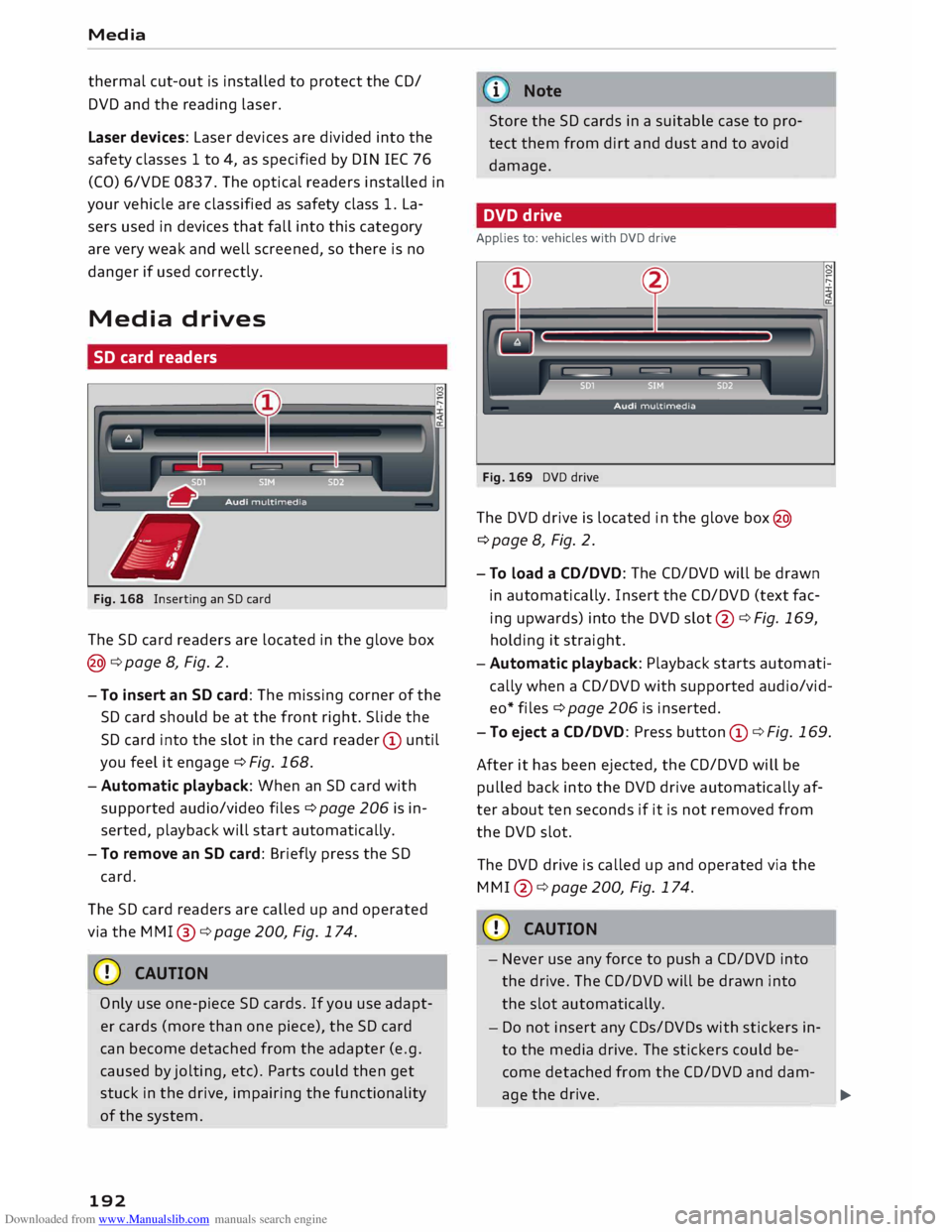
Fig. 168 Inserting an SD card
The SD card readers are Located in the glove box
@¢ page 8, Fig. 2.
- To insert an SD card: The missing corner of the
SD card should be at the front right. Slide the
SD card into the slot in the card reader CD until
you feel it engage ¢ Fig. 168.
-Automatic playback: When an SD card with
supported audio/video files¢ page 206 is in
serted, playback will start automatically.
- To remove an SD card: Briefly press the SD
card.
The SD card readers are called up and operated
via the MMl @
¢ page200, Fig.174.
CD CAUTION
Only use one-piece SD cards. If you use adapt
er cards (more than one piece), the SD card
can become detached from the adapter (e.g.
caused by jolting, etc). Parts could then get
stuck in the drive, impairing the functionality
of the system.
192 i
Note
Store the SD cards in a suitable case to pro
tect them from dirt and dust and to avoid
damage.
DVD drive
Applies to: vehicles with DVD drive
Fig. 169 DVD drive
The DVD drive is Located in the glove box@
¢page 8, Fig. 2.
- To load a CD/DVD: The CD/DVD will be drawn
in automatically. Insert the CD/DVD (text fac
ing upwards) into the DVD slot@¢ Fig. 169,
holding it straight.
-Automatic playback: Playback starts automati
cally when a CD/DVD with supported audio/vid
eo* files ¢ page 206 is inserted.
- To eject a CD/DVD: Press button CD¢ Fig. 169.
After it has been ejected, the CD/DVD will be
pulled back into the DVD drive automatically af
ter about ten seconds if it is not removed from
the DVD slot.
The DVD drive is called up and operated via the
MMl @¢page200, Fig.174.
CD CAUTION
- Never use any force to push a CD/DVD into
the drive. The CD/DVD will be drawn into
the slot automatically.
- Do not insert any CDs/DVDs with stickers in
to the media drive. The stickers could be
come detached from the CD/DVD and dam-age the drive
.
-- - -
-- -
- --
� �
Page 195 of 306
Downloaded from www.Manualslib.com manuals search engine Note
Playback cannot be guaranteed if the CD/DVD
contains audio/video files with a high data
rate.
CD drive
Applies to: vehicles with CD drive
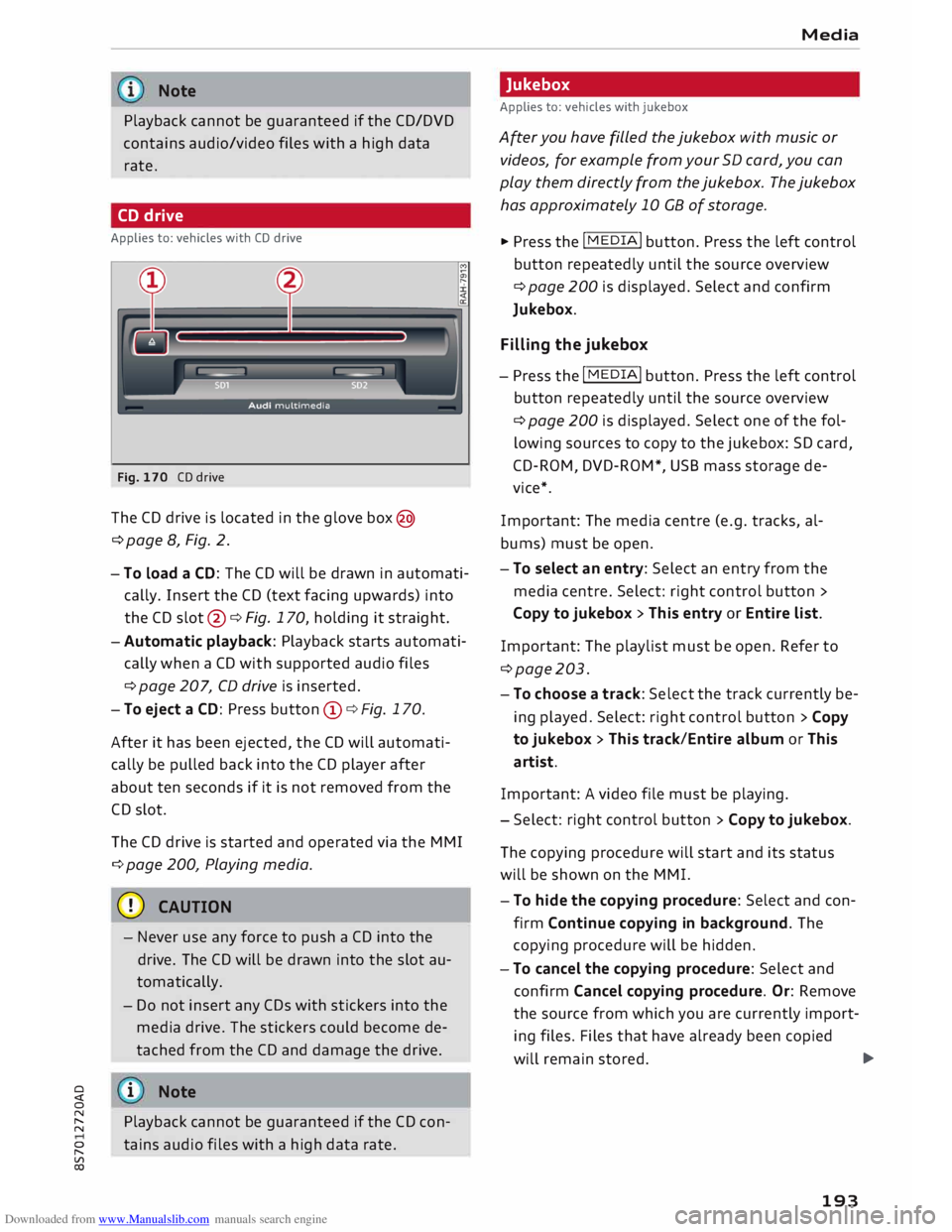
Fig. 170 CD drive
The CD drive is located in the glove box@
¢page 8, Fig. 2.
- To Load a CD: The CD will be drawn in automati
cally. Insert the CD (text facing upwards) into
the CD slot @¢ Fig. 170, holding it straight.
- Automatic playback: Playback starts automati
cally when a CD with supported audio files
¢ page 207, CD drive is inserted.
- To eject a CD: Press button (D ¢ Fig. 170.
After it has been ejected, the CD will automati
cally be pulled back into the CD player after
about ten seconds if it is not removed from the
CD slot.
The CD drive is started and operated via the MMI
¢ page 200, Playing media.
CD CAUTION
- Never use any force to push a CD into the
drive. The CD will be drawn into the slot au
tomatically.
- Do not insert any CDs with stickers into the
media drive. The stickers could become de
tached from the CD and damage the drive.
� i
Note
0
N
� Playback
cannot be guaranteed if the CD con-
::2 tains
audio files with a high data rate.
Vl
CX) Media
Jukebox
Applies to: vehicles with jukebox
After you have filled the jukebox with music or
videos, for example from your SD card, you can
play them directly from the jukebox. The jukebox
has approximately 10 CB of storage.
� Press the I MEDIA i
button. Press the left control
button repeatedly until the source overview
¢ page 200 is displayed. Select and confirm
Jukebox.
Filling the jukebox
- Press the I MEDIA i
button. Press the left control
button repeatedly until the source overview
¢page 200 is displayed. Select one of the fol
lowing sources to copy to the jukebox: SD card,
CD-ROM, DVD-ROM*, USB mass storage de
vice*.
Important: The media centre (e.g. tracks, al
bums) must be open.
- To select an entry: Select an entry from the
media centre. Select: right control button >
Copy to jukebox > This entry or Entire List.
Important: The playlist must be open. Refer to
¢page 203.
- To choose a track: Select the track currently be
ing played. Select: right control button> Copy
to jukebox > This track/Entire album or This
artist.
Important: A video file must be playing.
- Select: right control button> Copy to jukebox.
The copying procedure will start and its status
will be shown on the MMI.
- To hide the copying procedure: Select and con
firm Continue copying in background. The
copying procedure will be hidden.
- To cancel the copying procedure: Select and
confirm Cancel copying procedure. Or: Remove
the source from which you are currently import
ing files. Files that have already been copied
will remain stored. .,..
193
Page 196 of 306
Downloaded from www.Manualslib.com manuals search engine Media
Important: Copying must be in progress in the
background.
- To display the copy procedure: Select: right
control button > Active copy procedure.
During the copying procedure, the audio files are
automatically sorted according to the categories
in the media centre based on the metadata stor
ed for the files ¢ page 201. The video files cop
ied can be found in the Videos category of the
media centre.
Playing from the jukebox
Important: The jukebox must contain audio/vid
eo files ¢ page 193, Filling the Jukebox.
The jukebox is called up and operated via the
MMI (D¢page200, Fig.174.
Di splaying the jukebox memory capacity
Select: right control button> Jukebox memory
capacity. Information on the jukebox memory ca
pacity and the number of stored tracks will be
displayed.
Deleting tracks from the jukebox 1
)
Important: The jukebox must contain audio/vid
eo files.
- Delete entry: Select an entry from the juke
box's media centre. Select: right control button
> Delete from jukebox > This entry or Entire
list.
- The status of the deletion process will be
shown on the MMI. During the deletion process
the playback of the jukebox is interrupted; it is
started again automatically once the deletion
process has been completed.
CD CAUTION
Only copy audio/video files while the engine is
running; otherwise the vehicle battery will be
discharged.
Note
- For legal reasons it is not possible to copy
tracks from audio CDs onto the jukebox.
l l
Not in the Playback view.
194 -
Files that have already been copied are de
tected automatically and cannot be copied
to the jukebox again.
- It is not possible to play audio/video files*
in the CD/DVD* drive while they are being
copied.
- For legal reasons there is no export function
for the jukebox.
- Files or tracks that do not include stored
metadata are listed as Unknown. Audi rec
ommends that you mark the audio files with
the corresponding metadata (e.g. ID3 tags).
- When handing over your vehicle e.g. to a
new buyer, reset the jukebox to the factory
settings ¢ page 213.
Bluetooth audio player
Applies to: vehicles with Bluetooth
You can use the Bluetooth audio player to play
music from your Bluetooth-enabled device (e.g.
smartphone) wirelessly via the MMI.
Important: To connect a Bluetooth device, the
vehicle must be stationary and the Bluetooth
function of your Bluetooth device and the Blue
tooth audio player ¢ page 215 function of the
MMI system must be switched on.
- To connect a Bluetooth device: Press the
I MEDIA!
button. Press the left control button
repeatedly until the source overview is dis
played. Select and confirm Bluetooth audio
player @¢page200, Fig. 175.
- You may need to select and confirm Not con
nected > Connect Bluetooth audio player. The
system will start searching for Bluetooth devi
ces. Follow the instructions given by the MMI.
- Select and confirm the desired Bluetooth de
vice from the list. The MMI will generate a PIN
to establish the connection.
- Select and confirm Yes.
- Enter the PIN on your Bluetooth device to es-
tablish a connection. Or: If the PIN is already
being displayed on your Bluetooth device,
please confirm it on the device. You have about
30 seconds to enter the PIN.
�
Page 197 of 306

Downloaded from www.Manualslib.com manuals search engine 0
N
,.....
N
......
0
,.....
Vl
CX) Depending
on the device you are using, the me
dia are started and operated using the mobile de
vice or the MMI.
Note
- Pay attention to any connection queries on
your Bluetooth device.
- You can bond several Bluetooth audio play
ers to the MMI system; however only one
connection can be active at a time.
- The system supports the Bluetooth proto
cols AVRCP (1.0/1.3/1.4) and A2DP.
- Please consider the volume control on your
Bluetooth device. Audi recommends setting
the volume of mobile devices to maximum
when they are being used as Bluetooth au
dio players.
- Which media functions (e.g. random play
back) are supported depends on the Blue
tooth device you are using.
- For more information on which devices are
supported, please go online (e.g.
www.audi.com/bluetooth) or contact an
Audi dealer.
Wi-Fi audio players
Applies to: vehicles with Wi-Fi
The MMI's Wi-Fi audio player media source al
lows you to connect and operate your Wi-Fi me
dia player (e.g. smartphone) to play music wire
Lessly from your player's media centre. The me
dia player is connected via the vehicle's Wi-Fi
hotspot. A UPnP server opp or an integrated
UPnPIDLNA server on the media player is re
quired to access the media centre of your media
player.
Important: The Wi-Fi
function of
the media play
er must be switched on. The Audi MMI connect
app or a UPnP server app must be installed on
your media player. Or: You must be using a
UPnP/DLNA server integrated in the media play
er.
- To connect a media player: Select the I MEDIAi
button. Press the left control button repeatedly
until the source overview ¢page 200 is dis- Media
played. Select and confirm Wi-Fi audio player
0 ¢ page 200, Fig. 175.
- You may need to select and confirm Wi-Fi off>
Activate Wi-Fi to switch Wi-Fi on in the MMI.
Select Wi-Fi settings if necessary. Use the set
tings of the Wi-Fi hotspot for the media player
you are using.
- To start the Wi-Fi audio player: Start the Audi
MMI connect app or a UPnP server app, or ena
ble media sharing on your media player.
To use the media player: The media player is op
erated using the MMI.
- Press the left control button repeatedly until
the menu item Folders appears. Select and con
firm Folders.
- To play music from a media player: Select and
confirm Media centre.
Internet radio: See ¢page 196.
& WARNING
-
- Do not allow the features of the Wi-Fi hot
spot to distract you from watching the traf
fic -taking your eyes off the road can cause
an accident.
- Mobile devices, tablet and laptop computers
and devices of a similar weight can only be
operated safely when the vehicle is station
ary. Like any loose object, they can be cata
pulted through the vehicle in an accident
and cause serious injuries. Always make sure
that such devices are securely stowed while
you are driving.
- No Wi-Fi devices may be used in the areas
around the airbags while the vehicle is being
driven. Please also observe the safety warn
ings in the chapter on¢ page 235.
CD CAUTION
Please always observe the information ¢0 in
Wi-Fi hotspot on page 166.
@ Note
- Inserting or removing the mini SIM card
from the SIM card reader* causes the Wi-Fi
connection to be reconfigured. This may
cause a short interruption in the audio play-
back of some media players.
_____ _ ...,.
195
Page 198 of 306
Downloaded from www.Manualslib.com manuals search engine Media
- Please always note the information in the
chapter ¢page 167, Notes on Audi connect.
- Please note that the Wi-Fi connection does
not automatically enable you to use the In
ternet. Further information can be found
from ¢ page 159 onwards.
- To avoid interruptions in audio playback, de
activate the energy saving function on your
media player, or connect the player to a
charger.
- The time it takes to load audio files depends
on the media player in use and on the num
ber of files stored.
-A maximum of 2,000 entries per directory
are shown on the MMI.
- Tracks downloaded from music streaming
services for use offline may be stored on
your mobile device (e.g. smartphone) with
DRM protection. Please note that files with
DRM protection cannot be played by the Wi
Fi audio player.
-Audi dealerships will be able to provide you
with further information on Wi-Fi audio
players.
Online media and
Internet radio
Applies to: vehicles with Audi connect
You can start and operate Internet radio and
various online media services via the MMI.
.,. Press the I MEDIAi button. Press the left control
button repeatedly until the source overview
¢ page 200, Fig. 175 is displayed.
Applies to: using on line media and Internet radio
Important:
- The Audi MMI connect app must have been in
stalled and started on your mobile device.
- You must be logged in to your myAudi account
in the Audi MMI connect app and must have
selected your vehicle.
- The Wi-Fi function must be activated on the
mobile device and on the MMI.
- If necessary, open the connection manager
¢ page 213 and check that the mobile device
you have connected is selected under MMI con
nect App (�).
196 -
A
network connection must be set up on the
MMI ¢page 166.
- The symbol for the media source Online media*
@ ¢page 200, Fig. 175 must be shown on the
MMI.
Applies to: using on line media
Additional requirements:
- One of the supported on line media services
must be available in your country.
- You must have an account with one of the sup
ported online media services.
- Depending on the online media service, an app
may need to be installed and set up on your
mobile device.
Starting online media
- Press the I
MEDIAi button. Press the left control
button repeatedly until the source overview
¢ page 200 is displayed.
- Select and confirm an on line media service.
Starting
Internet
radio
- Press the I MEDIAi button. Press the left control
button repeatedly until the source overview
¢ page 200 is displayed.
- Select and confirm Internet radio. The Internet
radio browser or the most recently played sta
tion will be shown.
- To select a station: Select and confirm a cate
gory in the Internet radio Browser (if desired) >
a station.
Online media and Internet radio: Further op
tions
- Press the right control button.
The following options may be available depend
ing on the information displayed (e.g. the sta
tion/track currently playing):
- Sound settings: Refer to¢ page 217.
- Wi-Fi settings: Refer to ¢ page 165, Wi-Fi hot-
spot.
- Connection manager: Refer to ¢page 213.
-Additional options may be available depending
on the active online media service or Internet
radio function.
�
Page 200 of 306
Downloaded from www.Manualslib.com manuals search engine Media
Audi music interface
Applies to: vehicles with Audi music interface
You can connect your mobile devices via the Audi
music interface in order to charge the battery
and operate the devices via the MMI.
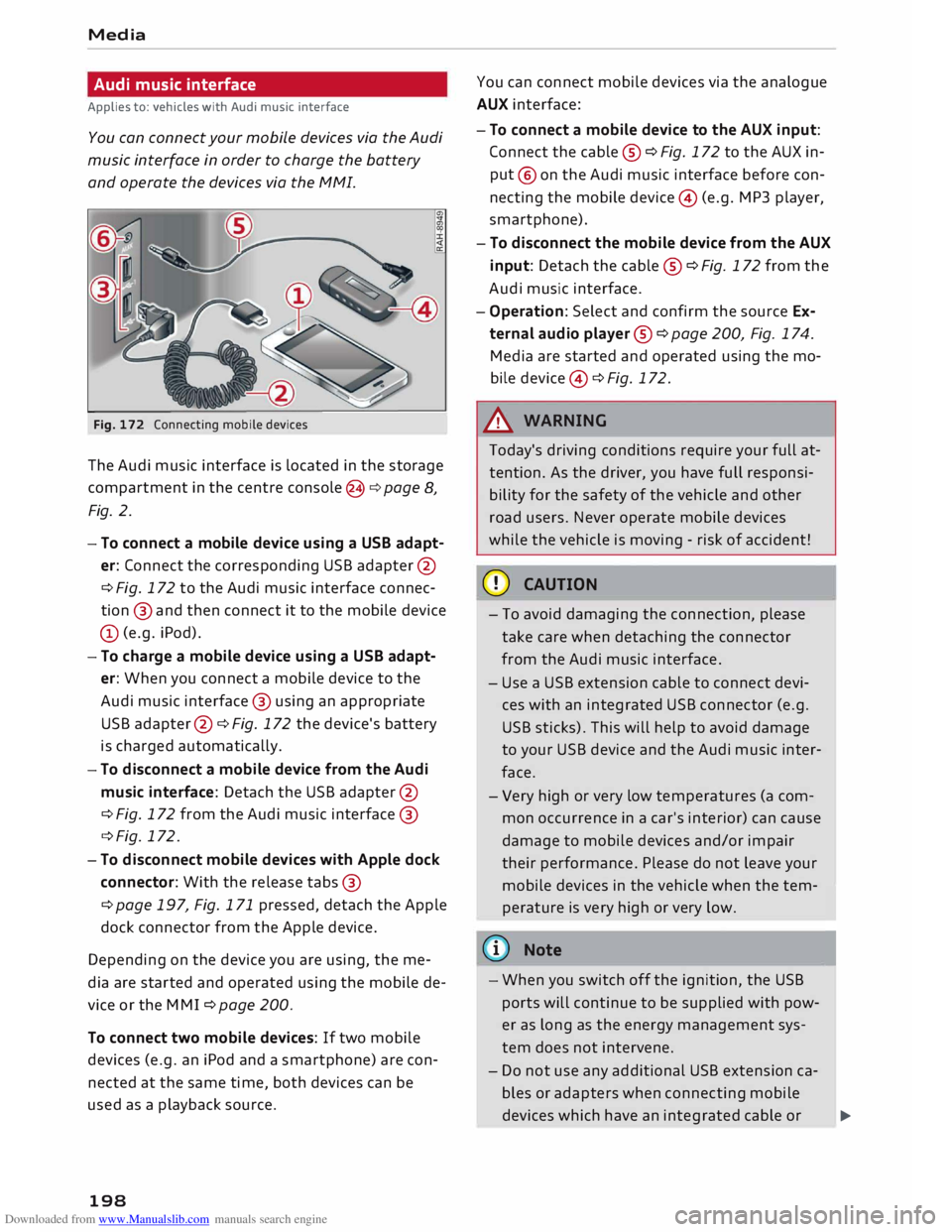
Fig. 172 Connecting mobile devices
The Audi music interface is Located in the storage
compartment in the centre console @c:> page 8,
Fig. 2.
- To connect a mobile device using a USB adapt
er: Connect the corresponding USB adapter @
c> Fig. 172 to the Audi music interface connec
tion @ and then connect it to the mobile device
(D (e.g. iPod).
- To charge a mobile device using a USB adapt
er: When you connect a mobile device to the
Audi music interface @ using an appropriate
USB adapter @ c:> Fig. 172 the device's battery
is charged automatically.
- To disconnect a mobile device from the Audi
music interface: Detach the USB adapter @
c> Fig. 172 from the Audi music interface @
c> Fig. 172.
- To disconnect mobile devices with Apple dock
connector: With the release tabs@
c> page 197, Fig. 171 pressed, detach the Apple
dock connector from the Apple device.
Depending on the device you are using, the me
dia are started and operated using the mobile de
vice or the MM I c:> page 200.
To connect two mobile devices: If two mobile
devices (e.g. an iPod and a smartphone) are con
nected at the same time, both devices can be
used as a playback source.
198 You
can connect mobile devices via the analogue
AUX interface:
- To connect a mobile device to the AUX input:
Connect the cable ® c:> Fig. 172 to the AUX in
put @ on the Audi music interface before con
necting the mobile device@ (e.g. MP3 player,
smartphone).
- To disconnect the mobile device from the AUX
input: Detach the cable ® c:> Fig. 172 from the
Audi music interface.
- Operation: Select and confirm the source Ex
ternal audio player @ c:> page 200, Fig. 174.
Media are started and operated using the mo
bile device @ c:> Fig. 172.
A WARNING
Today's driving conditions require your full at
tention. As the driver, you have full responsi
bility for the safety of the vehicle and other
road users. Never operate mobile devices
while the vehicle is moving -risk of accident!
CD CAUTION
- To avoid damaging the connection, please
take care when detaching the connector
from the Audi music interface.
- Use a USB extension cable to connect devi
ces with an integrated USB connector (e.g.
USB sticks). This will help to avoid damage
to your USB device and the Audi music inter
face.
- Very high or very Low temperatures (a com
mon occurrence in a car's interior) can cause
damage to mobile devices and/or impair
their performance. Please do not Leave your
mobile devices in the vehicle when the tem
perature is very high or very Low.
@ Note
-When you switch off the ignition, the USB
ports will continue to be supplied with pow-
er as long as the energy management sys-
tem does not intervene.
- Do not use any additional USB extension ca
bles or adapters when connecting mobile
devices which have an integrated cable or
�
Page 201 of 306
Downloaded from www.Manualslib.com manuals search engine 0
N
,.....
N
....
0
,.....
Vl
CX) which
must be connected via a USB adapter
(¢ page 197) to the Audi music interface;
this could cause performance issues.
- The AUX adapter cable is available from
Audi dealers or specialist retailers.
- It cannot be guaranteed that mobile devices
which do not meet the specification USB 2.0
will function properly.
- USB hubs are not supported.
- Some iPod versions (e.g. iPod shuffle) can-
not be connected with the USB adapter for
devices with Apple dock connector. You can
connect these devices using the AUX adapt
er cable.
- Video playback via the Audi music interface
is only supported if the system detects that
the device connected is a USB storage device
(e.g. a USB stick). Apple or MTP devices (e.g.
smartphones) are not recognised as USB
storage devices.
- iPod/iPhone malfunctions also affect opera
tion of the device via the MMI. In this case,
please reset your iPod/iPhone.
- Please refer to the iPod/iPhone operating
instructions for important information on
how to use your iPod/iPhone. We recom
mend that you use the most up-to-date
iPod/iPhone software possible.
- For more information on the Audi music in
terface and on which devices are supported,
please see the Audi mobile device database
at www.audi.com/mp3 or contact an Audi
dealer. Media
AUX input/USB charging socket
Applies to: vehicles with AUX input/USB charging socket
You can charge the batteries of your mobile devi
ces using the USB charging socket. You can con
nect mobile devices using the analogue AUX in
terface.
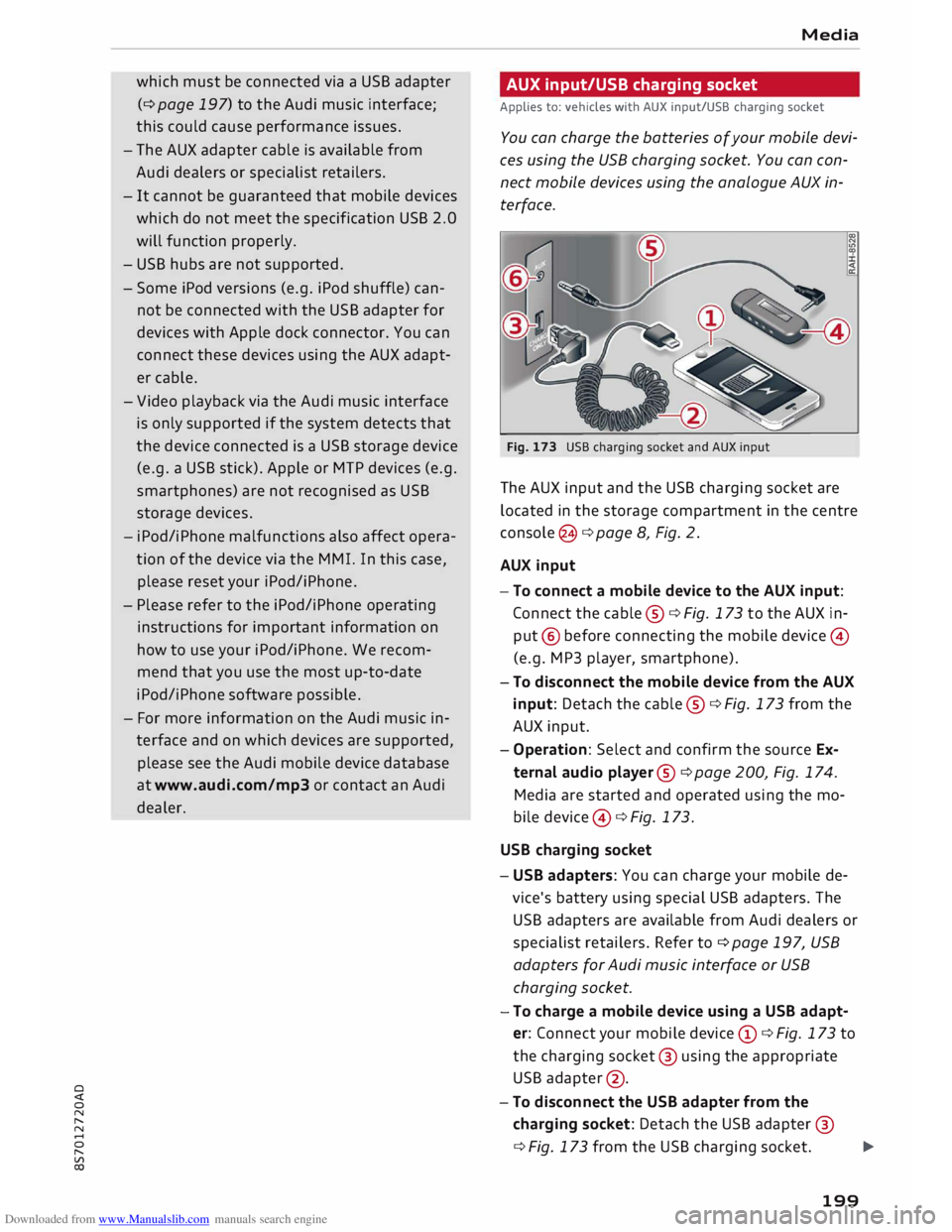
Fig. 173 USB charging socket and AUX input
The AUX input and the USB charging socket are
located in the storage compartment in the centre
console @¢ page 8, Fig. 2.
AUX input
-To connect a mobile device to the AUX input:
Connect the cable ®¢ Fig. 173 to the AUX in
put @ before connecting the mobile device©
(e.g. MP3 player, smartphone).
- To disconnect the mobile device from the AUX
input: Detach the cable ®¢ Fig. 173 from the
AUX input.
- Operation: Select and confirm the source Ex
ternal audio player@¢ page 200, Fig. 174.
Media are started and operated using the mo
bile device @¢ Fig. 173.
USB charging socket
- USB adapters: You can charge your mobile de
vice's battery using special USB adapters. The
USB adapters are available from Audi dealers or
specialist retailers. Refer to¢ page 197, USB
adapters for Audi music interface or USB
charging socket.
-To charge a mobile device using a USB adapt
er: Connect your mobile device (D ¢ Fig. 173 to
the charging socket@ using the appropriate
USB adapter @.
- To disconnect the USB adapter from the
charging socket: Detach the USB adapter @
¢ Fig. 173 from the USB charging socket.
...,.
199