boot AUDI TT ROADSTER 2016 User Guide
[x] Cancel search | Manufacturer: AUDI, Model Year: 2016, Model line: TT ROADSTER, Model: AUDI TT ROADSTER 2016Pages: 306, PDF Size: 31.82 MB
Page 86 of 306
Downloaded from www.Manualslib.com manuals search engine Driving
Releasing the selector lever manually (LHD
vehicles)
Applies to: vehicles with automatic gearbox
The selector Lever can be released manually if
the electrical power supply should fail.
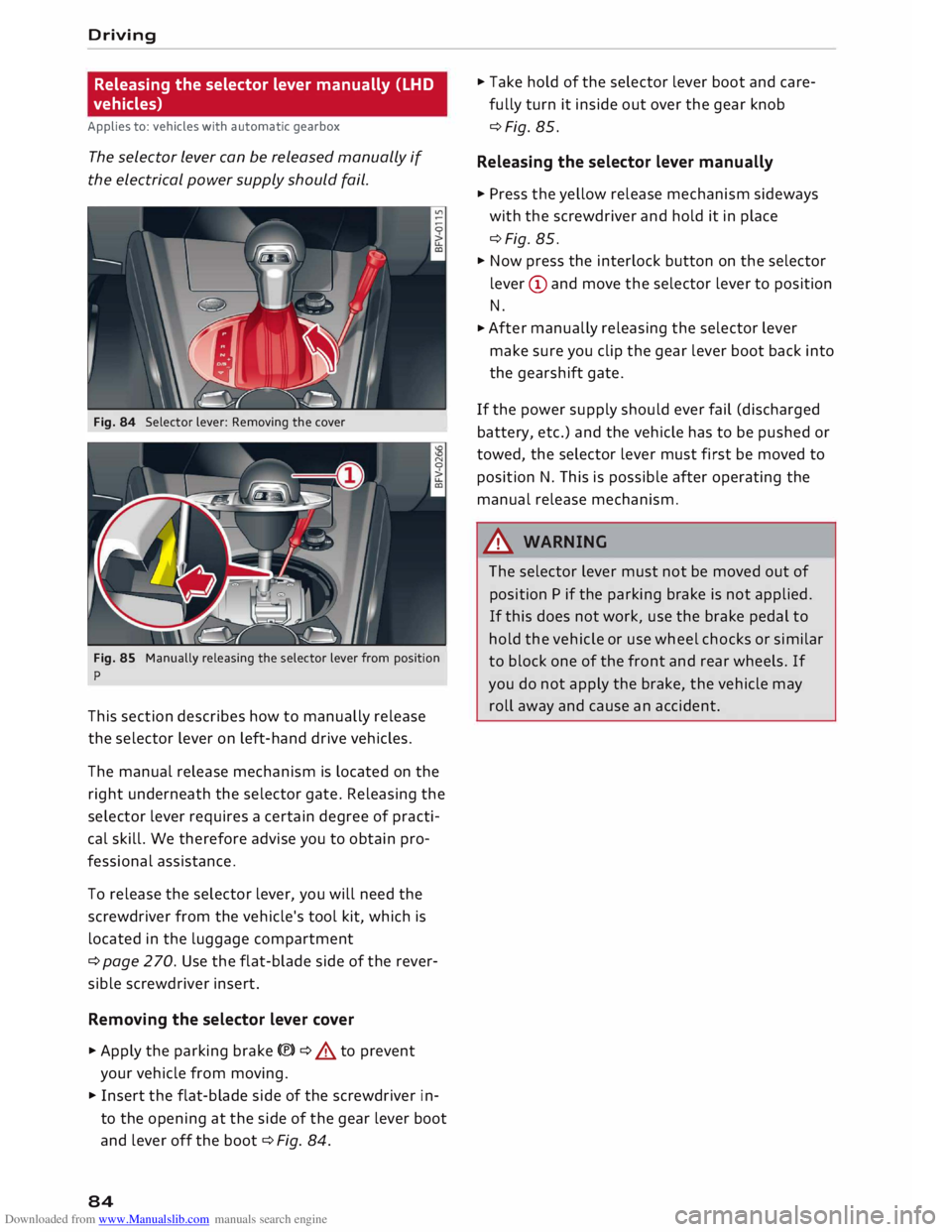
Fig. 84 Selector lever: Removing the cover
Fig. 85 Manually releasing the selector lever from position
p
This section describes how to manually release
the selector lever on left-hand drive vehicles.
The manual release mechanism is located on the
right underneath the selector gate. Releasing the
selector lever requires a certain degree of practi
cal skill. We therefore advise you to obtain pro
fessional assistance.
To release the selector lever, you will need the
screwdriver from the vehicle's tool kit, which is
located in the luggage compartment
¢ page 270. Use the flat-blade side of the rever
sible screwdriver insert.
Removing the selector lever cover
� Apply the parking brake(®)¢ & to prevent
your vehicle from moving.
� Insert the flat-blade side of the screwdriver in
to the opening at the side of the gear lever boot
and lever off the boot ¢Fig. 84.
84 �
Take hold of the selector lever boot and care
fully turn it inside out over the gear knob
¢Fig. 85.
Releasing the selector lever manually
� Press the yellow release mechanism sideways
with the screwdriver and hold it in place
¢Fig. 85.
� Now press the interlock button on the selector
lever (D and move the selector lever to position
N.
� After
manually releasing the selector lever
make sure you clip the gear lever boot back into
the gearshift gate.
If the power supply should ever fail (discharged
battery, etc.) and the vehicle has to be pushed or
towed, the selector lever must first be moved to
position N. This is possible after operating the
manual release mechanism .
.&_ WARNING
The selector lever must not be moved out of
position P if the parking brake is not applied.
If this does not work, use the brake pedal to
hold the vehicle or use wheel chocks or similar
to block one of the front and rear wheels. If
you do not apply the brake, the vehicle may
roll away and cause an accident.
Page 87 of 306
Downloaded from www.Manualslib.com manuals search engine Releasing
the selector lever manually (RHD
vehicles)
Applies to: vehicles with automatic gearbox
The selector Lever can be released manually if
the electrical power supply should fail.
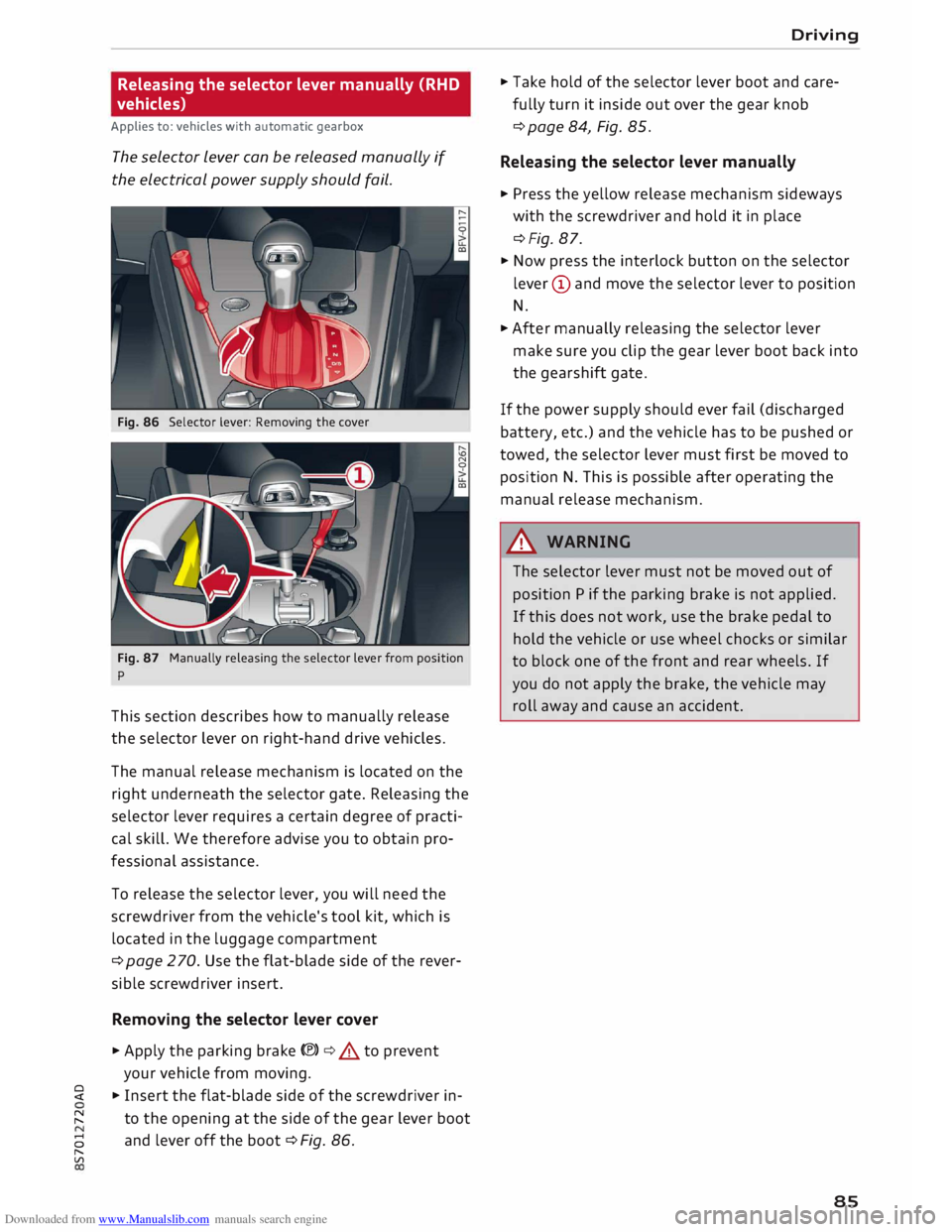
Fig. 86 Selector lever: Removing the cover
Fig. 87 Manually releasing the selector lever from position
p
This section describes how to manually release
the selector lever on right-hand drive vehicles.
The manual release mechanism is located on the
right underneath the selector gate. Releasing the
selector lever requires a certain degree of practi
cal skill. We therefore advise you to obtain pro
fessional assistance.
To release the selector lever, you will need the
screwdriver from the vehicle's tool kit, which is
located in the luggage compartment
¢ page 2 70. Use the flat-blade side of the rever
sible screwdriver insert.
Removing the selector lever cover
� Apply the parking brake(®)¢.&. to prevent
your vehicle from moving.
� � Insert the flat-blade side of the screwdriver in-
� to
the opening at the side of the gear lever boot
8 and
lever off the boot ¢ Fig. 86.
"
Vl Driving
� Take hold of the selector lever boot and care
fully turn it inside out over the gear knob
¢ page 84, Fig. 85.
Releasing the selector lever manually
� Press the yellow release mechanism sideways
with the screwdriver and hold it in place
¢Fig. 87.
� Now press the interlock button on the selector
lever (D and move the selector lever to position
N.
� After manually releasing the selector lever
make sure you clip the gear lever boot back into
the gearshift gate.
If the power supply should ever fail (discharged
battery, etc.) and the vehicle has to be pushed or
towed, the selector lever must first be moved to
position N. This is possible after operating the
manual release mechanism.
&_ WARNING
The selector lever must not be moved out of
position P if the parking brake is not applied.
If this does not work, use the brake pedal to
hold the vehicle or use wheel chocks or similar
to block one of the front and rear wheels. If
you do not apply the brake, the vehicle may
roll away and cause an accident.
85
Page 108 of 306
Downloaded from www.Manualslib.com manuals search engine Parking
aids
Reversing camera
Introduction
Applies to: vehicles with reversing camera
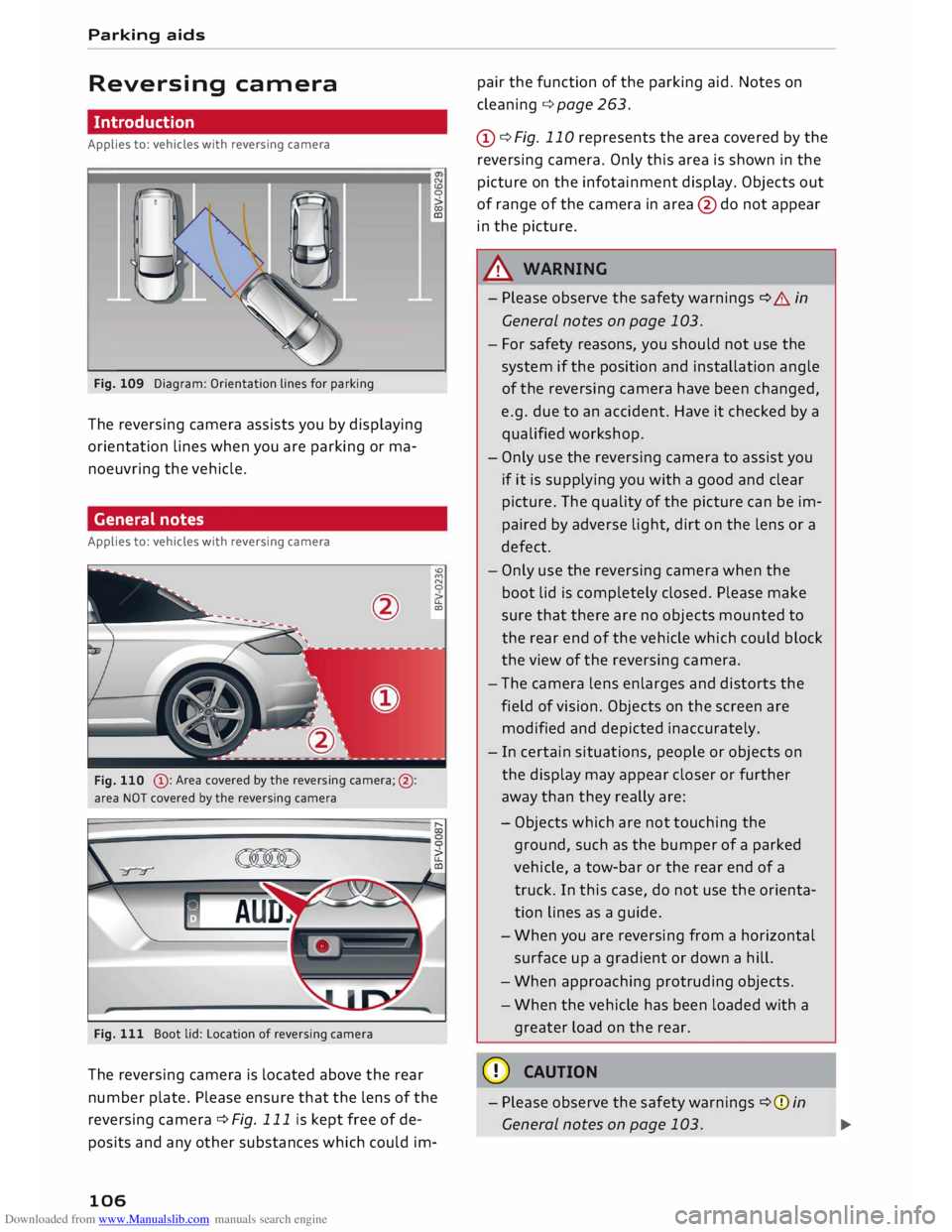
Fig. 109 Diagram: Orientation lines for parking
The reversing camera assists you by displaying
orientation lines when you are parking or ma
noeuvring the vehicle.
General notes
Applies to: vehicles with reversing camera
@ : Area covered by the reversing camera;@:
area NOT covered by the reversing camera
Fig. 111 Boot lid: Location of reversing camera N
CD
0
co
ID
'°
M
N
0
u..
CXl
The reversing camera is located above the rear
number plate. Please ensure that the lens of the
reversing camera ¢ Fig. 111 is kept free of de
posits and any other substances which could im-
106 pair
the function of the parking aid. Notes on
cleaning ¢page 263.
(D ¢ Fig. 110 represents the area covered by the
reversing camera. Only this area is shown in the
picture on the infotainment display. Objects out
of range of the camera in area @do not appear
in the picture.
A WARNING
- Please observe the safety warnings ¢ A in
General notes on page 103.
- For safety reasons, you should not use the
system if the position and installation angle
of the reversing camera have been changed,
e.g. due to an accident. Have it checked by a
qualified workshop.
- Only use the reversing camera to assist you
if it is supplying you with a good and clear
picture. The quality of the picture can be im
paired by adverse light, dirt on the lens or a
defect.
- Only use the reversing camera when the
boot lid is completely closed. Please make
sure that there are no objects mounted to
the rear end of the vehicle which could block
the view of the reversing camera.
- The camera lens enlarges and distorts the
field of vision. Objects on the screen are
modified and depicted inaccurately.
- In certain situations, people or objects on
the display may appear closer or further
away than they really are:
- Objects which are not touching the
ground, such as the bumper of a parked
vehicle, a tow-bar or the rear end of a
truck. In this case, do not use the orienta
tion lines as a guide.
- When you are reversing from a horizontal
surface up a gradient or down a hill.
- When approaching protruding objects.
- When the vehicle has been loaded with a
greater load on the rear.
CD CAUTION
- Please observe the safety warnings ¢(Din
General notes on page 103.
Page 120 of 306
Downloaded from www.Manualslib.com manuals search engine Intelligent
technology
A WARNING
When extending or retracting the rear spoiler,
please make sure that no persons or objects
are close to the moving spoiler -risk of injury!
CD CAUTION
- If you need to push the vehicle, never put
your weight on the rear spoiler -Risk of
damage!
- To avoid damage to the rear spoiler, you
should not lean on it or apply any other type
of pressure.
- Do not operate the rear spoiler manually
when the boot lid is open or any moving
parts of the automatic rear spoiler are ob
structed -risk of damage!
Note
Clean the rear spoiler housing every 2 to 3
months. The rear spoiler housing must be
free of ice, snow and leaves in order to oper
ate correctly.
Power management
This system helps to ensure reliable
starting
The power management controls the distribu
tion of electrical energy and thus helps to ensure
that there is always enough power available to
start the engine.
If a vehicle with a conventional electrical system
is left parked for a long time, the vehicle battery
will gradually lose its charge because certain
electrical equipment (such as the immobiliser)
continues to draw current even when the ignition
is off. In some cases there may not be enough
power available to start the engine.
Your vehicle is equipped with an intelligent pow
er management system to control the distribu
tion of electrical energy. This significantly im
proves reliability when starting the engine, and
also prolongs the life of the vehicle battery.
The main functions incorporated in the power
management system are battery diagnosis, re-
118 sidual
current management and dynamic power
management.
Battery diagnosis
The battery diagnosis function constantly regis
ters the condition of the vehicle battery. Sensors
detect the battery voltage, battery current and
battery temperature. This enables the system to
calculate the current power level and charge con
dition of the vehicle battery.
Residu al current management
The residual current management reduces power
consumption while the vehicle is parked. It con
trols the supply of power to the various electrical
components while the ignition is switched off.
The system takes the battery diagnosis data into
consideration.
Depending on the power level of the vehicle bat
tery, the individual electrical components are
switched off one after the other to prevent the
vehicle battery from losing too much charge and
to ensure that the engine can be started reliably.
Dynamic power management
While the vehicle is moving, this function distrib
utes the available power to the various electrical
components and systems according to their re
quirements. It ensures that on-board systems do
not consume more electrical power than is being
generated, and thus maintains the maximum
possible vehicle battery power level.
.
1 Note
- The power management system is not able
to overcome the given physical limits.
Please remember that the power and life of
the vehicle battery are limited.
- If the indicator lamp ri'.J ¢ page 15 appears,
the starting ability may be impaired.
Points to remember
Starting ability has first priority.
Short trips, city traffic and low temperatures all
place a heavy load on the vehicle battery. In
these conditions a large amount of power is
Page 229 of 306
Downloaded from www.Manualslib.com manuals search engine 0
N
,.....
N
......
0
,.....
Vl
CX) -
Never place objects in the driver's footwell.
Such objects could move under the pedals
and interfere with their proper function. In
the event of sudden braking or a change of
direction, you would not be able to use the
pedals. This could result in a loss of control
and possibly cause an accident.
Floor mats on the driver's side
Use only floor mats which can be securely fas
tened in the footwell and do not obstruct the
pedals.
... Make sure that floor mats are securely fastened
and cannot interfere with the pedals ¢,&. .
Use only floor mats that leave the pedal area un
obstructed and are firmly secured to prevent
them from slipping. You can obtain suitable floor
mats from your dealer or a specialist retailer.
A WARNING
Any obstructions that restrict pedal travel can
cause loss of vehicle control and increase the
risk of serious personal injury.
- Always make sure that floor mats are prop
erly secured.
- Never lay or install additional floor mats or
other floor coverings over the existing floor
mats; this would restrict the pedal area and
possibly obstruct the pedals, which could
cause an accident.
Stowing luggage safely
Luggage compartment
All luggage and other objects must be safely se
cured in the luggage compartment. To maintain
safe handling on the road, please observe the fol
lowing points:
.,.. Distribute the load evenly in the luggage com
partment.
.,.. Place heavy items as far forward as possible in
the Luggage compartment and secure them
properly. Safe
driving
... Secure the load with the luggage net* or with
non-elastic straps secured to the fastening
rings* ¢ page 228.
A WARNING
- Loose items in the luggage compartment
are a safety hazard: they can move suddenly
and impair the handling of the vehicle as a
result of the change in weight distribution.
- In an accident or a sudden manoeuvre, loose
objects in the passenger compartment can
be flung forward -risk of injury! Always
stow objects safely in the luggage compart
ment and secure them on the fastening
rings*. Use suitable securing straps, particu
larly when transporting heavy objects.
- Always stow objects in the luggage com
partment.
- Transporting heavy objects may affect the
vehicle's handling by shifting the centre of
gravity -this could cause an accident. Take
extra care when driving and adjust your
speed accordingly.
- Never exceed the maximum axle loads or
the maximum gross weight for the vehicle
¢ page 287. Exceeding the permitted axle
loads or gross weight limit can affect the ve
hicle's handling characteristics, and increase
the risk of accidents, personal injuries or
damage to the vehicle.
- Never leave your vehicle unattended when
the boot lid is open. Children could climb in
to the boot and close the boot lid from the
inside. In this case the child would be un
able to get out of the
vehicle
without help.
This could have fatal consequences.
- Never allow children to play in or around the
vehicle. Always close and lock the boot lid
and all the doors when you leave the vehi
cle.
- Never let passengers ride in the luggage
compartment. All occupants must be prop
erly restrained by the seat belts at all times
¢page 230. .,._
227
Page 246 of 306
Downloaded from www.Manualslib.com manuals search engine Checking
and topping up fluids
... After fuelling, remove the funnel and close the
fuel tank flap so that it locks in place.
CD CAUTION
Remove any fuel spills from the paintwork im
mediately.
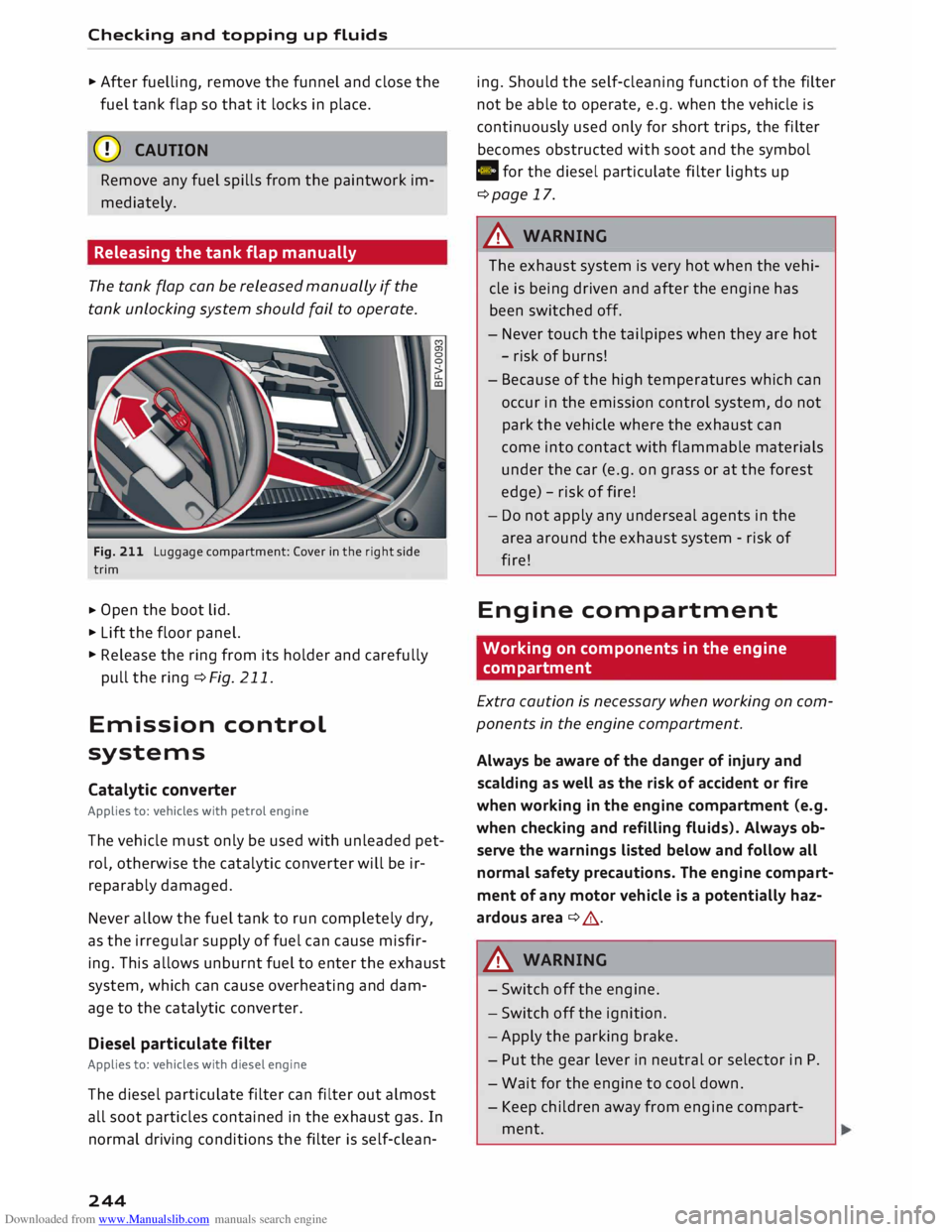
Releasing the tank flap manually
The tank flap can be released manually if the
tank unlocking system should fail to operate.
Fig. 211 Luggage compartment: Cover in the right side
trim
... Open
the boot lid .
... Lift the floor panel.
... Release the ring from its holder and carefully
pull the ring ¢Fig. 211.
Emission control
systems
Catalytic converter
Applies to: vehicles with petrol engine
The vehicle must only be used with unleaded pet
rol, otherwise the catalytic converter will be ir
reparably damaged.
Never allow the fuel tank to run completely dry,
as the irregular supply of fuel can cause misfir
ing. This allows unburnt fuel to enter the exhaust
system, which can cause overheating and dam
age to the catalytic converter.
Diesel particulate filter
Applies to: vehicles with diesel engine
The diesel particulate filter can filter out almost
all soot particles contained in the exhaust gas. In
normal driving conditions the filter is self-clean-
244 ing.
Should the self-cleaning function of the filter
not be able to operate, e.g. when the vehicle is
continuously used only for short trips, the filter
becomes obstructed with soot and the symbol
C for the diesel particulate filter lights up
¢page 17.
A WARNING
The exhaust system is very hot when the vehi
cle is being driven and after the engine has
been switched off.
- Never touch the tailpipes when they are hot
- risk of burns!
- Because of the high temperatures which can
occur in the emission control system, do not
park the vehicle where the exhaust can
come into contact with flammable materials
under the car (e.g. on grass or at the forest
edge) -risk of fire!
- Do not apply any underseal agents in the
area around the exhaust system -risk of
fire!
Engine compartment
Working on components in the engine
compartment
Extra caution is necessary when working on com
ponents in the engine compartment.
Always be aware of the danger of injury and
scalding as well as the risk of accident or fire
when working in the engine compartment (e.g.
when checking and refilling fluids). Always ob
serve the warnings listed below and follow all
normal safety precautions. The engine compart
ment of any motor vehicle is a potentially haz
ardous area ¢ A .
A WARNING
- Switch off the engine.
- Switch off the ignition.
- Apply the parking brake.
- Put the gear lever in neutral or selector in P.
- Wait for the engine to cool down.
- Keep children away from engine compart-
ment.
Page 265 of 306
Downloaded from www.Manualslib.com manuals search engine 0
N
,.....
N
......
0
,.....
Vl
CX) Care
of vehicle and
cleaning
General notes
Regular and careful care helps to maintain the
value of the vehicle. This may also be one of the
requirements for upholding any warranty claims
in the event of corrosion or paint defects.
Qualified workshops carry stocks of suitable car
care materials. Please follow the instructions for
use on the packaging.
A WARNING
- Cleaning products and other materials used
for car care can damage health if misused.
- Car care products can contain toxic substan
ces and must always be kept in a safe place
out of reach of children.
@ For the sake of the environment
- Please choose care products that are not
harmful to the environment.
- Surplus cleaning materials should not be
disposed of together with ordinary house
hold waste.
Washing the vehicle
The longer residues are allowed to remain on the
vehicle, the more damage they can do to the
paintwork. High temperatures (for instance in di
rect sunlight) further intensify the damage.
Before washing, soak heavy dirt with plenty of
water.
Stubborn dirt, such as bird droppings or resinous
tree sap, is best removed with plenty of water
and a micro-fibre cloth.
After the period when salt is put on the roads,
have the underside of the vehicle washed thor
oughly.
High-pressure cleaners
When cleaning the vehicle with a high-pressure
cleaner, always follow the operating instructions
for the equipment. This applies particularly to Care
of vehicle and cleaning
the operating pressure and the spraying dis
tance. Do not point the spray jet directly at the
seals on the windows, doors, bonnet or boot lid,
or at the tyres, rubber hoses, insulating material,
sensors* or camera lenses*. Maintain a distance
of at least 40 cm.
Do not use a high-pressure cleaner to remove
snow and ice.
Never use high-pressure cleaners with a round
jet nozzle or "dirt blasters".
The water must not be hotter than 60 °C.
Automatic car washes
Spray the vehicle with water before washing.
Ensure that the windows are closed and that the
windscreen wipers are switched off. Follow the
car wash operator's rules and recommendations,
especially if any accessories are attached to your
vehicle.
If possible use a brush less car wash.
Washing by hand
Clean the car with a soft sponge or brush, start
ing on the roof and working down. Use solvent
free cleaning agents.
Washing matt-painted vehicles by hand
To avoid damaging the paintwork when washing
the car, first remove any dust, sand and grit. In
sects, grease stains and fingerprints are best re
moved using a special cleaning agent for matt
painted surfaces.
Apply the product with a micro-fibre cloth. Do
not apply too much pressure to avoid damaging
the paintwork.
Rinse the car thoroughly with water. Then clean
the car with a neutral shampoo and a soft micro
fibre cloth.
Rinse the car with Lots of water again and then
let it dry in the air. Remove any water stains with
a chamois.
263
Page 293 of 306
Downloaded from www.Manualslib.com manuals search engine Audi
phone box . . . . . . . . . . . . . . . . . . . . . . . 146
Audi side assist
see Side assist . . . . . . . . . . . . . . . . . . . . . . . 97
Audi smartphone interface ......... 210, 215
Audi virtual cockpit (instrument cluster) 10
AUTO Automatic air conditioner . . . . . . . . . . . . . . 62
Automatic headlights . . . . . . . . . . . . . . . . . 44
Auto Lock (central locking system) . . . . . . . .
27
Automatic air conditioner
see Air conditioner (automatic) . . . . . . . . . . 62
Automatic gearbox . . . . . . . . . . . . . . . . . . . . .
76
Back-up programme . . . . . . . . . . . . . . . . . . 83
Downhill speed control
. . . . . . . . . . . . . . . .
80
Driving tips . . . . . . . . . . . . . . . . . . . . . . . . . .
79
Kick-down . . . . . . . . . . . . . . . . . . . . . . . . . . . 81
Launch control programme . . . . . . . . . . . . . 82
Malfunction . . . . . . . . . . . . . . . . . . . . . . . . . 78
Manual gear selection . . . . . . . . . . . . . . . . . 81
Manual release of selector lever . . . . . . 84, 85
Selector lever lock . . . . . . . . . . . . . . . . . . . . 78
Selector lever positions . . . . . . . . . . . . . . . .
77
Steering wheel with paddle levers . . . . . . . 81
tiptronic . . . . . . . . . . . . . . . . . . . . . . . . . . . .
81
Automatic zoom (navigation) . . . . . . . . . . .
180
AUX input . . . . . . . . . . . . . . . . . . . . . . . 198, 199
Average fuel consumption . . . . . . . . . . . . . . .
25
Average speed . . . . . . . . . . . . . . . . . . . . . . . .
25
Axle loads . . . . . . . . . . . . . . . . . . . . . . . . . . . 288
B
BACK button . . . . . . . . . . . . . . . . . . . . . . . . .
121
Background lighting . . . . . . . . . . . . . . . . . . . . 48
Balance (sound) ...................... 217
Bandages see First-aid kit . . . . . . . . . . . . . . . . . . . . . 269
Bass (sound) . . . . . . . . . . . . . . . . . . . . . . . . .
217
Battery . . . . . . . . . . . . . . . . . . . . . . . . . . . . .
250
Charge . . . . . . . . . . . . . . . . . . . . . . . . . . . . 118
Charging . . . . . . . . . . . . . . . . . . . . . . . . 15, 251
Indicator lamp . . . . . . . . . . . . . . . . . . . . . . . 15
Power management .. . . . . . . . . . . . . . . . . 118
Winter conditions . . . . . . . . . . . . . . . . . . . 251
0
� Battery,
charging (mobile devices) . . . . . . . 146
� Belts
::2 see
Seat belts . . . . . . . . . . . . . . . . . . . . . . . 230
Vl
CX) Index
Better route (navigation) . . . . . . . . . . . . . . . 184
Biodiesel . . . . . . . . . . . . . . . . . . . . . . . . . . . . 241
Bioethanol (fuel) . . . . . . . . . . . . . . . . . . . . .
241
Blower (air conditioner) . . . . . . . . . . . . . . 61, 62
Bluetooth Audio player . . . . . . . . . . . . . . . . . . . . . . . . 194
Connecting a mobile phone . . . . . . . . . . . . 142
Remote SIM Access Profile . . . . . . . . . . . . 160
Settings . . . . . . . . . . . . . . . . . . . . . . . . . . . 215
Boost pressure display . . . . . . . . . . . . . . . . . . 26
Boot see Luggage compartment . . . . . . . . . . . . 227
Boot lid
Manual release . . . . . . . . . . . . . . . . . . . . . . . 34
Opening/closing . . . . . . . . . . . . . . . . . . . . . . 33
Brake fluid Checking brake fluid level . . . . . . . . . . . . . 250
Brakes . . . . . . . . . . . . . . . . . . . . . . . . . . . . . . 115
Brake assist system . . . . . . . . . . . . . . . . . . 113
Brake fluid . . . . . . . . . . . . . . . . . . . . . . . . . 250
Brake pads worn . . . . . . . . . . . . . . . . . . . . . 16
Brake pedal . . . . . . . . . . . . . . . . . . . . . . . .
226
Brake servo . . . . . . . . . . . . . . . . . . . . . . . . .
115
Electro-mechanical parking brake. . . . . . . . 74
Emergency braking aid . . . . . . . . . . . . . . . 113
Emergency braking function . . . . . . . . . . . . 74
New brake pads . . . . . . . . . . . . . . . . . . . . . 115
Warning lamp . . . . . . . . . . . . . . . . . . . . . . . 13
Browser see Media centre . . . . . . . . . . . . . . . . . . . .
201
Bucket seat . . . . . . . . . . . . . . . . . . . . . . . . . . . 55
Bulbs, changing . . . . . . . . . . . . . . . . . . . . . . 284
Buttons Multi-function steering wheel. . . . . . . . 21, 23
Operating unit (MMI)................. 121
C
Cables (USB adapter/AUX adapter) . . . . . . . 197
Calling up media . . . . . . . . . . . . . . . . . . . . . .
200
Call list . . . . . . . . . . . . . . . . . . . . . . . . . . . . . 147
Call options . . . . . . . . . . . . . . . . . . . . . . . . . .
155
Camera-based traffic sign recognition . . . . . 90
Capacities Fuel tank. . . . . . . . . . . . . . . . . . . . . . . . . . .
288
Washer fluid reservoir . . . . . . . . . . . . . . . . 288
Caps for wheel bolts, removing . . . . . . . . . .
272
291
Page 294 of 306
Downloaded from www.Manualslib.com manuals search engine Index
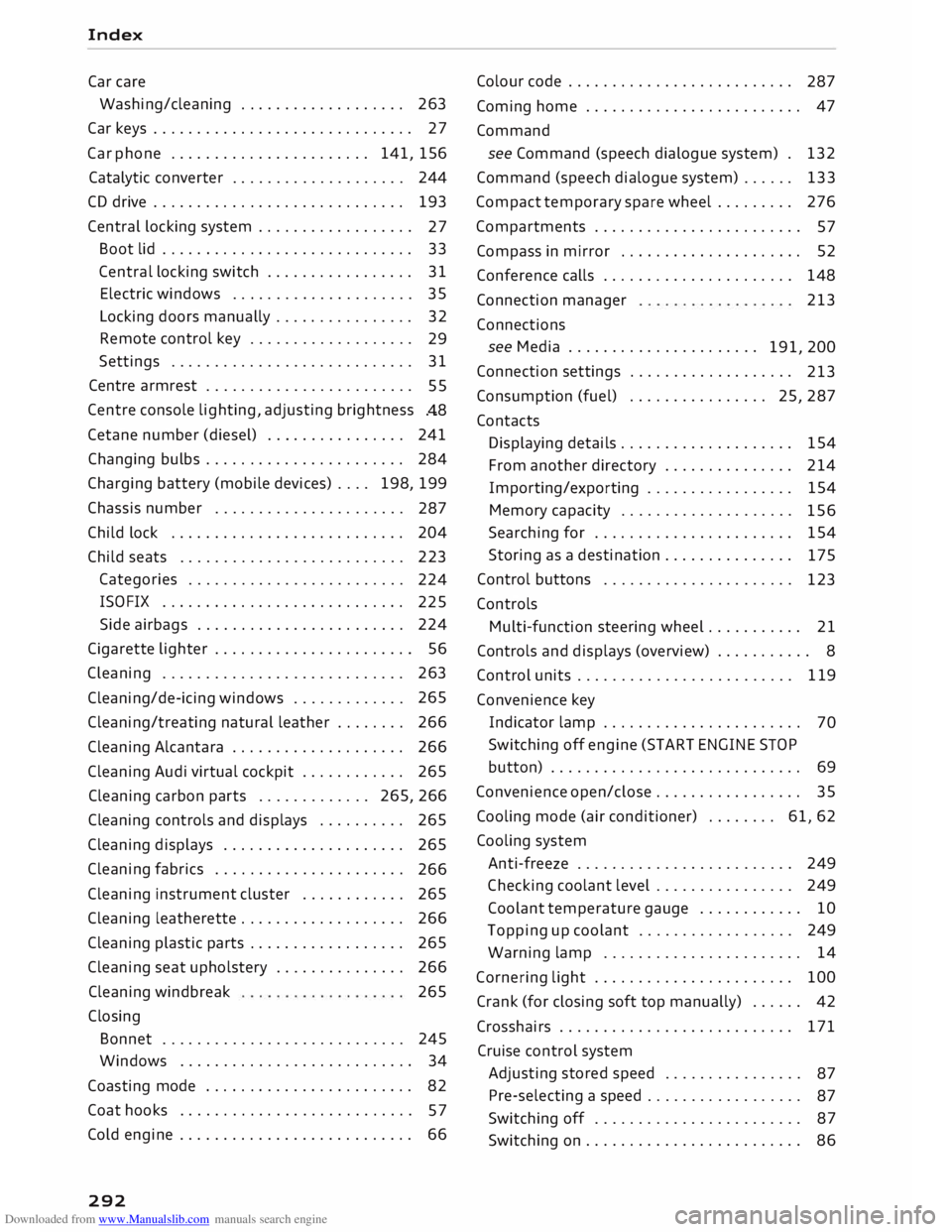
Car care
Washing/cleaning . . . . . . . . . . . . . . . . . . . 263
Car keys . . . . . . . . . . . . . . . . . . . . . . . . . . . . . . 27
Car phone . . . . . . . . . . . . . . . . . . . . . . . 141, 156
Catalytic converter . . . . . . . . . . . . . . . . . . . .
244
CD drive . . . . . . . . . . . . . . . . . . . . . . . . . . . . .
193
Central locking system . . . . . . . . . . . . . . . . . .
27
Boot lid . . . . . . . . . . . . . . . . . . . . . . . . . . . . . 33
Central locking switch . . . . . . . . . . . . . . . . .
31
Electric windows . . . . . . . . . . . . . . . . . . . . .
35
Locking doors manually . . . . . . . . . . . . . . . . 32
Remote control key . . . . . . . . . . . . . . . . . . .
29
Settings .. .. .. .. .. .. .. .. .. .. . . .. .. ..
31
Centre armrest . . . . . . . . . . . . . . . . . . . . . . . .
55
Centre console lighting, adjusting brightness
.48
Cetane number (diesel) . . . . . . . . . . . . . . . .
241
Changing bulbs . . . . . . . . . . . . . . . . . . . . . . .
284
Charging battery (mobile devices) . . . . 198, 199
Chassis number . . . . . . . . . . . . . . . . . . . . . .
287
Child lock . . . . . . . . . . . . . . . . . . . . . . . . . . .
204
Child seats . . . . . . . . . . . . . . . . . . . . . . . . . .
223
Categories . . . . . . . . . . . . . . . . . . . . . . . . .
224
ISOFIX . . . . . . . . . . . . . . . . . . . . . . . . . . . .
225
Side airbags . . . . . . . . . . . . . . . . . . . . . . . .
224
Cigarette lighter . . . . . . . . . . . . . . . . . . . . . . . 56
Cleaning . . . . . . . . . . . . . . . . . . . . . . . . . . . .
263
Cleaning/de-icing windows . . . . . . . . . . . . . 265
Cleaning/treating natural leather . . . . . . . . 266
Cleaning Alcantara . . . . . . . . . . . . . . . . . . . .
266
Cleaning Audi virtual cockpit . . . . . . . . . . . .
265
Cleaning carbon parts . . . . . . . . . . . . . 265, 266
Cleaning controls and displays . . . . . . . . . . 265
Cleaning displays . . . . . . . . . . . . . . . . . . . . . 265
Cleaning fabrics . . . . . . . . . . . . . . . . . . . . . .
266
Cleaning instrument cluster . . . . . . . . . . . .
265
Cleaning leatherette . . . . . . . . . . . . . . . . . . .
266
Cleaning plastic parts . . . . . . . . . . . . . . . . . .
265
Cleaning seat upholstery . . . . . . . . . . . . . . . 266
Cleaning windbreak
Closing 265
Bonnet . . . . . . . . . . . . . . . . . . . . . . . . . . . .
245
Windows ........................... 34
Coasting mode . . . . . . . . . . . . . . . . . . . . . . . .
82
Coat hooks . . . . . . . . . . . . . . . . . . . . . . . . . . .
5 7
Cold engine . . . . . . . . . . . . . . . . . . . . . . . . . . . 66
292 Colour
code . . . . . . . . . . . . . . . . . . . . . . . . . .
287
Coming home . . . . . . . . . . . . . . . . . . . . . . . . . 47
Command see Command (speech dialogue system) . 132
Command (speech dialogue system) . . . . . . 133
Compact temporary spare wheel . . . . . . . . . 276
Compartments . . . . . . . . . . . . . . . . . . . . . . . .
57
Compass in mirror . . . . . . . . . . . . . . . . . . . . .
52
Conference calls . . . . . . . . . . . . . . . . . . . . . . 148
Connection manager 213
Connections see Media . . . . . . . . . . . . . . . . . . . . . .
191, 200
Connection settings . . . . . . . . . . . . . . . . . . .
213
Consumption (fuel)
. . . . . . . . . . . . . . . . 25, 287
Contacts Displaying details.. . . . . . . . . . . . . . . . . . . 154
From another directory . . . . . . . . . . . . . . . 214
Importing/exporting . . . . . . . . . . . . . . . . .
154
Memory capacity . . . . . . . . . . . . . . . . . . . .
156
Searching for . . . . . . . . . . . . . . . . . . . . . . .
154
Storing as a destination...............
175
Control buttons . . . . . . . . . . . . . . . . . . . . . .
123
Controls Multi-function steering wheel..... ...... 21
Controls and displays (overview) . . . . . . . . . . . 8
Control units . . . . . . . . . . . . . . . . . . . . . . . . . 119
Convenience key
Indicator lamp . . . . . . . . . . . . . . . . . . . . . . .
70
Switching off engine (START ENGINE STOP
button) . . . . . . . . . . . . . . . . . . . . . . . . . . . . . 69
Convenience open/close . . . . . . . . . . . . . . . . . 35
Cooling mode (air conditioner) . . . . . . . . 61, 62
Cooling system
Anti-freeze . . . . . . . . . . . . . . . . . . . . . . . . . 249
Checking coolant level . . . . . . . . . . . . . . . . 249
Coolant temperature gauge . . . . . . . . . . . . 10
Topping up coolant . . . . . . . . . . . . . . . . . . 249
Warning lamp . . . . . . . . . . . . . . . . . . . . . . . 14
Cornering light . . . . . . . . . . . . . . . . . . . . . . . 100
Crank (for closing soft top manually) . . . . . . 42
Crosshairs . . . . . . . . . . . . . . . . . . . . . . . . . . . 171
Cruise control system
Adjusting stored speed . . . . . . . . . . . . . . . .
87
Pre-selecting a speed . . . . . . . . . . . . . . . . . .
87
Switching off . . . . . . . . . . . . . . . . . . . . . . . .
87
Switching on . . . . . . . . . . . . . . . . . . . . . . . . . 86
Page 298 of 306
Downloaded from www.Manualslib.com manuals search engine Index
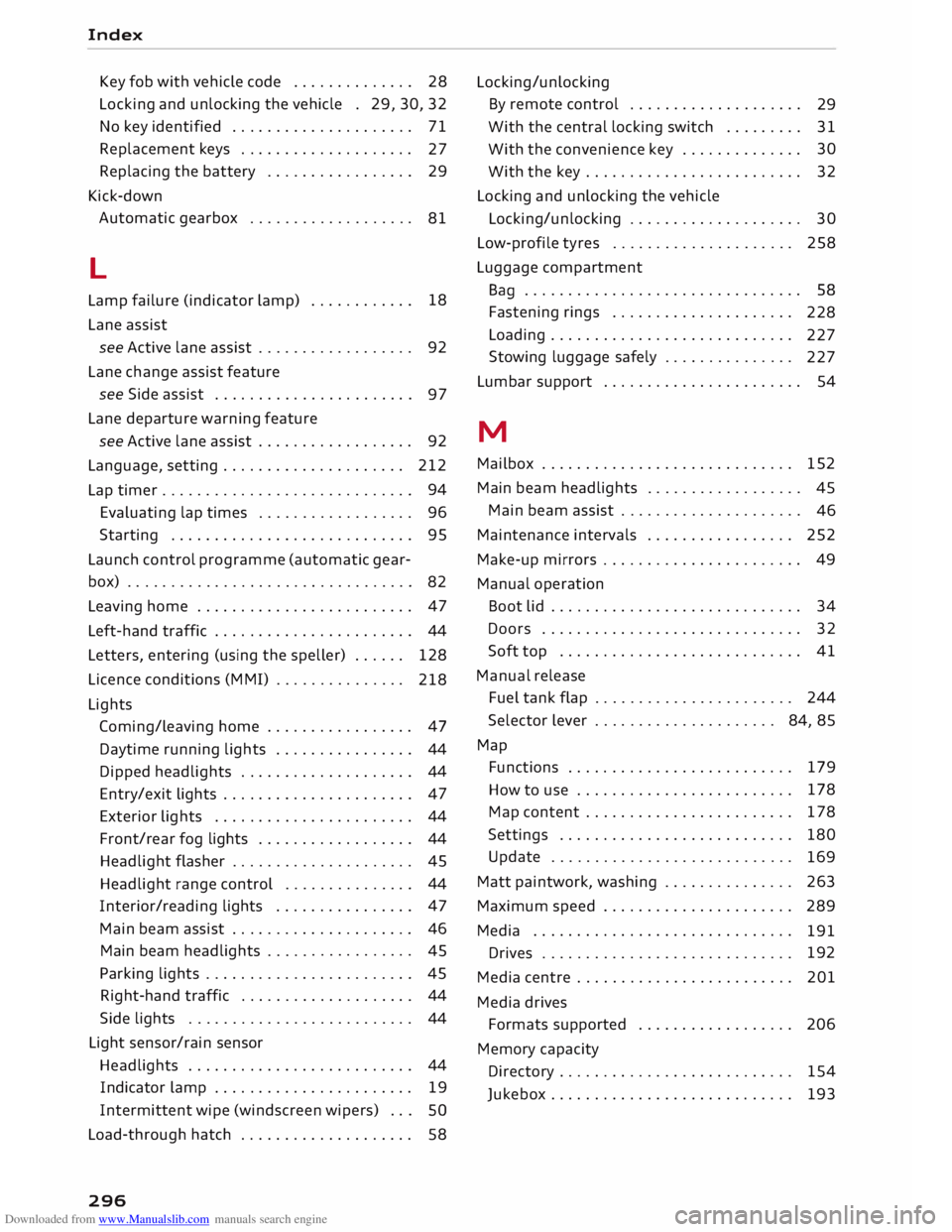
Key fob with vehicle code . . . . . . . . . . . . . . 28
Locking and unlocking the vehicle . 29, 30, 32
No key identified . . . . . . . . . . . . . . . . . . . . .
71
Replacement keys . . . . . . . . . . . . . . . . . . . .
27
Replacing the battery . . . . . . . . . . . . . . . . .
29
Kick-down Automatic gearbox . . . . . . . . . . . . . . . . . . .
81
L
Lamp failure (indicator lamp) . . . . . . . . . . . . 18
Lane assist
see Active lane assist . . . . . . . . . . . . . . . . . . 92
Lane change assist feature
see Side assist . . . . . . . . . . . . . . . . . . . . . . .
97
Lane departure warning feature
see Active lane assist . . . . . . . . . . . . . . . . . . 92
Language, setting..................... 212
Lap timer . . . . . . . . . . . . . . . . . . . . . . . . . . . . . 94
Evaluating lap times . . . . . . . . . . . . . . . . . .
96
Starting . . . . . . . . . . . . . . . . . . . . . . . . . . . . 95
Launch control programme (automatic gear-
box) . . . . . . . . . . . . . . . . . . . . . . . . . . . . . . . . .
82
Leaving home . . . . . . . . . . . . . . . . . . . . . . . . .
47
Left-hand traffic . . . . . . . . . . . . . . . . . . . . . . .
44
Letters, entering (using the speller) . . . . . .
128
Licence conditions (MMI) . . . . . . . . . . . . . . .
218
Lights Coming/leaving home . . . . . . . . . . . . . . . . . 47
Daytime running lights . . . . . . . . . . . . . . . . 44
Dipped headlights . . . . . . . . . . . . . . . . . . . . 44
Entry/exit lights . . . . . . . . . . . . . . . . . . . . . . 47
Exterior lights . . . . . . . . . . . . . . . . . . . . . . . 44
Front/rear fog lights . . . . . . . . . . . . . . . . . . 44
Headlight flasher . . . . . . . . . . . . . . . . . . . . . 45
Headlight range control . . . . . . . . . . . . . . . 44
Interior/reading lights . . . . . . . . . . . . . . . . 47
Main beam assist . . . . . . . . . . . . . . . . . . . . . 46
Main beam headlights . . . . . . . . . . . . . . . . . 45
Parking lights . . . . . . . . . . . . . . . . . . . . . . . . 45
Right-hand traffic . . . . . . . . . . . . . . . . . . . .
44
Side lights . . . . . . . . . . . . . . . . . . . . . . . . . . 44
Light sensor/rain sensor
Headlights . . . . . . . . . . . . . . . . . . . . . . . . . . 44
Indicator lamp . . . . . . . . . . . . . . . . . . . . . . .
19
Intermittent wipe (windscreen wipers) . . .
SO
Load-through hatch . . . . . . . . . . . . . . . . . . . . 58
296 Locking/unlocking
By remote control . . . . . . . . . . . . . . . . . . . .
29
With the central locking switch . . . . . . . . .
31
With the convenience key . . . . . . . . . . . . . . 30
With the key . . . . . . . . . . . . . . . . . . . . . . . . . 32
Locking and unlocking the vehicle
Locking/unlocking . . . . . . . . . . . . . . . . . . . . 30
Low-profile tyres . . . . . . . . . . . . . . . . . . . . . 258
Luggage compartment
Ba g
. . . . . . . . . . . . . . . . . . . . . . . . . . . . . . . . 58
Fastening rings . . . . . . . . . . . . . . . . . . . . .
228
Loading . . . . . . . . . . . . . . . . . . . . . . . . . . . .
227
Stowing luggage safely . . . . . . . . . . . . . . .
227
Lumbar support . . . . . . . . . . . . . . . . . . . . . . . 54
M
Mailbox . . . . . . . . . . . . . . . . . . . . . . . . . . . . .
152
Main beam headlights . . . . . . . . . . . . . . . . . .
45
Main beam assist . . . . . . . . . . . . . . . . . . . . .
46
Maintenance intervals . . . . . . . . . . . . . . . . . 252
Make-up mirrors . . . . . . . . . . . . . . . . . . . . . . . 49
Manual operation
Boot lid . . . . . . . . . . . . . . . . . . . . . . . . . . . . . 34
Doors . . . . . . . . . . . . . . . . . . . . . . . . . . . . . .
32
Soft top . . . . . . . . . . . . . . . . . . . . . . . . . . . .
41
Manual release
Fuel tank flap . . . . . . . . . . . . . . . . . . . . . . . 244
Selector lever . . . . . . . . . . . . . . . . . . . . . 84, 85
Map Functions . . . . . . . . . . . . . . . . . . . . . . . . . . 179
How to use . . . . . . . . . . . . . . . . . . . . . . . . . 178
Map content . . . . . . . . . . . . . . . . . . . . . . . .
178
Settings . . . . . . . . . . . . . . . . . . . . . . . . . . .
180
Update . . . . . . . . . . . . . . . . . . . . . . . . . . . .
169
Matt paintwork, washing . . . . . . . . . . . . . . .
263
Maximum speed . . . . . . . . . . . . . . . . . . . . . .
289
Media . . . . . . . . . . . . . . . . . . . . . . . . . . . . . .
191
Drives . . . . . . . . . . . . . . . . . . . . . . . . . . . . . 192
Media centre . . . . . . . . . . . . . . . . . . . . . . . . . 201
Media drives
Formats supported . . . . . . . . . . . . . . . . . . 206
Memory capacity
Directory . . . . . . . . . . . . . . . . . . . . . . . . . . . 154
Jukebox . . . . . . . . . . . . . . . . . . . . . . . . . . . .
193