light AUDI TT ROADSTER 2016 Owner's Guide
[x] Cancel search | Manufacturer: AUDI, Model Year: 2016, Model line: TT ROADSTER, Model: AUDI TT ROADSTER 2016Pages: 306, PDF Size: 31.82 MB
Page 53 of 306
Downloaded from www.Manualslib.com manuals search engine 0
N
,.....
N
......
0
,.....
Vl
CX) -
The windscreen washer jets are heated*
when the ignition is switched on if the out
side temperature is low.
- If you stop briefly, e.g. at traffic lights, the
wiper speed setting will automatically be re
duced by one level.
Cleaning windscreen wiper blades
Clean the wiper blades if the wipers leave smear
ing on the glass. Clean the wiper blades using a
soft cloth and a glass cleaning solution.
11- Set the wiper arms to the service position
¢page 51.
11- Lift the wiper arms away from the glass.
A WARNING
Dirty wiper blades can impair the driver's view
- risk of accident!
Changing the windscreen wiper blades
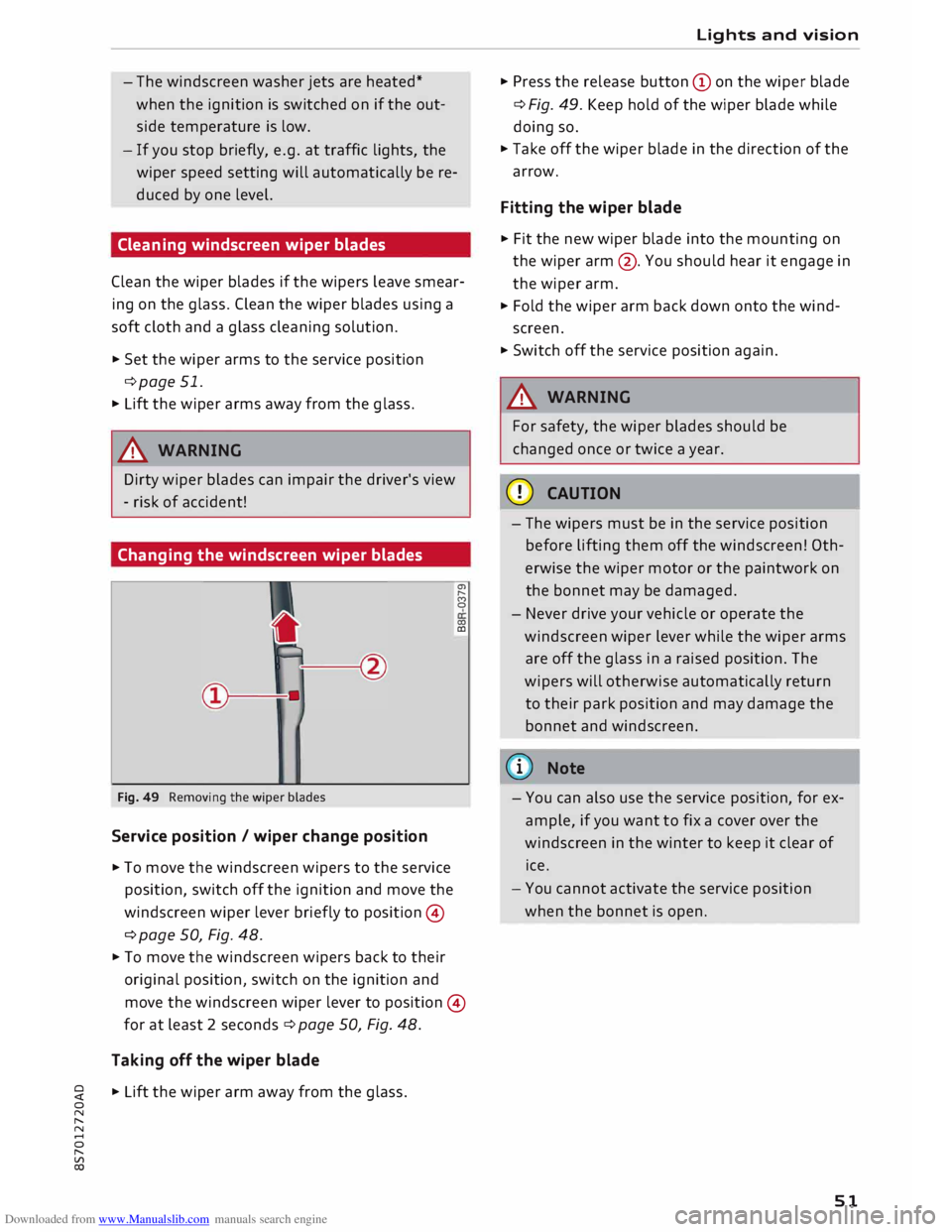
Fig. 49 Removing the wiper blades
Service position / wiper change position
11- To move the windscreen wipers to the service
position, switch off the ignition and move the
windscreen wiper lever briefly to position ©
¢ page 50, Fig. 48. a,
,._.
(')
0
0)
CD
11- To move the windscreen wipers back to their
original position, switch on the ignition and
move the windscreen wiper lever to position ©
for at least 2 seconds¢ page 50, Fig. 48.
Taking off the wiper blade
11- Lift the wiper arm away from the glass. Lights
and vision
11- Press the release button (Don the wiper blade
¢ Fig. 49. Keep hold of the wiper blade while
doing so.
11- Take off the wiper blade in the direction of the
arrow.
Fitting the wiper blade
11- Fit the new wiper blade into the mounting on
the wiper arm@. You should hear it engage in
the wiper arm.
11- Fold the wiper arm back down onto the wind
screen.
11- Switch off the service position again.
A WARNING
For safety, the wiper blades should be
changed once or twice a year.
CD CAUTION
- The wipers must be in the service position
before lifting them off the windscreen! Oth
erwise the wiper motor or the paintwork on
the bonnet may be damaged.
- Never drive your vehicle or operate the
windscreen wiper lever while the wiper arms
are off the glass in a raised position. The
wipers will otherwise automatically return
to their park position and may damage the
bonnet and windscreen.
(D) Note
- You can also use the service position, for ex
ample, if you want to fix a cover over the
windscreen in the winter to keep it clear of
ice.
- You cannot activate the service position
when the bonnet is open.
51
Page 54 of 306
Downloaded from www.Manualslib.com manuals search engine Lights
and vision
Digital compass
Activating and deactivating the compass
Applies to: vehicles with digital compass
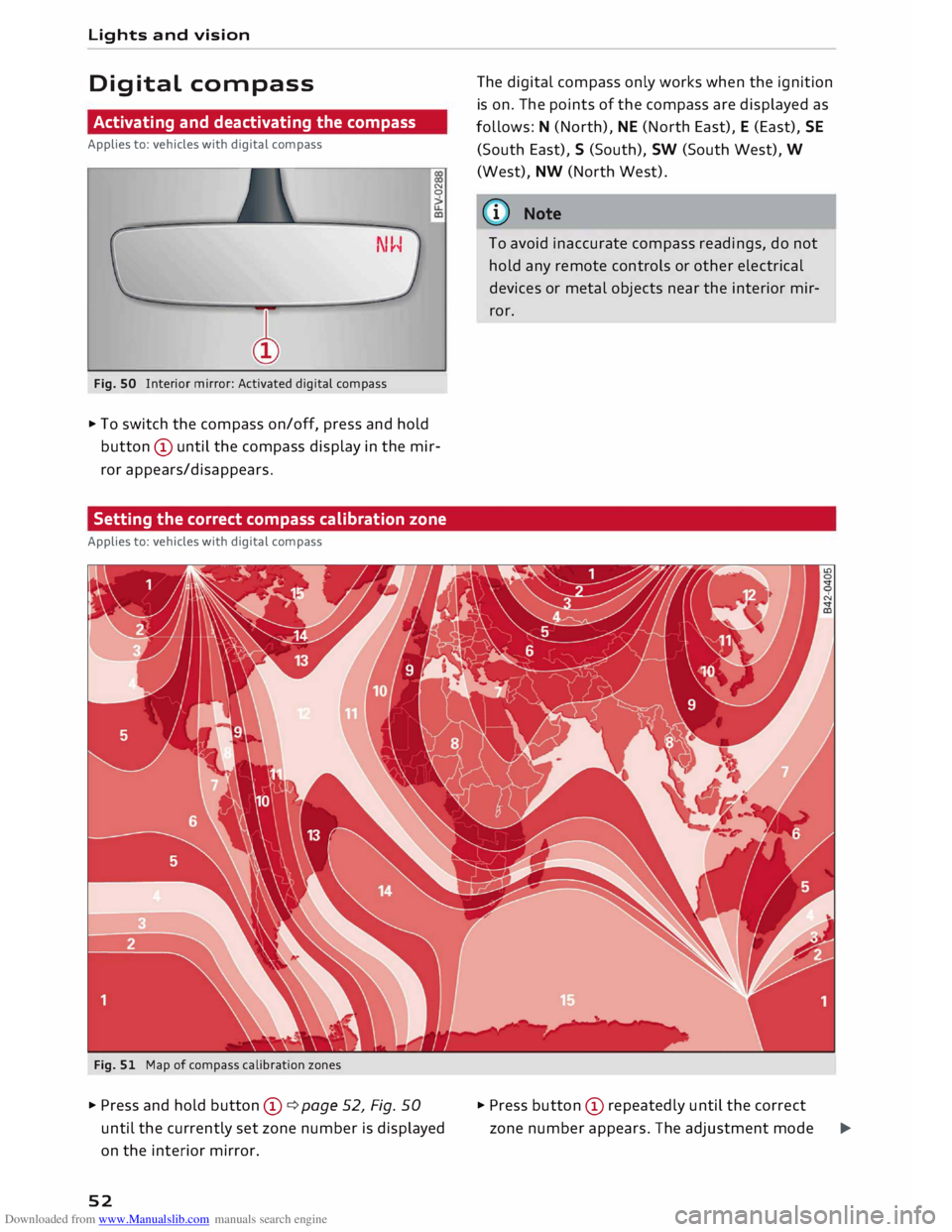
Fig. SO Interior mirror: Activated digital compass N
0
.,. To switch the compass on/off, press and hold
button © until the compass display in the mir
ror appears/disappears.
Setting the correct compass calibration zone
Applies to: vehicles with digital compass
Fig. 51 Map of compass calibration zones
.,. Press and hold button ©¢ page 52, Fig. 50
until the currently set zone number is displayed
on the interior mirror.
52 The
digital compass only works when the ignition
is on. The points of the compass are displayed as
follows: N (North), NE (North East), E (East), SE
(South East), S (South), SW (South West), W
(West), NW (North West).
ij)) Note
To avoid inaccurate compass readings, do not
hold any remote controls or other electrical
devices or metal objects near the interior mir
ror.
.,. Press button © repeatedly until the correct
zone number appears. The adjustment mode
�
Page 55 of 306
Downloaded from www.Manualslib.com manuals search engine 0
N
,.....
N
......
0
,.....
Vl
CX) will
be ended automatically after a few sec
onds.
Calibrating compass
Applies to: vehicles with digital compass
The compass must be re-calibrated if the display
is incorrect or inaccurate .
... Press and hold button (D until the letter Cap
pears on the interior mirror .
... Drive in a circle at a speed of about 10 km/h un
til a point of the compass is displayed on the in
terior mirror.
& WARNING
- Calibrate your compass at a location where
there is no traffic so that you do not endan
ger yourself or other road users (accident
risk).
- Always pay attention to the road and the
area surrounding the vehicle when you are
reading the compass while the vehicle is
moving. Lights
and vision
53
Page 57 of 306
Downloaded from www.Manualslib.com manuals search engine 0
N
,.....
N
......
0
,.....
Vl
CX) -
Do not drive with the backrests of the front
seats reclined too far as otherwise the seat
belt and airbag could fail to restrain the
wearer properly in an accident, possibly
leading to injury.
Bucket seat adjustment
Applies to: vehicles with bucket seats
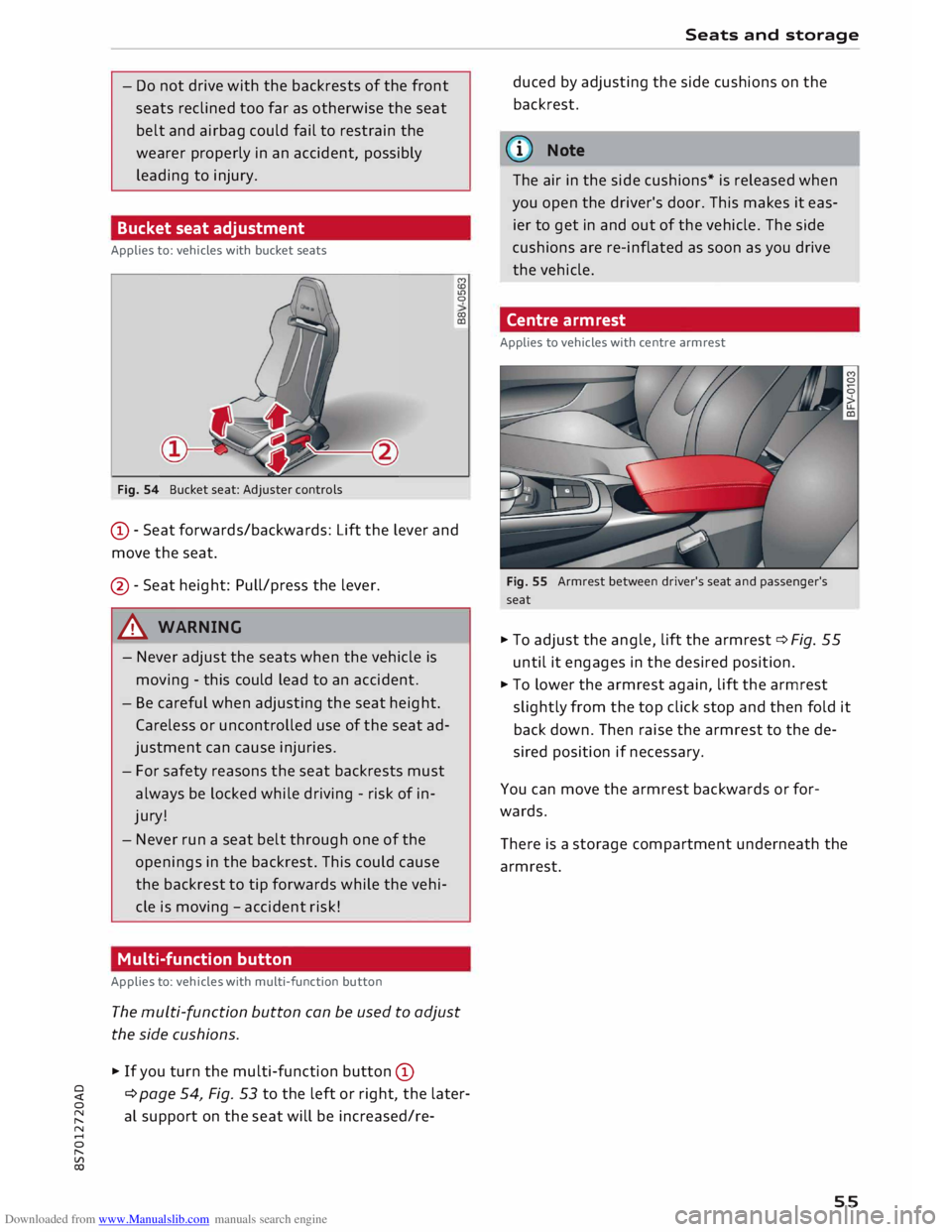
Fig. 54 Bucket seat: Adjuster controls M
co
Ll)
0
co
CD
CD -Seat forwards/backwards: Lift the lever and
move the seat.
@ -Seat height: Pull/press the lever.
A WARNING
- Never adjust the seats when the vehicle is
moving -this could lead to an accident.
- Be careful when adjusting the seat height.
Careless or uncontrolled use of the seat ad
justment can cause injuries.
- For safety reasons the seat backrests must
always be locked while driving -risk of in
jury!
- Never run a seat belt through one of the
openings in the backrest. This could cause
the backrest to tip forwards while the vehi
cle is moving -accident risk!
Multi-function button
Applies to: vehicles with multi-function button
The multi-function button can be used to adjust
the side cushions.
� If you turn the multi-function button CD
¢ page 54, Fig. 53 to the left or right, the later
al support on the seat will be increased/re- Seats
and storage
duced by adjusting the side cushions on the
backrest.
@ Note
The air in the side cushions* is released when
you open the driver's door. This makes it eas
ier to get in and out of the vehicle. The side
cushions are re-inflated as soon as you drive
the vehicle.
Centre armrest
Applies to vehicles with centre armrest
Fig. 55 Armrest between driver's seat and passenger's
seat
� To adjust the angle, lift the armrest ¢ Fig. 55
until it engages in the desired position.
� To lower the armrest again, lift the armrest
slightly from the top click stop and then fold it
back down. Then raise the armrest to the de
sired position if necessary.
You can move the armrest backwards or for
wards.
There is a storage compartment underneath the
armrest.
55
Page 58 of 306
Downloaded from www.Manualslib.com manuals search engine Seats
and storage
Ashtray
Applies to: vehicles with ashtray
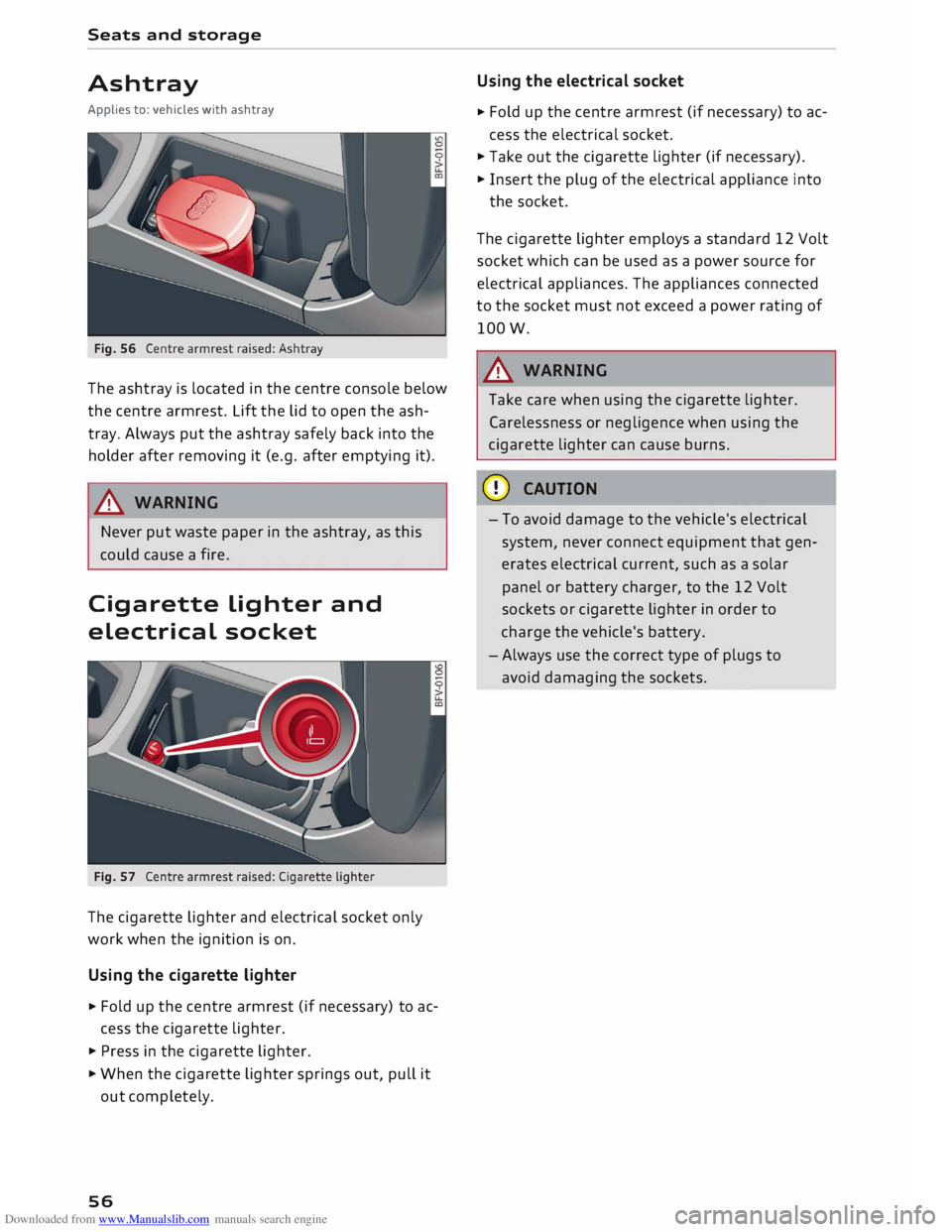
The ashtray is located in the centre console below
the centre armrest. Lift the lid to open the ash
tray. Always put the ashtray safely back into the
holder after removing it (e.g. after emptying it).
A WARNING
Never put waste paper in the ashtray, as this
could cause a fire.
Cigarette Lighter and
electrical socket
The cigarette lighter and electrical socket only
work when the ignition is on.
Using the cigarette lighter
� Fold
up the centre armrest (if necessary) to ac
cess the cigarette lighter.
� Press in the cigarette lighter.
� When the cigarette lighter springs out, pull it
out completely.
56 Using
the electrical socket
� Fold
up the centre armrest (if necessary) to ac
cess the electrical socket.
� Take out the cigarette lighter (if necessary).
� Insert the plug of the electrical appliance into
the socket.
The cigarette lighter employs a standard 12 Volt
socket which can be used as a power source for
electrical appliances. The appliances connected
to the socket must not exceed a power rating of
lOOW.
A WARNING
Take care when using the cigarette lighter.
Carelessness or negligence when using the
cigarette lighter can cause burns.
CD CAUTION
- To avoid damage to the vehicle's electrical
system, never connect equipment that gen
erates electrical current, such as a solar
panel or battery charger, to the 12 Volt
sockets or cigarette lighter in order to
charge the vehicle's battery.
- Always use the correct type of plugs to
avoid damaging the sockets.
Page 62 of 306
Downloaded from www.Manualslib.com manuals search engine Heating
and cooling
Heating and cooling
Air conditioner
Description
The air conditioner heats, cools and dehumidifies
the air inside the vehicle. It operates most effec
tively with the windows closed. If the vehicle has
been standing in the sun, it may cool down faster
if you open the windows briefly to let the hot air
escape.
Pollution filter
The pollution filter removes impurities, such as
dust and pollen, from the air.
Key-coded settings
Certain settings will be automatically stored and
assigned to the remote control key in use.
® For the sake of the environment
If you wish to save fuel, switch off the cooling
mode on the air conditioner by pressing the
Controls for manual air conditioner
Applies to vehicles with manual air conditioner
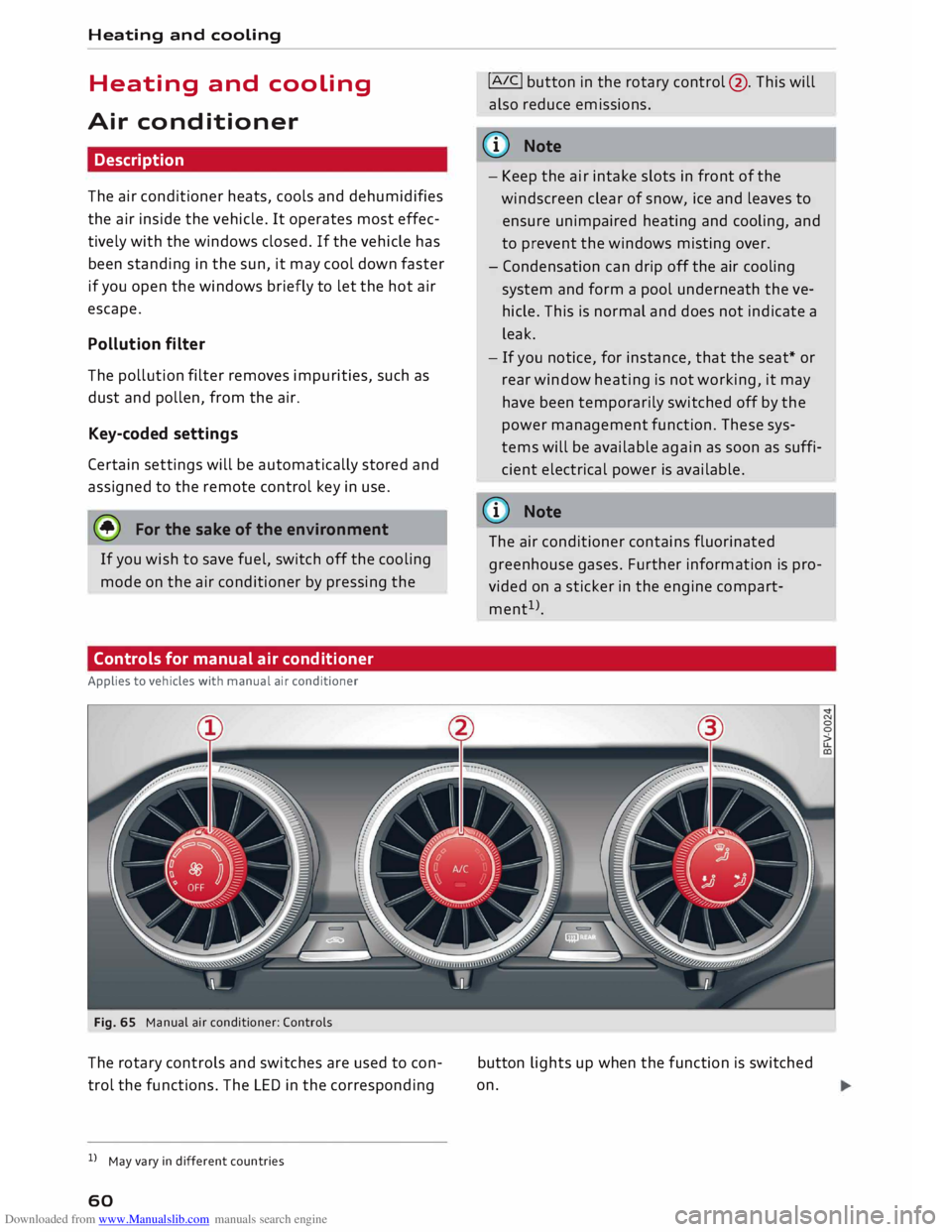
Fig. 65 Manual air conditioner: Controls
The rotary controls and switches are used to con
trol the functions. The LED in the corresponding
l l
May vary in different countries
60 !AIC!
button in the rotary control@. This will
also reduce emissions.
@ Note
- Keep the air intake slots in front of the
windscreen clear of snow, ice and leaves to
ensure unimpaired heating and cooling, and
to prevent the windows misting over.
- Condensation can drip off the air cooling
system and form a pool underneath the ve
hicle. This is normal and does not indicate a
leak.
- If you notice, for instance, that the seat* or
rear window heating is not working, it may
have been temporarily switched off by the
power management function. These sys
tems will be available again as soon as suffi
cient electrical power is available.
@ Note
The air conditioner contains fluorinated
greenhouse gases. Further information is pro
vided on a sticker in the engine compart
ment 1
>.
button lights up when the function is switched
on.
Page 64 of 306
Downloaded from www.Manualslib.com manuals search engine Heating
and cooling
Controls for automatic air conditioner
Applies to: vehicles with automatic air conditioner
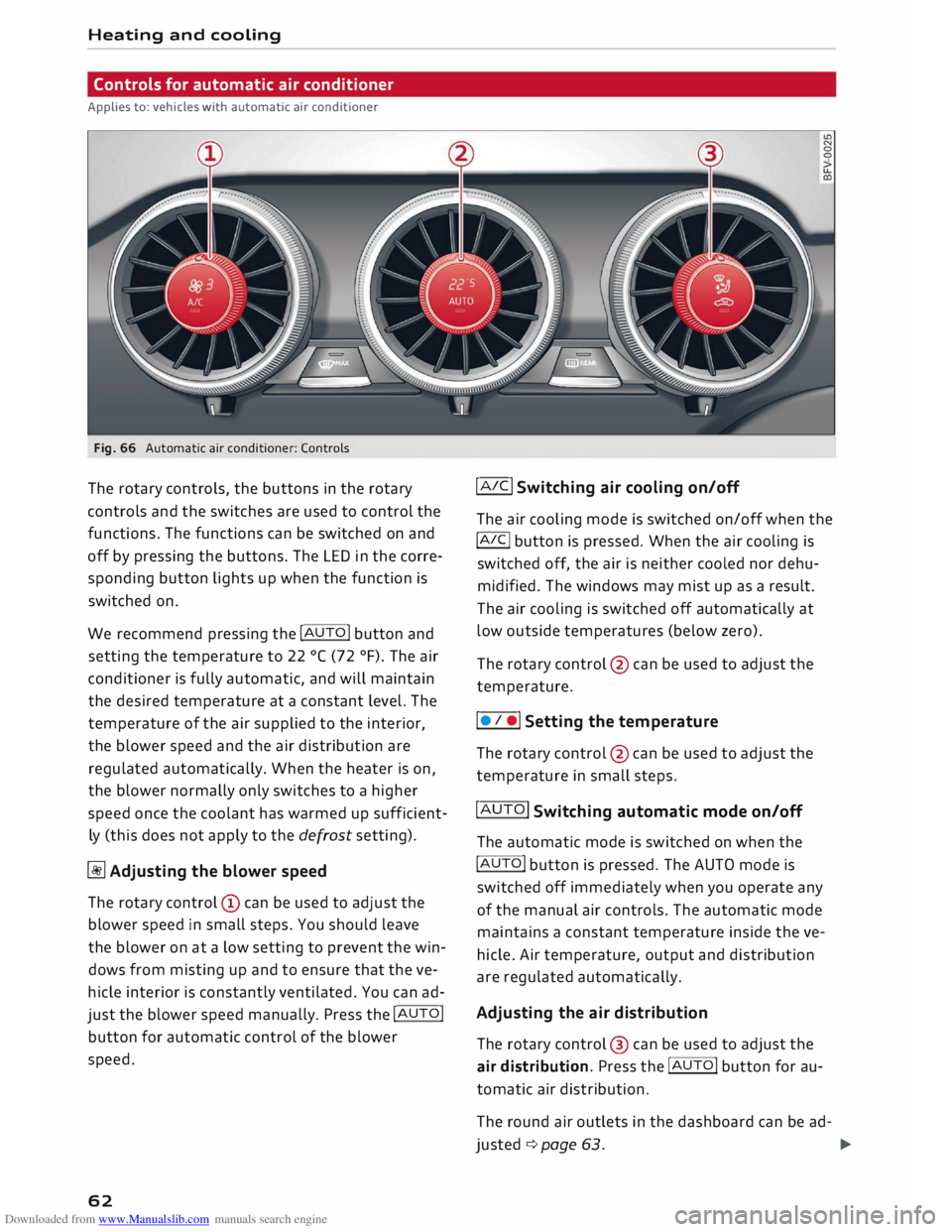
Fig. 66 Automatic air conditioner: Controls
The rotary controls, the buttons in the rotary
controls and the switches are used to control the
functions. The functions can be switched on and
off by pressing the buttons. The LED in the corre
sponding button lights up when the function is
switched on.
We recommend pressing the !AUTO! button and
setting the temperature to 22 °( (72 °F). The air
conditioner is fully automatic, and will maintain
the desired temperature at a constant level. The
temperature of the air supplied to the interior,
the blower speed and the air distribution are
regulated automatically. When the heater is on,
the blower normally only switches to a higher
speed once the coolant has warmed up sufficient
ly (this does not apply to the defrost setting).
� Adjusting the blower speed
The rotary control @ can be used to adjust the
blower speed in small steps. You should leave
the blower on at a low setting to prevent the win
dows from misting up and to ensure that the ve
hicle interior is constantly ventilated. You can ad
just the blower speed manually. Press the !AUTO!
button for automatic control of the blower
speed.
62 !AIC!
Switching air cooling on/off
The air cooling mode is switched on/off when the
!A IC!
button is pressed. When the air cooling is
switched off, the air is neither cooled nor dehu
midified. The windows may mist up as a result.
The air cooling is switched off automatically at
low outside temperatures (below zero).
The rotary control @ can be used to adjust the
temperature.
I • I •I Setting the temperature
The rotary control @ can be used to adjust the
temperature in small steps.
!AUTO! Switching automatic mode on/off
The automatic mode is switched on when the
!AUTO! button is pressed. The AUTO mode is
switched off immediately when you operate any
of the manual air controls. The automatic mode
maintains a constant temperature inside the ve
hicle. Air temperature, output and distribution
are regulated automatically.
Adjusting the air distribution
The rotary control @ can be used to adjust the
air distribution. Press the !AUTO! button for au
tomatic air distribution.
The round air outlets in the dashboard can be ad-
justed ¢ page 63.
�
Page 68 of 306
Downloaded from www.Manualslib.com manuals search engine Driving
Driving
General notes
Running in
A new vehicle should be run in over a distance of
1,500 km. For the first 1,000 km the engine
speed should not exceed 2/3 of the maximum
permissible engine speed -do not use full throt
tle. From 1,000 to 1,500 km you can gradually
increase the engine rpm and road speed.
During its first few hours of running, the internal
friction in the engine is greater than later on
when all the moving parts have bedded down.
How the vehicle is driven for the first 1,500 km
also influences the engine quality. After this peri
od you should continue driving at moderate en
gine speeds, in particular when the engine is
cold. This helps to reduce wear and tear on the
engine and increases the potential mileage which
can be covered by the engine.
You should also avoid driving with the engine
speed too low. Change down to a lower gear
when the engine no longer runs "smoothly". Ex
cessively high engine speeds are prevented by an
automatic rev limiter.
Letting the engine warm up/cool down
Applies to: Sand RS models
You can reduce the amount of wear and tear on
your vehicle during a sporty driving session sim
ply by adopting a more restrained driving style
while the engine is warming up and cooling
down.
When the engine is cold, the engine speed is limi
ted so that the full range of engine power is not
available. Once the engine has reached operating
temperature, the rev Limit moves to a higher
range of engine speeds. In addition, the tyres will
not develop their full grip potential until they
have had a chance to warm up on the road.
Even though the engine continues to be cooled
after you switch it off, it is particularly important
to give it time to cool down before parking. The
engine, brakes, exhaust system and gearbox will
66 all
reach very high temperatures when you adopt
a sporty driving style. Before you park the vehi
cle, allow it to cool down to normal temperature
by driving at moderate engine speeds for several
miles.
Avoiding damage to the car
CD CAUTION
Take care not to damage low-mounted parts
of the car (such as the spoiler or exhaust sys
tem) on steep ramps, uneven road surfaces or
roadside kerbs, etc. This applies especially to
vehicles with low ground clearance and to all
vehicles when fully laden.
Driving through water on roads
Please note the following in order to prevent
damage to the vehicle when driving through wa
ter (e.g. on flooded roads):
- The water level must not be higher than the ve
hicle's underbody.
- Do not drive faster than walking pace.
A WARNING
After driving through water, mud, sludge,
etc., the braking effect can be delayed slightly
due to moisture on the discs and brake pads.
Applying the brakes carefully several times
will remove the moisture and restore the full
braking effect.
CD CAUTION
- Parts of the vehicle (e.g. engine, gearbox,
running gear or electrical components) can
be badly damaged when driving through
water.
- Always switch off the start/stop system*
¢ page 71 before driving through water.
i Note
- It is advisable to check the depth at the
deepest point before approaching the wa
ter.
Page 69 of 306
Downloaded from www.Manualslib.com manuals search engine 0
N
,.....
N
......
0
,.....
Vl
CX) -
Do NOT stop the vehicle, drive in reverse or
switch off the engine before you are out of
the water.
- Bear in mind that waves created by oncom
ing traffic could exceed the permissible
wading depth of your vehicle.
- Avoid driving through salt water (corrosion).
How to improve economy and minimise
pollution
Fuel economy, environmental impact and wear
on the engine, brakes and tyres depend largely
on the way you drive the vehicle. By adopting an
economical driving style and anticipating the
traffic situation ahead, you can reduce fuel con
sumption by 10-15%. The following section gives
you some tips on lessening the impact on the en
vironment and reducing your operating costs at
the same time.
Anticipate well in advance
A car uses most fuel when accelerating. If you an
ticipate hazards and speed changes well in ad
vance, you will need to brake less and thus accel
erate less. Wherever possible, let the car slow
down gradually with a gear engaged, for in
stance when you can see that the next traffic
lights are red.
Change gear early to save fuel
An effective way of saving fuel is to change up
quickly through the gears. Running the engine at
high rpm in the lower gears uses an unnecessary
amount of fuel. Press the accelerator slowly and
avoid using the "kick-down" feature.
Avoid driving at high speed
Avoid travelling at top speed. Fuel consumption,
exhaust emissions and noise levels all increase
very rapidly at higher speeds. Driving at moder
ate speeds will help to save fuel.
Do not let the engine idle for longer than
necessary
Engine idling periods are automatically reduced
on vehicles with start/stop system*. On vehicles
without start/stop system*, it is worthwhile
switching off the engine at level crossings, for in- Driving
stance, or at traffic lights with a long red phase.
The fuel saved after only 30 -40 seconds is
greater than the amount of fuel needed to re
start the engine.
The engine takes a very long time to warm up
when it is running at idling speed. Mechanical
wear and pollutant emissions are also especially
high during this initial warm-up phase. It is
therefore best to drive off immediately after
starting the engine. Avoid running the engine at
high speed.
Regular servicing
Regular servicing can establish a basis for good
fuel economy before you start driving. A well
serviced engine gives you the benefit of im
proved fuel efficiency as well as maximum relia
bility and an enhanced resale value.
A poorly maintained engine can consume up to
ten percent more fuel than necessary.
Check the oil level when filling the tank. Oil con
sumption depends to a great extent on the en
gine load and engine speed. It is quite normal
that the oil consumption of a new engine only
reaches its lowest level after a certain mileage.
This means that the oil consumption can only be
properly assessed after about 5,000 km.
Avoid short trips
The engine and emission control system need to
reach their proper working temperature in order
to minimise fuel consumption and emissions.
A cold engine uses disproportionately more fuel.
The engine only reaches its working temperature
after about four kilometres, when fuel consump
tion will return to a normal level.
Check tyre pressures
Always make sure the tyres are inflated to the
correct tyre pressures to save fuel. If the tyre
pressures are just 0.5 bar too low, this can in
crease the fuel consumption by as much as 5 %.
Due to the greater rolling resistance, under-infla
tion also increases tyre wear and impairs han
dling.
67
Page 71 of 306
Downloaded from www.Manualslib.com manuals search engine Starting
the engine
� Manual gearbox: Press the clutch pedal all the
way down and move the gear Lever into neutral.
� Vehicles with automatic gearbox: Press the
brake pedal and move the selector Lever to po
sition P or N ¢ ,&..
� Press the ....,1s=
T_A_R _T_E_
N_G_I_N_ E-ST_O_PI
button. The
engine should start.
� Diesel engines can take a few seconds Longer
than usual to start on cold days. Please keep
your foot on the clutch pedal (manual gearbox)
or brake pedal (automatic gearbox) until the
engine starts. The indicator Lamp IJ Lights up
while the glow plugs are preheating.
If the engine fails to start immediately, the start
er will be switched off automatically after a few
seconds. Try to start the engine again.
Start/stop system
Please note the information on ¢ page 71,
Start/stop sy
stem.
A WARNING
Never run the engine in confined spaces. The
exhaust gases are toxic -risk of poisoning!
CD CAUTION
Avoid high engine speeds, full throttle and ex
treme load conditions until the engine has
reached its normal operating temperature;
otherwise this can damage the engine.
@) For the sake of the environment
Do not warm up the engine by running it with
the car stationary. You should drive off imme
diately whenever possible. This will help avoid
unnecessary exhaust emissions.
ijj} Note
-Any noises which may be heard when the
engine is started are quite normal and no
cause for concern.
- If you leave the vehicle with the ignition
� switched
on, it will be switched off auto-
o
N
,.....
N
......
0
,.....
� 1}
This function is not available on all export versions. Driving
matically after a while. Please note that
electrical equipment such as the exterior
Lighting will also be switched off.
Switching off the engine
� Stop the vehicle.
� Vehicles with automatic gearbox: Move these
lector Lever to position P.
� Press the !START
ENGINE STOP!
button
¢page 68, Fig. 72.
Steering lock1
)
The steering will be locked if you switch off the
engine with the !START
ENGINE STOP!
button,
move the selector lever to position P (on vehicles
with automatic gearbox*) and open the driver's
door.
The steering will be Locked if you switch off the
engine with the !START
ENGINE STOP!
button
and open the driver's door. The steering lock acts
as a theft deterrent.
Emergency Off function*
If necessary in an emergency, the engine can be
switched off while the vehicle is still moving at
speeds of 7 km/h and above. To switch off the
engine, press the !START E
NG I
N E
ST
OP!
button
twice in quick succession or hold it in for longer
than two seconds.
A WARNING
- Never switch off the engine until the vehicle
is stationary. Otherwise you may not have
the full benefit of the brake servo and pow
er steering. You may need more strength to
steer and brake the vehicle than you nor
mally would. This would mean a greater risk
of accidents and serious injury, because you
cannot steer and brake in the normal man
ner.
- Always take the key with you when you leave
the vehicle. Otherwise the engine can be
started or power-operated equipment such
as the electric windows can be used. This
could result in serious injury.
liJI>
69