lock AUDI TT ROADSTER 2016 Owner's Guide
[x] Cancel search | Manufacturer: AUDI, Model Year: 2016, Model line: TT ROADSTER, Model: AUDI TT ROADSTER 2016Pages: 306, PDF Size: 31.82 MB
Page 77 of 306
Downloaded from www.Manualslib.com manuals search engine 0
N
,.....
N
......
0
,.....
Vl
CX) A
WARNING
- Never press the accelerator pedal or release
the clutch inadvertently if a gear is engaged
or if the selector lever is not in position P or
N (on automatic vehicles) while the vehicle
is stationary with the engine running. The
vehicle will otherwise start moving immedi
ately and could cause an accident.
- You should only use the emergency braking
function in a real emergency, for example if
the brake system were to fail or if the brake
pedal were to be obstructed. If you use the
emergency braking function by activating
the parking brake switch, this has the same
effect as heavy braking. Please remember
that the ESC (and the integrated ABS, EDL
and traction control functions) is still sub
ject to certain physical limits. In a corner or
in bad road or weather conditions an emer
gency stop can cause the vehicle to skid or
lose steering control.
- It is not possible to apply the parking brake
if the electrical power supply fails. In this
case, park the vehicle on a level surface and
select 1st gear (manual gearbox) or move
the selector lever to position P (automatic
gearbox) to prevent it from rolling. Obtain
professional assistance.
- Always take the key with you when leaving
your vehicle -even if you only intend to be
gone for a short time. This is especially im
portant if children are left in the car. They
might otherwise be able to start the engine,
release the parking brake or use power-op
erated equipment such as the electric win
dows -this could lead to injuries.
- Do not leave anyone (especially children) in
the vehicle when it is locked. Locked doors
could delay assistance in an emergency, po
tentially putting lives at risk.
Applies to: vehicles with automatic gearbox
You can apply the parking brake manually or
switch on the hold assist* when stopping at
traffic lights, etc. You do not then have to
hold the car with the brake pedal, as the Driving
brakes will stop it creeping forward while a
gear is engaged in the automatic transmis
sion. When you drive off in the normal way,
the parking brake will be released automati
cally and your vehicle will start moving
¢page 75.
(CD) Note
- Any slight noise which may be heard when
the parking brake is applied or released is
quite normal and no cause for concern.
- The parking brake runs an automatic test
cycle at regular intervals when the vehicle is
parked. This may cause a slight noise, which
is normal.
- If the electrical power supply fails, it is not
possible to release the parking brake (if it
was applied) or to apply the parking brake
(if it was released) ¢ &,. Obtain professional
assistance.
Moving off
Various features and safety functions are availa
ble for driving off, depending on the equipment
in your vehicle.
Hill starting with the parking brake applied
Important: The driver's door must be closed.
� To drive off more easily on a slope, apply the
parking brake and drive off just as you usually
would. The parking brake will be released auto
matically, but not until there is enough power
at the wheels to make the vehicle move in the
desired direction.
Hill starting with the hill hold assist
The hill hold assist function makes it easier to
drive away on a slope.
Important: The driver's door must be closed and
the engine must be running.
� To activate the hill hold assist, press and hold
the brake pedal for several seconds. The vehicle
must be on a slope and facing uphill.
When you release the brake pedal the braking
force will be maintained for a moment ¢.&. in
..,.
75
Page 79 of 306
Downloaded from www.Manualslib.com manuals search engine 0
N
,.....
N
....
0
,.....
Vl
CX) Selector
lever positions
Applies to: vehicles with automatic gearbox
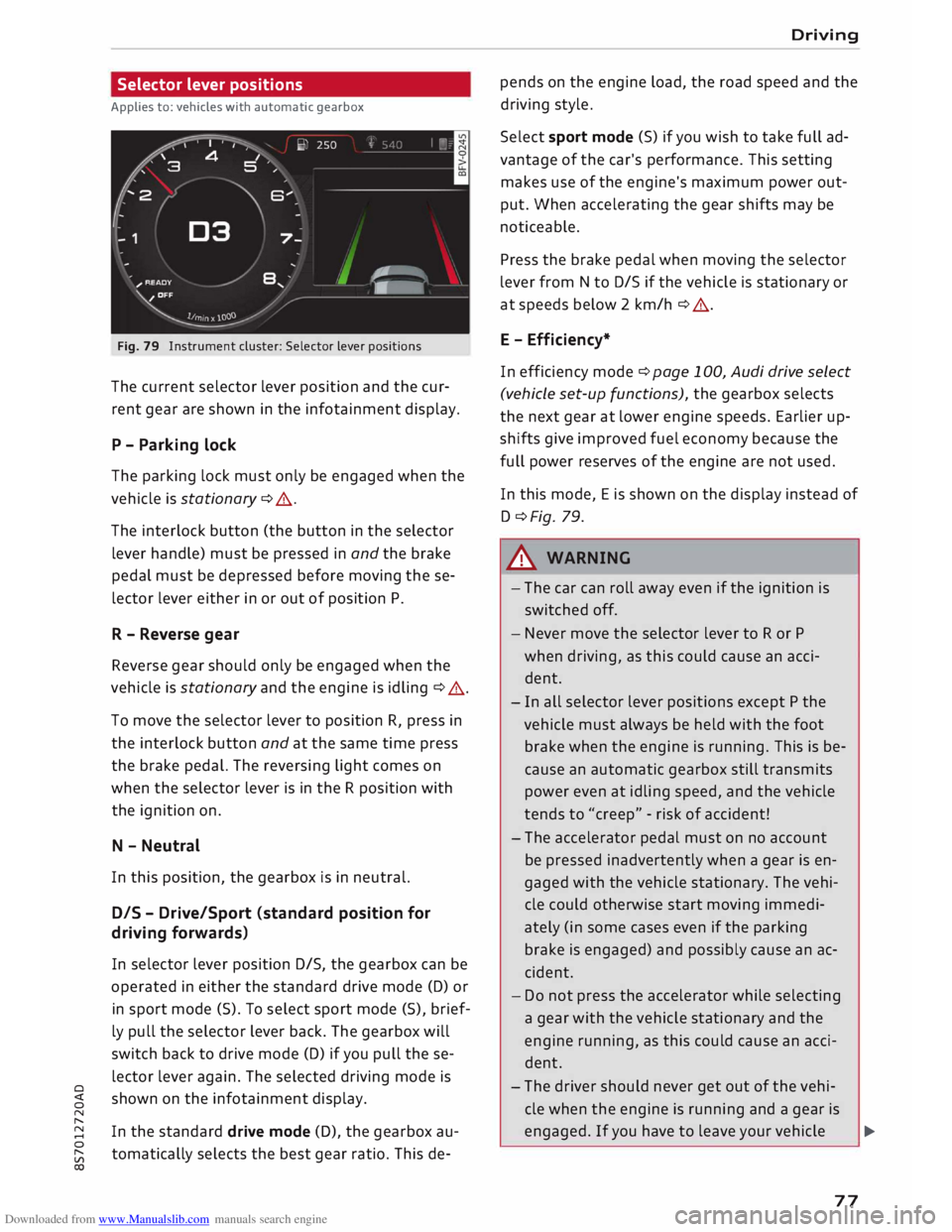
Fig. 79 Instrument cluster: Selector lever positions
The current selector lever position and the cur
rent gear are shown in the infotainment display.
P - Parking lock
The parking lock must only be engaged when the
vehicle is stationary ¢ A.
The interlock button (the button in the selector
lever handle) must be pressed in and the brake
pedal must be depressed before moving these
lector lever either in or out of position P.
R - Reverse gear
Reverse gear should only be engaged when the
vehicle is stationary and the engine is idling ¢
A.
To move the selector lever to position R, press in
the interlock button and at the same time press
the brake pedal. The reversing light comes on
when the selector Lever is in the R position with
the ignition on.
N - Neutral
In this position, the gearbox is in neutral.
DIS -Drive/Sport (standard position for
driving forwards}
In selector Lever position D/S, the gearbox can be
operated in either the standard drive mode (D) or
in sport mode (5). To select sport mode (5), brief
ly pull the selector lever back. The gearbox will
switch back to drive mode (D) if you pull these
lector lever again. The selected driving mode is
shown on the infotainment display.
In the standard drive mode (D), the gearbox au
tomatically selects the best gear ratio. This de- Driving
pends on the engine load, the road speed and the
driving style.
Select sport mode (S) if you wish to take full ad
vantage of the car's performance. This setting
makes use of the engine's maximum power out
put. When accelerating the gear shifts may be
noticeable.
Press the brake pedal when moving the selector
Lever from N to D/S if the vehicle is stationary or
at speeds below 2 km/h ¢ A.
E - Efficiency*
In efficiency mode¢ page 100, Audi drive select
(vehicle set-up functions), the gearbox selects
the next gear at Lower engine speeds. Earlier up
shifts give improved fuel economy because the
full power reserves of the engine are not used.
In this mode, Eis shown on the display instead of
D ¢Fig. 79.
.&_ WARNING
- The car can roll away even if the ignition is
switched off.
- Never move the selector lever to R or P
when driving, as this could cause an acci
dent.
- In all selector Lever positions except P the
vehicle must always be held with the foot
brake when the engine is running. This is be
cause an automatic gearbox still transmits
power even at idling speed, and the vehicle
tends to "creep" -risk of accident!
- The accelerator pedal must on no account
be pressed inadvertently when a gear is en
gaged with the vehicle stationary. The vehi
cle could otherwise start moving immedi
ately (in some cases even if the parking
brake is engaged) and possibly cause an ac
cident.
- Do not press the accelerator while selecting
a gear with the vehicle stationary and the
engine running, as this could cause an acci
dent.
- The driver should never get out of the vehi
cle when the engine is running and a gear is
engaged. If you have to leave your vehicle ..,.
77
Page 80 of 306
Downloaded from www.Manualslib.com manuals search engine Driving
while the engine is running, you must apply
the parking brake and engage the parking
lock P.
- To avoid accidents, apply the parking brake
and put the selector lever in position P be
fore opening the bonnet and working on the
vehicle with the engine running. Please ob
serve the important safety warnings
¢ page 244, Working on components in
the engine comportment.
Ct) Note
- Drive select: You can select the sport pro
gram for gear changes by activating the dy
namic mode. The infotainment display will
show S instead of D.
- If the lever is moved accidentally to N when
driving, take your foot off the accelerator
and let the engine speed drop to idling be
fore selecting Dor S again.
- It is not possible to move the selector lever
out of position P if the electrical power sup
ply fails. In this case, the selector lever can
be released manually. Left-hand drive
vehicles ¢page 84, right-hand drive
vehicles ¢page 85.
Selector lever lock
Applies to: vehicles with automatic gearbox
The selector Lever Lock prevents gears from being
engaged inadvertently, so that the vehicle is not
set in motion unintentionally.
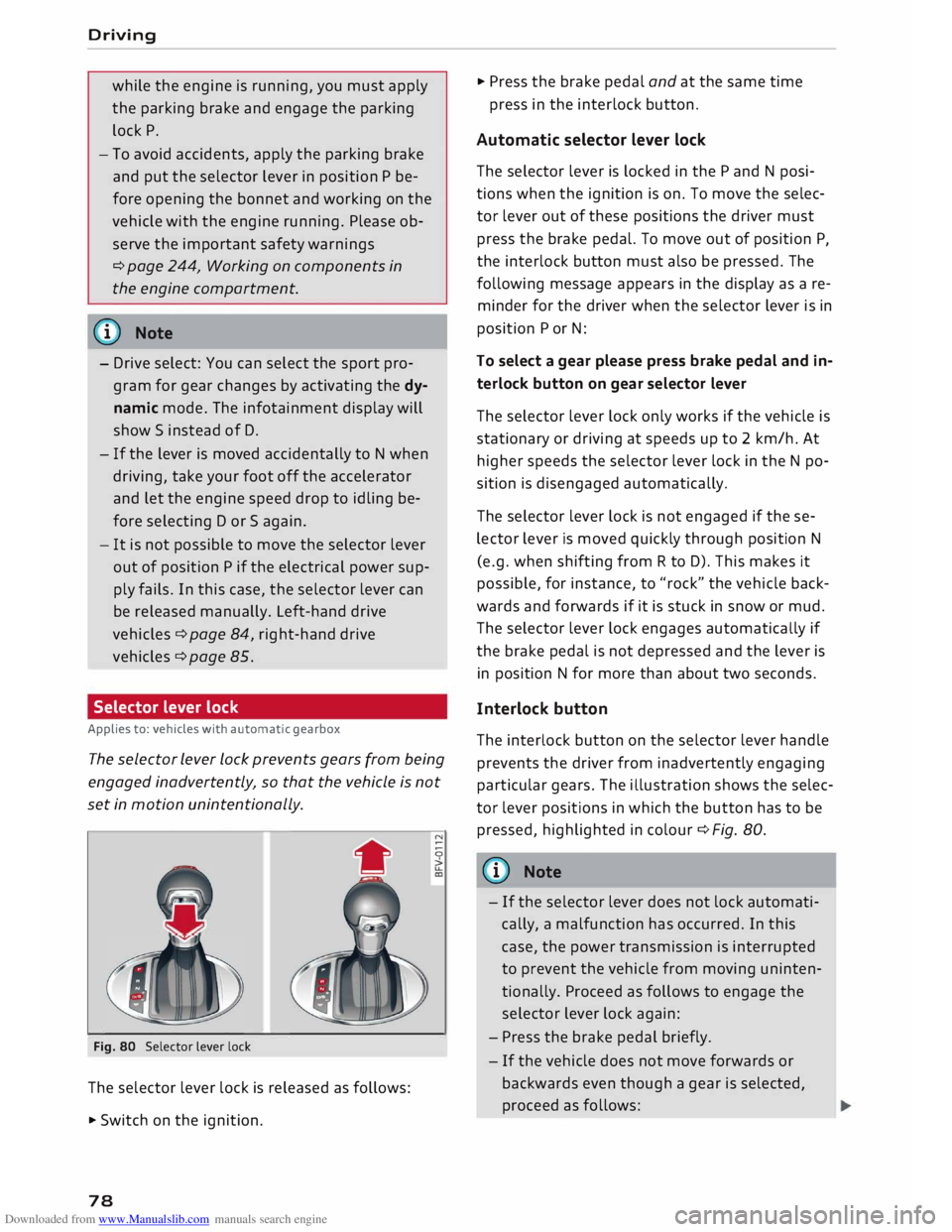
Fig. 80 Selector lever lock
The selector lever lock is released as follows:
• Switch on the ignition.
78 •
Press the brake pedal and at the same time
press in the interlock button.
Automatic selector lever lock
The selector lever is locked in the P and N posi
tions when the ignition is on. To move the selec
tor lever out of these positions the driver must
press the brake pedal. To move out of position P,
the interlock button must also be pressed. The
following message appears in the display as a re
minder for the driver when the selector lever is in
position P or N:
To select a gear please press brake pedal and in
terlock button on gear selector lever
The selector lever lock only works if the vehicle is
stationary or driving at speeds up to 2 km/h. At
higher speeds the selector lever lock in the N po
sition is disengaged automatically.
The selector lever lock is not engaged if the se
lector lever is moved quickly through position N
(e.g. when shifting from R to D). This makes it
possible, for instance, to "rock" the vehicle back
wards and forwards if it is stuck in snow or mud.
The selector lever lock engages automatically if
the brake pedal is not depressed and the lever is
in position N for more than about two seconds.
Interlock button
The interlock button on the selector lever handle
prevents the driver from inadvertently engaging
particular gears. The illustration shows the selec
tor lever positions in which the button has to be
pressed, highlighted in colour¢ Fig. 80.
{(D) Note
- If the selector lever does not lock automati
cally, a malfunction has occurred. In this
case, the power transmission is interrupted
to prevent the vehicle from moving uninten
tionally. Proceed as follows to engage the
selector lever lock again:
- Press the brake pedal briefly.
- If the vehicle does not move forwards or
backwards even though a gear is selected,
proceed as follows:
Page 81 of 306
Downloaded from www.Manualslib.com manuals search engine 0
N
,.....
N
......
0
,.....
Vl
CX) -
If the vehicle does not move in the desired
direction, the system may have failed to en
gage the gear correctly. In this case, press
the brake pedal and select the gear again.
- If the vehicle still does not move in the de
sired direction, a system malfunction has
occurred. Seek professional assistance and
have the system checked.
General notes on driving an automatic
Applies to: vehicles with automatic gearbox
The gearbox changes the forward gears up and
down automatically.
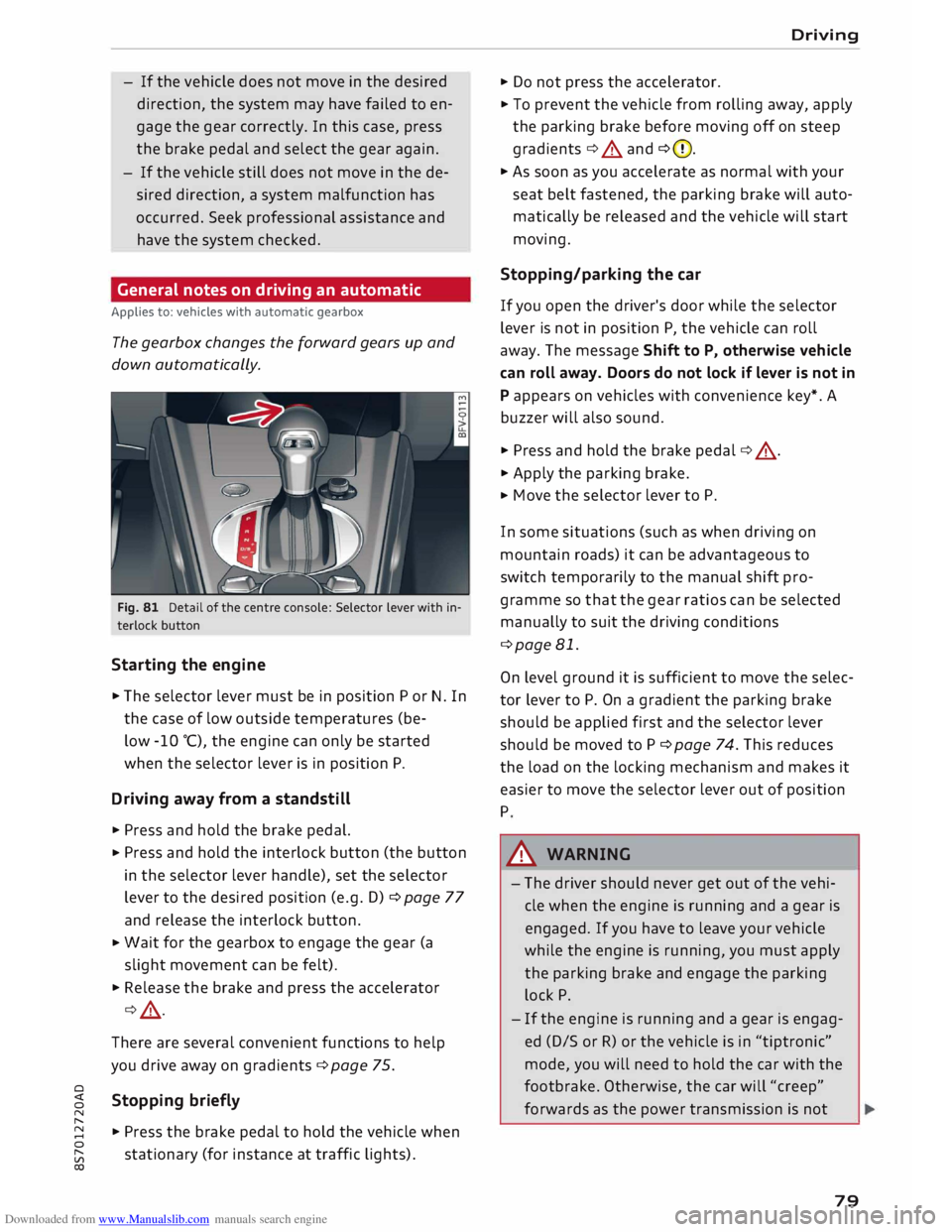
Fig. 81 Detail of the centre console: Selector lever with in
terlock button
Starting the engine
.,. The selector lever must be in position P or N. In
the case of low outside temperatures (be-
low -10 °(), the engine can only be started
when the selector lever is in position P.
Driving away from a standstill
.,. Press and hold the brake pedal.
.,. Press
and hold the interlock button (the button
in the selector lever handle), set the selector
lever to the desired position (e.g. D) ¢ page 77
and release the interlock button.
.,. Wait
for the gearbox to engage the gear (a
slight movement can be felt).
.,. Release the brake and press the accelerator
¢ .&, .
There are several convenient functions to help
you drive away on gradients ¢page 75.
Stopping briefly
.,. Press the brake pedal to hold the vehicle when
stationary (for instance at traffic lights). Driving
.,. Do not press the accelerator .
.,. To prevent the vehicle from rolling away, apply
the parking brake before moving off on steep
gradients ¢.&. and ¢(D.
.,. As soon as you accelerate as normal with your
seat belt fastened, the parking brake will auto
matically be released and the vehicle will start
moving.
Stopping/parking the car
If you open the driver's door while the selector
lever is not in position P, the vehicle can roll
away. The message Shift to P, otherwise vehicle
can roll away. Doors do not lock if lever is not in
P appears on vehicles with convenience key*. A
buzzer will also sound .
.,. Press and hold the brake pedal¢ .&, .
.,. Apply the parking brake .
.,. Move
the selector lever to P.
In some situations (such as when driving on
mountain roads) it can be advantageous to
switch temporarily to the manual shift pro
gramme so that the gear ratios can be selected
manually to suit the driving conditions
¢page 81.
On level ground it is sufficient to move the selec
tor lever to P. On a gradient the parking brake
should be applied first and the selector lever
should be moved to P ¢ page 74. This reduces
the load on the locking mechanism and makes it
easier to move the selector lever out of position
P
A WARNING
- The driver should never get out of the vehi
cle when the engine is running and a gear is
engaged. If you have to leave your vehicle
while the engine is running, you must apply
the parking brake and engage the parking
lock P.
- If the engine is running and a gear is engag
ed (D/S or R) or the vehicle is in "tiptronic"
mode, you will need to hold the car with the
footbrake. Otherwise, the car will "creep"
forwards as the power transmission is not
79
Page 86 of 306
Downloaded from www.Manualslib.com manuals search engine Driving
Releasing the selector lever manually (LHD
vehicles)
Applies to: vehicles with automatic gearbox
The selector Lever can be released manually if
the electrical power supply should fail.
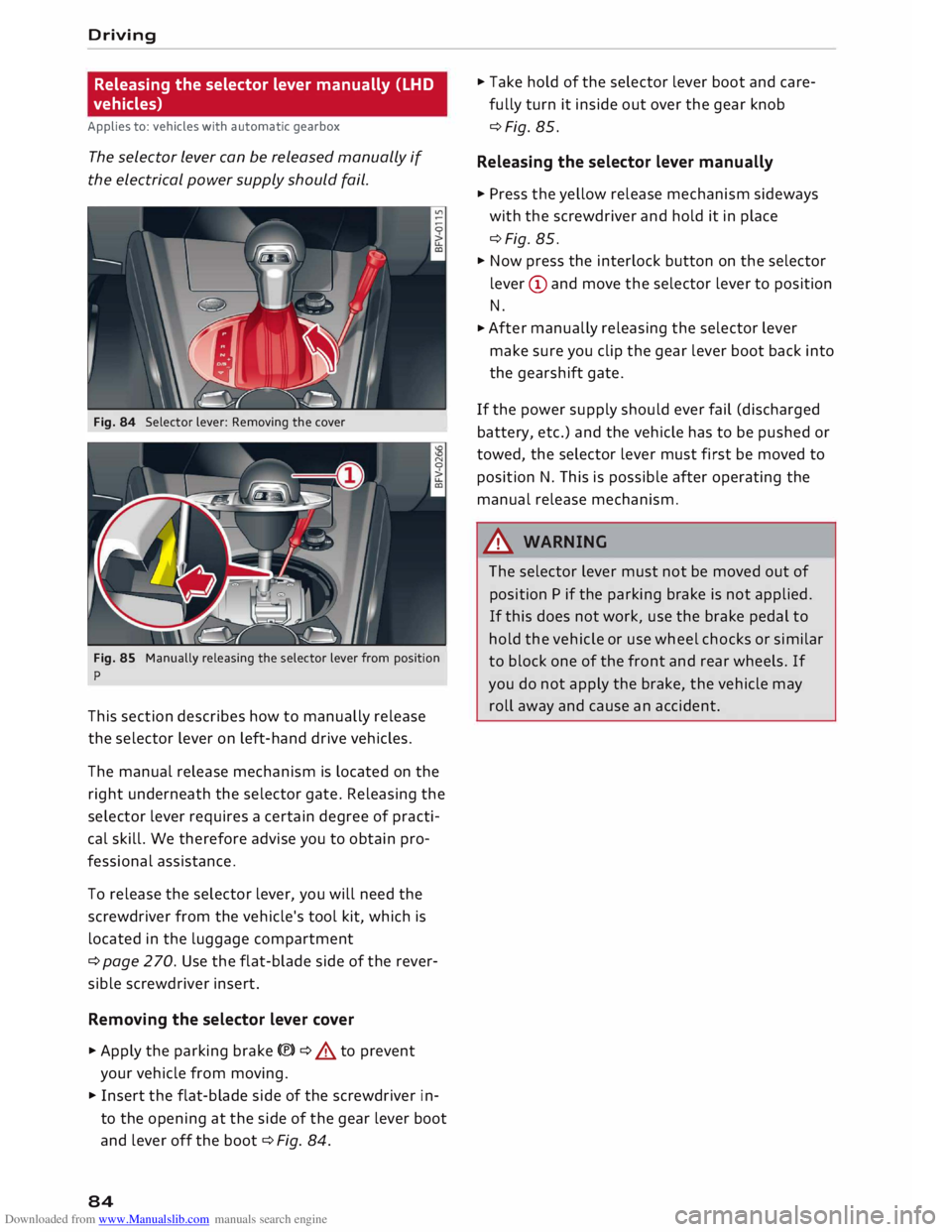
Fig. 84 Selector lever: Removing the cover
Fig. 85 Manually releasing the selector lever from position
p
This section describes how to manually release
the selector lever on left-hand drive vehicles.
The manual release mechanism is located on the
right underneath the selector gate. Releasing the
selector lever requires a certain degree of practi
cal skill. We therefore advise you to obtain pro
fessional assistance.
To release the selector lever, you will need the
screwdriver from the vehicle's tool kit, which is
located in the luggage compartment
¢ page 270. Use the flat-blade side of the rever
sible screwdriver insert.
Removing the selector lever cover
� Apply the parking brake(®)¢ & to prevent
your vehicle from moving.
� Insert the flat-blade side of the screwdriver in
to the opening at the side of the gear lever boot
and lever off the boot ¢Fig. 84.
84 �
Take hold of the selector lever boot and care
fully turn it inside out over the gear knob
¢Fig. 85.
Releasing the selector lever manually
� Press the yellow release mechanism sideways
with the screwdriver and hold it in place
¢Fig. 85.
� Now press the interlock button on the selector
lever (D and move the selector lever to position
N.
� After
manually releasing the selector lever
make sure you clip the gear lever boot back into
the gearshift gate.
If the power supply should ever fail (discharged
battery, etc.) and the vehicle has to be pushed or
towed, the selector lever must first be moved to
position N. This is possible after operating the
manual release mechanism .
.&_ WARNING
The selector lever must not be moved out of
position P if the parking brake is not applied.
If this does not work, use the brake pedal to
hold the vehicle or use wheel chocks or similar
to block one of the front and rear wheels. If
you do not apply the brake, the vehicle may
roll away and cause an accident.
Page 87 of 306
Downloaded from www.Manualslib.com manuals search engine Releasing
the selector lever manually (RHD
vehicles)
Applies to: vehicles with automatic gearbox
The selector Lever can be released manually if
the electrical power supply should fail.
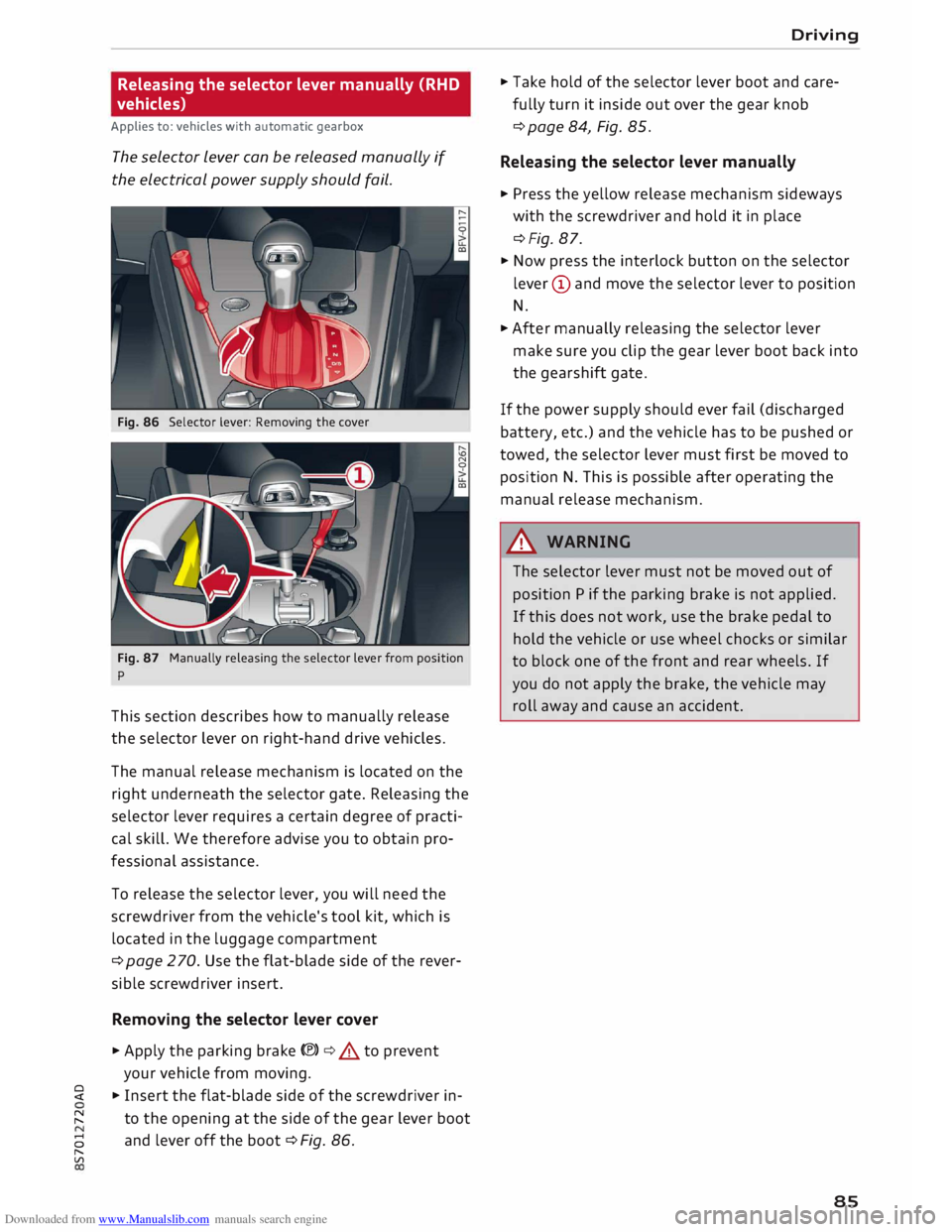
Fig. 86 Selector lever: Removing the cover
Fig. 87 Manually releasing the selector lever from position
p
This section describes how to manually release
the selector lever on right-hand drive vehicles.
The manual release mechanism is located on the
right underneath the selector gate. Releasing the
selector lever requires a certain degree of practi
cal skill. We therefore advise you to obtain pro
fessional assistance.
To release the selector lever, you will need the
screwdriver from the vehicle's tool kit, which is
located in the luggage compartment
¢ page 2 70. Use the flat-blade side of the rever
sible screwdriver insert.
Removing the selector lever cover
� Apply the parking brake(®)¢.&. to prevent
your vehicle from moving.
� � Insert the flat-blade side of the screwdriver in-
� to
the opening at the side of the gear lever boot
8 and
lever off the boot ¢ Fig. 86.
"
Vl Driving
� Take hold of the selector lever boot and care
fully turn it inside out over the gear knob
¢ page 84, Fig. 85.
Releasing the selector lever manually
� Press the yellow release mechanism sideways
with the screwdriver and hold it in place
¢Fig. 87.
� Now press the interlock button on the selector
lever (D and move the selector lever to position
N.
� After manually releasing the selector lever
make sure you clip the gear lever boot back into
the gearshift gate.
If the power supply should ever fail (discharged
battery, etc.) and the vehicle has to be pushed or
towed, the selector lever must first be moved to
position N. This is possible after operating the
manual release mechanism.
&_ WARNING
The selector lever must not be moved out of
position P if the parking brake is not applied.
If this does not work, use the brake pedal to
hold the vehicle or use wheel chocks or similar
to block one of the front and rear wheels. If
you do not apply the brake, the vehicle may
roll away and cause an accident.
85
Page 101 of 306
Downloaded from www.Manualslib.com manuals search engine 0
N
,.....
N
......
0
,.....
Vl
CX) -
In certain situations, the system may not
function properly, or the functionality of the
system may be restricted. For example:
- If other vehicles are approaching very
quickly, or if you are overtaking other
vehicles quickly. The warning lamp may
not light up in time.
- In poor weather conditions, such as heavy
rain, snow or road spray.
- If you are travelling in very wide lanes, in
tight bends or over crests. The system
may not detect vehicles in the adjacent
lane because they are outside the area
covered by the sensors.
CD CAUTION
Impacts or damage to the bumper, wheel
arches or underbody can cause misalignment
of the sensors. This can impair the functional
ity of the system. Have the systems checked
by a qualified workshop.
(D} Note
The warning lamps on the exterior mirrors
may not be properly visible if tinted foil is af
fixed to the side windows on the driver's or
passenger's side.
Switching on and off
Applies to: vehicles with Audi side assist
The system can be switched on and off on the in
fotainment system.
"' Select the following on the infotainment sys
tem: I MENU I button >Car> left control button
> Driver assist> Audi side assist.
The warning lamps in the exterior mirrors light
up briefly each time the ignition is switched on to
indicate that the system is activated. Driver
assist systems
Adjusting brightness of warning lamp
Applies to: vehicles with Audi side assist
The brightness of the warning lamp can be ad
justed on the infotainment system.
"' Select the following on the infotainment sys
tem: I MENU I button >Car> left control button
> Driver assist> Audi side assist.
The brightness of the warning lamp in both the
information and warning modes is regulated au
tomatically according to the ambient light level.
If you are in very dark or very light surroundings
when you adjust the brightness of the warning
lamp, the automatic brightness control may al
ready have reached the lowest or the brightest
setting. In such a case it is possible that you
won't notice a difference while you are adjusting
the brightness or that you will only notice it once
the light surroundings have changed.
Please adjust the brightness of the warning lamp
for the information mode so that it does not dis
tract you while you are looking at the road in
front. When you change the brightness, the
warning lamp on the exterior mirror will light up
briefly with the intensity set for the information
mode. The intensity of the lamp in the warning
mode is linked to the intensity in the information
mode and is adjusted automatically.
(CD) Note
- The side assist is not active while the set
tings are being adjusted.
- Your personal settings are stored automati
cally and assigned to the remote control key
which is being used.
Driver messages
Applies to: vehicles with Audi side assist
Should the side assist be deactivated automati
cally, a driver message will appear on the info
tainment display.
@j Audi
side assist: currently unavailable.
Sensor view restricted due to surroundi ngs.
See owner's manual
The radar sensors are blocked. The area in front
of the sensors must not be obstructed by bicycle
..,..
99
Page 108 of 306
Downloaded from www.Manualslib.com manuals search engine Parking
aids
Reversing camera
Introduction
Applies to: vehicles with reversing camera
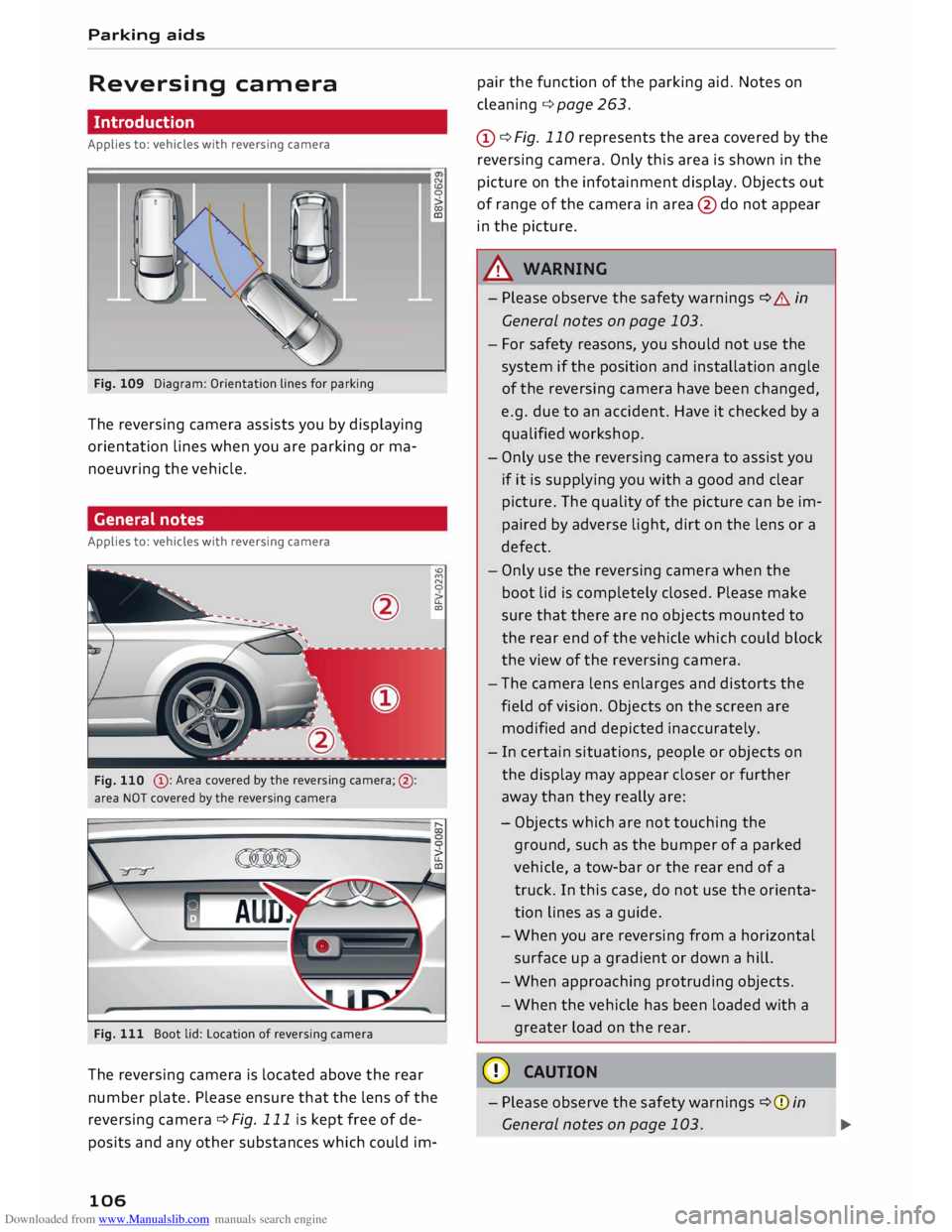
Fig. 109 Diagram: Orientation lines for parking
The reversing camera assists you by displaying
orientation lines when you are parking or ma
noeuvring the vehicle.
General notes
Applies to: vehicles with reversing camera
@ : Area covered by the reversing camera;@:
area NOT covered by the reversing camera
Fig. 111 Boot lid: Location of reversing camera N
CD
0
co
ID
'°
M
N
0
u..
CXl
The reversing camera is located above the rear
number plate. Please ensure that the lens of the
reversing camera ¢ Fig. 111 is kept free of de
posits and any other substances which could im-
106 pair
the function of the parking aid. Notes on
cleaning ¢page 263.
(D ¢ Fig. 110 represents the area covered by the
reversing camera. Only this area is shown in the
picture on the infotainment display. Objects out
of range of the camera in area @do not appear
in the picture.
A WARNING
- Please observe the safety warnings ¢ A in
General notes on page 103.
- For safety reasons, you should not use the
system if the position and installation angle
of the reversing camera have been changed,
e.g. due to an accident. Have it checked by a
qualified workshop.
- Only use the reversing camera to assist you
if it is supplying you with a good and clear
picture. The quality of the picture can be im
paired by adverse light, dirt on the lens or a
defect.
- Only use the reversing camera when the
boot lid is completely closed. Please make
sure that there are no objects mounted to
the rear end of the vehicle which could block
the view of the reversing camera.
- The camera lens enlarges and distorts the
field of vision. Objects on the screen are
modified and depicted inaccurately.
- In certain situations, people or objects on
the display may appear closer or further
away than they really are:
- Objects which are not touching the
ground, such as the bumper of a parked
vehicle, a tow-bar or the rear end of a
truck. In this case, do not use the orienta
tion lines as a guide.
- When you are reversing from a horizontal
surface up a gradient or down a hill.
- When approaching protruding objects.
- When the vehicle has been loaded with a
greater load on the rear.
CD CAUTION
- Please observe the safety warnings ¢(Din
General notes on page 103.
Page 115 of 306
Downloaded from www.Manualslib.com manuals search engine Intelligent
technology
Electronic stabilisation
control (ESC)
Description
The electronic stabilisation control (ESC) increa
ses the car's stability. It reduces the tendency to
skid and improves the stability and road holding
of the vehicle. The ESC detects critical handling
situations, such as understeer, oversteer and
wheelspin on the driven wheels. It stabilises the
vehicle by braking individual wheels or by reduc
ing the engine torque. The indicator lamp DJ in
the instrument cluster starts flashing as soon as
the ESC intervenes.
The following systems are integrated in the ESC:
Anti-lock brake system (ABS)
ABS prevents the wheels from locking up under
braking until the vehicle has reached a virtual
standstill. You can continue to steer the vehicle
even when the brakes are on full. Keep your foot
on the brake pedal and do not pump the brakes.
You will feel the brake pedal pulsate while the
anti-lock brake system is working.
Brake assist system
The brake assist system can shorten the braking
distance. The braking force is automatically boos
ted if you press the brake pedal quickly in an
emergency. You must keep pressing the brake
pedal until the danger has passed.
Traction control system (ASR)
In the event of wheelspin, the traction control
system reduces the engine torque to match the
amount of grip available. This helps the car to
start moving, accelerate or climb a gradient.
Electronic differential lock (EDL)
When the EDL detects wheelspin, it brakes the
spinning wheel and directs the power to the oth
er driven wheel (or wheels on quattro* versions).
0 This
function is not available at high speeds.
� To
prevent the disc brake of the braked wheel
8 from
overheating, the EDL cuts out automatically
"
Vl Intelligent
technology
if subjected to excessive loads. The vehicle can
still be driven. The EDL will switch on again auto
matically when the brake has cooled down.
Steering recommendation
The ESC helps to stabilise the vehicle by changing
the steering wheel torque.
Selective wheel torque control
Selective wheel torque control intervenes when
cornering by braking the wheel(s) on the inside of
the bend individually as required. This enables
precision cornering. The relevant system may not
intervene in the wet or snow.
Multicollision brake assist system
The "multicollision brake assist system" can help
to reduce the risk of skidding and further colli
sions during an accident. If the airbag control
unit detects that a collision has taken place up
wards of a certain speed, the vehicle is braked by
the ESC.
The vehicle will not be braked automatically if:
- the driver presses the accelerator,
- the brake pressure applied by pressing the
brake pedal is higher than the brake pressure
initiated by the system,
- or the ESC, the brake system or the vehicle's
electrical system are not fully functional.
A WARNING
- The grip provided by the ESC and the inte
grated systems is still subject to the physi
cal limits of adhesion. Always bear this in
mind, especially on wet or slippery roads. If
you notice the systems cutting in, you
should reduce your speed immediately to
suit the road and traffic conditions. Do not
let the extra safety provided tempt you into
taking any risks when driving -this can
cause accidents.
- Remember that the accident risk always in
creases if you drive fast, especially in cor
ners or on a wet or slippery road, or if you
follow too close behind the vehicle in front
of you. Please bear in mind that even the
113
Page 121 of 306
Downloaded from www.Manualslib.com manuals search engine 0
N
,.....
N
......
0
,.....
Vl
CX) consumed,
but only a small amount is supplied.
The situation is also critical if electrical equip
ment is in use when the engine is not running. In
this case power is consumed when none is being
generated.
In these situations you will be aware that the
power management system is intervening to con
trol the distribution of electrical power.
When the vehicle is parked for long periods
If you do not drive your vehicle for a period of
several days or weeks, the power management
will gradually shut off the on-board systems one
by one, or reduce the amount of current they are
using. This limits the amount of power consumed
and helps to ensure reliable starting even after a
long period. Certain convenience features, such
as remote control unlocking, may not be availa
ble. These functions will be restored when you
switch on the ignition and start the engine.
With the engine switched off
If you listen to the radio or use the other info
tainment functions when the engine is not run
ning, this will discharge the vehicle battery.
The infotainment display will show a warning
message before the battery power drops to a lev
el where the starting ability is impaired. This
message warns you that the system you are using
will soon be switched off automatically. You
should therefore start the engine if you wish to
continue using the system.
When the engine is running
Although the alternator generates electrical
power, the vehicle battery can still become dis
charged while the vehicle is being driven. This can
occur when a lot of power is being consumed but
only a small amount supplied, especially if the
vehicle battery is not fully charged initially.
To restore the necessary energy balance, the sys
tem will then temporarily shut off the electrical
components that are using a lot of power, or re
duce the current they are consuming. Heating
systems in particular use a large amount of elec
trical power. If you notice, for instance, that the
seat heating* or the rear window heater is not Intelligent
technology
working, they may have been temporarily switch
ed off or regulated to a lower heat output. These
systems will be available again as soon as suffi
cient electrical power is available.
You may also notice that the engine runs at a
slightly faster idling speed. This is quite normal,
and no cause for concern. The increased idling
speed allows the alternator to meet the greater
power requirement and charge the vehicle bat
tery at the same time.
Information saved in the
control units
The vehicle is fitted in the factory with electronic
control units that, among other things, control
the engine and the gearbox. The control units al
so monitor the exhaust system and the airbags.
The control units continually analyse data rele
vant to the vehicle while you are driving. In the
event of faults or anomalies in the vehicle data,
only these data are saved. As a rule, faults are
shown by the warning lamps in the instrument
cluster.
Data saved in the control units can only be read
and analysed with special equipment.
A qualified workshop is only able to recognise
and deal with faults by using the relevant saved
data. Among other things, the saved data may
contain the following information:
- Data relating to the engine and the gearbox
-Speed
- Direction of travel
- Braking force
- Seat belt warning system data
The control units installed will not under any cir
cumstances record conversations in the vehicle.
Event data recorder
Your vehicle is not equipped with an event data
recorder.
In an event data recorder, information about
the
vehicle is temporarily saved. In the event of an
accident, you can therefore obtain detailed infor-
mation about the course of events. On vehicles ...,.
119