lock AUDI TT ROADSTER 2016 Workshop Manual
[x] Cancel search | Manufacturer: AUDI, Model Year: 2016, Model line: TT ROADSTER, Model: AUDI TT ROADSTER 2016Pages: 306, PDF Size: 31.82 MB
Page 199 of 306
Downloaded from www.Manualslib.com manuals search engine 0
N
,.....
N
......
0
,.....
Vl
CX) &,
WARNING
- Mobile devices, tablet and laptop computers
and devices of a similar weight can only be
operated safely when the vehicle is station
ary. Like any loose object, they can be cata
pulted through the vehicle in an accident
and cause serious injuries. Always make sure
that such devices are securely stowed while
you are driving.
- No Wi-Fi devices may be used in the areas
around the airbags while the vehicle is being
driven. Please also observe the safety warn
ings in the chapter on¢ page 235.
CD CAUTION
Please always observe the information ¢(Din
Wi-Fi hotspot on page 166.
ijj) Note
- Depending on the Internet connection and
network load, playback of the on line media
services may be interrupted.
- Whether online media and Internet radio
can be used depends on the availability of
services provided by third parties.
- AUDI AG only enables you to access online
media services via the MMI system and ac
cepts no responsibility for the content of
online media services.
- Please always note the information in the
chapter ¢ page 167, Notes on Audi connect.
- Depending on the mobile device you are us
ing, you may experience interruptions in
media playback when using the Audi MMI
connect app. To avoid interruptions, keep
the Audi MMI connect app running in the
foreground and do not lock the screen on
your mobile device.
- Audi dealerships will be able to provide you
with further information on online media. Media
Multimedia connections
USB adapters for Audi music interface or
USB charging socket
Depending on the vehicle equipment, you may be
able to connect your mobile devices (e.g. smart
phones, MP3 players) to the Audi music interface
or the USB charging socket using the special USB
adapters.
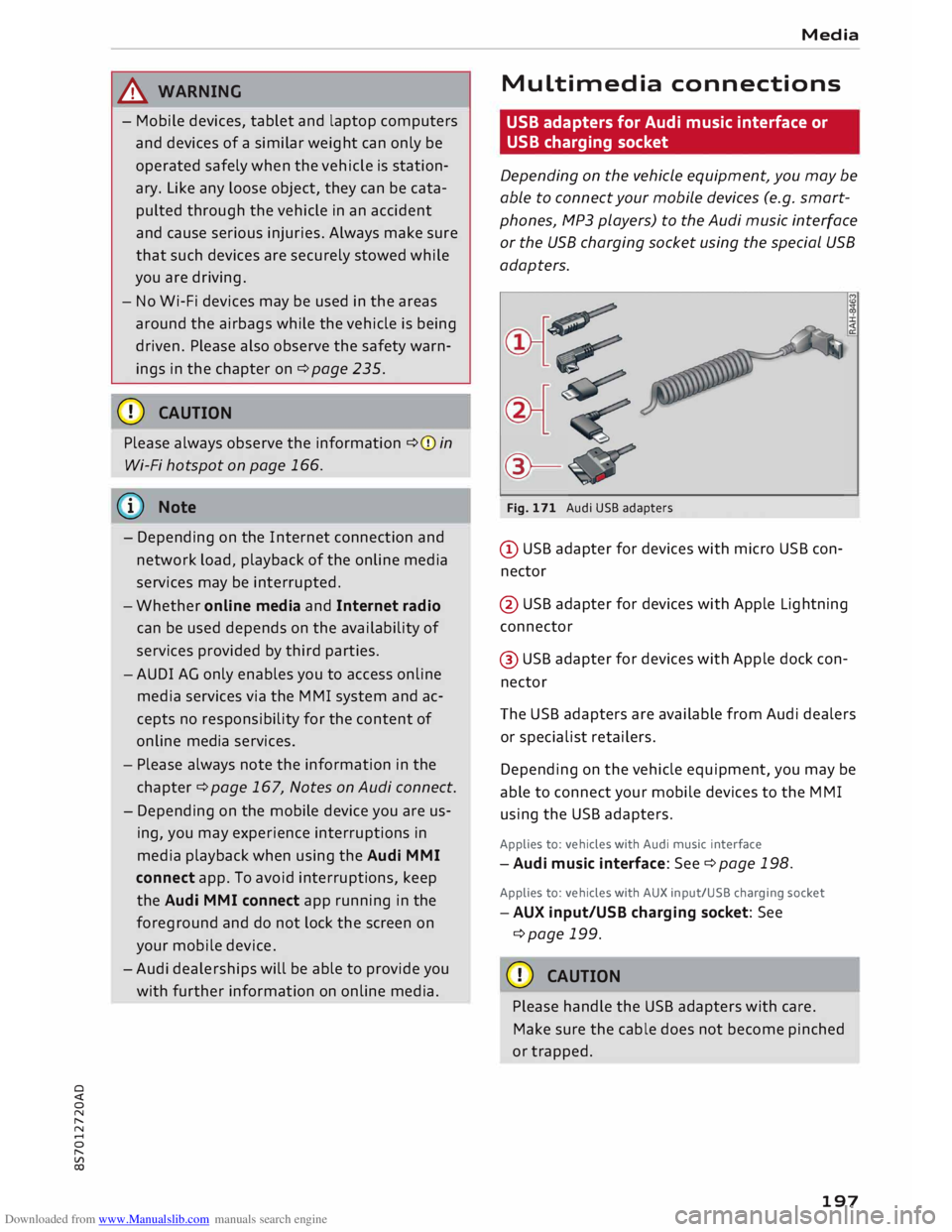
@-Fig. 171 Audi USB adapters
@ USB adapter for devices with micro USB con
nector
@ USB adapter for devices with Apple Lightning
connector
@ USB adapter for devices with Apple dock con
nector
The USB adapters are available from Audi dealers
or specialist retailers.
Depending on the vehicle equipment, you may be
able to connect your mobile devices to the MMI
using the USB adapters.
Applies to: vehicles with Audi music interface
-Audi music interface: See¢ page 198.
Applies to: vehicles with AUX input/USB charging socket
- AUX input/USB charging socket: See
¢page 199.
CD CAUTION
Please handle the USB adapters with care.
Make sure the cable does not become pinched
or trapped.
197
Page 206 of 306
Downloaded from www.Manualslib.com manuals search engine Media
Jukebox memory capacity*
Information on the jukebox memory capacity and
the number tracks stored on the jukebox will be
displayed.
Change play position
Turn the rotary pushbutton to the left or right.
Or: Move your finger from left to right across the
MMI touch pad.
Random playback 1
)
When this function is switched on�
. all the files
in the playlist will be played and shown in ran
dom order.
Repeat track1
>
When the function is switched on�
, the current
track will be repeated.
Back to 'Playback'
The options menu will be closed. The track cur
rently playing will be shown in the playlist
¢ page 203, Fig. 179.
Play similar music*
The track currently playing is briefly analysed
(e.g. by artist, genre, mood, time) so that the
system can display an intelligent playlist with
similar tracks.
Play more ...
An intelligent playlist is displayed based on the
track currently playing. You can choose between
a playlist with more tracks by this artist, of this
album or of this genre.
Set as ring tone* 2
>
Important: A mobile phone must be connected
to the MMI and the track currently playing must
be on the jukebox* ¢ page 193.
The selected track will be used as the ring tone
for incoming calls.
l) This function is automatically deactivated if you change
the source.
2 l
This function is not available for all mobile phones.
204 Gracenote
online database*
Important: The MMI must be connected to the
Internet.
When this function is switched on �
, various in
formation will be downloaded for the track cur
rently playing, if any is available.
Copy to jukebox
Refer to ¢ page 193, Filling the jukebox.
Favourites
Refer to ¢ page 203.
Further options
Important: The vehicle must be stationary and a
video file* or a DVD* must be playing.
Child lock*
You can use the child lock to restrict video DVD
playback.
Enter the child lock password. The password set
at the factory is 1234. The following options are
available:
- Safety level: Select and confirm a safety level
(e.g. level 5). Eight safety levels are available
for the child lock function. If you select child
lock level 5, all DVDs with safety levels 1-5 can
be played. Playback of DVDs with a higher safe
ty level will be blocked. Select No restriction to
remove all restrictions.
- Change password: You can change the current
password.
Switch to full screen
The video picture is displayed. Press the rotary
pushbutton to show the playlist. Or: Press the
I BACK!
button.
Replay video
When the function is switched on�
. the current
video will be replayed.
�
Page 207 of 306
Downloaded from www.Manualslib.com manuals search engine 0
N
,.....
N Display
DVD menu
To select a menu option: Select and confirm a
menu option. Or: Move your finger on the MMI
touch pad* and press the rotary pushbutton.
Audio track1
)
You can adjust the audio track (language and au
dio format) manually. It depends on the video
DVD whether different Languages and audio for
mats are available.
Subtitles 1
>
You can select subtitles manually. It depends on
the video DVD whether different languages are
available.
Picture format
We recommend using the automatic setting for
the picture format. Depending on the active file
or source (e.g. video file*, DVD*), you may be able
to adjust the picture format.
Picture for-Information
mat
automatic The
MMI detects the picture for-
mat of the source and displays the
picture using the best possible
width-to-height ratio. Depending
on the source format and the info-
tainment display installed, black
bars may be displayed on the edges
of the picture.
zoom The picture is enlarged to fill the
infotainment display. Switch this
function off if the picture is distor-
ted.
8 1}May not be possible during playback (depends on the
,.....
� DVD). Media
Picture for-
Information
mat
cinema- Use
this setting for films in the cin-
scope ema format 21:9. Black bars will
be shown on the upper and Lower
edges of the infotainment display.
original The picture will be displayed using
the picture ratio of the source for-
mat. Select this option if the pie-
ture shown with auto selected is
distorted or partially cut off.
4:3 The
picture is set to a width-to-
height ratio of 4:3. Black bars will
be shown on the edges of the info-
tainment display.
16:9 The
picture is set to a width-to-
height ratio of 16:9. Black bars will
be shown on the upper and Lower
edges of the infotainment display.
(© Note
- Not all video DVDs have a child lock feature.
- The child lock safety levels comply with the
US standards of the Motion Picture Associa
tion of America (MPAA). Please note that
age ratings for DVDs may vary between dif
ferent European countries.
- If you enter the wrong child Lock password
three times in a row, you will not be able to
enter a password for approximately one mi
nute. The password can only be reset by an
Audi workshop.
205
Page 215 of 306
Downloaded from www.Manualslib.com manuals search engine 0
N
,.....
N
......
0
,.....
Vl
CX) -
spoken: The reminder signal is spoken by the
system.
Reminder signal volume: You can adjust the vol
ume of the reminder signal by turning the rotary
pushbutton.
Switch off pop-up: This function is switched off
at the factory. When this function is switched on
� , the messages about the charging status of
the mobile phone in the Audi phone box* on the
infotainment display will not appear. The re
minder not to forget the mobile phone when
leaving the vehicle will also be switched off.
Usage tips
Your MMI displays usage tips when this function
is switched on�
. They will appear less often as
time goes by. You can switch the usage tips off at
any time.
Speech dialogue system
Applies to: vehicles with speech dialogue system
Command display: The MMI displays possible
voice commands in the corresponding menu
when this function is switched on�
. You can
switch this function off at any time.
Short dialogue: When this function is switched
on �
, the spoken cues are shortened. You can
switch this function off at any time.
Speech dialogue system volume: You can adjust
the volume of the spoken cues by turning the ro
tary pushbutton.
Individual speech training (only possible when
the vehicle is stationary): You can use the individ
ual speech training to adapt the speech dialogue
system to your voice or pronunciation so that the
speech dialogue system can then better recog
nise what you are saying. The individual speech
training prompts you to repeat 20 spoken phra
ses that consist of certain commands and blocks
of digits. If you would like to delete the stored
speech training setup, you can use the function
Reset individual speech training.
Factory settings
You can reset the following functions to the fac
tory settings: System
settings
- Sound settings
- Radio
- Media settings
-Jukebox*
- Directory*
- Telephone*
- Bluetooth and Wi-Fi*
- Navigation settings*
- Navigation and online memory*
- Speech dialogue system*
- Message settings*
-Apps*
- Usage tips
-Audi connect*
You can select the desired options individually or
mark Select all entries. Select and confirm Re
store factory settings.
ijj) Note
- Please note that not only settings will be
deleted when you do this; saved data may
also be erased.
- If you set Navigation and on line memory*
or Audi connect* to the factory settings, the
system will restart after approx. 20 sec
onds. During the restart, the infotainment
display
will
be black for a few minutes.
- Please note that the speech dialogue sys
tem* is not available as a factory option for
Cabriolet models without a seat belt micro
phone.
Connection manager
Introduction
The connection manager gives you an overview
of your connected devices and their connection
status.
.., Select: I MENU I button > Settings > left control
button > MMI settings > Connection manager.
.., Select and confirm a menu option.
If a mobile device has already been connected
and you then select and confirm the correspond
ing menu item, the device's name and connection
mode is displayed under this menu item.
...,.
213
Page 219 of 306
Downloaded from www.Manualslib.com manuals search engine 0
N
,.....
N
......
0
,.....
Vl
CX) Note
- The On-board Handbook is not available in
all countries. Your Audi dealer will be able
to provide you with more detailed informa
tion.
- Switch off the ignition while you are instal
ling/updating the On-board Handbook.
- Please note that the On-board Handbook is
not a substitute for the printed Owner's
Manual.
Sound settings
You can adjust the sound and volume of the MMI
individually. The settings depend on the equip
ment fitted in your vehicle.
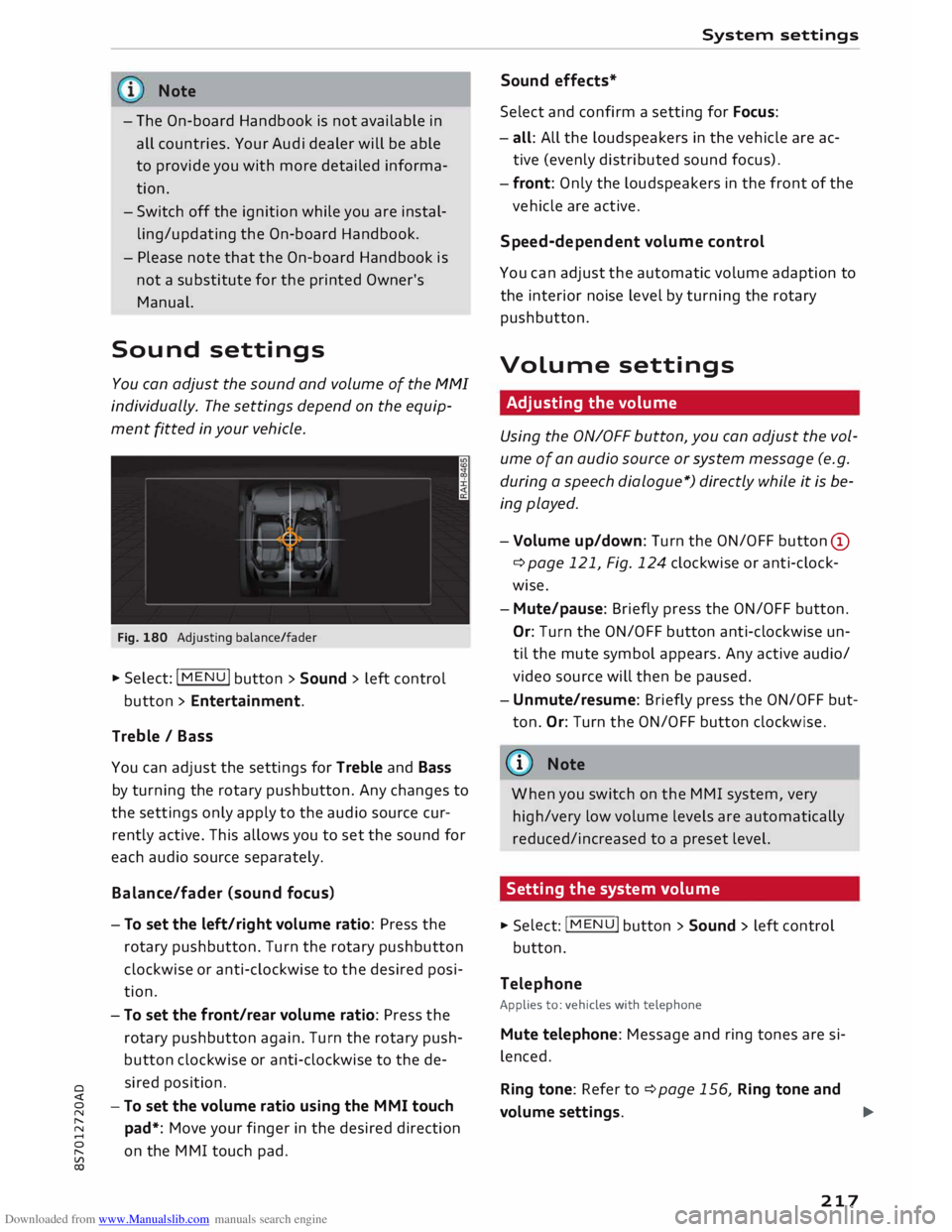
Fig. 180 Adjusting balance/fader
� Select: IM
E
N
u I button > Sound > left control
button > Entertainment.
Treble / Bass
You can adjust the settings for Treble and Bass
by turning the rotary pushbutton. Any changes to
the settings only apply to the audio source cur
rently active. This allows you to set the sound for
each audio source separately.
Bala nce/fader (sound focus)
- To set the left/right volume ratio: Press the
rotary pushbutton. Turn the rotary pushbutton
clockwise or anti-clockwise to the desired posi
tion.
- To set the front/rear volume ratio: Press the
rotary pushbutton again. Turn the rotary push
button clockwise or anti-clockwise to the de
sired position.
-To set the volume ratio using the MMI touch
pad*: Move your finger in the desired direction
on the MMI touch pad. System
settings
Sound effects*
Select and confirm a setting for Focus:
- all: All the loudspeakers in the vehicle are ac
tive (evenly distributed sound focus).
- front: Only the loudspeakers in the front of the
vehicle are active.
Speed-d ependent volume control
You can adjust the automatic volume adaption to
the interior noise level by turning the rotary
pushbutton.
Volume settings
Adjusting the volume
Using the ON/OFF button, you can adjust the vol
ume of an audio source or system message (e.g.
during a speech dialogue*) directly while it is be
ing played.
- Volume up/down: Turn the ON/OFF button (D
¢ page 121, Fig. 124 clockwise or anti-clock
wise.
- Mute/pause: Briefly press the ON/OFF button.
Or: Turn the ON/OFF button anti-clockwise un
til the mute symbol appears. Any active audio/
video source will then be paused.
- Unmute/resume: Briefly press the ON/OFF but
ton. Or: Turn the ON/OFF button clockwise.
{a)) Note
When you switch on the MMI system, very
high/very low volume levels are automatically
reduced/increased to a preset level.
Setting the system volume � Sele
ct:
IMENU! button > Sound > left control
button.
Telephone
Applies to: vehicles with telephone
Mute telephone: Message and ring tones are si
lenced.
Ring tone: Refer to ¢page 156, Ring tone and
volume settings.
..,.
217
Page 224 of 306
Downloaded from www.Manualslib.com manuals search engine Safe
driving
-Adjust the driver's seat and steering wheel
so there is a distance of at least 25 cm be
tween your breastbone and the centre of the
steering wheel¢ Fig. 182.
- While driving, always hold the steering
wheel with both hands on the outside of the
rim at about the 9 o'clock and 3 o'clock posi
tion. This reduces the risk of injury if the
driver's airbag inflates.
- Never hold the steering wheel at the 12
o'clock position, or with your hands inside
the rim or on the steering wheel hub. This
could result in serious injuries to the arms,
hands and head if the driver's airbag in
flates.
- To reduce any risk of injury to the driver dur
ing a sudden brake application or in an acci
dent, never drive with the backrest tilted
too far back. The airbag system and seat
belts can only provide proper protection
when the backrest is in an upright position
and the driver is wearing the seat belt in the
correct position. The further the backrest is
tilted back, the greater the risk of injury due
to incorrect positioning of the belt webbing
or an incorrect sitting position.
Correct position for the passenger
The front seat passenger must sit at least 25 cm
away from the dash panel so that the airbag has
enough room to inflate and give maximum pro
tection in an accident.
For your own safety and to reduce the risk of in
jury in the event of an accident, we recommend
adjusting the passenger's seat as follows:
"" Adjust the backrest to an upright position so
that your back remains in contact with the up
holstery.
"" Keep both feet in the footwell in front of the
seat.
"" Fasten your seat belt correctly ¢ page 232.
In exceptional cases you can disable the pas
senger's airbag via the key-operated switch*
¢page 237.
222 For
detailed information on how to adjust the
passenger's seat, see ¢ page 54, Front seats.
A WARNING
A passenger who is not sitting in the correct
position or who is not wearing a seat belt can
be fatally injured if the airbag is triggered.
-Adjust the passenger's seat so there is a dis-
tance of at least 25 cm between your
breastbone and the dash panel.
- Always keep your feet on the floor when the
vehicle is moving; never rest them on the in
strument panel, out of the window or on the
seat. If you sit in an incorrect position, you
increase your risk of injury in the event of
sudden braking or an accident. If the airbag
is triggered, you could sustain potentially
fatal injuries by sitting out of position.
- To reduce the risk of injury to the passenger
in the case of sudden braking or an accident,
the passenger should never travel in a mov
ing vehicle with the backrest reclined. The
airbag system and seat belt can only provide
proper protection when the backrest is in an
upright position and the passenger is wear
ing the seat belt in the correct position. The
further the backrest is tilted back, the
greater the risk of injury due to incorrect po
sitioning of the belt webbing or an incorrect
sitting position.
Examples of incorrect seating positions
Occupants can suffer severe or fatal injuries if
they sit in an incorrect position while the vehicle
is moving.
Seat belts can only provide maximum protection
if the belt webbing is positioned correctly. Sitting
out of position greatly reduces the effectiveness
of the seat belts and increases the risk of injury
since the belt webbing is not worn in the position
for which it is designed. The driver is responsible
for the safety of all vehicle occupants, especially
for children.
"" Never allow anyone to sit out of position while
the vehicle is moving ¢,&. . ..,.
Page 229 of 306
Downloaded from www.Manualslib.com manuals search engine 0
N
,.....
N
......
0
,.....
Vl
CX) -
Never place objects in the driver's footwell.
Such objects could move under the pedals
and interfere with their proper function. In
the event of sudden braking or a change of
direction, you would not be able to use the
pedals. This could result in a loss of control
and possibly cause an accident.
Floor mats on the driver's side
Use only floor mats which can be securely fas
tened in the footwell and do not obstruct the
pedals.
... Make sure that floor mats are securely fastened
and cannot interfere with the pedals ¢,&. .
Use only floor mats that leave the pedal area un
obstructed and are firmly secured to prevent
them from slipping. You can obtain suitable floor
mats from your dealer or a specialist retailer.
A WARNING
Any obstructions that restrict pedal travel can
cause loss of vehicle control and increase the
risk of serious personal injury.
- Always make sure that floor mats are prop
erly secured.
- Never lay or install additional floor mats or
other floor coverings over the existing floor
mats; this would restrict the pedal area and
possibly obstruct the pedals, which could
cause an accident.
Stowing luggage safely
Luggage compartment
All luggage and other objects must be safely se
cured in the luggage compartment. To maintain
safe handling on the road, please observe the fol
lowing points:
.,.. Distribute the load evenly in the luggage com
partment.
.,.. Place heavy items as far forward as possible in
the Luggage compartment and secure them
properly. Safe
driving
... Secure the load with the luggage net* or with
non-elastic straps secured to the fastening
rings* ¢ page 228.
A WARNING
- Loose items in the luggage compartment
are a safety hazard: they can move suddenly
and impair the handling of the vehicle as a
result of the change in weight distribution.
- In an accident or a sudden manoeuvre, loose
objects in the passenger compartment can
be flung forward -risk of injury! Always
stow objects safely in the luggage compart
ment and secure them on the fastening
rings*. Use suitable securing straps, particu
larly when transporting heavy objects.
- Always stow objects in the luggage com
partment.
- Transporting heavy objects may affect the
vehicle's handling by shifting the centre of
gravity -this could cause an accident. Take
extra care when driving and adjust your
speed accordingly.
- Never exceed the maximum axle loads or
the maximum gross weight for the vehicle
¢ page 287. Exceeding the permitted axle
loads or gross weight limit can affect the ve
hicle's handling characteristics, and increase
the risk of accidents, personal injuries or
damage to the vehicle.
- Never leave your vehicle unattended when
the boot lid is open. Children could climb in
to the boot and close the boot lid from the
inside. In this case the child would be un
able to get out of the
vehicle
without help.
This could have fatal consequences.
- Never allow children to play in or around the
vehicle. Always close and lock the boot lid
and all the doors when you leave the vehi
cle.
- Never let passengers ride in the luggage
compartment. All occupants must be prop
erly restrained by the seat belts at all times
¢page 230. .,._
227
Page 233 of 306
Downloaded from www.Manualslib.com manuals search engine 0
N
,.....
N
......
0
,.....
Vl
CX) -
Do not wear the belt over hard or fragile ob
jects (such as glasses or pens, etc.) because
this can cause injuries.
- Loose, bulky clothing (such as an overcoat
over a jacket) impairs the proper fit and
function of the belts.
- The belts must be kept clean, otherwise the
retractors may not work properly
¢ tab. Cleaning the interior on page 265.
- The slot in the seat belt buckle must not be
blocked with paper or other objects, as this
can prevent the latch plate from engaging
properly.
- The latch plate of the belt must always be
engaged in the correct buckle for that seat,
otherwise the belt will not be fully effective.
- Check the condition of the seat belts at reg
ular intervals. If you notice that the belt
webbing, fittings, retractor mechanism or
buckle of any of the belts is damaged, the
belt must be replaced by a qualified work
shop.
- The seat belts must not be removed or
modified in any way. Do not attempt to re
pair a damaged belt yourself.
- Seat belts which have been worn in an acci
dent and stretched must be replaced by a
qualified workshop. The belt anchorages
should also be checked. Forces
acting in a
collision Seat
belts
The physical principles involved in a frontal
impact
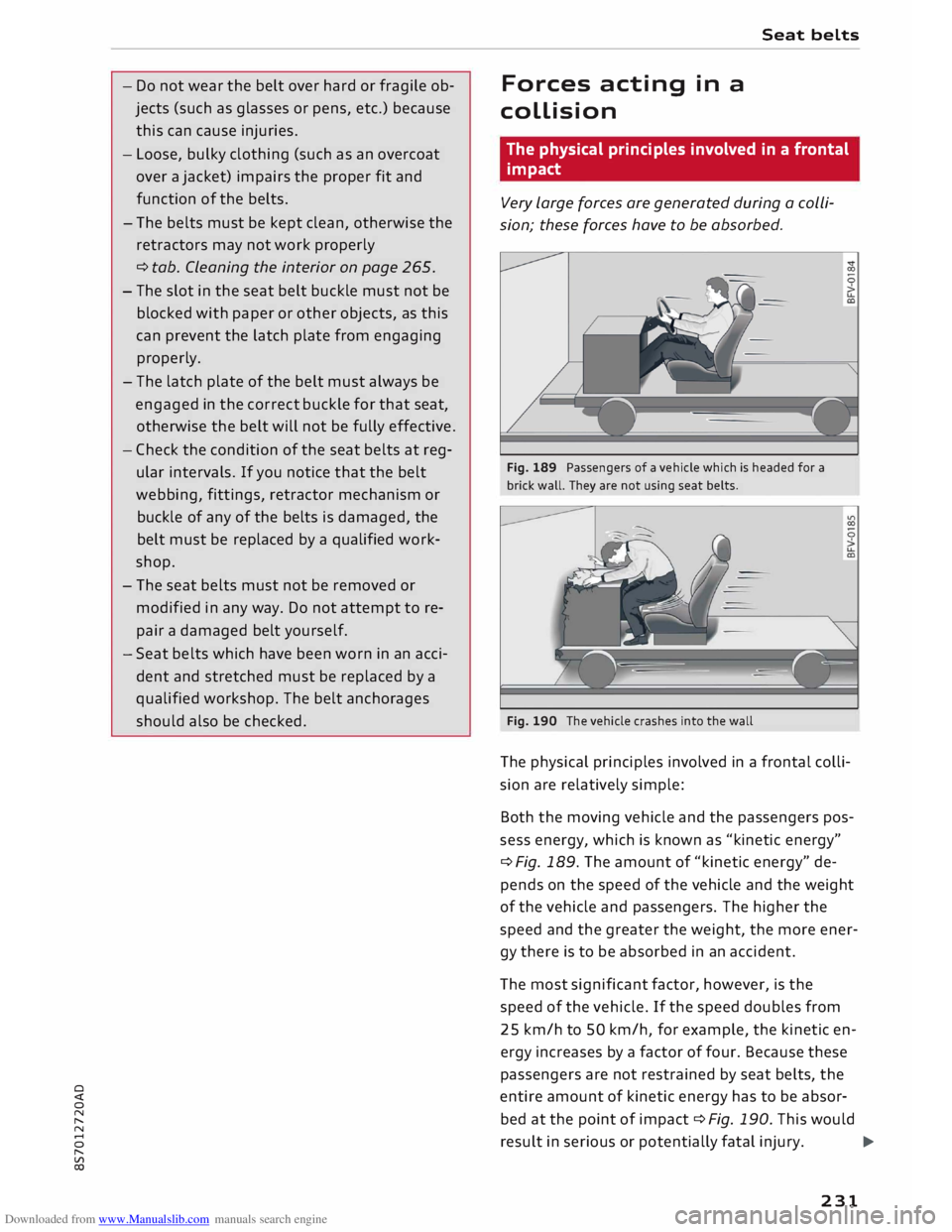
Very large forces are generated during a colli
sion; these forces have to be absorbed.
Fig. 189 Passengers of a vehicle which is headed for a
brick wall. They are not using seat belts.
Fig. 190 The vehicle crashes into the wall
The physical principles involved in a frontal colli
sion are relatively simple:
Both the moving vehicle and the passengers pos
sess energy, which is known as "kinetic energy"
¢ Fig. 189. The amount of "kinetic energy" de
pends on the speed of the vehicle and the weight
of the vehicle and passengers. The higher the
speed and the greater the weight, the more ener
gy there is to be absorbed in an accident.
The most significant factor, however, is the
speed of the vehicle. If the speed doubles from
25 km/h to 50 km/h, for example, the kinetic en
ergy increases by a factor of four. Because these
passengers are not restrained by seat belts, the
entire amount of kinetic energy has to be absor
bed at the point of impact ¢ Fig. 190. This would
result in serious or potentially fatal injury.
..,.
231
Page 234 of 306
Downloaded from www.Manualslib.com manuals search engine Seat
belts
Even at urban speeds of 30 km/h to 50 km/h, the
forces acting on the occupants in a collision can
reach the equivalent of 1 ton (1,000 kg) or more.
At greater speed these forces are even higher.
Again: if the speed doubles, the forces increase
by a factor of four.
Passengers who do not wear seat belts are not
"attached" to the vehicle. In a frontal collision
they will continue to move forward at the speed
their car was travelling just before the impact.
What happens to passengers not wearing
seat belts?
Passengers not wearing seat belts risk fatal inju
ries in the event of an accident.
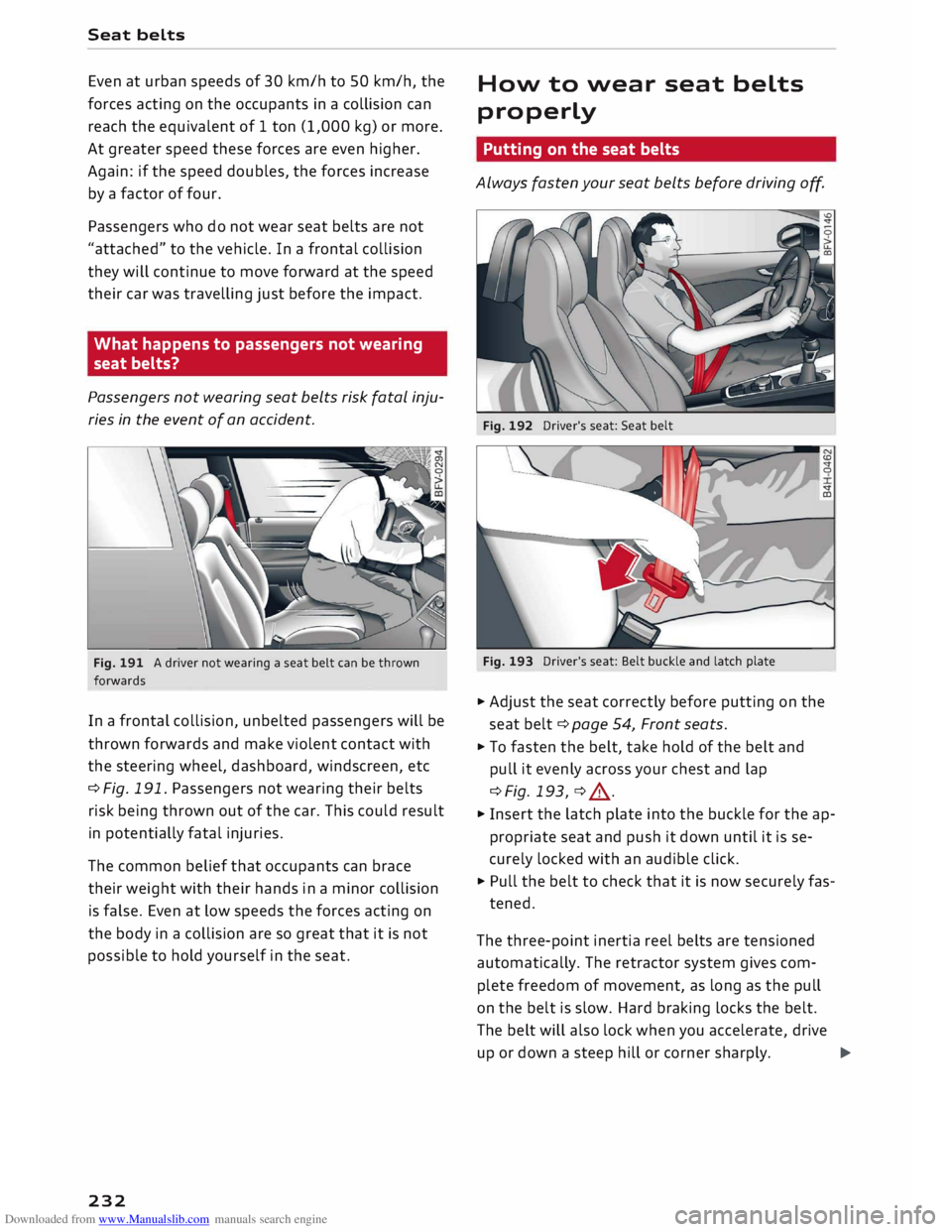
Fig. 191 A driver not wearing a seat belt can be thrown
forwards
In a frontal collision, unbelted passengers will be
thrown forwards and make violent contact with
the steering wheel, dashboard, windscreen, etc
¢ Fig. 191. Passengers not wearing their belts
risk being thrown out of the car. This could result
in potentially fatal injuries.
The common belief that occupants can brace
their weight with their hands in a minor collision
is false. Even at Low speeds the forces acting on
the body in a collision are so great that it is not
possible to hold yourself in the seat.
232 How
to wear seat belts
properly
Putting on the seat belts
Always fasten your seat belts before driving o
ff.
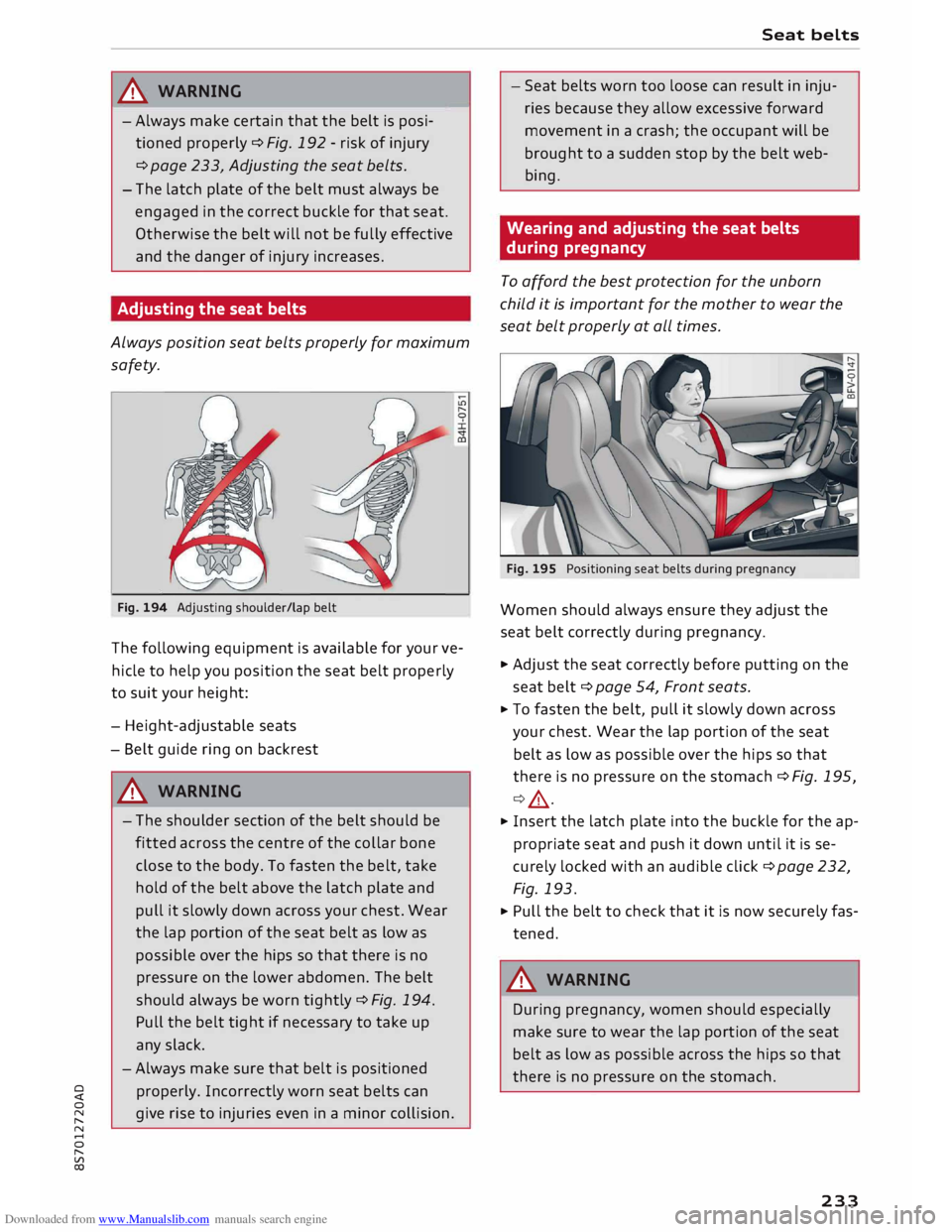
Fig. 192 Driver's seat: Seat belt
Fig. 193 Driver's seat: Belt buckle and latch plate
0
<:t
co
.. Adjust the seat correctly before putting on the
seat belt¢ page 54, Front seats.
.. To fasten the belt, take hold of the belt and
pull it evenly across your chest and lap
¢Fig. 193, ¢ ,A .
.. Insert the latch plate into the buckle for the ap
propriate seat and push it down until it is se
curely locked with an audible click.
.. Pull the belt to check that it is now securely fas-
tened.
The three-point inertia reel belts are tensioned
automatically. The retractor system gives com
plete freedom of movement, as long as the pull
on the belt is slow. Hard braking Locks the belt.
The belt will also lock when you accelerate, drive
up or down a steep hill or corner sharply.
..,.
Page 235 of 306
Downloaded from www.Manualslib.com manuals search engine 0
N
,.....
N
......
0
,.....
Vl
CX) A
WARNING
-Always make certain that the belt is posi
tioned properly ¢ Fig. 192 -risk of injury
¢ page
233, Adjusting the seat belts. -
- The latch plate of the belt must always be
engaged in the correct buckle for that seat.
Otherwise the belt will not be fully effective
and the danger of injury increases.
Adjusting the seat belts
Always position seat belts properly for maximum
safety.
Fig. 194 Adjusting shoulder/lap belt
The following equipment is available for your ve
hicle to help you position the seat belt properly
to suit your height:
- Height-adjustable seats
- Belt guide ring on backrest
A WARNING
- The shoulder section of the belt should be
fitted across the centre of the collar bone
close to the body. To fasten the belt, take
hold of the belt above the latch plate and
pull it slowly down across your chest. Wear
the lap portion of the seat belt as low as
possible over the hips so that there is no
pressure on the lower abdomen. The belt
should always be worn tightly ¢ Fig. 194.
Pull the belt tight if necessary to take up
any slack.
- Always make sure that belt is positioned
properly. Incorrectly worn seat belts can
give rise to injuries even in a minor collision. Seat
belts
- Seat belts worn too loose can result in inju
ries because they allow excessive forward
movement in a crash; the occupant will be
brought to a sudden stop by the belt web
bing.
Wearing and adjusting the seat belts
during pregnancy
To afford the best protection for the unborn
child it is important for the mother to wear the
seat belt properly at all times.
Fig. 195 Positioning seat belts during pregnancy
Women should always ensure they adjust the
seat belt correctly during pregnancy.
.., Adjust the seat correctly before putting on the
seat belt¢ page 54, Front seats.
... To fasten the belt, pull it slowly down across
your chest. Wear the lap portion of the seat
belt as low as possible over the hips so that
there is no pressure on the stomach ¢ Fig. 195,
¢ ,& .
... Insert the latch plate into the buckle for the ap
propriate seat and push it down until it is se
curely locked with an audible click¢ page 232,
Fig. 193.
... Pull the belt to check that it is now securely fas
tened.
A WARNING
During pregnancy, women should especially
make sure to wear the lap portion of the seat
belt as low as possible across the hips so that
there is no pressure on the stomach.
233