parking AUDI TT ROADSTER 2016 Service Manual
[x] Cancel search | Manufacturer: AUDI, Model Year: 2016, Model line: TT ROADSTER, Model: AUDI TT ROADSTER 2016Pages: 306, PDF Size: 31.82 MB
Page 181 of 306
Downloaded from www.Manualslib.com manuals search engine 0
N
,.....
N
......
0
,.....
Vl
CX) @
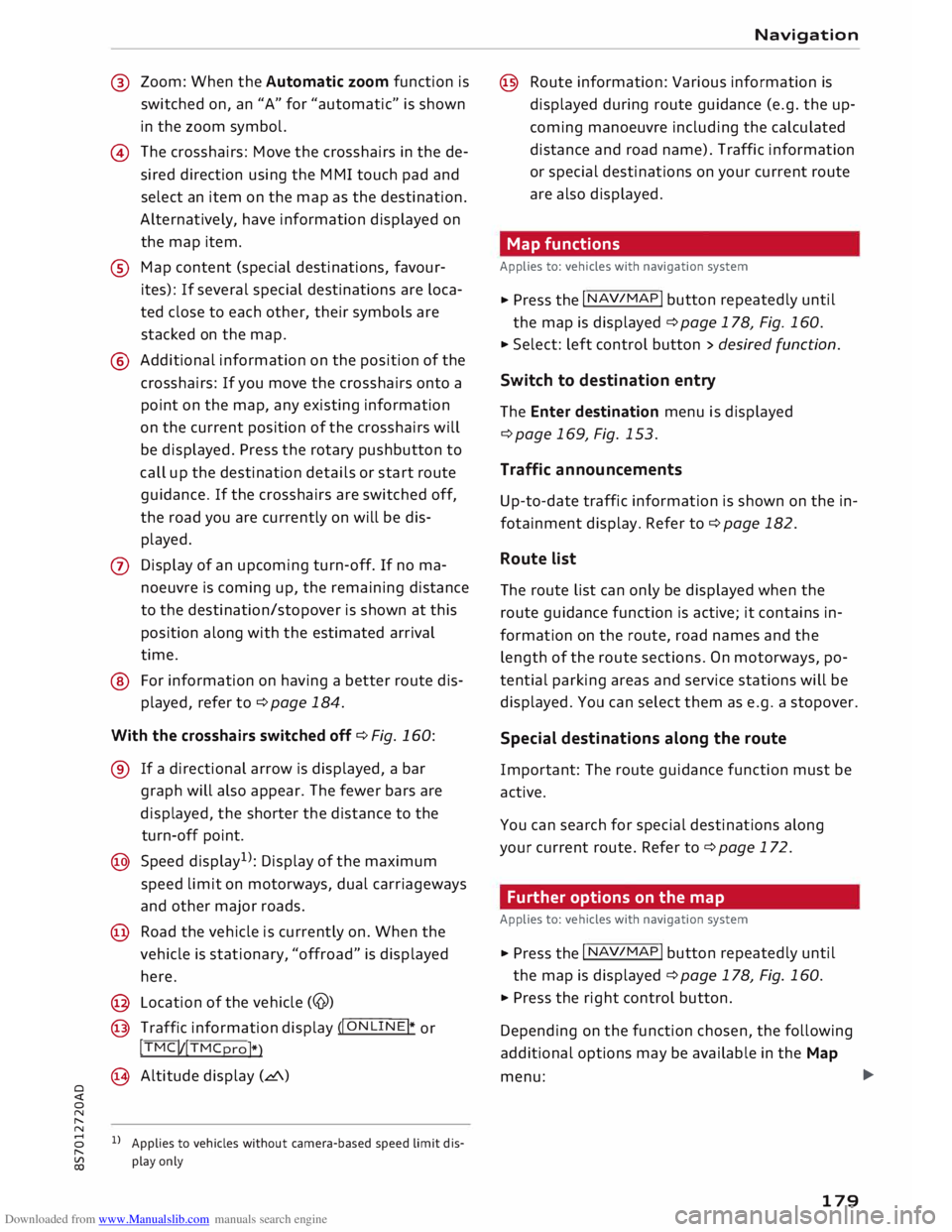
Zoom: When the Automatic zoom function is
switched on, an "A" for "automatic" is shown
in the zoom symbol.
@ The crosshairs: Move the crosshairs in the de
sired direction using the MMI touch pad and
select an item on the map as the destination.
Alternatively, have information displayed on
the map item.
® Map content (special destinations, favour
ites): If several special destinations are loca
ted close to each other, their symbols are
stacked on the map.
@ Additional information on the position of the
crosshairs: If you move the crosshairs onto a
point on the map, any existing information
on the current position of the crosshairs will
be displayed. Press the rotary pushbutton to
call up the destination details or start route
guidance. If the crosshairs are switched off,
the road you are currently on will be dis
played.
0 Display of an upcoming turn-off. If no ma
noeuvre is coming up, the remaining distance
to the destination /
stopover is shown at this
position along with the estimated arrival
time.
@ For information on having a better route dis
played, refer to¢ page 184.
With the crosshairs switched off¢ Fig. 160:
® If a directional arrow is displayed, a bar
graph will also appear. The fewer bars are
displayed, the shorter the distance to the
turn-off point.
@ Speed display 1
>: Display of the maximum
speed limit on motorways, dual carriageways
and other major roads.
@ Road the vehicle is currently on. When the
vehicle is stationary, "offroad" is displayed
here.
@ Location of the vehicle (@)
@ Traffic information display (�I O_ N
_L_I_ N
_E�I* or
!TMC! /!TMCpro!*
)
@ Altitude display (L!'.\)
1} Applies to vehicles without camera-based speed limit dis
play only Navigation
@ Route information: Various information is
displayed during route guidance (e.g. the up
coming manoeuvre including the calculated
distance and road name). Traffic information
or special destinations on your current route
are also displayed.
Map functions
Applies to: vehicles with navigation system
� Press the I N
AV/MAP
! button repeatedly until
the map is displayed ¢page 178, Fig. 160.
� Select: left control button> desired function.
Switch to destination entry
The Enter destination menu is displayed
¢ page 169, Fig. 153.
Traffic announcements
Up-to-date traffic information is shown on the in
fotainment display. Refer to¢ page 182.
Route list
The route list can only be displayed when the
route guidance function is active; it contains in
formation on the route, road names and the
length of the route sections. On motorways, po
tential parking areas and service stations will be
displayed. You can select them as e.g. a stopover.
Special destinations along the route
Important: The route guidance function must be
active.
You can search for special destinations along
your current route. Refer to ¢page 172.
Further options on the map
Applies to: vehicles with navigation system
� Press the I N
AV/MAP
! button repeatedly until
the map is displayed ¢page 178, Fig. 160.
� Press the right control button.
Depending on the function chosen, the following
additional options may be available in the Map
menu: .,.
179
Page 182 of 306
Downloaded from www.Manualslib.com manuals search engine Navigation
Stop route guidance: Refer to ¢ page 175
Map settings: Refer to¢ page 180.
Route criteria: Refer to ¢page 176.
Voice guidance: Refer to ¢ page 177.
Navigation settings: Refer to ¢ page 176.
Online traffic data*: Refer to¢ page 182.
Display alternative routes: Refer to ¢ page 177.
Parking in vicinity of route: Parking facilities
near the vehicle are displayed.
Store current position: You can store your vehi
cle's current position as a favourite ¢ page 175
or as a contact in the directory ¢ page 175.
Audi connect for this location* 1
): Enables you to
search for e.g. City events or Weather in the lo
cation entered.
Country information: With this option, you can
view the speed Limits for towns and country
roads in the country you have selected. This infor
mation is displayed automatically when you cross
a border in the route information @)¢ page 178,
Fig. 160 if this is activated ¢page 180.
Exclude route*: When route guidance is activa
ted, a section of the calculated route that you
have set (max 20 km) will be avoided if possible.
The navigation system will calculate an alterna
tive route. The route you entered will only be
blocked in the current route guidance; if re
quired, you will need to re-enter the route you
wish to avoid. If you exclude a route section, this
section will be hatched in red and white on the
map.
Map settings
Applies to: vehicles with navigation system
� Press the I NAV
/MAP
I button
repeatedly until
the map is displayed ¢page 178, Fig. 160.
� Select: right control button > Map settings.
Depending on the function selected, you can use
the following settings:
l l
This function is not available in the Mexican market.
180 Map
colours
day/night: The map is displayed with a Light/dark
background colour.
automatic: When the Lights are on, the map
scheme will switch from day to night.
Map display
Standard ¢page 178, Fig. 159.
Google Earth* ¢page 181, Fig. 161.
Traffic ¢page 183, Fig. 163.
Map orientation
destination: The map indicates the destination
and is set to face north.
2D driving position/2D north map: The map de
picts the vehicle's current position. The map is
set to face the direction of travel or north.
3D map: When this function is activated, the cur
rent vehicle position is displayed in a three-di
mensional map, and the map is set to face the di
rection of travel. If the map scale is more than
100 km, the map is set to face north.
overview: The entire route from the vehicle posi
tion to the final destination or next stopover is
displayed on the map. The map scale varies ac
cording to the length of the route and is adapted
automatically. The map is set to face north.
Route information
The display of route information such as the
street you are currently on, upcoming turn-offs,
traffic information or special destinations on the
current route can be switched on/off.
Automatic zoom
on: The map scale is adjusted automatically ac
cording to the category of the road you are on
(motorway, major road, other road) to ensure
that you always have the best possible overview
of the route ahead. When there is an upcoming
turn-off, the map display will also be automati
cally adjusted so that you have a more detailed
view. ..,.
Page 220 of 306
Downloaded from www.Manualslib.com manuals search engine System
settings
Ring tone volume: You can adjust the volume of
the ring tone currently selected by turning the ro
tary pushbutton.
Message volume: You can adjust the volume of
the tone informing you of a new text message by
turning the rotary pushbutton.
Microphone input Level: You can adjust the vol
ume during a call by turning the rotary pushbut
ton.
Navigation
Applies to: vehicles with navigation system
Voice guidance: Refer to ¢ page 177, Voice guid
ance.
Voice guidance during calls: Refer to
¢ page 177, Voice guidance.
Volume of spoken cues: You can adjust the vol
ume of the spoken cues while route guidance is
active by turning the rotary pushbutton.
Entertainment fader: This option allows the vol
ume of the current audio source to be temporari
ly reduced when the parking aid is active or while
a navigation cue is being played.
Announ cements
Traffic announcements: Refer to¢ page 186.
DAB announcements*: Refer to¢ page 186.
Volume of announcements: You can adjust the
volume of traffic announcements by turning the
rotary pushbutton.
Speech dialogue system
Applies to: vehicles with speech dialogue system
Short dialogue: This option can be switched on/
off. When it is activated, the spoken cues played
by the system are shortened.
Speech dialogue system volume: You can adjust
the volume of the spoken cues by turning the ro
tary pushbutton.
Parking aid*
Turn the rotary pushbutton to adjust the volume
of the beeps.
- To adjust the front volume: Select and confirm
high, medium or Low.
218 -
To adjust the rear volume: Select and confirm
high, medium or Low.
MMI touch volume*
You can adjust the volume of the M MI touch*
spoken cues by turning the rotary pushbutton.
Audi heartbeat
You can adjust the volume of the Audi heartbeat
by turning the rotary pushbutton.
� Note
Please note that the speech dialogue system*
is not available as a factory option for Cabrio
let models without a seat belt microphone.
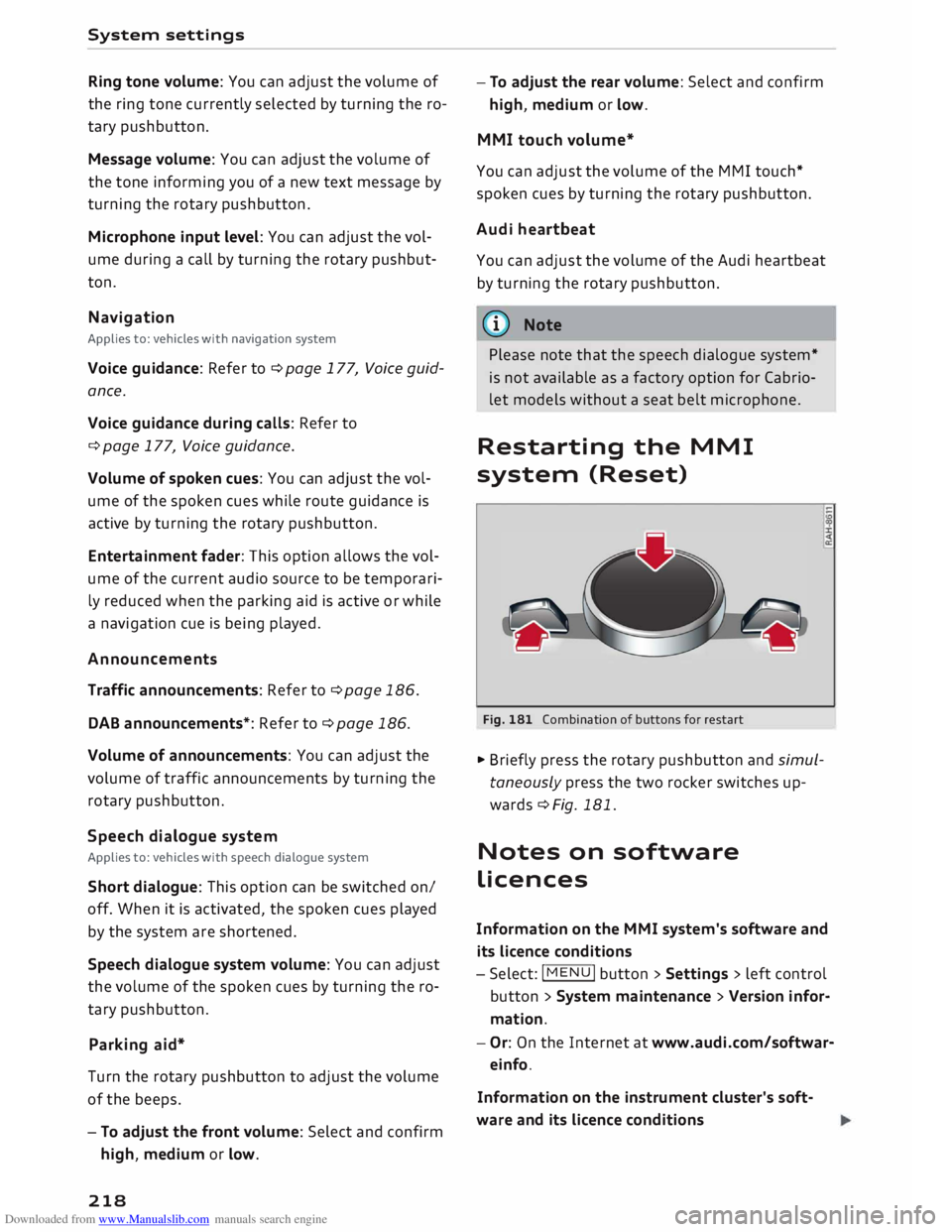
Restarting the MMI
system (Reset)
Fig. 181 Combination of buttons for restart
.,. Briefly press the rotary pushbutton and simul
taneously press the two rocker switches up
wards¢ Fig. 181.
Notes on software
licences
Information on the MMI system's software and
its Licence conditions
- Select: I MENU
I button
>Settings > left control
button > System maintenance > Version infor
mation.
- Or: On the Internet at www.audi.com/softwar
einfo.
Information on the instrument cluster's soft
ware and its Licence conditions
Page 246 of 306
Downloaded from www.Manualslib.com manuals search engine Checking
and topping up fluids
... After fuelling, remove the funnel and close the
fuel tank flap so that it locks in place.
CD CAUTION
Remove any fuel spills from the paintwork im
mediately.
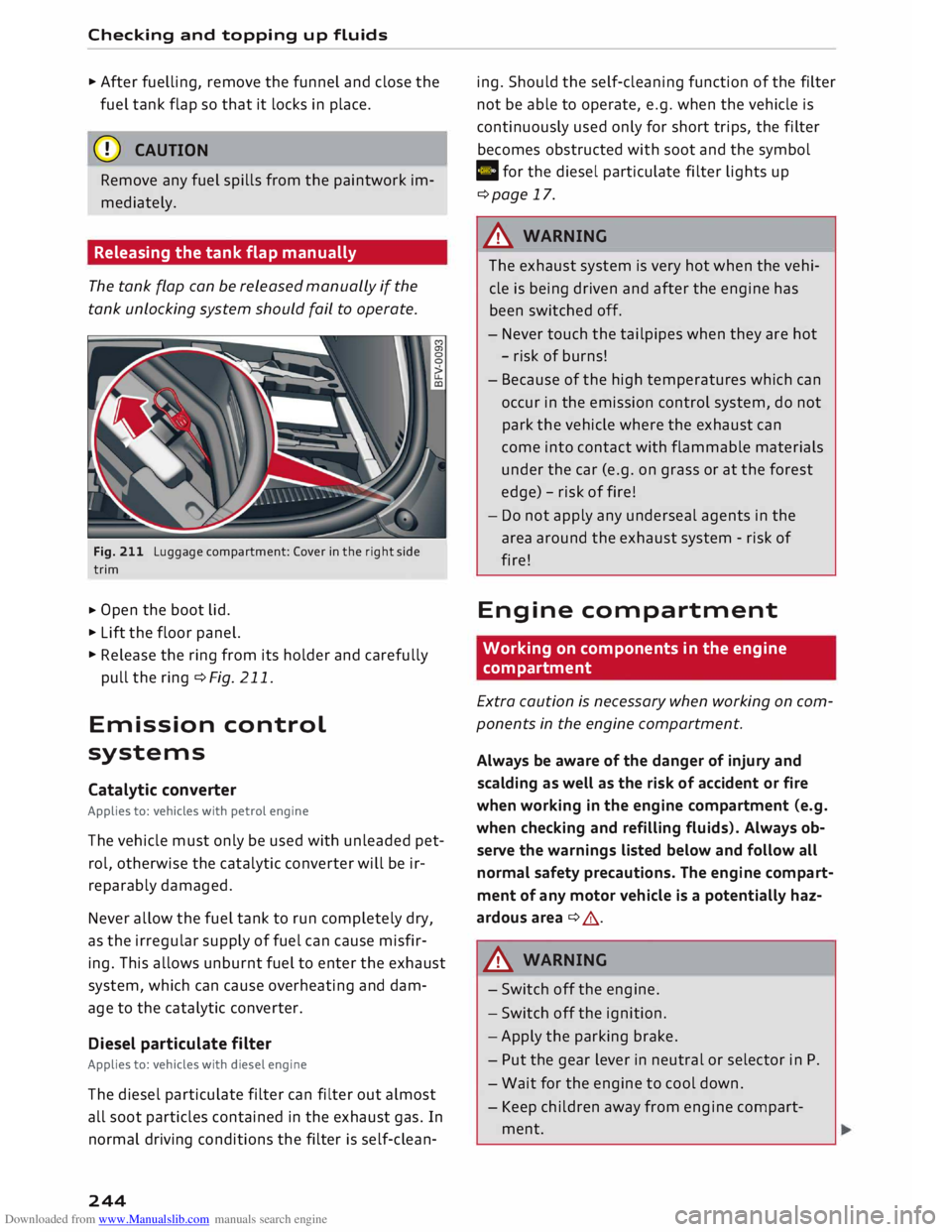
Releasing the tank flap manually
The tank flap can be released manually if the
tank unlocking system should fail to operate.
Fig. 211 Luggage compartment: Cover in the right side
trim
... Open
the boot lid .
... Lift the floor panel.
... Release the ring from its holder and carefully
pull the ring ¢Fig. 211.
Emission control
systems
Catalytic converter
Applies to: vehicles with petrol engine
The vehicle must only be used with unleaded pet
rol, otherwise the catalytic converter will be ir
reparably damaged.
Never allow the fuel tank to run completely dry,
as the irregular supply of fuel can cause misfir
ing. This allows unburnt fuel to enter the exhaust
system, which can cause overheating and dam
age to the catalytic converter.
Diesel particulate filter
Applies to: vehicles with diesel engine
The diesel particulate filter can filter out almost
all soot particles contained in the exhaust gas. In
normal driving conditions the filter is self-clean-
244 ing.
Should the self-cleaning function of the filter
not be able to operate, e.g. when the vehicle is
continuously used only for short trips, the filter
becomes obstructed with soot and the symbol
C for the diesel particulate filter lights up
¢page 17.
A WARNING
The exhaust system is very hot when the vehi
cle is being driven and after the engine has
been switched off.
- Never touch the tailpipes when they are hot
- risk of burns!
- Because of the high temperatures which can
occur in the emission control system, do not
park the vehicle where the exhaust can
come into contact with flammable materials
under the car (e.g. on grass or at the forest
edge) -risk of fire!
- Do not apply any underseal agents in the
area around the exhaust system -risk of
fire!
Engine compartment
Working on components in the engine
compartment
Extra caution is necessary when working on com
ponents in the engine compartment.
Always be aware of the danger of injury and
scalding as well as the risk of accident or fire
when working in the engine compartment (e.g.
when checking and refilling fluids). Always ob
serve the warnings listed below and follow all
normal safety precautions. The engine compart
ment of any motor vehicle is a potentially haz
ardous area ¢ A .
A WARNING
- Switch off the engine.
- Switch off the ignition.
- Apply the parking brake.
- Put the gear lever in neutral or selector in P.
- Wait for the engine to cool down.
- Keep children away from engine compart-
ment.
Page 271 of 306
Downloaded from www.Manualslib.com manuals search engine 0
N
,.....
N
......
0
,.....
Vl
CX) Mobility
General notes
.,.. If your vehicle experiences technical problems,
stop the car well away from moving traffic. If
you have a flat tyre, you should park the car on
a level surface. Be particularly careful if you are
on a slope .
.,.. Apply the parking brake .
.,.. Switch
the hazard warning lights on .
.,.. Place the warning triangle in a visible location
¢page 269.
.,.. Instruct all passengers to leave the car when it
is safe to do so. They should wait in a safe place
(for instance behind the roadside crash barrier).
A WARNING
You should note the procedure described
above for your own safety and that of other
road users.
Equipment Warning triangle
Applies to: vehicles with warning triangle
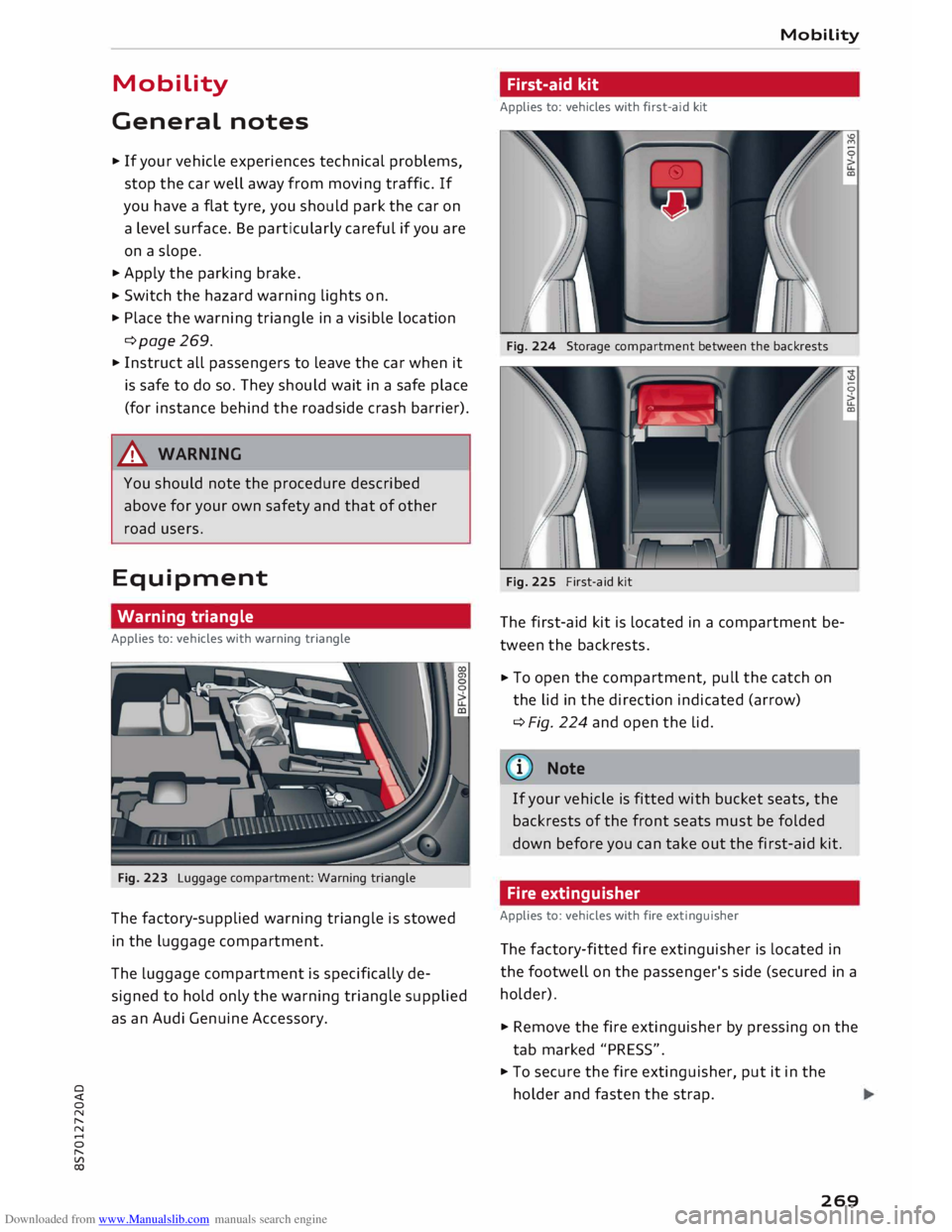
Fig. 223 Luggage compartment: Warning triangle
The factory-supplied warning triangle is stowed
in the luggage compartment.
The Luggage compartment is specifically de
signed to hold only the warning triangle supplied
as an Audi Genuine Accessory. Mobility
First-aid kit
Applies to: vehicles with first-aid kit
Fig. 224 Storage compartment between the backrests
Fig. 225 First-aid kit
The first-aid kit is located in a compartment be
tween the backrests .
.,.. To
open the compartment, pull the catch on
the Lid in the direction indicated (arrow)
¢ Fig. 224 and open the lid.
(©) Note
If your vehicle is fitted with bucket seats, the
backrests of the front seats must be folded
down before you can take out the first-aid kit.
Fire extinguisher
Applies to: vehicles with fire extinguisher
The factory-fitted fire extinguisher is located in
the footwell on the passenger's side (secured in a
holder).
.,.. Remove the fire extinguisher by pressing on the
tab marked "PRESS" .
.,.. To secure the fire extinguisher, put it in the
holder and fasten the strap.
269
Page 272 of 306
Downloaded from www.Manualslib.com manuals search engine Mobility
Check how the fire extinguisher works before you
need to use it. The instructions for use are shown
on the fire extinguisher.
A WARNING
If the fire extinguisher is not secured properly
it could be catapulted through the vehicle
during driving and braking manoeuvres or in
the event of an accident. This poses a risk of
injury to occupants.
(D Note
- The fire extinguisher must be replaced with
a new one after use or once it has reached
its expiry date.
- The fire extinguisher must comply with le
gal requirements.
Tool kit/tyre repair kit/compressor
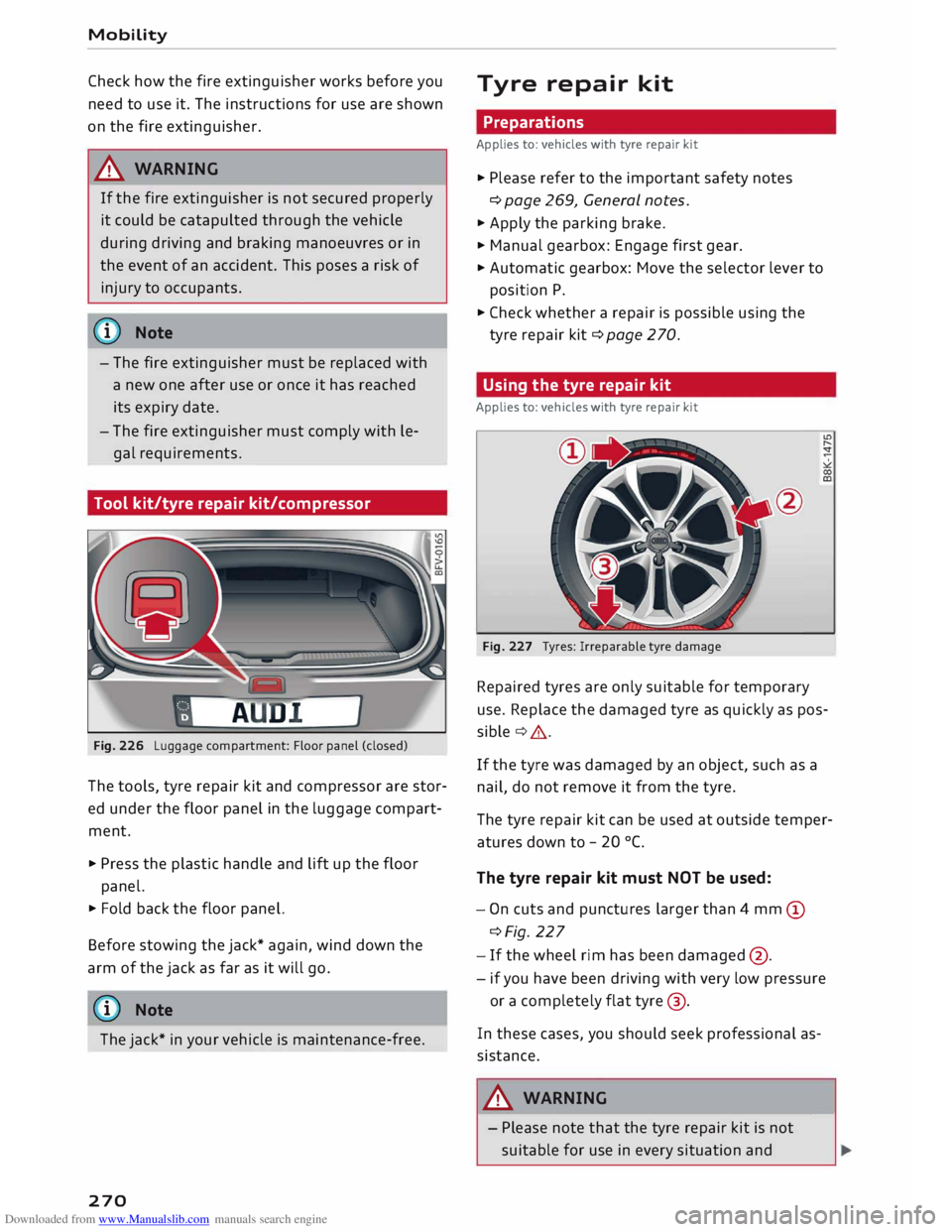
Fig. 226 Luggage compartment: Floor panel (closed)
The tools, tyre repair kit and compressor are stor
ed under the floor panel in the luggage compart
ment.
.., Press the plastic handle and lift up the floor
panel.
.., Fold back the floor panel.
Before stowing the jack* again, wind down the
arm of the jack as far as it will go.
ij} Note
The jack* in your vehicle is maintenance-free.
270 Tyre
repair kit
Preparations
Applies to: vehicles with tyre repair kit
.., Please refer to the important safety notes
¢ page 269, General notes.
.., Apply the parking brake.
.., Manual gearbox: Engage first gear.
.., Automatic gearbox: Move the selector lever to
position P .
.., Check whether a repair is possible using the
tyre repair kit¢ page 270.
Using the tyre repair kit
Applies to: vehicles with tyre repair kit
Fig. 227 Tyres: Irreparable tyre damage
Repaired tyres are only suitable for temporary
use. Replace the damaged tyre as quickly as pos
sible ¢& .
If the tyre was damaged by an object, such as a
nail, do not remove it from the tyre.
The tyre repair kit can be used at outside temper
atures down to -20 °(.
The tyre repair kit must NOT be used:
- On cuts and punctures larger than 4 mm (D
¢Fig. 227
- If the wheel rim has been damaged @.
- if you have been driving with very low pressure
or a completely flat tyre@.
In these cases, you should seek professional as
sistance.
A WARNING
- Please note that the tyre repair kit is not
suitable for use in every situation and-
Page 274 of 306
Downloaded from www.Manualslib.com manuals search engine Mobility
- If it was not possible to build up a tyre pres
sure of 2.0 bar within 6 minutes this means
that the tyre is too badly damaged. Do not
drive on.
- Seek professional assistance if the repair of
a tyre puncture is not possible with the seal
ing compound.
{D Note
Do not use the compressor for longer than
6 minutes at a time, as it could overheat.
When the compressor has cooled down, you
can use it again.
After repairing a tyre
Applies to: vehicles with tyre repair kit
.,. Affix the sticker "max. 80 km/h", which is inclu
ded in the tyre repair kit, to the dashboard
where the driver will see it.
.,. After about 10 minutes, stop to check the tyre
pressure .
.,. If
tyre pressure is less than 1.3 bar, the tyre is
too badly damaged. Do not drive on.
A WARNING
After repairing a tyre please note the follow
ing points:
- Do not drive faster than 80 km/h.
-Avoid heavy acceleration, hard braking and
fast cornering.
- Vehicle handling could be impaired.
- If the tyre is too badly damaged, you should
seek professional assistance.
® For the sake of the environment
A used can of sealing compound can be re
turned to your qualified workshop for dispos
al.
@ Note
After repairing a tyre, remember to buy a new
tyre sealant can at a qualified workshop.
272 Changing
a wheel
Preparations
Certain preparations must be made before you
change the wheel.
.,. Please refer to the important safety notes
¢ page 269, General notes.
.,. Apply the
parking brake .
.,. Manual gearbox: Engage first gear.
.,. Automatic gearbox: Move the selector lever to
position P.
.,. Take out the
tools ¢ page 2 70 and spare wheel
¢page 276.
A WARNING
If you have to use the jack* on a gradient or
off-road track, block the wheel diagonally op
posite the wheel being changed by placing
suitable objects underneath both the front
and rear of the wheel to prevent the vehicle
from rolling away.
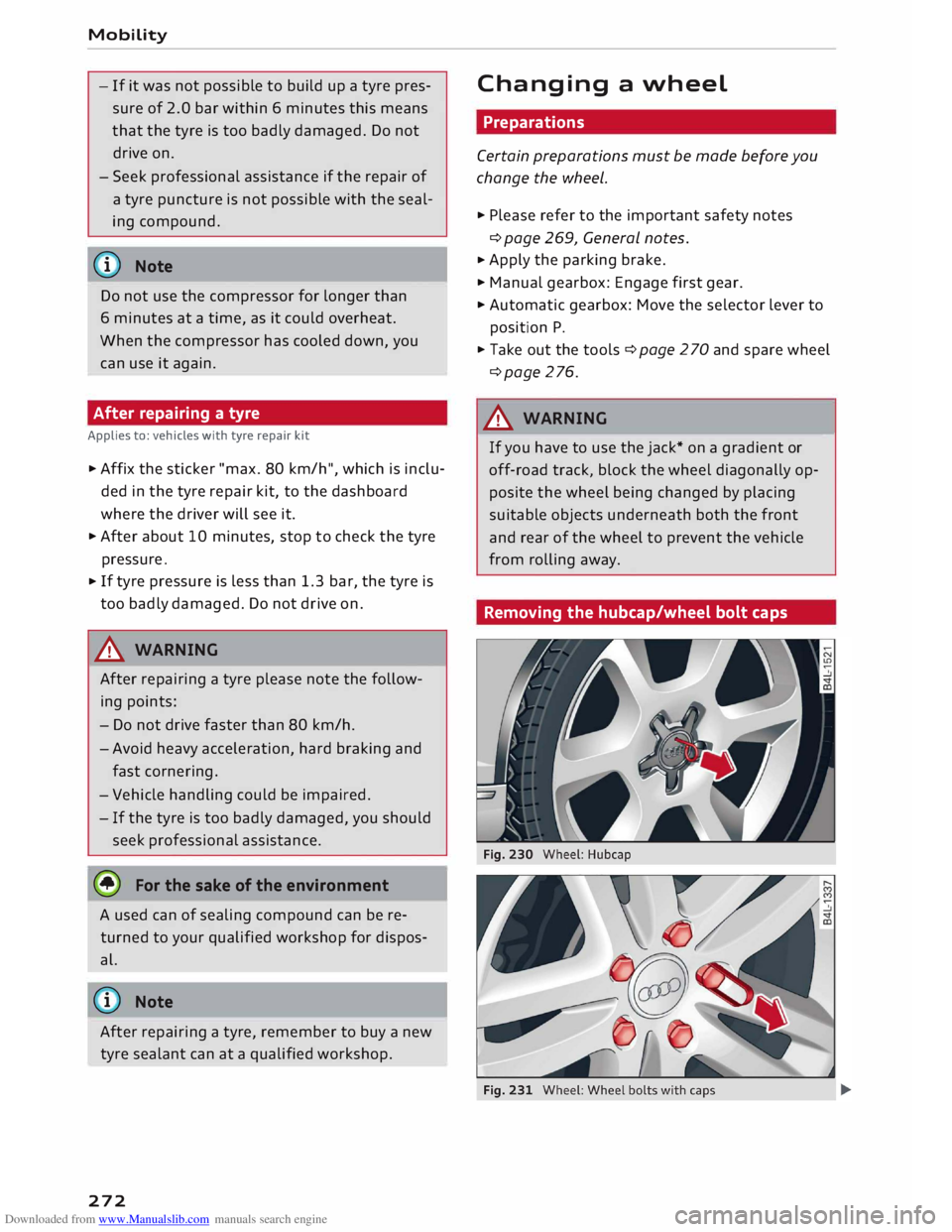
Removing the hubcap/wheel bolt caps -
Page 279 of 306
![AUDI TT ROADSTER 2016 Service Manual Downloaded from www.Manualslib.com manuals search engine 0
<t
0
N
,.....
N
......
0
,.....
Vl
CX) ]ump-starting
Before starting the engine
If necessary, the engine can be started by](/img/6/57670/w960_57670-278.png "AUDI TT ROADSTER 2016 Service Manual Downloaded from www.Manualslib.com manuals search engine 0
<t
0
N
,.....
N
......
0
,.....
Vl
CX) ]ump-starting
Before starting the engine
If necessary, the engine can be started by")
Downloaded from www.Manualslib.com manuals search engine 0
N
,.....
N
......
0
,.....
Vl
CX) ]ump-starting
Before starting the engine
If necessary, the engine can be started by con
necting it to the battery of another vehicle.
If the engine fails to start because of a dis
charged battery, the vehicle battery can be con
nected to the battery of another vehicle to start
the engine. Suitable jump leads are required.
Both vehicle batteries must be rated at 12 Volts.
The capacity (Ah) of the booster battery should
not be significantly lower than that of the dis
charged battery.
Jump leads
The jump leads must be heavy enough to carry
the starter current. Refer to the details given by
the manufacturer.
Only use jump leads with insulated battery
clamps.
Positive cable -usually red.
Negative cable -usually black.
A WARNING
- When it is discharged the battery can freeze
at temperatures around 0°
(. A frozen bat
tery must first be thawed out before con
necting the jump leads -risk of explosion
and chemical burns! After jump-starting the
vehicle, drive to a qualified workshop with
out delay and have the vehicle battery
checked.
- Note the safety warnings referring to work
ing in the engine compartment ¢ page 244.
ij}) Note
- There must be no contact between the two
vehicles as otherwise current could flow as
soon as the positive terminals are connec
ted. This would discharge the boosting bat
tery.
- The discharged vehicle battery must be
properly connected to the vehicle's electri
cal system. Mobility
- Switch off the car telephone if necessary.
Details will be given in the manufacturer's
instructions for the car telephone.
Starting the engine
The two jump Leads must be connected in the
correct sequence.
Fig. 240 Engine compartment: Terminals for jump leads
and battery charger
Fig. 241 Jump-starting with the battery of another vehi
cle: A -Discharged battery, B -Boosting battery
Preparations
... Apply the parking brake and move the gear lev
er to neutral (manual gearbox) or move these
lector lever to P (automatic gearbox).
... Switch off all electrical equipment and the igni-
tion on both vehicles.
Connecting and disconnecting the jump
leads
... Before jump-starting the vehicle you must open
the cap on the positive terminal.
... Connect one end of the red jump lead to the
positive terminal (!) ¢Fig. 241 ofthejump
start connection @ in your vehicle.
... Connect the other end of the red jump lead to
the positive terminal @of the boosting battery
® · �
277
Page 282 of 306
Downloaded from www.Manualslib.com manuals search engine Mobility
Vehicle being towed (rear)
� Ensure that the ignition is switched on, the
steering wheel is not locked, and that you can
operate the turn signals, horn or windscreen
wipers if necessary ¢ A-
� The brake servo only works when the engine is
running. The power steering only works when
the ignition is on and the vehicle is moving 1
).
Otherwise you will need to press the brake ped
al significantly harder and apply more force to
move the steering wheel.
� Please ensure that the steering wheel is un-
locked and that it moves freely.
� Release the parking brake¢ page 74.
� Manual gearbox: Put the gear lever in neutral.
� Automatic gearbox: Move the selector lever to
position N.
� Ensure that the tow-rope remains taut at all
times when towing.
A WARNING
If the vehicle has no electrical power, do NOT
use a tow-bar or tow-rope to tow the vehicle
(D Note
You can use the turn signals to indicate a
change of direction (or lane) even when the
hazard warning lights are on. The hazard
warning lights will be interrupted temporari
ly.
Tow-starting
Please observe the important safety warnings on
¢page 278.
Important: Your vehicle must be fitted with a
manual gearbox. If your vehicle has a petrol en
gine, it must not be towed further than SO me
tres ¢(D.
� Attach the tow-rope or the tow-bar only to the
towing anchorages provided for this purpose
¢page 280, ¢page 281.
� Engage second or third gear before moving off.
� Press the clutch and hold the pedal down.
l l
Important: The vehicle battery must be adequately charg
ed.
280 �
Switch on the ignition.
� Once both vehicles are moving, release the
clutch.
� As soon as the engine starts, press the clutch
pedal and put the gear lever in neutral.
CD CAUTION
When tow-starting the vehicle, do not tow it
further than 50 metres; otherwise the cata
lytic converter could be damaged.
Front towline anchorage
Fig. 242 Front bumper: Cover cap
Fig. 243 Front bumper: Fitting the towline anchorage
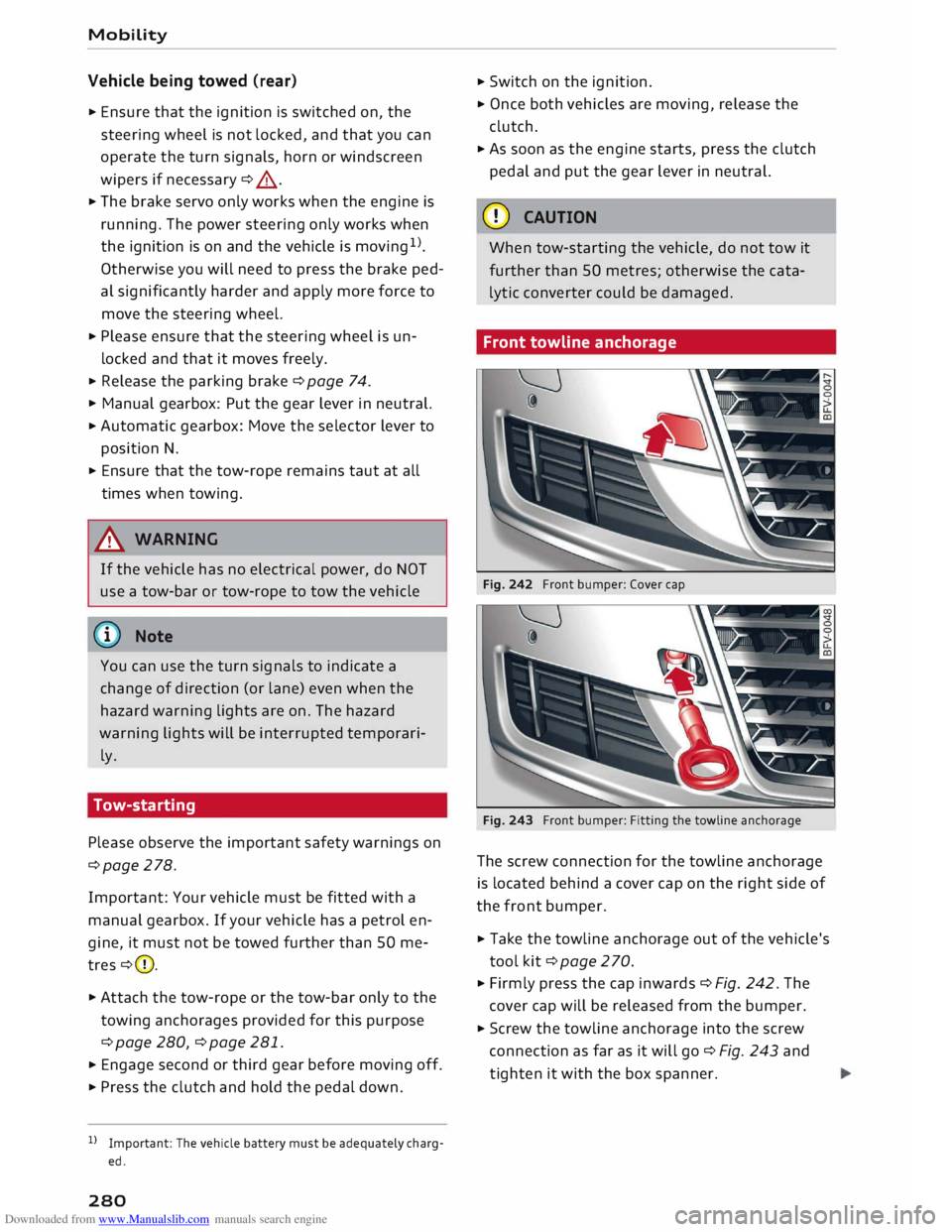
The screw connection for the towline anchorage
is located behind a cover cap on the right side of
the front bumper.
� Take the towline anchorage out of the vehicle's
tool kit¢ page 2 70.
� Firmly press the cap inwards ¢ Fig. 242. The
cover cap will be released from the bumper.
� Screw the towline anchorage into the screw
connection as far as it will go¢ Fig. 243 and
tighten it with the box spanner.
Page 285 of 306
Downloaded from www.Manualslib.com manuals search engine 0
N
,.....
N
......
0
,.....
Vl
CX) &,
WARNING
Never attempt to repair a fuse or replace a
blown fuse by fitting a fuse with a higher am
pere rating. This could damage the electrical
system -risk of fire!
CD CAUTION
If a newly replaced fuse blows again after a
short time, the electrical system must be
checked by a qualified workshop as soon as
possible.
@ Note
- Unassigned fuse locations are not shown in
the tables below.
- Some of the items of equipment listed in
the tables below are only fitted on certain
models or are optional extras.
Fuses in vehicle interior
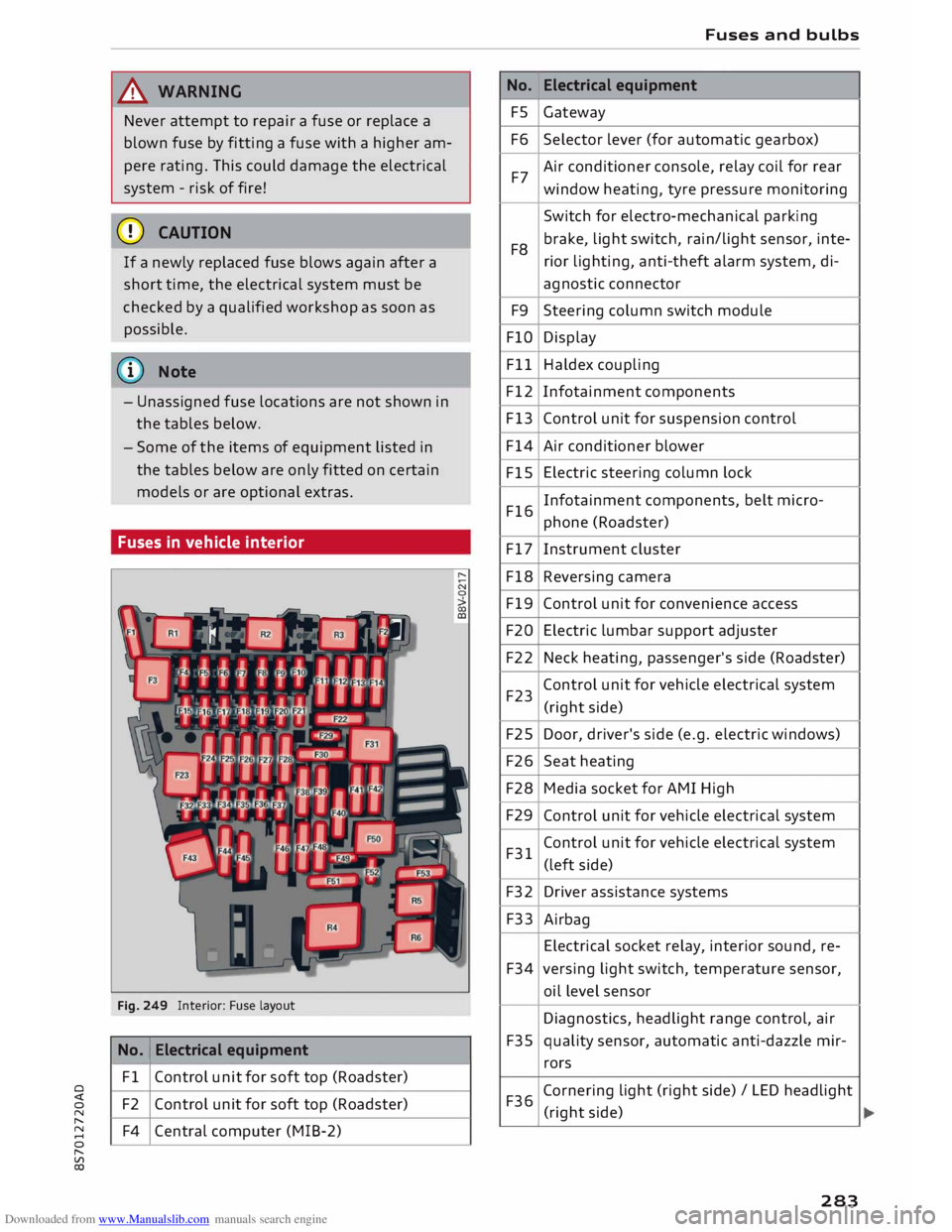
Fig. 249 Interior: Fuse layout
No. 1
Electrical equipment
Fl Control unit for soft top (Roadster)
F2 Control unit for soft top (Roadster)
F4 Central computer (MIB-2) No.
FS
F6
F7
F8 F9
FlO
Fll
F12
F13
F14
FlS
F16
F17
F18
F19
F20
F22
F23
F25
F26
F28
F29
F31
F32
F33
F34
F35
F36 Fuses
and bulbs
Electrical equipment
Gateway
Selector lever (for automatic gearbox)
Air conditioner console, relay coil for rear
window heating, tyre pressure monitoring
Switch for electro-mechanical parking
brake, light switch, rain/light sensor, inte-
rior lighting, anti-theft alarm system, di-
agnostic connector
Steering column switch module
Display
Haldex coupling
Infotainment components
Control unit for suspension control
Air conditioner blower
Electric steering column lock
Infotainment components, belt micro-
phone (Roadster)
Instrument cluster
Reversing camera
Control unit for convenience access
Electric lumbar support adjuster
Neck heating, passenger's side (Roadster)
Control unit for vehicle electrical system
(right side)
Door, driver's side (e.g. electric windows)
Seat heating
Media socket for AMI High
Control unit for vehicle electrical system
Control unit for vehicle electrical system
(left side)
Driver assistance systems
Airbag
Electrical socket relay, interior sound, re-
versing light switch, temperature sensor,
oil level sensor
Diagnostics, headlight range control, air
quality sensor, automatic anti-dazzle mir-
rors
Cornering light (right side)/ LED headlight
(right side)
283