ESP AUDI TT ROADSTER 2016 Workshop Manual
[x] Cancel search | Manufacturer: AUDI, Model Year: 2016, Model line: TT ROADSTER, Model: AUDI TT ROADSTER 2016Pages: 306, PDF Size: 31.82 MB
Page 208 of 306
Downloaded from www.Manualslib.com manuals search engine Media
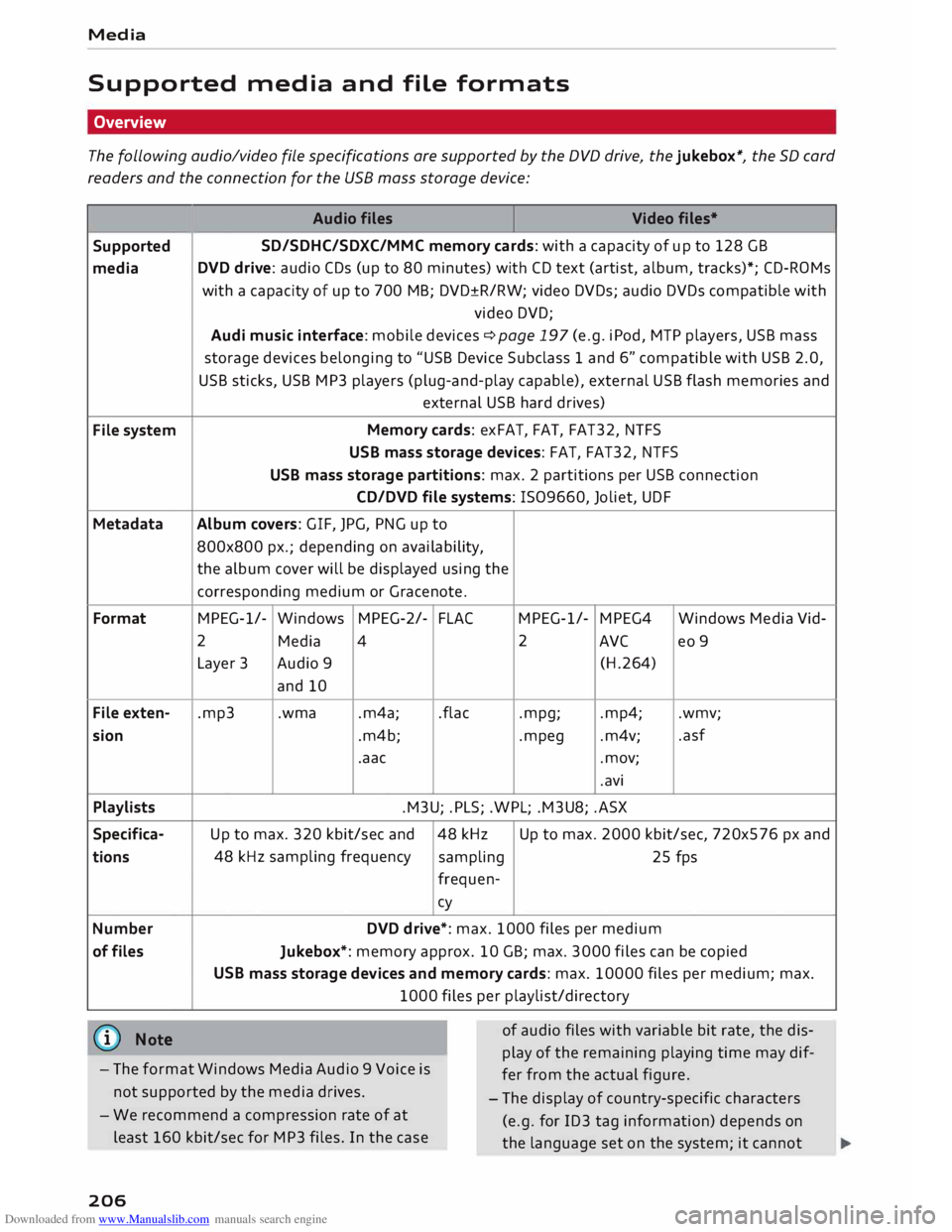
Supported media and file formats
Overview
The following audio/video file specifications are supported by the DVD drive, the jukebox*, the SD card
readers and the connection for the USB mass storage device:
Audio files
Video files•
Supported SD/SDHC/SDXC/MMC
memory cards: with a capacity of up to 128 GB
media DVD
drive: audio CDs (up to 80 minutes) with CD text (artist, album, tracks)*; CD-ROMs
with a capacity of up to 700 MB; DVD±R/RW; video DVDs; audio DVDs compatible with
video DVD;
Audi music interface: mobile devices �page 197 (e.g. iPod, MTP players, USB mass
storage devices belonging to "USB Device Subclass 1 and 6" compatible with USB 2.0,
USB sticks, USB MP3 players (plug-and-play capable), external USB flash memories and
external USB hard drives)
File system Memory
cards: exFAT, FAT, FAT32, NTFS
USB mass storage devices: FAT, FAT32, NTFS
USB mass storage partitions: max. 2 partitions per USB connection
CD/DVD file systems: !509660, Joliet, UDF
Metadata Album covers:
GIF, JPG, PNG up to
800x800 px.; depending on availability,
the album cover will be displayed using the
corresponding medium or Gracenote.
Format MPEG-1/-
Windows MPEG-2/-
FLA( MPEG-1/-
MPEG4
Windows Media Vid-
2 Media 4 2
AVC
eo 9
Layer 3 Audio 9
(H.264)
and 10
File exten- .mp3 .wma
.m4a; .flac
.mpg; .mp4;
.wmv;
sion .m4b; .mpeg .m4v; .asf
.aac .mov;
.avi
Playlists .M3U; .PLS; .WPL; .M3U8; .ASX
Specifica- Up to max. 320 kbit/sec and 48 kHz Up
to max. 2000 kbit/sec, 720x576 px and
tions 48
kHz sampling frequency
sampling 25 fps
frequen-cy
Number DVD drive*: max. 1000 files per medium
of files
Jukebox*: memory approx. 10 GB; max. 3000 files can be copied
USB mass storage devices and memory cards: max. 10000 files per medium; max.
1000 files per playlist/directory
(@ Note
- The format Windows Media Audio 9 Voice is
not supported by the media drives. of
audio files with variable bit rate, the dis
play of the remaining playing time may dif
fer from the actual figure.
- The display of country-specific characters
(e.g. for ID3 tag information) depends on
the language set on the system; it cannot
-
We recommend a compression rate of at
least 160 kbit/sec for MP3 files. In the case
206
Page 209 of 306
Downloaded from www.Manualslib.com manuals search engine 0
N
,.....
N
......
0
,.....
Vl
CX) Media
be ensured that these characters are always
dis played correctly. -
Some functions of MTP players such as vid
eo playback and the rating of tracks are not
supported.
- The manufacturer will provide you with in
formation on the "USB Device Subclass" of a
USB memory device.
CD drive
Applies to: vehicles with CD drive
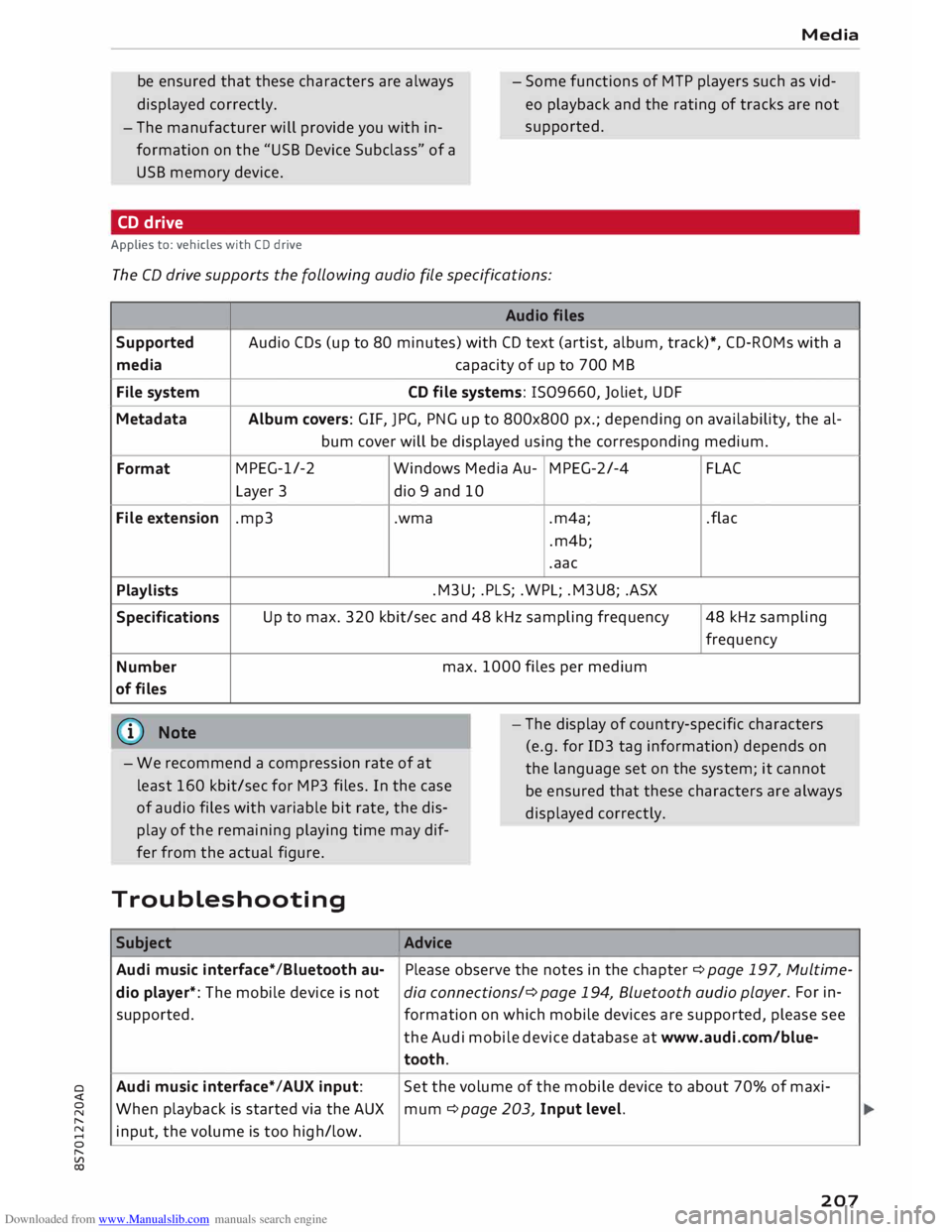
The CD drive supports the following audio fi
le specifications:
Audio files
Supported Audio
CDs (up to 80 minutes) with CD text (artist, album, track)*, CD-ROMs with a
media capacity
of up to 700 MB
File system CD
file systems: 1509660, Joliet, UDF
Metadata Album
covers: GIF, JPG, PNG up to 800x800 px.; depending on availability, the al-
bum cover will be displayed using the corresponding medium.
Format MPEG-1/-2
Windows Media Au-MPEG-2/-4
FLAC
Layer 3
dio 9 and 10
File extension .mp3
.wma
.m4a;
.flac
.m4b;
.aac
Playlists .M3U;
.PLS; .WPL; .M3U8; .ASX
Specifications Up
to max. 320 kbit/sec and 48 kHz sampling frequency 48 kHz sampling
frequency
Number max.
1000 files per medium
of files
@ Note
- We recommend a compression rate of at
least 160 kbit/sec for MP3 files. In the case
of audio files with variable bit rate, the dis
play of the remaining playing time may dif
fer from the actual figure. -
The display of country-specific characters
(e.g. for ID3 tag information) depends on
the language set on the system; it cannot
be ensured that these characters are always
dis played correctly.
Troubleshooting Subject Advice
Audi music interface* /Bluetooth au-Please
observe the notes in the chapter ¢ page 197, Multime-
dio player*: The mobile device is not dia connections/¢ page 194, Bluetooth audio play
er. For in-
supported. formation on which mobile devices are supported, please see
the Audi mobile device database at www.audi.com/blue-
tooth.
Audi music interface*/AUX input: Set
the volume of the mobile device to about 70% of maxi-
When playback is started via the AUX
mum ¢ page 203, Input level.
input, the volume is too high/low.
207
Page 214 of 306
Downloaded from www.Manualslib.com manuals search engine System
settings
System settings
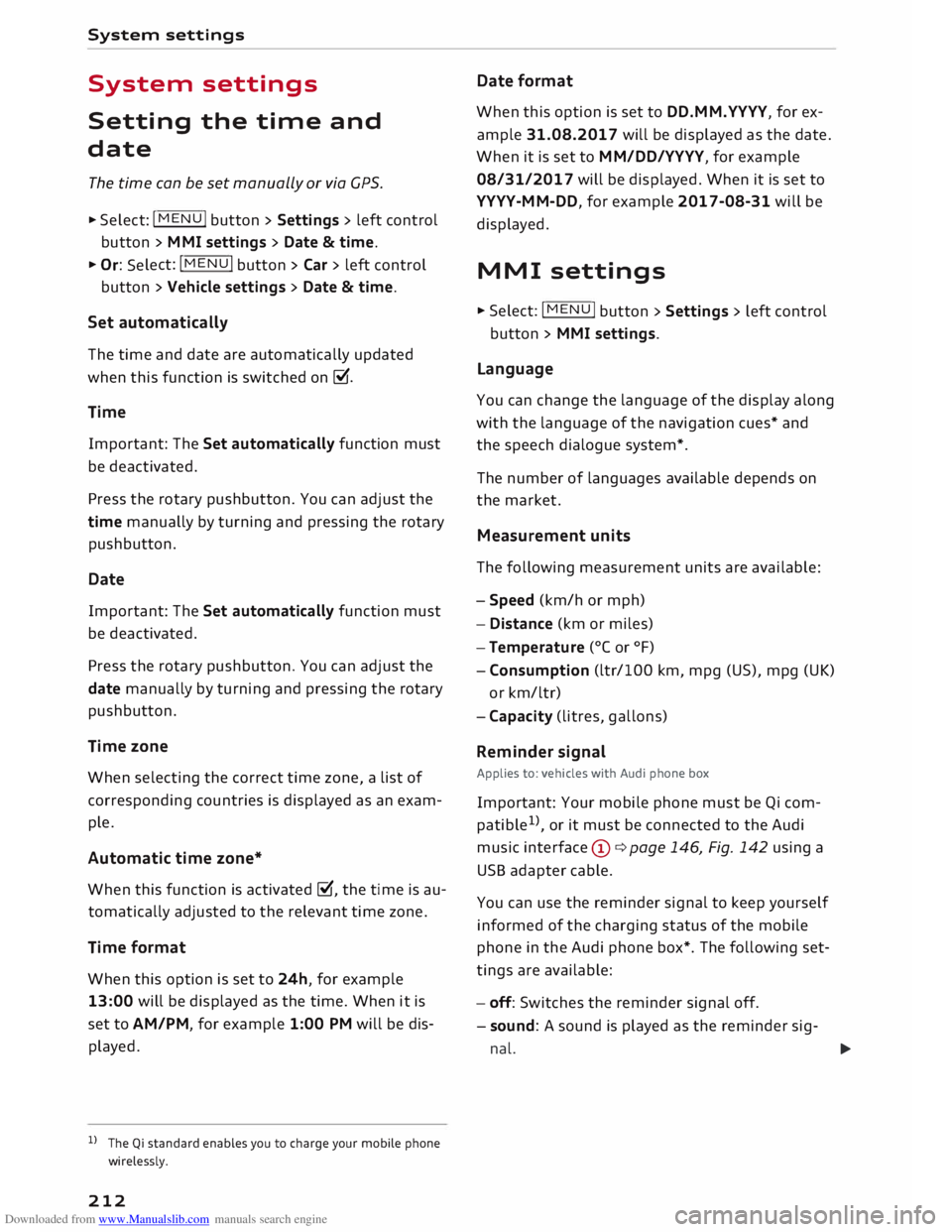
Setting the time and
date
The time can be set manually or via CPS.
... Select: I MEN
U
I button > Settings > left control
button > MMI settings > Date & time ....
Or: Select: !MENU! button
> Car > left control
button > Vehicle settings > Date & time.
Set automatically
The time and date are automatically updated
when this function is switched on�-
Time Important: The Set automatically function must
be deactivated.
Press the rotary pushbutton. You can adjust the
time manually by turning and pressing the rotary
pushbutton.
Date
Important: The Set automatically function must
be deactivated.
Press the rotary pushbutton. You can adjust the
date manually by turning and pressing the rotary
pushbutton.
Time zone
When selecting the correct time zone, a list of
corresponding countries is displayed as an exam
ple.
Automatic time zone*
When this function is activated �, the time is au
tomatically adjusted to the relevant time zone.
Time format
When this option is set to 24h, for example
13:00 will be displayed as the time. When it is
set to AM/PM, for example 1:00 PM will be dis
played.
l l
The Qi standard enables you to charge your mobile phone
wirelessly.
212 Date
format
When this option is set to DD.MM.YYYY, for ex
ample 31.08.2017 will be displayed as the date.
When it is set to MM/DD/YYYY, for example
08/31/2017 will be displayed. When it is set to
YYYY-MM-DD, for example 2017-08-31 will be
displayed.
MMI settings
... Select: I MEN
U
I button >Settings> Left control
button > MMI settings.
Language
You can change the language of the display along
with the language of the navigation cues* and
the speech dialogue system*.
The number of languages available depends on
the market.
Measurement units
The following measurement units are available:
- Speed (km/h or mph)
- Distance (km or miles)
- Temperature (0
( or °F)
- Consumption (ltr/100 km, mpg (US), mpg (UK)
or km/ltr)
- Capacity (litres, gallons)
Reminder signal
Applies to: vehicles with Audi phone box
Important: Your mobile phone must be Qi com
patible 1
>
, or it must be connected to the Audi
music interface (!)¢ page 146, Fig. 142 using a
USB adapter cable.
You can use the reminder signal to keep yourself
informed of the charging status of the mobile
phone in the Audi phone box*. The following set
tings are available:
- off: Switches the reminder signal off.
- sound: A sound is played as the reminder sig-
nal. �
Page 215 of 306
Downloaded from www.Manualslib.com manuals search engine 0
N
,.....
N
......
0
,.....
Vl
CX) -
spoken: The reminder signal is spoken by the
system.
Reminder signal volume: You can adjust the vol
ume of the reminder signal by turning the rotary
pushbutton.
Switch off pop-up: This function is switched off
at the factory. When this function is switched on
� , the messages about the charging status of
the mobile phone in the Audi phone box* on the
infotainment display will not appear. The re
minder not to forget the mobile phone when
leaving the vehicle will also be switched off.
Usage tips
Your MMI displays usage tips when this function
is switched on�
. They will appear less often as
time goes by. You can switch the usage tips off at
any time.
Speech dialogue system
Applies to: vehicles with speech dialogue system
Command display: The MMI displays possible
voice commands in the corresponding menu
when this function is switched on�
. You can
switch this function off at any time.
Short dialogue: When this function is switched
on �
, the spoken cues are shortened. You can
switch this function off at any time.
Speech dialogue system volume: You can adjust
the volume of the spoken cues by turning the ro
tary pushbutton.
Individual speech training (only possible when
the vehicle is stationary): You can use the individ
ual speech training to adapt the speech dialogue
system to your voice or pronunciation so that the
speech dialogue system can then better recog
nise what you are saying. The individual speech
training prompts you to repeat 20 spoken phra
ses that consist of certain commands and blocks
of digits. If you would like to delete the stored
speech training setup, you can use the function
Reset individual speech training.
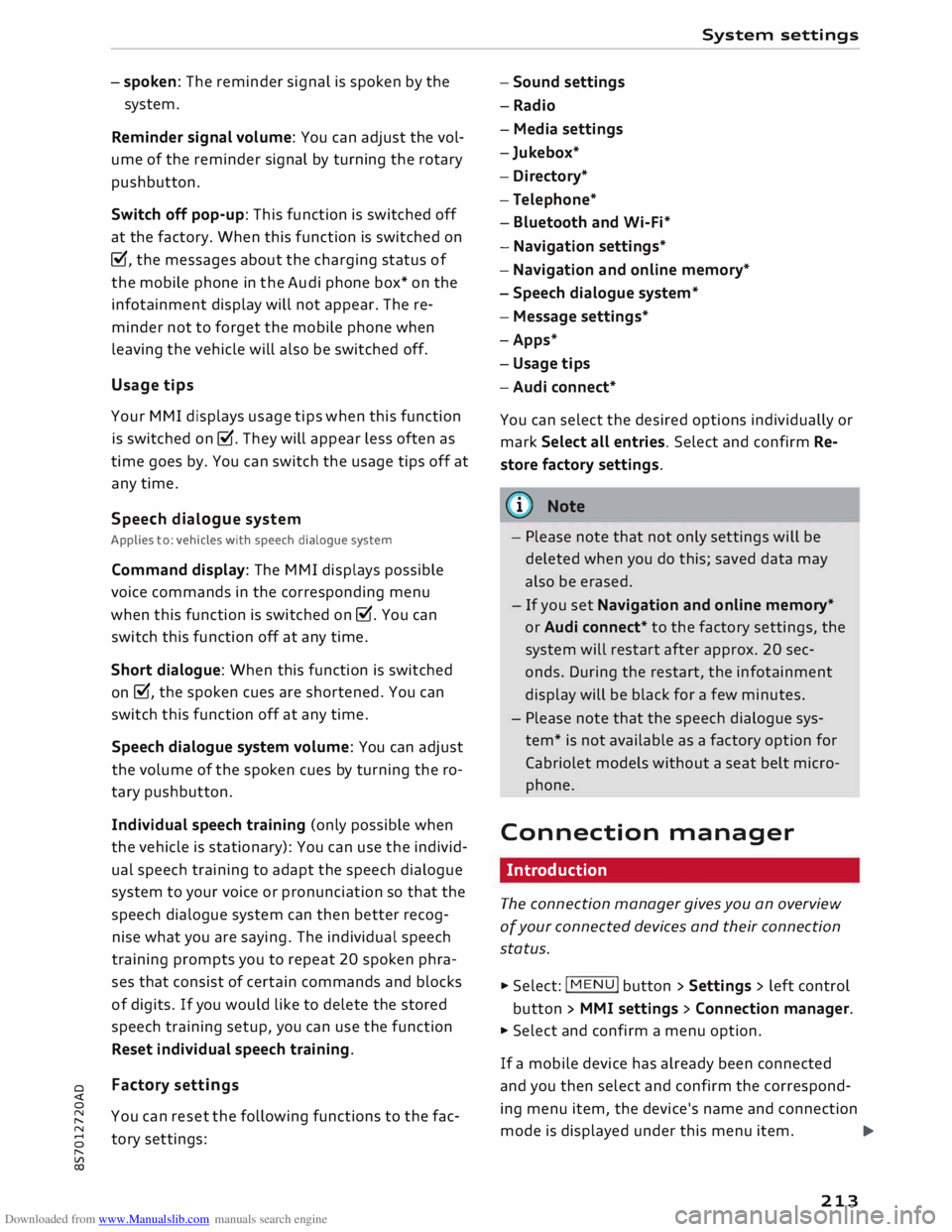
Factory settings
You can reset the following functions to the fac
tory settings: System
settings
- Sound settings
- Radio
- Media settings
-Jukebox*
- Directory*
- Telephone*
- Bluetooth and Wi-Fi*
- Navigation settings*
- Navigation and online memory*
- Speech dialogue system*
- Message settings*
-Apps*
- Usage tips
-Audi connect*
You can select the desired options individually or
mark Select all entries. Select and confirm Re
store factory settings.
ijj) Note
- Please note that not only settings will be
deleted when you do this; saved data may
also be erased.
- If you set Navigation and on line memory*
or Audi connect* to the factory settings, the
system will restart after approx. 20 sec
onds. During the restart, the infotainment
display
will
be black for a few minutes.
- Please note that the speech dialogue sys
tem* is not available as a factory option for
Cabriolet models without a seat belt micro
phone.
Connection manager
Introduction
The connection manager gives you an overview
of your connected devices and their connection
status.
.., Select: I MENU I button > Settings > left control
button > MMI settings > Connection manager.
.., Select and confirm a menu option.
If a mobile device has already been connected
and you then select and confirm the correspond
ing menu item, the device's name and connection
mode is displayed under this menu item.
...,.
213
Page 222 of 306
Downloaded from www.Manualslib.com manuals search engine Safe
driving
Safe driving
General notes
Safety is the first priority
Your safety is our first priority.
This chapter contains important information,
tips, suggestions and warnings that you should
read and observe for your own safety and the
safety of your passengers.
A WARNING
- The information in this chapter is important
for the driver of the vehicle and the passen
ger. The other chapters in this manual (and,
where applicable, in the other literature
supplied with the vehicle) contain further
important notes which you should read and
observe for your own safety and that of your
passenger.
- Ensure that the complete vehicle wallet is
always in the vehicle. This is especially im
portant when you lend or sell the vehicle to
others.
Safety features
The safety features Listed here are part of the ve
hicle's occupant restraint system. They work to
gether to help reduce the risk of injury in a wide
variety of accident situations.
Your safety and the safety of your passengers
should not be left to chance. In the event of an
accident, the safety features incorporated in your
vehicle are capable of reducing the risk of injury.
These are just a few of the safety features in your
Audi:
- Seat belts for all seats
- Belt force limiters for all seats
- Belt tensioners for all seats
- Front airbags
- Side airbags in the backrests
- "ISOFIX" anchorages* for "ISO FIX" child seats
on the passenger's seat
-Adjustable steering column
220 These
individual safety features are harmonised
to provide you and your passenger with the best
possible protection in accident situations. How
ever, they can only be effective if you and your
passenger sit in the correct position and adjust
and use the safety equipment properly.
For these reasons, this chapter explains why
these safety features are so important, how they
can protect you, what you need to remember
when using them, and how you and your passen
gers can gain the most benefit from them. There
are also a number of important safety warnings
which you and your passengers should always ob
serve in order to minimise the risk of injury.
Safety is everyone's responsibility!
Before every trip
The driver is responsible for the safety of the
passengers and the safe operation of the vehicle
at all times.
For your own safety and the safety of your pas
senger, always note the following points before
every trip:
.,. Make sure that all lights and turn signals are
working properly .
... Check
the tyre pressures.
... Make sure that all windows are clean and give
good visibility to the outside.
... Secure all luggage and other items carefully
¢page 227.
... Make sure that no objects can interfere with
the pedals.
... Adjust the mirrors and the seat according to
your body height.
.,. Make sure that children are protected with suit
able safety seats and properly worn seat belts
¢page 223.
... Sit
in the correct position in your seat. Make
sure that your passenger is sitting in the cor
rect position ¢ page 54.
... Fasten your seat belt correctly. Make sure that
your passenger does the same¢ page 230.
Page 223 of 306
Downloaded from www.Manualslib.com manuals search engine 0
N
,.....
N
......
0
,.....
Vl
CX) What
factors can impair your safety?
Safety on the road is directly related to how you
drive, and can also be affected by the passengers
in the vehicle.
The driver is responsible for the safety of the ve
hicle and all its occupants. If your ability to drive
is impaired in any way, you endanger yourself and
other road users ¢ ,A. Therefore:
""Do not let yourself be distracted by passengers
or by using a mobile phone, etc.
"" Never drive when your driving ability is im
paired (by medication, alcohol, drugs, etc.).
"" Obey all traffic regulations and speed limits
and always maintain a safe distance to the vehi
cle in front.
"" Always adjust your speed to suit the road, traf
fic and weather conditions.
"" Take frequent breaks on long trips. Do not drive
for more than two hours without a stop.
""If possible, avoid driving when you are tired or
stressed.
A WARNING
- Distractions while driving or any kind of im
pairment to your driving ability increase the
risk of accident and injury.
- Do not place loose objects on the dash pan
el. These objects could fly around the interi
or when the vehicle is moving (under accel
eration or whilst cornering) and distract the
driver -risk of accident! Safe
driving
Correct sitting positions
Correct driving position
The correct driving position is important for safe
driving.
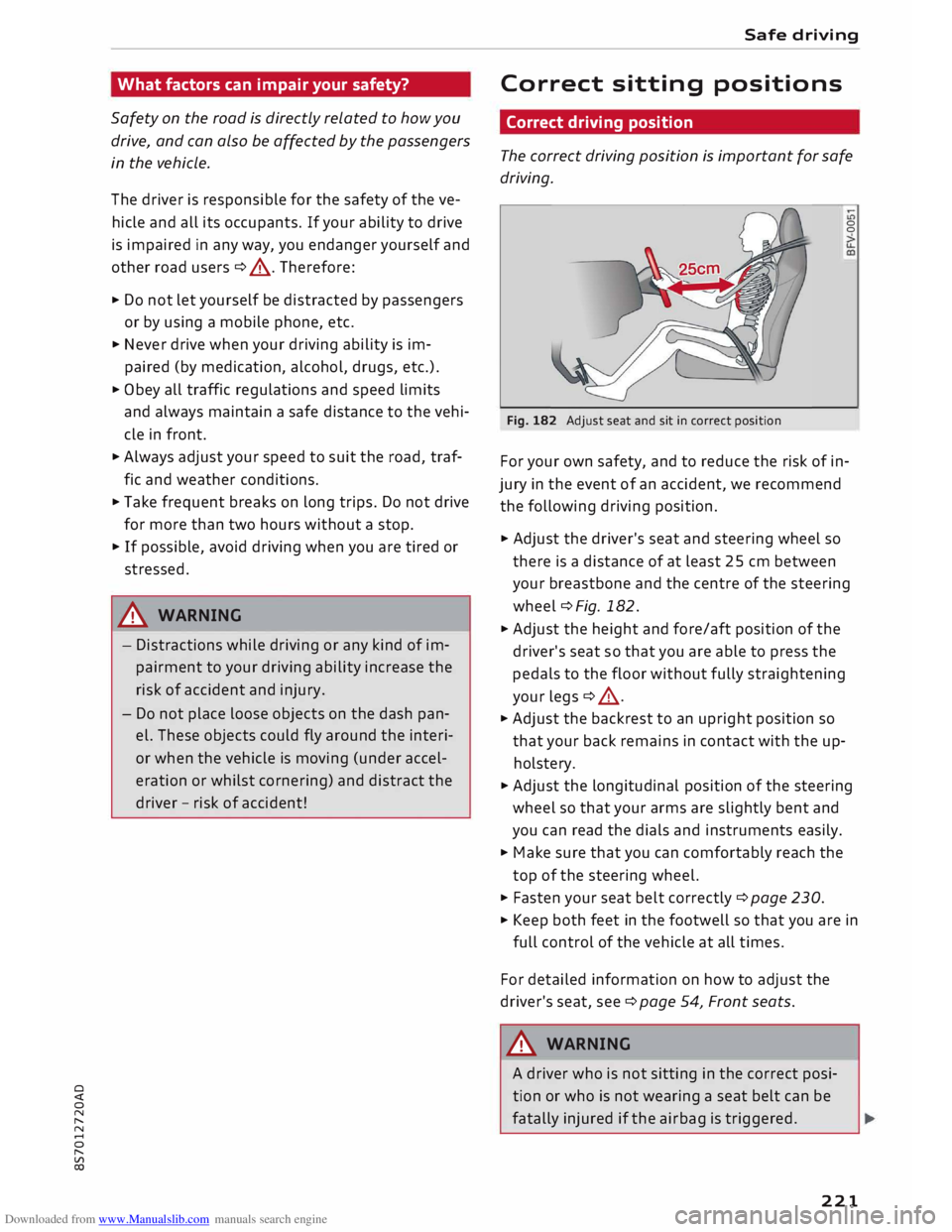
Fig. 182 Adjust seat and sit in correct position 0
0
For your own safety, and to reduce the risk of in
jury in the event of an accident, we recommend
the following driving position.
"" Adjust the driver's seat and steering wheel so
there is a distance of at least 25 cm between
your breastbone and the centre of the steering
wheel¢ Fig. 182.
"" Adjust the height and fore/aft position of the
driver's seat so that you are able to press the
pedals to the floor without fully straightening
your legs¢ A.
"" Adjust the backrest to an upright position so
that your back remains in contact with the up
holstery.
""Adjust the longitudinal position of the steering
wheel so that your arms are slightly bent and
you can read the dials and instruments easily.
"" Make sure that you can comfortably reach the
top of the steering wheel.
"" Fasten your seat belt correctly ¢ page 230.
"" Keep both feet in the footwell so that you are in
full control of the vehicle at all times.
For detailed information on how to adjust the
driver's seat, see¢ page 54, Front seats.
A WARNING
A driver who is not sitting in the correct posi
tion or who is not wearing a seat belt can be
fatally injured if the airbag is triggered.
221
Page 224 of 306
Downloaded from www.Manualslib.com manuals search engine Safe
driving
-Adjust the driver's seat and steering wheel
so there is a distance of at least 25 cm be
tween your breastbone and the centre of the
steering wheel¢ Fig. 182.
- While driving, always hold the steering
wheel with both hands on the outside of the
rim at about the 9 o'clock and 3 o'clock posi
tion. This reduces the risk of injury if the
driver's airbag inflates.
- Never hold the steering wheel at the 12
o'clock position, or with your hands inside
the rim or on the steering wheel hub. This
could result in serious injuries to the arms,
hands and head if the driver's airbag in
flates.
- To reduce any risk of injury to the driver dur
ing a sudden brake application or in an acci
dent, never drive with the backrest tilted
too far back. The airbag system and seat
belts can only provide proper protection
when the backrest is in an upright position
and the driver is wearing the seat belt in the
correct position. The further the backrest is
tilted back, the greater the risk of injury due
to incorrect positioning of the belt webbing
or an incorrect sitting position.
Correct position for the passenger
The front seat passenger must sit at least 25 cm
away from the dash panel so that the airbag has
enough room to inflate and give maximum pro
tection in an accident.
For your own safety and to reduce the risk of in
jury in the event of an accident, we recommend
adjusting the passenger's seat as follows:
"" Adjust the backrest to an upright position so
that your back remains in contact with the up
holstery.
"" Keep both feet in the footwell in front of the
seat.
"" Fasten your seat belt correctly ¢ page 232.
In exceptional cases you can disable the pas
senger's airbag via the key-operated switch*
¢page 237.
222 For
detailed information on how to adjust the
passenger's seat, see ¢ page 54, Front seats.
A WARNING
A passenger who is not sitting in the correct
position or who is not wearing a seat belt can
be fatally injured if the airbag is triggered.
-Adjust the passenger's seat so there is a dis-
tance of at least 25 cm between your
breastbone and the dash panel.
- Always keep your feet on the floor when the
vehicle is moving; never rest them on the in
strument panel, out of the window or on the
seat. If you sit in an incorrect position, you
increase your risk of injury in the event of
sudden braking or an accident. If the airbag
is triggered, you could sustain potentially
fatal injuries by sitting out of position.
- To reduce the risk of injury to the passenger
in the case of sudden braking or an accident,
the passenger should never travel in a mov
ing vehicle with the backrest reclined. The
airbag system and seat belt can only provide
proper protection when the backrest is in an
upright position and the passenger is wear
ing the seat belt in the correct position. The
further the backrest is tilted back, the
greater the risk of injury due to incorrect po
sitioning of the belt webbing or an incorrect
sitting position.
Examples of incorrect seating positions
Occupants can suffer severe or fatal injuries if
they sit in an incorrect position while the vehicle
is moving.
Seat belts can only provide maximum protection
if the belt webbing is positioned correctly. Sitting
out of position greatly reduces the effectiveness
of the seat belts and increases the risk of injury
since the belt webbing is not worn in the position
for which it is designed. The driver is responsible
for the safety of all vehicle occupants, especially
for children.
"" Never allow anyone to sit out of position while
the vehicle is moving ¢,&. . ..,.
Page 230 of 306
Downloaded from www.Manualslib.com manuals search engine Safe
driving
� Note
- The tyre pressure must be adjusted accord
ing to the Load the vehicle is carrying
¢page 256.
-Air circulation in the vehicle helps reduce
fogging of the windows. Used air escapes
through ventilation slots in the rear of the
vehicle. Make sure that these ventilation
slots are not obstructed.
- Suitable belts for securing Loads to the fas
tening rings* are commercially available.
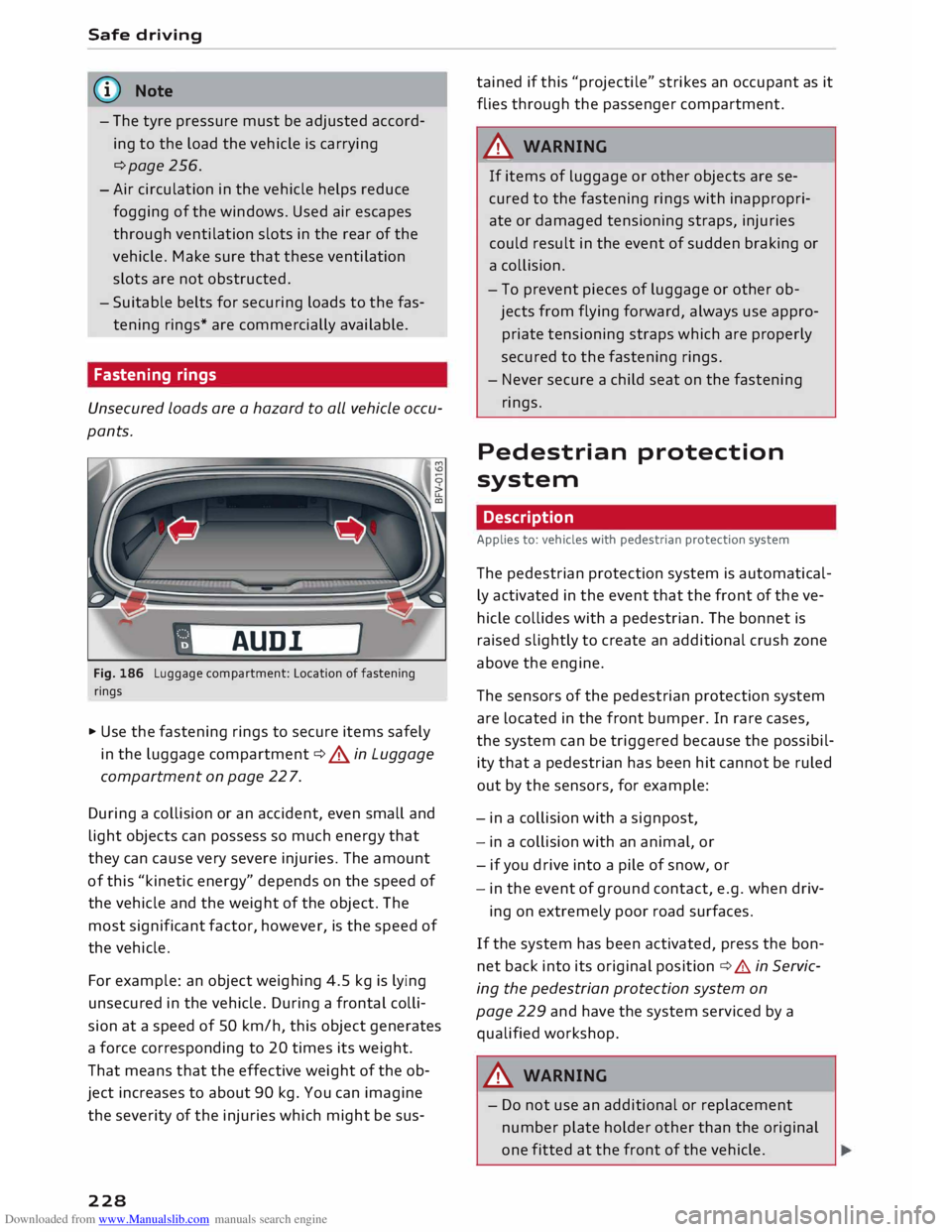
Fastening rings
Unsecured Loads are a hazard to all vehicle occu
pants.
AUDI
Fig. 186 Luggage compartment: Location of fastening
rings
� Use the fastening rings to secure items safely
in the Luggage compartment ¢.&. in Luggage
compartment on page 22 7.
During a collision or an accident, even small and
Light objects can possess so much energy that
they can cause very severe injuries. The amount
of this "kinetic energy" depends on the speed of
the vehicle and the weight of the object. The
most significant factor, however, is the speed of
the vehicle.
For example: an object weighing 4.5 kg is Lying
unsecured in the vehicle. During a frontal colli
sion at a speed of 50 km/h, this object generates
a force corresponding to 20 times its weight.
That means that the effective weight of the ob
ject increases to about 90 kg. You can imagine
the severity of the injuries which might be sus-
228 tained
if this "projectile" strikes an occupant as it
flies through the passenger compartment.
A WARNING
If items of Luggage or other objects are se
cured to the fastening rings with inappropri
ate or damaged tensioning straps, injuries
could result in the event of sudden braking or
a collision.
- To prevent pieces of Luggage or other ob
jects from flying forward, always use appro
priate tensioning straps which are properly
secured to the fastening rings.
- Never secure a child seat on the fastening
rings.
Pedestrian protection
system
Description
Applies to: vehicles with pedestrian protection system
The pedestrian protection system is automatical
ly activated in the event that the front of the ve
hicle collides with a pedestrian. The bonnet is
raised slightly to create an additional crush zone
above the engine.
The sensors of the pedestrian protection system
are Located in the front bumper. In rare cases,
the system can be triggered because the possibil
ity that a pedestrian has been hit cannot be ruled
out by the sensors, for example:
- in a collision with a signpost,
- in a collision with an animal, or
- if you drive into a pile of snow, or
- in the event of ground contact, e.g. when driv-
ing on extremely poor road surfaces.
If the system has been activated, press the bon
net back into its original position ¢.&. in Servic
ing the pedestrian protection system on
page 229 and have the system serviced by a
qualified workshop.
A WARNING
- Do not use an additional or replacement
number plate holder other than the original
one fitted at the front of the vehicle.
Page 232 of 306
Downloaded from www.Manualslib.com manuals search engine Seat
belts
Seat belts
Why is it so important to
use seat belts?
Seat belts provide effective protection
The common belief that passengers can brace
their weight with their hands in a minor collision
is false.
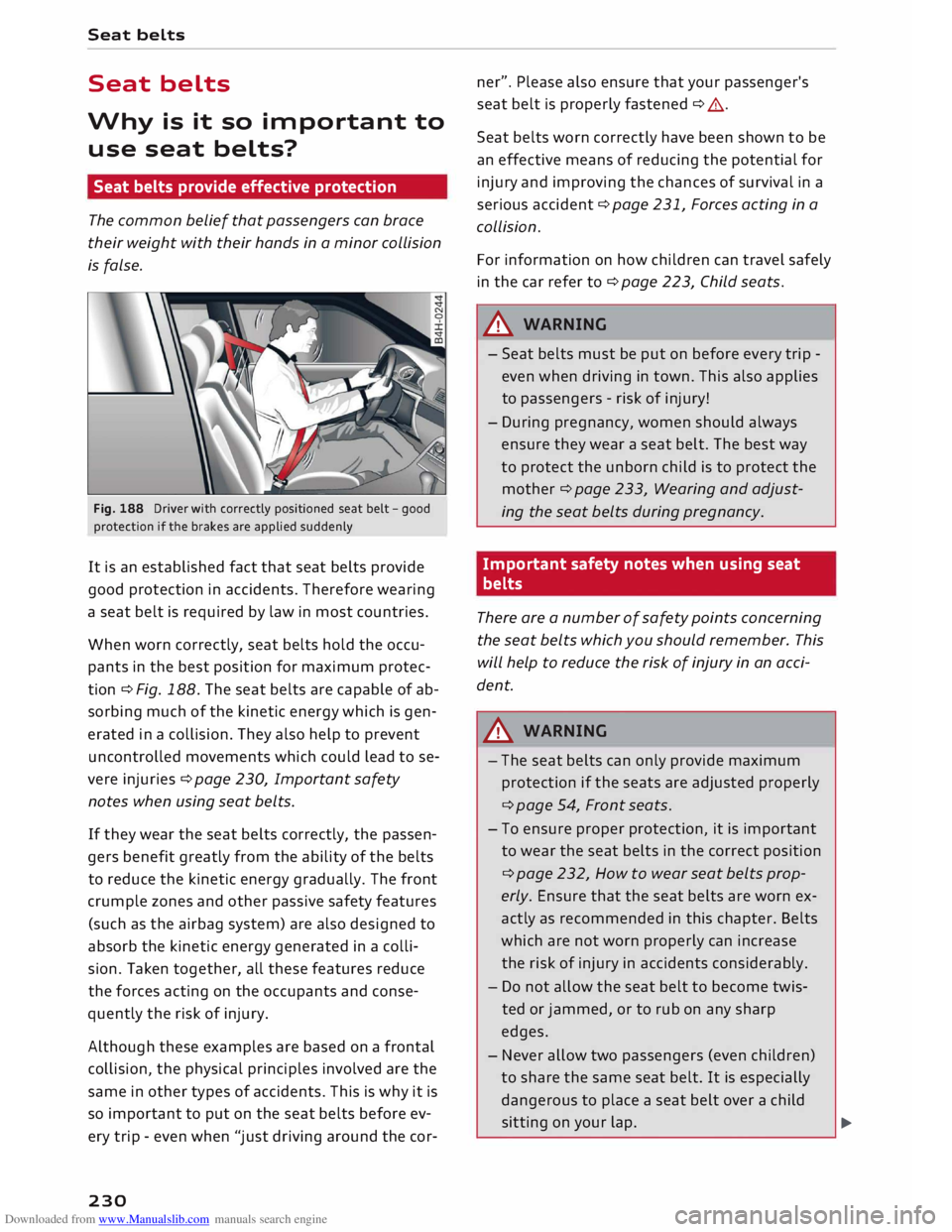
Fig. 188 Driver with correctly positioned seat belt -good
protection if the brakes are applied suddenly
It is an established fact that seat belts provide
good protection in accidents. Therefore wearing
a seat belt is required by law in most countries.
When worn correctly, seat belts hold the occu
pants in the best position for maximum protec
tion ¢ Fig. 188. The seat belts are capable of ab
sorbing much of the kinetic energy which is gen
erated in a collision. They also help to prevent
uncontrolled movements which could lead to se
vere injuries ¢ page 230, Important safety
notes when using seat belts.
If they wear the seat belts correctly, the passen
gers benefit greatly from the ability of the belts
to reduce the kinetic energy gradually. The front
crumple zones and other passive safety features
(such as the airbag system) are also designed to
absorb the kinetic energy generated in a colli
sion. Taken together, all these features reduce
the forces acting on the occupants and conse
quently the risk of injury.
Although these examples are based on a frontal
collision, the physical principles involved are the
same in other types of accidents. This is why it is
so important to put on the seat belts before ev
ery trip -even when "just driving around the cor-
230 ner".
Please also ensure that your passenger's
seat belt is properly fastened ¢ A.
Seat belts worn correctly have been shown to be
an effective means of reducing the potential for
injury and improving the chances of survival in a
serious accident ¢ page 231, Forces acting in a
collision.
For information on how children can travel safely
in the car refer to¢ page 223, Child seats.
_& WARNING
- Seat belts must be put on before every trip -
even when driving in town. This also applies
to passengers -risk of injury!
- During pregnancy, women should always
ensure they wear a seat belt. The best way
to protect the unborn child is to protect the
mother ¢ page 233, Wearing and adjust
ing the seat belts during pregnancy.
Important safety notes when using seat
belts
There are a number of safety points concerning
the seat belts which you should remember. This
will help to reduce the risk of injury in an acci
dent.
_& WARNING
- The seat belts can only provide maximum
protection if the seats are adjusted properly
¢ page 54, Front seats.
- To ensure proper protection, it is important
to wear the seat belts in the correct position
¢ page 232, How to wear seat belts prop
erly. Ensure that the seat belts are worn ex
actly as recommended in this chapter. Belts
which are not worn properly can increase
the risk of injury in accidents considerably.
- Do not allow the seat belt to become twis
ted or jammed, or to rub on any sharp
edges.
- Never allow two passengers (even children)
to share the same seat belt. It is especially
dangerous to place a seat belt over a child
sitting on your lap.
..,.
Page 235 of 306
Downloaded from www.Manualslib.com manuals search engine 0
N
,.....
N
......
0
,.....
Vl
CX) A
WARNING
-Always make certain that the belt is posi
tioned properly ¢ Fig. 192 -risk of injury
¢ page
233, Adjusting the seat belts. -
- The latch plate of the belt must always be
engaged in the correct buckle for that seat.
Otherwise the belt will not be fully effective
and the danger of injury increases.
Adjusting the seat belts
Always position seat belts properly for maximum
safety.
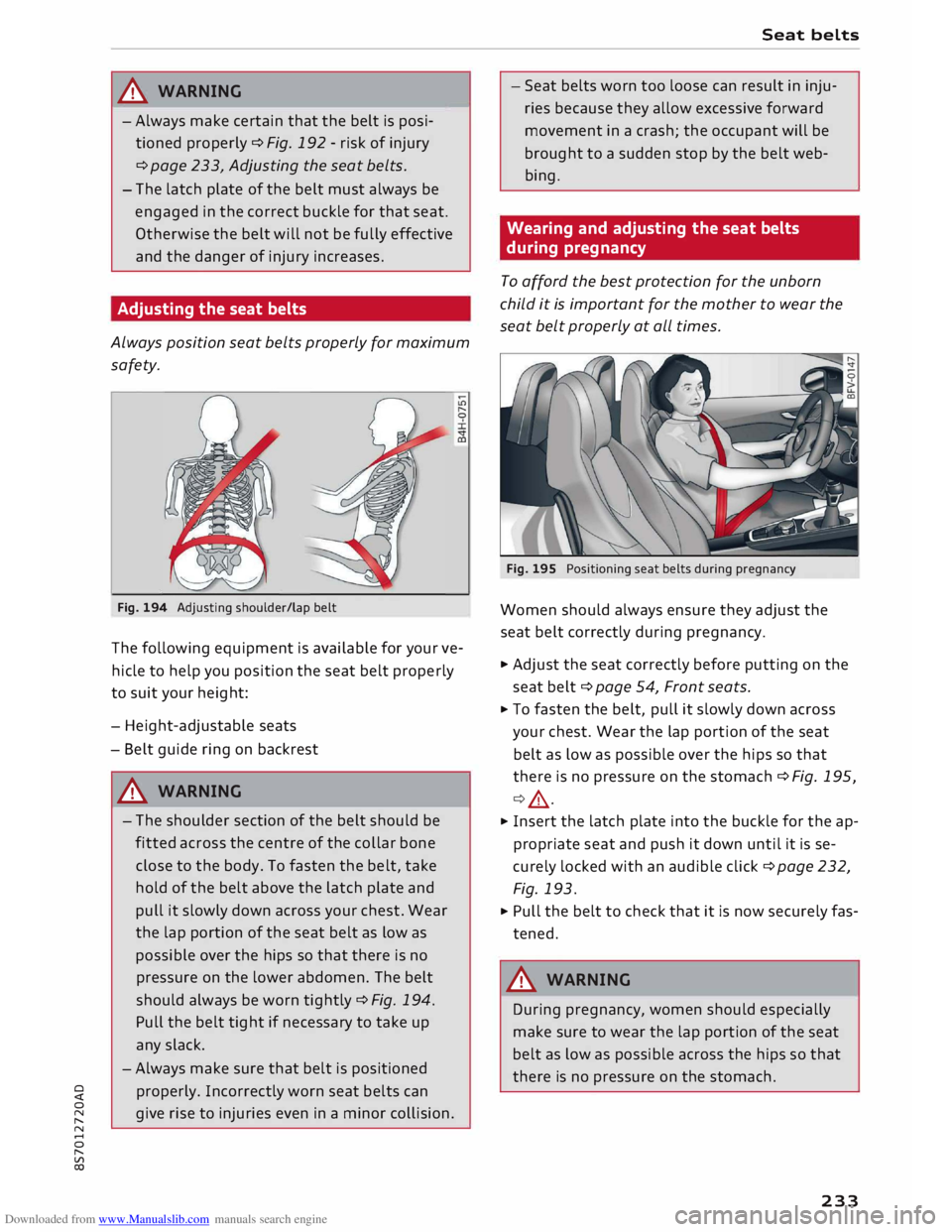
Fig. 194 Adjusting shoulder/lap belt
The following equipment is available for your ve
hicle to help you position the seat belt properly
to suit your height:
- Height-adjustable seats
- Belt guide ring on backrest
A WARNING
- The shoulder section of the belt should be
fitted across the centre of the collar bone
close to the body. To fasten the belt, take
hold of the belt above the latch plate and
pull it slowly down across your chest. Wear
the lap portion of the seat belt as low as
possible over the hips so that there is no
pressure on the lower abdomen. The belt
should always be worn tightly ¢ Fig. 194.
Pull the belt tight if necessary to take up
any slack.
- Always make sure that belt is positioned
properly. Incorrectly worn seat belts can
give rise to injuries even in a minor collision. Seat
belts
- Seat belts worn too loose can result in inju
ries because they allow excessive forward
movement in a crash; the occupant will be
brought to a sudden stop by the belt web
bing.
Wearing and adjusting the seat belts
during pregnancy
To afford the best protection for the unborn
child it is important for the mother to wear the
seat belt properly at all times.
Fig. 195 Positioning seat belts during pregnancy
Women should always ensure they adjust the
seat belt correctly during pregnancy.
.., Adjust the seat correctly before putting on the
seat belt¢ page 54, Front seats.
... To fasten the belt, pull it slowly down across
your chest. Wear the lap portion of the seat
belt as low as possible over the hips so that
there is no pressure on the stomach ¢ Fig. 195,
¢ ,& .
... Insert the latch plate into the buckle for the ap
propriate seat and push it down until it is se
curely locked with an audible click¢ page 232,
Fig. 193.
... Pull the belt to check that it is now securely fas
tened.
A WARNING
During pregnancy, women should especially
make sure to wear the lap portion of the seat
belt as low as possible across the hips so that
there is no pressure on the stomach.
233