infotainment AUDI TT ROADSTER 2016 Manual PDF
[x] Cancel search | Manufacturer: AUDI, Model Year: 2016, Model line: TT ROADSTER, Model: AUDI TT ROADSTER 2016Pages: 306, PDF Size: 31.82 MB
Page 261 of 306
Downloaded from www.Manualslib.com manuals search engine 0
N
,.....
N
......
0
,.....
Vl
CX) based
on the tyre pressures you have stored. The
inflation pressures recommended for your vehicle
are given on the tyre pressure sticker
¢page 256, Fig. 222.
The rolling circumference and vibration can
change and cause a tyre pressure warning if:
- The inflation pressure in one or more tyres is
too low.
- The tyre has suffered structural damage.
- The wheels were changed or the tyre pressures
were changed and the new tyre pressures were
not stored ¢ page 259.
- You are driving with the temporary spare
wheel*.
Indicator lamps
RE- Loss of pressure on one or more tyres¢.&,.
Check and change or repair the tyre(s). Check and
adjust the inflation pressures of all four tyres
again and store the new tyre pressures on the in
fotainment system¢ page 259.
@m (Tyre Pressure Monitoring System) Tyre
pressure: fault. See owner's manual -If @m
ap
pears and the indicator lamp RE in the instru
ment cluster display flashes for approx. one mi
nute and then remains lit after you have switched
on the ignition or while you are driving, there is a
fault in the system. Try to store the correct tyre
pressures ¢ page 259. If the indicator lamp
does not go out or if it comes on again after a
short time, drive to a qualified workshop without
delay and have the fault rectified.
& WARNING
- If the tyre pressure loss indicator appears
on the display, slow down immediately and
avoid any severe braking or steering ma
noeuvres. As soon as you can do so safely,
stop and check the tyres and the tyre pres
sures.
- It is the driver's responsibility to ensure that
the tyre pressures are correct. For this rea
son you must check the tyre pressures regu
larly.
- Under certain conditions (e.g. driving at
high speeds, on ice and snow or on poor Wheels
road surfaces) the tyre pressure loss indica
tor may not appear immediately.
- The use of run-flat tyres on your vehicle is
NOT authorised! Unauthorised use can cause
an accident or damage your vehicle.
((D) Note
- If a malfunction occurs in the ESC system,
the tyre pressure loss indicator may also be
out of action.
- When driving with snow chains, a system
malfunction can occur.
- The tyre pressure loss indicator on your Audi
is specially matched to tyres with the mark
ing "AO"¢ page 254. We recommend that
you use these tyres.
Storing tyre pressure settings
Applies to: vehicles with tyre pressure loss indicator
When you change a tyre or the tyre pressure on
your vehicle, you must confirm the change on the
infotainment system.
.., Before storing the new tyre pressures, check
that the current pressures on all four wheels
correspond to the specified values and adapt
the pressures to the current load ¢ page 255.
.., Switch on the ignition.
.., Select the following on the infotainment sys
tem: I MENU I button >Car> left control button
> Servicing & checks > Tyre pressure loss indi
cator.
(D} Note
Do not store the tyre pressures if you are driv
ing with snow chains.
259
Page 262 of 306
Downloaded from www.Manualslib.com manuals search engine Wheels
Tyre pressure
monitoring system
General notes
Applies to: vehicles with tyre pressure monitoring system
The tyre pressure monitoring system keeps a
check on the tyre pressures of the four road
wheels while you are driving.
The system uses sensors to measure tempera
tures and pressures in the tyres. The sensors
transmit the data to the control unit by radio.
The tyre pressure monitoring system displays the
current pressures and temperatures of the tyres
on the infotainment system while the vehicle is
moving ¢ page 260. In addition, it compares the
current tyre pressures with the stored tyre pres
sures and warns you if it detects a discrepancy
¢page 261.
The system cannot check if the stored tyre pres
sures correspond to the recommended tyre pres
sures for your vehicle. You must store the new
tyre pressures ¢ page 261:
- after every adjustment to the tyre pressures,
e.g. after changing the laden weight of your ve
hicle,
- after changing a wheel, or
- when using wheels with new wheel sensors.
.&_ WARNING
- The tyre pressure monitoring system helps
the driver to monitor the tyre pressures.
However, it is always the driver's responsi
bility to ensure that the tyres are at the cor
rect pressure.
- Never re-adjust the tyre inflation pressure
when the tyre is hot. This can cause serious
damage to the tyre or even a blow-out,
which could result in an accident.
- Under-inflated tyres flex more than they
should. This causes them to overheat. This
can cause tread separation and tyre blow
out, which could result in an accident.
- The tyre pressure monitoring system cannot
warn you of tyre damage or defects that
could lead, for example, to a tyre blow-out.
Perform a regular visual check of your tyres.
260 (I))
Note
- The sensors and valves do not have to be de
tached or changed round when fitting new
tyres. Only the valve core needs to be re
placed, and if necessary the valve and the
electronic components in the wheel. Please
contact a qualified workshop if you have any
questions.
-After using the tyre repair kit, the tyre pres
sure monitoring system may malfunction.
Have the sensors renewed by a qualified
workshop.
Displaying tyre pressures and temperatures
Applies to: vehicles with tyre pressure monitoring system
Important: The vehicle must be moving.
.. Select the following on the infotainment sys
tem: !MENU! button> Servicing & checks >
Tyre pressure loss indicator > Display tyre
pressures.
The current tyre pressures are displayed in green,
yellow or red on the infotainment system:
- Green: The tyre pressure is roughly the same as
the reference value.
- Yellow: The tyre pressure is too low compared
with the reference value.
- Red: The tyre pressure is much too low com-
pared with the reference value.
The reference value is the last stored tyre pres
sure value ¢ page 261.
Bear in mind that the tyre inflation pressure is al
so influenced by the temperature of the tyre. The
tyre heats up while the vehicle is being driven
and the tyre pressure will rise accordingly.
.&_ WARNING
Please observe the important safety informa-
tion and notes ¢ page 260.
�
Page 263 of 306
Downloaded from www.Manualslib.com manuals search engine 0
N
,.....
N
......
0
,.....
Vl
CX) (D)
Note
The tyre pressures and temperatures are not
shown in the display when the vehicle is sta
tionary or during the initialisation phase. Hor
izontal dashes--.--will appear instead of the
pressure and temperature figures.
(1) Loss of tyre pressure
Applies to: vehicles with tyre pressure monitoring system
If the indicator lamp RE appears, the tyre pres
sure on at least one of the wheels is too low or
new sensors have not yet been initialised.
Indicator lamp [Bl lights up after switching
on the ignition
The tyre pressure is too low compared with the
reference value.
... Adjust the pressure of the relevant tyre(s) at
the next opportunity and store the pressures
¢page 261.
Indicator lamp [Bl lights up during a journey
Wheels with new sensors have not yet been ini
tialised or the tyre pressure has reached a critical
level compared with the reference value.
... Avoid unnecessary braking and steering ma
noeuvres.
... Adapt your driving style to the prevailing condi
tions.
... As soon as you can do so safely, stop and check
the tyre(s).
... If it is possible to continue driving, you should
take the vehicle to a qualified workshop and
have the defective tyre(s) repaired or replaced
immediately.
A WARNING
Please observe the important safety informa
tion and notes ¢page 260. Wheels
Storing new tyre pressures
Applies to: vehicles with tyre pressure monitoring system
To enable the tyre pressure monitoring system
to work reliably, it is important to store the cor
rect pressure settings.
You should always store the tyre pressures if new
sensors are fitted or after changing the pressures
when carrying a different amount of passengers
or luggage.
... Before storing the new tyre pressures, check
that the current pressures on all four wheels
correspond to the specified values and adapt
the pressures to the current load ¢ page 256,
Fig. 222. Only adjust and store the inflation
pressure of the tyres when they are at approxi
mately ambient temperature. If the tyre tem
peratures are higher than the ambient temper
ature, the inflation pressures should be in
creased by approx. 0.2 bar above the pressures
specified on the tyre pressure sticker.
... Switch on the ignition.
... Select the following on the infotainment sys
tem: I MENU I button > Servicing & checks >
Tyre pressure loss indicator > Store tyre pres
sures > Yes, store now. The tyre pressure moni
toring system will then measure the current
tyre pressures when you drive the vehicle and
store them as the new reference values .
... If the new tyre pressures do not appear on the
infotainment display, you will need to drive for
about 10 minutes so that the sensor signal
from the wheels can be received again .
During this initialisation phase,--.--will be
shown on the pressure and temperature display
and some functions of the tyre pressure monitor
ing system will not be available. The system will
warn you only if the pressure of one or more tyres
is below the minimum reference pressure.
If the indicator lamp RE lights up and the mes
sage Tyre pressure: wheel change detected.
Please check all tyres and store pressures in
MMI appears, the system has detected that the
sensor positions have changed because of a
wheel change or that new sensors have been fit-
ted. Store the new tyre pressures.
llll-
261
Page 278 of 306
Downloaded from www.Manualslib.com manuals search engine Mobility
...
Put the tools and jack back in the luggage com
partment.
... If the replaced wheel will not fit into the spare
wheel well, stow it safely in the luggage com
partment ¢page 227.
... Check
the tyre pressure of the fitted wheel as
soon as possible.
... Adjust the tyre pressures and store them via
the infotainment system.
... The
wheel bolts should be tightened to 120
Nm. Have this checked as soon as possible with
a torque wrench. Until then, drive with caution .
... Have the flat tyre replaced as quickly as possi
ble.
Spare wheel
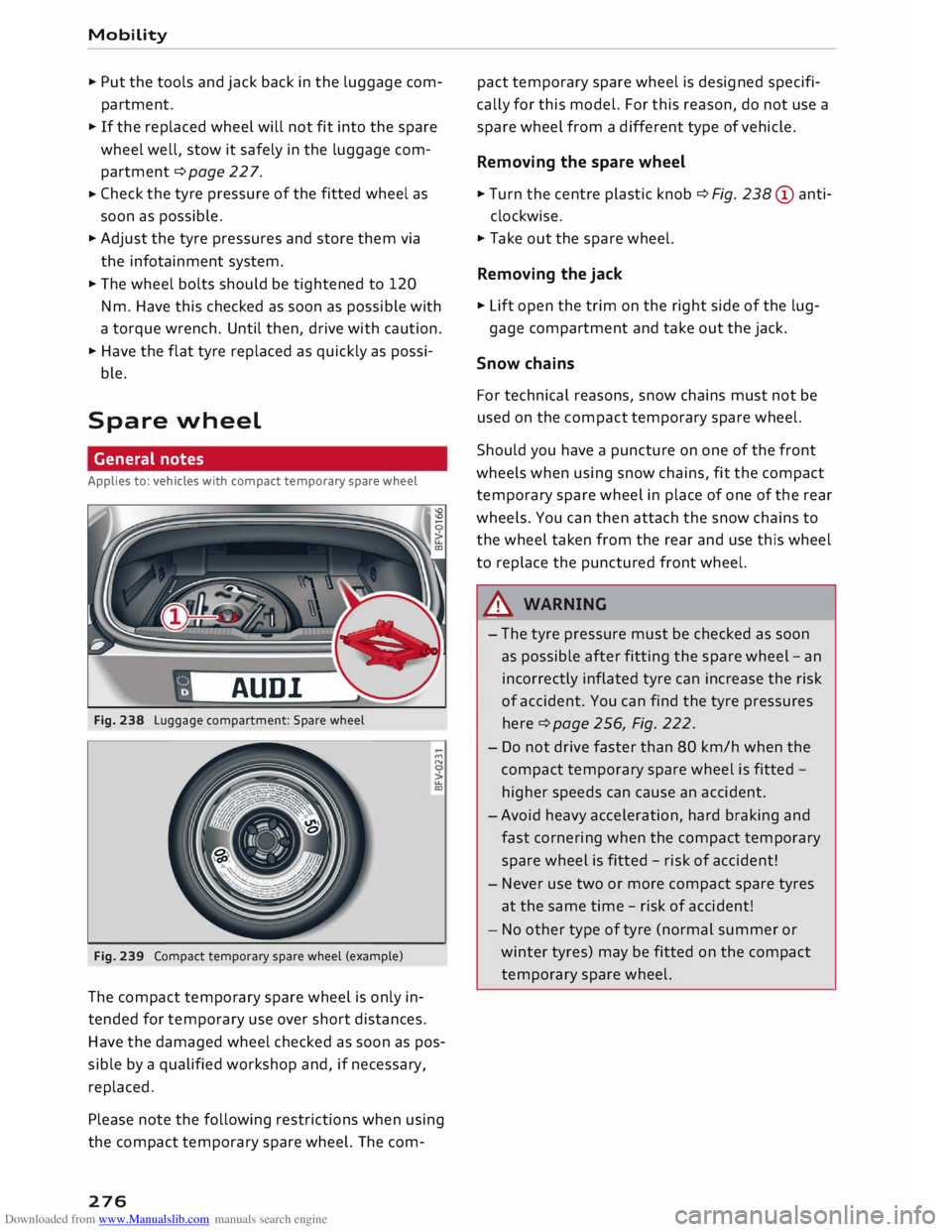
General notes
Applies to: vehicles with compact temporary spare wheel
AUD!
Fig. 238 Luggage compartment: Spare wheel
Fig. 239 Compact temporary spare wheel (example) ""
N
u..
co
The compact temporary spare wheel is only in
tended for temporary use over short distances.
Have the damaged wheel checked as soon as pos
sible by a qualified workshop and, if necessary,
replaced.
Please note the following restrictions when using
the compact temporary spare wheel. The com-
276 pact
temporary spare wheel is designed specifi
cally for this model. For this reason, do not use a
spare wheel from a different type of vehicle .
Removing the spare wheel
... Turn the centre plastic knob¢ Fig. 238 © anti-
clockwise.
... Take out the spare wheel.
Removing the jack
... Lift open the trim on the right side of the lug-
gage compartment and take out the jack.
Snow chains
For technical reasons, snow chains must not be
used on the compact temporary spare wheel.
Should you have a puncture on one of the front
wheels when using snow chains, fit the compact
temporary spare wheel in place of one of the rear
wheels. You can then attach the snow chains to
the wheel taken from the rear and use this wheel
to replace the punctured front wheel.
A WARNING
- The tyre pressure must be checked as soon
as possible after fitting the spare wheel -an
incorrectly inflated tyre can increase the risk
of accident. You can find the tyre pressures
here ¢ page 256, Fig. 222.
- Do not drive faster than 80 km/h when the
compact temporary spare wheel is fitted
higher speeds can cause an accident.
- Avoid heavy acceleration, hard braking and
fast cornering when the compact temporary
spare wheel is fitted -risk of accident!
- Never use two or more compact spare tyres
at the same time -risk of accident!
- No other type of tyre (normal summer or
winter tyres) may be fitted on the compact
temporary spare wheel.
Page 285 of 306
Downloaded from www.Manualslib.com manuals search engine 0
N
,.....
N
......
0
,.....
Vl
CX) &,
WARNING
Never attempt to repair a fuse or replace a
blown fuse by fitting a fuse with a higher am
pere rating. This could damage the electrical
system -risk of fire!
CD CAUTION
If a newly replaced fuse blows again after a
short time, the electrical system must be
checked by a qualified workshop as soon as
possible.
@ Note
- Unassigned fuse locations are not shown in
the tables below.
- Some of the items of equipment listed in
the tables below are only fitted on certain
models or are optional extras.
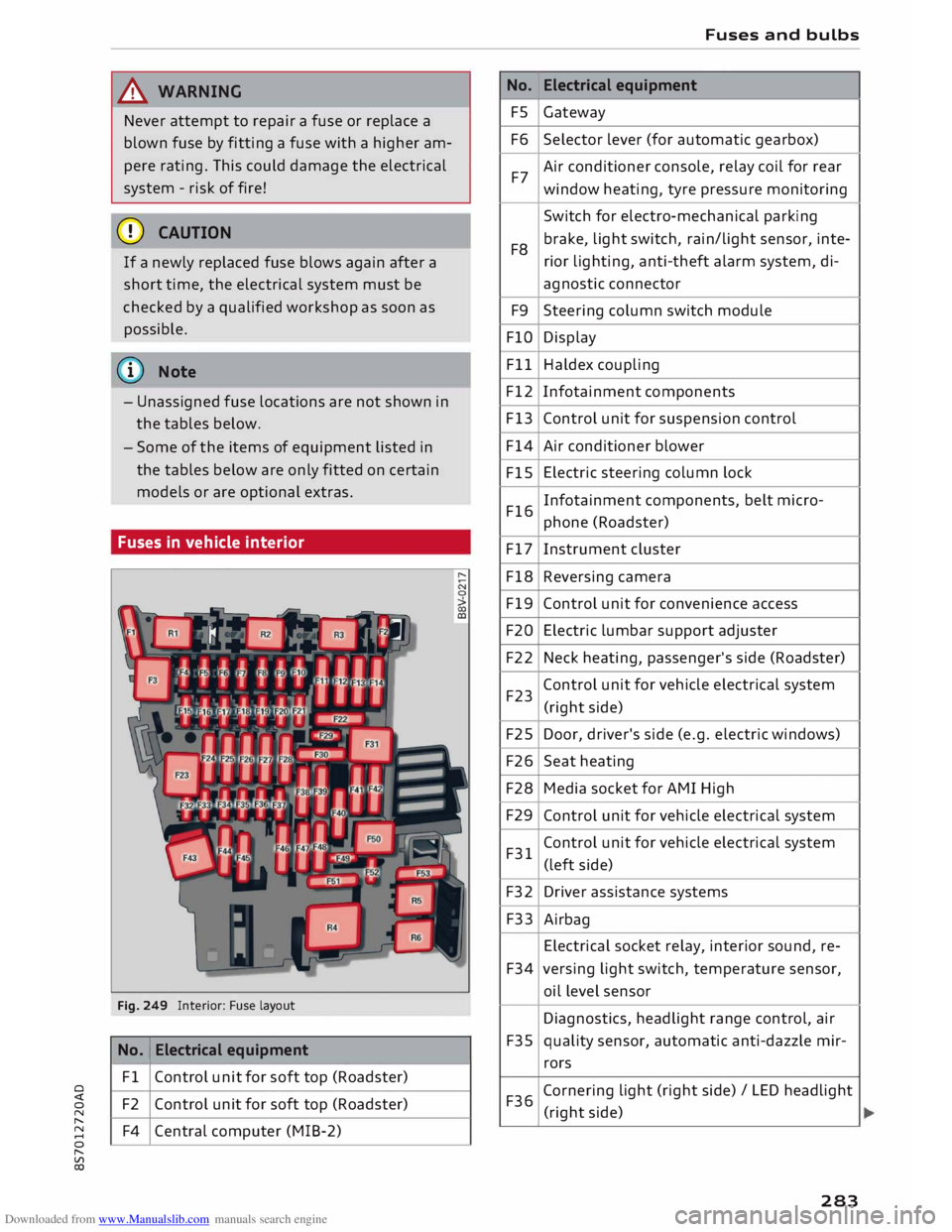
Fuses in vehicle interior
Fig. 249 Interior: Fuse layout
No. 1
Electrical equipment
Fl Control unit for soft top (Roadster)
F2 Control unit for soft top (Roadster)
F4 Central computer (MIB-2) No.
FS
F6
F7
F8 F9
FlO
Fll
F12
F13
F14
FlS
F16
F17
F18
F19
F20
F22
F23
F25
F26
F28
F29
F31
F32
F33
F34
F35
F36 Fuses
and bulbs
Electrical equipment
Gateway
Selector lever (for automatic gearbox)
Air conditioner console, relay coil for rear
window heating, tyre pressure monitoring
Switch for electro-mechanical parking
brake, light switch, rain/light sensor, inte-
rior lighting, anti-theft alarm system, di-
agnostic connector
Steering column switch module
Display
Haldex coupling
Infotainment components
Control unit for suspension control
Air conditioner blower
Electric steering column lock
Infotainment components, belt micro-
phone (Roadster)
Instrument cluster
Reversing camera
Control unit for convenience access
Electric lumbar support adjuster
Neck heating, passenger's side (Roadster)
Control unit for vehicle electrical system
(right side)
Door, driver's side (e.g. electric windows)
Seat heating
Media socket for AMI High
Control unit for vehicle electrical system
Control unit for vehicle electrical system
(left side)
Driver assistance systems
Airbag
Electrical socket relay, interior sound, re-
versing light switch, temperature sensor,
oil level sensor
Diagnostics, headlight range control, air
quality sensor, automatic anti-dazzle mir-
rors
Cornering light (right side)/ LED headlight
(right side)
283
Page 289 of 306
Downloaded from www.Manualslib.com manuals search engine Technical
data
Vehicle identification
data
XXXXX XX -X -XXXX XXX
(1\_J_ FAHRZG. -llENT -NR.
� VEHnE-IOENT -NO. xx
P /TYPE XXXXXXXX
XX X
XXXXXXXX
XXX XXX
I XX
XXXXXXX XX X.X XX
XXX KW
XXX
®i �i��:-:::s��
OE
xxxx
XXX XXX
©+ �N
:t,) N
�:� r.
xxxx I xxxx XXX I xx
M. -AUSSl/ !M'TIONS
EOA 7D5
4UB 6XM 5SG 5RW
2EH JOZ lLB
lAS 1BA
3FC 5MU 7X1
FOA 9G3 OG7
OYH
OJF
TL6 3KA 8EH UlA X9B QZ7 lXW
803 908 8Z4 D2D
7T6 CV7
7KO
4X3 2K2
3L4 4KC 3YO
4I3 5D2
15A 7GB 01A
4GO
® XX.
X XX.
X XX. X xxxx
® @ © @
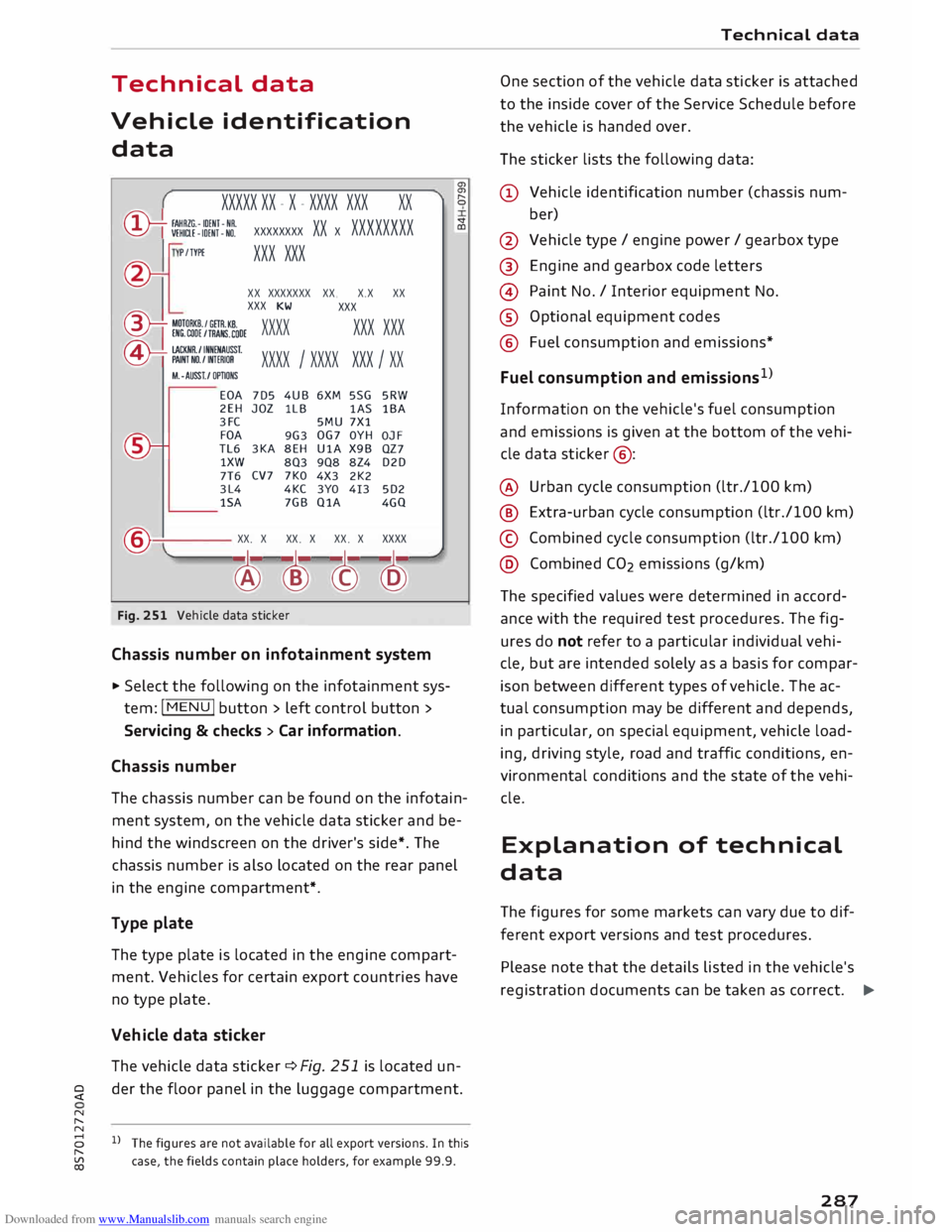
Fig. 251 Vehicle data sticker
Chassis number on infotainment system
... Select the following on the infotainment sys
tem: I MENU I button > left control button >
Servicing & checks > Car information.
Chassis number a,
a,
"
0
V
CD
The chassis number can be found on the infotain
ment system, on the vehicle data sticker and be
hind the windscreen on the driver's side*. The
chassis number is also located on the rear panel
in the engine compartment*.
Type plate
The type plate is located in the engine compart
ment. Vehicles for certain export countries have
no type plate.
Vehicle data sticker
The vehicle data sticker¢ Fig. 251 is located un-
� der
the floor panel in the luggage compartment.
N
,.....
N
8 l}The figures are not available for all export versions. In this
,.....
� case,
the fields contain place holders, for example 99.9. Technical
data
One section of the vehicle data sticker is attached
to the inside cover of the Service Schedule before
the vehicle is handed over.
The sticker lists the following data:
(!) Vehicle identification number (chassis num-
ber)
@ Vehicle type/ engine power/ gearbox type
@ Engine and gearbox code letters
@ Paint No./ Interior equipment No.
® Optional equipment codes
@ Fuel consumption and emissions*
Fuel consumption and emissions 1
>
Information on the vehicle's fuel consumption
and emissions is given at the bottom of the vehi
cle data sticker @:
@ Urban cycle consumption (ltr./100 km)
@ Extra-urban cycle consumption (ltr./100 km)
© Combined cycle consumption (ltr./100 km)
@ Combined CO2 emissions (g/km)
The specified values were determined in accord
ance with the required test procedures. The fig
ures do not refer to a particular individual vehi
cle, but are intended solely as a basis for compar
ison between different types of vehicle. The ac
tual consumption may be different and depends,
in particular, on special equipment, vehicle load
ing, driving style, road and traffic conditions, en
vironmental conditions and the state of the vehi
cle.
Explanation of technical
data
The figures for some markets can vary due to dif
ferent export versions and test procedures.
Please note that the details listed in the vehicle's
registration documents can be taken as correct. .,.
287