infotainment AUDI TT ROADSTER 2016 Service Manual
[x] Cancel search | Manufacturer: AUDI, Model Year: 2016, Model line: TT ROADSTER, Model: AUDI TT ROADSTER 2016Pages: 306, PDF Size: 31.82 MB
Page 108 of 306
Downloaded from www.Manualslib.com manuals search engine Parking
aids
Reversing camera
Introduction
Applies to: vehicles with reversing camera
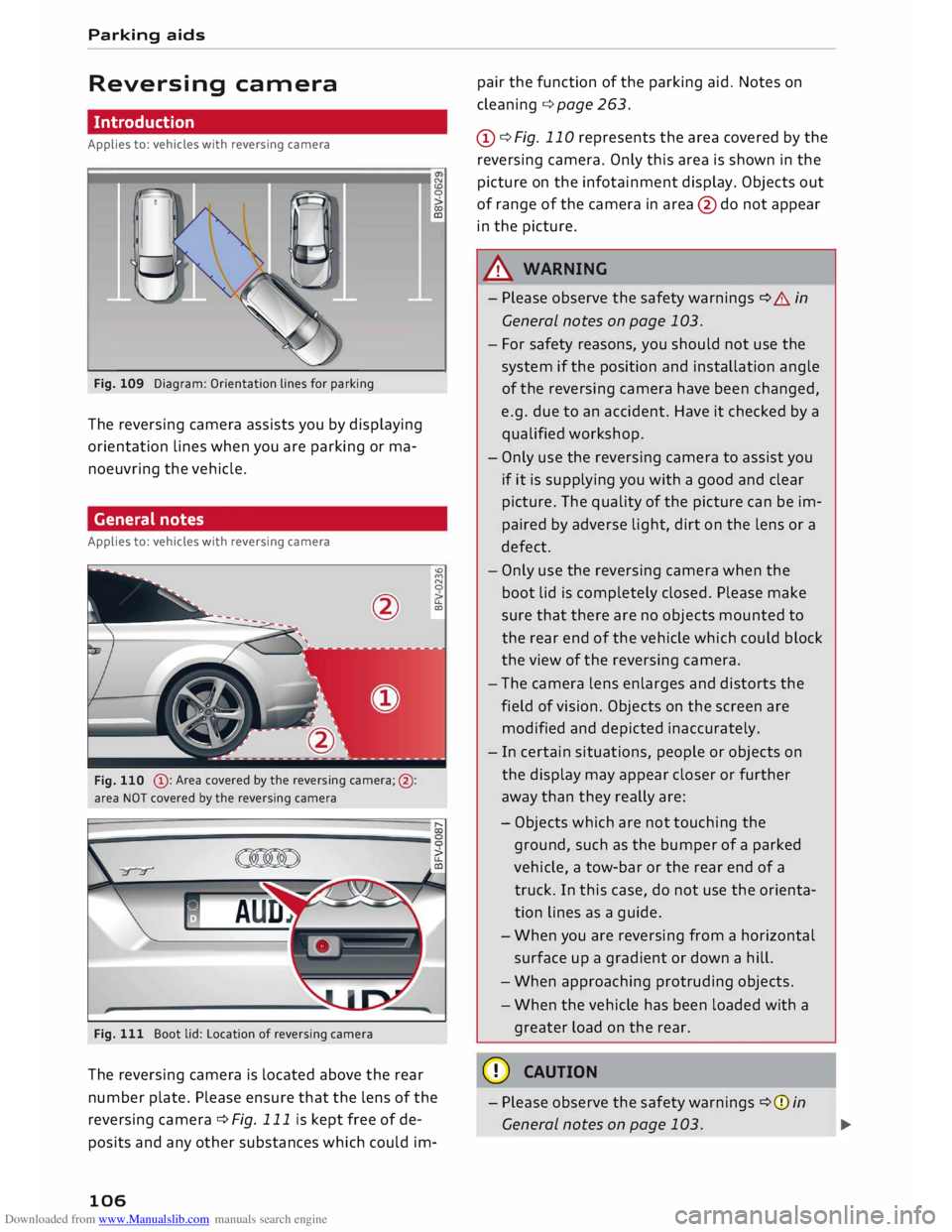
Fig. 109 Diagram: Orientation lines for parking
The reversing camera assists you by displaying
orientation lines when you are parking or ma
noeuvring the vehicle.
General notes
Applies to: vehicles with reversing camera
@ : Area covered by the reversing camera;@:
area NOT covered by the reversing camera
Fig. 111 Boot lid: Location of reversing camera N
CD
0
co
ID
'°
M
N
0
u..
CXl
The reversing camera is located above the rear
number plate. Please ensure that the lens of the
reversing camera ¢ Fig. 111 is kept free of de
posits and any other substances which could im-
106 pair
the function of the parking aid. Notes on
cleaning ¢page 263.
(D ¢ Fig. 110 represents the area covered by the
reversing camera. Only this area is shown in the
picture on the infotainment display. Objects out
of range of the camera in area @do not appear
in the picture.
A WARNING
- Please observe the safety warnings ¢ A in
General notes on page 103.
- For safety reasons, you should not use the
system if the position and installation angle
of the reversing camera have been changed,
e.g. due to an accident. Have it checked by a
qualified workshop.
- Only use the reversing camera to assist you
if it is supplying you with a good and clear
picture. The quality of the picture can be im
paired by adverse light, dirt on the lens or a
defect.
- Only use the reversing camera when the
boot lid is completely closed. Please make
sure that there are no objects mounted to
the rear end of the vehicle which could block
the view of the reversing camera.
- The camera lens enlarges and distorts the
field of vision. Objects on the screen are
modified and depicted inaccurately.
- In certain situations, people or objects on
the display may appear closer or further
away than they really are:
- Objects which are not touching the
ground, such as the bumper of a parked
vehicle, a tow-bar or the rear end of a
truck. In this case, do not use the orienta
tion lines as a guide.
- When you are reversing from a horizontal
surface up a gradient or down a hill.
- When approaching protruding objects.
- When the vehicle has been loaded with a
greater load on the rear.
CD CAUTION
- Please observe the safety warnings ¢(Din
General notes on page 103.
Page 109 of 306
Downloaded from www.Manualslib.com manuals search engine 0
N
,.....
N
......
0
,.....
Vl
CX) -
The orange orientation lines on the infotain
ment display show the path of the rear end
of the vehicle if you were to reverse using
the current steering angle. Please note that
the front end of the vehicle swings out fur
ther than the rear. Please make sure you
keep a sufficient distance between the vehi
cle and any obstacles to make sure that the
exterior mirror or edge of the vehicle do not
collide with the obstacles.
Switching on/off
Applies to: vehicles with reversing camera
Switching on
� Engage
reverse gear, or
� Press the p,,1.4 button in the centre console
¢ page 105, Fig. 107. You will hear a brief ac
knowledgement tone and the LED in the button
will light up.
Switching off
� Drive forwards faster than 10 km/h, or
� Press the p,�.4 button, or
� Switch off the ignition.
(D} Note
- The graphic on the left of the display helps
identify the critical area of the vehicle.
- You can change the display and adjust the
volume of the beeps ¢ page 112.
Parking perpendicular to the roadside
Applies to: vehicles with reversing camera
This view can be used when parking your vehicle
in a garage or parking bay.
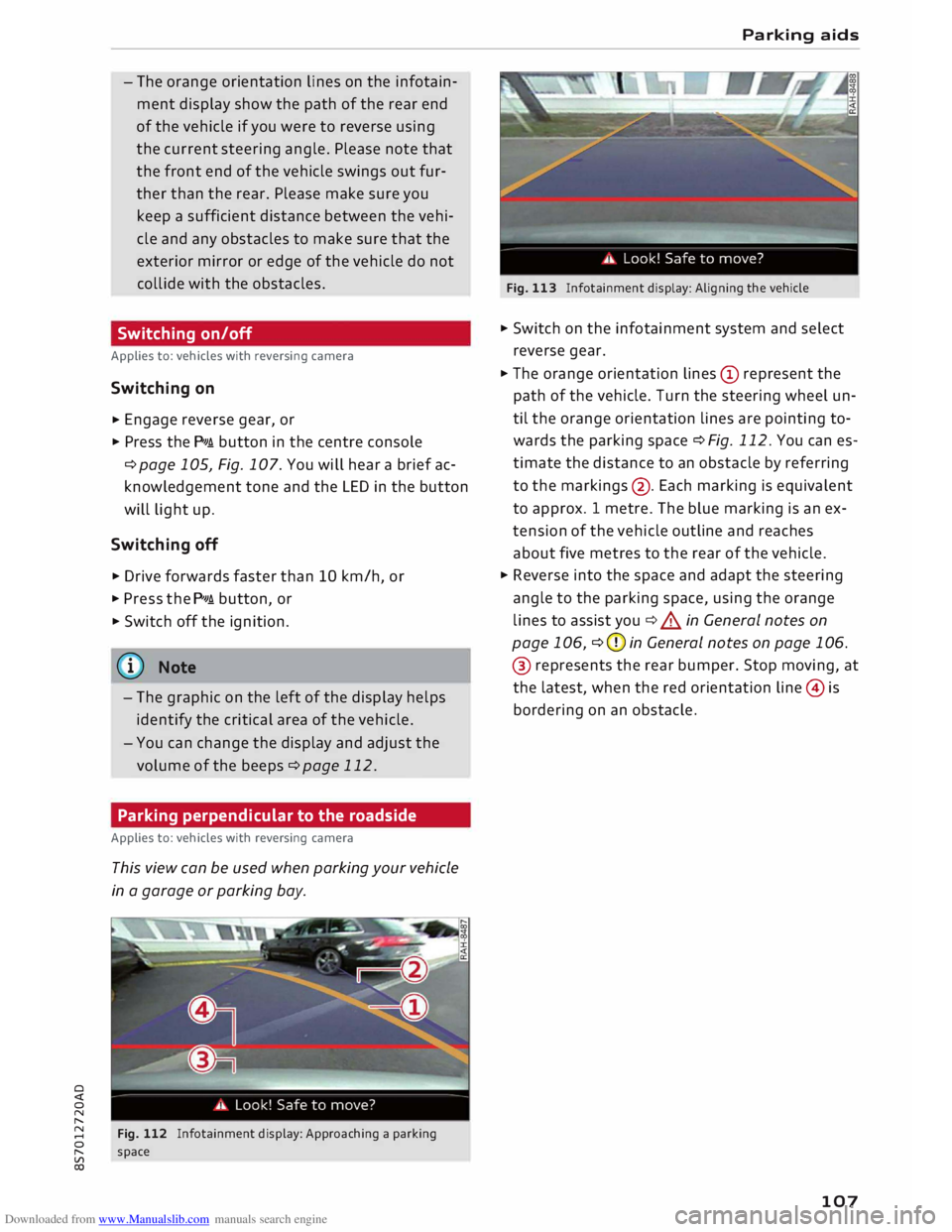
Fig. 112 Infotainment display: Approaching a parking
space Parking
aids
Fig. 113 Infotainment display: Aligning the vehicle
� Switch on the infotainment system and select
reverse gear.
� The orange orientation lines(!) represent the
path of the vehicle. Turn the steering wheel un
til the orange orientation lines are pointing to
wards the parking space ¢Fig. 112. You can es
timate the distance to an obstacle by referring
to the markings @. Each marking is equivalent
to approx. 1 metre. The blue marking is an ex
tension of the vehicle outline and reaches
about five metres to the rear of the vehicle.
� Reverse into the space and adapt the steering
angle to the parking space, using the orange
lines to assist you¢&. in General notes on
page 106, ¢CJ) in General notes on page 106.
® represents the rear bumper. Stop moving, at
the latest, when the red orientation line@ is
bordering on an obstacle.
107
Page 111 of 306
Downloaded from www.Manualslib.com manuals search engine 0
N
,.....
N
......
0
,.....
Vl
CX) -
The park assist cannot be used to park the
vehicle on tight bends.
Switching on and off
Applies to: vehicles with park assist
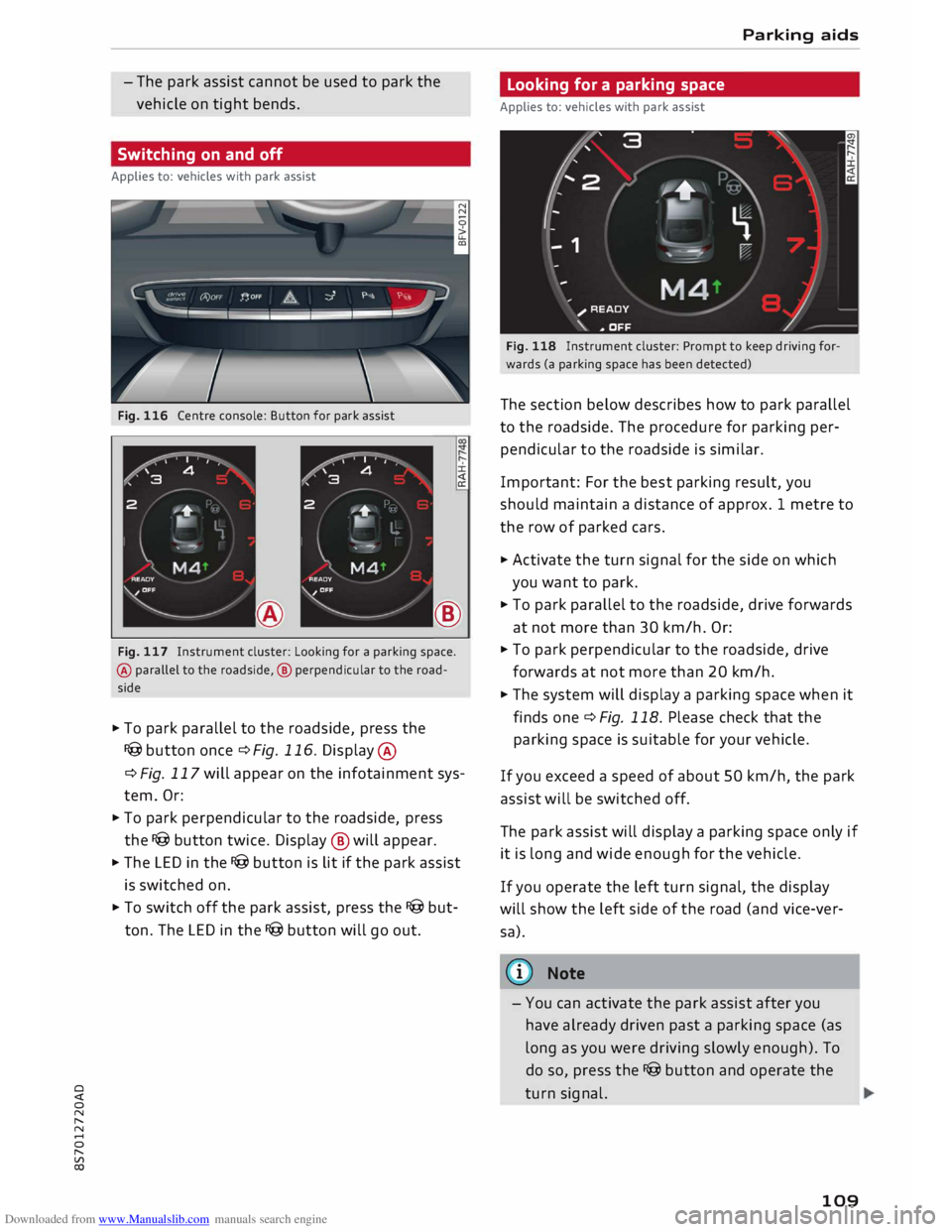
Fig. 116 Centre console: Button for park assist
±.
®
Fig. 117 Instrument cluster: Looking for a parking space.
@ parallel to the roadside, @ perpendicular to the road
side
� To park parallel to the roadside, press the
I@ button once¢ Fig. 116. Display @
¢ Fig. 117 will appear on the infotainment sys
tem. Or:
� To park perpendicular to the roadside, press
the I@ button twice. Display ® will appear.
� The LED in the I@ button is lit if the park assist
is switched on.
� To switch off the park assist, press the I@ but
ton. The LED in the I@ button will go out. Parking aids
Looking for a parking space
Applies to: vehicles with park assist
Fig. 118 Instrument cluster: Prompt to keep driving for
wards (a parking space has been detected)
The section below describes how to park parallel
to the roadside. The procedure for parking per
pendicular to the roadside is similar.
Important: For the best parking result, you
should maintain a distance of approx. 1 metre to
the row of parked cars.
� Activate the turn signal for the side on which
you want to park.
� To park parallel to the roadside, drive forwards
at not more than 30 km/h. Or:
� To park perpendicular to the roadside, drive
forwards at not more than 20 km/h.
� The system will display a parking space when it
finds one¢ Fig. 118. Please check that the
parking space is suitable for your vehicle.
If you exceed a speed of about 50 km/h, the park
assist will be switched off.
The park assist will display a parking space only if
it is Long and wide enough for the vehicle.
If you operate the left turn signal, the display
will show the left side of the road (and vice-ver
sa).
@ Note
- You can activate the park assist after you
have already driven past a parking space (as
Long as you were driving slowly enough). To
do so, press the I@ button and operate the
turn signal.
109
Page 114 of 306
Downloaded from www.Manualslib.com manuals search engine Parking
aids
After you select reverse gear, the vehicle has to
remain stationary for a moment so that the park
assist can activate the steering. Follow the direc
tions given in the display.
II Park assist: fault. Please contact workshop
Ill Park assist: fault. Continue steering vehicle!
Please contact workshop
Please contact a qualified workshop. The park as
sist cannot be used to park the vehicle if a system
fault occurs.
II Park assist: cancelled. Space too small. Con
tinue steering vehicle!
The park assist cannot be used to park the vehicle
in this space. Park the vehicle without using the
park assist or look for a bigger space.
Adjusting graphic display
and warning beeps
Applies to: vehicles with parking system plus/park assist
The settings for the graphic display and acoustic
signals are controlled via the infotainment sys
tem.
.. Select the following on the infotainment sys
tem: I MENU I button > Car > left control button
> Driver assist> Parking aid.
Warning beeps
Front volume -Volume for the front and side*
zones
Rear volume -Volume for the rear zone
In-car entertainment fader -The volume of the
current audio or video source is reduced when the
parking aid is switched on.
You will hear a short test tone each time you
make a new setting.
� Note
The settings will be automatically stored and
assigned to the remote control key in use.
112 Fault
warnings
Applies to: vehicles with rear parking aid/parking system
plus/park assist
Rear parking aid: fault. Obstacles cannot be de
tected
Parking aid: fault. Obstacles cannot be detected
If the LED in the P,J1A button starts flashing when
you switch the system on, a system fault has oc
curred. If the fault is not corrected before you
switch off the ignition, it will only be indicated by
the flashing LED in the P'),IA button the next time
you switch on the parking aid by engaging re
verse gear. The fault warning can be displayed in
the second tab of the driver information system
as long as the fault is active.
Parking system plus*/parking system plus
and park assist*
If a sensor or loudspeaker malfunctions, the�
symbol will be shown on the infotainment sys
tem in front of or behind the vehicle. If a rear
sensor malfunctions, obstacles will only be dis
played in zones (D and @ ¢page 104, Fig. 106.
If a front sensor malfunctions, obstacles will only
be displayed in zones @ and @ .
Drive to a qualified workshop soon and have the
fault rectified.
Page 121 of 306
Downloaded from www.Manualslib.com manuals search engine 0
N
,.....
N
......
0
,.....
Vl
CX) consumed,
but only a small amount is supplied.
The situation is also critical if electrical equip
ment is in use when the engine is not running. In
this case power is consumed when none is being
generated.
In these situations you will be aware that the
power management system is intervening to con
trol the distribution of electrical power.
When the vehicle is parked for long periods
If you do not drive your vehicle for a period of
several days or weeks, the power management
will gradually shut off the on-board systems one
by one, or reduce the amount of current they are
using. This limits the amount of power consumed
and helps to ensure reliable starting even after a
long period. Certain convenience features, such
as remote control unlocking, may not be availa
ble. These functions will be restored when you
switch on the ignition and start the engine.
With the engine switched off
If you listen to the radio or use the other info
tainment functions when the engine is not run
ning, this will discharge the vehicle battery.
The infotainment display will show a warning
message before the battery power drops to a lev
el where the starting ability is impaired. This
message warns you that the system you are using
will soon be switched off automatically. You
should therefore start the engine if you wish to
continue using the system.
When the engine is running
Although the alternator generates electrical
power, the vehicle battery can still become dis
charged while the vehicle is being driven. This can
occur when a lot of power is being consumed but
only a small amount supplied, especially if the
vehicle battery is not fully charged initially.
To restore the necessary energy balance, the sys
tem will then temporarily shut off the electrical
components that are using a lot of power, or re
duce the current they are consuming. Heating
systems in particular use a large amount of elec
trical power. If you notice, for instance, that the
seat heating* or the rear window heater is not Intelligent
technology
working, they may have been temporarily switch
ed off or regulated to a lower heat output. These
systems will be available again as soon as suffi
cient electrical power is available.
You may also notice that the engine runs at a
slightly faster idling speed. This is quite normal,
and no cause for concern. The increased idling
speed allows the alternator to meet the greater
power requirement and charge the vehicle bat
tery at the same time.
Information saved in the
control units
The vehicle is fitted in the factory with electronic
control units that, among other things, control
the engine and the gearbox. The control units al
so monitor the exhaust system and the airbags.
The control units continually analyse data rele
vant to the vehicle while you are driving. In the
event of faults or anomalies in the vehicle data,
only these data are saved. As a rule, faults are
shown by the warning lamps in the instrument
cluster.
Data saved in the control units can only be read
and analysed with special equipment.
A qualified workshop is only able to recognise
and deal with faults by using the relevant saved
data. Among other things, the saved data may
contain the following information:
- Data relating to the engine and the gearbox
-Speed
- Direction of travel
- Braking force
- Seat belt warning system data
The control units installed will not under any cir
cumstances record conversations in the vehicle.
Event data recorder
Your vehicle is not equipped with an event data
recorder.
In an event data recorder, information about
the
vehicle is temporarily saved. In the event of an
accident, you can therefore obtain detailed infor-
mation about the course of events. On vehicles ...,.
119
Page 123 of 306
Downloaded from www.Manualslib.com manuals search engine Multi
Media Interface
Notes on traffic safety
You should only use certain infotainment system
functions, e.g. enter a navigation destination,
while the vehicle is stationary. Always be pre
pared to stop operating the infotainment system
in the interest of your own safety and that of oth
er road users.
A WARNING
Only operate the infotainment system when
the traffic conditions allow you to do so safely
and when you can maintain proper control of
your vehicle -risk of accident!
(©) Note
Certain functions are not available while the
vehicle is in motion.
Introduction The Multi Media Interface (MMI) combines dif
ferent communication, navigation* and enter
tainment systems in your Audi. You can operate
your MMI system via the MMI control console,
the multi-function steering wheel or the speech
dialogue system*.
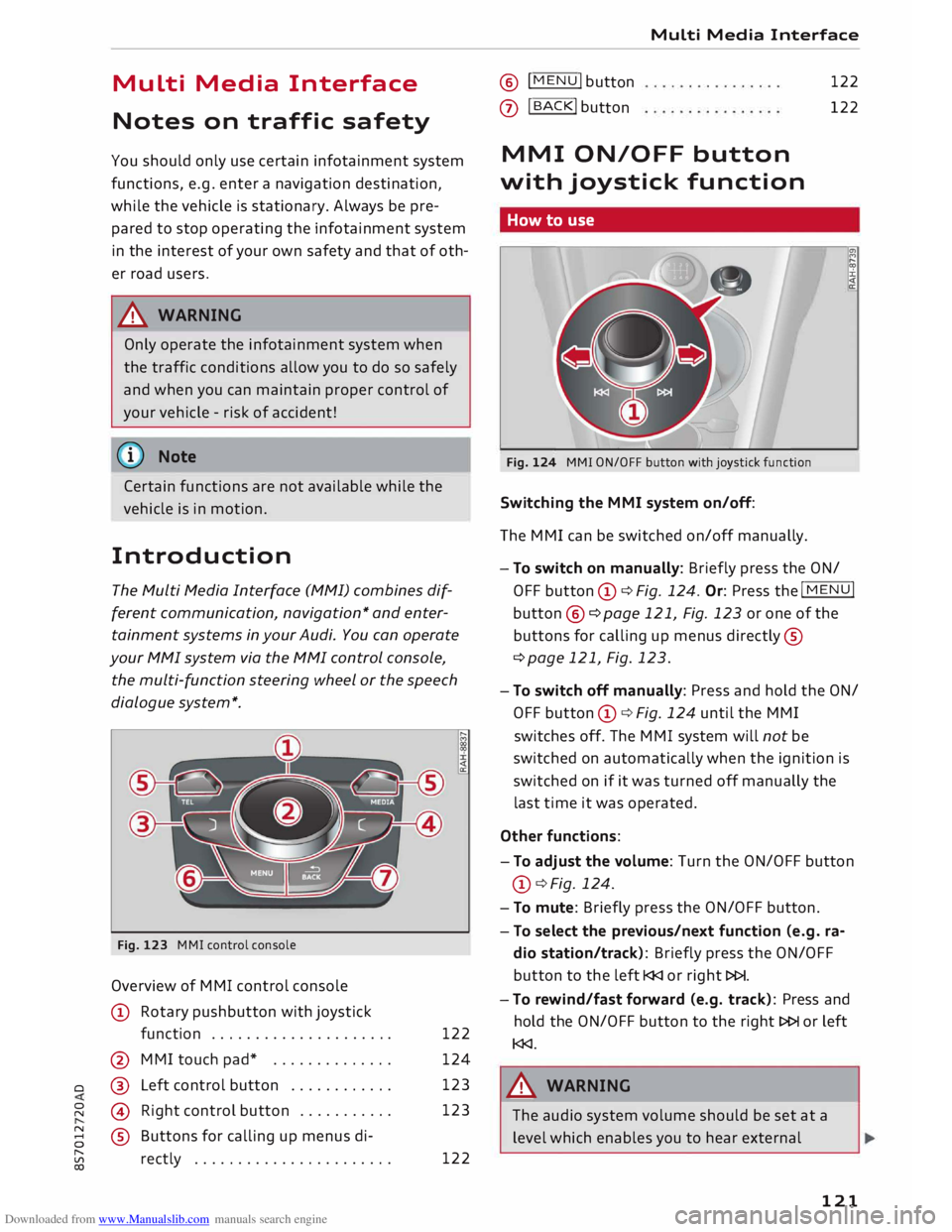
Fig. 123 MMI control console
Overview of MMI control console
CD Rotary pushbutton with joystick
function .................... .
@ MMI touch pad* ............. .
o @
Left control button ........... . 122
124
123
123
� @
Right control button .......... .
8 ®
Buttons for calling up menus di-
� rectly ...................... . 122 Multi
Media Interface ® !
MENU! button
0
I BACK! button
122
122
MMI ON/OFF button
with joystick function
How to use
Fig. 124 MMI ON/OFF button with joystick function
Switching the MMI system on/off:
The MMI can be switched on/off manually. l?l
:;;
:i:
<(
a:
- To switch on manually: Briefly press the ON/
OFF button CD¢ Fig. 124. Or: Press the I
MENU!
button ®
¢page 121, Fig. 123 or one of the
buttons for calling up menus directly ®
¢ page 121, Fig. 123.
- To switch off manually: Press and hold the ON/
OFF button CD¢ Fig. 124 until the MMI
switches off. The MMI system will not be
switched on automatically when the ignition is
switched on if it was turned off manually the
last time it was operated.
Other functions:
- To adjust the volume: Turn the ON/OFF button
CD ¢ Fig. 124.
- To mute: Briefly press the ON/OFF button.
- To select the previous/next function (e.g. ra-
dio station/track): Briefly press the ON/OFF
button to the left l
- To rewind/fast forward (e.g. track): Press and
hold the ON/OFF button to the right l>l>I or left
l
The audio system volume should be set at a
level which enables you to hear external
121
Page 125 of 306
Downloaded from www.Manualslib.com manuals search engine Calling
up the selection/options menu with
the control buttons
You can use the selection menu to call up further
functions for individual menu items (e.g. radio).
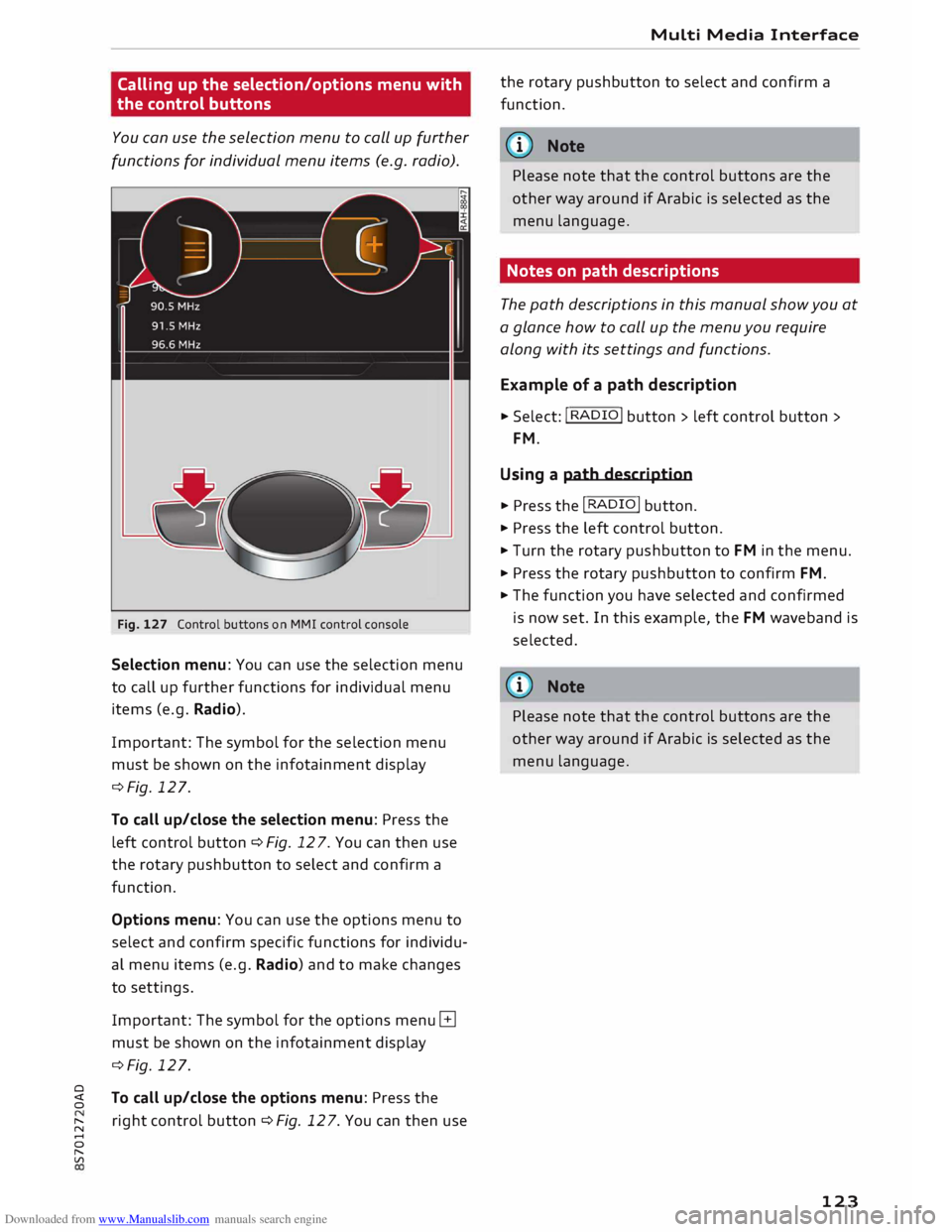
Fig. 127 Control buttons on MMI control console
Selection menu: You can use the selection menu
to call up further functions for individual menu
items (e.g. Radio).
Important: The symbol for the selection menu
must be shown on the infotainment display
¢Fig. 127.
To call up/close the selection menu: Press the
left control button ¢ Fig. 12 7. You can then use
the rotary pushbutton to select and confirm a
function.
Options menu: You can use the options menu to
select and confirm specific functions for individu
al menu items (e.g. Radio) and to make changes
to settings.
Important: The symbol for the options menu G
must be shown on the infotainment display
¢Fig. 127.
0
� To
call up/close the options menu: Press the
� right
control button ¢ Fig. 12 7. You can then use
......
0
"
Vl Multi
Media Interface
the rotary pushbutton to select and confirm a
function.
{(D Note
Please note that the control buttons are the
other way around if Arabic is selected as the
menu language.
Notes on path descriptions
The path descriptions in this manual show you at
a glance how to call up the menu you require
along with its settings and functions.
Example of a path description
.,. Select: I RADIO! button> left control button>
FM.
Using a path description
.,. Press the I RADIO I button .
.,. Press the left control button .
.,. Turn the rotary pushbutton to FM in the menu .
.,. Press the rotary pushbutton to confirm FM .
.,. The function you have selected and confirmed
is now set. In this example, the FM waveband is
selected.
@ Note
Please note that the control buttons are the
other way around if Arabic is selected as the
menu language.
123
Page 126 of 306
Downloaded from www.Manualslib.com manuals search engine Multi
Media Interface
MMI touch
MMI touch pad
You can enter data on the MMI touch pad with
the help of handwriting recognition.
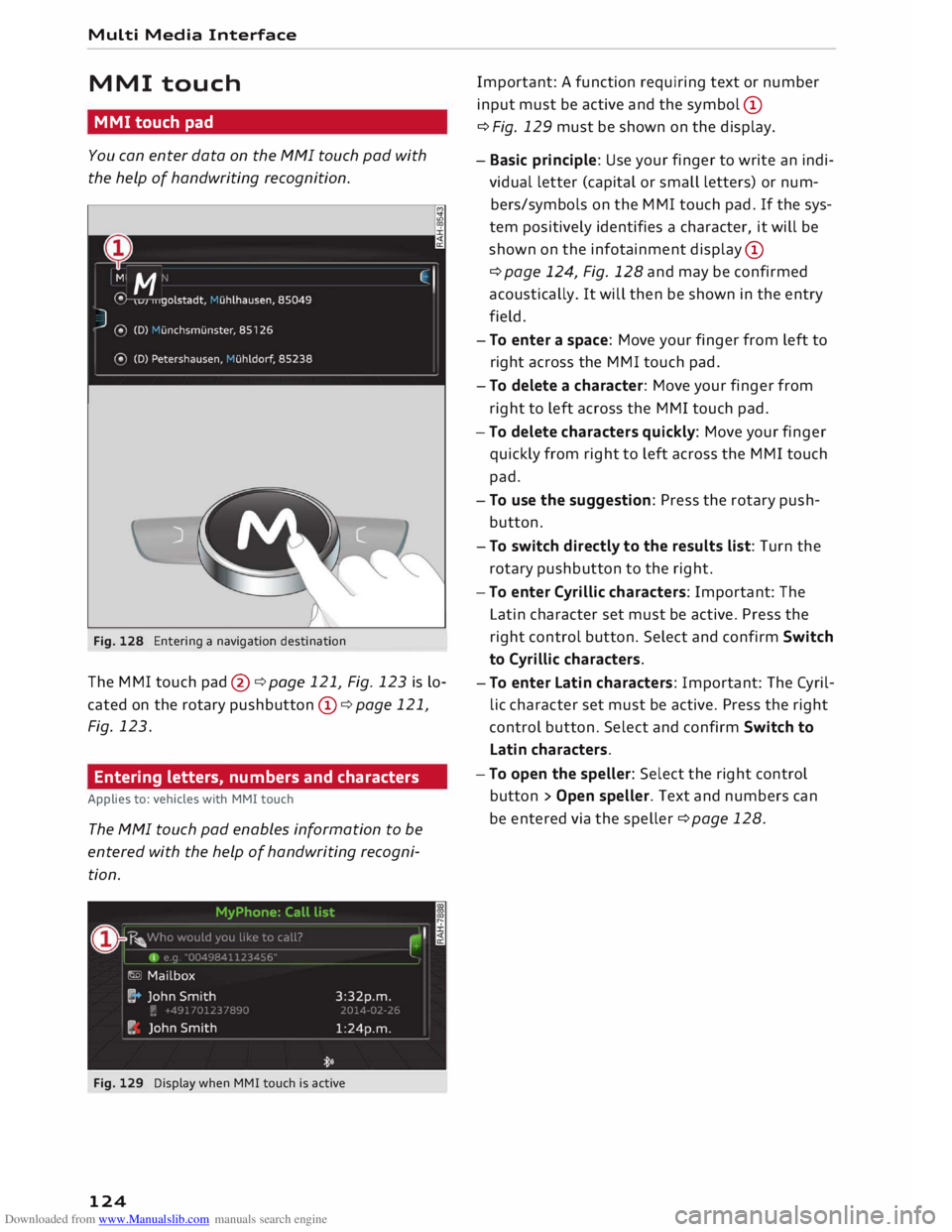
Fig. 128 Entering a navigation destination
The MMI touch pad@¢page 121, Fig. 123 is lo
cated on the rotary pushbutton @¢ page 121,
Fig. 123.
Entering letters, numbers and characters
Applies to: vehicles with MMI touch
The MMI touch pad enables information to be
entered with the help of handwriting recogni
tion.
Fig. 129 Display when MMI touch is active
124 Important:
A function requiring text or number
input must be active and the symbol @
¢ Fig. 129 must be shown on the display.
- Basic principle: Use your finger to write an indi
vidual letter (capital or small letters) or num
bers/symbols on the MMI touch pad. If the sys
tem positively identifies a character, it will be
shown on the infotainment display@
¢ page 124, Fig. 128 and may be confirmed
acoustically. It will then be shown in the entry
field.
- To enter a space: Move your finger from left to
right across the MMI touch pad.
- To delete a character: Move your finger from
right to left across the MMI touch pad.
-To delete characters quickly: Move your finger
quickly from right to left across the MMI touch
pad.
- To use the suggestion: Press the rotary push
button.
- To switch directly to the results list: Turn the
rotary pushbutton to the right.
-To enter Cyrillic characters: Important: The
Latin character set must be active. Press the
right control button. Select and confirm Switch
to Cyrillic characters.
- To enter Latin characters: Important: The Cyril
lic character set must be active. Press the right
control button. Select and confirm Switch to
Latin characters.
- To open the speller: Select the right control
button > Open speller. Text and numbers can
be entered via the speller ¢ page 128.
Page 132 of 306
Downloaded from www.Manualslib.com manuals search engine Multi
Media Interface
If the desired term is not yet displayed, continue
entering letters until it appears.
The first few letters of the search terms will of
ten be sufficient to bring up a list of results. In
the Telephone* menu, for example, write the ini
tials of the contact you are looking for, separat
ing them with a space.
Confirming an autocomplete suggestion
Important: An autocomplete suggestion@
¢ Fig. 136 must be displayed .
... When using MMI touch: Press the rotary push
button.
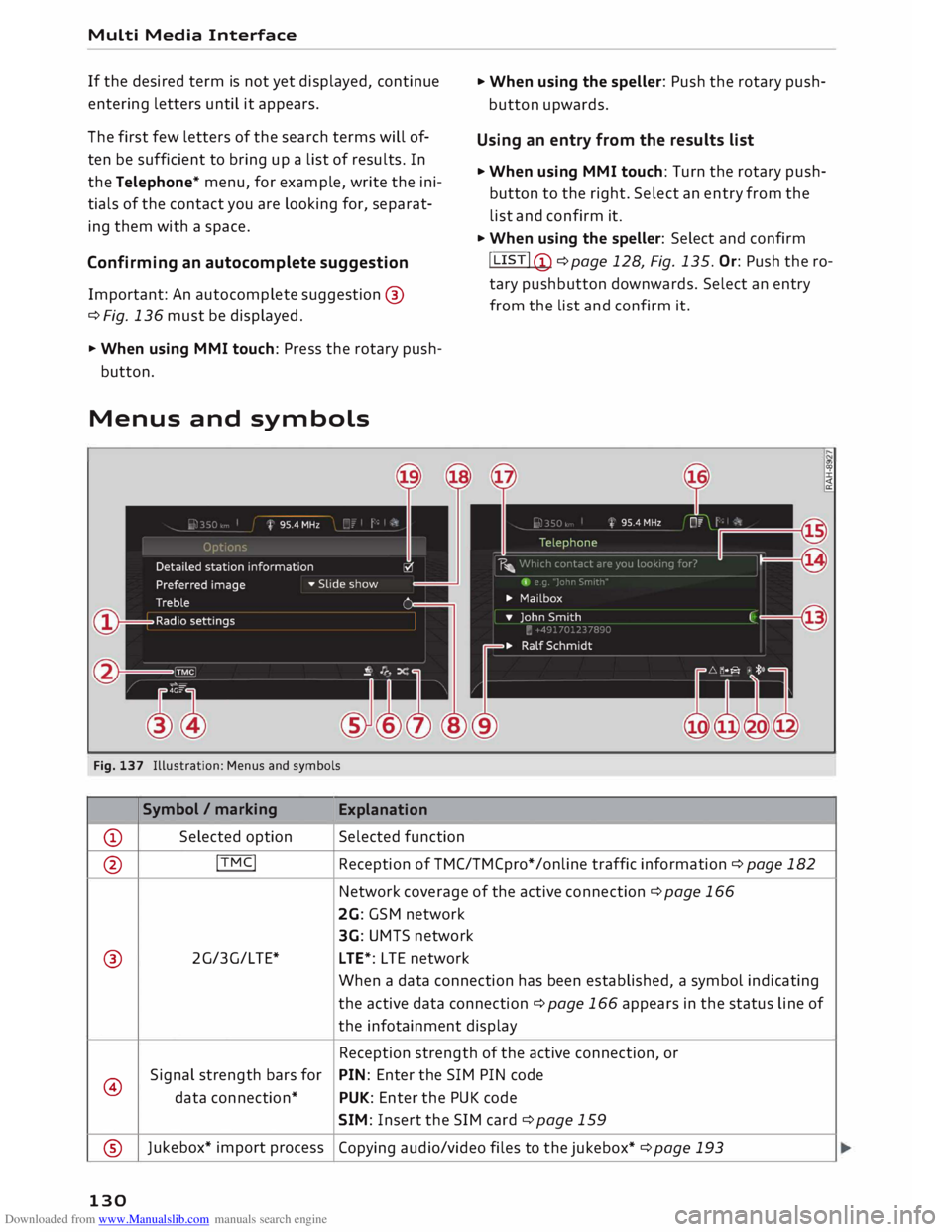
Menus and symbols
Fig. 137 Illustration: Menus and symbols
Symbol / marking
Explanation
CD Selected
option Selected function ...
When using the speller: Push the rotary push
button upwards.
Using an entry from the results list
... When using MMI touch: Turn the rotary push
button to the right. Select an entry from the
list and confirm it.
... When using the speller: Select and confirm
! LIST! (!)
¢page 128, Fig. 135. Or: Push the ro
tary pushbutton downwards. Select an entry
from the list and confirm it.
@ !TMC!
Reception of TMC/TMCpro* /on line traffic information ¢ page 182
Network coverage of the active
connection
¢ page 166
2G: GSM network
3G: UMTS network
® 2G/3G/LTE*
LTE*: L TE network
When a data connection has been established, a symbol indicating
the active data connection ¢page 166 appears in the status line of
the infotainment display
Reception strength of the active connection, or
@ Signal
strength bars for PIN:
Enter the SIM PIN code
data connection* PUK:
Enter the PUK code
SIM: Insert the SIM card¢ page 159
® Jukebox*
import process
Copying audio/video files to the jukebox* ¢ page 193
130
Page 135 of 306
Downloaded from www.Manualslib.com manuals search engine 0
N
,.....
N
....
0
,.....
Vl
CX) Speech
dialogue system
How to use the speech
dialogue system
Applies to: vehicles with speech dialogue system
You can operate many infotainment functions
conveniently by voice.
Important: The ignition and the MMI system
must be switched on, you must not be talking on
the phone, and the parking aid must not be ac
tive.
� To switch on: Briefly press the [2!l button @ on
the multi-function steering wheel¢ page 23,
Fig. 10 and give a spoken command after the
beep signal.
� To switch off: Press and hold the [2!l button for
several seconds. Or: Say the command Cancel.
� To pause: Say the command Pause. To end the
pause, press the [2!l button.
� To make a correction: Press the� button once
® ¢page 21, Fig. 8. Or: Say the command Cor
rection.
Input help
The system guides you through the input routine
with cues and messages.
- Input help messages on screen: After the
speech dialogue system is switched on, a selec
tion of possible commands will be shown. The
command display can be switched on/off via
IM ENU I
> Settings > left control button > MMI
settings > Speech dialogue system.
- Spoken input help cues: To have the system
play the commands currently possible, press
the [2!l button on the multi-function steering
wheel and say Help.
How to help the system understand you
Speak clearly in a normal volume. Speak louder if
you are driving fast.
Speak in a normal tone without long pauses.
Avoid speaking when the speech dialogue system
is saying a cue. Speech
dialogue system
Close doors and windows and soft top* to reduce
background noise. Make sure that passengers are
not talking when you say a command.
Keep the air outlets of the air distribution system
pointed away from the microphone, which is fit
ted in the vicinity of the front interior lights in
the headliner/on the driver's seat belt*. For more
information about the seat belt microphone, re
fer to¢ page 157.
The system should only be operated by the driv
er, since the handsfree microphone is directed
towards the driver.
Other settings
Refer to¢ page 218, Speech dialogue system.
&_ WARNING
- Please direct your full attention to the road
at all times! As the driver, you have full re
sponsibility for the safety of the vehicle and
other road users. For this reason, you should
only use the functions in a manner that al
lows you to maintain control of the vehicle
in all situations -accident risk!
- The speech dialogue system must not be
used in cases of emergency, since the voice
changes in stressful situations. This could
result in a failed or delayed telephone con
nection. Always dial emergency numbers
manually!
(@ Note
- The dialogue is paused when an incoming
telephone call is received; you can continue
the dialogue by ignoring the call. If you an
swer the call, the dialogue will be cancelled.
- No navigation cues* or traffic announce
ments* are played when a dialogue is active.
- You can select an entry from a list both via
the speech dialogue system and using the
rotary pushbutton.
- The speech dialogue system does not sup
port commands in Arabic, Norwegian or
Hungarian.
133