battery AUDI TT ROADSTER 2017 User Guide
[x] Cancel search | Manufacturer: AUDI, Model Year: 2017, Model line: TT ROADSTER, Model: AUDI TT ROADSTER 2017Pages: 314, PDF Size: 76.54 MB
Page 56 of 314
Warm and cold
1- 1 Switching recirculation mode on and off
The recirculation mode can be turned on manual
ly or automat ically*.
- Switching manual recirculation mode on and
off: press
1- 1
- Automat ic* recirculation mode: auto rec ircula
tion needs to be activated in the Infotainmen t
system. Select in the Infotainment system:
IMENUI button> Vehicle> left control button
>Vehicle settings> Air conditioning > Auto re
circulation .
The air quality sensor that is de
signed for diese l and gasoline exhaust auto
matically sw itches the recirculation mode on or
off depend ing on the level of pollutants in the
outside air.
In recirculation mode, the air inside the vehicle is
circu lated and filtered. This prevents the unfil
tered a ir outside the vehicle from entering the
veh icle inter ior . We recommend switching recir
culation mode on when dr iv ing through a tunnel
or when s itting in traffic
q Le,..
Recirculation mode is switched off by pressing
the ~ button or
I AU TO I or ,..., MAX L
I@ MAX I Switching defrost on and off
The windshield and s ide windows are defrosted
or cleared of condensation as quickly as possible.
The optimum amount of air flows mainly out of the vents under the windshield. Recirculation
mode switches off . The temperature is controlled
automatically .
The
IAUTOI button switches the defroster off.
IQiil REAR ! Switching the rear window defogger
on and off
If the rear w indow defogger is activated when
the ignition is switched on, the battery manage
ment determines based on the battery charge if
it is possible to turn on. Ot he rwise, the rear win
dow defogger functions with the engine running
and switches off automatically after approxi
mately 10 - 20 minutes, depending on the out
side temperature.
To prevent the rear w indow defogger from
sw itching off automatically, press and hold the
I@ REARI button for more than two seconds. This
54
remains stored up to approximately 15 minutes
after turning off the ignition.
A WARNING
You should not use the recirculation mode for
an extended period since no fresh air is drawn
in. With the air-conditioning switched off, t he
windows can fog up, which increases the risk
of an acc ident.
Adjusting the air vents
Fig. 62 Cockpit: adju sting the a ir vents
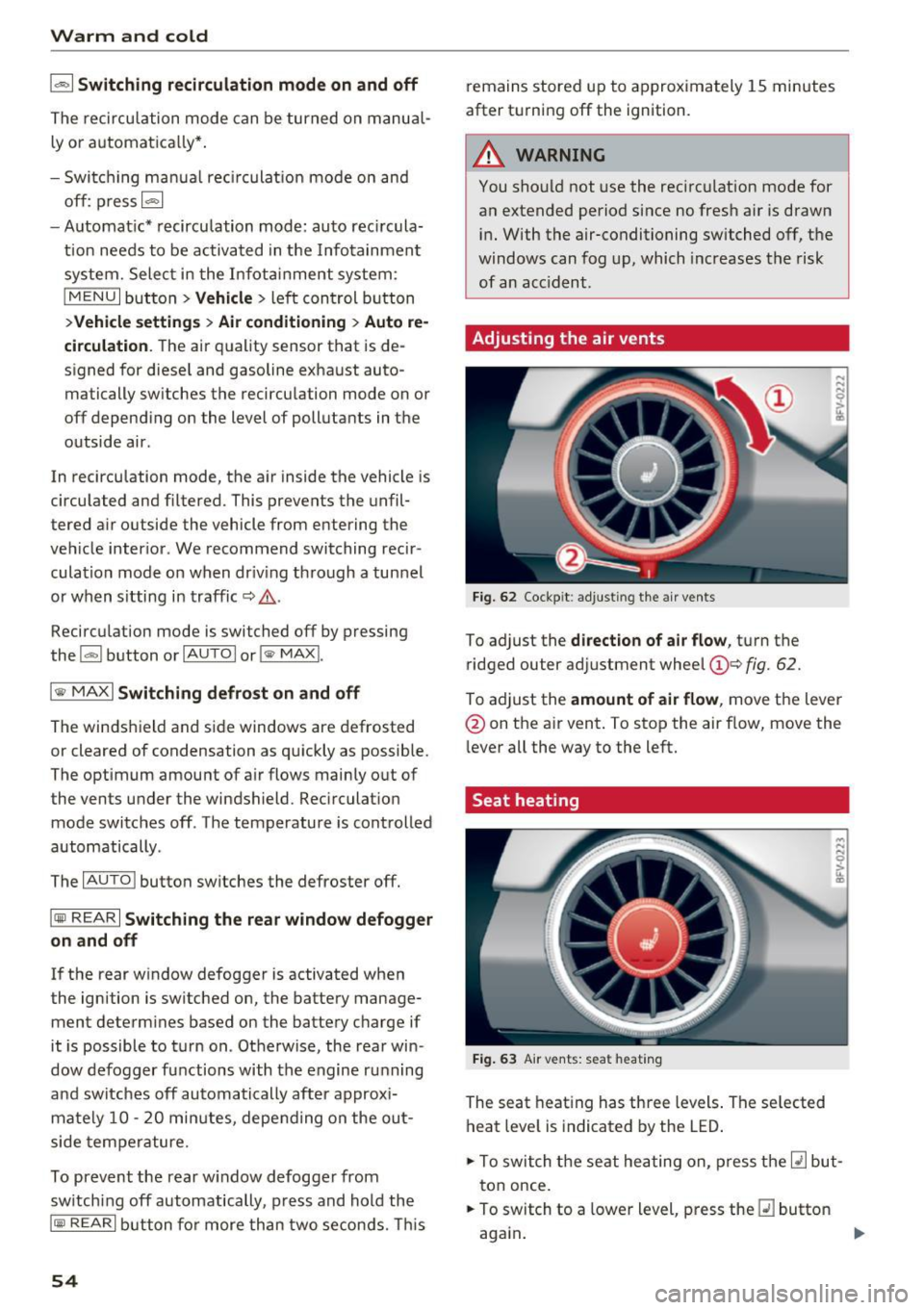
To adjust the direction of air flow, turn the
ridged outer adjustment wheel
©Q fig. 62.
To ad just the amount of air flow , move the lever
@ on the air vent . To stop the air flow, move the
l ever all the way to the left.
Seat heating
Fig. 63 Air vents: seat heat ing
The seat heating has three levels. The selected
heat level is indicated by the LED .
.. To switch the seat heating on, press the
Q] but
ton once.
.. To switch to a lower level, press the
Q] button
again .
Ill>
Page 58 of 314
Warm and cold
switched on. This can cause burns on unpro
tected skin exposed directly to the vents.
(D Tips
- The fan speed is always lower when the
power top is closed than when it is open.
- Energy management
qpage 93 may re
duce the heat output if the battery voltage i s too low .
56
Page 62 of 314
Driving
-Never turn off the engine before the vehicle
has come to a complete stop.
- The brake booster and power steering only
work when the engine is running. If the en
gine is
off, you have to use more force when
steering or braking. Because you cannot
steer and brake as you usually would, this
could lead to accidents and serious injuries.
(D Note
Avoid high engine speed, full throttle, and
heavy engine load if the engine has not
reached operating temperature yet. You could
damage the engine.
@ For the sake of the environment
Do not let the engine run while parked to
warm up. Begin driving immediately . This re
duces unnecessary emissions.
{D) Tips
-Some noise after starting the engine is nor
mal and is no cause for concern.
- If you leave the vehicle with the ignition
switched on, the ignition will switch
off af
ter a certain amount of time . Make sure that
electrical equipment such as the exterior
lights are switched
off.
Stopping the engine
.,. Bring the vehicle to a full stop.
.,. Move the selector lever into the P position .
... Press the
I START ENGINE STOPI button
¢ page 59, fig. 67.
Emergency off function*
If it is absolutely necessary, the engine can also
be turned
off while driving at speeds starting at
4 mph (7 km/h). To switch the engine
off, press
the
! START ENGINE STOPI button twice in a row
briefly or press and hold for longer than two sec
onds.
_&. WARNING
- Never turn off the engine before the vehicle
has come to a complete stop.
60
- Please note that the brake booster and pow
er steering only work when the engine is
running. When the engine
off, you must use
more force to steer or brake the vehicle. Be
cause the usual steering and braking capa
bility is not available, the risk of accidents or
. . . . mJunes increases.
- For safety reasons, always park the vehicle
with the selector lever in the P position.
Otherwise, there is the risk that the vehicle
could roll.
- After the engine has been switched off, the
radiator fan can continue to run for up to 10
minutes -even with the ignition switched
off. It can also switch on again after some
time if the coolant temperature rises as the
result of heat buildup or if the engine is al
ready warm and the engine compartment is
also heated by the sun's rays.
(D Note
If the engine has been under heavy load for
an extended period of time, heat builds up in
the engine compartment after th@ engine is
switched
off and there is a risk of damaging
the engine . For this reason, let the engine run
at idle for approximately two minutes before
shutting it
off.
Messages
Turn off ignition before leaving vehicle. Battery
is discharging
This message appears and a warning tone sounds
if you open the driver's door when the ignition is
switched on. Switch the ignition
off so that the
battery will not discharge.
Pressing start/stop button again will switch off
engine.
This message appears when you press the
I START ENGIN E STOP ! button while driving.
Engine start system: malfunction! Please con
tact Service
The engine automatic start system has a mal
function. Drive to an authorized Audi dealer or
autho rized Audi Service Facility immediately to
IJlo-
Page 63 of 314
CD
CD
.... N
" N ...... 0 r--. V, co
have the malfunction corrected. To start the en
gine, press and hold the
! START ENGINE STOPI
button.
DJ R emot e control key : hold b ack of key
again st the d esignated are a. See owner's man
ual
This message appea rs if the re is no convenie nce
key inside the vehicle or if the system does not
recognize the key . The conven ience key may not
be recognized, for example, if it is cove red by an
object that
disrupts the signal (such as a brief
case), or if the key battery is weak. Electronic de
vices such as cell phones can also interfere with
the signal.
To still be able to start or stop the eng ine, see
c:::> page 61, Starting the engine when there is a
malfunction .
Ill Remote control key : key not recogn ized . Is
the ke y still in th e vehi cle?
The Ill ind icator light turns on and this message
appears if the conve nience key was removed from
the vehicle when the engine was running.
If the
conven ience key is no longer in the vehicle, you
cannot switch the ign ition on or start the engine
once you stop it. You a lso cannot lock the vehicle
from the outside .
Please press brake p edal
This message appears if you do not press the
brake pedal when starting the eng ine.
Please pr ess clut ch p edal
This message appea rs in vehicles w it h manual
transmissions if you do not press the clutch pedal
when sta rting the engine . The engine can on ly be
started when t he clu tch pedal is pressed.
Pl ease select N or P
This message appea rs when starting or stopping
the eng ine if the selector lever is not in the Nor P
position . The engine will not start/stop.
Shift to P , otherw ise vehi cle can roll awa y.
Doors can be lo cked i n P only
This message appears for safety reasons a long
with a warning tone. It appears if the selector
lever for the automatic transmission is not in the
D rivi ng
P position when switch ing the ignit ion off w ith
the
I START ENGINE STOPI b utton. P lace these
l ector lever in the P position. The veh icle cou ld
roll if the lever is not in P. You also cannot lock
the vehicle using the locking sensor on the door handle or using the conven ience key .
Starting the engine when there is a
malfunction
It may not be possible to start the engine under
certain circumstances, for example if th e battery
in the vehicle key is drained, if interference is af
fected the key or if there is a system malfunc
tion.
F ig. 68 Steering column/ remote control key: starting the
e n g in e if there is
a m alfunct ion
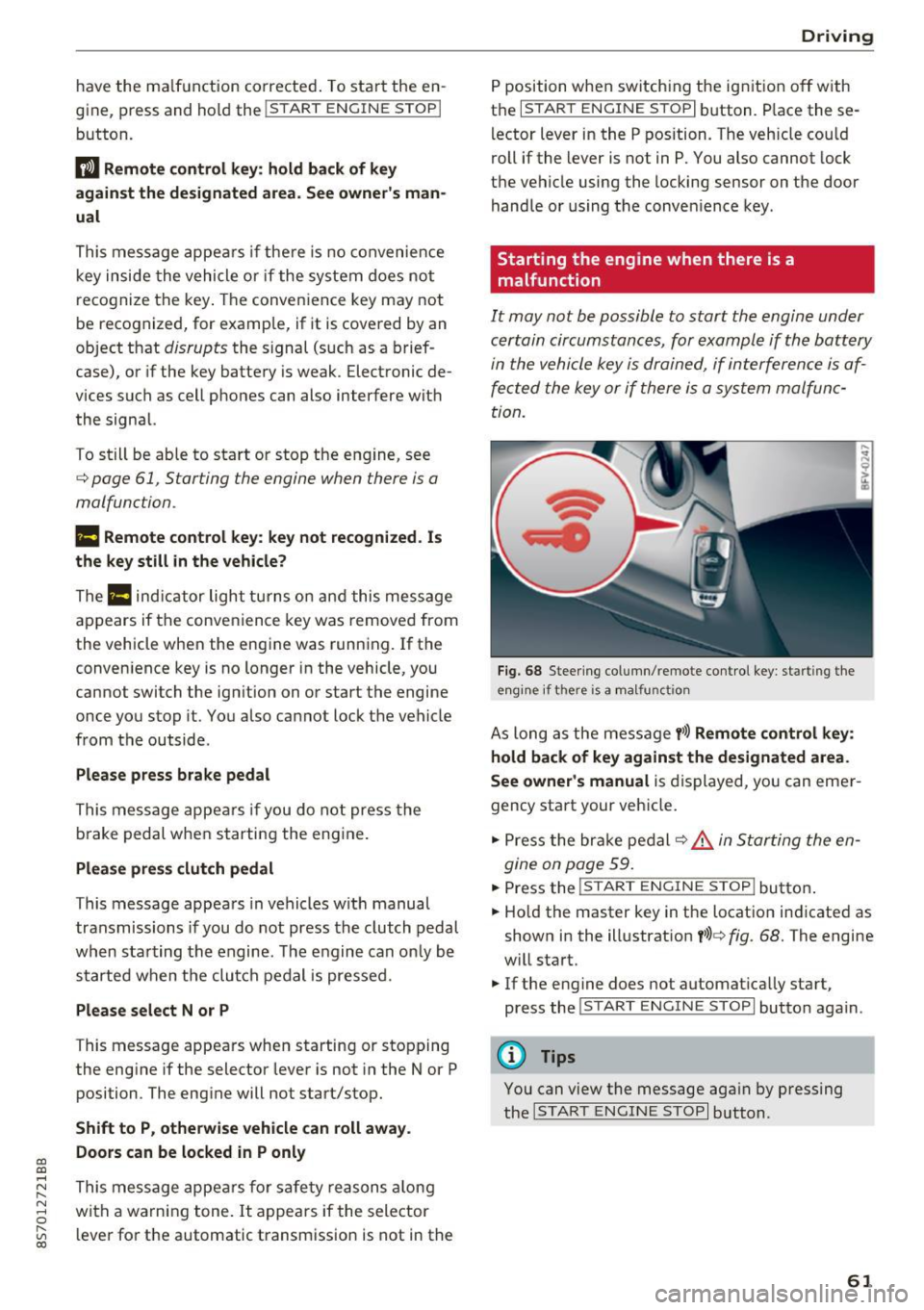
As long as the message y >l) Remote control key :
hold back of key against the designated are a.
See owner's manual
is displayed, you can emer
gency start your vehicle.
.. Press the brake pedal
c:::> .&. in Starting the en
gine on page 59.
... Press the ~I s=T ~A ~ R~ T~ E_N _G _I _N =E - S~ T= o- P~I button .
.,. Ho ld the master key in the location ind icated as
shown in the illustrat ion
y >l) c:::, fig. 68. The engine
w ill start.
.. If the engine does not automat ica lly start,
press the
! S TART ENGINE STOPI butto n again .
(D Tips
You can view the message aga in by pressing
the
I S TA RT ENGINE S TOP I button.
61
Page 73 of 314
CD
CD
.... N
" N ,-I 0
" V, co
Selector lever emergency release
If the vehicle's power supply fails, the selector lever can be released in an emergency.
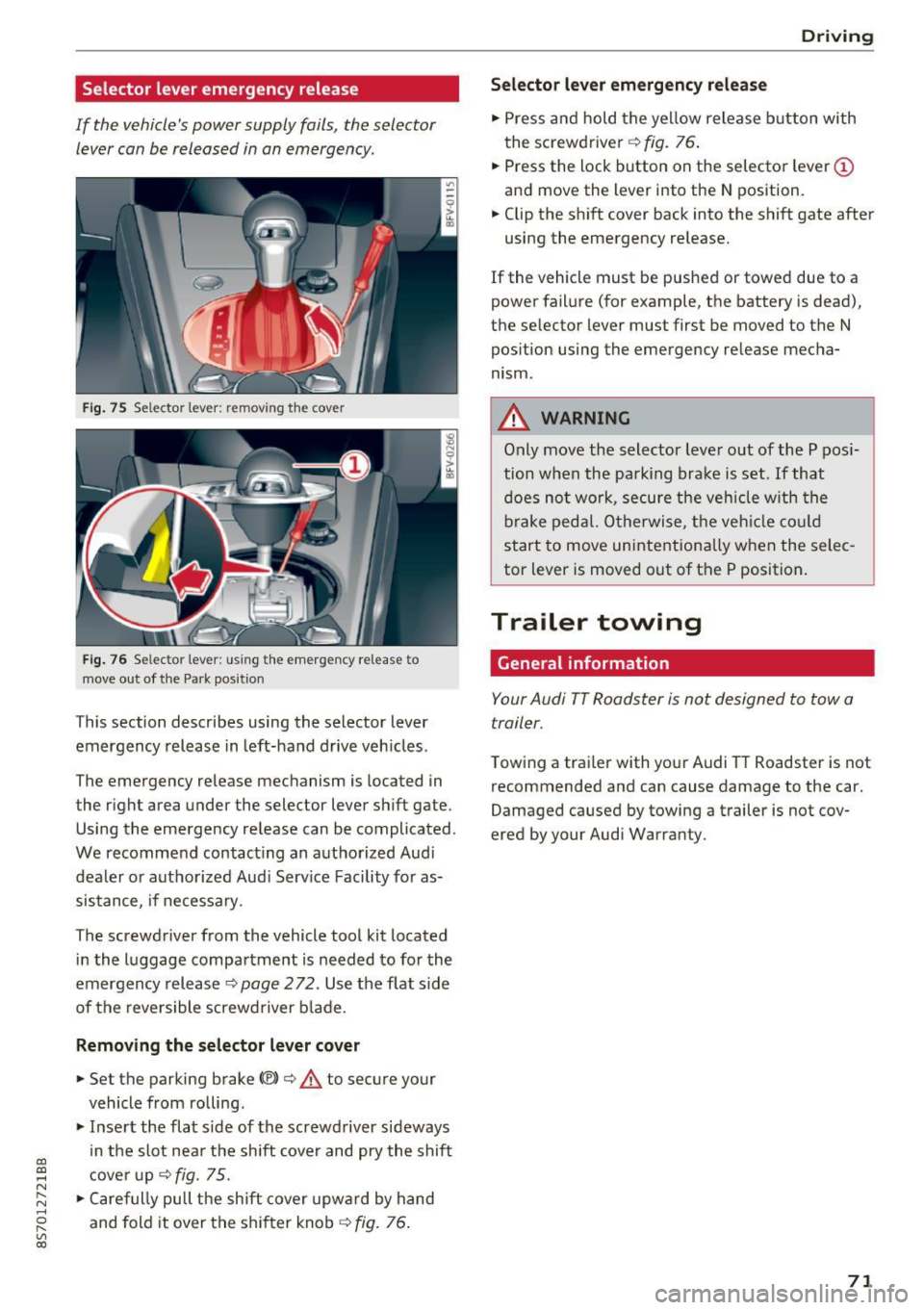
Fig . 75 Selector lever: remov ing t he cover
Fi g. 76 Selec tor lever : us ing the eme rgency re lease to
move out of t he Park pos it ion
This section describes using the selector lever
emergency release in left-hand drive veh icles .
The emergency re lease mechanism is located in
the right area under the selector lever shift gate.
Using the emergency release can be complicated.
We recommend contact ing an authorized Audi
dealer o r authorized Aud i Serv ice Facility fo r as
sistance, if necessary .
The screwdriver from the vehicle tool kit located
i n the luggage compartment is needed to for the
emergency release ¢
page 2 72. Use the flat sid e
of the revers ible screwd river b lade.
Removing the selector lever cover
.,. Set the parking brake CV)¢ A to secure your
vehicle from ro lling .
.,. In se rt the flat side of the screwdriver sideways
in the slot nea r the sh ift cover and pry the shift
c ove r up
¢fig. 75 .
.,. Caref ully pull t he shift cover upw ard by hand
and fold it over the sh ifter knob ¢
fig. 76.
Drivi ng
Selector l ever emergency release
.,. Press and hold t he ye llow release b utton with
the screwdriver ¢
fig. 76.
.,. Press the lock button on the selecto r lever
(D
and move the lever into the N position .
.,. Clip the shift cover back into the shift gate after
using the emergency re lease.
If the vehicle must be pushed or towed due to a
power failure (for example, the battery is dead),
the selector lever must first be moved to the N
pos ition using the emergency re lease mecha
nism.
A WARNING
Only move the selector lever out of the P pos i
tion when the parking bra ke is set. If that
d oes no t wo rk, secure the ve hicle w ith the
bra ke ped al. Otherwise, t he veh icle co ul d
st art to move uninte ntiona lly w hen the selec
tor lever is moved out of the P position.
Trailer towing
General information '
Your Audi TT Roadster is not designed to tow a
trailer.
Towing a trailer with you r Audi TT Roadster is not
recommended and can cause damage to the car.
Damaged caused by towing a trailer is not cov
ered by your Audi Warranty.
71
Page 81 of 314
co
co
.... N
" N .... 0
" "' c:o
Switching on and off
Applies to: vehicles with Audi side assist
The system ca n be switched on/off in the Info
t a in men t system.
"' Select in the Info tainment sys tem:
iM ENUI but
ton
> Vehicle > left contro l butto n >Driver as
sistan ce > Audi side assist
If the system is activated, the displays in the ex
ter io r mir rors wi ll turn o n briefly when the ig ni
tion is sw itched on.
Adjusting the display brightness
Applies to: vehicles with Audi side assist
The display brightness can be adjusted in the In
fotainm ent system.
"' Se lect in the Infotainment system: i MENU I but
ton
> Vehicle > left contro l butto n >Driver as
sistance > Audi side assist
The display b rightness ad justs automat ica lly to
the br ightness of the s urrou ndings, both in the
in fo rmat ion and in the warning stage . In very
da rk or ve ry br igh t sur ro u ndings, the a utomat ic
ad ju st men t will se t th e d isp lay to the mini mum
or maxim um level. In s uch cases , you m ay no tice
no change w hen adjus ting t he br ightness, o r th e
change may on ly be no tic eable o nce the su r
ro undings change .
A dju st the br ightn ess to a level where the d isp lay
i n the inform ation stage wi ll no t di srupt your
v iew ahead. If you change the brightness, the dis
p lay in the exter ior mir ror will briefly show the
b rightness level i n the information stage . The
b rightness of the warning stage is linked to the
b rightness in t he info rmat ion stage and is ad just
ed along w ith the information stage .
- Side assist is not active wh ile you are ma k
i ng the ad justment.
- Your settings are automatically stored and ass igned to the remote cont rol key being
used.
Assist
Messages
Applies to: vehicles with Audi side assist
I f the s ide ass is t swi tches off automat ically, a
mess age app ear s in t he In fota in men t sys tem dis
play.
@j Audi side assist: currently unavailable.
Sensor vision restricted due to surroundings.
See owner 's manual
The radar sensors ' v is ion is affected. Do not cover
the a rea in front of the sensors with bike whee ls,
stickers, dirt or other objects. Clean the area in
front of the sensors, if necessary
q page 77,
fig. 84.
@j Audi side a ssist: currently unavailable.
See owner's manual
S ide assist cannot be switched on at this time be
ca use there is a ma lfu nction ( for example, the
battery c harge leve l may be too low) .
@j Audi side assist: malfunction! Please
contact Service
The system cannot guarantee that it will detect
vehicles cor rect ly and it has switc hed off. The
senso rs have been move d or are fa ulty. Have the
syste m chec ked by an au tho riz ed Au di deale r or
a uthor iz e d Au di S ervice Faci lity s oon.
Audi drive select (drive
settings)
Introduction
Applies to: vehicles with Audi drive select
Dr ive select ma kes it possib le to e xper ience dif
fere nt types of ve hicl e sett ings in one ve hicle.
T he driver can sele ct from th ree mo des,
Comfort ,
Auto
and Dynamic , using the r.~;\,1 bu tton in the
center console o r by using the Infotainment sys
tem. This allows you to switch between a sporty
and a comfo rtable driv ing mode, fo r example. In
t h e
Individual mode, the sett ings can be ad just
ed to yo ur persona l pre ferences . This makes it
poss ible to com bine settings such as a sporty en-
gine sett ing wi th light s teer ing. .,._
79
Page 95 of 314
co
co
.... N
" N .... 0
" "' c:o
Facility immediately to have the malfunction cor
rected. The color of the indicator light depends
on the vehicle speed.
A WARNING
-
Driving at higher speeds without the rear
spoiler deployed can impair handling charac teristics, making the vehicle harder to con
trol.
- Always make sure that the spoiler is de
ployed when driving at speeds over 85 mph
(140 km/h). If the rear spoiler warning/indi
cator light in the instrument cluster comes
on, the rear spoiler may not have deployed.
- Never drive at speeds higher than 85 mph
(140 km/h) if the spoiler is not deployed .
Have the spoiler inspected as soon as possi
ble by an authorized Audi dealer or qualified
workshop.
- Always obey speed limits and other traffic
laws.
A WARNING t =
Improper operation of the rear spoiler can
cause crushing injuries.
-
- Always make sure that nobody, especially
children, is in the way when the rear spoiler
is deployed or retracted.
(D Note
- Never push on the vehicle on the rear spoil
er. This could cause damage.
- To prevent damage to the rear spoiler do
not lean or place anything on it.
- Only operate the rear spoiler manually when
the luggage compartment lid is close and
the rear spoiler moving parts are not
blocked. Otherwise, damage could occur.
@ Tips
Clean the rear spoiler compartment every 2 to
3 months. To function correctly, the rear
spoiler must be free of ice , snow and leaves.
Intelligent Technology
Energy management
The starting ability is optimized
The energy management system manages the
electrical energy distribution and optimizes the
availability of electrical energy for starting the
engtne.
When a vehicle with a conventional energy sys
tem is not driven for a long time, the vehicle bat
tery is drained by equipment (for example, the
immobilizer). In certain circumstances , there
could may not be enough energy to start the en
gine.
Your vehicle is equipped with an intelligent ener
gy management system for distributing electrici
ty. This significantly improves the starting ability
and increases the vehicle battery life.
The energy management system Is made up of
battery diagnosis, idling current management
and dynamic energy management.
Battery diagnosis
The battery diagnosis determines the vehicle bat
tery charge level. The sensors determine the bat
tery voltage, the battery current, and the battery
temperature. The current charge level and the
performance of the vehicle battery are deter
mined based on this.
Idling current management
The idling current management decreases the
energy used while parked. With the engine
switched off , it manages the energy distribution
to the different electrical components. Data from
the battery diagnosis is taken into account for
this.
Depending on the vehicle battery charge level,
electrical equipment is switched off one item af
ter the other to prevent the vehicle battery from draining and to maintain the starting ability.
Dynamic energy management
While driving , dynamic energy management dis
tributes the appropriate amount of energy to the
electrical equipment.
It controls the battery
charge level so that the amount of energy is not ..,_
93
Page 96 of 314
Intelligent Technology
greater than the amount being generated in or
der to maintain an optimal vehicle battery charge
level.
(D Tips
- Energy management cannot overcome the laws of physics. Note that the charge level
and length of the vehicle battery life are
limited.
- When the starting ability is jeopardized, the
(•j indicator light turns on¢ page 13.
What you should know
Maintaining the starting ability is the highest
priority.
A lot of stress is placed on the vehicle battery
when driving short distances, during city driving,
and at cold times of the year. A lot of energy is
used but little is generated. It is also critical
when the engine is not running but electrical
equipment is switched on. In this case, energy is used but none is generated .
In situations like this, energy management will
actively regulate the distribution of energy.
Long periods without use
If you do not drive your vehicle for several days or
weeks, electrical equipment is gradually scaled
back or switched off. This reduces energy use and
ensures the vehicle will be able to start after long
periods of time. Some convenience functions
such as opening with the remote control key may not be available . These convenience functions
will be available again once you switch the igni tion on and start the engine.
With the engine switched off
The vehicle battery will drain if you use Infotain ment functions such as listening to the radio
while the engine is switched off .
If the vehicle's ability to start may be impaired by
the energy use, a message will appear in the In
fotainment system display. The message indi cates that the system will switch off automatically soon .
If you would like to continue using the
functions, you must start the engine.
94
With the engine running
Although e lectrical energy is generated while
driving , the vehicle battery can drain . This can
happen if little energy is generated but much is
used, and the charge level of the vehicle battery
is not optimal.
To restore the balance of energy , components
that require large amounts of energy are tempo
rarily scaled back or switched off. Heating sys
tems in particular require a great deal of energy.
If you notice, for example, that the seat heating*
or rear window defroster is not working, then it has been temporarily reduced or switched off .
These systems are available again as soon as the energy supply has been restored.
In addition, you may notice that the idle speed
has slightly increased . That is normal and no
cause for concern . By increasing the idling speed ,
the additional required energy will be generated
and the vehicle battery will be charged.
Information about data
recorded by vehicle
control modules
Your vehicle is not equipped with a crash data re
corder . This device is installed by some vehicle
manufacturers to record data about crashes so
that it can be analyzed later. Crash data record
ers are also called "Event Data Recorders (EDR)".
In some legal jurisdictions, it is not permitted to
access or download data recorded by pre-instal
led crash data recorders in order to evaluate a
crash without clear consent of the vehicle owner.
Your vehicle is not equipped with a crash data re
corder. However it does contain a variety of elec
tronic control modules for various vehicle sys
tems such as engine function, exhaust treatment
or airbags and safety belts.
These electronic control modules record vehicle
data during normal driving for diagnosis and re
pair purposes. The recording capability of the
electronic control modules is limited to data only
- no sound is recorded. If the control module de
tects a system malfunction or other change in
status, a very limited amount of data is recorded .,,.
Page 99 of 314
CD
CD
.... N
" N .... 0 r--. V, co
police and fire sirens, can be heard easily at
all times.
(D Tips
The M MI switches off automatically if the en
gine is not running and the vehicle battery is
low.
MMI operation
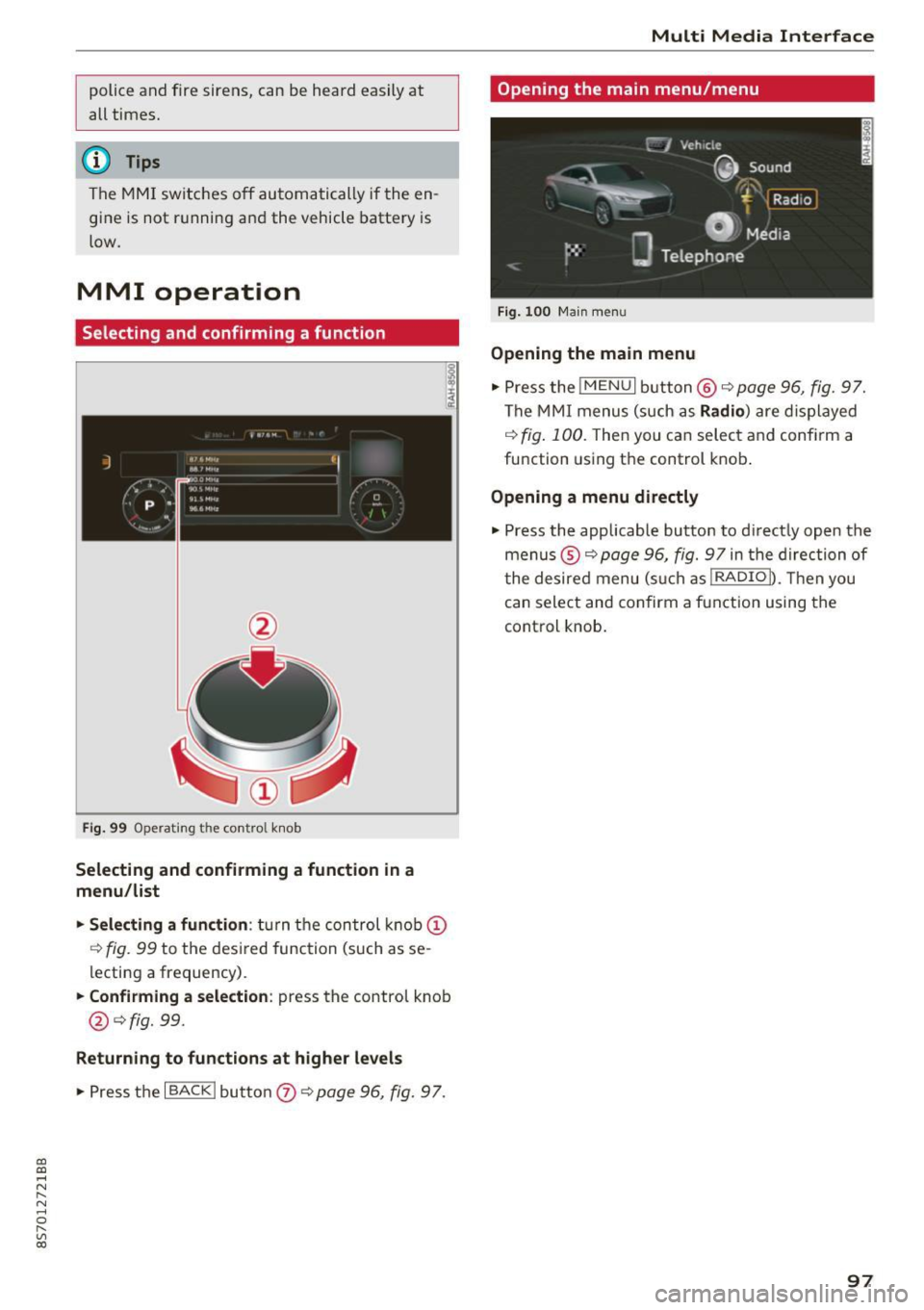
Selecting and confirming a function
Fig. 99 Operating t he cont ro l knob
Selecting and confirming a function in a
menu/list
"'Selecting a function:
turn the control knob(!)
r:!>fig. 99 to the des ired function (such as se
lecting a frequency) .
"'Confirming a selection: press the control knob
@¢fig. 99.
Returning to functions at higher levels
"'P ress the I BACK I button 0 ¢ page 96, fig. 97.
Multi Media Interface
Opening the main menu/menu
Fig. 100 Main menu
Opening the main menu
"' Pressthe lMENUlbutton @¢page96, fig. 97.
The MMI menus (such as Radio) are displayed
¢fig. 100. Then you can select and confirm a
function using the control knob.
Opening a menu directly
"' Press the applicable button to d irectly open the
menus ®¢
page 96, fig. 97 in the direction of
t he desired menu (such as!RADIOn. Then you
can select and confirm a function using the
control knob.
97
Page 161 of 314
co
co
.... N
" N .... 0
" "' c:o
When importing, the audio files a re automatical
l y sorted into the media center categor ies based
on the stored addit ional info rmation
c:> page 165. The copied video files are stored in
the media ce nter under the
Videos category.
Playing the Ju kebo x
Req uirement: the J ukebox must contain audio/
vi deo fi les
c:> page 158, Adding files to the Juke
box.
The Jukebox is a ccesse d and ope rated thr ou gh
the MMI
(D c:> page 164, fig . 144.
Displaying Jukebox memory capacity
Select: r igh t control button > Jukebox memory
capacity .
Inform ation abou t the J ukebox memory
c a pacity an d the numbe r of store d tra cks is dis
p layed .
Deleting tracks from the Jukebox1
)
Req uirement: the Ju kebox must contain audio/
video fi les.
- Deleting an entry : select an entry from the
Jukebox media center. Select: rig ht cont ro l but
ton
> Delete from Jukebox > This entry or En
tire list .
- The s tatus of the de leti ng p rocess is shown in
the MMI. Jukebox playback stops d uring the de
l eting process a nd starts again au tomatically
on ce the dele tio n i s comp lete.
(D Note
D o not import au dio/video files when the en
g in e is t urned off because this will d rain the
ve hicl e battery.
(D Tips
-Tracks fro m aud io C Ds cannot be impo rted
t o the Jukebox for leg al re as ons.
- Files that have al rea dy been import ed are
a utomat ica lly r ecogn ized and ca n not be
cop ied to the Juk eb ox again.
- It is no t possib le to play audio/v ideo* files
i n the C D/D V D* drive while import ing the m.
l) Not in th e Playba ck view .
Media
-The Jukebox does not provi de a n export
function d ue to legal reasons .
- F iles o r trac ks w ithout store d ad di tional in
formatio n are listed as
Unknown . Audi rec
ommends adding a dditio nal info rmation
(such as ID3 tags) to a udio f iles.
- Reset the J ukebox to t he factory default set
tings when selling your vehicle
c:> page 176 .
Bluetooth audio player
Applies to: vehicles with Bluetooth
With the Bluetooth audio player, you con ploy
music wirelessly from your Bluetooth-capable
device (such as a cell phone) through the MMI.
Requirement: the vehicle must be stationa ry and
the Bluetooth function on your Bl uetooth device
and the
Bluetooth audio player c:> page 177 in
t h e MMI m ust both be switched on .
-Connecting a Bluetooth de vice : press the
! MEDI Ai button. Press the left control button
until t he source overv iew is d isp layed. Select
and confirm
Bluetooth audio player @
Gpoge 164, fig. 145.
-If necessa ry, select and co nfirm, Not connected
> Connect Bluetooth audio player . The Blue
t ooth dev ice searc h starts . Fo llow the inst ruc
tions in the M MI.
- Select and confirm the des ired Bluetooth de
vice from the list. The M MI generates a PIN fo r
t he co nne ction.
- Select and confirm
Yes .
-Enter the PIN for connect ing on your Bl uetooth
dev ice.
Or : if the PIN is already displayed on
your Bl uetoo th device, confi rm it in the Blue
t ooth device and in the MMI. The t ime a llowed
for e ntering the P IN is lim ite d t o ap prox ima tely
3 0 seconds.
T he media is s tarted and operated thro ugh the
mobile device o r the MMI, de pending on t he de
vice be ing used.
@ Tips
- Check fo r any connection reques ts on you r
B lu etoo th devi ce .
159