battery AUDI TT ROADSTER 2017 Owner's Manual
[x] Cancel search | Manufacturer: AUDI, Model Year: 2017, Model line: TT ROADSTER, Model: AUDI TT ROADSTER 2017Pages: 314, PDF Size: 76.54 MB
Page 164 of 314
Media
@ Tips
-Depending on the Internet connection and
network traffic, a connection loss can occur
during p layback of on line media serv ices.
- Online media and Internet radio usage de·
pends on the service avai lability of the third
party provider.
- Audi AG simply makes the access to online
media serv ices possible th rough the MMI
and does not take any respons ibility for the
contents of the online med ia services.
- Always read the chapter <=>page 133, About
Audi connect.
- Depending on the mobile device used, the re
may be interrupt ions during media playback
and when using the
Audi MMI connect app .
To avoid interruptions when usi ng a mob ile
d evice, do not loc k the sc reen on yo ur mo
bile devi ce and keep the
Audi MMI connect
a pp in the foreground.
- Contact you r authorized Audi dea ler or au
thorized Audi Se rvice F acili ty for a ddi tional
i n format io n a bout o n line medi a.
Multimedia connections
USB adapter for Audi music interface or
USB charging port
Depending on the vehicle equipment , you can
connect your mobile devices (such as a smart
phone or MP3 player) to the Audi music interface
or a USB charging port using a special USB
adapter.
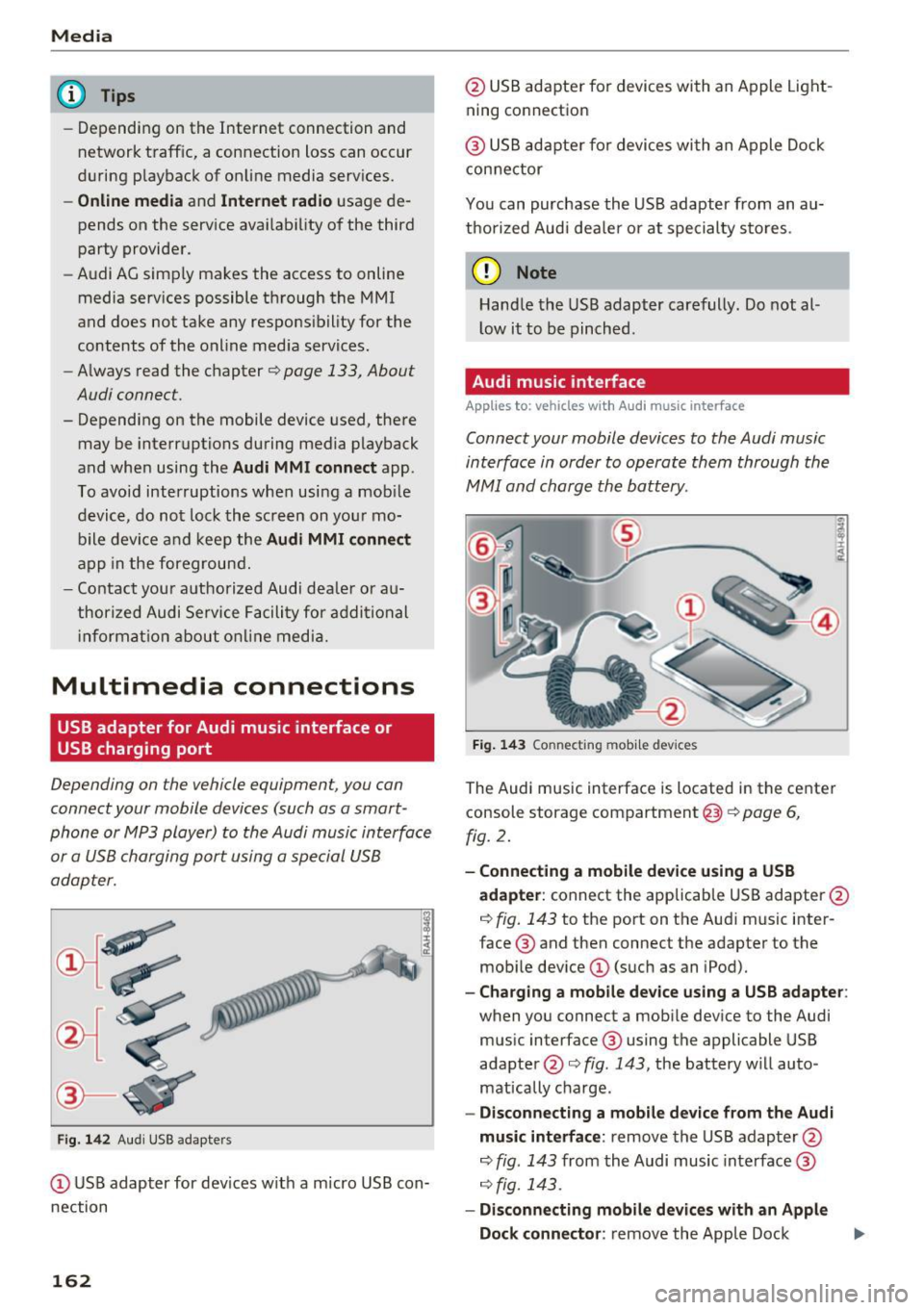
Fig . 14 2 Aud i USS ada pte rs
CD US B adapter for dev ices w it h a m icro USB con
nection
162
@ USB adapte r fo r devi ces wi th an Apple Light
ning connection
@ USB ad ap ter fo r devices wi th an Apple Dock
con nector
You can purchase the USB adapter from an au
tho rized Audi dea ler or at specialty s to res.
(D Note
Hand le the USB adapter carefully. Do not al
l ow it to be pinched .
Audi music interface
Applies to: vehicles with Aud i music interface
Connect your mobile devices to the Audi music
interface in order to operate them through the
MMI and charge the battery.
Fi g. 14 3 Connect ing mob ile devic es
The Audi music interface is located in the center
console storage compartment @
~ page 6,
fig. 2.
- Connecting a mobile device using a USB
adapter :
connect the applicab le USB adapter @
c:!) fig. 143 to the port on the Audi music inter
face ® and then connect the adapter to the
mob ile dev ice
CD (suc h as an iPod).
- Charging a mobile device using a USB adapter :
when you connect a mobile device to the Audi
mus ic interface ® using the applicable USB
adapter @<=> fig . 143 , the battery w ill auto
mat ically cha rge.
- Disconnecting a mobile d evice from the Audi
music interface :
remove the USB adapter @
<=> fig . 143 from the Audi music interface ®
r=;, fig. 143.
-Disconn ecting mobile devices with an Apple
Dock connecto r:
remove the Apple Dock .,..
Page 173 of 314
co
co
.... N
" N .... 0
" "' c:o
Media
on the system language and cannot a lways
be g uaranteed .
Troubleshooting
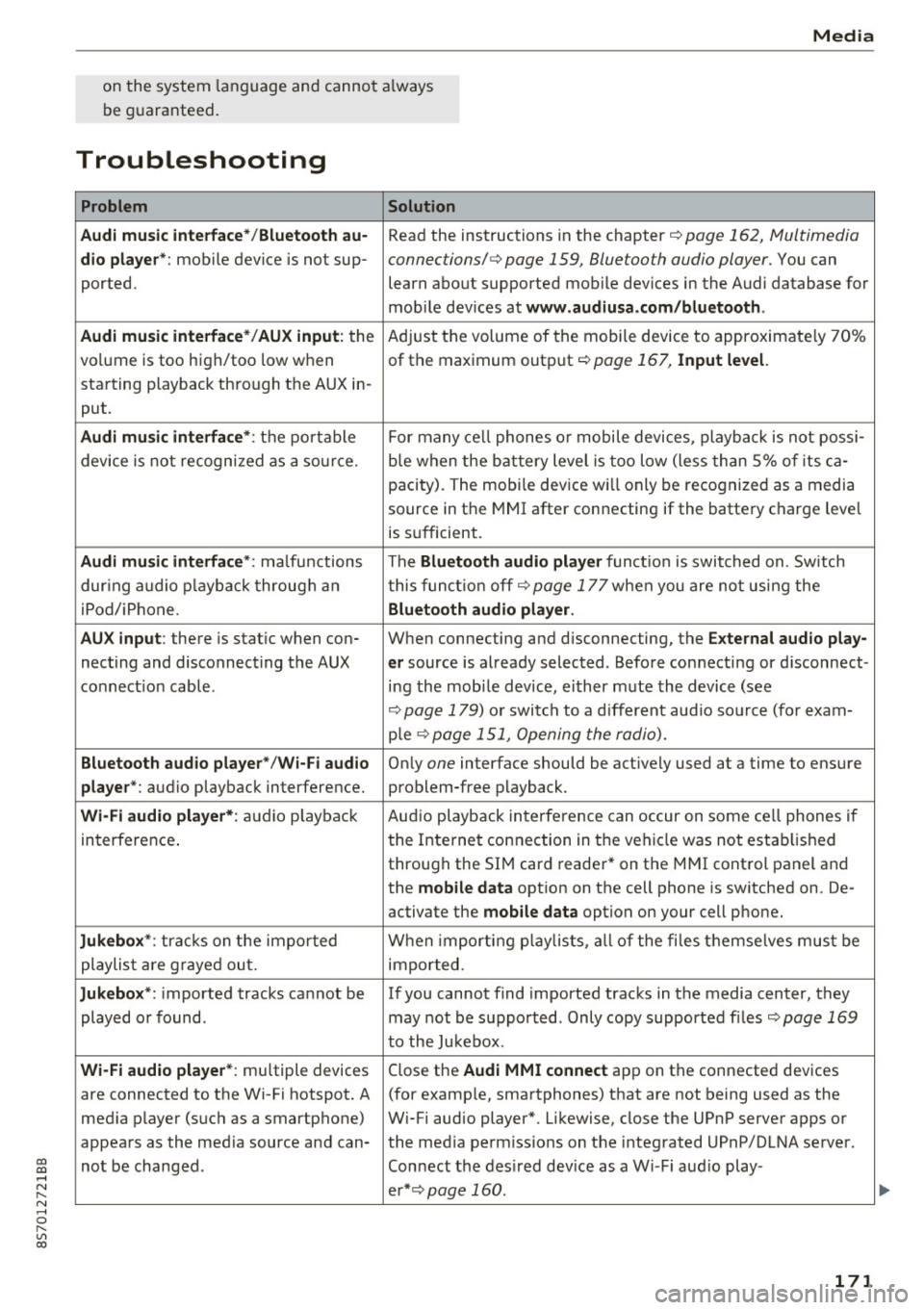
Problem Solution
Audi music interface* /Bluetooth au-
Read the instructions in the chapter ¢ page 162, Multimedia
dio player *: mobile device is not sup-connections/ ¢ page 159, Bluetooth audio player. You can
ported. learn about supported mobile devices in the Audi database for
mob ile dev ices at
www .audiusa.com /bluetooth .
Audi music interface* /AUX input:
the Adjust the volume of the mobile device to approximate ly 70%
volume is too high/too low when of the maximum output
¢ page 167, Input level.
starting playback through the AUX in-
put.
Audi music interface *: the portable For many cell phones or mobile devices, playback is not possi-
device is not recognized as a source. b
le when the battery level is too low (less than 5% of its ca-
pacity) . The mobi le device will only be recognized as a media
source in the MMI after connecting if the battery charge level
is sufficient.
Audi music interface *: malfunctions The Bluetooth audio player functio n is switched on. Switch
dur ing audio playback through an this funct io n off¢
page 177 when you are not using the
iPod/ iPhone .
Bluetooth audio player.
AUX input:
there is stat ic when con- When connecting and d isconnecting, the E xternal audio play-
necting and disconnect ing the AUX er source is already selected . Before connecting or d isconnect-
connection cable. ing the mobile dev ice, either m ute the device (see
¢ page 179) or switch to a different aud io so urce (fo r exam-
p ie
¢page 151, Opening the radio).
Bluetooth audio player * /Wi-Fi audio On ly one interface should be act ively used at a time to ensure
player* : audio playback interference. problem-free playback.
Wi-Fi audio player* : audio pla yback Aud io playback interference can occur on some ce ll phones if
in terference . the Internet connection in the vehicle was not estab lished
through the SIM card reader* on the MMI control panel and
the
mobile data option on the cell phone is switched on. De-
activate the
mobile data option on your cell phone.
Jukebox* : tracks on the imported When importing p laylists , all of the files themse lves must be
playlist are grayed out. imported.
Jukebox*: imported tracks cannot be If you cannot find imported tracks in the media center, they
played or found . may not be supported. Only copy supported f iles
¢ page 169
to the Jukebox .
Wi-Fi audio player* : multiple devices
Close the Audi MMI connect app on the connected devices
are connected to the Wi-Fi hotspot. A (for exam ple, smartphones) that are not being used as the
med ia p layer (such as a smartphone) Wi-Fi audio player*. Likewise, close the UPnP server apps or
appears as the med ia source and can- the med ia permiss ions on the integrated UPnP/DLNA server.
not be changed . Connect the desired dev ice as a W i- F i aud io play-
er* ¢page 160 .
171
...
Page 176 of 314
Audi smartphone interface
Android Auto: to go back to the Android Auto
menu bar, push the control knob down. Opening a menu item
Select and confirm a menu item using the MMI
contro l pane l.
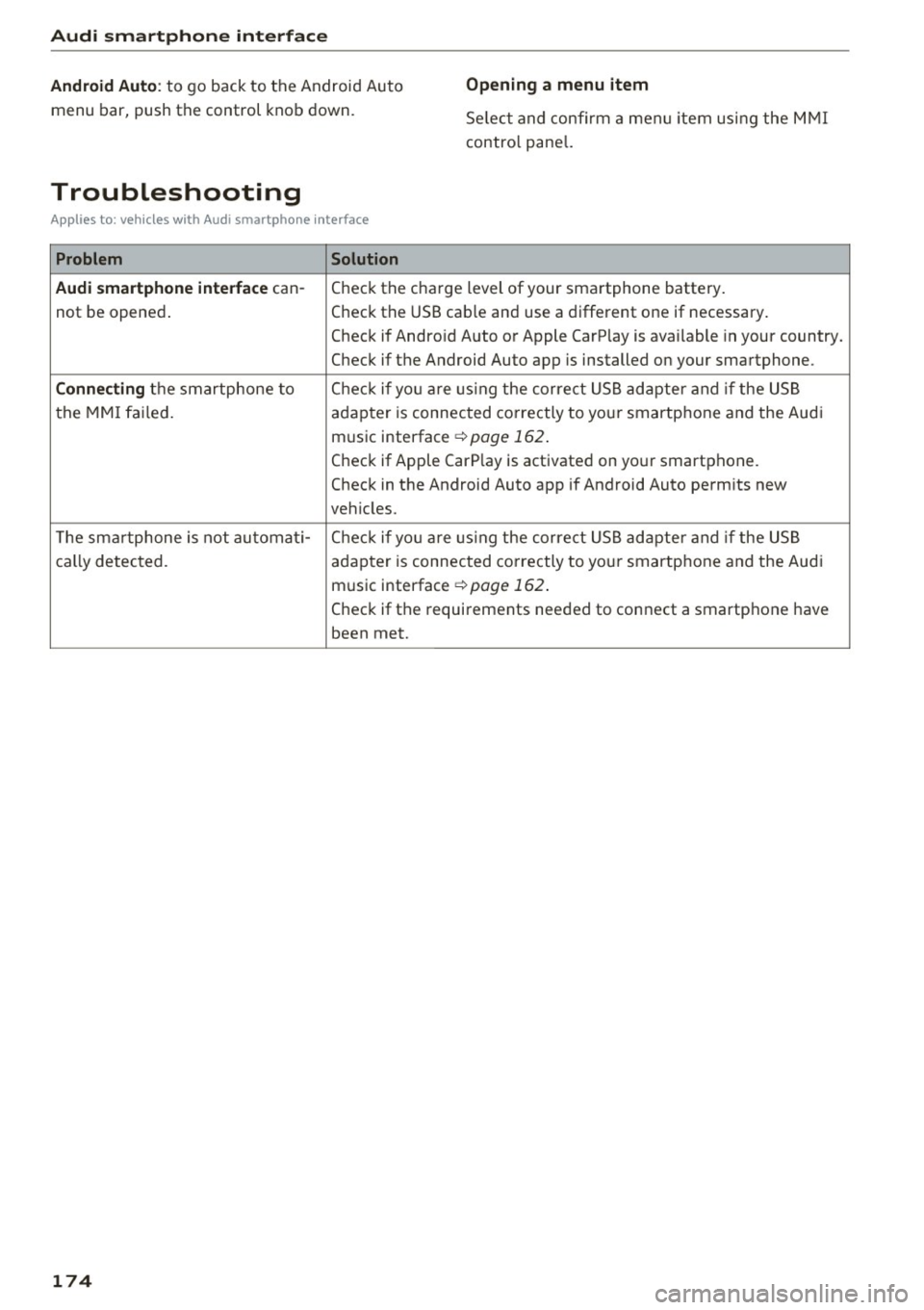
Troubleshooting
Applies to: ve hicles w ith Audi smartpho ne interface
Problem Solution
Audi smartphone interface
can-Check the charge level of your smartphone battery.
not be opened . Check the
USB cable and use a different one if necessary.
Check if Android Auto or Apple CarPlay is available in your country.
Check if the Android Auto app is installed on your smartphone.
Connecting the smartphone to Check if you are UJsing the correct USB adapter and if the USB
the MMI failed. adapter is connected correctly to your smartphone and the Audi
music interface ¢
page 162.
Check if Apple CarP lay is activated on your smartphone.
Check in the Android Auto app if Android Auto permits new
vehicles.
T he smartphone is not automati -Check if yo u are UJsing the correct USB adapter and if the USB
cally detected.
adapter is connected correctly to your smartphone and the Aud i
music interface ¢
page 162.
Check if the requirements needed to connect a smartphone have
been met.
174
Page 213 of 314
co
co
.... N
" N .... 0
" "' c:o
-Never install seat covers or replacement
upholstery over the front seatbacks that
have not been specifically approved by
Audi.
- Never use additional seat cushions that
cover the areas where the side airbags in
flate.
- Damage to the original seat covers or to
the seam in the area of the side airbag module must always be repaired immedi
ately by an authorized Audi dealer.
- The airbag system can deploy only once. Af
ter an airbag has been deployed, it must be
replaced with new replacement parts de
signed and approved especially for your
Audi model version. Replacement of com plete airbag systems or airbag components
must be performed by qualified workshops
only. Make sure that any airbag service ac
tion is entered in your Audi Warranty
&
Maintenance booklet under AIRBAG RE
PLACEMENT RECORD.
- For safety reasons in severe accidents, the
alternator and starter are separated from
the vehicle battery with a pyrotechnic circuit interrupter.
- Work on the pyrotechnic circuit interrupt
er must only be performed by a qualified
technicians who have the experience, in
formation and special tools necessary to
perform the work safely.
- If the vehicle or the circuit interrupter is
scrapped, all applicable safety precautions must be followed.
@ For the sake of the environment
Undeployed airbag modules and pretension
ers might be classified as Perchlorate Materi
al -special handling may apply, see
www.dtsc.ca.gov/hazardouswaste/perchlo
rate. When the vehicle or parts of the re
straint system including airbag modules and
safety belts with pretensioners are scrapped,
all applicable laws and regulations must be
observed. Your authorized Audi dealer is fa
miliar with these requirements and we recom
mend that you have your dealer perform this
service for you.
Airbag system
Other things that can affect Advanced
Airbag performance
Changing the vehicle's suspension system can
change the way that the Advanced Airbag System
performs in a crash. For example, using tire-rim
combinations not approved by Audi, lowering the
vehicle, changing the stiffness of the suspension, including the springs, suspension struts, shock
absorbers etc . can change the forces that are
measured by the airbag sensors and sent to the
electronic control unit. Some suspension changes
can, for example, increase the force levels meas
ured by the sensors and make the airbag system
deploy in crashes in which it would not deploy if
the changes had not been made. Other kinds of
changes may reduce the force levels measured by
the sensors and prevent the airbag from deploy ing when it should.
A WARNING
-Changing the vehicle's suspension including use of unapproved tire-rim combinations can
change Advanced Airbag performance and in
crease the risk of serious personal injury in a
crash.
- Never install suspension components that
do not have the same performance charac
teristics as the components originally instal
led on your vehicle.
- Never use tire-rim combinations that have
not been approved by Audi.
211
Page 237 of 314
co
co
.... N
" N .... 0
" "' c:o
Engine compartment
Working in the engine compartment
Special care is required if you are working in the
engine compartment
F or wo rk in th e en gine c ompar tment su ch as
ch eckin g and fi llin g flu id s, th ere is a risk of in
j u ry , sca lding , acci dent s, a nd b urn s. Fo r this
re aso n, follow all the warnin gs and ge nera l
saf ety pr eca uti ons pr ov ided in the follow in g i n·
form ation . Th e e ng ine c ompartm en t is a d an
ger ous a re a .
¢ ,&. .
A WARNING
- T urn the engine off.
- Switch the ign ition off .
- Set the parking brake .
- Place the selector lever in the P pos it ion.
- Let the engine cool down.
- Never open the hood when there is steam or coolant escaping from the eng ine compart
ment, because there is a risk that you could
be burned . Wait until no steam or coolant is
escaping .
- Keep children away from the engine com
partment .
- Never spill fluids on a hot engine. These flu
ids (such as the freeze protection contained
in the coolant) can catch fire .
- Avoid short circu its in the electrical system,
especially to the battery .
- When working in the engine compartment ,
remember that the radiator fan can sw itch
on even if the ign ition is switched off , which
increases the risk of pe rsonal injury.
- Never open the cap on the coolant expan sion tank when the eng ine is warm . The
cooling system is under pressu re .
- To protect your face, hands, and arms from
hot steam or coolant, cover the cap with a
large cloth when opening.
- Do not remove the engine cover under any
circumstances. This increases the risk of
burns.
- If tests need to be performed w ith the en
gine running, there is additional dange r due
Ch eck ing and Filling
to moving components (such as the ribbed
be lt, alternator and radiator fan) and from
the high voltage ignition system.
- Do not press the acce lerator pedal inadver
tently if a gear is selected when the vehicle
is stationary and the engine is running. Oth
erwise, the vehicle will start to move imme
diate ly and this could result in an accident .
- Pay attent ion to the following warnings list
ed when work on the fuel system or on the
electrical equipment is required.
- Do not smoke .
- Never wor k near open flames .
- Always have a working fi re extingu isher
nearby
- All work on the battery or electrical system
in your veh icle can result in inju ries, chemi
cal burns, acc idents or burns . Because of
this, all work must be performed
onl y by an
authorized Audi dealer or authorized Audi
Service Facility.
- To reduce the risk of electric shock and in
jury, never touch the following components
when the engine is running or is being start·
ed:
- Ign it ion cable
- Other components in the electronic high -
voltage ign ition system
- If you must check or perform work on the
engine wh ile it is running:
- Set the parking brake and place the selec
tor lever in the P (park) position first .
- Always proceed w ith extreme caution so
that clothing, jewelry or long hair do not
become caught in the radiator fan , fan
belt or other moving components or do
not come into contact with hot compo
nents. Tie back long hair before beginning
work and do not wear clothing that can hang down into the engine .
- Lim it your exposure to exhaust and chemi
cals to as short a time as possible
¢ ,&. .
A WARNING '"--
California Proposition 65 Warning:
235
Page 238 of 314
Checking and Filling
-Engine exhaust, some of its constituents,
and certain vehicle components contain or
emit chemicals known to the State of Cali
fornia to cause cancer and birth defects and reproduct ive harm . In addition, certain flu
ids contained in veh icles and certain prod
ucts of compo nent wear con tain or emit
c hemicals known to the State of Califo rnia
to cause cance r and birth defects or other
reproductive harm .
- Battery posts, termina ls and re lated acces
sories contain lead and lead compounds, chemicals known to the State of California
to cause cancer and reproductive harms .
Wash hands after handling .
(D Note
When fil lin g flu ids, be sure not to mix the flu
ids up . Otherwise severe ma lfunctions and en
gine damage w ill occur .
@ For the sake of the environment
You shou ld regularly chec k the ground under
your vehicle in order to detect leaks qu ickly. If
there are visible spots from oil or other fluids,
bring your vehicle to an authorized Aud i deal
er or author ized Audi Se rvice Facility to be
checked.
Opening/closing the hood
The hood is released from inside the vehicle.
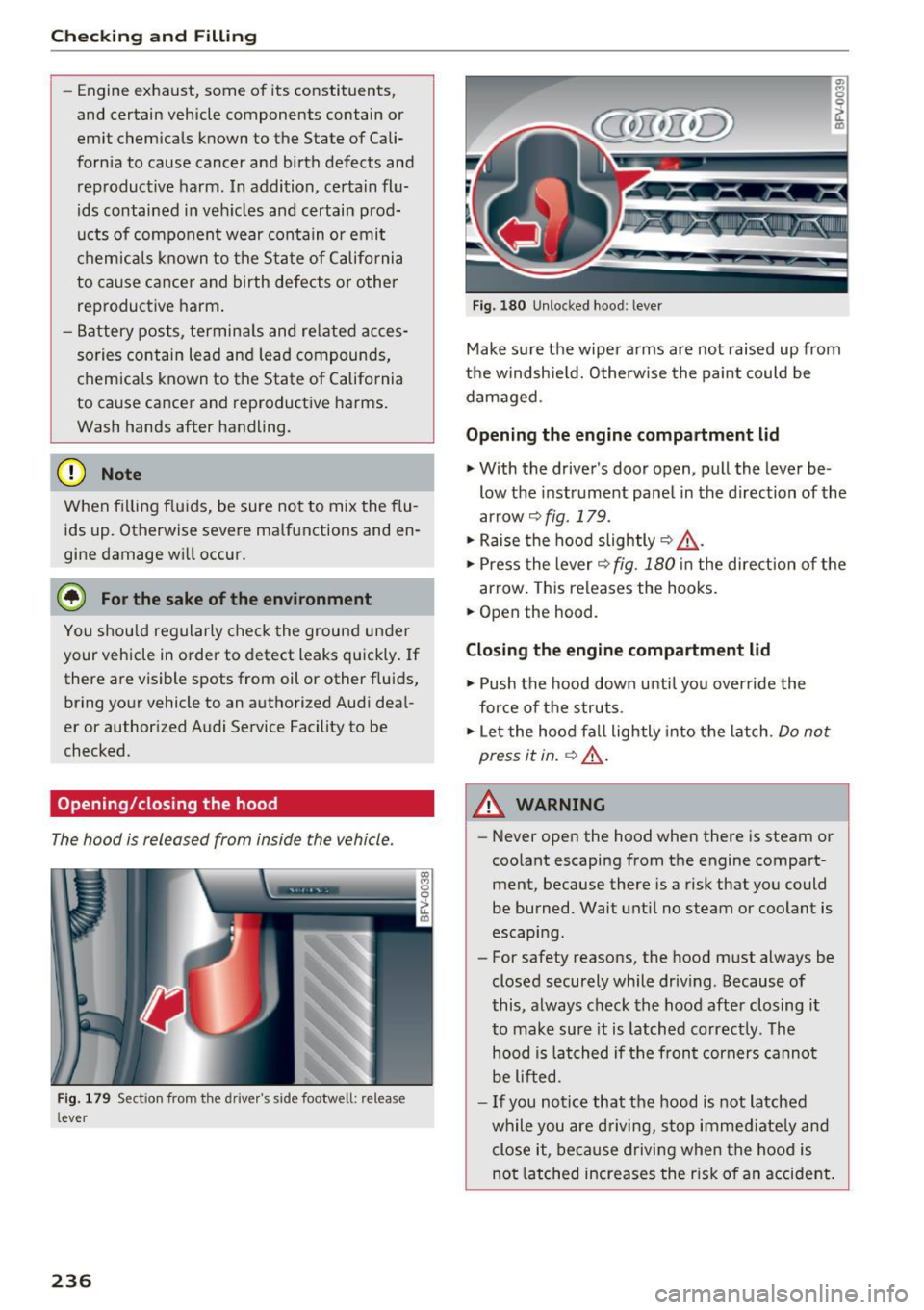
F ig . 17 9 Sect io n from the driv er' s s ide footwell: relea se
l ever
236
~ 0 0
ct Q)
F ig. 1 80 Unlocked hood : lev er
Make su re the wiper a rms are not raised up from
the windshie ld. Otherw ise the paint could be
dam aged .
Opening the engine compartment lid
"With the driver's door open, pull the lever be -
low the instrument pane l in the direction of the
arrow
9 fig . 179 .
" Raise the hood slightly 9 ,& .
"Press the lever 9 fig. 180 in the direct ion of the
arrow . This releases the hooks .
" Open the hood.
Closing the engine compartment lid
" Push the hood down u ntil yo u over ride the
for ce of the s truts .
" Let the hood fa ll lightly into the latch .
Do not
press it in.
~ ,& .
&_ WARNING
-Never open the hood when there is steam o r
coo lant escaping from the engine compart
ment, because there is a risk that yo u could
be burned. Wait unt il no steam or coolant is
escaping.
- For safety reasons, the hood must always be
closed securely while dr iving . Because of
this, always chec k the hood after closing i t
to make sure it is latched correctly . T he
hood is lat ched if the front corners canno t
be lifted .
- If you notice that the hood is not latched
while you are d riving, s top imme diate ly and
close it, because d riving when the hood is
no t latched increases the r isk o f an accident .
Page 245 of 314
co
co
.... N
" N .... 0
" "' c:o
CD Note
-If the brake fluid level is above the MAX
mark ing, brake fluid may leak out over the
edge of the reservoir and result in damage
to the vehicle.
- Do not get any brake f luid on the vehicle
paint, because it will corrode the paint.
Battery
General warnings about batteries
All of the batteries in yo ur vehicle are practically
ma intenance-free and are checked during a ve hi
cle inspection . Because of the complex power
supp ly, all work on batter ies such as d isconnect
ing, replacing, etc. should
o nly be performed by
an author ized Audi dealer or authorized Audi
Service Facility
c> & -
The term "vehicle battery" refers to the 12 Vo lt
battery in your veh icle.
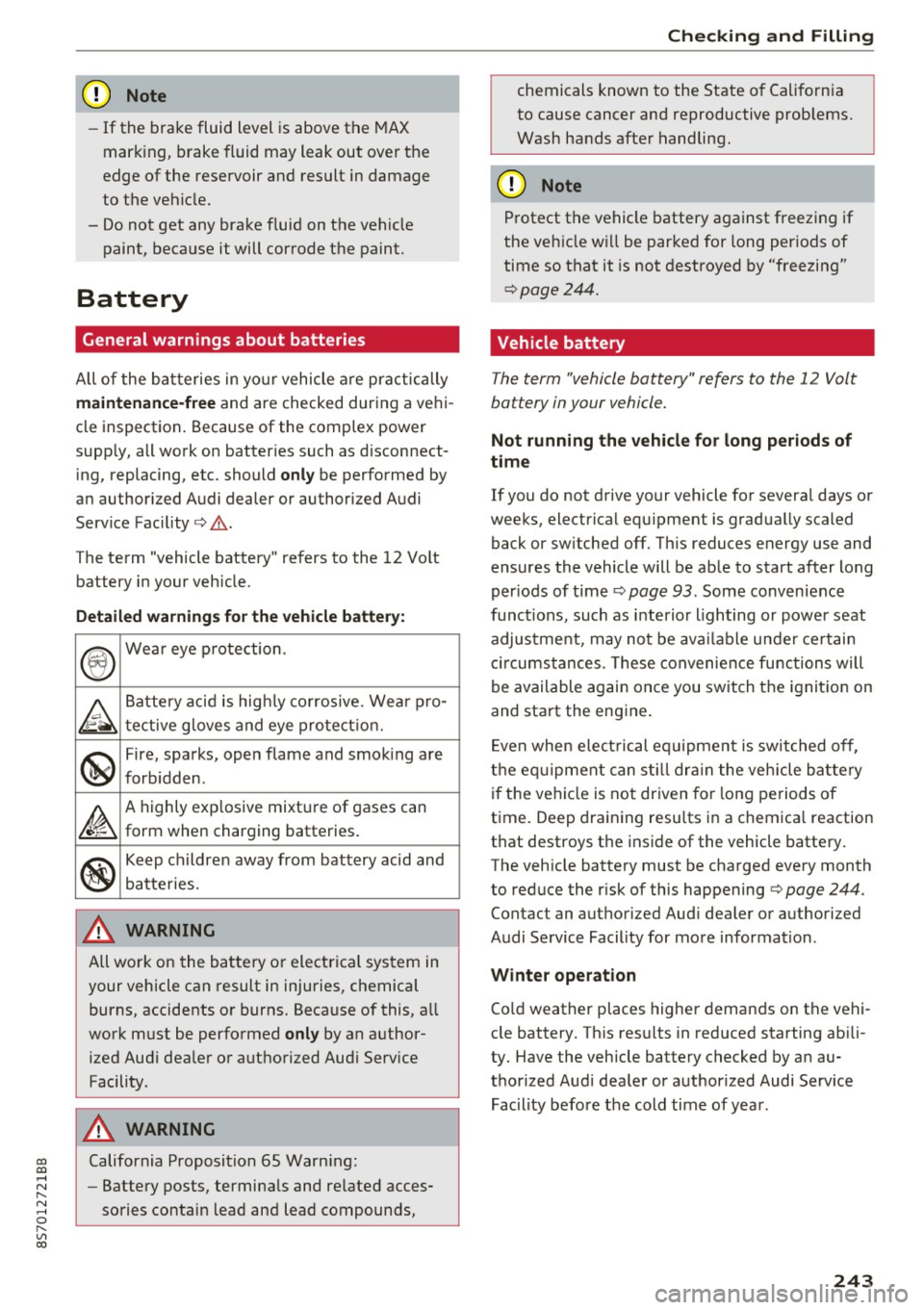
Detailed wa rning s for the vehicle batte ry:
®
Wear eye p rotection.
A
Battery acid is hig hly co rrosive. Wea r pro-
tective g loves and eye pro tect ion.
@
Fire, sparks, open flame and smok ing are
forb idden.
~
A highly exp losive mixtu re of gases can
form when charging batteries.
®
Keep childre n away from battery acid and
batteries.
A WARNING
All work on the battery or electrical system in
your vehicle can result in injuries, chemical
burns, accidents or burns. Because of this, a ll
work m ust be perfo rmed
only by an author
ized Aud i deale r or authorized Audi Serv ice
Facility.
A WARNING
California Proposition 65 Warn ing:
- Battery posts, terminals and re lated acces
sories contain lead and lead compounds,
Ch eck ing and Filling
chemicals known to the State of California
to cause cancer and reproductive problems.
Wash hands after handling.
CD Note
Protect the vehicle battery against freezing if
the veh icle wi ll be parked for long periods of
time so that it is not destroyed by "freezing"
c> page244.
Vehicle battery
The term "vehicle battery" refers to the 12 Volt
battery in your vehicle.
Not running the vehicl e for long periods of
time
If you do not drive your vehicle for severa l days or
weeks, electrical equ ipment is gradua lly scaled
back or sw itched off. Th is reduces energy use and
ensures the vehicle will be ab le to start after long
per iods of time
c> page 93 . Some convenience
func tions, such as i nterio r lighting o r power seat
adjus tme nt, may no t be ava ilab le unde r certain
cir cumstances . These convenience func tions will
be available again once you switch the ignit ion on
and start the engine.
E ven when elec trical equipment is switched off,
the eq uipment can sti ll dr ain the vehicle ba ttery
i f the veh icle is not dr iven for long periods of
t ime . Deep dra ining resu lts in a chemica l reaction
t h at destroys the inside of the vehicle batte ry.
The veh icle battery must be charged every month
to red uce the risk of this happening
c> page 244.
Contact an authorized Aud i dea ler or authorized
Audi Service Facility for more information .
Winter operat ion
Co ld weather places higher demands on the vehi
cle battery. Th is res ults in reduced starting ab ili
ty. Have the vehicle battery checked by an au
thorized Aud i dea ler or authorized Audi Service
Facility before the cold time of year .
243
Page 246 of 314
Checking and Filling
Charging the vehicle battery
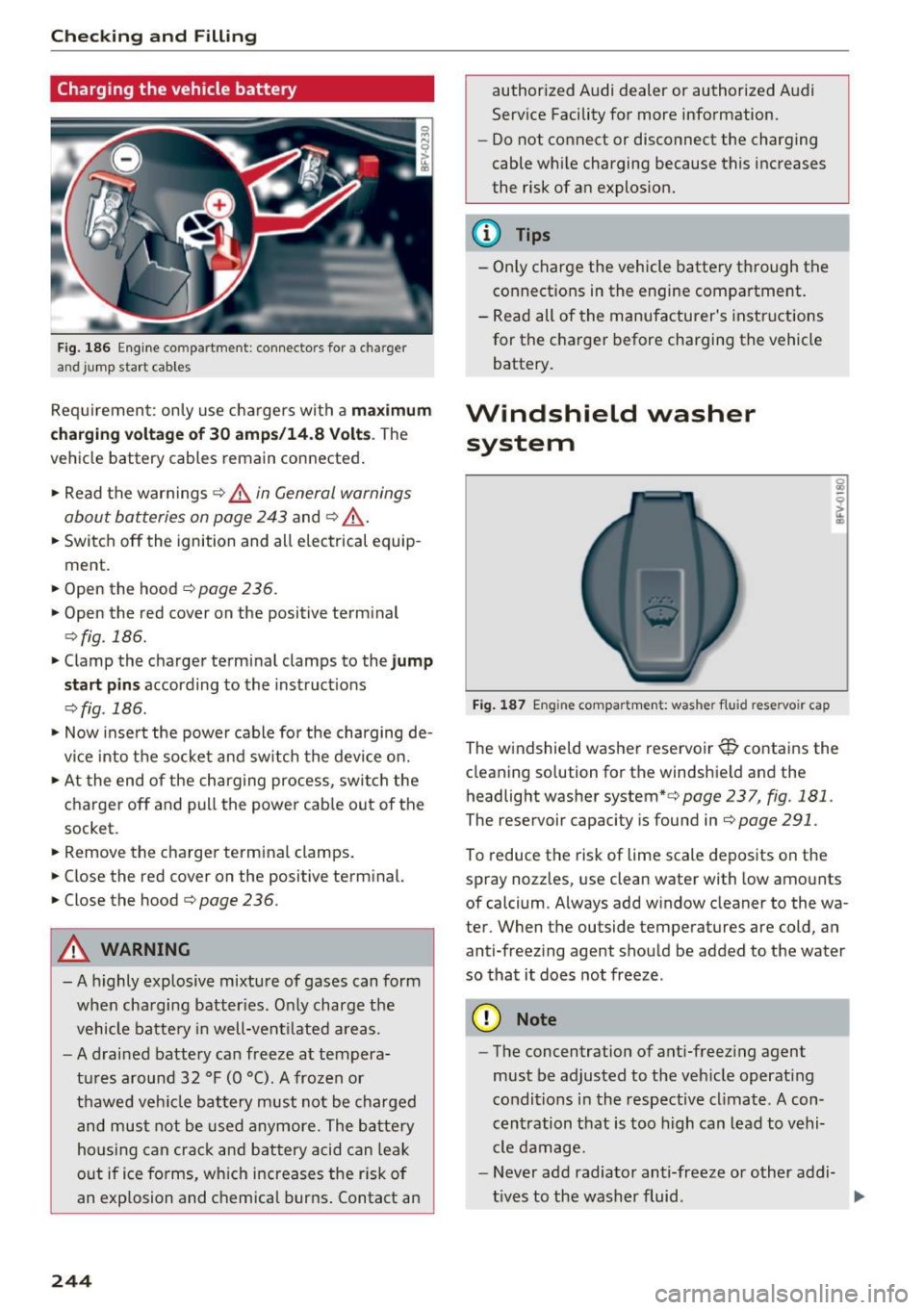
Fig. 186 Engine co mpa rtment : connec tors for a c harger
and jump start cab le s
Req uirement: only use chargers with a m aximum
c hargi ng vo lta ge of 30 amp s/14.8 Volt s.
The
vehicle battery cables remain connected .
.,. Read the warnings
c> .&. in General warnings
about batteries on page 243
and c> ,&. .
.,. Switch off the ignition and all electrical equip
ment .
.,. Open the hood ¢
page 236 .
.,. Open the red cover on the positive terminal
c> fig. 186 .
.,. Clamp the charger terminal clamps to the jump
s ta rt pin s
according to the instruct ions
c> fig . 186 .
.,. Now inse rt the powe r cable for the charging de
v ice into the socket and sw itch the device on.
.,. At the end of the charging process, switch the
charger off and pull the powe r cab le out of the
socket .
.,. Remove the charger terminal clamps.
.,. Close the red cover on the positive term inal.
.,. Close the hood¢
page 236.
A WARNING
- A highly explosive mixture of gases can form
when cha rging batter ies. Only charge the
vehicle batte ry in well-vent ilated areas.
- A drai ned battery can freeze at tempera
t ur es a round 32 °F (0 °C) . A frozen or
thawed veh icle battery must not be charged
and must not be used anymore. The batte ry
housing can crac k and battery acid can leak
o ut if ice fo rms, wh ich increases the risk of
an explosion and chemical burns . Contact an
244
author ized Audi dealer or authorized A udi
Service Facility for more information.
- Do not connect or disconnect the charging
cable whi le charging because this increases
the risk of an explos ion.
@ Tips
- Only charge the vehicle battery t hrough the
connect ions in the engine compartme nt.
- Read all of the manufacturer's instructions
for the charger before charging the vehicle
battery.
Windshield washer system
Fi g. 18 7 Engine compar tm ent: washer flui d res ervoir cap
The windshield washer reservoir~ contains the
cleaning so lu ti on for th e windshield and the
headlight washer system*c>
page 237 , fig. 181 .
The reservoir capaci ty is found in c> page 291.
To reduce the risk of lime scale depos its on the
spray nozzles, us e clean water with low amo unts
of calcium . Always add w indow cleaner to the wa
ter . When the ou tside temperatures a re cold , an
anti-freez ing agent should be added to the water
so that it does not freeze .
(D Note
-The concentration of ant i-freez ing agent
must be adjusted to the veh icle operat ing
conditions i n the respective cl imate. A con
cen tration that is too high can lead to vehi-
cle damage.
- Never add radiato r anti-freeze or other addi-
t ives to the washer fluid . ...,
Page 247 of 314
co
co
.... N
" N .... 0
" "' c:o
-Do not use a glass cleaner that contains
paint solvents, because this could damage
the pa int.
Service interval display
The service interval display detects when your ve
hicle is due for service.
The service interval display works in two stages:
- Inspection or oil change reminder: after a cer-
tain distance driven, a message appears in the
Infotainment system display each time the ig
nition is switched on or off. The remaining dis
tance or time is displayed briefly.
- Inspection or oil change due: if your vehicle
has reached an inspection or oil change interval
or both intervals at the same time, the mes
sage
Inspection due! or Oil change due! or Oil
change and inspection duel
appears briefly af
ter switching the ignition on/off .
Checking service intervals
You can check the remaining distance or time un
til the next oil change or next inspection. Select
in the Infotainment system: the !MENU ! button>
Vehicle > left control button > Service & checks >
Service intervals .
(D Note
-Following the service intervals is critical to
maintain ing the service life and value of
your vehicle, especially the engine. Even if
the mileage on the vehicle is low, do not ex
ceed the time for the next service.
- Calcu lating the time to the next oil change
i s interrupted when the vehicle battery is
disconnected~
page 271.
Checking and Filling
245
Page 273 of 314
co
co
.... N
" N .... 0
" "' c:o
-Regular waxing can prevent rust spots from
forming.
Placing your vehicle out
of service
If you would like to take your vehicle out of serv
ice for a longer period of time, contact an author
ized Audi dealer or authorized Aud i Service Fac ili
ty . They w ill advise you of important measures,
such as cor ros ion p rotection, se rvice and storage
p rocedures. Also follow the info rmat ion about
the vehicle battery .
Care and cleaning
271