turn signal AUDI TT ROADSTER 2017 User Guide
[x] Cancel search | Manufacturer: AUDI, Model Year: 2017, Model line: TT ROADSTER, Model: AUDI TT ROADSTER 2017Pages: 314, PDF Size: 76.54 MB
Page 76 of 314
Ass is t
& WARNING
You should only resume the stored speed if it
is not too high for existing traffic conditions.
Otherwise you can increase the r isk of an acci
dent .
Audi active Lane assist
Description
Appl ie s to: ve hicles w ith Audi ac tive lane assis t
Active lane assist detects lane marker lines with
in the limits of the system using a camera in the
windshield. If you are approaching a detected
lane marker line and it appears likely that you
will leave the lane, the system will warn you with
correct ive steering. You can override th is steer ing
at any time . If you pass over a line, the steer ing
wheel will v ibrate l ightly. In order for this warn
ing vibration to occur, it must first be sw itched
on in the Infotainment system. Active lane assist
is ready for operation when the lane marker line
is detected on at least one side of the vehicle.
The system is designed for driving on express
ways and highways and so it only activates at
speeds above approximately 40 mph (65 km/h) (depending on the market).
Applies to vehicles w ith side assist* : if you act i
vate a turn signal when active lane assist is ready
and it classifies a lane change as critical because
of vehicles traveling alongside you or approach
ing you, there w ill be noticeable corrective steer
ing shortly before you leave the lane. This will at
tempt to keep your vehicle in the lane.
Applies to vehicles without side assist* : the sys
tem does not warn when it is ready if you activate
the turn signal before crossing the lane marker line . In this case, it assumes that you are chang
ing lanes intentionally .
& WARNING
-The system wa rns the driver that the veh icle
is leav ing the lane using co rrective s teer ing.
1 ) The co rrect ive stee ring fun ctio n is not ava ilabl e in all mar
ket s.
74
The driver is always responsible for keeping
the vehicle within the lane.
- The system can assist the driver in keeping
the vehicle in the lane, but it does not drive
by itself. A lways keep your hands on the
steer ing wheel.
- Corrective steering may not occur in certain situations, such as during heavy braking.
- There may be cases where the camera does
not recognize all lane marker lines. Correc
tive steering can only take place on the s ide
of the vehicle where lane marker lines are
detected .
- Other road structures or objects could poss i
bly be identified un intent ionally as lane
marker lines . As a result, corrective steering
may be unexpected o r may not occ ur.
- The camera view can be restricted, for ex
ample by vehicles driving ahead or by ra in,
snow, heavy spray light shin ing into the
camera or by dirt o n the window. This can
result in active lane assist not detecting the
lane marker lines or detecting them incor
rectly.
- In certain s ituations where visibility is low,
the vehicle may switch internally from "ear
ly" to "late" steering cor rection
ll.
- Unde r certain cond itions such as r uts in the
road, an inclined roadway or crosswinds, the
corrective steer ing alone may not be enough
to keep the vehicle in the m iddle of the lane.
- For safety reasons, active lane assist must
not be used when there are poor road and/
or weather conditions such as slippery
roads, fog, gravel, heavy rain, snow and the potential for hydroplaning . Using active lane
assist under these cond it ions may increase
the risk of a crash.
Page 79 of 314
CD
CD
.... N
" N ...... 0
" V, co
the system, it warns you about vehicles that are
coming closer or that are traveling with you with
in sensor range(!)¢
fig. 81: if a lane change is
classified as critical, the display @ in the exter ior
mirror
¢ fig . 82 turns on.
The display in the left exterior mirror provides as
sistance when making a lane change to the left,
while the d isp lay in the right exterior mirror pro
vides assistance when mak ing a lane change to
the r ight.
Information stage
As long as you do not activate the turn signal,
side assist
informs you about vehicles that are
detected and classified as crit ical. The display in
the m irror turns on, but is dim.
The display remains dim in the information stage
so that your view toward the front is not distur
bed.
Warning stage
If you activate the turn signal, side assist warns
you about vehicles that are detected and classi
fied as critical. The display in the respective mir
ror blinks brightly . If this happens, check traffic
by glancing in the exterior mirrors and over your
shoulder¢ .&
in General information on
page 78.
@ Tips
You can adjust the brightness on of the dis
play on the rearview mirror ¢
page 79.
Assist
General information
Applies to : veh icles w it h Aud i s ide ass ist
Fig . 83 Driv ing s ituat ions
Fig. 84 Rear of t he ve hicle: positio n of the sensors (exam
ple)
S id e assist funct ions at speeds above approxi
mately 19 mph (30 km/h).
@ Approaching vehicles
In certain cases, a vehicle will be classified as
critical for a lane change even if it is still some
what far away. The faster a vehicle approaches,
the sooner the display in the exterior m irror will
turn on.
@ Vehicles traveling with you
Vehicles traveling with yo u are indicated in the
exterior mirror if they are classified as critica l for
a lane change. All vehicles detected by side assist
lli>-
77
Page 86 of 314
Parking systems
Switching on /off
Applies to: ve hicles w ith park ing system p lus
F ig. 88 Center console : park ing aid button
Fig . 89 optical d istance display
Switching on
.,. Shift into reverse, or
.,. Press the
Pw.A. button in the center console
c:> fig. 88. A short confirmat ion tone sounds and
the LED in the button turns on.
Switch ing off
.,. Drive faster than 6 mph (10 km/h), or
.,. Press the
p,,,A button, or
.,. Switch the ignition off .
Activating automatically
The parking aid is activated automatically at
speeds less than 6 mph (10 km/h) and when ap
proaching an obstacle from approximately 3.1 ft
(95 cm) away. There are audible signals when ap
proximately 1.6
ft (SO cm) away from the obsta
cle .
If you press the p,,1~ button to sw itch the park
ing a id off, it can only be reactivated automati
cally when one of the following conditions is met :
- The vehicle speed exceeds 6 mph (10 km/h).
- The ignition is switch off and back on again .
- The parking brake is set and then re leased .
84
-Th e selector lever must be in the P position .
Segments in the visual display
The segments in front of and behind the vehicle
(vehicles with parking system plus*)
9 fig. 89
help you to determine the distance between your
vehicle and an obstacle. The red lines mark the
expected direction of travel according to the
steering ang le. A white segment indicates an
identified obstacle that is outside of the vehicle's
path. Red segments show identified obstacles
that are in your veh icle's path. As your vehicle
comes closer to the obstacle, the segments
move
closer to the vehicle . The collision area has been
reached when the next to last segment is dis
played . Obstacles in the collision a rea, incl uding
those outside of the vehicle 's path, are show n in
r ed . Do not continue driving forward or in reverse
c:> & in General information on page 82, ¢(D in
General information on page
82!
Rearview camera
Introduct ion
App lies to: vehicles wit h rearv iew camera
Fig. 90 Diag ram : lines to aid in park ing
The rearview camera helps you to park or maneu
ver using the orientation lines .
Page 98 of 314
Multi Media Interface
Multi Media Interface
Traffic safety information
Aud i recommends performing certa in Infotain
ment system functions, such as entering a desti
nation, only when the vehicle is stat ionary . Al
ways be p repared to stop opera ting the Info tain
ment system i n the interest of your safety and
t he safe ty of other ro ad u sers.
_& WARNING
O nly use the In fotain ment sys tem w hen tra f
fic con ditions permit and always in a way that
allows you to ma inta in complete control ove r
your vehicle.
@ Tips
Cer tain functi ons are no t avail ab le wh ile driv
ing .
Introduction
The Multi Media Interface , or MMI for short,
combines various systems for communication ,
navigation* and entertainment in your Audi . You
can operate the MMI using the MMI control pan
el, the multifunction steering wheel or the voice
recognition system* .
Fig. 97 MMI con trol p an el
MM I cont rol panel overview
CD Control knob with joystick f unction
@ M MI to uch con trol pad* ... .... .
® Left contro l button . ..... ... .. .
© R ight con trol b utton ....... ... .
96
97
9 9
98
98
® Buttons fo r opening men us
directly .... . .. .. .. .... .. .... .
@ IMENU I button
(J) I BACK I button . .. .. .... .. ... . .
MMI On/Off knob with
joystick function
Operating
Fig . 98 M MI O n/Off k nob w it h joys tick functio n
Switching the MMI on /off :
The M MI can be manua lly switched on and off .
97
97
97
- Switching on manually : press the On/O ff kno b
CD¢ fig. 9 8 briefly . Or: press the !MENU I button
@ ¢page 96, fig. 9 7 or one of the b uttons to
direct ly open the menus®¢
page 96, fig. 97.
-Switching off manually : press and hold the
O n/Off knob
CD ¢ fig. 98 unt il t he M MI switches
off. If the MMI ha s been switched off manua lly,
it does
not switch on agai n automatically the
next time the ignition is switched on.
Additional function s:
- Adjusting the volume :
turn the On/Off knob CD
¢fig. 98 .
-Muting (mute) : briefly press the On/Off knob .
-Selecting the previous /next function (for ex-
ample , a radio station/track ):
brief ly press the
On/Off knob toward the left
l
-Fast forwarding/rewinding (fo r example ,
tracks) :
press the On/Off knob longer toward
the rig ht t>t>I or left
l
Adjust the vo lume of the audio system so that
signals from outside th e vehicle, such as
~
Page 101 of 314
CD
CD
.... N
" N ...... 0 r--. V, co
The MMI touch control pad@q page 96, fig. 97
is located on the control knob
(I)¢ page 96,
fig. 97.
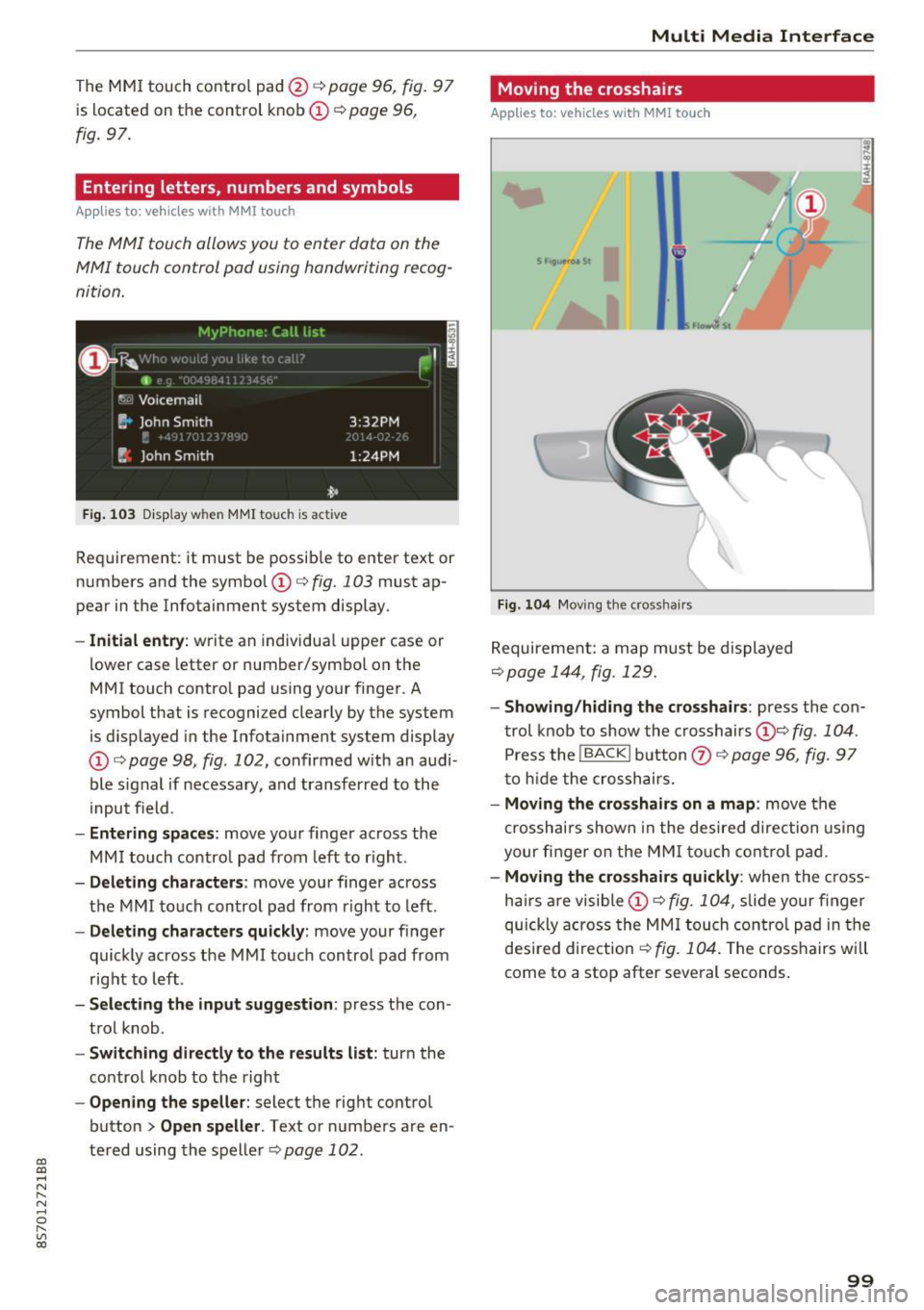
Entering letters, numbers and symbols
Applies to: veh icles with MMI touch
The MMI touch allows you to enter data on the
MMI touch control pad using handwriting recog
nition.
F ig. 103 Disp lay w hen MMI touch is ac tive
Requirement : it must be possible to enter text or
numbers and the symbol
(I) q fig. 103 must ap
pear in the Infotainment system display.
- Initial entry : write an individual upper case or
lower case letter or number/symbol on the
MMI touch control pad using your finger . A
symbol that is recognized clearly by the system
is d isplayed in the Infotainment system display
(I) ¢ page 98, fig . 102, confirmed with an audi
ble signal if necessary, and transferred to the
input field .
-Entering spaces: move your finge r across the
MM I touch contro l pad from left to right.
- Deleting characters : move your finger across
t h e MMI touch control pad from right to left.
-Deleting characters quickly: move your finger
quickly across the MMI touch control pad from
right to left .
-Selecting the input suggestion: press the con
trol knob .
-Switching directly to the results list: turn the
contro l knob to the right
-Opening the speller : select the right control
button
> Open speller . Text or numbers are en
tered using the speller
q page 102.
Multi Media Interface
Moving the crosshairs
Applies to: vehicles with MMI touch
Fig. 104 Moving the cross hair s
Requirement: a map must be displayed
¢page 144, fig . 129.
- Showing/hiding the crosshairs: press the con
trol knob to show the crosshairs
(!)¢ fig . 104 .
Press the !BACKI button Q) ¢ page 96, fig. 97
to hid e the crosshairs.
- Moving the crosshairs on a map : move the
crosshai rs shown in the desired direction using
your fi nger on the MMI touch control pad.
-Moving the crosshairs quickly : when the cross
ha irs are visible
(I)¢ fig. 104, slide your finger
quickly across the MMI touch control pad in the
desired direction
¢ fig. 104. The crosshairs w ill
come to a stop after several seconds.
99
Page 107 of 314
CD
CD
.... N
" N ...... 0
" V, co
Multi Media Interface
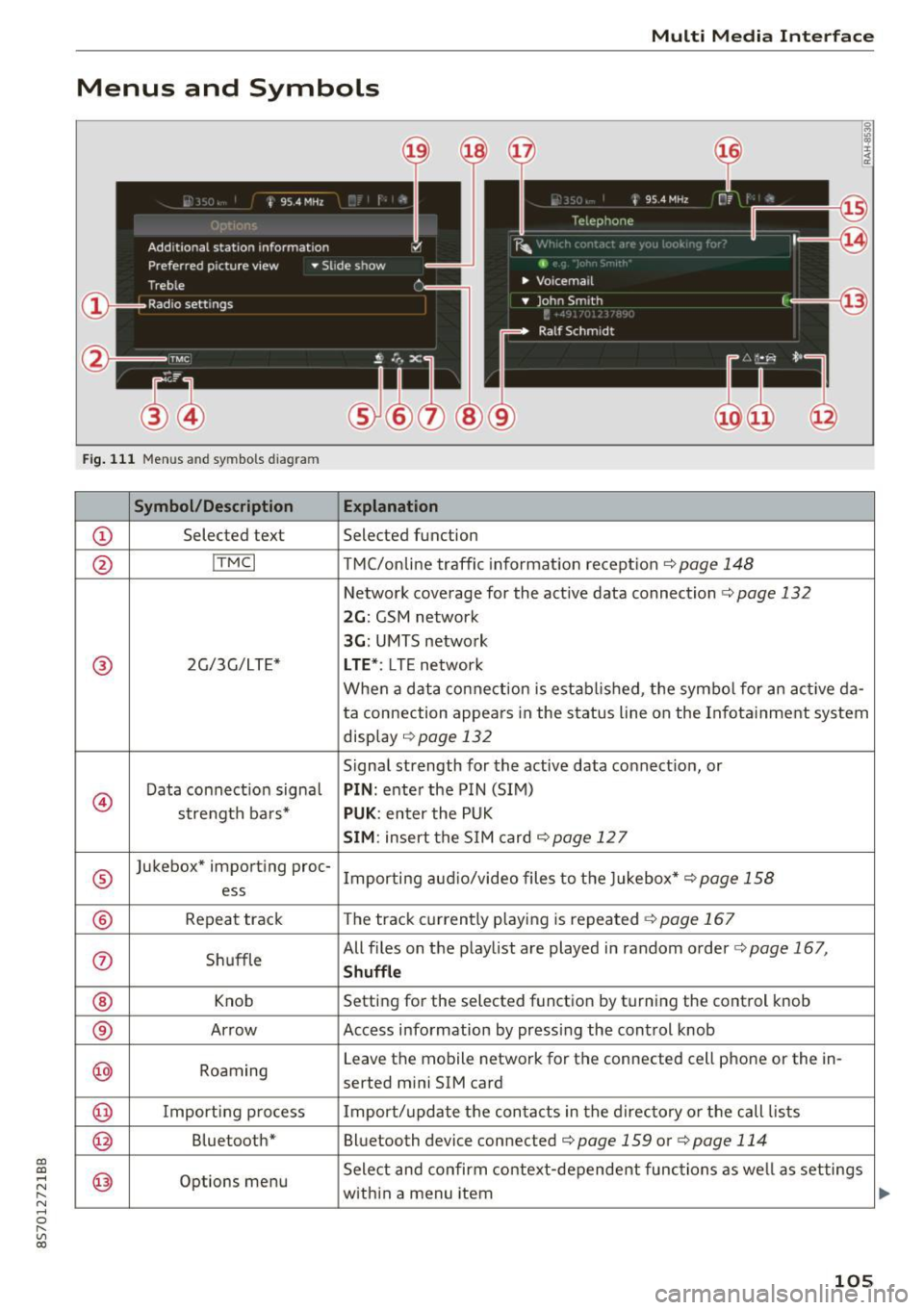
Menus and Symbols
I~ :c
' ~
@
14
Fig. 111 Menus and symbols diagram
Symbol/Description Explanation
CD Selected text Selected function
@ I
TMC I TMC/online traffic informat ion recept ion c::>page 148
Network coverage for the active data connection c::> page 132
2G: GSM network
3G : UMTS network
® 2G/3G/LTE* LTE *: LTE network
When a data connection is establ ished, the symbol for an act ive da-
ta connection appea rs in the status line on the Infota inment system
display
c::> page 132
Signal strength for the active data connect ion, or
@
Data connect ion signa l PIN: enter the PIN (SIM)
strength bars*
PUK : enter the PUK
SIM: insert the SIM card c::> page 12 7
®
Jukebox* importing proc-
Importing audio/video files to the Jukebox*
c::> page 158
ess
® Repeat track The track currently playing is repeated c::>page 167
0 Shuffle All files on the playlist are played in random o
rder
c::> page 167,
Shuffle
® Knob Setting for the selected function by turning the control knob
® Arrow Access information by pressing the control
knob
@ Roaming Leave the mobile network for the connected cell phone or the in-
serted mini SIM card
@ Importing process Import/update the contacts in the directory or the call lists
@ Bluetooth* Bluetooth device connected c::> page 159 or c::> page 114
@ Options menu Select
and confirm context-dependent functions as well as settings
within a menu item
105
Page 153 of 314
Radio
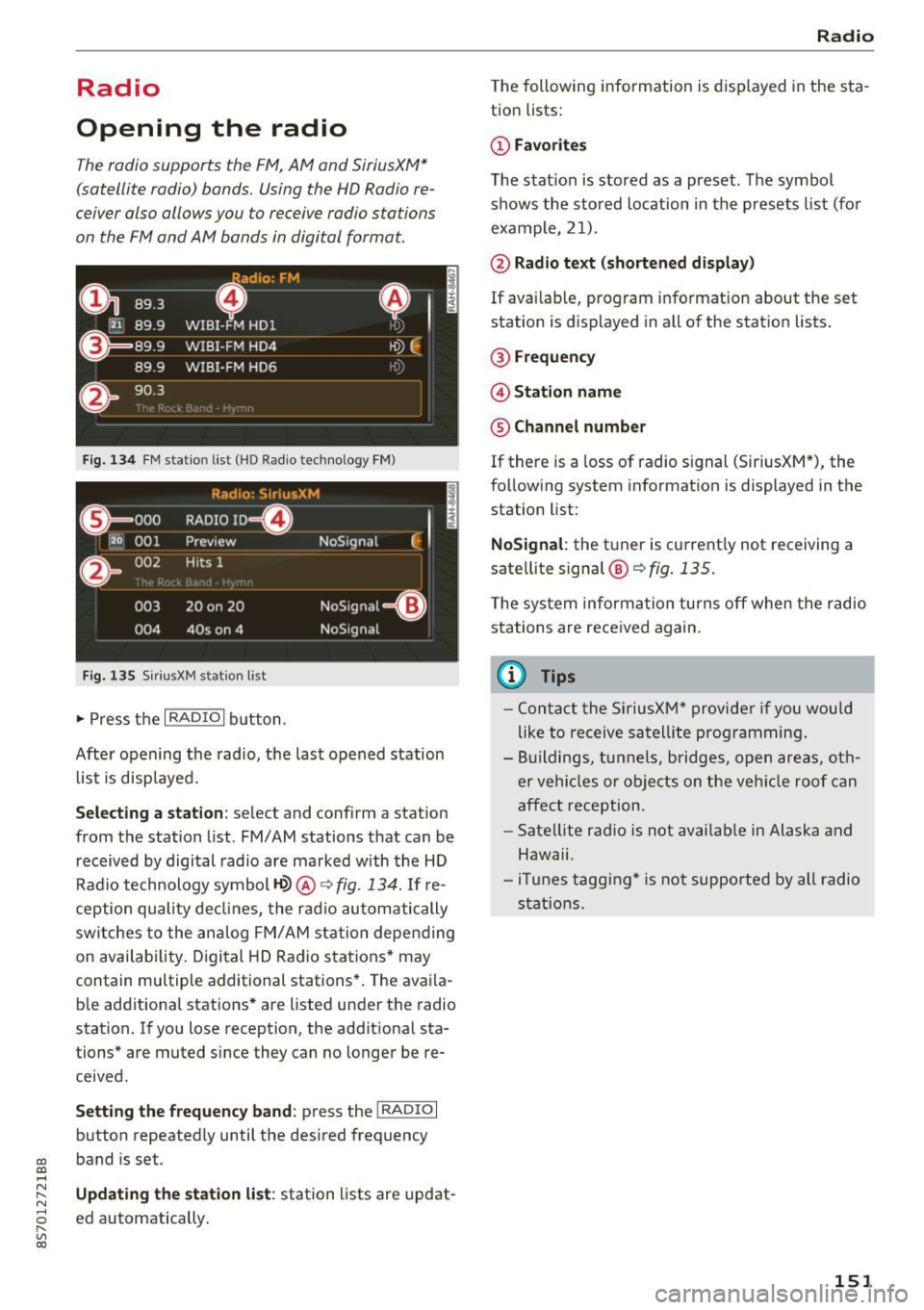
Opening the radio
The radio supports the FM , A M and SiriusXM *
(satellite radio) bands. Using the HO Radio re
ceiver also allows you to receive radio stations
on the FM and AM bands in digital format.
Fig . 134 FM stat ion list ( HO Ra dio tec hn ology FM)
Radio: SiriusXM
ti
~ .. . 000 RADIO 10 D
120 001
Preview NoSignal
&
002 H
its 1
003 20 on 20
NoSignal=8
004 40s on 4 NoSignal
Fig. 135 S iri usXM station list
.. Press the I RAD IO I bu tton.
Afte r opening the rad io, t he last opened station
lis t is disp laye d.
.
I
Selecting a station : select and confirm a stat io n
from the station list . FM/ AM stations t hat can be
received by digital rad io are ma rked w ith the HD
R adio technology symbol
tQ> @ ~ fig. 13 4. If re
ception quality decl ines, the r adio automatically
switches to the analog FM/AM station depe nding
on availability . D igi tal HD Radio s ta tions * may
contain multiple additional stations* . The ava ila
b le add itiona l stations* are listed under the radio
station. I f you lose reception, the add it iona l sta
tions* are muted since they can no longer be re
ceived.
Setting the frequency band : press the I RADIO I
button repeated ly until the desired frequency
CD band is set. CD ....
~ Updat ing the station li st : station lists are updat -.....,
8 ed automatically. r--. V, co
Radio
The following information is displayed in the s ta
tion lists:
(D Favorites
The s tat io n is stored as a preset . The symbo l
shows the s to red location in the p resets list (fo r
example, 21).
@ Rad io text (shortened display )
If availab le, program info rmat ion about the set
station is d isplayed in a ll of the stat ion lists.
@ Frequenc y
@ Station name
® Channel number
If there is a loss of radio signal (Sir iusXM*), the
f o llow ing system in format ion is displayed in the
station list:
NoSignal : the tu ner is cu rrent ly not receiving a
sate llite signal @~
fig. 135.
The system inform ation turns off when the radio
st ations are rece ived again.
(D Tips
- Con tact the SiriusXM" provider if you would
like to receive sa tel lit e programming .
- B uilding s, tu nnels, b ridges, ope n area s, oth
er veh icles or objects o n the veh icle roof can
affect reception.
- Sate llite ra dio is not availab le in Alaska and
Hawaii.
- iT unes tagg ing* is not supporte d by all radio
sta tio ns.
151
Page 201 of 314
co
co
.... N
" N .... 0
" "' c:o
smash the child seat and child against the
backrest, center armrest, door or roof.
- Forward-facing child seats installed on the
front passenger's seat may interfere with
the deployment of the airbag and cause se
rious personal injury to the child.
A WARNING
If, in exceptional circumstances, you must in
stall a forward-facing child restraint on the
front passenger's seat:
- Always make sure the forward-facing seat
has been designed and certified by its man
ufacturer for use on a front seat with a pas
senger front and side airbag.
- Never put the forward-facing child restraint
up against or very near the instrument pan
el.
- Always move the front passenger seat to
the highest position in the up and down ad
justment range and move it back to the
rearmost position in the seat's fore and aft
adjustment range, as far away from the air
bag as possible, before installing the for·
ward-facing child restraint.
- Always make sure that the safety belt upper
anchorage is behind the child restraint and
not next to or in front of the child restraint
so that the safety belt will be properly posi
tioned.
- Make sure that the
PASSENGER AIR BAG
OFF~;
light comes on and stays on all the
time whenever the ignition is switched on.
A WARNING
To reduce the risk of serious injury, make sure
that the
PASSENGER AIR BAG OFF~; light
will be displayed whenever a child restraint is
installed on the front passenger seat and the
ignition is switched on.
- If the PASSENGER AIR BAG OFF~; light
does not stay on, perform the checks descri
bed
Q page 20 7, Monitoring the Advanced
Airbag System.
- Have the airbag system inspected by your
Audi dealer immediately.
Airbag system
-Always carefully follow instructions from
child restraint manufacturers when instal
ling child restraints.
A WARNING
If, in exceptional circumstances, you must in
stall a forward or rearward-facing child re
straint on the front passenger's seat:
- Improper installation of child restraints can
reduce their effectiveness or even prevent
them from providing any protection.
- An improperly installed child restraint can
interfere with the airbag as it deploys and
seriously injure or even kill the child -even
with an Advanced Airbag System.
- Always carefully follow the manufacturer's
instructions provided with the child seat or
earner.
-Always make sure that there is nothing on
the front passenger seat that will cause the
capacitive passenger detection system in
the seat to signal to the Airbag System that
the seat is occupied by a person when it is
not, or to signal that it is occupied by some ·
one who is heavier than the person actually
sitting on the seat. The presence of addi
tional objects could cause the passenger
front airbag to be turned on when it should
be off, or could cause the airbag to work in a
way that is different from the way it would have worked without the object on the seat.
199
Page 210 of 314
Airbag system
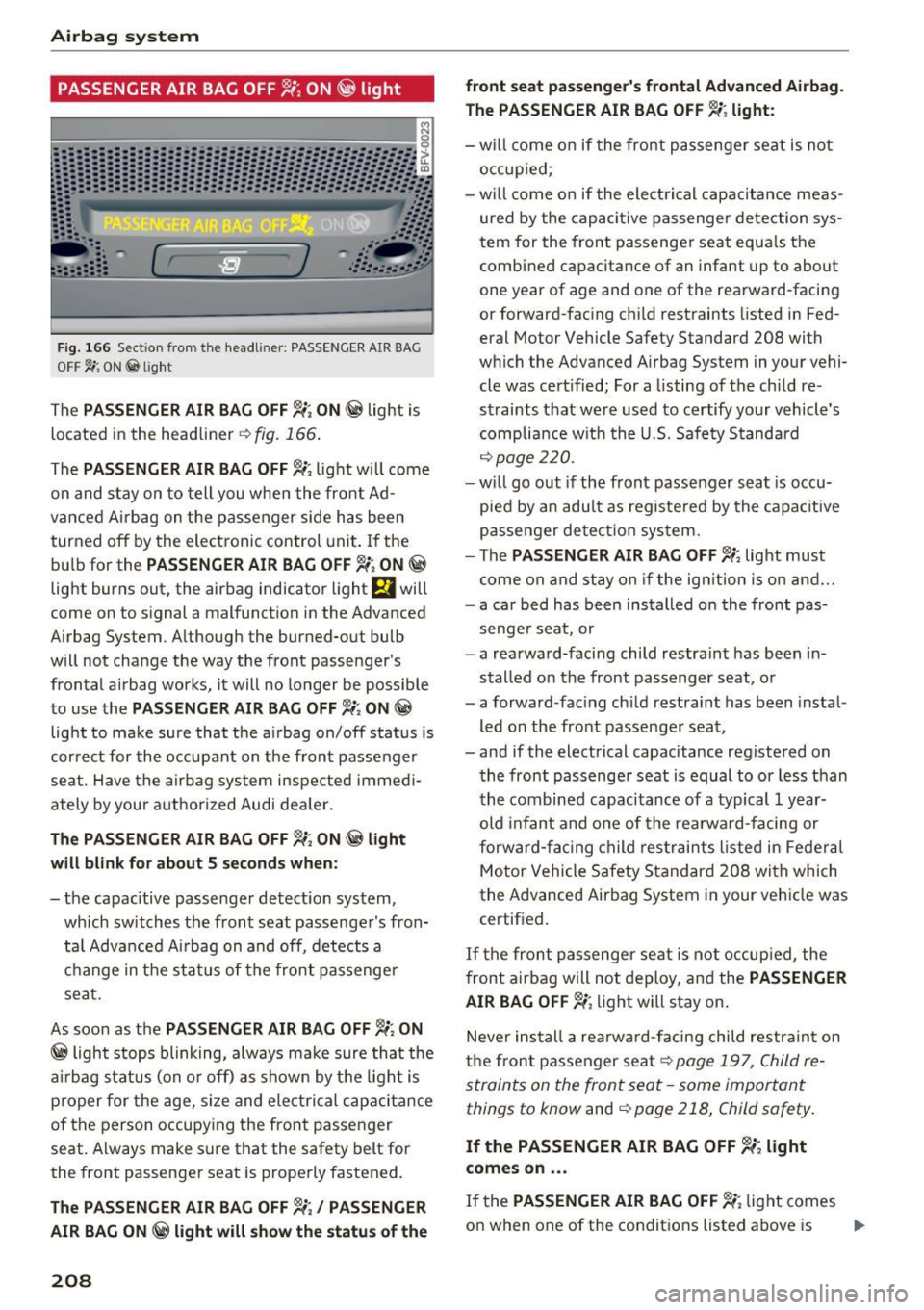
PASSENGER AIR BAG OFF 1!; ON @ light
F ig. 166 Sect ion from the headl iner: PASSENGER AIR BAG
O FF ~ ON@lig ht
The PASSENGER AIR BAG OFF~; ON @ light is
located in the he adliner
~ fig. 166 .
The PASSENGER AIR BAG OFF~; light w ill come
on and stay on to tell you whe n the front Ad
vance d Ai rbag on t he passenger side h as been
turned off by the electronic control uni t. If the
bu lb for the
PASSENGER AIR BAG OFF 1i , ON @
light burns out, the airbag indicator light El will
come on to signal a malfunction in the Advanced
Airbag System. A lthough the burned-out bulb
w ill not change t he way the front passenger 's
fron ta l airbag works, it will no lo nger be possible
to use the
PASSENGER AIR BAG OFF~; ON @
light to ma ke sure tha t the ai rbag on/off s tat us is
corre ct for the occup ant on the fron t passe nger
se at. H ave the airbag system inspected immed i
ately by your a uthorized Audi dea ler.
The PASSENGER AIR BAG OFF~; ON @ light
will blink for about 5 seconds when:
- the capacitive passenger de tect ion sys tem,
which sw itches the front seat passenge r's fron·
tal Adv anced Ai rb ag on and off, detect s a
c h ange in t he sta tus of the front passenge r
sea t.
As soo n as the
PASSENGER AIR BAG OFF ~; ON
@ ligh t stop s blinking, always ma ke sure tha t the
air bag statu s (on or off) as shown by t he light is
p roper for the age, s ize and ele ct ric al c ap acitance
of the person occupy ing the front passe nger
seat . A lways make s ure that the safety belt for
the front passenge r seat is prope rly fasten ed.
The PASSENGER AIR BAG OFF ~; / PASSENGER
AIR BAG ON@ light will show the status of the
208
front seat passenger's frontal Advanced Airbag.
The PASSENGER AIR BAG OFF~; light:
- will c om e o n if the fr ont pas senge r seat is not
o ccupi ed;
- will c ome o n if the ele ctric al c apac itance meas·
ured by the capaci tive pas senger detectio n sys·
t ern for the fron t passenge r se at equ als the
combined capacitance of an infant up to about
one year of age and one of the rea rwa rd-faci ng
or forward -fac ing c hild rest raints listed in Fed
eral Motor Vehicle Safety Standard 208 with
which the Advanced A irbag System in your vehi·
cle was cert ified; For a listing of the ch ild re·
strai nts that we re us ed to certify yo ur vehicle's
complia nce w it h t he U.S . Safe ty S tanda rd
¢ page 220 .
-will go out if the front p assenge r seat is occu
pie d by an adu lt as regis te re d by the capac itive
passe nger detect io n sys tem.
- The
PASSENGER AIR BAG OFF~; light mus t
come on and sta y on if the ig nition i s on a nd ...
- a ca r bed has been ins talled o n the front pas·
senge r sea t, or
- a rea rwa rd -facing child restrain t has been in·
s talled on the front passenger s eat, or
- a forward -fac ing ch ild restraint has been insta l·
led on the fro nt passenger sea t,
- and if the electrical capacitance registe red on
the front passenge r seat is equal to or less than
t he co mbine d capacitance of a typical 1 y ear·
old inf ant and o ne of th e rea rw ar d-facing or
forw ard-fa cing c hild r estra in ts l iste d in Fe deral
Moto r Vehicle S afety S tandar d 208 with which
the Adva nced Airbag System in your veh icle was
certif ied.
If t he fron t passenger se at i s not occup ied, the
fr ont airba g will not deploy, a nd the
PASSENGER
AIR BAG OFF~;
light w ill stay on .
Neve r ins tall a rea rw ar d-f a cing child res tra int on
th e fr on t passenger sea t
¢ page 19 7, C hild re
s traints on the front seat -some importan t
things to know
and ¢ page 21 8, Child safety .
If the PASSENGER AIR BAG OFF ~; light
comes on ...
If th e PASSENGER AIR BAG OFF~; ligh t comes
o n when one of the condit ions listed above is
Ill-
Page 222 of 314
Child safety
Advanced front airbag system and children
Your vehicle is equipped with a front "Advanced
Airbag System" in compliance with United States Federal Motor Vehicle Safety Standard (FMVSS)
208 as applicable at the time your vehicle was
manufactured.
The Advanced Airbag system in your vehicle has
been certified to meet the "low-risk" require
ments for 3- and 6-year old children on the pas
senger side and small adults on the driver side.
The low risk deployment criteria are intended to
reduce the risk of injury through interaction with
the airbag that can occur, for example, by being
too close to the steering wheel and instrument panel when the airbag inflates. In addition, the
system has been certified to comply with the
"suppression" requirements of the Safety Stand
ard, to turn off the front airbag for infants up to
12 months who are restrained on the front pas
senger seat in child restraints that are listed in
the Standard .
Even though your vehicle is equipped with an Ad
vanced Airbag system, a child should always ride
in the seat properly restrained for its age and
size . The airbag on the passenger side makes the
front seat a potentially dangerous place for a
child to ride. The front seat is not the safest place
for a child in a forward-facing child safety seat. It
can be a very dangerous place for an infant or a larger child in a rearward-facing seat .
The vehicle's Advanced Airbag System has a ca pacitive passenger detection system in the front
passenger seat cushion that can detect the pres
ence of a baby or a child in a child restraint sys
tem on this seat.
The capacitive passenger detection system regis
ters the changes that result in an electrical field
when a ch ild, a child restraint, and a baby blanket
are on the front passenger seat. The change in
the measured capacitance due to the presence of
a child, a child restraint, and a baby blanket on
the front passenger seat is related to the child
restraint system resting on the seat. The meas
ured capacitance of a child restraint system var ies depending on the type of system and specific
make and model.
220
The electrical capacitance of the various types, makes, and models of child restraints specified
by the U.5 .National Highway Traffic Safety Ad
ministration (NHTSA) in the relevant safety
standard are stored in the Advanced Airbag Sys
tem control unit together with the capacitances
typical of infants and a 1-year old child . When a
child restraint is used on the front passenger
seat with a typical 1 year-old infant, the Ad
vanced Airbag System compares the capacitance
measured by the capacitive passenger detection
system with the data stored in the electronic con
trol unit.
Child restraints and Advanced front airbag
system
Regardless of the child restraint that you use,
make sure that it has been certified to meet Unit
ed States Federal Motor Vehicle Safety Standards
and has been certified by its manufacturer for
use with an airbag. If in exceptional circumstan
ces you must use it on the front passenger seat,
carefully read all of the information on child safe
ty and Advanced Airbags and heed all of the ap
plicable WARNINGS. Make certain that the child
and child restraint are correctly recognized by the
capacitive passenger detection system in the
front passenger seat, that the front passenger
airbag is turned off, and that the airbag status is
always correctly signaled by the
PASSENGER AIR
BAG OFF~;
light.
Many types and models of child restraints have
been available over the years, new models are in
troduced regularly incorporating new and im
proved designs and older models are taken out of
production. Child restraints are not standardized.
Child restraints of the same type typically have
different weights and sizes and different "foot
prints", the size and shape of the bottom of the
child restraint that sits on the seat, when they
are installed on a vehicle seat. These differences
make it virtually impossible to certify compliance
with the requirements for advanced airbags with each and every child restraint that has ever been
sold in the past or will be sold over the course of
the useful life of your vehicle. ..,.