warning AUDI TT ROADSTER 2017 User Guide
[x] Cancel search | Manufacturer: AUDI, Model Year: 2017, Model line: TT ROADSTER, Model: AUDI TT ROADSTER 2017Pages: 314, PDF Size: 76.54 MB
Page 19 of 314
CD
CD
.... N
" N .... 0 r--. V, co
@:.D Light/rain sensor
l!I Automatic headlights: malfunction! See
owner' s manual
El Automatic wipers : malfun ction! See owner 's
manual
The light/ra in sensor is malf unct ion ing.
The low beams remain switched on at all times
for safety reasons when the light switch is in the
AUTO position. You can continue to turn the
lights on and off using the light switch . You can
still cont rol a ll wipe r functions that a re inde
pendent of the ra in se nsor.
Drive to an authorized Aud i dea ler or a ut horized
Audi Service Facility immediately to have t he
malfunction corrected .
; Adaptive dampers
Applies to: vehicles with Audi drive select
B Suspension : malfunction! You may continue
driving
There is an adaptive damper malf unct ion.
Drive to an aut horize d Aud i dea le r or a uthorized
Aud i Service Facility immediately to have t he
malfunct ion corrected.
¢i ¢ Turn signals
If t he B or Ill indicator light b links, a t urn sig
n a l is turned on. If both indicator lig hts are blink
i ng, the eme rgency flash ers a re on .
On-Board Diagnostic
system (OBD)
Malfunction indicator lamp (MIL)
The malfunction indica to r l amp (MIL) ¢.j in the
in str ument cluster is part of the O n Board Diag
n os tic Sys tem ( OBD II).
The warning/indicator light turns on w hen the ig
ni tion is switched o n and turns off once the e n
g ine is s tarted an d is runn ing in id le at a stab le
speed. This indica tes th at the MIL is functioning
cor re ct ly.
Instruments and indicator lights
If the light does not turn off after starting the
engine
or turns on while driving, this may in di
cate there is a malfunction in the engine.
If the
indicato r turns on, the cata lytic conve rter may be
damaged .
Drive
with reduced engine performan ce (avo id
high speeds for extended per io d s of t ime and/o r
fast acceleration) and have the ma lfunction cor
rected. See an author ized Audi dealer or author
ized Audi Service Facility.
The in dicator may turn on if the e lectron ic speed
li miter is faulty. For add it iona l information, see
¢ page 72, Electronic speed limiter.
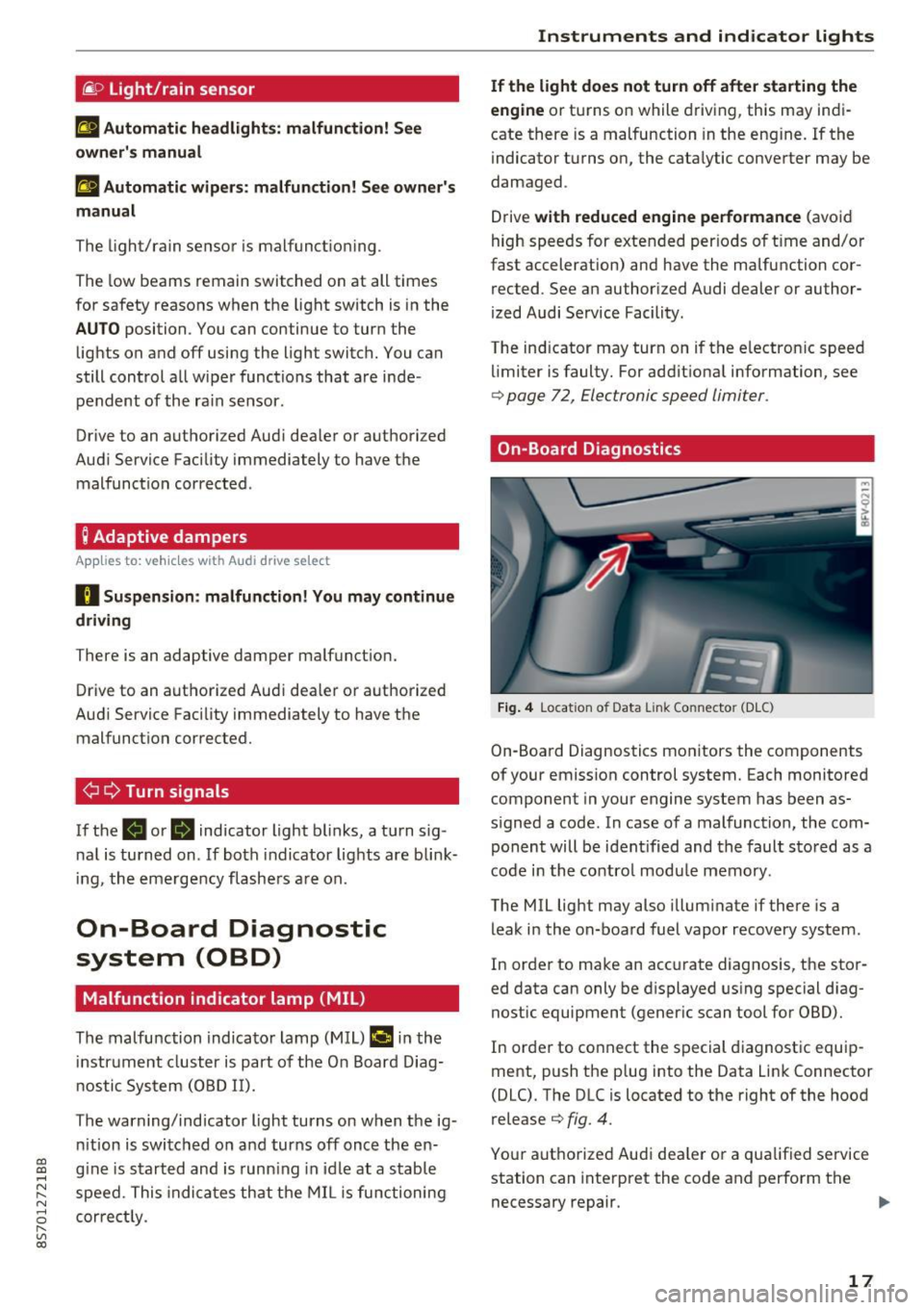
On-Board Diagnostics
Fig. 4 Location of Data Link Connector (DLC)
On-Boa rd Diagnostics mo nitors the components
of your emission control system. Each monitored
component in your engine system has been as
s igned a code. In case o f a malfunction, the com
ponent will be i dent ified and the faul t st o red as a
co de i n t he co ntro l mo dule mem ory.
The MIL lig ht may also illum inate if there is a
leak in the on-boa rd fuel vapor recovery system .
In or de r to ma ke an acc urate diagnosis, the sto r
ed data can only be d isplayed using special d iag
nostic equipment (gener ic scan to ol for OBD).
In order to co nnect the s pecial diagnost ic equi p
ment, push the p lug into the Data Link Connector
(DLC). T he DLC is located to the right of the hood
re lease
¢ fig. 4.
You r aut horize d Aud i dea le r or a qua lified se rvice
station can inte rpret the code and perform the
necessary repair.
IJJI,
17
Page 20 of 314
Instruments and indicator lights
A WARNING
Do not use the diagnostic connector for pe r
sonal use . Incorrect usa ge can cause malfunc-
18
-
tions, which can increase the risk of a co lli
sion!
Page 21 of 314
CD
CD
.... N
" N .... 0 r--. V, co
Driver information system
Overview
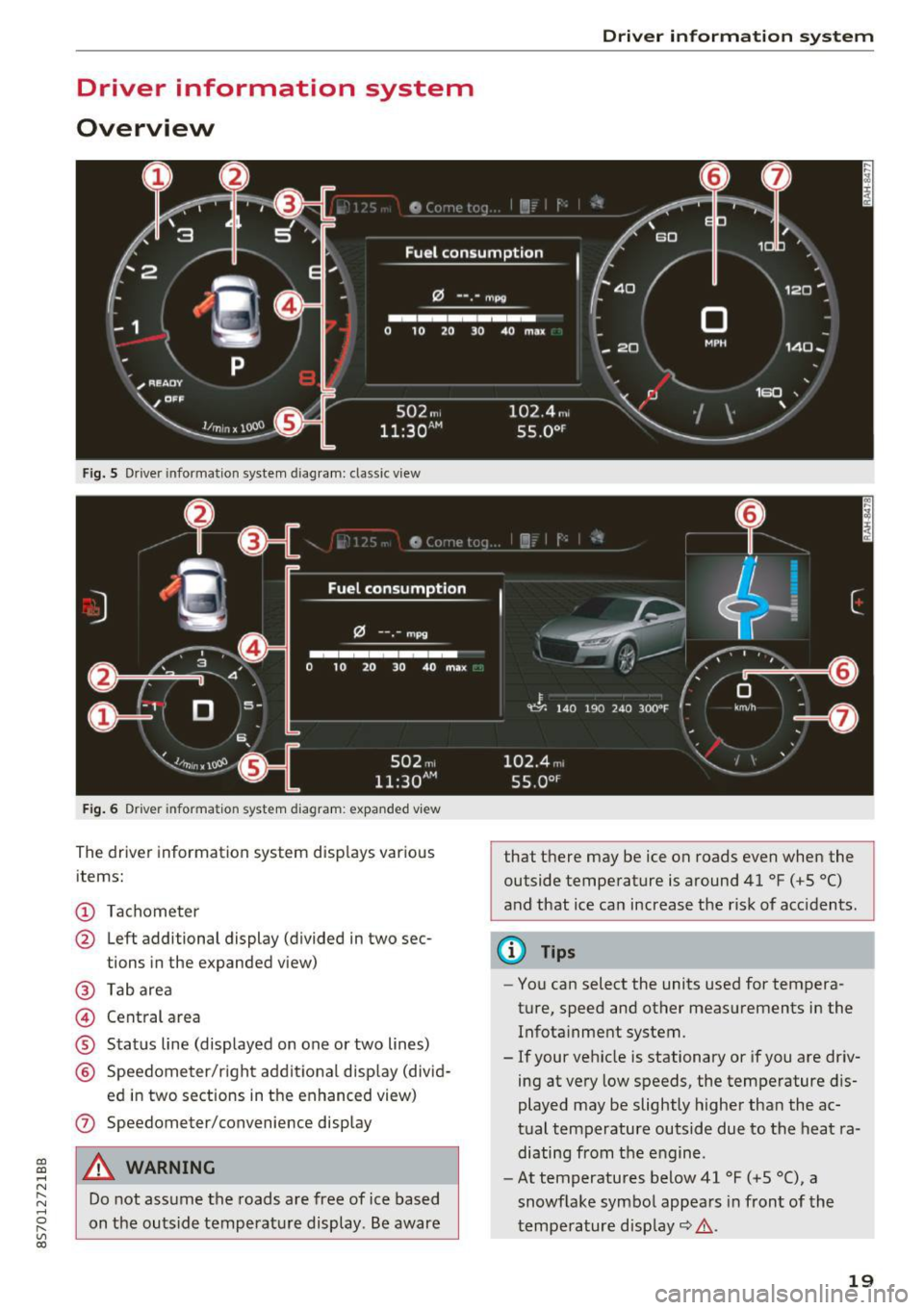
Fig. S Dr iver information system diagram: classic v iew
Fig. 6 D river information system diagram : expanded view
The driver information system displays various
items:
@ Tachometer
@ Left additional display (divided in two sec-
tions in the expanded view)
@ Tab area
@ Central area
® Status line (displayed on one or two lines)
@ Speedometer/right additional display (divid-
ed in two sections in the enhanced view)
(J) Speedometer/convenience display
A WARNING
Do not assume the roads are free of ice based
on the outside temperature display . Be aware
Driver in forma tion system
that there may be ice on roads even when the
outside temperature is around 41 °F ( +S °C)
and that ice can increase the risk of acc idents.
(D Tips
- You can select the units used for tempera
ture, speed and other measurements in the
Infotainment system.
- If your vehicle is stationary or if you are driv
ing at
very low speeds, the temperature dis
played may be slightly higher than the ac
tual temperature outside due to the heat ra
diating from the engine.
- At temperatures below 41 °F (+S °C), a
snowflake symbol appears in front of the
temperature display~ ,&.
19
Page 22 of 314
Driver information system
Multifunction steering
wheel plus
Operating
Apples to: vehicles with multifunctio n steering wheel plus
The Multifunction steering wheel plus* hos 14
buttons. You con use them to operate the driver
information system and the MMI functions,
change the volume and switch the voice recogni
tion system* on and off.
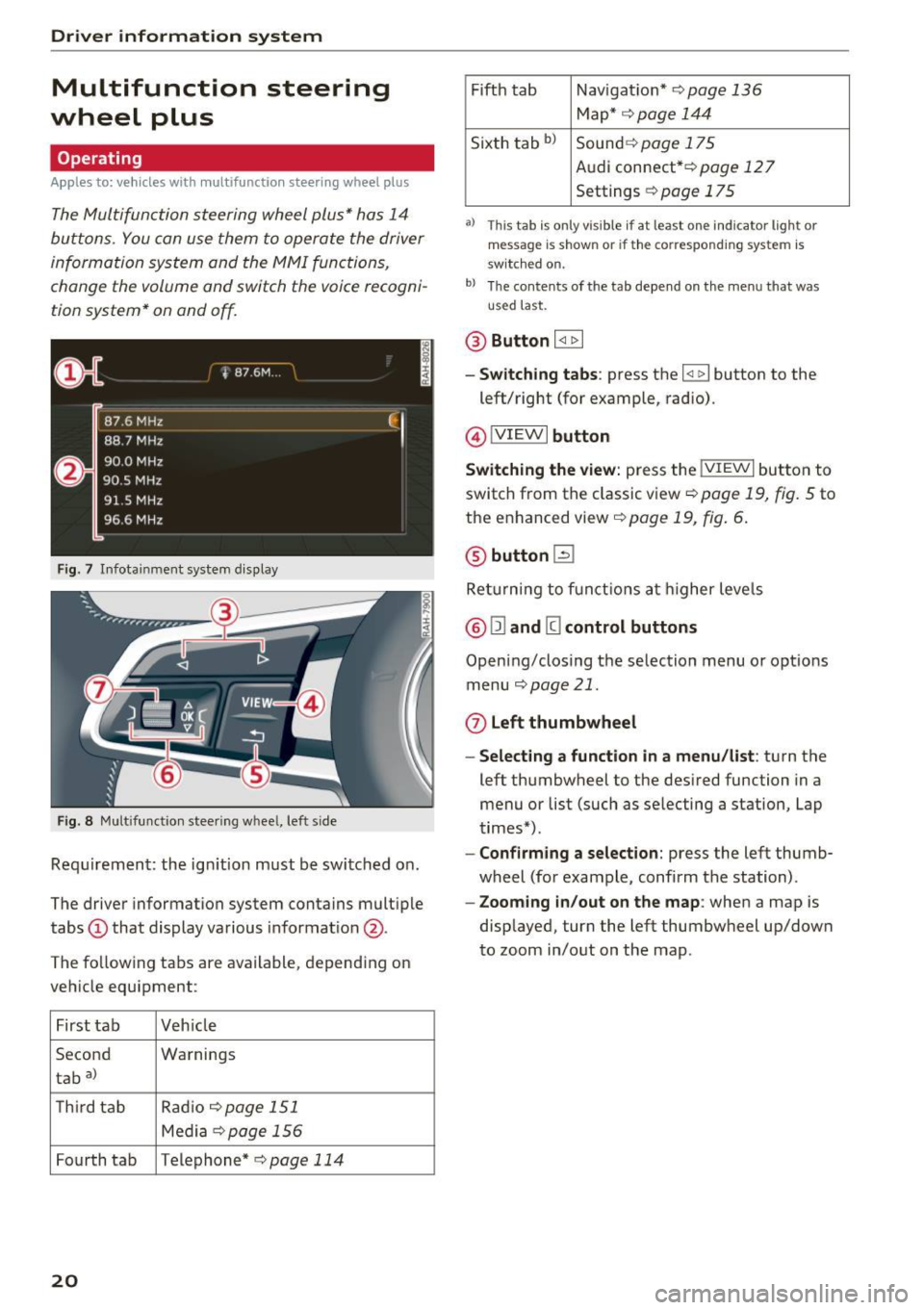
F ig. 7 Infotainment system display
Fig. 8 Mult ifunction steering wheel, left side
Requirement: the ign ition must be switched on .
The driver information system contains multiple
tabs
(D that display various informat ion @.
The fo llowing tabs are available, depending on
vehicle equipment :
First tab Veh icle
Second Warnings
tab
a)
T h ird tab Rad
io c:>page 151
Media c:> page 156
Fourth tab Telephone* c:> page 114
20
Fifth tab Navigat ion* c:> page 136
Map * c:> page 144
Sixth tab bl Sound c:> page 175
Audi connect* c:>page 127
Settings c:> page 175
a) This tab is only visible if at least o ne indicator lig ht or
message is shown or if the correspond ing system is
sw itc hed on.
bl Th e contents of the tab depend on the menu that was
u se d last.
® Button I <1 1> I
- Switching tabs: press the I
left/right (for example, radio).
@!VIEWI button
Switching the view: press the !VIEWI button to
switch from the classic view
c:> page 19, fig. 5 to
the enhanced view c:>
page 19, fig. 6.
@ button l2J
Returning to f unctions at higher levels
® l1l and III control buttons
Opening/closing the selection menu o r options
menu
c:>poge 21.
0 Left thumbwheel
-Selecting a function in a menu/list: turn the
left thumbwheel to the desired function in a
menu or list (such as selecting a station, Lap
times*) .
-Confirming a selection: press the left thumb
wheel (for example, confirm the station) .
-Zooming in/out on the map : when a map is
displayed, turn the left thumbwheel up/down
to zoom in/out on the map.
Page 24 of 314
Driver information system
© button l1<1<1 I l1>1>1 I
-Selecting the previous/next tr ack or station :
press the ll
- Fast forwarding /re winding audio file s: press
and ho ld the
! 1q<] I or l1>1> 1I bu tton un til t he desired
location in the fi le is reached .
@button @
- Programmable steering wheel button - open
ing a function :
press the@ bu tton.
- Programmable steering wheel button - re
questing a function :
ho ld dow n the Ill button.
- Programmable steering wheel button - chang
ing a function:
selec t the fi rst tab> Vehicle
settings
> Steering wheel button a ssignment .
@ button 1~·" 1
- Repeating the last navigat ion prompt : press
the
I Q•,.., I button when route guidance is active.
- Changing the voice guidance volume : when
route gu idance is active, turn th e right thumb
whee l upward or dow nward d uring a navigat ion
prom pt.
Multifunction steering
wheel
Operating
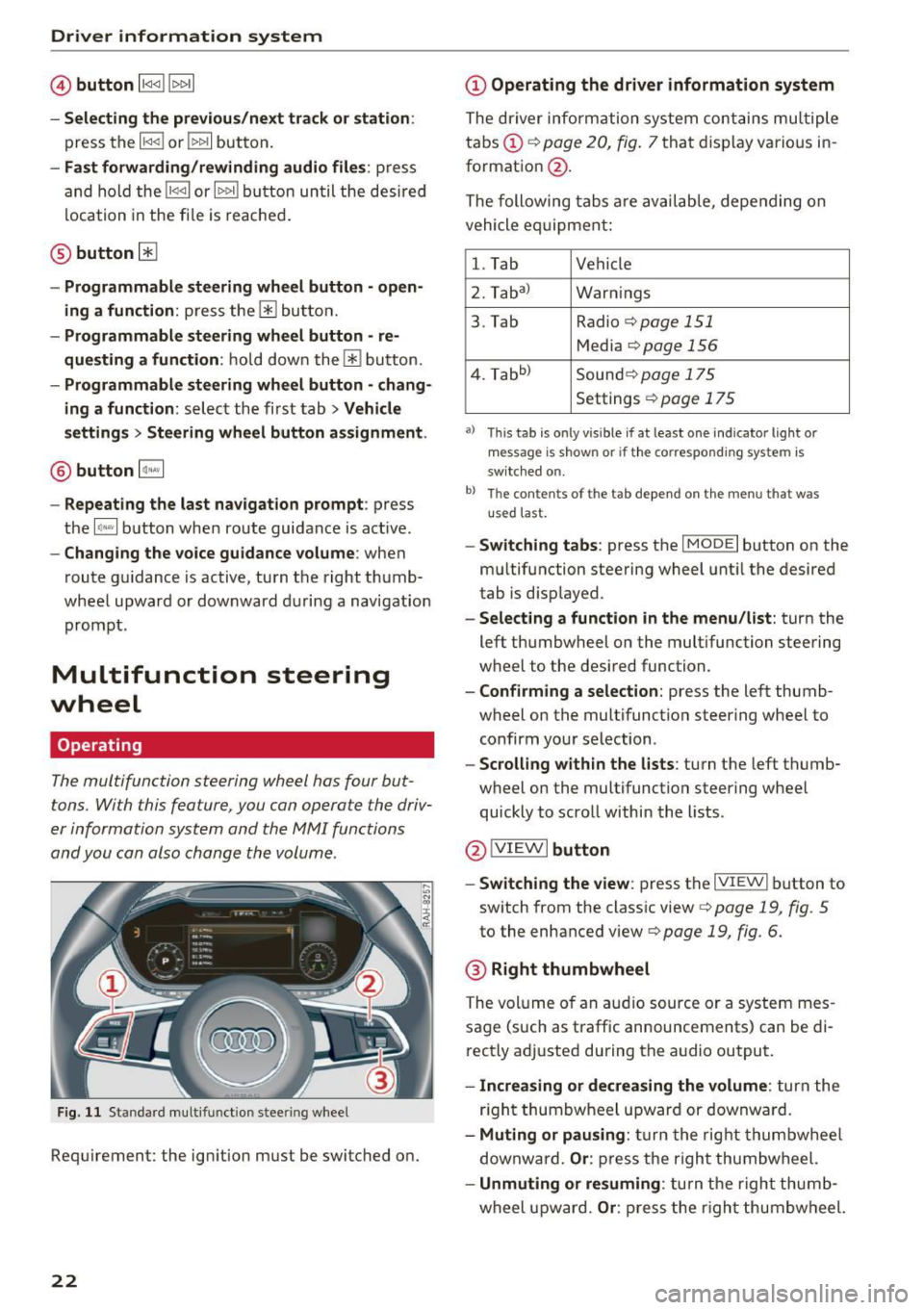
The multifunction steering wheel has four but
tons. With this feature, you can operate the driv
er information system and the MMI functions
and you can also change the volume.
Fig . 11 Standard multifunction stee ring wheel
Requirement: the ignition must be switched on.
22
(D Operating the driver information system
The driver information system contains multiple
tabs (!)¢
page 20, fig . 7 that disp lay various i n
format ion
@ .
The following tabs a re av ail ab le, depe nding on
vehicle e quipment:
l. Tab Vehicle
2. Taba )
Warnings
3. Tab Radio¢
page 151
Media ¢page 156
4. Tabb )
Sound¢ page 1 75
Settings ¢ page 175
a) Thi s tab is only v is ib le if at least one indicator lig ht or
message is shown or if t he co rrespond ing sys te m is
sw itched o n.
b ) Th e co ntents of th e tab depend on the menu t hat was
u se d l ast.
-Switch ing tabs : press th e I MODE I button on the
m ultifunction steering wheel unt il the desired
tab is disp layed .
-Selecting a function in the menu/list : turn the
left thumbwheel on the multifunction steering
wheel to the desired function .
-Confirming a selection : press the left thumb
wheel on the multifunction steering wheel to
confirm your selection.
-Scrolling with in the lists : turn the left thumb
wheel on the multifunction steering whee l
quickly to scro ll within the lists .
@!VI EWI button
- Switching the view :
press the IVIEWI button to
switch from the class ic view ¢
page 19, fig. 5
to th e enhanced view¢ page 19, fig. 6.
® Right thumbwheel
The volume o f an a udio source o r a system mes
sage (such as traffic announcements) can be di
r ectly adjusted during the a udio output.
- Increasing or decreasing the volume : turn the
r ig ht thumbwheel u pward or downwa rd.
- Muting or pausing : turn the rig ht thumbwhee l
downwa rd.
Or : press th e righ t thumbwheel.
- Unmuting or resuming : turn the righ t thumb
wheel u pw ard.
Or : press the r igh t thumbwheel.
Page 27 of 314
CD
CD
.... N
" N .... 0 r--. V, co
@ Key tag with PIN
Only applies to vehicles with Connectivity serv
ice*: open the key fob and rub the PIN until it is
v isib le . You can activate the Connectivity service*
on your vehicle using th is PIN code.
Replacing a key
If a key is lost, see an au thorized A udi dealer or
authorized Audi Service Facility. Have
this key de
activated.
It is important to bring all keys with
you. If a key is lost, you should report it to your
insurance company.
Number of keys
You can check the number of keys ass igned to
your veh icle in the Infotainment system . To do
this, select: the
I MENU ! button >Vehicle > left
control b utton
> Service & checks > Vehicle in
formation.
This way, you can make sure that you
have all the keys when purchasing a used vehicle .
Electronic immobilizer
The immobilizer prevents unauthorized use of
the vehicle.
Unde r certain circumstances, the vehicle may not
be ab le to start if there is a key from a different
vehicle manufacturer on the key chain .
Data in the master key
When driving, service and maintenance-relevant
data is continuously stored in your remote con
tro l key. Your Aud i service adviso r ca n read o ut
this da ta and tell you about the wo rk your veh icle
needs. This applies also to vehicles with a con
venience key*.
Personal convenience settings
I f two people use one vehicle, it is recommended
that each person always uses "t heir own" master
key. When the ignition is turned off or when the
vehicle is lock ed, persona l conven ience settings
for the following systems are stored and as
signed to the remote master key.
- Climate control system
- Parking aid*
- Active lane assist*
- Side assist*
Open ing and closing
-Drive se lect
T he sto red settings a re automa tica lly recalled
when you unlock the vehicle, open the doors or
turn on the ign ition.
& WARNING ~
A lways take the vehicle key with you when
l eav ing the vehicle, even for a short period of
time. This applies particularly when chi ldren
remain in the vehicle. Otherwise the children
could start the engine or operate e lectr ica l
equipment such as power windows.
@ Tips
-
The operation of the remote control key can
be temporarily disrupted by interference from
transmitters near the veh icle work ing in the
same frequency range (such as a cell phone or
radio equipment). A lways check if your vehicle
i s locked!
Removing the mechanical key
Fig . 14 Remote control mas ter key: remov ing the mechan i
ca l key
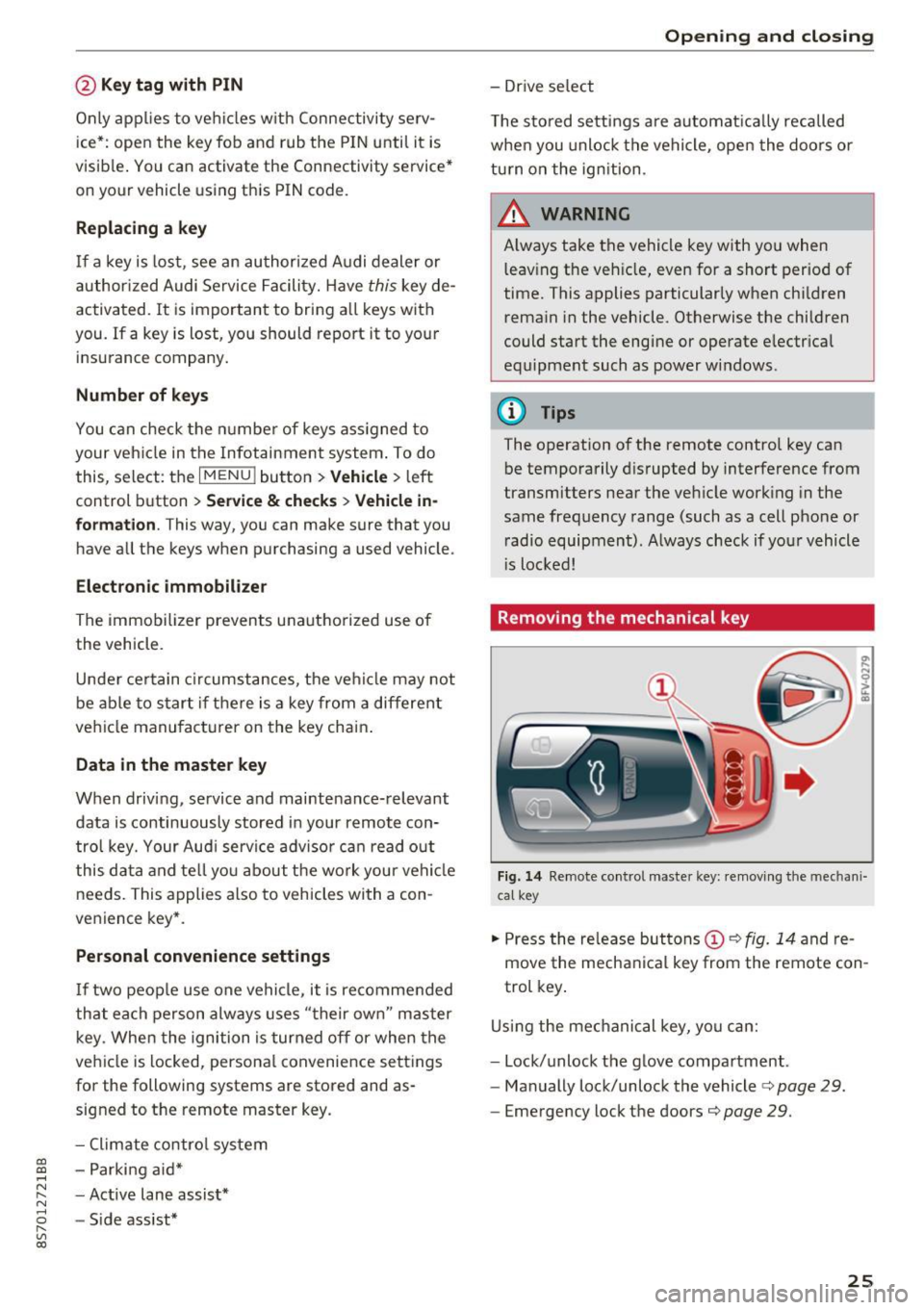
.,. Press the release but tons (D c::> fig. 14 and re
move the mechanical key from the remote con
trol key .
Using the mechanical key, you can:
- Lock/unlock the glove compartment.
- Manually lock/unlock the vehicle
c::> page 29.
-Eme rgency lock the doors c::> page 29.
25
Page 29 of 314
co
co
.... N
" N .... 0
" "' c:o
A WARNING ,~
No one, especially children, sho uld stay in the
veh icle w he n i t is locked from the outside, be
cause the w indows can no longer be opened
from th e inside
c::> page 29. Locked doors
ma ke it more difficult for eme rgency workers
t o get into the vehicle, which puts lives at
r isk.
@ Tips
- Only use the remote control key when you
are within view of the vehicle.
- Do not use the remote control when you are
inside the vehicle. Otherwise, yo u could un
i ntent io nally loc k the vehicle. If you then
tried to start the eng ine or open a door, the
alarm wou ld be triggered . If this happens,
press the un lock button@ .
- The selector leve r must be in the P position
on vehicles with a convenience key*. Other
wise the vehicle will not be ab le to lock .
- Only use the panic function in an emergen
cy .
Unlocking and locking with the
convenience key
Appl ies to: ve hicles with co nve nien ce key
The doors and luggage compartment lid can be
unlocked/locked without using the remote con
trol key.
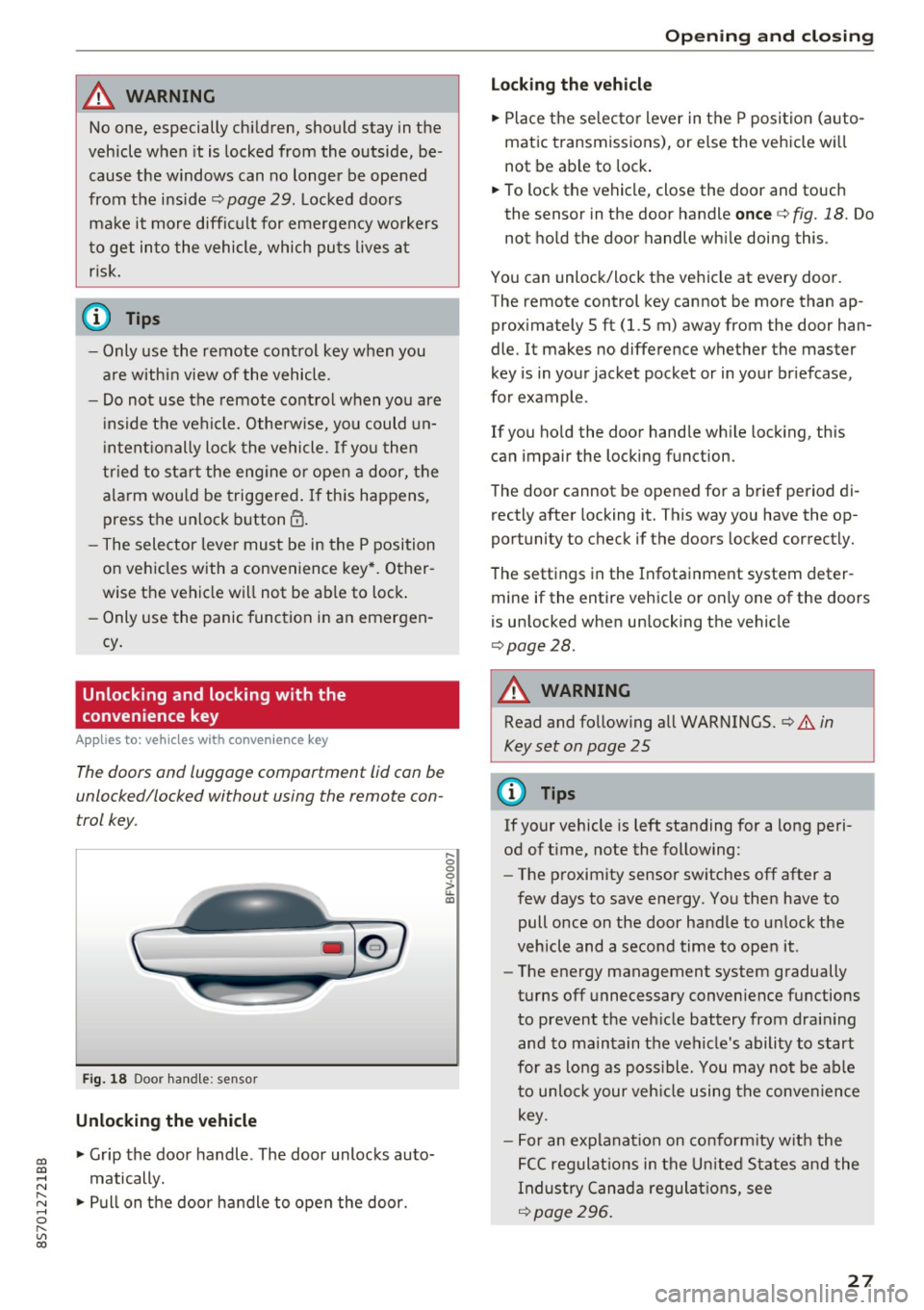
F ig . 18 Door han dle: senso r
Unlocking the vehicle
.,. Grip the door handle . The door unlocks auto
matically .
.,. Pull on the door handle to open the door.
.... 0 0 0
ii: IXl
Op ening and cl osing
Locking the v ehicle
.,. Place the se lecto r lever in t he P posi tion (a uto
matic transmiss ions), or else the vehicle wi ll
not be able to lock .
.,. To lock the vehicle, close the door and touch
the sensor in the door handle
once c::> fig. 18. Do
not hold the door handle wh ile doing this .
You can unlock/lock the ve hicle at every door.
The remote control key cannot be more than ap
prox imately 5 ft (1.5 m) away from the door han
dle. It makes no difference whether the master
key is in your jacket pocket or in your br iefcase,
for example .
If you ho ld the door handle wh ile lock ing, this
can impair the locking function.
The door cannot be opened for a brief period di rectly after locking it. This way you have the op
portunity to check if the doors locked correctly.
The settings in the Infotainment system deter mine if the entire vehicle or only one of the doors
is unlocked when un locking the vehicle
c::> page28.
A WARNING
-Read and follow ing all WARNINGS. c::> .&. in
Key set on page 25
0) Tips
If your vehicle is left standing for a long peri
od of t ime, note the follow ing:
- The proximity sensor sw itches off after a
few days to save energy. You then have to
pull once on the door handle to un lock the
vehicle and a second time to open it.
- The energy management system gradually
turns off unnecessary convenience functions
to prevent the veh icle battery from drain ing
and to ma intain the vehicle's ability to start
for as lo ng as poss ible. You may no t be ab le
to un lo ck your veh icle using the conve nience
key.
- For an explanat ion on co nfo rm ity w ith the
FCC regulat ions in the U nited S ta tes an d the
Indus try Canad a regulat ions, see
c::> page296 .
27
Page 30 of 314
Opening and clo sin g
Central locking switch
Fig. 19 D rive r's door : central lock ing switch
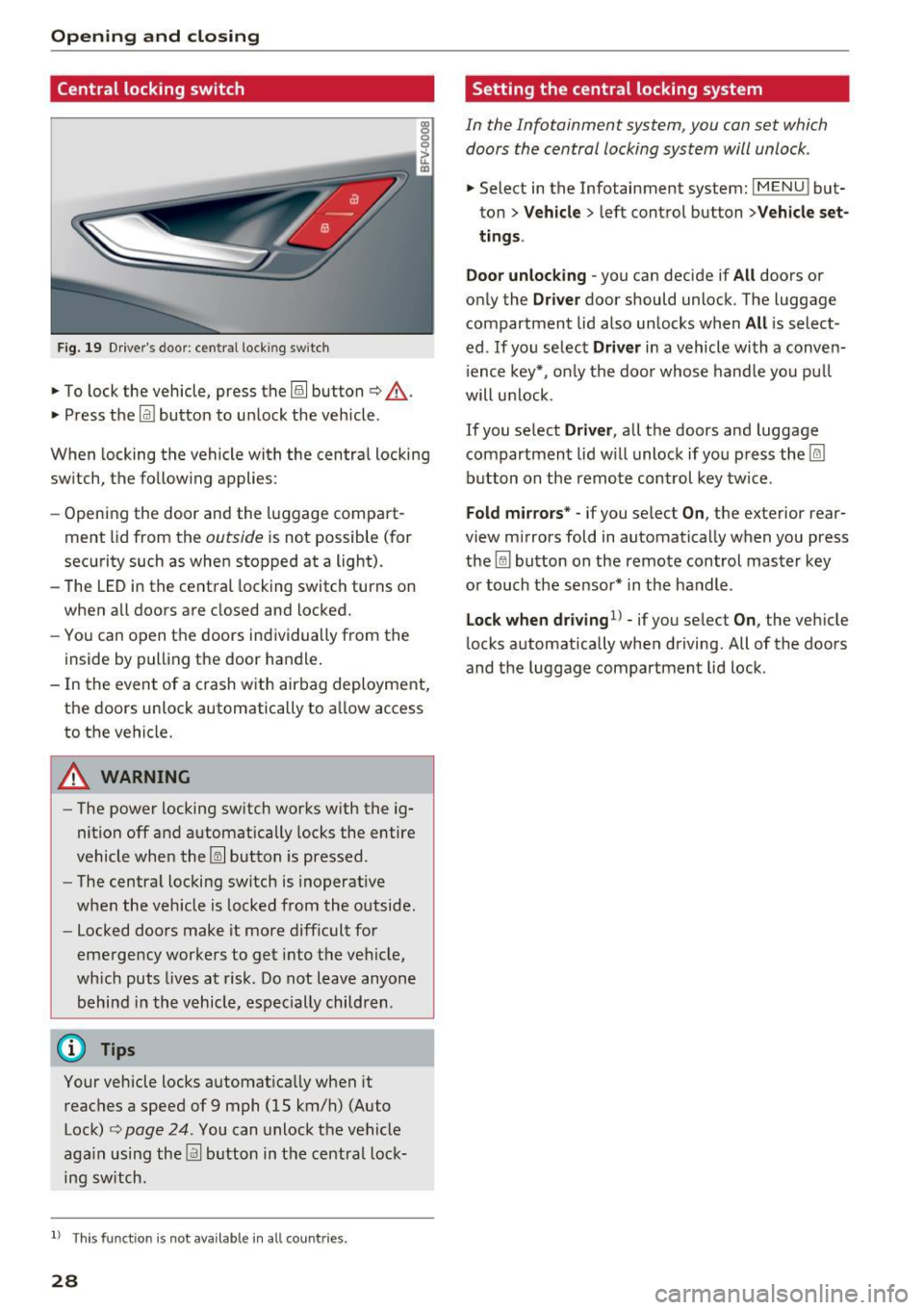
• To lock the vehicle, press the~ button c> .&,.
• Press t he !ill button to unlock the vehicle.
When locking the vehicle with the centra l locking
switch, the follow ing applies:
- Opening the door and the luggage compart
ment lid from the
outside is not possible (for
security such as when stopped at a light).
- The LED in the central locking switch turns on
when all doors are closed and locked.
- You can open the doors ind ividually from the
inside by pulling the door handle .
- In the event of a c rash with airbag deployment,
the doors unlock automat ically to a llow access
to the vehicle.
& WARNING
- The power locking sw itch works with the ig
nition off and automatically locks the entire
vehicle when the~ button is pressed.
- The centra l locking switch is inoperative
when the vehicle is locked from the outside.
- Locked doors make it more difficult for
emergency worke rs to get into t he vehicle,
wh ich puts lives at risk. Do not leave anyone
behind in the vehicle, especially children .
(D Tips
Your vehicle locks automatically when it
reaches a speed of 9 mph (15 km/h) (Auto Lock)
c> page 24 . You can unlock the vehicle
aga in using the
!ill b utton in the central lock
ing sw itch.
l) Th is fun ctio n is not a vailab le in a ll coun tries.
28
Setting the central locking system
In the Infotainment system, you can set which
doors the central locking system will unlock .
• Select in the Infotainment system: IMENU ! but
ton>
V eh icle > left control button >Vehicle set
t ings.
Door unloc king -
you can decide if All doors or
only the
Dr ive r door should unlock . The luggage
compartment lid also unlocks when
All i s select
ed . If you select
D riv er in a vehicle with a conven
i ence key*, on ly the door whose handle you pu ll
will unlock .
If you se lect
Dri ver , all the doors and luggage
compartment lid w ill unlock if you press the
I@
button on the remote control key tw ice .
Fold m irrors* -if you select On, the exterior rear
view m irrors fold in automatically when you press
the ~ button on the remote control master key
or touch the sensor* in the handle.
Lock whe n driving1l -if you select On , the veh icle
locks automatically when driving. All of the doors
and the luggage compartment lid lock .
Page 31 of 314
CD
CD
.... N
" N .... 0 r--. V, co
Emergency unlocking and locking the doors
-
----
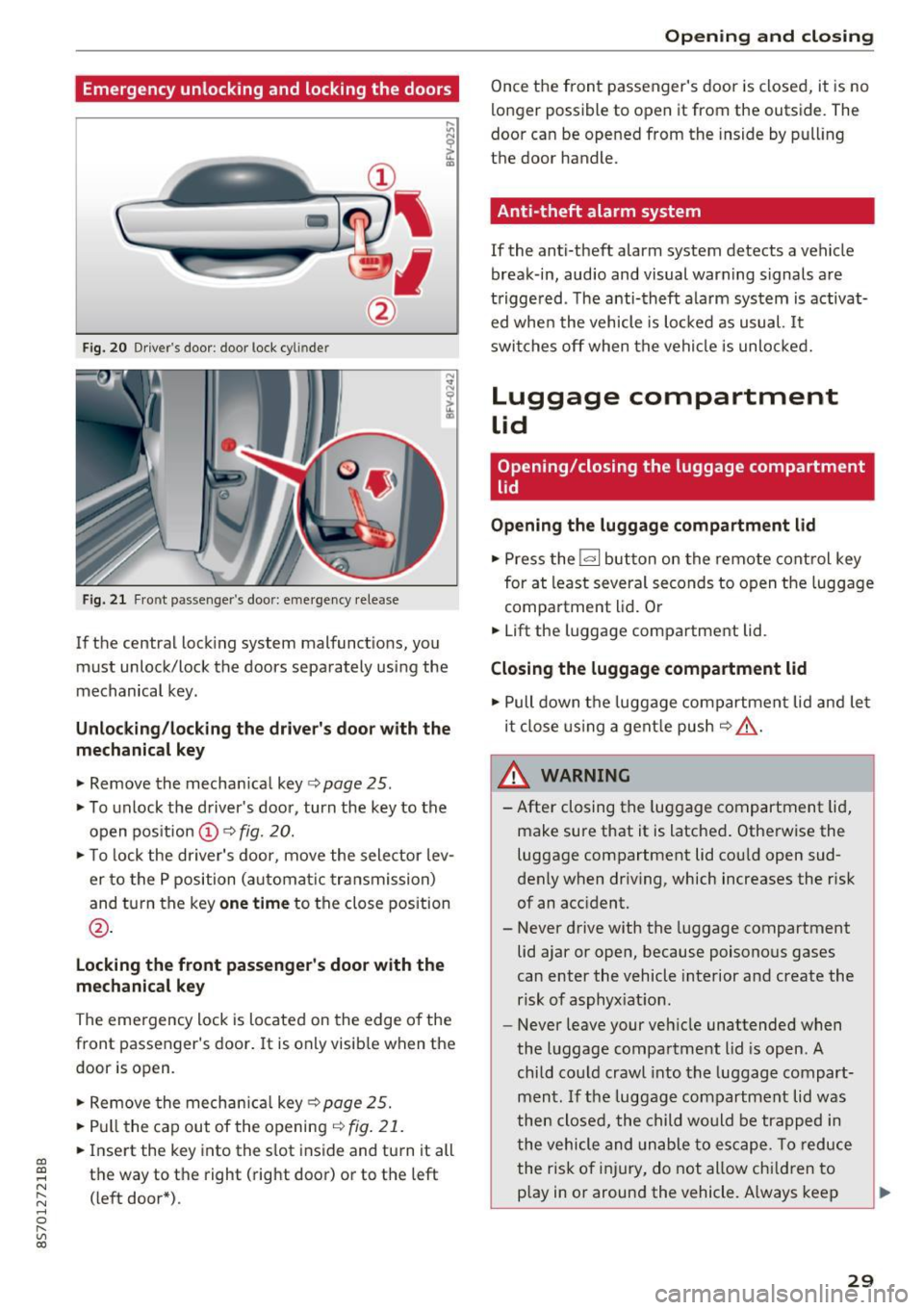
F ig. 20 Drive r's door : door lock cy lin de r
Fig. 21 Front passenger 's doo r: emergency release
If the central lock ing system malfunctions, you
must unlock/lock the doors separately us ing the
mechanical key .
Unlocking/locking the driver's door with the
mechanical key
• Remove the mechan ical key ¢ page 25.
• To unlock the driver's doo r, turn the key to the
open position @¢
fig. 20.
• To lock the driver's door, move the selector lev
er to the P position (automat ic transmission)
and turn the key
one time to the close position
@.
Locking the front passenger's door with the
mechanical key
The emergency lock is located on the edge o f the
front passenger's door. It is only visib le when the
door is open.
• Remove the mechan ical key ¢
page 25.
• Pull the cap out of the opening ¢
fig. 21.
• Insert the key into the s lot inside and turn it all
the way to the right (right door) or to the left
(left door*) .
Opening and closing
Once the front passenger's door is closed, it is no
longer possible to open it from the outside. The
door can be opened from the inside by pull ing
the door handle.
Anti-theft alarm system
If the anti-theft alarm system detects a vehicle
break -in, audio and visual warning s ignals are
triggered . T he anti-theft alarm system is activat
ed whe n the vehicle is locked as usual.
It
switches off when the vehicle is unlocked.
Luggage compartment
Lid
Opening/closing the luggage compartment
lid
Opening the luggage compartment lid
• Press the l«=> I but ton on the remote control key
for at least several seconds to open the luggage
compartment lid. Or
• Lift the luggage compartment lid .
Closing the luggage compartment lid
• Pull down the luggage compartment lid and let
it close using a gentle push
C? .&, .
_.&. WARNING
-After closing the luggage compartment lid,
make sure that it is latched. Otherwise the
luggage compartment lid cou ld open sud
denly when driving, which increases the risk
of an accident.
- Never drive with the luggage compartment
lid ajar or open, because poisonous gases
can enter the vehicle interior and create the
risk of asphyx iat ion.
- Never leave your vehicle unattended when
the luggage compartment lid is open. A
child could crawl into the luggage compart
ment .
If the luggage compartment lid was
then closed, the child would be trapped in
the vehicle and unable to escape. To reduce
the risk of injury, do not allow chi ldren to
p lay in or around the vehicle. A lways keep
29
Page 32 of 314
Opening and clo sin g
the luggage compartment lid and the doors
closed when the vehicle is not in use.
- Always make sure no o ne is in the luggage
compartment lid's range of motion when it
is clos ing, especially near the h inges . Fin
gers or hands could be p inched.
(D Tips
- When the vehicle is locked, the luggage
compartment lid can be unlocked separately
by p ressing the
1£) button on the remote
contro l key. The luggage compartment lid
locks automatically whe n it is closed again .
- In case of an emergency or a faulty handle,
the luggage compartment lid can be opened
manua lly from the inside
c::> page 30.
Luggage compartment lid emergency
release
The luggage compartment lid can be released in
an emergency from the inside.
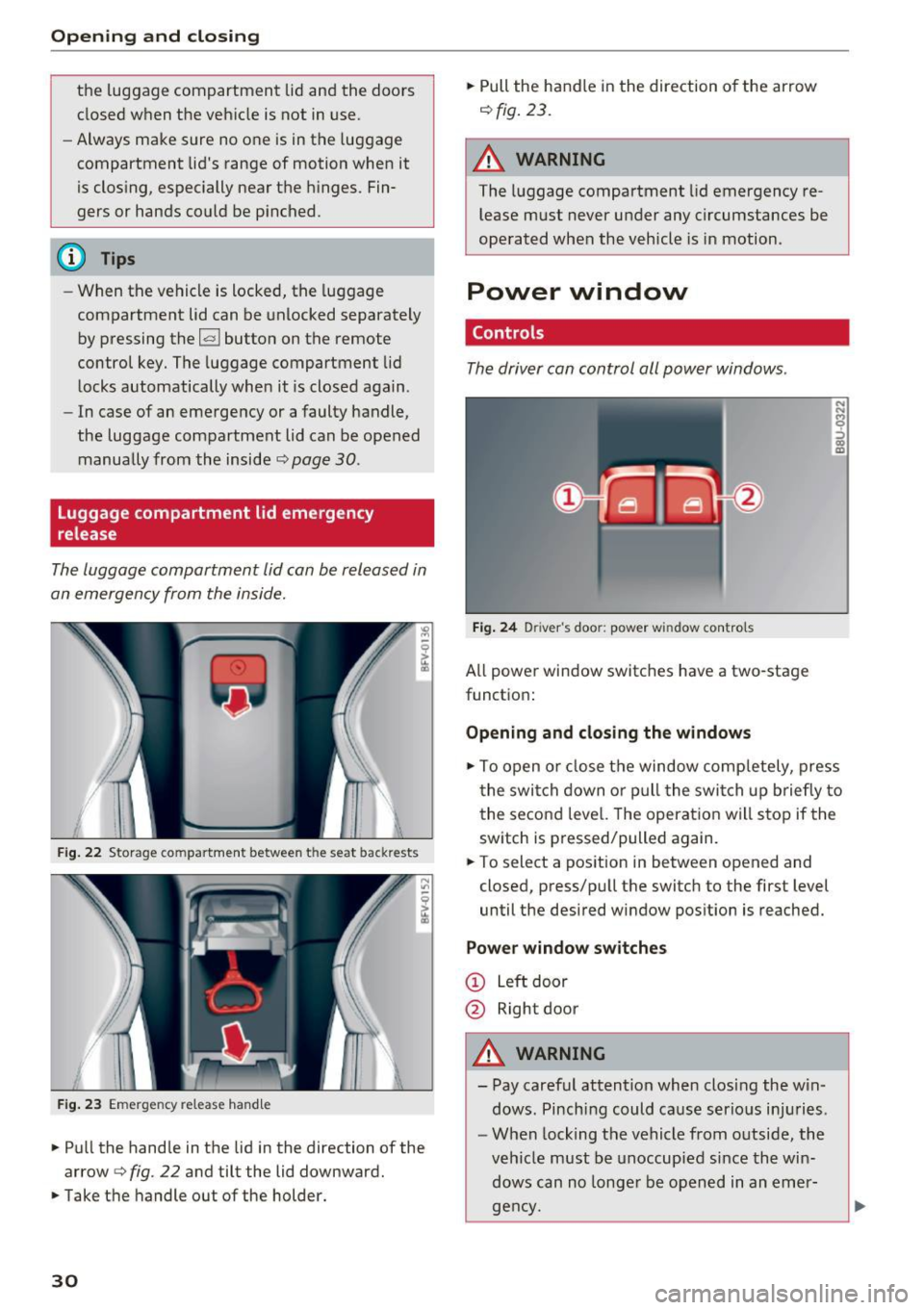
F ig. 22 Storage co mpartment between t he seat back rests
F ig. 2 3 Em erge ncy release hand le
.,. Pu ll the hand le in t he lid in the direction of the
arrow
c::> fig. 22 and tilt the lid downward .
.,. Take t he handle out of the holder.
30
.,. Pull the h andle in the direction of the arrow
c::> fig. 23 .
A WARNING
The luggage compartment lid emergency re
lease m ust never under any circumstances be
ope rated when the vehicle is in motion .
Power window
Controls
The driver can control all power windows .
Fig. 24 Driver 's doo r: power w indow controls
All power window switches have a two-stage
functio n:
Opening and closing the windows
.,. To open o r close t he window comp letely, press
t he swi tch down o r pu ll the swi tch up brie fly to
the second leve l. The operat io n w ill s to p if the
sw itch is pressed/pulled again.
.,. To select a pos ition in between opened and
closed, press/p ull the switch to the first level
until the desired window pos ition is reached.
Power window switches
@ L eft door
@ Rightdoor
A WARNING
- Pay caref ul attention when clos ing th e w in
dows . Pinching could c ause serio us inj uries .
- W hen locking t he vehicle from o utside, the
veh icle must be unoccupied si nce the wi n
dows can no longe r be opened in an eme r
gen cy.