warning AUDI TT ROADSTER 2017 Workshop Manual
[x] Cancel search | Manufacturer: AUDI, Model Year: 2017, Model line: TT ROADSTER, Model: AUDI TT ROADSTER 2017Pages: 314, PDF Size: 76.54 MB
Page 68 of 314
Driving
Interlock button
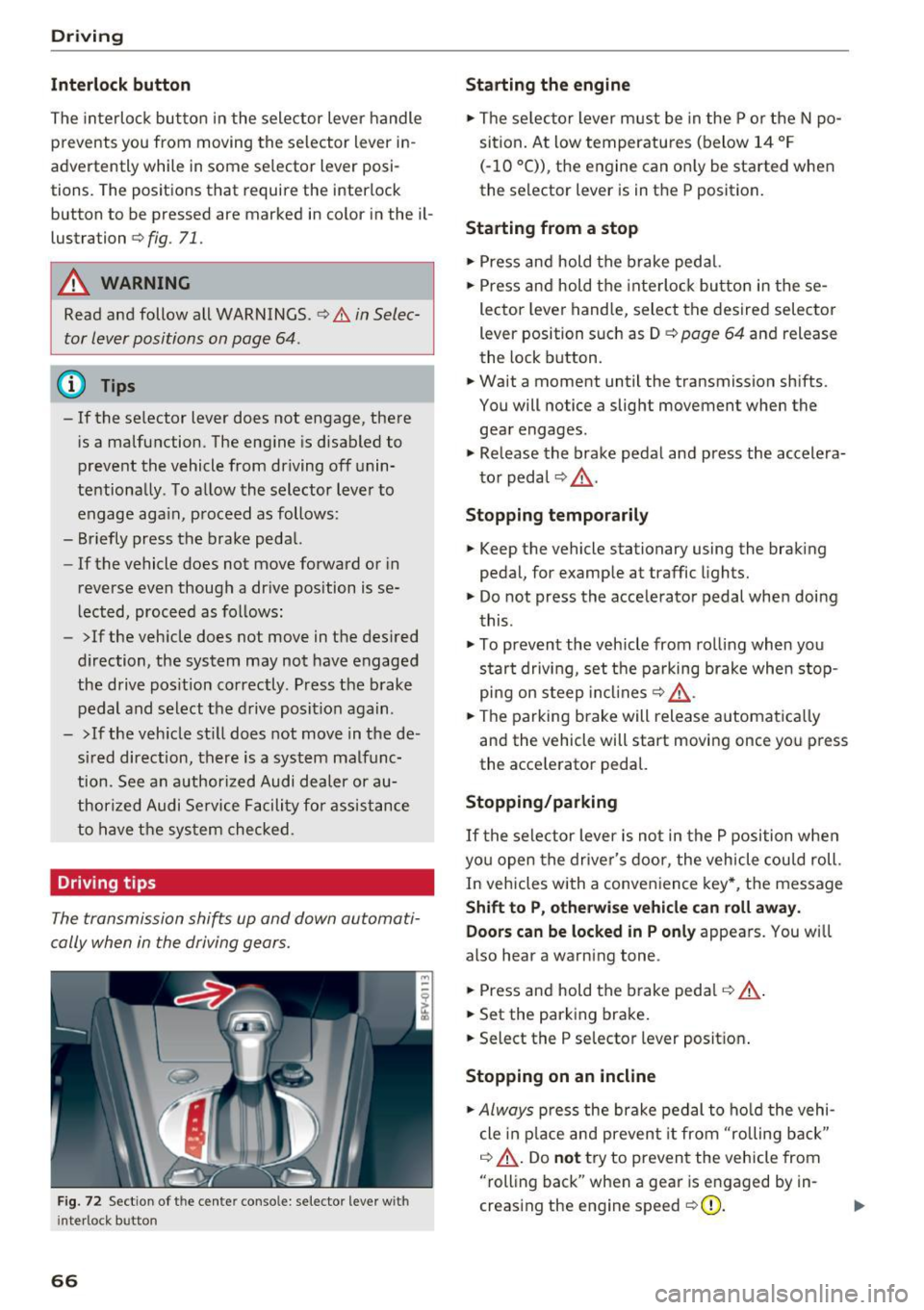
The interloc k but to n in the selector lever handle
prevents you from moving the selector lever i n
advertently while in some se lector lever posi
tions. The posit ions that require the interlock
button to be pressed a re marked in co lor in the il
lustration
c> fig. 71.
A WARNING
Read and follow all WARNINGS.¢.&. in Selec
tor lever positions on page 64 .
(D Tips
- If the selector lever does not engage, there
is a malfunction . The eng ine is disabled to
prevent the vehicle from driving off unin
te ntionally . To a llow the selector lever to
engage aga in , proceed as follows :
- Briefly press the b rake pedal.
- If the vehicle does not move forward or in
reverse even though a dr ive pos ition is se
l ected, procee d as follows :
- >If the veh icle does not move in the des ired
direction, the system may not have engaged
the drive pos ition correctly . P ress the b rake
pedal and sel ect t he d rive posit ion again .
- >If the veh icle st ill does not move in the de
s ir ed direction, there is a system malfunc
tion. See a n authori zed Audi dea ler or au
thori zed Audi Service Facili ty for assistance
to have t he sys te m c hecked.
Driving tips
The transmission shifts up and down automati
cally when in the driving gear s.
F ig . 7 2 Sect io n of the cente r conso le: se lecto r lever w it h
i nte rlock b utton
66
Starting the engine
.. The se lec to r lever m ust be in the P o r the N po
si tion. At low temperatu res (below 14 ° F
(- 10 °C)), the e ngine can o nly be sta rted when
the selector lever is in t he P position .
Starting from a stop
.. Press and hold the b rake peda l.
.. Press an d hold the inte rlo ck button in these
lector leve r handle, select the desired selector
lever position such as D
c> page 64 and release
th e lock button.
.. Wait a moment until the transmission sh ifts.
You will notice a slight movement when the gea r engages .
.. Re lease the brake pedal and press the accelera
t o r pedal
c> ,& .
Stopping temporarily
.. Keep the vehicle stationary using the braking
pedal, for examp le at traffic lights.
.. Do not press the acce lerator pedal whe n doi ng
t his .
.. To prevent the vehicle from ro lling when you
s tar t drivi ng, set t he pa rking brake when stop
pi ng on s teep in cli ne s
c:> ,& .
.. The pa rking brake will release a utomat ic all y
and the vehicle will start moving once yo u press
the acce le rator pedal.
Stopping /parking
If the sele ctor lever is not in the P position w he n
yo u open the drive r's door, the vehicle cou ld roll.
In vehicles with a conve nience key*, the message
Shift to P, otherwi se vehicle can roll away.
Doors can be locked in P only
appea rs. You wi ll
also hear a warning tone .
.. Press and hold the brake peda l
c:> .&, .
.. Set the parking brake .
.. Select the P selector lever posit io n.
Stopping on an incline
.. Always press the brake pedal to ho ld the vehi
cle in p lace and preven t it from "rolling back"
c:> .&, . Do not try to preven t the vehicle from
"rolling back" when a gea r is e ngaged by in
creas ing the eng ine speed
c> (D .
Page 69 of 314
co
co
.... N
" N .... 0
" "' c:o
Starting on a hill
"' Set the parking brake .
"'With the driving gear selected, press the accel
erator pedal carefully. The parking brake will
release automatically if your safety belt is fas
tened .
Under certain circumstances, such as driving in
the mountains, it may be useful to switch tempo
rarily to the manual shift program in order to
manually adjust the gears to the driving condi
tions ¢
page 68.
When parking on a level surface, simply place the
selector lever in the P position. On inclines, acti
vate the parking brake first and then move the selector lever to the P position ¢
page 62. This
prevents the locking mechanism from being
loaded too heavily and will make it easier to
move the selector lever out of the P position .
.8, WARNING
- The vehicle can roll even when the engine is
switched off.
- Unintended vehicle movement can lead to
serious injuries.
- Never leave your vehicle with the engine
running while in gear.
If you must leave
your vehicle when the engine is running, set
the parking brake and move the selector lev
er to the P position.
- Power is still transferred to the wheels
when the engine is running at idle. To pre
vent the vehicle from "creeping", you must keep your foot on the brake when the en
gine is running and the selector lever is in
the D, Sor R position or "tiptronic" mode is
selected.
- Do not inadvertently press the accelerator
pedal when the vehicle is stationary. Other
wise the vehicle will start to move immedi ately, even if the parking brake is set. This
could result in a crash.
- Do not press the accelerator pedal when
changing the selector lever position while
the vehicle is stationary and the engine is running .
Driving
-Never engage the R or P selector level posi
tions while driving. It could cause a crash.
- Before driving down a steep slope, reduce
your speed and shift into a lower gear with "ti ptronic".
- Do not ride the brakes or press the brake
pedal too often or too long when driving
downhill. Constant braking causes the brakes to overheat and substantially re
duces braking performance, increases brak
ing distance or causes complete failure of
the brake system.
- If you must stop on an incline, always hold
the vehicle in place with the foot brake or
parking brake to prevent it from rolling
back .
- Never hold the vehicle on an incline with a
slipping clutch. The clutch opens automati
cally when it becomes too hot from the
overload. The
mJ indicator light turns on
and a message appears ¢
page 70 when
the clutch is overloaded.
- If the engine must run while you are work
ing in the engine compartment with the
hood open, make sure a gear is not engag
ed. The selector lever must be firmly in the
P position and locked in place and the park
ing brake must be set ¢
page 235. Other
wise, the vehicle could begin moving when
increasing the engine speed, even with the
parking brake set .
(!) Note
- When stopping on an incline, do not try to
hold the vehicle in place by pressing the ac
celerator pedal while a driving gear is se
lected. This can cause the automatic trans
mission to overheat and can damage it. Set
the parking brake or press the brake pedal
to prevent the vehicle from rolling.
- Allowing the vehicle to roll when the engine
is stopped and the selector lever is in the N
position will damage the automatic trans
mission because it is not lubricated under
those circumstances.
67
Page 70 of 314
Driving - The transmission can overheat and be dam
aged under certain driving and traffic condi
tions such as frequent starts, creeping for a
long time, or stop -and-go traffic. When the
@] or. indicator light turns on, stop the
vehicle at the next opportunity and let the
transmission cool
r=;, page 70 .
-Allowing the vehicle to roll when the engine
is stopped will damage the S tronic trans
mission because it is not lubricated
¢ page 286, Towing with a tow truck.
@ Tips
For safety reasons, the parking brake is re
leased automatically only when the driver's
safety belt is engaged in the buckle.
Hill descent control
The hill descent control system assists the driver
when driving down hills .
Hill descent control is ac tivated when the selec
tor lever is in the Dor S position and you press
the brake pedal. The transmission automatically
selects a gear that is suitable for the hill. Hill de
scent control tries to maintain the speed ach
ieved at the time of braking, within physical and
technical limitations.
If may still be necessary to
adjust the speed with the brakes. Because hill de
scent control cannot shift down farther than 3rd
gear, it may be necessary to shift into tiptronic
mode in very steep areas. In this case, shift man
ually into 1st or 2nd gear in tiptronic mode to
use the engine's braking force to relieve the
brakes .
Hill descent control switches off once the hill lev
els out or you press the accelerator pedal.
On vehicles with a cruise control system*
¢ page 72, hill descent control is also activated
when the speed is set.
A WARNING
Hill descent control cannot overcome physical
limitations, so it may not be able to maintain
a constant speed under all conditions. Always
be ready to apply the brakes.
68
Shifting manually (tiptronic mode)
The tiptronic mode allows the driver to shi~ the
gears manually .
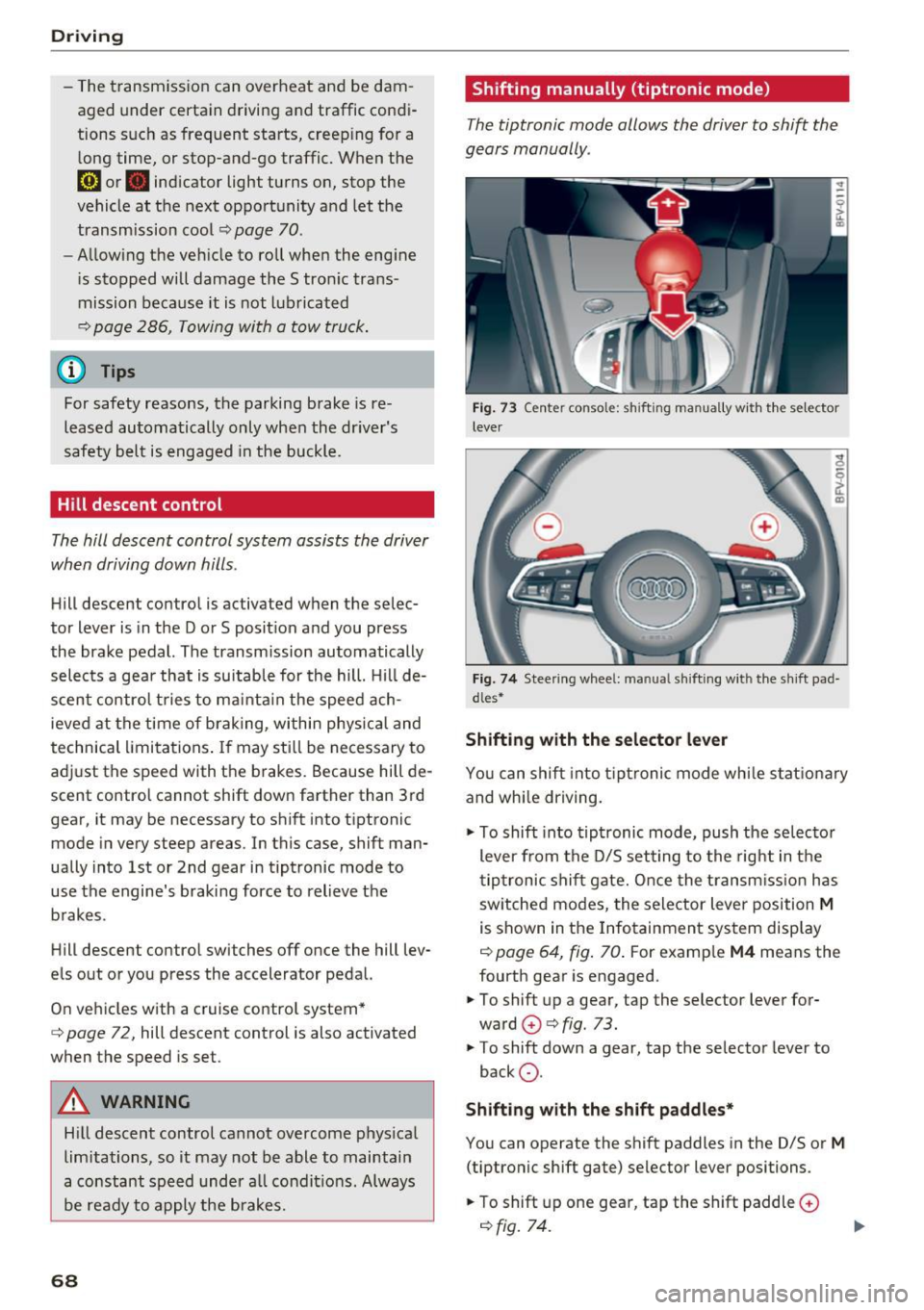
Fig. 73 C enter conso le: sh ift ing ma nuall y wi th the selecto r
lever
Fig. 74 Steering whee l: ma nual shifting wit h the shift pad
dles•
Shifting with the selector lever
You can shift into tiptronic mode while stationary
and whi le driving.
.,. To shift into tiptronic mode, push the selector
lever from the D/S setting to the right in the
tiptronic shift gate. Once the transmission has
sw itched modes, the selector lever position
M
is shown in the Infotainment system display
r=;, page 64, fig. 70 . For example M4 means the
fourth gear is engaged .
.,. To shift up a gear, tap the selector lever for
ward
G) ¢ fig. 73.
.,. To shift down a gear, tap the selector lever to
back
0 .
Shifting with the shift paddles*
You can operate the shift paddles in the D/S or
M
(tiptronic shift gate) selector lever positions.
.,. To shift up one gear, tap the shift paddle
0
r=;, fig. 7 4.
Page 71 of 314
co
co
.... N
" N .... 0
" "' c:o
~ To shift down one gear, tap the shift paddle 0-
If the sh ift paddles are tapped while in the D/S
selecto r lever posit io n, automatic mode switches
off briefly . To switch from manually shifting back
to a utomatic shifting immediately, tap the shift
paddle
G) ¢ fig . 74 for 1 second .
To keep shifting using the shift paddles, move
the sele ctor lever to the right out of the D/S posi
tion into the t ipt ronic shift gate.
The transm ission automatically shifts up o r down
befo re critical engine speed is reached.
The transm ission only a llows manual sh ift ing
when the engine speed is within the permitted
range.
(D Tips
- If you sh ift to the next lowest gear, the
transm ission w ill only shift if the engine w ill
not be over-revved.
- With kick-down, the transmission shifts to a
l ower gear, depending on vehicle speed and
engine speed.
- tiptronic does not wo rk if the t ransmiss ion
i s r unning in emergency mode.
Kick-down
Kick-down enables maximum acceleration.
When you press the accelerator pedal down be
yond the resistance point , the automatic trans
m iss ion downshifts into a lower gear and the en
g ine utilizes its fu ll power , depend ing on veh icle
speed and engine R PM.
It shifts up into t he next
h igher gea r once the maximum spec ified engine
RP M is reached.
A WARNING
Please note that the wheels could spin on
slick or slippery roads when kick-down is ac
tive.
-
l ) T he ESC lig ht turn s on continuous ly and the mess age S ta·
b ili za tion co ntro l (E SC): sport. Warn ing! Red uced st abi l·
ity appe ars te mporar ily in th e I nfotainment syste m to in
di cate tha t the syste m wa s deact ivate d.
D riv ing
Launch Control-Program
The Launch Control Program enables maximum
acceleration .
Requirement: the engine must be at operating
temperature and the steering wheel must not be
turned .
~ With the engine running, press the l1' 0FF I but
ton briefly one t ime
l ).
~ Pull the selector lever back out of the D/S posi
tion briefly to select the S position, or press it
toward the r ight into the tiptron ic position or
select the
Dynamic dr iving mode in dr ive se
lect*
¢ page 79.
~ Press the brake pedal fi rm ly w ith your left foo t
and hold it all the way down for at least 1 sec
ond.
~ At the same time, p ress the gas peda l all the
way down with your right foot until the eng ine
reaches and stays at a high RPM level.
~ Remove your left foot from the brake.
A WARNING
- Always adapt your driving to the t raff ic flow.
- Only use Launch Control when road and traf-
f ic conditions allow it and other drivers will
not be endange red or impacted by your dr iv
ing and the vehicle's acceleration.
- Please note that the d rive wheels can spin
and the vehicle can b reak away when spo rt
mode is switched on, especially when the
road is slippery.
- Once the vehicle has started mov ing, press
the
! .P-O FF I button briefly to turn the spo rt
mode off.
(D Tips
- The transmission temperature may increase
significant ly after using the launch control
prog ram. If that happens, the prog ram may
no t be ava ilable for a few minutes.
It will be
avai lab le again afte r a cool -down period. ..,.
69
Page 73 of 314
CD
CD
.... N
" N ,-I 0
" V, co
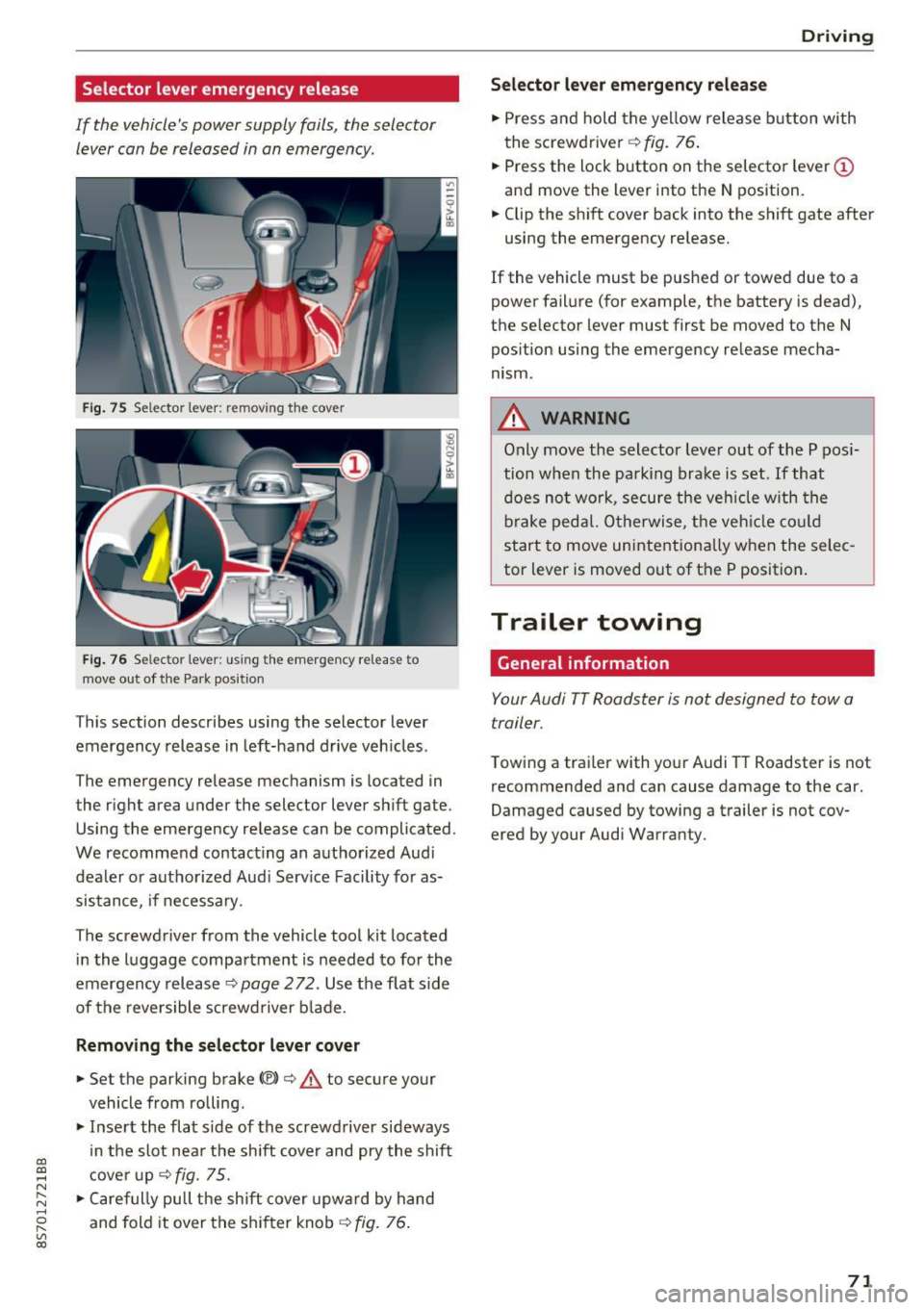
Selector lever emergency release
If the vehicle's power supply fails, the selector lever can be released in an emergency.
Fig . 75 Selector lever: remov ing t he cover
Fi g. 76 Selec tor lever : us ing the eme rgency re lease to
move out of t he Park pos it ion
This section describes using the selector lever
emergency release in left-hand drive veh icles .
The emergency re lease mechanism is located in
the right area under the selector lever shift gate.
Using the emergency release can be complicated.
We recommend contact ing an authorized Audi
dealer o r authorized Aud i Serv ice Facility fo r as
sistance, if necessary .
The screwdriver from the vehicle tool kit located
i n the luggage compartment is needed to for the
emergency release ¢
page 2 72. Use the flat sid e
of the revers ible screwd river b lade.
Removing the selector lever cover
.,. Set the parking brake CV)¢ A to secure your
vehicle from ro lling .
.,. In se rt the flat side of the screwdriver sideways
in the slot nea r the sh ift cover and pry the shift
c ove r up
¢fig. 75 .
.,. Caref ully pull t he shift cover upw ard by hand
and fold it over the sh ifter knob ¢
fig. 76.
Drivi ng
Selector l ever emergency release
.,. Press and hold t he ye llow release b utton with
the screwdriver ¢
fig. 76.
.,. Press the lock button on the selecto r lever
(D
and move the lever into the N position .
.,. Clip the shift cover back into the shift gate after
using the emergency re lease.
If the vehicle must be pushed or towed due to a
power failure (for example, the battery is dead),
the selector lever must first be moved to the N
pos ition using the emergency re lease mecha
nism.
A WARNING
Only move the selector lever out of the P pos i
tion when the parking bra ke is set. If that
d oes no t wo rk, secure the ve hicle w ith the
bra ke ped al. Otherwise, t he veh icle co ul d
st art to move uninte ntiona lly w hen the selec
tor lever is moved out of the P position.
Trailer towing
General information '
Your Audi TT Roadster is not designed to tow a
trailer.
Towing a trailer with you r Audi TT Roadster is not
recommended and can cause damage to the car.
Damaged caused by towing a trailer is not cov
ered by your Audi Warranty.
71
Page 74 of 314
Ass is t
Assist
Electronic speed Limiter
Your v ehicle may be factory equipped with tires
that are rated for a maximum speed of 130 mph (210 km/h). This is less than the maximum sp eed
of your vehicle . To reduce the risk of sudden tire
failure and loss of control if the vehicle is operat ed at excessive speeds, your vehicle also has an
electronic speed limiter . The electronic speed
lim iter prevents your vehicle from going faster
than the t ire speed rating. For mo re information
~ page 253.
If the engine control unit receives faulty vehicle
road speed s ignals , the Malfunction Indicator
L amp (MIL)
¢..ffi will illumina te . If this occurs,
con tact the nearest au thorized A ud i dealer for
assistance.
_& WARNING
Always observe the posted speed limits and
adjust you r speed to suit prevailing road, traf
fic and weather conditions. Never drive your
vehicle faster than the maximum speed rating
of the tires installed .
Speed warning system
Applies to: vehicles with speed warning system
The speed warning system helps you to stay be
low a specified maximum speed that can be set,
changed or deleted in the Infotainment system . -
The speed warning system warns you if you are
exceeding the maximum speed that you have set
.
A warni ng tone will sound as soon as you r speed
exceeds the sto red value s lightly . The
(OJ (USA
models)
I [OJ (Canada models) indicator light
and a message appear i n the ins trumen t cluster
d isp lay a t the same time. Th@
Hll (USA models)/
[O](Canada models) i ndicator light and the mes
sage turn off when the vehicle speed drops be low
the stored maximum speed.
Se tting a threshold is rec om mended if you would
like to be reminded when yo u reach a certa in
maximum speed . Situations where you may want
to do so include driving in a country w it h a ge ne r-
72
al speed limit or if there is a spec ified maximum
speed for winter tires.
Setting the warning threshold
.,. Select in the Infotainment system: IM ENU ! but
t on
> Vehicle > left con trol b utton > Driver as
sistance > Speed warning > Manu al.
a) Tips
Regar dless of the speed warning sys tem, you
sh ould alw ays mon itor your spee d using the
speedometer and tnake s ure yo u are fo llow ing
the lega l speed limit.
Cruise control system
Switching on
Applies to: vehicles with cruise control system
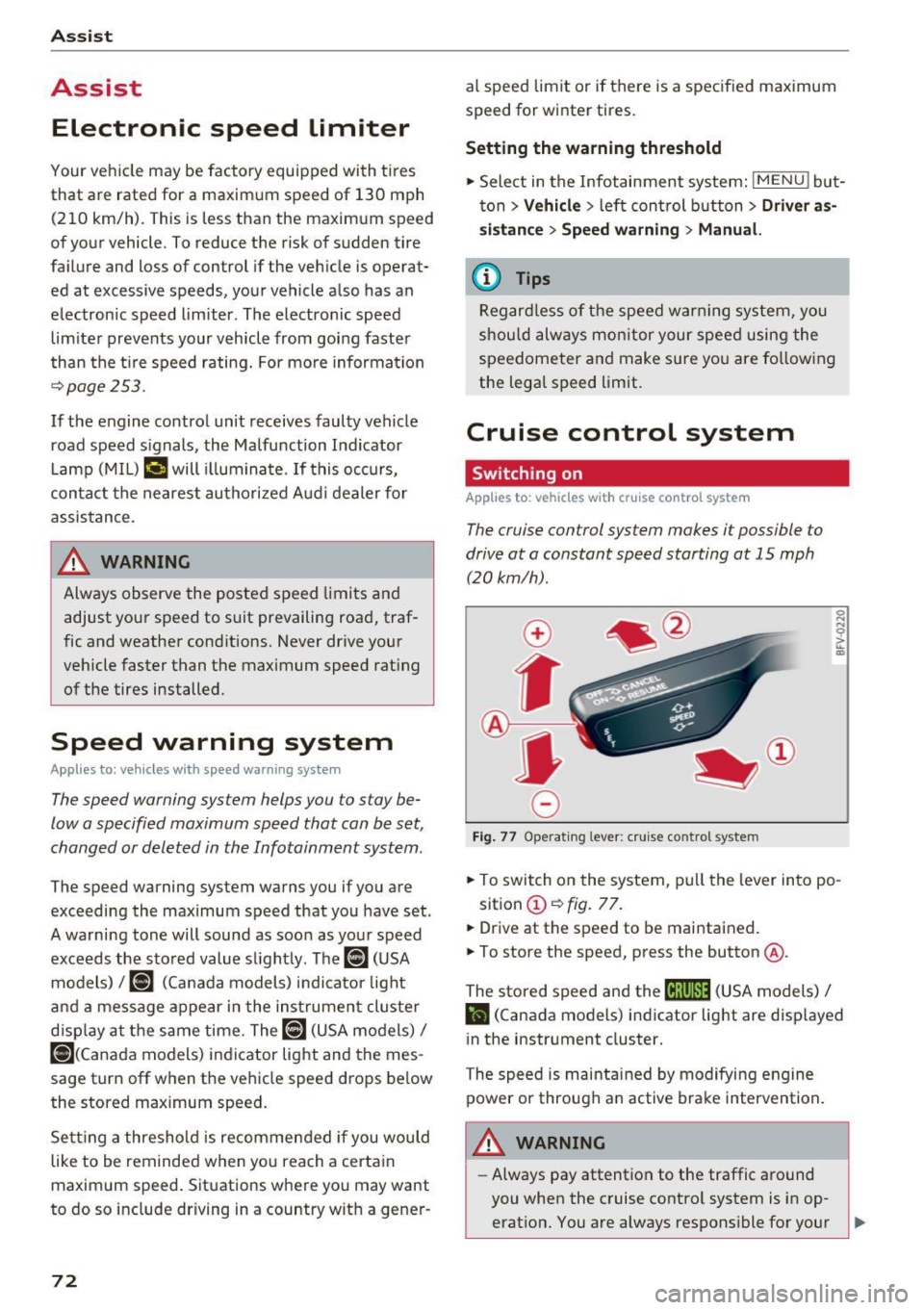
The cruise control sys tem makes it possible to
drive at a constant speed starting at 15 mph (20kmlh) .
0
f
~
0
Fig. 7 7 Operat ing lever: c ruise co ntro l sy ste m
.,. To switch on the system, pu ll the lever in to po -
sition @~
fig. 77 .
.,. Drive at th e speed to be maintained.
.,. To store the speed, press the button @.
The stored speed and the
M;\1)~1j (USA models) /
l'I (Canada models) indicator light are disp layed
in the instrument cluster.
The speed is maintained by modifying engine power or through a n active brake intervention.
_& WARNING
- Always pay attention to the traffic around
you when the cruise contro l system is in op
erat ion. You are always respons ible for your ,...
Page 76 of 314
Ass is t
& WARNING
You should only resume the stored speed if it
is not too high for existing traffic conditions.
Otherwise you can increase the r isk of an acci
dent .
Audi active Lane assist
Description
Appl ie s to: ve hicles w ith Audi ac tive lane assis t
Active lane assist detects lane marker lines with
in the limits of the system using a camera in the
windshield. If you are approaching a detected
lane marker line and it appears likely that you
will leave the lane, the system will warn you with
correct ive steering. You can override th is steer ing
at any time . If you pass over a line, the steer ing
wheel will v ibrate l ightly. In order for this warn
ing vibration to occur, it must first be sw itched
on in the Infotainment system. Active lane assist
is ready for operation when the lane marker line
is detected on at least one side of the vehicle.
The system is designed for driving on express
ways and highways and so it only activates at
speeds above approximately 40 mph (65 km/h) (depending on the market).
Applies to vehicles w ith side assist* : if you act i
vate a turn signal when active lane assist is ready
and it classifies a lane change as critical because
of vehicles traveling alongside you or approach
ing you, there w ill be noticeable corrective steer
ing shortly before you leave the lane. This will at
tempt to keep your vehicle in the lane.
Applies to vehicles without side assist* : the sys
tem does not warn when it is ready if you activate
the turn signal before crossing the lane marker line . In this case, it assumes that you are chang
ing lanes intentionally .
& WARNING
-The system wa rns the driver that the veh icle
is leav ing the lane using co rrective s teer ing.
1 ) The co rrect ive stee ring fun ctio n is not ava ilabl e in all mar
ket s.
74
The driver is always responsible for keeping
the vehicle within the lane.
- The system can assist the driver in keeping
the vehicle in the lane, but it does not drive
by itself. A lways keep your hands on the
steer ing wheel.
- Corrective steering may not occur in certain situations, such as during heavy braking.
- There may be cases where the camera does
not recognize all lane marker lines. Correc
tive steering can only take place on the s ide
of the vehicle where lane marker lines are
detected .
- Other road structures or objects could poss i
bly be identified un intent ionally as lane
marker lines . As a result, corrective steering
may be unexpected o r may not occ ur.
- The camera view can be restricted, for ex
ample by vehicles driving ahead or by ra in,
snow, heavy spray light shin ing into the
camera or by dirt o n the window. This can
result in active lane assist not detecting the
lane marker lines or detecting them incor
rectly.
- In certain s ituations where visibility is low,
the vehicle may switch internally from "ear
ly" to "late" steering cor rection
ll.
- Unde r certain cond itions such as r uts in the
road, an inclined roadway or crosswinds, the
corrective steer ing alone may not be enough
to keep the vehicle in the m iddle of the lane.
- For safety reasons, active lane assist must
not be used when there are poor road and/
or weather conditions such as slippery
roads, fog, gravel, heavy rain, snow and the potential for hydroplaning . Using active lane
assist under these cond it ions may increase
the risk of a crash.
Page 77 of 314
CD
CD
.... N
" N ...... 0 r--. V, co
Switching on/off
A ppl ies to: ve hicles with Audi active lane assist
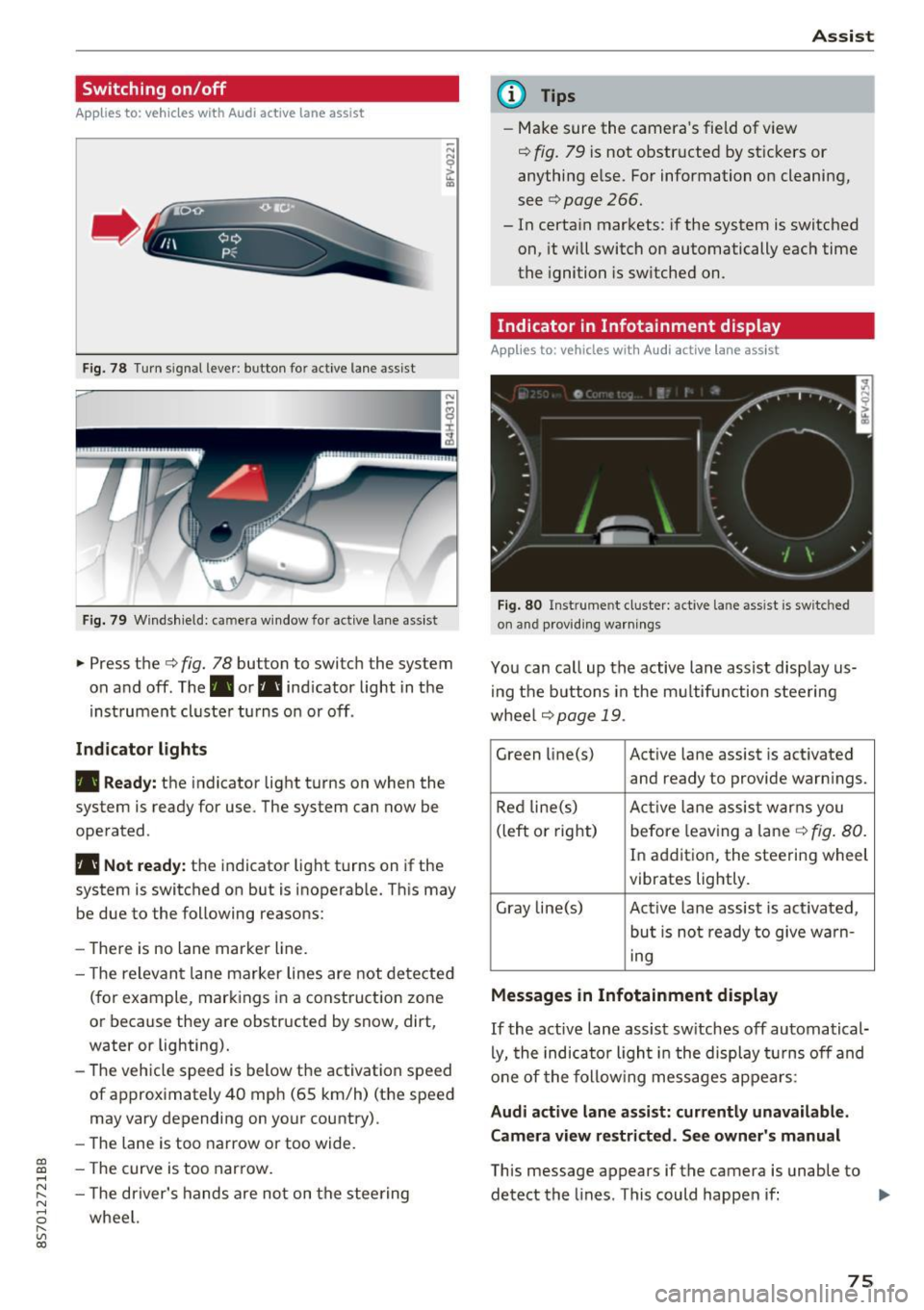
Fig. 78 T urn s ignal lever: button for active lane assist
F ig. 79 Windsh ield: camera w indow for active lane assist
... Press the c:> fig. 78 button to switch the system
on and off . The . or. indicator light in the
inst rument cluster turns on or off .
Indicator lights
• Ready:
the indicator light turns on when the
system is ready for use. The system can now be
operated .
• Not ready: the indicator light turns on if the
system is switched on but is inoperab le. Th is may
be due to the following reasons:
- There is no lane marker line.
- T he relevant lane marker lines are not detected
(for example, markings in a construction zone
or because they are obstructed by snow, dirt,
water or lighting).
- The vehicle speed is below the activation speed
of approximately 40 mph (65 km/h) (the speed
may vary depending on your country).
- The lane is too narrow or too wide.
- T he curve is too narrow.
- The driver's hands are not on the steering
wheel.
Assist
(D Tips
- Make sure the camera 's field of view
¢ fig. 79 is not obstructed by st ickers or
anything else. For information on cleaning,
see
c:> page 266.
- In certain markets: if the system is switched
on, it wi ll switch on automatically each time
the ignition is switched on.
Indicator in Infotainment di splay
App lies to : vehicles wit h Audi active la ne ass ist
Fi g. 80 Inst rume nt cluster: active la n e ass ist is switc hed
on and providing warnings
You can call up the active lane assist disp lay us
in g the butt ons in the multifunction steering
wheel
c> page 19 .
Green li ne(s) Act ive lane assist is activated
and ready to provide warn ings.
Red line(s) Active lan e assist warns you
(left or right) before leav ing a lane
c:> fig. 80.
In addition, the steering wheel
vibrates lightly.
Gray line(s) Active lane assist is act ivated,
but is not ready to give warn-
ing
Messages in Infotainment display
If the active lane assist sw itches off automatical
ly, the indicato r ligh t in the display turns off and
one of the following messages appears :
Audi active lane assist: currently unavailable.
Camera view restricted. See owner's manual
This message appears if the camera is unable to
detect the lines . This could happen if: ..,
75
Page 78 of 314
Assist
-The camera field of view~ page 75, fig. 79 is
dirty or covered in ice. Clean this area on the
windshield.
- The camera field of view is fogged over. Wait
until the fog has cleared before switching the
active lane assist on again.
- The system has been unable to detect the lanes
for an extended period of time due to road con
ditions. Switch active lane assist back on when
the lines are more visible.
Audi active lane assist : currently unavailable.
See owner's manual
There is a temporary active lane assist malfunc
tion. Try switching the active lane assist on aga in
later .
Audi active lane assist : malfunction! See own
er's manual
Drive to an authorized Aud i dea ler or authorized
Audi Service Facility immediately to have the
malfunct io n corrected.
Audi active lane assist: Please take over steer
ing!
This message appears if you are not steering by
yourse lf. If th is is the case, active lane assist does
not switch off, but it is "not ready " to provide a
warn ing . The system can he lp you keep the veh i
cle in the lane. However, you are responsible for
driving the vehicle and must steer it yourself .
Adjusting the steering time and vibration
warning
Applies to: vehicles with Audi active lane assist
You can adjust individual active lane assis t set
tings in the Infotainment system.
Select in the Infotainment system: I MENU ! but
ton>
Vehicle > left control button >Driver assis
tance
> Audi active lane assist
1l The correct ive steer ing fu nctio n is not available in all mar
kets.
76
Steering time1>
Early: in this setting, the corrective steering hap
pens continuously to help keep the veh icle in the
center of the lane.
Late : in this setting, the system provides correc
tive steering just before a vehicle wheel touches a
detected lane marker line .
Vibration warning
You can switch the add itional vibrat ion warn ing
i n the steering wheel on or off.
(D Tips
In certain markets: your settings are stored
a ut omat ically and assigned to the remote
control key in use.
Audi side assist
Description
Applies to: vehicles with Audi side assist
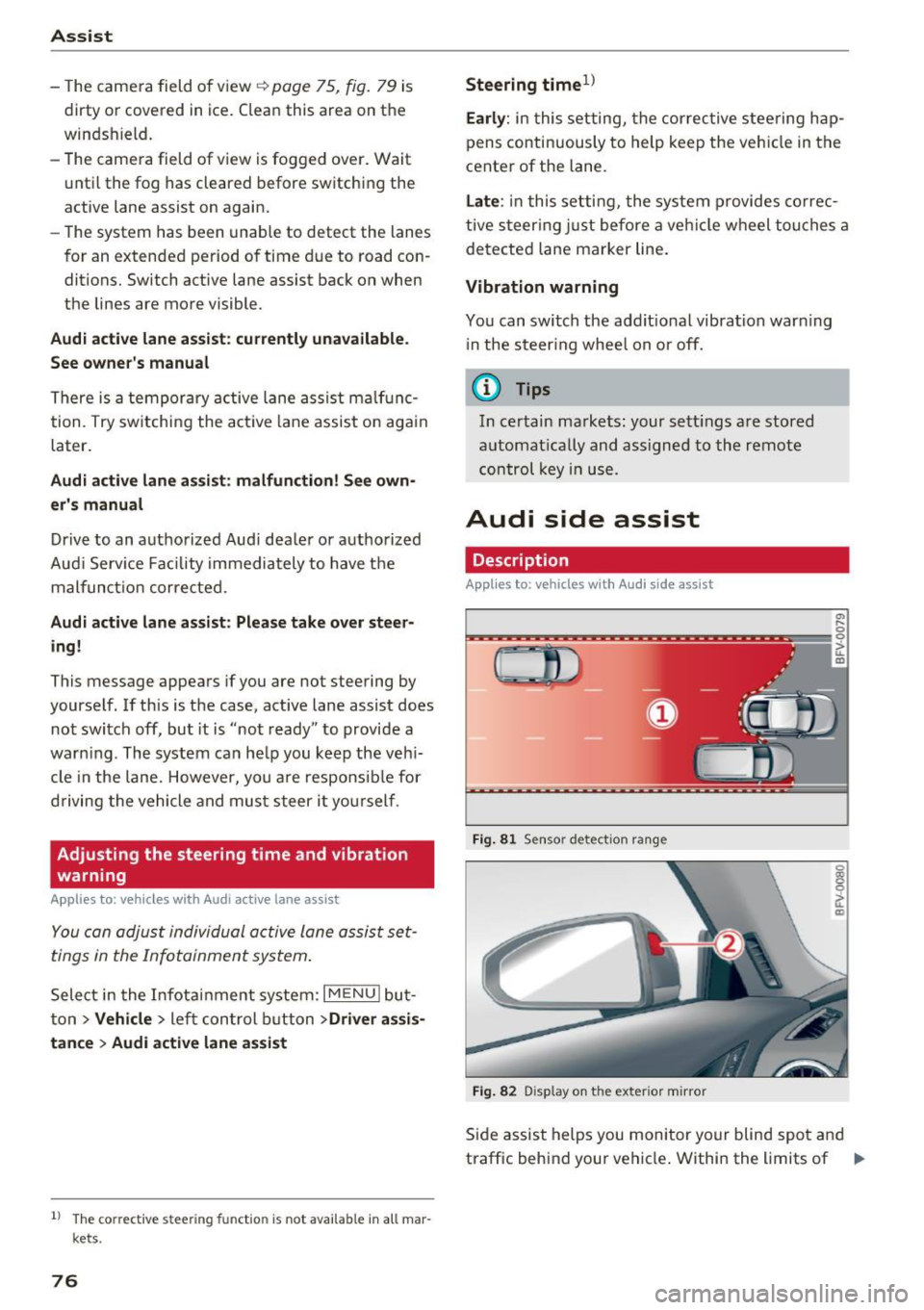
Fig. 81 Sensor detec tion rang e
Fig. 82 Display on the exterior mirror
Side assist helps you monitor your blind spot and
traffic behind your vehicle . Within the limits of .,.
Page 79 of 314
CD
CD
.... N
" N ...... 0
" V, co
the system, it warns you about vehicles that are
coming closer or that are traveling with you with
in sensor range(!)¢
fig. 81: if a lane change is
classified as critical, the display @ in the exter ior
mirror
¢ fig . 82 turns on.
The display in the left exterior mirror provides as
sistance when making a lane change to the left,
while the d isp lay in the right exterior mirror pro
vides assistance when mak ing a lane change to
the r ight.
Information stage
As long as you do not activate the turn signal,
side assist
informs you about vehicles that are
detected and classified as crit ical. The display in
the m irror turns on, but is dim.
The display remains dim in the information stage
so that your view toward the front is not distur
bed.
Warning stage
If you activate the turn signal, side assist warns
you about vehicles that are detected and classi
fied as critical. The display in the respective mir
ror blinks brightly . If this happens, check traffic
by glancing in the exterior mirrors and over your
shoulder¢ .&
in General information on
page 78.
@ Tips
You can adjust the brightness on of the dis
play on the rearview mirror ¢
page 79.
Assist
General information
Applies to : veh icles w it h Aud i s ide ass ist
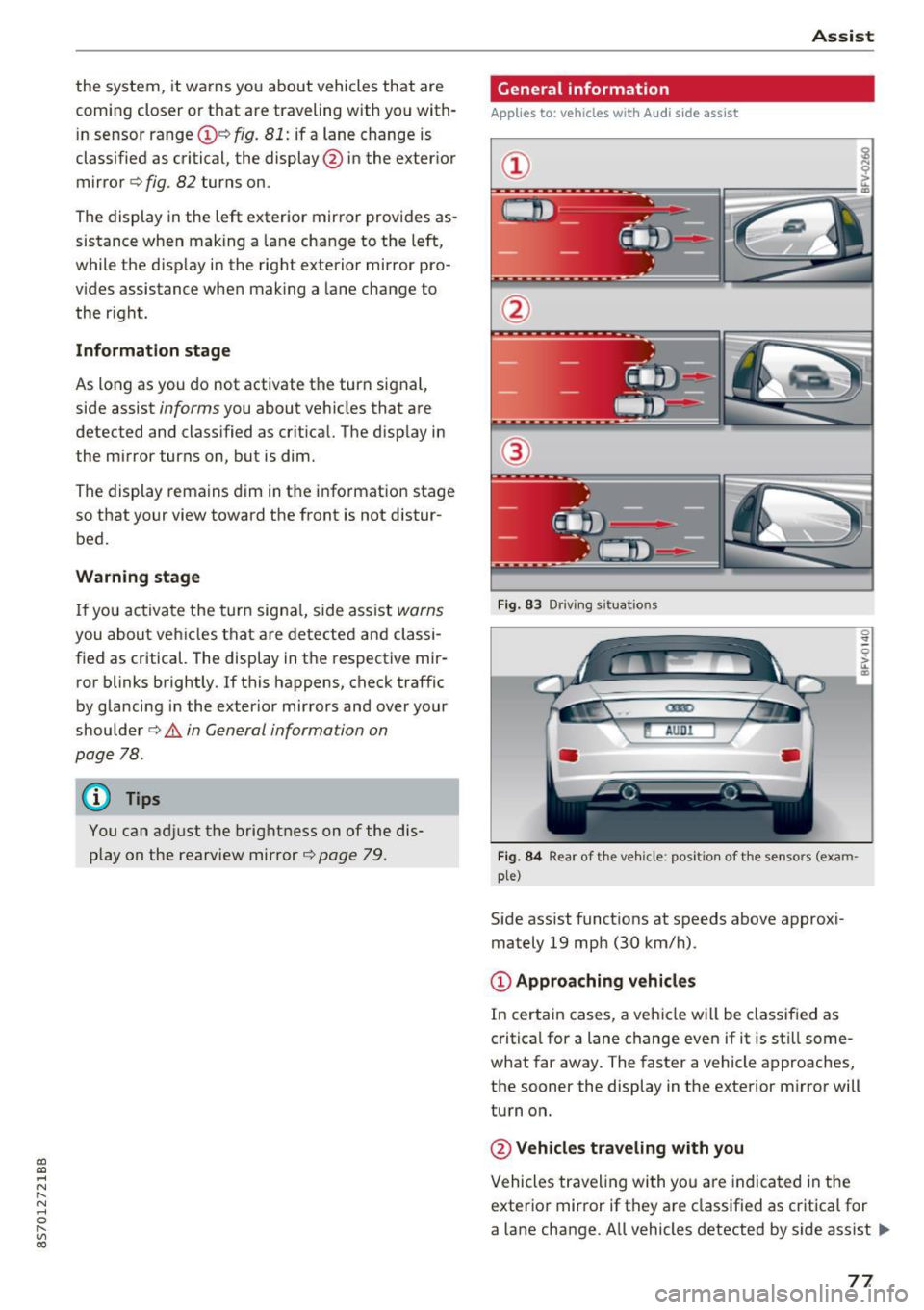
Fig . 83 Driv ing s ituat ions
Fig. 84 Rear of t he ve hicle: positio n of the sensors (exam
ple)
S id e assist funct ions at speeds above approxi
mately 19 mph (30 km/h).
@ Approaching vehicles
In certain cases, a vehicle will be classified as
critical for a lane change even if it is still some
what far away. The faster a vehicle approaches,
the sooner the display in the exterior m irror will
turn on.
@ Vehicles traveling with you
Vehicles traveling with yo u are indicated in the
exterior mirror if they are classified as critica l for
a lane change. All vehicles detected by side assist
lli>-
77