warning AUDI TT ROADSTER 2017 Owner's Manual
[x] Cancel search | Manufacturer: AUDI, Model Year: 2017, Model line: TT ROADSTER, Model: AUDI TT ROADSTER 2017Pages: 314, PDF Size: 76.54 MB
Page 33 of 314
CD
CD
.... N
" N ,-I 0 r--. V, co
@ Tips
-You can still open and close the windows for
approximately 10 minutes after turn ing the
ignition off. The power windows do not
switch off until the driver's door or front passenger's door has been opened.
- When opening the doors and when open
i ng/closing the power top, the windows au
tomatically lower approximately 10 mm.
Convenience opening/closing
All windows can be opened and closed at the
same time.
Convenience opening feature
• Press the Im button on the remote control key
until all windows reach the desired position.
Convenience closing feature
• Press the {D button on the remote control key
u nti l all windows are closed¢
A or
Convenience closing with the convenience
key*
• Touch the sensor* on the door handle long
enough until all windows and the power top*
are closed . Do not place your hand in the door
hand le when doing this.
Setting convenience opening in the
Infotainment system
• Select in the Infotainment system: !MENUI but
ton
> Vehicle> left control button >Vehicle set
tings .
To enable the convenience window opening func
tion, the
Long press to open windows function
must be switched
on.
.&_ WARNING
- Never close the windows or power top* care lessly or in an uncontrolled manner, be
cause this increases the risk of injury.
- For security reasons, the windows and the
power top* can only be opened and closed
with the remote control key at a maximum
distance of approximately 6 ft (2 m) away
Open ing and closing
from the vehicle . Always pay attention when
pressing the
Im button to close the w indows
and the power top* so that no one is
pinched. The closing process w ill stop im
mediately when the
Im button is released .
Correcting power window malfunctions
You can reactivate the one-touch up/down func
tion if it malfunctions.
• Pull the power window switch up until the win
dow is completely raised.
• Release the switch and pull it up aga in for at
least one second .
Garage door opener
(Homelink)
Description
Applies to : veh icles w ith garage door o pen er (Home link)
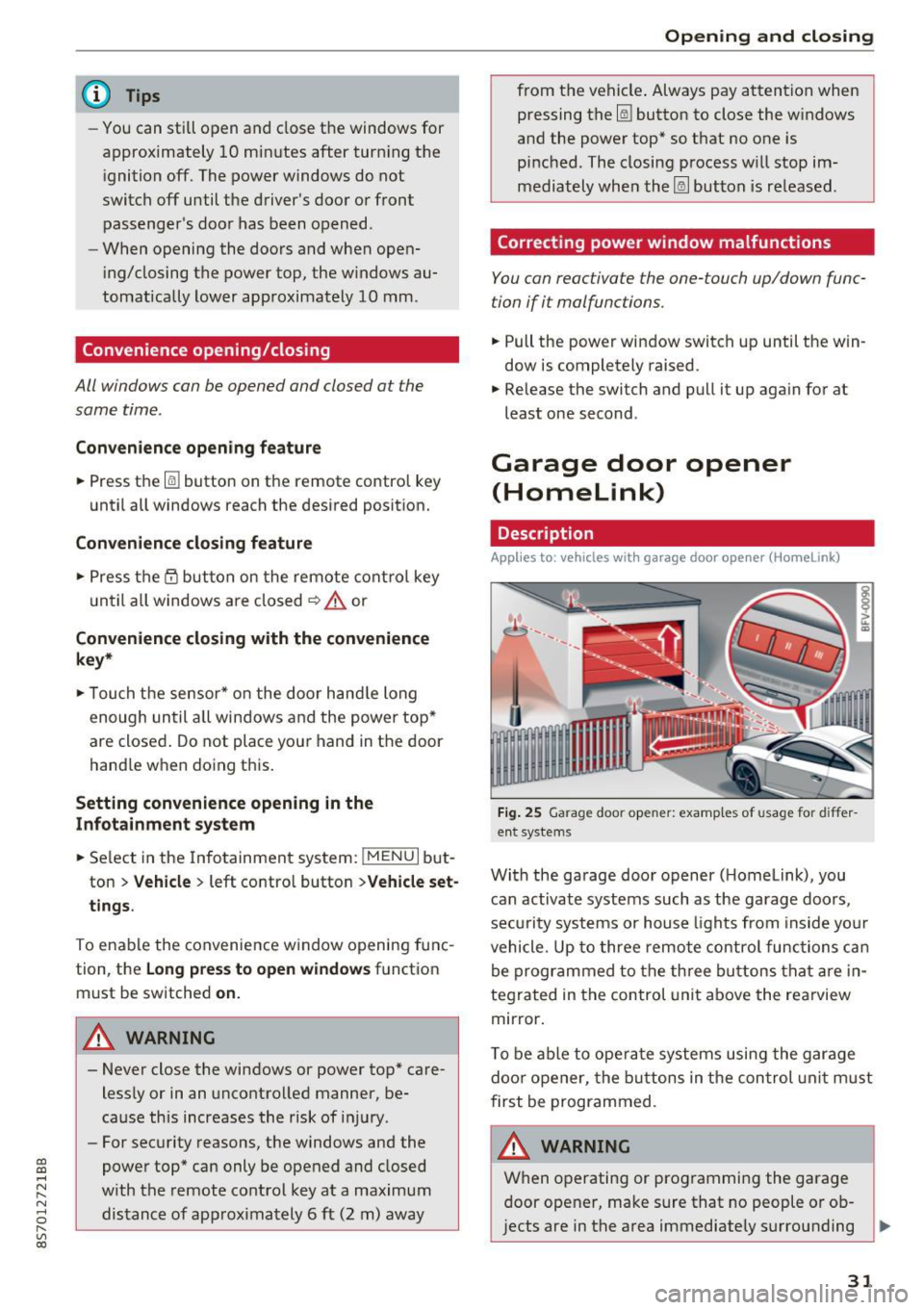
Fig. 25 Garage door opener: examples of usage for differ
ent systems
With the garage door opener ( Homelink), you
can activate systems such as the garage doors,
security systems or house lights from inside your
vehicle. Up to three remote control functions can
be programmed to the three buttons that are in
tegrated in the control unit above the rearview
mirror.
T o be able to operate systems using the garage
door opener, the buttons in the control unit must
first be programmed.
A WARNING ~
When operating or programming the garage
door opener, make sure that no people or ob
jects are in the area immediately surrounding ..,.
31
Page 36 of 314
Power top
Power top
Power top
General information
The power top opens and closes automatically .
When open, the power top is stored completely
in the power top compartment. The power top
can be opened or closed at speeds up to 30 mph
(SO km/h).
Under normal conditions, the power top is wind
and waterproof. In rare cases, small droplets of
water may form under extreme weather condi
tions such as torrential or prolonged rain. That is
normal and no cause for concern.
Follow the care instructions to keep the power
top free of leaks and to maintain its appearance
~ page 266, Core and cleaning. Also observe the
following:
- Open and stow the power top only when it is
clean and dry . Sharp-edged dirt particles can
cause damage to the rear window and the pow
er top . Stowing the power top when it is damp
can create imprints in it, and if it is left that
way for long periods of time, mildew and other
damage can form .
- Do not leave the power top open for several weeks or the creases in it may become discol
ored.
- Remove ice and snow before opening the power
top. Do not use any sharp edged objects to re move ice and snow or the power top could be
scratched or damaged . The rear window may be
cleared with a standard ice scraper .
- Do not open the power top when the tempera
ture is below 32 °F (0 °C). The fabric in the
power top loses elasticity in sub-zero tempera
tu res .
34
Opening and closing the power top
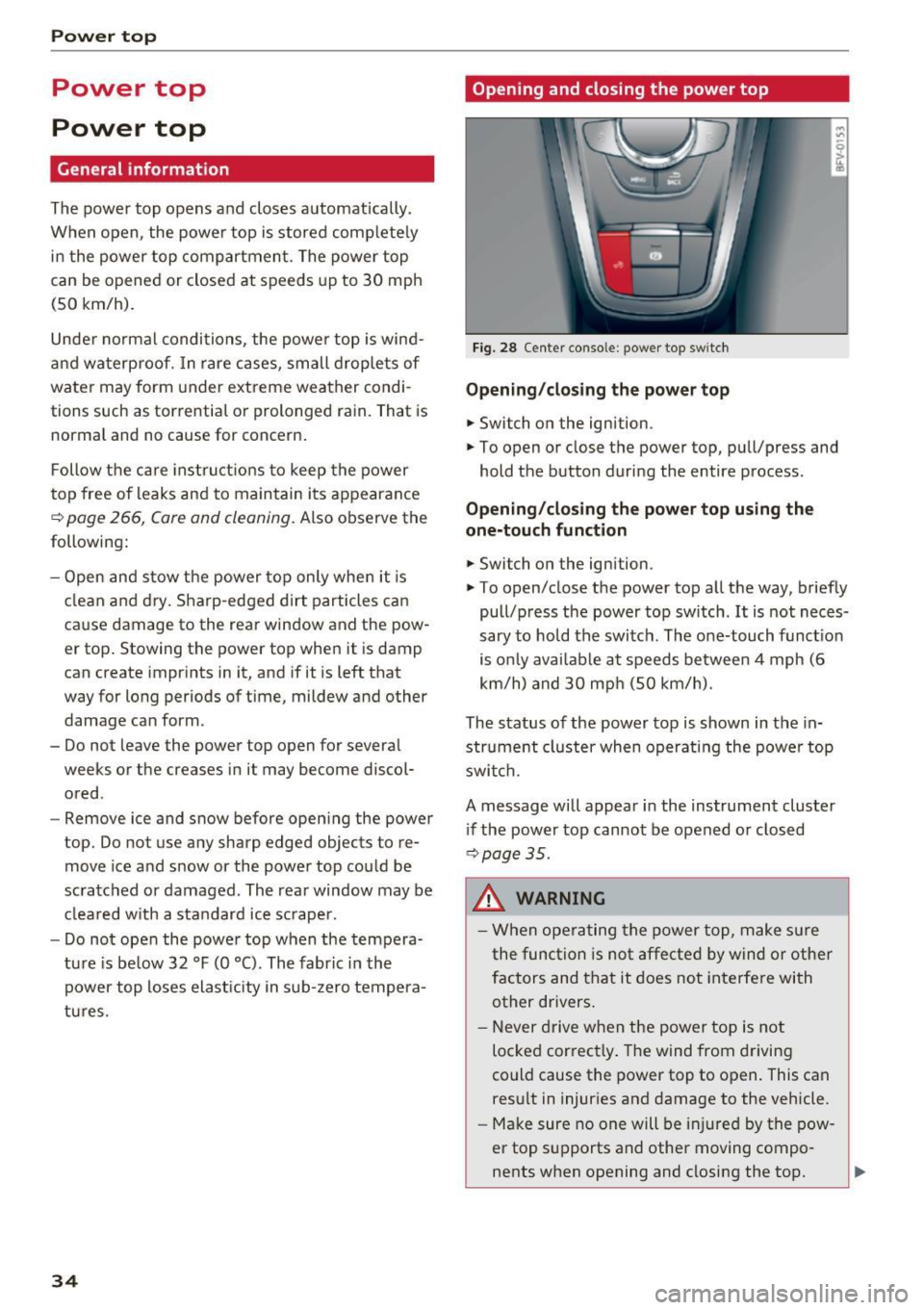
Fig. 28 Center conso le: power top sw itch
Opening/closing the power top
.,. Switch on the ignition.
.,. To open or close the power top, pull/press and
hold the button during the entire process.
Opening/closing the power top using the
one-touch function
.,. Switch on the ignition .
.,. To open/close the power top all the way, briefly
pull/press the power top switch. It is not neces
sary to hold the switch. The one-touch function
is only available at speeds between 4 mph (6
km/h) and 30 mph (SO km/h).
The status of the power top is shown in the in
strument cluster when operating the power top
switch.
A message will appear in the instrument cluster
if the power top cannot be opened or closed
~ page 35.
A WARNING
-When operating the power top, make sure
the function is not affected by wind or other
factors and that it does not interfere with
other drivers.
- Never drive when the power top is not
locked correctly. The wind from driving
could cause the power top to open. This can
result in injuries and damage to the vehicle .
- Make sure no one will be injured by the pow
er top supports and other moving compo
nents when opening and closing the top.
Page 37 of 314
CD
CD
.... N
" N ...... 0 r--. V, co
-When operating the power top, visibility to
the rear is limited. Avoid operating the top
while driving in reverse.
(D Note
-To prevent damage to the power top:
- do not store any objects in the power top
storage compartment .
- make sure there is enough space above
the vehicle when opening or closing the
power top.
(D Tips
- To prevent the vehicle battery from draining
unnecessarily, do not open or close the pow
er top repeatedly when the engine is switch
ed off.
- A message will appear in the instrument cluster if there is a malfunction in the power
top
¢ page 35.
- The power top can also be operated manual
l y temporarily if there is a malfunction
¢ page 3 7, Power top emergency opera
tion.
An authori zed A udi dealer or au thor
i zed Audi Service Facility should diag nose
and correct the cause of the ma lfunction as
soon as possib le .
- If the vehicle is parked with the power top open, the vehicle interior is not p rotected
from damaging weather or unauthorized ac
cess. Lock any items you leave behind in the
l uggage compartment. Close the power top
before leaving the vehicle .
- The side windows automat ically lower
slight ly when opening or closing the power
top.
P owe r top
Power top convenience opening and closing
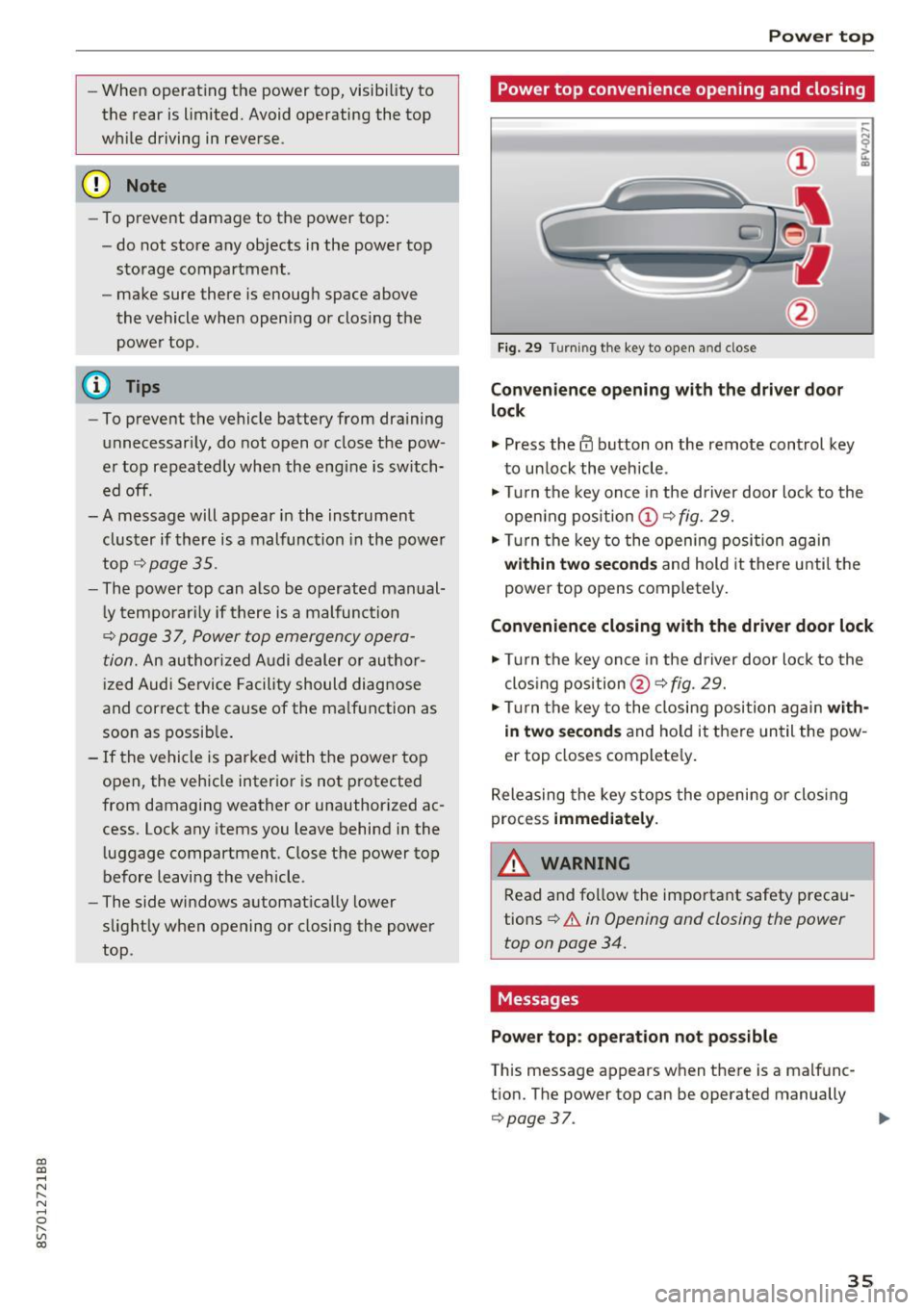
Fig. 29 Turning the key to open and close
Conven ience opening with the dri ver door
lock
.,. Press the 63 button on the remote control key
to un lock the vehicle .
.,. Turn the key once in the driver door lock to the
open ing pos ition
© ¢fig. 29.
.,. Turn the key to the opening posi tion again
within tw o second s and hold it there until the
power top opens completely.
Convenience closing with the driver door lock
.,. Turn the key once in the driver door lock to the
clos ing position @¢
fig. 29.
.,. Tur n the key to the closing position again
with
in two second s
and ho ld it there un til the pow
er top closes complete ly .
Releasing the key s tops the opening or clos ing
process
immedi ate ly.
A WARNING
-
Read and fo llow the important safety preca u
tions
¢ .&. in Opening and closing the power
top on page 34.
Messages
Pow er top : operation n ot pos sibl e
This message appears when there is a malfunc
t ion. The power top can be operated manually
¢ page 37. ..,.
35
Page 38 of 314
Power top
Pow er top: op erati on curr ently not poss ible
I f the power top is operated continuo usly for a
long period of time, the overload protection acti
vates for approximate ly 15 to 30 minutes. You
can open or close the power top again after that .
Power top: operation currently not possible.
Engine mu st b e running
The power top is automatically deactivated if the
battery voltage is low. You can open or close the
power top again after starting the engine.
P ower top: op erati on curr ently not possible.
Out sid e temp eratur e too l ow
The power top will not open when the tempera
ture is below 5 °F ( -15
°() .
Pow er top: operation not po ssib le. Speed too
h igh
If you go above 30 mph (SO km/h), the power
top cannot be operated due to safety reasons. Reduce the vehicle speed to close or open the
power top.
Power top : not secur e. Spe ed too high
This message appears if you go above 30 mph
(SO km/h) when operating the power top. Reduce
the vehicle speed and operate the power top again.
Power top: malfunction! You may continu e
dri ving (limited functionality ). See owner' s
manual
This message appears if there is a malfunction in
the system . Try to open or close the power top
again. If the message st ill appea rs , then have an
author ized Audi dealer or author ized Audi Se rvice
F acility correct the malf unct ion. Do not dr ive
more than 30 mph (SO km/h) until it is correct
ed .
.&,. WARNING
Never drive whe n the power top is not locked
correctly . The wind from driving cou ld cause
the power top to open. This can result in inju
r ies and damage to the vehicle.
36
Wind deflector
Appl ies to: vehicles with wind deflector
The wind deflector reduces air movement in the
passenger compartment in order to increase driving comfort.
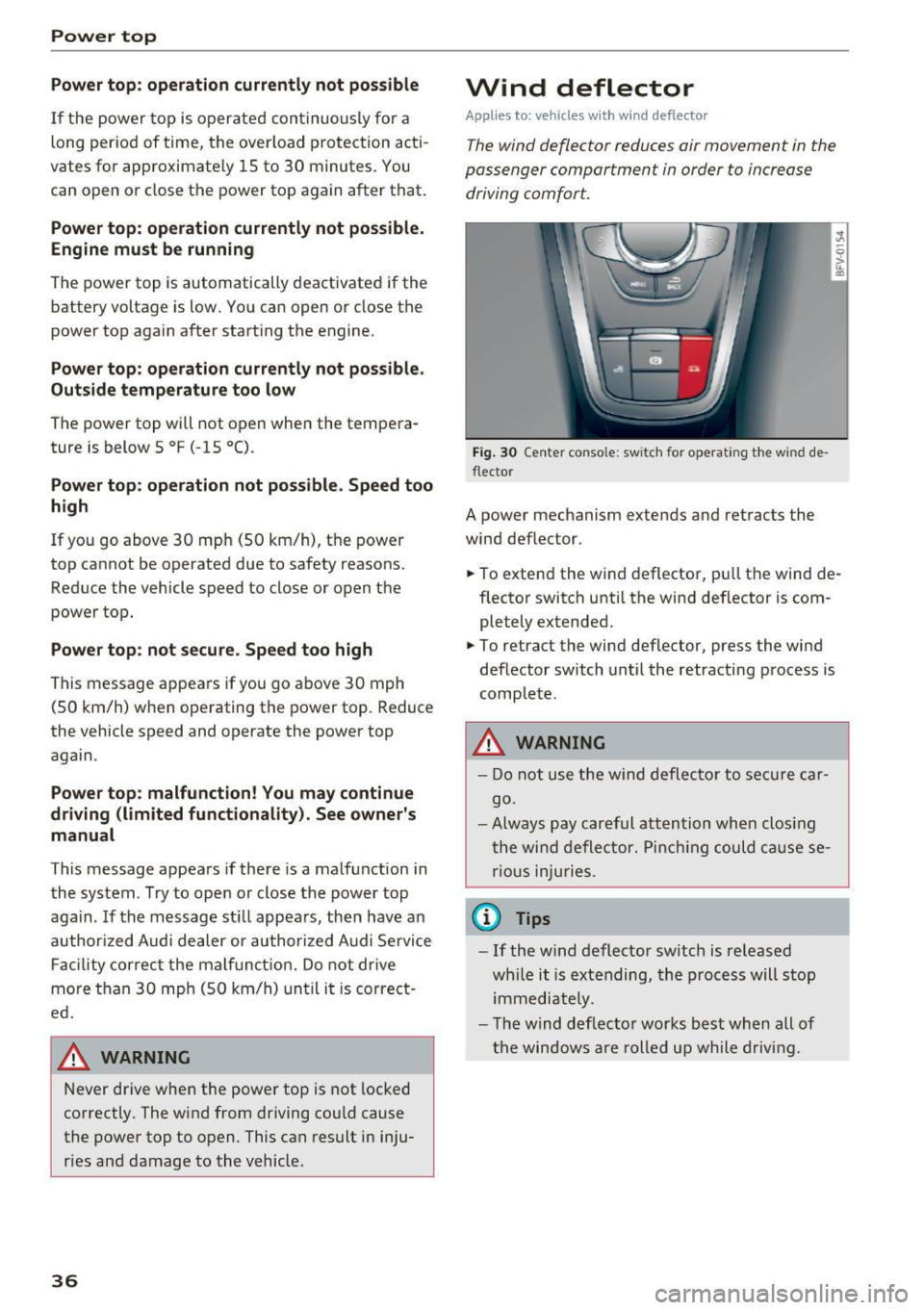
Fi g. 30 Ce nter conso le: switch for ope ra ting t he w ind de
flector
A power mechanism extends and retracts the
wind deflector.
., To extend the wind deflector, pu ll the wind de
flector switch unti l the wind def lector is com
pletely extended .
., To retract the wind deflector, press the wind
deflector switch until the retracting process is
complete .
.&,. WARNING
-Do not use the w ind deflector to secure car
go .
- Always pay careful attention when clos ing
the wind deflector. Pinch ing could ca use se
r ious inju ries .
(j) Tips
-If the w ind deflector sw itch is released
wh ile it is extending, the process will stop
immediately .
- T he wind deflec to r works best when all of
the windows are rolled up while driving .
Page 39 of 314
CD
CD
.... N
" N .... 0 r--. V, co
Power top emergency
operation
General information
The power top can be closed manually if there is
a malfunction .
• Set the parking brake .
• Open all windows.
• Switch the ignition off.
Only close the power top manually in an emer
gency. Have a second person assist. Drive to an
authorized Audi dealer or authorized Audi Service
F acility immediately to have the malfunction cor
rected.
A WARNING
- There is a risk of pinching the hands or other
people during all of the power top emergen
cy operation steps .
- Make sure all windows are lowered during
emergency operation.
- Do not reach into the power top supports
or other moving components.
- Never drive when the power top is not
locked correctly. The w ind from dr iving
cou ld cause the power top to open. This can
resu lt in injuries and damage to the vehicle.
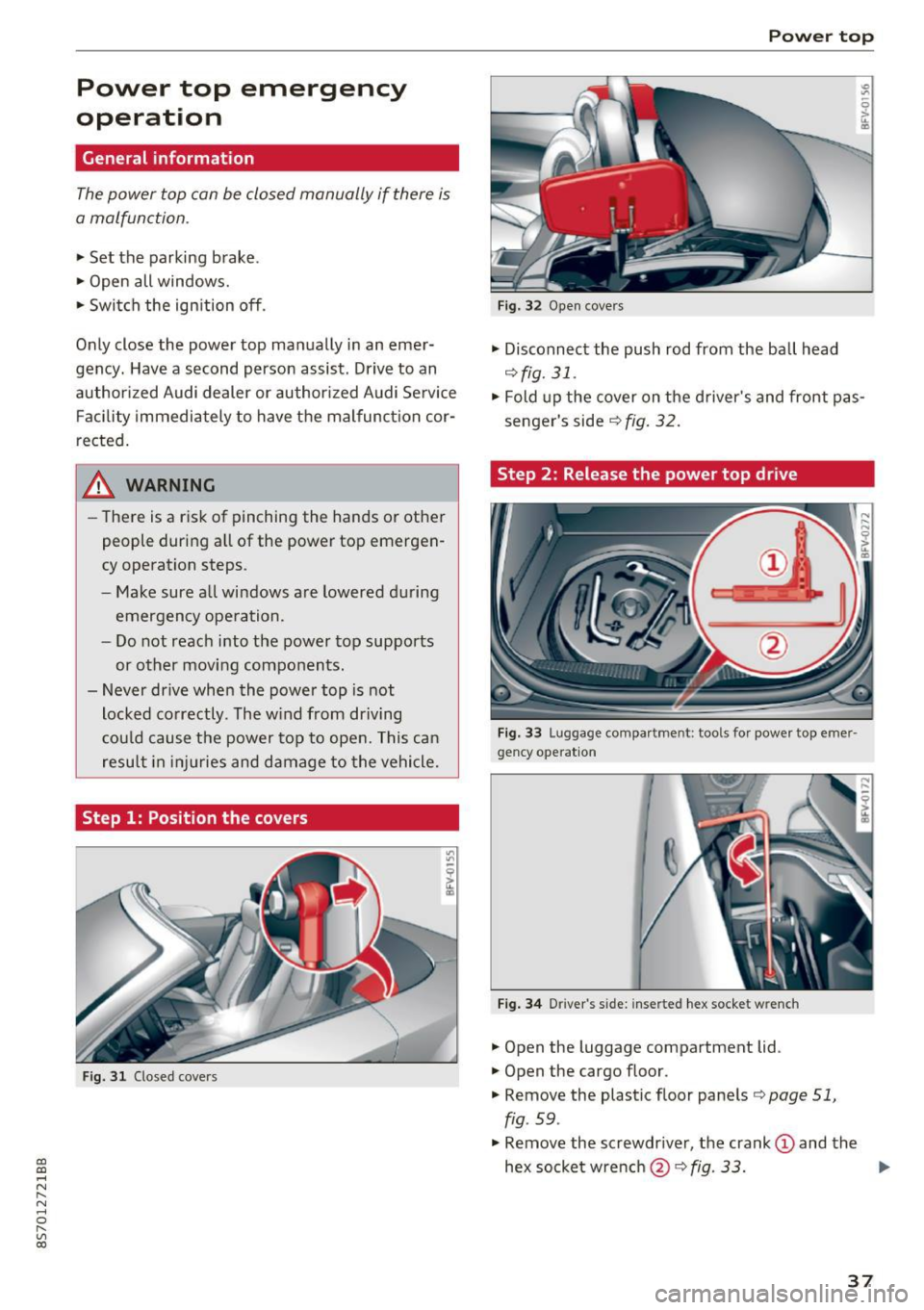
Step 1: Position the covers
Fig. 31 Closed covers
Power top
Fig. 32 Open covers
• Disconnect the push rod from the ball head
¢ fig. 31.
• Fold up the cover on the d river's and front pas
senger's side
r:::;, fig. 32 .
Step 2 : Release the power top drive
Fig. 33 Luggage compa rt me nt: t ools for power top eme r·
gency operat io n
Fig. 34 D river 's s ide: inserte d hex socket w re nch
• Open the luggage compartment lid .
• Open the cargo floor .
• Remove the plastic floor panels
r:::;, page 51,
fig . 59 .
• Remove the screwdr iver, the crank (D and the
hex socketwrench @r:::;,fig .
33. .,..
37
Page 40 of 314
Power top
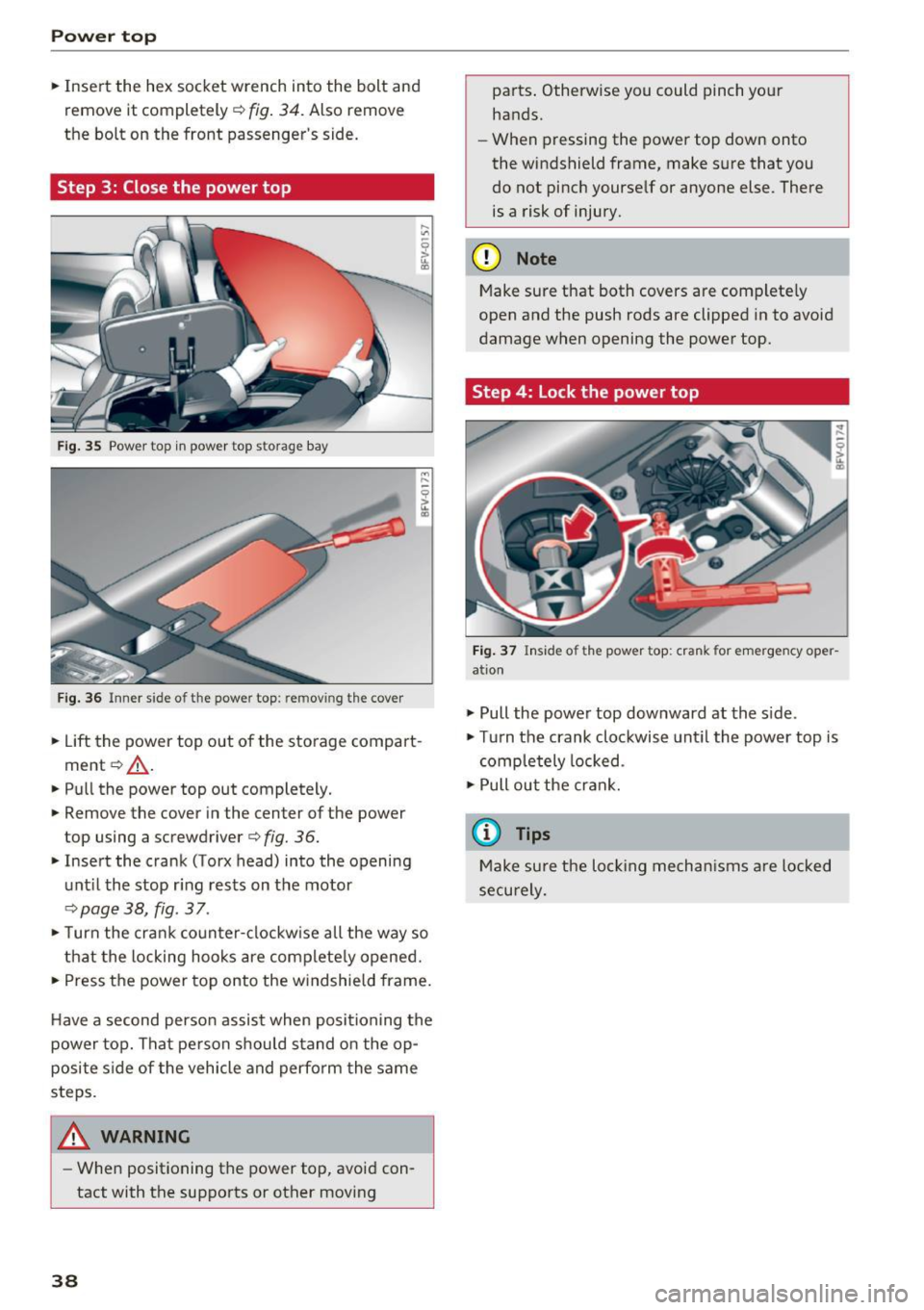
• Insert the hex socket wrench into the bolt and
remove it completely ¢
fig. 34. Also remove
the bolt on the front passenger's side.
Step 3: Close the power top
Fig. 35 Power top in power top s torage bay
Fig. 36 Inner side o f th e powe r top: re m ov ing the cover
• Lift the power top out of the storage compart
ment ¢,& .
• Pull the power top out completely.
• Remove the cover in the center of the power
top using a screwdriver ¢
fig. 36.
• Insert the crank (Torx head) into the opening
until the stop ring rests on the motor
¢page 38, fig . 37 .
• Turn the crank counter-clockwise all the way so
that the locking hooks are completely opened.
• Press the power top onto the windshield frame.
Have a second person assist when positioning the
power top. That person should stand on the op
posite side of the vehicle and perform the same
steps.
_& WARNING
- When positioning the power top, avoid con
tact with the supports or other moving
38
parts. Otherwise you could pinch your
hands.
- When pressing the power top down onto
the windshield frame, make sure that you
do not pinch yourself or anyone else . There
is a risk of injury.
(D Note
Make sure that both covers are completely
open and the push rods are clipped in to avoid
damage when opening the power top.
Step 4: Lock the power top
Fig. 37 Inside of the power top: crank for emergency oper
ation
• Pull the power top downward at the side.
• Turn the crank clockwise until the power top is
completely locked .
•Pullout the crank.
(D Tips
Make sure the locking mechanisms are locked
securely.
Page 41 of 314
CD
CD
.... N
" N ...... 0
" V, co
Lights and Vision
Exterior Lighting
Switching lights on and off
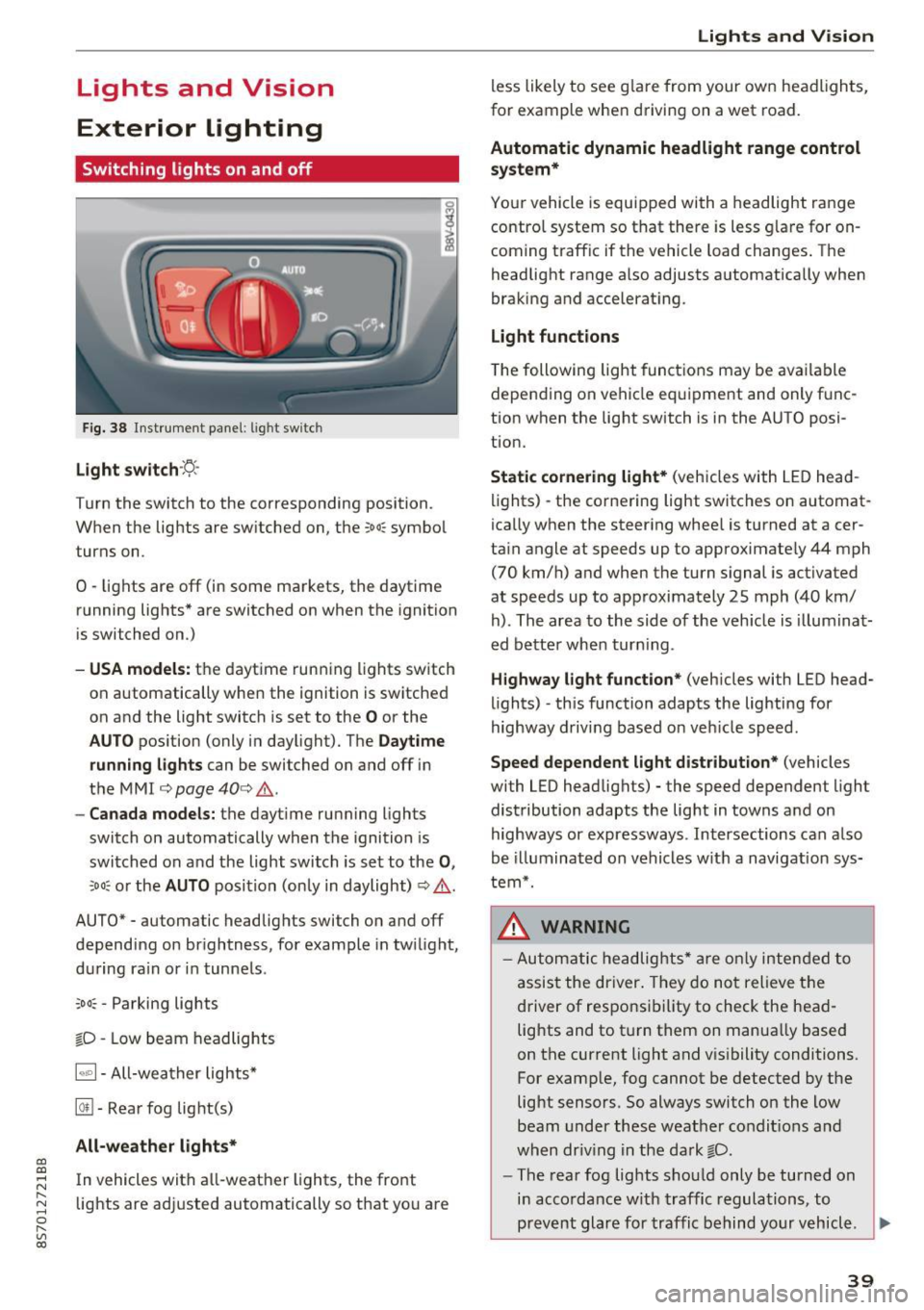
Fig. 38 Instrument panel: l ig ht switc h
Light switch ·:<'>'.·
Turn the switch to the corresponding position.
When the lights are switched on, the
;oo: symbol
turns on.
0 · lights are off (in some markets, the daytime
running lights* are switched on when the ignition
is switched on.)
-USA model s: the daytime running lights sw itch
on automatically when the ignition is switched
on and the light switch is set to the
O or the
AUTO pos ition (only in daylight). The D aytime
runn ing lights
can be switched on and off i n
the MMI
¢ page 40 ¢ &.
- Canada models: the dayt ime running lights
switch on automatically when the ignition is
switched on and the light switch is set to the
0 ,
;oo: or the AUTO posit ion (only in daylight) ¢ & .
AUTO* - automatic headlig hts switch on and off
depending on brightness, for example in tw ilight,
during ra in or in tunne ls .
~oo: -Parking lights
gD -Low beam headlights
IQ., 1-All-weather lights*
@il -Rear fog lig ht(s)
All-weather light s*
In vehicles with all-weather lights, the front
lights are adjusted automatically so that yo u are
Lights and V ision
less likely to see g lare from your own headlights,
for example when driving on a wet road.
Automatic dynamic headlight range control
system*
Your vehicle is equipped with a headlight range
contro l system so that there is less g lare for on
coming traff ic if the vehicle load changes . The
headlight range also adjusts automatically when
braking and accelerat ing .
Light function s
The following light funct ions may be avai lable
depending on vehicle eq uipment and only f unc
tion when the lig ht switch is in the AUTO posi
tion.
Static cornering light * (vehicles with LED head
li ghts) - the cornering light switches on automat
ica lly when the steer ing whee l is turned at acer
ta in angle at speeds up to approximate ly 44 mph
(70 km/h) and when the turn signal is activated
at speeds up to approximately 25 mph (40 km/
h) . The area to the side of the veh icle is illumina t
ed bette r when turn ing .
Highway l ight function * (vehicles with LED head
lights) -th is function adapts the lighting for
highway driving based o n veh icle speed.
Speed dependent light distribution* (vehicles
with LED headlights) - the speed dependent l ight
distribution adapts the lig ht in towns a nd on
highways or expressways . Intersections can a lso
be illuminated on vehicles w ith a navigation sys
tem*.
_& WARNING
- Autom atic headlights * are only inten ded to
a ssis t the driver . They do no t relieve t he
d river of respo nsibility to check the head
lig hts and to t urn them on manua lly based
on the current light and v is ibility conditions.
For example, fog cannot be detected by the
light sensors . So always switch on the low
beam under these weather condit ions a nd
when dr iv ing in the da rk
gD .
-The rear fog lights shou ld only be turned on
i n acco rdanc e w ith traffic regulations, to
prevent glare for traffic behind yo ur v ehicl e.
~
39
Page 42 of 314
Lights and Vision
-If the battery has been discharging for a
wh ile, the parking light may switch off auto
matically. Always make sure your vehicle is
parked and adequately lit according to the
laws. Avo id using the parking lights for sev
era l hours.
- Always observe legal regulations when us ing the light ing systems described.
(D Tips
- The light sensor for the automatic head
lights* is in the rearview m irror mount. Do
not place any stickers in th is area on the
windsh ield.
- Some exterior lighting functions can be ad
ju sted
c:::;, page 40.
-If you turn off the ignition wh ile the exter ior
lights are on and open the-door, a warning
tone so unds.
- In some markets, the tail lights will sw itch
on when the daytime runn ing lights sw itch
on .
- In cool or damp weather, the inside of the
headlights, turn s ignals and tail lights can
fog over due to the tempe rature d ifference
betwee n the inside and ou ts ide. They will
clea r short ly after sw itch ing them on. This
does not affect the service life o f the light
i ng.
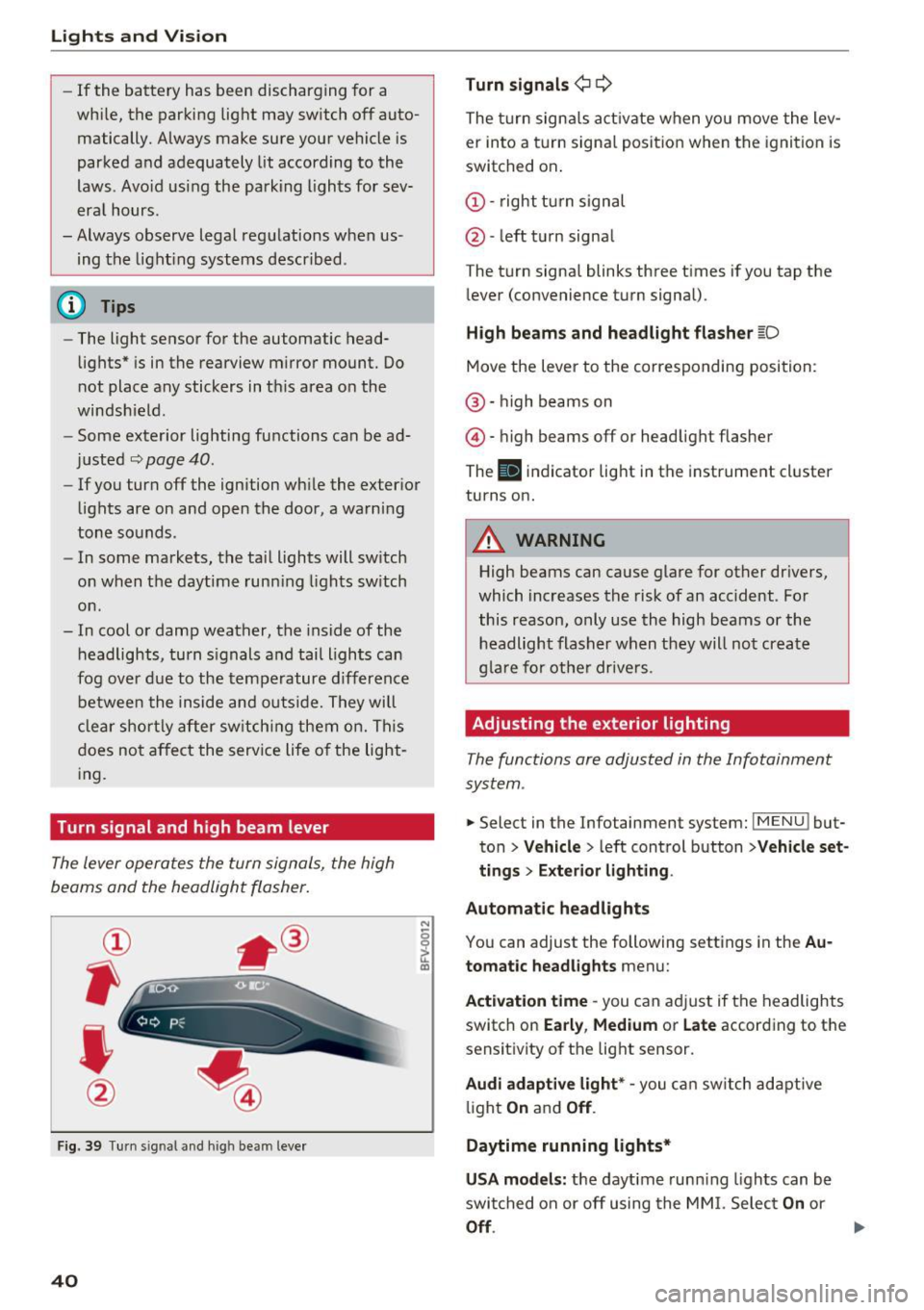
Turn signal and high beam lever
The lever operates the turn signals, the high
beams and the headlight flasher.
®
,
I
@
F ig . 39 Tu rn sig nal a nd high beam lever
40
N
c 0
ct a,
Turn signals ¢ Q
The turn sign als act ivate when yo u move the lev
er into a turn signa l posit ion when the igni tion is
switched on.
(D -right tu rn signal
@ -left t urn signa l
The tu rn signa l blinks three t imes i f you tap the
l ever (convenience t urn signal).
High beams and headlight fla sher l[D
Move the lever to the correspondin g position:
@ · high beams on
@ · high beams off or head light flasher
The
El i ndicator lig ht in the instrume nt cl uster
turns on.
_8 WARNING
High beams can cause glare for other dr ivers,
which inc reases the risk of an accident . Fo r
this reason, only use the high beams or the headlight flasher when t hey will no t create
g la re for ot he r drive rs.
Adjusting the exterior lighting
The functions are adjusted in the Infotainment
system .
.. Select in the Infotainment system: IMENU! but
ton>
Veh icle > left control button >Vehicle set
tings > Exterior light ing.
Automatic headlights
You can adjust the following sett ings in the Au
tomatic headlights
menu:
Act ivation time -you can a dju st if the headlights
switch on
Early , Medium or Late according to the
sensit ivity of th e lig ht sensor.
Audi adaptive light* -you c an switch adapt ive
li ght
On an d Off .
Daytime running lights*
USA models: the daytime runn ing lights can be
swi tched on or off using the MM I. Selec t
On or
Off.
Page 44 of 314
Lights and Vision
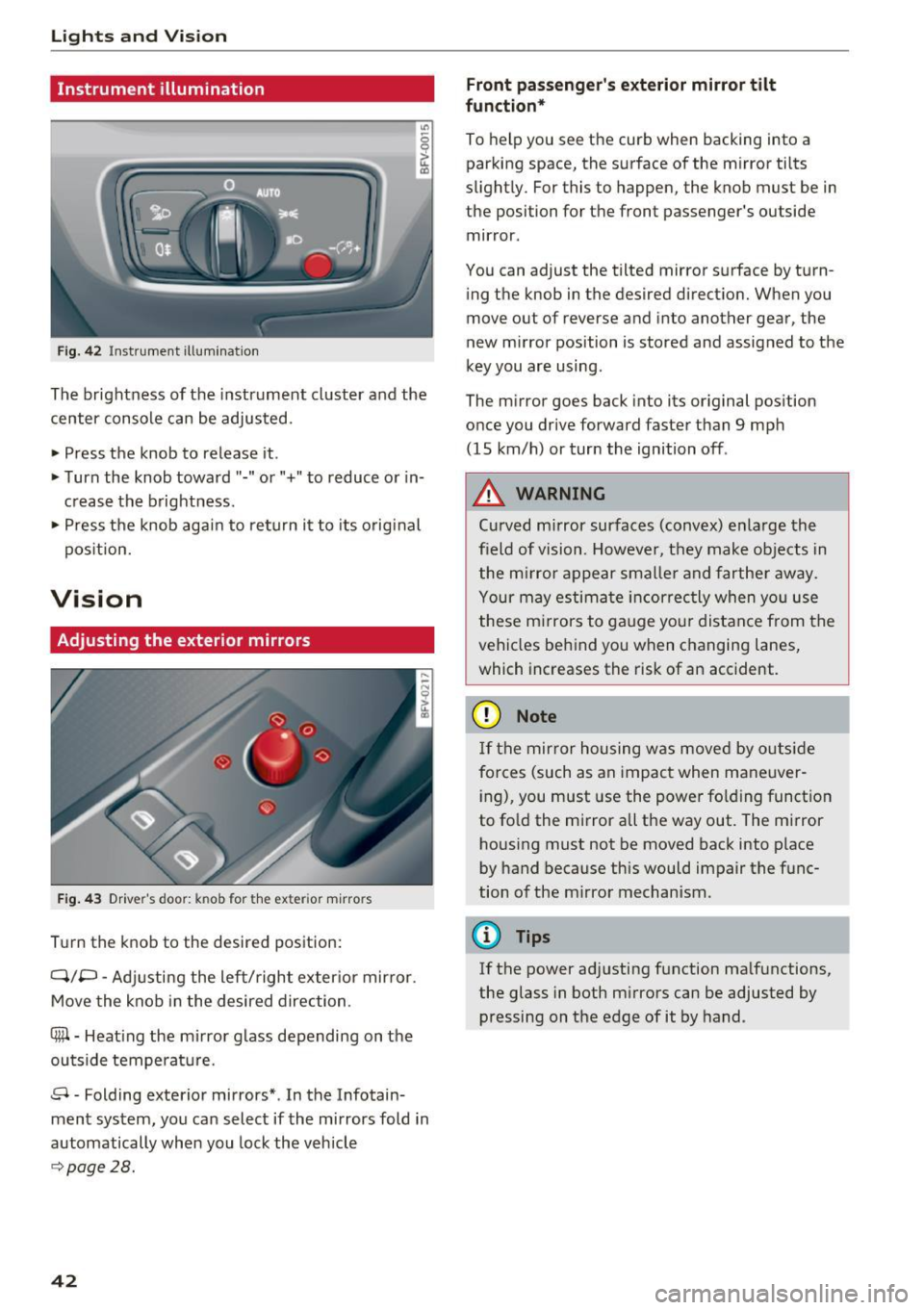
Instrument illumination
Fig . 42 Inst ru m ent illuminat io n
"' ~ 0 0
~ (0
The brightness of the instrument cluster and the
center console can be adjusted.
• Press the knob to release it .
• Turn the knob toward"-" or"+" to reduce or in
c rease the b rightness .
• Press the knob again to ret urn it to its original
pos ition.
Vision
Adjusting the exterior mirrors
F ig. 4 3 Driver's door: knob for the exter ior m irrors
T u rn the knob to the desired pos ition:
Q/P -Adjusti ng the left/right exter ior mir ror.
Move the knob in the desired direction.
®-Heat ing the mi rror g lass depending on the
outside temperat ure.
8 -Folding exterior mirrors *. In the Infotain
ment system, you can select if the mirrors fold in
automatically when you lock the vehicle
9 page28.
42
Front passenge r's exterior mirror tilt
function *
To help you see the cur b when backing into a
parking space, the surface of the m irror tilts
slight ly. For this to happen, the knob must be in
the position for the front passenger's outside
mir ror .
You can adjust the tilted mirror s urface by turn
i ng the knob in the desired direct ion. When you
move out of reverse and into another gear, the
new m irror position is stored and assigned to the
key you are using.
The m irror goes back into its or ig inal pos ition
once you drive forward faster than 9 mp h
(15 km/h) or turn the ignition off .
,&. WARNING
Curved mirror surfaces (convex) e nla rge the
field of vision. Howeve r, they make objec ts in
the m irror appear s maller and fart he r aw ay.
Your may estima te inc orrec tly when yo u use
these m irrors to ga uge you r distan ce from the
vehicles behind you w hen changing la nes ,
which increases the risk of an accident.
(D Note
If th e mir ror h ousing w as move d by o utsid e
forces (such as an imp act when ma neuver
i ng), you must use the power fo lding funct ion
to fo ld the m irror all the way out. The m irror
h ousing must not be moved back into place
by hand because this would impair the func
tion o f the m irro r mechan ism.
(D Tips
If the power ad justing function ma lfunctions ,
the glass in both m irrors can be adjusted by
pressing on t he edge of it by hand.
-
Page 45 of 314
CD
CD
.... N
" N ...... 0
" V, co
Dimming the mirrors
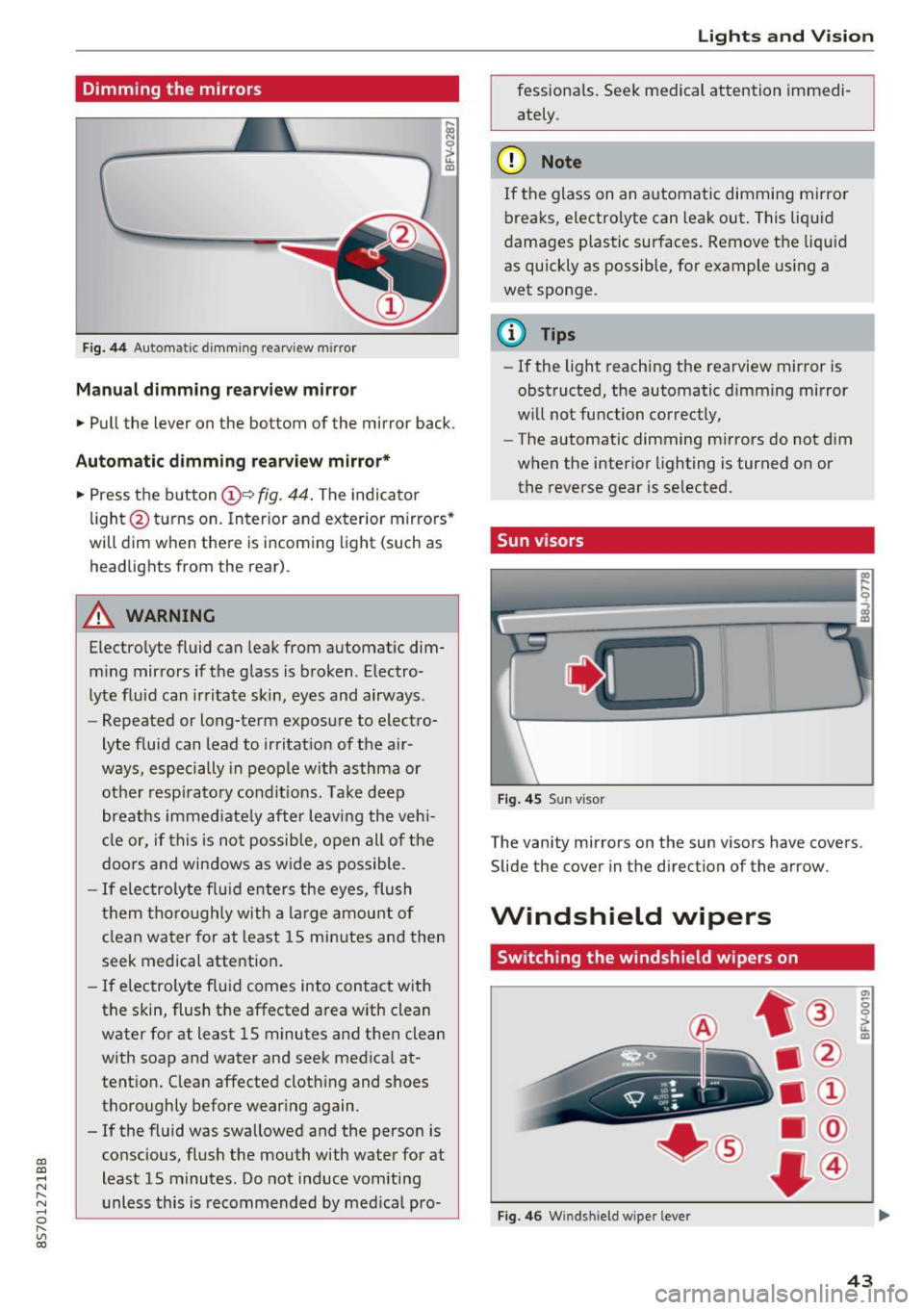
Fig . 44 Automat ic dimm ing rearview mirror
Manual dimming rear view mirror
• Pull the lever on the bottom of the mirror back.
Automatic dimming rea rvie w mirror*
• Press t he button @~
fig. 44 . The indicato r
li ght @turns on. In terior and exterior mirrors"
will dim when there is incoming light (such as
headlights from the rear).
A WARNING
Electrolyte fluid can leak from automat ic dim
m ing mirrors if t he g lass is b roken . Electro
lyte fluid can ir ritate skin, eyes and airways .
- Repeated or long-term exposure to elect ro-
lyte fluid can lead to irritat ion of the a ir
ways, especially in peo ple with asthma or
ot he r resp irato ry condi tions. Take deep
breat hs immed iate ly after leaving the veh i
cl e or, if this is n ot possib le, open all of t he
doo rs and windows as wide as possible.
- If elec troly te flu id ente rs the eyes, flush
t hem thorough ly with a large amou nt o f
cl ean water for at least 15 mi nutes and then
seek medical attention.
- If elec troly te f lu id comes into con tact wit h
the skin, flush t he affected area with clean
water for at least 15 minutes a nd then clean
with soap and water and seek medical at
tent ion. Clean affected cloth ing and shoes
thoroughly before wear ing again .
- If the fluid was swallowed and the person is
conscious, flus h the mouth with water for at
least 15 minutes. Do not induce vomiting
unless this is recommended by med ica l pro-
Lights and V ision
fessionals. Seek medical attention immedi
ately .
(D Note
If the glass on an a utomat ic dimmi ng mirror
breaks, electro lyte can leak out. This liquid
damages plastic sur faces. Remove t he liqu id
as quickly as possible, for example using a
wet sponge.
@ Tips
- If the light reaching the rearview mirror is
obstructed, the automatic dimming mirror
w ill not function correctly,
- The automatic dimming m irrors do not dim
w hen the interior lighting is turned on or
the reverse gear is selected.
Sun visors
Fi g. 4 5 Su n visor
The vanity mirrors on the sun visors have covers.
Slide the
cover in the direction of the arrow.
Windshield wipers
Switching the windshield wipers on
Fig. 4 6 W indshi eld wiper leve r
(7)
-0 0 :,;.. u. m
43