warning AUDI TT ROADSTER 2017 Owner's Guide
[x] Cancel search | Manufacturer: AUDI, Model Year: 2017, Model line: TT ROADSTER, Model: AUDI TT ROADSTER 2017Pages: 314, PDF Size: 76.54 MB
Page 46 of 314
Lights and Vi sion
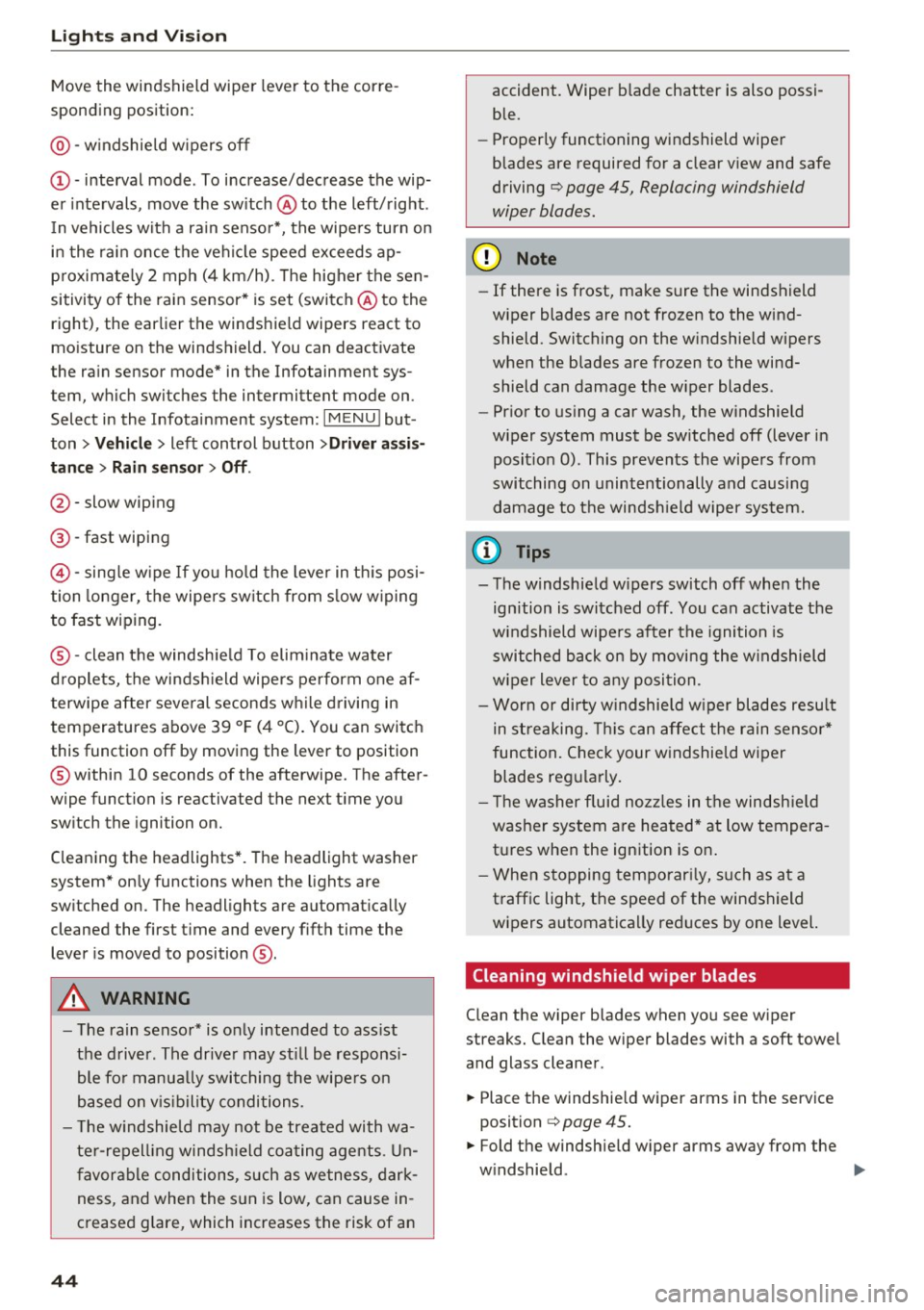
Move the windshield wiper lever to the corre
sponding position:
@ -windshield w ipers off
(D -interval mode. To increase/decrease the wip
er intervals , move the sw itch @ to the left/right .
I n vehicles with a rain sensor*, the wipe rs turn on
i n the rai n once the vehicle speed exceeds ap
p roximate ly 2 mph (4 km/h) . T he higher the sen
sitivity of the rain sensor * is set (switch @ to the
right), the earlier the windshield wipers react to
mo isture on the windshield. You can deact ivate
the rain sensor mode* in the Infotainment sys
tem, which switches the intermittent mode on .
Select in the Infotainment system:
I MENU I but
ton>
V ehicle > left control button >Dri ver a ssis
tan ce > Rain sensor> Off.
@-slow wip ing
@ -fast wiping
©-sing le w ipe If yo u ho ld the leve r in th is posi
tion longer, the wipers sw itch from s low w iping
to fast wiping .
®-clean the windsh ie ld To elim inate water
droplets, the winds hield wipers pe rform one af
terwipe after several seconds w hile driving in
temperatures above 39 °F (4 °C) . You can switch
this function off by moving the lever to position
@ within 10 seconds of the afterwipe. The after
wipe function is reactivated the next t ime you
sw itch the ignition on.
C leaning the headlights *. T he headlight washer
system* on ly functions when the lights are
sw itched on. The headlights are automat ica lly
cleaned the first t ime and every f ifth time the
lever is moved to position
® ·
A WARNING
- The rain senso r* is o nly intended to ass ist
the d river . The drive r may st ill be responsi
ble fo r manua lly switching t he wipe rs on
based on v is ibility conditions.
- T he w indshield may not be treated with wa
te r-repell ing windsh ield coa ting age nts . U n
favor able conditions, such as wetness, dark
ness, and when the s un is low, can cause in
creased g lare, which increases the risk of an
44
-
accident. Wiper b lade chatter is also possi
ble.
- Properly functioning windshield wiper
blades are required for a clear v iew and safe
driving
¢ page 45, Replacing windshield
wiper blades.
(D Note
- If there is frost, make sure the windshield
wiper blades are not frozen to the wind
shield. Switching on the w indshield w ipers
when the blades are frozen to the wind shield can damage the w iper blades .
- Pr ior to us ing a car wash, the w indshield
wiper system must be sw itched off (lever in
posit ion 0) . This prevents the wipers from
switching on unintentionally and causing
damage to the windsh ield wiper system.
('O Tips
- The windshield w ipers sw itch off when the
ignition is switched off . You can activate the
windshield wipe rs after the ignition is
switched back on by moving the windshield
wiper lever to any posi tion.
- Wor n or dirty w indshie ld w iper blades resu lt
in streaking. This can affect the rain senso r*
function. Check your w indshield wiper
blades regularly.
'
- T he washer fluid noz zles in t he windsh ie ld
washer system are heated* at low tempera
tures when the ignition is on .
- When s topping temporar ily, such as at a
traffic light, the speed of the windshield
wipers automatica lly reduces by one level.
Cleaning windshield wiper blades
Clean the wiper blades when you see w iper
streaks. Clean the wiper blades with a soft towel
and glass cleaner.
.,. Place the windshie ld wiper arms in the serv ice
position
¢ page 45.
.,. Fold the windshie ld w iper arms away from the
w indshield. ..,.
Page 47 of 314
CD
CD
.... N
" N .... 0 r--. V, co
_& WARNING
Dirty windshield wiper blades can impair vi
sion, which increases the risk of a n accident.
Replacing windshield wiper blades
Fig . 47 Remov ing windshie ld wiper blades
Windshield wiper service position /blade
replacement position
"'
~ a: a) OJ
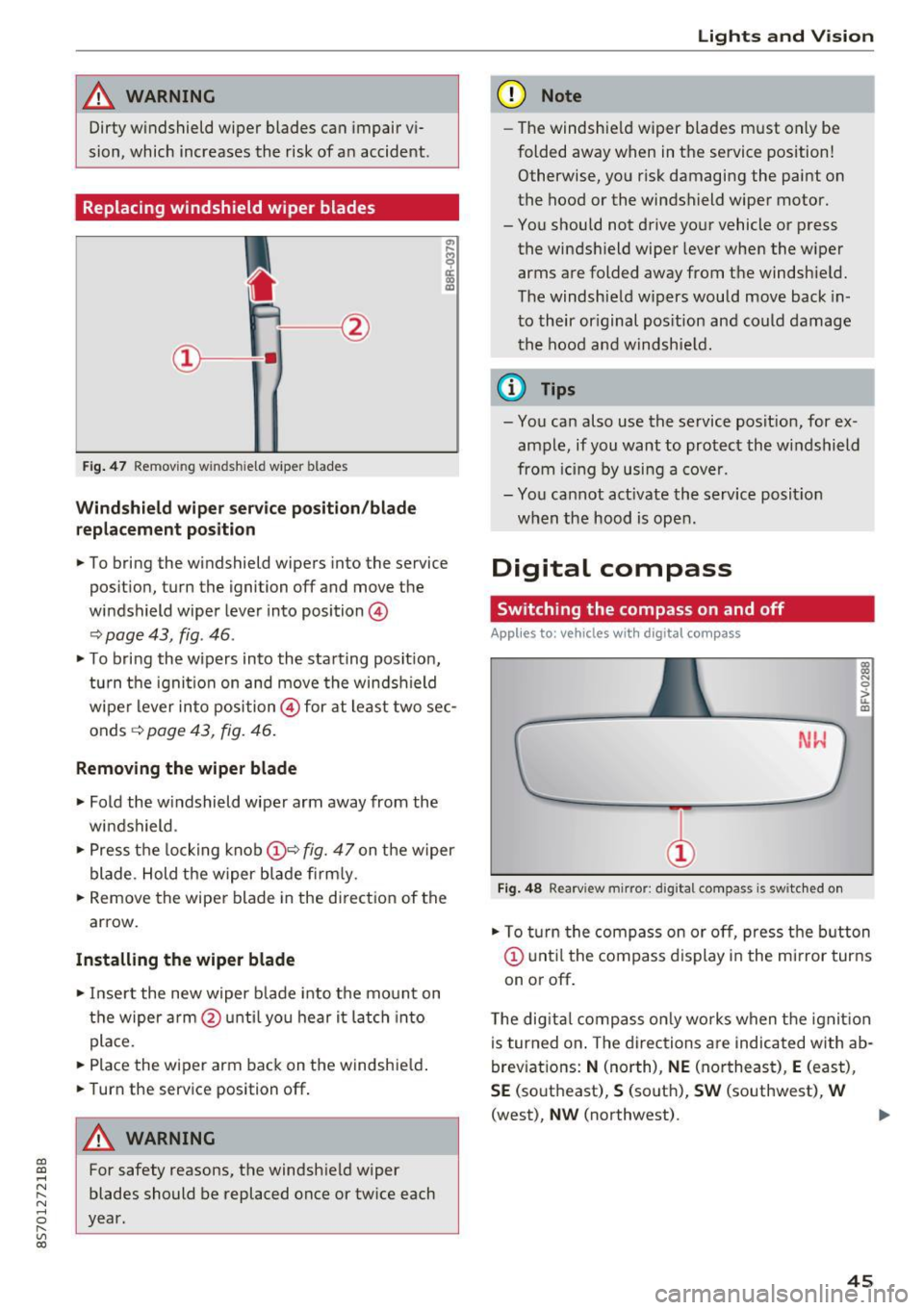
.. To bring the windshield wipers into the service
pos it ion, turn the ignition off and move the
windshield wiper lever into position @
~ page 43, fig. 46 .
.. To bring the wipers into the starting posit ion,
tu rn the ignition on and move the windshield
wiper lever into position@ for at least two sec
onds ~
page 43, fig. 46.
Removing the wiper blade
.. Fold the windshield wiper arm away from the
windshield .
.,. Press the locking knob@~
fig. 47 on the wiper
blade. Hold the wiper blade firmly.
.. Remove the wiper blade in the direct ion of the
arrow.
Installing the wiper blade
.. Insert the new wiper b lade into the mount on
the wiper arm @until you hear it latch into
place.
.. Place the wiper arm back on the windshie ld .
.. Turn the service position off.
A WARNING
-
For safety reasons, the windshield wiper
blades should be replaced once or twice each
year.
Lights and V ision
(D Note
-The windshie ld wiper blades must only be
folded away when in the service position!
Otherwise, you risk damaging the paint on
the hood or the windshield wiper motor.
- You should not drive your vehicle or press the windsh ield wiper lever when the wiper
arms are folded away from the windshield.
The windshield wipers would move back in
to their original pos ition and could damage
the hood and windshie ld.
(1} Tips
-You can also use the service posit ion, for ex
ample, if you want to protect the windshield
from icing by using a cover.
- You cannot act ivate the service posit ion
when the hood is open.
Digital compass
Switching the compass on and off
Applies to: vehicles wit h digita l compass
Fig. 48 Rearview mirror: digita l compass is switc hed on
::l
"' 0
> LL OJ
.. To turn the compass on or off, press the button
@ until the compass d isplay in the mirror turns
on or off .
The digita l compass only works when the ignit ion
is turned on . The directions are indicated with ab
breviations:
N (north), NE (northeast), E (east),
SE (southeast), S (south), SW (southwest), W
(west),
NW (northwest). ..,_
45
Page 48 of 314
Lights and Vision
@ Tips
To prevent inaccurate compass readings, do
not bring any remote controls, e lectr ica l dev i
ces or metall ic objects near the mirro r.
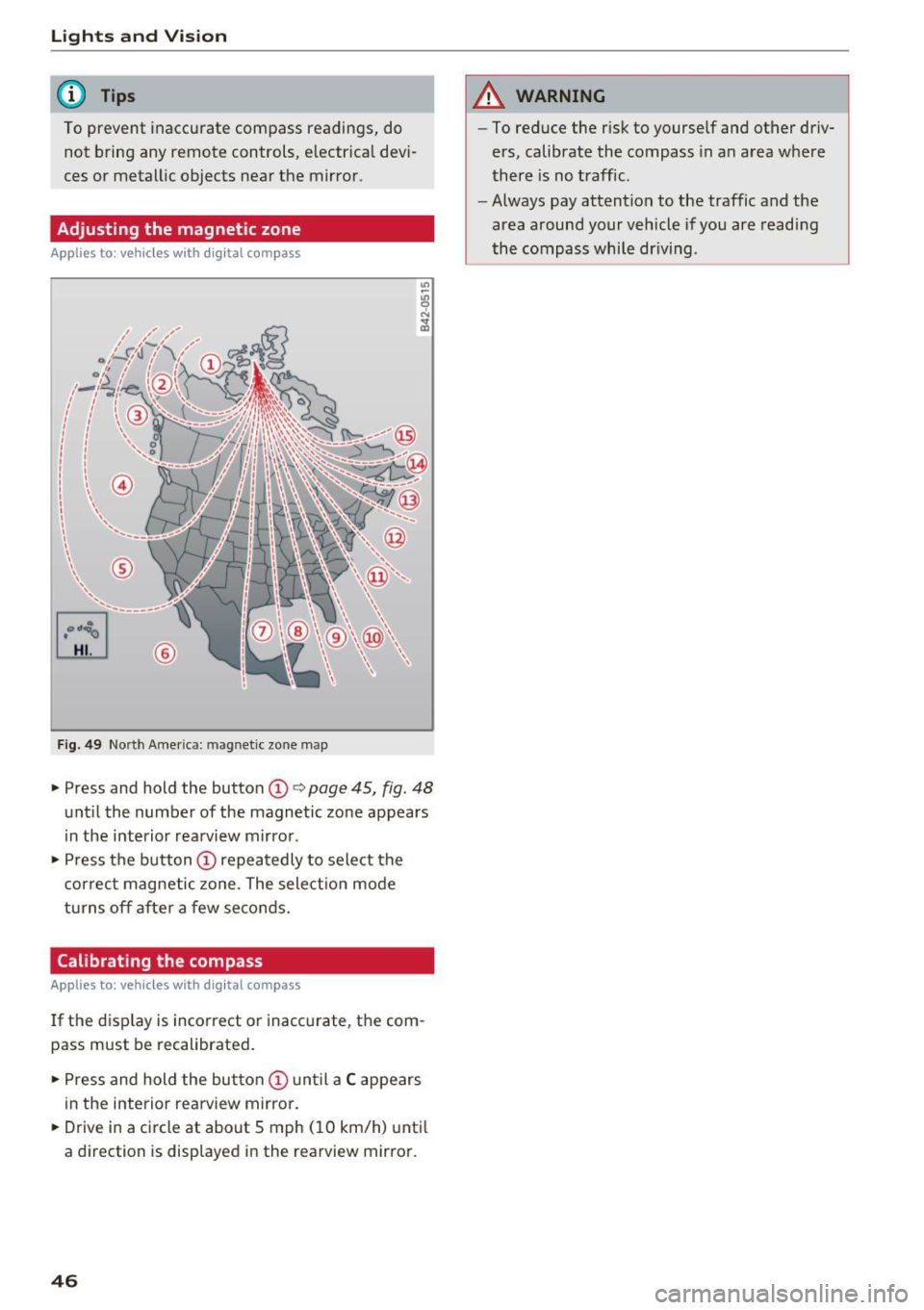
Adjusting the magnetic zone
A pp lies to: ve hicles w ith digital compass
[o::J
UiL.J ®
F ig . 4 9 Nort h Amer ica : ma gnetic zo ne m ap
.- Press and hold the button CD i:> page 45, fig. 48
unt il the number of the magnetic zone appears
in the interior rea rview m irro r .
.- Press t he button
CD repea tedly to select the
correc t magne tic zone . The select io n mode
turns off afte r a few seco nds.
Calibrating the compass
A pp lies to: ve hicles w ith digi tal compass
If the d isp lay is incorrect or inacc urate, t he com
pass must be recalibrated .
.- Pre ss and hold the button
CD un til a C appears
in the inte rio r rearview mirror .
.- Drive in a circle at about 5 mph ( 10 km/h) unti l
a dir ection is disp layed i n the rearvi ew mirro r.
46
A WARNING
- To reduce the r isk to yourself and other driv
ers, calibrate the compass in an area whe re
there is no traffic .
- Always pay attention to the traffic and the
area around your vehicle if you are readi ng
the compass whi le dr iv ing .
Page 49 of 314
CD
CD
.... N
" N .... 0 r--. V, co
Seats and storage
General information
A WARNING
See¢ page 181 , Safe driving for important
information, tips, suggestions and warnings
that you sho uld read and follow for your own
safety and the safety of your passengers .
Front seats
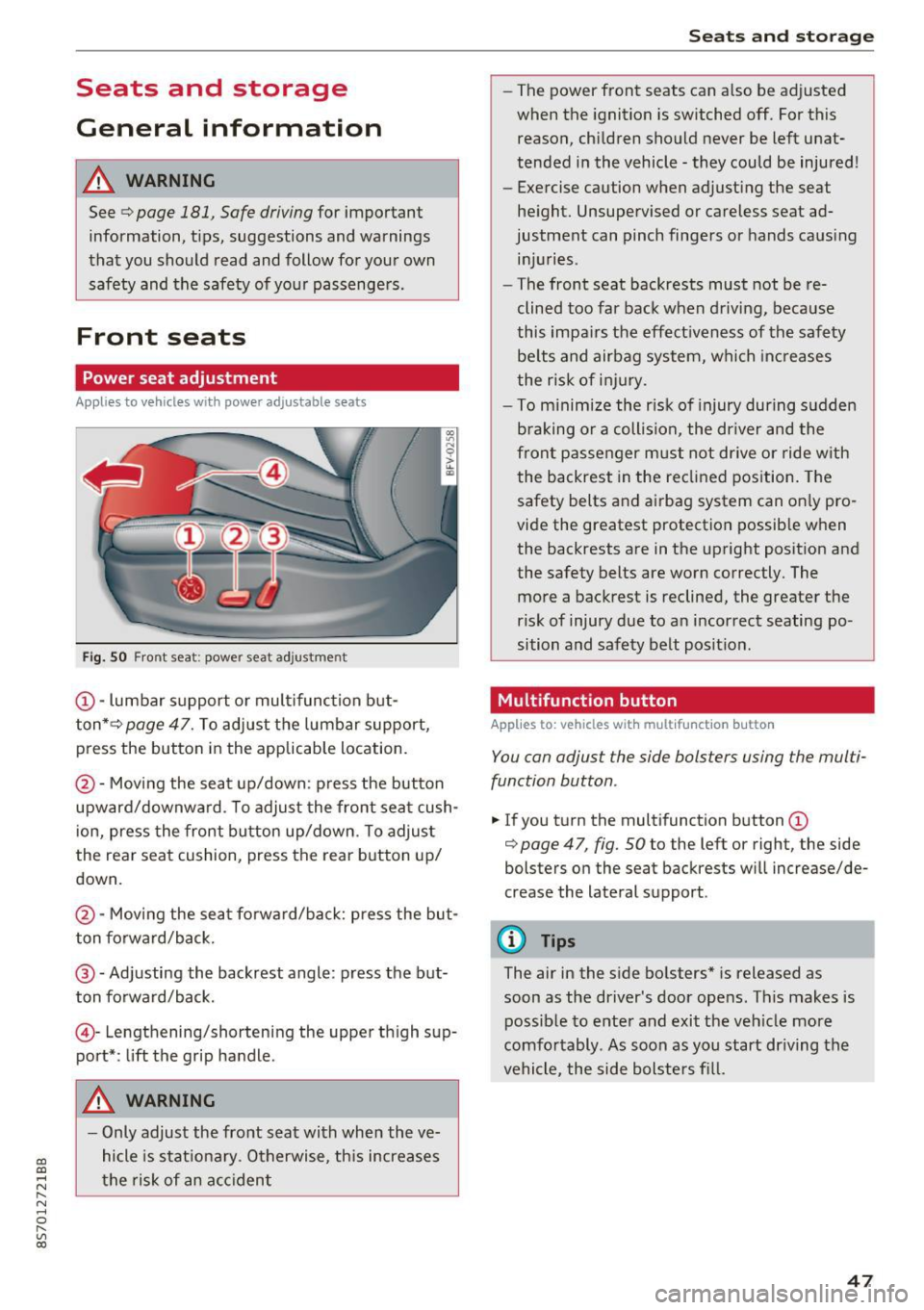
Power seat adjustment
Applies to vehicles with power adjustable seats
Fig. 50 F ro nt seat: powe r seat ad jus tme nt
@ -lumbar support o r mult ifunct ion but
ton* ¢
page 47. To adjust the lumbar support,
press the button in the applicable location.
@ -Moving the seat up/down : p ress the button
upward/downwa rd . To adjust the front sea t cush
i on, press the front bu tton up/down . T o adjus t
the rear seat cushion, press the rear button up/
down.
@ -Mov ing the sea t fo rwa rd/back: press the but
ton forward/back.
@ -Adjusting the backrest angle : press the but
ton fo rward/back.
© -Lengthening/shorteni ng the upper th igh sup
port* : lift the grip ha ndle .
A WARNING
-Only adjust the fro nt sea t with whe n the ve
hicle is stat iona ry . O therwise, th is increases
t h e risk of an a cc ident
Seats and storag e
-The power front seats can a lso be adjusted
when the ignition is switched off. For this
reason, chi ldren should never be left unat
tended i n the vehicle -they could be injured!
- E xercise caution when adjust ing the seat
he ight. Unsupe rvised or careless seat ad
justment can pinch finge rs or hands caus ing
in ju ries .
- The front seat backrests must not be re
clined too far back when driv ing, because
this impa irs the effect iveness of the safety
be lts and airbag system, w hich inc rea ses
the risk of i nju ry.
- T o m inimize the r isk of injury during s udden
b raking or a collision, the dr iver and the
front passe nger m ust not drive o r ride w ith
the backrest in the re clin ed position. The
safety belts and airbag system can on ly pro
vide the greatest protection possib le w hen
the backrests are in the up right posit ion and
the safety belts are worn correctly. The
more a backrest is reclined , the greater the
risk of injury due to an i ncorrec t seating po
sition and safety belt posit ion .
Multifunction button
Applies to: vehicles with multifunction button
You can adjust the side bols ters using the mul ti
function button .
.. If you t urn the multifunction button(!)
¢
page 47 , fig. 50 to the left or right, the side
bolsters o n the seat backrests w ill increase/de
crease the lateral s upport .
(D Tips
The air in the s ide bo lsters* is released as
soon as the driver's door ope ns. This makes is
possib le to ente r and exit the veh icle more
comfo rtably . As soon as you start dr iving the
vehicle, the side bolsters fi ll.
47
Page 50 of 314
Seats and storage
Center armrest
Applies to: vehicles with center armrest
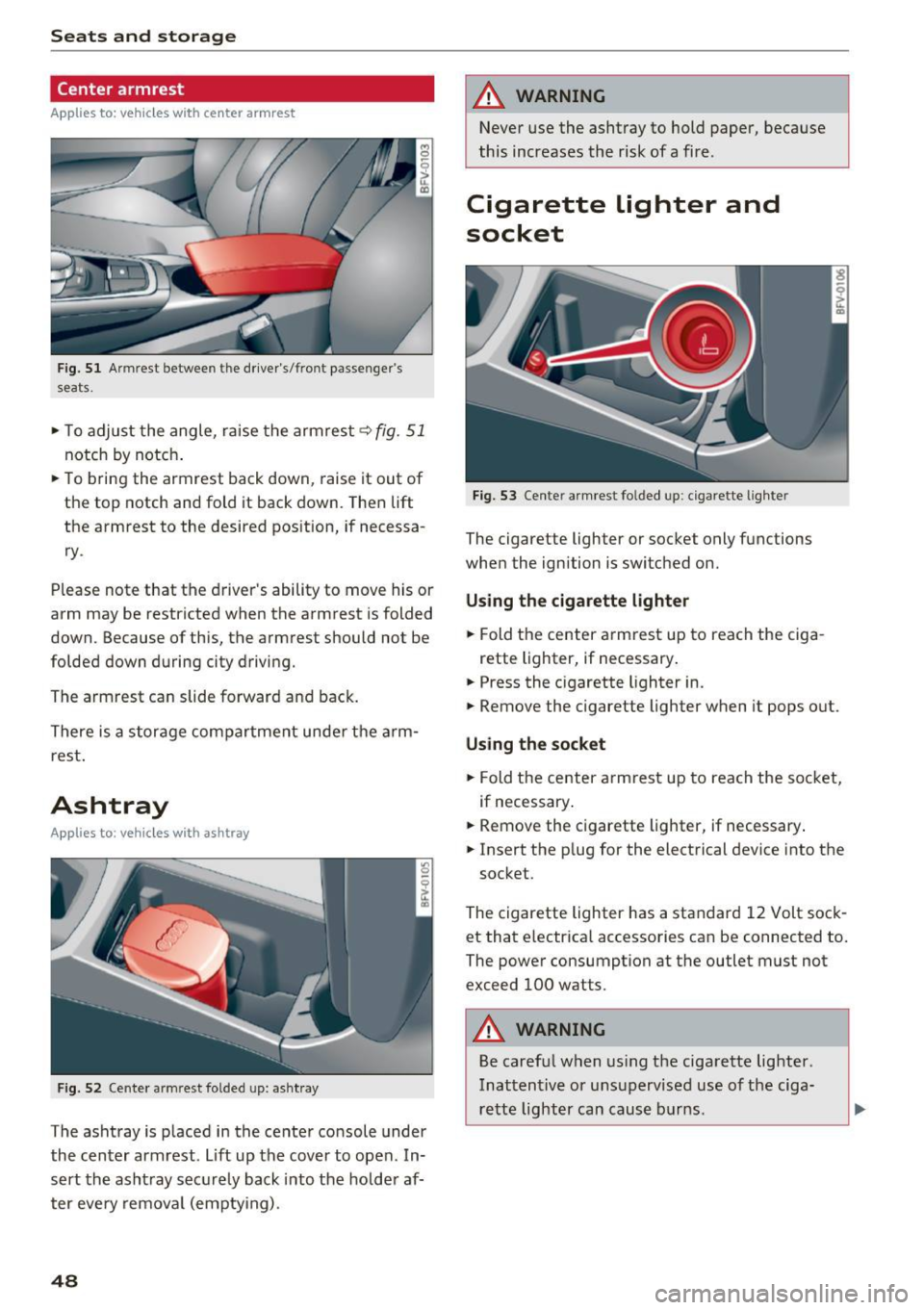
Fig. 51 Armrest between the driver's/front passenger's
seats.
,.. To adjust the angle, raise the armrest q fig. 51
notch by notch .
,.. To bring the armrest back down, raise it out of
the top notch and fold it back down. Then lift
the armrest to the desired pos ition, if necessa
ry .
Please note that the d river 's ability to move his or
arm may be restricted when the armrest is folded
down. Because of this, the armrest should not be
folded down during city driving.
The armrest can slide forward and back.
There is a storage compartment under the arm
rest .
Ashtray
Applies to : vehicles with ashtray
Fig . 52 Cente r armrest folded up: asht ray
The ashtray is p laced in the center console under
the center armrest. Lift up the cover to open . In
sert the asht ray securely back into the hold er af
ter eve ry removal (emptying) .
48
A WARNING
Never use the ashtray to hold paper, because
this increases the risk of a fire .
Cigarette lighter and
socket
Fig. 53 Center armrest folded up: cigarette lighter
The cigarette lighter or socket only functions
when the ignition is switched on.
Using the cigarette lighter
,.. Fold the center armrest up to reach the ciga-
rette lighter, if necessary .
,.. Press the cigarette lighter in.
,.. Remove the cigarette lighter when it pops out.
Using the socket
,.. Fold the center armrest up to reach the socket,
if necessary .
,.. Remove the c igarette lighter, if necessary .
,.. Insert the p lug for the electrical device into the
socket.
The cigarette lighter has a standard 12 Volt sock et that electrica l accessories can be connected to.
The power consumption at the outlet must not
exceed 100 watts.
A WARNING
Be careful when using the cigarette lighter.
Inattentive or unsupervised use of the ciga
rette lighter can cause burns .
-
Page 51 of 314
CD
CD
.... N
" N .... 0 r--. V, co
CD Note
-To reduce the risk of damage to the vehicle
electrical system, never attempt to charge
the veh icle battery by connect ing accesso
ries that prov ide power, such as solar panels
or battery chargers, to the 12 Volt sockets
or the cigarette lighter.
- To reduce the risk of damage to the sockets,
on ly use plugs that fit correctly .
Storage
Beverage holders
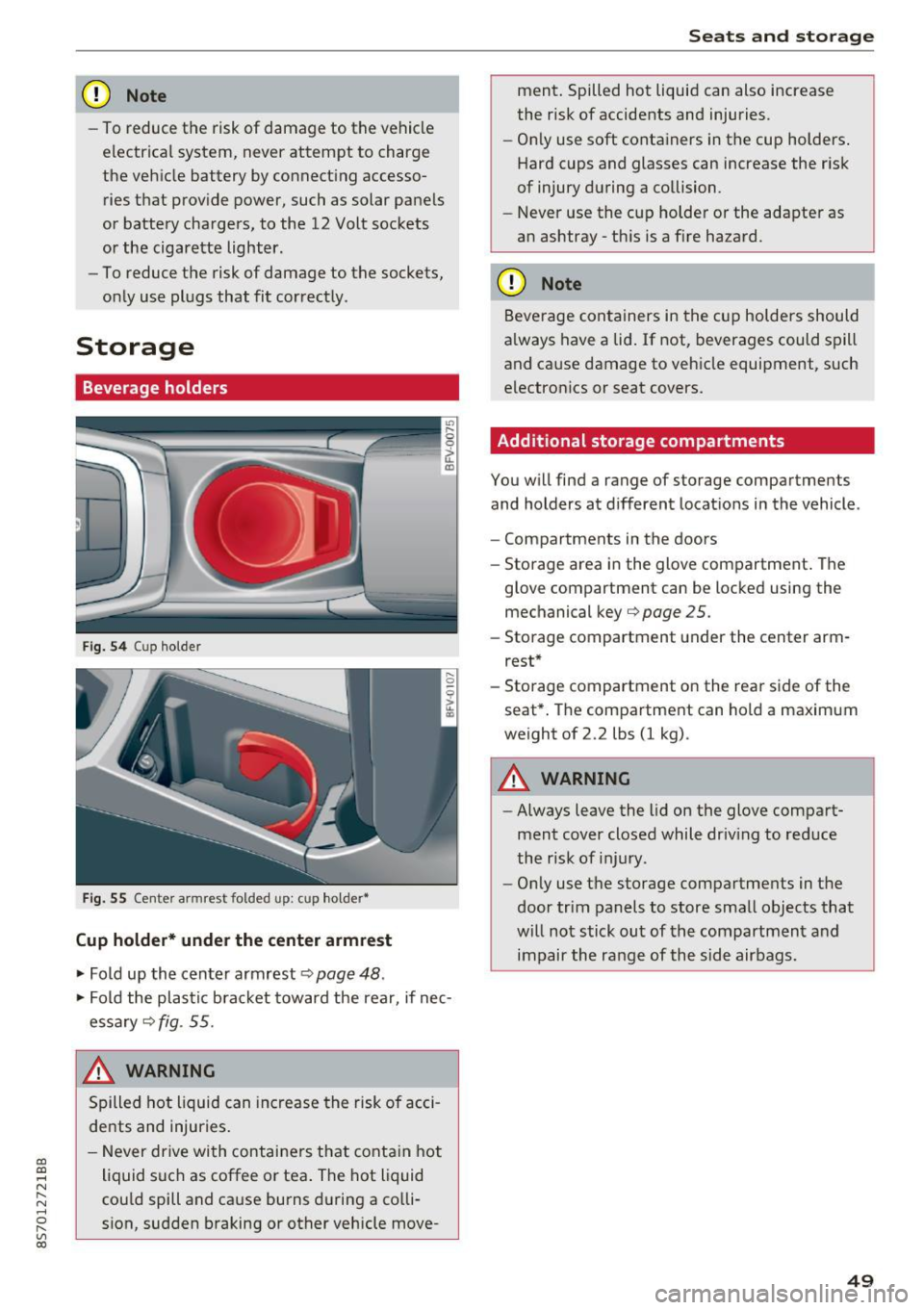
Fig. 5 4 Cup holder
Fig. 55 Cente r armrest folded up: cup holder•
Cup holder* under the center armrest
~ Fold up the center armrest q page 48 .
~ Fold the plas tic bracket toward the rear, if nec
essary
q fig . 55.
,&_ WARNING
Spilled hot liquid can increase the risk of acci
de nts and injuries .
- Never drive wi th containers that contain hot
liquid such as coffee or tea . The hot liquid
cou ld spill and cause burns during a colli·
sion, sudden braking or other vehicle move -
Seats and storage
ment. Spilled hot liquid can also increase
the risk of accidents and injuries.
- On ly use soft containers in the cup holders .
Hard cups and glasses can increase the risk
of injury during a collision.
- Never use the cup holder or the adapter as
an ashtray -th is is a f ire hazard.
CD Note
Beverage containers in the cup holders should
a lways have a lid. If not, beverages could spill
and cause damage to vehicle equipment, such
electronics or seat covers.
Additional storage compartments
You w ill find a range of storage compartments
and holders at different locat ions in the vehicle .
- Compartments in the doors
- Storage area in the glove compartment . The
glove compartment can be locked using the mechanical key
qpage 25 .
-Storage compartment under the center arm
rest*
- Storage compartment on the rea r side of the
seat*. The compartment can hold a maximum
weight of 2.2 lbs (1 kg) .
A WARNING
-
-Always leave the lid on the glove compart
ment cover closed while driv ing to reduce
the risk of injury.
- Only use the storage compartments in the
door trim panels to store small objects that
will not stick out of the compartment and
impair the range of the side airbags.
-
49
Page 52 of 314
Sea ts and stor age
Storage compartment between the seat
backrests
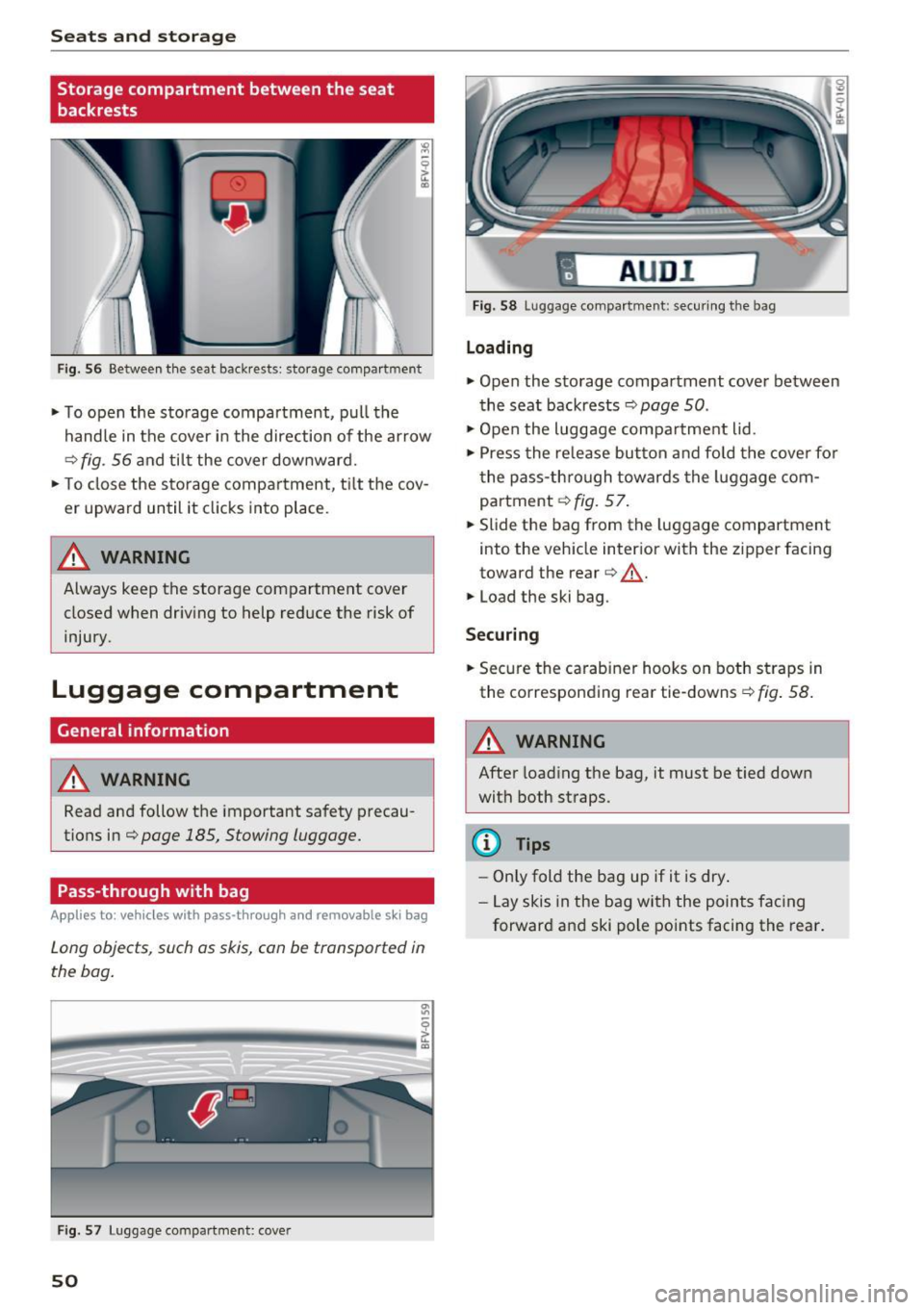
Fig . 56 Between th e seat backrests: storage compartment
• To open the storage compartment, pull the
handle in the cover in the direction of the ar row
r::::> fig . 56 a nd til t the cover downward.
• To close the s torage compa rtment, t ilt the cov
er upward until it clicks into place .
_& WARNING
Always keep the storage compartment cover
closed when dr iv ing to help reduce the risk of
injury.
Luggage compartment
General information
A WARNING
Read and follow the important safety precau
tions in¢
page 185, Stowing luggage.
Pass-through with bag
Applies to: vehicles with pass-through and removable s ki bag
Long objects , such as skis, can be transported in
the bag .
Fig . 57 Luggage compartme nt: cover
50
fl AUD I 1
Fig. 58 Luggage compa rtment: secu ring the bag
Loading
• Open the storage compartment cover between
the seat backrests ¢
page 50.
• Open the luggage compa rtment lid .
• Press the release button and fo ld the cove r fo r
t he pass-th rough towards the luggage com
partment ¢
fig. 57.
• Slide the bag from the luggage compartment
into the vehicle inter ior with the zipper facing
toward the rear
r::::> .&_.
• Load the ski bag.
Securing
• Secure the carabine r hooks on both straps in
the corresponding rea r tie-downs
r::::> fig . 58.
A WARNING
After loading the bag, it must be tied down
with both straps.
(I} Tips
-Only fold the bag up if it is dry.
- Lay skis in the bag with the points facing
forward and ski pole points facing the rear.
-
Page 53 of 314
CD
CD
.... N
" N ...... 0 r--. V, co
Lowering the cargo floor
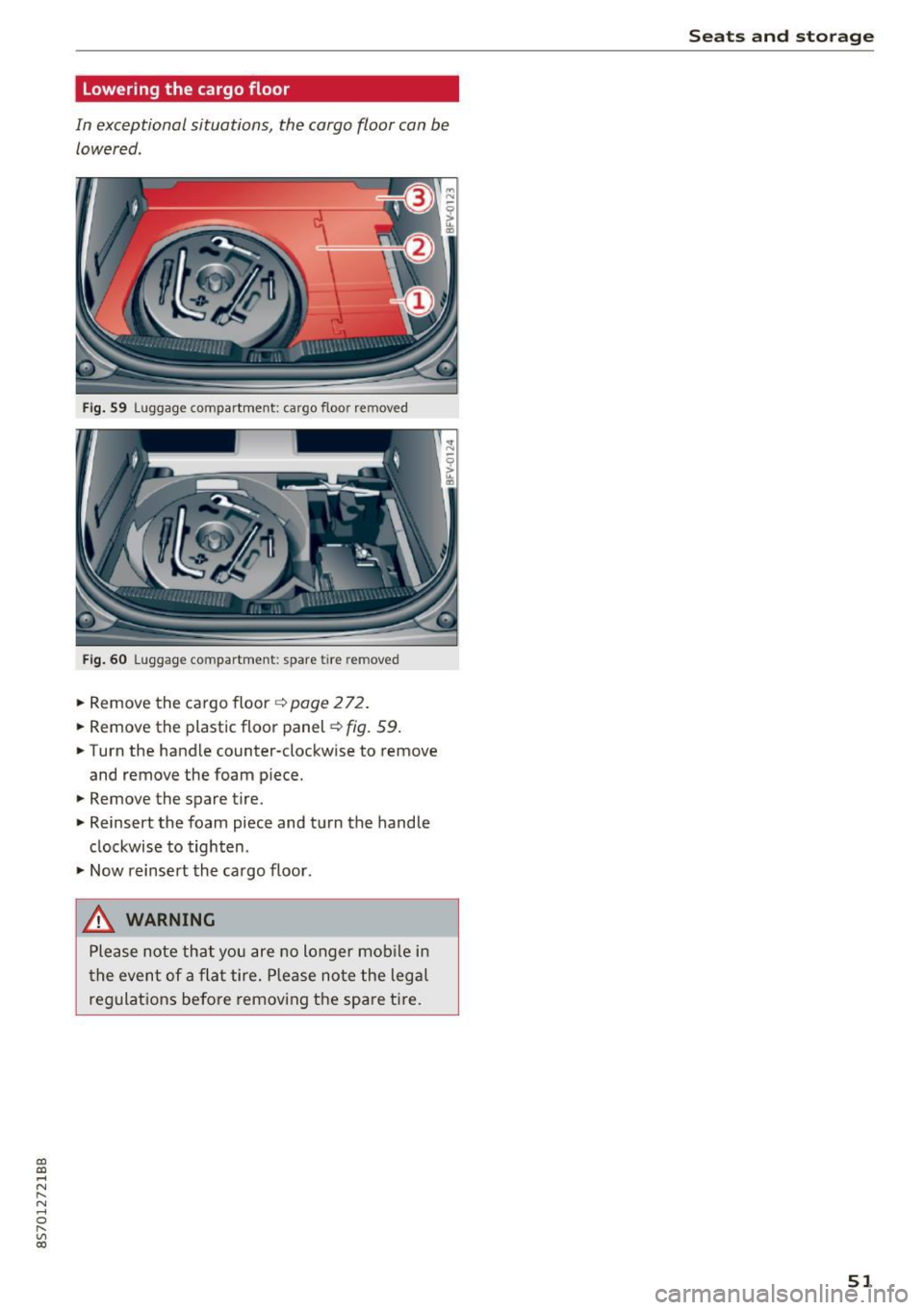
In exceptional situations, the cargo floor can be lowered .
Fig. S9 Luggage compartment: ca rgo floor removed
Fig. 60 Luggage compartment: spare tire rem oved
.. Remove the cargo floor q page 2 72 .
.. Remove the plastic floor panel~
fig. 59 .
.. Turn the handle counter-clockwise to remove
and remove the foam p iece .
.. Remove the spare tire .
.. Reinsert the foam piece and turn the handle
clockwise to tighten .
.,. Now reinsert the cargo floor .
_& WARNING
Please note that you are no longer mob ile i n
t he event of a fla t tire. P lease no te the legal
regulat ions befo re removing the spa re tire.
Seats and storag e
51
Page 54 of 314
Warm and cold
Warm and cold
Climate control system
Description
The climate control system warms, cools and re moves humidity from the air in the vehicle interi
or. It functions most effectively when the w in
dows are closed .
If there is a build-up of heat in
side the vehicle , ventilation can help to speed up
the cooling process.
Pollutant filter
The po llutant filter removes pollutants such as
dust and pollen from the a ir.
Key recognit ion
Certain settings are automatically stored and as
signed to the remote control key be ing used .
.&_ WARNING
Poor visibility can lead to accidents.
- For safer driving, keep all windows free of
ice, snow and fog.
- Become familiar as quickly as possible with
the correct use and function of the cl imate
contro l system, especially w ith the defrost
ing and defogging function.
- Whe n the temperature is below freez ing,
on ly use the windsh ield washer system after
the windsh ie ld has been warmed by the cli
mate contro l system . T he washer fluid cou ld
freeze o n the windshield and impair visibili
ty .
(D Note
-If yo u suspect that the climate control sys
tem is damaged, switch the sys tem off to
52
prevent further damage and have it checked
by an authorized Audi dea ler or authorized
Audi Service Facility .
- Repairs to the Audi climate control system
require special technical knowledge and
special tools. See an authori zed Aud i dea ler
or authori zed Aud i Service Facility.
@) For the sa ke of the environment
Reducing the amo unt of fuel used also re
duces the amount of pollutants that enter the
a ir .
(D Tips
- To prevent interference with the heating
and cooling output and to prevent the win
dows from fogging over, the a ir intake in
front of the windshie ld m ust be free of ice ,
snow or leaves .
- Condensation from the cooling system can
dr ip and form a pudd le of water under t he
vehicle . This is norma l and does not mean
there is a lea k.
- The energy management system may sw itch
the seat heating* or rear window defroster
off tempora rily . These systems a re available
aga in as soo n as the energy supp ly has been
restore d.
- Th e flows throug h the vents under the rea r
window. Make su re t he openings are no t
c overed when plac ing clothing on the lug
gage compa rtment cove r.
Page 56 of 314
Warm and cold
1- 1 Switching recirculation mode on and off
The recirculation mode can be turned on manual
ly or automat ically*.
- Switching manual recirculation mode on and
off: press
1- 1
- Automat ic* recirculation mode: auto rec ircula
tion needs to be activated in the Infotainmen t
system. Select in the Infotainment system:
IMENUI button> Vehicle> left control button
>Vehicle settings> Air conditioning > Auto re
circulation .
The air quality sensor that is de
signed for diese l and gasoline exhaust auto
matically sw itches the recirculation mode on or
off depend ing on the level of pollutants in the
outside air.
In recirculation mode, the air inside the vehicle is
circu lated and filtered. This prevents the unfil
tered a ir outside the vehicle from entering the
veh icle inter ior . We recommend switching recir
culation mode on when dr iv ing through a tunnel
or when s itting in traffic
q Le,..
Recirculation mode is switched off by pressing
the ~ button or
I AU TO I or ,..., MAX L
I@ MAX I Switching defrost on and off
The windshield and s ide windows are defrosted
or cleared of condensation as quickly as possible.
The optimum amount of air flows mainly out of the vents under the windshield. Recirculation
mode switches off . The temperature is controlled
automatically .
The
IAUTOI button switches the defroster off.
IQiil REAR ! Switching the rear window defogger
on and off
If the rear w indow defogger is activated when
the ignition is switched on, the battery manage
ment determines based on the battery charge if
it is possible to turn on. Ot he rwise, the rear win
dow defogger functions with the engine running
and switches off automatically after approxi
mately 10 - 20 minutes, depending on the out
side temperature.
To prevent the rear w indow defogger from
sw itching off automatically, press and hold the
I@ REARI button for more than two seconds. This
54
remains stored up to approximately 15 minutes
after turning off the ignition.
A WARNING
You should not use the recirculation mode for
an extended period since no fresh air is drawn
in. With the air-conditioning switched off, t he
windows can fog up, which increases the risk
of an acc ident.
Adjusting the air vents
Fig. 62 Cockpit: adju sting the a ir vents
To adjust the direction of air flow, turn the
ridged outer adjustment wheel
©Q fig. 62.
To ad just the amount of air flow , move the lever
@ on the air vent . To stop the air flow, move the
l ever all the way to the left.
Seat heating
Fig. 63 Air vents: seat heat ing
The seat heating has three levels. The selected
heat level is indicated by the LED .
.. To switch the seat heating on, press the
Q] but
ton once.
.. To switch to a lower level, press the
Q] button
again .
Ill>