infotainment AUDI TT ROADSTER 2017 Owner's Manual
[x] Cancel search | Manufacturer: AUDI, Model Year: 2017, Model line: TT ROADSTER, Model: AUDI TT ROADSTER 2017Pages: 314, PDF Size: 76.54 MB
Page 78 of 314
Assist
-The camera field of view~ page 75, fig. 79 is
dirty or covered in ice. Clean this area on the
windshield.
- The camera field of view is fogged over. Wait
until the fog has cleared before switching the
active lane assist on again.
- The system has been unable to detect the lanes
for an extended period of time due to road con
ditions. Switch active lane assist back on when
the lines are more visible.
Audi active lane assist : currently unavailable.
See owner's manual
There is a temporary active lane assist malfunc
tion. Try switching the active lane assist on aga in
later .
Audi active lane assist : malfunction! See own
er's manual
Drive to an authorized Aud i dea ler or authorized
Audi Service Facility immediately to have the
malfunct io n corrected.
Audi active lane assist: Please take over steer
ing!
This message appears if you are not steering by
yourse lf. If th is is the case, active lane assist does
not switch off, but it is "not ready " to provide a
warn ing . The system can he lp you keep the veh i
cle in the lane. However, you are responsible for
driving the vehicle and must steer it yourself .
Adjusting the steering time and vibration
warning
Applies to: vehicles with Audi active lane assist
You can adjust individual active lane assis t set
tings in the Infotainment system.
Select in the Infotainment system: I MENU ! but
ton>
Vehicle > left control button >Driver assis
tance
> Audi active lane assist
1l The correct ive steer ing fu nctio n is not available in all mar
kets.
76
Steering time1>
Early: in this setting, the corrective steering hap
pens continuously to help keep the veh icle in the
center of the lane.
Late : in this setting, the system provides correc
tive steering just before a vehicle wheel touches a
detected lane marker line .
Vibration warning
You can switch the add itional vibrat ion warn ing
i n the steering wheel on or off.
(D Tips
In certain markets: your settings are stored
a ut omat ically and assigned to the remote
control key in use.
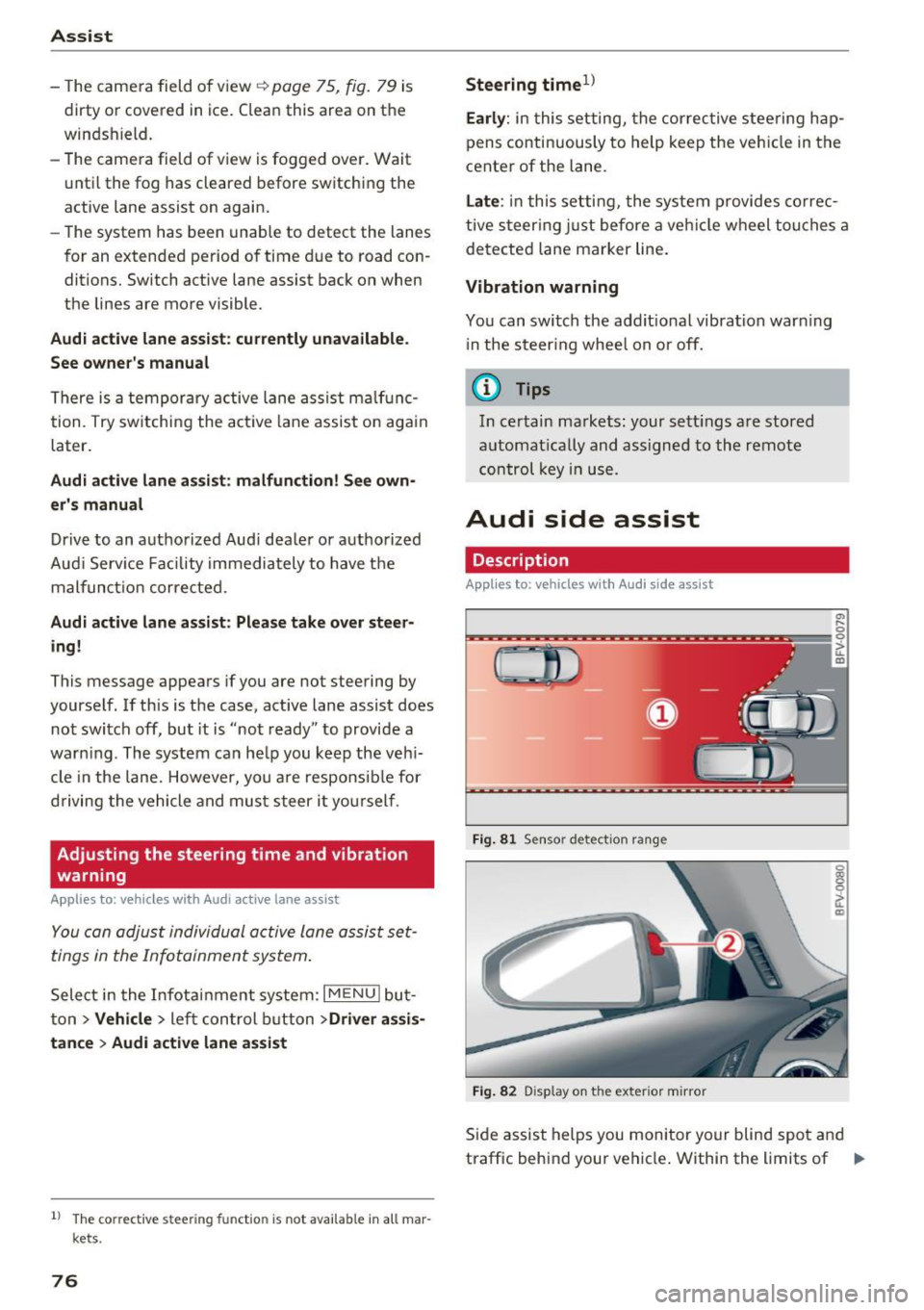
Audi side assist
Description
Applies to: vehicles with Audi side assist
Fig. 81 Sensor detec tion rang e
Fig. 82 Display on the exterior mirror
Side assist helps you monitor your blind spot and
traffic behind your vehicle . Within the limits of .,.
Page 81 of 314
co
co
.... N
" N .... 0
" "' c:o
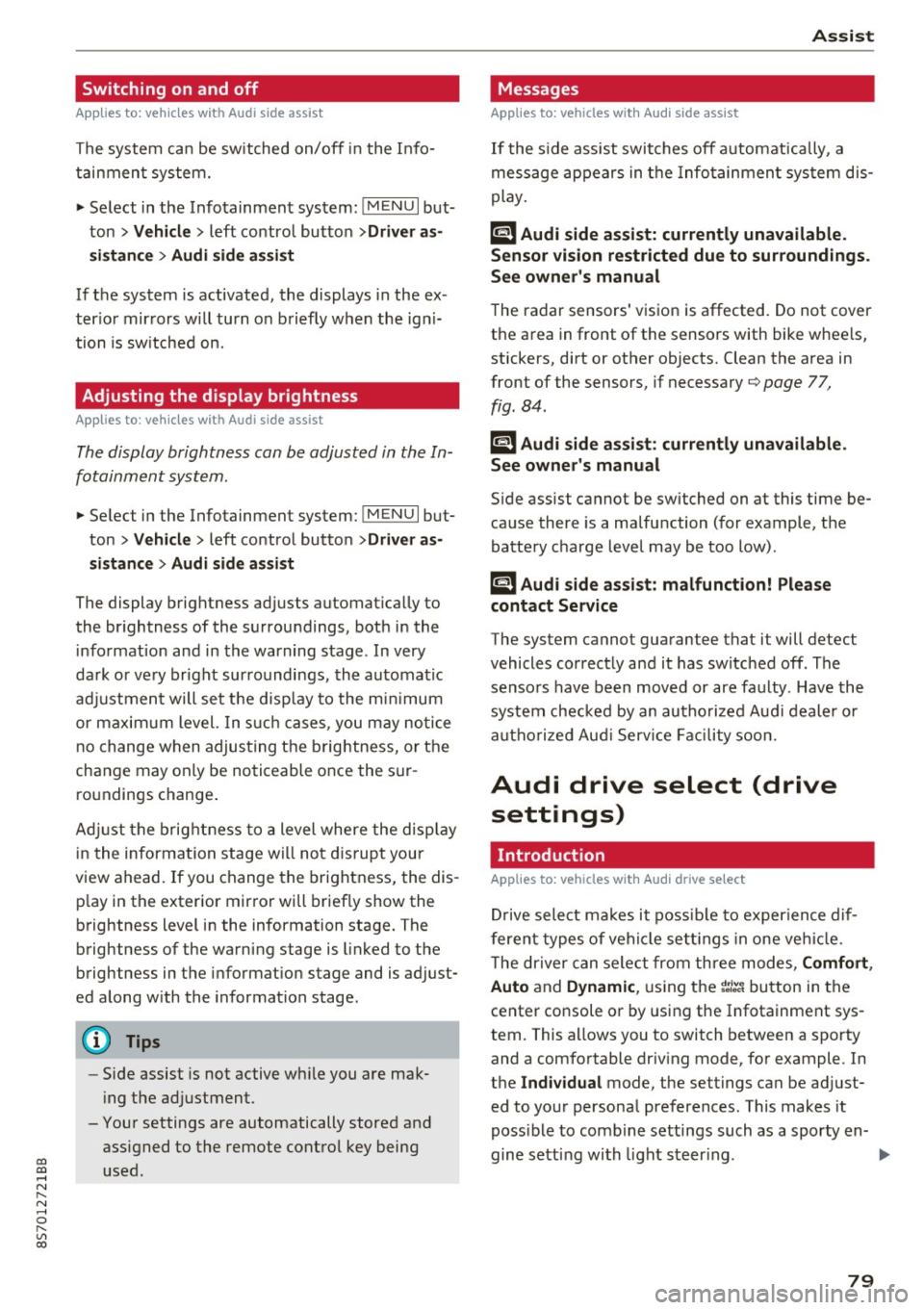
Switching on and off
Applies to: vehicles with Audi side assist
The system ca n be switched on/off in the Info
t a in men t system.
"' Select in the Info tainment sys tem:
iM ENUI but
ton
> Vehicle > left contro l butto n >Driver as
sistan ce > Audi side assist
If the system is activated, the displays in the ex
ter io r mir rors wi ll turn o n briefly when the ig ni
tion is sw itched on.
Adjusting the display brightness
Applies to: vehicles with Audi side assist
The display brightness can be adjusted in the In
fotainm ent system.
"' Se lect in the Infotainment system: i MENU I but
ton
> Vehicle > left contro l butto n >Driver as
sistance > Audi side assist
The display b rightness ad justs automat ica lly to
the br ightness of the s urrou ndings, both in the
in fo rmat ion and in the warning stage . In very
da rk or ve ry br igh t sur ro u ndings, the a utomat ic
ad ju st men t will se t th e d isp lay to the mini mum
or maxim um level. In s uch cases , you m ay no tice
no change w hen adjus ting t he br ightness, o r th e
change may on ly be no tic eable o nce the su r
ro undings change .
A dju st the br ightn ess to a level where the d isp lay
i n the inform ation stage wi ll no t di srupt your
v iew ahead. If you change the brightness, the dis
p lay in the exter ior mir ror will briefly show the
b rightness level i n the information stage . The
b rightness of the warning stage is linked to the
b rightness in t he info rmat ion stage and is ad just
ed along w ith the information stage .
- Side assist is not active wh ile you are ma k
i ng the ad justment.
- Your settings are automatically stored and ass igned to the remote cont rol key being
used.
Assist
Messages
Applies to: vehicles with Audi side assist
I f the s ide ass is t swi tches off automat ically, a
mess age app ear s in t he In fota in men t sys tem dis
play.
@j Audi side assist: currently unavailable.
Sensor vision restricted due to surroundings.
See owner 's manual
The radar sensors ' v is ion is affected. Do not cover
the a rea in front of the sensors with bike whee ls,
stickers, dirt or other objects. Clean the area in
front of the sensors, if necessary
q page 77,
fig. 84.
@j Audi side a ssist: currently unavailable.
See owner's manual
S ide assist cannot be switched on at this time be
ca use there is a ma lfu nction ( for example, the
battery c harge leve l may be too low) .
@j Audi side assist: malfunction! Please
contact Service
The system cannot guarantee that it will detect
vehicles cor rect ly and it has switc hed off. The
senso rs have been move d or are fa ulty. Have the
syste m chec ked by an au tho riz ed Au di deale r or
a uthor iz e d Au di S ervice Faci lity s oon.
Audi drive select (drive
settings)
Introduction
Applies to: vehicles with Audi drive select
Dr ive select ma kes it possib le to e xper ience dif
fere nt types of ve hicl e sett ings in one ve hicle.
T he driver can sele ct from th ree mo des,
Comfort ,
Auto
and Dynamic , using the r.~;\,1 bu tton in the
center console o r by using the Infotainment sys
tem. This allows you to switch between a sporty
and a comfo rtable driv ing mode, fo r example. In
t h e
Individual mode, the sett ings can be ad just
ed to yo ur persona l pre ferences . This makes it
poss ible to com bine settings such as a sporty en-
gine sett ing wi th light s teer ing. .,._
79
Page 82 of 314
Ass is t
_& WARNING
Using Audi drive select incorrectly can lead to
collisions, other accidents and serious inju
ries.
Description
App lies to: ve hicles w ith Aud i d rive select
The vehicle setup in each mode depends on the
veh icle's features . However, the engine and
steer ing are always affe cted.
E ngine and automatic tr an smi ssi on
Depending on the mode, the engine and auto
matic transmiss ion respond more qu ickly or in a
more balanced manner to accelerator pedal
movements .
Adaptive damper s (Audi m agnetic ride )*
The adaptive dampers use sensors to record in
formation regarding steering movements, brak
ing and accelerat ion operat ions by the driver,
road surface, driving speed, and load. With dr ive
select, you can adjust the adaptive dampers to
sporty (dynamic), comfortable (comfort) or ba l
a nced (auto).
Stee ring
The power steer ing adapts . Indirect steering that
moves eas ily as in comfort mode is especially
suited to long drives on a highway. The dynam ic
mode provides sporty, direct steering.
Torque distribution
The sport d ifferent ial d istr ibutes the dr ive power
to the rear axle based on the situation . The distri
bution of power varies depend ing on the selected
mode from mode rate
( Comfort ) to sporty ( D y
nami c). The goal is a high leve l of agility and ab il
ity to acce lerate o n curves . The vehicle is very re
sponsive to steering.
Engine sound *
The engine sound adapts to the current mode
and can be subtle to sporty.
80
@ Tips
In some models, the maximum vehicle speed
can only be reached in the auto and dynamic
modes.
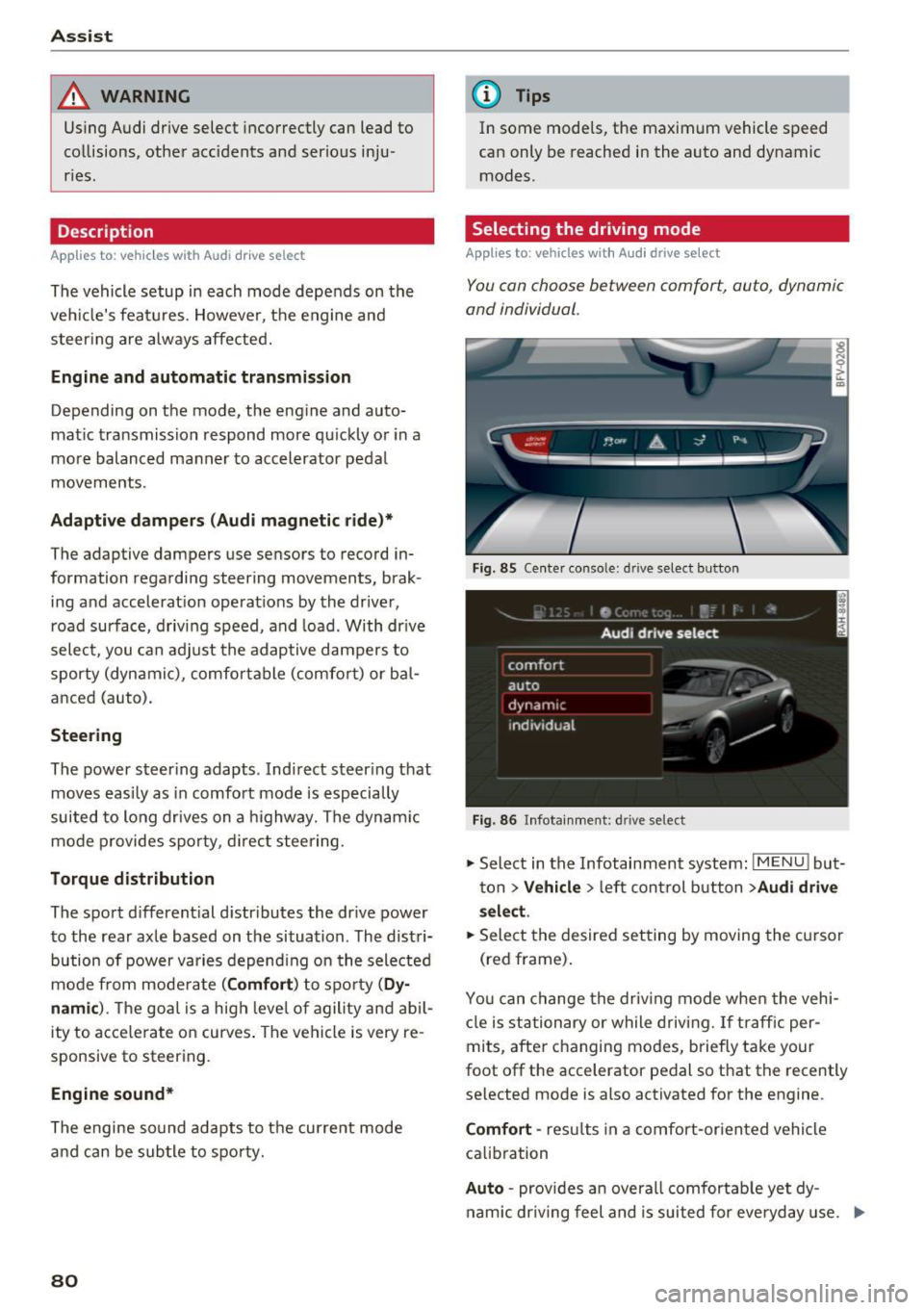
Selecting the driving mode
App lies to : vehicles with A udi drive se lect
You can choose between comfort, auto , dynamic
and individual.
Fig. 85 Center conso le: drive select button
Fig. 86 Infotainment: driv e select
., Select in the Infotainment system : IMENU! but
ton
> V ehicle > left control button > Audi drive
sel ec t.
.. Select the desired setting by moving the cursor
(red frame) .
You can change the dr iv ing mode whe n the vehi
cle is st ationary or while driving. If traff ic per
mits, after changing modes, b riefly take your
foot off the accelerator pedal so that the recently
selected mode is also activated for the engine .
Comfort -res ults in a comfort-or ien ted vehicle
calib ration
Auto -provides an overa ll comfortab le yet dy
nam ic dr iv ing feel and is suited for everyday use. ..,.
Page 83 of 314
co
co
.... N
" N .... 0
" "' c:o
Dynamic -gives the driver a sporty driving feel
and is suited to a sporty driving style .
Individual -¢ page 81.
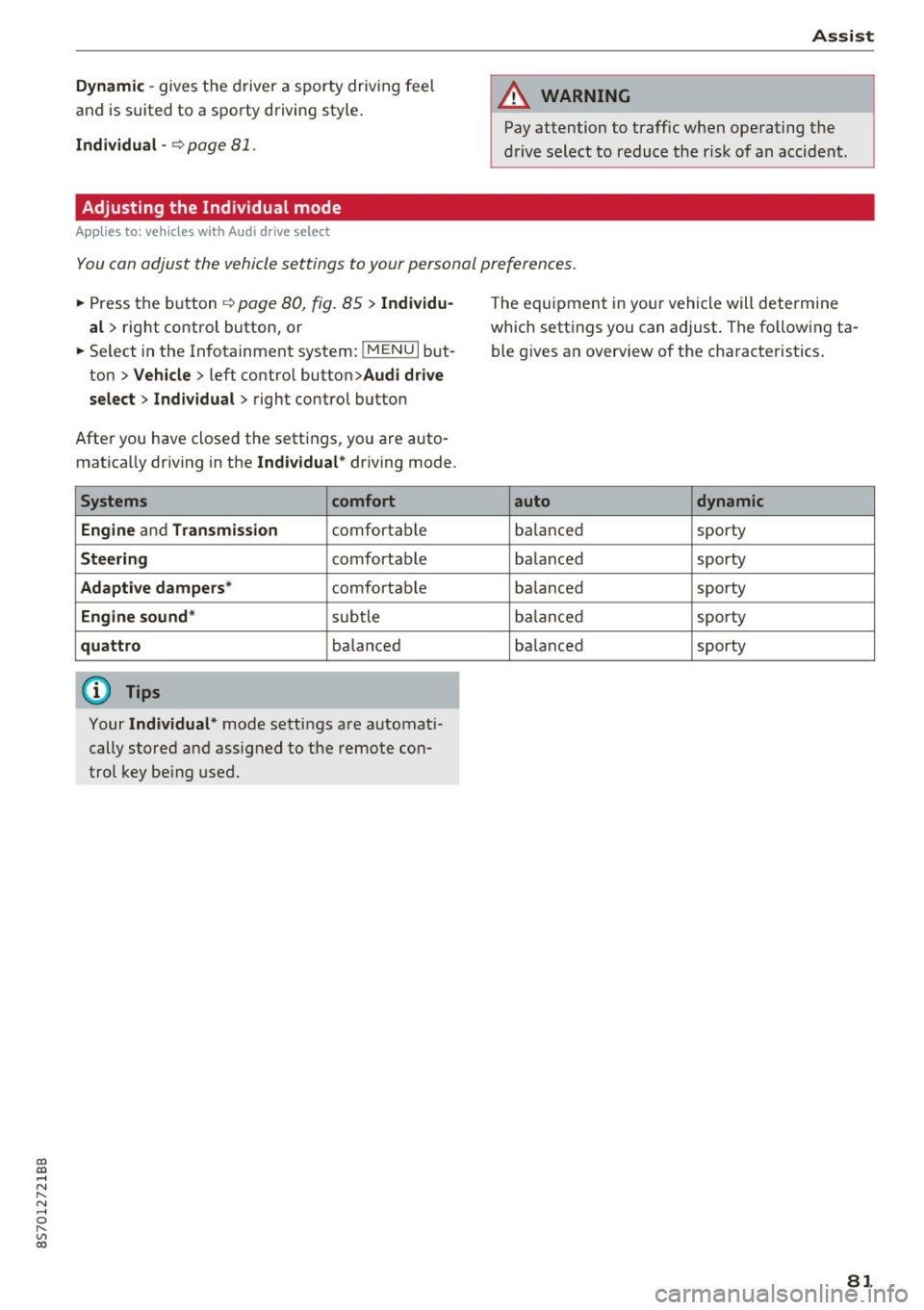
Adjusting the Individual mode
Applies to: vehicles with Audi drive select
Assist
A WARNING
Pay attention to traffic when operating the
drive select to reduce the r isk of an accident.
-
You con adjust the vehicle settings to your personal preferences .
.,. Press the b utton ¢ page 80, fig. 85 > Indi vidu
al
> right contro l button, or
.,. Se lect in the Infotainment system:
! MENUI but
ton
>V ehicle > left contro l button> Audi drive
select > Indi vidual >
right contro l button
After you have closed the settings, you are auto
matica lly dr iving in the
Indi vidual * driving mode.
Systems comfort
Engine
and T ransm ission comfortable
St ee ring comfortable
Adapti ve dampers * comfortable
Engine sound * subtle
quattro balanced
{!) Tips
Your Individual* mode settings are automat i
cally stored and assigned to the remote con
trol key be ing used. T
he equipment in your vehicle will determine
which settings you can adjust . The fo llowing ta
ble g ives an overview of the characteristics .
auto dynamic
balanced sporty
ba lanced sporty
ba lanced sporty
ba lanced sporty
ba lanced
sporty
81
Page 84 of 314
Parking systems
Parking systems
General information
A ppl ies to: ve hicles w ith rear pa rk in g sys te m /p ark in g system
p lus
Depending on your vehicle's equipment , various
parking aids will help you when parking and ma
neuvering.
The
rear park ing system is an audible parking aid
that warns you of obstacles
behind the vehicle
c:> poge 83.
The parking system plus assists you when park
ing by audibly and visually indicating objects de
tected
in front of and behind the veh icle
c:> poge83.
The rearview camera shows the area behind the
vehicle in the Infotainment system display . The
lines in the rearview camera image help you to
park or maneuver
c:> page 84. The parking sys
tem plus functions are also available
c:> page83.
& WARNING
-Always look for traffic and check the area
around your vehicle by looking at it directly
as well. The parking system cannot replace
the driver's attention. The driver is always
responsible when entering or leaving a park
ing space and during similar maneuvers .
- Please note that some surfaces , such as
clothing, are not detected by the system .
- Sensors and cameras have blind spots in
which people and objects cannot be detect
ed . Be especially cautious of small children
and animals .
- The sensors can be displaced by impacts or
damage to the radiator gr ille, bumper,
wheel housing and the underbody . The park
ing system may be impaired as a result.
Have an authorized Audi dealer or author
ized Audi Service Facility check their func
tion .
- Make sure the sensors are not obstructed by
stickers, deposits or other materials. If they
are, the sensor function could be impaired.
For additional information on cleaning, see
c:> page266.
82
(D Note
-Some objects are not detected or displayed
by the system under certain circumstances:
- Objects such as barrier chains, trailer draw
bars, vertical poles or fences
- Objects above the sensors such as wall ex
tensions
- Objects with certain surfaces or structures
such as chain link fences or powder snow
- If you continue driving closer to a low ob
ject, it may disappear from the sensor range. Note that you will no longer be
warned about th is obstacle.
- Keep enough distance from the curb to re
duce the risk of damage to the rims .
@ Tips
-The system may provide a warning even
though there are no obstacles in the cover
age area in some situations, such as :
- certain road surfaces or when there is tall
grass.
- external ultrasonic sources such as from
cleaning vehicles .
- in heavy rain, snow, or thick vehicle ex
haust.
- We recommend that you practice parking in
a traffic -free location or parking lot to be
come familiar with the system . When doing
this, there should be good light and weath
er conditions.
- You can change the volume of the signals.
- What appears in the display is slightly de-
layed.
- The sensors must be kept clean and free of
snow and ice for park aid to operate .
Page 87 of 314
CD
CD
.... N
" N .... 0 r--. V, co
General information
Applies to: vehicles with rearview camera
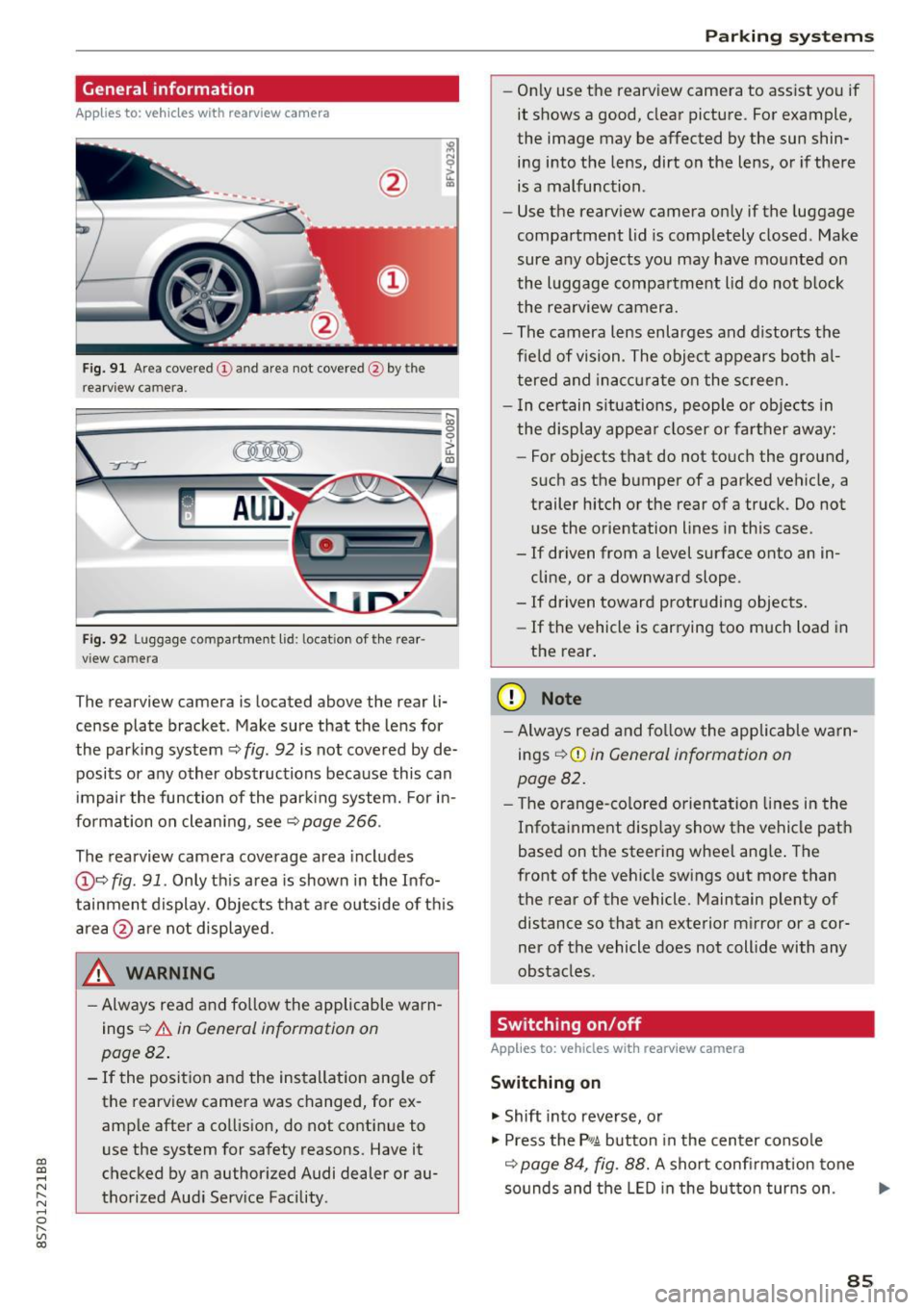
Fig. 9 1 Are a co vered (!) and a rea not cove red @ bythe
r earv iew ca mera.
~
~ ;..------ ::.·~- ,.,.~ _.,- ,,,_-------- g
(Jo00oD ~
Fig. 92 Luggage compartme nt lid: locat io n of t he rear
view c amera
The rearview camera is located above the rear li
cense plate bracket. Make sure that the lens for
the park ing system ~
fig. 92 is not covered by de
posits or any other obstructions because this can
i mpair the function of the par king system. For in
formation on clean ing, see ~
page 266 .
The rearview camera coverage area includes
@ ~ fig . 91 . Only th is area is shown in the Info
tainment display. Objects tha t are outside of th is
area @are no t displayed.
A WARNING
- Always read and fo llow the applicable warn
ings
~ A in General information on
page 82 .
- If the position and the installation ang le of
the rearview camera was changed, for ex
amp le after a collision , do not continue to
use the system for safety reasons. Have it
checked by an authorized Audi dealer or au
thorized Aud i Serv ice Facility .
Parking systems
-On ly use the rearv iew camera to ass ist you if
it shows a good, clear pictu re. For example,
the image may be affected by the sun shin
ing i nto the lens, dirt on the lens, or if there
is a malfunction .
- Use the rearv iew camera on ly if the luggage
compa rtment lid is completely closed . Make
sure any objects you may have mounted on
the l uggage compa rtment lid do not b lock
the rea rview camera.
- The camera lens enlarges and d istorts the
field of vision. The object appears both a l
t ered and ina ccur ate on the s creen.
- I n ce rtain s itu ations, people or objects in
the display appea r closer or fa rther away:
- For objects t hat do not touc h the grou nd,
such as the bumper of a parked vehicle, a
trailer hitch or the rear of a truck . Do not
u se the orie ntation lines in this case .
- If driven from a level s urface onto an in
cline, or a downward slope .
- If driven toward protruding objects.
- If the vehicle is carrying too much load in
the rear.
(D Note
-Alw ays read and fo llow the applicable w arn
ings
¢ (D in General information on
page 82 .
- The orange-co lored orientation lines in the
Infotainment display show the vehicle path
based on the steering wheel ang le . The
front o f the vehicle swings out more than
the rear of the vehicle. Maintain plenty of distance so that a n exterior m irror or a cor
ner of the vehicle does not coll ide with any
obstacles.
Switching on/off
Applies to: vehicles with rearview camera
Switching on
.. Shift into reverse, or
.. Press the
P,qA button in the center console
~ page 84, fig. 88. A short confi rmation tone
so unds and the LED in the bu tton tur ns on . ...
85
Page 88 of 314
Parking systems
Switching off
.. Drive faster than 6 mph (10 km/h), or
.. Press the
P"1A button, or
.. Switch the ignition
off.
(D) Tips
- The visual display in the left part of the dis
play should help you detect the critical vehi
cle areas .
- You can change the volume of the sig nals
and the display
¢page 86.
Perpendicular parking
Appl ies to: ve hicles with rea rview ca mera
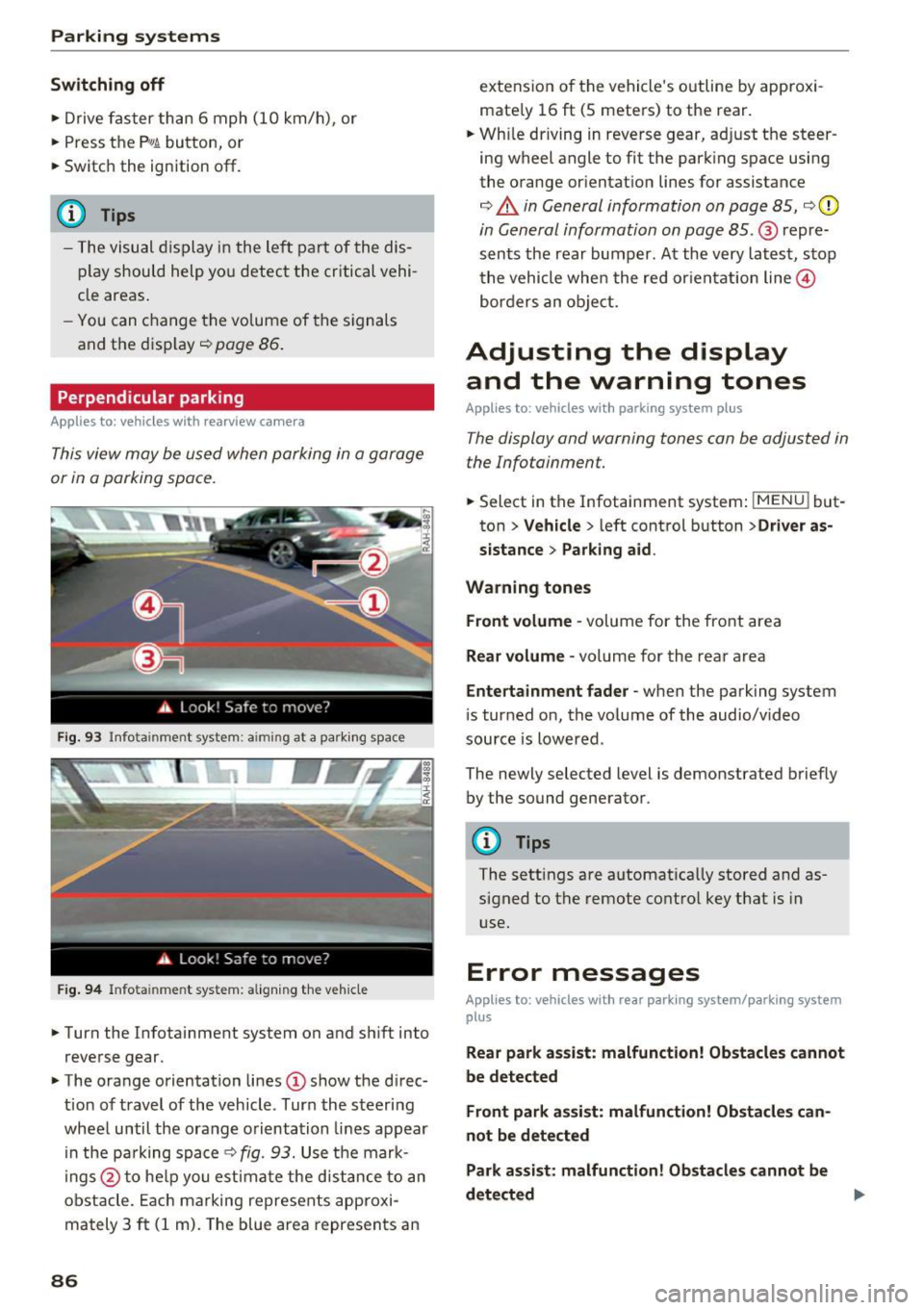
This view may be used when parking in a garage
or in a parking space.
Fig. 93 Info ta inment syste m: aim ing at a pa rking space
Fig. 94 Infota inme nt sys tem: aligning the vehicle
.. Turn the Infotainment system on and shift into
reverse gear.
.. The orange orientation lines
(I) show the direc
tion of travel of the vehicle . Turn the steering
wheel until the orange orientation lines appear
in the pa rking space
c:!;> fig. 93. Use the mark
ings @to help you estimate the d istance to an
obstacle. Each marking represents approxi
mately 3
ft (1 m). The blue area represents an
86
extension of the vehicle 's outline by approxi
mate ly 16
ft (5 meters) to the rear .
.. Wh ile driving in reverse gear, adjust the steer
ing wheel angle to fit the parking space using
the orange orientation lines for assistance
¢ &. in General information on page 85, ¢(D
in General information on page 85. @ repre
sents the rear bumper. At the very latest, stop
the vehicle when the red or ientation line@
borders an object.
Adjusting the display
and the warning tones
Applies to: vehicles with parkin g sys tem plus
The display and warning tones can be adjusted in
the Infotainment.
.. Select in the Infotainment system : IMENUj but
ton
> Vehicle > left control button >Driver as
sistance> Parking aid .
Warning tones Front volume -
volume for the front area
Rear volume -volume for the rear area
Entertainment fader -when the parking system
is turned on, the volume of the audio/video
source is lowered .
The newly selected level is demonstrated briefly by the sound generator.
{!) Tips
The settings are automat ically stored and as
signed to the remote control key that is in
use.
Error messages
App lies to : vehicles wit h rear parking system/parking system
plus
Rear park assist: malfunction! Obstacles cannot
be detected
Front park assist: malfunction! Obstacles can
not be detected
Park assist: malfunction! Obstacles cannot be
detected ..,._
Page 89 of 314
co
co
.... N
" N .... 0
" "' c:o
There is a system malfunct ion if the L ED in the
p,g! button blinks when switching on the system .
If the error is not corrected before yo u switch off
the ignition, the L ED in the
P' #A button will blink
the next time you switc h on the parking system
by shifting into reve rse . As long as the error is ac
tive, you can display the error messages in the
second tab of the dr iver information system .
Parking system plus*
If a sensor or speaker is faulty, the .IM symbol
will appear in front of/behind the vehicle i n the
Infotainment d isplay . If a rear sensor is faulty,
only obstacles that are in areas
(D and
@<=:> page 83, fig . 87 are shown . If a front sensor
i s faulty , on ly obsta cles that are in areas @ and
@ are show n.
Drive to an authorized Aud i dealer o r a uthorized
Aud i Service Fac ility immediately to have the
malfunct ion corre cted.
Parking system s
87
Page 100 of 314
Multi Media Interface
Opening the selection/options menu with
the control buttons
Using the selection menu, you con open addition
al functions within a menu item (such as Radio).
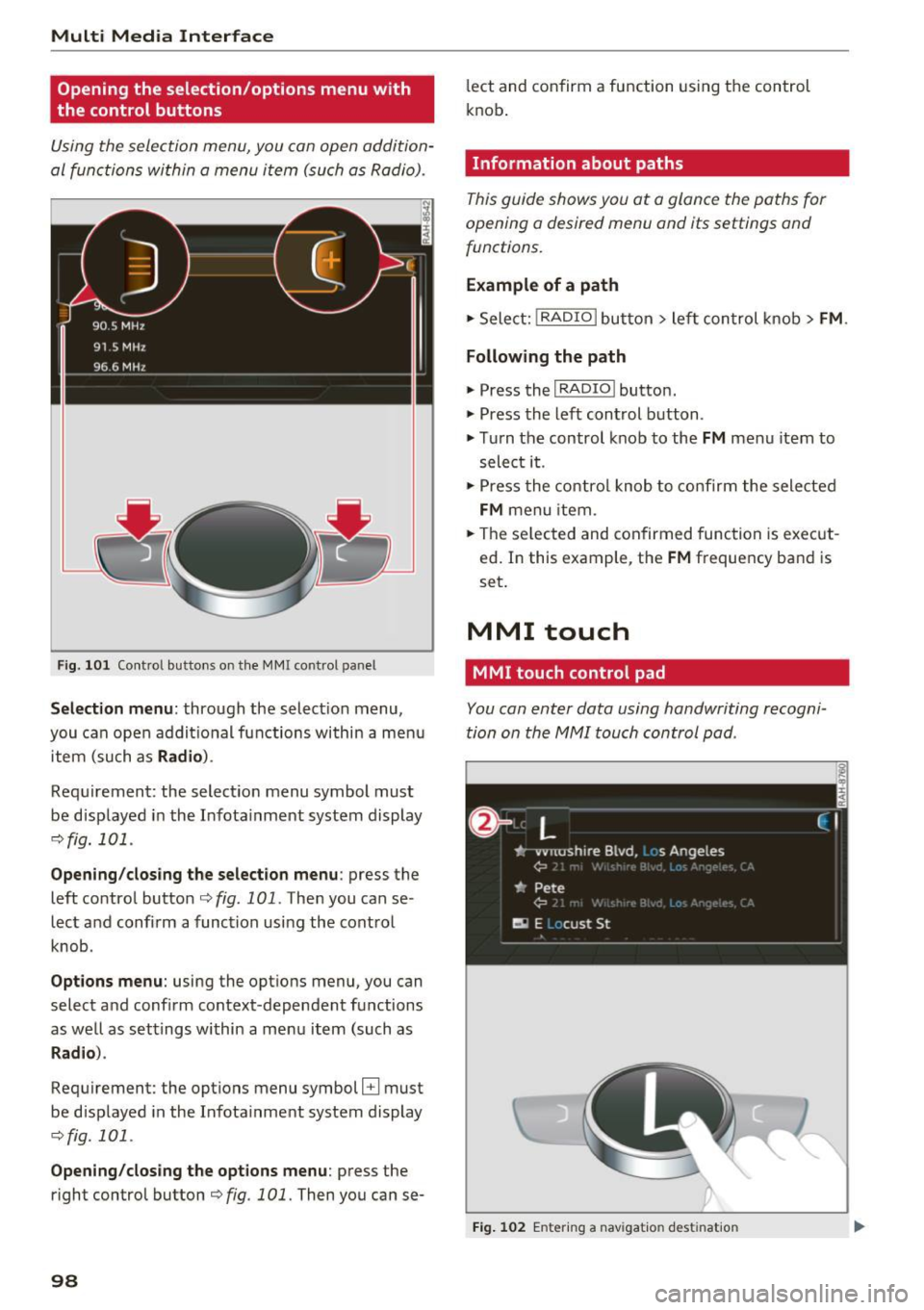
F ig. 101 Control buttons on the MMI control panel
Selection menu : through the select ion menu,
you can open additional functions within a menu
item (such as
Radio ).
Requirement: the select ion menu symbol must
be displayed in the Infotainment system display
¢fig. 101 .
Opening/closing the selection menu: press the
left contro l button ¢
fig. 101. Then you can se
lect and confirm a function using the control
knob.
Options menu: using the options menu, you can
select and confirm context-dependent functions
as well as settings within a menu item (such as
Rad io).
Requirement: the options menu symbol B must
be displayed in the Infotainment system display
¢fig. 101 .
Opening/closing the options menu : press the
right control button¢
fig. 101. Then you can se-
98
lect and confirm a function using the control
knob .
Information about paths
This guide shows you at a glance the paths for
opening a desired menu and its settings and
functions.
Example of a path
1-Select: ! RADIO I button> left con trol knob > FM.
Following the path
" Press the I RADIO I button.
" Press the left control button .
.. Turn the control knob to the
FM menu item to
select it .
" Press the control knob to confirm the selected
FM menu item.
" The selected and confirmed function is execut
ed. In this example, the
FM frequency band is
set.
MMI touch
MMI touch control pad
You con enter data using handwriting recogni
tion on the MMI touch control pad .
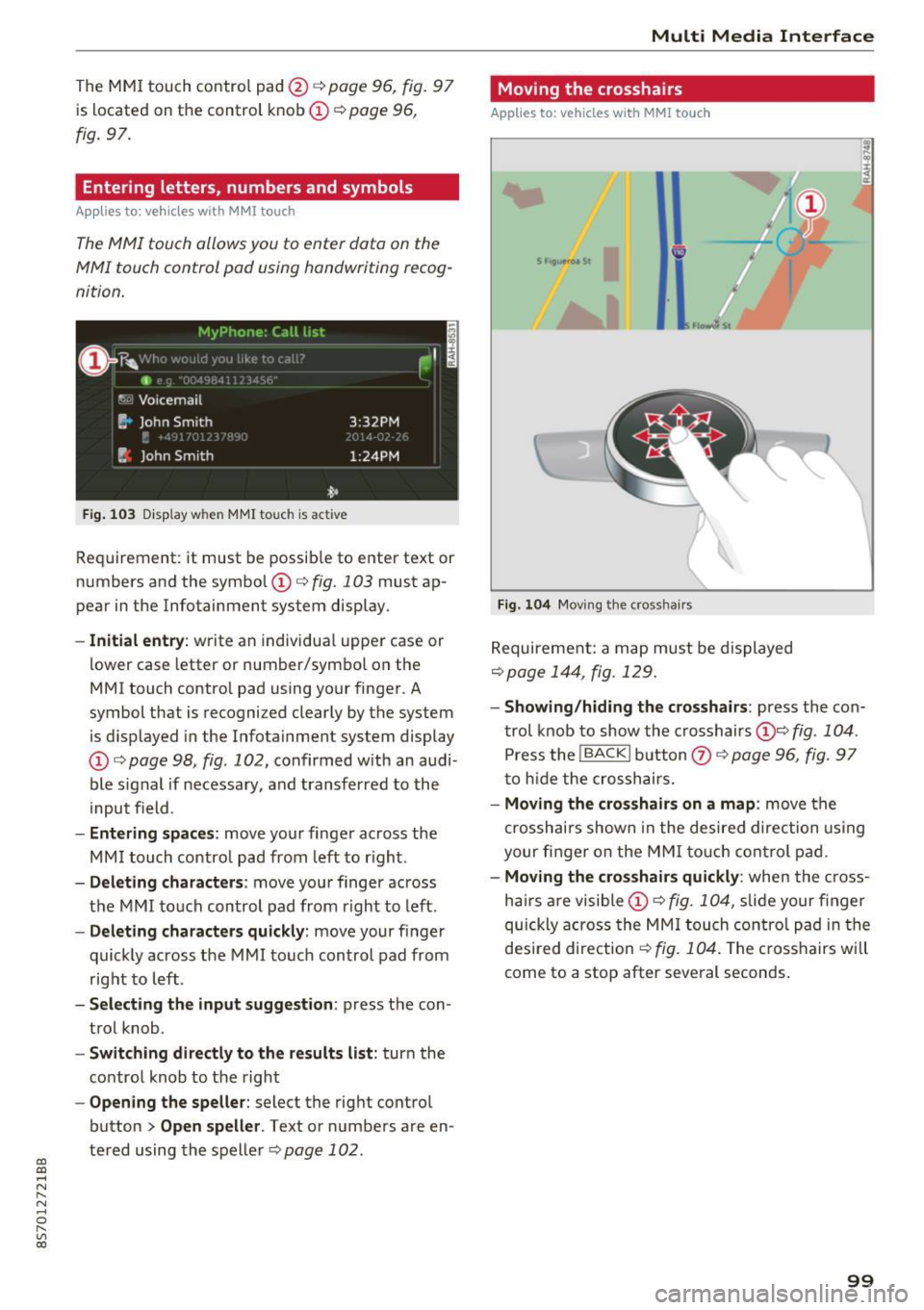
Fig. 102 En tering a nav igatio n dest ination
Page 101 of 314
CD
CD
.... N
" N ...... 0 r--. V, co
The MMI touch control pad@q page 96, fig. 97
is located on the control knob
(I)¢ page 96,
fig. 97.
Entering letters, numbers and symbols
Applies to: veh icles with MMI touch
The MMI touch allows you to enter data on the
MMI touch control pad using handwriting recog
nition.
F ig. 103 Disp lay w hen MMI touch is ac tive
Requirement : it must be possible to enter text or
numbers and the symbol
(I) q fig. 103 must ap
pear in the Infotainment system display.
- Initial entry : write an individual upper case or
lower case letter or number/symbol on the
MMI touch control pad using your finger . A
symbol that is recognized clearly by the system
is d isplayed in the Infotainment system display
(I) ¢ page 98, fig . 102, confirmed with an audi
ble signal if necessary, and transferred to the
input field .
-Entering spaces: move your finge r across the
MM I touch contro l pad from left to right.
- Deleting characters : move your finger across
t h e MMI touch control pad from right to left.
-Deleting characters quickly: move your finger
quickly across the MMI touch control pad from
right to left .
-Selecting the input suggestion: press the con
trol knob .
-Switching directly to the results list: turn the
contro l knob to the right
-Opening the speller : select the right control
button
> Open speller . Text or numbers are en
tered using the speller
q page 102.
Multi Media Interface
Moving the crosshairs
Applies to: vehicles with MMI touch
Fig. 104 Moving the cross hair s
Requirement: a map must be displayed
¢page 144, fig . 129.
- Showing/hiding the crosshairs: press the con
trol knob to show the crosshairs
(!)¢ fig . 104 .
Press the !BACKI button Q) ¢ page 96, fig. 97
to hid e the crosshairs.
- Moving the crosshairs on a map : move the
crosshai rs shown in the desired direction using
your fi nger on the MMI touch control pad.
-Moving the crosshairs quickly : when the cross
ha irs are visible
(I)¢ fig. 104, slide your finger
quickly across the MMI touch control pad in the
desired direction
¢ fig. 104. The crosshairs w ill
come to a stop after several seconds.
99