radio AUDI TT ROADSTER 2017 Owner's Manual
[x] Cancel search | Manufacturer: AUDI, Model Year: 2017, Model line: TT ROADSTER, Model: AUDI TT ROADSTER 2017Pages: 314, PDF Size: 76.54 MB
Page 164 of 314
Media
@ Tips
-Depending on the Internet connection and
network traffic, a connection loss can occur
during p layback of on line media serv ices.
- Online media and Internet radio usage de·
pends on the service avai lability of the third
party provider.
- Audi AG simply makes the access to online
media serv ices possible th rough the MMI
and does not take any respons ibility for the
contents of the online med ia services.
- Always read the chapter <=>page 133, About
Audi connect.
- Depending on the mobile device used, the re
may be interrupt ions during media playback
and when using the
Audi MMI connect app .
To avoid interruptions when usi ng a mob ile
d evice, do not loc k the sc reen on yo ur mo
bile devi ce and keep the
Audi MMI connect
a pp in the foreground.
- Contact you r authorized Audi dea ler or au
thorized Audi Se rvice F acili ty for a ddi tional
i n format io n a bout o n line medi a.
Multimedia connections
USB adapter for Audi music interface or
USB charging port
Depending on the vehicle equipment , you can
connect your mobile devices (such as a smart
phone or MP3 player) to the Audi music interface
or a USB charging port using a special USB
adapter.
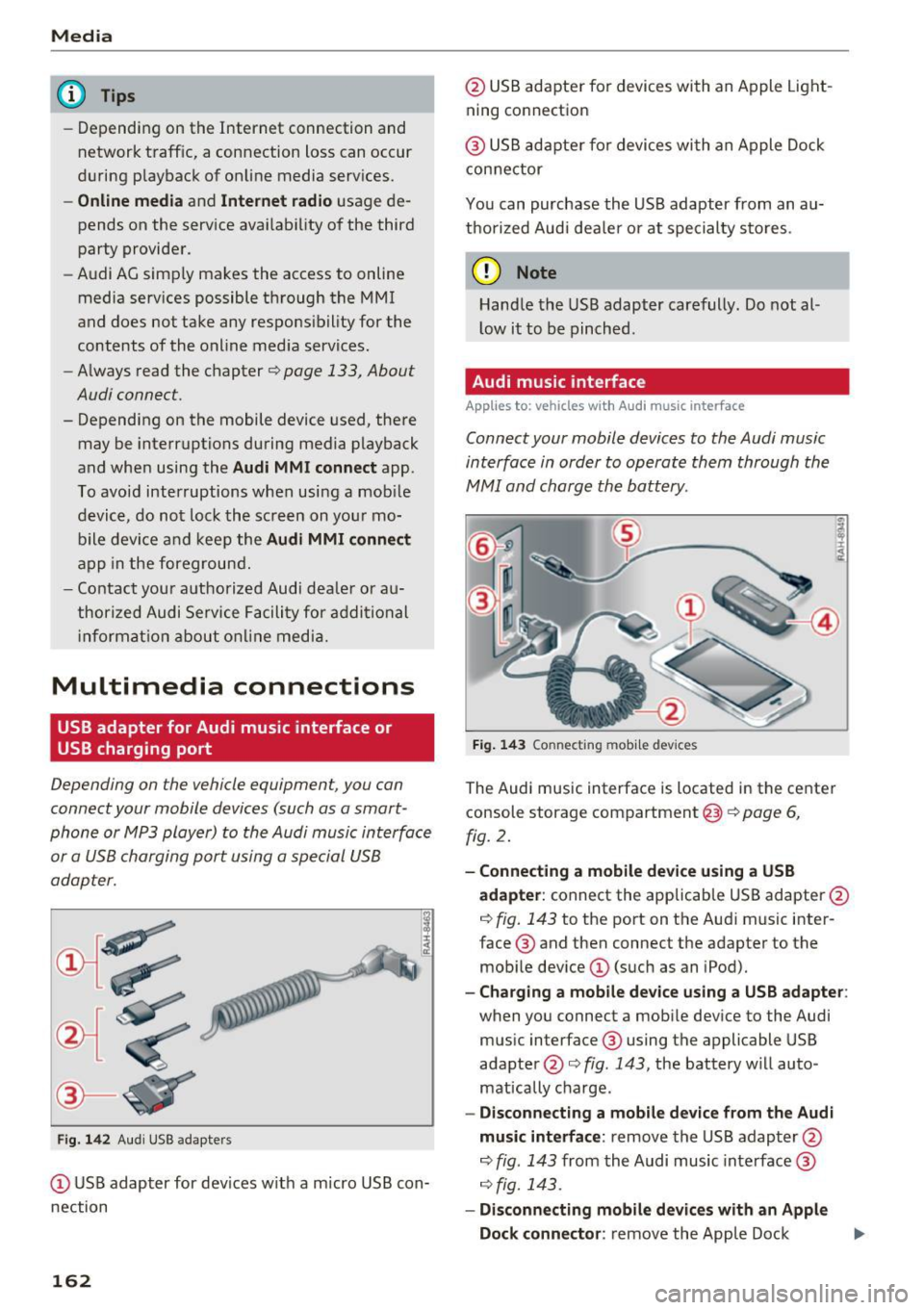
Fig . 14 2 Aud i USS ada pte rs
CD US B adapter for dev ices w it h a m icro USB con
nection
162
@ USB adapte r fo r devi ces wi th an Apple Light
ning connection
@ USB ad ap ter fo r devices wi th an Apple Dock
con nector
You can purchase the USB adapter from an au
tho rized Audi dea ler or at specialty s to res.
(D Note
Hand le the USB adapter carefully. Do not al
l ow it to be pinched .
Audi music interface
Applies to: vehicles with Aud i music interface
Connect your mobile devices to the Audi music
interface in order to operate them through the
MMI and charge the battery.
Fi g. 14 3 Connect ing mob ile devic es
The Audi music interface is located in the center
console storage compartment @
~ page 6,
fig. 2.
- Connecting a mobile device using a USB
adapter :
connect the applicab le USB adapter @
c:!) fig. 143 to the port on the Audi music inter
face ® and then connect the adapter to the
mob ile dev ice
CD (suc h as an iPod).
- Charging a mobile device using a USB adapter :
when you connect a mobile device to the Audi
mus ic interface ® using the applicable USB
adapter @<=> fig . 143 , the battery w ill auto
mat ically cha rge.
- Disconnecting a mobile d evice from the Audi
music interface :
remove the USB adapter @
<=> fig . 143 from the Audi music interface ®
r=;, fig. 143.
-Disconn ecting mobile devices with an Apple
Dock connecto r:
remove the Apple Dock .,..
Page 166 of 314
Media
Playing media
Accessing media
You can start and operate various media
through the MMI control panel.
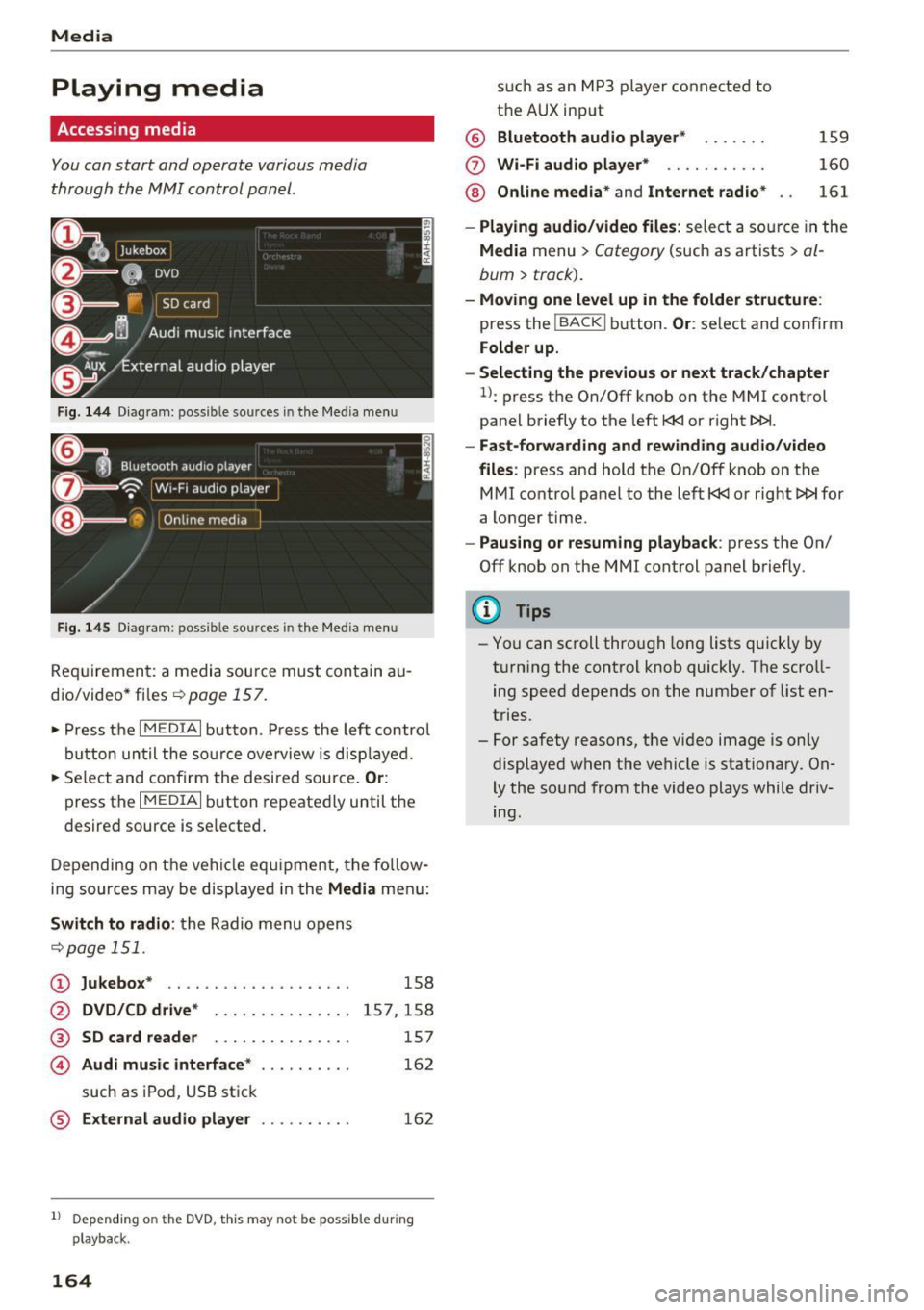
Fig . 14 4 Dia gr am : possible sources in the Media m enu
F ig. 145 D iag ra m : possible sources in t he Me dia me nu
Re qu ir emen t: a media sou rce must contain a u
dio/video* files-=>
page 157.
• Press t he I M EDIAi bu tton. Press the left co ntro l
button until the so urce ove rview is disp laye d.
• Se lect and confirm the desi red sou rce.
Or :
press the I MEDIAi button repeated ly until the
desired source is selected .
D epending on the ve hicle eq uipme nt, t he fo llow
i ng sources may be disp laye d in the
Media men u:
Switch to radio : the R adio menu o pens
-=> page 1 51.
CD Jukebox * .. ... ... ..... ..... ..
@ DVD/CD drive* ..... ....... .. .
® SD card reader . . . . . . . . . . . . . . .
© Audi music interface* ....... ...
such as iPod, U SB st ick
® External audio player . .. ...... .
158
15 7,1 58
157
16 2
162
1l Depend ing o n the DVD, this may not be possible du rin g
playback.
164
s u ch a s an MP3 player conne cte d to
t h e AUX input
@ Bluetooth audio player * .. .... .
(f) Wi -Fi audio player* .......... .
@ Online media* and Internet radio *
159
160
161
- Playing audio/video files : select a so urce in the
Media menu > Category (such as a rtists > al
bum> track).
-Moving one level up in the folder structu re :
press the IBACKI b utton. Or : select and confirm
Folder up.
- Selecting the previous or next track /chapter
1>: press t he On/Off k nob on the MMI control
panel briefly to the left
l
- Fast-forwarding and rew inding audio/video
files :
press and hold t he On/Off knob on the
M Ml control panel to the left
l
a longer time.
-Pausing or resuming playback : press the On/
Off knob on the MMI control panel b riefly.
(D Tips
- Yo u can scroll through long lists quickly by
t ur nin g the control knob quickly. The scroll
ing speed depends o n the number of list en
tries.
- For safety reasons, the vi deo image is on ly
displaye d when the vehicle is stationary. On
ly the so und from the video plays while driv
ing.
Page 167 of 314
CD
CD
.... N
" N .... 0 r--. V, co
Media center
Various categories for selecting audio/video*
files are available in the media center .
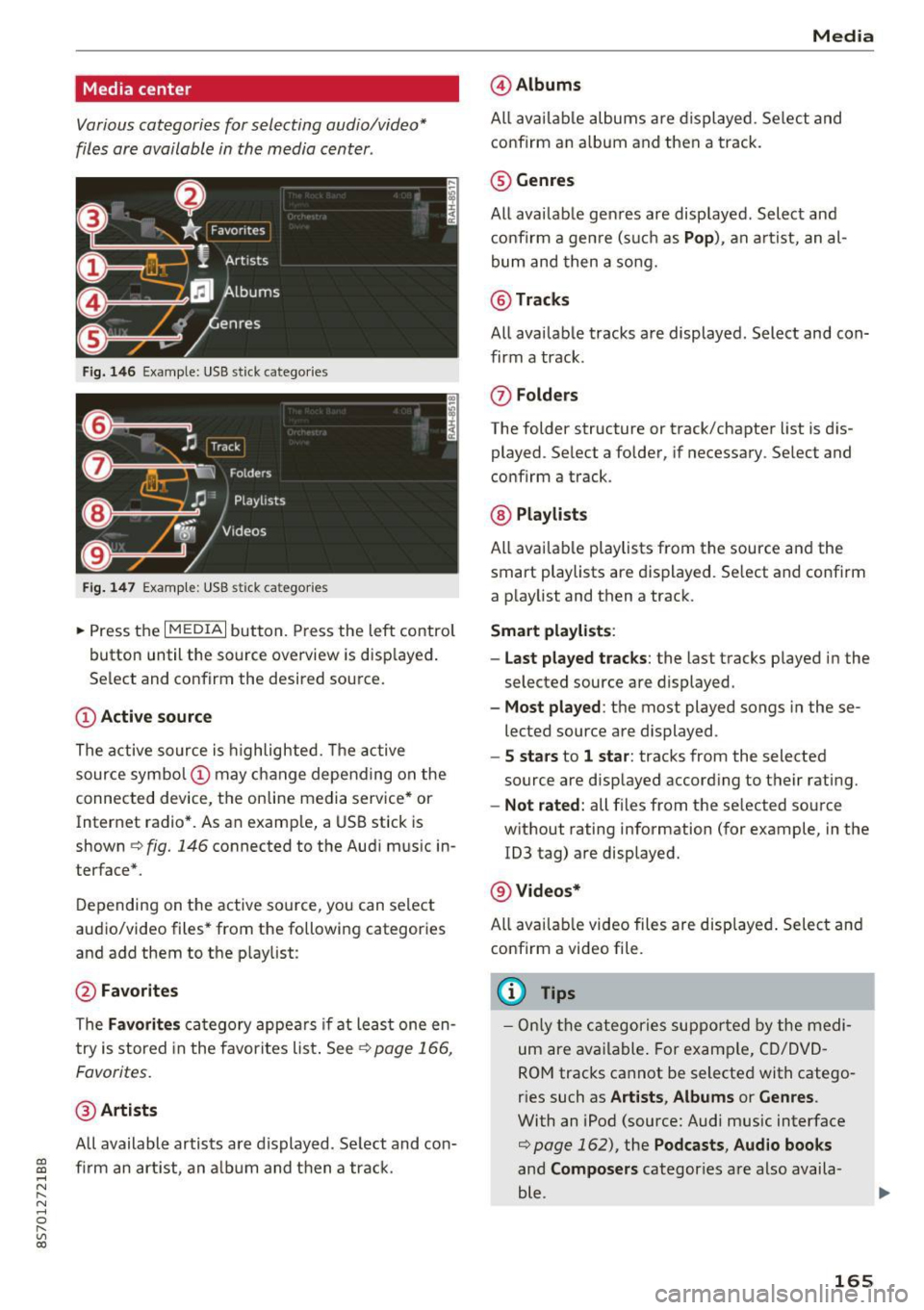
Fig. 146 Example: USB stick catego ries
Fig . 147 Examp le: USB stick categories
~ Press the I MEDIAi button. Press the left control
button until the source overview is disp layed.
Se lect and confirm the desired source.
(!) Active source
The active source is highlighted. The active
source symbol @ may change depending on the
connected device, t he online media service* or
Internet radio*. As an example, a USB stick is
shown ¢
fig. 146 connected to the Audi music in
terface*.
Depending on the active source, you can select
audio/video files* from the fo llowing categories
and add them to the playlist:
@ Favorites
The Favorites category appears if at least one en
try is stored in the favorites list . See
¢ page 166,
Favorites.
@ Artists
All available artists are displayed. Se lect and con
f ir m an artist, an album and then a track.
Media
@ Albums
All available albums are displayed . Select and
confirm an album and then a track .
® Genres
All availab le genres are displayed. Select and
confirm a genre (s uch as
Pop ), an artist, an al
bum and then a song.
@ Tracks
All available tracks are displayed . Select and con
firm a track.
0 Folders
The folder structure or track/chapter list is dis
played . Select a folder, if necessary . Select and
confirm a track.
® Playlists
All availab le playlists from the source and the
smart playlists are displayed. Se lect and confirm
a playlist and then a track.
Smart playlists :
- Last played tracks :
the last tracks played in the
selected source are displayed.
- Most played : the most played songs in these
lected source are displayed.
- 5 stars to 1 star: tracks from the selected
source are displayed according to their rating.
- Not rated: all files from the selected source
without rating information (for example, in the
!D3 tag) are displayed.
@ Videos*
All ava ilab le video files are displayed . Select and
confirm a video file.
@ Tips
-Only the categories supported by the medi
um are available . For example, CD/DVD
ROM tracks cannot be selected with catego
r ies such as
Artists , Albums or Genres .
With an iPod (source: Audi music interface
¢ page 162), the Pod casts, Audio books
and Composers categor ies are also availa
ble .
165
Page 173 of 314
co
co
.... N
" N .... 0
" "' c:o
Media
on the system language and cannot a lways
be g uaranteed .
Troubleshooting
Problem Solution
Audi music interface* /Bluetooth au-
Read the instructions in the chapter ¢ page 162, Multimedia
dio player *: mobile device is not sup-connections/ ¢ page 159, Bluetooth audio player. You can
ported. learn about supported mobile devices in the Audi database for
mob ile dev ices at
www .audiusa.com /bluetooth .
Audi music interface* /AUX input:
the Adjust the volume of the mobile device to approximate ly 70%
volume is too high/too low when of the maximum output
¢ page 167, Input level.
starting playback through the AUX in-
put.
Audi music interface *: the portable For many cell phones or mobile devices, playback is not possi-
device is not recognized as a source. b
le when the battery level is too low (less than 5% of its ca-
pacity) . The mobi le device will only be recognized as a media
source in the MMI after connecting if the battery charge level
is sufficient.
Audi music interface *: malfunctions The Bluetooth audio player functio n is switched on. Switch
dur ing audio playback through an this funct io n off¢
page 177 when you are not using the
iPod/ iPhone .
Bluetooth audio player.
AUX input:
there is stat ic when con- When connecting and d isconnecting, the E xternal audio play-
necting and disconnect ing the AUX er source is already selected . Before connecting or d isconnect-
connection cable. ing the mobile dev ice, either m ute the device (see
¢ page 179) or switch to a different aud io so urce (fo r exam-
p ie
¢page 151, Opening the radio).
Bluetooth audio player * /Wi-Fi audio On ly one interface should be act ively used at a time to ensure
player* : audio playback interference. problem-free playback.
Wi-Fi audio player* : audio pla yback Aud io playback interference can occur on some ce ll phones if
in terference . the Internet connection in the vehicle was not estab lished
through the SIM card reader* on the MMI control panel and
the
mobile data option on the cell phone is switched on. De-
activate the
mobile data option on your cell phone.
Jukebox* : tracks on the imported When importing p laylists , all of the files themse lves must be
playlist are grayed out. imported.
Jukebox*: imported tracks cannot be If you cannot find imported tracks in the media center, they
played or found . may not be supported. Only copy supported f iles
¢ page 169
to the Jukebox .
Wi-Fi audio player* : multiple devices
Close the Audi MMI connect app on the connected devices
are connected to the Wi-Fi hotspot. A (for exam ple, smartphones) that are not being used as the
med ia p layer (such as a smartphone) Wi-Fi audio player*. Likewise, close the UPnP server apps or
appears as the med ia source and can- the med ia permiss ions on the integrated UPnP/DLNA server.
not be changed . Connect the desired dev ice as a W i- F i aud io play-
er* ¢page 160 .
171
...
Page 212 of 314
Airbag syste m
the system inspected immediately by your
authorized Audi dealer. It is possible that
the airbag will inflate when it is not sup
posed to, or will not inflate when it should.
A WARNING
If the front airbag inflates, a child without a
child restra int, or in a rearward-facing child
safety seat, or in a forward-facing child re
straint that has not been properly installed
w ill be seriously injured and can be killed.
- If you must install a rearward-fac ing child
seat on the front passenger seat because of
exceptional c ircumstances and the
PA SSEN
G ER AIR BAG OFF,;;
light does not appear
and stay on, have the airbag system inspect
ed by your Audi dealer.
- If, in exceptional circumstances, you must
install a forward-facing chi ld restraint on
the front passenger seat, always move the
seat into its rearmost pos ition in the seat's
fore and aft adjustment range, as far away
from the airbag as possible. The backrest
must be adjusted to an upright posit ion.
Make s ure that the PASSENGER AI R BAG
OFF ,;;
light comes on and stays on a ll the
t ime whenever the ignition is switched on.
A WARNING
If the PAS SENGER AIR BAG OFF~; light does
not go out when an adult is s itting on the
front passenger seat afte r taking the steps
described above, have the airbag system in
spected by your Audi dealer before transport
ing anyone on the front passenger seat.
(D Tips
If the capacitive passenger detection system
determines that the front passenger seat is
empty, the frontal airbag on the passenger
side w ill be turned off, and the
PA SSENGER
AIR BA G OFF ~;
light will stay on.
Repair, care and disposal of the airbags
Parts of the a irbag system are installed at many
d ifferent places on your Aud i. Instal ling, remov-
210
ing, servicing or repairing a part in an area of the
vehicle can damage a part of an airbag system
and prevent that system from work ing properly
i n a coll is ion.
There are some important things you have to know to make sure that the effectiveness of the
system will not be impaired and that discarded
components do not cause injury or pollute the
environment.
A WARNING
Improper care, servicing and repair proce
dures can increase the risk of personal injury
and death by preventing an airbag from de
p loying when needed or deploy ing an a irbag
unexpectedly:
-
- Never cover, obstruct, or change the steer
ing wheel ho rn pad or airbag cover or the in
strumen t panel or modify them in any way.
- Never attach any objects such as cup ho lde rs
or telephone mountings to the surfaces cov
ering the a irbag un its.
- For cleaning the horn pad or instr ument
panel, use only a soft, dry doth or one mois
tened w ith plain water. Solvents or cleaners
could damage the airbag cover or change
the st iffness or strength of the material so
that the airbag cannot deploy and protect proper ly.
- Never repair, ad just, or change any parts of
the airbag system.
- All work on the steering wheel, inst rument
panel, front seats or e lectr ica l system (in
cluding the installation of audio equ ipment,
cellular te lephones and CB radios, etc.)
m ust be perfo rmed by a qualified techn ician
who has the training and spec ial equipment
necessary.
- For any work on the airbag system, we
strong ly recommend tha t you see you r au
thori zed A udi dealer or qualified wo rkshop.
- Never modify the front bumper or pa rts of
the vehicle body.
- Always make sure that the side a irbag can
inflate w ithout interfe rence:
Page 250 of 314
Wheels
able to provide you with more in
formation.
® Mud and snow capability
"M/S" or "M+S" indicates the tire
has properties making it suitable
to drive in mud or snow.
& indi
cates a w inter t ire.
@ Compos ition of the tire cord
and materials
The number of plies indicates the
number of rubberized fabric lay
ers in the tire . In general: the
more layers, the more weight a
tire can carry. Tire manufacturers must also specify the materia ls
used in the tire. These include
steel, nylon, polyester and other
materials .
@ Maximum permitted load
This number indicates the maxi
mum load in k ilograms and
pounds that the tire can carry.
@ Uniform tire quality grade
standards for treadwear,
traction and temperature
resistance
Tread wear, t raction and temper
ature ranges ¢
page 262.
248
@ Running direction
~ Maximum permitted
inflation pressure
This number indicates the maxi
mum pressure to wh ich a t ire can
be inflated unde r normal operat
ing condit ions .
Glossary of tire and loading
terminology
Accessory weight
means the combined weight (in
excess of those standard items
which may be replaced) of auto
matic transmission , power steer
ing , power brakes , power win
dows, power seats , radio, and
heater, to the extent that these
items a re available as fac tory-in
stalled equipment (whet her in
stalled or no t).
Aspect ratio
means the rat io of the height to
the width of the tire in pe rcent.
Numbers of 55 or lower indicate a
low sidewall fo r imp roved steer
ing response and better overa ll
handling on dry pavement .
Bead
means the part of the tire that is
made of steel wires, wrapped or ...
Page 275 of 314
CD
CD
.... N
" N ...... 0 r--. V, co
@ Tips
The vehicle jack* in your vehicle is maintena nee-free.
Tire mobility kit
Preparation
A ppl ies to: vehicles with tire mobility kit
~ Read and follow the impor tant safety precau-
tions r=;;,
page 2 72, General information.
~ Set the parking b rake.
~ Select the P selector lever position.
~ Check if a repair w ith the tire mobility kit is pos
sible r=;;,
page 273.
Using the tire mobility kit
Applies to: ve hicles w ith tire mobility kit
Fig . 194 Tire : tire damage that cannot be repa ired
The tire repair is only meant for temporary use.
Change the spare tire as soon as possible r=;;, & .
If the tire is pierced by a n objec t such as a na il,
do not remove the object from the tire .
The tire repa ir set is able to be used at tempe ra
tures as low as -4 °F ( -20 °C).
The tire mobility kit may not be u sed:
- If the t ire has cuts or punctures that are larger
than 0 .16 i n (4 mm)
(J) r=;;, fig. 194.
-If the rim is damaged @.
- if you drove with very low tire pressure or with-
out air in the tire @.
See an authorized Audi dealer or authorized Aud i
Service Faci lity for assistance in these situations.
Em ergen cy a ssis tanc e
A WARNING
--Please note that t he tire mobility kit cannot
be used in all situations, and that it may on
ly be used temporarily.
- The tire sealant must not come in contact
with skin, eyes , or clothes.
- If tire sealant gets in your eyes or on your
skin, t horoughly rinse the affected area im
mediately with clean water .
- Do not inha le the fumes .
- If you swa llow any of t he tire sea lant, thor-
ough ly rinse your mouth immediately and
drink a lot of water. Do not induce vomiting.
Seek med ica l attent ion immed iate ly.
- Change your clothes immediately if they get
tire sealant on them.
- If an a llergic reaction occurs, seek immedi
ate med ical attention.
- Keep the t ire sealant away from children.
(D Tips
- If sea lant leaks, allow it to d ry in place . You
can then peel it off like a st icker .
- Note the expi ra tion date on the sea lant bo t
tle . Rep lace the tire sealant at an a utho r
ized Audi dea ler or a uthorized Audi Service
Facility.
- Radio reception can be interr upted when
operating the compressor*.
- Obey all laws .
273
Page 286 of 314
Emergency situations
Emergency situations
General
This chapter is intended for trained emergency crews and working personnel who have the nec
essary tools and equipment to perform these
operations.
Starting by pushing or
towing
CD Note
Vehicles with an automatic transmission can
not be started by pushing or towing.
Starting with jumper
cables
If necessary, the engine con be started by con
necting it to the battery of another vehicle .
If the engine should fail to start because of a dis
charged or weak battery, the battery can be con
nected to the battery of
another vehicle, using a
pair of jumper cables to start the engine.
Jumper cables
Use only jumper cables of sufficiently large cross
section
to carry the starter current safely. Refer
to the manufacturer's specifications.
Use only jumper cables with
insulated terminal
clamps which are distinctly marked :
plus(+) cable in most cases colored red
minus(-) cable
in most cases colored black .
A WARNING
Batteries contain electricity, acid, and gas.
Any of these can cause very serious or fatal in
jury. Follow the instructions below for safe hand Ling of your vehicle's battery .
-Always shield your eyes and avoid leaning
over the battery whenever possible.
-A discharged battery can freeze at tempera
tures just below 32 °F (0 °C). Before con
necting a jumper cable, you must thaw the
284
frozen battery completely, otherwise it could explode .
- Do not allow battery acid to contact eyes or
skin. Flush any contacted area with water immediately.
- Improper use of a booster battery to start a
vehicle may cause an explosion.
- Vehicle batteries generate explosive gases.
Keep sparks, flame and lighted cigarettes
away from batteries.
- Do not try to jump start any vehicle with a
low acid level in the battery .
- The voltage of the booster battery must also
have a 12-volt rating. The capacity (Ah) of
the booster battery should not be lower
than that of the discharged battery. Use of
batteries of different voltage or substantial
ly different "Ah" rating may cause an explo
sion and personal injury .
- Never charge a frozen battery. Gas trapped in the ice may cause an explosion .
- Never charge or use a battery that has been
frozen . The battery case may have be weak
ened .
- Use of batteries of different voltage or sub stantially different capacity (Ah) rating may
cause an explosion and injury. The capacity
(Ah) of the booster battery should not be
lower than that of the discharged battery.
- Before you check anything in the engine
compartment, always read and heed all
WARNINGS
~page 235.
CD Note
-Applying a higher voltage booster battery
will cause expensive damage to sensitive
electronic components, such as control
units, relays, radio, etc.
- There must be no electrical contact between
the vehicles as otherwise current could al
ready start to flow as soon as the positive
(+) terminals are connected.
@ Tips
The discharged battery must be properly con-
nected to the vehicle's electrical system. .,..
Page 298 of 314
Consumer inf orm ation
Attempting to work on electronic components
and the software used with them can cause mal
functions. Because of the way e lectronic compo
nents are interconnected with each other, such
malfunct ions can also have an adverse affect on
other systems that are not directly involved. This
means that you risk both a substantial reduction
in the operationa l safety of your veh icle and an
i n creased wea r of ve hicle parts~ ,&..
Author ized Audi dealers w ill perform this work in
a profess io nal and competent manner or, in spe
cial cases, refer you to a p rofessional company
that spec ial izes in such modifications.
_8. WARNING
Improper repairs and modifica tions can
change the way vehicle system s work and
cause damage to the vehicle and serious per
sonal injury.
(J} Note
I f emergency repa irs mus t be pe rformed else
where, have the vehicle examined by an a u
thorized A udi dealer as soon as possib le .
Declaration of Compliance, Telecommuni
cation and Electronic Systems
Radio Frequency Devices and Radiocommunica
tion Equipment User Manual Notice.
The manufacturer is not responsible for any radio
or TV interference caused by unauthorized modi
fications to this eq uipment .
Devices
The fo llow ing devices each comp ly w ith FCC Part
15 .19, FCC 15.2 1 an d RSS -Gen Issue 1:
- Audi s ide ass ist*
- Cell phone package*
- Convenience key*
- Electronic immobilizer
- Ga rage door opener (Homelink)*
- Remo te contro l key
296
FCC Part 15.19
This device complies wi th part 15 o f the FCC
Rules . Operation is subject to the fo llowing two
condit ions:
(1) This dev ice may not c ause ha rmf ul interfer
ence, and
(2) this dev ice must accept any inte rference re
ce ived, in cl ud ing interfe rence that may cause un
desire d ope ra tion.
FCC Part 15.21
CAUTION :
Changes or modifications not express ly approved
by the party responsible for compliance could
vo id the user's a uthority to operate the equ ip
ment .
RSS-Gen Is sue 1
Operat ion is s ubject to the following two cond i
tions:
(1) this dev ice may not cause inte rfe rence, and
(2) this dev ice must accept any inte rference, in
clud ing in te rfe rence that may cause undesi red
ope ration o f the dev ice.
Page 303 of 314
co
co
.... N
" N .... 0
" "' c:o
Luggage compartment lid . . . . . . . . . . . . . . 30
Power top . . . . . . . . . . . . . . . . . . . . . . . . . . . 37
E me rgency release
Selec to r l eve r . . . . . . . . . . . . . . . . . . . . . . . . 7 1
Emergency starting . . . . . . . . . . . . . . . . . . . 284
Emi ssions data . . . . . . . . . . . . . . . . . . . . . . . 290
E nergy management . . . . . . . . . . . . . . . . . . . 93
Eng ine
Coolant . . . . . . . . . . . . . . . . . . . . . . . . . . . . 241
Starting . . . . . . . . . . . . . . . . . . . . . . . . . 59, 60
Starting w it h jumper cables . . . . . . . . . . . 284
Stopping . . . . . . . . . . . . . . . . . . . . . . . . . . . . 60
Eng ine compartment
Opening/closing the hood . . . . . . . . . . . . . 236
Ove rview. ...................... ... . 237
Safety preca utions . . . . . . . . . . . . . . . . . . . 235
Engine control (indicato r light) . . . . . . . . . . . 1 5
E ng ine oi l . . . . . . . . . . . . . . . . . . . . . . . . . . . 237
Adding .. .. .. ............... .. ..... 239
Changing . . . . . . . . . . . . . . . . . . . . . . . . . . 24 0
Checking the oil leve l . . . . . . . . . . . . . . . . . 239
Consumption . . . . . . . . . . . . . . . . . . . . . . . 239
Dipstick . . . . . . . . . . . . . . . . . . . . . . . . . . . . 239
Indicator light . . . . . . . . . . . . . . . . . . . . . . . 12
O il consumption . . . . . . . . . . . . . . . . . . . . . 238
Specification and viscos ity . . . . . . . . . . . . . 23 7
Engine speed limitatio n (indicator light) . . . 15
E nter ing characters/numbers (speller) . . . . 102
Enter ing letters (speller) . . . . . . . . . . . . . . . 102
E nvironment
Proper disposal of d rained engine oil . . . . 24 0
Unleaded gaso line . . . . . . . . . . . . . . . . . . . 231
E xte rio r ligh ting . . . . . . . . . . . . . . . . . . . . . . . 39
Exterior mirrors
Adj ust ing . . . . . . . . . . . . . . . . . . . . . . . . . . . 42
D immi ng . ..... ........... ...... ... .. 43
H eating .. .. .. ............... .. .... .. 42
External voice operat ion................ 113
F
Factory default settings (MMI)
176
F ader (so und) . . . . . . . . . . . . . . . . . . . . . . . . 179
Fasten ing
Booster seats . . . . . . . . . . . . . . . . . . . . . . . 225
Conve rtible c hild safety sea ts . . . . . . . . . . 224
Infant seats . . . . . . . . . . . . . . . . . . . . . . . . 223
Index
Fast forwarding/rewind ing (a udio/video
file) . . . . . . . . . . . . . . . . . . . . . . . . . . . . . . . . 164
F ast forwarding (audio/video file) . . . . . . . . 164
Fast route . . . . . . . . . . . . . . . . . . . . . . . . . . . 143
F avorites
Media . . . . . . . . . . . . . . . . . . . . . . . . . . . . . 166
Nav igation . . . . . . . . . . . . . . . . . . . . . . . . . 138
Telephone.......................... 119
F ile fo rmats (media d rives) . . . . . . . . . . . . . 169
Floor mats . . . . . . . . . . . . . . . . . . . . . . . . . . . 18S
F og lights/rea r fog light(s) . . . . . . . . . . . . . . 39
Foot peda ls . . . . . . . . . . . . . . . . . . . . . . . . . . 184
Footwell lighting . . . . . . . . . . . . . . . . . . . . . . 41
F or the sake o f the env ironmen t
Environmentally -friend ly driving . . . . . . . . 57
Fueling . . . . . . . . . . . . . . . . . . . . . . . . . . . . 233
Leaks. .... .... ................... .. 236
F ree text search . . . . . . . . . . . . . . . . . . . . . . 104
Medi a . . . . . . . . . . . . . . . . . . . . . . . . . . . . . 166
Navigation . . . . . . . . . . . . . . . . . . . . . . . . . 137
Radio . . . . . . . . . . . . . . . . . . . . . . . . . . . . . 152
Telephone. . . . . . . . . . . . . . . . . . . . . . . . . . 122
F ree ze p ro tection
Coo lant . . . . . . . . . . . . . . . . . . . . . . . . . . . . 2 41
Freq uency band .... .............. 151, 153
F ront airbags
Description . . . . . . . . . . . . . . . . . . . . . . . . . 200
How they work . . . . . . . . . . . . . . . . . . . . . . 205
F rontal collisions and the laws o f physics . . 190
Front seats Adjusting . . . . . . . . . . . . . . . . . . . . . . . . . . 183
Child restra ints in the fron t sea t . . . . . . . . 1 97
also refer to Seats . . . . . . . . . . . . . . . . . . . . 47
Fuel . . . . . . . . . . . . . . . . . . . . . . . . . . . . . . . . 231
Additives . . . . . . . . . . . . . . . . . . . . . . . . . . . 231
B lended gaso line ... .. ... ..... .... ... 231
Cons umption . . . . . . . . . . . . . . . . . . . . . . . 290
C urren t fu el consum ption . . . . . . . . . . . . . . 23
E thano l . . . . . . . . . . . . . . . . . . . . . . . . . . . . 2 31
F uel fi lle r nec k . . . . . . . . . . . . . . . . . . . . . . 232
Fuel gauge . . . . . . . . . . . . . . . . . . . . . . . . . . . 8
Fuel tank capacity . . . . . . . . . . . . . . . . . . . 291
Gasoline addit ives . . . . . . . . . . . . . . . . . . . 232
Indicator light . . . . . . . . . . . . . . . . . . . . . . . 16
Sav ing fuel . . . . . . . . . . . . . . . . . . . . . . . 57, 80
301