radio AUDI TT ROADSTER 2017 User Guide
[x] Cancel search | Manufacturer: AUDI, Model Year: 2017, Model line: TT ROADSTER, Model: AUDI TT ROADSTER 2017Pages: 314, PDF Size: 76.54 MB
Page 114 of 314
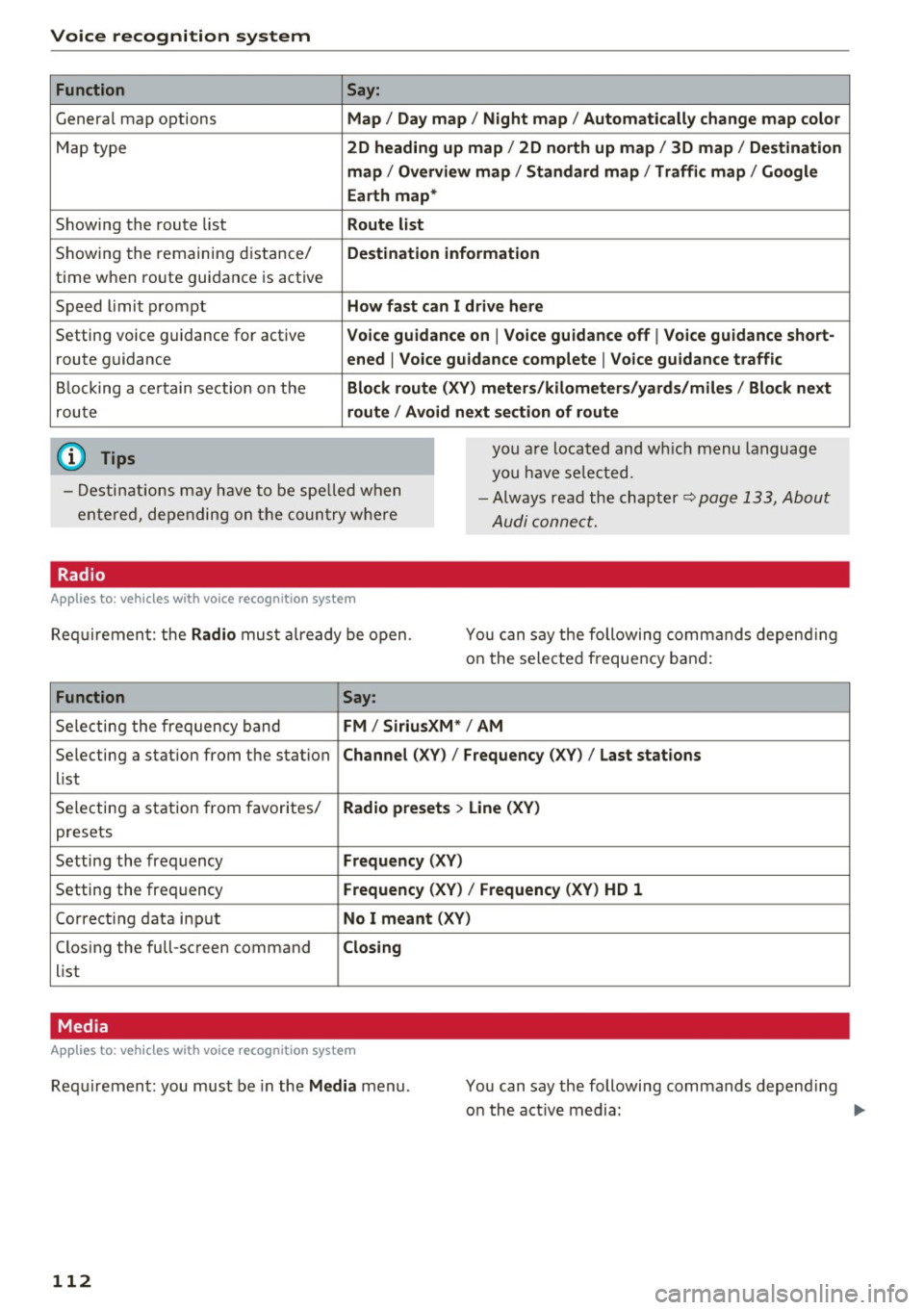
Voice recognition system Function
Genera l map options
Map type
Showing the route list
Showing the remaining distance/
time when route guidance is active
Speed limit prompt
Setting voice guidance for active route guidance
B locking a ce rtain section on the
rou te
(D Tips Say:
Map / Day map / N ight map / Automatically change map color
2D heading up map / 2D north up map / 3D map / De stination
map / Ov ervi ew map / Standard map / Traffic map / Googl e
Earth map *
Route l ist
Destin ation information
How fa st can I drive here
V oice guidance on
I V oice guidance off I Voice guidance short-
ened
I Vo ice guidance complete I V oice guid ance traffic
Block route (XV ) m eter s/kilom eters /yards /mile s/ Block next
route / Avo id next section of route
you a re located and wh ich menu language
you have se lected.
- Destinations may have to be spe lled when
entered, depending on the coun try where -
Always read the chapter~
page 133, About
Audi connect.
Radio
Applies to : vehicles with voice recognitio n system
Req uirement: the Radio mus t already be open. You can say the following commands depend ing
on the selected frequency band:
Function Say:
Selecting the frequency band FM / Siriu sXM * / AM
Selecting a station from the station Channel (XV) / !Frequency (XV) / Last stat ions
list
Selecting a station from favorites/
Radio presets > Line (XV)
presets
Setting the frequency
Fr equ ency (XV)
Setting the frequency Frequenc y (XV) / Frequency (XV ) HD 1
Correcting data input No I m eant (XV )
Closing the full-screen command C losing
list
Media
Appl ies to: vehicles with voice recognition system
Requirement: you must be in the Med ia menu .
112 You can say the following commands depend
ing
o n the act ive media:
Page 120 of 314
Telephone
-Ending a phone call/cancel dialing: select and
confirm End call. Or : press the control knob.
A ccepting another call: see
q page 118, During
a phone call.
Caller information : the name, phone number or
Unknown appears in the Infotainment system
display depending on if the ca ller has bee n stored
in the directory and if the phone number has
been transmitted. A picture may also be dis
p layed, depending on whether you have assigned
a picture to a contact in your directory and if it
was transferred to your MMI. You can find out if
your cell phone supports this function from your cell phone network provider, your cell phone
owner's manual or at www.audiusa .com/blue
tooth .
{D) Tips
The radio or media playback is muted during a
phone call.
During a phone call
Applies to: vehicles with telephone
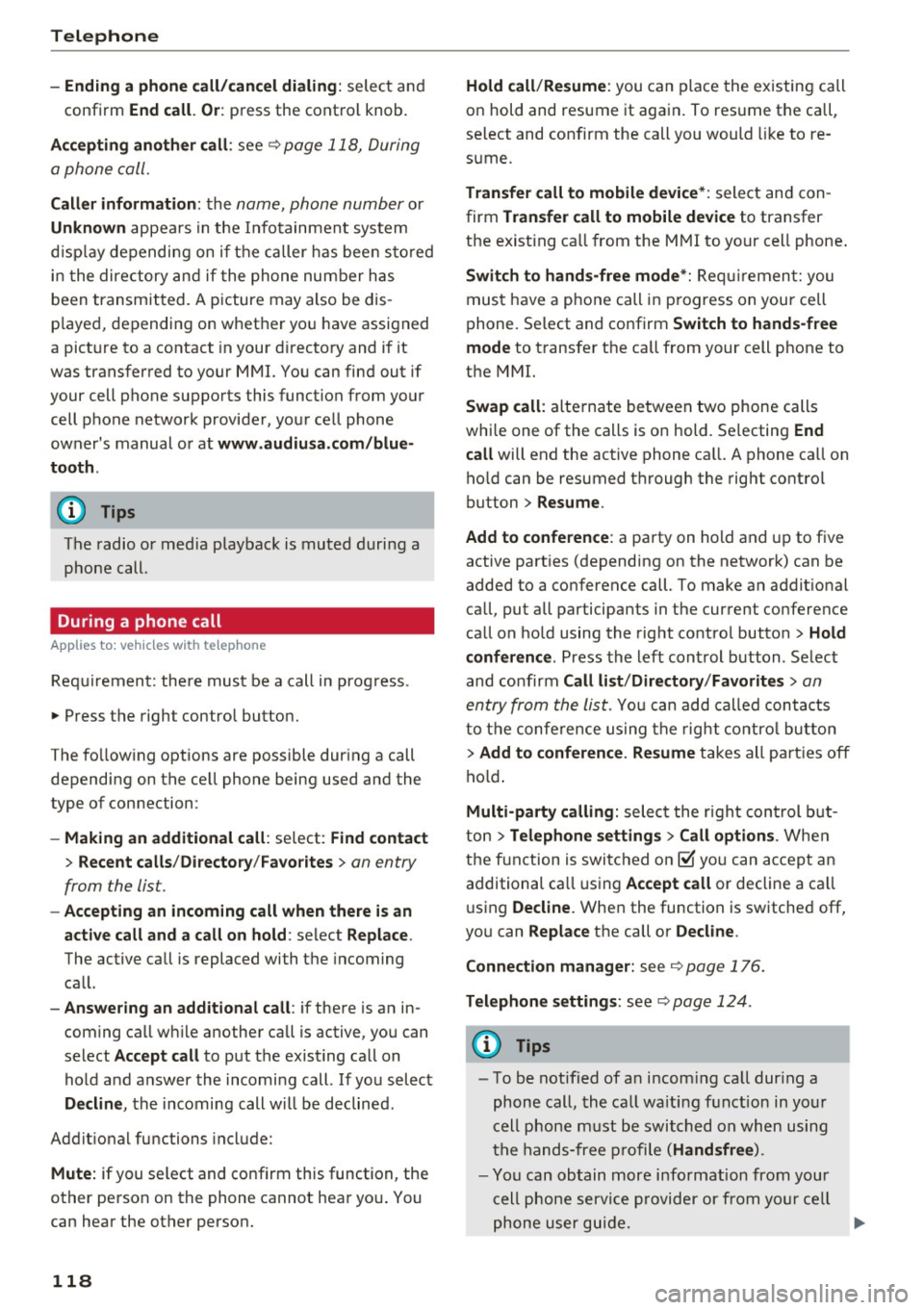
Requirement: there must be a call in progress.
"" Press the right control button.
The fo llowing options are possible during a call
depending on the ce ll phone being used and the
type of connection:
- Making an additional call: select: Find contact
> Recent calls /Directory /Favorites > an entry
from the list.
- Accepting an incoming call when there is an
active call and a call on hold : select Replace .
The active call is replaced with the incoming
call.
- Answering an additional call : if there is an in
coming call w hile another call is active, you can
select Accept call to put the exist ing call on
hold and answer the incomi ng call.
If you select
Decline , the incoming call w ill be declined.
Addit ional functions include:
Mute: if you se lect and confirm this function, the
other person on the phone cannot hear you . You
can hear the other person.
118
Hold call /Resume : you can place the existing call
on hold and resume it again . To res ume the call,
se lect and confirm the call you would like to re
sume .
Transfer call to mobile device* : select and con
firm Transfer call to mobile device to transfer
the exist ing ca ll from the MMI to your cell phone .
Switch to hands-free mode*: Requiremen t: you
must have a phone call in progress on your cell
phone. Select and confirm Switch to hands-free
mode to transfer the call from your cell phone to
the MMI.
Swap call: alternate between two phone calls
while one of the calls is on hold. Se lecting End
call will end the active phone call. A phone call on
hold can be resumed through the right control
button
> Resume .
Add to conference : a party on hold and up to five
active part ies (depending on the network) can be
added to a conference call. To make an addit ional
ca ll, put all participants in the current conference
call on hold using the right control button
> Hold
conference . Press the left control button . Se lect
and confirm Call list/Directory /Favorites
> an
entry from the list.
You can add called contacts
to the conference using the right control button
> Add to conference. Resume takes all part ies off
hold.
Multi-party calling: select the right con trol but
ton
> Telephone settings > Call options . When
the function is switched on~ you can accept an
additional ca ll using Accept call or decline a ca ll
using Decline. When the function is switched off,
you can Replace the call or Decline.
Connection manager: see
q page 176.
Telephone settings: see q page 124.
(D Tips
-To be notified of a n incom ing call dur ing a
phone call, the call wa iting function in your
cell phone must be switched on when using
the hands-free profile (Handsfree ).
- You can obtain more information from your
cell phone service provider or from your cell
phone user guide.
Ill>
Page 124 of 314
Telephone
(D Tips
-This service must be set up and activated in
advance by the cell phone service provider.
You can obta in more information from your
cell phone service prov ider.
- The voicemai l number depends on the cell
phone service provider .
Emergency call functions
Appl ies to: ve hicles w ith tele phone
~ Select : I MENU I button >Telephone > left con
trol button >
Enter number > Enter emergency
call number (for example , 911)
> O K.
A WARNING
-
- Beca use your phone works with radio s ig
nals , a connect ion cannot be guaranteed un
der all ci rc u mstances. Do not rely on only
yo ur phone when it comes to essent ial com
mun ication (s uch as a medical eme rgency).
- Always follow the instructions given by the
emergency personnel du ring an emergency
call and only end the call when they instruct
yo u to do so .
(D Tips
Emergency numbers are not the same eve ry
where. Find out which eme rgency number is
used in yo ur current locat ion .
Directory
Opening the directory
Appl ies to: ve hicles w ith tele phone
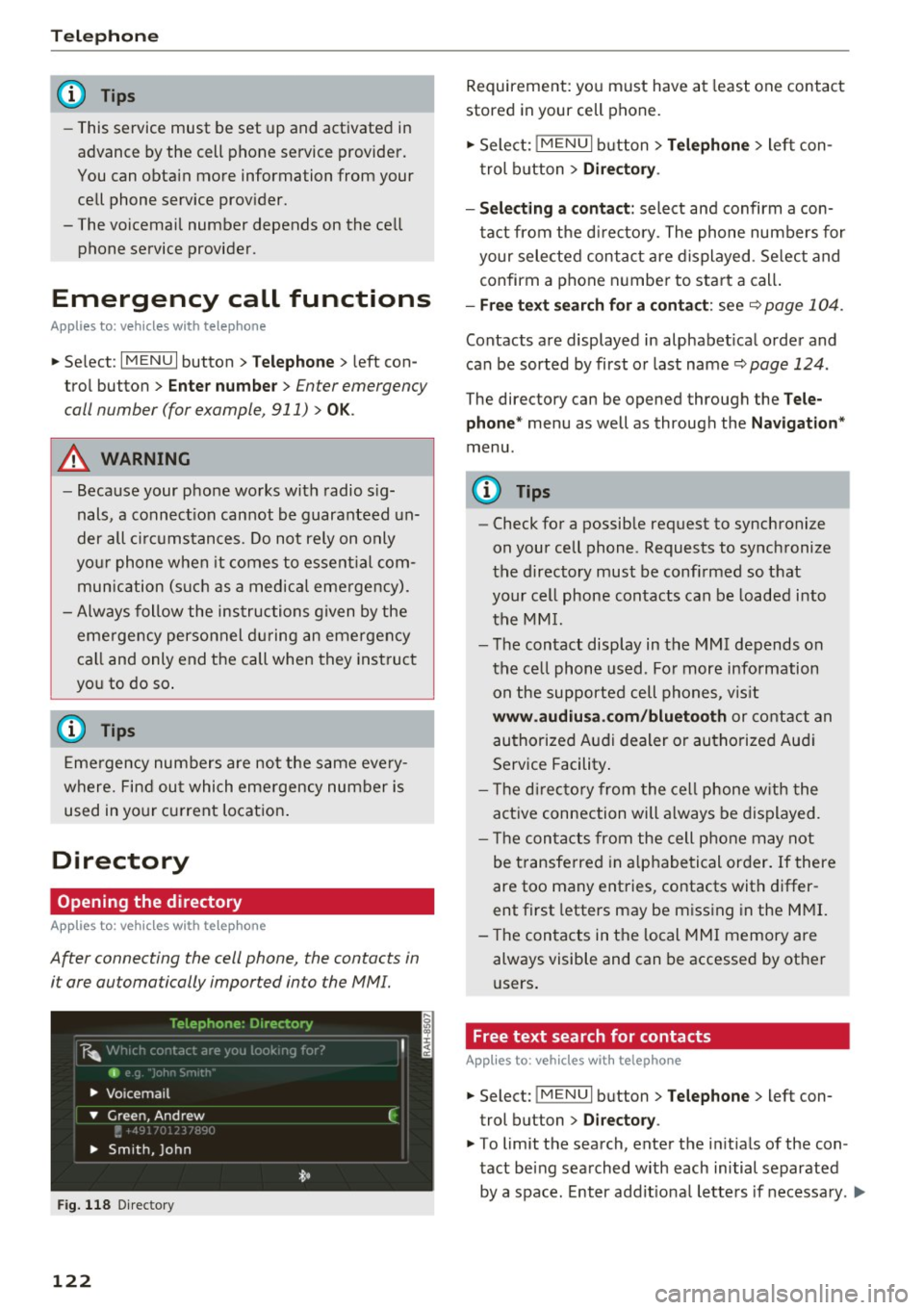
After connecting the cell phone, the contacts in
i t are automatically impor ted in to the MMI.
F ig . 11 8 Direc tory
122
Requirement: yo u must have at least one contact
stored in your cell phone.
~ Select: ! M ENUI button> T el ephone > left con
trol b utton >
Dire ctory .
- Selecting a contact :
select and confirm a con
tact from t he d irectory. The phone numbers for
your selected contact are displayed . Se lect and
confirm a phone n umbe r to sta rt a call .
-Fre e te xt sear ch for a conta ct : see q page 104 .
Contacts a re displayed in alphabet ical order and
can be sorted by first or last name ¢
page 124.
The directo ry can be opened th rough the Tele
phone "
menu as well as through the Navigation "
menu.
(D Tips
-Check for a possible request to synchronize
on your cell phone . Requests to synchronize
the directory must be confirmed so that
your cell phone contacts can be loaded into
the MM I.
- The contact display in the MMI depends on
the ce ll phone used . Fo r more information
on the supported cell phones , vis it
www .audiu sa .com /blu etooth or contact an
authorized Audi dealer or authorized Aud i
Service Facility .
- T he d irecto ry from the cell phone w ith the
active connection will a lways be displayed.
- T he contac ts from the cell phone may not
be transferred in a lphabetical order. If there
are too many entries, contacts with differ
ent first letters may be miss ing in the M MI.
- The contacts in the local MMI memory are
always visible and can be accessed by other
users.
, Free text search for contacts
App lies to : vehicles wi th telepho ne
~ Select: !MENU I button> Telephone > left con
trol button >
Director y.
~ To limit the search , enter the in it ials of the con
tact being searched with each initial separated
by a space. Enter addit iona l letters if necessa ry . .,..
Page 153 of 314
Radio
Opening the radio
The radio supports the FM , A M and SiriusXM *
(satellite radio) bands. Using the HO Radio re
ceiver also allows you to receive radio stations
on the FM and AM bands in digital format.
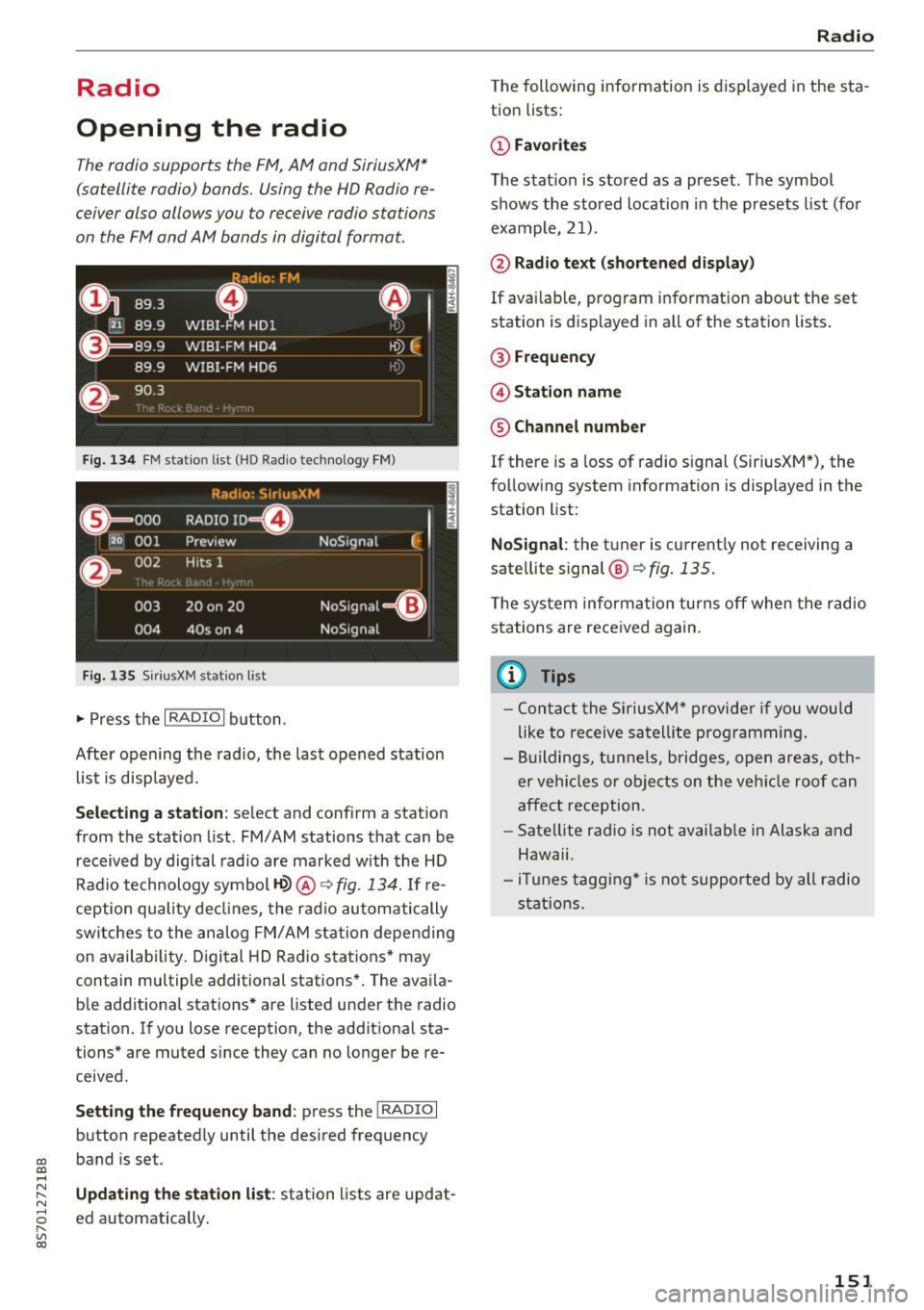
Fig . 134 FM stat ion list ( HO Ra dio tec hn ology FM)
Radio: SiriusXM
ti
~ .. . 000 RADIO 10 D
120 001
Preview NoSignal
&
002 H
its 1
003 20 on 20
NoSignal=8
004 40s on 4 NoSignal
Fig. 135 S iri usXM station list
.. Press the I RAD IO I bu tton.
Afte r opening the rad io, t he last opened station
lis t is disp laye d.
.
I
Selecting a station : select and confirm a stat io n
from the station list . FM/ AM stations t hat can be
received by digital rad io are ma rked w ith the HD
R adio technology symbol
tQ> @ ~ fig. 13 4. If re
ception quality decl ines, the r adio automatically
switches to the analog FM/AM station depe nding
on availability . D igi tal HD Radio s ta tions * may
contain multiple additional stations* . The ava ila
b le add itiona l stations* are listed under the radio
station. I f you lose reception, the add it iona l sta
tions* are muted since they can no longer be re
ceived.
Setting the frequency band : press the I RADIO I
button repeated ly until the desired frequency
CD band is set. CD ....
~ Updat ing the station li st : station lists are updat -.....,
8 ed automatically. r--. V, co
Radio
The following information is displayed in the s ta
tion lists:
(D Favorites
The s tat io n is stored as a preset . The symbo l
shows the s to red location in the p resets list (fo r
example, 21).
@ Rad io text (shortened display )
If availab le, program info rmat ion about the set
station is d isplayed in a ll of the stat ion lists.
@ Frequenc y
@ Station name
® Channel number
If there is a loss of radio signal (Sir iusXM*), the
f o llow ing system in format ion is displayed in the
station list:
NoSignal : the tu ner is cu rrent ly not receiving a
sate llite signal @~
fig. 135.
The system inform ation turns off when the radio
st ations are rece ived again.
(D Tips
- Con tact the SiriusXM" provider if you would
like to receive sa tel lit e programming .
- B uilding s, tu nnels, b ridges, ope n area s, oth
er veh icles or objects o n the veh icle roof can
affect reception.
- Sate llite ra dio is not availab le in Alaska and
Hawaii.
- iT unes tagg ing* is not supporte d by all radio
sta tio ns.
151
Page 154 of 314
Radio
Radio functions
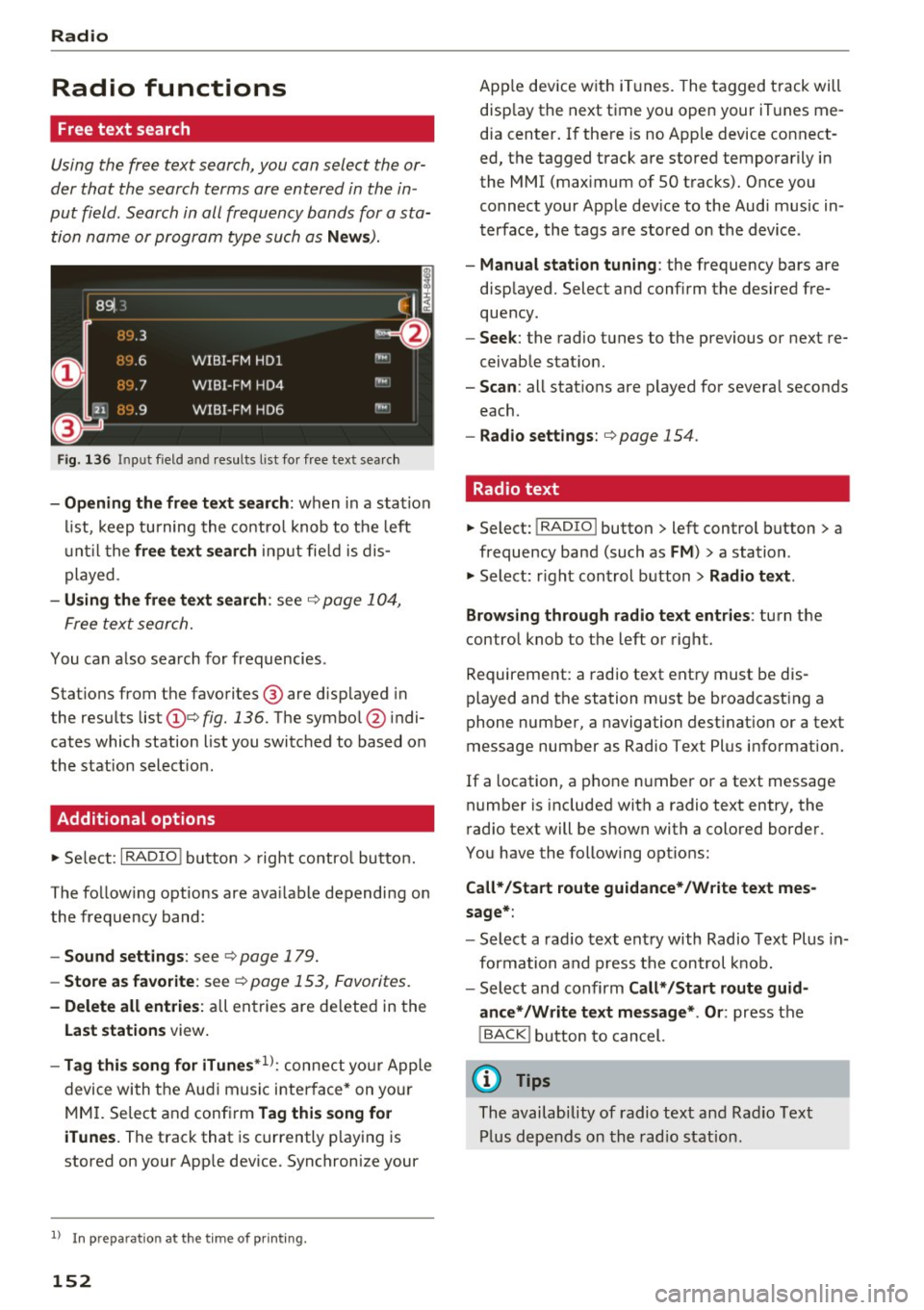
Free text search
Using the free text search, you can select the or
der that the search terms are entered in the in
put field. Search in all frequency bands for a sta tion name or program type such as
News ).
891 l,
~ flLJ.3 .
D
H'J.6
WIBI-FM HDl
H'-J.7 WIBI-FM HD4
IIM
r,M
~
fl'l.9 WIBI-FM HD6 ,,,,.
Fig. 136 Input field a nd result s list fo r free text sea rc h
- Opening the free text search : when in a station
list, keep turning the control knob to the left
until the
free text search input fie ld is dis
played .
-Using the free text search : see ¢ page 104,
Free text search.
You can a lso search for frequencies .
Stat ions from the favorites ® are disp layed in
the results list
(D e> fig. 136. The symbol @ indi
cates which station list you switched to based on
the station select ion .
Additional options
~ Select : I RADIO I button> right control button.
The follow ing options are ava ilable depending on
the frequency band:
- Sound settings : see c> page 179.
-Store as favorite: see c> page 153 , Favorites.
- Delete all entries: all entries are de leted in the
Last stations view.
-Tag this song for iTunes*1>: connect you r Apple
device with the Audi music interface* on you r
MM I. Select and confirm
Tag this song for
iTunes.
The track that is currently p laying is
stored on your App le device. Synchronize your
1> I n pr ep aratio n at t he time of pr inting.
152
App le device with iTunes. The tagged track will
disp lay the next time you open your iTunes me
dia center. If there is no Apple device connect
ed, the tagged track are stored temporarily in
the MMI (max imum of SO tracks). Once you
connect your Apple dev ice to the Audi music in
terface, the tags are stored on the device .
-Manual station tuning: the frequency bars are
displayed. Select and confirm the desired fre
quency .
-Seek: the radio tunes to the previous or next re
ceivable stat ion.
- Scan: all stat ions are p layed for several seconds
each.
- Radio settings: c> page 154 .
Radio text
~ Select: I RADIO I button > left control button > a
frequency band (such as
FM ) > a station .
~ Select: right control button> Radio text .
Browsing through radio text entries :
turn the
control knob to the left or right.
Requirement: a radio text entry must be dis
played and the station must be broadcasting a
phone number, a navigation dest ination or a text
message number as Radio Text Plus information.
If a location, a phone number or a text message
number is included with a radio text entry, the
radio text will be shown with a colored border .
You have the following options:
Call*/Start route guidance*/Write text mes
sage*:
- Select a radio text entry with Radio Text Plus in
formation and press the control knob.
- Select and confirm
Call* /Start route guid
ance* /Write text message* . Or :
press the
I BACK I button to cancel.
(D Tips
The availability of radio text and Radio Text
Plus depends on the radio station.
Page 155 of 314
CD
CD
.... N
" N ...... 0 r--. V, co
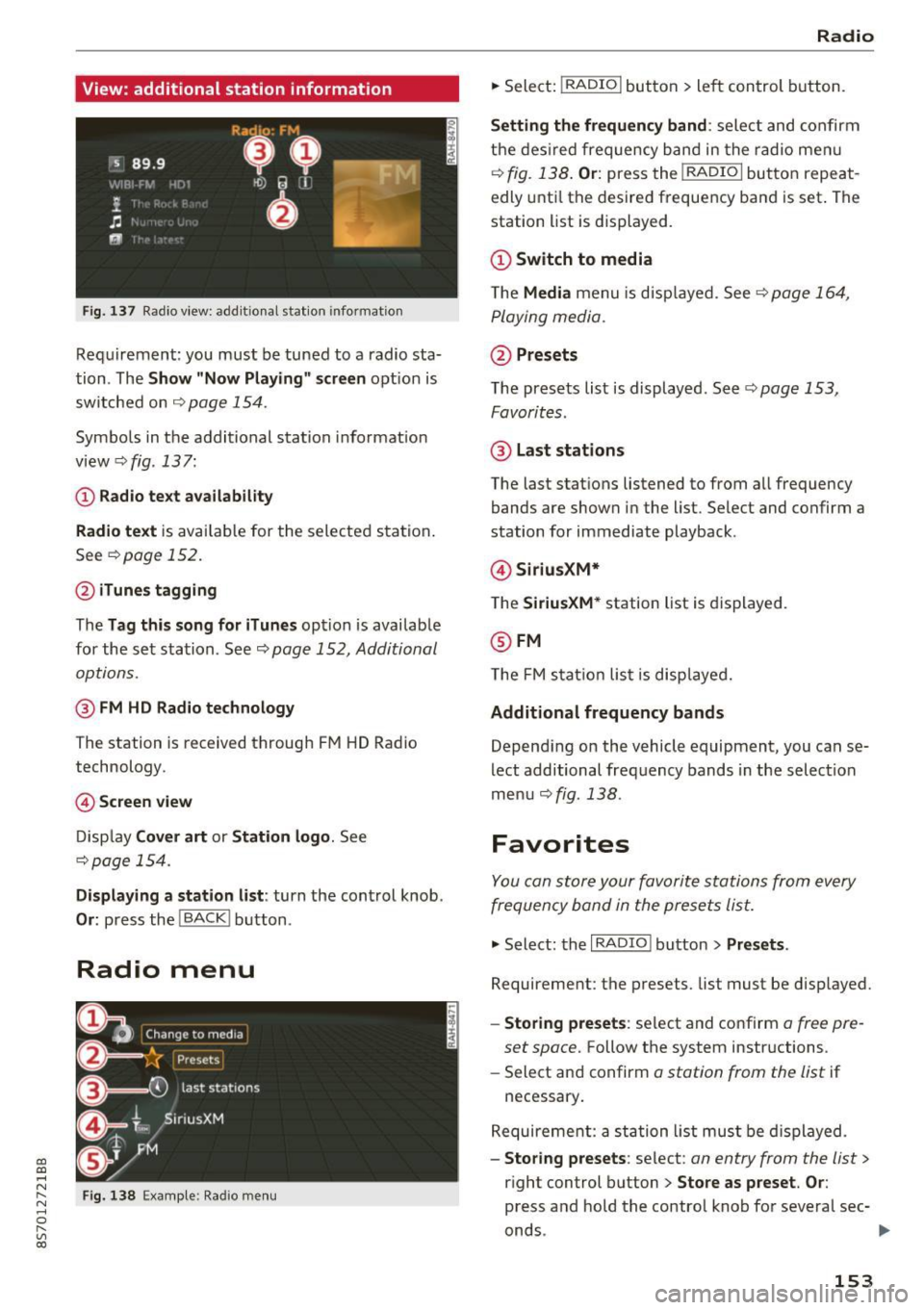
View: additional station information
Fig. 137 Radio view: add it ional stat ion information
Requirement: you must be tuned to a radio sta
tion . The
Show "Now Playing" screen opt ion is
switched on
Q page 154.
Symbols in the additional station informat ion
view ¢fig .137:
(D Radio text availability
Radio text
is available for the selected station .
See
Q page 152.
@iTunes tagging
The Tag this song for iTunes option is available
for the set station . See ¢
page 152, Additional
options.
@ FM HD Radio technology
The station is received through FM HD Radio
technology.
@ Screen view
Display Cover art or Station logo. See
¢page 154.
Displaying a station list: turn the control knob .
Or: press the I BACK ! button .
Radio menu
Fig. 138 Example: Radio menu
Radio
.,. Select: I RADIO I button > left control button.
Setting the frequency band : select and confirm
the desired frequency band in the radio menu
¢
fig. 138 . Or: press the I RADIO I button repeat
edly until the desired frequency band is set . The
station list is displayed.
(D Switch to media
The Media menu is disp layed. See Q page 164,
Playing media.
@Presets
The presets list is displayed. See ¢ page 153,
Favorites .
@ Last stations
The last stations listened to from all frequency
bands are shown in the list. Select and confirm a
station for immediate playback .
@SiriusXM*
The SiriusXM* station list is displayed.
@FM
The FM sta tion list is displayed.
Additional frequency bands
Depend ing on the vehicle equipment, you can se
lect additional frequency bands in the selection
menu ¢
fig. 138 .
Favorites
You can store your favorite stations from every
frequency band in the presets list.
.,. Select: the I RADIO I button > Presets .
Requirement: the presets. list must be disp layed.
- Storing presets : select and confirm a free pre-
set space.
Follow the system instructions .
- Select and confirm
a station from the list if
necessary .
Requirement: a station list must be displayed.
-Storing presets : select : an entry from the list>
right control button > Store as preset. Or :
press and hold the contro l knob for several sec-
onds .
~
153
Page 156 of 314
Radio
-Displaying the presets list: select: I RADIO I but-
ton
> Presets.
Req uirement: the favorites list m ust be dis
p la yed.
- Listening to presets : select and confirm a pre
set from the list.
- Move preset : select a favorite from the list >
right control button > Move preset. Or: press
and hold the control knob for several seconds.
Select and confirm the location of the selected
favorite.
- Deleting presets : select a preset from the list>
right control button > Delete preset > Delete
this preset or Delete all presets.
Additional settings
Radio settings
~ Select : I RADIO I button > right control button >
Rad io settings .
The following settings can be selected, depend
ing on the band that is se lected:
FM/AM HD Radio*
You can switch HD Radio recept ion on or off.
Station sorting (SiriusXM*}
You can set the station sorting for SiriusXM sta
tion lists* by:
-Channel number: the stations are sorted in as
cending order according to their station num
ber.
- Channel name: the stations are listed in alpha
betical order.
- First category, then channel number : the sta
tions are sorted by their category and then by
their channe l numbers .
-First the category, then the channel name : the
stations are sorted by their category and then
by the ir channel names .
Category filter (SiriusXM*}
The stations shown in the station list can be fi l
tered by your personal preferences and by pro -
154 gram
type. The program categories that you can
se lect depend on what is offered by your provid
er. Se lect the
All categories option to deactivate
all filter options and display all available stations
i n the satellite stat ion list.
Additional station information
When the function is switched on~ and station
or presets lists are open, the display will switch
after approximate ly five seconds to the
Show
" Now Playing" screen
view c::> page 153. Depend
i ng on ava ilability, information about the set sta
tion (such as stat io n name, artist, slide show,
station logo) is displayed in this view .
Preferred picture view
You can set your preferred picture view for the
Show "Now Playing" screen display c:> page 153.
-Station logo: the station logo is displayed, de-
pending on availability .
-Cover art: the album cover or genre cover is dis-
played, depending on availability.
Gracenote online database*
Requirement: the MMI must be connected to the
Internet. The
Cover art option must be selected
c:> page 154, Preferred picture view.
When the funct io n is switched on~, the albu m
cover or genre cover for the song that is pla yin g
is loaded from the Gracenote online database,
depending on availability.
Subscription status (SiriusXM}*
This opt ion is available when your subscr ipt ion is
about to expire or has already expired. The expi
rat ion date for you r license is displayed.
Call to SiriusXM *: the contact information for
your sate llite radio provider is displayed. To call
your sate llite radio provider using the MMI, press
Call to SiriusXM *.
Page 157 of 314
co
co
.... N
" N .... 0
" "' c:o
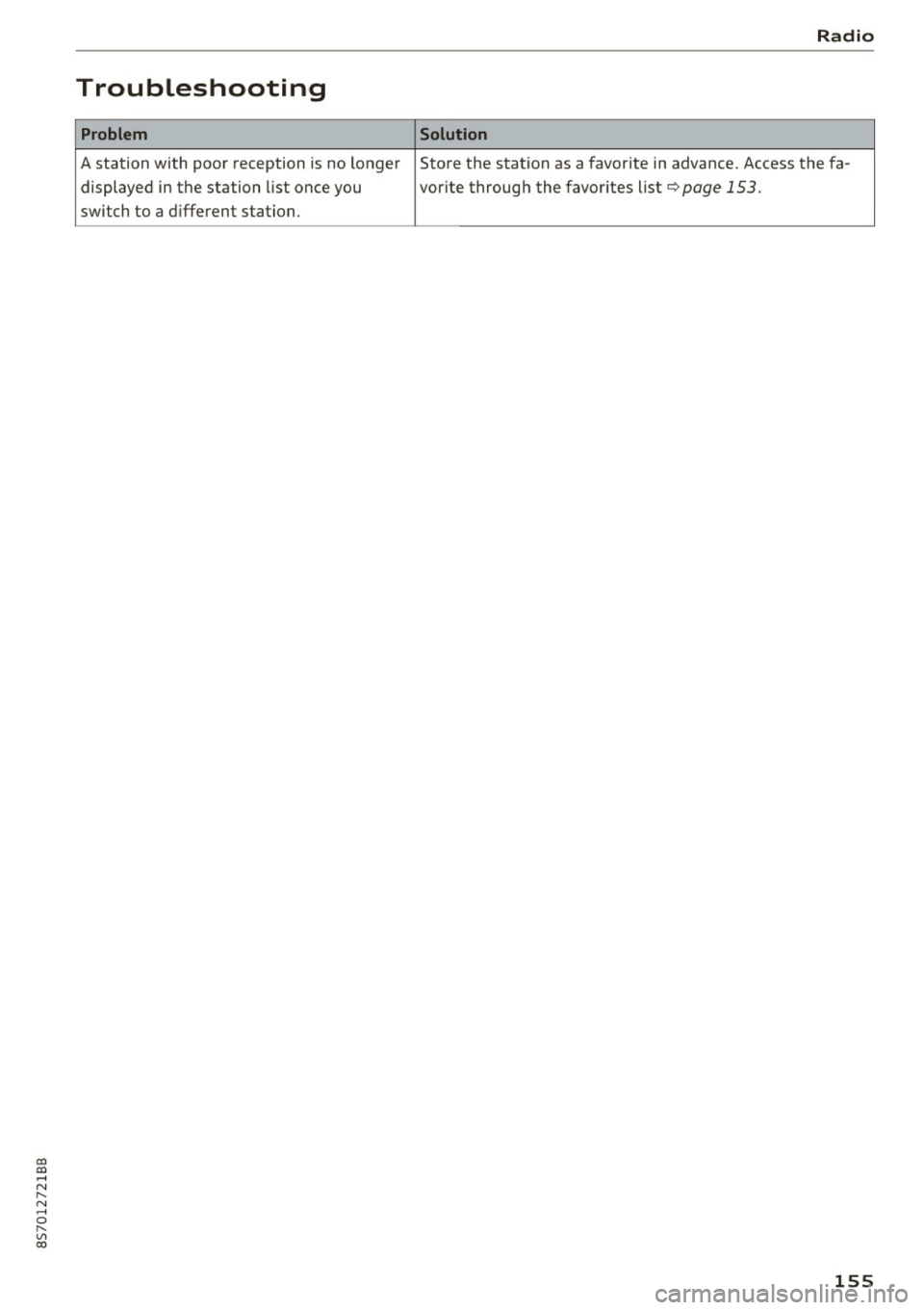
Troubleshooting
Problem
A station with poor reception is no longer displayed in the station list once you
switch to a d ifferent station. Radio
Solution
Store the station as a favorite in advance. Access the fa-
vor ite through the favor ites list
c>page 153.
155
Page 162 of 314
Media
-Multiple Bluetooth audio players can be
connected to the MMI, but only one mobile
device can be active.
- Bluetooth protocols AVRCP ( 1.0/1.3/1.4)
and A2DP are supported.
- Note the volume se tting on your Bluetooth
device. A udi recommends setting your mo
bile device to the maxim um vo lume when
us ing it as a Bluetooth audio player.
- The supported media functions (such as
shuffle) depend on the Bluetooth device be
i ng used.
- For more information on the supported de
vices, visit
www.audi.com /bluetooth or
contact your author ized Audi dealer or au
thorized Audi Service Facility.
Wi-Fi audio player
A ppl ies to: ve hicles w ith Wi-F i
Using the Wi-Fi audio player media source on the
MMI, you can connect and operate your Wi-Fi-ca
pable media player (su ch as a smartphone) to
wirelessly play music from your media player
li
brary. The media player is connected through the
vehicle's Wi-Fi hotspot . A UPnP Server opp or an
integrated UPnPIDLNA server on your media
player is required to access your media player
li
brary.
Req uirement: the Wi-Fi function on your media
p layer must be switched on. The
Audi MMI con
nect
app or a UPnP server app must be installed
on your med ia player .
Or: you must be us ing a
media player wit h an integrated UPnP/DLNA
server .
-Connecting a media player : press the I MEDIA!
button. Press the left control button unti l the
sources overview
c::;,page 164 is d isp layed. Se
lect and co nfirm
W i-Fi audio player
(J) c::;, page 164, fig . 145.
- If necessary, select a nd confirm Wi -Fi off >
Turn on Wi-Fi
to activate Wi-Fi in the MMI. Se
lect
Wi-Fi settings , if necessary. Select the
same settings on the wire less media player
that are used for the Wi -Fi hotspot .
-Start ing the Wi -Fi audio pl ayer : start the Audi
MMI conne ct
app or a UPn P serve r app . Or: al
low medi a shar ing o n your medi a player.
160 Operating the medi
a playe r:
the med ia p layer is
operated through the MMI.
- Press the left control b utton repeatedly until
the
Folders menu item appears . Select and con
firm
Folders.
- Playing mu sic from the media player:
select
and confirm
Media cent er.
Web radio :
see c::;, page 161.
A WARNING
-As t he d river, do not allow usage of the Wi
Fi ho tspot to distract you from driv ing, as
this could increase the r isk of an accide nt.
- It is o nly safe to use tablets, laptops, mo
b ile devices and other s imilar devices when
t he vehicle is stat ionary because , like all
loose objec ts, they co uld be thrown a round
t he inside o f th e ve hicle in a crash and ca u se
serious inju ries. Store these types of devices
secure ly w hile d riving .
- Do no t use any W i-Fi devices wit hin range of
t he airbags while dr iv ing. A lso rea d the
warn ings in the chapter
¢page 196.
(D Note
You are re spon sib le fo r all pre ca utio ns taken
fo r d ata p rotection, an ti- v irus pro te cti on and
protection ag ain st loss o f data on mobi le de
v ices that a re used to access the Internet
thro ugh the W i-F i hotspot .
(D Tips
-The Wi-Fi connec tion is reconf igure d when
inserting or removin g the m ini SIM ca rd in
t h e SIM card reader*. There may be a tem
porary interr upt ion in aud io playback, de
pend ing o n the media player.
- Always read the chapter
c::;, page 133, About
Audi connect.
- Please note that a Wi-Fi connection does
not automatically make it possible to use
t h e Internet. For addit ional information,
see
c::;, page 127.
-To avoid interr upt ions during playback, de
act ivate the power sav ing funct io n on the
media player or co nnect it to a cha rger.
Page 163 of 314
co
co
.... N
" N .... 0
" "' c:o
-The loading times for the audio data depend
on the media player used and the number of
files that it contains.
- A maximum of 2,000 entries per directory
are displayed in the MMI.
- Songs downloaded for offline use using mu
sic streaming services are stored on your mobile device (such as a smartphone) and
may be DRM protected. The Wi-Fi audio
player will not play DRM protected files.
- Contact your authorized Audi dealer or au
thorized Audi Service Facility for additional
information on the Wi-Fi audio player.
Online media and
Internet radio
Applies to: vehicles with Audi connect
You can playback and operate various online me
dia services and Internet radio using the MMI.
• Press the I MEDIAi button. Press the left control
button until the sources overview<>
page 164,
fig. 145
is displayed .
Applies to: using online media and Internet radio
Requirement:
- The
Audi MMI connect app must be installed
and open on your mobile device.
- You must be logged into your my Audi account
in the
Audi MMI connect app and you must
have selected your vehicle.
- The Wi-Fi function on the mobile device and on
the MMI must be switched on.
- If necessary, check in the connection manager
<=> page 176 if the mobile device you connected
is selected under the
MMI connect app (~).
-The MMI must be connected to the network.
- The symbol for the
Online media* source @
<=> page 164, fig . 145 is shown in the MMI.
Applies to: using online media
Additional requirement:
- A supported online media service must be avail
able in your country.
- You must have an account with a supported on
line media service.
- Depending on the online media service, you
must install and open an app on your mobile
device .
Media
Starting Online media
- Press the I MEDIA i button. Press the left control
button until the sources overview
c:> page 164
is displayed.
- Select and confirm an online media service.
Starting Internet radio
- Press the I MEDIA ! button. Press the left control
button until the sources overview
c:> page 164
is displayed.
- Select and confirm
Internet radio . The Internet
radio browser or the last station that was play
ing is shown.
- Selecting the station : if necessary, select and
confirm a category in the Internet radio
Brows
er
> a station.
Online media and Internet radio: additional op
tions
- Press the right control button.
The following options may be available, depend
ing on the information shown (such as the sta
tion/track that is currently playing):
-Sound settings: see<> page 179.
-Wi-Fi settings: see <> page 131, Wi-Fi hotspot.
-Connection manager : see<> page 176.
-Additional options may be available, depending
on the active online media service or Internet
radio.
A WARNING
- It is only safe to use tablets, laptops, mo
bile devices and other similar devices when
the vehicle is stationary because, like all loose objects, they could be thrown around
the inside of the vehicle in a crash and cause
serious injuries . Store these types of devices
securely while driving.
- Do not use any Wi-Fi devices within range of
the airbags while driving . Also read the
warnings in the chapter <>
page 196.
Q) Note
Please note that there generally are addition
al costs when using an online media service
account, especially when it is used interna
tionally.
-
161