warning light AUDI TT ROADSTER 2017 Owner's Manual
[x] Cancel search | Manufacturer: AUDI, Model Year: 2017, Model line: TT ROADSTER, Model: AUDI TT ROADSTER 2017Pages: 314, PDF Size: 76.54 MB
Page 46 of 314
Lights and Vi sion
Move the windshield wiper lever to the corre
sponding position:
@ -windshield w ipers off
(D -interval mode. To increase/decrease the wip
er intervals , move the sw itch @ to the left/right .
I n vehicles with a rain sensor*, the wipe rs turn on
i n the rai n once the vehicle speed exceeds ap
p roximate ly 2 mph (4 km/h) . T he higher the sen
sitivity of the rain sensor * is set (switch @ to the
right), the earlier the windshield wipers react to
mo isture on the windshield. You can deact ivate
the rain sensor mode* in the Infotainment sys
tem, which switches the intermittent mode on .
Select in the Infotainment system:
I MENU I but
ton>
V ehicle > left control button >Dri ver a ssis
tan ce > Rain sensor> Off.
@-slow wip ing
@ -fast wiping
©-sing le w ipe If yo u ho ld the leve r in th is posi
tion longer, the wipers sw itch from s low w iping
to fast wiping .
®-clean the windsh ie ld To elim inate water
droplets, the winds hield wipers pe rform one af
terwipe after several seconds w hile driving in
temperatures above 39 °F (4 °C) . You can switch
this function off by moving the lever to position
@ within 10 seconds of the afterwipe. The after
wipe function is reactivated the next t ime you
sw itch the ignition on.
C leaning the headlights *. T he headlight washer
system* on ly functions when the lights are
sw itched on. The headlights are automat ica lly
cleaned the first t ime and every f ifth time the
lever is moved to position
® ·
A WARNING
- The rain senso r* is o nly intended to ass ist
the d river . The drive r may st ill be responsi
ble fo r manua lly switching t he wipe rs on
based on v is ibility conditions.
- T he w indshield may not be treated with wa
te r-repell ing windsh ield coa ting age nts . U n
favor able conditions, such as wetness, dark
ness, and when the s un is low, can cause in
creased g lare, which increases the risk of an
44
-
accident. Wiper b lade chatter is also possi
ble.
- Properly functioning windshield wiper
blades are required for a clear v iew and safe
driving
¢ page 45, Replacing windshield
wiper blades.
(D Note
- If there is frost, make sure the windshield
wiper blades are not frozen to the wind
shield. Switching on the w indshield w ipers
when the blades are frozen to the wind shield can damage the w iper blades .
- Pr ior to us ing a car wash, the w indshield
wiper system must be sw itched off (lever in
posit ion 0) . This prevents the wipers from
switching on unintentionally and causing
damage to the windsh ield wiper system.
('O Tips
- The windshield w ipers sw itch off when the
ignition is switched off . You can activate the
windshield wipe rs after the ignition is
switched back on by moving the windshield
wiper lever to any posi tion.
- Wor n or dirty w indshie ld w iper blades resu lt
in streaking. This can affect the rain senso r*
function. Check your w indshield wiper
blades regularly.
'
- T he washer fluid noz zles in t he windsh ie ld
washer system are heated* at low tempera
tures when the ignition is on .
- When s topping temporar ily, such as at a
traffic light, the speed of the windshield
wipers automatica lly reduces by one level.
Cleaning windshield wiper blades
Clean the wiper blades when you see w iper
streaks. Clean the wiper blades with a soft towel
and glass cleaner.
.,. Place the windshie ld wiper arms in the serv ice
position
¢ page 45.
.,. Fold the windshie ld w iper arms away from the
w indshield. ..,.
Page 47 of 314
CD
CD
.... N
" N .... 0 r--. V, co
_& WARNING
Dirty windshield wiper blades can impair vi
sion, which increases the risk of a n accident.
Replacing windshield wiper blades
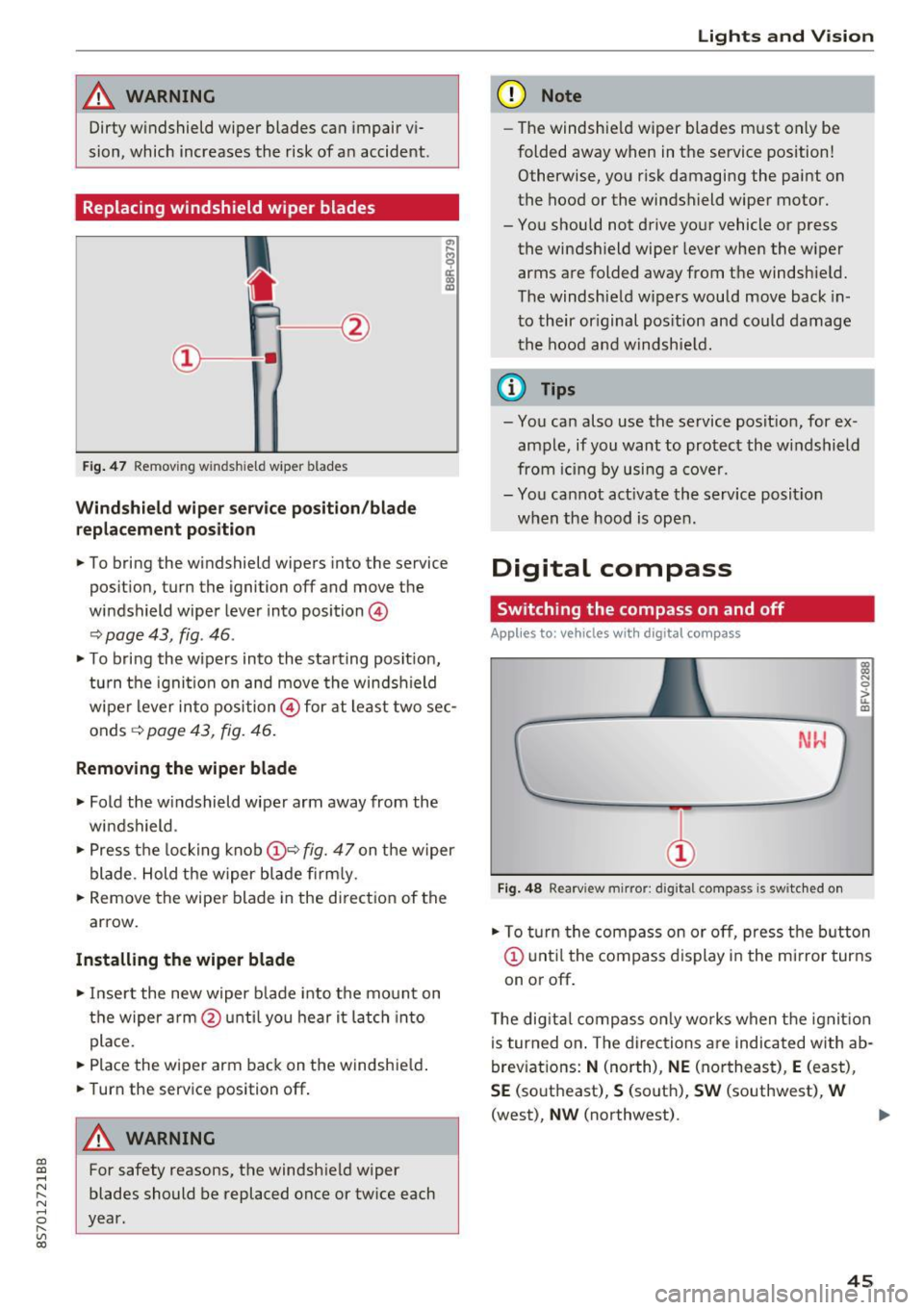
Fig . 47 Remov ing windshie ld wiper blades
Windshield wiper service position /blade
replacement position
"'
~ a: a) OJ
.. To bring the windshield wipers into the service
pos it ion, turn the ignition off and move the
windshield wiper lever into position @
~ page 43, fig. 46 .
.. To bring the wipers into the starting posit ion,
tu rn the ignition on and move the windshield
wiper lever into position@ for at least two sec
onds ~
page 43, fig. 46.
Removing the wiper blade
.. Fold the windshield wiper arm away from the
windshield .
.,. Press the locking knob@~
fig. 47 on the wiper
blade. Hold the wiper blade firmly.
.. Remove the wiper blade in the direct ion of the
arrow.
Installing the wiper blade
.. Insert the new wiper b lade into the mount on
the wiper arm @until you hear it latch into
place.
.. Place the wiper arm back on the windshie ld .
.. Turn the service position off.
A WARNING
-
For safety reasons, the windshield wiper
blades should be replaced once or twice each
year.
Lights and V ision
(D Note
-The windshie ld wiper blades must only be
folded away when in the service position!
Otherwise, you risk damaging the paint on
the hood or the windshield wiper motor.
- You should not drive your vehicle or press the windsh ield wiper lever when the wiper
arms are folded away from the windshield.
The windshield wipers would move back in
to their original pos ition and could damage
the hood and windshie ld.
(1} Tips
-You can also use the service posit ion, for ex
ample, if you want to protect the windshield
from icing by using a cover.
- You cannot act ivate the service posit ion
when the hood is open.
Digital compass
Switching the compass on and off
Applies to: vehicles wit h digita l compass
Fig. 48 Rearview mirror: digita l compass is switc hed on
::l
"' 0
> LL OJ
.. To turn the compass on or off, press the button
@ until the compass d isplay in the mirror turns
on or off .
The digita l compass only works when the ignit ion
is turned on . The directions are indicated with ab
breviations:
N (north), NE (northeast), E (east),
SE (southeast), S (south), SW (southwest), W
(west),
NW (northwest). ..,_
45
Page 48 of 314
Lights and Vision
@ Tips
To prevent inaccurate compass readings, do
not bring any remote controls, e lectr ica l dev i
ces or metall ic objects near the mirro r.
Adjusting the magnetic zone
A pp lies to: ve hicles w ith digital compass
[o::J
UiL.J ®
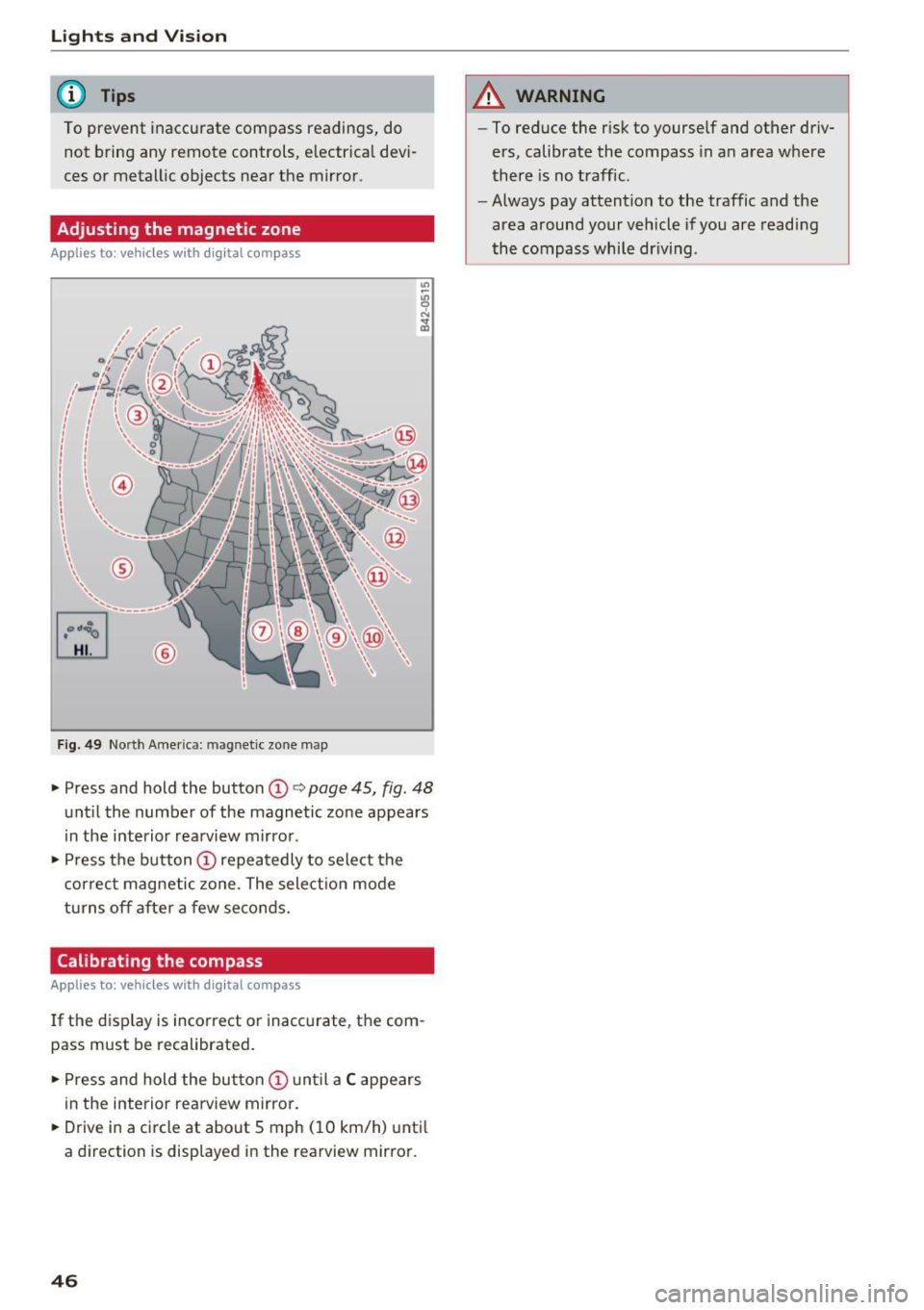
F ig . 4 9 Nort h Amer ica : ma gnetic zo ne m ap
.- Press and hold the button CD i:> page 45, fig. 48
unt il the number of the magnetic zone appears
in the interior rea rview m irro r .
.- Press t he button
CD repea tedly to select the
correc t magne tic zone . The select io n mode
turns off afte r a few seco nds.
Calibrating the compass
A pp lies to: ve hicles w ith digi tal compass
If the d isp lay is incorrect or inacc urate, t he com
pass must be recalibrated .
.- Pre ss and hold the button
CD un til a C appears
in the inte rio r rearview mirror .
.- Drive in a circle at about 5 mph ( 10 km/h) unti l
a dir ection is disp layed i n the rearvi ew mirro r.
46
A WARNING
- To reduce the r isk to yourself and other driv
ers, calibrate the compass in an area whe re
there is no traffic .
- Always pay attention to the traffic and the
area around your vehicle if you are readi ng
the compass whi le dr iv ing .
Page 50 of 314
Seats and storage
Center armrest
Applies to: vehicles with center armrest
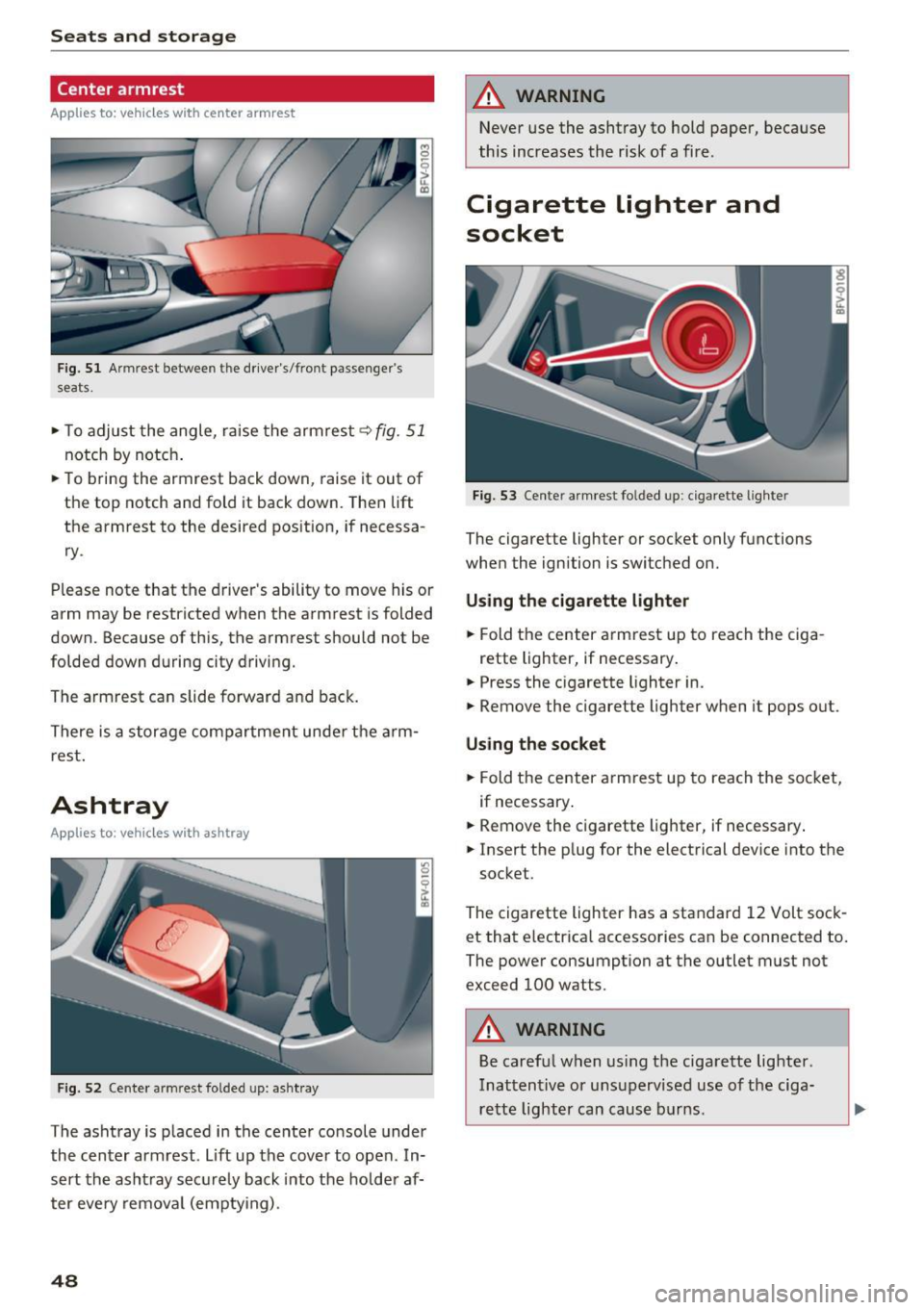
Fig. 51 Armrest between the driver's/front passenger's
seats.
,.. To adjust the angle, raise the armrest q fig. 51
notch by notch .
,.. To bring the armrest back down, raise it out of
the top notch and fold it back down. Then lift
the armrest to the desired pos ition, if necessa
ry .
Please note that the d river 's ability to move his or
arm may be restricted when the armrest is folded
down. Because of this, the armrest should not be
folded down during city driving.
The armrest can slide forward and back.
There is a storage compartment under the arm
rest .
Ashtray
Applies to : vehicles with ashtray
Fig . 52 Cente r armrest folded up: asht ray
The ashtray is p laced in the center console under
the center armrest. Lift up the cover to open . In
sert the asht ray securely back into the hold er af
ter eve ry removal (emptying) .
48
A WARNING
Never use the ashtray to hold paper, because
this increases the risk of a fire .
Cigarette lighter and
socket
Fig. 53 Center armrest folded up: cigarette lighter
The cigarette lighter or socket only functions
when the ignition is switched on.
Using the cigarette lighter
,.. Fold the center armrest up to reach the ciga-
rette lighter, if necessary .
,.. Press the cigarette lighter in.
,.. Remove the cigarette lighter when it pops out.
Using the socket
,.. Fold the center armrest up to reach the socket,
if necessary .
,.. Remove the c igarette lighter, if necessary .
,.. Insert the p lug for the electrical device into the
socket.
The cigarette lighter has a standard 12 Volt sock et that electrica l accessories can be connected to.
The power consumption at the outlet must not
exceed 100 watts.
A WARNING
Be careful when using the cigarette lighter.
Inattentive or unsupervised use of the ciga
rette lighter can cause burns .
-
Page 51 of 314
CD
CD
.... N
" N .... 0 r--. V, co
CD Note
-To reduce the risk of damage to the vehicle
electrical system, never attempt to charge
the veh icle battery by connect ing accesso
ries that prov ide power, such as solar panels
or battery chargers, to the 12 Volt sockets
or the cigarette lighter.
- To reduce the risk of damage to the sockets,
on ly use plugs that fit correctly .
Storage
Beverage holders
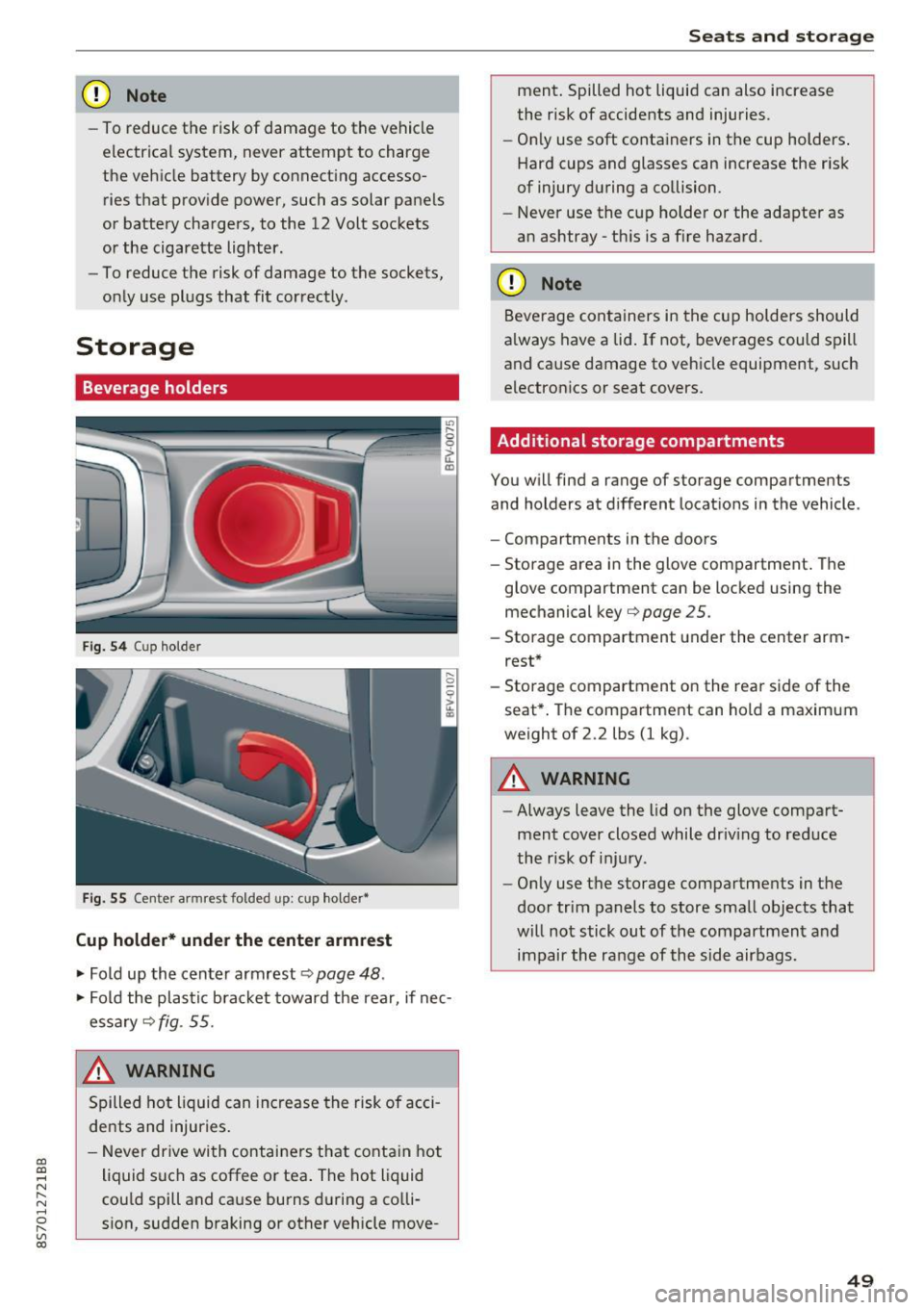
Fig. 5 4 Cup holder
Fig. 55 Cente r armrest folded up: cup holder•
Cup holder* under the center armrest
~ Fold up the center armrest q page 48 .
~ Fold the plas tic bracket toward the rear, if nec
essary
q fig . 55.
,&_ WARNING
Spilled hot liquid can increase the risk of acci
de nts and injuries .
- Never drive wi th containers that contain hot
liquid such as coffee or tea . The hot liquid
cou ld spill and cause burns during a colli·
sion, sudden braking or other vehicle move -
Seats and storage
ment. Spilled hot liquid can also increase
the risk of accidents and injuries.
- On ly use soft containers in the cup holders .
Hard cups and glasses can increase the risk
of injury during a collision.
- Never use the cup holder or the adapter as
an ashtray -th is is a f ire hazard.
CD Note
Beverage containers in the cup holders should
a lways have a lid. If not, beverages could spill
and cause damage to vehicle equipment, such
electronics or seat covers.
Additional storage compartments
You w ill find a range of storage compartments
and holders at different locat ions in the vehicle .
- Compartments in the doors
- Storage area in the glove compartment . The
glove compartment can be locked using the mechanical key
qpage 25 .
-Storage compartment under the center arm
rest*
- Storage compartment on the rea r side of the
seat*. The compartment can hold a maximum
weight of 2.2 lbs (1 kg) .
A WARNING
-
-Always leave the lid on the glove compart
ment cover closed while driv ing to reduce
the risk of injury.
- Only use the storage compartments in the
door trim panels to store small objects that
will not stick out of the compartment and
impair the range of the side airbags.
-
49
Page 59 of 314
co
co
.... N
" N .... 0
" "' c:o
Driving
General information
Breaking in
A new vehicle must be broken in, and the break
in distance should be 1,000 mi les ( 1,500 km). Do
not drive at speeds that w ill exceed
2/3 of the
maximum permitted engine speed
(RPM) for the
first 600 miles (1,000 km) , and avoid full accel
eration during this period . You may gradually
start increasing the
RPM and the speed between
600 miles (1,000 km) and 1,000 miles (1,500
km).
During the first hours of use, the engine has a
higher internal friction than later on when all
moving parts have settled into place with each
other.
How the vehicle is driven during the first 1,000
miles (1,500 km) also affects the engine quality.
Drive at moderate engine speeds after the initial
break-in per iod, part icularly when running a cold
engine . This will reduce engine wear and improve
the mileage .
Do not drive at too low of an engine speed (rpm).
Shift down if the engine stops running "smooth
ly" . Extremely high eng ine speeds are automati
cally reduced .
Avoid damaging the vehicle
When you are driving on poor roads, or over
curbs, steep ramps, etc., make certain that low
lying parts such as spoilers and exhaust system
parts do not bottom out and get damaged.
This is especially true for vehicles with low-slung
chassis (sports chassis)* and fully loaded
vehicles.
Driving through water on roads
Note the following to reduce the risk of vehicle
damage when driving through water, for examp le
on flooded roads :
- The wate r must not be any higher than the bot
tom of the vehicle body .
Driving
- Do not drive faster than walking speed.
A WARNING
After driv ing through water or mud, the effec
tiveness of the brakes may be reduced due to moisture on the brake rotors and brake pads.
A few careful brake applications should dry
off the brakes .
(D Note
Vehicle components such as the engine,
transmission, suspension or electrical system
can be severely damaged by driving through
water.
(D Tips
- Determine the depth before driving through
water.
- Do not stop the vehicle, drive in reverse or
switch the engine off when driving through
water.
- Keep in mind that oncoming vehicles may create waves that raise the water level and
make it too deep for your vehicle to drive
through safely.
- Avoid dr iving through salt water, because
this can cause corrosion.
Economical and environmentally-friendly
driving
T he amount of fuel consumpt ion, the environ
menta l impact and the wear to the engine,
brakes and tires depends mostly on your driving
style. With an anticipatory and economic driving
style, fuel consumption can be reduced by ap
proximately 10-15%. The following tips will help
you conserve the environment and your money at
the same time .
Anticipatory driving
A vehicle uses the most fuel when accelerating.
When you drive with anticipation, you do not
need to brake as often and so you accelerate less.
When possible, let your vehicle coast with a
gear
engaged -
for example, when you notice that the
next traff ic light is red . .,,.
57
Page 60 of 314
Driving
Avoid full acc ele ra tion
You sho uld rare ly travel at the maximum vehicle
speed . High speeds cause a disp roportionately
high increase in fuel consumption, emissions and
traffic noise . Slower driving saves fuel.
Reduce idling time
It pays off to stop the engi ne, for examp le when
at rai lro ad crossings or tr affic lights with longer
red lights . Stopping the engine for 30 -40 sec
onds already saves more fuel than the amount of
extra fuel needed to resta rt the engine.
It t akes a very long time in idle to wa rm the en
g ine up to operating tempe ra ture . Wear and
emissions are especially high in the warm-up
p hase . Therefore, yo u should begin driving im
mediately after starting the engine. Avoid high
RPMs while do ing th is.
Have ma intenanc e performed r egularly
By having maintenance performed regular ly on
your vehicle, yo u can help to reduce f uel con
sumpt ion before you even start to dr ive. The
maintenance condition of your vehicle not only
affects traffic safety and long-term value but a l
so impacts
fuel consumpt ion .
A poorly maintained engine can lead to fuel con
sumpt ion that is 10% higher than normal.
A lso check the
oil le vel when refueling . The o il
consumption
depends large ly on the engine load
and speed. It is normal for the oil consumpt ion
of a new eng ine to reach its lowest point only af
ter a certain amount of use. Therefore, the oil
consumption can o nly be properly judged after
approx imately 3,000 m i (S,000 km) have been
d riven.
Avoid short trips
The engine and exhaust cleaning system must
reach the ir opt imal
operating temperature to ef
fectively red uce consumption and em iss ions.
A co ld engine uses a disproportionately h igh
amount of fuel. The engine reaches operating
temperature and consumpt io n normalizes only
afte r approximately
four kilometers.
58
(D Note
Do not leave engine idling unattended after
starting. If warning lights sho uld come on to
i ndicate imprope r operation, they would go
unheeded. Extended idling also produces
h eat, which could result in overheating or
other damage to the vehicle o r other proper
ty.
(D Note
- Have your ve hicle ma intained properly and
in accordance with the service recommenda
t ions i n your Warranty
& M aintenance book
let. La ck of prope r mai nte na nce as we ll as
imp roper use o f the ve hicle will impa ir the
func tion of the emission cont ro l sys tem and
cou ld lead to damage.
- Do not alte r or remove any compone nt of
the Emission Contro l System unless ap
proved by the man ufacturer.
- Do not alte r or remove any dev ice, such as
heat shields, switches, ig nition w ires,
valves, which are designed to protect your
vehicle's Emission Contro l System and other
important veh icle components.
(D Tips
The cons umption estimates as publishe d by
ENVIRONMENTAL PROTECTION AGENCY
(EPA) and Transport Canada may not corre
spond to your actual consumption on the r oad, which wi ll vary depending upon vehicle
l oad and speed, road a nd wea ther conditions,
tr ip length, etc.
Page 62 of 314
Driving
-Never turn off the engine before the vehicle
has come to a complete stop.
- The brake booster and power steering only
work when the engine is running. If the en
gine is
off, you have to use more force when
steering or braking. Because you cannot
steer and brake as you usually would, this
could lead to accidents and serious injuries.
(D Note
Avoid high engine speed, full throttle, and
heavy engine load if the engine has not
reached operating temperature yet. You could
damage the engine.
@ For the sake of the environment
Do not let the engine run while parked to
warm up. Begin driving immediately . This re
duces unnecessary emissions.
{D) Tips
-Some noise after starting the engine is nor
mal and is no cause for concern.
- If you leave the vehicle with the ignition
switched on, the ignition will switch
off af
ter a certain amount of time . Make sure that
electrical equipment such as the exterior
lights are switched
off.
Stopping the engine
.,. Bring the vehicle to a full stop.
.,. Move the selector lever into the P position .
... Press the
I START ENGINE STOPI button
¢ page 59, fig. 67.
Emergency off function*
If it is absolutely necessary, the engine can also
be turned
off while driving at speeds starting at
4 mph (7 km/h). To switch the engine
off, press
the
! START ENGINE STOPI button twice in a row
briefly or press and hold for longer than two sec
onds.
_&. WARNING
- Never turn off the engine before the vehicle
has come to a complete stop.
60
- Please note that the brake booster and pow
er steering only work when the engine is
running. When the engine
off, you must use
more force to steer or brake the vehicle. Be
cause the usual steering and braking capa
bility is not available, the risk of accidents or
. . . . mJunes increases.
- For safety reasons, always park the vehicle
with the selector lever in the P position.
Otherwise, there is the risk that the vehicle
could roll.
- After the engine has been switched off, the
radiator fan can continue to run for up to 10
minutes -even with the ignition switched
off. It can also switch on again after some
time if the coolant temperature rises as the
result of heat buildup or if the engine is al
ready warm and the engine compartment is
also heated by the sun's rays.
(D Note
If the engine has been under heavy load for
an extended period of time, heat builds up in
the engine compartment after th@ engine is
switched
off and there is a risk of damaging
the engine . For this reason, let the engine run
at idle for approximately two minutes before
shutting it
off.
Messages
Turn off ignition before leaving vehicle. Battery
is discharging
This message appears and a warning tone sounds
if you open the driver's door when the ignition is
switched on. Switch the ignition
off so that the
battery will not discharge.
Pressing start/stop button again will switch off
engine.
This message appears when you press the
I START ENGIN E STOP ! button while driving.
Engine start system: malfunction! Please con
tact Service
The engine automatic start system has a mal
function. Drive to an authorized Audi dealer or
autho rized Audi Service Facility immediately to
IJlo-
Page 63 of 314
CD
CD
.... N
" N ...... 0 r--. V, co
have the malfunction corrected. To start the en
gine, press and hold the
! START ENGINE STOPI
button.
DJ R emot e control key : hold b ack of key
again st the d esignated are a. See owner's man
ual
This message appea rs if the re is no convenie nce
key inside the vehicle or if the system does not
recognize the key . The conven ience key may not
be recognized, for example, if it is cove red by an
object that
disrupts the signal (such as a brief
case), or if the key battery is weak. Electronic de
vices such as cell phones can also interfere with
the signal.
To still be able to start or stop the eng ine, see
c:::> page 61, Starting the engine when there is a
malfunction .
Ill Remote control key : key not recogn ized . Is
the ke y still in th e vehi cle?
The Ill ind icator light turns on and this message
appears if the conve nience key was removed from
the vehicle when the engine was running.
If the
conven ience key is no longer in the vehicle, you
cannot switch the ign ition on or start the engine
once you stop it. You a lso cannot lock the vehicle
from the outside .
Please press brake p edal
This message appears if you do not press the
brake pedal when starting the eng ine.
Please pr ess clut ch p edal
This message appea rs in vehicles w it h manual
transmissions if you do not press the clutch pedal
when sta rting the engine . The engine can on ly be
started when t he clu tch pedal is pressed.
Pl ease select N or P
This message appea rs when starting or stopping
the eng ine if the selector lever is not in the Nor P
position . The engine will not start/stop.
Shift to P , otherw ise vehi cle can roll awa y.
Doors can be lo cked i n P only
This message appears for safety reasons a long
with a warning tone. It appears if the selector
lever for the automatic transmission is not in the
D rivi ng
P position when switch ing the ignit ion off w ith
the
I START ENGINE STOPI b utton. P lace these
l ector lever in the P position. The veh icle cou ld
roll if the lever is not in P. You also cannot lock
the vehicle using the locking sensor on the door handle or using the conven ience key .
Starting the engine when there is a
malfunction
It may not be possible to start the engine under
certain circumstances, for example if th e battery
in the vehicle key is drained, if interference is af
fected the key or if there is a system malfunc
tion.
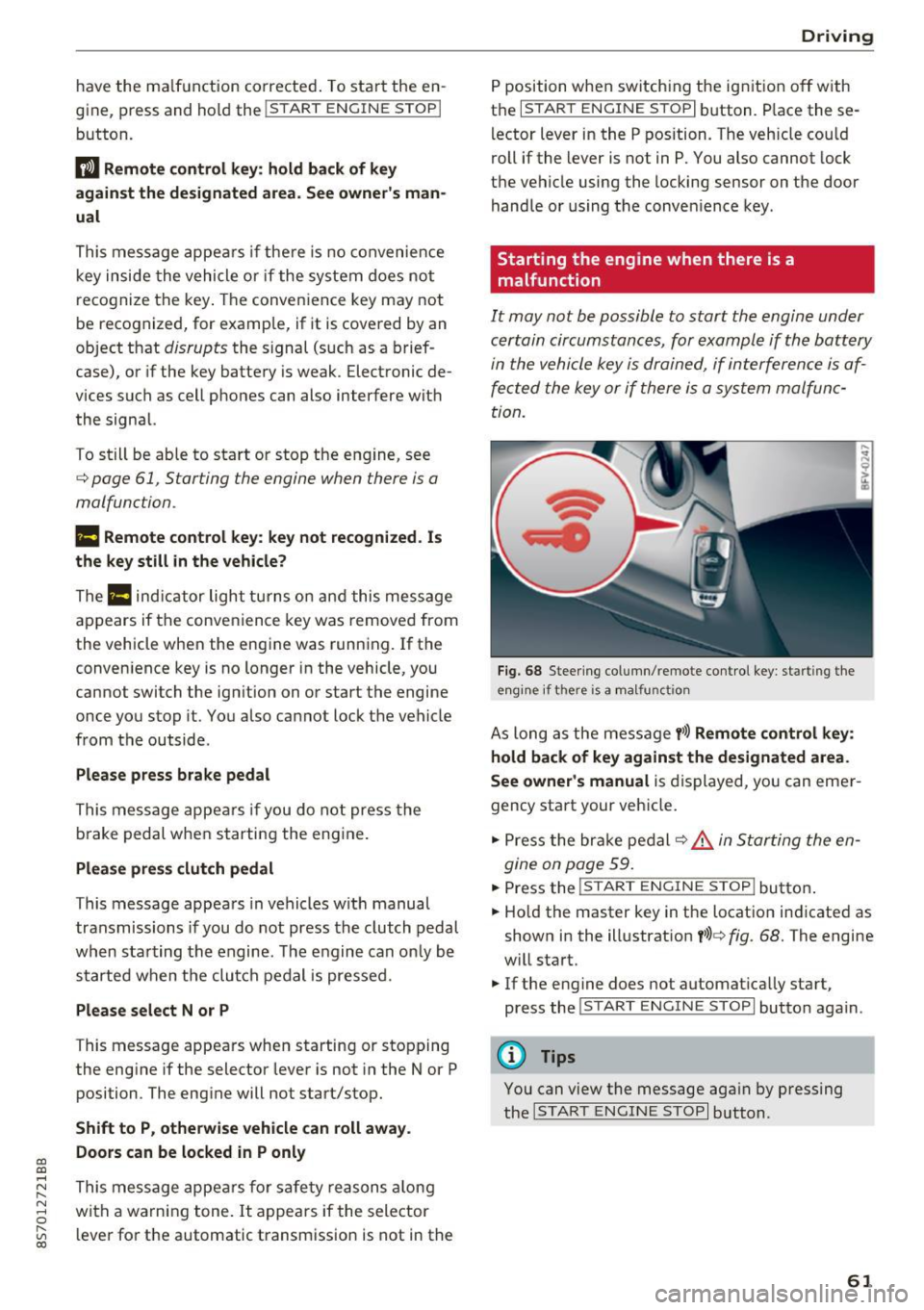
F ig. 68 Steering column/ remote control key: starting the
e n g in e if there is
a m alfunct ion
As long as the message y >l) Remote control key :
hold back of key against the designated are a.
See owner's manual
is displayed, you can emer
gency start your vehicle.
.. Press the brake pedal
c:::> .&. in Starting the en
gine on page 59.
... Press the ~I s=T ~A ~ R~ T~ E_N _G _I _N =E - S~ T= o- P~I button .
.,. Ho ld the master key in the location ind icated as
shown in the illustrat ion
y >l) c:::, fig. 68. The engine
w ill start.
.. If the engine does not automat ica lly start,
press the
! S TART ENGINE STOPI butto n again .
(D Tips
You can view the message aga in by pressing
the
I S TA RT ENGINE S TOP I button.
61
Page 64 of 314
Driving
Electromechanical
parking brake
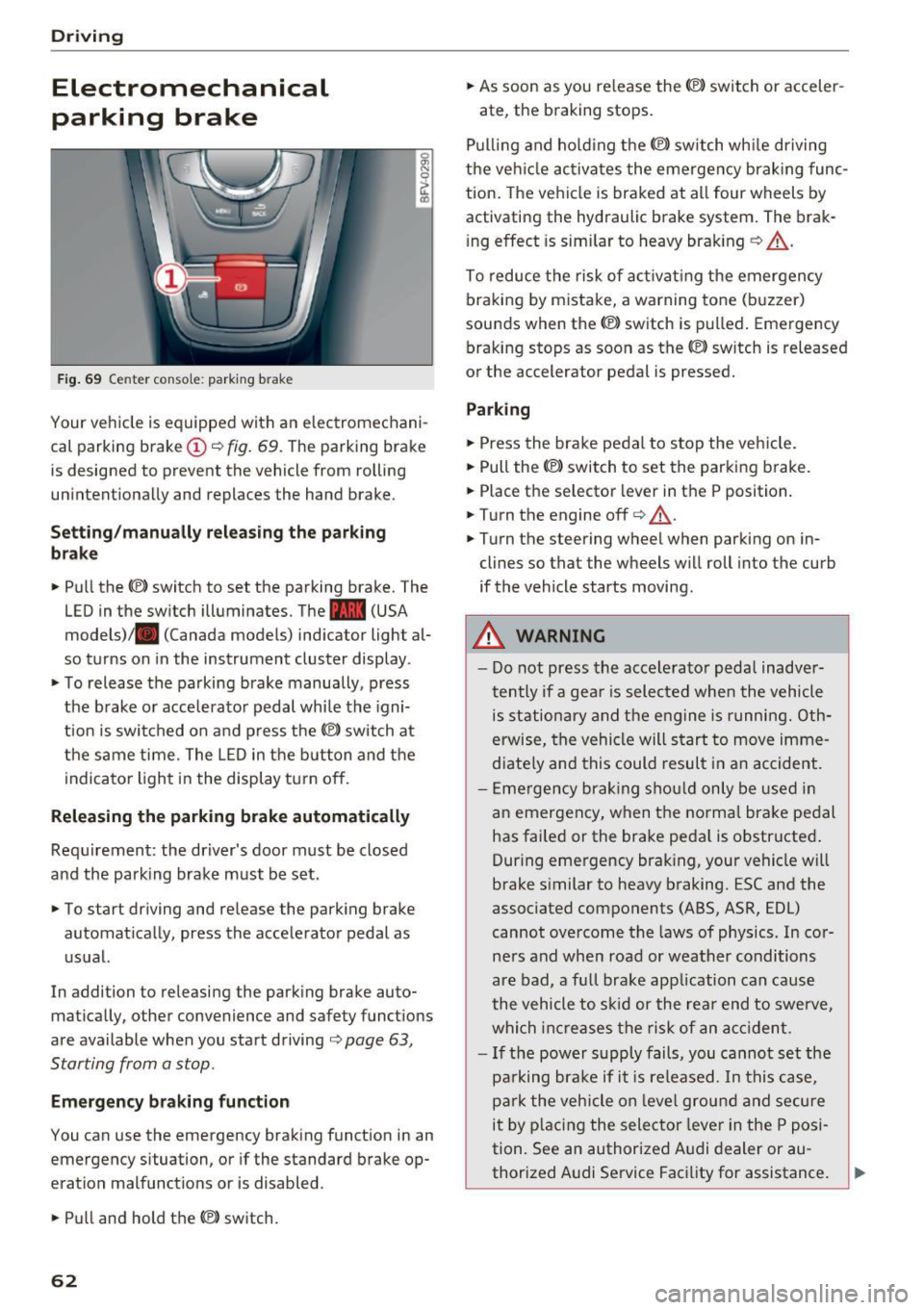
Fig . 69 Center conso le: par king brake
Your vehicle is equipped with an electromechani
cal parking brake
(D o fig. 69. The parking brake
is designed to prevent the vehicle from rolling
unintentionally and replaces the hand brake.
Setting /manuall y re le asing the parking
bra ke
.. Pull the(®) switch to set the parking brake. The
LED in the switch illuminates. The -(USA
models)/ . (Canada models) indicator light al
so turns on in the instrument cluster display .
.. To release the parking brake manua lly, press
the brake o r acce lerato r pedal while the igni
tion is swi tched on a nd p ress the
«el) switch at
the same time. The L ED in the b utton and the
indicator light in the display t urn off.
Releasing the parking brake automatically
Req uirement: the driver's door must be closed
and the park ing brake must be set.
.. To start driving and release the park ing brake
automat ically, press the accelerator pedal as
u su al.
In addition to releasing the park ing brake auto
mat ica lly, other convenience and safety functions
are available when you start driving
o page 63,
Starting from a stop .
Emergency braking function
You can use the emergency brak ing function in an
emergency situation, or if the standard brake op
eration mal functions or is disabled .
.. Pull and hold th e®> switch.
62
.. As soon as you re lease the (®) switch or acceler-
ate, the braking stops.
P ulli ng and ho ld ing the®) switch wh ile driving
the ve hicle ac tiva tes the emerge ncy braking func
tion . The vehi cle is braked at a ll four wheels by
activating the hydraulic brake system . The brak
i ng effect is sim ilar to heavy brak ing
o ,A .
To reduce the risk of act ivat ing the emergency
braking by mistake, a warning tone (buzzer)
sou nds when the© switch is pulled . Emergency
bra king stops as soon as the®) switch is released
or the accelerator pedal is pressed.
Parking
.. Press the bra ke pedal to stop the veh icle.
.. Pull the®> switch to set the parking brake.
.. Place the selector lever in t he P position .
.. Turn the engine off
cc> ,A.
.. Turn the steering wheel when parking on in
cl ines so that the wheels w ill roll into the curb
if the vehicle starts moving.
.&. WARNING
- Do not press the acce lera to r pedal inadve r
tently if a gea r is selec ted whe n the vehicle
is st ation ary and the e ngine is runni ng. Oth
erwise, the vehi cle will s tart to move imme
diate ly and this could result i n an accident.
- E mergency brak ing sho uld only be used i n
an emergency, when the norma l bra ke pe dal
has failed or the brake peda l is o bstr ucted .
During emergency brak ing, your vehicle will
brake s imilar to heavy braking. ESC and the
associated components (ABS, ASR, EDL)
cannot ove rcome the laws of physics. In co r
ners and when road or weather conditions
are bad, a fu ll brake application can cause
the vehicle to s kid or the rea r end to swe rve,
whi ch in crease s the risk of an ac cident.
- I f the power supply fails, you cannot set the
pa rking bra ke if it is released. In this ca se,
p ar k the vehicle on leve l grou nd and secure
it by plac ing the sele ctor lever in the P pos i
tion. See an authorized A udi dealer or au -
thorized A udi Service Facil ity for assistance.
~