light AUDI TT ROADSTER 2018 Owners Manual
[x] Cancel search | Manufacturer: AUDI, Model Year: 2018, Model line: TT ROADSTER, Model: AUDI TT ROADSTER 2018Pages: 310, PDF Size: 46.95 MB
Page 263 of 310
Cl 00 .-< N r-N .-< 0 r-Vl 00
Tire pressure monitoring system
(J_) General notes
Each tire, incl uding the spare (if provided),
should be checked month ly when co ld and inflat
ed to the inf lation pressure recommended by the
ve hicle manufacturer on the vehicle placard or
tire inflat ion pressure label. (If your vehicle has
tires of a d ifferent s ize tha n the s ize indicated on
the veh icle placa rd or t ire inflation pressure la
be l, you s hou ld determine the prope r tir e infla
tion pressure fo r th ose tires).
As an added safety feature, your ve hicle has been
equ ipped w ith a t ire pressu re monito ring system
(TPMS) that ill uminates a low tire p ress ure tell
tale whe n one or more of yo ur t ires is sign ificant
l y unde r-infla ted. Accord ingly, whe n the low tire
p ressure tellta le illuminates, yo u should stop and
check your tires as soon as possible, and inflate
them to the proper press ure. D riving on a signifi
cantly under-inflated tire causes the tire to ove r
h eat and can lead to t ire failure. Under-inflation
a lso reduces fuel efficiency and ti re tread life,
and may affect the veh icle's handling and stop
p ing ability .
P lease note that the TPMS is not a substitute for
proper tire maintenance, and it is the driver's re
sponsib il ity to ma inta in correct tire pressure,
even if u nder-inflation has not reached t he leve l
to tr igger illum inat io n of t he TPM S low tire p res
sure telltale.
Your veh icle has also been equ ipped w ith a TPMS
malfunct ion ind icator to indicate when the sys
tem is not operat ing properly. The TPMS ma l
f u nction ind icator is combined w ith the low tire
p ressure tellta le. Whe n the system det ects a
mal function, the te lltale wi ll flash fo r approxi
mate ly one mi nute and then remain continuous ly
illum inated. This sequence will continue upon
subseq uent ve hicle start-ups as long as the ma l
function ex ists .
W hen t he malfunctio n indicator is ill uminated,
the system may not be ab le to detect or signa l
low t ire press ure as intended. TPMS ma lfunctions
may occur for a var iety of reasons, including the
Wheels
insta llation o f replacement or alternate tires or
whee ls on the vehicle that prevent the TPMS
from functioning p roperly . Always check the
TPMS ma lfunction te lltale after replac ing one or
more tires or wheels on you r vehicle to ensure
t h at the rep lacement or a lternate tires a nd
wheels allow t he TPMS to continue to function
prope rly.
If the Tire Pressure Monitoring System
indicator appears
Applies to: vehicles with Tire Pressure Monitoring System in
dicator
The tire pressure indicator in the instrument
cluster informs you if the tire pressure is too low
or if there is a system malfunction.
U sing the ABS se nsors, the t ire pressure monitor
ing system compares the tire tread c ircumfer
ence and v ibration characterist ics of the ind ividu
al tires. If the pressu re changes in one o r more
t ir es, th is is indica ted in the Info tainment sys tem
display wi th an indica to r li ght
ti] and a message.
If only one ti re is affected, the location of tha t
tire will be indicated.
T he tire press ures mus t be store d in the Infota in
me nt system agai n ea ch t ime t he p ressures
change (switching between partia l and full load
pressure) or after c hanging or replacing a tire on
yo ur vehicle
¢ page 262 . The tire pressure moni
toring system on ly monitors the tire pressure you
have stored. Refer to the t ire pressure label for
the recommended t ire pressure for your vehicle
¢ page 254, fig . 190 .
Tire tread c ircumference and vibration character
istics can change and cause a tire pressu re warn
i ng if:
- the ti re pressure in one or more tires is too low
- the tire has str uctural damage
- t he t ire w as replaced or the t ire pressu re w as
changed and it was no t stored ¢
page 262
- the spare tire* is i nstalled
Indicator lights
ti] -loss of pressure in at least one tire ¢,& .
Check the t ires and replace or repair if necessary.
Check/correct the pressures of all fou r tires and
.,.
261
Page 264 of 310
Wheels
store the pressure again in the Infotainment sys
tem
i::> page 262 .
mm (Tir e Pr essure Monitoring System) Tire
pressure: malfunction! See owner's manual -
if
mm appears after switching on the ignition or
while driving and then the
[DJ indicator light in
the instrument cluster also starts to blink for
about one minute and then stays on permanen t
ly, there is a system malfunction. Try to store the
correct tire pressures
<=:> page 262 . If the indica
tor light does turn off or turns on again after a
short period of time, drive to an authorized Audi
dealer or authorized Aud i Serv ice Facility immedi
ately to have the malfunction corrected .
_& WARNING
-If the tire pressure indicator appears in the
display, reduce your speed immediately and
avoid any hard steering or braking maneu
vers. Stop as soon as possible and check the
tires and their pressure.
- The driver is responsible for maintaining the
correct tire pressures. You must check the
tire pressures regularly.
-Under certain conditions (such as a sporty
driving style, winter conditions or unpaved
roads), the pressure monitor indicator may
be delayed .
- Do not use run-flat tires on your vehicle. Us
ing them when not permitted can lead to
vehicle damage or accidents .
(D Tips
- The tire pressure monitoring system can al
so stop working when there is an ESC mal
function.
- Using snow chains may result in a system
malfunction.
- The tires with the identification
"AO"
¢page 251 have been matched with your
Audi tire pressure monitoring system . Using
these tires is recommended.
262
Storing tire pressures
Applies to: vehicles with Tire P ressure Monitoring System in
dicator
If the t ire pr essure chang es or a tire is replaced ,
it must be confirmed in the Infotainment sys
tem.
.,. Make sure before storing that the tire pressures
of all four tires meet the specified values and
a re adapted to the load
<=:>page 253.
.,. Switch the ignition on.
.,. Select in the Infotainment system : the!M ENUI
button > Vehicle > left control button > Service
& checks> Tire pressure monitoring .
(D Tips
Do not store the tire pressures if snow chains
are installed .
Tire pressure monitoring
system
ill General notes
Each tire, including the spare (if provided),
should be checked monthly when cold and inflat
ed to the inflation pressure recommended by the
vehicle manufacturer on the vehicle placard or
tire inflation pressure label. (If your vehicle has
tires of a different size than the size indicated on
the vehicle placard or tir e inflation pr essure la
bel, you should determine the proper tire infla
tion pressure for those tires).
As an added safety feature, your vehicle has been
equipped with a tire pressure monitoring system
( T PMS) that illuminates a low tire pressure tell
tale when one or more of you r tires is significant
ly under-inflated. Accordingly, when the low tire
pressure telltale illuminates, you should stop and
check your tires as soon as possible, and inflate
them to the proper pressure . Driving on a signifi
cant ly under-inflated t ire causes the tire to over
heat and can lead to tire failur e. Under-inflation
also reduces fuel efficiency and tire tread life,
and may affect the vehicle's handling and stop-
ping ability.
..,.
Page 266 of 310
Wheels
Displaying tire pressures/temperatures
Applies to: vehicles with tire pressure monitoring system
Requirement: you must be d rivi ng the veh icle .
"'Se lect in the Infotainment system: IMENU I but
ton
> Service & checks > Tire pre ssur e monitor
ing > Di splay tire pressure.
- Green:
the current tire pressure and the speci
fied t ire pressure are approximately the same .
-Yellow: the current tire pressure is too low
compared to the specified tire pressure .
The specified tire press ure is the last tire pres
sure that was stored
c> page 264.
Note that t he tire p ressure also de pends on the
temperature of the tire . The tire press ure in
creases as the engine becomes wa rmer whi le
driving.
A WARNING
Read and follow the important information
and notes
c> page 263.
(D Tips
The tire pressure or temperature is not d is
played while the veh icle is stationary and in
adaptation mode. Dashes --.--are shown in
place of the pressu re and temperature.
(D Tire pressure loss
Applies to: vehicles with tire pressure monitoring system
-
If the Rt] indicato r light turns on, the p ressure in
at least one t ire is too low o r new sensors we re
not adapted :
[I] indicator lights turns on after turning the
ignition on
The tire pressure is too low compared to the
specified p ressure.
"' Check and store the t ire pressure(s) the next
time it is poss ible
c> page 264 .
[I] indicator light turns on while dri ving
Wheels with new sensors were not adapted or
the t ire pressure has reached a critical leve l com
pared to the specified pressure .
264
"'Avoid unnecessary steering and brak ing maneu -
vers .
"'Adapt your dr iving sty le to the s ituation.
"' Stop as soon as possible and check the tire(s).
"'If it is possib le to continue driv ing, see an au-
thorized Audi dealer or authorized Aud i Service
Facility immediately and have your tire(s) re
pa ired o r rep laced .
A WARNING
Read and fo llow the impo rtant info rmation
and n otes
c>page 263.
Storing new tire pressures
Applies to: vehicles with tire pressure monitoring system
Correctly stored tire pressure specifications are
necessary for reliable tire pressure monitoring.
-
It is always necessary to store the t ire pressures
whe n the t ire pressu res a re modified, fo r exam
ple d ue to a change in load . o r when new senso rs
a re installed.
"' Before storing the t ire pressures, make su re the
tire pressures of all four t ires meet the spec i
fied va lues and are adapted to t he load
c::> page 254, fig. 190 . Only correct and store
the pressure in tires whose temperature is ap
proximate ly the same as the ambient tempera
t u re . If the temperature of the tire is higher
than the ambient air temperature, the tire pressure must be increased approximately
3.0 PSI (0.2 bar) above the value on the st icker.
"' Switch the ignit ion on .
"'Select in the Infotainment system : IMENU! but
ton
> Service & checks > Tire pressure monitor
ing > Store tire pre ssure > Ye s, store now .
Af
ter storing the t ire pressures, the t ire press ure
mon itor ing system measures the c urrent pres
sures while driving and stores them as the new
specified pressures .
"'If the changed tire pressures are not displayed
in the Infotainment system, drive the vehicle
for approximately 10 minutes so that the sen sor signa l from the wheels is received again .
During this adaptation phase, -- .- - is d isplayed
for the pressure and temperature and the tire pressure monitoring system is on ly partially
Page 267 of 310
![AUDI TT ROADSTER 2018 Owners Manual Cl 00 .-< N r-N .-< 0 r-Vl 00
availab le . It only provides a warning if one o r
more tire pressures is be low the minimum per
mitted specif ied pressure .
If the
[I] indica to r l](/img/6/57668/w960_57668-266.png "AUDI TT ROADSTER 2018 Owners Manual Cl 00 .-< N r-N .-< 0 r-Vl 00
availab le . It only provides a warning if one o r
more tire pressures is be low the minimum per
mitted specif ied pressure .
If the
[I] indica to r l")
Cl 00 .-< N r-N .-< 0 r-Vl 00
availab le . It only provides a warning if one o r
more tire pressures is be low the minimum per
mitted specif ied pressure .
If the
[I] indica to r lig ht turns on and the mes
sage
Tire pressure: wheel change detected .
Please check all tires and store pressures in
MMI also appears, the system has detected that
the posit ion of the sensors has changed because
of a tire rotation, or that new sensors were in
stalled . Store the new tire pressures.
A WARNING -
Read and follow the important informa tion
and notes<=;>
page 263.
Malfunctions
App lies to: ve hicles with tire press ure m onitoring system
If t he tire pressure monitoring system is not
available, the
m;i ind icat or light appears in the
in str ument cluster display along with th e mes
sage
Tire pressure: malfunction! See owner's
manual.
I f the @m in dica tor light appears after switch
ing the ignition on or while dr iv in g and the
[I] in
d icator light also blinks for approximate ly one
minute and t hen stays on, there is system ma l
function. The following are examples of sit ua
tions that cou ld cause a malfunction:
-If the message appears at the end o f the adap
tation phase, the system may not detect one or
severa l of the wheel senso rs necessa ry for pres
s ur e monitoring. This may result from one or
more wheels being installed without wheel sen
sors or with incompatible wheel sensors .
- A wheel sensor o r another component has
failed.
- Using snow cha ins can affect the f unction of
the system because of the shie lding effect of
the cha ins.
- The tire pressure monitor ing system is not
available due to a malfunction.
- Transmitters with the same frequency, such as
headphones or remote-controlled dev ices, may
cause a temporary system malfunction due to
the strong electromagnetic field .
Wheels
The m;i indicator lig ht and the message turn off
once the tire pressure monitoring system is avail
able again. If you cannot co rrect the malfunction
and
the m indicator light stays on, drive imme
diately to an authorized Audi dea ler or author
ized Audi Se rvice Facility to have the malfunct ion
repaired.
265
Page 268 of 310
Care and cleaning
Care and cleaning
General information
Regular, proper care helps to maintain your vehi
cle's value. It can also be a requirement when
submitting warranty claims for corrosion damage
and paint defects on the body.
The necessary care products can be obtained
from an authorized Audi dea ler or authorized
Audi Service Facility. Read and follow the instruc
tions for use on the packaging.
A WARNING
-Using cleaning and care products incorrectly
can be dangerous to your health.
- Always store clean ing and care products out
of reach of children to reduce the r isk of poi
sonin g.
@ For the sake of the environment
- Preferab ly purchase environmenta lly-friend
l y cleaning products.
- Do not dispose of leftover cleaning and care
products with household trash.
Car washes
The longer that deposits remain on the vehicle,
the more the surface may be damaged. High
temperatures such as those caused by sunlight increase the damaging effect .
Before washing, rinse
off heavy deposits with
p lenty of water.
Stubborn deposits such as bird droppings or tree
sap are best removed with plenty of water and a
microfiber cloth.
A lso, wash the underside of yo ur vehicle once
road sa lt stops being used for the season.
Pressure washers
When washing your veh icle w ith a pressure wash
er, always follow the operating instructions pro
vided with the press ure washer. This is espec ially
impor tant in r egard to the pressure and spraying
distance. Do not direct th e stream of water di
rect ly onto seals for the side windows, doors,
266
lug gage compartment lid or hood, or onto the
tires, rubber hoses, insulating material, sensors*
or camera lenses* . Keep a distance of at least 16
i n
(40 cm).
Do not remove snow and ice with a pressure
washer.
Never use cone nozz les or high pressure nozzles.
The water temperature must not be above
140 °F
(60 °() .
Automatic car washes
Spray off the vehicle before washing.
Make sure that the windows are closed and the
winds hield wipers are
off. Follow instructions
from the car wash operator, espec ia lly if there
are accessories attached to your veh icle.
If possible, use car washes that do not have
brushes.
Washing by hand
Clean the vehicl e starting from the top and work
in g down using a soft sponge or cl eaning br ush.
Use solvent-free cleaning products.
Washing vehicles with matte finish paint by
hand
To avoid damaging the paint when washing, first
remove dust and large part icles from you r vehi
cle. Insects, grease spots and fingerprints are
best removed with a special cleaner for matte
finish paint.
Apply t he product using a microfiber cloth. To
avoid damaging th e paint surface, do not use too
much pressure.
R inse the vehicl e thoroughly with wate r. Then
clean using a neutra l shampoo and a soft micro
f iber cloth .
Rinse the vehicl e thoroughly again and let it air
dry. Remove any water residue using a chamois.
A WARNING
-Only wash the vehicle when the ignition is
off and follow the instructions from the car
-
Page 269 of 310
Cl 00 .-< N r--N .-< 0 r--Vl 00
wash operator to reduce the risk of acci
dents.
- To reduce the risk of cuts, protect yourself
from sharp metal components when wash ing the underbody or the inside of the wheel
hous ings.
- After wash ing the vehicle, the brak ing effect
may be delayed due to mo isture on the
brake rotors or ice in the w inter . This in
c reases the risk of an acc ident. The brakes
must be d ried fi rst w it h a few careful b rake
applications.
@ Note
- If you wash the vehicle in an automatic car
wash, you m ust retract the extendable rear
spo ile r* if necessary, and fold the exter ior
mir rors in to red uce the r isk of damage.
Power folding exte rior m irrors* must o nly
be fo lde d in a nd out u sing the power folding
f unct ion .
- To reduce the risk of p ain t d amage, do no t
wash the vehi cle i n di rect sunlig ht.
Care and cleaning
- T o red uce the risk of damage, do not was h
the power top with a pressure washer.
- T o red uce the risk of damage to the s urface,
do not use insect removing sponges, kitchen
sponges or similar items .
- Mat te finish painted veh icle components:
- To reduce the risk of damage to t he sur-
face, do not use po lish ing agents or hard
wax.
- Never use protective wax. It can destroy
the matte finish effect .
- Do not place any stickers or magnetic
signs on vehicle parts painted with matte
finish paint. The paint cou ld be damaged
when the stickers or magnets are re
moved.
@ For the sake of the environment
Only wash the vehicle in facilities spec ially de
s igned for that pu rpose . This will reduce the
r isk of di rty wate r contam inated with o il from
ente ring the sewe r sys tem.
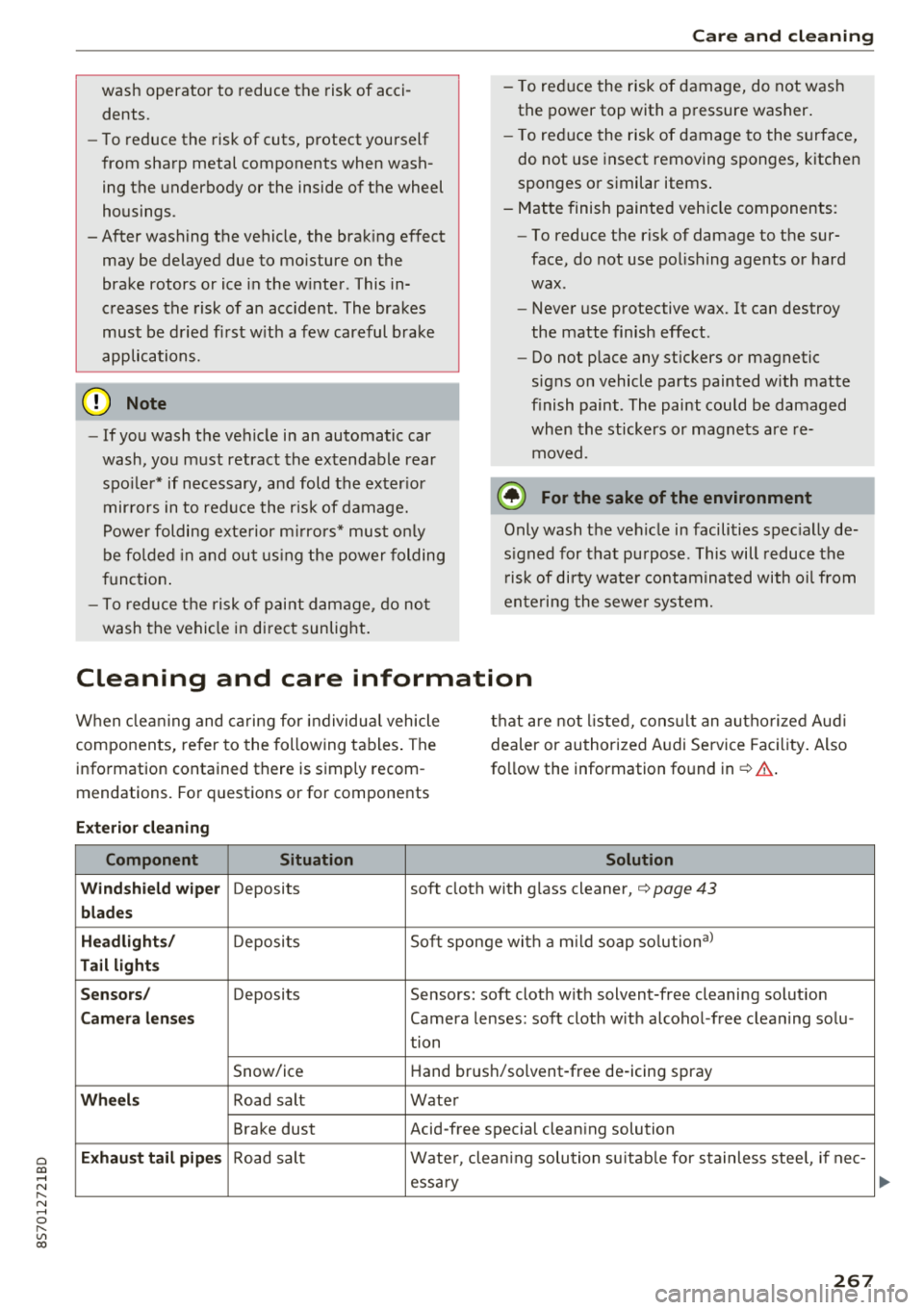
Cleaning and care information
When cleani ng and ca ring for individua l vehicle
components, refer to the following tables . The
information contained there is simp ly recom
mendations. For questions or for components t
h at are not l isted, cons ult an autho rized Aud i
dealer or authorized A udi Se rvice Fac ility . Also
fo llow the information fo und
in ¢& .
Ext erior cleaning
Component Situation Solution
Windshield wiper
Deposits soft cloth with glass cleaner, ¢ page 43
blades
Headli ghts/
Deposits Soft sponge with a m
ild soap so lutiona )
Tail light s
Se nsors /
Deposits Sensors: soft cloth with solvent-free cleaning solut ion
Cam era len ses Camera lenses: soft cloth w ith alcohol -free cleaning solu -
tion
Snow/ice Hand brush/solvent-free de-icing spray
Wheels Road salt Water
Brake dust Acid-free special clean ing solution
Exhaust tai l pipes Road salt Water, clea ning solution su itab le for stainless stee l, if nee-
essa ry
267
Page 271 of 310
Cl 00 ... N r--N ... 0 r--Vl 00
Care and cleaning
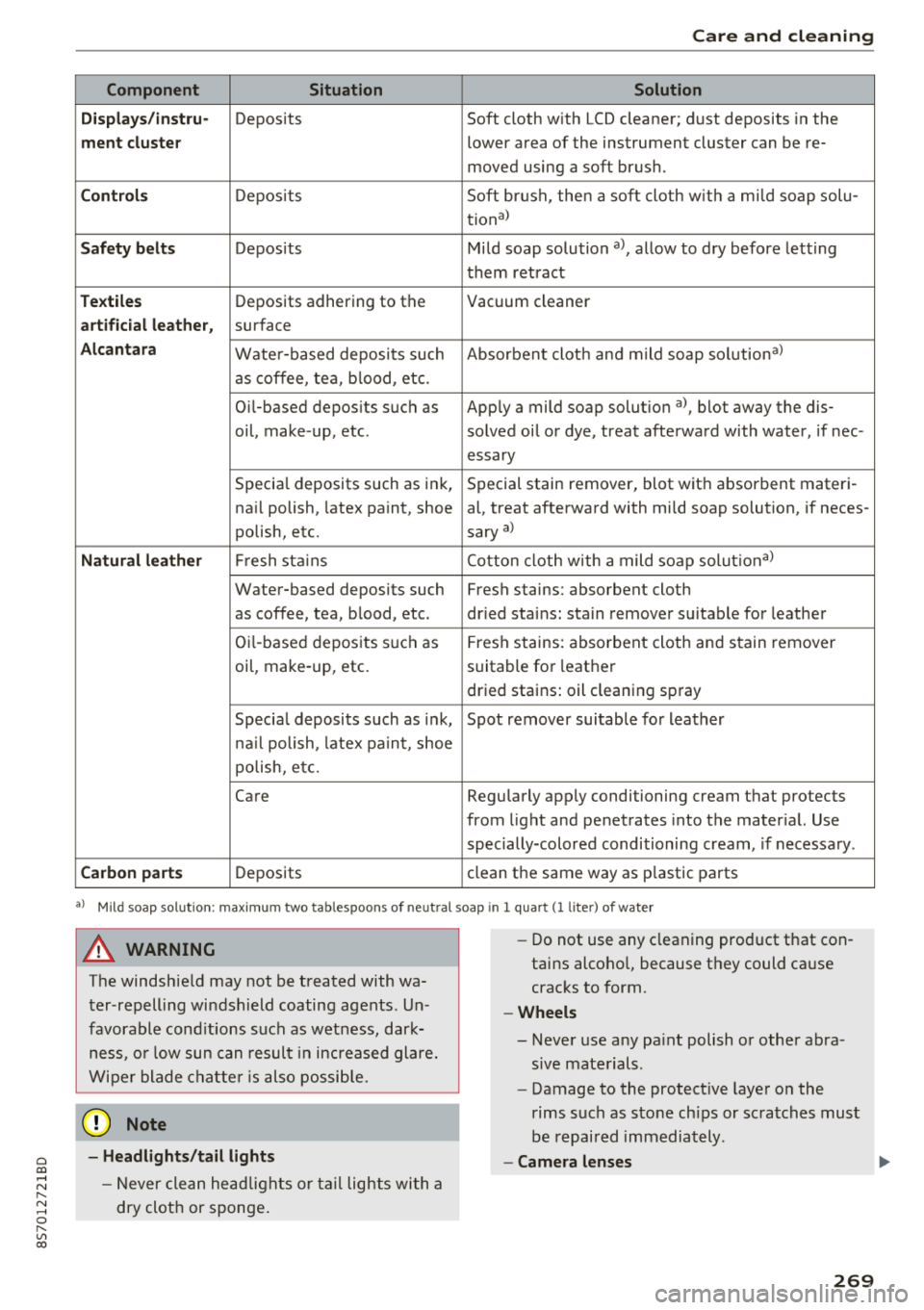
Component Situation Solution
Displays /instru·
Deposits Soft cloth with LCD cleaner; dust deposits in the
ment cluster lower area of the instrument cluster can be re-
moved using a soft brush.
Controls Deposits Soft
brush, then a soft cloth with a mild soap solu-
tiona)
Safety belts Deposits Mild soap solution a), allow to dry before letting
them retract
Textiles Deposits adhering to the
Vacuum cleaner
artificial leather, surface
Alcantara Water-based deposits such Absorbent clot
h and mild soap solutiona)
as coffee, tea, blood, etc.
O il-based deposits such as Apply a mild soap solut ion
a ), blot away the dis-
oil, make -up, etc. solved oil or dye, treat afterward with water, if nee-
essary
Specia l deposits such as ink, Special stain remover, blot wit h absorbent materi -
nail polish, latex paint, shoe al, treat afterward with mi ld soap solution, if neces -
polish, etc. sary
a)
Natural leather Fr
esh stains Cotton cloth
with a mild soap solutiona)
Water-based deposits such Fresh stains: absorbent cloth
as coffee, tea, blood, etc . dried sta ins: sta in remover suitable for leather
Oi l-based deposits such as
Fresh stains: absorbent cloth and stain remover
oil, make-up, etc. suitable for leather
dried stains: oil cleaning spray
Special deposits such as ink , Spot remover suitable for leather
nail polish, latex paint, shoe
polish, etc.
Care Regularly apply conditioning cream that protects
from light and penetrates into the mater ial. Use
specially-colored conditioning cream, if necessary .
Carbon parts Deposits clean
the same way as p lastic parts
a) Mild soap so lution: maximum two tablespoons of ne utra l soap in l quart (1 lite r) of wate r
A WARNING
The windsh ield may not be treated with wa
ter-repelling windshield coating agents. Un
favorable conditions such as wetness, dark
ness, or low sun can result in increased glare.
Wiper blade chatter is also possible.
0 Note
-Headlights/tail lights
-Never clean headlights or tail lights wi th a
dry cloth or sponge .
-
-Do not use any cleaning product that con
tains alcoho l, because they could ca use
cracks to form.
- Wheels
-Never use any paint polish or other abra-
sive materials.
-Damage to the protective layer o n the
rims such as stone chips or scratches must
be repaired immediately.
-Camera lenses
269
Page 272 of 310
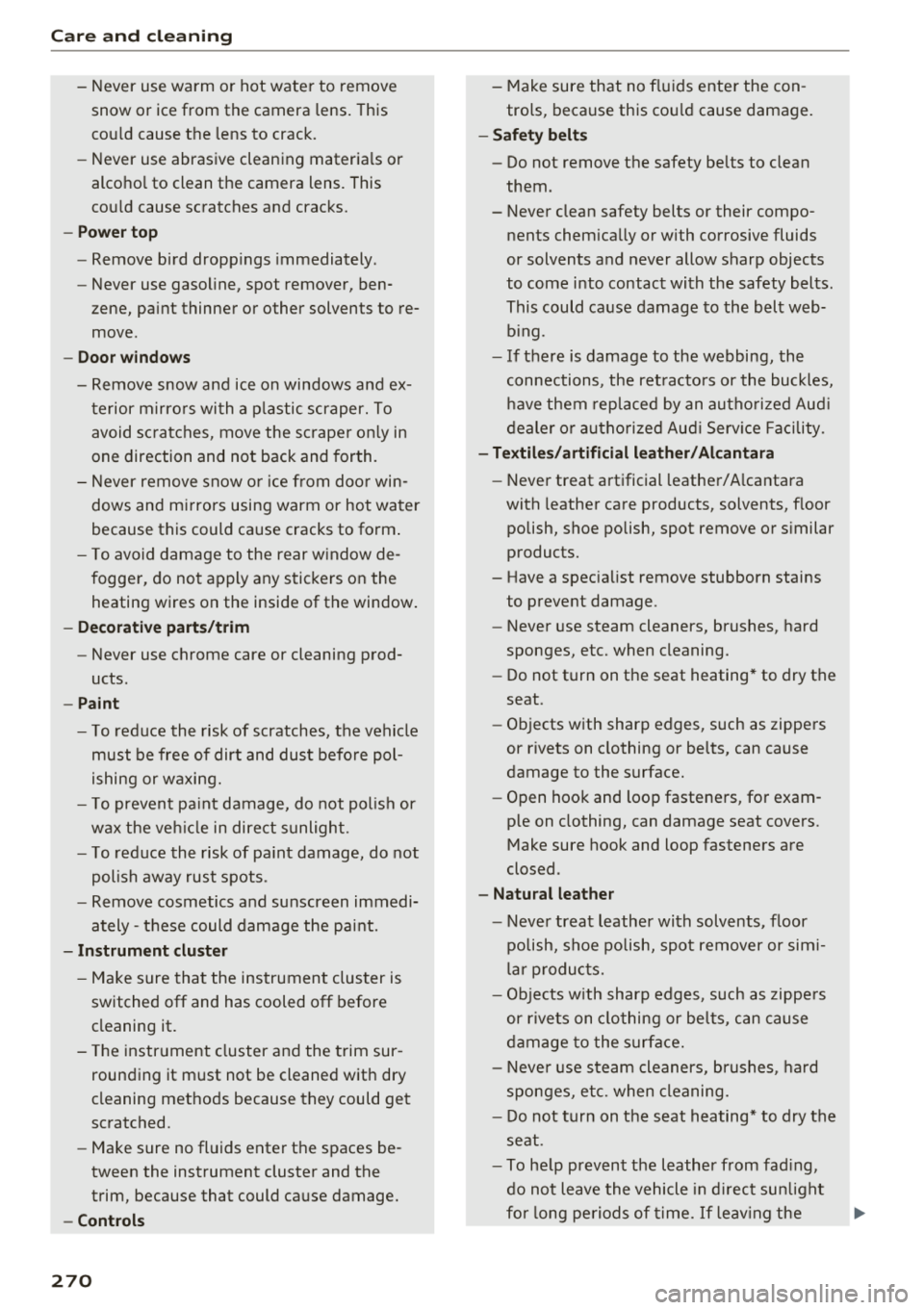
Care and cleaning
- Never use warm or hot water to remove
snow or ice from the camera lens. This
could cause the lens to crack.
- Never use abrasive cleaning materials or
alcohol to clean the camera lens. This
could cause scratches and cracks.
- Power top
- Remove bird droppings immediately.
- Never use gasoline, spot remover, ben-
zene, paint thinner or other solvents to re
move .
-Door windows
- Remove snow and ice on windows and ex-
terior mirrors with a plastic scraper. To
avoid scratches, move the scraper only in
one direction and not back and forth.
- Never remove snow or ice from door win
dows and mirrors using warm or hot water
because this could cause cracks to form.
- To avoid damage to the rear window de
fogger, do not apply any stickers on the heating wires on the inside of the window.
- Decorative parts/trim
- Never use chrome care or cleaning prod-
ucts .
-Paint
-To reduce the risk of scratches, the vehicle
must be free of dirt and dust before pol
ishing or waxing.
- To prevent paint damage, do not polish or
wax the vehicle in direct sunlight.
- To reduce the risk of paint damage, do not
polish away rust spots .
- Remove cosmetics and sunscreen immedi
ately - these could damage the paint.
- Instrument cluster
- Make sure that the instrument cluster is
switched off and has cooled off before
cleaning it.
- The instrument cluster and the trim sur
rounding it must not be cleaned with dry
cleaning methods because they could get
scratched.
- Make sure no fluids enter the spaces be
tween the instrument cluster and the
trim, because that could cause damage.
- Controls
270
- Make sure that no fluids enter the con
trols, because this could cause damage.
- Safety belts
- Do not remove the safety belts to clean
them.
- Never clean safety belts or their compo
nents chemically or with corrosive fluids
or solvents and never allow sharp objects
to come into contact with the safety belts.
This could cause damage to the belt web
bing.
- If there is damage to the webbing, the
connections, the retractors or the buckles, have them replaced by an authorized Audi
dealer or authorized Audi Service Facility .
-Textiles/artificial leather/ Alcantara
- Never treat artificial leather/ Alcantara
with leather care products, solvents, floor
polish, shoe polish, spot remove or similar
products.
- Have a specialist remove stubborn stains
to prevent damage .
- Never use steam cleaners, brushes, hard
sponges, etc. when cleaning.
-Do not turn on the seat heating* to dry the
seat.
- Objects with sharp edges, such as zippers
or rivets on clothing or belts, can cause
damage to the surface.
- Open hook and loop fasteners , for exam
ple on clothing, can damage seat covers .
Make sure hook and loop fasteners are
closed.
- Natural leather
- Never treat leather with solvents, floor
polish, shoe polish, spot remover or simi
lar products.
- Objects with sharp edges, such as zippers
or rivets on clothing or belts, can cause
damage to the surface.
- Never use steam cleaners, brushes, hard
sponges, etc. when cleaning.
- Do not turn on the seat heating* to dry the
seat .
- To help prevent the leather from fading,
do not leave the vehicle in direct sunlight
for long periods of time. If leaving the
Page 273 of 310
Cl 00 .-< N r-N .-< 0 r-Vl 00
vehicle parked for long periods of time,
you should cover the leather to protect it
from direct sunlight .
(D Tips
-Insects are easier to remove from paint that
has been fresh ly waxed.
- Regular waxing can prevent rust spots from
forming.
Placing your vehicle out
of service
If you would like to take your vehicle out of serv
ice for a longer period of time, contact an author
ized Audi dealer or authorized Audi Service Facili
ty . They w ill advise you of important measures,
such as corros ion protection, service and storage
procedures. Also follow the information about
the vehicle battery.
Care and cleaning
271
Page 278 of 310
Emerg enc y assis ta nce
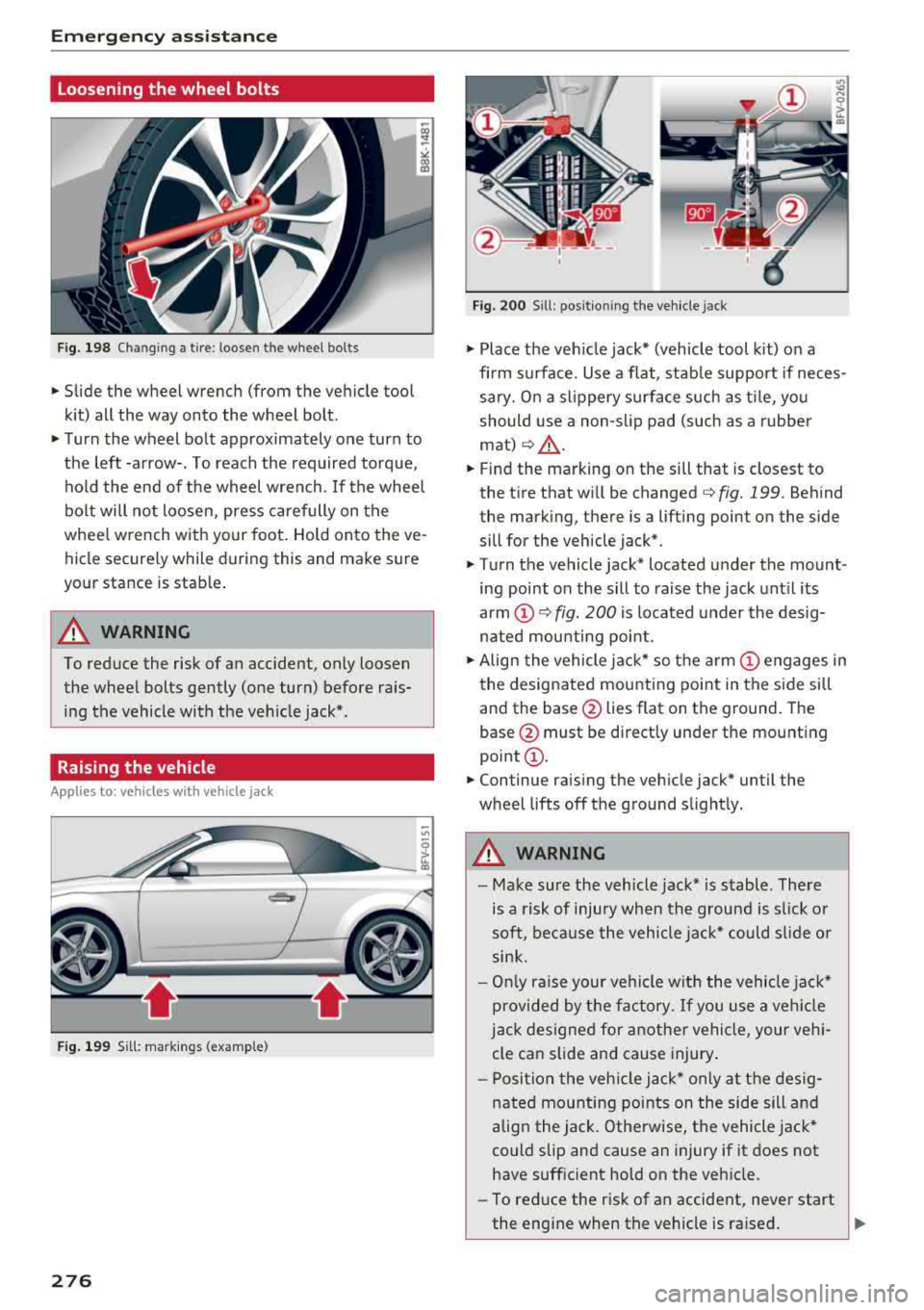
Loosening the wheel bolts
Fig. 198 Chan gin g a tire : loosen t he wheel bolts
.,. Slide the wheel wrench (from the vehicle tool
k it) all the way onto the wheel bolt.
.,. Turn the wheel bolt approximately one turn to
the left -arrow-. To reach the required torque, hold the end of the wheel wrench. If the wheel
bolt will not loosen, press carefully on the
whee l wrench with your foot. Hold onto the ve
hicle securely while during this and make sure
your stance is stable .
A WARNING
To reduce the risk of an accident, only loosen
the wheel bolts gently (one turn) before rais
ing the vehicle with the veh icle jack*.
Raising the vehicle
A ppl ies to: ve hicles w ith vehicle jack
- ,t.------,:
Fig. 199 Sill: markings (examp le)
276
Fig. 200 S ill : pos ition ing the vehicle jack
.,. Place the veh icle jack* (vehicle tool kit) on a
firm s urface. Use a f lat, stab le support if neces
sary. On a slippery surface such as ti le, you
should use a non-slip pad (such as a rubber
mat) <=>& .
.,. Find the marking on the sill that is closest to
the tire that will be changed
c> fig. 199. Behind
the marking, there is a lifting point on the side
sill for the vehicle jack* .
.,. Turn the vehicle jack* located u nder the mount
ing point on the sill to raise the jack until its
arm
(D c> fig. 200 i s located under the desig
nated mou nting point .
.,. Align the vehicle jack* so the a rm (!) engages in
the designated mounting point in the side sill
and the base @lies flat on the ground. The
base @ must be directly under the mounting
point @.
.,. Continue raising the vehicle jack* until the
wheel lifts off the ground slightly.
A WARNING
- Make sure the vehicle jack* is stable . There
is a risk of injury when the ground is s lick or
soft, because the vehicle jac k* could sl ide or
sink.
- On ly raise your vehicle w ith the vehicle jac k*
provided by the factory. If you use a ve hicle
j a ck designed for anothe r vehicle, your veh i
cle can slide and cause injury .
- Posi tion the veh icle jack* only at the des ig
nated mounting points on the side sill and
align the jack . Otherwise, the vehicle jack*
could slip and cause an injury if it does not
have sufficient hold on the vehicle.
- To reduce the risk of an accident, never start
the engine when the vehicle is ra ised.