radio AUDI TT ROADSTER 2018 User Guide
[x] Cancel search | Manufacturer: AUDI, Model Year: 2018, Model line: TT ROADSTER, Model: AUDI TT ROADSTER 2018Pages: 310, PDF Size: 46.95 MB
Page 117 of 310
Accepting/ending a call
Applies to: vehicles with telephone
-Ac cepting a call : sele ct and confirm A ccept
call .
- Declining a call :
select and confirm Decline .
- Muting th e active call:
select and confirm
Mute .
- Ending a phone call /cancel dialing:
select a nd
confirm
End call . Or : press the cont rol knob .
Accepting another call : see ¢ page 115, During
a phone call.
Caller information: the name, phone number or
Unknown appears in t he Infotainment system
d isp lay depending on if the caller has bee n sto red
i n the directory and if the phone number has
been transm itted . A p icture may also be dis
p layed, depend ing on whether yo u have ass igned
a pict ure to a contac t in you r d irec to ry and if it
was tr ansfer red to your M MI. Yo u can find ou t if
your cell phone supports this fu n cti on from yo ur
cell phone network prov ide r, yo ur cell ph one
owner 's manual o r at www .a ud iusa .com/
b luetoot h.
(D Tips
The radio o r me dia pla yba ck is mu ted during a
p hone ca ll.
During a phone call
Applies to: vehicles with telephone
Re qu irement: the re must be a call in pro gress .
.,. Press t he righ t contro l bu tton.
The fo llow ing opt ions are possib le dur ing a call
d epend ing on the ce ll phone bei ng use d an d t he
t ype o f con necti on:
- Making an additional call : selec t: Find contact
> Call li st / Directory /Favorites > an entry from
the lis t.
- Accepting an incoming call when there is an
active call and a call on hold :
select Replace .
The acti ve call i s repl aced with the inc oming
~ call. .-<
~ - Answering an additional call : if the re is a n in -N
8 coming ca ll w hile an othe r call is active, yo u ca n r--Vl 00
Telephone
select Accept call to put the ex isting call on
hold and answe r th e incoming ca ll. If you select
Decline , the incom ing call will be decl ined.
Addi tiona l functi ons include:
Mute : if you select and confi rm this f unction, the
othe r person on the p ho ne can not hear you . Y ou
ca n hear the other pers on .
Hold call /Resume : you can place the ex isting call
o n hold and res ume it aga in . To res ume the call,
select and co nfir m the call you would like to re
s u me .
Transfer call to mobile device *: select and con
firm
Transfer call to mobile device to transfer
t h e e xis ti ng c all fro m the M MI to yo ur cell phone .
Switch to hands-free mode *: Req uirement: you
mus t have a p ho ne call in p rogress on you r ce ll
phone . Se lect and confirm
Switch to hands-free
mode
t o t ransfe r th e ca ll from your cell p ho ne to
t h e MM I.
Swap call : alte rn ate be tween two phone calls
wh ile one of the calls is o n hold . Se lecting
End
call will e nd th e ac tive phone ca ll. A ph one call on
ho ld ca n be resumed using the righ t con trol bu t
t on
> Resume .
Add to conference :
a party on hol d and up to five
a ctive pa rties ( depend ing on the ne twor k) ca n b e
adde d to a c onferen ce call . T o m ake an ad ditio nal
c all , put al l p articip ants in t he cur rent con feren ce
ca ll on hold using the right cont ro l but ton
> Hold
conference.
Press the left cont rol button. Se lect
and confirm
Call list /Directory /Favorites > an
entry from the list .
You can add called contacts
to the confe rence using the right contro l butto n
> Add to conference . Resume takes all pa rt ies off
hold .
Multi-party calling : select the right cont rol b ut
ton
> Telephone settings > Call options . When
t h e function is switc hed
o n~ you can accept a n
additional ca ll us ing
Accept call or decline a ca ll
u sing
Decline . When the function is sw itched off,
yo u can Replace th e c all or Decline .
Connection manager:
see ¢ page 174 .
Telephone settings : see ¢page 121 .
115
Page 121 of 310
Cl co .... N ,....
N ...... 0 ,....
Vl co
-Dialing the voicemail number : select and con
firm
Voicemail.
(D Tips
- This service must be set up and act ivated in
advance by the cell phone service provider.
You can obtain more information from your
ce ll phone service prov ider.
-The voicemai l number depends on the cell
phone service provider.
Emergency call functions
Appl ies to: vehicles with te le phone
~ Select : I MENU I button >Telephone > left con
trol button >
Enter number > Enter emergency
coll number (for example, 911)
> OK .
A WARNING
-Because your phone works with radio sig
nals, a connection cannot be guaranteed un
der all circumstances . Do not rely on only
your phone when it comes to essent ial com
munication (such as a medica l emergency).
-Always follow the instructions given by the
emergency personnel during an emergency call and only end the call when they instruct
you to do so.
@ Tips
Emergency numbers are not the same every
where. Find out which emergency number is used in your current locat ion.
Telephone
Directory
Opening the directory
Applies to: vehicles with telephone
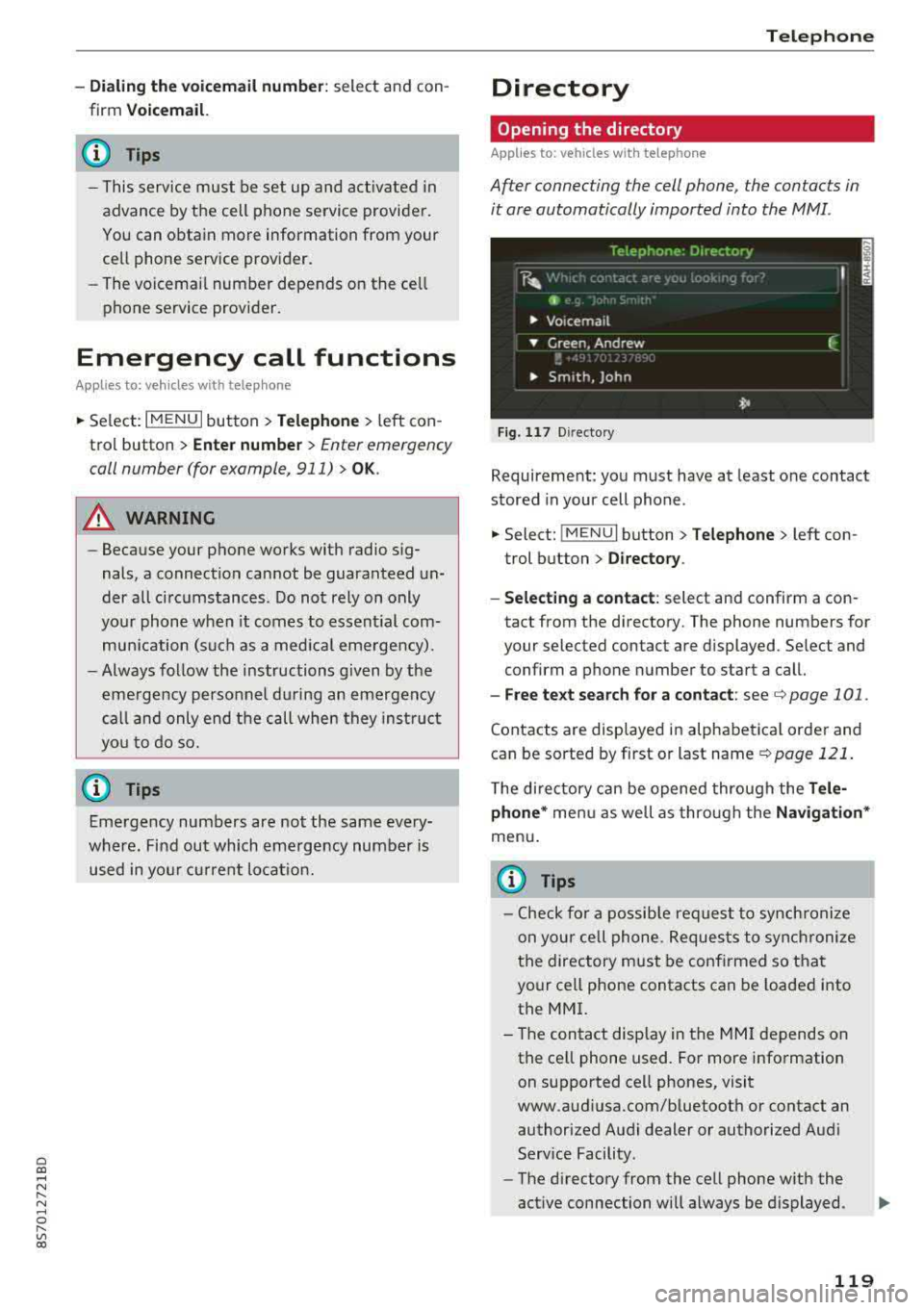
After connecting the cell phone, the contacts in
it ore automatically imported into the MMI.
Fig . 11 7 Direct ory
Requirement: you must have at least one contact
stored in your cell phone .
~ Select: !MENUI button> Telephone> left con
trol button >
Directory.
- Selecting a contact:
select and confirm a con
tact from the directory. The phone numbers for
your selected contact are displayed . Se lect and
confirm a phone number to start a call.
- Free te xt search for a contact: see c:> page 101 .
Contacts are displayed in alphabetical order and
can be sorted by first or last name
c:> page 121.
The directory can be opened through the Tele
phone *
menu as well as through the Navigation*
menu.
{i) Tips
-Check for a possible request to synchronize
on your cell phone. Requests to synchronize
the directory must be confirmed so that
your cell phone contacts can be loaded into
the MMI.
- The contact display in the
MMI depends on
the cell phone used. For more information on supported cell phones, visit
www.audiusa.com/bluetooth or contact an authorized Audi dealer or authorized Audi
Service Facility .
- The directory from the cell phone with the
active connection will always be displayed .
119
Page 130 of 310
Audi conn ect
The Audi MMI con nect app must be installed and
open on your mobile device.
You must be logged into yo ur myAud i acco unt in
t he
Audi MMI connect app and you must have se
lected you r vehicle .
The Wi-Fi funct ion on you r mobile device and on
the MMI must be sw itched on.
The MMI must be connected to the network .
~ Select : I MENU I button > Aud i conn ect> left
cont ro l button
> In formation category> Tra v
el.
After opening th e travel guide , travel tips in your
area will be d isplayed including current rat ings as
well as the corresponding ca tegory.
~ Press the left control button to change the cat
egory (such as bars nearby) .
A WARNING
-It is only safe to use tab lets, laptops, mo
bile devices and othe r similar devices w hen
the vehicle is st ationa ry be cause, like all
loose objects, they could be thrown aro und
the inside of the vehicle in a crash and cause serious injuries . Store t hese types of devices
securely whi le driving.
- Do not use any wireless devices on the front
seats w ith in range of the a irbags while driv
ing. Also read the warnings in the chapter
Q page 198, Front airbags.
@ Note
Always follow the information found in Q i© in
Wi-Fi hotspot on page 130.
@ Tips
Units of meas urement, language settings and
time are shown in the Infotainment system
disp lay based on how they were set in the
MMI system settings
<=) page 173 .
-
ll AUDI AG pr ovide s access to services fro m third party pro
v ider s. Pe rma ne nt ava ilabil ity c anno t be guara nteed , be
c a use that depen ds on th e th ird party provid er.
128 Audi connect services in navigation
App
lies to : vehicles wit h naviga tion sys te m and A udi connect
The following Aud i connect services a re current ly
available :
- Navigation with
satellite map1> Q page 145 .
-Point of Interest (POI ) on line sear ch wi th
v oi ce recognit ion
(such as restaurants) : plan
route guidance using the MMI control panel
and the vo ice recognit ion system
<=) page 105 .
- Set up destinations in your MMI using your
m yA udi account or the sat ellite map view l )
r=;, page 145 .
-Online traffic information : receive up-to-the
m inute traffic informat ion about acc idents,
road const ruct ion and other inc idents
r=;, page 146 .
-Map updates *: import navigat ion map updates
in yo ur MMI using an S D card.
(D Tips
-For the map update Audi connect serv ice
using an SD card, check t he current soft
w ar e version in yo ur vehicle and compare it
w ith www.aud iusa.com/myaudi to see if a
new ve rsion is avai lab le . You can a lso have
the new navigation data installed by an Audi dea ler, which can be done for an addit iona l
charge.
- You can find additional information about
the
map update at www.a udiusa.com/
myaudi.
Audi connect services in the Media menu
App lies to: vehicles wit h Audi conne ct
- Online media and Internet radio : offers access
to d ifferent online med ia services as well as In
ternet radio and ope ration through the
MMI us
ing the
A udi MMI connect app Q page 159.
App lies to: vehicles wi th Wi-Fi au dio player
- Wi-Fi audio playe r: you can access the media
center through W i-F i connected med ia p layers
(such as smartphones)
Q page 158. Ill-
Page 151 of 310
Radio
Opening the radio
The radio supports the F M, AM and SiriusXM*
(satellite radio) bands. Using the HO Radio re
ceiver also allows you to receive radio stations
on the FM and AM bands in digital format.
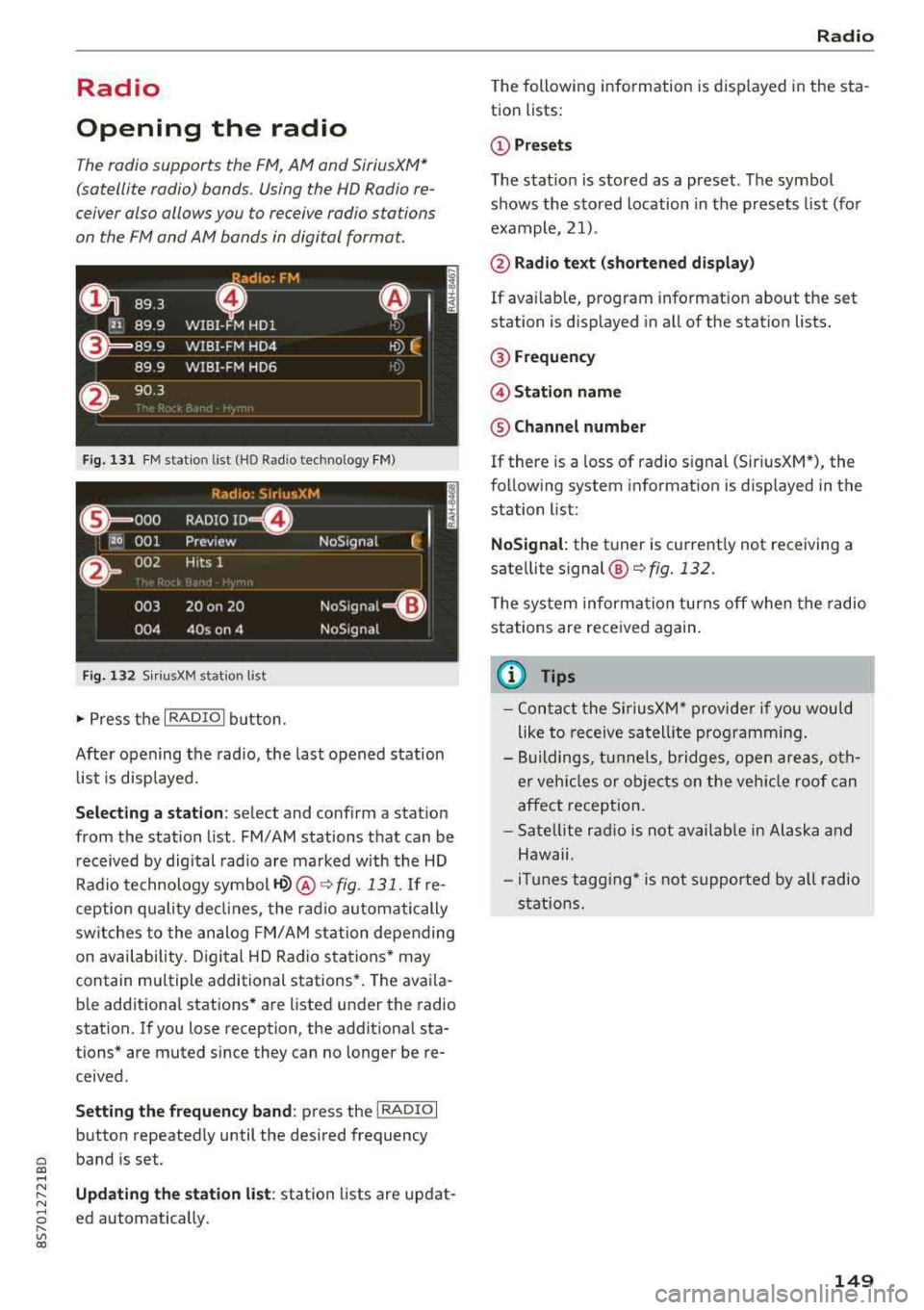
Fig . 131 FM stat ion list (H O Ra dio tec hn ology FM)
Rad io: SiriusXM
t i
(@== ooo RADIO ID m
120 001
Preview NoSignal
&
002 H
its 1
003 20 on 20
NoSignat=<(l)
004 40s on 4 NoSignal
F ig. 1 32 Siri usXM station list
.,. P ress the I RADIO I bu tton.
Afte r opening the rad io, t he last opened station
lis t is disp laye d.
.
I
Selecting a station : select and confirm a stat io n
from the station list . FM/ AM stations t hat can be
received by digital radio are ma rked with the HD
R adio technology symbol
H2> @ ~ fig. 131. If re
ception quality decl ines, the ra dio au tomatically
switches to the analog FM/AM st ation depe nding
on availability . D igi tal HD Radio s ta tions * may
contain multiple additional stations* . The ava ila
b le add itiona l stations* are listed under the radio
station. I f you lose reception, the addit iona l sta
tions* are muted since they can no longer be re
ceived.
Setting the frequency band : press the I RADIO I
b utton repeated ly until the desired frequency
a band is set. co ....
~ Updat ing the station list : station lists are updat -
"' 8 ed automatically. r--Vl co
Radio
The following information is displayed in the s ta
tion lists:
(D Presets
T he s tat io n is stored as a preset. The symbo l
shows the sto red location in the p resets list (fo r
example, 21).
@ Rad io text (shortened display )
If availab le, program info rmat ion about the set
station is displayed in a ll of the stat ion lists.
@ Frequency
@ Station name
® Channel number
If there is a loss of radio s ignal (Sir iusXM*), the
f o llow ing system in format ion is displayed in the
station list:
NoSignal : the tu ner is cu rrent ly not receiving a
sate llite
s ignal @~ fig. 132.
The system inform ation turns off when the radio
st ations are rece ived again.
(D Tips
- Con tact the SiriusXM* provide r if you would
like to receive sa tell ite programming .
- Bu ilding s, tu nnels, b ridges, ope n area s, oth
er veh icles or objects o n the veh icle roof can
affect reception.
- Satel lite ra dio is not availab le in Alaska and
Haw aii.
- iT unes tagg ing* is not supporte d by all radio
sta tio ns.
149
Page 152 of 310
Radio
Radio functions
Free text search
Using the free text search, you can select the or
der that the search terms are entered in the in
put field . Search in all frequency bands for a sta
tion name or program type, such as
News .
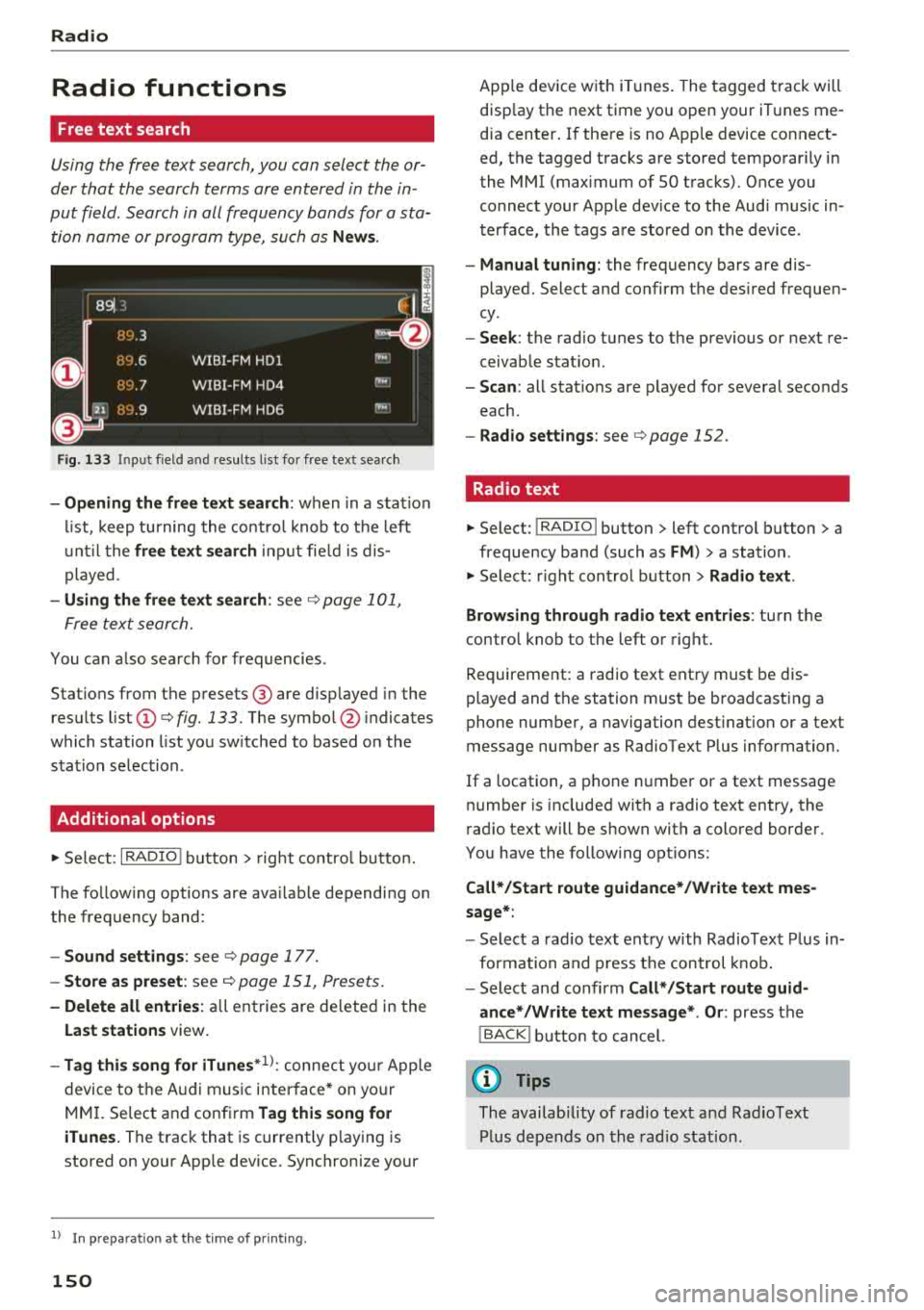
891 ,,
~ H'J.3
D
HY .6 WIBI-FM HDl
flLJ.7 WIBI-FM HD4
""
""
~
il'J.9 WIBI-FM HD6 ""
Fig. 133 Input field a nd results l ist fo r free tex t sea rc h
- Opening the free text search: when in a stat ion
list, keep turning the control knob to th e left
until the
free text search input fie ld is dis
played .
-Using the free text search : see ¢ page 101,
Free text search.
You can also search for frequencies .
Stat ions from the presets @ are disp layed in the
results list
Q) ¢ fig. 133. The symbo l@ indicates
which station list you sw itched to based on the
stat ion selection .
Additional options
.,. Select : I RADIO ! button> right control button.
The follow ing options are ava ilable depending on
the frequency band:
- Sound settings : see ¢ page 177.
-Store as preset : see¢ page 151, Presets .
-Delete all entries : all entries are deleted in the
Last stations view.
-Tag this song for iTunes *1
) : connect yo ur Apple
device to the A udi music interface* on yo ur
MM I. Se lect and confirm
Tag this song for
iTunes.
The track that is currently p laying is
stored on your App le device. Synchronize your
1> I n pr ep ara tion at t he time of pr inting.
150
App le device wit h iTunes. The tagged track will
disp lay the next time you open your iTunes me
dia center . If there is no App le device connect
ed, the tagged tracks are stored temporar ily in
the
MMI (max imum of SO tracks). Once you
connect your Apple dev ice to the Audi music in
terface, the tags are stored on the device .
-Manual tuning: the frequency bars are dis
played. Select and confirm the des ired frequen
cy .
- Seek: the radio tunes to the previous or next re
ceivab le stat ion.
- Scan : all stat ions are p layed for several seconds
each.
- Radio settings: see ¢page 152.
Radio text
.,. Select: I RADIO I button > left control button > a
frequency band (such as
FM ) > a station .
.,. Select: right control button> Radio text .
Browsing through radio text entries :
turn the
control knob to the left or right.
Requirement: a radio text entry must be dis
played and the station must be broadcasting a
phone number, a navigation destinat ion or a text
message number as Radio Text Plus information.
If a location, a phone number or a text message
number is included with a radio text entry, the
radio text will be shown with a colored border .
You have the following opt ions:
Call*/Start route guidance*/Write text mes
sage*:
- Select a radio text entry with Radio Text Plus in
formation and press the control knob.
- Select and confirm
Call* /Start route guid
ance* /Write text message* . Or :
press the
I BACK ! button to cancel.
(D Tips
The availab ility of radio text and Rad io Text
Plus depends on the rad io stat ion.
Page 153 of 310
Cl co .... N ,....
N ...... 0 ,....
Vl co
View: Show "Now Playing" screen
Fig. 134 Radio view: add it ional station information
Requirement: you must be tuned to a radio sta
tion . The
Show "Now P la y ing" screen opt ion
must be switched on
9 page 152.
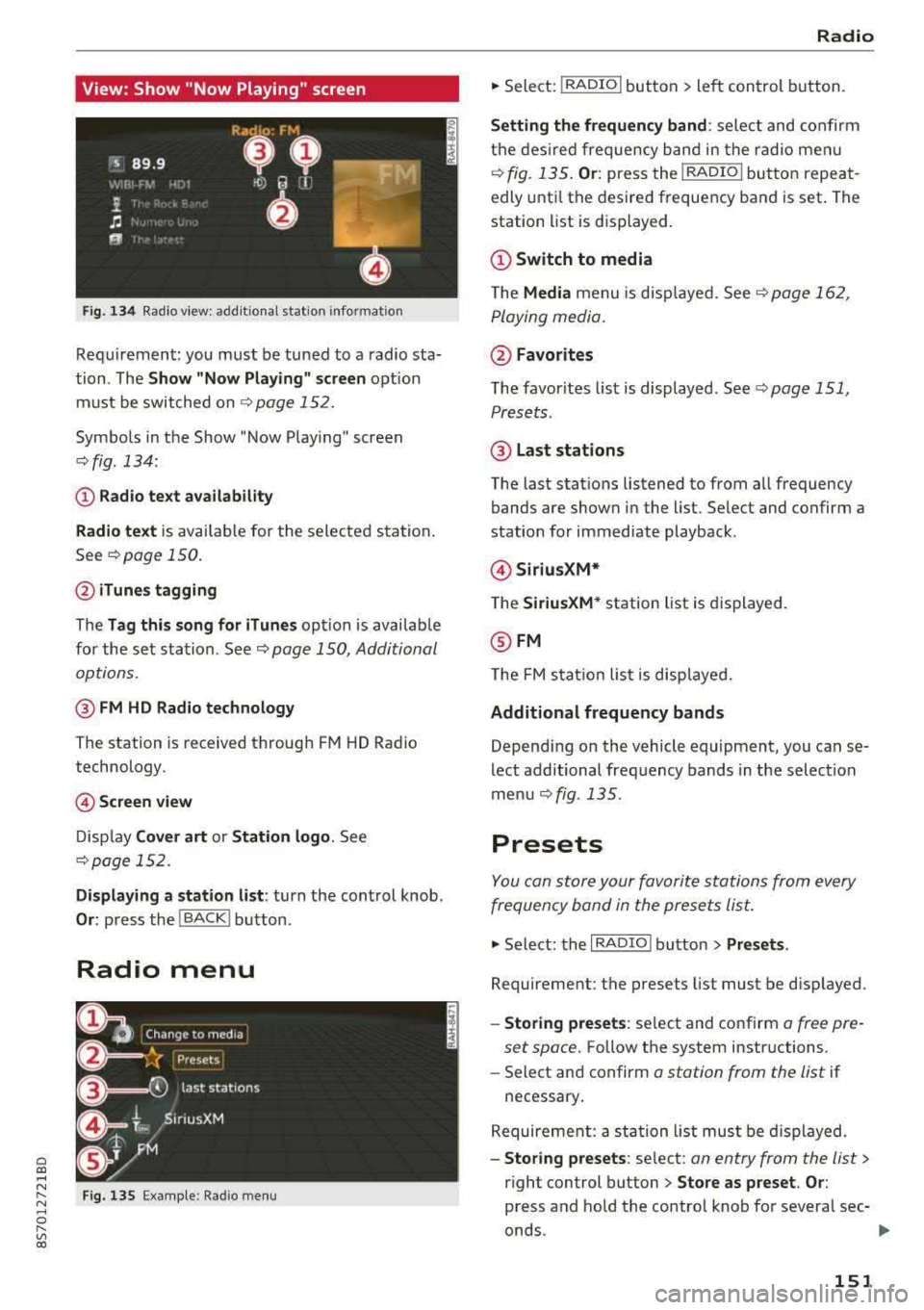
Symbo ls in the Show "Now Playing" screen
o:;, fig. 134:
CD Radio te xt ava ilabil ity
Radio te xt
is availab le for the selected station .
See
o:;, page 150.
@ iTune s tagging
The Tag this song for iTun es option is availab le
for the se t station. See
o:;, page 150, Additional
options.
@ FM HD Radio technology
The station is received through FM HD Radio
technology.
@ Screen view
D isp lay Cover art or Station logo . See
o:;, page 152.
Displaying a station list : turn the control knob.
Or: press the I BACK! button .
Radio menu
Fig . 135 Examp le: Radio men u
Radio
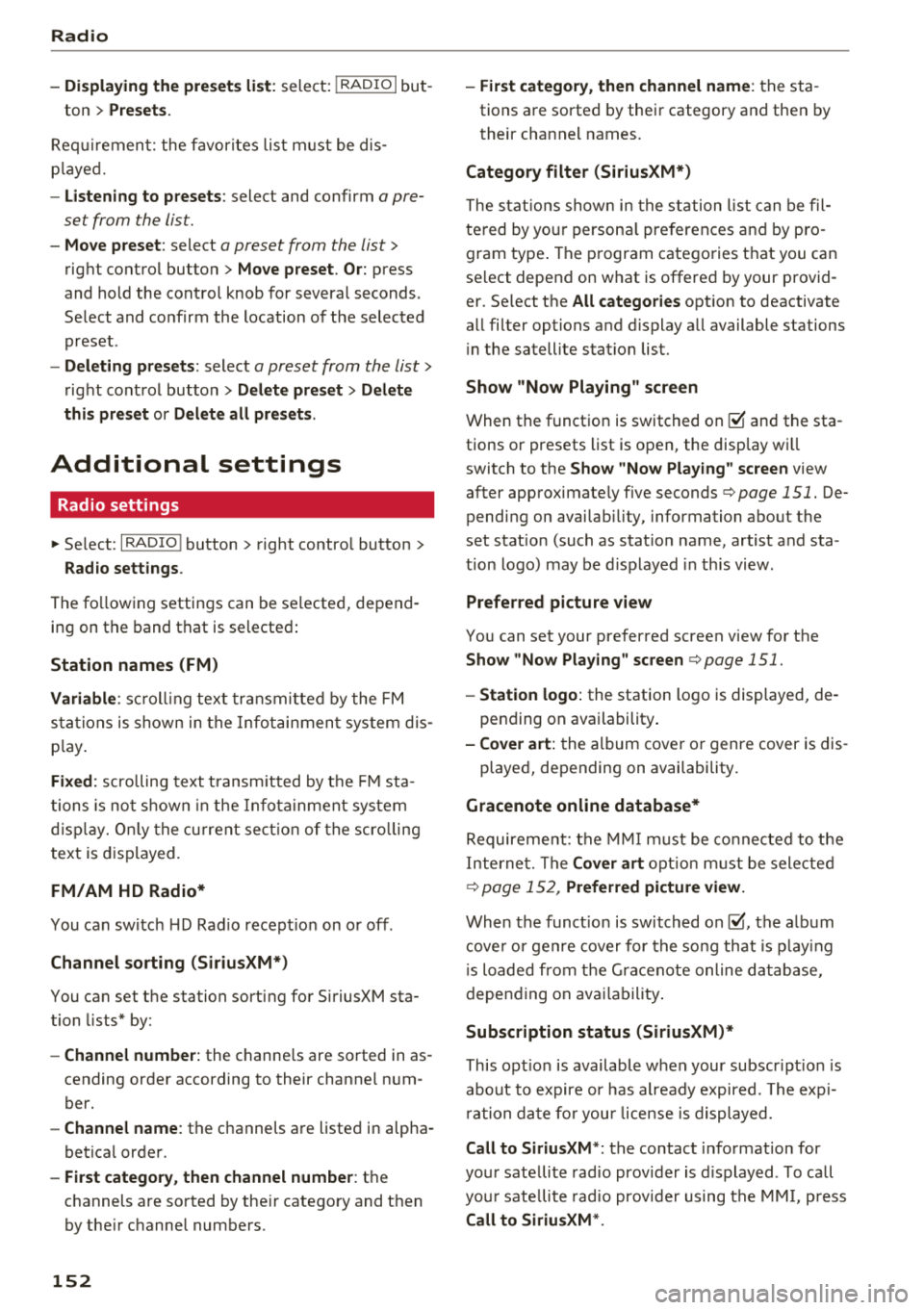
.. Sele ct: I RADIO I button > le ft con trol button.
Setting th e frequency band : select and confirm
the des ired frequency band in the rad io me nu
o:;, fig. 135 . Or: press the I RADIO I button repeat
edly unt il the desire d frequency band is set . The
station list is displayed.
(!) Switch to media
The Media menu is disp layed. See¢ page 16 2,
Playing media.
@ Favorites
The favorites list is displayed . See t:;, page 151,
Presets .
@ Last stations
The last stations listened to from all frequency
bands are shown in the list. Select and confirm a
station for immediate playback .
@Siriu sXM*
T he SiriusXM* station list is displayed.
@ FM
The FM s ta ti on lis t is disp laye d.
Additional frequency bands
Depend ing on the vehicle equipment, you can se
lect additional freq uency bands in the selection
me nu
o:;, fig. 135 .
Presets
You can store your favorite sta tions from every
frequency band in the prese ts list.
.. Select: the I RADIO I button > Presets .
Requireme nt: the presets list must be disp layed.
- Storing preset s: select and confirm a free pre-
set space.
Follow the system instructions.
- Select an d confirm
o station from the list if
necessary .
Requireme nt: a st ation list must be d isplayed.
- Storing presets : select : an entry from the list>
right control button > Store as preset . Or :
press and hold the control knob for severa l sec-
onds .
~
151
Page 154 of 310
Radio
-Di spla ying the pre set s list : select: I RADIO I but -
ton
> Presets.
Re quir emen t: the favorites list m ust be dis
p laye d.
- Listening to presets : select and confirm a pre
set from the list.
- Mo ve preset : select a preset from the list >
right control button> Move p reset . O r: press
and hold the cont rol knob for several seconds .
Se lect and confirm the location of the selected
preset .
-Deleting presets : select a preset from the list>
right cont ro l button> Delete preset > Delete
this preset or Delete all presets .
Additional settings
Radio settings
~ Select : I RADIO I button > right contro l button >
Rad io settings .
The follow ing settings can be se lected, depend
i n g on the band that is se lected :
Station names (FM)
Variable :
scr oll ing text tran smi tted by the FM
s ta ti ons is shown in the Info tainmen t system d is
p lay .
Fixed : scrolling text t rans mitted by t he FM sta
tions is no t sh ow n in the In fota inment syste m
d is pla y. Onl y the cu rrent se ction of the scro lling
t ext is disp layed.
FM/AM HD Radio*
You can sw itc h H D Rad io recep tion on o r off .
Channel sorting (SiriusXM*)
You can set the station sorting fo r SiriusXM sta
tion lists* by:
- Channel number: the channe ls are so rted in as
cending orde r according to their channel n um
ber.
- Channel name : the channels a re listed in alpha
betica l orde r.
- First category, then channel number : th e
c h annels a re so rted by the ir catego ry and t hen
by the ir ch annel numbe rs .
152
- First category , then channel name : the sta
tions a re sorted by thei r category and then by
their cha nnel names .
Category filter (Sirius XM*)
The stat io ns sh ow n in the st ation l ist can be fil
te red by yo ur person al pre ferences and by pro
gram type . The program catego ries t hat you ca n
se lect depen d on w hat is offere d by your provid
er. Se lect the
All categories opt ion to deactivate
a ll filter options and d isplay all available stations
i n the satellite stat ion list.
Show "Now Playing" screen
When the f unct io n is switched on@' and the sta
tions o r presets list is open, the disp lay w ill
switch to the
Show "Now Playing" screen view
after approximate ly five
seconds ¢ page 151. De
pending on avai lab ility, information about the
set stat io n (such as stat io n name, artis t and sta
tion logo) may be d is p layed in th is view .
Preferred picture view
You can set your pre fer red screen view fo r the
Show "Now Play ing" screen ¢ page 151.
- Station logo: the station logo is displayed, de
pen ding on ava ilability .
-Cover art: the al bum cove r or genre cover is dis -
played, depending on availabi lity.
Gracenote online database*
Require ment: t he M MI m ust be co nne cted to the
I n ter net. T he
Cover art opt io n mu st be sele cte d
¢ page 1 52, Preferred picture view.
When the funct ion is switch ed on@', the a lb um
cove r o r genre cover for the so ng th at is p lay ing
i s loade d from the G ra cenote online database,
depen ding on av ailability .
Subscription status (SiriusXM)*
This op tion is available w hen your subscr ip ti on i s
abo ut to expire or has already expired . The exp i
r a tion da te fo r you r license is displayed.
Call to SiriusXM *: th e contac t information for
yo ur sate lli te rad io provider is d isplayed . To ca ll
yo ur sate lli te rad io prov ider using the M MI, p ress
Call to SiriusXM *.
Page 155 of 310
Cl 00 .-< N r--N .-< 0 r--Vl 00
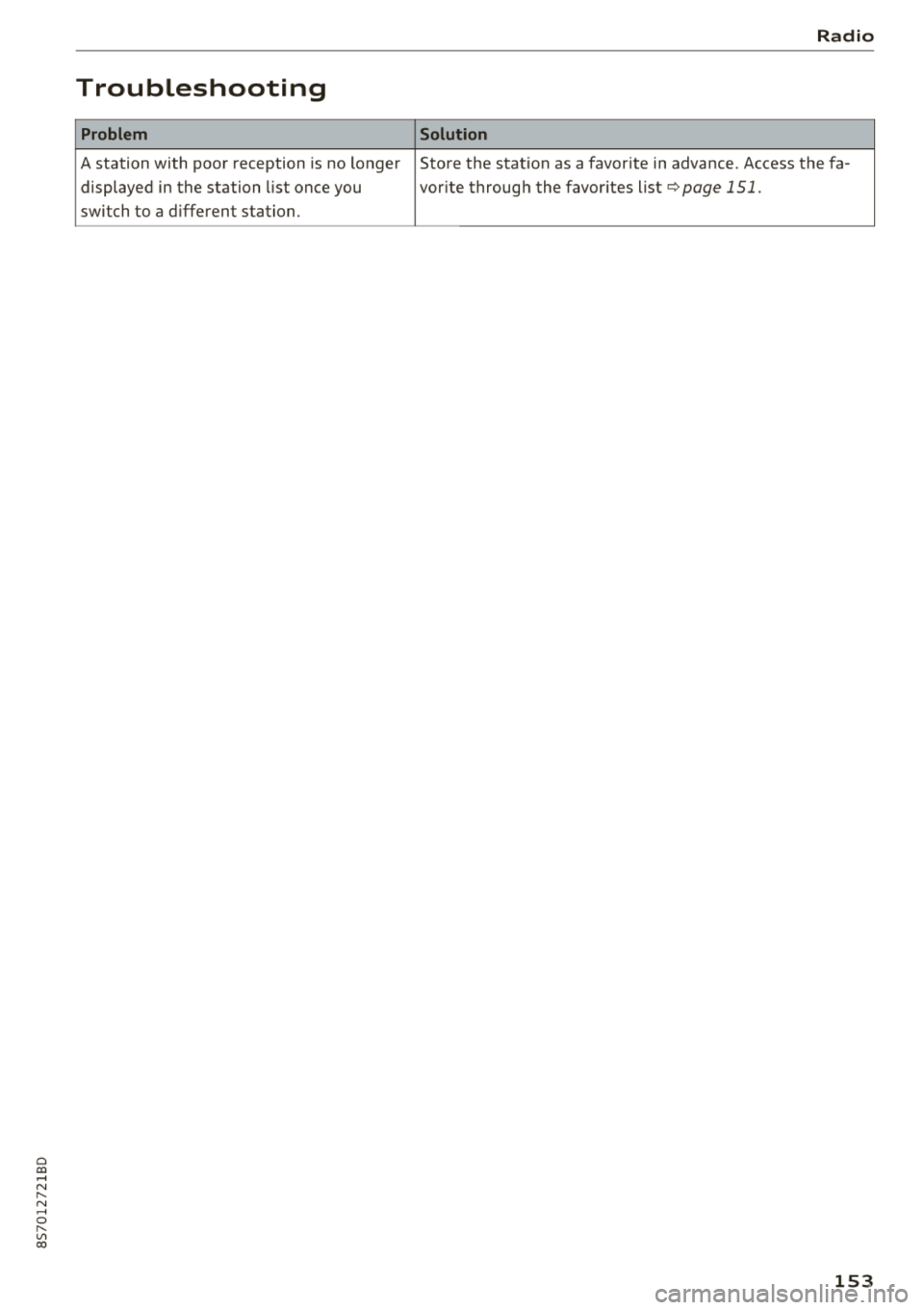
Troubleshooting
Problem
A station with poor reception is no longer displayed in the station list once you
switch to a d ifferent station.
Radio
Solution
Store the station as a favorite in advance. Access the fa-
vor ite through the favor ites list
¢page 151.
153
Page 160 of 310
Media
(D Tips
-Check for any connection requests on your
Bluetooth device.
- Multiple Bluetooth audio players can be
connected to the MMI, but only one mobile
device can be active.
- Bluetooth protocols AVRCP (1.0/1.3/1.4)
and A2DP are supported.
- Note the volume setting on your Bluetooth
device. Audi recommends setting your mo
bile device to the maximum volume when
using it as a Bluetooth audio player.
- The supported media functions (such as
shuffle) depend on the Bluetooth device be ing used.
- For more information on the supported de
vices, visit www.audiusa.com/bluetooth or
contact an authorized Audi dealer or author
ized Audi Service Facility.
Wi-Fi audio player
App lies to: ve hicles w ith Wi-F i audio playe r
Using the Wi-Fi audio player media source on the
MMI, you can connect and operate your Wi-Fi-ca
pable media player (such as a smartphone) to wirelessly play music from your media player
li
brary. The media player is connected through the
vehicle's Wi-Fi hotspot. A UPnP Server opp or an
integrated UPnPIDLNA server on your media
player is required to access your media player
li
brary.
Requirement: the Wi-Fi function on your media
player must be switched on. The
Audi MMI con
nect
app or a UPnP server app must be installed
on your media player .
Or: you must be using a
media player with an integrated UPnP/DLNA
server .
-Connecting a media player: press the I MEDIA !
button. Press the left control button until the
sources overview
¢ page 162 is displayed . Se
lect and confirm
Wi-Fi audio player 0
¢ page 162, fig . 142.
- If necessary, select and confirm Wi-Fi turned
off> Turn on Wi-Fi
to activate Wi-Fi in the
MMI. Select
Wi-Fi settings, if necessary . Select
158
the same settings on the wireless media player
that are used for the Wi-Fi hotspot.
- Starting the Wi-Fi audio player: start the Audi
MMI connect
app or a UPnP server app. Or: al
low media sharing on your media player.
Operating the media player: the media player is
operated through the MMI.
- Press the left control button repeatedly until
the
Folders menu item appears. Select and con
firm
Folders .
- Playing music from the media player:
select
and confirm
Media center .
Web radio:
see ¢ page 159.
A WARNING
- As the driver, do not allow usage of the Wi
Fi hotspot to distract you from driving, as
this could increase the risk of an accident.
- It is only safe to use tablets, laptops, mo
bile devices and other similar devices when
the vehicle is stationary because, like all
loose objects, they could be thrown around
the inside of the vehicle in a crash and cause
serious injuries. Store these types of devices
securely while driving.
- Do not use any Wi-Fi devices within range of
the airbags while driving . Also read the
warnings in the
chapter¢ page 194.
((D} Note
Always follow the information found in ¢(l} in
Wi-Fi hotspot on page 130.
(D Tips
- The Wi-Fi connection is reconfigured when
inserting or removing the mini SIM card in
the SIM card reader*. There may be a tem
porary interruption in audio playback, de
pending on the media player.
- Always read the chapter¢
page 131, About
Audi connect.
- Please note that a Wi-Fi connection does
not automatically make it possible to use
the Internet. For additional information,
see ¢
page 124.
Page 161 of 310
Cl 00 .-< N r-N .-< 0 r-Vl 00
- To avoid interruptions during playback, de
activate the power saving function on the media playe r or connect it to a charger.
- The loading times for the a udio data depend
on the media p layer used and the number of
files that it contains.
- A maximum of 2,000 entries per directory
are displayed in the MMI.
- Songs down loaded for offline use using mu
sic streaming services are stored on your mobile device (such as a smartphone) and
may be ORM protected. The Wi-Fi audio
player w ill not play ORM protected files.
- Contact an a uthorized Audi dea ler or au
thorized Audi Service Facility for additional i nformat ion on the Wi-Fi audio p layer .
Online media and
Internet radio
Applies to: vehicles with Audi connect
You can playback and operate various online me
dia services and Internet radio using the MMI.
,. Press t he IM EDIA I button. P ress the left control
button until the so urces ove rview
Q page 162,
fig. 142
is d isplayed.
Applies to: using online media and Internet radio
Requirement:
- The
Audi MMI conn ect app must be installed
and open on your mob ile dev ice.
- You must be logged into your my Audi account
i n the
Audi MMI conn ect app and you must
have selected your veh icle .
- The Wi-Fi function on the mobile device and on
the MMI must be switched on .
- If necessary, check in the connection manager
Q page 174 if the mob ile device you connected
is selected under the
MMI connect app (~) .
-The MMI must be connected to the network.
- The symbo l for the
O nline media * source®
Qpage 162, fig . 142 is shown in the MMI.
Applies to: using online media
Addit ional requirement:
- A supported o n line media serv ice m ust be avail
able in your country.
- You must have an account with a supported on
l ine med ia serv ice .
Media
-Depending on t he online media service, you
must install and open an app on your mobile
dev ice .
St arting Onlin e media
- Press the I MEDIA i button. Press the left control
button until the sources overv iew
Q page 162
is displayed .
- Select and confirm an online media serv ice.
Starting Inte rnet radio
- Press the I MEDIA i button. Press the left control
button until the sources overv iew
Q page 162
is displayed .
- Select and confirm
Int ernet r adio . The Internet
radio b rowser or the last stat io n that was play
ing is shown .
-Sel ecting the station : if necessary, select and
confirm a category in the Inte rnet rad io
Bro ws
er >
a station.
Online m edia and Internet radio :: additional op
tion s
-Press the r ight cont rol b utt on.
The following opt ions may be ava ilable, depend
i ng on the information shown (such as the sta
tio n/t rack that is cur re ntly playing):
- Sound setting s: see Q page 177.
-Wi-Fi settings : see Q page 129, Wi-Fi hotspot .
-Conne ction manager : see Qpage 174.
-Add it io na l opt ions may be ava ilable, depend ing
on the active online med ia service or In ter net
radio .
_&. WARNING
= -
-It is only safe to use tablets, laptops, mo
bi le devices and other simi lar devices when
the vehicle is stationary because, like all loose objects, they could be thrown around
the inside of the vehicle in a crash and cause
serio us injuries . Store these types of devices
securely while d riving .
- Do not use any Wi-Fi devices within range of
the airbags while dr iv ing . Also read the
warn ings in the chapter
Q page 194 . ..,.
159