radio AUDI TT ROADSTER 2018 Owner's Manual
[x] Cancel search | Manufacturer: AUDI, Model Year: 2018, Model line: TT ROADSTER, Model: AUDI TT ROADSTER 2018Pages: 310, PDF Size: 46.95 MB
Page 164 of 310
Media
-Audi recommends setting the volume of a
mobil e device connected to the AUX input to
approximately 70% of the maximum vol
ume .
- Functionality is not guaranteed for mobile
devices that do not conform to the USB 2.0
spec ification.
- USB hubs are not supported .
- Some ve rsions of the iPod such as the iPod
shuffle cannot be connected to the USB
adapter for devices w ith App le Dock connec
tor. Connect these dev ices using a AUX con
nector cable .
- Video p layback through the Audi music in
terface is only supported if the connected
device is recognized as a USB storage device
(for example a USB stick) . Apple devices and
MT P devices (such as smartphones) a re not
r ecogni zed as USB storage devices .
- i Pod/iPhone malfunct ions also affect the
operation of the MMI. Reset your iPod/
i Phone if this happens.
- For important information on operating
your iPod/iPhone, refer to the user guide for
the dev ice. Audi recomme nds updat ing the
i Pod/iPhone so ftwa re to the latest ve rsion.
- Fo r more information about the Audi music
i nte rface and supporte d devices, check the
A udi databa se fo r mobile devices at
www.audiusa.com/mp3 or contact an au
thorized Audi dealer or authorized Audi
Service Fac ility.
162
Playing media
Accessing media
You can start and operate various media
through the
MMI control panel .
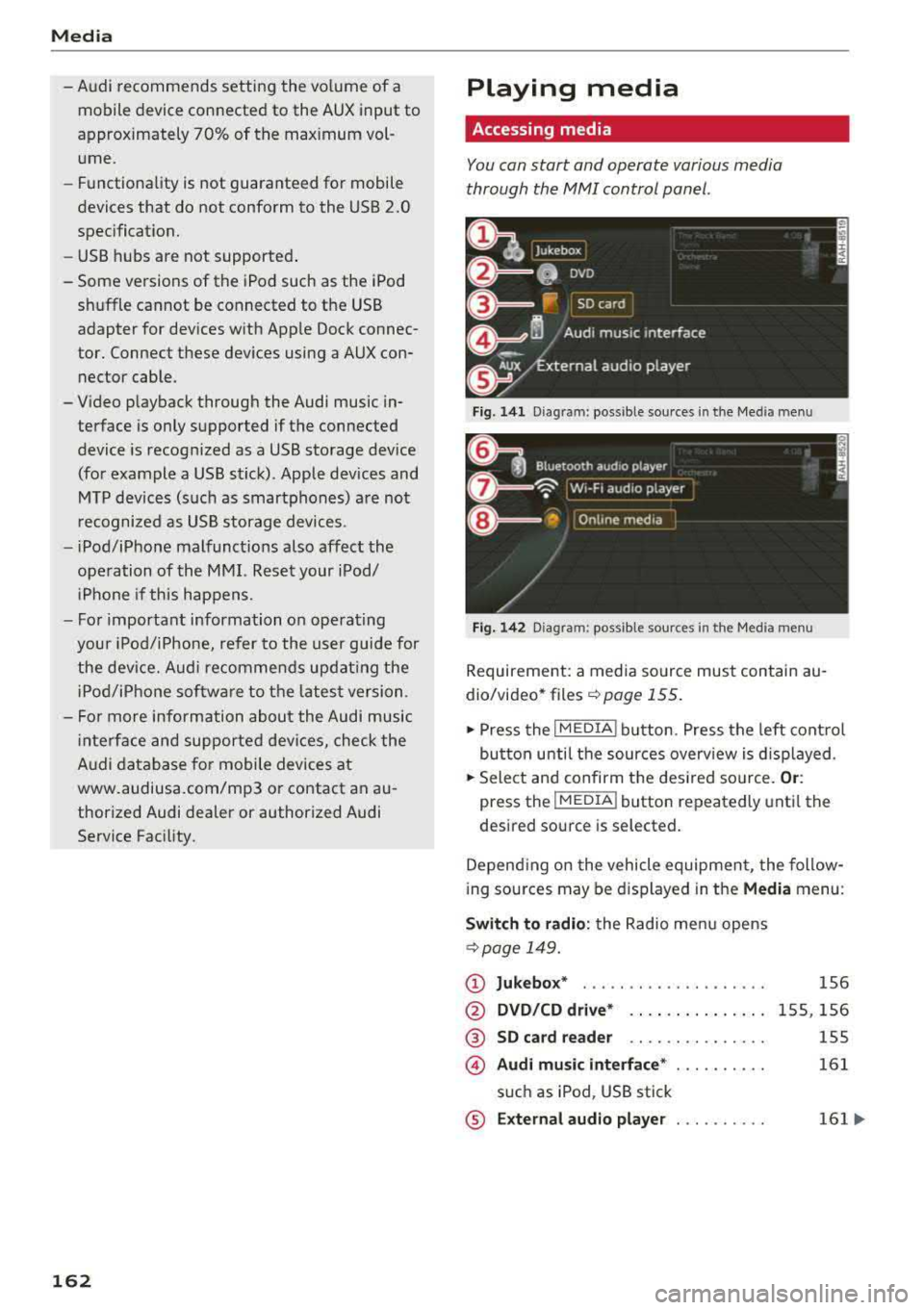
Fig. 1 41 Diagram: possible source s in t he Me dia menu
F ig . 142 Dia gr am: pos sible sour ces in the Med ia m enu
Requireme nt: a media so urce mus t contain au
dio/video* files
c:> page 155.
.,. Press the I M EDIA i button . Press the left cont rol
button unti l the sources overv iew is d isplayed .
.,. Select and confirm the des ired so urce. Or :
press the !MEDIA ! button repeatedly unti l th e
d esired sourc e is s elected.
Depend ing o n the vehicle equipmen t, the follow
i ng sou rces may be d isplayed in the
Media menu :
Switch to radio : the Radio menu opens
c:> page 149.
CD Jukebox* ....................
@ DVD /CD dri ve* .. .. .... . ..... .
® SD ca rd re ader .. .. ... ... ... ..
© Audi mu sic interface * ..........
s u ch as iPod , USB stick
® E xternal audio player . . . . . . . . . .
1S6
1 5S, 156
155
161
161 ...
Page 165 of 310
Cl co .... N ,....
N .... 0 ,....
Vl co
®
0
®
such as an MP3 player connected to
the AUX input
Bluetooth audio player*
Wi-Fi audio player* .......... .
Online media*
and Internet radio*
157
158
159
-Playing audio/video files: select a source in the
Media menu > category (such as artists > al
bum
> track) .
-Moving one level up in the folder structure:
press the I BACK I button. Or: select and confirm
Folder up.
- Selecting the previous or next track/chapter
1): press the On/Off knob on the MMI control
panel briefly to the left
l
-Fast-forwarding and rewinding audio/video
files :
press and hold the On/Off knob on the
MMI control panel to the left l
a longer time.
-Pausing or resuming playback: press the On/
Off knob on the MMI control panel briefly.
@ Tips
-You can scroll through long lists quickly by
turning the control knob quickly. The scroll
i ng speed depends on the number of list en
tries.
-For safety reasons, the video image is only
displayed when the vehicle is stationary. On ly the sound from the v ideo plays while driv
i ng .
Media center
Various categories for selecting audio/video*
files are available in the media center .
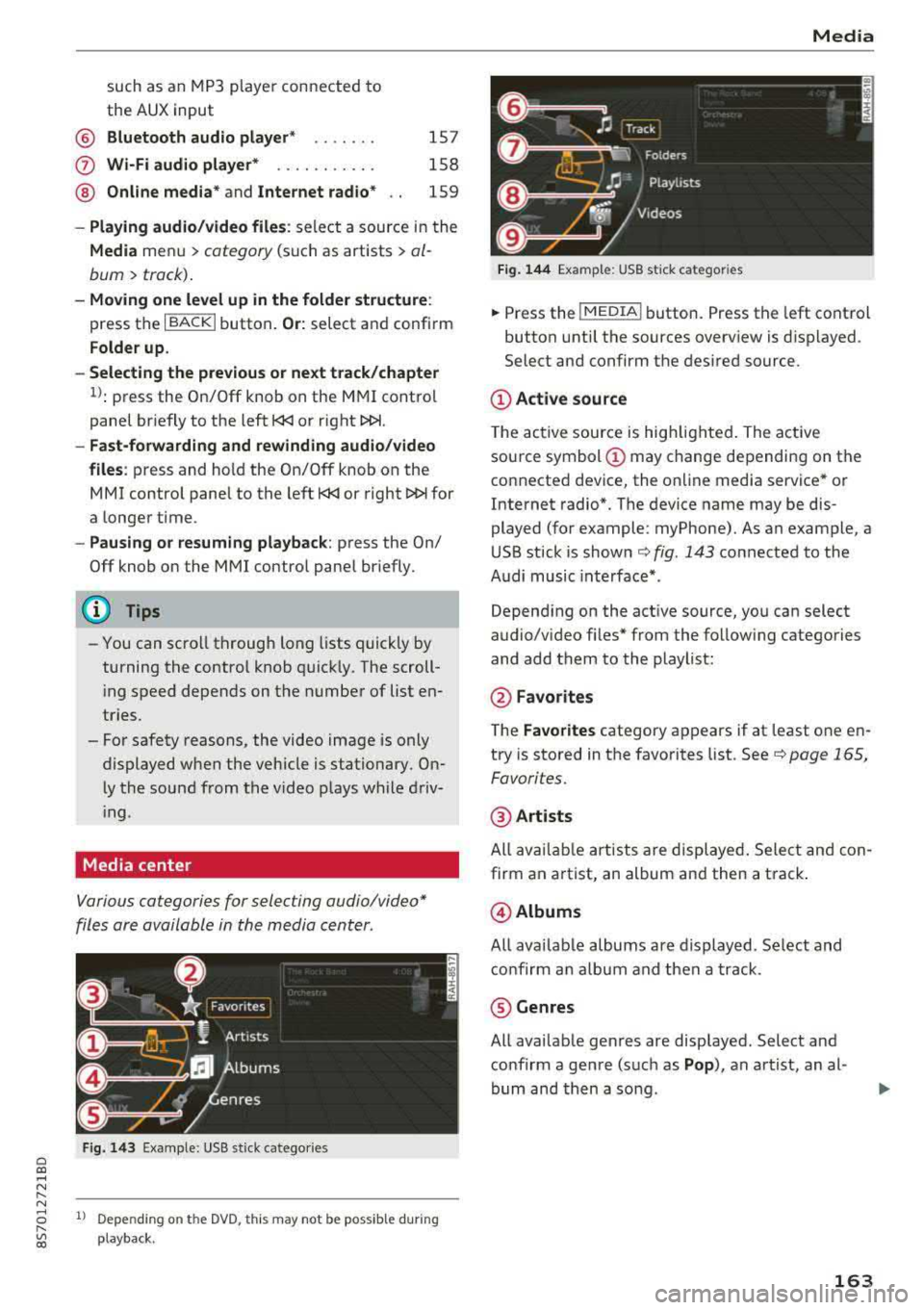
Fig. 143 Example: USB stick catego ries
1l Depe ndi ng o n th e DVD, t his may not be possible during
playba ck .
Media
Fi g. 144 Example: USB stick categories
... Press the I MEDIA! button. Press the left control
button until the sources overview is displayed.
Select and confirm the desired source.
(D Active source
The active source is highlighted . The active
source symbol
(D may change depending on the
connected device, the online media service* or
Internet radio*. The device name may be dis
played (for example: myPhone). As an example, a
USB stick is shown
c:> fig. 143 connected to the
Audi music interface* .
Depending on the active source, you can select
audio/video fi les* from the follow ing categories
and add them to the playlist:
@ Favo rites
The Favorites category appears if at least one en
try is stored in the favorites list. See
c:> page 165,
Favorites.
@ Artists
All available artists are displayed. Select and con
firm an a rtist, an album and then a track .
@Albums
All availab le albums are displayed. Select and
confirm an album and then a track .
® Genres
All available genres are displayed. Select and
confirm a genre (such as
Pop ), an artist, an al
bum and then a song .
163
Page 172 of 310
Media Problem Solution
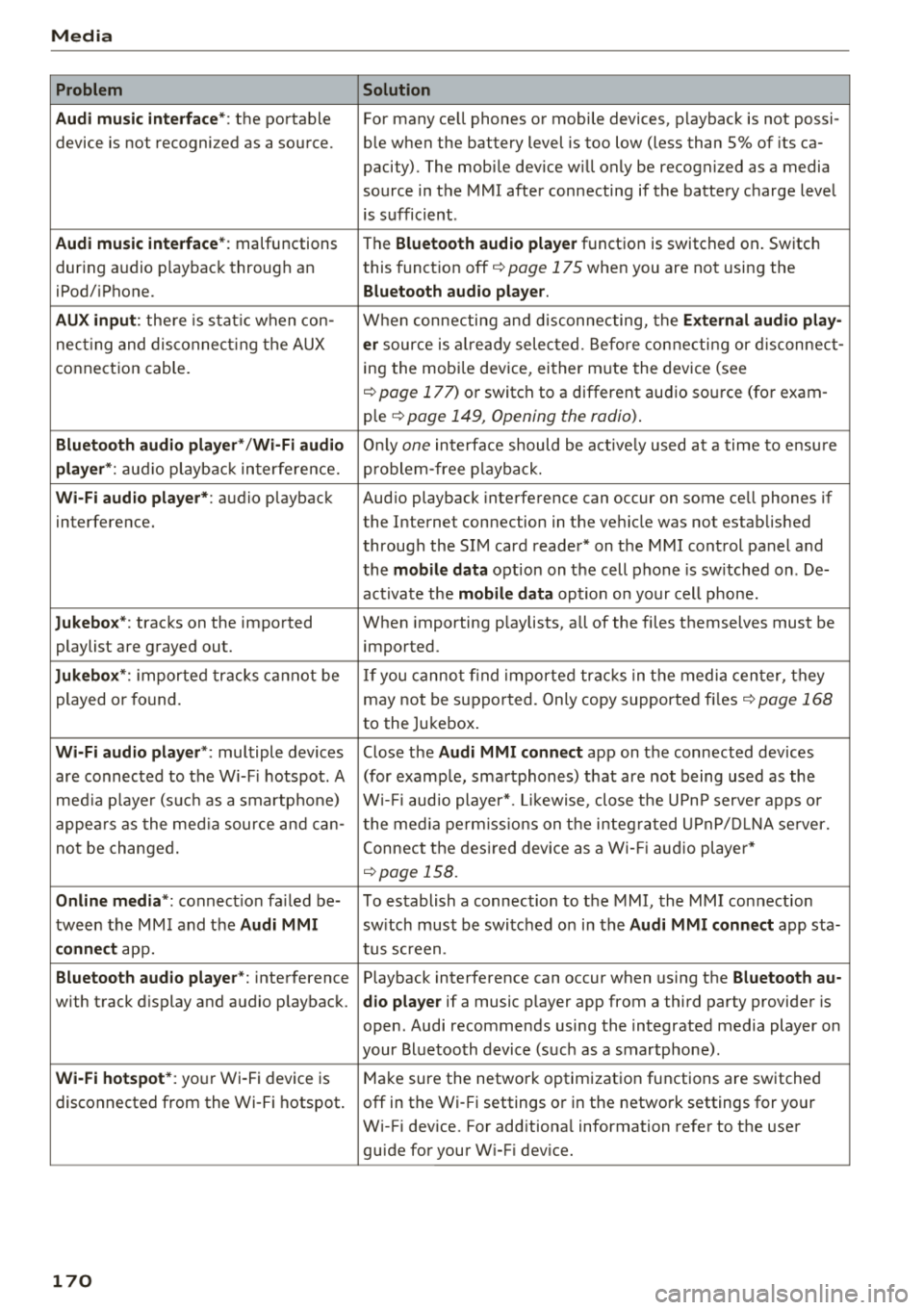
Audi music interface* :
the portable For many cell phones or mobile devices, playback is not possi-
device is not recognized as a source. ble when the battery level is too low (less than 5% of its ca-
pacity) . The mobile device w ill only be recognized as a media
source in the MMI after connecting if the battery charge level
is sufficient .
Audi music interface* : malfunctions
The Bluetooth audio player function is switched on . Switch
dur ing audio p layback throug h an this
funct ion off
i::> page 175 when you are not using the
iPod/ iPhone.
Bluetooth audio player.
AUX input :
there is stat ic when con- When connecting and disconnecting, the External audio play-
necting and disconnect ing the AUX er source is al ready selected . Before connecting or disconnect-
connection cable. ing
the mobi le device, either m ute the device (see
<=:>page 177) or switch to a different audio source (for exam -
ple
i::> page 149, Opening the radio) .
Bluetooth audio player* /Wi-Fi audio Only one interface should be act ive ly used at a time to ensu re
player *: audio playback interfe re nc e. problem -free playback.
Wi-Fi audio player* : audio playback Aud io playback interference can occur on some cell phones if
interference. the Internet connection in the ve hicle was no t established
through the SIM card reader* on the MMI control panel and
the
mobile data option on the cell phone is sw itched on . De-
activate the
mobile data option on your cell phone.
Jukebox* : tracks on the imported When importing playlists, all of the files themselves must be
playlist are grayed out. imported
.
Jukebox*: imported tracks cannot be If you cannot find imported tracks in the media center, they
played or found. may not be supported. Only copy supported files
i::> page 168
to the Jukebox .
Wi-Fi audio player *: multiple devices Close the Audi MMI connect app on the connected devices
are connected to the Wi-Fi hotspot. A (for example, smartphones) that are not being used as the
media pla ye r (suc h as a smartphone) Wi-Fi audio player*. Likewise , close the UPn P serve r apps or
appears as the media source and can- t he media permissions on the integ rated UPnP/DLNA server.
not be changed. Connect the desired device as a Wi-Fi audio player*
<=:> page 158.
Online media *: connection fa iled be- To establish a connection to the MMI, the MMI connection
tween the MMI and the
Audi MMI switch must be switched on in the Audi MMI connect app sta-
connect app. tus screen .
Bluetooth audio player *: interference Playback interference can occur when using the Bluetooth au-
with track d isplay and audio p layback. dio player if a music player app from a third party provider is
open . Audi recommends using the integrated media player on
your Bluetoo th device (such as a smartphone) .
Wi-Fi hotspot*: your Wi-Fi device is
Make sure the network optimization functions are switched
disconnected from the Wi-Fi hotspot. off in the Wi- Fi settings or in the network settings for your
Wi-Fi device. For additiona l information refer to the user
guide for your W i-F i dev ice.
170
Page 176 of 310
System settings
delete the programmed voice training with the
Reset individual speech training function .
Factory settings
The follo wing funct ions can be reset to the facto
ry default settings :
-Sound settings
- Radio
- Media settings
- Jukebox*
- Directory*
- Telephone *
- Bluetooth and Wi-Fi*
- Navigation settings *
- Navigation and online memory *
- Voice recognition system*
- Message settings *
-Apps*
-Tool tips
-Audi connect *
You can select the desired functions individually
or all at once with the option
Select all entries .
Select and confirm Restore factory settings.
(D Tips
-Make sure that not only t he settings were
deleted but also the stored data, if appl ica
ble.
- Please note that the
voice recognit ion sys
tem* is not available in Cabriolets that do
not have a factory- insta lled safety belt mi
crophone .
174
Connection manager
Introduction
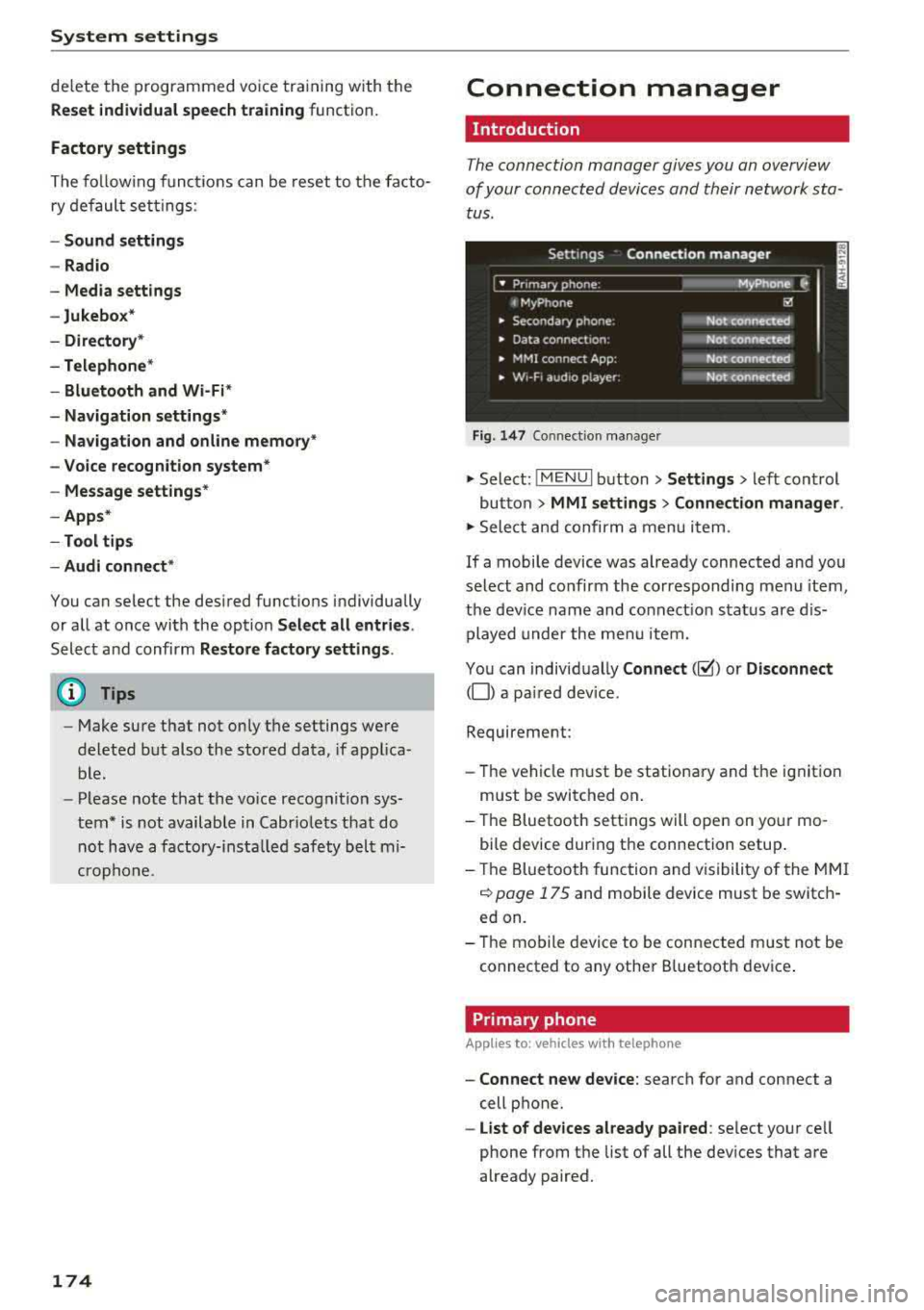
The connection manager gives you an overview
of your connected devices and their network sta
tus.
Settings Connection manager
I • Prima hone : M_Phone C,
t MyPhone ~
• Secondary phone : Not connected
• Data connect,on: Not connected
• MMI connect App: Not connected
• w,- F, aud ,o player: Not connected
Fig . 147 Co nnect ion manager
.,.. Select: !MENUI button> Settings > left control
button
> MMI settings > Connection manager.
.,.. Select and confirm a menu it em.
If a mobile device was already connected and you
select and co nfirm the corresponding menu item,
the device name and connect ion status are dis
played under the menu item.
You can individually
Connect(~) or Disconnect
(0) a pa ired device.
Requirement:
- Th e vehicle m ust be stationary and the ignition
m ust be switched on .
- Th e Bluetooth settings will open on your mo
bile device during the connection setup .
- Th e Bluetooth function and visibility of the MMI
c::> page 175 and mobile device must be switch
ed on.
- Th e mobile device to be connected m ust not be
connected to any other B luetooth dev ice .
Primary phone
App lies to: vehicles wi th telepho ne
- Connect new device: search for and connect a
cell phone.
- List of devices already paired: select your cell
phone from the list of all the devices that are
already paired.
Page 210 of 310
Airbag syste m
the system inspected immediately by your
authorized Aud i dealer. It is possible that
the a irbag will inflate when it is not sup
posed to, or will not inflate when it should.
A WARNING
If the front airbag inflates, a child without a
child restra int, or in a rearward-facing child
safety seat, or in a forward-facing child re
st raint that has not been p roperly installed
w ill be seriously injured and can be killed.
- If you must install a rearward-fac ing child
seat on the front passenger seat because of
exceptional c ircumstances and the
PA SSEN
GER AIR BAG
OFF ,;; light does not appear
and stay on, have the airbag system inspect
ed by your Audi dealer.
- If, in exceptiona l circumstances, you must
install a forward-facing chi ld restraint on
the front passenger seat, always move the
seat into its rearmost pos ition in the seat's
fore and aft adjustment range, as far away
from the airbag as possible. The backrest
must be adjusted to an upright posit ion .
Make sure that the PASSENGER AIR BAG
OFF ,;; light comes on and stays on a ll the
t ime whenever the ignition is switched on.
A WARNING
If the PASSENGER AIR BAG OFF ~; ligh t does
not go o ut when an adult is s itting on the
front passenger seat after taking the steps described above, have the airbag system in
spected by your Audi dealer before transport
ing anyone on the front passenger seat.
(D Tips
If the capacitive passenger detection system
determines that the front passenger seat is
empty, the frontal airbag on the passenger
side w ill be turned off, and the
PA SSENGER
AIR BAG
OFF ~; light will stay on.
Repair , care and disposal of the airbags
Parts of the a irbag system are installed at many
d ifferent p laces on your Aud i. Insta lling, remov-
208
ing, servicing or repair ing a part in an area of the
vehicle can damage a part of an airbag system
and prevent that system from work ing properly
i n a coll is ion.
There are some important things you have to know to make sure that the effectiveness of the
system will not be impaired and that discarded
components do not cause injury or pollute the
environment .
A WARNING
Improper care, servicing and repair proce
du res can increase the risk of personal in jury
and death by p reventing an airbag from de
p loying when needed or deploy ing an a irbag
unexpectedly:
-
- Never cover, obstruct, or change the steer
ing wheel ho rn pad or airbag cover or the in
s trumen t panel or modify them in any way.
- Never attach any objects s uch as c up ho lde rs
or telephone mountings to the surfaces cov
ering the a irbag un its.
- For cleaning the horn p ad or instr ument
panel, use only a soft, dry doth or one mois
tened w ith plain water . Solvents or cleaners
could damage the airbag cover or change
the stiffness o r strength of the material so
that the airbag cannot deploy and protect properly.
- Never repair, ad just, or change any parts o f
the airbag system.
- All work on the steering wheel, instrument
panel, front seats or e lectr ica l system ( in
cluding the installation of a udio eq uipment,
cellular te lephones and CB radios, etc.)
m ust be performed by a qualified techn ician
who has the training and spec ial equipment
necessary.
- For any work on the airbag system, we
strong ly recommend tha t you see you r au
thori zed A udi dealer or qualified wo rkshop.
- Never modify the front bumper or pa rts of
the vehicle body.
- Always make sure that the side a irbag can
inflate w ithout interfe rence:
Page 233 of 310
Cl 00 .-< N r-N .-< 0 r-Vl 00
filler door . For additional info rmation on fuel,
see
~ page 229.
F or the tank capac ity in yo ur vehicle , refer to t he
Technical Data
~ page 288 .
To reduce the r isk of fuel leak ing out or vapors
escap ing, make su re t hat the fuel ta nk is closed
correct ly. O therwise
t he-¢..ij indicator light will
turn on.
I f the central lock ing system malfunct ions, the
fuel filler door may emergency release
~ page 232.
_& WARNING
An improper f uel ing p rocedure and improper
hand ling of fue l can lead to exp losions, fires,
severe b urns and other injuries .
- Do not smoke and keep away from open
flames .
- T he ig nition m ust be switched off whe n re
f ueling .
- Cell pho nes, radio devices and o ther radio
equipment s hou ld always be switched off
w hen refueling . Electromagnetic rays cou ld
cause sparks and start a fire .
- If you do not insert the fuel pump nozzle a ll
the way into the filler tube, then fue l can
leak out. Spilled fue l can ignite and start a
fire.
- Never get into the vehicle when refueling. If
there is an exceptional s ituation where the
vehicle must be entered, close the door and
touch a metal surface before touching the
fuel pump nozzle aga in . This will reduce the
r isk of electrostat ic d ischarge that can cause
flying sparks . Sparks can start a fire when
ref uel ing .
_& WARNING
We recommend that you do not t ransport any
fue l co nta iners in t he veh icle. Fue l cou ld leak
out of the containe r and ignite, espe cially dur
ing an accident. This can cause exp losions,
fires and injuries .
- If you must transport fuel in a fue l contain
er, please note the following:
Ch eck ing and F illing
- Always place a fue l container on the
ground before filling . Never fill the fue l
container with fuel while it is in or on the
vehicle . Electrostatic charge can occur
wh ile refueling and the fuel vapors could
i gnite .
- For fuel containers made of metal, the fuel p ump nozzle must always maintai n
contact with the conta iner to reduce the
r isk of s tat ic charge.
- Insert the fuel pump nozz le as far as pos
s ible into the fi lle r opening w hile refuel
ing .
-Fo llow lega l requ irements when using,
stor ing and t ransporti ng f uel conta iners.
- Make su re that the fuel containe r meets
t h e in dust ry standa rds, for example ANS I
o r ASTM F8S2 -86.
@ Note
- Remove fuel that has overflowed onto any
veh icle components immediately to reduce
the risk of damage to the vehicle.
- Never drive unt il the fuel
tank is completely
empty. The irregula r supply of fue l that re
sults from that can cause eng ine misfi res.
U nc ombus ted fuel will ente r th e exhaus t
system and increase the risk of damage to
the cata lytic converter.
@ For the sake of the environment
Do not overfill the fuel tank, otherwise f uel
ca n leak o ut w hen the ve hicle is warming up.
(D Tips
- If adverse weat her co nd it io ns cause the f uel
filler door to freeze shut, p ress o n the cen
t er of the fi ller door wit h the hee l of your
hand and then try opening it again .
- Th e fuel fi ller door on yo ur vehicle does no t
lock if yo u lock the vehicle from the inside
using the central locking switch.
(D Tips
- Yo ur vehicle is eq uipped w ith a misfue ling
guard. It a llows the vehicle to be f ueled on -
ly with the correct fue l pump nozz le .
.,.
2 3 1
Page 249 of 310
windows, power seats, radio, and heater, to the extent that these
items are available as factory- in
stalled equipment (whether in
stalled or not) .
Aspect ratio
means the ratio of the height to
the width of the tire in percent .
Numbers of 55 or lower indicate a
low sidewall for improved steer
ing response and better overall
handling on dry pavement .
Bead
means the part of the tire that is
made of steel wires , wrapped or
reinfo rced by ply cords and that is
shaped to fit the rim .
Bead separation
means a breakdown of the bond
between components in the bead .
Cord
means the strands forming the
plies in the tire.
Cold tire inflation pressure
means the t ire pressure recom
mended by the vehic le manufac
turer for a tire of a designated
Wheels
three hour period before the tire
pressure is measured or adjusted .
Curb weight
means the weight of a motor ve
hicle with standar d equipment in
c luding the maximum capacity of
f u el, oi l, and coolant, air condi
tioning and additional weight of
optional eq uipment.
Extra load ti re
means a t ire designed to operate
at higher loads and at higher in
flation pressures than the corre
sponding s tandard tire. Extra load
ti res may be identified as
"XL",
"xl" "EXT RA LOAD" or "RF" on , ,
the sidewall.
Gross Axle Weight Rating
(" GAWR ")
means the load -carrying capacity
of a single axle system, measured
at the tire -ground interfaces.
Gross Vehicle Weight Rating
( " GVWR ")
means the maxim um total loaded
weight of the vehic le .
Groove
size that has not been driven for means the space between two ad -
~ more than a co uple of miles (kilo -jacent tread ribs . .,.
"
8 meters) at low speeds in the
" "' a:,
2 47
Page 265 of 310
Cl 00 .-< N r-N .-< 0 r-Vl 00
Please note that the TPMS is not a substitute for
proper tire maintenance, and it is the driver's re
sponsibility to maintain correct tire pressure,
even if under-inflation has not reached the level
to trigger illumination of the TPMS low tire pres
sure telltale .
Your vehicle has also been equipped with a TPMS malfunction indicator to indicate when the sys
tem is not operating properly. The TPMS mal
function indicator is combined with the low tire pressure telltale. When the system detects a
malfunction, the telltale will flash for approxi
mately one minute and then remain continuously
illuminated. This sequence will continue upon
subsequent vehicle start-ups as long as the mal
function exists.
When the malfunction indicator is illuminated,
the system may not be able to detect or signal
low tire pressure as intended. TPMS malfunctions
may occur for a variety of reasons, including the
installation of replacement or alternate tires or
wheels on the vehicle that prevent the TPMS
from functioning properly . Always check the
TPMS malfunction telltale after replacing one or
more tires or wheels on your vehicle to ensure
that the replacement or alternate tires and
wheels allow the TPMS to continue to function
properly.
Description
Applies to: vehicles with tire pressure monitor ing system
The tire pressure monitoring system monitors
the pressure in the four tires when driving.
T he system uses sensors that measure the tem
perature and pressure in the tires . The data is
sent from these sensors to the control module by radio frequency.
T he tire pressure monitoring system shows the
current pressures and temperatures of the tires
in the Infotainment system while driving
¢ page 264. It also compares the current tire
pressures with the stored tire pressures and
gives a warning if the tire pressure is different
from what is stored
¢ page 264 .
Wheels
The system does not detect if the stored tire
pressures match the recommended tire pres
sures. You must store the tire pressures again
¢ page 264:
- every time the tire pressures change, for exam
ple when the load in the vehicle changes,
- after replacing a tire, or
- if wheels with new wheel sensors are used.
_& WARNING
- The tire pressure monitoring system assists
the driver in monitoring tire pressures. The
driver is responsible for having the tires in
flated to the correct pressure.
- Do not change the tire pressure when the
temperature of the tire is extremely high.
This could result in serious damage to the
tire and even cause the tire to burst, in
creasing the risk of an accident.
- A tire with low pressure flexes more. This heats the tire up too much. This could cause
the tread to separate and even cause the
tire to burst, increasing the risk of an acci
dent.
- The tire pressure monitoring system does not warn about damage or defects in the
tire construction that could cause the tire to
burst, for example. Inspect your tires regu
larly.
(D Tips
- If tires are replaced, the sensors/valves do
not need to be removed or replaced . Just re
placed the valve stem and, if necessary, the
valve and the wheel electronics. If you have questions, see an authorized Audi dealer or
authorized Audi Service Facility.
- An incorrect display or a malfunction in the
tire pressure monitoring system can occur
after using the tire mobility kit. Have the
sensors replaced by an authorized Audi
dealer or authori zed Audi Service Facility.
- For an explanation on conformity with the
FCC regulations in the United States and the
Industry Canada regulations, see
¢ page 293.
263
Page 275 of 310
Cl co .... N ,....
N ...... 0 ,....
Vl co
(D Tips
The vehicle jack* in your vehicle is maintena nee-free.
Ti re mobility kit
Preparation
A ppl ies to: ve hicles with tire mobility kit
~ Read and follow the important safety precau-
t ions ¢
page 2 72, General information.
~ Set the parking b rake.
~ Select the "P" selector lever position .
~ Check if a repair with the tire mobility kit is pos
sible c:>page 273.
Using the tire mobility kit
Appl ies to: ve hicles w ith tire mob ility kit
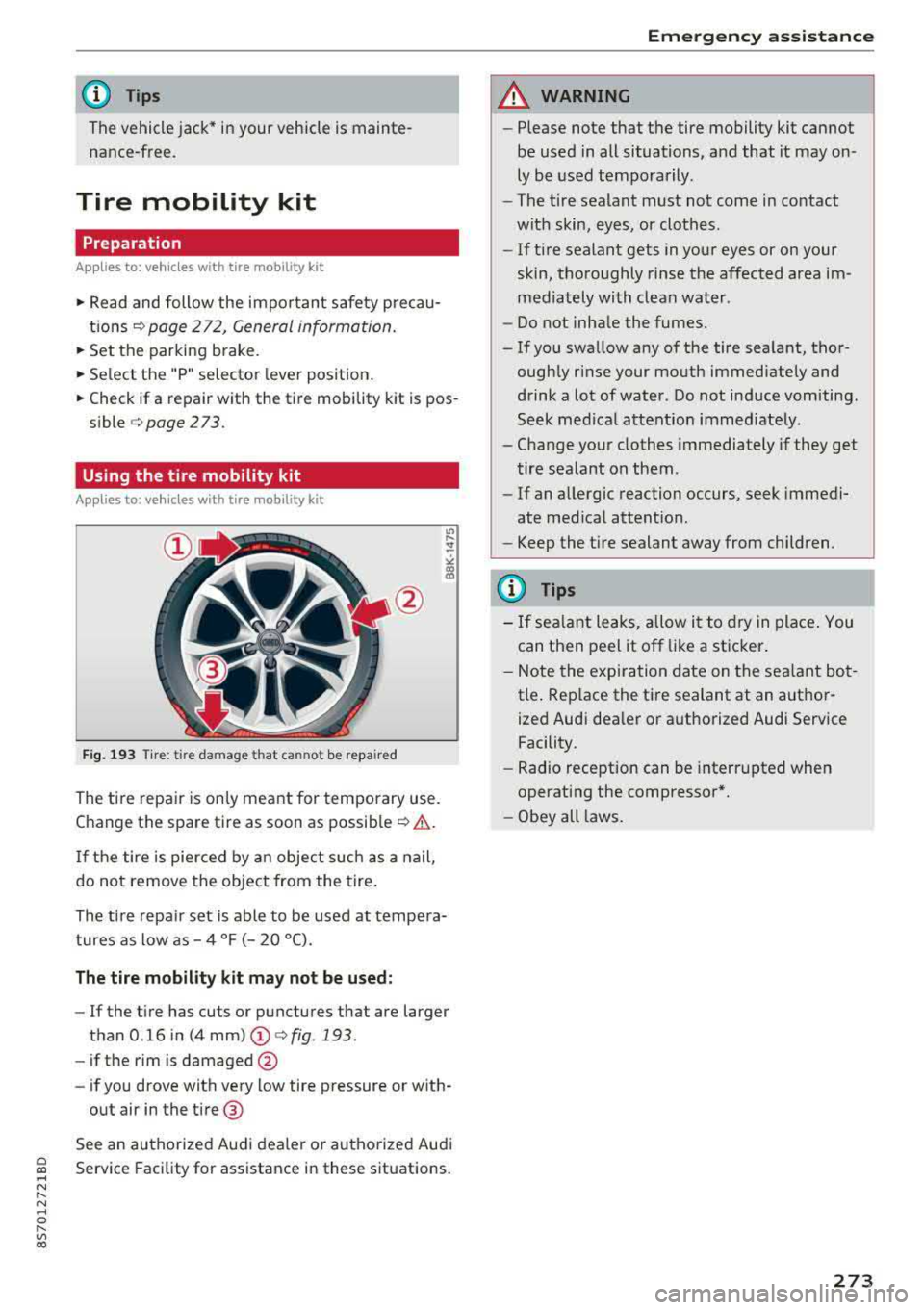
Fig . 193 Tire : tire da mage that canno t be repa ired
The tire repair is only meant for temporary use .
Change the spare tire as soon as
possib le ¢ .& .
If the tire is pierced by a n object such as a nail,
do not remove the object from the tire .
The tire repa ir set is able to be used at tempe ra
tures as low as
-4 °F (- 20 °C).
The tire mobility kit ma y not be u sed:
- If the t i re has cuts or punctures that are larger
than 0 .16 in (4
mm) (!)¢ fig. 193.
-if the rim is damaged @
- if you drove with very low tire pressure or with-
out air in the tire @
See an authorized Audi dealer or authorized Aud i
Service Facility for assistance in these situations.
Em ergen cy as sis tanc e
A WARNING
-Please note that the tire mobility kit cannot
be used in all situations, and that it may on
ly be used temporarily.
- The tire sealant must not come in contact
with skin, eyes , or clothes.
- If tire sealant gets in your eyes or on your
skin, thoroughly rinse the affected area im
mediately with clean water .
- Do not inha le the fumes.
-If you swa llow any of the tire sealant, thor-
ough ly rinse your mouth immediately and
drink a lot of water . Do not induce vomiting .
Seek med ica l attent ion immed iate ly.
-Change your clothes immediately if they get
tire sealant on them.
-If an allergic reaction occurs, seek immedi
ate med ical attention.
-Keep the tire sealant away from children.
(D Tips
- If sea lant leaks, allow it to dry in place . You
can then peel it off like a st icker .
- Note the expi ra tion date on the sea lant bot
tle . Rep lace the tire sealant at an autho r
ized Audi dealer or authorized Audi Service Facility.
- Radio reception can be interr upted when
operating the compressor*.
- Obey all laws .
273
Page 285 of 310
Cl 00 .-< N r--N .-< 0 r--Vl 00
Emergency situations
General
This chapter is intended for trained emergency
crews and working personnel who have the nec
essary tools and equipment to perform these
operations.
Starting by pushing or
towing
~ Note
Vehicles with an automatic transmission can
not be started by pushing or towing.
Starting with jumper
cables
If necessary, the engine can be started by con
necting it to the battery of another vehicle .
If the engine should fail to start because of a dis
charged or weak battery, the battery can be con
nected to the battery of
another vehicle, using a
pair of jumper cables to start the engine.
Jumper cables
Use only jumper cables of sufficiently large cross
section
to carry the starter current safely. Refer
to the manufacturer's specifications.
Use only jumper cables with
insulated terminal
clamps which are distinctly marked :
plus(+) cable in most cases colored red
minus(-) cable
in most cases colored black.
A WARNING -
Batteries contain electricity, acid, and gas.
Any of these can cause very serious or fatal in
jury. Follow the instructions below for safe
handling of your vehicle's battery .
-Always shield your eyes and avoid leaning
over the battery whenever possible.
-A dead battery can freeze at temperatures
around 32 °F (0 °C) . If the vehicle battery is
frozen, you must thaw it before connecting
the jump start cables. If you do not, this in-
Emergency situations
creases the risk of an explosion and chemi
cal burns. After jump starting the vehicle,
drive to an authorized Audi dealer or author ized Audi Service Facility immediately to
have the vehicle battery checked.
- Do not allow battery acid to contact eyes or
skin . Flush any contacted area with water
immediately.
- Improper use of a booster battery to start a
vehicle may cause an explosion .
- Vehicle batteries generate explosive gases .
Keep sparks, flame and lighted cigarettes
away from batteries.
- Do not try to jump start any vehicle with a
low acid level in the battery .
- The voltage of the booster battery must also
have a 12-Volt rating . The capacity (Ah) of
the booster battery should not be lower
than that of the discharged battery. Use of
batteries of different voltage or substantial
ly different "Ah " rating may cause an explo
sion and personal injury.
- Never charge a frozen battery. Gas trapped
in the ice may cause an explosion.
- Never charge or use a battery that has been
frozen. The battery case may have be weak
ened.
- Use of batteries of different voltage or sub
stantially different capacity (Ah) rating may
cause an explosion and injury. The capacity
(Ah) of the booster battery should not be
lower than that of the discharged battery.
- Before you check anything in the engine
compartment, always read and heed all
WARNINGS
c>page 233.
@ Note
- Applying a higher voltage booster battery
will cause expensive damage to sensitive
electronic components, such as control
units, relays, radio, etc.
- There must be no electrical contact between
the vehicles as otherwise current could al
ready start to flow as soon as the positive
( + ) terminals are connected.
283