steering wheel AUDI TT ROADSTER 2018 User Guide
[x] Cancel search | Manufacturer: AUDI, Model Year: 2018, Model line: TT ROADSTER, Model: AUDI TT ROADSTER 2018Pages: 310, PDF Size: 46.95 MB
Page 80 of 310
Assistance systems
Messages
App lies to: ve hicles w ith Aud i side ass ist
If th e side assist sw itches off automatically, a
message appears in the Infotainment system dis
p la y.
@j Audi side assist: currently unavailable.
Sensor vision restricted due to surroundings.
See owner's manual
The radar sensor vision is impaired . Do not cover
the area in front of the sensors with bike wheels,
stickers, dirt or other objects. Clean the area in
front of the sensors, if necessary
c:> page 76,
fig . 84 .
@j Audi side assist: currently unavailable.
See owner's manual
Side assist cannot be switched on at th is time be
cause there is a malfunction (for example, the battery charge level may be too low) .
@j Audi side assist: malfunction! Please
contact Service
The system cannot guarantee that it will detect
veh icles correctly and it has switched off . The
sensors have been moved or are faulty. Have the
system checked by an author ized Audi deale r or
authorized Audi Service Facility soon.
Audi drive select (drive
settings)
Introduction
A pp lies to: ve hicles w ith Aud i d rive select
Drive select makes it possible to expe rience d if
fe rent types of vehicle settings in one vehicle.
The driver can select from three modes, Comfort,
Auto and Dynamic , using the
i:l:ta button in the
center console or by using the Infotainment sys
tem . T his allows you to switch between a sporty
and a comfortab le driving mode, for examp le. In
the Indi vidual mode, the settings can be adjust
ed to your personal preferences. This makes it
possible to combine sett ings such as a sporty en
g ine setting w ith light steering.
78
A WARNING
Using Aud i drive select incorrectly can lead to
coll is ions, other accidents and serious inju
ries.
Description
App lies to: vehicles with A udi drive se lect
The veh icle setup in each mode depends on the
vehicle's features.
Engine and automatic transmission
Depending on the mode, the engine and auto
matic transmission respond more quickly or in a
more balanced manner to accelerator pedal
movements.
Suspension control (Audi magnetic ride)*
The suspension control uses sensors to record in
format ion regarding steering movements, brak
i ng and acceleration operations by the driver, as
well as information about the road surface, driv
i ng speed, and load. W ith dr ive se lect, you can
adjust the suspension control to sporty (dynam
ic ), comfortable (comfort) or balanced (auto).
Steering
The power steering adapts . Indirect steering that
moves eas ily as in comfort mode is espec ially
su ited to long drives on a highway . The dynamic
mode provides sporty, direct steering.
Engine sound*
The engine sound adapts to the current mode
and can be subtle to sporty .
(D Tips
In some models, the maximum vehicle speed
can only be reached in the auto and dynamic
modes .
Page 85 of 310
Cl co .... N ,....
N ...... 0 ,....
Vl co
General information
Applies to: ve hicles with rearview camera
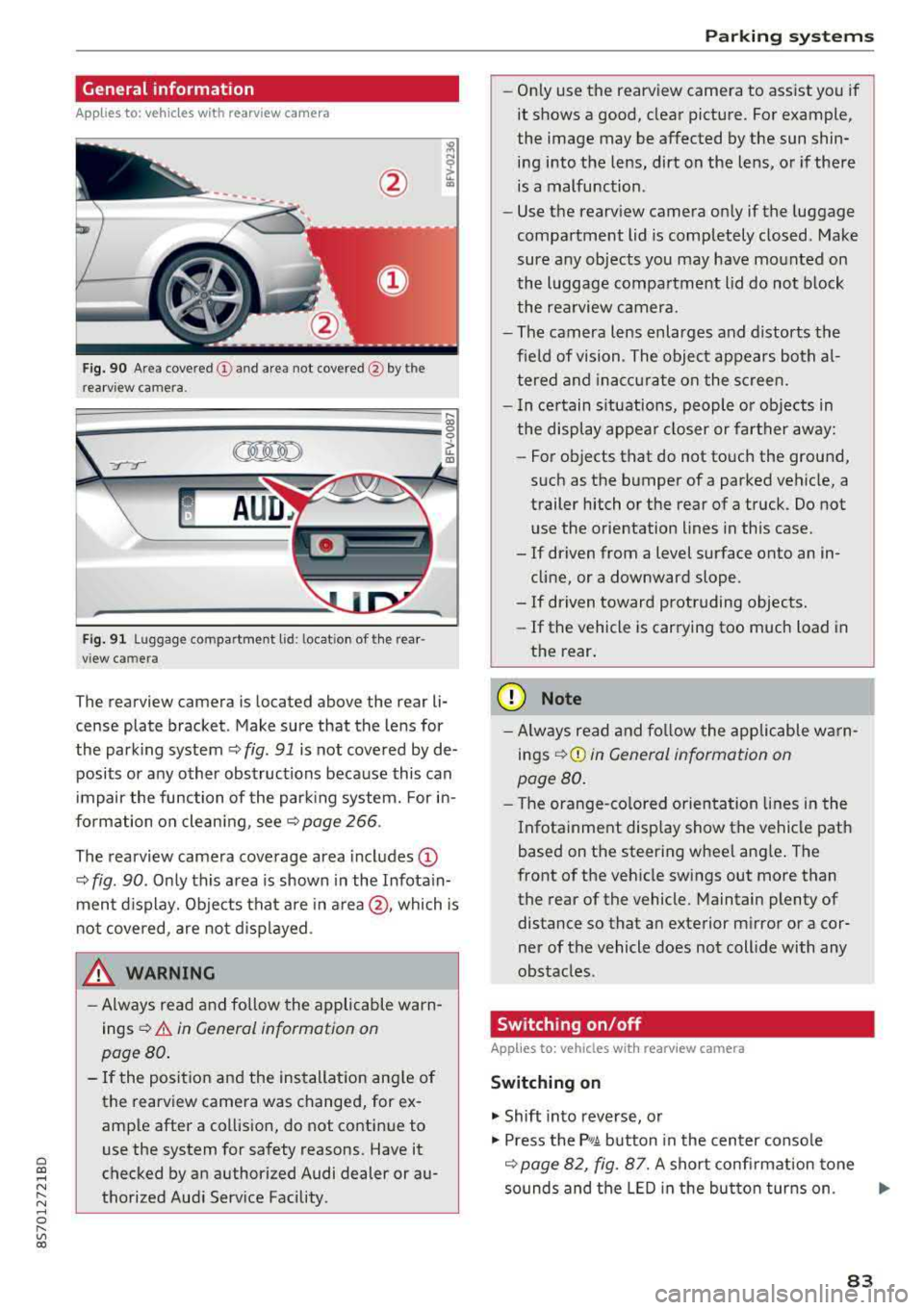
Fig . 90 Area covered (!) and area not covered @ by the
rea rview camera.
:;,
~;..------: :.·~- ---~ _.,- ,.,,.--------g
(Jo00oD ~
Fig. 91 Luggag e compartment lid: locat ion of the rear
view camera
The rearview camera is located above the rear li
cense plate bracket. Make sure that the lens for
the parking system¢
fig. 91 is not covered by de
posits or any other obstructions because this can
impair the function of the parking system. For in
formation on cleaning, see¢
page 266 .
The rearview camera coverage area includes
(D
¢ fig. 90. Only this area is shown in the Infotain
ment display. Objects that are in
area @, which is
not covered, are not displayed.
A WARNING
-Always read and follow the applicable warn
ings ¢
A in General information on
page 80.
- If the position and the installation angle of
the rearv iew camera was changed, for ex
ample after a collision, do not continue to
use the system for safety reasons. Have it
checked by an authorized Audi dealer or au
thorized Audi Service Facility .
Parking systems
-Only use the rearview camera to assist you if
it shows a good, clear picture. For example,
the image may be affected by the sun shin
ing into the lens, dirt on the lens, or if there
is a malfunction.
- Use the rearview camera only if the luggage
compartment lid is completely closed. Make
sure any objects you may have mounted on
the luggage compartment lid do not block
the rearview camera.
- The camera lens enlarges and distorts the
field of vision. The object appears both al
tered and inaccurate on the screen.
- In certain situations, people or objects in
the display appear closer or farther away:
- For objects that do not touch the ground,
such as the bumper of a parked vehicle, a
trailer hitch or the rear of a truck. Do not use the orientation lines in this case.
- If driven from a level surface onto an in cline, or a downward slope .
- If driven toward protruding objects.
- If the vehicle is carrying too much load in
the rear.
(D Note
-Always read and follow the applicable warn
ings
¢ (D in General information on
page 80.
- The orange-colored orientation lines in the
Infotainment display show the vehicle path
based on the steering wheel angle. The
front of the vehicle swings out more than
the rear of the vehicle. Maintain plenty of
distance so that an exterior mirror or a cor
ner of the vehicle does not collide with any
obstacles.
Switching on/off
App lies to : vehicles wi th rearv iew camera
Switching on
.,. Shift into reverse, or
.,. Press the P,q.A button in the center console
¢ page 82, fig. 87. A short confirmation tone
sounds and the LED in the button turns on.
..,.
83
Page 86 of 310
Parking systems
Switching off
~ Drive faster than 6 mph (10 km/h), or
~ Press the P"'il button, or
~ Switch the ignition off .
(D Tips
-The visual display in the left part of the dis
play should help you detect the critical vehi
cle areas .
- You can change the volume of the signals
and the display
¢page 84.
Perpendicular parking
Applies to: vehicles with rearview camera
This view may be used when parking in a garage
or in a parking space.
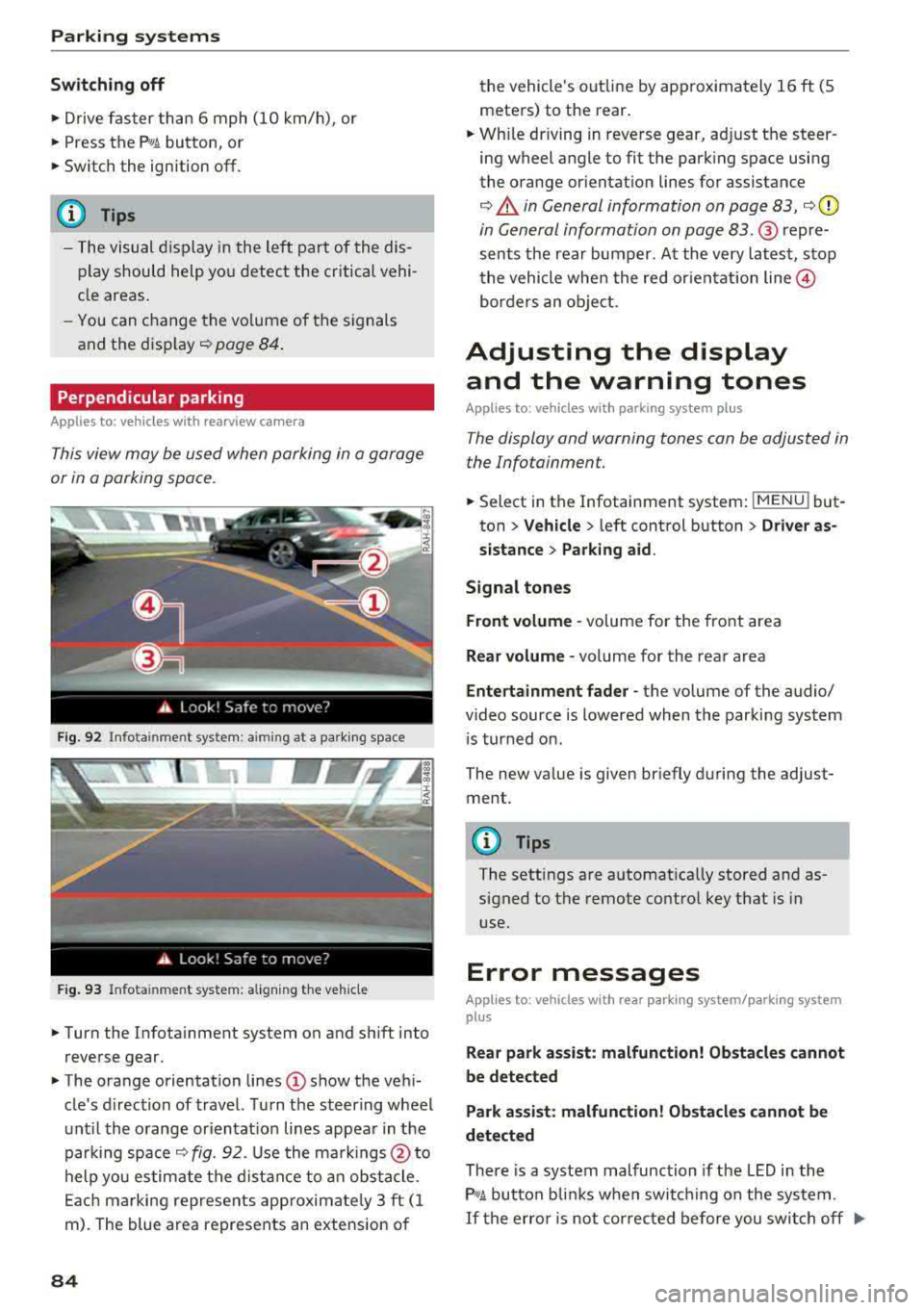
F ig. 92 Info ta in ment system: a im ing at a park ing space
Fig. 93 Infota inme nt system: aligning the vehicle
~ Turn the Infota inment system on and shift into
reverse gear.
~ The orange orientation lines (D show the vehi
cle's d irection of travel. Turn the steering wheel
until the orange or ientat ion lines appear in the
parking space
¢ fig. 92. Use the markings @to
help you estimate the distance to an obstacle.
Each marking represents app roximate ly 3 ft (1
m). The blue area represents an extension of
84
the vehicle 's out line by approximately 16 ft (5
meters) to the rear.
~ Wh ile driving in reverse gear, adjust the steer
ing wheel angle to fit the parking space using
the orange orientation lines for assistance
¢ .&. in General information on page 83, ¢(D
in General information on page 83. ® repre
sents the rear bumper. At the very latest, stop
the vehicle when the red or ientat ion
line @
borders an object.
Adjusting the display
and the warning tones
Applies to: vehicles with parking system plus
The display and warning tones can be adjusted in
the Infotainment.
~ Select in the Infotainment system : IMENU! but
ton
> Vehicle > left control button > Driver as
sistance> Parking aid.
Signal tones
Front volume -
volume for the front area
Rear volume -volume for the rear area
Entertainment fader -the volume of the audio/
video source is lowered when the parking system
i s turned on.
The new value is given briefly during the adjust ment.
{!) Tips
The settings are automat ically stored and as
signed to the remote control key that is in
use.
Error messages
App lies to: vehicles with rear park ing system/parking system
plus
Rear park assist: malfunction! Obstacles cannot
be detected
Park assist: malfunction! Obstacles cannot be
detected
There is a system malfunction if the LED in the
P'1
1 .ll button blin ks when switc hing on the system .
If the error is not corrected before you switch off Ill-
Page 88 of 310
Intelligent Technology
Intelligent Technology Electronic stabilization
control (ESC)
Description
Elect ronic stabili zation control ( ESC) suppo rts
driver safety. It red uces the risk of slipping and
improves dr iving stabi lity. ESC detects crit ica l sit
uations such as the vehicle overstee ring and un
dersteeri ng or the w heels are sp inning. The vehi
cle is stabilized by app lying the brakes or reduc
i n g e ngine torque . When the ESC engages, the
liJ indicato r light bli nks in t he instr ument clus
t er.
The fo llow ing systems are in tegrated in the ESC:
Anti-lock braking system (ABS)
ABS p reve nts the whee ls from lock ing whe n brak
ing. The vehicle can st ill be steered even d uring
hard brak ing. Apply steady press ure to the bra ke
pedal. Do not pump the pedal. A puls ing in t he
b rake pedal indicates that the system is act ing to
s tabili ze the vehicle .
Brake assist system
The brake assist system can decrease brak ing dis
tance . It inc reases brak ing power when the d river
presses the brake pedal q uick ly in eme rgency sit
uations . You must press and hold t he b rake pedal
until the dangerous si tuatio n is ove r.
Anti-slip regulation (ASR)
ASR red uces eng ine power when the d rive wheels
begin sp inning a nd adapts the force to the road
conditions . This makes it easie r to start, acceler
ate and dr ive u p hill s.
Electronic differential lock (EDL)
E DL applies the brakes to a wheel that sta rts
spi nning and t ransfe rs the d rive power to the
other driving wheels. This f unction is not availa
b le at higher speeds.
In extreme cases, EDL automatically sw itches off
to keep the brake on the b raked wheel from over
heati ng. The vehicle is st ill work ing correctly. EDL
86
will swi tc h on again automatically when condi
tions have retu rned to normal.
Power steering
The ESC can also support veh icle stab ility
t hr ough stee rin g.
Selective wheel torque control
Se lective wheel to rque con trol is used when d riv
i ng on curves . The front whee l on the ins ide of
t h e curve or bo th whee ls on the i nside of th e
cu rve are braked se lective ly as needed. This al
l ows mo re pre cise dr iving in curves .
_&. WARNING
-The E SC and i ts in teg ra ted systems cannot
overcome the lim its imposed by natura l
phys ica l laws. This is es pec ially important
on s lippery or wet roa ds.
If the systems be
gin acting to stabilize yo ur vehicle, you
should immediately a lter your speed to
match the road and traffic conditions. Do
no t le t the inc reased safety p rovi ded tempt
you into taking risks. This could increase
y o ur r is k of a c oll is ion.
- Please note the r is k of a coll is ion increases
w hen dr iv in g fast, especially t hrough curves
a nd on sl ippery or wet r oads, and w hen dr iv
ing to o cl ose to obje cts ahead. T he ES C and
it s i ntegrated systems cannot a lways pre
vent co llisions
-there is st ill a risk of acci
dents!
- Press the accelerator peda l caref ully when
accelerating on even, slippery sur faces such
as ice and snow. The drive wheels can spin
even when these control systems a re instal
led and this can affect driving stability and
increase the risk of a collision.
(0 Tips
- The ABS and ASR only funct ion correctly
when a ll four wheels have a sim ila r wear
co nditio n. D iffere nt tire sizes can lead to a
red uction in engin e power.
- You may hear noises when the systems de
sc ribed are working .
Page 91 of 310
Cl 00 .-< N r-N .-< 0 r-Vl 00
-The efficiency of the brakes can also be im
paired by driving for long stretches on roads
covered with salt without using the brakes .
You can remove salt deposits from the
brake rotors and pads by carefully applying
the brakes severa l t imes .
- If the front spoiler is damaged or you install
another spoiler, make sure the front wheel
brakes are vent ilated proper ly . Otherwise,
the b rake system could overheat, w hich re
duces the ir effectiveness.
- Failure of a brake c ircuit impa irs b raking
perfo rman ce , which increases brak ing dis
tan ce. Avoid d riving the vehicle and have it
towed it to the nearest authorized Audi
dealer or authorized Audi Service Facility .
- Never let the vehicle roll while t he engine is
stopped because this increases the risk of an
accident.
- If the brake booster is not working, you will
have to press much harder on the brake
peda l to compensate for the lack of the
booster.
@ Note
- Never let the brakes "rub" by pressing the
pedal light ly when braking is not actually
necessary. This causes the brakes to over
heat and increases braking d istance and
causes wear.
- Before driving downhi ll a long distance on a
steep h ill, decrease your speed and select a
lower gear. This makes use of the engine
braking effect and relieves the brakes . If
you need to brake additionally, brake in in
tervals and not conti nuous ly .
0) Tips
- If the brake booster is not working, you
must press the brake pedal with much more
fo rce t han normal.
- If you retrofit your vehicle with a front spoil
er, whee l covers o r similar items, make sure
t h at the a ir flow to the front whee ls is not
i nte rru pted. Ot herw ise the brake system
ca n become too ho t.
In tellig ent T echn olo gy
Electromechanical
steering
The electromechanical steering supports the
driver 's steering movements .
Power steering adap ts elec troni cally based on
the vehicle speed .
Indicator li ghts and me ssages
• Stee ring: m alfun ction! Ple ase stop vehicle
If this indica to r li ght tur ns on and stays on and
this message appears, the powe r steering may
have failed.
Stop the veh icle in a safe location as soon as pos
s ible. Do
n o t cont inue d riving. See an autho rized
Audi dealer or authorized A udi Service Facility for
assistance .
(;r,ij Ste ering : malfun cti on! You may con tinu e
dri vin g
If the indicator l ight turns on, the steering wheel
may be more d ifficult to move or more sensit ive
t h an usual. The steer ing whee l may also be at an
angle when d riving stra ight.
Drive slowly to an authorized Aud i dealer or au
thorized Aud i Serv ice Facility to have the mal
funct ion corrected.
(D Tips
If the . or (;r,ij ind icator light only stays on
fo r a short t ime, yo u may continue d riving.
All wheel drive (quattro)
In all wheel drive, all four wheels are powered.
Gener al informat ion
In all wheel dr ive, the dr iving power is divided be
tween all four wheels . This happens automatical
ly depending on your dr iv ing behavior as well as
t h e cur rent road condit ions. A lso
see ~ page 86,
Electronic stabilization control (ESC).
The all wheel dr ive concept is des igned for high
engine power . You r vehicle is except ionally pow
erfu l and has excellent driv ing cha racter istics
bot h unde r normal d riving conditions and o n
89
Page 95 of 310
Cl co .... N ,....
N .... 0 ,....
Vl co
Multi Media Interface
Traffic safety information
Aud i recommends performing certa in Infotain
ment system functions, such as enteri ng a desti
n ation, only when the vehicle is stat ionary . Al
ways be p repa red to stop operat ing the Info tain
ment system in the interest of your safety and
t he safety of o ther ro ad use rs.
_& WARNING
O nly use the In fo tainme nt sys tem when tra f
fic con ditio ns permit and alw ays in a way t hat
allows you to maintain complete control over
your vehicle.
@ Tips
Ce rtain functi ons are not av ailable wh ile driv
ing .
Introduction
The Multi Media Interface, or MMI for short,
combines various systems for communication,
navigation* and entertainment in your Audi. You
can opera te the MMI using the MMI control pan
el , the multifunction steering wheel or the voice
recognition system*.
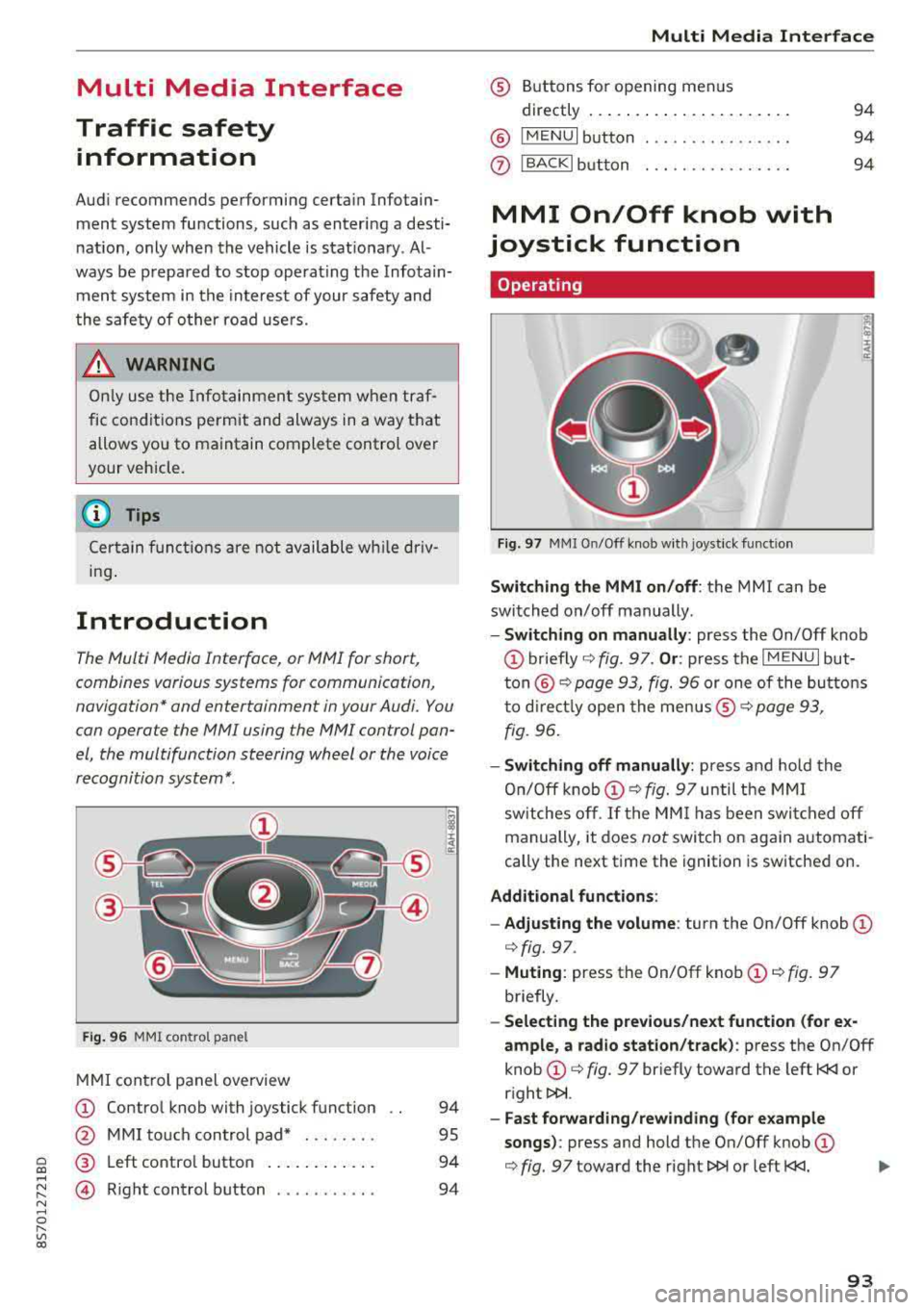
F ig. 96 MMI co ntrol pa nel
M MI con trol panel overview
(D Contro l knob with joystick f unction
@ M MI to uch con trol pad* . .... .. .
® Left co ntro l butto n .... .. . ... . .
© R ight control b utton .......... .
94
95
94
94
Multi Media Inte rface
® Buttons fo r opening menus
directly .... ... .. .. .. .. .... .. .
@ IM ENU I button
0 IBACKI bu tton . .. .. .. .... .... .
MMI On/Off knob with
joystick function
Operating
Fig . 97 MMI O n/Off k nob w it h joys tick funct io n
Switching the MMI on/off : the MMI can be
switched on/off manually .
94
94
94
E
" ~ .. a:
- Switching on manually : press the On/Off knob
(D briefly c::> fig. 9 7. Or : press the IM ENU I but
t o n
@ c::> page 93, fig. 96 or one of the bu tton s
t o dir ect ly open the menus ®
r=.> page 93,
fig. 96.
- Switching off manually : press and ho ld the
O n/O ff k nob
(D r=.> fig. 97 until t he MMI
sw itches o ff.
If the MM I has been swi tc h ed off
manually, it does
not switch o n again automati
cally the next time the ignition is sw itche d on.
Additional fun ctions :
- Adjusting the volume :
turn the On/Off knob (D
c::> fig. 97.
-Muting : press the On/Off knob (D c::> fig. 97
briefly .
-Selecting the previous/next function (for e x
ample , a radio station/track ):
p ress the On/Off
knob
(D c::> fig. 97 br iefly toward the left t
l>!>i.
- Fast forwarding/rew inding (for e xample
songs) :
press and hold the On/Off knob (D
c::> fig. 97 toward the right l>!>i or left t
Page 145 of 310
Cl 00 .-< N r-N .-< 0 r-Vl 00
turn the left thumbwhee l on the mu ltifunction
steering wheel*
r=> page 18.
Turning th e cross hair s on /off
-Switching the crosshairs on : press the control
knob in the map view .
-Switching th e crossh airs off : press the I BACKI
button .
When the cros s h air s are s witched on r:!> fig. 12 7:
(D Orientation : th e map is either displayed as a
2D north up m ap or a 2D heading up map.
@ Scale : turn the control knob to the left or
right to decrease or increase the scale .
@ Zoom: when the Automatic zo om function is
switc hed on, an
"A" for "Automatic" is dis
p layed in the magnifying g lass.
© Crosshairs: move the crossha irs in the de
sired direction us ing the MMI touch control
pad and set a po int on t he map as the desti
n at ion or have info rmation about the fo cal
po int disp layed.
® Map content (points of interest, favorites) : if
there are mult iple POis in the immed iate v i
cin ity, they will be shown stacked o n the
map .
@ Additional information on t he crosshai rs po
sition : if you move the crosshairs to a loca
tion on the map, avai lable information for
the current c rosshairs position is displayed.
Press the control knob to open destination
deta ils or to start route guidance . When the
crossha irs are turned off, the road being cur
rently d riven on is shown .
0 Disp lay o f an upcoming maneuver. If the re is
no upcoming maneuver, the distance and ca l
culat ed arrival tim e to the destination/stop
over is displayed in this location.
@ Di sp lay of a better route . Seer:!> page 147 .
When the c rosshairs a re s witched o ff r:!> fig. 128 :
® If a turn arrow is displayed, a bar graph turns
on. The fewer bars are shown, th e shorter th e
d istance is unt il the turn .
l) O nly applie s to vehicl es withou t ca mer a-b as ed speed li mit
d is play .
Navigation
@ Speed limit display l): disp lay of the max i
mum permitted speed on the expressways
and highways.
@ Road currently being driven on . When the ve
hicle is stat iona ry, "off road" is displayed
here.
@ Vehicle location (@)
@ Display of active traffic information
(ION LINEI* or lTMC !)
@ Altitude disp lay (.d\)
@ Route information: var ious informa tion will
be displayed dur ing active route guidance
(for example, t he upcom ing maneuver in
clud ing ca lculated distance and street
names). The d isplay a lso p rovides t raff ic in
format io n or points of inte rest on the cur rent
route.
Map functions
Applies to : vehicles with navigation system
.. Press the !NAV /MAP I button repeatedly unti l
the map is displayed
r=> page 142, fig. 128.
.. Select: left control button > desired function.
Switch to d estin ation input
T he Enter de stin ation menu is d isp layed
r:!> page 134, fig. 1 22 .
Traffic messages
Current traffic information is disp layed in the In
fota inme nt system display . See
r:!> page 145 .
Route list
The route list can o nly be disp layed when route
guidance is active and contains informat ion re
gard ing the route, the names of the streets and
the le ngth of the route sect ions. When traveling
o n highways, poss ible parking lots and rest areas
are show n, wh ich you can se lect as a stopove r.
POis along the route
Requirement: route guidance must be active .
Searching for points of interest a long your cur
rent route See
r:!> page 13 7 .
143
Page 182 of 310
Safe dri ving
,.. Take frequent breaks on long trips. Do not drive
for more than two hours at a stretch.
,.. Do NOT drive when you are tired, under pres
sure or when you are stressed.
A WARNING
Impaired driving safety increases the risk of
serious personal injury and death whenever a
vehicle is being used.
Correct passenger
seating positions
Proper seating position for the driver
The proper driver seating position is important
for safe, relaxed driving.
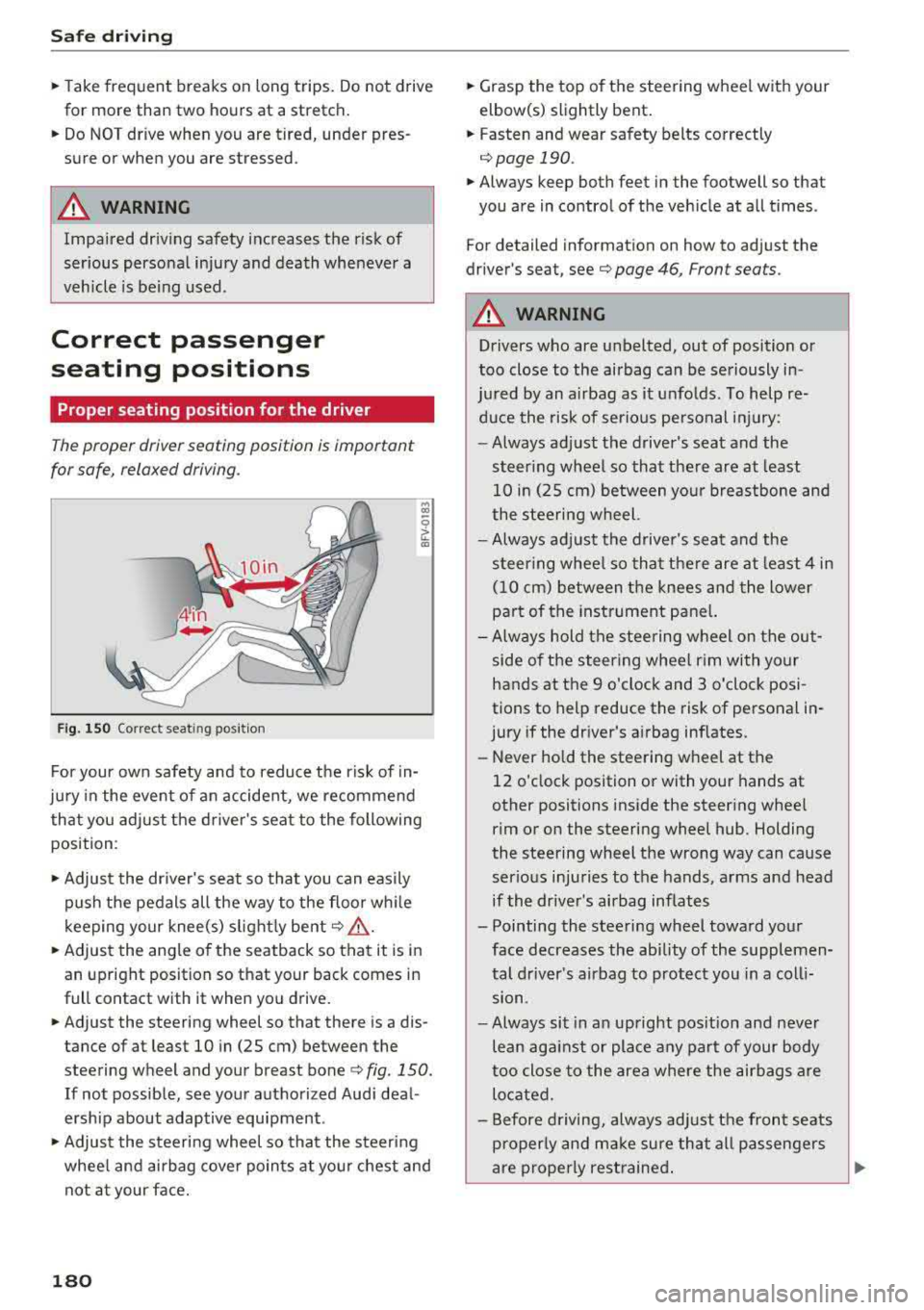
F ig. 150 Correct seat in g posi tion
.., CD
~ CD
For your own safety and to reduce the risk of in
jury in the event of an accident, we recommend
that you adjust the driver's seat to the following
position :
,.. Adjust the driver's seat so that you can easily
push the pedals all the way to the floor wh ile
k eeping your knee(s) s lightly bent
c:> .&_ .
,.. Adjust the angle of the seatback so that it is in
an upright position so that your back comes in
full contact with it when you drive.
,.. Adjust the steering wheel so that there is a dis
tance of at least 10 in (25 cm) between the
steering wheel and your breast bone
c:> fig. 150.
If not possible, see your authorized Audi deal
ersh ip about adaptive equipment .
,.. Adjust the steering wheel so that the steering
whee l and airbag cover points at you r chest and
not at your face.
180
,.. Grasp the top of the steering wheel with your
elbow(s) slightly bent.
,.. Fasten and wear safety belts correctly
c:> page 190 .
,.. Always keep both feet in the footwell so that
you are in control of the vehicle at all times .
For detailed information on how to adjust the
driver's seat, see
c:> page 46, Front seats.
A WARNING
Drivers who are unbelted, out of position or
too close to the airbag can be seriously in -
ju red by an airbag as it unfolds. To help re-
duce the risk of serious pe rsonal injury:
-Always adjust the driver's seat and the
steer ing wheel so that the re are at least
10 in (25 cm) between your breastbone and
the steering wheel.
-Always adjust the driver's seat and the
steer ing whee l so that there are at least 4 in
(10 cm) between the knees and the lower
pa rt of the instrument pane l.
- Always hold the steering wheel on the out
side of the steering wheel rim with your
hands at the 9 o'clock and 3 o'clock posi
tions to help reduce the risk of personal in
jury if the dr iver's a irbag inflates.
- Never hold the steering wheel at the
12 o'clock position or with your hands at
other positions inside the steering whee l
rim or on the steering wheel hub . Holding
the steering wheel the wrong way can cause
serious injuries to the hands, arms and head
if the driver's airbag inflates
- Pointing the steering wheel toward your face decreases the ability of the supplemen
tal driver's airbag to protect you in a coll i
sion.
- Always sit in an upright pos it ion and never
lean against or place any part of your body
too close to the area where the airbags are
located.
- Before driving, always adjust the front seats
properly and make sure that all passengers
-
are properly restrained . ..,.
Page 190 of 310
Safety belts
Why safety belts?
Frontal collisions and the law of physics
Frontal crashes create very strong forces for peo
ple riding in vehicles .
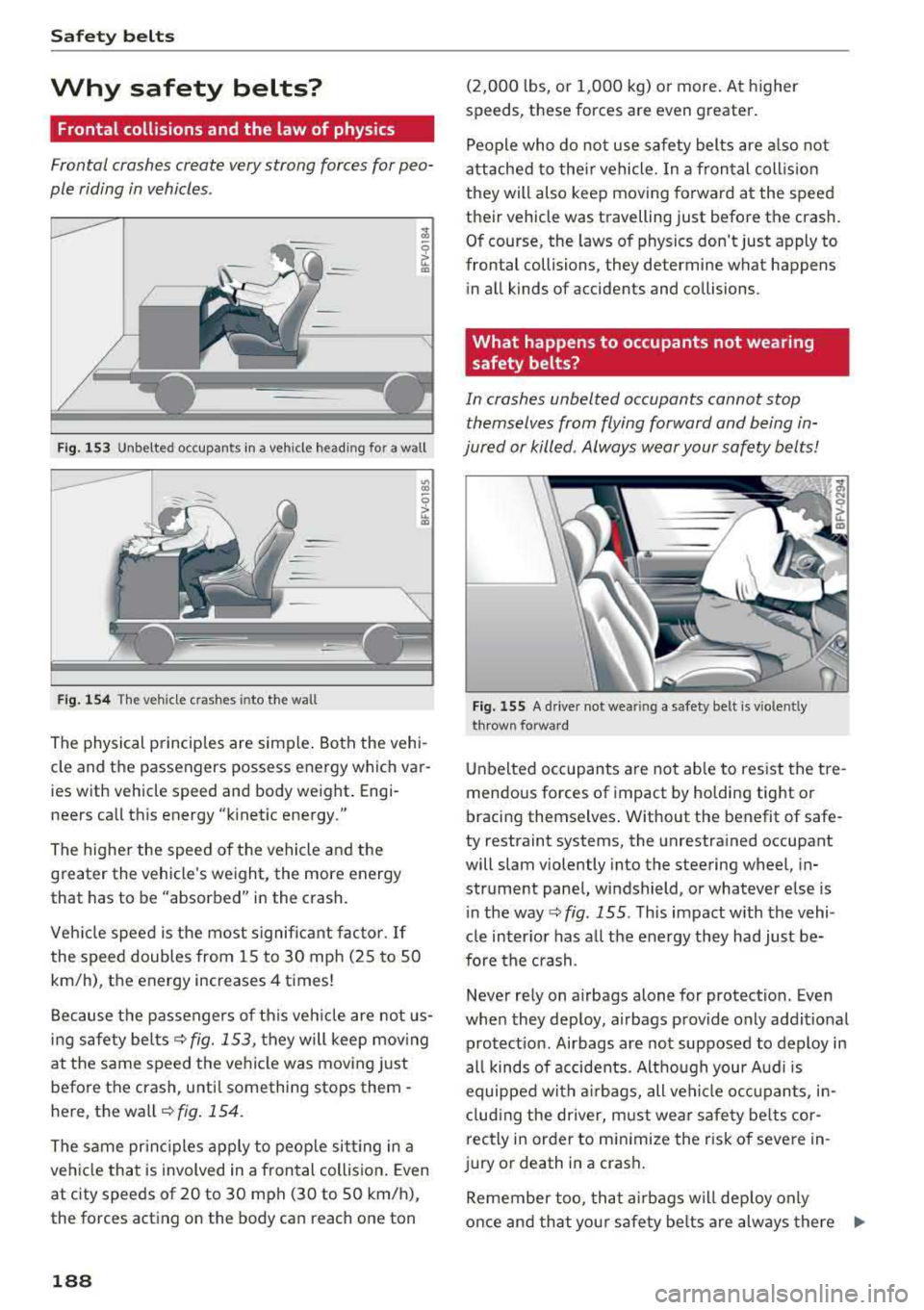
Fig . 153 Unbelted occupants in a veh icle headi ng fo r a wall
Fig. 154 T he vehicle c rashes into the wall
The physical principles are simple. Both the vehi
cle and the passengers possess energy which var
ies w ith vehicle speed and body weight. Engi
neers call this energy "k inetic energy."
The higher the speed of the vehicle and the
greater the vehicle's weight, the more energy
that has to be "absorbed" in the crash.
Vehicle speed is the most significant factor .
If
the speed doubles from 15 to 30 mph (25 to 50
km/h), the energy increases 4 times!
Because the passengers of this vehicle are not us
i ng safety belts
c::>fig. 153, they will keep moving
at the same speed the vehicle was moving just
before the crash, unti l something stops them -
here, the wall
c::> fig . 154.
The same principles apply to people sit ting in a
vehicle that is involved in a frontal collision . Even
at c ity speeds of 20 to 30 mph (30 to 50 km/h),
the forces acting on the body can reach one ton
188
(2,000 lbs, or 1,000 kg) or more . At higher
speeds, these forces are even greater.
People who do not use safety belts are also not
attached to their vehicle. In a frontal collis ion
they will also keep moving forward at the speed
their vehicle was travelling just before the crash.
Of course, the laws of physics don't just apply to
frontal collisions, they determine what happens
in all kinds of accidents and collisions .
What happens to occupants not wearing
safety belts?
In crashes unbelted occupants cannot stop
themselves from flying forward and being in
jured or killed . Always wear your safety belts!
Fig. 155 A drive r not wea ring a safety belt is vio len tly
t hrow n fo rward
Unb elted occupants are not able to resist the tre
mendous forces of impact by holding tight o r
bracing themselves . Without the benefit of safe
ty restraint systems, the unrestrained occupant
will slam violently into the steering wheel, in
strument panel, windshield, or whatever else is
i n the way
c::> fig . 155 . This impact w ith the vehi
cle inter ior has all the energy they had just be
fore the crash.
Never rely on a irbags alone for protection . Even
when they deploy, a irbags provide only addit ional
protection. Airbags are not supposed to deploy in
all kinds of accidents. Although your Audi is
equipped with airbags, all veh icle occupants, in
cluding the driver, must wear safety belts cor
rectly in order to minimize the risk of severe in
ju ry or death in a crash .
Remember too, that airbags will deploy only
once and that your safety be lts are always there
IJJ,,
Page 196 of 310
Airbag system
Airbag system
Important information
Importance of wearing safety belts and
sitting properly
Airbags are only supplemental restraints . For
airbags to do their job, occupants must always
properly wear their safety belts and be in a prop er seating position.
For your safety and the safety of your passen
gers , before driving off, always :
.,. Adjust the driver's seat and steering wheel
properly ~ page 180,
.,. Adjust the front passenge r's seat properly
~ page 181,
.,. Wear safety belts p roperly ~ page 189,
.. Always properly use the proper child restraint
to protect chi ldren
~ page 216.
In a coll is ion airbags must inflate within the blink
of an eye and with considerable force. The sup
p lemental airbags can cause injuries if the driver
or the front seat passenger is not seated proper ·
ly. T herefore in order to help the airbag to do its
job, it is important, both as a dr iver and as a pas
senger to sit properly at all t imes .
By keeping room between your body and the
steering whee l and the front of the passenger
compartment, the a irbag can inflate fully and
completely and provide supplemental protect ion
in certain frontal
coll isions ¢ page 180, Correct
passenger seating positions .
For details on the
operation of the seat adjustment controls
¢page 46.
It's especially important that children are proper
ly restrained
¢page 216 .
There is a lot that the driver and the passenger
can and must do to help the ind iv idual safety fea
tures installed in your Audi work together as a
system .
Proper seating posit ion is important so that the
front airbag on the driver side can do its job. If
you have a physical impairment or cond ition that
prevents you from s itting properly on the driver
seat with the safety be lt properly fastened and
194 reaching
the pedals, or if you have concerns with
regard to the function or operation of the Ad
vanced Airbag System, please contact your au
thori zed Audi dea ler or qualified workshop, or
ca ll Audi Customer Relations at 1-800-822-2834
for poss ible modifications to your vehicle .
When the airbag system dep loys, a gas generator
will fill the airbags, break open the padded cov ers, and inflate between the steering wheel and
the driver and between the instrument panel and
the front passenger . Th e a irbags w ill deflate im
med iate ly after deployment so that the front oc
cupants can see t hrough the windsh ield aga in
without interruption.
All of th is takes place in the blink of an eye, so
fast that many people don't even realize that the
a irbags have deployed. The airbags also inflate
with a great deal of force and nothing should be
in the ir way when they deploy. Front airbags in
combination with properly worn safety belts slow
down and limit the occupant's forward move
ment . Together they help to prevent the driver
and passenger from hitting parts of the inside
the vehicle while reducing the forces acting on
the occupant during the crash . In this way they
help to reduce the risk of injury to the head and
upper body in the crash . Airbags do not protect
the arms or the lowe r parts of the body.
Both front airbags will not inflate in all frontal
collisions . The triggering of t he a irbag system de
pends on the vehicle deceleration rate caused by
the collis ion and regis tered by the electronic con
trol unit . If this rate is be low the refe rence value
programmed into the control unit, the airbags
will not be triggered, even tho ugh t he car may be
badly damaged as a resu lt of the co llision . Vehi
cle damage, repair costs or even the lack of vehi
cle damage is not necessarily an indication of
whether an a irbag should inflate or not.
Since the circumstances wi ll vary considerab ly
between one collision and another, it is not possi
ble to define a range of veh icle speeds that will
cover every poss ible kind and angle of impact
that w ill always trigger the airbags . Important
factors include, for example, the nature (hard or
soft) of the object which the car hits, the angle of
im pact , vehicle speed, etc. The front airbags will
..,.