warning light AUDI TT ROADSTER 2018 User Guide
[x] Cancel search | Manufacturer: AUDI, Model Year: 2018, Model line: TT ROADSTER, Model: AUDI TT ROADSTER 2018Pages: 310, PDF Size: 46.95 MB
Page 28 of 310
Opening and clo sin g
pull once on the door handle to unlock the
vehicle and a second time to open it .
- The energy management system gradually
turns off unnecessary convenience functions
to prevent the vehicle battery from draining
and to maintain the vehicle's ability to start
for as long as possible. You may not be able
to unlock your vehicle using the convenience
key.
- For an explanation on conformity with the
FCC regulations in the United States and the
Industry Canada regulations, see
¢page 293.
(0 Tips
Unlocking with the convenience key (keyless
access) can be deactivated temporarily .
- Place the selector lever in the "P" pos ition;
otherwise, the vehicle cannot be locked.
- Close the door and press the button
(D III
¢ page 24, fig.16.
- Press the sensor on the door handle on ce
within five seconds ¢ fig. 17, ¢ & . Do not
ho ld the door handle wh ile doing this .
- The next time the vehicle is unlocked, it can
on ly be done with the remote control key or
mechanically us ing the door lock cylinder.
The convenience key will be active again af
ter the next loc king/un locking.
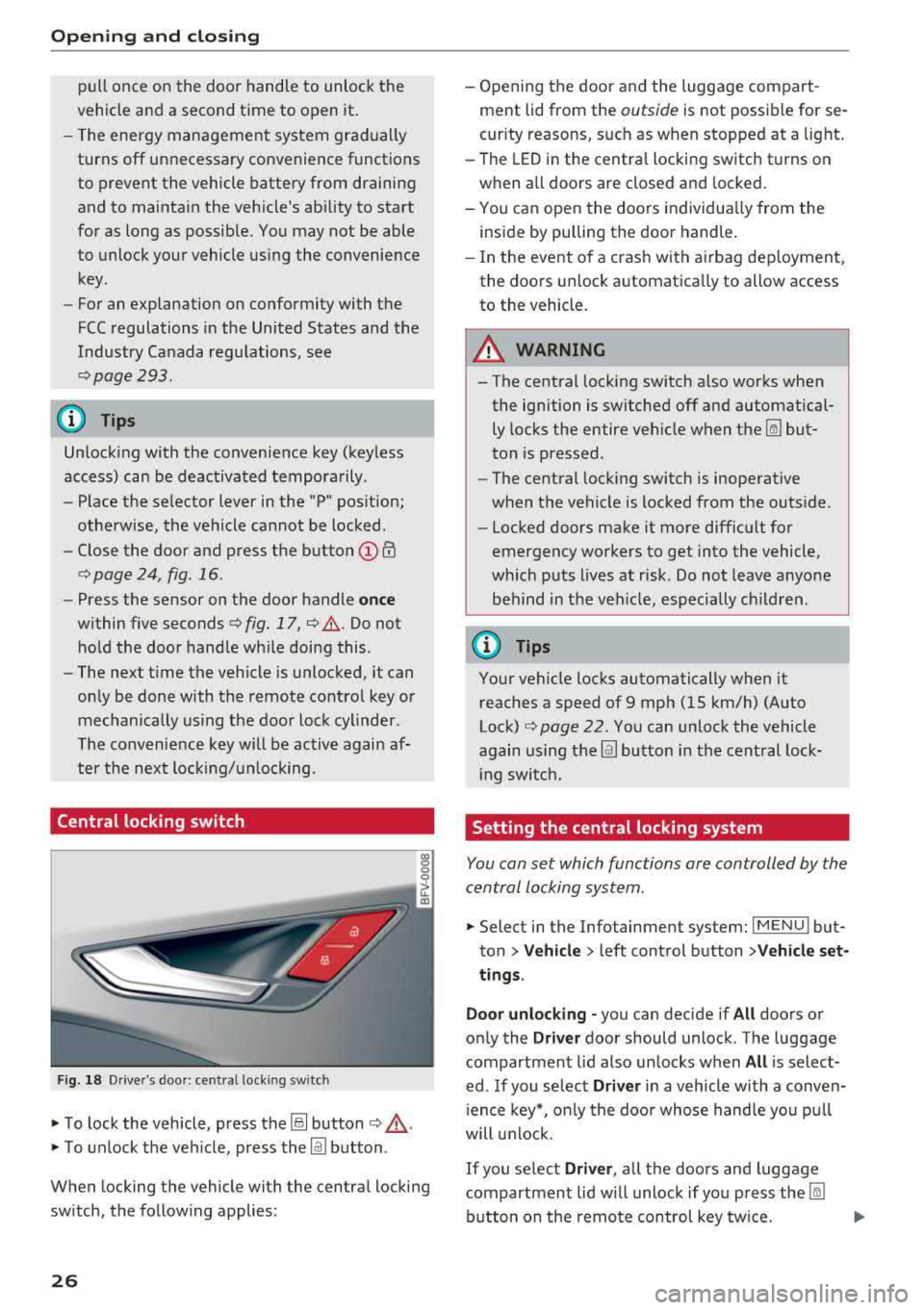
Central locking switch
F ig . 18 Dr ive r's doo r: central locki ng switch
• To lock the vehicle, press the@! button ¢,& .
• To unlock the veh icle, press the @J button .
When locking the vehicle with the central locking
sw itch, the follow ing applies:
26
- Opening the door a nd the luggage compart
ment lid from the
outside is not possible for se
curity reasons, such as when stopped at a light.
- The LED in the centra l locking switch t urns on
when all doors are closed and locked.
- You ca n open the doors individua lly from the
inside by pulling the door handle.
- In the eve nt of a cras h with a irbag dep loyment,
the doo rs unlock automatica lly to allow access
to the vehicle.
8_ WARNING
-The central locking switch a lso works when
the ignition is switched off and automatical
ly locks the entire vehicle when
the~ but
ton is pressed.
- The central locking switch is inoperative
when the vehicle is locked from the outs ide .
-Locked doors make it more difficult for
emergency workers to get into the vehicle,
which p uts lives at risk . Do not leave anyone
behind in the ve hicle, especially ch ildren.
(D Tips
Your vehicle locks automatically when it
reaches a speed of 9 mph (15 km/h) (Auto
Lock)
¢ page 22. Yo u can unlock the vehicle
again using the
@J button i n the cent ral lock-
i ng switch.
Setting the central locking system
You con set which functions ore controlled by the
central locking system .
• Select in the Infotainment system: IMENUJ but
ton
>Ve hicle > left control button >V ehicle set
ting s.
Door unloc king -
you can decide if All doors or
on ly the
Driv er door should unlock . The luggage
compartmen t lid also un locks when
All is select
ed . If you se lect
Driver in a vehicle with a conven
i ence key*, o nly the doo r whose hand le yo u pu ll
will u nlock.
If you se lect Driver , all the doors and luggage
compartment lid w ill unloc k if yo u press
the ~
button on the remo te con trol key tw ice.
Page 32 of 310
Opening and clo sin g
Correcting power w indow malfunctions
You can reactivate the one-touch up/down func
tion if it malfunctions .
.. Pull the power window sw itch up unt il the win
dow is completely raised.
.. Release the sw itch and pull it up again for at
least one second .
Garage door opener
(Homelink)
Description
Applies to: vehicles with garage door opener (Homelink)
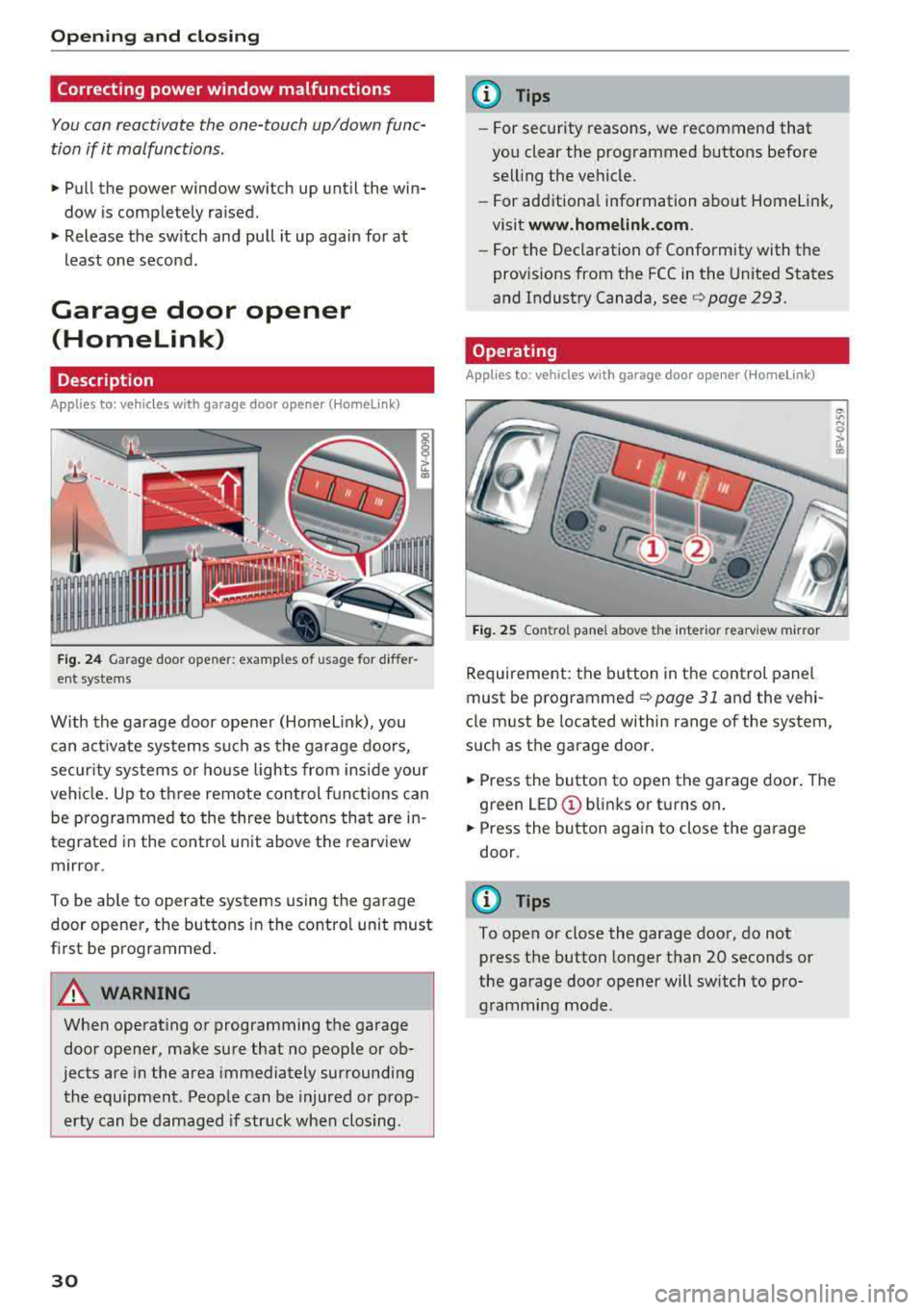
Fig . 24 Garage door ope ner: exa mples o f usage fo r differ
ent systems
W ith the garage door opener (Homelin k), you
can activate systems such as the garage doors,
secur ity systems o r house lights from inside your
veh icle. Up to three remote control f unctions can
be programmed to the three buttons that are in
tegrated in the control unit above the rearview
mirror .
To be ab le to operate systems using the garage
door opener, the buttons in the contro l unit must
first be programmed .
A WARNING
When operating or programming the garage
door opener, make sure that no people or ob
jects are in the area immediately surrounding
the equipment . Peop le can be injured or prop
erty can be damaged if str uck when closing .
30
@ Tips
-For security rea.sons, we recommend that
you clear the programmed buttons before
selling the vehicle .
- For additiona l information about Homelink,
visit
www.homeli nk.com .
-For the Dec laration of Conformity with the
prov isions from the FCC in the United States
and Industry Canada, see
c;, page 293.
Operating
App lies to : vehicles with garage door opener (Homelink)
F ig . 25 Co ntro l pane l above t he inter ior rea rv iew mirror
Requirement: the button in the control panel
must be
programmed ¢ page 31 and the vehi
cle must be located within range of the system,
such as the garage door.
.. Press the button to open the garage door . The
green
LED © blinks or turns on .
.. Press the button aga in to close the garage
door.
(D Tips
To open or close the garage door, do not
press the button longer than 20 seconds or
the garage door opener will switch to pro gramming mode.
Page 36 of 310
Power top
-Visibility to the rear is limited when operat
ing the power top. Avoid operat ing the top
wh ile driving in reverse.
(D Note
- To prevent damage to the power top:
- do not store any objects in the power top
storage compartment.
- make sure there is enough space above
the vehicle when opening or clos ing the
powe r top.
(D Tips
- To prevent the vehicle battery from dra ining
unnecessari ly, do not open or close the pow
er top repeatedly when the engine is switch
ed off.
- A message will appear in the instrument
cluster if there is a malfunction in the powe r
top
~ page 34.
- The powe r top can also be operated manual
l y temporari ly if there is a malfunction
~ page 36, Power top emergency opera
tion.
An authorized A udi dealer or author
ized Audi Service Facility should diagnose
and correct the cause of the ma lfunction as
soon as possib le .
- If the vehicle is parked with the power top open, the vehicle interior is not protected
from damaging weather or unauthor ized ac
cess. Lock any items you leave behind in the
luggage compartment. C lose the power top
before leaving the vehicle .
- The side windows automat ically lower
slightly when opening or closing the power
top.
34 Power top convenience opening and closing
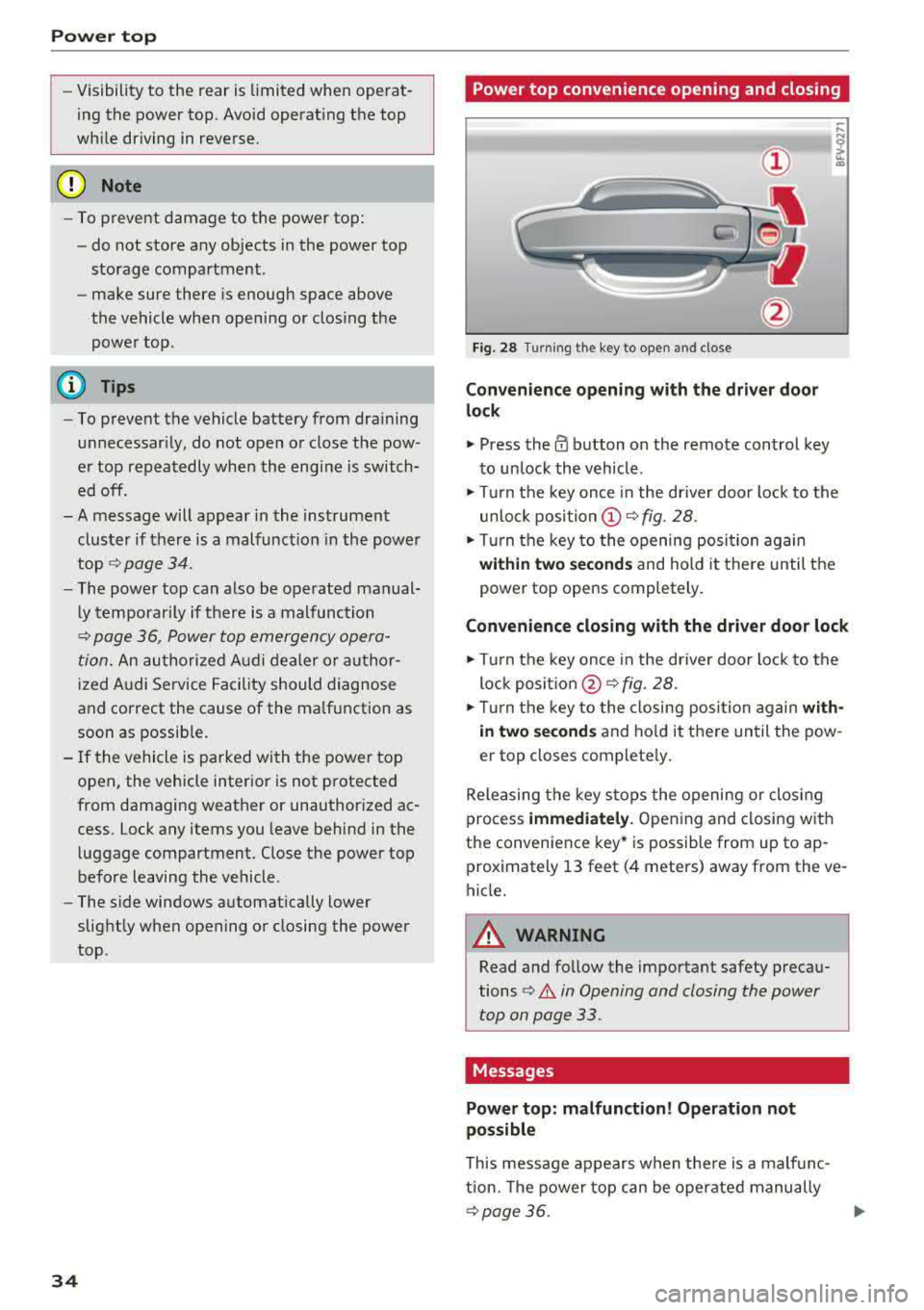
Fig. 28 Turn
ing the key to open and close
Convenience opening with t he dri ver door
lock
.,. Press the 0 button on the remote control key
to un lock the vehicle .
.,. Turn the key once in the driver door lock to the
unlo ck
position @~ fig. 28 .
.. Turn the key to the opening posi tion again
within two se cond s and hold it there until the
power top opens completely .
Convenience closing with the driver door lock
.,. Turn the key once in the driver door lock to the
lock
posit ion @ ~ fig. 28.
.. T urn the key to the closing posi tion again w ith
i n two second s
and ho ld it there until the pow
er top closes complete ly .
Releasing the key stops the opening or clos ing
process
immedi ately . Opening and closing with
the convenience key* is possible from up to ap
prox imately 13 feet (4 meters) away from the ve
hicle.
A WARNING
Read and follow the important safety precau
tions
¢ .&. in Opening and closing the power
top on page 33.
Messages
Power top: m alfunction! Oper ation not
possible
This message appears when the re is a malfunc
tion. The power top can be operated manually
~ page 36. .,.
Page 40 of 310
Lights and Vision
Lights and Vision
Exterior lighting
Switching lights on and off
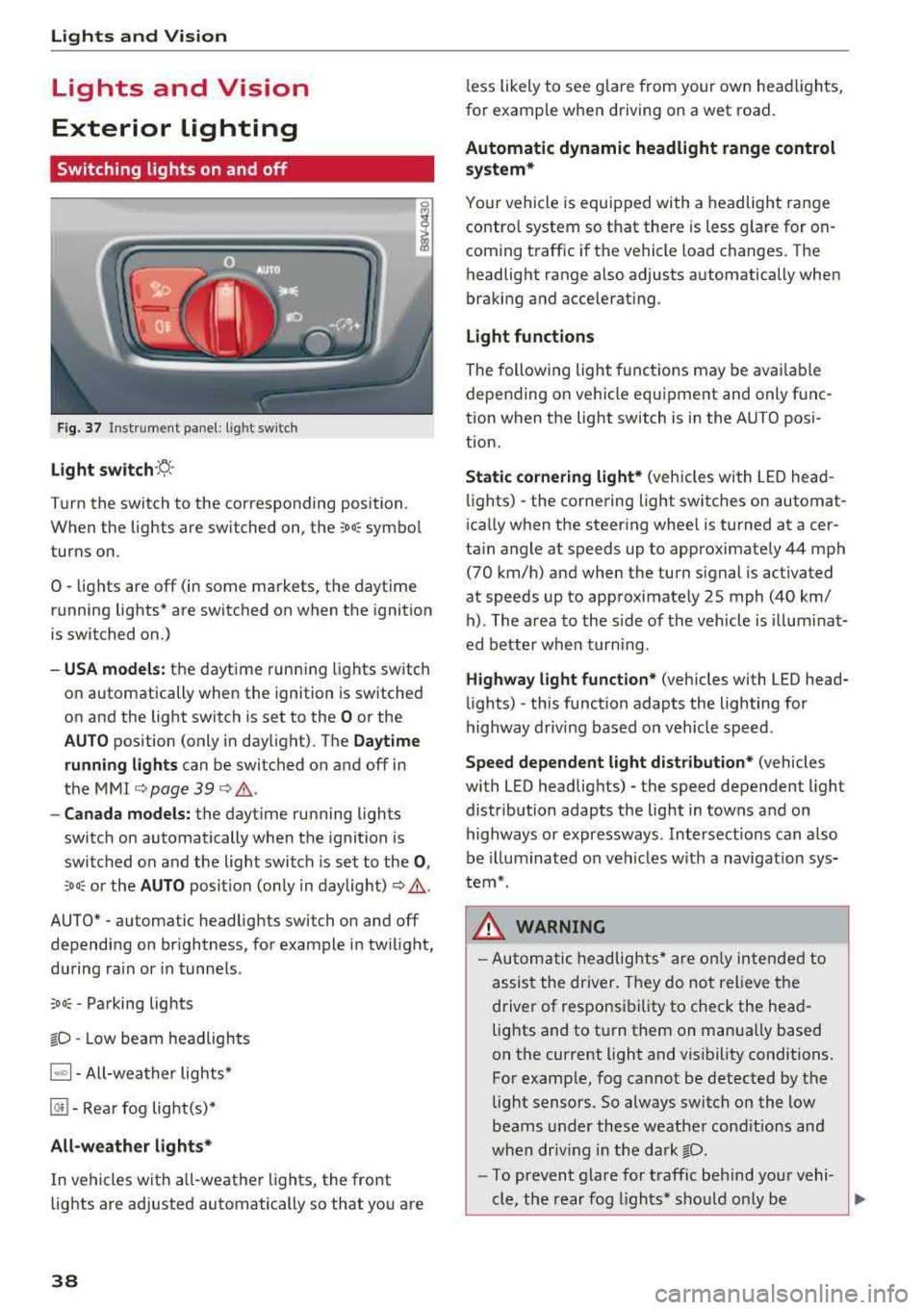
F ig. 37 Instrument panel: l ight sw itch
Light s witch ·~ ·
I
Turn the switch to the corresponding position.
When the lights are switched on, the
;Do: symbo l
turns on.
0
• lights are off (in some markets, the daytime
running lights* are switched on when the ignition
is switched on.)
-USA models : the daytime running lights switch
on automatically when the ignition is sw itched
on and the light switch is set to the
O or the
AUTO position (only in daylight). The Daytime
runn ing lights
can be switched on and off in
the
MMI c::;, page 39 c::;, ,&. .
-Canad a models: the dayt ime running lights
switch on automatically when the ignition is
switched on and the light switch is set to the
0 ,
:'.Do: or the AUTO position (only in daylight) c::;, ,&. .
AUTO* - automatic headlig hts switch on and off
depending on br ightness, for example in tw ilight,
during ra in or in tunne ls .
;Do: -Parking lights
tD -Low beam headlights
1~"' 1-All-weather lights*
@!I -Rear fog light(s)*
All-weather light s*
In vehicles with a ll-weathe r lights, the front
lights are adjusted automatically so that yo u are
38
less likely to see g lare from your own head lights,
fo r example when driving on a wet road.
Automatic dynamic headlight range control
system*
Your vehicle is equipped with a headlight range
contro l system so that there is less g la re for on
coming t raffic if the vehicle load changes. The
headlight range also adjusts automatically when
braking and accelerat ing.
Light function s
The following light funct ions may be ava ilable
depending on ve hicle equipment and only f unc
tion when the light switch is in the AUTO posi
t ion.
Static cornering light* (vehicles with LED head
li ghts) - the corne ring light switches on automat
i ca lly when the steer ing whee l is turned at acer
ta in angle at speeds up to approximately 44 mph
(70 km/h) and when the turn signal is activated
at speeds up to approximately 25 mph (40 km/ h) . The area to the side of the veh icle is illum ina t
ed bette r whe n turn ing .
Highway l ight function * (vehicles with LED head
li ghts)
-this function adapts the lighting for
highway driv ing based on veh icle speed .
Speed dependent light dist ribution* (vehicles
with LED headlig hts) - the speed dependent light
distribution adapts the light in towns and on
highways or expressways . Intersections can a lso
be illuminated on veh icles w ith a navigat ion sys
tem*.
& WARNING
- Autom atic headlig hts * are o nly in tended to
assis t the driver. They do not relieve the
driver of responsi bility to check the head
lights and to t urn them on manually based
on the current light and v is ibility conditions.
For examp le, fog cannot be detected by the
light sensors . So always switch on the low
beams under these weather cond it io ns an d
when dr iv ing in the da rk
tD.
-To prevent gla re for traffic be hind you r vehi-
cle, the rear fog lights* sho uld only be
..,.
Page 41 of 310
Cl co .... N ,..._
N .... 0 ,..._
Vl co
turned on in accordance with traffic
reg ulations.
- If the battery has been discharging for a
while, the parking light may sw itch off auto
matically. A lways make sure your vehicle is
parked and adequately lit according to the
laws . Avo id using the parking lights for sev
era l hours.
- Always observe legal reg ulat ions when us
ing the light ing systems described.
(!') Tips
- The light sensor for the automatic head
lights* is in the rearview mirror mount. Do
not place any stickers in this area on the
windsh ield.
- Some exterior lighting fu nctions can be ad
j usted
c::> page 39.
- If you turn off the ignition wh ile the exterio r
lights are on and open the door, a warning
tone so unds.
- In some markets, the ta il lights will sw itch
on when the dayt ime runn ing lights sw itch
on.
- In cool o r damp weather, the inside of the
headlig hts, tu rn s ignals and tai l lights can
fog over d ue to the tem perature d ifference
betwee n the inside and ou ts ide. They will
clea r shor tly after sw itch ing them o n. This
d oes not aff ect t he serv ice life o f the lig ht
i ng.
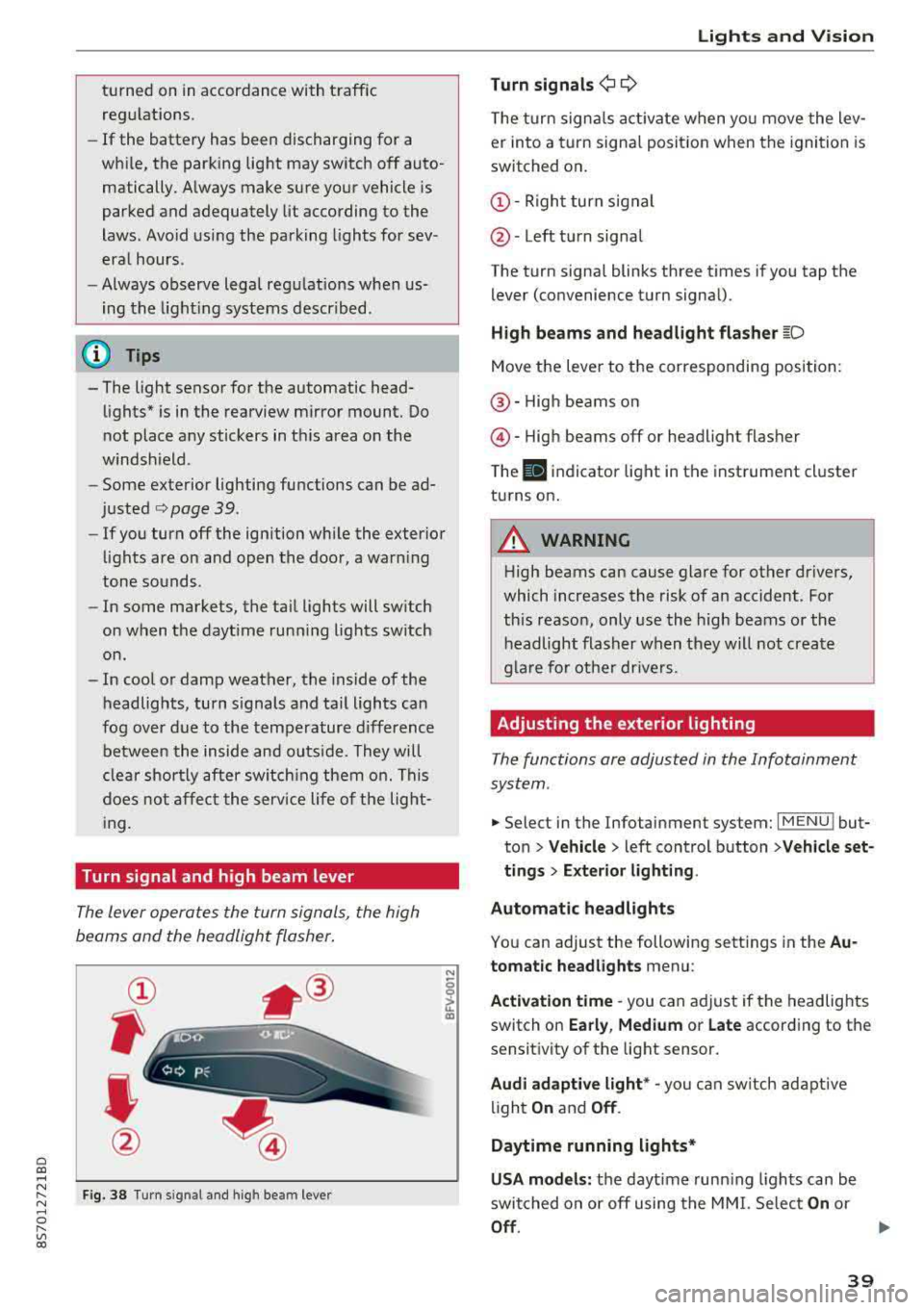
Turn signal and high beam lever
The lever opera tes the turn sign als, the high
beams and the headlight flasher .
Fig . 38 Tu rn signal an d high beam lever
N
0
~
"'
Lights and V ision
Turn signals ¢ 9
The turn signa ls act ivate w hen yo u move the lev
er into a turn signa l posit io n when the igni tion is
switched on .
©-Righ t turn signal
@ -Left tur n signal
The turn signa l blinks three t imes i f you tap t he
lever (convenience t urn signa l).
High beams and headlight flasher
~D
Move t he lever to the corresponding position:
@ -High beams o n
@-High beams off or headlight flasher
T he
II indicato r light in t he inst rument cl uster
turns on .
A WARNING
-High beams can cause glare for other drivers,
which increases the risk of an accident. Fo r
this reaso n, only use the high beams or the
headlight flasher when they wil l not create
g la re fo r ot her dr ivers.
Adjusting the exterior lighting
The functions are adjusted in the Infotainment
system .
.,. Select in the Infotainment system: I MENU ! but
ton> Vehicle > left control button >Vehicle set
tings > Exterior lighting .
Automatic headlights
You can adjust the following sett ings in the Au
tomatic headlights menu:
Activation time
-you can a djust if the headlights
switch on Early, Medium or Late according to the
sensit ivity of the light sensor.
Audi adaptive light * -you can sw itch ad ap tive
li gh t
On and Off .
Daytime running lights*
USA models: the daytime runn ing ligh ts can be
switched on or off using the MM I. Se lec t
On or
Off .
39
Page 43 of 310
Cl co .... N ,....
N ...... 0 ,....
Vl co
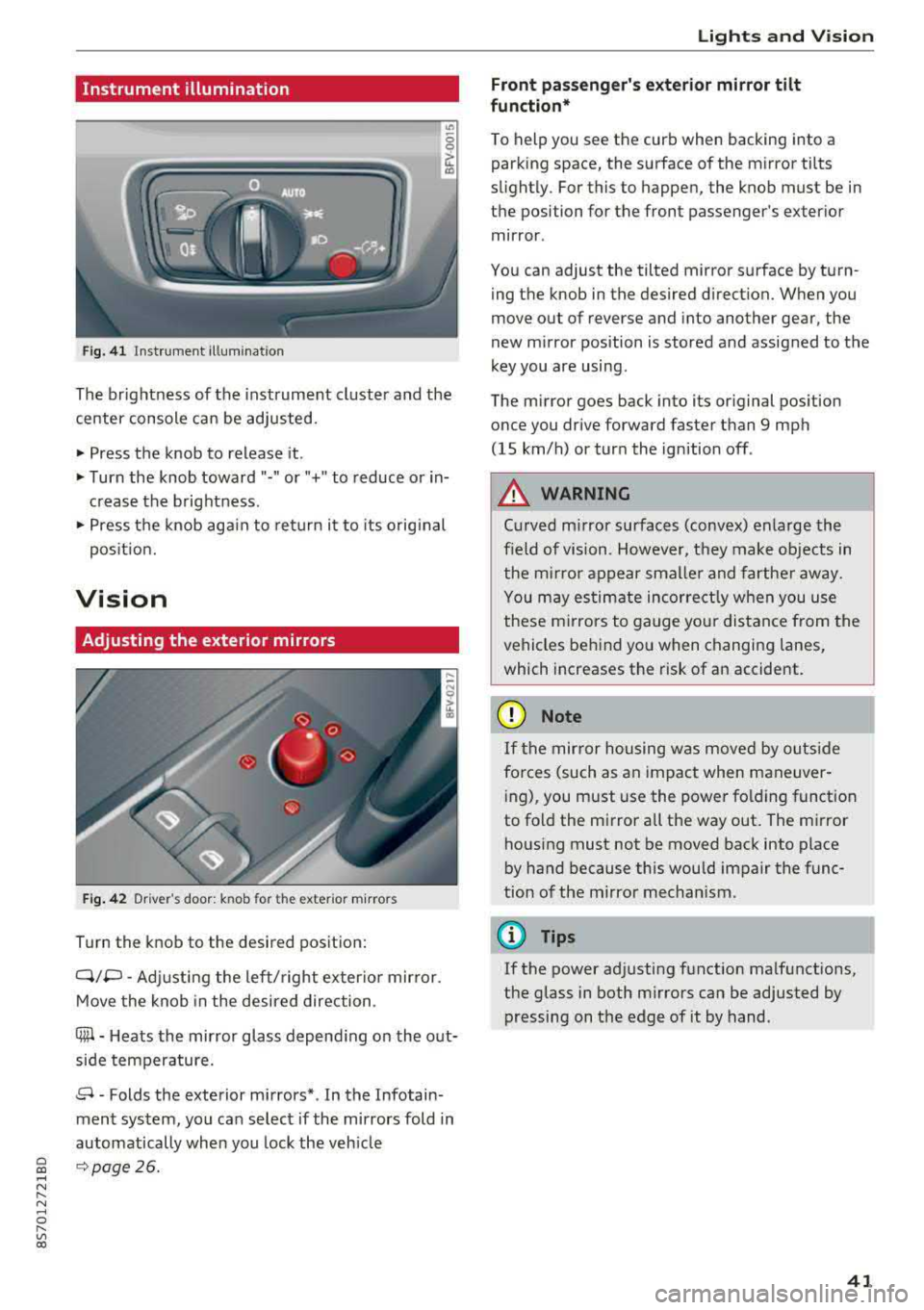
Instrument illumination
Fig. 41 Instrument illumination
The brightness of the instrument cluster and the
center console can be adjusted.
~ Press the knob to release it.
~ Turn the knob toward"·" or"+" to reduce or in
crease the brightness .
~ Press the knob again to return it to its original
posit ion.
Vision
Adjusting the exterior mirrors
Fig. 42 Driver 's door: knob for the ex ter ior mirrors
Turn the knob to the desired pos ition:
Q/P -Adjusting the left/ right exter io r mir ror.
Move the knob in the desired direction .
C@-Heats the mirror glass depend ing on the out
side temperature.
8 -Folds the exterior mirrors* . In the Infotain
ment system, you can select if the mirrors fold in
automatically when you lock the veh icle
9 page26.
Lights and Vision
Front passenger 's exterior mirror tilt
function*
To help you see the curb when backing into a
parking space, the surface of the mirror tilts
slight ly. For this to happen, the knob must be in
the position for the front passenger's exterior
mirror .
You can adjust the tilted mirror surface by turn ing the knob in the desired direction. When you
move out of reverse and into another gear, the
new mirror position is stored and assigned to the
key you are using .
The mirror goes back into its original position
once you drive forward faster than 9 mph
(15 km/h) or turn the ignition off .
A WARNING
Curved mirror surfaces (convex) enlarge the
f ield of vision. However, they make objects in
the m irror appear smaller and farther away.
You may estimate incorrectly when you use
these mirrors to gauge your distance from the
vehicles behind you when changing lanes,
which increases the risk of an accident.
(D Note
If th e mirror housing was moved by outs ide
fo rces (such as an impact when maneuver
i ng), you must use the power fold ing funct ion
to fold the mirror a ll the way out . The mirror
housing must not be moved back into place
by hand because th is would impair the func
tion of the mirror mechanism.
(D Tips
If the power adjusting function malfunctions,
the glass in both mirrors can be adjusted by
pressing on the edge of it by hand.
41
Page 44 of 310
Lights and Vision
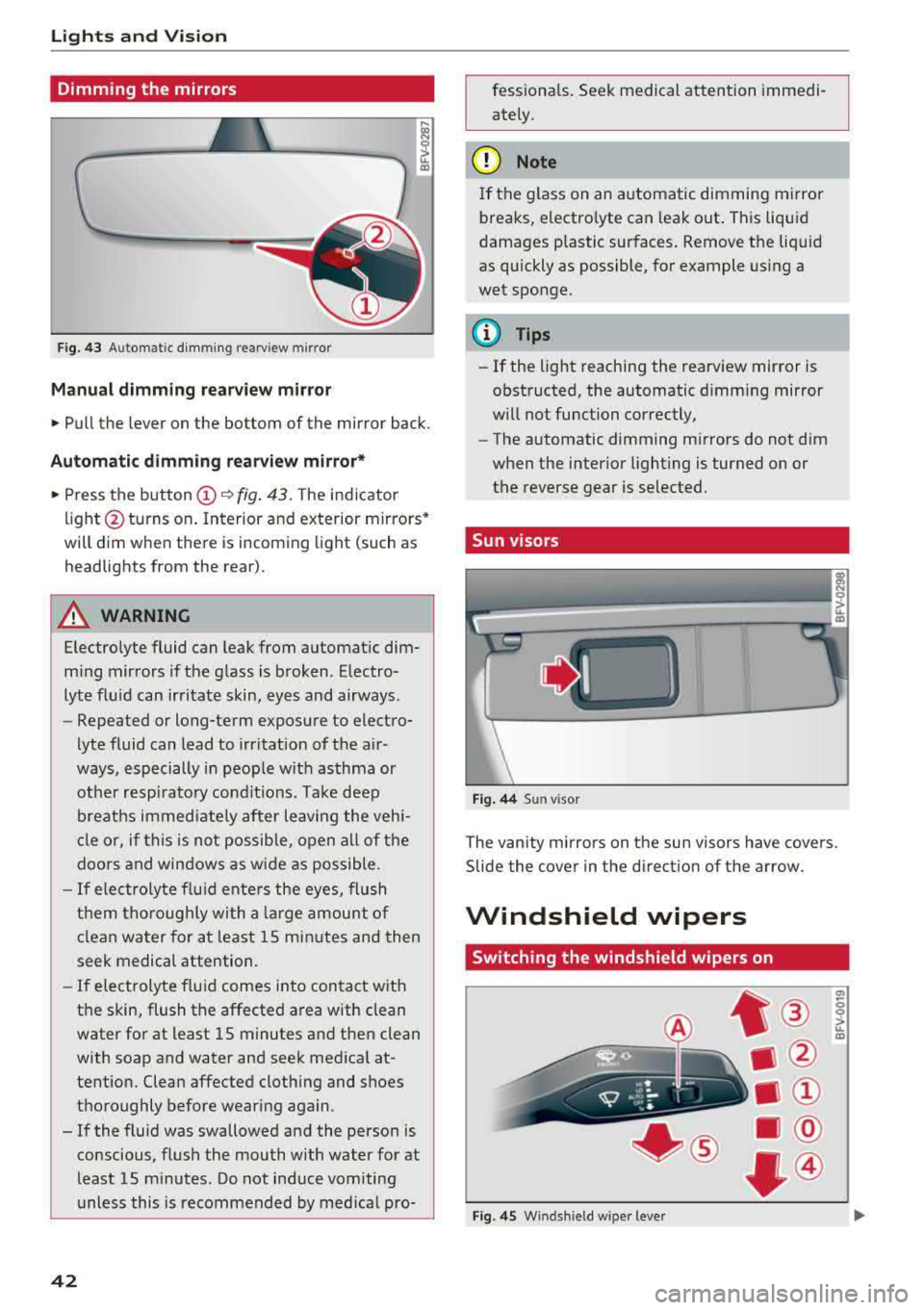
Dimming the mirrors
Fig. 43 Automatic dimming rearview mirror
Manual dimming rea rview mirror
• Pull the lever on the bottom of the mirror back.
Automatic dimming rearview mirror*
• Press the button (D ~ fig. 43. The indicator
light @turns on . Interior and exterior mirrors*
will dim when there is incoming light (such as
headlights from the rear) .
A WARNING
Electrolyte fluid can leak from automatic dim
m ing mirrors if the glass is broken. Electro
lyte fluid can irritate skin, eyes and airways.
- Repeated or long-term exposure to electro-
lyte fluid can lead to irritation of the a ir
ways, especially in people with asthma or
other resp irato ry conditions. Take deep
breaths immed iate ly after leaving the vehi
cle or, if this is not possible, open all of the
doors and windows as wide as possible .
-If electrolyte f lu id ente rs the eyes, flush
them thoroughly with a large amount of
clean water for at least 15 minutes and then
seek medical attention.
- If electrolyte f luid comes into contact with
the skin, flush the affected area with clean
water for at least 15 minutes and then clean
with soap and water and seek medical at
tention. Clean affected clothing and shoes
thoroughly before wearing again .
- If the fluid was swallowed and the person is conscious, flush the mouth with water for at
least 15 minutes. Do not induce vomiting
unless this is recommended by med ical pro-
42
fessionals . Seek medical attention immedi
ately .
(D Note
If the glass on an automatic dimming mirror
breaks, electro lyte can leak out . This liquid
damages plastic surfaces. Remove the liquid
as quickly as possible, for example us ing a
wet sponge.
(D Tips
- If the light reaching the rearview mirror is
obstructed, the automatic dimming mirror
will not function correctly,
- The automatic dimming mirrors do not dim
when the interior lighting is turned on or
the reverse gear is selected.
Sun visors
Fig. 44 Sun visor
T he vanity mirrors on the sun visors have covers .
Slide the cover in the direction of the arrow.
Windshield wipers
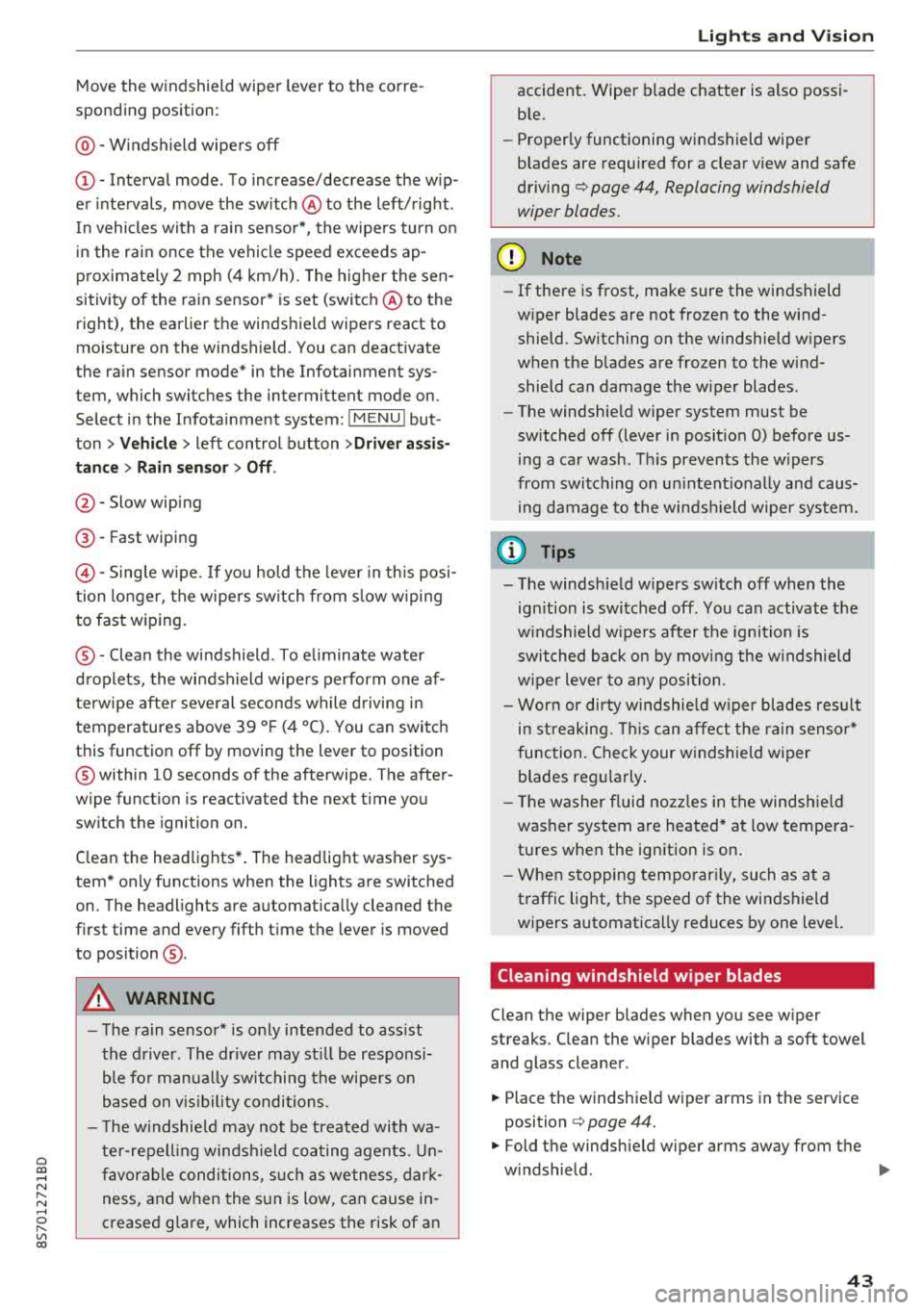
Switching the windshield wipers on
Fig . 45 W inds hield w iper leve r
(7>
0 0 > u. m
Page 45 of 310
Cl 00 .-< N r-N .-< 0 r-Vl 00
Move the windshield wiper lever to the corre
sponding position:
@ -Windshield wipe rs off
(D -Interval mode . T o increase/decrease the w ip
er intervals, move the sw itch
@ to the left/rig ht.
I n vehicles with a ra in senso r*, the wipe rs turn o n
in the ra in once the vehicle speed exceeds ap
p roximate ly 2 mph (4 km/h). The h igher the sen
sitivity of the rain sensor* is set (switch @to the
right), the earlier the winds hield wipers react to
mo isture on the windshield. You can deact ivate
the ra in sensor mode* in the Infotainment sys
tem, which switches the intermittent mode on.
Select in the Infotainment system:
IMENU I but
ton>
V ehicle > left control button >Driv er a ssis
tance > Rain sensor > Off .
@-Slow wiping
@-Fast wiping
© -Sing le w ipe. If yo u hold t he leve r in th is posi
tion longer, the wipers sw itch from s low w iping
to fast wiping.
® -Clea n the wi ndshield . To e liminate water
d roplets, the windsh ield wipers pe rform one af
terwipe after several seconds wh ile driving in
temperatures above 39 ° F (4 °C). You can switc h
this function off by moving the lever to position
@ within 10 seconds of the afterwipe. The after
wipe function is reactivated the next t ime you
switch the ignition on.
C lean the headlights*. The headlight washer sys
tem* only functions when the lights are switched
on. The headlights are automat ically cleaned the
f irst time and every fifth t ime the lever is moved
to position
® ·
A WARNING
- T he ra in sensor* is o nly intended to ass ist
the d river. The dr ive r may st ill be responsi
ble fo r manua lly swit ching the wi pe rs on
based on v is ibility co ndi tions.
- T he w indshie ld ma y not be treated with wa
te r-repell ing winds hield coa ting age nts. Un
f avor ab le cond itions, s uch a s wetness, dar k
ness, and when the s un is low, can cause in
creased g lare, which increases the risk of an
-
Light s and Vision
accident. Wiper b lade chatter is also possi
b le.
- Properly functioning windshield wiper
b lades are required for a clear v iew and safe
driving¢ page 44, Replacing windshield
wiper blades.
@ Note
- If there is frost, make sure the windshield
w iper blades are not frozen to the wind
shield. Switching on the w indshield w ipers
when the blades are frozen to the wind shield can damage the w iper blades.
- The windshie ld w iper system must be
sw itched off (lever in posit io n 0) before us
ing a car wash. This prevents the w ipers
from switc hing on un intent io nally and caus
ing damage to the winds hield wiper system.
(D Tips
- T he windsh ie ld w ipers sw itch off when the
ign ition is switched off. You can activate the
w indshield w ipe rs after the ignition is
sw itched back on by mov ing the w indshield
w iper lever to a ny posi tion.
- Wor n or d irty w indshie ld w iper blades res ult
in st reaking. This can affect t he rain senso r*
function. Chec k your w indshie ld w iper
blades reg ularly.
- Th e washer fluid no zzles in the winds hield
washe r system are heated* at low tempera
t ur es when the ignition is on .
- Whe n stopping tempo rar ily, such as at a
traffic lig ht, the speed of the windshield
wipers automatica lly reduces by one level.
Cleaning windshield wiper blades
Clean the wiper b lades when you see w iper
streaks. C lean the wiper blades with a soft towel
and glass cleaner .
.,. Place the windshie ld wiper arms in the service
position
¢ page 44.
.,. Fold the windshie ld wiper arms away from the
w indshield .
.,,.
43
Page 46 of 310
Lights and Vision
& WARNING
Dirty windshield wiper blades can impair vi
sion, which increases the risk of an accident .
Replacing windshield wiper blades
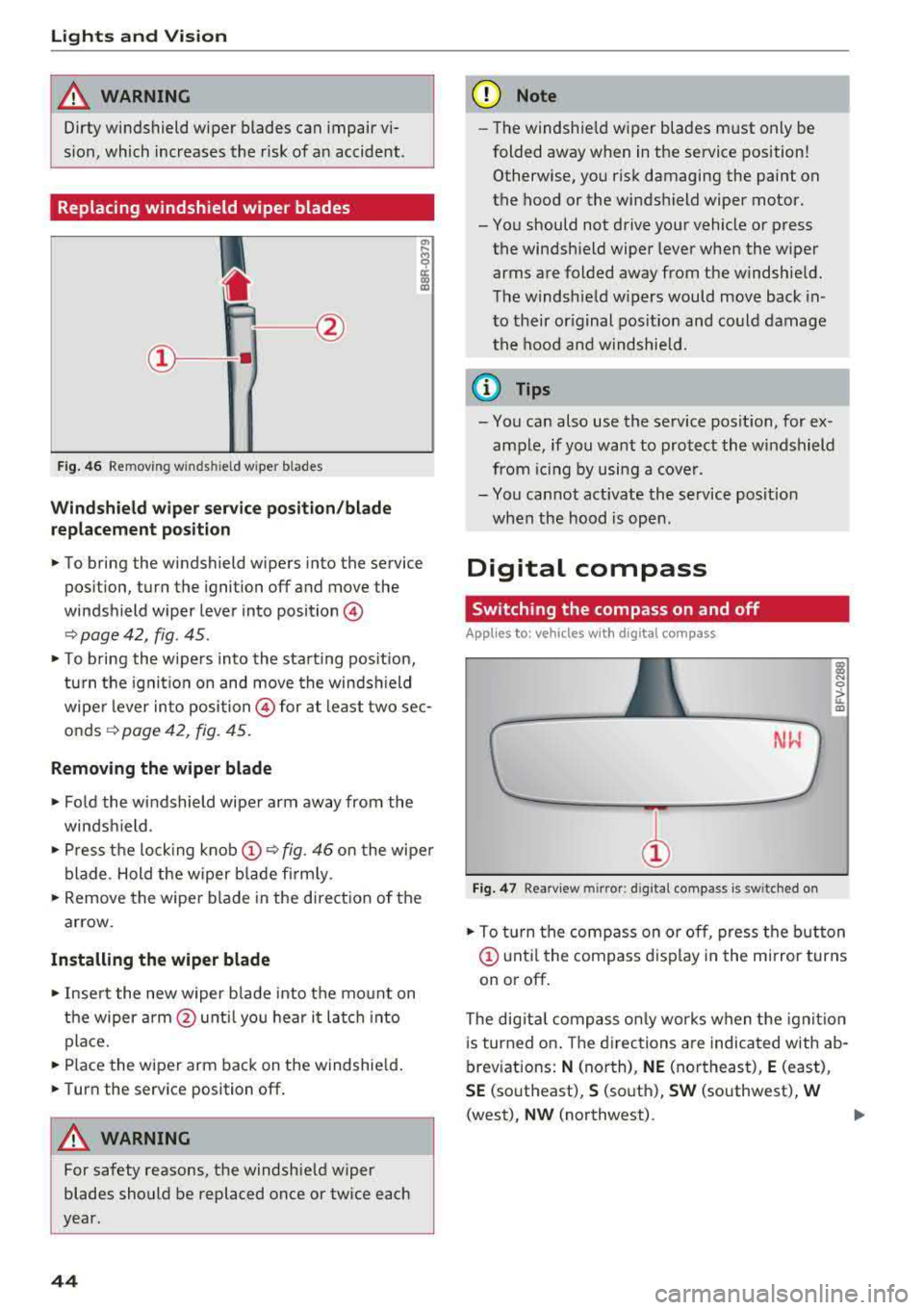
Fig. 46 Removing w inds hield w iper b lades
Windshield wiper service position/blade
replacement position
"' ij
a:: CX) m
,.. To bring the windshield wipers into the service
position, turn the ignition off and move the
windshield wiper lever into position@
¢ page 42, fig. 45 .
,.. To bring the wipers into the starting pos it io n,
turn the ignition on and move the windsh ield
wiper lever into position @ for at least two sec
onds¢ page 42, fig. 45.
Removing the wiper blade
,.. Fold the windshield wiper arm away from the
windshield.
,.. Press the locking knob@¢ fig. 46 on the wiper
blade . Hold the wiper blade firmly.
,.. Remove the wiper blade in the direction of the
arrow.
Installing the wiper blade
,.. Insert the new wiper b lade into the mount on
the wiper arm@until you hear it latch into
place.
,.. Place the wiper arm back on the windshield.
,.. Turn the service position off.
& WARNING
-
For safety reasons, the windshie ld wiper
blades should be replaced once or twice each
year.
44
(D Note
- Th e windshie ld wiper blades must only be
folded away when in the service position!
Otherwise, you risk damaging the paint on
the hood or the windshield wiper motor.
- You should not drive your vehicle or press the windshield wiper lever when the wiper
arms are folded away from the windshield.
The windshield w ipers would move back in
to their original position and could damage
the hood and windshield.
a) Tips
- You can also use the service posit ion, for ex
ample, if you want to protect the windshield
from icing by using a cover .
- You cannot activate the service posit ion
when the hood is open .
Digital compass
Switching the compass on and off
Applies to: vehicles wit h digital compass
Fig. 47 Rearview m irror: d ig ital compass is sw itched on
l!l
"' 0
> ... m
,.. To turn the compass on or off, press the button
@ until the compass display in the mirror turns
on or off.
The dig ital compass only works when the ignit ion
is turned on . The directions are indicated with ab
breviations:
N (north), NE (northeast), E (east),
SE (southeast), S (south), SW (southwest), W
(west), NW (northwest).
Page 47 of 310
Cl co .... N ,..._
N .... 0 ,..._
Vl co
(D Tips
To prevent inaccurate compass readings, do not bring any remote controls, e lectr ica l devi
ces or metallic objects near the mirror .
Adjusting the magnetic zone
Applies to: vehicles with digital compass
I
I I
' I
I I
®
' ' ' '
®
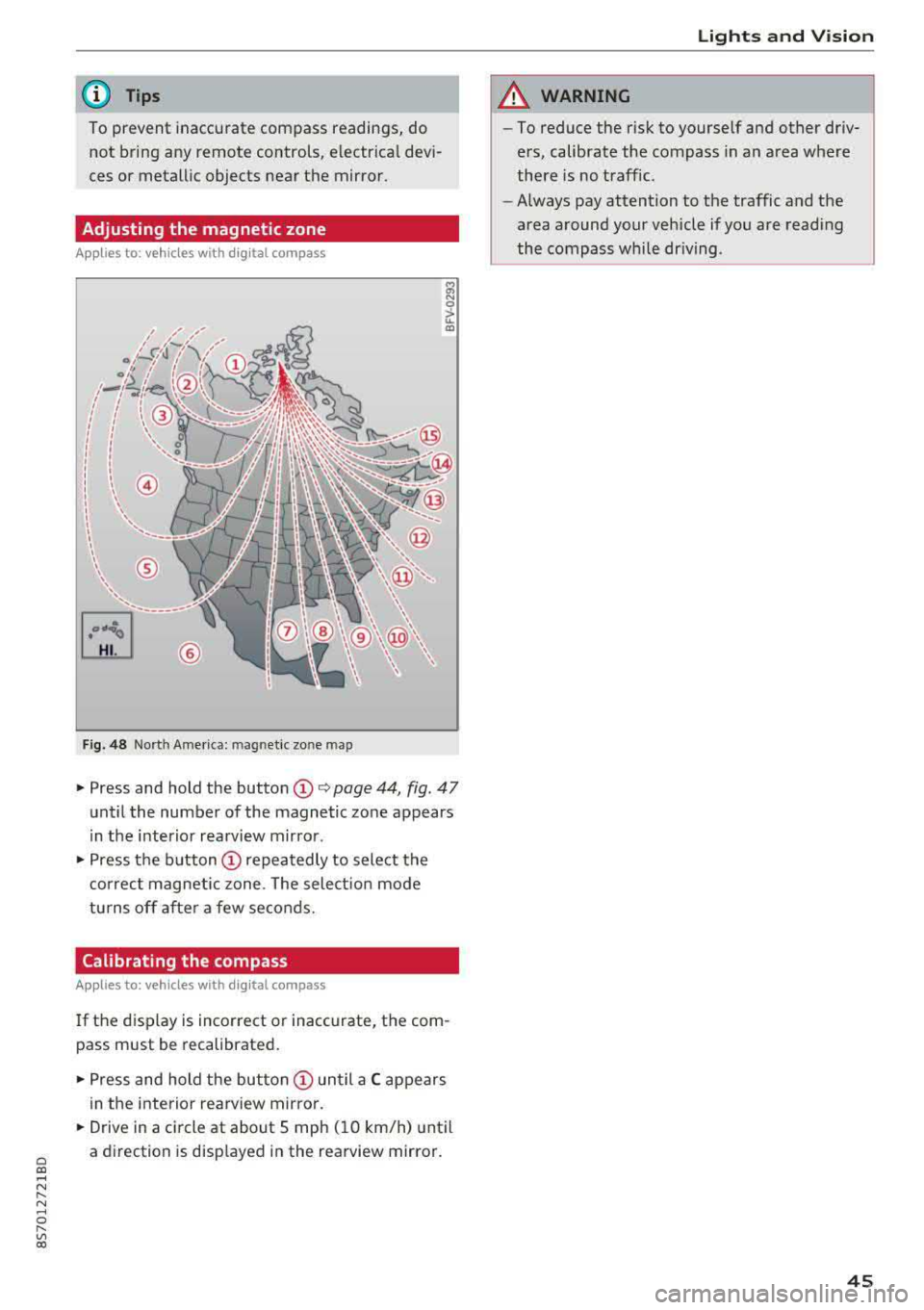
Fig. 48 Nort h Ame rica: mag netic zo ne map
~ N 0
> u. ID
• Press and hold the button (D Q page 44, fig . 47
until the number of the magnetic zone appears
in the interior rearview mirror .
• Press the button (D repeatedly to select the
correct magnetic zone . The select ion mode
turns off after a few seconds.
Calibrating the compass
Applies to: vehicles with digital compass
If the display is incorrect or inaccurate, the com
pass must be recalibrated.
• Press and hold the button (D until a C appears
in the interior rearview mirror .
.,. Drive in a circle at about 5 mph ( 10 km/h) until
a direction is displayed in the rearview mirror .
Lights and Vision
A WARNING
-To reduce the risk to yourself and other driv
ers, calibrate the compass in an area where
there is no traffic.
- Always pay attention to the traffic and the
area around your vehicle if you are reading
the compass while driving .
45