warning light AUDI TT ROADSTER 2018 Owner's Manual
[x] Cancel search | Manufacturer: AUDI, Model Year: 2018, Model line: TT ROADSTER, Model: AUDI TT ROADSTER 2018Pages: 310, PDF Size: 46.95 MB
Page 50 of 310
Seats and stor age
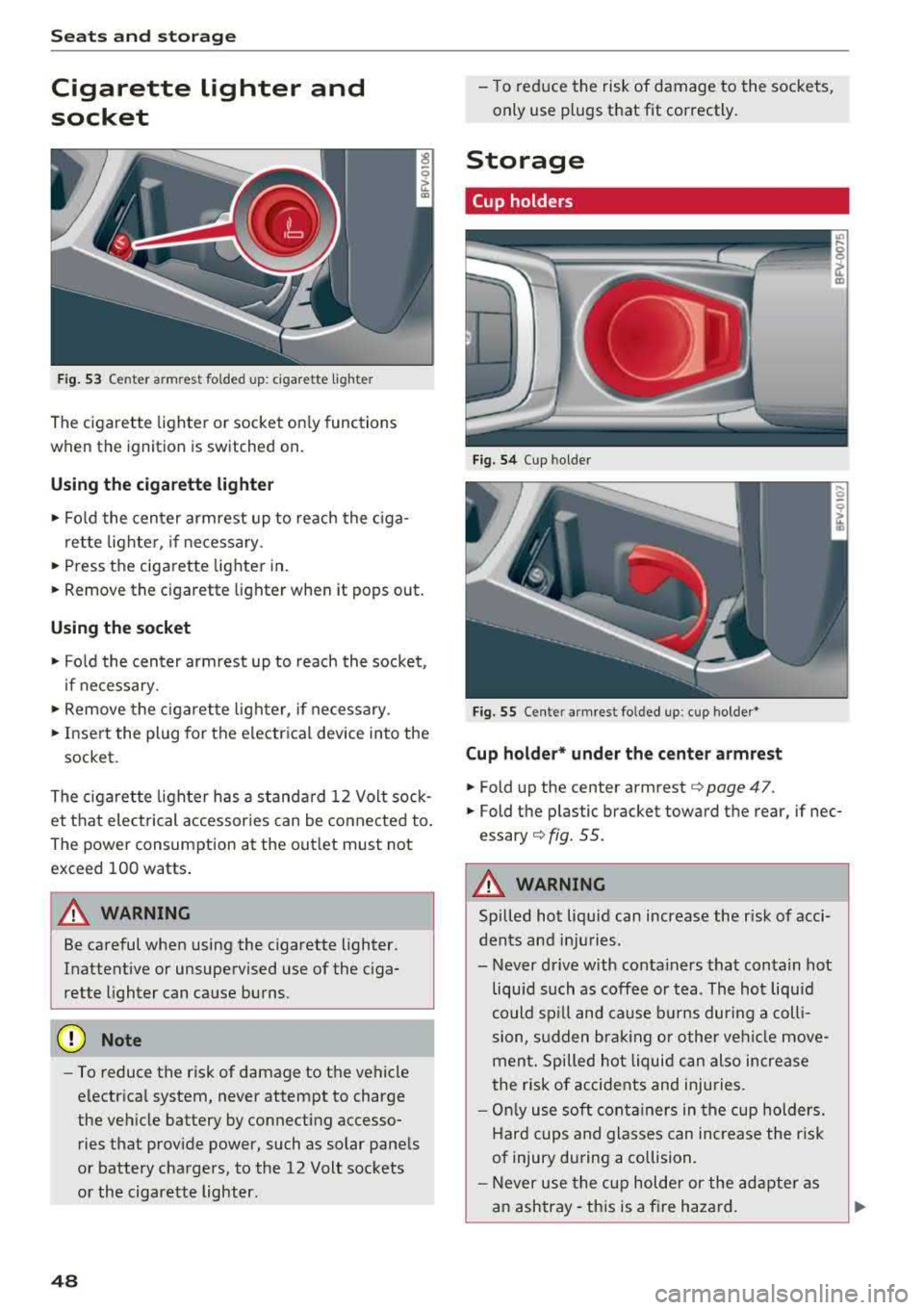
Cigarette lighter and
socket
F ig. 53 Cen te r armre st fo ld ed u p: cig arette ligh te r
The cigarette lighter o r socket on ly functions
when the ignition is switched on.
Using the cigarette li ghter
• Fo ld the center armrest up to reach the c iga-
rette lighter, if necessary .
• Press the ciga re tte lighter in .
.. Remove the cigarette lighter when it pops out.
Using the socket
• Fo ld the cen ter armrest up to reach the socket ,
i f necessary .
... Remove the cigarette lighter, if necessary .
.. Insert the plug for the e lectrica l device into the
socket.
The cigaret te lighter has a standa rd 12 Volt sock
et that electrical accessor ies can be conne cted to .
Th e power consumption a t the out let must not
exceed 100 watts .
A WARNING
Be careful when using the cigarette lighter.
Inattentive or unsupervised use of the c iga
rette lighter can cause burns.
(D Note
- To reduce the risk of damage to the vehicle
electrical system, never attempt to charge
the veh icle battery by connecting accesso
ries that prov ide power, such as solar panels
or battery chargers , to the 12 Volt sockets
or the cigarette lighter.
48
- To reduce the risk of damage to the sockets,
only use plugs that fit correctly .
Storage
Cup holders
Fig. 54 Cup hol der
Fig. 5 5 Cente r armres t fo lded up : cup holder *
Cup holder* und er the center armrest
• Fold up the cente r armrest¢ page 47.
.. Fold the p lastic bracket toward the rear, if nec
essary ¢ fig. 55.
A WARNING
Spilled hot liqu id can increase the r isk of acci
dents and in ju ries .
- Never d rive with conta iners that contain hot
liquid such as coffee or tea . The hot liquid
could sp ill and cause b urns dur ing a coll i
sion, s udden bra king or other vehi cle move
men t. Spilled hot liquid can also increase
the risk of accidents and injuries.
- On ly use soft cont ainers in the cup holders.
Hard cups and glasses can increase the r isk
of injury dur ing a collision.
- Never use the c up holder or the adapte r as
a n ashtray- th is is a fire hazard.
Page 58 of 310
Drivin g
Driving
General information
Breaking in
A new vehicle must be broken in for the first 1,000 mi les (1,500 km). Do not dr ive at speeds
t hat will exceed 2/3 of the max imum pe rm itted
engine speed (RPM) for the first 600 miles
(1,000 km), and avoid fu ll acceleration during
this period . You may gradually start increasing
the RPM and the speed between 600 miles
(1,000 km) and 1,000 miles (1,500 km) .
During the first hours of use, the engine has a
higher internal friction than later on when all
moving parts have settled into place with each
other.
How the vehicle is driven d uring the first 1,000
miles (1,500 km) a lso affects the engine quality .
Drive at moderate engine speeds after the initial
break-in per iod, part icu larly when running a cold
eng ine . Th is will reduce eng ine wear and improve
the m ileage.
Do not drive at too
low of an engine speed (RPM).
Shift down if the engine stops running "smooth ly". Extremely high eng ine speeds are automati
cally reduced .
Reducing the risk of vehicle damage
@ Note
When driving on poo r roads, by cu rbs and on
s teep ramps, make su re t hat low-hang ing
compone nts such as the spo ile r and exha ust
system do not come into contact with these
or they could be damaged. This especially ap
plies to vehicles with low ground clearance
and veh icles that are heavily loaded.
Driving through water on roads
Note the following to reduce the r isk of vehicle
damage when driv ing through water, for example
on flooded roads :
- The water must not be any higher than the bot
tom of the vehicle body .
56
-Do not drive faster than walking speed .
A WARNING
After driving through water or m ud, the effec
tiveness of the brakes may be red uced due to
mo isture on the brake rotors and brake pads.
A few careful brake applications shou ld dry
off the brakes and restore the full braking ef
fect .
@ Note
Vehicle components such as the engine,
transmission, suspension or electr ica l system
can be severely damaged by driving through
water.
{D Tips
- Determine the depth before driving through
water.
- Do not stop the vehicle, drive in reverse or
switch t he engine off whe n driving through
water.
- Keep in mind that oncom ing vehicles may
create waves that raise the water level and
make it too deep fo r yo ur vehicle to drive
throug h safe ly.
- Avoid driv ing th rough salt water, because
this ca n cause cor rosion .
Economical and environmentally-friendly
driving
The amount o f fuel consumption, the environ
mental impact and the wear to the engine,
bra kes and tires depends mostly on your d riving
style. With an ant icipatory and economic driving
sty le, fuel consumpt ion can be reduced by ap
prox imately 10-15% . The follow ing t ips will help
you conserve the environment and your money at
t h e same time .
Anticipatory dri ving
A vehicle uses the most fuel when accelerating.
When you drive with anticipation, you do not
need to brake as often and so you acce lerate less .
When poss ible, let you r vehicle coast with a
gear
engag ed ,
for examp le, when you not ice that the
next t raff ic light is red.
Ill>
Page 59 of 310
Cl 00 .-< N r-N .-< 0 r-Vl 00
Avoid full acceler ation
You sho uld rare ly t rave l a t t he maxim um vehicle
speed . High speeds cause a disproportionately
h igh increase in fuel consumption, emissions and
traffic noise . Slower driving saves fuel.
Reduce idling time
It pays off to stop the eng ine, for example when
at ra ilroad crossings or traffi c lights w ith longer
red lights . Stopping the engine for 30 -40 sec
onds already saves more fuel than the amount of
extra fuel needed to restart the engine.
I t takes a very long time in idle to wa rm the en
gine up to operating tempera ture . Wea r and
emissions are especially high in the warm -up
p hase . Therefore, you should begin driving im
mediately after starting the engine. Avoid high
RPMs while do ing th is.
Hav e ma intenanc e performed r egularly
By having maintenance performed regu lar ly on
your vehicle, you can he lp to reduce fuel con
sumption before yo u even start to drive. The
maintenance condition of your vehicle not only
affects traffic safety and long-term va lue but al
so impacts
fu el con sumpt ion .
A poorly maintained engine can lead to fuel con
sumpt ion that is 10% higher than norma l.
A lso check the
o il l evel when refueling . The oil
consumpt ion
depends large ly on the engine load
and speed. It is normal for the oil consumption
of a new eng ine to reach its lowest point only af
ter a certain amount of use. Therefore, the oil
consumption can only be properly judged after
approx imately 3,000 m i (S,000 km) have been
driven.
Avoid short trips
The engine and exhaust clean ing system must
reach their opt imal
op erating temp eratur e to ef
fective ly reduce consumpt ion and emiss ions.
A co ld engine uses a disproportionately h igh
amount of fuel. The eng ine reaches operating
temperature and consumpt ion normalizes only
afte r approx imately
2.5 miles (4 km) .
Driving
@ Note
Do not leave engine idling unattended after
start ing. If warning lights sho uld come on to
i ndicate improper operation, they would go
unheeded. Extended idling also produces
heat, which could resu lt in overheating or
other damage to the veh icle o r other proper
ty.
@ Note
- Have your ve hicle ma intained properly and
in accordance w ith the service recommenda
tions i n your Warranty
& Main tenance book
let. La ck of prope r mai nte nan ce as we ll as
imp rope r use of t he ve hicle will impa ir the
function of the em iss ion cont ro l system and
co uld lead to damage .
- Do not alte r or remove any compone nt o f
t he Emission Contro l System unless ap
proved by the man ufacturer .
- Do not alte r or remove any dev ice, s uch as
heat shields, switc hes, ignition wires,
valves, which are designed to protect your
vehicle's Emission Contro l System and other
impo rtant ve hicle components.
(D Tips
The cons umption estimates as published by
ENVIRONMENTAL PROTECTION AGENCY
(EPA) and T ransport Canada may not co rre
spond to your actual consumption on the r oad, wh ich w ill vary depending upon veh icle
l oad and speed, road and weather cond itions,
tr ip length, etc.
57
Page 61 of 310
Cl 00 .-< N r--N .-< 0 r--Vl 00
-Never turn off the engine before the vehicle
has come to a complete stop.
- The brake booster and power steering only
work when the engine is running. If the en gine is off, you have to use more force when
steering or braking. Because you cannot
steer and brake as you usually would, this
could lead to accidents and serious injuries.
@ Note
Avoid high engine speed, full throttle, and
heavy engine load if the engine has not
reached operating temperature yet. You could
damage the engine.
@ For the sake of the environment
Do not let the engine run while parked to
warm up. Begin driving immediately . This re
duces unnecessary emissions.
(D Tips
-Some noise after starting the engine is nor
mal and is no cause for concern.
- If you leave the vehicle with the ignition
switched on, the ignition will switch off af
ter a certain amount of time. Make sure that
electrical equipment such as the exterior
lights are switched off.
Stopping the engine
.,. Bring the vehicle to a full stop.
.,. Move the selector lever into the P position .
... Press the I START ENGINE STOPI button.
Emergency off function*
If it is absolutely necessary, the engine can also
be turned off while driving at speeds starting at
4 mph (7 km/h). To switch the engine off, press
the
I START ENGINE STOPI button twice in a row
br iefly or press and hold for longer than two sec
onds.
A WARNING
- Never turn off the engine before the vehicle has come to a complete stop.
Driving
-Please note that the brake booster and pow
er steering only work when the engine is
running. When the engine off, you must use
more force to steer or brake the vehicle. Be
cause the usual steering and braking capa
bility is not available, the risk of accidents or
. . . . mJunes increases.
-For safety reasons, always park the vehicle
with the selector lever in the P position.
Otherwise, there is the risk that the vehicle
could roll.
- After the engine has been switched off, the
radiator fan can continue to run for up to 10
minutes
-even with the ignition switched
off. It can also switch on again after some
time if the coolant temperature rises as the result of heat buildup or if the engine is al
ready warm and the engine compartment is
also heated by the sun's rays.
@ Note
If the engine has been under heavy load for
an extended period of time, heat builds up in
the engine compartment after the
engine is
switched off and there is a risk of damaging
the engine . For this reason, let the engine run
at idle for approximately two minutes before
shutting it off.
(D Tips
For up to 10 minutes after stopping the en
gine, the radiator fan may turn on again auto matically or it may continue to run (even if
the ignition is switched off) for the following
reasons :
- The coolant temperature is increasing due
to trapped heat.
- If the engine is warm and the engine com
partment also heats up from strong sun
light.
Messages
Turn off ignition before leaving vehicle. Battery
is discharging
This message appears and a warning tone sounds
if you open the driver's door when the ignition is
..,
59
Page 63 of 310
Cl co .... N ,....
N .... 0 ,....
Vl co
(D Tips
You can view the message again by pressing
the
I START ENGINE S T OP ! button.
Electromechanical
parking brake
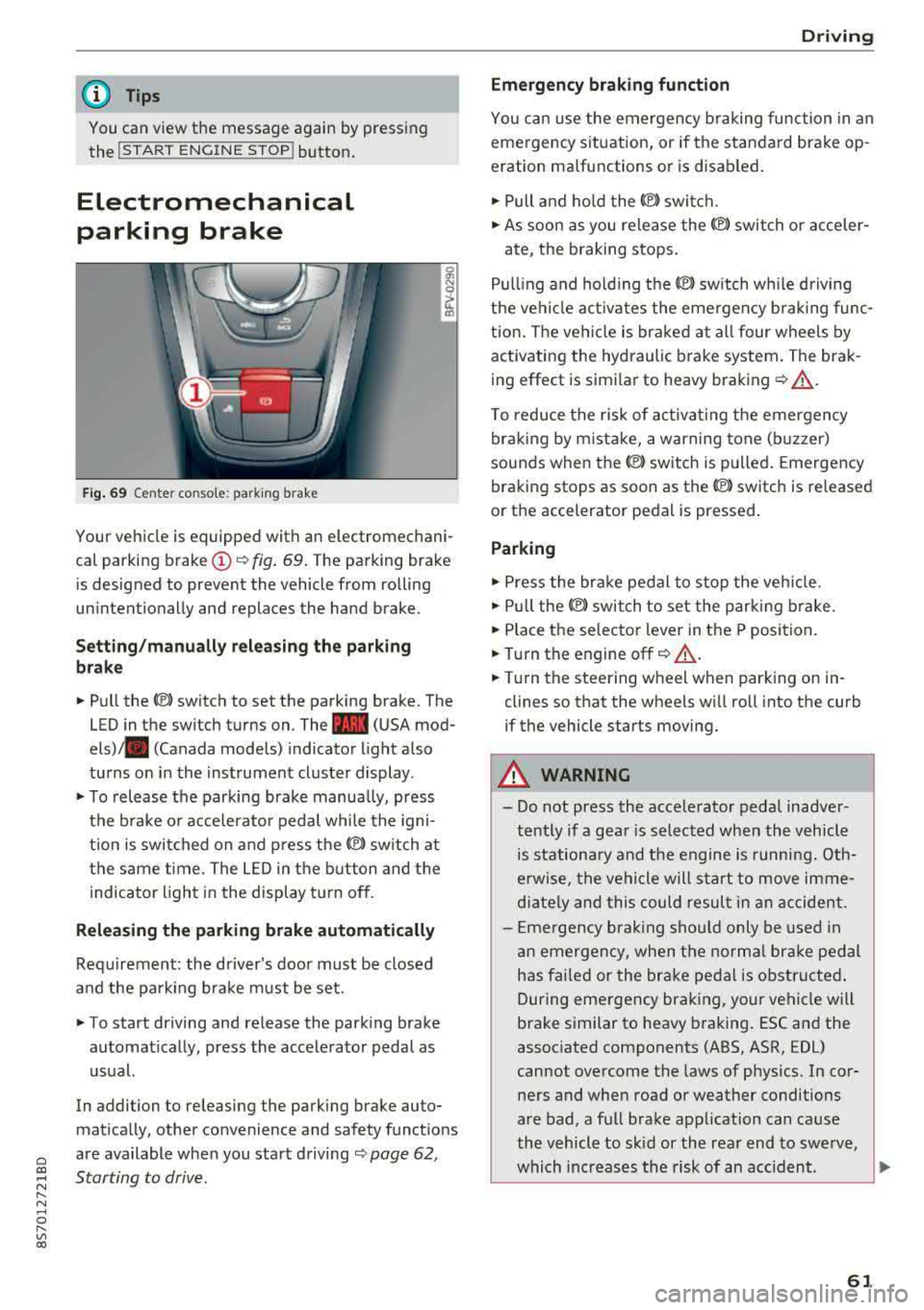
Fig. 69 C ent er co n so le : pa rking brake
Your vehicle is equipped with an electromechani
cal parking brake
(D <¢ fig. 69. The parking brake
is designed to prevent the vehicle from rolling
unintention ally and replaces the hand brake.
Setting/manually releasing the parking
brake
.. Pull the(®) switch to set the parking brake. The
LED in the switch turns on. The
-(USA mod
els) . (Canada models) indicator light also
turns on in the instrument cluster display .
.. To release the parking brake manually, press
the brake or acce lerator pedal while the igni
t ion is switched on and press
the®) switch at
the same time. The LED in the button and the
indicator light in the display turn off .
Releasing the parking brake automatically
Requirement: the driver's door must be closed
and the parking brake must be set.
.. To start driving and release the parking brake
automatically, press the accelerator pedal as
usual.
In addi tion to releasing the parking brake au to
mat ically, other convenience and safety funct ions
are available when you start driving
<¢ page 62,
Starting to drive .
Driving
Emergency braking function
You can use the emergency braking function in an
emergency situation, or if the standard brake op
eration malfunctions or is disabled.
.. Pull and hold the ®l switch .
.. As soon as you release the ®) switch or acceler-
ate, the braking stops.
Pulling and holding the
®l sw itch wh ile driving
the vehicle activates the emergency braking func
tion. The vehicle is braked at all four wheels by
activating the hydraulic brake system. The brak
ing effect is similar to heavy braking
r¢ &_ .
To reduce the risk of activating the emergency
braking by mistake, a warning tone (buzzer)
sounds when
the(®) switch is pulled. Emergency
braking stops as soon as
the(®) sw itch is released
or the accelerator pedal is pressed.
Parking
.,.. Press the brake pedal to stop the vehicle.
.. Pull the®> switch to set the parking brake .
.. Place the selector lever in the P position.
.. Turn the engine off r¢ &_ .
.. Turn the steering whe el wh en parking on in
clines so that the wheels will roll into the curb
if the vehicle starts moving.
A WARNING
-- Do not press the accelerator pedal inadver-
tently if a gear is selected when the vehicle
is stationary and the engine is running. Oth
erwise, the vehicle will start to move imme
diately and this could result in an accident.
- Emergency braking should only be used in
an emergency, when the normal brake pedal
has fai led or the brake pedal is obstructed .
During emergency braking, your vehicle will
brake similar to heavy braking . ESC and the
associated components (ABS, ASR, EDL)
cannot overcome the laws of physics . In cor
ners and when road or weather conditions
are bad, a full brake application can cause
the vehicle to skid or the rear end to swerve,
which increases the risk of an accident .
~
61
Page 65 of 310
Cl co .... N ,....
N ...... 0 ,....
Vl co
Automatic transmission
Introduction
Your vehicle is equipped with an electronically
controlled DSG transmiss ion called S tronic. Two
independent clutches transfer the power be
tween the engine and transmission . It allows the
vehicle to accelerate without a noticeab le inter
ruption in traction.
The transmission upshifts or downsh ifts auto
mat ica lly. The driving style continuously influen
ces the selection of the driving program.
When a
mod erat e d rivin g sty le is used, the
transmission selects the most economical d riving
mode. The transmiss ion upsh ifts at a lower RPM
and downshifts at a higher RPM to improve fuel
efficiency.
The transm ission switches to a spo rty mode after
a kick-down or when the driver uses a
s po rt y
d riv ing sty le
characterized by quick accelerator
pedal movements, heavy acce leration, frequent
changes in speed and traveling at the maximum
speed.
If desired, the driver can also select the gears
manually ( tipt roni c mod e).
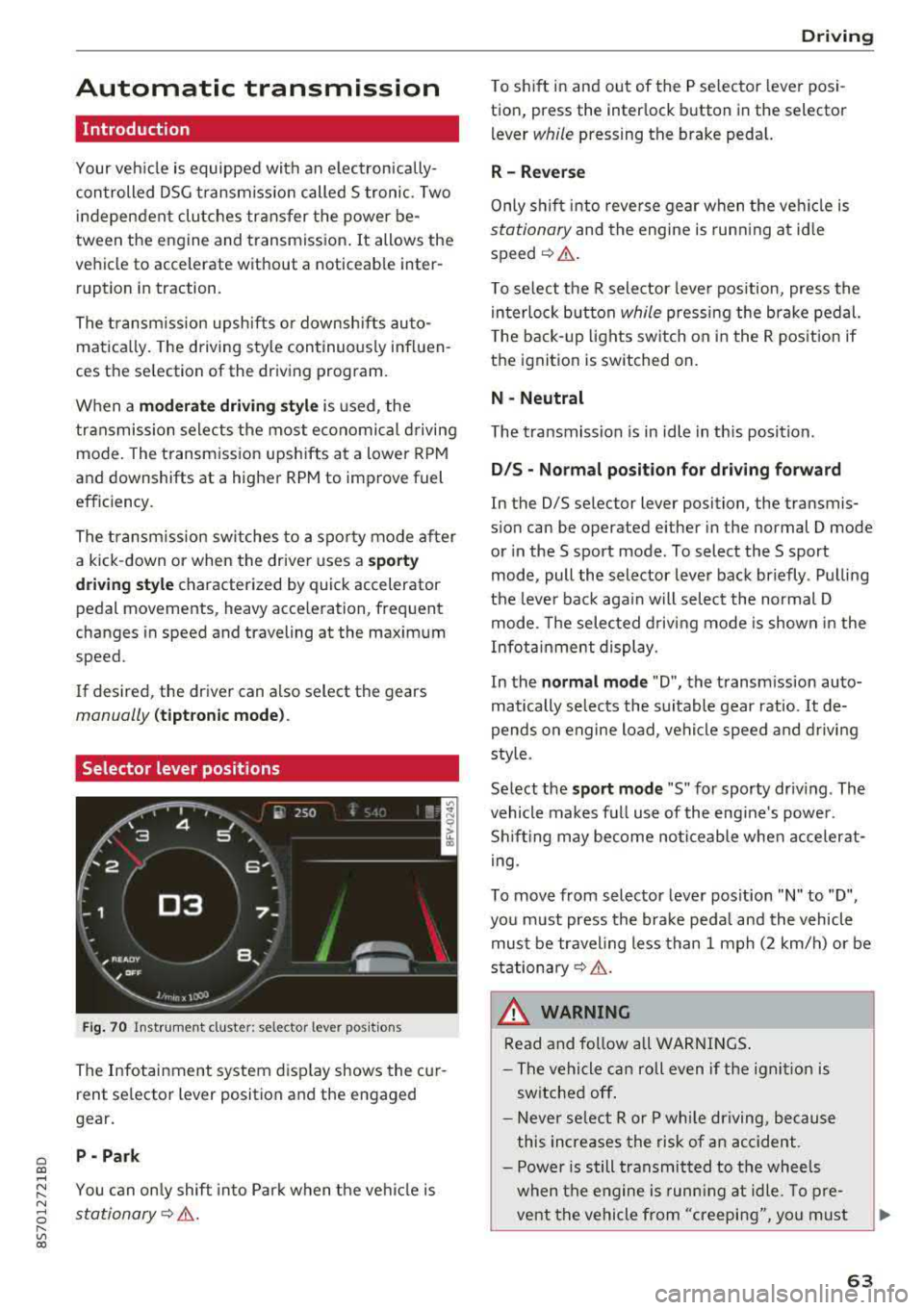
Selector lever positions
Fig . 70 Instrumel'lt cluster: selector lever positions
The Infotainment system d isplay shows the cur
rent se lector lever position and the engaged
gear.
P -Pa rk
You can on ly shift into Park when the vehi cle is
stationary¢ &.
Drivi ng
To shift in and out of the P selector lever posi
tion, press the inter lock button in the selector
lever
while pressing the brake pedal.
R- Reverse
Only s hift into reverse gear when the vehicle is
stationary and the engine is runn ing at id le
speed¢ &.
To se lect the R selector leve r pos ition, press the
in terlock button
while press ing the brake pedal.
T he back-up lights sw itch on in the R pos ition if
the ignition is switched on.
N -Neutral
The t ransmission is in idle in th is posit ion.
D IS -Norm al position fo r driving forward
In the D/S se lector lever position, the transmis
s ion can be operated either in the normal D mode
or in the S sport mode . To select the S sport
mode, pull the selector lever back briefly . Pulling
the leve r back aga in will selec t the normal D
mode. The selected d riving mode is shown in the
Infotainment display.
In the
n ormal mode "D", the transm ission auto
matically selects the suitable gear ratio.
It de
pends on engine load, vehicle speed and driving
sty le.
Select the
s p o rt mod e "S" for sporty driving . The
vehicle makes full use of the eng ine 's powe r.
Shifting may become noticeable whe n accelerat
i ng.
To move from selector lever pos ition
"N" to "D",
you m ust press the brake peda l and the vehicle
must be traveling less than 1 mph (2 km/h) or be
stationary¢ &.
A WARNING
Read and fo llow all WARNI NGS .
- The vehicle can roll even if the ignit ion is
switched off .
- Never se lect R or P whi le driving, because
this increases the risk of an accident .
- Power is still transmitted to the wheels
when the engine is runn ing at idle. To pre
vent the vehicle from "creeping", yo u must
63
Page 67 of 310
Cl co .... N ,....
N ...... 0 ,....
Vl co
Inte rlock button
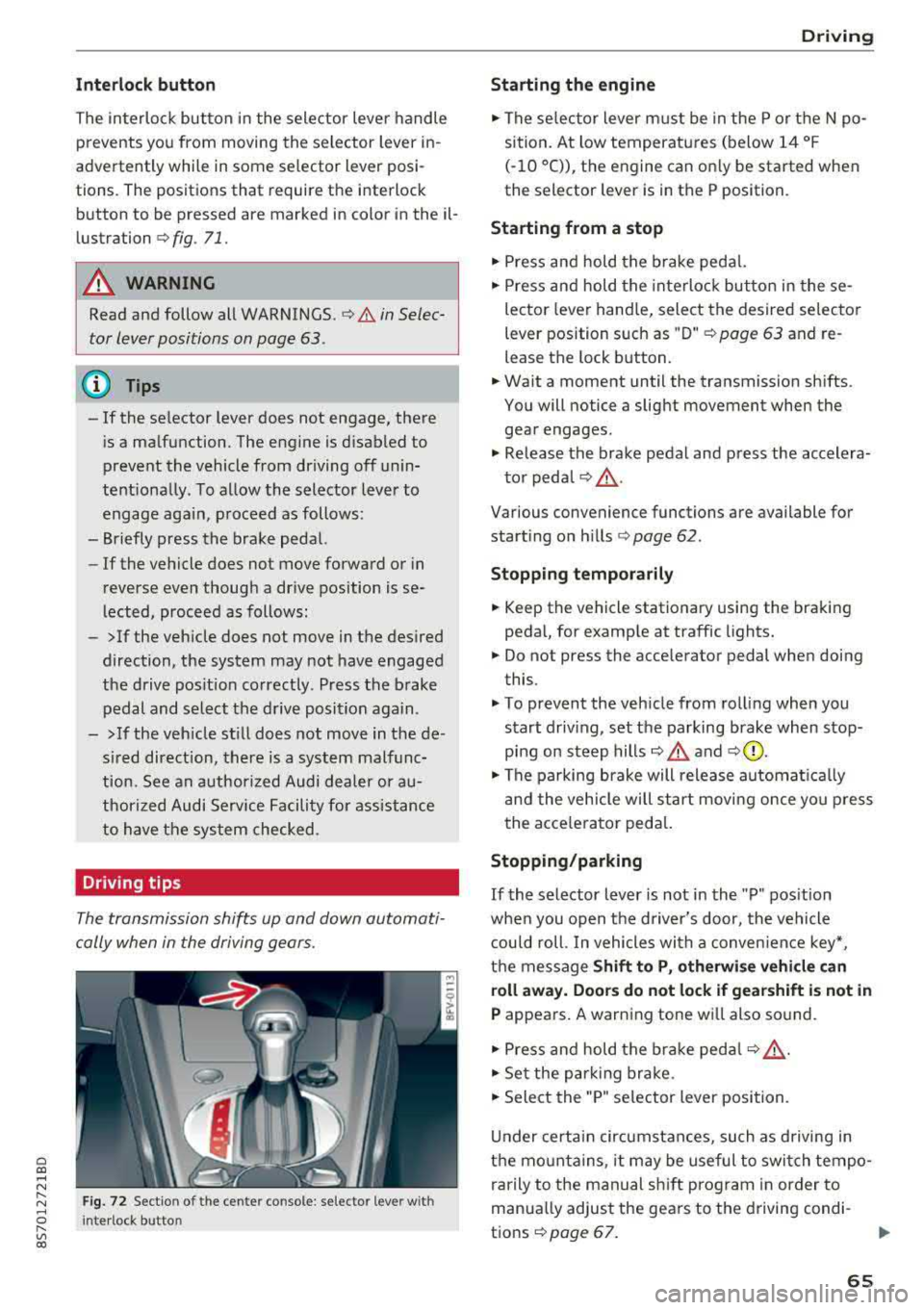
The in terlock button in the selector lever handle
prevents you from moving the selector lever in
advertently while in some selector lever posi
tions. The positions that require the interlock
button to be pressed are marked in color in the il
lustration
c:;, fig . 71.
A WARNING
Read and follow all WARNINGS . c;, .&. in Selec
tor lever positions on page 63.
@ Tips
-If the se lector lever does not engage, there
i s a malfunction. The engine is d isabled to
prevent the vehicle from driving off unin
tentiona lly . To allow the selector lever to
engage aga in , proceed as follows:
-Briefly press the brake pedal.
-If the vehicle does not move forward or in
reverse even thoug h a drive position is se
lected, proceed as follows:
-> If the veh icle does not move in the desired
direction, the system may not have engaged
the drive pos it ion correctly. Press the brake
pedal and select the drive position again.
->If the veh icle st ill does not move in the de
s ired direction, there is a system malfunc
tion. See an authorized Audi dea ler or au
thorized Audi Service Facility for assistance
to have the system checked .
Driving tips
The transmission shifts up and down automati
cally when in the driving gears.
F ig. 72 Sectio n of the cente r console: se lecto r leve r w ith
I nte rlock button
D rivi ng
Starting the engine
.,. The se lector lever must be in the P or t he N po
sition. At low temperatures (below 14 °F
(-10 °C)), the engine can on ly be started when
the selector lever is in the P position.
Starting from a stop
.,. Press and hold the brake pedal.
.,. Press and hold the interloc k butto n in these
lector lever hand le, select the desired selecto r
lever position s uch as " D"
c;, page 63 and re
lease the lock b utton.
.,. Wa it a moment until the transmission sh ifts.
You will notice a slight movement when the
gear engages .
.,. Release the brake pedal and press the accelera-
to r peda l
c;, _&..
Various convenience functions are available for
start ing o n hills
¢ page 62.
Stopping t emporarily
.,. Keep the vehicle stationary using the braking
pedal, for examp le at traffic lights.
.,. Do not press the acce lerator pedal when doing
this.
.,. To prevent the veh icle from rolling when you
s tart driv ing, set the parking brake when stop
ping on steep
hills¢ .&. and c;,0.
.,. The pa rking brake will release automat ica lly
and the vehicle will star t movi ng once yo u press
the acce le rator ped al.
Stopping /parking
If
the selector lever is not in the "P" pos ition
whe n you open the d river's door, the vehicle
c ou ld roll. In vehicles wi th a conven ien ce key*,
t h e message
Shift to P, otherwi se vehicle can
roll away. Door s do not lock if gearshift is not in
P appears. A warning tone wi ll also so und .
.,. Press and hold the brake peda l c;, _&. .
.,. Set the park ing br ake .
.,. Sele ct the "P" selector lever position.
U nder certain circumstances, such as d riving in
the mo unta ins, i t may be useful to switch tempo
rarily to the manual sh ift prog ram in order to
manua lly adjust the gears to the d riving condi-
t ions
c;, page 67. .,.
65
Page 68 of 310
Driving
When parking on a level surface, simply place the
selector lever in the "P" position. On inclines, ac
tivate the parking brake first and then move the
selector lever to the "P " position
c> page 61 . This
prevents the locking mechanism from being
loaded too heavily and will make it easier to
move the selector lever out of the "P" position.
A WARNING
- The vehicle can roll even when the engine is
switched off .
- Unintended vehicle movement can lead to
serious injuries.
- Never leave your vehicle with the engine
running while in gear . If you must leave
your vehicle when the engine is running, set
the parking brake and move the selector lev
er to the P position.
- Power is still transferred to the wheels
when the engine is running at idle. To pre
vent the vehicle from "creeping", you must
keep your foot on the brake when the en
gine is running and the selector lever is in
the "D" , "S" or "R" position or "tiptronic"
mode is selected.
- Do not inadvertently press the accelerator
pedal when the vehicle is stationary. Other
wise the vehicle will start to move immedi
ately, even if the parking brake is set . This
could result in a crash .
- Do not press the accelerator pedal when
changing the selector lever position while
the vehicle is stationary and the engine is
running .
- Never engage the R or P selector level posi
tions while driving. It could cause a crash .
- Before driving down a steep slope, reduce
your speed and shift into a lower gear with
"ti ptron i c" .
- Do not ride the brakes or press the brake
pedal too often or too long when driving
downhill. Constant braking causes the
brakes to overheat and substantially re
duces braking performance, increases brak
ing distance or causes complete failure of
the brake system.
- If you must stop on an incline, always hold
the vehicle in place with the foot brake or
66
parking brake to prevent it from rolling
back .
- Never hold the vehicle on an incline with a
slipping clutch. The clutch opens automati
cally when it becomes too hot from the
overload. The
ml indicator light turns on
and a message appears
c> page 68 when
the clutch is overloaded .
- If the engine must run while you are work
ing in the engine compartment with the
hood open, make sure a gear is not engag
ed. The selector lever must be firmly in the
P position and locked in place and the park
ing brake must be set
c> page 233. Other
wise, the vehicle could begin moving when
increasing the engine speed, even with the
parking brake set.
@ Note
- When stopping on an incline, do not try to
hold the vehicle in place by pressing the ac
celerator pedal while a driving gear is se
lected. This can cause the automatic trans
mission to overheat and can damage it. Set
the parking brake or press the brake pedal
to prevent the vehicle from rolling.
- Allowing the vehicle to roll when the engine
is stopped and the selector lever is in the N
position will damage the automatic trans
mission because it is not lubricated under
those circumstances.
- The transmission can overheat and be dam
aged under certain driving and traffic condi
tions such as frequent starts, creeping for a
long time , or stop-and-go traffic . When the
ml or. indicator light turns on, stop the
vehicle at the next opportunity and let the
transmission cool
c> page 68.
- Allowing the vehicle to roll when the engine
is stopped will damage the S tronic trans
mission because it is not lubricated
c> page 285, Towing with a tow truck .
(D Tips
For safety reasons, the parking brake is re
leased automatically only when the driver's
safety belt is fastened.
Page 72 of 310
Drivin g
Selector le ver em ergency r ele ase
.,. Press and hold the yellow release bu tton with
the screwdriver
c:::> fig. 76 .
.,. Press the lock button on the se lector lever (D
and move the lever into the N position .
.,. Clip the shift cover back into the shift gate after
us ing the emergency release .
If the ve hicle must be pushed or towed due to a
power failure (for example, the battery is dead),
the selector lever must first be moved to the N position us ing the emergency release mecha
n ism .
A WARNING
-Only activate the emergency release while
on a level su rface or a slight slope.
- Only move the selector lever out of the "P" pos it ion when the parking brake is set. If it
is not funct ioning, secu re the vehicle from
rolling using the b rake pedal o r othe r su ita
ble means, such as bloc king a front and a
rear whee l. An unsecured veh icle may roll
away, which increases the risk of an acci
dent.
Trailer towing
General information
Your Audi TT Roadster is not designed to tow a
trailer .
-
Towing a trailer w ith your Aud i TI Roadster is not
recommended and can cause damage to the car .
Damaged caused by tow ing a trailer is not cov
ered by your Audi Warranty .
70
Page 73 of 310
Cl co .... N ,....
N ...... 0 ,....
Vl co
Assistance systems Speed warning system
Description
App lies to: vehicles with speed warning system
The speed warning system helps you to stay be
low a specified maximum speed that can be set,
changed or deleted in the Infotainment system .
The speed warning system warns you if you are
exceeding the maximum speed that you have set .
A warning tone will sound as soon as your speed
exceeds the stored value slightly. The
(Ol (USA
models)/
(01 (Canada models) indicato r light
and a message appear i n the ins trumen t cluster
d isplay at the same time. The
(Sl (USA models)/
(O] (Canada models) indicator light and the mes
sage turn off when the ve hicle speed drops below
the stored maximum speed.
Sett ing a threshold is recommended if you would
like to be reminded when you reach a certain
maximum speed . Situations where you may want
to do so include driving in a country with a gener
al speed limit or if there is a specified maximum
speed for winter tires.
Setting the warning thr eshold
.. Se lect in the Infotainment system: ! MENUI b ut
ton
> Vehicle > left contro l button > Driver a s
s istan ce
> S peed warning > Manual.
@ Tips
Regard less of the speed warning system, you
should always monitor your speed using the
speedometer and make sure you are following
the legal speed limit.
A ssi st a nce systems
Cruise control system
Switching on
Applies to: vehicles with cruise control system
The cruise control system makes it possible to
drive at a constant speed starting at 15 mph
(20 km/h).
0
f
~
0
Fig . 7 7 Operat ing leve r: cru ise control system
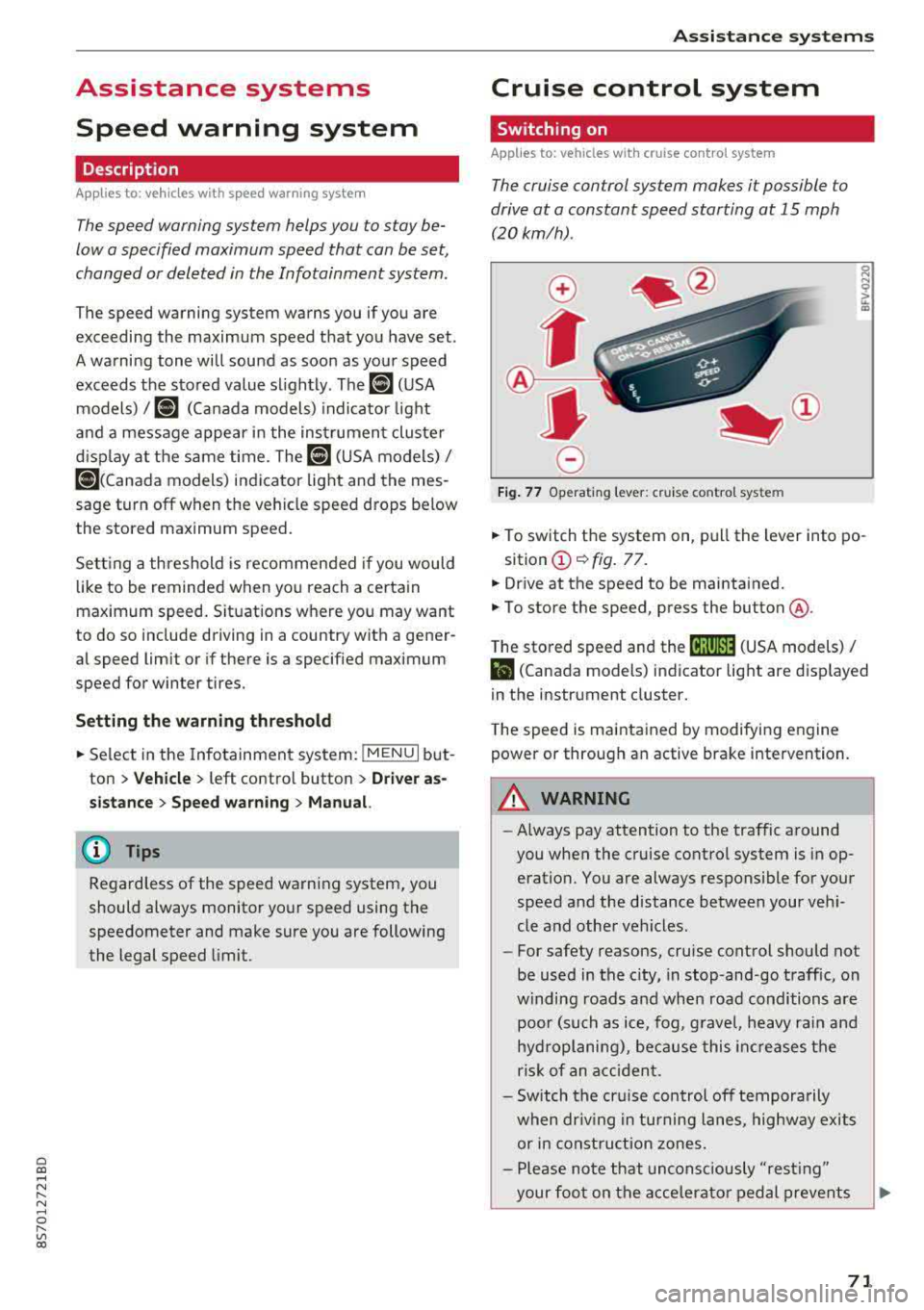
.. To switch t he system on, pull the lever into po-
sition
(D ¢ fig. 77.
.. Drive at the speed to be maintained.
.. To store the speed, press the button @.
T he stored speed and the
@jltJ~i, (USA models) /
l'I (Canada models) ind icator lig ht are d isp layed
in the instrument cluster.
T he speed is maintained by modifying engine
power or through an active brake intervention.
_8 WARNING
---A lways pay attention to the traffic around
you when the cruise control system is in op
eration. You are always responsible for your
speed and the distance between your vehi
cle and othe r vehicles.
-For safety reasons, cruise control should not
be used in the city, in stop-and-go traffic, on
w inding roads a nd when road conditions a re
poor (such as ice, fog, g rave l, heavy rai n and
hydroplaning), because this in cr eases the
risk of an acciden t.
-Sw itch the cr uise con trol off tempora rily
when dr iv ing in tu rning lanes, highway exits
or in const ruc tion zones.
-Please no te that uncons ciously "resting"
your foo t on the accelera to r ped al prevents
-
71