navigation system AUDI TT ROADSTER 2018 Owner's Manual
[x] Cancel search | Manufacturer: AUDI, Model Year: 2018, Model line: TT ROADSTER, Model: AUDI TT ROADSTER 2018Pages: 310, PDF Size: 46.95 MB
Page 149 of 310
Cl 00 ... N r-N ... 0 r-Vl 00
You can also display the o nline traffic info rma
tion
in the sate llite map*1
) ¢ page 145 or the
standard map
¢ pag e 142, fig . 127
(D Tips
-Online traff ic information is not available in
Canada .
- Always read the chapter
~ page 131, About
Audi connect .
-Havi ng the Online tr affic data fu nction
switched on provides t he most accu rate re
ports of traffic situations as we ll as traffic
forecasting. Yo ur vehicle transmits and
processes its anonymous, encrypted posi
tion information at regular intervals to the
traffic data provider . If yo u do not want to
use this, you can switch off the
on line traf
fic information
function at any time .
-The online traffic informat ion network is
curre ntly not ava ilable i n all countr ies, and
the coverage is not nat io nwide . For add i
tiona l information, v is it www.aud iusa.com.
Traffic information (TMC)
Applies to: vehicles with navigation system
~ Press the I NAV /MAPI button repeated ly un til
the map is disp layed.
~ Se lect : left control button > Traffic me ssage s.
TMC t raffic mess ages are switched o n at the fac
tory.
Multip le traffic messages a re summarized in the
overview unde r th e correspondi ng street names
or h ighway names.
-Di spla ying all traffic messages for a street /
highwa y:
select and confirm the [ill symbol. A
l ist of a ll the traffic messages for the sele cted
st ree t/ hi ghway is displayed.
-Opening the detailed view of a tr affic me s
s age :
if you se lect an ent ry from the list, the
t raff ic information will be shown as a map p re
view ®¢
page 146, fig. 130 . Select and con-
l) AU DI AG prov ides acces s to serv ices from third pa rty pro
v iders . Pe rman ent availa bili ty c anno t be g uara nteed , be
c a use that dep ends on th e th ird party provid er.
Na vigation
firm a traff ic message to d isplay the details for
that message.
-Displ aying th e sele cted traffic me ssage on the
map :
select the right control button > Sh ow on
map .
-Displaying the ne xt traffic mes sage on the
map :
press the control knob .
Traffic information display
Colored warning symbol s:
traffic incidents o n
yo ur r oute are shown in the upper sect io n of the
li st and are sorted ac cording to d istance .
Warning symbol s with~: avo ided traff ic inci
dents.
Grayed out warning s ymbol s: traffic incidents
that are not on your route . T hey are sorted ac
cording to road type (expressway, h ighway, other
r oad), cou ntry and name.
Shaded markings indicate the length of the area
with congest ion .
(D Tips
Critical traffic information, such as war nings
abo ut wrong-way drivers, is a utomat ica lly dis
played . To hide t he traffic informat ion, press
the
IBACK ! button or the contro l knob .
-TMC traffic reports are not available in Can
ada . For more info rmat io n, p lease contact
S irius Canada.
Better route
Applies to: vehicles with navigation system
By receiving traffic information through TMC,
your MMI calculates a better route -if available -
and the possible time saved for the current route
guidance. You can decide yourself which route
you would like to use.
~ Press the ! NAV/MAPI button repeatedly unti l
t he map is displayed.
Requirement: route guidance must be active .
147
Page 150 of 310
Navigation
If you r MMI has calculated a better route than
the current route guidance, the message
A better
route is available.
appears on the map along
with the time that may be saved. A better route
is indicated in the map view by the symbol
rS
c::;,pag e 142, fig. 127 .
Apply better route
- Press the right contro l button in the map view .
Or: select the left contro l button > Traffic mes·
sages.
The better route with the calcu lated ar
rival time is displayed .
Troubleshooting
App lies to: ve hicles w ith navigation system
Problem Solution
-Select and confirm the better route. Or: select
and confirm
Details to display details about the
optimized route. You can zoom in or out on the
map using the MMI touch control pad. Require
ment: there must be more than one optimized
route calculated. Press the control knob to
sw itch to the next route in the detailed view .
Closing the detailed view: press the I BACK I
button.
- After you have selected a better route, the
route w ill be recalculated.
Free text search: the desired des- The dest inat ion might not be entered in the navigation database.
ti nat ion cannot be found .
Or: check the spelling of the term that was searched . Check if the
desired country/state was selected for the free text search using
the
Country/state selection ¢page 135 or the option All coun-
tries/states.
148
Page 176 of 310
System settings
delete the programmed voice training with the
Reset individual speech training function .
Factory settings
The follo wing funct ions can be reset to the facto
ry default settings :
-Sound settings
- Radio
- Media settings
- Jukebox*
- Directory*
- Telephone *
- Bluetooth and Wi-Fi*
- Navigation settings *
- Navigation and online memory *
- Voice recognition system*
- Message settings *
-Apps*
-Tool tips
-Audi connect *
You can select the desired functions individually
or all at once with the option
Select all entries .
Select and confirm Restore factory settings.
(D Tips
-Make sure that not only t he settings were
deleted but also the stored data, if appl ica
ble.
- Please note that the
voice recognit ion sys
tem* is not available in Cabriolets that do
not have a factory- insta lled safety belt mi
crophone .
174
Connection manager
Introduction
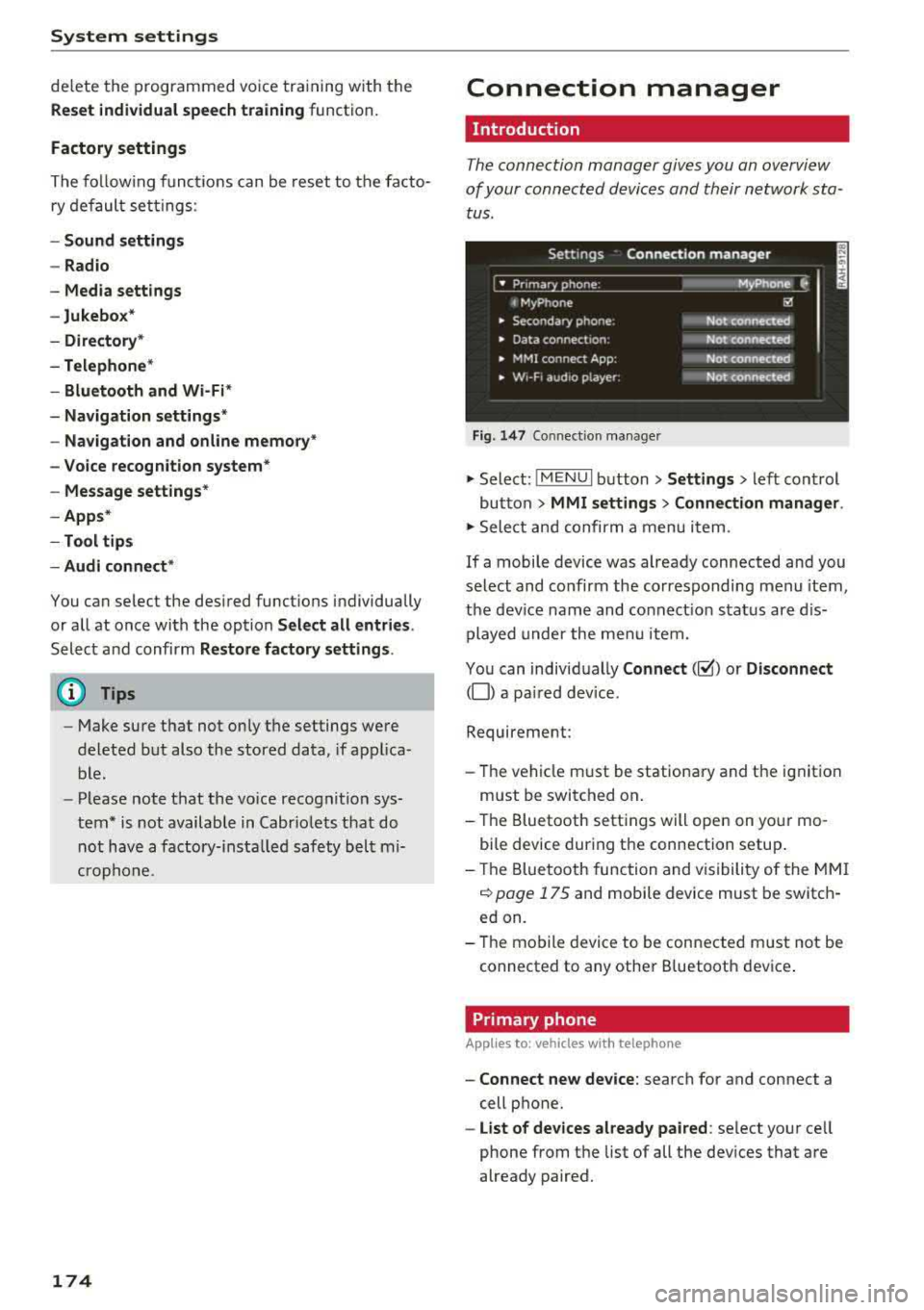
The connection manager gives you an overview
of your connected devices and their network sta
tus.
Settings Connection manager
I • Prima hone : M_Phone C,
t MyPhone ~
• Secondary phone : Not connected
• Data connect,on: Not connected
• MMI connect App: Not connected
• w,- F, aud ,o player: Not connected
Fig . 147 Co nnect ion manager
.,.. Select: !MENUI button> Settings > left control
button
> MMI settings > Connection manager.
.,.. Select and confirm a menu it em.
If a mobile device was already connected and you
select and co nfirm the corresponding menu item,
the device name and connect ion status are dis
played under the menu item.
You can individually
Connect(~) or Disconnect
(0) a pa ired device.
Requirement:
- Th e vehicle m ust be stationary and the ignition
m ust be switched on .
- Th e Bluetooth settings will open on your mo
bile device during the connection setup .
- Th e Bluetooth function and visibility of the MMI
c::> page 175 and mobile device must be switch
ed on.
- Th e mobile device to be connected m ust not be
connected to any other B luetooth dev ice .
Primary phone
App lies to: vehicles wi th telepho ne
- Connect new device: search for and connect a
cell phone.
- List of devices already paired: select your cell
phone from the list of all the devices that are
already paired.
Page 180 of 310
System settings
Ringtone volume: you can adjust the volume of
the selected ringtone by turning the contro l
knob.
Message volume: you can adjust the volume of
the notification for an incoming text message by
turning the control knob.
Microphone input level : you can adjust the vol
ume during a phone call by turning the control
knob.
Navigation
A pp lies to: ve hicles w ith navigation system
Voice guidance: see¢ page 141, Voice guidance.
Voice guidance during phone call: see
¢ page 141, Voice guidance.
Voice guidance volume: you can adjust the voice
gu idance volume during active route guidance by
turn ing the control knob.
Entertainment fader : the volume of audio play
back can be temporarily lowered when the park
ing system or voice guidance is active.
Voice recognition system
App lies to: ve hicles w ith vo ice recogni tion sys te m
Short dialog : prompts in a shorte r format can be
switched on or o ff.
Speech dialog system volume: you can adjust
the volume of the prompts by turning the control
knob.
Parking aid*
You can adjust the signal tone volume by turning
the control knob.
-Adjusting the Front volume: select and con
firm
High , Medium or Low .
- Adjusting
the Rear volume: select and confirm
High, Medium or Low .
MMI touch volume*
You can adjust the vo lume of the prompts for the
MMI to uch* by turning the contro l knob.
Audi Heartbeat
You can adjust the volume of Aud i Heartbeat by
t ur nin g the control knob.
178
(D Tips
Please note that the voice recognition sys
tem* is not available in Cabr io lets t hat do not
have a factory-installed safety belt micro
phone.
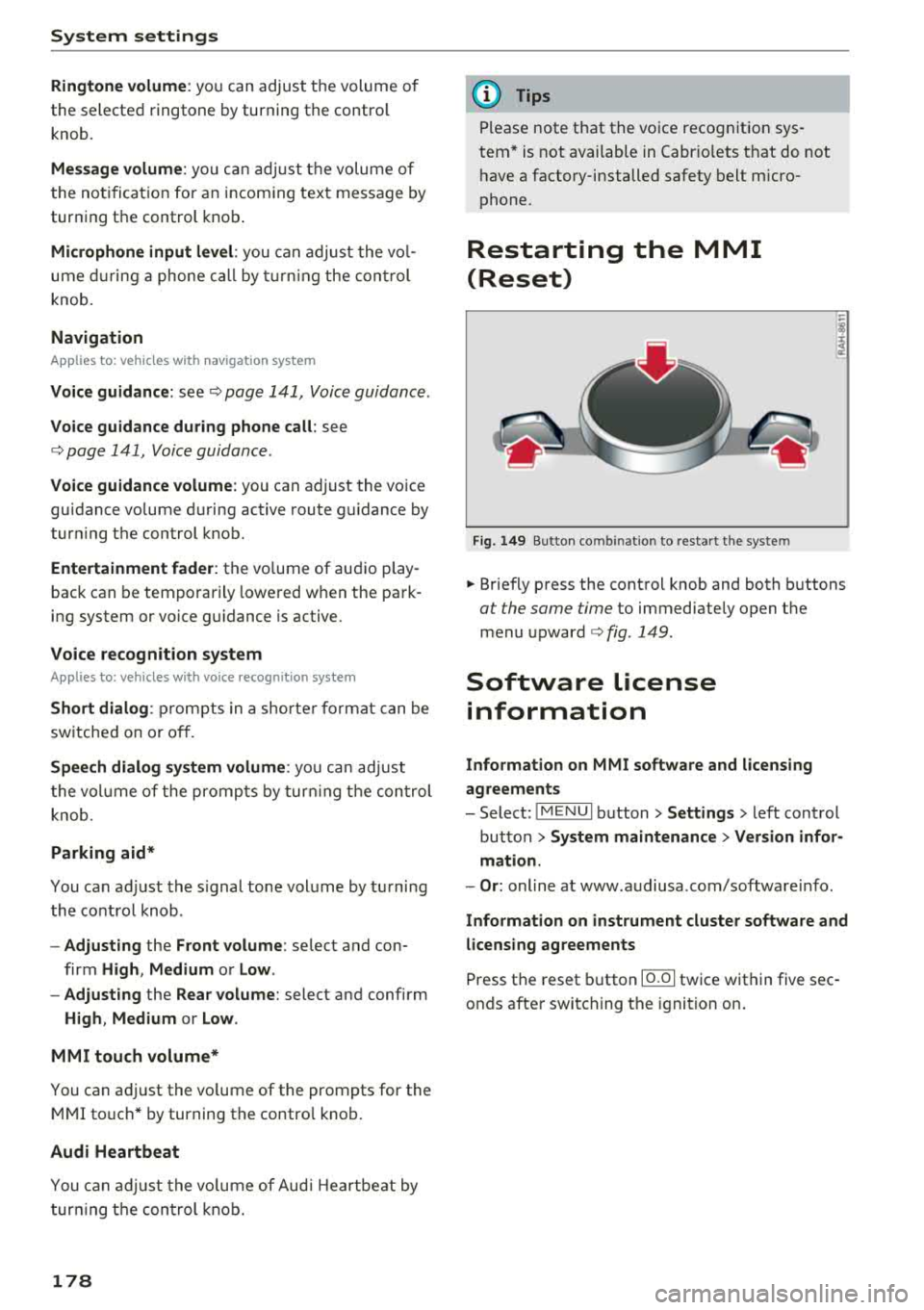
Restarting the MMI
(Reset)
Fig. 149 Button co mbin ation to res tart the syste m
.. Briefly press the control knob and both buttons
at the same time to immediately open the
menu
upward ¢ fig. 149.
Software License
information
Information on MMI software and licensing
agreements
- Select: ~
I M _ E_N_ U~ I button> Settings > left control
button >
System maintenance > Version infor
mation.
- Or : online at www .audiusa .com/software info .
Information on instrument cluster software and
licensing agreements
Press the reset button 10.01 twice within five sec
onds after switching the ignition on.
Page 200 of 310
Airbag system
Front airbags
Description of front airbags
The airbag system can provide supplemental
protection to properly restrained front seat occu
pants.
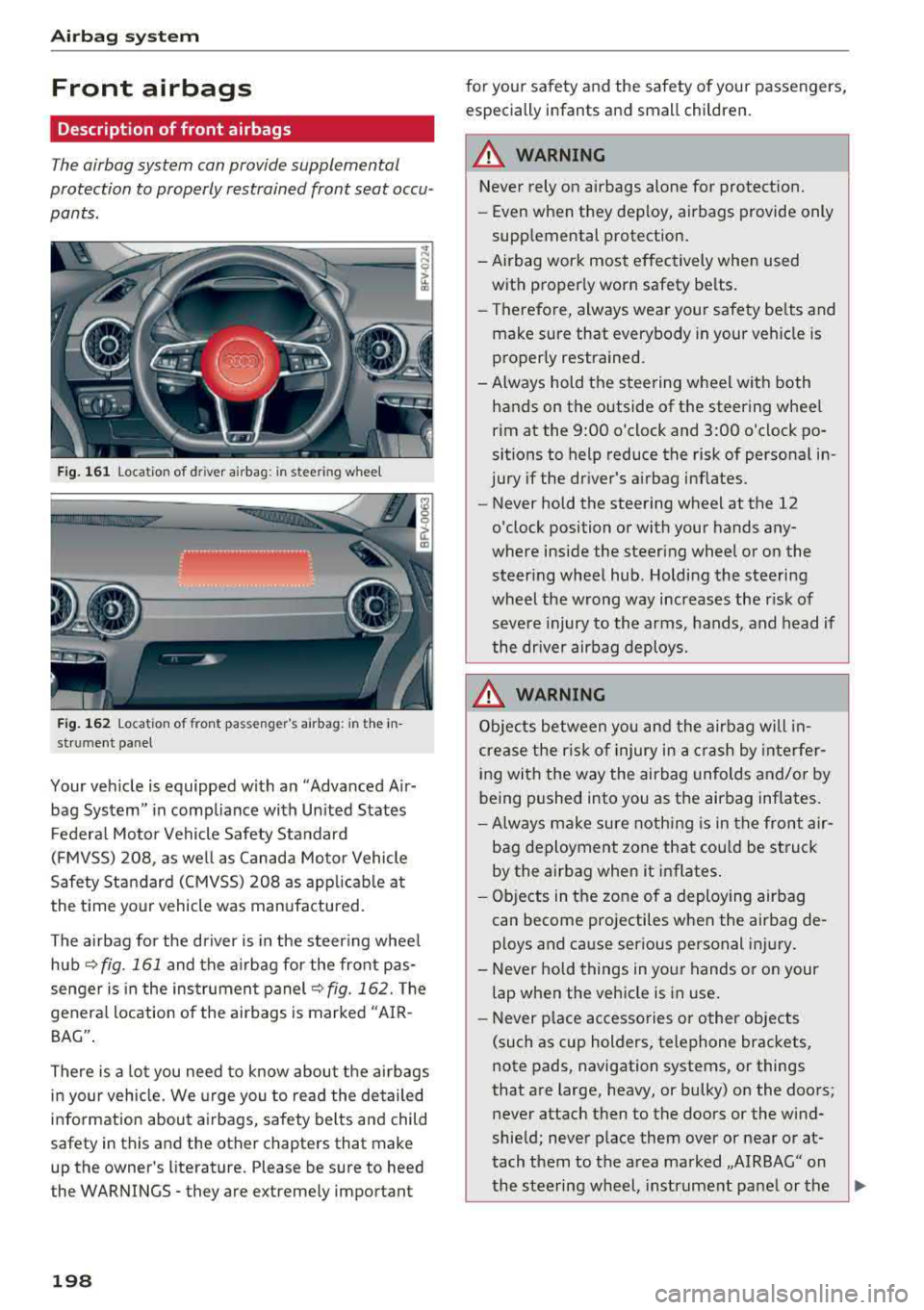
Fig. 161 location of driver airbag: in steering wheel
Fig. 162 location of front passenger's airbag: in the in
strument panel
Your vehicle is equipped with an "Advanced Air
bag System" in compliance with Un ited States
Federal Motor Vehicle Safety Standard
(FMVSS) 208, as well as Canada Motor Vehicle
Safety Standard (CMVSS) 208 as applicable at
the time your vehicle was manufactured.
The airbag for the driver is in the steer ing whee l
hub
~ fig. 161 and the airbag for the front pas
senger is in the instrument panel
~fig. 162. The
general location of the airbags is marked "AIR
BAG" .
There is a lot you need to know about the airbags
in your vehicle. We urge you to read th e detailed
information about airbags, safety belts and child
safety in this and the other chapters that make
up the owner's literature. Please be sure to heed
the WARNINGS - they are extremely important
198
for your safety and the safety of your passengers,
especially infants and small children.
A WARNING -
Never rely on airbags alone for protection.
- Even when they deploy, airbags provide only
supplemental protection.
- Airbag work most effectively when used with proper ly worn safety belts.
- Therefore, always wear your safety be lts and
make sure that everybody in your veh icle is
properly restrained.
- Always hold the steering wheel with both hands on the outside of the steering wheel
rim at the 9:00 o'clock and 3:00 o'clock po
sitions to help reduce the risk of personal in
jury if the driver's airbag inflates.
- Never hold the steering wheel at the 12
o'clock position or with your hands any
where inside the steering wheel or on the
steering wheel hub. Holding the steering
wheel the wrong way increases the risk of
severe injury to the arms, hands, and head if
the dr iver airbag deploys .
.&_ WARNING
Objects between you and the airbag will in
crease the r isk of injury in a crash by interfer
ing with the way the airbag unfolds and/or by
being pushed into you as the airbag inflates.
-Always make sure nothing is in the front air-
bag deployment zone that cou ld be struck
by the airbag when it inflates.
-
- Objects in the zone of a deploying airbag
can become projectiles when the airbag de
ploys and cause serious personal injury.
- Never hold things in your hands or on your
lap when the vehicle is in use.
- Never p lace accessories or other objects
(such as cup holders, telephone brackets,
note pads, navigation systems, or things
that are large, heavy, or bulky) on the doors;
never attach then to the doors or the wind
shield; never place them over or near or at
tach them to the area marked ,,AIRBAG" on the steering wheel, instrument panel or the
.,..
Page 201 of 310
Cl 00 .-< N r-N .-< 0 r-Vl 00
seat backrests; never place them between
these areas and you or any other person in
the vehicle.
- Never attach objects to the windshield
above the passenger front airbag, such as
accessory GPS navigation units or music
players. Such objects could cause serious in
jury in a collision, especially when the air bags inflate .
A WARNING
A person on the front passenger seat, espe
cially infants and small children, will receive
serious injuries and can even be killed by be
ing too close to the airbag when it inflates.
- Although the Advanced Airbag System in
-
your vehicle is designed to turn off the front
passenger airbag if an infant or a small child
is on the front passenger seat, nobody can
absolutely guarantee that deployment un
der these special conditions is impossible in
all conceivable situations that may happen
during the useful life of your vehicle.
- The Advanced Airbag System can deploy in accordance with the "low risk" option under
the U .S . Federal Standard if a child that is
heavier than the typical one-year old child is
on the front passenger seat and the other
conditions for airbag deployment are met.
- For its own safety, a child should always ride
properly restrained for its age and size.
Advanced front airbag system
Your vehicle is equipped with a front Advanced
Airbag System in compliance with United States
Federal Motor Vehicle Safety Standard (FMVSS)
208, as well as Canada Motor Vehicle Safety
Standard (CMVSS) 208 as applicable at the time
your vehicle was manufactured.
The front Advanced Airbag System supplements
the safety belts to provide additional protection
for the driv er's and front passenger's heads and
upper bodies in frontal crashes . The airbags in
flate only in frontal impacts when the vehicle de
celeration is high enough.
Airbag system
The front Advanced Airbag System for the front
seat occupants is not a substitute for your safety
belts. Rather, it is part of the overall occupant re
straint system in your vehicle. Always remember
that the airb ag system can only help to protect
you, if you are sitting upright, wearing your safe
ty belt and wearing it properly . This is why you
and your passengers must always be properly re
strained, not just because the law requires you to
be.
The Advanced Airbag System in your vehicle has
been certified to meet the "low risk" require
ments for 3 and 6 year-old children on the pas
senger side and very small adults on the driver
side. The low risk deployment criteria are intend
ed to help reduce the risk of injury through inter
action with the front airbag that can occur, for
example, by being too close to the steering wheel
and instrument p anel when the airbag inflates.
In addition, the system has been certified to
comply with the "suppression" requirements of
the Safety Standard, to turn off the front airbag
for infants 12 months old and younger who are
res trained on the front passenger seat in child re
straints that are listed in the Standard
~page 218, Child restraints and Advanced front
airbag system .
"Suppression" requires the front airbag on the
passenger side to be turned off if:
- a child up to about one year of age is restrained
on the front passenger seat in one of the rear
facing or forward-facing infant restraints listed in Federal Motor Vehicle Safety Standard 208
with which the Advanced Airbag System in your
vehicle was certified . For a listing of the child
restraints that were used to certify your vehi
cle's compliance with the US Safety Standard
~page 218,
- When a person is detected on the front passen
ger seat that has an electrical capacitance that
is more than the total electrical capacitance of
a child that is about 1 year old restrained in one
of the rear-facing or forward-facing infant re
straints (listed in Federal Motor Vehicle Safety
Standard 208 with which the Advanced Airbag
System in your vehicle was certified), the front
.,,.
199
Page 297 of 310
Cl 00 .-< N r-N .-< 0 r-Vl 00
AUTO Automatic climate control system . . . . . . . 52
Automatic headlights . . . . . . . . . . . . . . . . . 38
Auto Lock (central locking) . . . . . . . . . . . . . . 22
Automatic belt retractor . . . . . . . . . . . . . . .
190
Automatic climate control system
refer to Climate control system (automatic) .52
Automatic key . . . . . . . . . . . . . . . . . . . . . . . . . 22
Automatic transmission . . . . . . . . . . . . . . . . . 63
Driving tips . . . . . . . . . . . . . . . . . . . . . . . . . . 65
Emergency mode . . . . . . . . . . . . . . . . . . . . . 68
Hill descent control . . . . . . . . . . . . . . . . . . . 67
Kick-down . . . . . . . . . . . . . . . . . . . . . . . . . . . 68
La unch Control Program . . . . . . . . . . . . . . . 68
malfunction . . . . . . . . . . . . . . . . . . . . . . . . . 64
Selector lever emergency release . . . . . . . .
69
Selector lever lock . . . . . . . . . . . . . . . . . . . . 64
Selector lever positions . . . . . . . . . . . . . . . . 63
Shifting manually . . . . . . . . . . . . . . . . . . . . 67
Steering wheel with shift paddles . . . . . . . . 67
tiptronic . . . . . . . . . . . . . . . . . . . . . . . . . . . . 67
Automatic wipe/wash system . . . . . . . . . . . . 42
Automatic zoom (navigation) . . . . . . . . . . . 144
Index
Brakes . . . . . . . . . . . . . . . . . . . . . . . . . . . . . . . 87
Brake assist . . . . . . . . . . . . . . . . . . . . . . . . . 86
Brake assist system . . . . . . . . . . . . . . . . . . . 86
Brake booster . . . . . . . . . . . . . . . . . . . . . . . . 87
Brake fluid . . . . . . . . . . . . . . . . . . . . . . . . . 241
Electromechanical parking brake . . . . . . . . 61
Emergency braking function . . . . . . . . . . . . 61
Indicator light . . . . . . . . . . . . . . . . . . . . . . .
10
New brake pads . . . . . . . . . . . . . . . . . . . . . . 87
Worn brake pads . . . . . . . . . . . . . . . . . . . . . 14
Break-in security feature . . . . . . . . . . . . . 22, 2 7
Breaking in New brake pads . . . . . . . . . . . . . . . . . . . . . . 87
New engine . . . . . . . . . . . . . . . . . . . . . . . . . 56
New tires 251
Browser
refer to Media center . . . . . . . . . . . . . . . . . 163
Bulb failure (indicator light) . . . . . . . . . . . . . 16
Bulb replacement . . . . . . . . . . . . . . . . . . . . . 282
Buttons Control panel (MMI) . . . . . . . . . . . . . . . . . .
93
Multifunction steering wheel . . . . . . . . 18, 20
Auto Safety Hotline . . . . . . . . . . . . . . . . . . . 18S C
AUX input
Average fuel consumption ........... .. . . 161
21
Average speed . . . . . . . . . . . . . . . . . . . . . . . . 21
B
BACK button . . . . . . . . . . . . . . . . . . . . . . . . . . 93
Balance (sound) . . . . . . . . . . . . . . . . . . . . . . 177
Bass (sound) . . . . . . . . . . . . . . . . . . . . . . . . . 177
Battery Jump starting . . . . . . . . . . . . . . . . . . . . . . . 283
Before driving .. ................ ... .. .
Better route (navigation) ........ .. .. .. .
Blended gasoline
179
147
229
Blower (climate control system) . . . . . . . . . . 52
Bluetooth Audio player . . . . . . . . . . . . . . . . . . . . . . . . 157
Connecting a cell phone . . . . . . . . . . . . . . 111
Settings . . . . . . . . . . . . . . . . . . . . . . . . . . . 175
Booster seats
Brake fluid 223
Checking the brake flu id leve l . . . . . . . . . .
241
Cable (USB adapter/AUX connector cable) 160
California Proposition 65 Warning . . . . . . . 234
Battery specific . . . . . . . . . . . . . . . . . . . . . 242
Call list . . . . . . . . . . . . . . . . . . . . . . . . . . . . . 114
Call options . . . . . . . . . . . . . . . . . . . . . . . . . . 121
Capacities Fuel tank . . . . . . . . . . . . . . . . . . . . . . . . . . . 288
Washer fluid reservoir . . . . . . . . . . . . . . . . 288
Cargo area
refer to Luggage compartment. . . . . . . . . 183
Catalytic converter ... ................ . 233
CD drive (media drives) ............... . 156
Cell phone Pl
. · aying music . . . . . . . . . . . . . . . . . . . . . . . 157
also refer to Telephone . . . . . . . . . . . . . . . 111
Center armrest . . . . . . . . . . . . . . . . . . . . . . . .
47
Central locking . . . . . . . . . . . . . . . . . . . . . . . . 22
Luggage compartment lid . . . . . . . . . . . . . . 27
Mechanically locking . . . . . . . . . . . . . . . . . . 27
Power windows . . . . . . . . . . . . . . . . . . . . . . 29
Remote control key . . . . . . . . . . . . . . . . . . . 24
Setting . . . . . . . . . . . . . . . . . . . . . . . . . . . . . 26
295
Page 303 of 310
Cl 00 ... N r-N ... 0 r-Vl 00
MMI search
refer to Free text search . . . . . . . . . . . . . . 101
MMI touch . . . . . . . . . . . . . . . . . . . . . . . . . . . . 95
MODE .. .. .. .. ............... .. .. .. .. 20
Monitoring the Advanced Airbag System 205
MP3
refer to Jukebox . . . . . . . . . . . . . . . . . . . . . 156
Multifunction steering wheel . . . . . . . . . . 18, 20
Buttons . . . . . . . . . . . . . . . . . . . . . . . . . . . . . 19
Operating . . . . . . . . . . . . . . . . . . . . . . . . 18, 20
Multi Media Interface . . . . . . . . . . . . . . . . . . . 93
Music collection
refer to Jukebox . . . . . . . . . . . . . . . . . . . . . 156
Mute
refer to Muting . . . . . . . . . . . . . . . . . . . . . . 177
Muting .. .... .. ................ ... 19, 177
myAudi Configur ing (Audi connect services) . . . . . 125
L ogging in in the vehicle . . . . . . . . . . . . . . 125
PIN . . . . . . . . . . . . . . . . . . . . . . . . . . . . . . . 125
N
Natural leather care/cleaning . . . . . . . . . . . 269
NAV/MAP button . . . . . . . . . . . . . . . . . . . . . 134
Navigation . . . . . . . . . . . . . . . . . . . . . . . . . . . 134
Control pane l (MMI) . . . . . . . . . . . . . . . . . 134
also refer to Map . . . . . . . . . . . . . . . . . . . . 142
Neck heating . . . . . . . . . . . . . . . . . . . . . . . . . . 54
Network connection (Wi -Fi) . . . . . . . . . . . . . 129
NHTSA Contacting . . . . . . . . . . . . . . . . . . . . . . . . . 185
Number of seats . . . . . . . . . . . . . . . . . . . . . . 187
0
Occupant seating posit ions . . . . . . . . . . . . . 180
Octane rating (gasoline) . . . . . . . . . . . . . . . . 229
Odometer . . . . . . . . . . . . . . . . . . . . . . . . . . . . 21
Oil Indicator light . . . . . . . . . . . . . . . . . . . . . . . 15
also refer to Eng ine oi l . . . . . . . . . . . . . . . 236
Oil change interval . . . . . . . . . . . . . . . . . . . . 243
On-board computer . . . . . . . . . . . . . . . . . . . . 21
On-Board Diagnostic System (OBD) . . . . . . . 233
On/Off knob (MMI) . . . . . . . . . . . . . . . . . . . . . 93
Index
Online destinations
refer to Point of interest search
138
Online map . . . . . . . . . . . . . . . . . . . . . . . . . . 145
Online media . . . . . . . . . . . . . . . . . . . . . . . . . 159
Online services
refer to Audi connect . . . . . . . . . . . . . . . . . 124
Opening Doors . . . . . . . . . . . . . . . . . . . . . . . . . . . . . . 25
Fuel filler door . . . . . . . . . . . . . . . . . . . . . . 230
Hood . . . . . . . . . . . . . . . . . . . . . . . . . . . . . . 235
Windows ........................... 29
Opening/closing Using the door lock . . . . . . . . . . . . . . . . . . . 27
also refer to Unlocking/locking . . . . . . . 22, 25
Operating Multifunction steering wheel . . . . . . . . 18, 20
Multi Media Interface . . . . . . . . . . . . . . . . . 94
Vo ice recognit ion system . . . . . . . . . . . . . 105
Options menu . . . . . . . . . . . . . . . . . . . 94, 98, 99
Outside temperature display . . . . . . . . . . . . . 17
Overview (Cockpit) . . . . . . . . . . . . . . . . . . . . . . 6
p
Paint damage
Paint number 268
288
Parenta l control . . . . . . . . . . . . . . . . . . . . . . 166
Parking brake Indicator light . . . . . . . . . . . . . . . . . . . . . . . 11
also refer to Electromechanical
parking brake . . . . . . . . . . . . . . . . . . . . . . . . 61
Parking light . . . . . . . . . . . . . . . . . . . . . . . . . . 38
Parking system
refer to Parking systems . . . . . . . . . . . . 81, 82
Parking systems . . . . . . . . . . . . . . . . . . . . . . . 80
Adjusting the display/warning tone . . . . . . 84
Cleaning sensors/the camera . . . . . . . . . . 267
Cleaning the rearview camera . . . . . . . . . . . 83
Malfunction . . . . . . . . . . . . . . . . . . . . . . . . . 84
Parking system plus . . . . . . . . . . . . . . . . . . . 81
Peripheral disp lay . . . . . . . . . . . . . . . . . . . . 81
R ear parking system . . . . . . . . . . . . . . . . . . 81
Rearview camera . . . . . . . . . . . . . . . . . . . . . 82
Parking (automatic transm ission) . . . . . . . . . 65
Parts replacement . . . . . . . . . . . . . . . . . . . . 292
Pass-through . . . . . . . . . . . . . . . . . . . . . . . . . 49
PASSENGER AIR BAG light . . . . . . . . . . . . . . 206
301
Page 305 of 310
Cl 00 .-< N r-N .-< 0 r-Vl 00
Removing the wheel hub covers . . . . . . . . . 275
Repair manuals . . . . . . . . . . . . . . . . . . . . . . . 290
Repairs Airbag system 208
Replacement key . . . . . . . . . . . . . . . . . . . . . . 22
Replacing windshield wiper blades . . . . . . . . 44
Reporting Safety Defects . . . . . . . . . . . . . . . 185
Reset refertoRestart(MMI) ......... .. .. .. . 178
Reset button (trip odometer) . . . . . . . . . . . . 21
Resetting the trip odometer . . . . . . . . . . . . . 21
Restart (MMI) . . . . . . . . . . . . . . . . . . . . . . . . 178
Retractor . . . . . . . . . . . . . . . . . . . . . . . . . . . . 190
Reverse (automatic transmission) . . . . . . . . . 63
Rewinding (audio/video file) . . . . . . . . . . . . 162
Rims . .. .. .. .. ............... .. .. .. . 258
R. t t . ing one se tings ............ .. .. .. .. . 121
Roaming
refer to Data connection . . . . . . . . . . . . . . 130
Route crit eria 141
Route guidance
refer to Navigation . . . . . . . . . . . . . . . . . . . 134
Running direction (tires) . . . . . . . . . . . . . . . 278
s
Safe driving . . . . . . . . . . . . . . . . . . . . . . . . . . 179
Safe driving habits
Safety 179
Airbag system . . . . . . . . . . . . . . . . . . . . . . 194
Belts . . . . . . . . . . . . . . . . . . . . . . . . . . . . . . 187
Correct seating position . . . . . . . . . . . . . . 180
Telephone . . . . . . . . . . . . . . . . . . . . . . . . . . 111
Safety belt microphone . . . . . . . . . . . . . . . . 122
Safety belt position . . . . . . . . . . . . . . . . . . . 191
Safety belts worn by pregnant women . . . 191
Safety belt pretensioner Service and disposal. . . . . . . . . . . . . . . . . . 193
Safety belts .. .. ................ .. 187, 190
C leaning . . . . . . . . . . . . . . . . . . . . . . . . . . . 269
Danger to passengers who do not wear a
safety belt . . . . . . . . . . . . . . . . . . . . . . . . . 188
Fastening . . . . . . . . . . . . . . . . . . . . . . . . . . 190
Improperly worn . . . . . . . . . . . . . . . . . . . . 192
Indicator light . . . . . . . . . . . . . . . . . . . . . . . 13
Not worn . . . . . . . . . . . . . . . . . . . . . . . . . . 188
Safety belt position . . . . . . . . . . . . . . . . . . 191
Index
Safety belt tensioner . . . . . . . . . . . . . . . . . 192
Safety instructions . . . . . . . . . . . . . . . . . . . 189
Securing child safety seats . . . . . . . . . . . . 225
Special considerations for pregnant wom-
en . . . . . . . . . . . . . . . . . . . . . . . . . . . . . . . . 191
Unfastening . . . . . . . . . . . . . . . . . . . . . . . . 192
Warning/indicator light . . . . . . . . . . . . . . 187
Worn properly . . . . . . . . . . . . . . . . . . . . . . 189
Safety be lt warning light . . . . . . . . . . . . . . . 187
Safety instructions
for using child safety seats . . . . . . . . . . . . 219
For using safety belts . . . . . . . . . . . . . . . . 189
Monitoring the Advanced Airbag System . 207
Safety systems (indicator light) . . . . . . . . . . . 14
Saving fuel Recuperation . . . . . . . . . . . . . . . . . . . . . . . . 21
Scan (radio) . . . . . . . . . . . . . . . . . . . . . . . . . . 150
Screen
refer to Aud i virtual cockp it (instrument
cluster) . . . . . . . . . . . . . . . . . . . . . . . . . . 18, 20
Screwdriver . . . . . . . . . . . . . . . . . . . . . . . . . . 272
SD card reader . . . . . . . . . . . . . . . . . . . . . . . 155
Search
refer to Fr ee text search . . . . . . . . . . . . . . 101
Search area (point of interest) . . . . . . . . . . . 137
Searching for an entry . . . . . . . . . . . . . . . . . 101
Seat heating . . . . . . . . . . . . . . . . . . . . . . . . . . 53
Seating capacity
Seating position 187
Driver . . . . . . . . . . . . . . . . . . . . . . . . . . . . . 180
Front passenger . . . . . . . . . . . . . . . . . . . . . 181
How to adjust the front seats . . . . . . . . . . 181
Incorrect seat position . . . . . . . . . . . . . . . 181
Occupants. . . . . . . . . . . . . . . . . . . . . . . . . . 180
Seats Adjusting . . . . . . . . . . . . . . . . . . . . . . . . . . . 46
Adjusting bucket seats . . . . . . . . . . . . . . . . 46
Correct seating position . . . . . . . . . . . . . . 180
Number of seats . . . . . . . . . . . . . . . . . . . . 187
Secondary phone .... ............. 113, 175
Selecting a source Mult ifunct ion steering wheel . . . . . . . . . . . 20
Selecting a source (media) . . . . . . . . . . . . . . 162
Selection menu . . . . . . . . . . . . . . . 18, 94, 98 , 99
Multifunction steering wheel . . . . . . . . . . . 20
Selective wheel torque control . . . . . . . . . . . 86
303
Page 306 of 310
Index
Selector lever (automatic transmission)
Emergency operation . . . . . . . . . . . . . . . . . . 69
Position . . . . . . . . . . . . . . . . . . . . . . . . . . . . 63
Serv ice a nd d isposa l
Safety bel t pre tensioner . . . . . . . . . . . . . . 193
Serv ice interval d isplay . . . . . . . . . . . . . . . . . 243
Settings Directory . . . . . . . . . . . . . . . . . . . . . . . . . . . 121
Map . .... .. .. .. ............. .... .. . 144
Media . . . . . . . . . . . . . . . . . . . . . . . . . . . . . 165
Navigation . . . . . . . . . . . . . . . . . . . . . . . . . 140
Radio . . . . . . . . . . . . . . . . . . . . . . . . . . . . . 152
System . . . . . . . . . . . . . . . . . . . . . . . . . . . . 173
Telephone .. .. .. ............. .. .. .. . 12 1
Sett ing the language . . . . . . . . . . . . . . . . . . 173
Shift padd les (automatic transmission) . . . . 67
Shuff le . . . . . . . . . . . . . . . . . . . . . . . . . . . . . 165
Side airbags Descr ipt ion . .. .. ............. .... .. . 212
H owtheywork ...................... 213
Side assist . . . . . . . . . . . . . . . . . . . . . . . . . . . . 7 5
Adjusting the brightness . . . . . . . . . . . . . . . 77
Clean ing the sensors . . . . . . . . . . . . . . . . . 267
Sensor range . . . . . . . . . . . . . . . . . . . . . . . . 76
Sw itchi ng on and off . . . . . . . . . . . . . . . . . . 77
SI M card reader . . . . . . . . . . . . . . . . . . . . . . 124
Ski bag .. .. .. .. .. ... .. ..... ... .. .. .. .. 49
Snowboard bag . . . . . . . . . . . . . . . . . . . . . . . . 49
Snow chains . . . . . . . . . . . . . . . . . . . . . . . . . 259
Socket . . . . . . . . . . . . . . . . . . . . . . . . . . . . . . . 48
Software update
refer to System update (MMI) . . . . . . . . . . 176
Software ( MMI)
License . . . . . . . . . . . . . . . . . . . . . . . . . . . . 178
Update . . . . . . . . . . . . . . . . . . . . . . . . . . . . 176
Version . . . . . . . . . . . . . . . . . . . . . . . . . . . . 176
Sources of info rmat ion about c hild rest raints
a nd the ir use . . . . . . . . . . . . . . . . . . . . . . . . . 228
Spare tire . . . . . . . . . . . . . . . . . . . . . . . . . . . 27 9
Speed dependent vo lume contro l . . . . . . . . 177
Speedometer . . . . . . . . . . . . . . . . . . . . . . . . . 17
Speed warn ing system . . . . . . . . . . . . . . . . . . 71
Speller . . . . . . . . . . . . . . . . . . . . . . . . . . . . . . . 99
Sport mode . . . . . . . . . . . . . . . . . . . . . . . . . . . 87
STAR T Engine S TOP button . . . . . . . . . . . . . . 58
S tarting to d rive . . . . . . . . . . . . . . . . . . . . . . . 6 2
304
Start ing (engine) . . . . . . . . . . . . . . . . . . . . . . 58
Steering El ectromechanical steering . . . . . . . . . . . . . 89
Ind icator lig ht . . . . . . . . . . . . . . . . . . . . 13 , 89
also refer to E lec tromechanical steering 89
Steering wheel Adjust ing . . . . . . . . . . . . . . . . . . . . . . . . . . . 58
S hi ft paddles (automatic t ransm iss ion) . . . 67
also refer to Mult ifunct io n
stee ring wheel . . . . . . . . . . . . . . . . . 18, 19 , 20
Steps for determin ing correct load l imit ... 257
Stopover (navigation) . . . . . . . . . . . . . . . . . . 139
Stoppi ng (e ngine) . . . . . . . . . . . . . . . . . . . . . . 59
Storage compartments . . . . . . . . . . . . . . . . . 48
Streaming
refer to On line media . . . . . . . . . . . . . . . . . 159
S t ronic (a utomat ic tr ansmiss ion) . . . . . . . . . 63
Subtitles (DVD) . . . . . . . . . . . . . . . . . . . . . . . 165
Sun visors . . . . . . . . . . . . . . . . . . . . . . . . . . . . 42
Suspension control . . . . . . . . . . . . . . . . . . . . . 78
Swapping ca lls . . . . . . . . . . . . . . . . . . . . . . . 115
Swi tc hi ng dayt ime r unning lights on an d off 39
Switc hing tabs
refer to Multifunction
stee ring wheel . . . . . . . . . . . . . . . . . 18, 19, 20
Switch ing the ignit ion on . . . . . . . . . . . . . . . . 58
Symbols . . . . . . . . . . . . . . . . . . . . . . . . . . . . 102
Nav iga tion . . . . . . . . . . . . . . . . . . . . . . . . . 142
T ra ffic . . . . . . . . . . . . . . . . . . . . . . . . . . . . . 147
also refer to Indicator lights . . . . . . . . . . . . . 9
System sett ings (MMI) . . . . . . . . . . . . . . . . . 173
System update (MMI) . . . . . . . . . . . . . . . . . . 176
System volume 177
T
Tachometer... .. .. .. .. ............. . 8, 21
Techn ica l data . . . . . . . . . . . . . . . . . . . . . . . . 288
Technica l modifications . . . . . . . . . . . . . . . . 293
Telephone . . . . . . . . . . . . . . . . . . . . . . . . . . . 111
Connect ing . . . . . . . . . . . . . . . . . . . . . . . . . 111
D ialing a numbe r . . . . . . . . . . . . . . . . . . . . 11 4
Options d uring a phone call . . . . . . . . . . . 115
Settings . . . . . . . . . . . . . . . . . . . . . . . . . . . 121
Temperature d isplay
Outs ide temperat ure . . . . . . . . . . . . . . . . . . 17