service AUDI TT ROADSTER 2018 Owner's Manual
[x] Cancel search | Manufacturer: AUDI, Model Year: 2018, Model line: TT ROADSTER, Model: AUDI TT ROADSTER 2018Pages: 310, PDF Size: 46.95 MB
Page 71 of 310
Cl co .... N ,....
N ...... 0 ,....
Vl co
position. Then the indicator light and the mes
sage turn off, drive to an authorized Audi dea ler
or author ized Audi Service Facility immed iately to
have the malfunction corrected.
If the ind icator
light and the driver message do not turn off, do
not continue driving . See an authorized Audi
dealer or authorized Aud i Serv ice Facility for as
sistance .
DI Transmission : malfunction! You can contin
ue driving. See owner's manual
Drive to an authorized Aud i dea ler or authorized
Aud i Service Facility immediately to have the
malfunction corrected .
DI Transmission: malfunction! You may contin
ue driving. No reverse gear
There is a system mal funct ion in the transm is
sion. The transmission is switching to emergency
mode. This mode only shifts into certain gears or
will no longer shift at all. The engine may stall.
You cannot engage the reverse gear . Drive to an
author ized Audi dealer or authorized Audi Service
Facility immediately to have the malfunction cor
rected .
DI Transm ission : malfunction! You may contin
ue driving in D until engine off
Drive the vehicle away from moving traffic and
park. See an authorized Audi dealer or authorized
Aud i Service Facility for assistance.
DI Transmission: too hot. Please adapt driving
style
The transmission temperature has increased s ig
nificantly. Drive ve ry cautiously or take a break
from driving until the temperature returns to the
norma l range and the indicator light turns off.
DI Transmission : Please press brake pedal and
select gear again
I f the transmission ma lfunctions because the
temperature is too high, a message appears
when the transmission is cooled .
Driving
Selector lever emergency release
If the vehicle 's power supply fails, the selector
lever can be released in an emergency .
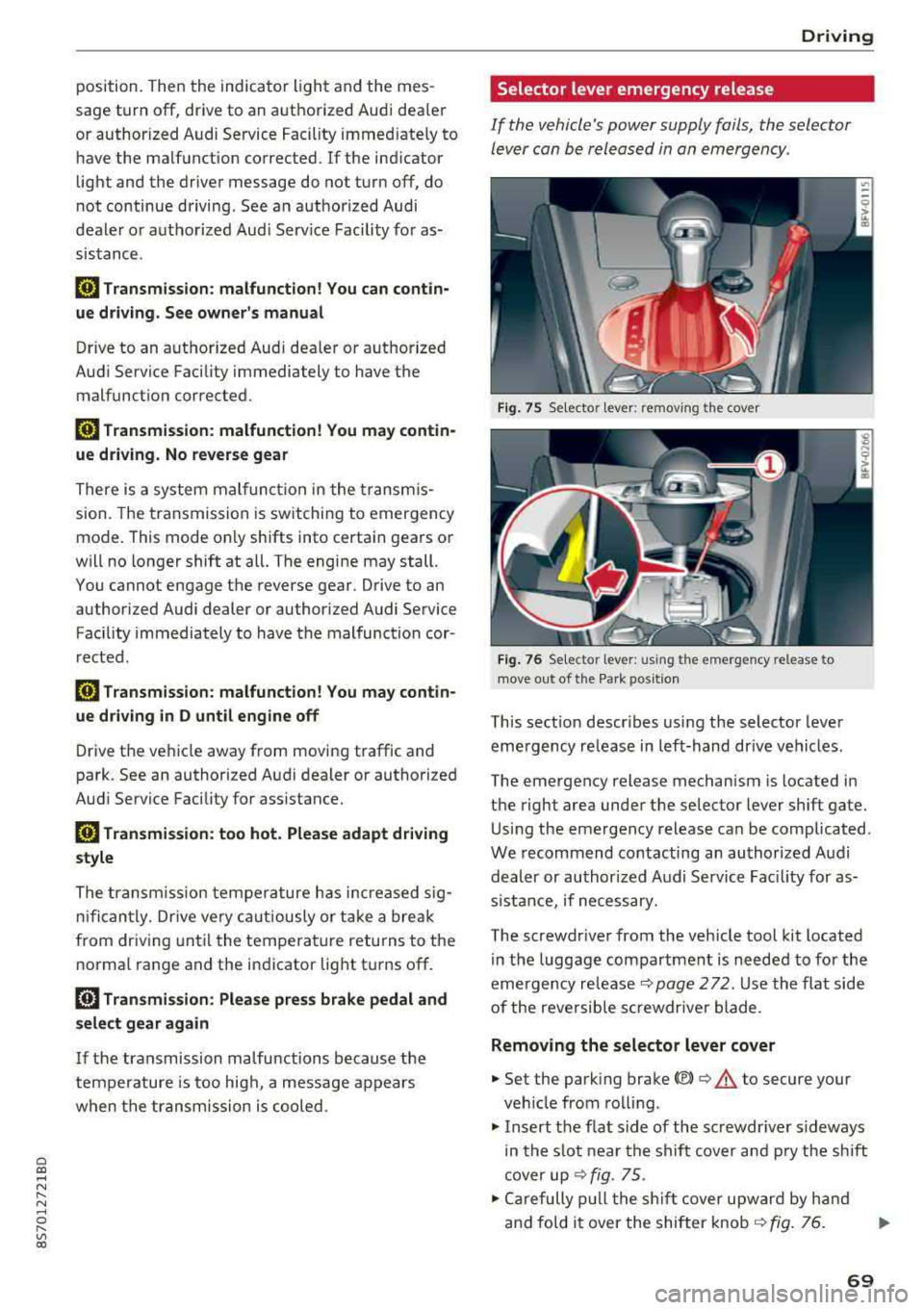
Fig. 7 S Selecto r lever : remov ing the cov er
Fig. 76 Se lecto r le ver: u sing th e em erge ncy re lease to
move out of t he Pa rk po siti on
This sect ion descr ibes using the selector lever
eme rgency release in left-hand dr ive vehicles .
The emergency release mechanism is located in
the right area under the selector lever shift gate.
Using the emergency release can be complicated .
We recommend contacting an authorized Audi
dealer or authorized A udi Service Fac ility for as
s istan ce, if necessary.
The screwdr iver from the vehicle tool kit located
in the luggage compartment is needed to for the
emergency
re lease ¢ page 2 72 . Use the flat side
of the reversible sc rewdr ive r blade .
Removing the selector lever cover
.,. Set the park ing brake<®> ¢.&. to secure your
veh icle from rolling.
.,. Insert the f lat s ide of the screwdr iver s ideways
in the slot near the shift cover and pry the shift
cover up
¢ fig . 75 .
.,. Carefully pull the shift cover upward by hand
and fold it over the shifter knob
¢ fig. 76. ..,.
69
Page 76 of 310
Ass is tance sy stem s
,.. Press the button to switch the system on and
off¢ fig. 78. The . or rl1 indicator light in
the instrument cluster turns on or off.
Ind icat or light s
• Read y: the i ndicator light t urns on when the
system is ready for use. The system can now be
operated.
rl1 Not read y: the indicator light turns on if the
system is swi tched on but is inoperab le. Th is may
be due to the following reasons:
- There is no lane marker line .
- The relevant lane marker lines are not detected (for example, mark ings in a construction zone
o r because they are obstructed by snow, dirt,
water or lighting).
- The veh icle speed is below the activation speed
of approximately 40 mph (65 km/h) (the speed
may vary depending on yo ur country).
- The lane is too narrow or too wide.
- The curve is too narrow .
- The driver's hands are not on the steering
wheel.
(D Tips
- Make sure the camera's field of view
¢
fig. 79 is not obstructed by stickers or
anything else . For informat ion on cleaning,
see¢ page 266 .
-In certain markets : if the system is switched
on, it will sw itch on automat ically each time
the ign it ion is switched on .
Indicator in Infotainment d isplay
Ap plies to: ve hicles w ith Aud i active lane assist
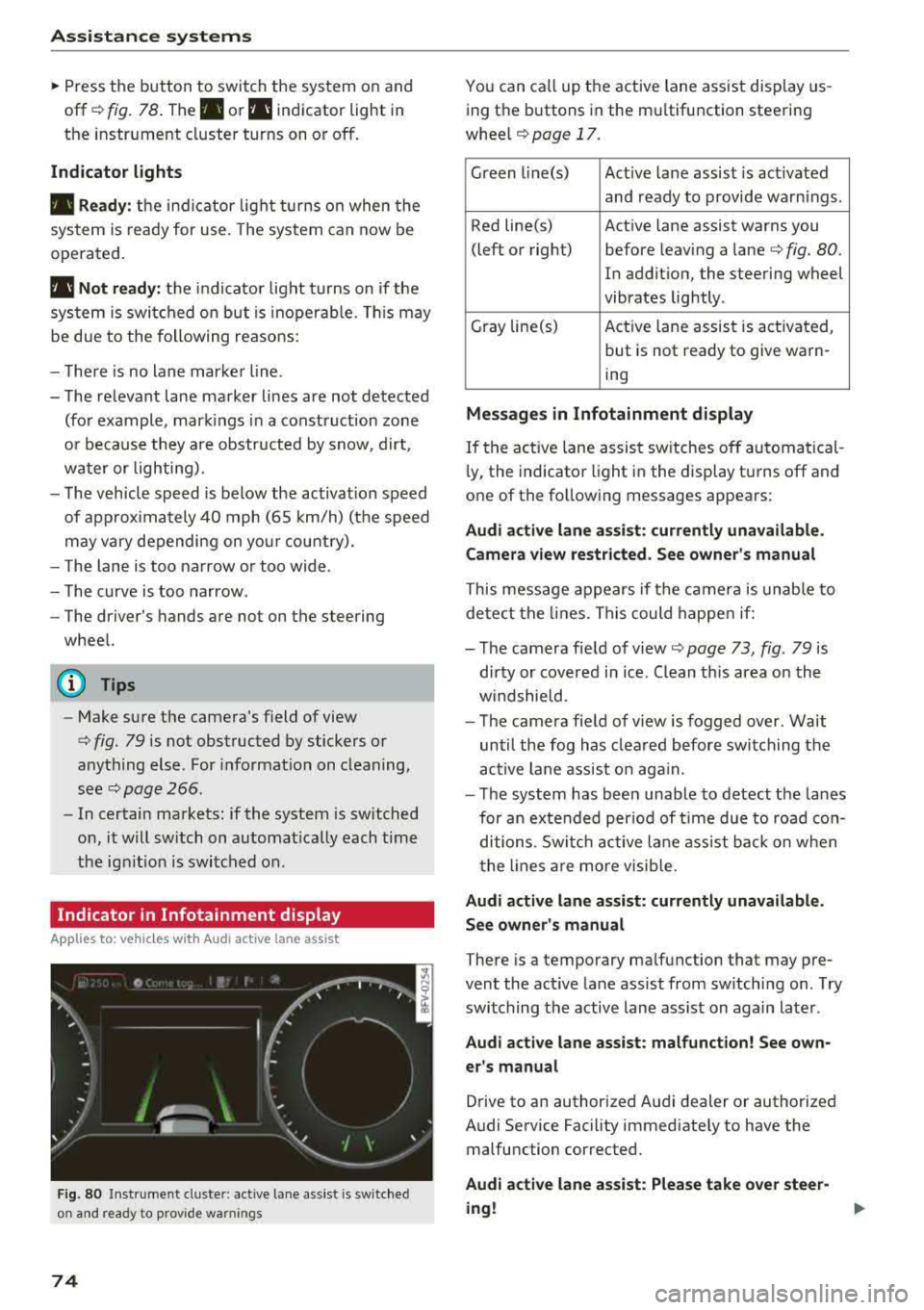
F ig. 80 Instrument cluste r: active lane ass ist is switched
on and ready to prov ide warnings
74
You can call up the active lane ass ist display us
ing the buttons in the mu ltifunction steering
wheel
¢ page 17.
Green l i ne(s) Act ive lane assist is act ivated
and ready to provide warnings .
Red line(s) Active lane assist warns you
(left or right) before leav ing a
lane¢ fig. 80.
In addition, the steering wheel
vibrates lightly .
Gray line(s) Act ive lane assist is activated,
but is not ready to give warn-
ing
M essag es in Infotainm ent disp la y
If the active lane assist sw itches off automatical
l y, the indicato r light i n the display turns off and
one of the following messages appears :
Audi a ctive l ane ass is t: currentl y unavailable.
Camera view restricted . See ow ner' s ma nual
This message appears if the camera is unable to
detect the lines. This could happe n if:
- The camera field of
view ¢ page 73, fig. 79 is
dirty or covered in ice . Clean th is area on the
w indshield.
- The camera fie ld of view is fogged over. Wait
until the fog has clea red before switching the
active lane assist on aga in.
- T he system has been unable to detect the lanes
for an extended per iod of t ime due to road con
ditions . Switch ac tive lane assist ba ck on w hen
the lines a re more visib le.
A udi acti ve l ane as sis t: cur rentl y una vailable.
Se e owner' s manual
There is a temporary malfunction that may pre
vent the act ive lane assist from sw itching on . T ry
switching the active lane assist on again later .
Audi active lane assi st: mal func tion! See own
er 's manual
Drive to an authorized Audi dealer or authorized
Audi Service Facility immediately to have the malfunction corrected.
Audi a ctive lane a ssi st: Plea se take over stee r
ing !
Page 80 of 310
Assistance systems
Messages
App lies to: ve hicles w ith Aud i side ass ist
If th e side assist sw itches off automatically, a
message appears in the Infotainment system dis
p la y.
@j Audi side assist: currently unavailable.
Sensor vision restricted due to surroundings.
See owner's manual
The radar sensor vision is impaired . Do not cover
the area in front of the sensors with bike wheels,
stickers, dirt or other objects. Clean the area in
front of the sensors, if necessary
c:> page 76,
fig . 84 .
@j Audi side assist: currently unavailable.
See owner's manual
Side assist cannot be switched on at th is time be
cause there is a malfunction (for example, the battery charge level may be too low) .
@j Audi side assist: malfunction! Please
contact Service
The system cannot guarantee that it will detect
veh icles correctly and it has switched off . The
sensors have been moved or are faulty. Have the
system checked by an author ized Audi deale r or
authorized Audi Service Facility soon.
Audi drive select (drive
settings)
Introduction
A pp lies to: ve hicles w ith Aud i d rive select
Drive select makes it possible to expe rience d if
fe rent types of vehicle settings in one vehicle.
The driver can select from three modes, Comfort,
Auto and Dynamic , using the
i:l:ta button in the
center console or by using the Infotainment sys
tem . T his allows you to switch between a sporty
and a comfortab le driving mode, for examp le. In
the Indi vidual mode, the settings can be adjust
ed to your personal preferences. This makes it
possible to combine sett ings such as a sporty en
g ine setting w ith light steering.
78
A WARNING
Using Aud i drive select incorrectly can lead to
coll is ions, other accidents and serious inju
ries.
Description
App lies to: vehicles with A udi drive se lect
The veh icle setup in each mode depends on the
vehicle's features.
Engine and automatic transmission
Depending on the mode, the engine and auto
matic transmission respond more quickly or in a
more balanced manner to accelerator pedal
movements.
Suspension control (Audi magnetic ride)*
The suspension control uses sensors to record in
format ion regarding steering movements, brak
i ng and acceleration operations by the driver, as
well as information about the road surface, driv
i ng speed, and load. W ith dr ive se lect, you can
adjust the suspension control to sporty (dynam
ic ), comfortable (comfort) or balanced (auto).
Steering
The power steering adapts . Indirect steering that
moves eas ily as in comfort mode is espec ially
su ited to long drives on a highway . The dynamic
mode provides sporty, direct steering.
Engine sound*
The engine sound adapts to the current mode
and can be subtle to sporty .
(D Tips
In some models, the maximum vehicle speed
can only be reached in the auto and dynamic
modes .
Page 85 of 310
Cl co .... N ,....
N ...... 0 ,....
Vl co
General information
Applies to: ve hicles with rearview camera
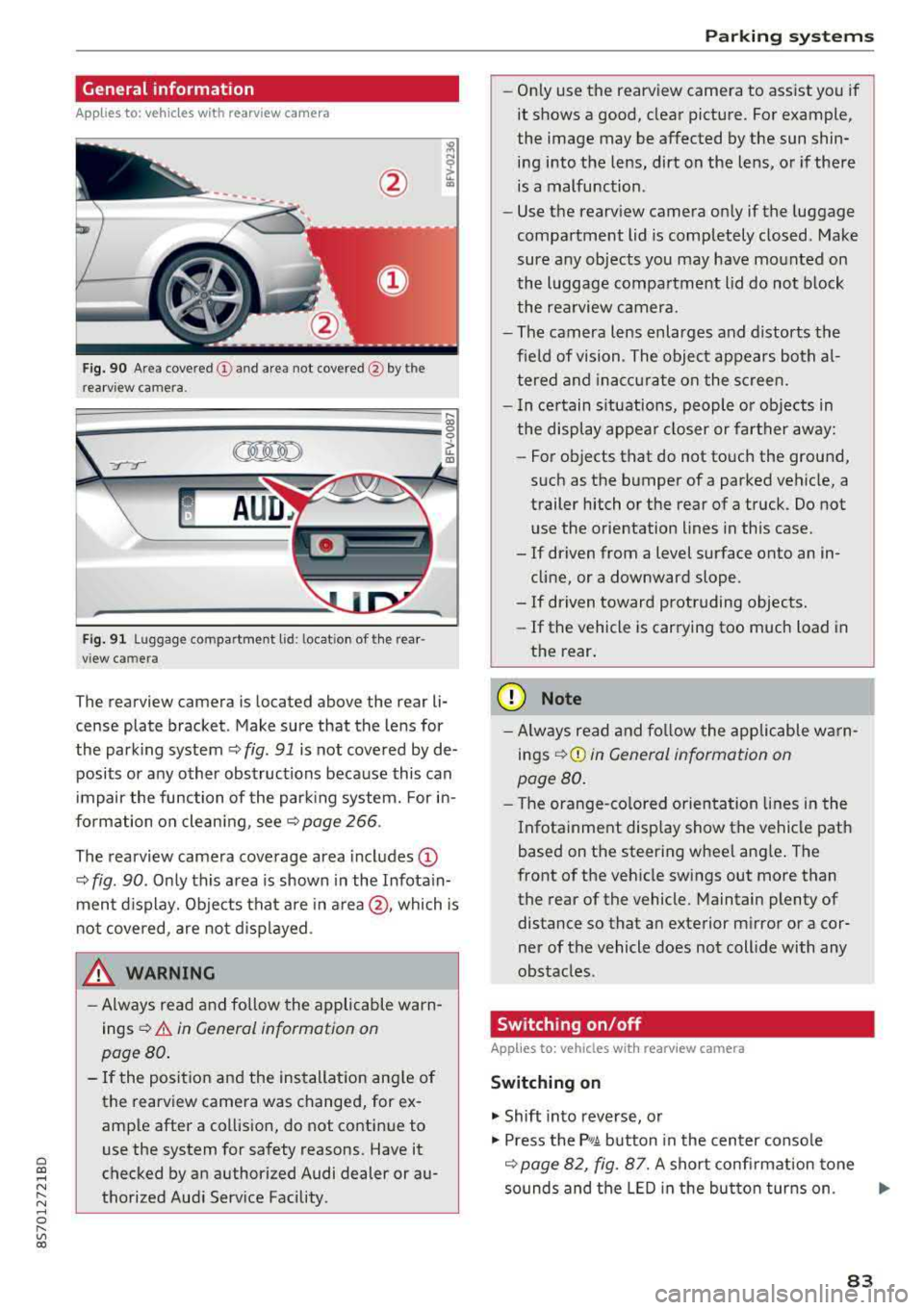
Fig . 90 Area covered (!) and area not covered @ by the
rea rview camera.
:;,
~;..------: :.·~- ---~ _.,- ,.,,.--------g
(Jo00oD ~
Fig. 91 Luggag e compartment lid: locat ion of the rear
view camera
The rearview camera is located above the rear li
cense plate bracket. Make sure that the lens for
the parking system¢
fig. 91 is not covered by de
posits or any other obstructions because this can
impair the function of the parking system. For in
formation on cleaning, see¢
page 266 .
The rearview camera coverage area includes
(D
¢ fig. 90. Only this area is shown in the Infotain
ment display. Objects that are in
area @, which is
not covered, are not displayed.
A WARNING
-Always read and follow the applicable warn
ings ¢
A in General information on
page 80.
- If the position and the installation angle of
the rearv iew camera was changed, for ex
ample after a collision, do not continue to
use the system for safety reasons. Have it
checked by an authorized Audi dealer or au
thorized Audi Service Facility .
Parking systems
-Only use the rearview camera to assist you if
it shows a good, clear picture. For example,
the image may be affected by the sun shin
ing into the lens, dirt on the lens, or if there
is a malfunction.
- Use the rearview camera only if the luggage
compartment lid is completely closed. Make
sure any objects you may have mounted on
the luggage compartment lid do not block
the rearview camera.
- The camera lens enlarges and distorts the
field of vision. The object appears both al
tered and inaccurate on the screen.
- In certain situations, people or objects in
the display appear closer or farther away:
- For objects that do not touch the ground,
such as the bumper of a parked vehicle, a
trailer hitch or the rear of a truck. Do not use the orientation lines in this case.
- If driven from a level surface onto an in cline, or a downward slope .
- If driven toward protruding objects.
- If the vehicle is carrying too much load in
the rear.
(D Note
-Always read and follow the applicable warn
ings
¢ (D in General information on
page 80.
- The orange-colored orientation lines in the
Infotainment display show the vehicle path
based on the steering wheel angle. The
front of the vehicle swings out more than
the rear of the vehicle. Maintain plenty of
distance so that an exterior mirror or a cor
ner of the vehicle does not collide with any
obstacles.
Switching on/off
App lies to : vehicles wi th rearv iew camera
Switching on
.,. Shift into reverse, or
.,. Press the P,q.A button in the center console
¢ page 82, fig. 87. A short confirmation tone
sounds and the LED in the button turns on.
..,.
83
Page 87 of 310
Cl 00 .-< N r-N .-< 0 r-Vl 00
the ignition, the LED in the P•1~ button will blink
the next time you switch on the parking system
by shifting into reverse. As long as the error is ac
tive, you can display the error messages in the
second tab of the dr iver information system.
Parking system plus*
If a sensor or speaker is fau lty, t he J;l4 symbol
will appear in front of/behind the vehicle in the Infotainment disp lay. If a rear sensor is faulty,
only obstacles that are in areas
(D and @
¢ page 81, fig. 86 are shown. If a front sensor is
faulty, only obstacles that are in areas ®
and@
are shown .
Drive to an authorized Aud i dea ler or authorized
Aud i Service Facility immediately to have the
malfunct ion corrected.
Parking systems
85
Page 91 of 310
Cl 00 .-< N r-N .-< 0 r-Vl 00
-The efficiency of the brakes can also be im
paired by driving for long stretches on roads
covered with salt without using the brakes .
You can remove salt deposits from the
brake rotors and pads by carefully applying
the brakes severa l t imes .
- If the front spoiler is damaged or you install
another spoiler, make sure the front wheel
brakes are vent ilated proper ly . Otherwise,
the b rake system could overheat, w hich re
duces the ir effectiveness.
- Failure of a brake c ircuit impa irs b raking
perfo rman ce , which increases brak ing dis
tan ce. Avoid d riving the vehicle and have it
towed it to the nearest authorized Audi
dealer or authorized Audi Service Facility .
- Never let the vehicle roll while t he engine is
stopped because this increases the risk of an
accident.
- If the brake booster is not working, you will
have to press much harder on the brake
peda l to compensate for the lack of the
booster.
@ Note
- Never let the brakes "rub" by pressing the
pedal light ly when braking is not actually
necessary. This causes the brakes to over
heat and increases braking d istance and
causes wear.
- Before driving downhi ll a long distance on a
steep h ill, decrease your speed and select a
lower gear. This makes use of the engine
braking effect and relieves the brakes . If
you need to brake additionally, brake in in
tervals and not conti nuous ly .
0) Tips
- If the brake booster is not working, you
must press the brake pedal with much more
fo rce t han normal.
- If you retrofit your vehicle with a front spoil
er, whee l covers o r similar items, make sure
t h at the a ir flow to the front whee ls is not
i nte rru pted. Ot herw ise the brake system
ca n become too ho t.
In tellig ent T echn olo gy
Electromechanical
steering
The electromechanical steering supports the
driver 's steering movements .
Power steering adap ts elec troni cally based on
the vehicle speed .
Indicator li ghts and me ssages
• Stee ring: m alfun ction! Ple ase stop vehicle
If this indica to r li ght tur ns on and stays on and
this message appears, the powe r steering may
have failed.
Stop the veh icle in a safe location as soon as pos
s ible. Do
n o t cont inue d riving. See an autho rized
Audi dealer or authorized A udi Service Facility for
assistance .
(;r,ij Ste ering : malfun cti on! You may con tinu e
dri vin g
If the indicator l ight turns on, the steering wheel
may be more d ifficult to move or more sensit ive
t h an usual. The steer ing whee l may also be at an
angle when d riving stra ight.
Drive slowly to an authorized Aud i dealer or au
thorized Aud i Serv ice Facility to have the mal
funct ion corrected.
(D Tips
If the . or (;r,ij ind icator light only stays on
fo r a short t ime, yo u may continue d riving.
All wheel drive (quattro)
In all wheel drive, all four wheels are powered.
Gener al informat ion
In all wheel dr ive, the dr iving power is divided be
tween all four wheels . This happens automatical
ly depending on your dr iv ing behavior as well as
t h e cur rent road condit ions. A lso
see ~ page 86,
Electronic stabilization control (ESC).
The all wheel dr ive concept is des igned for high
engine power . You r vehicle is except ionally pow
erfu l and has excellent driv ing cha racter istics
bot h unde r normal d riving conditions and o n
89
Page 92 of 310
Intelligent Technology
snow and ice. Always read and follow safety pre
cautions
¢ .&. .
Winter tires
By using all wheel drive, your vehicle has good
forward motion with standard tires in winter con
ditions. However, in winter we recommend using
winter or all season tires on
all four wheels, be
cause this will improve the
broking effect.
Snow chains
If there are snow chain laws, snow chains must
also be used on vehicles with all wheel drive
c::> page 259, Snow chains.
Replacing tires
For vehicles with all wheel drive, only wheels with
the same rolling circumference should be used .
Avoid using tires with different tread depths
c::> page 251, New tires or wheels.
Offroad vehicle?
Your Aud i is not an offroad vehicle - there is not
enough ground clearance. For this reason, avoid
difficult terrain.
,& WARNING
- Also, in vehicles with all wheel drive, adapt
your driv ing style to the current road and
t ra ffic conditions. Do not let the increased
safety provided tempt you into taking risks,
because this increases the r isk of an acci
dent.
- The braking ability of your vehicle is limited
to the traction of the wheels. In this way, it
is not different from a two wheel drive vehi
cle. Do not be tempted to accelerate to a
high speed when the road is slippery, be
cause this increases the risk of an accident.
- Note that on wet streets, the front wheels
can "hydroplane" if driving at speeds that
are too high. Unlike front whee l drive
vehicles, the engine does not rev higher sud
denly when the vehicle begins hydroplaning.
For this reason, adapt your speed to the
road conditions to reduce the risk of an acci
dent.
90
Rear spoiler
Applies to: vehicles with retractable rear spoile r
The extendoble rear spoiler increases driving sta
bility.
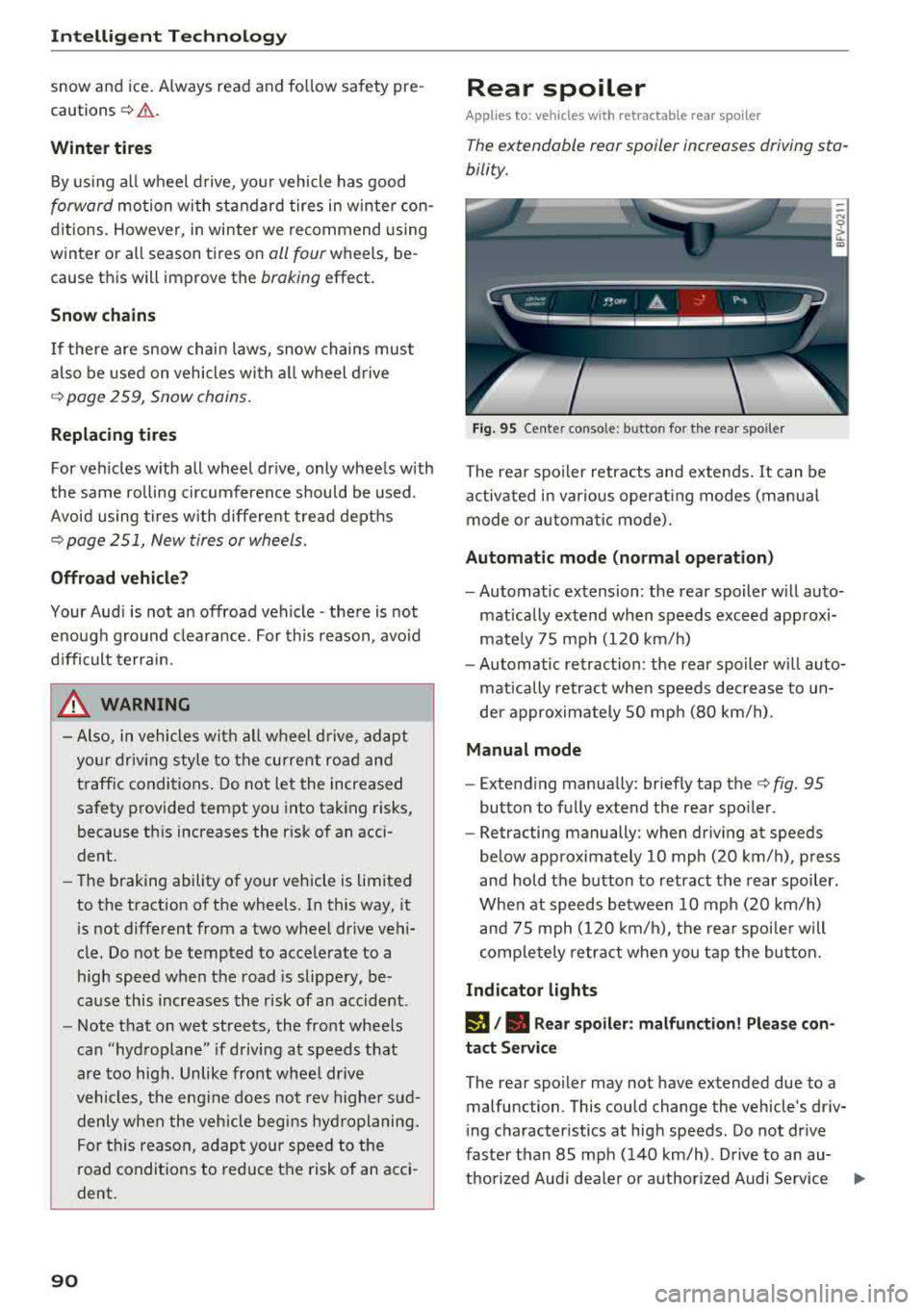
Fig. 95 Center conso le: button for the rear spoiler
The rear spoiler retracts and extends. It can be
activated in various operat ing modes (manua l
mode or automatic mode).
Automatic mode (normal operation)
- Automatic extension: the rear spoiler w ill auto
matically extend when speeds exceed approxi
mately 75 mph (120 km/h)
- Automatic retraction: the rear spoiler w ill auto
matically retract when speeds decrease to un
der approximately 50 mph (80 km/h).
Manual mode
- Extend ing manually : briefly tap the
c::> fig. 95
button to fully extend the rear spoiler .
- Retracting manually: when driving at speeds
below approximately 10 mph (20 km/h), press
and hold the b utton to retract the rear spoiler.
When at speeds between 10 mph (20 km/h)
and 75 mph (120 km/h), the rear spoiler will
completely retract when you tap the button.
Indicator lights
I), . Rear spoiler: malfunction! Please con
tact Service
The rear spoiler may not have extended due to a
malfunction . This could change the vehicle's driv
ing characteristics at high speeds . Do not drive
faster than 85 mph (140 km/h) . Drive to an au-
thorized Audi dea ler or authorized Audi Service
..,.
Page 109 of 310
Cl 00 .-< N r-N .-< 0 r-Vl 00
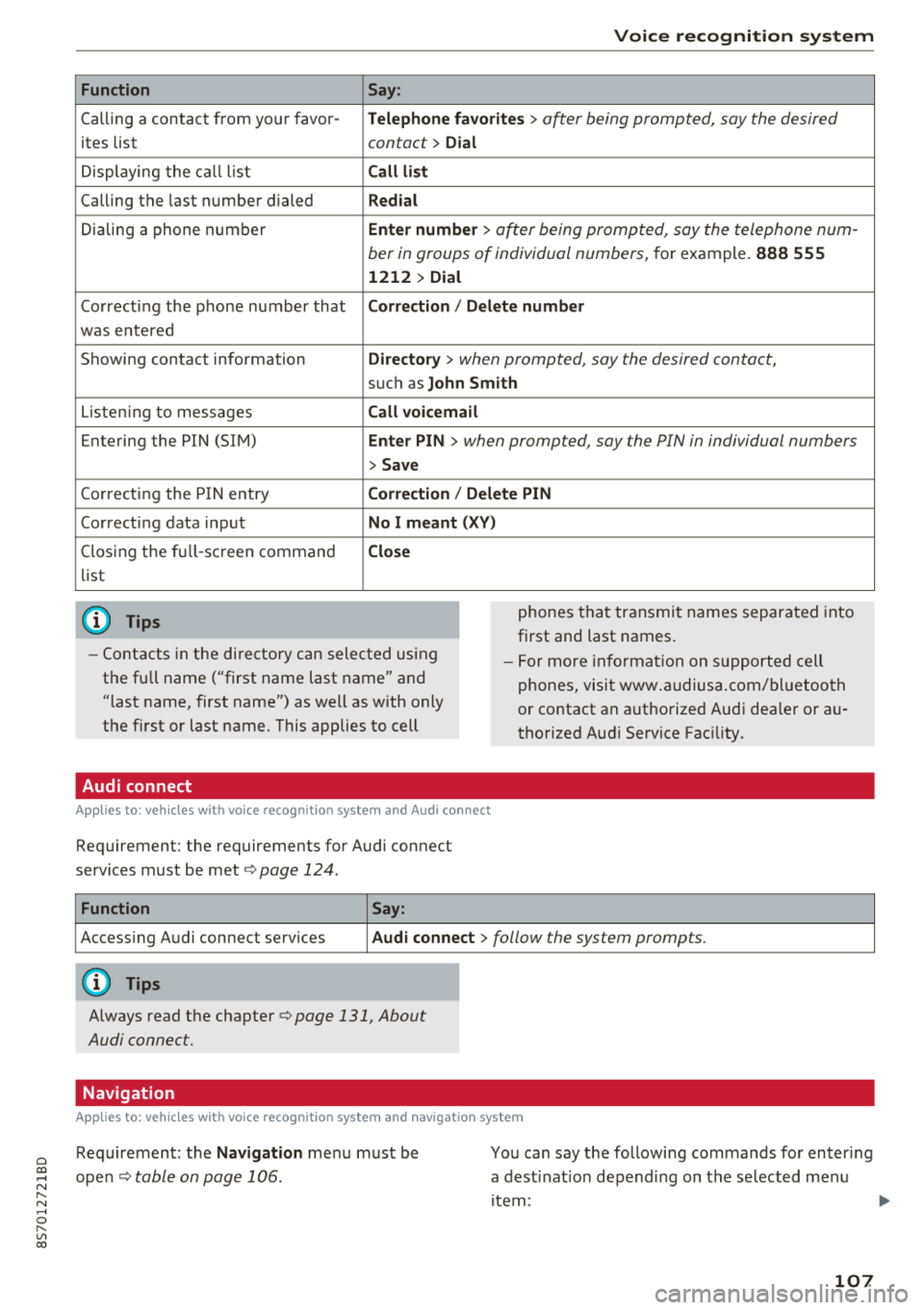
Function
Calling a contact from yo ur favor -
ites list
Displaying the ca ll list
Calling the last number dialed
Dialing a phone num ber
Correcting the p hone number that
was entered
Showing contact information
L iste ning to messages
Entering the PIN (SIM)
C orrecting the P IN entry
Correcting data inp ut
Closing the fu ll- screen command
list
(D Tips
Voice recognition system
Say :
Telephone fa vo rites
> a~er being prompted, say the desired
contact>
D ial
Call li st
Redial
En ter number
> after being prompted, say the telephone num-
ber in groups of individual numbers,
for example. 888 555
1212 > Dial
Correction / Delete number
Directory
> when prompted, say the desired contact,
suc h as John Smith
Call voi cemail
Enter PIN
> · when prompted, say the PIN in individual numbers
> Save
Correction / Delete PIN
No I meant ( XV)
Close
phones tha t transmit names separated into
first and last names.
- Contacts in the directory can selected using
the full name ("first name last name" and
"last name, first name") as well as with only
the first or last name. This applies to cell - F
or more in format ion on s uppo rted cell
phones, visi t www .audiusa.com/ bluetoo th
or contact an a uthorized Audi dea ler or au
thorized Aud i Service Fac ility.
Audi connect
A ppl ies to : ve hicl es w ith vo ice recogni tion sys te m and Audi co nn ect
Requirement: the requirements for Audi connect
services must be met ¢
page 124.
Function Say:
Accessing A udi connect services Aud i connect > follow the system prompts.
(D Tips
Always read the chapte r¢ page 131, About
Audi connect.
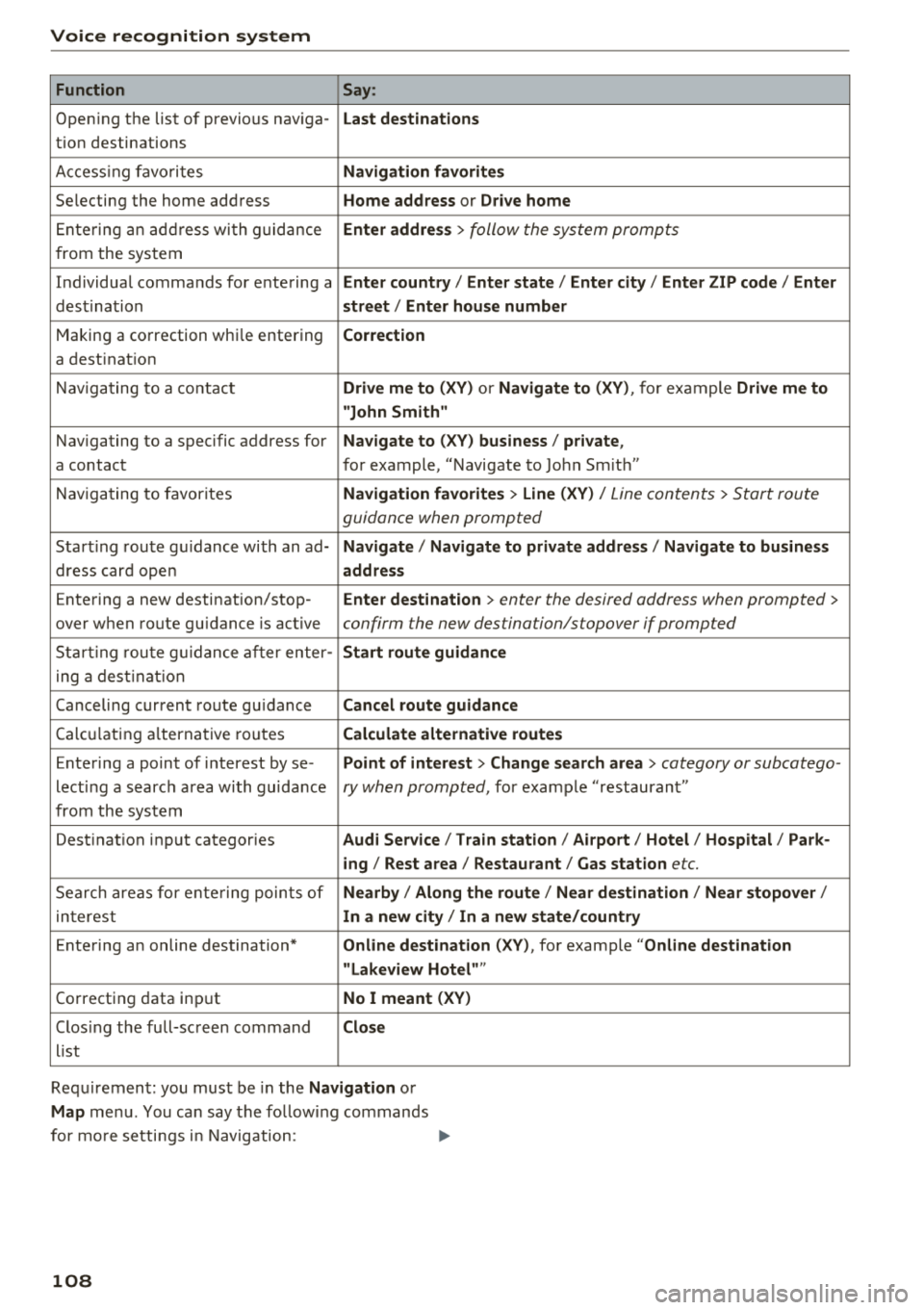
Navigation
A pp lies to: ve hicles with vo ice recognition syste m and navigation syste m
Requirement: the Navigation me nu must be
ope n¢
table on page 106 .
You can say the following commands fo r en ter ing
a dest inat ion depending on the se lected me nu
i tem :
107
Page 110 of 310
Voice recognition system
Function Say:
Opening the list of previous naviga -Last destinations
tion destinations
Accessing favorites
Navigation favorites
Selecting the home address Home address or Drive home
Entering an address with guidance Enter address > follow the system prompts
from the system
Individual commands for entering a
Enter country I Enter state I Enter city / Enter ZIP code / Enter
dest ination street/ Enter house number
Making a correction whi le entering Correction
a destination
Navigating to a contact
Drive me to (XV) or Navigate to (XV), for example Drive me to
"John Smith"
Navigating to a specific address for Navigate to (XV) business / private ,
a contact for example, "Navigate to John Sm ith"
Navigating to favorites
Navigation favorites > Line (XV) / Line contents > Start route
guidance when prompted
Start ing route gu idance with an ad-Navigate / Navigate to private address / Navigate to business
dress card open address
Entering a new destination/stop -Enter destination > enter the desired address when prompted >
over when route guidance is active confirm the new destination/stopover if prompted
Starting route guidance after enter -Start route guidance
ing a destination
Canceling current route guidance
Cancel route guidance
Calc ula ting alternative routes Calculate alternative routes
Entering a point of interest by se-Point of interest > Change search area > category or subcatego-
lecting a search area with guidance ry when prompted, for example "restaurant"
from the system
Dest inat ion input categories
Audi Service / Train station/ Airport/ Hotel / Hospital / Park-
ing / Rest area / Restaurant / Gas station
etc.
Search areas for entering points of Nearby / Along the route / Near destination / Near stopover/
interest In a new city I In a new state/country
Entering an online destination* Online destination (XV), for example "Online destination
"Lakeview Hotel" "
Correcting data input No I meant (XV)
Closing the full-screen command Close
list
Requ irement: you must be in the
Navigation or
Map menu. You can say the follow ing commands
for more settings i n Navigation:
108
Page 112 of 310
Voice recognition s ystem
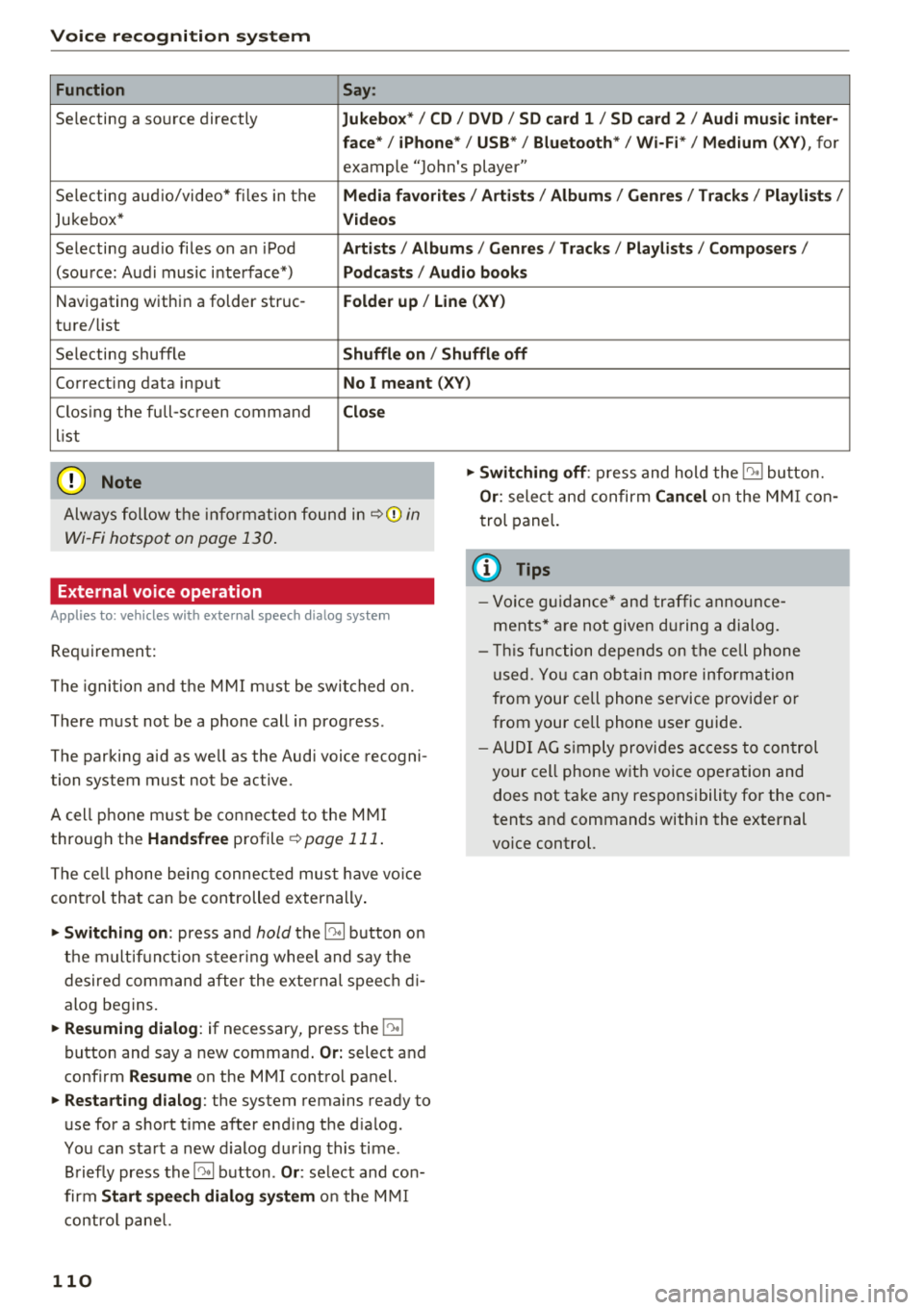
Function Say:
Selecting a so urce directly Jukebo x*/ CD/ DVD/ S D card 1 / SD card 2 / Audi mu sic inter·
face */ iPhone * / USB* / Bluetooth * / Wi -Fi * / Medium
(XV), for
example "Jo hn's player"
Selecting aud io/video* fi les in the
Media fav orites / Arti sts/ Album s/ Genr es I Track s/ Playli st s /
Jukebox* Vid eos
Selecting aud io files on an iPod Artists / Albu m is / Genre s/ Track s/ Playlists /Compo ser s/
(sou rce: Aud i music interface*) Podca sts / Aud io bo oks
Navigating within a folder struc -Folder up / Line (XV)
ture/ list
Selecting shuffle
Shuffl e on / Shuffle off
Correcting data input No I meant (XV)
Clos ing the full-sc reen command Clo se
list
(Ud) Note
Always follow t he info rmat ion found in ~ @ in
Wi -Fi hotspot on page 130 .
External voice operation
Applies to: vehicles with external speech dialog system
Requirement:
The ignition and t he M MI m ust be switched on.
There must not be a phone call in progress .
The parking aid as we ll as the Audi voice recogni
tion system must not be active.
A cell phone must be connected to the M MI
through the
Handsfree profile ~ page 111 .
The ce ll phone being connec ted must have vo ice
con trol that can be controlled externally .
"'Switching on: press and hold the 10° 1 button o n
the m ult if u nct ion steer ing whee l and say the
desired command after the external speech d i
alog begins.
"'Re suming dialog : if necessary, press the l')•I
button and say a new command . Or: select and
confirm
Re sume on the MMI contro l panel.
"'Restart ing dialog : the system remains ready to
use for a short t ime after end ing the d ialog.
You can start a new d ialog during this time.
Briefly press the
5] button . Or: select and con
firm
Start speech dialog sy stem o n the M MI
contro l pane l.
110
"'Swit ching off : press and hold the 5] button.
Or : select and confirm Can cel on the M MI co n
trol panel.
{i) Tips
- Vo ice g uidance* and tra ffic anno un ce
ments* a re not give n during a dialog.
- Thi s function depe nds on the ce ll phone
used. Yo u ca n ob ta in more info rmation
from your cell phone service provider or
from your ce ll phone use r guide .
- AUDI AG s imply provides ac cess to con trol
your cell phone w it h voice operation and
does not take any responsibility for the con
tents and commands within the external
vo ice control.