service AUDI TT ROADSTER 2018 Workshop Manual
[x] Cancel search | Manufacturer: AUDI, Model Year: 2018, Model line: TT ROADSTER, Model: AUDI TT ROADSTER 2018Pages: 310, PDF Size: 46.95 MB
Page 164 of 310
Media
-Audi recommends setting the volume of a
mobil e device connected to the AUX input to
approximately 70% of the maximum vol
ume .
- Functionality is not guaranteed for mobile
devices that do not conform to the USB 2.0
spec ification.
- USB hubs are not supported .
- Some ve rsions of the iPod such as the iPod
shuffle cannot be connected to the USB
adapter for devices w ith App le Dock connec
tor. Connect these dev ices using a AUX con
nector cable .
- Video p layback through the Audi music in
terface is only supported if the connected
device is recognized as a USB storage device
(for example a USB stick) . Apple devices and
MT P devices (such as smartphones) a re not
r ecogni zed as USB storage devices .
- i Pod/iPhone malfunct ions also affect the
operation of the MMI. Reset your iPod/
i Phone if this happens.
- For important information on operating
your iPod/iPhone, refer to the user guide for
the dev ice. Audi recomme nds updat ing the
i Pod/iPhone so ftwa re to the latest ve rsion.
- Fo r more information about the Audi music
i nte rface and supporte d devices, check the
A udi databa se fo r mobile devices at
www.audiusa.com/mp3 or contact an au
thorized Audi dealer or authorized Audi
Service Fac ility.
162
Playing media
Accessing media
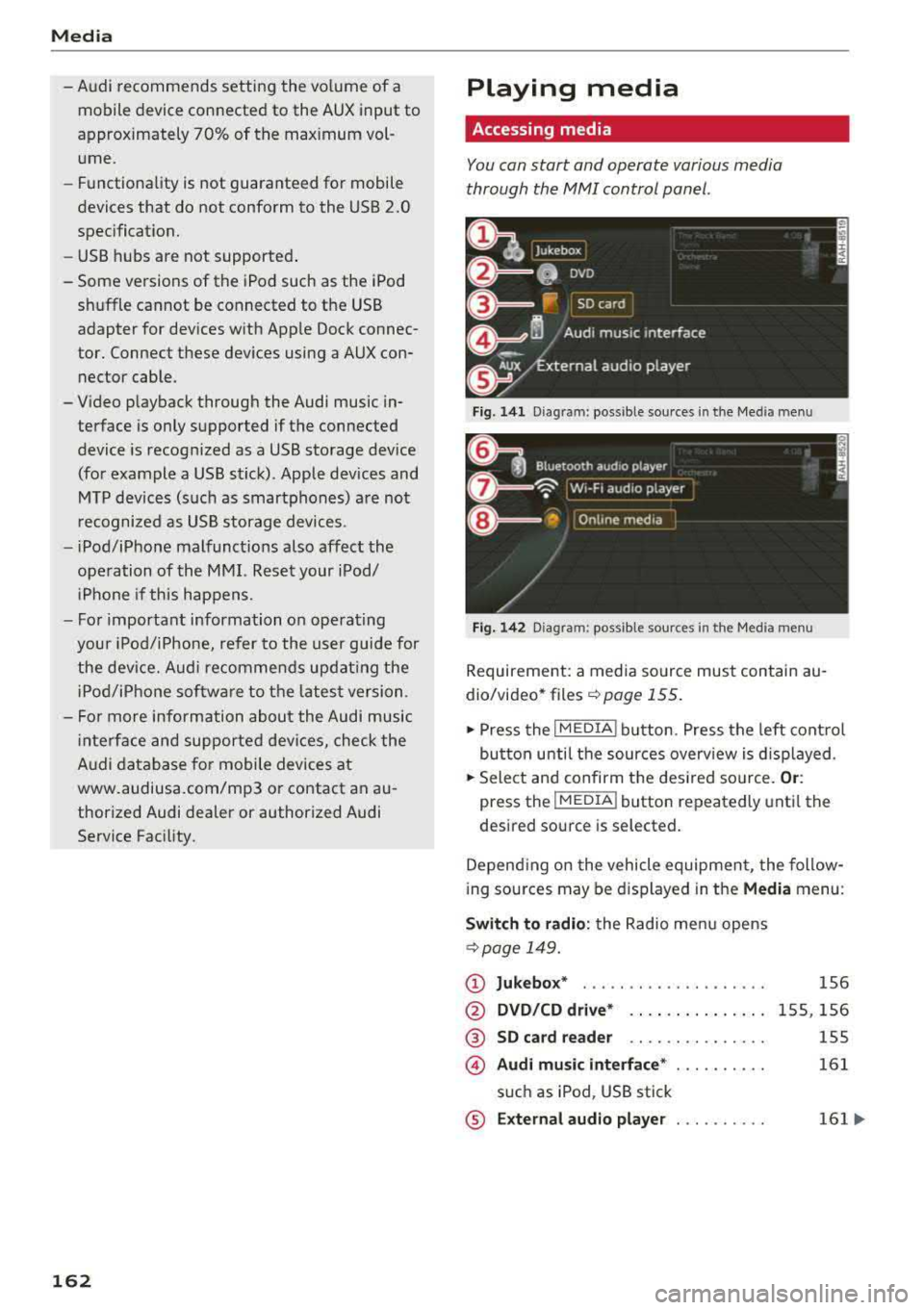
You can start and operate various media
through the
MMI control panel .
Fig. 1 41 Diagram: possible source s in t he Me dia menu
F ig . 142 Dia gr am: pos sible sour ces in the Med ia m enu
Requireme nt: a media so urce mus t contain au
dio/video* files
c:> page 155.
.,. Press the I M EDIA i button . Press the left cont rol
button unti l the sources overv iew is d isplayed .
.,. Select and confirm the des ired so urce. Or :
press the !MEDIA ! button repeatedly unti l th e
d esired sourc e is s elected.
Depend ing o n the vehicle equipmen t, the follow
i ng sou rces may be d isplayed in the
Media menu :
Switch to radio : the Radio menu opens
c:> page 149.
CD Jukebox* ....................
@ DVD /CD dri ve* .. .. .... . ..... .
® SD ca rd re ader .. .. ... ... ... ..
© Audi mu sic interface * ..........
s u ch as iPod , USB stick
® E xternal audio player . . . . . . . . . .
1S6
1 5S, 156
155
161
161 ...
Page 165 of 310
Cl co .... N ,....
N .... 0 ,....
Vl co
®
0
®
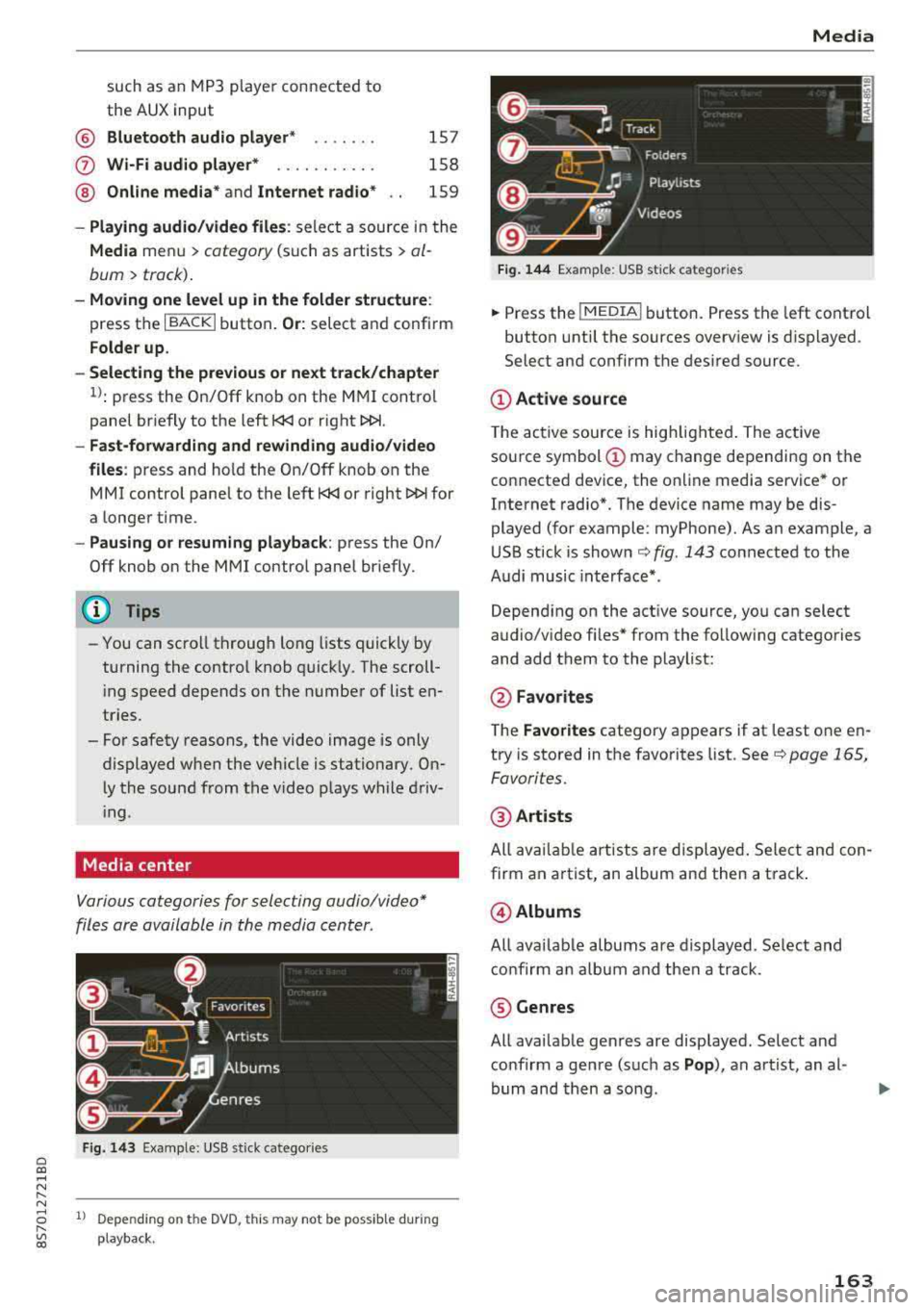
such as an MP3 player connected to
the AUX input
Bluetooth audio player*
Wi-Fi audio player* .......... .
Online media*
and Internet radio*
157
158
159
-Playing audio/video files: select a source in the
Media menu > category (such as artists > al
bum
> track) .
-Moving one level up in the folder structure:
press the I BACK I button. Or: select and confirm
Folder up.
- Selecting the previous or next track/chapter
1): press the On/Off knob on the MMI control
panel briefly to the left
l
-Fast-forwarding and rewinding audio/video
files :
press and hold the On/Off knob on the
MMI control panel to the left l
a longer time.
-Pausing or resuming playback: press the On/
Off knob on the MMI control panel briefly.
@ Tips
-You can scroll through long lists quickly by
turning the control knob quickly. The scroll
i ng speed depends on the number of list en
tries.
-For safety reasons, the video image is only
displayed when the vehicle is stationary. On ly the sound from the v ideo plays while driv
i ng .
Media center
Various categories for selecting audio/video*
files are available in the media center .
Fig. 143 Example: USB stick catego ries
1l Depe ndi ng o n th e DVD, t his may not be possible during
playba ck .
Media
Fi g. 144 Example: USB stick categories
... Press the I MEDIA! button. Press the left control
button until the sources overview is displayed.
Select and confirm the desired source.
(D Active source
The active source is highlighted . The active
source symbol
(D may change depending on the
connected device, the online media service* or
Internet radio*. The device name may be dis
played (for example: myPhone). As an example, a
USB stick is shown
c:> fig. 143 connected to the
Audi music interface* .
Depending on the active source, you can select
audio/video fi les* from the follow ing categories
and add them to the playlist:
@ Favo rites
The Favorites category appears if at least one en
try is stored in the favorites list. See
c:> page 165,
Favorites.
@ Artists
All available artists are displayed. Select and con
firm an a rtist, an album and then a track .
@Albums
All availab le albums are displayed. Select and
confirm an album and then a track .
® Genres
All available genres are displayed. Select and
confirm a genre (such as
Pop ), an artist, an al
bum and then a song .
163
Page 166 of 310
Media
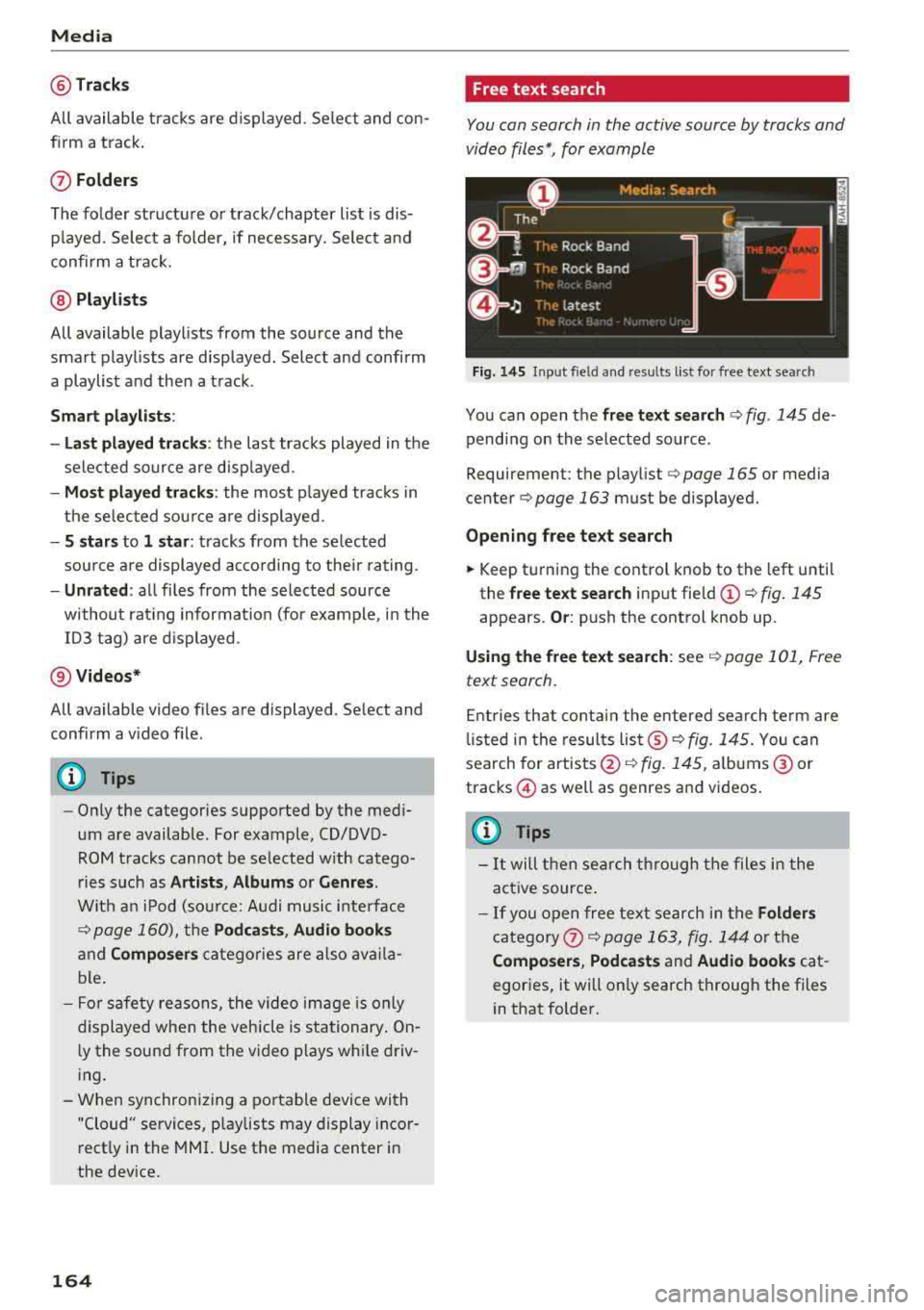
@Tracks
All available tracks are displayed. Se lect and con
f ir m a track.
(J) Folders
The fo lder structu re or track/chapter list is dis
p layed. Select a folder, if necessary. Select and
confirm a track.
@ Playlists
All available playlists from the source and the
smart playlists are displayed. Select and confirm
a playlist and then a track.
Smart playlists :
- Last played tracks :
the last tracks played in the
selected source are disp layed.
- Most played tracks : the most played tracks in
the selected sou rce a re displayed.
- S stars to 1 star : tracks from the se lected
source are displayed acco rding to their rating.
-Unrated : all files from the selected source
without rat ing information (for example, i n the
103 tag) are displayed .
@Videos*
All available video files are displayed . Select and
confirm a v ideo file .
(D Tips
-Only the categories supported by the med i
um are available. For example, CD/DVD
ROM tracks cannot be selected w ith catego
ries such as
Artists , Albums or Genres .
With an iPod (sou rce: Audi music inte rface
¢ page 160), th e Pod casts , Audio books
and Composers categories are also availa
ble.
- For safety reasons, the video image is only
displayed when the vehicle is stationary . On
l y the sound from the video p lays while driv
ing.
- When synchronizing a portable device with
"Cloud" services, p laylists may display incor
rectly in the MMI. Use the media center in
the device.
164
Free text search
You can search in the active source by tracks and
video files*, for example
Fig. 145 Input field and resu lts list for free text searc h
You can open the free text search ¢ fig. 145 de
pending on the selected source .
Requirement: the play list
¢ page 165 or media
cente r
¢page 163 must be displayed.
Opening free text search
.,. Keep turning the control knob to the left until
the
free text search input fie ld (!) ¢ fig. 145
appears. Or: push the control knob up.
Using the free text search: see¢ page 101, Free
text search.
Entries that contain the entered search term are
li sted in the results
list ®¢ fig. 145. You can
search for artists @¢
fig. 145, albums @ or
tracks @as well as genres and videos .
(D Tips
-It will then search through the files i n the
act ive source .
-If you open free text search in the Folders
category 0 ¢ page 163, fig. 144 or the
Composers , Podcasts and Audio books cat
egories, it will only search through the files
in that folder.
Page 173 of 310
Cl 00 ... N r--N ... 0 r--Vl 00
Audi smartphone interface
Setup
A ppl ies to : ve hicles w ith Audi smartpho ne inte rfa ce
You con connect your smortphone to the MMI us
ing the Audi smortphone interface . Certain con
tent on your smortphone is adopted to the Info
tainment system display while driving and con
be operated through the
MMI control panel .
Requirement:
The vehicle must be stat ionary and the ignition
must be switched on .
iPhone generation 5 or h igher w ith Lightning
connector and iOS 7 .1.2 operating system or h igher.
O r:
Smartphone with Android Auto app and Android
5 .0 Loll ipop operating system or higher.
.,. Connec t your sma rtphone to the Audi music in
terface
¢ page 161 using a USB adapte r
¢page 160, fig. 139 .
.. Select and confirm A ctivate Apple CarPlay or
Acti vate And roid Auto now .
.. Follow the system instruct ions.
.. Pay attention to any additiona l system prompts
on your smartphone if applicable .
If you chose not to use Apple CarP lay or Android
Auto when connecting your smartphone for the
first time, you can start the Audi smartphone in
terface later on using the
Connection manager.
.,. Se lect : I MENU I button > Audi smartphone in-
terfa ce
> Change to connection manager .
.. Connect your sma rtphone to the A udi music in
terface
¢ page 161 using a USB adapter
¢ page 160, fig. 139 .
.. Select and confirm Audi smartphone in t he
Connection manager ¢ page 174. You can se
l ect your smartphone in the list of devices that
are already paired
¢page 175.
.,. Follow the system instruct ions .
ll In prep arat io n at t he t im e of pr in tin g .
Aud i smartph one interfac e
@ Note
Always fo llow the information fo und in ¢ @ in
Wi-Fi hotspot on page 130.
(D Tips
-T he f unctions that can be used depend on
the fo llow ing factors, among others:
-the brand of your smartphone
-the vers io n of the ope rating system in
your smartphone
-the software ve rsion of the app used
-the USB adapter cab le an d correct connec -
tion
-your cell phone service provide r
-the customized se tt in g s on yo ur sm art-
phone
-O ne of t he factors above o r a com binat ion
o f any of them could cause you r sma rtphone
to be incompatib le wit h the Audi smart
phone interface. Compatibility cannot be
guaranteed for all types of smartphones.
For more informat ion and assistance, refe r
to the user guide and the man ufacturer of
your smartphone .
-If the connected smartphone has voice con
trol, you can operate you r smartp hon e usi ng
t he ex ter nal voice recognition system*
¢page 110.
-T he menu language show n in t he MMI is
based on t he sett ings in you r smartp ho ne.
-The time d isplayed in the MMI is based o n
t he settings in yo ur smartphone .
-Several M MI functions a re not avai lab le
w hen Apple Car Play or Andro id A uto is ac
t ive .
-You cannot co nnect any mob ile dev ices via
Bluetooth whe n an Apple CarPlay connec
tion is act ive.
-Whe n the App le CarPlay connection is ac
t ive,
Tag this song for iTunes*1
) is not ava il
able
¢page 150 .
171
Page 195 of 310
Cl 00 .-< N r-N .-< 0 r-Vl 00
-Any work on the tensioner system or remov
al and installation of system components
for other repairs must be performed by a qualified workshop.
- The pyrotechnic system can on ly prov ide
protection for one col lision. If the pyrotech
nic pretensioners deploy, the pretens ion ing
system must be replaced .
(D Tips
-A fine dust is released when the pyrotechnic
safety be lt pretens ioners deploy. This is nor
mal and is not caused by a fire in the vehi
cle.
- The re levant safety req uirements must be
observed when the veh icle or components
of the system are sc rapped. A qualified
dealersh ip is familiar w ith these regu lations
and will be p leased to pass on the informa
tion to you.
Service and disposal of safety belt preten
sioner
The safety belt pretens ioners are parts of the
safety belts on your Audi. Installing, removing,
servicing or repa iring of belt pretensioners can
damage the safety belt system and prevent it
from work ing cor rectly in a collision .
There are some important things you have to
know to make sure that the effectiveness of the
system w ill not be impaired and that discarded
components do not cause injury or pollute the
e nvir onment.
A WARNING -
Improper care, serv icing and repa ir proce
dures can increase the r is k of personal injury
and death by preventing a safety be lt preten
sioner from activating when needed or acti
vating it unexpectedly:
- The be lt pretensioner system can be activat
ed only once. If belt pretensioners have
been activated, the system must be re
placed.
- Never repair, adjust, or change any parts of the safety be lt system .
Safet y be lts
- Safety belt systems including safety belt
pretensioners cannot be repaired. Spec ial
procedures are required for removal, instal
lation and disposal of this system.
- For any work on the safety belt system, we
strong ly recommend that you see your au
thor ized Audi dealer or qualified techn ician
who has an Audi app roved repa ir manual,
tra ining and special equipment necessa ry.
@ For the sake of the environment
Undeployed airbag modules and pretension
ers might be classif ied as Perchlorate Materi
al -special handling may apply, see
www.dtsc.ca. gov/hazard ouswaste/ perch lo
r a te. When the vehicle or pa rts of the re
straint sys tem including ai rbag modu les safe
ty belts with pretensioners are scrapped, all
applicable laws and regu lations must be ob
served . Your authorized Audi dealer is familiar
with these requirements and we recommend
that you have your dealer perform this service
for you.
193
Page 211 of 310
Cl 00 .-< N r-N .-< 0 r-Vl 00
-Never install seat covers or replacement
upholstery over the front seatbacks that
have not been specifically approved by
Aud i.
- Never use add itiona l seat cushions that
cover the areas where the s ide airbags in
flate.
- Damage to the origina l seat covers or to
the seam in the area of the side airbag module must always be repaired immedi
ately by an authorized Audi dealer.
- The airbag system can deploy only once . Af
ter an airbag has been deployed, it must be
rep laced with new rep lacement parts de
signed and approved especially fo r you r
Audi mode l version. Replacement of com
plete airbag systems or airbag components
must be performed by qualified workshops
only . Make sure that any airbag service ac
tion is entered in your Audi Warranty
&
Maintenance booklet under AIRBAG RE
PLACEMENT RECORD.
- For safety reasons in severe accidents, the
alternator and starter are separated from
the vehicle battery with a pyrotechn ic circuit
interrupter.
-Work on the pyrotechnic circu it interrupt
er must only be performed by a qualified
technicians who have the experience, in
formation and special tools necessary to perform the work safely.
-If the vehicle or the circuit interrupter is
scrapped, all app licab le safety precautions
must be followed.
@ For the sake of the environment
Undep loyed airbag modu les and pretension
ers might be classified as Perch lorate Materi
al
-special handling may apply, see
www.dtsc.ca.gov/hazardouswaste/perchlo
rate . When the veh icle or parts of the re
straint system including airbag modules and
safety belts with p retensioners are scrapped,
all appli cable laws and regulations must be
observed. Your authorized Audi dealer is fa
m il iar with these requi rements and we re com
mend that you have you r dealer per form this
service for you.
Airbag syste m
Other things that can affect Advanced
Airbag performance
Changing the vehicle's suspension system can
change the way that the Advanced Airbag System
performs in a crash. For example, using tire-rim
combinations not approved by Audi, lowering the
vehicle, changing the stiffness of the suspension, including the springs, suspension struts, shock
absorbers etc . can change the forces that are
measured by the airbag sensors and sent to the
electronic cont rol u nit. Some suspension c hanges
can, for example, increase the fo rce leve ls meas
u red by the sensors and make t he a irbag system
deploy in crashes in which it wou ld not deploy if
the changes had not been made. Other kinds of
changes may reduce the force levels measured by
the sensors and prevent the a irbag from deploy
ing when it should.
A WARNING
-
Changing the vehicle's suspension including use of unapproved tire-rim combinations can
change Advanced Airbag perfo rmance and in
crease the risk of serious personal injury in a
crash.
- Never install suspension components that
do not have the same performance charac
ter istics as the components o riginally instal
led on your vehicle .
-Never use tire-rim combin ations that have
not been approved by Audi .
209
Page 219 of 310
Cl 00 .-< N r-N .-< 0 r-Vl 00
-Never install a rearward facing child safety
seat on the front passenger seat if the
PA S·
SEN GER AIR B AG
OFF,;; light does not
turn on and stay on. Have the system in
spected immediately by an authorized Audi
dealer or author ized Audi Service Facility .
A WARNING
-Forward-fac ing ch ild seats insta lled on the
front passenge r seat may inte rfere with the
deployment of the a irbag and cause serious
persona l inju ry to the child .
- If except ional circumstances require the use
of a forward-facing child res traint on the
front passenger's seat, the child's safety
and well-being require the following special
precautions to be taken:
- Always make sure that the forward-facing seat has been designed and cert ified by its
manufacture r fo r u se on a front passenger
seat with a front and s ide a irb ag.
- Always carefully follow the manufacturer's
instr uctions provided with the child seat
or i nfan t ca rrier.
- Never p ut the fo rward-facing child re
s tra int up against o r very near the instru
men t panel.
- Always move the front passenger seat to
the highest posit ion in the up and down
ad justment range and move it back to the
rearmost position in the seat's fore and
aft adjustment range, as far away from
the airbag as possible, before installing
the forward-fac ing ch ild restraint.
- Always make sure that the safety be lt up
pe r anchorage is behind the child restra int
and not next to o r in front of the child re
stra int so that the safety belt will be prop
erly positioned.
- Always make sure that nothing prevents
the front passenger's seat from be ing
moved to the rearmost posit ion in its fore
and aft adjustment range .
- Never place objects on the seat (such as a
laptop, CD p laye r, electronic games de
vice, powe r inverter or seat heater for
child se ats). These m ay influence the ele c-
Ch ild saf ety
trical capacitance measu red by the capac i
tive passenger detection system and can also fly around in an acc ident and cause
serious personal injury .
- Never place or use any electrical device
(such as a laptop, CD player, electronic
games device, powe r inverter or seat heat
er for child seats) on the front passenger
seat if the device is connected to the 12-
vo lt socke t or the cigarette lighter so cket.
- If a seat heate r has been retrofitted or
othe rw ise added to t he front passenger
seat, neve r insta ll any child res traint sys
tem on this seat.
- Make su re that there a re no wet objects
(s uch as a we t towe l) and no w ater or oth
er liquids on the front passenger seat
cushion .
- Always make sure tha t the
PASSENGER
AIR BAG
OFF ,;; light comes on and stays
on all the time whenever the ignition is
switched on .
- Never install a forward -facing chi ld safety
seat on the front passenger seat if the
PASSENGER AIR BAG OFF ~; light does
not turn on and stay on. Have the system
inspected immediately by an author ized
Audi dealer or authorized Audi Service Fa
c ility .
- Always buck le the child seat firmly in
place even if a child is not s itting in it . A
loose child seat can fly aro und during a
sudden stop or in a collision.
- Always read and heed all WARNINGS
whenever using a child rest raint in a vehi
cl e
~page 187, Safety bel ts, ~page 194,
Airbag sy stem
and ~ page 216, Impor
tant information.
(D Tips
A lways replace child restraints that were in
stalled in a vehicle du ring a c rash . Damage to
a child restrain t that is not v is ible could cause
i t to fai l in another co llision sit uat ion .
217
Page 232 of 310

Checking and Filling
-If you a re unable to determine whether or
not a particular fuel blend meets the speci
fications, ask your service station or its fuel
supplier.
- Do not use fuel for which the contents can
not be identified.
- Fuel system damage and performance prob
lems resulting from the use of fuels differ
ent from those specified a re not the respon
sibility of Audi and are not covered under
the New Vehicle or the Emission Control System Warranties.
- If you experience a loss of fuel economy or
driveability and performance problems due
to the use of one of these fuel blends , we
recommend that you switch to unblended
fuel.
Gasoline additives
A major concern among many auto manufactur
ers is carbon deposit build-up caused by the type
of gasoline you use.
Although gasoline grades differ from one manu
facturer to another, they have certain things in
common. All gasoline grades contain substances
that can cause deposits to collect on vital engin e
parts, such as fuel injectors and intake valves. Al
though most gasoline brands include additives to keep engine and fuel systems clean, they are not
equally effective .
Audi recommends using TOP TI ER Dete rgent Gas
oline. For more information on TOP TIER Deter
gent Gasoline , please go to the official website
(www .toptiergas .com) .
After an extended per iod of us ing inadequate
fuels, carbon deposit build-ups can rob your
en
gine of peak performance.
(D Note
Damage or malfunction due to poor fuel qual
ity is not covered by the Audi New Vehicle Limited Warranty.
230
Refueling
Fueling procedure
Your vehicle is equipped with a capless fuel filler
system .
Fig. 172 R ight rea r sid e of the vehicle : ope ning the fuel
fil ler door
Fig. 173 R ig ht rea r sid e of t he ve hicle: fuel pum p nozz le
in ser ted
The fuel filler door is unlocked or locked by the
central locking system.
.. Press on the left side of the fuel filler door to
open
r:::;, fig . 172.
.. Insert the fuel pump nozzle all the way into the
fuel tank filler neck
r:::;, fig. 173. Make sure it is
seated correctly.
.. Begin fueling. Once the fuel pump no zzle turns
off the first time, the fuel tank is full. Do not
continue fueling, or else the expansion space in
the tank will be filled with fuel.
.. After the fuel pump has switched off, wait five
seconds before removing it to allow the rest of
the fuel to finish dripping into the fuel tank.
.. Close the fuel filler door and then press on the
left side until it latches.
The correct fuel type for your vehicle can be
found on a label located on the inside of the f uel
ll>
Page 235 of 310
Cl co .... N ,....
N .... 0 ,....
Vl co
Emissions control
systems
Catal ytic conve rt er
The vehicle may on ly be driven with unleaded
gasoline, otherwise the catalyt ic converter will be
destroyed.
Never drive until the tank is completely empty.
The irregular supply of f uel that results from that
can cause engine m isfires. Uncombusted fuel will
enter the exhaust system, wh ich can cause over
heat ing and damage to the catalyt ic converter .
A WARNING
The temperature of the exhaust system is
high, both when d riving and after stopping
the engine.
-
- Never touch the exhaust tail pipes once they
have become ho t. This could result in bu rns.
- Do not park your vehicle ove r flammable
materials such as g rass or leaves because
the high temperat ure of the em iss ions con
trol system co uld s tart a fire.
- Do not apply underbody p rotectant in the
exha ust system area, because this inc reases
the risk of fi re.
On Board Diagnostic
System (OBD)
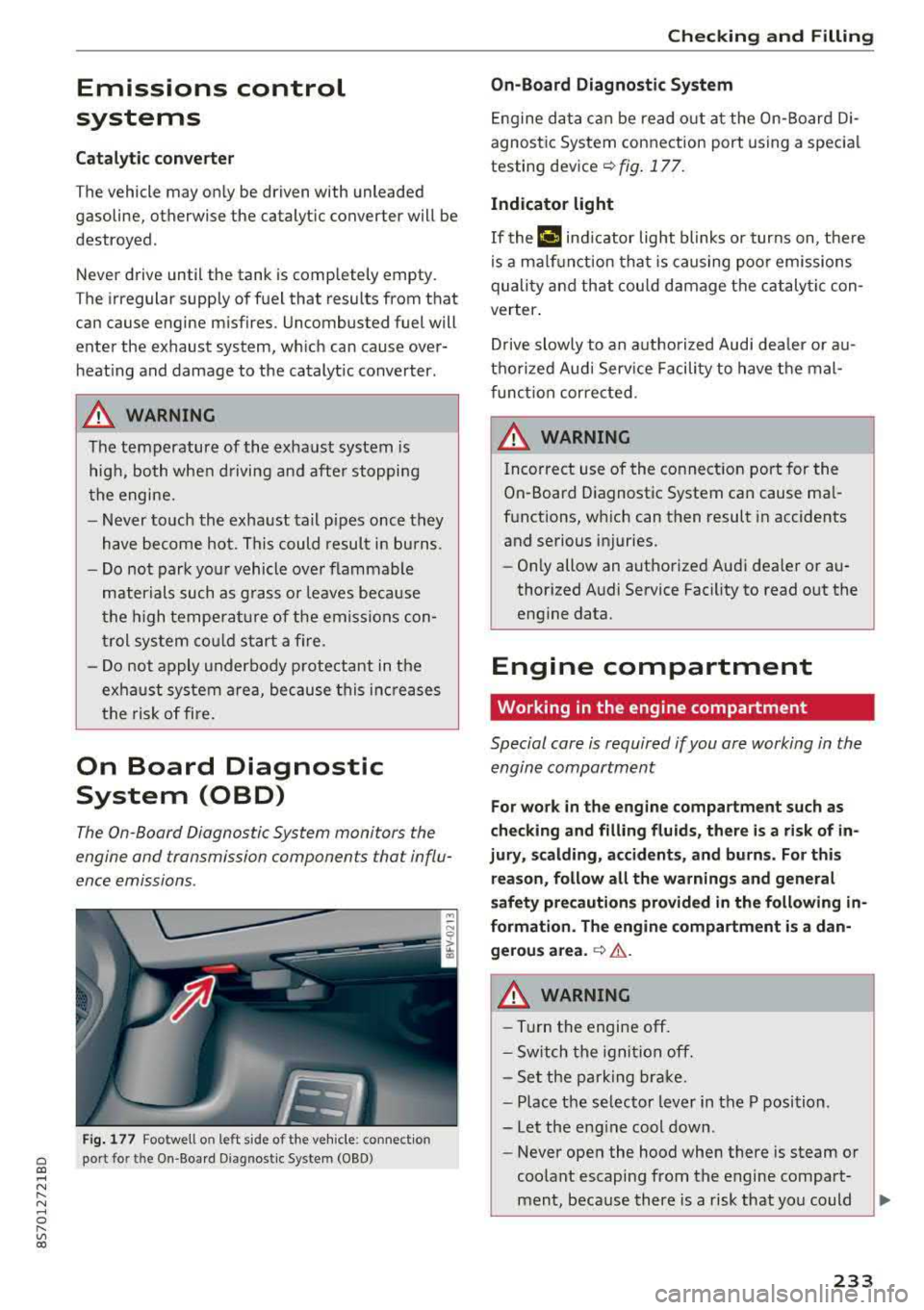
The On -Board Diagnostic System monitors the
engine and transmission components that influ
ence emissions.
F ig . 177 Footwell on left side of the vehicle : connect ion
port for the On-Board Diagnostic System (OBD)
Chec king and Filling
On -Board Diagnostic System
Engine da ta can be read out at the On-Board Di
agnost ic System connection port using a spec ia l
testing
dev ice~ fig. 177 .
Indicator light
If thP ¢'4 ind icator light blinks or turns on, there
is a ma lf u nction that is caus ing poo r emissions
quality and that cou ld damage the catalytic con
verter .
Drive slowly to an a uthorized Aud i dea ler or au
t h orized Audi Serv ice Facili ty to have t he mal
f unct ion corrected.
A WARNING ..
Incorrect use of the connection port for the
On-Board D iagnostic System can cause ma l
f u nctions, which can then result in accidents
and serious injuries.
- Only allow an authorized Audi dea ler or au
thor ized Audi Service Fac ility to read out the
engine data.
Engine compartment
Working in the engine compartment
Special care is required if you are working in the
engine compartment
-
F o r work in the engine compa rtment such as
checking and fill ing fl uids , there i s a risk of in
jury , scalding, accident s, and b urn s. For thi s
re ason , follow all the warnings and general
safety pre cautions prov ided in the following
in
formati on. The engine compartm ent i s a dan
gerou s area .
~ .&..
A WARNING
-----Turn the engine off.
- Sw itch the igni tio n off.
- Set the parking brake.
- P lace the se lector lever in the P position.
-Let the eng ine cool down.
-Never open the hood when there is steam or
coolant escaping from the engine compart
ment, because there is a risk that you could
233
Page 236 of 310
Check ing and F illing
be burned. Wait until no steam or coolant is
escaping.
- Keep children away from the engine com
partment.
- Never spill fluids on a hot engine . These flu
ids (such as the freeze protection contained
in the coolant) can catch fire.
- Avoid short circuits in the e lectrica l system,
especially to the battery.
- When working in the engine compartment,
remember that the radiator fan can switch
on even if the ign ition is switched off, which
increases the risk of personal in jury.
- Never open the cap on the coolant expan
sion tank when the eng ine is warm. The
cooling system is under pressure.
- To protect your face, hands, and arms from hot steam or coolant, cover the cap with a
large cloth when opening.
- Do not remove the engine cover under any circumstances. This increases the risk of
burns .
- If tests need to be performed w ith the en
gine ru nning, there is additional danger due
to moving components (such as the ribbed
belt, a lter nator and radiator fa n) and from
the high-voltage ign it io n system.
- Do not press the accelerator pedal inadver
tent ly if a gear is selected when the veh icle
is sta tionary and the eng ine is ru nning. Oth
erwise, the veh icle w ill start to move imme
diately and t his co uld r esult in an a ccid en t.
- Pay attention to the fo llow ing warnings list
ed whe n wo rk on the fuel system or on the
electri cal eq uipment is requ ired.
- Do not smoke.
- Never work near open flames.
- Always have a working fire extinguisher
nearby.
- All work on the battery or e lectrica l system
in yo ur vehicle can res ult in injuries, chemi
ca l burns, accidents or burns. Because of
t h is, all wor k must be performed
only by an
autho rized Aud i dealer or authorized Aud i
Service Facility .
- To reduce the risk of electric shock and in
jury , never touch the following components
234
when t he engine is runni ng or is being start
ed:
- Ig nition cable
- Other compone nts in the electron ic high-
vo ltage ig nition system
- If you must check or perform work on the
eng ine wh ile it is ru nning:
- Set the pa rking brake and p lace the selec
tor lever in the P (par k) position fi rst .
- Alw ays proceed w ith ext reme cau tion so
t h at clothing, jewelry or long hair do not
become ca ught in the radiator fan, fan
belt or other moving components or do
not come into contact with hot compo
nents. Tie back long hair before begin ning
work and do not wear clothing that can
hang dow n into the eng ine .
- Lim it your exposure to exhaust and chemi
cals to as short a time as possible
<=> &. .
A WARNING
Ca lifo rnia Proposition 65 Warning:
- Engine exhaust, some of its const ituents,
a nd certa in veh icle components conta in or
em it chem icals know n to the State of Cal i
fornia to ca use cancer and b irth defects and
reproductive harm. In add ition, certain flu
ids cont ained in vehicles a nd certai n prod
uc ts of component we ar con tain or em it
chemica ls known to the State o f Califo rnia
to cause cancer and birth defects or othe r
reproductive harm.
- Battery posts, terminals and related acces
sories contain lead and lead compounds,
chemicals known to the State of California
to cause cancer and reproductive harms.
Was h ha nds after handling.
@ Note
When filling fluids, be sure not to mix the flu
i ds up. Otherwise severe mal functions and en
g ine damage will occu r.
@ For the sake of the environment
You sho uld regularly check the gro und under
your vehicle in order to detect leaks quick ly. If
there are visible spots from oi l or othe r fluids,
ll-